Tiger EA 5
- 专家
- 版本: 1.0
- 激活: 5

Tiger EA for MetaTrader 5
Tiger EA is an automated trading system designed for gold (XAUUSD). It includes 15 strategies, each of which can trade buy signals, sell signals, or both. The EA detects the broker’s server time automatically and displays its trading status on the chart.
Tiger EA manages trades in baskets. When a strategy adds a position, it uses the same lot size as the first entry in that basket. Each strategy sets a maximum number of entries, and the EA manages a shared Stop Loss and Take Profit on the broker’s server. Each additional entry increases the basket’s total exposure.
Recommended setup
| Setting | Recommendation |
|---|---|
| Symbol | XAUUSD (Gold). Select your broker’s gold symbol, including any suffix. |
| Chart timeframe | M1. Attach Tiger EA to one gold chart. The strategies use their own timeframes internally. |
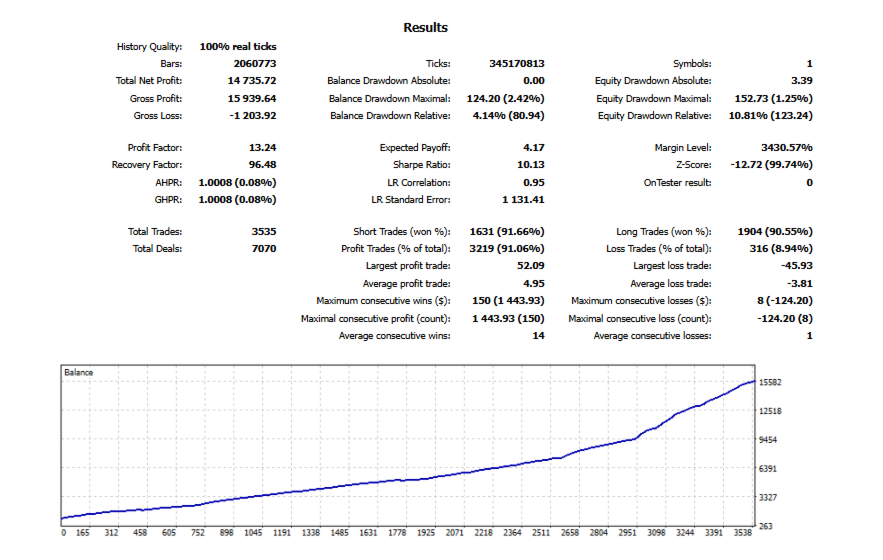
| Starting balance | USD 1,000 |
| Leverage | 1:100 |
| Lot size | 0.01 fixed lot with dynamic lot sizing disabled |
| Account type | Hedging is recommended for running multiple baskets at the same time. On a Netting account, Tiger EA manages one basket at a time on the symbol. |
Enable Algo Trading in MT5. On first use, allow the terminal to download your broker’s M1 price history. The dashboard shows when the EA is waiting for price data or checking server time before it can open a basket.
Backtest settings
| Strategy Tester setting | Recommended value |
|---|---|
| Expert, symbol and timeframe | Tiger EA · your broker’s XAUUSD · M1 |
| Modelling | Every tick based on real ticks |
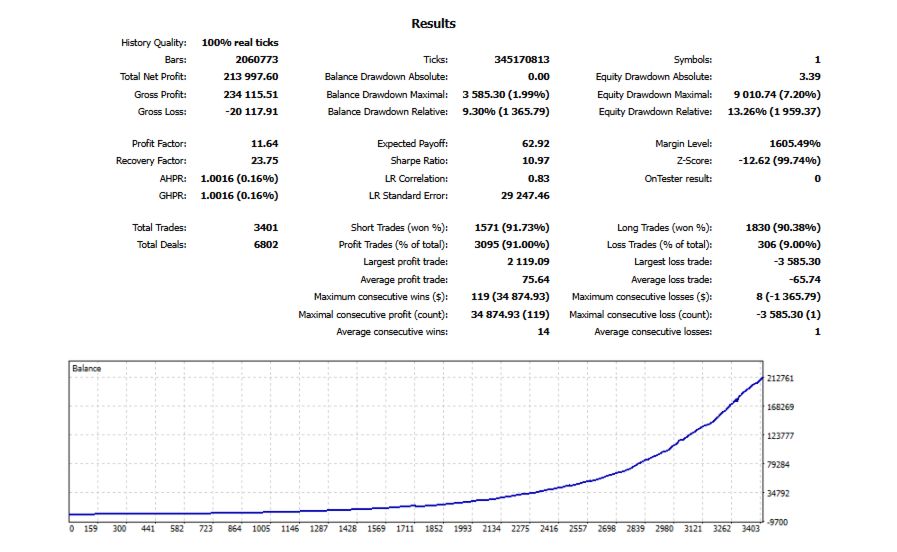
| Test period | January 2021 through the latest date with reliable real-tick history from your broker |
| Deposit and leverage | USD 1,000 · 1:100 |
| Inputs | Default settings, fixed lot 0.01, all 15 strategies enabled |
| Optimization | Off |
| Trading costs | Use your broker’s historical spreads, commission and swap settings. |
EA settings
| Input | What it does |
|---|---|
| Magic Number | Identifies this instance’s trades. Default 20. |
| Show Dashboard | Displays trading status, open baskets and performance on the chart. |
| Allow Parallel Strategies | Allows multiple strategies to manage baskets at the same time on a hedging account. Enabled by default. |
| Max Spread Points | Blocks new entries and additions when the spread exceeds the limit. The default of 100 corresponds to 1.00 in the XAUUSD price. |
| Max Slippage Points | Sets the price deviation requested for execution. The default of 50 corresponds to 0.50 in the XAUUSD price. |
| Account Drawdown Percent | Stops new entries and starts closing Tiger EA’s baskets on the symbol when its tracked equity falls 20% from its peak by default. |
| Resume After Drawdown | Allows trading to resume after the affected baskets have closed and the EA has reset its drawdown reference. Enabled by default. |
| Fixed Lot Size | Sets the entry size when dynamic lot sizing is off. Default 0.01 for a standard 100 oz gold contract. |
| Enable Dynamic Lot | Calculates the lot size at the start of each basket and uses that size for all its entries. Disabled by default. |
| Basket Risk [%] | Sets the percentage of account equity used to size a full basket when dynamic lot sizing is on. Default 5%. |
| Overflow Action | Applies when the broker’s minimum lot would exceed the basket risk budget. Skip Signal skips the entry. Force Close allows entry and requests closure if the basket loss reaches the budget. Ignore Risk, the default, allows entry without enforcing that basket budget. |
| Strategy [01]–[15] Mode | Choose Buy & Sell, Buy Only, Sell Only, or Disabled for each strategy. All 15 default to Buy & Sell. |
| Chart Theme Inputs | Set the colours of the chart background, foreground, bullish and bearish candles, and bid line. |