SignalGrid Pro
- 专家
- 版本: 1.0
- 激活: 5

SignalGrid_Pro — Signal-Based Grid DCA Expert Advisor for MT5
Overview
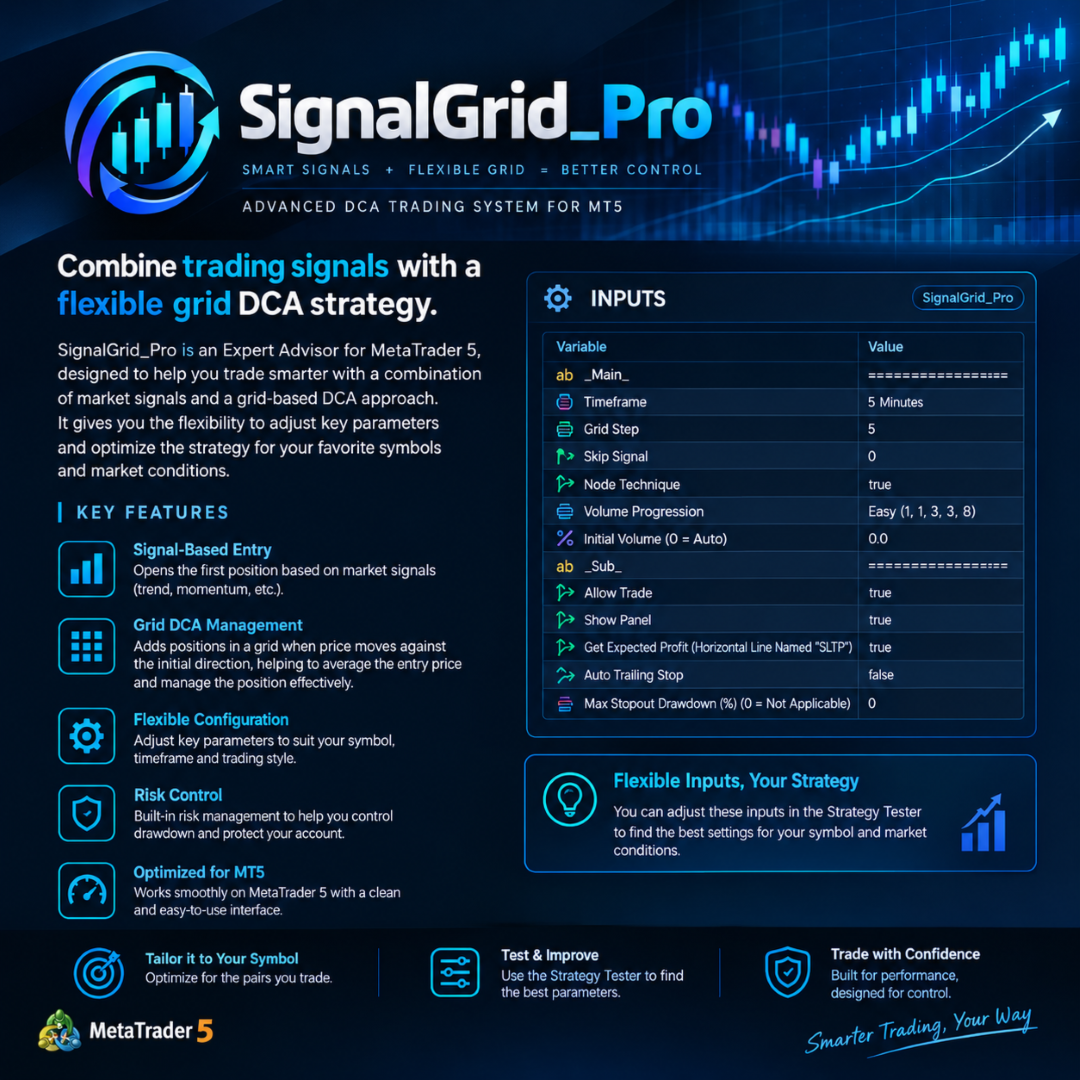
SignalGrid_Pro is an Expert Advisor for MetaTrader 5 that combines signal-based trade entries with grid-based Dollar-Cost Averaging (DCA) position management.
The EA is designed to open initial positions based on trading signals and manage subsequent positions using a configurable grid approach. Users can adjust key parameters to suit their preferred symbols, timeframes, and trading conditions.
With flexible grid settings, configurable volume progression, optional trailing stop functionality, and a built-in information panel, SignalGrid_Pro provides users with greater control over their trading configuration.
Key Features
-
Signal-Based Entry: Uses the EA's trading logic to determine initial trade entries.
-
Grid-Based DCA: Manages additional positions according to the configured grid settings.
-
Flexible Timeframe: Select the timeframe used by the EA's strategy.
-
Configurable Grid Step: Adjust grid spacing to suit different symbols and market conditions.
-
Volume Progression: Choose a predefined volume progression mode.
-
Automatic Initial Volume: Allow the EA to calculate the initial volume automatically, or specify it manually.
-
Optional Auto Trailing Stop: Enable or disable the EA's trailing stop functionality.
-
Expected Profit Calculation: Optionally display the estimated profit or loss at a user-defined horizontal price level named SLTP.
-
Trading Control: Enable or disable trading and display the information panel through the input settings.
-
Maximum Stopout Drawdown Setting: Configure the drawdown threshold if supported by the EA's stopout-control logic.
Flexible Configuration
SignalGrid_Pro allows users to customize key parameters and test different configurations using the MetaTrader 5 Strategy Tester.
Users can compare settings for individual symbols and evaluate performance using factors such as net profit, equity drawdown, recovery factor, and trade duration.
A configuration that performs well on historical data may not perform equally well in future market conditions. Forward testing and appropriate risk management are recommended before live trading.
Risk Disclaimer
SignalGrid_Pro uses a grid-based DCA approach, which can accumulate multiple positions and expose an account to significant floating losses during prolonged directional market movements.
Backtest results do not guarantee future performance. Users should understand the strategy's behavior, monitor margin usage, and select settings appropriate to their risk tolerance and account size.
Input Parameters Guide
Main Settings
1. Timeframe
Select the timeframe used by the EA's trading strategy. Different timeframes may produce different trading frequencies and results. Test the available options to determine which settings are appropriate for your chosen symbol.
2. Grid Step
Sets the grid spacing parameter used by the EA to manage additional positions. Its exact effect depends on the EA's grid calculation logic.
Different values can affect the frequency of additional entries, the number of open positions, and the strategy's exposure during adverse price movements.
3. Skip Signal
Controls the EA's signal-skipping behavior according to the implemented strategy logic. Adjust this parameter only after reviewing how it affects initial entries and subsequent trading decisions.
4. Node Technique
Enables or disables the technique controlled by this setting. Refer to the EA's specific implementation to understand its effect on grid or position management.
5. Volume Progression
Selects the volume progression mode used for successive positions.
Available example shown in the settings:
-
Easy: 1, 1, 3, 3, 8
The selected progression determines the relative volume assigned to successive positions according to the EA's implementation. Different progressions can substantially change total exposure and drawdown.
6. Initial Volume (0 = Auto)
Sets the initial trading volume.
-
0.0: Uses the EA's automatic initial-volume calculation.
-
A positive value: Specifies the initial volume manually, subject to the broker's volume limits and the EA's validation rules.
Additional Settings
7. Allow Trade
-
true: Allows the EA to execute trades.
-
false: Disables trading through this setting.
8. Show Panel
-
true: Displays the EA's information panel.
-
false: Hides the panel.
9. Get Expected Profit (Horizontal Line Named "SLTP")
-
true: Enables the expected profit/loss calculation associated with the horizontal chart line named SLTP.
-
false: Disables this feature.
The displayed value depends on the EA's calculation method, current positions, and the specified price level.
10. Auto Trailing Stop
-
true: Enables the EA's automatic trailing-stop functionality.
-
false: Disables automatic trailing-stop management.
The actual trailing behavior depends on the EA's implemented rules and any associated conditions.
11. Max Stopout Drawdown (%) (0 = Not Applicable)
Sets the drawdown threshold for the EA's stopout-control logic.
-
0: Disables this threshold or makes it inapplicable, as indicated by the setting.
-
A positive value: Specifies the configured drawdown threshold in percent.
Review the EA's implementation to confirm the reference balance or equity, the trigger conditions, and the actions taken when the threshold is reached.
Optimization Recommendations
-
Start with the default settings.
-
Test one symbol at a time using the MetaTrader 5 Strategy Tester.
-
Compare different timeframes and grid settings.
-
Evaluate equity drawdown and margin usage alongside net profit.
-
Test the selected configuration on a separate historical period or using forward testing.
-
Avoid selecting a configuration solely because it produces the highest historical profit.
Always use appropriate risk management. Grid-based DCA strategies can experience substantial drawdowns during prolonged trends.