HowToTrade Adaptive Pro
- 专家
-
Rendzo Govan Mhlongo
 My focus is RegimePilot Adaptive EA, currently listed on the MQL5 Market as HowToTrade Adaptive Pro (product 199153) for MetaTrader 5.
 - 版本: 5.60
- 激活: 5
HowToTrade Adaptive Pro
Automated setup analysis and configurable trade management for Quick Scalp, Day Trading and Swing Trading in one MetaTrader 5 Expert Advisor.
Choose a trading profile, review the market context and follow position management from the on-chart dashboard. The RegimePilot Adaptive EA project is currently available under this Market listing name: HowToTrade Adaptive Pro.
The EA combines market-regime detection, trend, price action, structure and liquidity analysis. Day and Swing support partial exits, break-even movement and adaptive trailing. Try the free Market demo in Strategy Tester before purchasing.
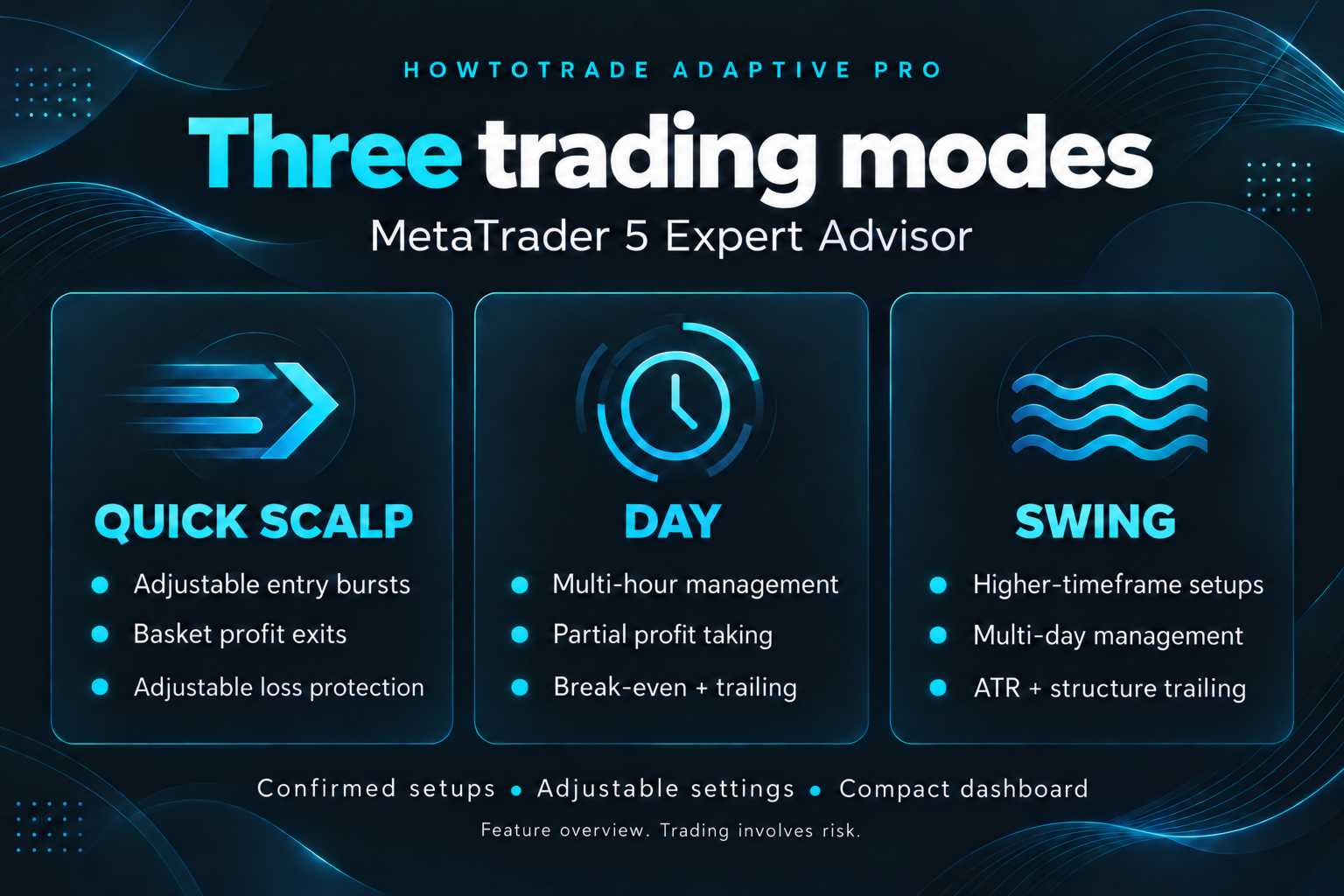
Quick Scalp
Quick Scalp scans for confirmed intraday setups using M1 signals, M15 trend context and H1 structure by default.
- Adjustable entries per setup and lot size: the default burst is 8 entries of 0.01 lots each.
- Configurable basket profit target: 20 in account currency by default.
- Adjustable profitable reversal and peak-profit giveback exits.
- One burst per confirmed decision candle; later aligned setups can add entries.
- Default loss protection: a basket loss-exit trigger at 5% of account balance and an initial broker stop at 1.5 times signal-timeframe ATR.
Basket exits are evaluated on each tick; a triggered exit continues retrying until the basket is flat. Fixed take profit is off by default. Quick Scalp bypasses the EA's other session, spread, news and portfolio entry blockers. There is no fixed EA position-count cap, so further setups can increase exposure; broker volume and margin restrictions still apply.
The basket loss threshold is an exit trigger, not a guaranteed maximum loss. Gaps, slippage and execution delays can produce larger losses. Basket exits require the EA to remain running and receive ticks; broker stops depend on broker execution. Disabling loss protection removes these Quick Scalp protections. Separate positions require a hedging account; netting accounts combine same-symbol entry deals into one position.
Day Trading
Day mode suits traders who prefer structured intraday setups with higher-timeframe context. Default signal, trend and structure timeframes are M15, H1 and H4.
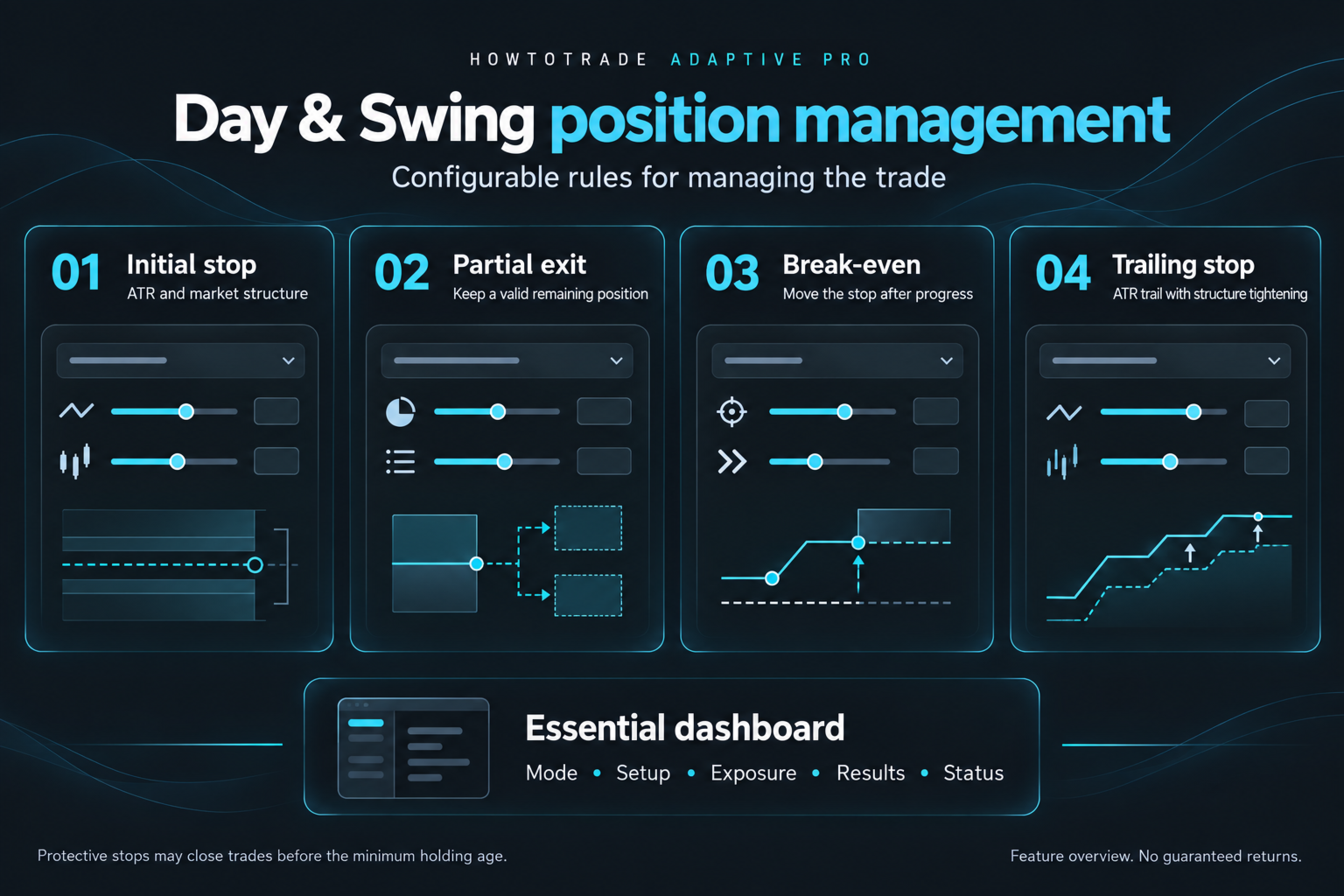
Configure percentage-based risk sizing or fixed lots, initial ATR/structure-based stops, partial profit, break-even movement and ATR trailing with structure-aware tightening. Fixed take profit is off by default, allowing the remaining position to follow its trailing stop; optional fixed targets are available.
Day's discretionary reversal exits require confirmation and a minimum position age of 5 hours. Protective stops can close a position sooner.
Swing Trading
Swing mode uses slower analysis for traders who prefer higher-timeframe setups. Default signal, trend and structure timeframes are H1, H4 and D1.
The profile uses the same configurable risk and position-management framework with settings suited to slower price movement. Swing's discretionary reversal exits require confirmation and a minimum position age of 24 hours. This is an exit-rule condition, not a promised holding period; protective stops can close a position sooner.
Market Regime, Structure And Liquidity Analysis
The EA combines multiple analysis engines to assess a setup. Depending on the active profile and configuration, analysis includes:
- Market-regime detection: trend, range, breakout, volatile or neutral conditions.
- Trend and exponential moving average (EMA) alignment, higher-timeframe direction, price-action confirmation and volatility/average true range (ATR) conditions.
- Smart Money Concepts (SMC): liquidity sweeps, Break of Structure (BOS) and Change of Character (CHOCH).
- Supply and demand zones and Fair Value Gaps (FVG).
- Break-and-retest setups, opening-range breakouts and range conditions.
Higher-timeframe context and adjustable scoring help determine whether an entry qualifies. A detected setup is an analysis result, not a promise of a winning trade.
Partial Profit, Break-Even And Trailing
Day and Swing can manage a position progressively: initial stop, partial exit, break-even movement and trailing of the remaining position.
The default partial exit is 35% when broker volume rules permit. Trailing starts when its configured trigger is reached; it does not necessarily begin immediately after entry. ATR trailing and market-structure adjustments manage the remaining position according to the selected settings. Review the dashboard's management state to understand the current stage.
On-Chart Dashboard
See the active mode, effective timeframes, market regime, BUY/SELL scores, setup direction and quality, position count and total lots, floating result, today's realized result, spread, current status and management state in a compact chart workspace.
Change the profile through Inputs. If EA positions or pending orders remain, the EA continues managing them under their original profile, pauses new entries and queues the selected mode until the basket is clear and the new data are ready.
Configurable Trading And Risk
Choose exposure appropriate to your account. Broker minimum volume, volume step, available margin and stop-distance restrictions affect execution. No symbol-specific profitability or minimum suitable account balance is claimed.
- InpTradingMode: select Quick Scalp, Day or Swing.
- InpAutoModeTimeframes: use the default analysis timeframes for the selected profile.
- InpScalpEntriesPerSetup / InpScalpLotPerEntry: entries per confirmed setup and lots per entry.
- InpScalpBasketProfitTarget: basket target in account currency; 0 disables the hard target.
- InpScalpUseLossSafeguard: enable the basket loss exit and initial broker stop.
- InpScalpMaxBasketLossPct / InpScalpSafetyStopATR: basket loss threshold as a percentage of balance and initial stop distance in ATR units.
- InpScalpReversalMinProfit / InpScalpProfitLockStart / InpScalpProfitGivebackPct: profitable reversal and peak-profit exit settings.
- Day/Swing stop and trailing ATR inputs: configure each profile's stop and trailing distance.
- InpManagedPartialPercent: percentage to close at the partial profit level.
Try The Free Market Demo
- Download the free Market demo in MT5 and open Strategy Tester.
- Select the EA, broker symbol, dates, deposit and leverage. Use available real ticks and review spread, commission, swap and execution assumptions.
- Reset Inputs to defaults and select Quick Scalp, Day or Swing. Enable visual mode to inspect the dashboard, entries, exits and management.
- Review the full report, drawdown, trade count and Journal across different periods, including losing runs.
The free Market demo runs only in Strategy Tester and cannot trade on an online chart. A purchased or rented copy can be tested on a broker demo account before live use.
Read the setup guide and watch the feature overview. The guide includes a PDF buyer guide and starting presets for all three modes. Presets are starting settings for testing, not validated profitability recommendations.
Getting Started And Support
Install through the MT5 Market, attach the EA to the intended symbol, allow algorithmic trading and select your mode. History loading, an unconfirmed setup or broker/platform restrictions can delay orders. Keep MT5 running with a stable connection for EA-managed exits.
For setup help, use the product's MQL5 Comments section or the seller's MQL5 messaging. Include the EA version, mode, symbol, preset and relevant Status or Journal message; hide account numbers and personal details in screenshots.
Gallery Guide
Images 1–4 are illustrative interface previews reconstructed from version 5.60 dashboard code, with example chart values: 1. Day dashboard and setup status; 2. Quick Scalp entry bursts and basket management; 3. Day partial exit and trailing management; 4. Swing structure, demand-zone and Fair Value Gap analysis. Images 5–6 summarize the three profiles and Day/Swing position management. These images are feature illustrations, not live trading captures or backtest reports. Any historical Strategy Tester results presented separately are simulations, not live results.
Risk Disclosure
Trading involves risk, including loss of capital. Profit targets and risk thresholds are settings, not promised returns or guaranteed loss limits. Historical Strategy Tester results are simulations and do not guarantee future results. Market technical validation checks software behavior and does not establish profitability. Test the intended broker, symbol and settings before live use.