Nivelesfibonacci2

NIVELESFIBONACCI2.12 — Órdenes Pendientes sobre Niveles Fibonacci Personalizados

Este script para MetaTrader 5 permite colocar automáticamente órdenes pendientes de compra o venta utilizando como referencia los niveles Fibonacci horizontales previamente dibujados en el gráfico.

El script está diseñado para funcionar conjuntamente con NIVELESFIBONACCI1.1, aunque puede utilizar cualquier conjunto de líneas horizontales que siga la misma estructura de nombres mediante el prefijo configurado.

La primera herramienta calcula los precios correspondientes a los niveles Fibonacci y dibuja las líneas en el gráfico. Esta segunda herramienta utiliza esas líneas como referencia para colocar automáticamente las órdenes pendientes.

¿Cómo funciona?

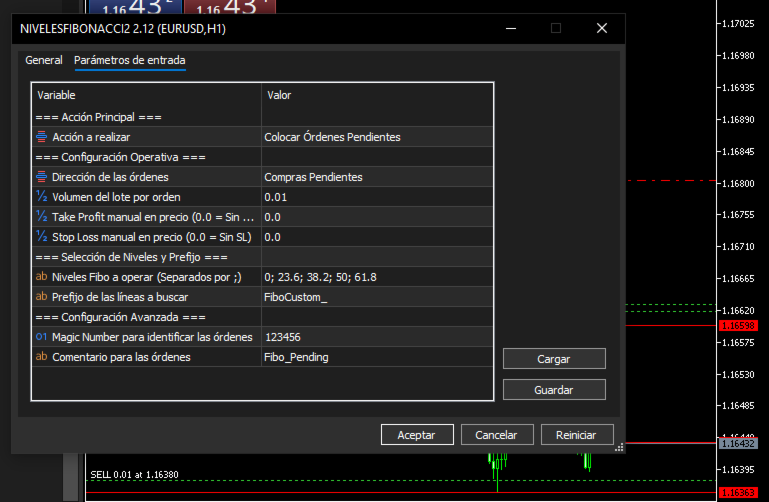
El usuario configura:

  • Dirección de las órdenes: BUY o SELL.

  • Tamaño del lote.

  • Take Profit opcional.

  • Stop Loss opcional.

  • Niveles Fibonacci que desea operar.

  • Prefijo utilizado para identificar las líneas.

  • Magic Number.

  • Comentario de las órdenes.

El script busca en el gráfico las líneas cuyo nombre comience por el prefijo indicado en:

InpPrefix

Por defecto:

FiboCustom_

Por ejemplo, si el primer script ha creado:

FiboCustom_0.0 FiboCustom_23.6 FiboCustom_38.2 FiboCustom_50.0 FiboCustom_61.8 FiboCustom_100.0 FiboCustom_161.8

el segundo script puede seleccionar únicamente los niveles que se desean utilizar.

Ejemplo:

InpTargetLevels = "0; 23.6; 38.2; 61.8"

Los demás niveles serán ignorados.

Determinación automática del tipo de orden

El tipo de orden pendiente se determina automáticamente en función de la dirección seleccionada y de la posición del nivel respecto al precio actual del mercado.

Órdenes BUY

Si se selecciona:

DIR_BUY

el script utiliza:

Buy Limit

Cuando el precio de la línea está por debajo del precio Ask actual.

Precio línea < Ask

Se coloca una:

BUY LIMIT

Buy Stop

Cuando el precio de la línea está por encima del precio Ask actual.

Precio línea > Ask

Se coloca una:

BUY STOP

Órdenes SELL

Si se selecciona:

DIR_SELL

el script utiliza:

Sell Limit

Cuando el precio de la línea está por encima del precio Bid actual.

Precio línea > Bid

Se coloca una:

SELL LIMIT

Sell Stop

Cuando el precio de la línea está por debajo del precio Bid actual.

Precio línea < Bid

Se coloca una:

SELL STOP

De esta forma, el usuario no necesita seleccionar manualmente entre Limit y Stop. El script determina automáticamente el tipo de orden según la posición del nivel Fibonacci respecto al mercado.

Ejemplo de funcionamiento

Supongamos que el gráfico contiene las siguientes líneas:

FiboCustom_0.0 FiboCustom_23.6 FiboCustom_38.2 FiboCustom_50.0 FiboCustom_61.8 FiboCustom_100.0

Y el usuario configura:

Dirección: BUY
Lote: 0.01
Niveles: 0; 23.6; 38.2; 50; 61.8

El script localizará esas líneas, obtendrá sus precios y decidirá automáticamente si cada una corresponde a una Buy Limit o una Buy Stop dependiendo del precio Ask actual.

Por tanto, un mismo conjunto de niveles Fibonacci puede generar diferentes tipos de órdenes dependiendo de dónde se encuentre actualmente el mercado.

Take Profit y Stop Loss

El script permite introducir opcionalmente un precio de Take Profit y Stop Loss.

Sin Take Profit

InpTakeProfit = 0.0

No se establece TP.

Sin Stop Loss

InpStopLoss = 0.0

No se establece SL.

Cuando se introduce un precio superior a 0.0 , el valor se normaliza automáticamente utilizando los decimales del símbolo:

_Digits

Esto permite adaptar los precios a instrumentos con diferentes cantidades de decimales.

Selección de niveles

Los niveles se introducen mediante:

InpTargetLevels

separados por ; .

Por ejemplo:

0; 23.6; 38.2; 50; 61.8

También pueden utilizarse niveles superiores a 100% o niveles negativos, siempre que las correspondientes líneas existan en el gráfico.

Por ejemplo:

-61.8; 0; 23.6; 38.2; 50; 61.8; 100; 161.8; 261.8; 423.6

El script solamente operará los niveles seleccionados que encuentre mediante el prefijo configurado.

Identificación mediante prefijo

El parámetro:

InpPrefix

permite determinar qué objetos del gráfico serán considerados.

Valor predeterminado:

FiboCustom_

Por ejemplo:

FiboCustom_23.6 FiboCustom_50.0 FiboCustom_61.8

serán reconocidos.

Esta característica permite mantener separadas las líneas utilizadas por esta herramienta de otros objetos existentes en el gráfico.

Magic Number

El parámetro:

InpMagicNumber

permite identificar las órdenes creadas por el script.

Valor predeterminado:

123456

El Magic Number resulta especialmente útil para diferenciar estas órdenes de otras órdenes pendientes que puedan existir en la misma cuenta.

Comentario de las órdenes

El parámetro:

InpOrderComment

permite establecer el comentario asociado a las órdenes.

Valor predeterminado:

Fibo_Pending

Esto facilita su identificación dentro de MetaTrader 5.

Cancelación de órdenes pendientes

El parámetro:

InpAction

permite seleccionar entre dos acciones.

ACTION_PLACE

Coloca las órdenes pendientes correspondientes a los niveles seleccionados.

ACTION_DELETE

Cancela las órdenes pendientes que cumplan simultáneamente estas condiciones:

  • Pertenecen al símbolo actual.

  • Tienen el Magic Number indicado en InpMagicNumber .

Esto permite eliminar las órdenes pendientes gestionadas por este script sin afectar a las órdenes pertenecientes a otros símbolos o Magic Numbers.

Relación con NIVELESFIBONACCI1.1

Los dos scripts pueden utilizarse como un sistema de dos etapas:

NIVELESFIBONACCI1.1 ↓ Calcula los precios Fibonacci ↓ Dibuja las líneas horizontales ↓ NIVELESFIBONACCI2.12 ↓ Lee las líneas por prefijo ↓ Selecciona los niveles indicados ↓ Obtiene sus precios ↓ Determina automáticamente Limit / Stop ↓ Coloca las órdenes pendientes

Por ejemplo:

Primera herramienta

Punto A → 1.16594 = 100%
Punto B → 1.16363 = 423.6%

La primera herramienta calcula los precios correspondientes a:

0% 23.6% 38.2% 50% 61.8% 100% 161.8% 261.8% 423.6%

y los dibuja en el gráfico.

Posteriormente, la segunda herramienta puede seleccionar, por ejemplo:

23.6; 38.2; 50; 61.8

y colocar las órdenes pendientes directamente sobre esos precios.

Características principales
  • Colocación masiva de órdenes pendientes sobre niveles Fibonacci.

  • Compatible con niveles Fibonacci personalizados.

  • Selección independiente de los niveles que se desean operar.

  • Soporte para órdenes Buy Limit.

  • Soporte para órdenes Buy Stop.

  • Soporte para órdenes Sell Limit.

  • Soporte para órdenes Sell Stop.

  • Determinación automática del tipo de orden según el precio actual.

  • Lectura de las líneas mediante un prefijo configurable.

  • Compatible con diferentes números de decimales mediante _Digits .

  • Normalización automática de los precios.

  • Take Profit opcional.

  • Stop Loss opcional.

  • Magic Number configurable.

  • Comentario de órdenes configurable.

  • Función para cancelar las órdenes pendientes gestionadas por el Magic Number.

  • No requiere indicadores externos.

  • No requiere DLL.

Importante

Este script no calcula los niveles Fibonacci por sí mismo.

Utiliza los precios de las líneas horizontales existentes en el gráfico como niveles de entrada para las órdenes pendientes.

Para utilizarlo conjuntamente con NIVELESFIBONACCI1.1, ambos scripts deben utilizar el mismo prefijo, por defecto:

FiboCustom_

El script tampoco genera señales de compra o venta mediante análisis técnico. La dirección de las órdenes ( BUY o SELL ) es seleccionada manualmente por el usuario.

La colocación de órdenes implica riesgo financiero. El comportamiento final de una orden pendiente también depende de las condiciones de mercado, las reglas del bróker, la distancia mínima de órdenes, volumen permitido, stops level y demás restricciones del símbolo.

Versión: 2.12
Plataforma: MetaTrader 5
Tipo: Script
Autor: SPC


//+------------------------------------------------------------------+

//|                                        NIVELESFIBONACCI2.12.mq5 |

//|                                                              SPC |

//|                       https://www.mql5.com/es/users/calimero1166 |

//+------------------------------------------------------------------+

#property copyright "SPC"

#property link      "https://www.mql5.com/es/users/calimero1166"

#property version   "2.12"

#property description "Script para la colocación masiva o cancelación selectiva de órdenes pendientes (Limit/Stop) según niveles Fibonacci trazados por prefijo."

#property script_show_inputs


#include <Trade\Trade.mqh>


//--- Enumeración para la acción principal del script

enum ENUM_SCRIPT_ACTION

  {

   ACTION_PLACE  = 0, // Colocar Órdenes Pendientes

   ACTION_DELETE = 1  // Cancelar Órdenes Pendientes

  };


//--- Enumeración para la dirección de las órdenes

enum ENUM_ORDER_DIRECTION

  {

   DIR_BUY  = 0, // Compras Pendientes

   DIR_SELL = 1  // Ventas Pendientes

  };


//--- Parámetros de Entrada

input group "=== Acción Principal ==="

input ENUM_SCRIPT_ACTION InpAction       = ACTION_PLACE; // Acción a realizar


input group "=== Configuración Operativa ==="

input ENUM_ORDER_DIRECTION InpDirection   = DIR_BUY;      // Dirección de las órdenes

input double               InpLotSize     = 0.01;         // Volumen del lote por orden

input double               InpTakeProfit  = 0.0;          // Take Profit manual en precio (0.0 = Sin TP)

input double               InpStopLoss    = 0.0;          // Stop Loss manual en precio (0.0 = Sin SL)


input group "=== Selección de Niveles y Prefijo ==="

input string               InpTargetLevels = "0; 23.6; 38.2; 50; 61.8"; // Niveles Fibo a operar (Separados por ;)

input string               InpPrefix       = "FiboCustom_";             // Prefijo de las líneas a buscar


input group "=== Configuración Avanzada ==="

input ulong                InpMagicNumber  = 123456;       // Magic Number para identificar las órdenes

input string               InpOrderComment = "Fibo_Pending"; // Comentario para las órdenes


//+------------------------------------------------------------------+

//| Script program start function                                    |

//+------------------------------------------------------------------+

void OnStart()

  {

   CTrade trade;

   trade.SetExpertMagicNumber(InpMagicNumber);


   // --- MODO 1: CANCELAR ÓRDENES PENDIENTES ---

   if(InpAction == ACTION_DELETE)

     {

      int deletedCount = DeletePendingOrders(trade, InpMagicNumber);

      PrintFormat("NIVELESFIBONACCI2.12 (v2.12): Se han eliminado %d órdenes pendientes con Magic %d en %s.", deletedCount, InpMagicNumber, _Symbol);

      return;

     }


   // --- MODO 2: COLOCAR ÓRDENES PENDIENTES ---

   // 1. Procesar el texto de niveles a buscar

   double targetLevels[];

   ushort u_sep = StringGetCharacter(";", 0);

   string rawLevels[];

   int totalSplit = StringSplit(InpTargetLevels, u_sep, rawLevels);


   if(totalSplit <= 0)

     {

      Print("Error: No se especificaron niveles válidos en InpTargetLevels.");

      return;

     }


   ArrayResize(targetLevels, totalSplit);

   int validLevelsCount = 0;


   for(int i = 0; i < totalSplit; i++)

     {

      string trimmed = rawLevels[i];

      StringTrimLeft(trimmed);

      StringTrimRight(trimmed);


      if(StringLen(trimmed) > 0)

        {

         double val = StringToDouble(trimmed);

         if(val == 0.0 && trimmed != "0" && trimmed != "0.0" && trimmed != "0,0")

           {

            continue;

           }

         targetLevels[validLevelsCount] = val;

         validLevelsCount++;

        }

     }


   if(validLevelsCount == 0)

     {

      Print("Error: No se pudieron interpretar los niveles de Fibonacci especificados.");

      return;

     }


   // 2. Obtener precios de mercado actuales

   double ask = SymbolInfoDouble(_Symbol, SYMBOL_ASK);

   double bid = SymbolInfoDouble(_Symbol, SYMBOL_BID);


   if(ask <= 0 || bid <= 0)

     {

      Print("Error: No se pudieron obtener los precios de cotización actuales.");

      return;

     }


   // 3. Buscar objetos con el prefijo en el gráfico

   int totalObjects = ObjectsTotal(0, -1, -1);

   int ordersPlaced = 0;


   for(int i = 0; i < totalObjects; i++)

     {

      string objName = ObjectName(0, i, -1);


      // Verificar si el objeto coincide con el prefijo

      if(StringFind(objName, InpPrefix) == 0)

        {

         // Extraer el nivel numérico del objeto

         string levelStr = StringSubstr(objName, StringLen(InpPrefix));

         double objLevel = StringToDouble(levelStr);


         // Verificar si el nivel de la línea está en nuestra lista seleccionada

         if(!IsLevelSelected(objLevel, targetLevels, validLevelsCount))

            continue;


         double linePrice = ObjectGetDouble(0, objName, OBJPROP_PRICE);

         linePrice = NormalizeDouble(linePrice, _Digits);


         if(linePrice <= 0)

            continue;


         // Normalizar TP y SL si están configurados

         double tp = (InpTakeProfit > 0) ? NormalizeDouble(InpTakeProfit, _Digits) : 0.0;

         double sl = (InpStopLoss > 0)   ? NormalizeDouble(InpStopLoss, _Digits)   : 0.0;


         // 4. Determinar tipo de orden y enviar

         if(InpDirection == DIR_BUY)

           {

            if(linePrice < ask)

              {

               if(trade.BuyLimit(InpLotSize, linePrice, _Symbol, sl, tp, ORDER_TIME_GTC, 0, InpOrderComment))

                 {

                  PrintFormat("Buy Limit colocada en el nivel %.1f%% al precio %.*f", objLevel, _Digits, linePrice);

                  ordersPlaced++;

                 }

               else

                 {

                  PrintFormat("Error al colocar Buy Limit en %.1f%%: %s", objLevel, trade.ResultComment());

                 }

              }

            else if(linePrice > ask)

              {

               if(trade.BuyStop(InpLotSize, linePrice, _Symbol, sl, tp, ORDER_TIME_GTC, 0, InpOrderComment))

                 {

                  PrintFormat("Buy Stop colocada en el nivel %.1f%% al precio %.*f", objLevel, _Digits, linePrice);

                  ordersPlaced++;

                 }

               else

                 {

                  PrintFormat("Error al colocar Buy Stop en %.1f%%: %s", objLevel, trade.ResultComment());

                 }

              }

           }

         else // DIR_SELL

           {

            if(linePrice > bid)

              {

               if(trade.SellLimit(InpLotSize, linePrice, _Symbol, sl, tp, ORDER_TIME_GTC, 0, InpOrderComment))

                 {

                  PrintFormat("Sell Limit colocada en el nivel %.1f%% al precio %.*f", objLevel, _Digits, linePrice);

                  ordersPlaced++;

                 }

               else

                 {

                  PrintFormat("Error al colocar Sell Limit en %.1f%%: %s", objLevel, trade.ResultComment());

                 }

              }

            else if(linePrice < bid)

              {

               if(trade.SellStop(InpLotSize, linePrice, _Symbol, sl, tp, ORDER_TIME_GTC, 0, InpOrderComment))

                 {

                  PrintFormat("Sell Stop colocada en el nivel %.1f%% al precio %.*f", objLevel, _Digits, linePrice);

                  ordersPlaced++;

                 }

               else

                 {

                  PrintFormat("Error al colocar Sell Stop en %.1f%%: %s", objLevel, trade.ResultComment());

                 }

              }

           }

        }

     }


   PrintFormat("NIVELESFIBONACCI2.12 (v2.12): Proceso finalizado. Total de órdenes colocadas: %d", ordersPlaced);

  }


//+------------------------------------------------------------------+

//| Función auxiliar para comprobar si un nivel pertenece a la lista |

//+------------------------------------------------------------------+

bool IsLevelSelected(double level, const double &selectedLevels[], int count)

  {

   for(int i = 0; i < count; i++)

     {

      if(MathAbs(level - selectedLevels[i]) < 0.01)

         return true;

     }

   return false;

  }


//+------------------------------------------------------------------+

//| Función auxiliar para borrar las órdenes pendientes por Magic   |

//+------------------------------------------------------------------+

int DeletePendingOrders(CTrade &trade, ulong magic)

  {

   int deleted = 0;

   int totalOrders = OrdersTotal();


   // Recorremos las órdenes en orden inverso para evitar desajustes de índice

   for(int i = totalOrders - 1; i >= 0; i--)

     {

      ulong ticket = OrderGetTicket(i);

      if(ticket > 0)

        {

         if(OrderGetString(ORDER_SYMBOL) == _Symbol && OrderGetInteger(ORDER_MAGIC) == magic)

           {

            if(trade.OrderDelete(ticket))

               deleted++;

            else

               PrintFormat("Error al borrar la orden #%d: %s", ticket, trade.ResultComment());

           }

        }

     }

   return deleted;

  }

//+------------------------------------------------------------------+

推荐产品
Free automatic Fibonacci is an indicator that automatically plots a Fibonacci retracement based on the number of bars you select on the BarsToScan setting in the indicator. The Fibonacci is automatically updated in real time as new highest and lowest values appears amongst the selected bars. You can select which level values to be displayed in the indicator settings. You can also select the color of the levels thus enabling the trader to be able to attach the indicator several times with differe
FREE
Gold Session Levels Pro MT5 is a manual MetaTrader 5 indicator designed to display relevant intraday reference levels for XAUUSD. The indicator automatically calculates and draws the Asian range, its midpoint, the daily open, the London and New York opens, the previous trading day's high and low, and targets derived from the size of the Asian range. FEATURES - Dynamic Asian range while the configured session is active. - Range freezing after the configured Asian session close. - Asian range
FREE
Automatic fibonacci with alerts is an indicator that automatically plots a fibonacci retracement based on the number of bars you select on the BarsToScan setting in the indicator. The fibonacci is automatically updated in real time as new highest and lowest values appear amongst the selected bars. You can select which level values to be displayed in the indicator settings. You can also select the color of the levels thus enabling the trader to be able to attach the indicator several times with d
FREE
Fibo Trader FREE MT5
Grzegorz Korycki
3 (3)
Fibo Trader is an expert advisor that allows you to create automated presets for oscillation patterns in reference to Fibonacci retracements values using fully automated and dynamically created grid. The process is achieved by first optimizing the EA, then running it on automated mode. EA allows you to switch between automatic and manual mode. When in manual mode the user will use a graphical panel that allows to manage the current trading conditions, or to take control in any moment to trade ma
FREE
前一版本指标的发展 ZigZag WaveSize MT4 ZigZag WaveSize - 修改后的标准锯齿指标,增加了波浪长度、水平和不同警报逻辑的信息 一般改进: 为MetaTrader 5适配代码 优化了图形对象的操作 新特性: 极值处的水平线 选择水平类型:水平线/射线/线段 液性水平滤波器(未被价格突破) 突破缓冲区:设置对错误突破的敏感度 标签设置和功能:数量、外观、删除旧标签 结构突破警报(BoS) 移动性质变化警报(ChoCH) 优化: 修正更新极值的逻辑 动态更新新对象 减少新柱出现时的负载 集中的标签系统 修复: 修复了数组越界问题 正确的标签定位 删除了重复的参数 将ZigZag WaveSize指标作为您交易系统的补充使用   也可以尝试我在市场上的其他产品  https://www.mql5.com/ru/users/capitalplus/seller 如果您喜欢该指标,请对其进行评分并留下评论,这对我来说非常重要! 祝您交易获利丰厚!
FREE
The jcoworld OTE EA is an automated trading bot for MetaTrader 5 built on Smart Money Concepts (SMC) . It accurately identifies market impulse moves and automatically enters trades within the Optimal Trade Entry (OTE) zone (61.8% – 79.0% Fibonacci) as soon as a confirmation candle closes. Optimized for: XAUEUR, XAUUSD, and Major Forex Pairs Features: Automatic risk management, dynamic lot sizing & automated Stop Loss/Take Profit. Try for free: This demo version is 100% free! Pricing Plans for Fu
FREE
How the day starts
Sergio Antoni Escudero Tirado
This indicator draws the high intraday price and the low intraday price of the first n minutes of the day. The chart shows the days with vertical lines and two horizontal lines to indicate the max and the min close price of the n first minutes of the day. The max/min lines start and end with the day calculated. With this indicator you can see how starts the day compared with the previous days. It is valid for any market inasmuch as the start time is calculated with the data received. Parameter
FREE
MultiTimeframe Trend Pro shows you the market direction across 7 timeframes at a glance. Clear colors, no repainting, fully customizable. Perfect as a quick filter for any intraday or swing strategy. Key Features Supports M1, M5, M15, H1, H4, D1 and W1 Colors MediumSeaGreen when the close is above the MA, and Red when below No repainting → always based on the last closed candle for each timeframe Fully customizable: MA period (200 by default) font, size and colors X/Y offsets, spacing
FREE
Fibonacci Moving Averages
Brendan Jonathan Stoyanowski-campbell
2 (1)
OVERVIEW The Fibonacci Moving Averages are a toolkit which allows the user to configure different types of Moving Averages based on key Fibonacci numbers. Moving Averages are used to visualise short-term and long-term support and resistance which can be used as a signal where price might continue or retrace. Moving Averages serve as a simple yet powerful tool that can help traders in their decision-making and help foster a sense of where the price might be moving next. The aim of this scrip
FREE
Price Ray
Keni Chetankumar Gajanan -
5 (7)
Price Ray indicator is a utility that will improve the way you trade. Primarily, it shows the Bid, Ask or Last price as a line ray which beams till the current candle, last visible chart candle or extended to all candle bars. The enhanced features in this indicator provide information in an area where you focus most, right next to the current candle. You can select text to be shown above or below the Price ray. The indicator is fully customizable, allowing it to fit any strategy requirements. Th
FREE
AP Fibonacci Retracement PRO (MT5) Overview AP Fibonacci Retracement PRO is a trend-continuation pullback EA. It waits for a confirmed swing, calculates the Fibonacci retracement zone, and looks for entries in the direction of the original move. No grid, no martingale. Strategy logic Detects the last valid swing high/low using Fractals on the selected signal timeframe. Calculates the retracement zone between 38.2% and 61.8% (configurable). On a closed bar, if price is inside the zone (with opti
FREE
Fibonacci Bollinger Bands MT5
Diego Arribas Lopez
5 (1)
MT4 Version Most indicators draw lines. This one draws the battlefield. If you ever bought an EA or indicator based on a perfect equity curve — and then watched it bleed out live — you’re not alone. The problem? Static logic in a dynamic market. Fibonacci Bollinger Bands   adapts. It combines Bollinger structure with customizable Fibonacci levels to mark   zones of control   — where price reacts, pauses, or reverses. No magic. Just logic that follows volatility. Why this tool matters   It
FREE
FibRetrace Zones 最新波段的斐波那契回撤区域 FibRetrace Zones 是 FibRetrace EA 的免费可视化配套指标。它绘制斐波那契回撤水平并标出最新波段的回调区域,让您在交易前就能看到回撤入场位置。 区域按方向着色:看涨为绿色,看跌为红色。适用于任何品种和任何周期。 主要功能 自动波段识别,回看周期可调 经典斐波那契水平(23.6%、38.2%、50%、61.8%、78.6%),每条可单独开关 高亮回调区域,颜色可配置 方向着色:绿色 = 看涨,红色 = 看跌 K线收盘确认;可选对当前K线实时更新 使用方法 加载到任意图表。当价格回调进入着色区域时,FibRetrace 就在那里寻找入场。可利用斐波那契线手动挂单。 自动化交易 FibRetrace EA 自动交易同样的区域:每个品种一个仓位,每笔交易都有止损,每日交易次数限制,交易时段结束自动平仓。回测结果(含样本外数据)见其产品页面。在本页"作者的其他产品"中查看,或在市场中搜索 FibRetrace。 兼容性 MetaTrader 5,任何经纪商、任何品种、任何周期。 免责声明 本工具仅用于可视化
FREE
The   Pivot Point indicator   automatically calculates and displays the pivot point line and support and resistance levels. Pivot can be calculated according to the Classic, Floor, Fibonacci, Woodie, Camarilla or DeMark formula. It is also possible to select the period for calculating the indicator. A trader can choose from daily, weekly, monthly, or user-defined periods. Types of pivots Classic Floor Fibonacci Woodie Camarilla DeMark Main features The indicator shows the current and historic
FREE
Auto Fib Retracements
Ross Adam Langlands Nelson
4.2 (5)
Automatic Fibonacci Retracement Line Indicator. This indicator takes the current trend and if possible draws Fibonacci retracement lines from the swing until the current price. The Fibonacci levels used are: 0%, 23.6%, 38.2%, 50%, 61.8%, 76.4%, 100%. This indicator works for all charts over all timeframes. The Fibonacci levels are also recorded in buffers for use by other trading bots. Any comments, concerns or additional feature requirements are welcome and will be addressed promptly. 
FREE
Babel Assistant
Iurii Bazhanov
4.33 (9)
Babel assistant 1 MT5 净额制机器人 "Babel_assistant_1" 使用 ZigZag 指标在 M1、M5、M15、H1、H4、D1 和 W1 图表周期上生成斐波那契水平线,并计算买入和卖出趋势的强度。当突破指定的 4.925 趋势水平时,它会使用 "Lot for open a position" 设置开仓。然后,Babel 会在某些斐波那契水平上放置挂单,并设置指定的止损(Stop Loss)和止盈(Take Profit)线。屏幕上会显示当前持仓、交易和趋势的运行结果。 手动增加 0.02 手或更多的仓位会被机器人视为其自身挂单的触发。0.01 手的挂单或市价单在执行时只会改变持仓量。 免责声明: 以下材料仅供信息和教育参考。通过使用本产品(外汇市场自动交易程序 Babel assistant 1),您将完全承担未能实现预期利润的风险以及损失所有投资资金的风险。过去的业绩、测试和优化结果并不保证未来的收益。 Babel 机器人的参数: Indicator Mode Only true :机器人仅显示斐波那契水平和趋势概率,不执行交易。 false :
FREE
Trend Catcher EA Pro MT5
Issam Kassas
4.43 (42)
Trend Catcher EA Pro 在 MetaTrader 5 中结合自动交易与图表上的手动控制。 交易和持仓管理按照设置的规则运行。执行结果取决于市场状况、经纪商规则和连接质量。 如有产品、设置或技术支持方面的问题,请直接在 MQL5 上给我发消息。 核心策略: EA 内置两种策略,可自由选择交易风格: I. Smart Trend Mode(智能趋势模式)一次仅在一个方向交易。 II. Dynamic Dual Mode(动态双向模式 / 激进)可通过对冲在两个方向交易。 你可以自由选择只做多、只做空或双向交易,使 EA 完全适应你的交易理念。 混合控制系统: 可使用图表上的控件手动管理交易。 可即时执行: 关闭所有订单 (C) 仅关闭盈利订单 (L) 仅关闭亏损订单 (O) 关闭所有多单 (S) 关闭所有空单 (E) 并可一键启用/关闭自动交易 — 即使在交易进行中也能保持灵活控制。 盈亏可视化显示(蓝=盈利,红=亏损,白=持平)让你始终掌握交易状况。 为什么交易者喜欢它: 趋势 + 剥头皮 双逻辑混合算法 完整可视化手动控制面板 — 无需打开订单列表 实时盈亏以点数显示
FREE
A ready-made multitimeframe trading system based on automatic plotting and tracking of Fibonacci levels for buying and selling any symbol. Demo version - calculation of the last 390 bars is not performed. Advantages Determines the trend direction based on a complex of 14 indicators ( Cx ), extremums of ZigZag ( Z ), RSI ( R ), Impulse ( I ) Displaying the values of 14 indicators comprising the trend direction ( Cx ) Plotting horizontal levels, support and resistance lines, channels View the plo
FREE
LZ Auto Fibo Retracement
Lukasz Tomasz Zychal
LZ Auto Fibo Retracement automatically detects the most significant swing highs and lows on your chart and instantly draws accurate Fibonacci retracement levels between them. Stop drawing Fibs manually—let the indicator do it for you dynamically as the market evolves. Feature highlights - Auto Swing Detection: identifies the most relevant market extremes based on a configurable swing period and lookback range. - Dynamic Updates: the Fibonacci levels automatically adjust to new highs and lows
FREE
Session High Low Boxes
Shanawaz Mohammed Nabi Rasool Pinjori
Session High Low draws the Asian, London and New York sessions on your chart as colored boxes, with the high and low of each session. Optional extension lines continue the session high and low after the session ends, which is useful for breakout and retest trading. Features Asian, London and New York boxes, each can be turned on or off Session high and low prices shown as labels Extension lines after the session end (hours adjustable, 0 = off) Ranges are built from M5 data, so the boxes are the
FREE
Strategy: This is a Guard for your account in case the Margin Call of the Account is called. The most brokers have Margin Call at Margin Level of 100%. If account Margin Level is below TriggerMarginLevelPercent (100%), the EA checks all open account positions. For every non-hedge position it opens one reverse position with the same symbol and same volume. After that it will remove itself from the Chart IMPORTANT: CHECK this manually on the Account before using this EA. Only some Broker offer t
FREE
This indicator automatically identifies liquidity levels using swing fractals and tracks when price sweeps through them. Works on any symbol and timeframe with full multi-timeframe support. Features: — Detects swing highs and lows via a fractal method (configurable bars left & right) on a selected timeframe. Active levels are displayed as rays extending to the right; swept levels turn into dashed lines ending at the sweep candle. — Plots Previous Day (PDhigh / PDlow), Previous Week (PWhigh / PWl
FREE
CloseAll MT5
Mr Sorachai Pitakjarukul
4.5 (2)
ขอบคุณ แรงบันดาลใจ จากโค้ชแพม ที่ทำให้เริ่มทำ    Close all ตัวนี้  และขอขอบคุณทุกคนที่ให้ความรู็มาโดยตลอด ไม่ว่าจะทางตรงทางอ้อม ขอบคุณทุกคนที่ให้ความรู้เพื่อนร่วมเทรด ทั้งนี้เพื่อให้นักเทรดทุกคนได้มีเครื่องมือในการควบคุมการปิดการซื้อขาย จึงขอพัฒนาโปรแกรม close all version 5 ได้ใช้ทุกคน  Close all and update profit Version 1.00 (MT5) Full version Give you free  For MT4 Click  https://www.mql5.com/en/market/product/79252 Fix TPSL calculate  Program function Tab 1 Close order function and show br
FREE
Nexus Pivot Points
Mohammed Kaddour
Pivot Points are used by Forex traders to find support and resistance levels based on the previous day's price action. There are various ways to calculate pivot points, including averaging the open, high, low, and close of the previous day's chart price. Forex Traders use a combination of pivot points with moving averages to find trading opportunities in the currency markets. Pivot points are very useful tools that use the previous bars' highs, lows and closings to project support and resist
FREE
它预测最有可能的短线价格走势,基于先进的数学计算。 功能 评估即时价格走势; 计算实时市场趋势; 计算最重要的支撑和阻力位; 算法优化,在进行复杂数学计算时系统资源消耗最小。 最佳性能自调整, 所以它可以工作于任何品种 (无论它有多奇葩) 以及任意时间帧; 与所有 MetaTrader 平台兼容, 不管报价位数或其它参数; 与所有其它工具兼容 (指标, EA 或脚本),不会减缓终端性能和交易操作。 注: 为了获取多个时间帧的数值, 密集区域和附加的功能,您必须适用 专业版 或 大师版 。 介绍 构建一般交易策略的许多经典指标都基于简单的数学,不是因为创建这些指标时,没有优秀的数学家 (事实上,那时的数学家有可能比现在更好),但因为电脑还不存在,或是它们太简单,持续处理复杂数学操作的能力低下。如今,任何智能手机都完胜几十年前最强大的计算机。所以,处理海量信息的能力如今不再是限制,除了极其复杂的模拟处理。 高级价格走势预测者 (APMP) 指标利用当前处理能力的优势,通过一些最先进的数学、统计和概率的概念,来捕获价格波动的本质。 APMP 不能用来预测它自己,由于价格运动是一种非平稳随
FREE
Haven Key Levels PDH PDL
Maksim Tarutin
4.92 (12)
"Haven Key Levels PDH PDL"   指标可帮助交易者在图表上将关键水平可视化。它会自动标记以下水平: DO (Daily Open)   — 每日开盘价。 NYM (New York Midnight)   — 纽约午夜价。 PDH (Previous Day High)   — 前一日最高价。 PDL (Previous Day Low)   — 前一日最低价。 WO (Weekly Open)   — 每周开盘价。 MO (Monthly Open)   — 每月开盘价。 PWH (Previous Week High)   — 前一周最高价。 PWL (Previous Week Low)   — 前一周最低价。 CMH (Current Month High)   — 当月最高价。 CML (Current Month Low)   — 当月最低价。 PMH (Previous Month High)   — 上一月最高价。 PML (Previous Month Low)   — 上一月最低价。 其他产品 ->  点击这里 。 自定义功能: 选择线条颜
FREE
Try Before You Buy: You can download and test the Multi Tp Ladder  free demo version  on a demo account before purchasing. For MetaTrader 5: Download:   MultiTP ladder     How to install the trial: Download the       MultiTP ladder     file above. In MetaTrader:   File → Open Data Folder →   MQL5/Experts Paste the trial file into that folder, then   restart MetaTrader . The trial is fully functional for 12  hours per demo account . To reset the trial period   (demo accounts only): MetaTrader →
Introducing a powerful MetaTrader 5 Expert Advisor designed to enhance your trading strategy – the Auto Breakeven EA! This feature-rich EA is tailored to bring your stop-loss to breakeven, ensuring a risk-free trade once the market moves in your favor up to a specified price. Explore the full potential of the Auto Breakeven EA. Download it for free now, and find the download link at the bottom of our page. Elevate your trading experience and take control of your risk management strategy. Happy
FREE
This Expert Advisor provides an advanced on-chart trading panel designed for discretionary traders. It simplifies position sizing, risk management, and trade execution directly from the chart without manual calculations. Key Features  On-chart trading panel  Fixed lot and balance percentage risk mode  Risk-based lot calculation using stop loss  Market and pending order execution  Partial close management  Break-even automation  Trailing stop control  Equity protection system  Daily loss lock  S
FREE
ATR Dynamic Stop
Quang Huy Quach
1. Overview The ATR Dynamic Stop (CE) is a powerful technical indicator designed to help traders identify and follow market trends. Its core function is to provide a dynamic trailing stop-loss based on price volatility, as measured by the Average True Range (ATR) indicator. The main objectives of the ATR Dynamic Stop are: Profit Optimization: It helps you ride a strong trend by setting a reasonable stop-loss, preventing premature exits due to minor market noise and fluctuations. Risk Management:
FREE
该产品的买家也购买
Trade Assistant MT5
Evgeniy Kravchenko
4.43 (216)
它有助于计算每笔交易的风险,容易安装新的订单,具有部分关闭功能的订单管理, 7 种类型的追踪止损和其他有用的功能。   附加材料和说明 安装说明   -   应用程序说明   -   模拟账户应用程序的试用版 线条功能  - 在图表上显示开仓线、止损线、止盈线。 有了这个功能,就可以很容易地设置一个新的订单,并在开仓前看到它的附加特性。   风险管理  - 风险计算功能在考虑到设定的风险和止损单的大小的情况下,计算新订单的成交量。它允许你设置任何大小的止损,同时观察设定的风险。 批量计算按钮 - 启用 / 禁用风险计算。 在 " 风险 " 一栏中设置必要的风险值,从 0 到 100 的百分比或存款的货币。 在 " 设置 " 选项卡上选择风险计算的变量: $ 货币, % 余额, % 资产, % 自由保证金, % 自定义, %AB 前一天, %AB 前一周, %AB 前一个月。   R/TP 和 R/SL - 设置止盈和止损的关系。 这允许你设置相对于损失的利润大小。 例如, 1 : 1 - 这决定了 TP = SL 的大小。 2 : 1 - 这意味着 TP 是 SL 的两倍。 RR -
欢迎来到 Trade Manager EA——这是一个终极风险管理工具,旨在使交易变得更直观、精准和高效。它不仅仅是一个下单工具,而是一个用于无缝交易计划、仓位管理和风险控制的全面解决方案。不论您是新手交易员、资深交易员,还是需要快速执行的剥头皮交易员,Trade Manager EA 都可以满足您的需求,适用于外汇、指数、大宗商品、加密货币等各种市场。 借助 Trade Manager EA,复杂的计算已成过去。只需分析市场,在图表上用水平线标记入场、止损和止盈,设置您的风险水平,Trade Manager 就会立即计算出理想的头寸规模,并实时显示以点、账户货币计价的止损和止盈。每笔交易都得以轻松管理。 主要功能: 头寸规模计算器 :根据定义的风险瞬间确定交易规模。 简单的交易计划 :在图表上用可拖动的水平线直接计划交易,设置入场、止损和止盈。 实时显示 SL 和 TP :以账户货币、点或分显示止损和止盈,便于分析。 高级保护工具 盈亏平衡选项 : 基本盈亏平衡 :当您的交易达到设定水平时自动保护利润。 多级盈亏平衡 :设置多达 4 个级别以逐步保护利润。 尾随止损选项 : 基本尾随
Local Trade Copier EA MT5
Juvenille Emperor Limited
4.94 (149)
Local Trade Copier EA MT5 是一款快速、灵活的交易复制工具,用于在同一台 Windows 电脑或 Windows VPS 上的多个 MetaTrader 5 账户之间复制和管理交易。 它将本地交易同步与 Receiver 端的手数管理、风险管理、交易过滤、品种映射、交易管理和账户保护功能结合在一起。 只需约 1 分钟 即可完成 Transmitter 和 Receiver 终端的设置,并可在同一经纪商或不同经纪商的账户之间复制手动交易或 EA 交易。在合适的条件下,本地 MetaTrader 终端之间的交易信息可以在 0.5 秒以内 完成同步。实际交易执行速度取决于经纪商延迟、网络状况、电脑/VPS 性能以及终端负载。 购买前先试用免费演示版 您可以在 MT5 模拟账户上测试 功能完整的 Local Trade Copier EA MT5 免费演示版 ,每次可使用 4 小时 : 下载 Local Trade Copier EA MT5 免费演示版 将下载的文件放入: MT5 → 文件 → 打开数据文件夹 → MQL5 → Experts 然后重新启动 MT
Telegram to MT5 Multi-Channel Copier   可将您 Telegram 和 Discord 频道中的交易信号自动复制到 MetaTrader 5。无需机器人、无需浏览器扩展、无需手动复制。信号一到 Telegram 或 Discord,EA 几秒内就在您的终端开仓。 在复制某个频道之前,内置回测器还能告诉您该频道在您的账户上会有怎样的表现。 产品包含两个组件:一个监听您 Telegram 频道的 Windows 应用程序,以及在 MT5 终端执行信号的本 EA。同时提供 MT4 版本   点此 . 设置指南与应用下载:   https://www.mql5.com/en/blogs/post/768988 了解如何 回测任何 Telegram 信号频道 。 当前价格将来会上调。 工作原理 应用通过您自己的 Telegram 账号连接,因此能看到您关注的所有频道、群组、话题和机器人,包括私密和 VIP 频道。信号到达时,应用读取它,EA 按您的手数和设置在终端中开仓。 整个过程全自动,无需守在电脑前。专为 24/7 无人值守运行设计:Telegram 连接
================================================================================ POC BREAKOUT - V20.72. Full Professional Grade Toolkit ================================================================================ POC Breakout is a full MetaTrader 5 trading dashboard for discretionary traders who want breakout signals, Point of Control (POC) context, volume profiles, order flow, market structure, news, alerts, and advanced trade planning in one professional workspace. Attached directly to you
Strategy Ledger Pro
Abdullah Uygar Tuna
5 (11)
现已支持中文。 Strategy Ledger Pro 是一款适用于 MetaTrader 5 的只读账户分析面板。它按智能交易系统(EA)、策略、品种和魔术号拆分账户结果,让您看清每一个的真实贡献。 面板支持 11 种语言:English、Français、Deutsch、Español、Italiano、Português、Русский、Türkçe、中文、日本語 和 한국어。 下载演示版之前请注意。 Market 仅在策略测试器中运行任何付费产品的演示版。本面板分析的是您自己账户上的交易,而策略测试器中没有可读取的账户历史,因此演示版会打开一个空面板并加以说明。这是演示机制的工作方式,并非产品的限制。 本描述中的视频展示了面板在真实账户上的运行效果。 详细的 使用手册 (英文)介绍了每项功能, AureusAI Trading Suite 群组欢迎交流讨论并发布公告。 MetaTrader 对整个账户只显示一个余额。当多个 EA 同时交易时,这个余额无法说明每个 EA 的贡献。Strategy Ledger Pro 读取账户历史,重建已平仓头寸,将其归入各个策略,并在一个
The Patch
Mian Rameez Ali
The Patch It never opens a trade. It walks behind the ones that did. Every open position, every pending order — checked twice a second for the one thing that's easy to forget: a stop, a target. Found bare, it doesn't ask. It writes the missing number in, measured in points from wherever the position began, and moves on to the next. No strategy, no opinion on direction. Just the quiet assumption that nothing should ever sit on the market unprotected — not because someone decided it shouldn't,
TradePanel MT5
Alfiya Fazylova
4.88 (170)
交易面板是一款多功能交易助手。该应用包含超过50种手动交易功能,并允许您自动执行大多数交易任务。 应用程序说明 : https://www.mql5.com/zh/blogs/post/761102 用于模拟账户的应用程序试用版: https://www.mql5.com/zh/blogs/post/762579 如何安装应用程序: https://www.mql5.com/zh/blogs/post/762580 如何在可视化模式下测试应用程序: https://www.mql5.com/zh/blogs/post/770278 如何在VPS MetaTrader上安装应用程序: https://www.mql5.com/zh/blogs/post/770196 贸易. 只需单击一下即可执行交易操作: 打開掛單和頭寸,並自動計算風險。 一鍵打開多個訂單和頭寸。 打開訂單網格。 按組別關閉掛單和頭寸。 反轉頭寸方向(關閉買入>打開賣出,關閉賣出>打開買入)。 鎖定頭寸(通過開啟缺少的頭寸,使買入和賣出頭寸的數量相等)。 一鍵部分關閉所有頭寸。 將所有頭寸的止盈和止損設置在同一價格水平。
Floor Watch
Syed Tauqeer Hussain Shah
Floor Watch One number, watched every thirty seconds: how far equity has fallen since the day began — or since its highest point, if it's told to trail the peak instead of the open. Cross the line and it doesn't argue. Every open position closes, every pending order vanishes, and anything that slips through afterward gets shut the moment it appears. Not asked. Removed. The floor holds until the clock turns 5 AM Pakistan time — then, and only then, does the day start over. One rule. No except
按照自己的交易规则复制 Telegram 信号 Telegram to MT5 Signal Trader 可将 Telegram 公开及私密频道和群组中的文字交易信号自动复制到 MetaTrader 5。通过一个桌面应用管理多个信号提供者和 MT5 账户,并为 每个提供者单独设置风险和交易参数 。 复制信号无需 Telegram 机器人,也无需配置 API。 只需通过手机号或二维码登录您自己的 Telegram 账户,然后选择您已加入的频道或群组。您无需创建机器人,也无需提供 Telegram API 令牌、API ID 或 API hash。 自行选择仓位大小,将平仓分配到多个止盈价位,并自动执行保本止损和移动止损。在跟随信号提供者的同时,掌握信号的实际交易方式。 本产品由这款 MT5 EA 和必须配合使用的 Windows 桌面应用组成。请参阅 安装指南及应用下载 。 管理多个信号提供者和账户 为每个提供者单独设置: 为每个频道设置专属的仓位计算方式、入场规则、止损、止盈和交易管理参数。 灵活分配至不同账户: 将同一提供者的信号复制到多个已连接的 MT5 账户,并为每个账户使用不
Power Candles 策略扫描器——自优化多符号设置查找器 Power Candles策略扫描器 采用与Power Candles指标相同的自优化引擎,可同时扫描您“市场观察”中的所有交易品种。一个面板即可显示当前哪些品种在统计上具备交易价值、每种策略的最佳应用方向、最优止损/止盈组合,并在新信号触发时立即向您发送提醒。 本工具是 Stein Investments 生态系统的一部分 - 18+ 款工具,加上 Max,您的一对一 AI 交易导师。  随时在线,深入了解每一款指标,在您需要梳理思路的那一刻就在那里。  立即认识他: https://stein.investments 您的全面市场监控。每个交易品种超过3,000次自动优化。2种警报类型。一键切换图表并采取行动。 为何您需要此工具 大多数多标的扫描器仅展示价格 波动 。每只股票的波动率、百分比变化、RSI。您仍需自行摸索正确的策略、合适的止损位以及理想的入场阈值。Power Candles策略扫描器针对每只股票自动解答这些问题,仅在数学验证过的交易设置中触发实际入场信号时才会向您发出提示。这就是全部卖点。 自动
Welcome to ENTRY IN THE ZONE with SMC MULTI TIMEFRAME SPECIAL BENEFIT / FOR OUR MQL5 CUSTOMERS FREE ACCESS TO THE NEW TOOL  — COMING SOON — Learn more on our official website  : https://www.fableedge.net YouTube Channel : 24/7 LIVE SIGNALS  :   https://www.youtube.com/@FableEdgeView Entry In The Zone with SMC Multi Timeframe is a real-time market analysis tool based on Smart Money Concepts (SMC), designed to analyze market structure, price direction, and key trading zones. It supports both Sing
Grid Manual MT5
Alfiya Fazylova
4.73 (22)
Grid Manual是一个交易面板,用于处理订单网格。 该实用程序是通用的,具有灵活的设置和直观的界面。 它不仅可以在亏损方向上设置订单网格,还可以在盈利方向上设置订单网格。 交易者不需要创建和维护订单网格,实用程序会这样做。 打开一个订单就足够了,Grid manual会自动为它创建一个订单网格,并伴随它直到非常关闭。 完整说明和演示版 此處 。 该实用程序的主要特性和功能: 伴隨以任何方式打開的訂單,包括從移動終端打開的訂單。 適用於兩種類型的網格:“限制”和“停止”。 使用兩種方法計算網格間距:固定和動態(基於 ATR 指標)。 允許您更改未結訂單網格的設置。 顯示圖表上每個網格的盈虧平衡水平。 顯示每個網格的利潤率。 允許您一鍵關閉網格中的盈利訂單。 讓您一鍵關閉每個訂單網格。 允許您對訂單網格應用追踪止損功能。 允許您在訂單網格上應用將訂單網格的止損轉移到盈虧平衡水平的功能。 相對於訂單網格的盈虧平衡水平自動重新排列止盈(僅在限價網格模式下,距離取決於所選的計算類型:“保守”或“激進”)。 最多可管理 20 個訂單網格,每個網格最多可包含 100 個訂單。 計算初始手數時,
The product will copy all telegram signal to MT5 ( which you are member) , also it can work as remote copier.  Easy to set up, copy order instant, can work with almost signal formats, image signal,  s upport to translate other language to English Work with all type of channel or group, even channel have "Restrict Saving Content", work with  multi channel, multi MT5 Work as remote copier: with signal have ticket number, it will copy exactly via ticket number. Support to backtest signal. How to s
一次购买,即可免费获得我所有 MT4 和 MT5 指标,包括现有指标及未来发布的指标。 购买后请联系我,了解领取方式。 计划每售出 10 份后提价 50$,最高至 999$。 实际价格以结算时的 Market 标价为准。 保留您信赖的指标,让相关操作自动完成。 您的信号。您的规则。您的交易执行。 您已有信赖的 MT5 指标,却仍需盯盘、等待信号、计算手数、下单并手动管理每个持仓? Stratiora Signal Engine MT5 将这些环节连接起来。它可将兼容的买入和卖出缓冲区信号转化为完整的自动化流程:入场、交易量计算、止损、止盈、过滤、持仓管理及账户保护。 更换指标或交易思路时,无需每次另行定制 EA。您可以使用同一个灵活的执行引擎,自行决定每个信号的交易方式。 您的信号。您的规则。您的交易执行。 为什么开发 Stratiora 许多交易者已有熟悉且信赖的指标,但仍需手动盯盘、等待信号、计算手数、下单和管理持仓。 Stratiora 的目的就是连接这些步骤。 指标仍负责生成交易信号,Stratiora 负责按您的规则执行和管理。您决定何时读取信号、如何计算交易量、设置哪些保
Quant AI Agents
Ho Tuan Thang
5 (1)
Quant AI Agents are independent trading Expert Advisors. Instead of trading using a fixed strategy like other conventional EAs, Quant AI Agents   is a   multi-agent AI trading framework   that turns natural-language strategy prompts into live.  WANT THE SAME RESULTS AS MY LIVE SIGNAL?   Use the exact same brokers I do:   IC MARKETS , IC TRADING   .  Unlike the centralized stock market, Forex has no single, unified price feed.  Every broker sources liquidity from different providers, creating un
Daily Trading Limiter
AL MOOSAWI ABDULLAH JAFFER BAQER
5 (8)
• Please test the product in the Strategy Tester before purchasing to understand how it works. • If you face any issues, contact me via private message—I’m always available to help. • After purchase, send me a screenshot of your order to receive a FREE EA as a gift. Daily Trading Limiter — the rule you cannot break Every trader knows the number. Three trades. Two percent. One bad day and stop. And every trader has watched themselves take the fourth trade anyway. The problem was never knowing th
VirtualTradePad PRO SE MT5 — MetaTrader 5 专业交易控制中心 VirtualTradePad PRO SE 是一款基于图表的高级交易面板,也是适用于 MetaTrader 5 的交易管理工作区。它专为希望获得更快执行、更清晰持仓控制、结构化交易管理、可视化价位规划,以及直接在图表上完成专业交易流程的交易者而设计。 这不仅仅是一个 BUY / SELL 面板。PRO SE 将手动交易、挂单、持仓管理、部分平仓、篮子利润/亏损控制、加仓均价层级、ATM 规则、信号监控、实时市场信息、策略测试器 (Strategy Tester) 流程以及面向 VPS 的运行方式整合到一个互相关联的界面中。 MT4 版本 | 完整说明和截图 | 如何购买 | 如何安装 | 如何获取日志文件 | 如何测试与优化 | Expforex 的所有产品 为什么交易者会选择这套面板 图表一键交易 ,并支持键盘快速操作 快速完成开仓、平仓、修改、反转、锁仓与部分平仓 深度控制仓位、挂单、总利润与风控逻辑 自动参数计算,减少手动输入与重复劳动 为什么 PRO SE 比标准手动交易更高
FUTURES ORDERFLOW FOOTPRINT CHART Professional OrderFlow EA for MetaTrader 5 Version 1.01| Professional tool for real traders | Institutional-Grade Visualization STRATEGY TESTER USERS - PLEASE SELECT EVERY REAL TICK WHEN TESTING AND YOU HAVE DOWNLOADED HISTORICAL DATA. IF YOU SEE A WAITING SCREEN AND IT IS NOT DOWNLOADING, IT MEANS YOU HAVE LOW HISTORICAL DATA. TRY 1 MIN AND 5 MIN FIRST ON 1 DAY DATA. ONE DAY DATA SHOULD BE THE NEWEST AND MOST CURRENT DATE. PLEASE WAIT UNTIL THE MARKET HAS ROL
MT5 to Telegram Signal Provider 是一个易于使用且完全可自定义的工具,它允许向 Telegram 的聊天室、频道或群组发送 指定 的信号,将您的账户变为一个 信号提供商 。 与大多数竞争产品不同,它不使用 DLL 导入。 [ 演示 ] [ 手册 ] [ MT4 版本 ] [ Discord 版本 ] [ Telegram 频道 ]  New: [ Telegram To MT5 ] 设置 提供了逐步的 用户指南 。 不需要了解 Telegram API;开发者提供了您所需的一切。 关键特性 能够自定义发送给订阅者的订单详情 您可以创建分层的订阅模型,例如铜、银、金。其中金订阅获得所有信号等。 通过 id、符号或评论过滤订单 包括执行订单的图表截图 在发送的截图上绘制已关闭的订单,以便额外核实 延迟发送新订单消息的可能性,以便在发送前对位置进行调整 订单详情完全透明: 新的市场订单*带截图 订单修改(止损、获利) 已关闭的订单*带截图 部分关闭的订单** 新的挂单 修改的挂单(进场价格) 挂单激活(作为新的市场订单附加) 已删除的挂单 历史订单报告
Exp COPYLOT CLIENT for MT5
Vladislav Andruschenko
3.97 (35)
适用于 MetaTrader 5 的专业交易复制器 快速、专业、稳定可靠的 交易复制器 ,适用于 MetaTrader 。 COPYLOT 可在 MT4 和 MT5 终端之间复制 Forex 交易,并支持 Hedge 和 Netting 账户。 COPYLOT 的 MT5 版本支持: - MT5 Hedge → MT5 Hedge - MT5 Hedge → MT5 Netting - MT5 Netting → MT5 Hedge - MT5 Netting → MT5 Netting - MT4 → MT5 Hedge - MT4 → MT5 Netting MT4 版本 完整说明 + DEMO + PDF 如何购买 如何安装 如何获取日志文件 如何测试和优化 Expforex 的所有产品 您也可以将交易复制到 MT4 终端(MT4 → MT4,MT5 → MT4): COPYLOT CLIENT for MT4 COPYLOT 是一款专业的交易和持仓复制器,可同时与 2、3 甚至 10 个终端协同工作。 支持从 模拟账户和投资者账户 复制,也支持同时在多个终端上运行。 您可以使
Trade copier MT5
Alfiya Fazylova
4.61 (56)
Trade Copier 是一种专业实用程序,旨在复制和同步交易账户之间的交易。 复制发生从供应商的帐户/终端到收件人的帐户/终端,安装在同一台计算机或 vps 上。 在购买之前,您可以在演示帐户上测试演示版本。 演示 这里 。 完整说明 这里 。 主要功能和优点: 支持复制MT5>MT5、MT4>MT5、MT5>MT4,包括МТ5 netting账户。 供应商和收件人模式在同一产品中实现。 简单直观的界面,允许您直接从图表中实时控制复制。 连接中断或终端重新启动时不会丢失设置和位置。 允许您选择要复制的符号,也可以替换接收者的符号,例如 EURUSD> USDJPY。 允许为每个符号设置个性化的复制设置。 支持回拷贝。 能够仅复制某些订单。 允许您设置开仓交易价格的最大差异和最大时间延迟。 正确复制部分订单关闭的执行。 计算复制手数的几种方法。 同步止盈和止损。有几种方法可以计算它们的位置。 支持通过执行在“Market account”上工作,其中 SL / TP 仅在开仓后设置。 如何使用简单的设置复制交易 将供应商终端和接收终端安装在同一台计算机或 VPS 上。 在供应商终端上
Trade Manager DaneTrades
Levi Dane Benjamin
4.23 (30)
交易管理器可帮助您快速进入和退出交易,同时自动计算风险。 包括帮助您防止过度交易、报复性交易和情绪化交易的功能。 交易可以自动管理,账户绩效指标可以在图表中可视化。 这些功能使该面板成为所有手动交易者的理想选择,并有助于增强 MetaTrader 5 平台。多语言支持。 MT4版本  |  用户指南+演示 交易经理在策略测试器中不起作用。 如需演示,请参阅用户指南 风险管理 根据%或$自动调整风险 可选择使用固定手数或根据交易量和点自动计算手数 使用 RR、点数或价格设置盈亏平衡止损 追踪止损设置 最大每日损失百分比,在达到目标时自动平仓所有交易。 保护账户免遭过多提款并阻止您过度交易 最大每日损失(以美元为单位)在达到目标时自动关闭所有交易。 保护账户免遭过多提款并阻止您过度交易 一键实现所有交易的盈亏平衡 自动计算从手机/电话发送的交易的风险 OCO 在设置中可用 交易和头寸管理 通过设置每月、每周、每天、每小时或每分钟的最大交易次数,停止过度交易和报复性交易。 高级挂单管理。 调整何时关闭挂单的规则 追踪挂单 支持市价订单和挂单 每日最大利润目标(以美元为单位)以确保头寸并停止
The News Filter MT5
Leolouiski Gan
4.78 (23)
这个产品在新闻时间过滤所有的专家顾问和手动图表,因此您不必担心突然的价格波动会破坏您的手动交易设置或其他专家顾问输入的交易。此产品还带有完整的订单管理系统,可在任何新闻发布前处理您的持仓和挂单。一旦您购买了   The News Filter ,您将不再需要依赖以后的专家顾问内置的新闻过滤器,因为这个产品可以从此过滤它们所有。 新闻选择 新闻来源于Forex Factory的经济日历。 选择可以基于任何一种货币,如USD,EUR,GBP,JPY,AUD,CAD,CHF,NZD和CNY等。 选择也可以基于关键识别,例如Non-Farm (NFP),FOMC,CPI等。 能够选择新闻影响级别的筛选,从低、中、到高影响。 自动模式只选择与图表相关的新闻。 新闻来源每小时自动刷新,以确保最新的新闻数据。 为每个新闻影响级别提供单独的输入,以确定您要过滤掉的新闻发布前后的分钟数。 订单管理选项 在新闻发布前关闭未平仓头寸的选项,并在新闻发布后恢复它们。 在新闻发布前删除挂单的选项,并在新闻发布后恢复它们。 在新闻发布前移除止损和止盈水平的选项,并在新闻发布后恢复它们。 在新闻发布前移动止损和
Footprint Chart Pro — Professional OrderFlow EA for MetaTrader 5 Version 6.34 | Professional tool for real traders | Institutional-Grade Visualization DEMO USERS - PLEASE SELECT EVERY TICK / REAL TICK WHEN TESTING AND YOU HAVE DOWNLOADED HISTORICAL DATA. IF YOU SEE A WAITING SCREEN AND IT IS NOT DOWNLOADING, IT MEANS YOU HAVE LOW HISTORICAL DATA. TRY 1 MIN AND 5 MIN FIRST ON 1 DAY DATA. ONE DAY DATA SHOULD BE THE NEWEST AND MOST CURRENT DATE. PLEASE WAIT UNTIL THE MARKET HAS ROLLED OVER PERIOD.
Trade Indicator Assistant   is a powerful MT5 utility designed to turn indicators into automated trading systems. Its main feature is the ability to automatically detect an indicator’s   BUY and SELL signal buffers , without requiring you to know the buffer numbers, search through indicator settings, or modify the indicator source code. Bonus Indicator:   After purchasing Trade Indicator Assistant, contact me to receive   Trade Signal Pro   completely free as a bonus indicator. [Download Demo V
Telegram To MT5 Ultra
Mirel Daniel Gheonu
5 (5)
Telegram To MT5 — 信号复制器 将您的 Telegram 频道中的交易信号变成真实的 MT5 订单 — 自动执行,可用于任意数量的账户,风险与规则完全由您掌控。 Telegram To MT5 将您已在 Telegram 关注的 VIP / 信号频道连接到您的 MetaTrader 5 终端。一个免费的配套桌面应用读取消息(即使是禁止机器人的频道),而本 EA 在您的账户上执行这些信号 — 应用您自己的风险设置、品种映射、止盈处理、交易时段与新闻过滤。 它是一个信号复制器,而非黑箱策略:由您决定信任哪些频道,以及每笔交易如何计算手数和管理。 分步设置与配套应用安装指南 工作原理 [您的 Telegram 频道] -> [配套桌面应用] -> [MT5 + 本 EA] -> 订单 配套桌面应用(免费,已包含)使用您的 Telegram 账户登录并监视您所选择的频道。即使是禁止机器人的 VIP 频道也能正常工作,它通过一个私有、加密的本地桥接转发每条消息。 本 EA 挂在一个图表上,在 MT5 接收这些信号,并按照您的规则开仓 / 管理交易。 应用与 EA 之间的连接是位于
Seconds Chart MT5
Boris Sedov
4.61 (18)
秒级图表 (Seconds Chart) - 一款专为 MetaTrader 5 设计的独特工具,用于创建秒级时间框架的图表。 通过 秒级图表 ,您可以构建以秒为单位的时间框架图表,获得标准分钟或小时图表无法提供的极致灵活性和分析精度。例如,时间框架 S15 表示每根蜡烛图持续15秒。您可以使用任何支持自定义交易品种的指标和EA交易系统。操作它们就像在标准图表上交易一样方便。 与标准工具不同, 秒级图表 让您能够在超短时间框架下进行高精度交易,无延迟干扰。 免费演示版: Seconds Chart v2.29 Demo.ex5 下载免费演示版,亲自体验: 功能齐全 - 所有功能均可使用 24小时测试 - 足够评估准确性和便利性 仅限模拟账户 - 大多数经纪商均可轻松开立 仅限GBPCAD图表 - 大多数终端均可使用 这些限制仅适用于演示版。完整版适用于任何账户类型(真实、演示、竞赛)和任何图表(XAUUSD、EURUSD 等),无任何限制。 如何安装演示版 通过上方链接下载演示文件 打开MetaTrader -> 文件 -> 打开数据文件夹 -> MQL5 -> Experts 将下
Astro Trade MT5
Indra Maulana
5 (8)
25% discount on the release of the tool: only for the next 3 buyers Send a message to receive a demo version. AstroTrade Trading Assistant AstroTrade is a comprehensive multi-functional trading utility developed for the MetaTrader 5 platform. It integrates essential tools for trade execution, risk management, and technical monitoring into a single unified interface. The application is designed to assist traders in managing their daily operations through a visual and structured environment. Vi
Premium Trade Manager - 内置交易导师的图表面板 Premium Trade Manager 将一位交易导师嵌入您的图表,并在其下搭载完整的执行引擎。像往常一样建立交易,然后让您的 AI 交易导师 Max 读取这笔具体的交易,结合您的实时账户给出直接判断,再由您决定是否下单:止损是否符合纪律化交易的要求、风险规模是否合理、高影响新闻事件是否即将发布、您是否接近资金盘限额。其下是完整的执行引擎,负责点击之后的一切:一键按风险下单、您在图表上拖动规划且交易进行中仍可随时调整的计划、最多四个分批止盈级别、七种移动止损方式、实时资金盘合规检查、新闻屏蔽保护,以及对自身成本进行评级的点差功能。决策由您做出。Max 给出第二次审视。面板负责此后的一切。 购买前先亲手体验。 直接在浏览器中点击实时面板,这是在购买前感受其工作方式的最快途径。 stein.investments/products/premium-trade-manager Max 是您的一对一 AI 交易导师,他直接内置于面板之中。  他了解您的账户、您的设置和您的规则,用您自己的语言回答,并在每笔交易下单前进
作者的更多信息
TendenciaPrecioFecha
Sergio Piqueras Cuevas
AutoFindBestTrendLine — Detector Automático de Líneas de Tendencia Descripción general: AutoFindBestTrendLine es una utilidad para MetaTrader 5 que analiza el historial del gráfico y detecta automáticamente la mejor línea de tendencia posible, ya sea de máximos (resistencias), mínimos (soportes) o ambos. El script identifica los dos puntos más relevantes y dibuja una línea óptima basada en el número de toques reales sobre el precio. Ventajas principales: Detección automática de líneas de tendenc
FREE
TendenciaPrecioFecha2
Sergio Piqueras Cuevas
TrendLinesFromFiboAndTrend2 — Proyección Dinámica de Tendencias en Niveles Fibonacci Descripción general: TrendLinesFromFiboAndTrend2 es una herramienta para MetaTrader 5 diseñada para clonar el ángulo y la velocidad de una línea de tendencia existente y proyectarla automáticamente a través de todos los niveles clave (retrocesos y extensiones) de un objeto Fibonacci dibujado en el gráfico. Ventajas principales: Proyección geométrica exacta: Mantiene la inclinación y duración exacta de la línea d
FREE
Ajustartplinea
Sergio Piqueras Cuevas
AJUSTAR TP SEGÚN LÍNEA DE TENDENCIA — Modificación Dinámica de Take Profit en MT5 Este script para MetaTrader 5 permite proyectar el precio actual de cualquier línea de tendencia presente en el gráfico y asignarlo automáticamente como Take Profit (TP) a las posiciones abiertas que cumplan con los criterios de filtrado seleccionados. Es una herramienta imprescindible para traders que proyectan sus objetivos de salida basándose en estructuras diagonales, canales de precio, directrices de tendencia
FREE
NivelesFibonacci
Sergio Piqueras Cuevas
NIVELES FIBONACCI 1.14 — Proyección de niveles Fibonacci personalizados Este script para MetaTrader 5 permite calcular y dibujar automáticamente niveles de Fibonacci personalizados a partir de dos precios conocidos y sus correspondientes niveles Fibonacci. La herramienta utiliza una relación matemática lineal entre los dos puntos introducidos para proyectar cualquier nivel Fibonacci que el usuario desee. ¿Cómo funciona? El usuario debe introducir: Precio del Punto A Nivel Fibonacci asignado al P
FREE
筛选:
无评论
回复评论