Nivelesfibonacci2

NIVELESFIBONACCI2.12 — Órdenes Pendientes sobre Niveles Fibonacci Personalizados

Este script para MetaTrader 5 permite colocar automáticamente órdenes pendientes de compra o venta utilizando como referencia los niveles Fibonacci horizontales previamente dibujados en el gráfico.

El script está diseñado para funcionar conjuntamente con NIVELESFIBONACCI1.1, aunque puede utilizar cualquier conjunto de líneas horizontales que siga la misma estructura de nombres mediante el prefijo configurado.

La primera herramienta calcula los precios correspondientes a los niveles Fibonacci y dibuja las líneas en el gráfico. Esta segunda herramienta utiliza esas líneas como referencia para colocar automáticamente las órdenes pendientes.

¿Cómo funciona?

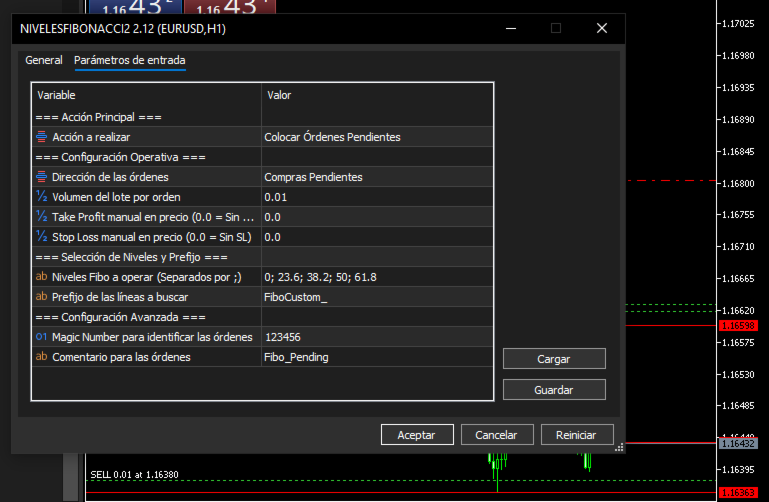
El usuario configura:

  • Dirección de las órdenes: BUY o SELL.

  • Tamaño del lote.

  • Take Profit opcional.

  • Stop Loss opcional.

  • Niveles Fibonacci que desea operar.

  • Prefijo utilizado para identificar las líneas.

  • Magic Number.

  • Comentario de las órdenes.

El script busca en el gráfico las líneas cuyo nombre comience por el prefijo indicado en:

InpPrefix

Por defecto:

FiboCustom_

Por ejemplo, si el primer script ha creado:

FiboCustom_0.0 FiboCustom_23.6 FiboCustom_38.2 FiboCustom_50.0 FiboCustom_61.8 FiboCustom_100.0 FiboCustom_161.8

el segundo script puede seleccionar únicamente los niveles que se desean utilizar.

Ejemplo:

InpTargetLevels = "0; 23.6; 38.2; 61.8"

Los demás niveles serán ignorados.

Determinación automática del tipo de orden

El tipo de orden pendiente se determina automáticamente en función de la dirección seleccionada y de la posición del nivel respecto al precio actual del mercado.

Órdenes BUY

Si se selecciona:

DIR_BUY

el script utiliza:

Buy Limit

Cuando el precio de la línea está por debajo del precio Ask actual.

Precio línea < Ask

Se coloca una:

BUY LIMIT

Buy Stop

Cuando el precio de la línea está por encima del precio Ask actual.

Precio línea > Ask

Se coloca una:

BUY STOP

Órdenes SELL

Si se selecciona:

DIR_SELL

el script utiliza:

Sell Limit

Cuando el precio de la línea está por encima del precio Bid actual.

Precio línea > Bid

Se coloca una:

SELL LIMIT

Sell Stop

Cuando el precio de la línea está por debajo del precio Bid actual.

Precio línea < Bid

Se coloca una:

SELL STOP

De esta forma, el usuario no necesita seleccionar manualmente entre Limit y Stop. El script determina automáticamente el tipo de orden según la posición del nivel Fibonacci respecto al mercado.

Ejemplo de funcionamiento

Supongamos que el gráfico contiene las siguientes líneas:

FiboCustom_0.0 FiboCustom_23.6 FiboCustom_38.2 FiboCustom_50.0 FiboCustom_61.8 FiboCustom_100.0

Y el usuario configura:

Dirección: BUY
Lote: 0.01
Niveles: 0; 23.6; 38.2; 50; 61.8

El script localizará esas líneas, obtendrá sus precios y decidirá automáticamente si cada una corresponde a una Buy Limit o una Buy Stop dependiendo del precio Ask actual.

Por tanto, un mismo conjunto de niveles Fibonacci puede generar diferentes tipos de órdenes dependiendo de dónde se encuentre actualmente el mercado.

Take Profit y Stop Loss

El script permite introducir opcionalmente un precio de Take Profit y Stop Loss.

Sin Take Profit

InpTakeProfit = 0.0

No se establece TP.

Sin Stop Loss

InpStopLoss = 0.0

No se establece SL.

Cuando se introduce un precio superior a 0.0 , el valor se normaliza automáticamente utilizando los decimales del símbolo:

_Digits

Esto permite adaptar los precios a instrumentos con diferentes cantidades de decimales.

Selección de niveles

Los niveles se introducen mediante:

InpTargetLevels

separados por ; .

Por ejemplo:

0; 23.6; 38.2; 50; 61.8

También pueden utilizarse niveles superiores a 100% o niveles negativos, siempre que las correspondientes líneas existan en el gráfico.

Por ejemplo:

-61.8; 0; 23.6; 38.2; 50; 61.8; 100; 161.8; 261.8; 423.6

El script solamente operará los niveles seleccionados que encuentre mediante el prefijo configurado.

Identificación mediante prefijo

El parámetro:

InpPrefix

permite determinar qué objetos del gráfico serán considerados.

Valor predeterminado:

FiboCustom_

Por ejemplo:

FiboCustom_23.6 FiboCustom_50.0 FiboCustom_61.8

serán reconocidos.

Esta característica permite mantener separadas las líneas utilizadas por esta herramienta de otros objetos existentes en el gráfico.

Magic Number

El parámetro:

InpMagicNumber

permite identificar las órdenes creadas por el script.

Valor predeterminado:

123456

El Magic Number resulta especialmente útil para diferenciar estas órdenes de otras órdenes pendientes que puedan existir en la misma cuenta.

Comentario de las órdenes

El parámetro:

InpOrderComment

permite establecer el comentario asociado a las órdenes.

Valor predeterminado:

Fibo_Pending

Esto facilita su identificación dentro de MetaTrader 5.

Cancelación de órdenes pendientes

El parámetro:

InpAction

permite seleccionar entre dos acciones.

ACTION_PLACE

Coloca las órdenes pendientes correspondientes a los niveles seleccionados.

ACTION_DELETE

Cancela las órdenes pendientes que cumplan simultáneamente estas condiciones:

  • Pertenecen al símbolo actual.

  • Tienen el Magic Number indicado en InpMagicNumber .

Esto permite eliminar las órdenes pendientes gestionadas por este script sin afectar a las órdenes pertenecientes a otros símbolos o Magic Numbers.

Relación con NIVELESFIBONACCI1.1

Los dos scripts pueden utilizarse como un sistema de dos etapas:

NIVELESFIBONACCI1.1 ↓ Calcula los precios Fibonacci ↓ Dibuja las líneas horizontales ↓ NIVELESFIBONACCI2.12 ↓ Lee las líneas por prefijo ↓ Selecciona los niveles indicados ↓ Obtiene sus precios ↓ Determina automáticamente Limit / Stop ↓ Coloca las órdenes pendientes

Por ejemplo:

Primera herramienta

Punto A → 1.16594 = 100%
Punto B → 1.16363 = 423.6%

La primera herramienta calcula los precios correspondientes a:

0% 23.6% 38.2% 50% 61.8% 100% 161.8% 261.8% 423.6%

y los dibuja en el gráfico.

Posteriormente, la segunda herramienta puede seleccionar, por ejemplo:

23.6; 38.2; 50; 61.8

y colocar las órdenes pendientes directamente sobre esos precios.

Características principales
  • Colocación masiva de órdenes pendientes sobre niveles Fibonacci.

  • Compatible con niveles Fibonacci personalizados.

  • Selección independiente de los niveles que se desean operar.

  • Soporte para órdenes Buy Limit.

  • Soporte para órdenes Buy Stop.

  • Soporte para órdenes Sell Limit.

  • Soporte para órdenes Sell Stop.

  • Determinación automática del tipo de orden según el precio actual.

  • Lectura de las líneas mediante un prefijo configurable.

  • Compatible con diferentes números de decimales mediante _Digits .

  • Normalización automática de los precios.

  • Take Profit opcional.

  • Stop Loss opcional.

  • Magic Number configurable.

  • Comentario de órdenes configurable.

  • Función para cancelar las órdenes pendientes gestionadas por el Magic Number.

  • No requiere indicadores externos.

  • No requiere DLL.

Importante

Este script no calcula los niveles Fibonacci por sí mismo.

Utiliza los precios de las líneas horizontales existentes en el gráfico como niveles de entrada para las órdenes pendientes.

Para utilizarlo conjuntamente con NIVELESFIBONACCI1.1, ambos scripts deben utilizar el mismo prefijo, por defecto:

FiboCustom_

El script tampoco genera señales de compra o venta mediante análisis técnico. La dirección de las órdenes ( BUY o SELL ) es seleccionada manualmente por el usuario.

La colocación de órdenes implica riesgo financiero. El comportamiento final de una orden pendiente también depende de las condiciones de mercado, las reglas del bróker, la distancia mínima de órdenes, volumen permitido, stops level y demás restricciones del símbolo.

Versión: 2.12
Plataforma: MetaTrader 5
Tipo: Script
Autor: SPC


//+------------------------------------------------------------------+

//|                                        NIVELESFIBONACCI2.12.mq5 |

//|                                                              SPC |

//|                       https://www.mql5.com/es/users/calimero1166 |

//+------------------------------------------------------------------+

#property copyright "SPC"

#property link      "https://www.mql5.com/es/users/calimero1166"

#property version   "2.12"

#property description "Script para la colocación masiva o cancelación selectiva de órdenes pendientes (Limit/Stop) según niveles Fibonacci trazados por prefijo."

#property script_show_inputs


#include <Trade\Trade.mqh>


//--- Enumeración para la acción principal del script

enum ENUM_SCRIPT_ACTION

  {

   ACTION_PLACE  = 0, // Colocar Órdenes Pendientes

   ACTION_DELETE = 1  // Cancelar Órdenes Pendientes

  };


//--- Enumeración para la dirección de las órdenes

enum ENUM_ORDER_DIRECTION

  {

   DIR_BUY  = 0, // Compras Pendientes

   DIR_SELL = 1  // Ventas Pendientes

  };


//--- Parámetros de Entrada

input group "=== Acción Principal ==="

input ENUM_SCRIPT_ACTION InpAction       = ACTION_PLACE; // Acción a realizar


input group "=== Configuración Operativa ==="

input ENUM_ORDER_DIRECTION InpDirection   = DIR_BUY;      // Dirección de las órdenes

input double               InpLotSize     = 0.01;         // Volumen del lote por orden

input double               InpTakeProfit  = 0.0;          // Take Profit manual en precio (0.0 = Sin TP)

input double               InpStopLoss    = 0.0;          // Stop Loss manual en precio (0.0 = Sin SL)


input group "=== Selección de Niveles y Prefijo ==="

input string               InpTargetLevels = "0; 23.6; 38.2; 50; 61.8"; // Niveles Fibo a operar (Separados por ;)

input string               InpPrefix       = "FiboCustom_";             // Prefijo de las líneas a buscar


input group "=== Configuración Avanzada ==="

input ulong                InpMagicNumber  = 123456;       // Magic Number para identificar las órdenes

input string               InpOrderComment = "Fibo_Pending"; // Comentario para las órdenes


//+------------------------------------------------------------------+

//| Script program start function                                    |

//+------------------------------------------------------------------+

void OnStart()

  {

   CTrade trade;

   trade.SetExpertMagicNumber(InpMagicNumber);


   // --- MODO 1: CANCELAR ÓRDENES PENDIENTES ---

   if(InpAction == ACTION_DELETE)

     {

      int deletedCount = DeletePendingOrders(trade, InpMagicNumber);

      PrintFormat("NIVELESFIBONACCI2.12 (v2.12): Se han eliminado %d órdenes pendientes con Magic %d en %s.", deletedCount, InpMagicNumber, _Symbol);

      return;

     }


   // --- MODO 2: COLOCAR ÓRDENES PENDIENTES ---

   // 1. Procesar el texto de niveles a buscar

   double targetLevels[];

   ushort u_sep = StringGetCharacter(";", 0);

   string rawLevels[];

   int totalSplit = StringSplit(InpTargetLevels, u_sep, rawLevels);


   if(totalSplit <= 0)

     {

      Print("Error: No se especificaron niveles válidos en InpTargetLevels.");

      return;

     }


   ArrayResize(targetLevels, totalSplit);

   int validLevelsCount = 0;


   for(int i = 0; i < totalSplit; i++)

     {

      string trimmed = rawLevels[i];

      StringTrimLeft(trimmed);

      StringTrimRight(trimmed);


      if(StringLen(trimmed) > 0)

        {

         double val = StringToDouble(trimmed);

         if(val == 0.0 && trimmed != "0" && trimmed != "0.0" && trimmed != "0,0")

           {

            continue;

           }

         targetLevels[validLevelsCount] = val;

         validLevelsCount++;

        }

     }


   if(validLevelsCount == 0)

     {

      Print("Error: No se pudieron interpretar los niveles de Fibonacci especificados.");

      return;

     }


   // 2. Obtener precios de mercado actuales

   double ask = SymbolInfoDouble(_Symbol, SYMBOL_ASK);

   double bid = SymbolInfoDouble(_Symbol, SYMBOL_BID);


   if(ask <= 0 || bid <= 0)

     {

      Print("Error: No se pudieron obtener los precios de cotización actuales.");

      return;

     }


   // 3. Buscar objetos con el prefijo en el gráfico

   int totalObjects = ObjectsTotal(0, -1, -1);

   int ordersPlaced = 0;


   for(int i = 0; i < totalObjects; i++)

     {

      string objName = ObjectName(0, i, -1);


      // Verificar si el objeto coincide con el prefijo

      if(StringFind(objName, InpPrefix) == 0)

        {

         // Extraer el nivel numérico del objeto

         string levelStr = StringSubstr(objName, StringLen(InpPrefix));

         double objLevel = StringToDouble(levelStr);


         // Verificar si el nivel de la línea está en nuestra lista seleccionada

         if(!IsLevelSelected(objLevel, targetLevels, validLevelsCount))

            continue;


         double linePrice = ObjectGetDouble(0, objName, OBJPROP_PRICE);

         linePrice = NormalizeDouble(linePrice, _Digits);


         if(linePrice <= 0)

            continue;


         // Normalizar TP y SL si están configurados

         double tp = (InpTakeProfit > 0) ? NormalizeDouble(InpTakeProfit, _Digits) : 0.0;

         double sl = (InpStopLoss > 0)   ? NormalizeDouble(InpStopLoss, _Digits)   : 0.0;


         // 4. Determinar tipo de orden y enviar

         if(InpDirection == DIR_BUY)

           {

            if(linePrice < ask)

              {

               if(trade.BuyLimit(InpLotSize, linePrice, _Symbol, sl, tp, ORDER_TIME_GTC, 0, InpOrderComment))

                 {

                  PrintFormat("Buy Limit colocada en el nivel %.1f%% al precio %.*f", objLevel, _Digits, linePrice);

                  ordersPlaced++;

                 }

               else

                 {

                  PrintFormat("Error al colocar Buy Limit en %.1f%%: %s", objLevel, trade.ResultComment());

                 }

              }

            else if(linePrice > ask)

              {

               if(trade.BuyStop(InpLotSize, linePrice, _Symbol, sl, tp, ORDER_TIME_GTC, 0, InpOrderComment))

                 {

                  PrintFormat("Buy Stop colocada en el nivel %.1f%% al precio %.*f", objLevel, _Digits, linePrice);

                  ordersPlaced++;

                 }

               else

                 {

                  PrintFormat("Error al colocar Buy Stop en %.1f%%: %s", objLevel, trade.ResultComment());

                 }

              }

           }

         else // DIR_SELL

           {

            if(linePrice > bid)

              {

               if(trade.SellLimit(InpLotSize, linePrice, _Symbol, sl, tp, ORDER_TIME_GTC, 0, InpOrderComment))

                 {

                  PrintFormat("Sell Limit colocada en el nivel %.1f%% al precio %.*f", objLevel, _Digits, linePrice);

                  ordersPlaced++;

                 }

               else

                 {

                  PrintFormat("Error al colocar Sell Limit en %.1f%%: %s", objLevel, trade.ResultComment());

                 }

              }

            else if(linePrice < bid)

              {

               if(trade.SellStop(InpLotSize, linePrice, _Symbol, sl, tp, ORDER_TIME_GTC, 0, InpOrderComment))

                 {

                  PrintFormat("Sell Stop colocada en el nivel %.1f%% al precio %.*f", objLevel, _Digits, linePrice);

                  ordersPlaced++;

                 }

               else

                 {

                  PrintFormat("Error al colocar Sell Stop en %.1f%%: %s", objLevel, trade.ResultComment());

                 }

              }

           }

        }

     }


   PrintFormat("NIVELESFIBONACCI2.12 (v2.12): Proceso finalizado. Total de órdenes colocadas: %d", ordersPlaced);

  }


//+------------------------------------------------------------------+

//| Función auxiliar para comprobar si un nivel pertenece a la lista |

//+------------------------------------------------------------------+

bool IsLevelSelected(double level, const double &selectedLevels[], int count)

  {

   for(int i = 0; i < count; i++)

     {

      if(MathAbs(level - selectedLevels[i]) < 0.01)

         return true;

     }

   return false;

  }


//+------------------------------------------------------------------+

//| Función auxiliar para borrar las órdenes pendientes por Magic   |

//+------------------------------------------------------------------+

int DeletePendingOrders(CTrade &trade, ulong magic)

  {

   int deleted = 0;

   int totalOrders = OrdersTotal();


   // Recorremos las órdenes en orden inverso para evitar desajustes de índice

   for(int i = totalOrders - 1; i >= 0; i--)

     {

      ulong ticket = OrderGetTicket(i);

      if(ticket > 0)

        {

         if(OrderGetString(ORDER_SYMBOL) == _Symbol && OrderGetInteger(ORDER_MAGIC) == magic)

           {

            if(trade.OrderDelete(ticket))

               deleted++;

            else

               PrintFormat("Error al borrar la orden #%d: %s", ticket, trade.ResultComment());

           }

        }

     }

   return deleted;

  }

//+------------------------------------------------------------------+

Önerilen ürünler
Free automatic Fibonacci is an indicator that automatically plots a Fibonacci retracement based on the number of bars you select on the BarsToScan setting in the indicator. The Fibonacci is automatically updated in real time as new highest and lowest values appears amongst the selected bars. You can select which level values to be displayed in the indicator settings. You can also select the color of the levels thus enabling the trader to be able to attach the indicator several times with differe
FREE
Gold Session Levels Pro MT5 is a manual MetaTrader 5 indicator designed to display relevant intraday reference levels for XAUUSD. The indicator automatically calculates and draws the Asian range, its midpoint, the daily open, the London and New York opens, the previous trading day's high and low, and targets derived from the size of the Asian range. FEATURES - Dynamic Asian range while the configured session is active. - Range freezing after the configured Asian session close. - Asian range
FREE
Automatic fibonacci with alerts is an indicator that automatically plots a fibonacci retracement based on the number of bars you select on the BarsToScan setting in the indicator. The fibonacci is automatically updated in real time as new highest and lowest values appear amongst the selected bars. You can select which level values to be displayed in the indicator settings. You can also select the color of the levels thus enabling the trader to be able to attach the indicator several times with d
FREE
Fibo Trader FREE MT5
Grzegorz Korycki
3 (3)
Fibo Trader is an expert advisor that allows you to create automated presets for oscillation patterns in reference to Fibonacci retracements values using fully automated and dynamically created grid. The process is achieved by first optimizing the EA, then running it on automated mode. EA allows you to switch between automatic and manual mode. When in manual mode the user will use a graphical panel that allows to manage the current trading conditions, or to take control in any moment to trade ma
FREE
ZigZag WaveSize MT4'ün önceki sürümünün geliştirilmesi  ZigZag WaveSize MT4 ZigZag WaveSize -  noktalar cinsinden dalga uzunluğu bilgisi, seviyeler ve farklı uyarı mantığı eklenmiş değiştirilmiş standart ZigZag göstergesi Genel İyileştirmeler: MetaTrader 5 için kod uyarlaması Grafik nesneleriyle çalışmanın optimize edilmesi Yeni Özellikler: Ekstremumlarda yatay seviyeler Seviye tipi seçimi: yatay/ışınlar/bölümler Likid seviyeler filtresi (fiyat tarafından test edilmemiş) Kırılma için tampon: y
FREE
The jcoworld OTE EA is an automated trading bot for MetaTrader 5 built on Smart Money Concepts (SMC) . It accurately identifies market impulse moves and automatically enters trades within the Optimal Trade Entry (OTE) zone (61.8% – 79.0% Fibonacci) as soon as a confirmation candle closes. Optimized for: XAUEUR, XAUUSD, and Major Forex Pairs Features: Automatic risk management, dynamic lot sizing & automated Stop Loss/Take Profit. Try for free: This demo version is 100% free! Pricing Plans for Fu
FREE
How the day starts
Sergio Antoni Escudero Tirado
This indicator draws the high intraday price and the low intraday price of the first n minutes of the day. The chart shows the days with vertical lines and two horizontal lines to indicate the max and the min close price of the n first minutes of the day. The max/min lines start and end with the day calculated. With this indicator you can see how starts the day compared with the previous days. It is valid for any market inasmuch as the start time is calculated with the data received. Parameter
FREE
MultiTimeframe Trend Pro shows you the market direction across 7 timeframes at a glance. Clear colors, no repainting, fully customizable. Perfect as a quick filter for any intraday or swing strategy. Key Features Supports M1, M5, M15, H1, H4, D1 and W1 Colors MediumSeaGreen when the close is above the MA, and Red when below No repainting → always based on the last closed candle for each timeframe Fully customizable: MA period (200 by default) font, size and colors X/Y offsets, spacing
FREE
Fibonacci Moving Averages
Brendan Jonathan Stoyanowski-campbell
2 (1)
OVERVIEW The Fibonacci Moving Averages are a toolkit which allows the user to configure different types of Moving Averages based on key Fibonacci numbers. Moving Averages are used to visualise short-term and long-term support and resistance which can be used as a signal where price might continue or retrace. Moving Averages serve as a simple yet powerful tool that can help traders in their decision-making and help foster a sense of where the price might be moving next. The aim of this scrip
FREE
Price Ray
Keni Chetankumar Gajanan -
5 (7)
Price Ray indicator is a utility that will improve the way you trade. Primarily, it shows the Bid, Ask or Last price as a line ray which beams till the current candle, last visible chart candle or extended to all candle bars. The enhanced features in this indicator provide information in an area where you focus most, right next to the current candle. You can select text to be shown above or below the Price ray. The indicator is fully customizable, allowing it to fit any strategy requirements. Th
FREE
AP Fibonacci Retracement PRO (MT5) Overview AP Fibonacci Retracement PRO is a trend-continuation pullback EA. It waits for a confirmed swing, calculates the Fibonacci retracement zone, and looks for entries in the direction of the original move. No grid, no martingale. Strategy logic Detects the last valid swing high/low using Fractals on the selected signal timeframe. Calculates the retracement zone between 38.2% and 61.8% (configurable). On a closed bar, if price is inside the zone (with opti
FREE
MT4 Version Most indicators draw lines. This one draws the battlefield. If you ever bought an EA or indicator based on a perfect equity curve — and then watched it bleed out live — you’re not alone. The problem? Static logic in a dynamic market. Fibonacci Bollinger Bands   adapts. It combines Bollinger structure with customizable Fibonacci levels to mark   zones of control   — where price reacts, pauses, or reverses. No magic. Just logic that follows volatility. Why this tool matters   It
FREE
FibRetrace Zones Son Salınımın Fibonacci Düzeltme Bölgeleri FibRetrace Zones, FibRetrace Uzman Danışmanının ücretsiz görsel yardımcısıdır. Fibonacci düzeltme seviyelerini çizer ve son salınımdaki geri çekilme bölgesini vurgular; böylece işlem yapmadan önce giriş noktalarının nerede olduğunu görürsünüz. Bölge yöne göre renklendirilir: yükseliş kurulumları için yeşil, düşüş kurulumları için kırmızı. Her sembolde ve her zaman diliminde çalışır. TEMEL ÖZELLİKLER Ayarlanabilir geriye bakış ile otomat
FREE
The   Pivot Point indicator   automatically calculates and displays the pivot point line and support and resistance levels. Pivot can be calculated according to the Classic, Floor, Fibonacci, Woodie, Camarilla or DeMark formula. It is also possible to select the period for calculating the indicator. A trader can choose from daily, weekly, monthly, or user-defined periods. Types of pivots Classic Floor Fibonacci Woodie Camarilla DeMark Main features The indicator shows the current and historic
FREE
Auto Fib Retracements
Ross Adam Langlands Nelson
4.2 (5)
Automatic Fibonacci Retracement Line Indicator. This indicator takes the current trend and if possible draws Fibonacci retracement lines from the swing until the current price. The Fibonacci levels used are: 0%, 23.6%, 38.2%, 50%, 61.8%, 76.4%, 100%. This indicator works for all charts over all timeframes. The Fibonacci levels are also recorded in buffers for use by other trading bots. Any comments, concerns or additional feature requirements are welcome and will be addressed promptly. 
FREE
Babel Assistant
Iurii Bazhanov
4.33 (9)
Babel assistant 1 MT5 netleştirme (netting) robotu "Babel_assistant_1", M1, M5, M15, H1, H4, D1 ve W1 zaman dilimlerinde Fibonacci seviyeleri oluşturmak için ZigZag göstergesini kullanır ve alım ile satım trendlerinin gücünü hesaplar. Belirtilen 4,925 trend seviyesi aşılırsa, "Lot for open a position" ayarını kullanarak bir pozisyon açar. Ardından Babel, belirli Fibonacci seviyelerinde bekleyen emirler (pending orders) yerleştirir ve belirtilen Stop Loss (Zarar Durdur) ile Take Profit (Kâr Al) ç
FREE
Trend Catcher EA Pro MT5
Issam Kassas
4.43 (42)
Trend Catcher EA Pro, MetaTrader 5 üzerinde otomatik işlemleri grafik üzerindeki manuel kontrollerle birleştirir. İşlemler ve pozisyon yönetimi yapılandırılmış kurallara göre yürütülür. Gerçekleşme; piyasa koşullarına, broker kurallarına ve bağlantı kalitesine bağlıdır. Ürün soruları, kurulum rehberliği veya teknik destek için bana doğrudan MQL5 üzerinden mesaj gönderin. Temel Stratejiler: EA içinde iki işlem modu bulunmaktadır: I. Smart Trend Mode aynı anda yalnızca bir yönde işlem yapar. II. D
FREE
A ready-made multitimeframe trading system based on automatic plotting and tracking of Fibonacci levels for buying and selling any symbol. Demo version - calculation of the last 390 bars is not performed. Advantages Determines the trend direction based on a complex of 14 indicators ( Cx ), extremums of ZigZag ( Z ), RSI ( R ), Impulse ( I ) Displaying the values of 14 indicators comprising the trend direction ( Cx ) Plotting horizontal levels, support and resistance lines, channels View the plo
FREE
LZ Auto Fibo Retracement automatically detects the most significant swing highs and lows on your chart and instantly draws accurate Fibonacci retracement levels between them. Stop drawing Fibs manually—let the indicator do it for you dynamically as the market evolves. Feature highlights - Auto Swing Detection: identifies the most relevant market extremes based on a configurable swing period and lookback range. - Dynamic Updates: the Fibonacci levels automatically adjust to new highs and lows
FREE
Session High Low Boxes
Shanawaz Mohammed Nabi Rasool Pinjori
Session High Low draws the Asian, London and New York sessions on your chart as colored boxes, with the high and low of each session. Optional extension lines continue the session high and low after the session ends, which is useful for breakout and retest trading. Features Asian, London and New York boxes, each can be turned on or off Session high and low prices shown as labels Extension lines after the session end (hours adjustable, 0 = off) Ranges are built from M5 data, so the boxes are the
FREE
Strategy: This is a Guard for your account in case the Margin Call of the Account is called. The most brokers have Margin Call at Margin Level of 100%. If account Margin Level is below TriggerMarginLevelPercent (100%), the EA checks all open account positions. For every non-hedge position it opens one reverse position with the same symbol and same volume. After that it will remove itself from the Chart IMPORTANT: CHECK this manually on the Account before using this EA. Only some Broker offer t
FREE
This indicator automatically identifies liquidity levels using swing fractals and tracks when price sweeps through them. Works on any symbol and timeframe with full multi-timeframe support. Features: — Detects swing highs and lows via a fractal method (configurable bars left & right) on a selected timeframe. Active levels are displayed as rays extending to the right; swept levels turn into dashed lines ending at the sweep candle. — Plots Previous Day (PDhigh / PDlow), Previous Week (PWhigh / PWl
FREE
CloseAll MT5
Mr Sorachai Pitakjarukul
4.5 (2)
ขอบคุณ แรงบันดาลใจ จากโค้ชแพม ที่ทำให้เริ่มทำ    Close all ตัวนี้  และขอขอบคุณทุกคนที่ให้ความรู็มาโดยตลอด ไม่ว่าจะทางตรงทางอ้อม ขอบคุณทุกคนที่ให้ความรู้เพื่อนร่วมเทรด ทั้งนี้เพื่อให้นักเทรดทุกคนได้มีเครื่องมือในการควบคุมการปิดการซื้อขาย จึงขอพัฒนาโปรแกรม close all version 5 ได้ใช้ทุกคน  Close all and update profit Version 1.00 (MT5) Full version Give you free  For MT4 Click  https://www.mql5.com/en/market/product/79252 Fix TPSL calculate  Program function Tab 1 Close order function and show br
FREE
Pivot Points are used by Forex traders to find support and resistance levels based on the previous day's price action. There are various ways to calculate pivot points, including averaging the open, high, low, and close of the previous day's chart price. Forex Traders use a combination of pivot points with moving averages to find trading opportunities in the currency markets. Pivot points are very useful tools that use the previous bars' highs, lows and closings to project support and resist
FREE
It predicts the most likely short-term price movement based on advanced mathematical calculations. Features Estimation of immediate price movement; Calculation of the real market trend; Calculation of the most important support and resistance levels; Algorithms optimized for making complex mathematical calculations with a minimal drain of system resources; Self-adjusting for better performance, so it’s able to work properly at any symbol (no matter how exotic it is) and any timeframe; Compatibl
FREE
Haven Key Levels PDH PDL
Maksim Tarutin
4.92 (12)
"Haven Key Levels PDH PDL"   göstergesi, yatırımcıların grafikteki kilit seviyeleri görselleştirmesine yardımcı olur. Aşağıdaki seviyeleri otomatik olarak işaretler: DO (Daily Open)   — Günlük Açılış seviyesi. NYM (New York Midnight)   — New York Gece Yarısı seviyesi. PDH (Previous Day High)   — Önceki Günün En Yüksek seviyesi. PDL (Previous Day Low)   — Önceki Günün En Düşük seviyesi. WO (Weekly Open)   — Haftalık Açılış seviyesi. MO (Monthly Open)   — Aylık Açılış seviyesi. PWH (Previous Week
FREE
Try Before You Buy: You can download and test the Multi Tp Ladder  free demo version  on a demo account before purchasing. For MetaTrader 5: Download:   MultiTP ladder     How to install the trial: Download the       MultiTP ladder     file above. In MetaTrader:   File → Open Data Folder →   MQL5/Experts Paste the trial file into that folder, then   restart MetaTrader . The trial is fully functional for 12  hours per demo account . To reset the trial period   (demo accounts only): MetaTrader →
Introducing a powerful MetaTrader 5 Expert Advisor designed to enhance your trading strategy – the Auto Breakeven EA! This feature-rich EA is tailored to bring your stop-loss to breakeven, ensuring a risk-free trade once the market moves in your favor up to a specified price. Explore the full potential of the Auto Breakeven EA. Download it for free now, and find the download link at the bottom of our page. Elevate your trading experience and take control of your risk management strategy. Happy
FREE
This Expert Advisor provides an advanced on-chart trading panel designed for discretionary traders. It simplifies position sizing, risk management, and trade execution directly from the chart without manual calculations. Key Features  On-chart trading panel  Fixed lot and balance percentage risk mode  Risk-based lot calculation using stop loss  Market and pending order execution  Partial close management  Break-even automation  Trailing stop control  Equity protection system  Daily loss lock  S
FREE
1. Overview The ATR Dynamic Stop (CE) is a powerful technical indicator designed to help traders identify and follow market trends. Its core function is to provide a dynamic trailing stop-loss based on price volatility, as measured by the Average True Range (ATR) indicator. The main objectives of the ATR Dynamic Stop are: Profit Optimization: It helps you ride a strong trend by setting a reasonable stop-loss, preventing premature exits due to minor market noise and fluctuations. Risk Management:
FREE
Bu ürünün alıcıları ayrıca şunları da satın alıyor
Trade Assistant MT5
Evgeniy Kravchenko
4.43 (216)
It helps to calculate the risk per trade, the easy installation of a new order, order management with partial closing functions, trailing stop of 7 types and other useful functions. Additional materials and instructions Installation instructions - Application instructions - Trial version of the application for a demo account Line function -   shows on the chart the Opening line, Stop Loss, Take Profit. With this function it is easy to set a new order and see its additional characteristics bef
Trade Manager EA’ye hoş geldiniz! Ticaretin daha sezgisel, hassas ve verimli hale gelmesi için tasarlanmış nihai risk yönetim aracı ile tanışın. Bu sadece bir emir verme aracı değil; ticaret planlaması, pozisyon yönetimi ve risk kontrolü için kapsamlı bir çözüm. İster yeni başlayan bir yatırımcı olun, ister deneyimli bir trader ya da hızlı emir gerektiren bir scalper, Trade Manager EA ihtiyaçlarınıza uyum sağlar ve forex, endeksler, emtialar ve kripto paralar dahil tüm piyasalarda esneklik sunar
Local Trade Copier EA MT5
Juvenille Emperor Limited
4.94 (149)
Local Trade Copier EA MT5, aynı Windows bilgisayarı veya Windows VPS üzerinde çalışan birden fazla MetaTrader 5 hesabı arasında işlemleri kopyalamak ve yönetmek için hızlı ve esnek bir işlem kopyalayıcıdır. Yerel işlem senkronizasyonunu, Receiver tarafında lot büyüklüğü, risk yönetimi, işlem filtreleme, sembol eşleştirme, işlem yönetimi ve hesap koruması kontrolleriyle birleştirir. Transmitter ve Receiver terminallerinizi yaklaşık 1 dakika içinde ayarlayın ve aynı veya farklı brokerlardaki hesa
Telegram to MT5 Multi-Channel Copier   , Telegram ve Discord kanallarınızdaki alım-satım sinyallerini doğrudan MetaTrader 5'e otomatik kopyalar. Bot yok, tarayıcı uzantısı yok, elle kopyalama yok. Sinyal Telegram'a veya Discord'a düşer ve EA birkaç saniye içinde terminalinizde işlemi açar. Ve bir kanalı kopyalamadan önce, yerleşik backtester o kanalın hesabınızda ne yapmış olacağını gösterir. Ürün iki bileşenden oluşur: Telegram kanallarınızı dinleyen bir Windows uygulaması ve sinyalleri MT5 ter
================================================================================ POC BREAKOUT - V20.72. Full Professional Grade Toolkit ================================================================================ POC Breakout is a full MetaTrader 5 trading dashboard for discretionary traders who want breakout signals, Point of Control (POC) context, volume profiles, order flow, market structure, news, alerts, and advanced trade planning in one professional workspace. Attached directly to you
Strategy Ledger Pro
Abdullah Uygar Tuna
5 (11)
Şimdi Türkçe dil desteği ile. Strategy Ledger Pro , MetaTrader 5 için salt okunur bir hesap analiz panelidir. Hesap sonuçlarını Uzman Danışman (EA), strateji, sembol ve magic numaraya göre ayırır; böylece her birinin gerçekte ne kattığını görürsünüz. Panel 11 dilde kullanılabilir: English, Français, Deutsch, Español, Italiano, Português, Русский, Türkçe, 中文, 日本語 ve 한국어. Demoyu indirmeden önce. Market, her ücretli ürünün demosunu yalnızca Strateji Test Cihazında çalıştırır. Bu panel kendi hesabı
The Patch It never opens a trade. It walks behind the ones that did. Every open position, every pending order — checked twice a second for the one thing that's easy to forget: a stop, a target. Found bare, it doesn't ask. It writes the missing number in, measured in points from wherever the position began, and moves on to the next. No strategy, no opinion on direction. Just the quiet assumption that nothing should ever sit on the market unprotected — not because someone decided it shouldn't,
TradePanel MT5
Alfiya Fazylova
4.88 (170)
Trade Panel, çok işlevli bir ticaret asistanıdır. Uygulama, manuel ticaret için 50'den fazla ticaret fonksiyonu içerir ve çoğu ticaret görevini otomatikleştirmeyi mümkün kılar. Uygulama talimatları: https://www.mql5.com/en/blogs/post/756482 Demo hesabı için uygulamanın deneme sürümü: https://www.mql5.com/en/blogs/post/750865 Uygulamayı nasıl kurulur: https://www.mql5.com/en/blogs/post/756239 Uygulamayı görsel modda nasıl test edilir: https://www.mql5.com/en/blogs/post/770277 Uygulamayı VPS MetaT
Floor Watch
Syed Tauqeer Hussain Shah
Floor Watch One number, watched every thirty seconds: how far equity has fallen since the day began — or since its highest point, if it's told to trail the peak instead of the open. Cross the line and it doesn't argue. Every open position closes, every pending order vanishes, and anything that slips through afterward gets shut the moment it appears. Not asked. Removed. The floor holds until the clock turns 5 AM Pakistan time — then, and only then, does the day start over. One rule. No except
Telegram sinyallerini kendi işlem kurallarınızla kopyalayın Telegram to MT5 Signal Trader , herkese açık ve özel Telegram kanallarındaki ve gruplarındaki metin tabanlı işlem sinyallerini otomatik olarak MetaTrader 5'e kopyalar. Tek bir masaüstü uygulamasından birden fazla sinyal sağlayıcısını ve MT5 hesabını yönetin; her sağlayıcı için ayrı risk ve işlem ayarları belirleyin. Sinyal kopyalamak için Telegram botu veya API kurulumu gerekmez. Kendi Telegram hesabınızla telefon numarası veya QR kod k
Power Candles Strateji Tarayıcısı - Kendi Kendini Optimize Eden Çoklu Sembol Kurulum Bulucu Power Candles Strateji Tarayıcısı , Power Candles göstergesini çalıştıran aynı kendinden optimize edici motoru, Piyasa İzleyicinizdeki her sembol üzerinde yan yana çalıştırır. Tek bir panel, şu anda istatistiksel olarak hangi sembollerin işlem yapılabilir olduğunu, her birinde hangi stratejinin kazandığını, en uygun Stop Loss / Take Profit çiftini gösterir ve yeni bir sinyal geldiği anda size bildirim gön
Welcome to ENTRY IN THE ZONE with SMC MULTI TIMEFRAME SPECIAL BENEFIT / FOR OUR MQL5 CUSTOMERS FREE ACCESS TO THE NEW TOOL  — COMING SOON — Learn more on our official website  : https://www.fableedge.net YouTube Channel : 24/7 LIVE SIGNALS  :   https://www.youtube.com/@FableEdgeView Entry In The Zone with SMC Multi Timeframe is a real-time market analysis tool based on Smart Money Concepts (SMC), designed to analyze market structure, price direction, and key trading zones. It supports both Sing
Grid Manual MT5
Alfiya Fazylova
4.73 (22)
Grid Manual, sipariş ızgarasıyla çalışmak için kullanılan bir ticaret yardımcı programıdır. Yardımcı program evrenseldir, esnek ayarlara ve sezgisel bir arayüze sahiptir. Sadece kayıpların ortalaması yönünde değil, aynı zamanda kazanç artışı yönünde de bir emir ızgarası ile çalışır. Tüccarın bir emir ızgarası oluşturmasına ve eşlik etmesine gerek yoktur, bu yardımcı programı yapacaktır. Emri açmanız yeterlidir ve Grid manual otomatik olarak ona bir emir ızgarası oluşturacak ve kapanana kadar ona
The product will copy all telegram signal to MT5 ( which you are member) , also it can work as remote copier.  Easy to set up, copy order instant, can work with almost signal formats, image signal,  s upport to translate other language to English Work with all type of channel or group, even channel have "Restrict Saving Content", work with  multi channel, multi MT5 Work as remote copier: with signal have ticket number, it will copy exactly via ticket number. Support to backtest signal. How to s
Bir kez satın alın. Şu anda sunulan ve gelecekte yayımlayacağım tüm MT4 ve MT5 göstergelerimi ek ücret ödemeden edinin. Satın aldıktan sonra edinme talimatları için benimle iletişime geçin. Her 10 satın alımdan sonra fiyatın 50$ artırılarak en fazla 999$ olması planlanmaktadır. Ödeme sırasında Market’te görünen fiyat geçerlidir. Güvendiğiniz göstergeyi kullanmaya devam edin. Çevresindeki işleri otomatikleştirin. Sizin sinyaliniz. Sizin kurallarınız. Sizin işlem yürütmeniz. Güvendiğiniz bir MT5
Quant AI Agents are independent trading Expert Advisors. Instead of trading using a fixed strategy like other conventional EAs, Quant AI Agents   is a   multi-agent AI trading framework   that turns natural-language strategy prompts into live.  WANT THE SAME RESULTS AS MY LIVE SIGNAL?   Use the exact same brokers I do:   IC MARKETS , IC TRADING   .  Unlike the centralized stock market, Forex has no single, unified price feed.  Every broker sources liquidity from different providers, creating un
Daily Trading Limiter
AL MOOSAWI ABDULLAH JAFFER BAQER
5 (8)
• Please test the product in the Strategy Tester before purchasing to understand how it works. • If you face any issues, contact me via private message—I’m always available to help. • After purchase, send me a screenshot of your order to receive a FREE EA as a gift. Daily Trading Limiter — the rule you cannot break Every trader knows the number. Three trades. Two percent. One bad day and stop. And every trader has watched themselves take the fourth trade anyway. The problem was never knowing th
VirtualTradePad PRO SE MT5 — MetaTrader 5 için profesyonel işlem kontrol merkezi VirtualTradePad PRO SE , MetaTrader 5 için grafik tabanlı premium bir işlem paneli ve trade yönetim çalışma alanıdır. Daha hızlı emir yürütme, daha net pozisyon kontrolü, yapılandırılmış trade yönetimi, görsel seviye planlama ve doğrudan grafik üzerinden profesyonel bir çalışma akışı isteyen traderlar için tasarlanmıştır. Bu yalnızca basit bir BUY / SELL paneli değildir. PRO SE; manuel işlem, bekleyen emirler, pozis
FUTURES ORDERFLOW FOOTPRINT CHART Professional OrderFlow EA for MetaTrader 5 Version 1.01| Professional tool for real traders | Institutional-Grade Visualization STRATEGY TESTER USERS - PLEASE SELECT EVERY REAL TICK WHEN TESTING AND YOU HAVE DOWNLOADED HISTORICAL DATA. IF YOU SEE A WAITING SCREEN AND IT IS NOT DOWNLOADING, IT MEANS YOU HAVE LOW HISTORICAL DATA. TRY 1 MIN AND 5 MIN FIRST ON 1 DAY DATA. ONE DAY DATA SHOULD BE THE NEWEST AND MOST CURRENT DATE. PLEASE WAIT UNTIL THE MARKET HAS ROL
MT5 to Telegram Signal Provider , hesabınızı bir sinyal sağlayıcı haline getirerek belirtilen sinyalleri Telegram'ın sohbetine, kanalına veya grubuna göndermeyi sağlayan kullanımı kolay, tamamen özelleştirilebilir bir araçtır. Rakip ürünlerin çoğunun aksine, DLL içe aktarması yapmaz. [ Demo ] [ Kılavuz ] [ MT4 Versiyonu ] [ Discord Versiyonu ] [ Telegram Kanalı ]  New: [ Telegram To MT5 ] Kurulum Adım adım bir kullanıcı kılavuzu mevcuttur. Telegram API'si hakkında bilgi gerekmemektedir; ihtiyac
Exp COPYLOT CLIENT for MT5
Vladislav Andruschenko
3.97 (35)
MetaTrader 5 için profesyonel işlem kopyalayıcı MetaTrader için hızlı, profesyonel ve güvenilir bir işlem kopyalayıcı . COPYLOT , MT4 ve MT5 terminalleri arasında Forex işlemlerini kopyalamanıza olanak tanır ve Hedge ile Netting hesaplarını destekler. COPYLOT MT5 sürümü şunları destekler: - MT5 Hedge → MT5 Hedge - MT5 Hedge → MT5 Netting - MT5 Netting → MT5 Hedge - MT5 Netting → MT5 Netting - MT4 → MT5 Hedge - MT4 → MT5 Netting MT4 sürümü Tam açıklama + DEMO + PDF Nasıl satın alınır Nasıl kurul
Trade copier MT5
Alfiya Fazylova
4.61 (56)
Trade Copier, ticaret hesapları arasındaki işlemleri kopyalamak ve senkronize etmek için tasarlanmış profesyonel bir yardımcı programdır. Kopyalama, tedarikçinin hesabından/terminalinden alıcının aynı bilgisayarda veya vps'de kurulu olan hesabına/terminaline gerçekleşir. Satın almadan önce demo sürümünü bir demo hesabında test edebilirsiniz. Demo versiyonu burada . Tüm talimatlar burada . Ana işlevler ve avantajlar: Emirlerin kopyalanmasını destekler: МТ5> МТ5, МТ4> МТ5, МТ5> МТ4. Emirlerin kopy
Riskinizi otomatik olarak hesaplarken işlemlere hızlı bir şekilde girip çıkmanıza yardımcı olacak Ticaret Yöneticisi. Aşırı Ticaret, İntikam Ticareti ve Duygusal Ticaretten korunmanıza yardımcı olacak özellikler içerir. İşlemler otomatik olarak yönetilebilir ve hesap performans ölçümleri bir grafikte görselleştirilebilir. Bu özellikler, bu paneli tüm manuel yatırımcılar için ideal kılar ve MetaTrader 5 platformunun geliştirilmesine yardımcı olur. Çoklu Dil desteği. MT4 Sürümü  |  Kullanım Kılavu
Bu ürün, haber saatlerinde tüm uzman danışmanları ve manüel grafikleri filtreler, böylece manüel ticaret kurulumlarınızı veya diğer uzman danışmanlar tarafından girilen işlemleri yok edebilecek ani fiyat dalgalanmaları konusunda endişelenmenize gerek kalmaz. Bu ürün, herhangi bir haber yayınlanmadan önce açık pozisyonlarınızı ve bekleyen emirlerinizi yönetebilen tam bir sipariş yönetim sistemi ile birlikte gelir.   The News Filter'ı   satın aldığınızda, gelecekteki uzman danışmanlar için yerleşi
Footprint Chart Pro — Professional OrderFlow EA for MetaTrader 5 Version 6.34 | Professional tool for real traders | Institutional-Grade Visualization DEMO USERS - PLEASE SELECT EVERY TICK / REAL TICK WHEN TESTING AND YOU HAVE DOWNLOADED HISTORICAL DATA. IF YOU SEE A WAITING SCREEN AND IT IS NOT DOWNLOADING, IT MEANS YOU HAVE LOW HISTORICAL DATA. TRY 1 MIN AND 5 MIN FIRST ON 1 DAY DATA. ONE DAY DATA SHOULD BE THE NEWEST AND MOST CURRENT DATE. PLEASE WAIT UNTIL THE MARKET HAS ROLLED OVER PERIOD.
Trade Indicator Assistant   is a powerful MT5 utility designed to turn indicators into automated trading systems. Its main feature is the ability to automatically detect an indicator’s   BUY and SELL signal buffers , without requiring you to know the buffer numbers, search through indicator settings, or modify the indicator source code. Bonus Indicator:   After purchasing Trade Indicator Assistant, contact me to receive   Trade Signal Pro   completely free as a bonus indicator. [Download Demo V
Telegram To MT5 — Sinyal Kopyalayıcı Telegram kanallarınızdaki işlem çağrılarını gerçek MT5 emirlerine dönüştürün — otomatik olarak, istediğiniz kadar hesapta ve risk ile kurallar tamamen sizin kontrolünüzde. Telegram To MT5, Telegram'da zaten takip ettiğiniz VIP / sinyal kanallarını MetaTrader 5 terminalinize bağlar. Ücretsiz bir eşlik eden masaüstü uygulaması mesajları okur (botlara izin vermeyen kanallardan bile), ve bu Expert Advisor bunları hesabınızda yürütür — kendi risk ayarlarınızı, sem
Seconds Chart - MetaTrader 5 için saniye bazlı grafikler oluşturmanıza olanak sağlayan eşsiz bir araçtır. Seconds Chart sayesinde saniye cinsinden zaman dilimleriyle grafik oluşturabilir, standart dakika veya saatlik grafiklerde mümkün olmayan esneklik ve analiz hassasiyetine ulaşabilirsiniz. Örneğin, S15 zaman dilimi 15 saniyelik mum çubuklarını ifade eder. Desteklenen özel sembollerle herhangi bir gösterge ve danışman kullanabilirsiniz. Onlarla çalışmak, standart grafiklerde işlem yapmak kadar
25% discount on the release of the tool: only for the next 3 buyers Send a message to receive a demo version. AstroTrade Trading Assistant AstroTrade is a comprehensive multi-functional trading utility developed for the MetaTrader 5 platform. It integrates essential tools for trade execution, risk management, and technical monitoring into a single unified interface. The application is designed to assist traders in managing their daily operations through a visual and structured environment. Vi
Premium Trade Manager - İçine Koç Yerleştirilmiş İşlem Paneli Premium Trade Manager , grafiğinizin içine bir trading koçu yerleştirir; altında tam bir yürütme motoru çalışır. İşlemi her zamanki gibi kurun, ardından yapay zeka trading koçunuz Max, o kurulumu tam olarak okusun ve canlı hesabınıza göre taahhüt etmeden önce size net bir değerlendirme sunsun: stop disiplinli bir yaklaşıma uyuyor mu, risk büyüklüğü makul mü, yüksek etkili bir haber dakikalar sonra mı geliyor, prop firm limitinize yakl
Yazarın diğer ürünleri
AutoFindBestTrendLine — Detector Automático de Líneas de Tendencia Descripción general: AutoFindBestTrendLine es una utilidad para MetaTrader 5 que analiza el historial del gráfico y detecta automáticamente la mejor línea de tendencia posible, ya sea de máximos (resistencias), mínimos (soportes) o ambos. El script identifica los dos puntos más relevantes y dibuja una línea óptima basada en el número de toques reales sobre el precio. Ventajas principales: Detección automática de líneas de tendenc
FREE
TrendLinesFromFiboAndTrend2 — Proyección Dinámica de Tendencias en Niveles Fibonacci Descripción general: TrendLinesFromFiboAndTrend2 es una herramienta para MetaTrader 5 diseñada para clonar el ángulo y la velocidad de una línea de tendencia existente y proyectarla automáticamente a través de todos los niveles clave (retrocesos y extensiones) de un objeto Fibonacci dibujado en el gráfico. Ventajas principales: Proyección geométrica exacta: Mantiene la inclinación y duración exacta de la línea d
FREE
AJUSTAR TP SEGÚN LÍNEA DE TENDENCIA — Modificación Dinámica de Take Profit en MT5 Este script para MetaTrader 5 permite proyectar el precio actual de cualquier línea de tendencia presente en el gráfico y asignarlo automáticamente como Take Profit (TP) a las posiciones abiertas que cumplan con los criterios de filtrado seleccionados. Es una herramienta imprescindible para traders que proyectan sus objetivos de salida basándose en estructuras diagonales, canales de precio, directrices de tendencia
FREE
NIVELES FIBONACCI 1.14 — Proyección de niveles Fibonacci personalizados Este script para MetaTrader 5 permite calcular y dibujar automáticamente niveles de Fibonacci personalizados a partir de dos precios conocidos y sus correspondientes niveles Fibonacci. La herramienta utiliza una relación matemática lineal entre los dos puntos introducidos para proyectar cualquier nivel Fibonacci que el usuario desee. ¿Cómo funciona? El usuario debe introducir: Precio del Punto A Nivel Fibonacci asignado al P
FREE
Filtrele:
Değerlendirme yok
Değerlendirmeye yanıt