Nivelesfibonacci2

NIVELESFIBONACCI2.12 — Órdenes Pendientes sobre Niveles Fibonacci Personalizados

Este script para MetaTrader 5 permite colocar automáticamente órdenes pendientes de compra o venta utilizando como referencia los niveles Fibonacci horizontales previamente dibujados en el gráfico.

El script está diseñado para funcionar conjuntamente con NIVELESFIBONACCI1.1, aunque puede utilizar cualquier conjunto de líneas horizontales que siga la misma estructura de nombres mediante el prefijo configurado.

La primera herramienta calcula los precios correspondientes a los niveles Fibonacci y dibuja las líneas en el gráfico. Esta segunda herramienta utiliza esas líneas como referencia para colocar automáticamente las órdenes pendientes.

¿Cómo funciona?

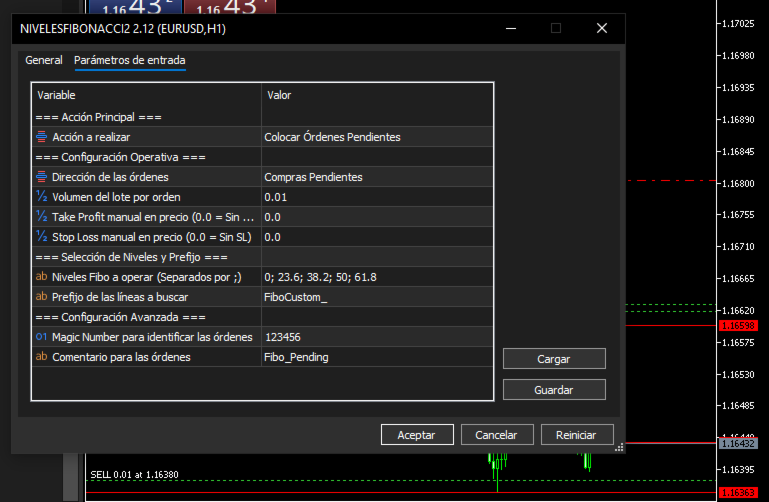
El usuario configura:

  • Dirección de las órdenes: BUY o SELL.

  • Tamaño del lote.

  • Take Profit opcional.

  • Stop Loss opcional.

  • Niveles Fibonacci que desea operar.

  • Prefijo utilizado para identificar las líneas.

  • Magic Number.

  • Comentario de las órdenes.

El script busca en el gráfico las líneas cuyo nombre comience por el prefijo indicado en:

InpPrefix

Por defecto:

FiboCustom_

Por ejemplo, si el primer script ha creado:

FiboCustom_0.0 FiboCustom_23.6 FiboCustom_38.2 FiboCustom_50.0 FiboCustom_61.8 FiboCustom_100.0 FiboCustom_161.8

el segundo script puede seleccionar únicamente los niveles que se desean utilizar.

Ejemplo:

InpTargetLevels = "0; 23.6; 38.2; 61.8"

Los demás niveles serán ignorados.

Determinación automática del tipo de orden

El tipo de orden pendiente se determina automáticamente en función de la dirección seleccionada y de la posición del nivel respecto al precio actual del mercado.

Órdenes BUY

Si se selecciona:

DIR_BUY

el script utiliza:

Buy Limit

Cuando el precio de la línea está por debajo del precio Ask actual.

Precio línea < Ask

Se coloca una:

BUY LIMIT

Buy Stop

Cuando el precio de la línea está por encima del precio Ask actual.

Precio línea > Ask

Se coloca una:

BUY STOP

Órdenes SELL

Si se selecciona:

DIR_SELL

el script utiliza:

Sell Limit

Cuando el precio de la línea está por encima del precio Bid actual.

Precio línea > Bid

Se coloca una:

SELL LIMIT

Sell Stop

Cuando el precio de la línea está por debajo del precio Bid actual.

Precio línea < Bid

Se coloca una:

SELL STOP

De esta forma, el usuario no necesita seleccionar manualmente entre Limit y Stop. El script determina automáticamente el tipo de orden según la posición del nivel Fibonacci respecto al mercado.

Ejemplo de funcionamiento

Supongamos que el gráfico contiene las siguientes líneas:

FiboCustom_0.0 FiboCustom_23.6 FiboCustom_38.2 FiboCustom_50.0 FiboCustom_61.8 FiboCustom_100.0

Y el usuario configura:

Dirección: BUY
Lote: 0.01
Niveles: 0; 23.6; 38.2; 50; 61.8

El script localizará esas líneas, obtendrá sus precios y decidirá automáticamente si cada una corresponde a una Buy Limit o una Buy Stop dependiendo del precio Ask actual.

Por tanto, un mismo conjunto de niveles Fibonacci puede generar diferentes tipos de órdenes dependiendo de dónde se encuentre actualmente el mercado.

Take Profit y Stop Loss

El script permite introducir opcionalmente un precio de Take Profit y Stop Loss.

Sin Take Profit

InpTakeProfit = 0.0

No se establece TP.

Sin Stop Loss

InpStopLoss = 0.0

No se establece SL.

Cuando se introduce un precio superior a 0.0 , el valor se normaliza automáticamente utilizando los decimales del símbolo:

_Digits

Esto permite adaptar los precios a instrumentos con diferentes cantidades de decimales.

Selección de niveles

Los niveles se introducen mediante:

InpTargetLevels

separados por ; .

Por ejemplo:

0; 23.6; 38.2; 50; 61.8

También pueden utilizarse niveles superiores a 100% o niveles negativos, siempre que las correspondientes líneas existan en el gráfico.

Por ejemplo:

-61.8; 0; 23.6; 38.2; 50; 61.8; 100; 161.8; 261.8; 423.6

El script solamente operará los niveles seleccionados que encuentre mediante el prefijo configurado.

Identificación mediante prefijo

El parámetro:

InpPrefix

permite determinar qué objetos del gráfico serán considerados.

Valor predeterminado:

FiboCustom_

Por ejemplo:

FiboCustom_23.6 FiboCustom_50.0 FiboCustom_61.8

serán reconocidos.

Esta característica permite mantener separadas las líneas utilizadas por esta herramienta de otros objetos existentes en el gráfico.

Magic Number

El parámetro:

InpMagicNumber

permite identificar las órdenes creadas por el script.

Valor predeterminado:

123456

El Magic Number resulta especialmente útil para diferenciar estas órdenes de otras órdenes pendientes que puedan existir en la misma cuenta.

Comentario de las órdenes

El parámetro:

InpOrderComment

permite establecer el comentario asociado a las órdenes.

Valor predeterminado:

Fibo_Pending

Esto facilita su identificación dentro de MetaTrader 5.

Cancelación de órdenes pendientes

El parámetro:

InpAction

permite seleccionar entre dos acciones.

ACTION_PLACE

Coloca las órdenes pendientes correspondientes a los niveles seleccionados.

ACTION_DELETE

Cancela las órdenes pendientes que cumplan simultáneamente estas condiciones:

  • Pertenecen al símbolo actual.

  • Tienen el Magic Number indicado en InpMagicNumber .

Esto permite eliminar las órdenes pendientes gestionadas por este script sin afectar a las órdenes pertenecientes a otros símbolos o Magic Numbers.

Relación con NIVELESFIBONACCI1.1

Los dos scripts pueden utilizarse como un sistema de dos etapas:

NIVELESFIBONACCI1.1 ↓ Calcula los precios Fibonacci ↓ Dibuja las líneas horizontales ↓ NIVELESFIBONACCI2.12 ↓ Lee las líneas por prefijo ↓ Selecciona los niveles indicados ↓ Obtiene sus precios ↓ Determina automáticamente Limit / Stop ↓ Coloca las órdenes pendientes

Por ejemplo:

Primera herramienta

Punto A → 1.16594 = 100%
Punto B → 1.16363 = 423.6%

La primera herramienta calcula los precios correspondientes a:

0% 23.6% 38.2% 50% 61.8% 100% 161.8% 261.8% 423.6%

y los dibuja en el gráfico.

Posteriormente, la segunda herramienta puede seleccionar, por ejemplo:

23.6; 38.2; 50; 61.8

y colocar las órdenes pendientes directamente sobre esos precios.

Características principales
  • Colocación masiva de órdenes pendientes sobre niveles Fibonacci.

  • Compatible con niveles Fibonacci personalizados.

  • Selección independiente de los niveles que se desean operar.

  • Soporte para órdenes Buy Limit.

  • Soporte para órdenes Buy Stop.

  • Soporte para órdenes Sell Limit.

  • Soporte para órdenes Sell Stop.

  • Determinación automática del tipo de orden según el precio actual.

  • Lectura de las líneas mediante un prefijo configurable.

  • Compatible con diferentes números de decimales mediante _Digits .

  • Normalización automática de los precios.

  • Take Profit opcional.

  • Stop Loss opcional.

  • Magic Number configurable.

  • Comentario de órdenes configurable.

  • Función para cancelar las órdenes pendientes gestionadas por el Magic Number.

  • No requiere indicadores externos.

  • No requiere DLL.

Importante

Este script no calcula los niveles Fibonacci por sí mismo.

Utiliza los precios de las líneas horizontales existentes en el gráfico como niveles de entrada para las órdenes pendientes.

Para utilizarlo conjuntamente con NIVELESFIBONACCI1.1, ambos scripts deben utilizar el mismo prefijo, por defecto:

FiboCustom_

El script tampoco genera señales de compra o venta mediante análisis técnico. La dirección de las órdenes ( BUY o SELL ) es seleccionada manualmente por el usuario.

La colocación de órdenes implica riesgo financiero. El comportamiento final de una orden pendiente también depende de las condiciones de mercado, las reglas del bróker, la distancia mínima de órdenes, volumen permitido, stops level y demás restricciones del símbolo.

Versión: 2.12
Plataforma: MetaTrader 5
Tipo: Script
Autor: SPC


//+------------------------------------------------------------------+

//|                                        NIVELESFIBONACCI2.12.mq5 |

//|                                                              SPC |

//|                       https://www.mql5.com/es/users/calimero1166 |

//+------------------------------------------------------------------+

#property copyright "SPC"

#property link      "https://www.mql5.com/es/users/calimero1166"

#property version   "2.12"

#property description "Script para la colocación masiva o cancelación selectiva de órdenes pendientes (Limit/Stop) según niveles Fibonacci trazados por prefijo."

#property script_show_inputs


#include <Trade\Trade.mqh>


//--- Enumeración para la acción principal del script

enum ENUM_SCRIPT_ACTION

  {

   ACTION_PLACE  = 0, // Colocar Órdenes Pendientes

   ACTION_DELETE = 1  // Cancelar Órdenes Pendientes

  };


//--- Enumeración para la dirección de las órdenes

enum ENUM_ORDER_DIRECTION

  {

   DIR_BUY  = 0, // Compras Pendientes

   DIR_SELL = 1  // Ventas Pendientes

  };


//--- Parámetros de Entrada

input group "=== Acción Principal ==="

input ENUM_SCRIPT_ACTION InpAction       = ACTION_PLACE; // Acción a realizar


input group "=== Configuración Operativa ==="

input ENUM_ORDER_DIRECTION InpDirection   = DIR_BUY;      // Dirección de las órdenes

input double               InpLotSize     = 0.01;         // Volumen del lote por orden

input double               InpTakeProfit  = 0.0;          // Take Profit manual en precio (0.0 = Sin TP)

input double               InpStopLoss    = 0.0;          // Stop Loss manual en precio (0.0 = Sin SL)


input group "=== Selección de Niveles y Prefijo ==="

input string               InpTargetLevels = "0; 23.6; 38.2; 50; 61.8"; // Niveles Fibo a operar (Separados por ;)

input string               InpPrefix       = "FiboCustom_";             // Prefijo de las líneas a buscar


input group "=== Configuración Avanzada ==="

input ulong                InpMagicNumber  = 123456;       // Magic Number para identificar las órdenes

input string               InpOrderComment = "Fibo_Pending"; // Comentario para las órdenes


//+------------------------------------------------------------------+

//| Script program start function                                    |

//+------------------------------------------------------------------+

void OnStart()

  {

   CTrade trade;

   trade.SetExpertMagicNumber(InpMagicNumber);


   // --- MODO 1: CANCELAR ÓRDENES PENDIENTES ---

   if(InpAction == ACTION_DELETE)

     {

      int deletedCount = DeletePendingOrders(trade, InpMagicNumber);

      PrintFormat("NIVELESFIBONACCI2.12 (v2.12): Se han eliminado %d órdenes pendientes con Magic %d en %s.", deletedCount, InpMagicNumber, _Symbol);

      return;

     }


   // --- MODO 2: COLOCAR ÓRDENES PENDIENTES ---

   // 1. Procesar el texto de niveles a buscar

   double targetLevels[];

   ushort u_sep = StringGetCharacter(";", 0);

   string rawLevels[];

   int totalSplit = StringSplit(InpTargetLevels, u_sep, rawLevels);


   if(totalSplit <= 0)

     {

      Print("Error: No se especificaron niveles válidos en InpTargetLevels.");

      return;

     }


   ArrayResize(targetLevels, totalSplit);

   int validLevelsCount = 0;


   for(int i = 0; i < totalSplit; i++)

     {

      string trimmed = rawLevels[i];

      StringTrimLeft(trimmed);

      StringTrimRight(trimmed);


      if(StringLen(trimmed) > 0)

        {

         double val = StringToDouble(trimmed);

         if(val == 0.0 && trimmed != "0" && trimmed != "0.0" && trimmed != "0,0")

           {

            continue;

           }

         targetLevels[validLevelsCount] = val;

         validLevelsCount++;

        }

     }


   if(validLevelsCount == 0)

     {

      Print("Error: No se pudieron interpretar los niveles de Fibonacci especificados.");

      return;

     }


   // 2. Obtener precios de mercado actuales

   double ask = SymbolInfoDouble(_Symbol, SYMBOL_ASK);

   double bid = SymbolInfoDouble(_Symbol, SYMBOL_BID);


   if(ask <= 0 || bid <= 0)

     {

      Print("Error: No se pudieron obtener los precios de cotización actuales.");

      return;

     }


   // 3. Buscar objetos con el prefijo en el gráfico

   int totalObjects = ObjectsTotal(0, -1, -1);

   int ordersPlaced = 0;


   for(int i = 0; i < totalObjects; i++)

     {

      string objName = ObjectName(0, i, -1);


      // Verificar si el objeto coincide con el prefijo

      if(StringFind(objName, InpPrefix) == 0)

        {

         // Extraer el nivel numérico del objeto

         string levelStr = StringSubstr(objName, StringLen(InpPrefix));

         double objLevel = StringToDouble(levelStr);


         // Verificar si el nivel de la línea está en nuestra lista seleccionada

         if(!IsLevelSelected(objLevel, targetLevels, validLevelsCount))

            continue;


         double linePrice = ObjectGetDouble(0, objName, OBJPROP_PRICE);

         linePrice = NormalizeDouble(linePrice, _Digits);


         if(linePrice <= 0)

            continue;


         // Normalizar TP y SL si están configurados

         double tp = (InpTakeProfit > 0) ? NormalizeDouble(InpTakeProfit, _Digits) : 0.0;

         double sl = (InpStopLoss > 0)   ? NormalizeDouble(InpStopLoss, _Digits)   : 0.0;


         // 4. Determinar tipo de orden y enviar

         if(InpDirection == DIR_BUY)

           {

            if(linePrice < ask)

              {

               if(trade.BuyLimit(InpLotSize, linePrice, _Symbol, sl, tp, ORDER_TIME_GTC, 0, InpOrderComment))

                 {

                  PrintFormat("Buy Limit colocada en el nivel %.1f%% al precio %.*f", objLevel, _Digits, linePrice);

                  ordersPlaced++;

                 }

               else

                 {

                  PrintFormat("Error al colocar Buy Limit en %.1f%%: %s", objLevel, trade.ResultComment());

                 }

              }

            else if(linePrice > ask)

              {

               if(trade.BuyStop(InpLotSize, linePrice, _Symbol, sl, tp, ORDER_TIME_GTC, 0, InpOrderComment))

                 {

                  PrintFormat("Buy Stop colocada en el nivel %.1f%% al precio %.*f", objLevel, _Digits, linePrice);

                  ordersPlaced++;

                 }

               else

                 {

                  PrintFormat("Error al colocar Buy Stop en %.1f%%: %s", objLevel, trade.ResultComment());

                 }

              }

           }

         else // DIR_SELL

           {

            if(linePrice > bid)

              {

               if(trade.SellLimit(InpLotSize, linePrice, _Symbol, sl, tp, ORDER_TIME_GTC, 0, InpOrderComment))

                 {

                  PrintFormat("Sell Limit colocada en el nivel %.1f%% al precio %.*f", objLevel, _Digits, linePrice);

                  ordersPlaced++;

                 }

               else

                 {

                  PrintFormat("Error al colocar Sell Limit en %.1f%%: %s", objLevel, trade.ResultComment());

                 }

              }

            else if(linePrice < bid)

              {

               if(trade.SellStop(InpLotSize, linePrice, _Symbol, sl, tp, ORDER_TIME_GTC, 0, InpOrderComment))

                 {

                  PrintFormat("Sell Stop colocada en el nivel %.1f%% al precio %.*f", objLevel, _Digits, linePrice);

                  ordersPlaced++;

                 }

               else

                 {

                  PrintFormat("Error al colocar Sell Stop en %.1f%%: %s", objLevel, trade.ResultComment());

                 }

              }

           }

        }

     }


   PrintFormat("NIVELESFIBONACCI2.12 (v2.12): Proceso finalizado. Total de órdenes colocadas: %d", ordersPlaced);

  }


//+------------------------------------------------------------------+

//| Función auxiliar para comprobar si un nivel pertenece a la lista |

//+------------------------------------------------------------------+

bool IsLevelSelected(double level, const double &selectedLevels[], int count)

  {

   for(int i = 0; i < count; i++)

     {

      if(MathAbs(level - selectedLevels[i]) < 0.01)

         return true;

     }

   return false;

  }


//+------------------------------------------------------------------+

//| Función auxiliar para borrar las órdenes pendientes por Magic   |

//+------------------------------------------------------------------+

int DeletePendingOrders(CTrade &trade, ulong magic)

  {

   int deleted = 0;

   int totalOrders = OrdersTotal();


   // Recorremos las órdenes en orden inverso para evitar desajustes de índice

   for(int i = totalOrders - 1; i >= 0; i--)

     {

      ulong ticket = OrderGetTicket(i);

      if(ticket > 0)

        {

         if(OrderGetString(ORDER_SYMBOL) == _Symbol && OrderGetInteger(ORDER_MAGIC) == magic)

           {

            if(trade.OrderDelete(ticket))

               deleted++;

            else

               PrintFormat("Error al borrar la orden #%d: %s", ticket, trade.ResultComment());

           }

        }

     }

   return deleted;

  }

//+------------------------------------------------------------------+

Produits recommandés
Free automatic Fibonacci is an indicator that automatically plots a Fibonacci retracement based on the number of bars you select on the BarsToScan setting in the indicator. The Fibonacci is automatically updated in real time as new highest and lowest values appears amongst the selected bars. You can select which level values to be displayed in the indicator settings. You can also select the color of the levels thus enabling the trader to be able to attach the indicator several times with differe
FREE
Gold Session Levels Pro MT5 is a manual MetaTrader 5 indicator designed to display relevant intraday reference levels for XAUUSD. The indicator automatically calculates and draws the Asian range, its midpoint, the daily open, the London and New York opens, the previous trading day's high and low, and targets derived from the size of the Asian range. FEATURES - Dynamic Asian range while the configured session is active. - Range freezing after the configured Asian session close. - Asian range
FREE
Automatic fibonacci with alerts is an indicator that automatically plots a fibonacci retracement based on the number of bars you select on the BarsToScan setting in the indicator. The fibonacci is automatically updated in real time as new highest and lowest values appear amongst the selected bars. You can select which level values to be displayed in the indicator settings. You can also select the color of the levels thus enabling the trader to be able to attach the indicator several times with d
FREE
Fibo Trader FREE MT5
Grzegorz Korycki
3 (3)
Fibo Trader is an expert advisor that allows you to create automated presets for oscillation patterns in reference to Fibonacci retracements values using fully automated and dynamically created grid. The process is achieved by first optimizing the EA, then running it on automated mode. EA allows you to switch between automatic and manual mode. When in manual mode the user will use a graphical panel that allows to manage the current trading conditions, or to take control in any moment to trade ma
FREE
Développement de la version précédente de l'indicateur ZigZag WaveSize MT4 ZigZag WaveSize - indicateur standard ZigZag modifié avec ajout d'informations sur la longueur d'onde en points, niveaux et différentes logiques d'alertes Améliorations générales : Adaptation du code pour MetaTrader 5 Travail optimisé avec les objets graphiques Nouveautés : Niveaux horizontaux aux extrêmes Choix du type de niveaux : horizontal/rayons/segments Filtre de niveaux liquides (non percés par le prix) Tampon po
FREE
How the day starts
Sergio Antoni Escudero Tirado
This indicator draws the high intraday price and the low intraday price of the first n minutes of the day. The chart shows the days with vertical lines and two horizontal lines to indicate the max and the min close price of the n first minutes of the day. The max/min lines start and end with the day calculated. With this indicator you can see how starts the day compared with the previous days. It is valid for any market inasmuch as the start time is calculated with the data received. Parameter
FREE
MultiTimeframe Trend Pro shows you the market direction across 7 timeframes at a glance. Clear colors, no repainting, fully customizable. Perfect as a quick filter for any intraday or swing strategy. Key Features Supports M1, M5, M15, H1, H4, D1 and W1 Colors MediumSeaGreen when the close is above the MA, and Red when below No repainting → always based on the last closed candle for each timeframe Fully customizable: MA period (200 by default) font, size and colors X/Y offsets, spacing
FREE
Fibonacci Moving Averages
Brendan Jonathan Stoyanowski-campbell
2 (1)
OVERVIEW The Fibonacci Moving Averages are a toolkit which allows the user to configure different types of Moving Averages based on key Fibonacci numbers. Moving Averages are used to visualise short-term and long-term support and resistance which can be used as a signal where price might continue or retrace. Moving Averages serve as a simple yet powerful tool that can help traders in their decision-making and help foster a sense of where the price might be moving next. The aim of this scrip
FREE
Price Ray
Keni Chetankumar Gajanan -
5 (7)
Price Ray indicator is a utility that will improve the way you trade. Primarily, it shows the Bid, Ask or Last price as a line ray which beams till the current candle, last visible chart candle or extended to all candle bars. The enhanced features in this indicator provide information in an area where you focus most, right next to the current candle. You can select text to be shown above or below the Price ray. The indicator is fully customizable, allowing it to fit any strategy requirements. Th
FREE
AP Fibonacci Retracement PRO (MT5) Overview AP Fibonacci Retracement PRO is a trend-continuation pullback EA. It waits for a confirmed swing, calculates the Fibonacci retracement zone, and looks for entries in the direction of the original move. No grid, no martingale. Strategy logic Detects the last valid swing high/low using Fractals on the selected signal timeframe. Calculates the retracement zone between 38.2% and 61.8% (configurable). On a closed bar, if price is inside the zone (with opti
FREE
MT4 Version Most indicators draw lines. This one draws the battlefield. If you ever bought an EA or indicator based on a perfect equity curve — and then watched it bleed out live — you’re not alone. The problem? Static logic in a dynamic market. Fibonacci Bollinger Bands   adapts. It combines Bollinger structure with customizable Fibonacci levels to mark   zones of control   — where price reacts, pauses, or reverses. No magic. Just logic that follows volatility. Why this tool matters   It
FREE
The   Pivot Point indicator   automatically calculates and displays the pivot point line and support and resistance levels. Pivot can be calculated according to the Classic, Floor, Fibonacci, Woodie, Camarilla or DeMark formula. It is also possible to select the period for calculating the indicator. A trader can choose from daily, weekly, monthly, or user-defined periods. Types of pivots Classic Floor Fibonacci Woodie Camarilla DeMark Main features The indicator shows the current and historic
FREE
Auto Fib Retracements
Ross Adam Langlands Nelson
4.2 (5)
Automatic Fibonacci Retracement Line Indicator. This indicator takes the current trend and if possible draws Fibonacci retracement lines from the swing until the current price. The Fibonacci levels used are: 0%, 23.6%, 38.2%, 50%, 61.8%, 76.4%, 100%. This indicator works for all charts over all timeframes. The Fibonacci levels are also recorded in buffers for use by other trading bots. Any comments, concerns or additional feature requirements are welcome and will be addressed promptly. 
FREE
A ready-made multitimeframe trading system based on automatic plotting and tracking of Fibonacci levels for buying and selling any symbol. Demo version - calculation of the last 390 bars is not performed. Advantages Determines the trend direction based on a complex of 14 indicators ( Cx ), extremums of ZigZag ( Z ), RSI ( R ), Impulse ( I ) Displaying the values of 14 indicators comprising the trend direction ( Cx ) Plotting horizontal levels, support and resistance lines, channels View the plo
FREE
FiboZoneLines Short Description Automatically draws multi-layered Fibonacci zone lines from your manually placed Fibonacci retracement. No repainting. Fully customizable. Overview FiboZoneLines is a powerful Fibonacci-based indicator for MetaTrader 5 that automatically generates a complete set of multi-layered support and resistance lines from a single manually drawn Fibonacci retracement object on your chart. Unlike standard Fibonacci tools, FiboZoneLines divides the entire retracement range in
FREE
LZ Auto Fibo Retracement automatically detects the most significant swing highs and lows on your chart and instantly draws accurate Fibonacci retracement levels between them. Stop drawing Fibs manually—let the indicator do it for you dynamically as the market evolves. Feature highlights - Auto Swing Detection: identifies the most relevant market extremes based on a configurable swing period and lookback range. - Dynamic Updates: the Fibonacci levels automatically adjust to new highs and lows
FREE
Strategy: This is a Guard for your account in case the Margin Call of the Account is called. The most brokers have Margin Call at Margin Level of 100%. If account Margin Level is below TriggerMarginLevelPercent (100%), the EA checks all open account positions. For every non-hedge position it opens one reverse position with the same symbol and same volume. After that it will remove itself from the Chart IMPORTANT: CHECK this manually on the Account before using this EA. Only some Broker offer t
FREE
This indicator automatically identifies liquidity levels using swing fractals and tracks when price sweeps through them. Works on any symbol and timeframe with full multi-timeframe support. Features: — Detects swing highs and lows via a fractal method (configurable bars left & right) on a selected timeframe. Active levels are displayed as rays extending to the right; swept levels turn into dashed lines ending at the sweep candle. — Plots Previous Day (PDhigh / PDlow), Previous Week (PWhigh / PWl
FREE
CloseAll MT5
Mr Sorachai Pitakjarukul
4.5 (2)
ขอบคุณ แรงบันดาลใจ จากโค้ชแพม ที่ทำให้เริ่มทำ    Close all ตัวนี้  และขอขอบคุณทุกคนที่ให้ความรู็มาโดยตลอด ไม่ว่าจะทางตรงทางอ้อม ขอบคุณทุกคนที่ให้ความรู้เพื่อนร่วมเทรด ทั้งนี้เพื่อให้นักเทรดทุกคนได้มีเครื่องมือในการควบคุมการปิดการซื้อขาย จึงขอพัฒนาโปรแกรม close all version 5 ได้ใช้ทุกคน  Close all and update profit Version 1.00 (MT5) Full version Give you free  For MT4 Click  https://www.mql5.com/en/market/product/79252 Fix TPSL calculate  Program function Tab 1 Close order function and show br
FREE
Pivot Points are used by Forex traders to find support and resistance levels based on the previous day's price action. There are various ways to calculate pivot points, including averaging the open, high, low, and close of the previous day's chart price. Forex Traders use a combination of pivot points with moving averages to find trading opportunities in the currency markets. Pivot points are very useful tools that use the previous bars' highs, lows and closings to project support and resist
FREE
It predicts the most likely short-term price movement based on advanced mathematical calculations. Features Estimation of immediate price movement; Calculation of the real market trend; Calculation of the most important support and resistance levels; Algorithms optimized for making complex mathematical calculations with a minimal drain of system resources; Self-adjusting for better performance, so it’s able to work properly at any symbol (no matter how exotic it is) and any timeframe; Compatibl
FREE
Babel Assistant
Iurii Bazhanov
4.33 (9)
Babel assistant 1     The MT5 netting “Babel_assistant_1” robot uses the ZigZag indicator to generate Fibonacci levels on M1, M5, M15, H1, H4, D1, W1  periods of the charts , calculates the strength of trends for buying and selling. It opens a position with "Lot for open a position" if the specified trend level 4.925 is exceeded. Then Babel places pending orders at the some Fibonacci levels and places specified Stop Loss , Take Profit. The screen displays current results of work on the position
FREE
Haven Key Levels PDH PDL
Maksim Tarutin
4.92 (12)
L'indicateur   "Haven Key Levels PDH PDL"   aide les traders à visualiser les niveaux clés sur le graphique. Il marque automatiquement les niveaux suivants : DO (Daily Open)   — Niveau d'ouverture du jour. NYM (New York Midnight)   — Niveau de minuit à New York. PDH (Previous Day High)   — Plus haut du jour précédent. PDL (Previous Day Low)   — Plus bas du jour précédent. WO (Weekly Open)   — Niveau d'ouverture de la semaine. MO (Monthly Open)   — Niveau d'ouverture du mois. PWH (Previous Week
FREE
Introducing a powerful MetaTrader 5 Expert Advisor designed to enhance your trading strategy – the Auto Breakeven EA! This feature-rich EA is tailored to bring your stop-loss to breakeven, ensuring a risk-free trade once the market moves in your favor up to a specified price. Explore the full potential of the Auto Breakeven EA. Download it for free now, and find the download link at the bottom of our page. Elevate your trading experience and take control of your risk management strategy. Happy
FREE
This Expert Advisor provides an advanced on-chart trading panel designed for discretionary traders. It simplifies position sizing, risk management, and trade execution directly from the chart without manual calculations. Key Features  On-chart trading panel  Fixed lot and balance percentage risk mode  Risk-based lot calculation using stop loss  Market and pending order execution  Partial close management  Break-even automation  Trailing stop control  Equity protection system  Daily loss lock  S
FREE
1. Overview The ATR Dynamic Stop (CE) is a powerful technical indicator designed to help traders identify and follow market trends. Its core function is to provide a dynamic trailing stop-loss based on price volatility, as measured by the Average True Range (ATR) indicator. The main objectives of the ATR Dynamic Stop are: Profit Optimization: It helps you ride a strong trend by setting a reasonable stop-loss, preventing premature exits due to minor market noise and fluctuations. Risk Management:
FREE
-- Simple mais efficace. Indicateur d'inversion - Qu'est-ce que c'est ? Un indicateur superposé qui suit les tendances et combine la logique SuperTrend avec la technologie des courbes exponentielles. Il détecte la direction de la tendance, trace un canal dynamique sur le graphique et envoie des alertes en temps réel lorsque la tendance s'inverse. Comment fonctionne-t-il ? L'indicateur calcule une ligne de base exponentielle à l'aide de l'ATR et d'un facteur SuperTrend. Lorsque le prix clôture
FREE
Trade Manager – BreakEven et Stop Loss Global en un clic Cet Expert Advisor (EA) est conçu pour aider les traders à gérer leurs positions plus rapidement et plus efficacement. Il propose deux fonctionnalités principales, accessibles via des boutons directement sur le graphique : Fonction BreakEven : Déplace instantanément toutes les positions ouvertes au prix d’entrée en un seul clic. Option pour ajouter une marge configurable (ex. +2 pips) afin de couvrir le spread ou les commissions.
FREE
Fibonacci Trend Indicator
Vinoth Durairaj Durairaj
Fibonacci Trend Indicator for MT5 Unlock the power of Fibonacci analysis on your MetaTrader 5 charts! Our   Fibonacci Trend Indicator   automatically plots dynamic support and resistance levels so you can spot trends, reversals, and breakout opportunities at a glance. Features & Advantages Automatic Fibonacci Levels Instantly displays seven key Fibonacci retracement levels based on the highest and lowest prices from your chosen lookback period — no manual work required. Dynamic Trend Adaptatio
FREE
This is a buyer and seller aggression indicator that analyzes the shape of each candle and project this data in a histogram form. There are 4 histograms in one. On the front we have two: Upper - Buyer force. Lower - Seller force. At the background we also have two histogram, both with same color. They measure the combined strenght of buyers and sellers. This histograms can be turned off in Input Parameters. It is also possible to have the real or tick volume to help on this force measurement. IN
FREE
Les acheteurs de ce produit ont également acheté
Trade Assistant MT5
Evgeniy Kravchenko
4.41 (216)
It helps to calculate the risk per trade, the easy installation of a new order, order management with partial closing functions, trailing stop of 7 types and other useful functions. Additional materials and instructions Installation instructions - Application instructions - Trial version of the application for a demo account Line function -   shows on the chart the Opening line, Stop Loss, Take Profit. With this function it is easy to set a new order and see its additional characteristics bef
Bienvenue sur Trade Manager EA, l’outil ultime de gestion des risques conçu pour rendre le trading plus intuitif, précis et efficace. Ce n’est pas seulement un outil d’exécution d’ordres ; c’est une solution complète pour la planification des trades, la gestion des positions et le contrôle des risques. Que vous soyez débutant, trader expérimenté ou scalpeur ayant besoin d’une exécution rapide, Trade Manager EA s’adapte à vos besoins, offrant une flexibilité sur tous les marchés, des devises et i
================================================================================ POC BREAKOUT - V20.72. Full Professional Grade Toolkit ================================================================================ POC Breakout is a full MetaTrader 5 trading dashboard for discretionary traders who want breakout signals, Point of Control (POC) context, volume profiles, order flow, market structure, news, alerts, and advanced trade planning in one professional workspace. Attached directly to you
Local Trade Copier EA MT5
Juvenille Emperor Limited
4.94 (148)
Découvrez une expérience exceptionnellement rapide de copie de trades avec le   Local Trade Copier EA MT5 . Avec sa configuration facile en 1 minute, ce copieur de trades vous permet de copier des trades entre plusieurs terminaux MetaTrader sur le même ordinateur Windows ou Windows VPS avec des vitesses de copie ultra-rapides de moins de 0.5 seconde. Que vous soyez un trader débutant ou professionnel, le   Local Trade Copier EA MT5   offre une large gamme d'options pour le personnaliser en fonc
Astro Trade MT5
Indra Maulana
5 (2)
25% discount on the release of the tool: only for the next 3 buyers Download the trial version: https://www.mql5.com/en/market/product/192656 AstroTrade Trading Assistant AstroTrade is a comprehensive multi-functional trading utility developed for the MetaTrader 5 platform. It integrates essential tools for trade execution, risk management, and technical monitoring into a single unified interface. The application is designed to assist traders in managing their daily operations through a visual
TradePanel MT5
Alfiya Fazylova
4.88 (167)
Trade Panel est un assistant commercial multifonction. L'application contient plus de 50 fonctions de trading pour le trading manuel et permet d'automatiser la plupart des tâches commerciales. Instructions d'utilisation + tutoriel vidéo : https://www.mql5.com/fr/blogs/post/762589 Version d'essai de l'application pour un compte démo : https://www.mql5.com/fr/blogs/post/762644 Comment installer l'application : https://www.mql5.com/fr/blogs/post/762645 Comment tester l'application en mode visuel :
Version Bêta Le Telegram to MT5 Signal Trader est presque prêt pour la sortie officielle en version alpha. Certaines fonctionnalités sont encore en développement et vous pourriez rencontrer de petits bugs. Si vous rencontrez des problèmes, merci de les signaler, vos retours aident à améliorer le logiciel pour tout le monde. Telegram to MT5 Signal Trader est un outil puissant qui copie automatiquement les signaux de trading depuis des chaînes ou groupes Telegram vers votre compte MetaTrader 5 .
Telegram to MT5 Multi-Channel Copier copie automatiquement les signaux de trading de vos canaux Telegram directement vers MetaTrader 5. Pas de bots, pas d'extensions de navigateur, pas de copie manuelle. Vous recevez un signal sur Telegram et l'EA ouvre l'opération sur votre terminal en quelques secondes. Le produit comprend deux composants : une application Windows qui écoute vos canaux Telegram, et cet Expert Advisor qui exécute les signaux sur votre terminal MT5. Une version MT4 est également
Telegram To MT5 Ultra
Mirel Daniel Gheonu
5 (4)
Telegram To MT5 — Copieur de signaux Transformez les appels de trading de vos canaux Telegram en véritables ordres MT5 — automatiquement, sur autant de comptes que vous le souhaitez, avec le risque et les règles entièrement sous votre contrôle. Telegram To MT5 relie les canaux VIP / de signaux que vous suivez déjà sur Telegram à votre terminal MetaTrader 5. Une application de bureau compagnon gratuite lit les messages (même des canaux qui bloquent les bots), et cet Expert Advisor les exécute sur
Anchor Trade Manager
Kalinskie Gilliam
5 (8)
Anchor: The EA Manager Your EAs manage their own trades. Anchor manages the account around them. Anchor gives you one place to control your EAs, manage risk and decide when trading is allowed. Any EA, any vendor, any broker or symbol. No source-code changes required. The Problem Most EAs only know what they are doing. They cannot see when another EA is already trading, when several EAs open and are stacking risk or when the account has reached your loss limit. Even using just one EA, it may not
Exp COPYLOT CLIENT for MT5
Vladislav Andruschenko
3.97 (35)
Copieur professionnel de trades pour MetaTrader 5 Un copieur de trades rapide, professionnel et fiable pour MetaTrader . COPYLOT permet de copier des trades Forex entre les terminaux MT4 et MT5 avec prise en charge des comptes Hedge et Netting . La version MT5 de COPYLOT prend en charge : - MT5 Hedge → MT5 Hedge - MT5 Hedge → MT5 Netting - MT5 Netting → MT5 Hedge - MT5 Netting → MT5 Netting - MT4 → MT5 Hedge - MT4 → MT5 Netting Version MT4 Description complète + DEMO + PDF Comment acheter Comme
The product will copy all telegram signal to MT5 ( which you are member) , also it can work as remote copier.  Easy to set up, copy order instant, can work with almost signal formats, image signal,  s upport to translate other language to English Work with all type of channel or group, even channel have "Restrict Saving Content", work with  multi channel, multi MT5 Work as remote copier: with signal have ticket number, it will copy exactly via ticket number. Support to backtest signal. How to s
Envoyez-moi un message après l’achat pour recevoir le kit complet du manuel + un essai de 3 jours de l’API OpenAI pour tester les fonctionnalités d’IA + un autre cadeau bonus Le prix actuel est un tarif promotionnel limité pour la mise à jour du relancement d’août — sécurisez votre édition maintenant avant l’augmentation du prix. Prochain prix : $340 C’est complètement différent de tous les panneaux de trading que vous avez pu essayer ou voir sur le marché. C’est l’un des panneaux de trading al
Trade copier MT5
Alfiya Fazylova
4.58 (52)
Trade Copier est un utilitaire professionnel conçu pour copier et synchroniser les commandesentre les comptes de trading. Les commandes sont copiées du compte/terminal du fournisseur vers le compte/terminal du destinataire, qui sont installés sur le même ordinateur ou vps. PROMOTION - Si vous avez déjà acquis le "Trade copier MT5", vous pouvez obtenir le "Trade copier MT4" gratuitement (pour la copie MT4 > MT5 et MT4 < MT5). Pour obtenir des informations plus détaillées sur les conditions, veuil
Signal Trading View to MT5 Pro
Mirel Daniel Gheonu
4.5 (2)
Signal TradingView to MT5 Pro Automator Exécution professionnelle instantanée entre TradingView et MetaTrader 5 Automatisez votre stratégie de trading avec le pont de communication le plus robuste entre les alertes TradingView et l'exécution réelle sur MT5. Conçu pour les traders qui exigent vitesse, flexibilité et une gestion des risques impeccable, cet Expert Advisor transforme tout message d'alerte en un ordre au marché ou à cours limité précis. POINTS FORTS ET AVANTAGES Moteur d'analyse univ
HINN MagicEntry Extra
ALGOFLOW OÜ
4.71 (17)
HINN MAGIC ENTRY – the ultimate tool for entry and position management! SIMPLE. FASTEST. INTUITIVE. MAX AUTOMATED. Place orders by selecting a level directly on the chart! full description   ::  demo-version  :: 60-sec-video-description Key features: - Market, limit, and pending orders - Automatic lot size calculation - Automatic spread and commission accounting - Unlimited partitial take-profits  - Breakeven and trailing stop-loss and take-profit  functions - Invalidation leves - Intuitive, a
Trade Assistant 38 in 1
Makarii Gubaydullin
4.91 (23)
Outil multifonctionnel : Calculateur de Lot, Ordres Grid, Ratio R/R, Gestionnaire de Trades, Zones d'Offre et de Demande, Price Action et bien plus Version Démo   |   Manuel d'Utilisation L'Assistant de Trading   ne fonctionne pas dans le testeur de stratégies : vous pouvez télécharger la   Version Démo ICI  pour tester l' utilitaire . Contactez-moi   pour toute question  / idée d'amélioration / en cas de bug détecté Si vous avez besoin d'une version MT4, elle est disponible ici Simplifiez, acc
Seconds Chart MT5
Boris Sedov
4.61 (18)
Seconds Chart - un outil unique pour créer des graphiques en secondes dans MetaTrader 5 . Grâce à Seconds Chart , vous pouvez créer un graphique avec une période définie en secondes, offrant une flexibilité et une précision idéales pour l'analyse, indisponibles sur les graphiques standards en minutes ou en heures. Par exemple, la période S15 indique un graphique avec des bougies d'une durée de 15 secondes. Vous pouvez utiliser n'importe quels indicateurs et experts advisors compatibles avec les
Power Candles Strategy Scanner - Outil de recherche de configurations multi-symboles à optimisation automatique Le Power Candles Strategy Scanner utilise le même moteur d'auto-optimisation que celui qui alimente l'indicateur Power Candles, pour chaque symbole de votre Market Watch, en parallèle. Un panneau vous indique quels symboles sont statistiquement négociables à l'instant, quelle stratégie est la plus performante pour chacun, la paire Stop Loss / Take Profit optimale, et vous alerte dès qu
Farmed Hedge Yield Farming | All Markets (Manual - Hybrid - Semi/Automated EA) VERIFIED TRADING RESULTS - Farmed Hedge Yield Axi Copy:  https://www.mql5.com/en/signals/2356376 - Farmed Hedge Yield Exn Copy:   https://www.mql5.com/en/signals/2356404 - Farmed Hedge Yield V Copy:  https://www.mql5.com/en/signals/2357156 * Before purchasing, please feel free to send me a message if you have any questions about the product or setup. ** After purchase,  Contact me via private message to receive t
Timeless Charts
Samuel Manoel De Souza
5 (8)
Timeless Charts est un utilitaire de trading tout-en-un destiné aux traders professionnels. Il combine des types de graphiques personnalisés tels que les graphiques en secondes et Renko avec une analyse avancée du flux d’ordre s utilisant Footprints , Clusters , Profils de Volume , études VWAP et outils d’analyse ancrés pour une compréhension plus approfondie du marché. Le trading et la gestion des positions sont effectués directement depuis le graphique via un panneau intégré de gestion des ord
Premium Trade Manager - Le panneau de trading avec un coach intégré Premium Trade Manager intègre un coach de trading directement dans votre graphique, avec un moteur d'exécution complet en dessous. Configurez le trade comme vous le faites toujours, puis laissez Max, votre coach de trading IA, analyser ce setup exact par rapport à votre compte en direct et vous donner un verdict clair avant de vous engager : le stop est-il discipliné, le risque est-il raisonnable, une publication à fort impact e
Trade Dashboard MT5
Fatemeh Ameri
4.95 (132)
Trade Dashboard simplifies how you open, manage, and control your trades, with built-in lot size calculation. It allows you to execute trades, manage risk, and control positions directly on the chart, with tools such as partial close, breakeven, and trailing stop. Designed to reduce manual work and help you stay focused on your trading decisions. A demo version is available for testing. Detailed explanations of features are provided within the MQL5 platform. Installation instructions are include
EA Portfolio Analyzer
Jimmy Peter Eriksson
4 (1)
Guide d'installation :    Cliquez ici ! Analyser simultanément plusieurs conseillers experts Comparer les résultats des EA par numéro magique Suivi de la rentabilité et des pertes Filtrer les résultats par plage de dates Courbe d'équité visuelle et indicateurs détaillés Prêt à l'emploi en moins d'une minute EA Portfolio Analyzer EA Portfolio Analyzer est un   outil d'analyse professionnel   conçu pour suivre   en temps réel les performances de plusieurs Expert Advisors   de manière claire et st
SAFETYLOCK for MetaTrader 5 — système premium de verrouillage protecteur et de gestion des risques SAFETYLOCK for MT5 est un utilitaire professionnel pour MetaTrader 5 qui crée automatiquement un ordre en attente protecteur opposé pour une position déjà ouverte. Lorsqu’un trader ou un autre Expert Advisor ouvre une position, SAFETYLOCK peut placer un Buy Stop ou un Sell Stop protecteur à la distance spécifiée. Si le marché évolue contre la position initiale, cet ordre est activé et forme une str
Quant AI Agents
Ho Tuan Thang
5 (1)
Quant AI Agents are independent trading Expert Advisors. Instead of trading using a fixed strategy like other conventional EAs, Quant AI Agents   is a   multi-agent AI trading framework   that turns natural-language strategy prompts into live.  WANT THE SAME RESULTS AS MY LIVE SIGNAL?   Use the exact same brokers I do:   IC MARKETS , IC TRADING   .  Unlike the centralized stock market, Forex has no single, unified price feed.  Every broker sources liquidity from different providers, creating un
Footprint Chart Pro — Professional OrderFlow EA for MetaTrader 5 Version 6.34 | Professional tool for real traders | Institutional-Grade Visualization DEMO USERS - PLEASE SELECT EVERY TICK / REAL TICK WHEN TESTING AND YOU HAVE DOWNLOADED HISTORICAL DATA. IF YOU SEE A WAITING SCREEN AND IT IS NOT DOWNLOADING, IT MEANS YOU HAVE LOW HISTORICAL DATA. TRY 1 MIN AND 5 MIN FIRST ON 1 DAY DATA. ONE DAY DATA SHOULD BE THE NEWEST AND MOST CURRENT DATE. PLEASE WAIT UNTIL THE MARKET HAS ROLLED OVER PERIOD.
Trade Copier Ultimate
Janitha Sandaruwan Amaradasa Wickramasingha Arachchilage
5 (5)
Trade Copier Ultimate - Telegram to MT5 Signal Copier Trade Copier Ultimate automatically copies Telegram trading signals into MetaTrader 5. The EA can read signal messages, detect the symbol, order type, entry price, Stop Loss, Take Profit levels and selected update commands, then execute or manage the trade in MT5 using your lot and risk settings. It is more than a basic Telegram to MT5 copier. TCU also supports Bot API and user-account Bridge workflows, Discord signal routing, local MT5 to MT
The News Filter MT5
Leolouiski Gan
4.78 (23)
Ce produit filtre tous les conseillers experts et les graphiques manuels pendant les heures de publication des actualités, de sorte que vous n'avez pas à vous soucier des pics de prix soudains qui pourraient détruire vos configurations de trading manuelles ou les transactions entrées par d'autres conseillers experts. Ce produit est également livré avec un système de gestion des ordres complet qui peut gérer vos positions ouvertes et vos ordres en attente avant la publication de toute actualité.
YuClusters
Yury Kulikov
4.93 (43)
Attention: You can view the program operation in the free version  YuClusters DEMO .  YuClusters is a professional market analysis system. The trader has unique opportunities to analyze the flow of orders, trade volumes, price movements using various charts, profiles, indicators, and graphical objects. YuClusters operates on data based on Time&Sales or ticks information, depending on what is available in the quotes of a financial instrument. YuClusters allows you to build graphs by combining da
Plus de l'auteur
NivelesFibonacci
Sergio Piqueras Cuevas
NIVELES FIBONACCI 1.14 — Proyección de niveles Fibonacci personalizados Este script para MetaTrader 5 permite calcular y dibujar automáticamente niveles de Fibonacci personalizados a partir de dos precios conocidos y sus correspondientes niveles Fibonacci. La herramienta utiliza una relación matemática lineal entre los dos puntos introducidos para proyectar cualquier nivel Fibonacci que el usuario desee. ¿Cómo funciona? El usuario debe introducir: Precio del Punto A Nivel Fibonacci asignado al P
FREE
TendenciaPrecioFecha
Sergio Piqueras Cuevas
AutoFindBestTrendLine — Detector Automático de Líneas de Tendencia Descripción general: AutoFindBestTrendLine es una utilidad para MetaTrader 5 que analiza el historial del gráfico y detecta automáticamente la mejor línea de tendencia posible, ya sea de máximos (resistencias), mínimos (soportes) o ambos. El script identifica los dos puntos más relevantes y dibuja una línea óptima basada en el número de toques reales sobre el precio. Ventajas principales: Detección automática de líneas de tendenc
FREE
Filtrer:
Aucun avis
Répondre à l'avis