SM Telegram Scanner
- 专家
-
Sergejs Mihalkins
 Разрабатываю утилиты, скрипты автоматизации и торговые панели для MetaTrader 5. Фокусируюсь на создании удобных инструментов для быстрой торговли, управления рисками и автоматизации рутинных операций на рынке.
 - 版本: 1.0
SM Telegram Scanner (Free Edition) is an efficient multi-currency market scanner for MetaTrader 5 that automatically tracks overbought and oversold conditions using the RSI indicator for EURUSD and GBPUSD, sending instant notifications directly to your Telegram.
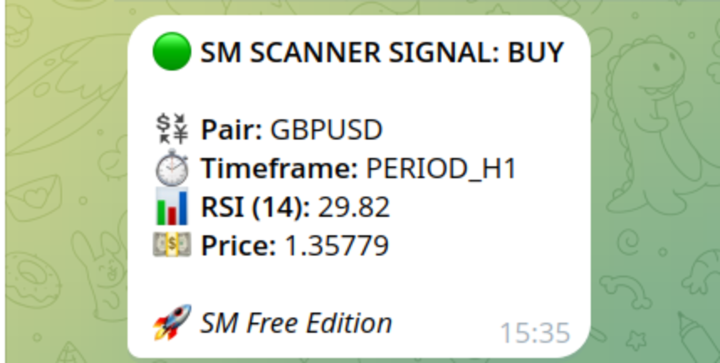
No more staring at charts for hours. The scanner works in the background and sends detailed signal alerts (currency pair, timeframe, RSI value, and current price) straight to your phone.
How It Works: The Expert Advisor continuously analyzes EURUSD and GBPUSD. As soon as the RSI indicator crosses designated levels (default: 30 for BUY and 70 for SELL), it immediately sends a notification via your Telegram Bot.
Key Advantages:
-
Multi-Currency Scanning: In this Free Edition, the scanner simultaneously monitors EURUSD and GBPUSD from a single chart.
-
Instant Telegram Alerts: Receive real-time trade signals wherever you are.
-
Fully Customizable: Easily adjust timeframes, RSI periods, and overbought/oversold levels.
-
Lightweight & VPS-Friendly: Minimal terminal resource usage, perfect for 24/7 VPS hosting.
-
No Signal Repainting: Accurate signals sent upon condition confirmation.
📌 Quick & Easy 4-Step Setup Guide:
Step 1: Enable WebRequest in MetaTrader 5 • Go to Tools -> Options -> Expert Advisors. • Check "Allow WebRequest for listed URL". • Add URL: https://api.telegram.org and click OK.
Step 2: Get your Telegram Bot Token (1 min) • Search for @BotFather in Telegram. • Send /newbot command and follow instructions. • Copy your HTTP API Token.
Step 3: Get your Chat ID • Search for @userinfobot (or @myidbot) in Telegram. • Send /start and copy your ID number.
Step 4: Launch Scanner • Drag SM Telegram Scanner onto any chart (e.g., EURUSD H1). • Paste your Bot Token and Chat ID into the input parameters. • Click OK. Done!