QuantEx Market Scanner
- 实用工具
-
Savia Forex Software Solutions
 我在 Savia Forex Software Solutions 为 MetaTrader 5 定制开发智能交易程序(EA,交易机器人)、指标、脚本和互联的交易信号系统。
我的工作涵盖策略逻辑、自动化交易、交易与风险管理、市场扫描工具、Python 集成、API、Webhook,以及 Telegram 和 Discord 通知。我会把各个组件整合成一套协同工作的完整方案。 - 版本: 1.0
- 激活: 5
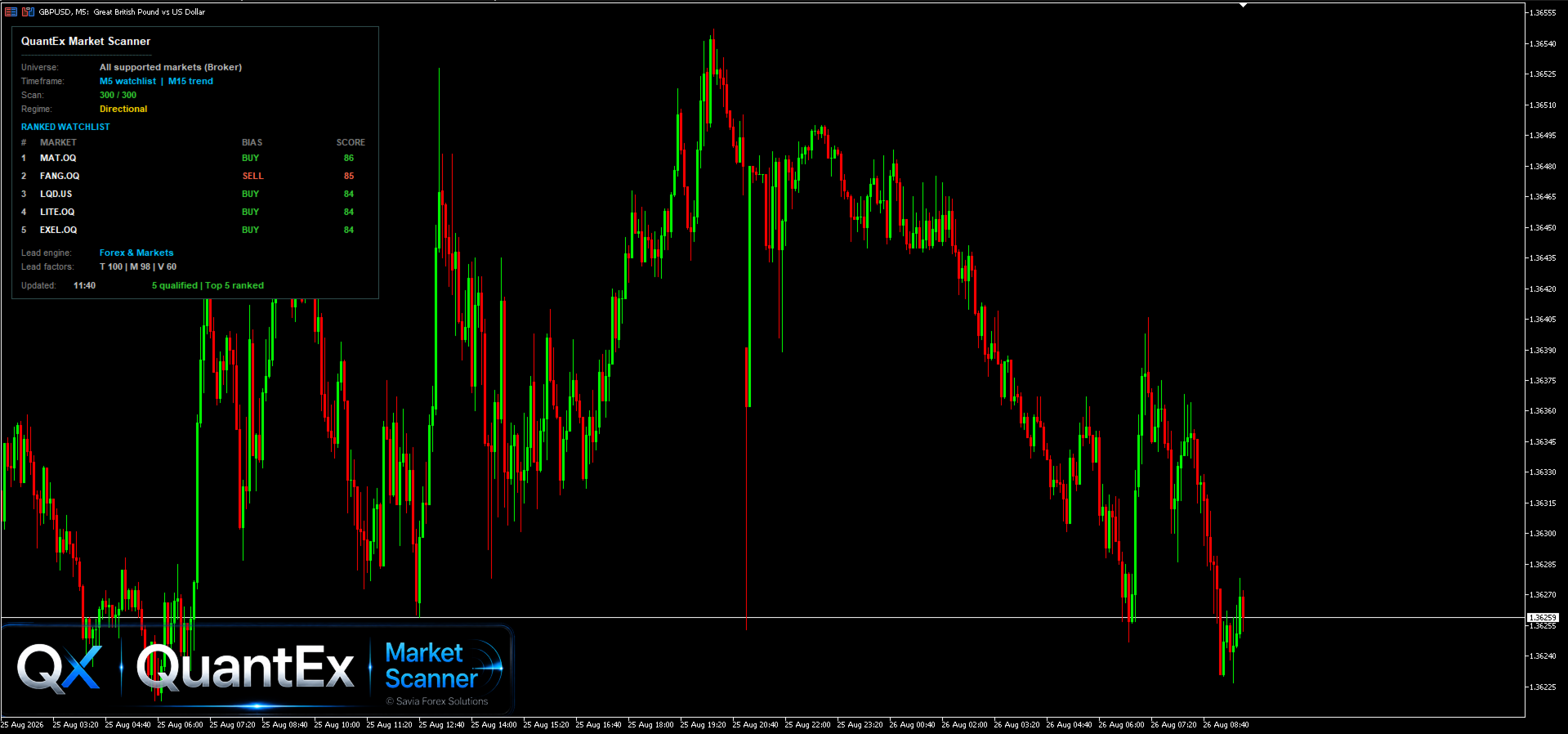
QuantEx Market Scanner is a multi-market MT5 indicator designed to reduce manual chart-hopping. It scans the available broker symbols and presents a focused ranked watchlist directly on the chart.
The scanner does not open, close or manage trades. It is a technical-analysis tool that helps traders identify markets currently showing stronger directional structure, momentum and activity.
KEY FEATURES
-
Scans Forex, Synthetic Indices, or the full supported broker universe.
-
Displays a ranked Top 5 watchlist directly on the chart.
-
Shows each candidate’s market bias: BUY, SELL or WAIT.
-
Uses trend, momentum, price activity and volatility factors to rank markets.
-
Separate analysis handling for Forex and price-derived markets.
-
Dedicated Synthetic Index logic, including Boom and Crash trend analysis, Boom and Crash spike-pressure analysis, and Volatility Index analysis.
-
Preserves Boom and Crash direction-lock behaviour where applicable.
-
Lets users filter supported Synthetic families for a more focused scan.
-
Keeps recent watchlist results visible while the next scan is being built.
-
Retains useful scan results across chart timeframe changes and indicator reloads.
-
Built-in information panel displays the selected universe, active families, scan progress, market regime, ranked candidates and leading analysis factors.
-
Automatic panel and chart-logo positioning helps prevent clashes with compatible QuantEx tools.
HOW TO USE
-
Install QuantEx Market Scanner in your MT5 terminal.
-
Attach the indicator to any chart.
-
Select the preferred market universe: Forex, Synthetic Indices, or All Markets.
-
For Synthetic Indices, enable the market families you want to scan.
-
Select your preferred trend and momentum analysis timeframes.
-
Review the ranked watchlist and open the relevant market chart for your own confirmation and trade planning.
SETTINGS
- Market Universe
- Select Forex Only, Synthetic Indices Only, or All Markets.
- Synthetic Market Families
- Enable or disable compatible Synthetic Index families to focus the scan.
- Trend Timeframe
- Selects the higher-timeframe trend context used by the scanner.
- Momentum Timeframe
- Selects the timeframe used to assess shorter-term momentum and activity.
IMPORTANT NOTES
QuantEx Market Scanner ranks technical conditions; it does not guarantee that a market will continue in the displayed direction.
A BUY, SELL or WAIT status is not financial advice or a recommendation to enter a trade.
Results may vary according to broker symbol names, available market history, spread, volatility, timeframe and current market conditions.
Always confirm a setup using your own trading plan, risk management and market analysis.
DISCLAIMER
QuantEx Market Scanner is a technical-analysis indicator only. It does not provide investment advice, trading signals with guaranteed outcomes, or profit guarantees. Forex, synthetic indices, commodities and other leveraged instruments involve risk, and losses may occur. All trading decisions remain the responsibility of the user.