Backtest Verdict MT5

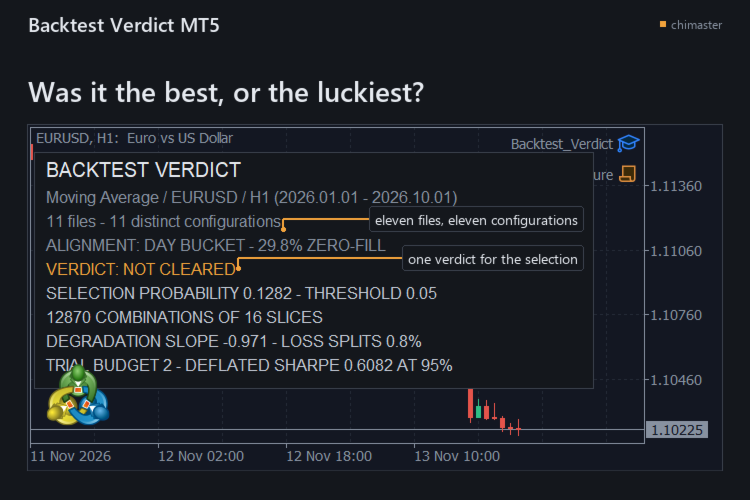
Tells you how likely it is that the best result in your backtest folder was the luckiest, for the trader who kept the winner of a parameter sweep. It re-runs your choice across every split of the closed trades and answers the overfitting question with one selection probability and one verdict.

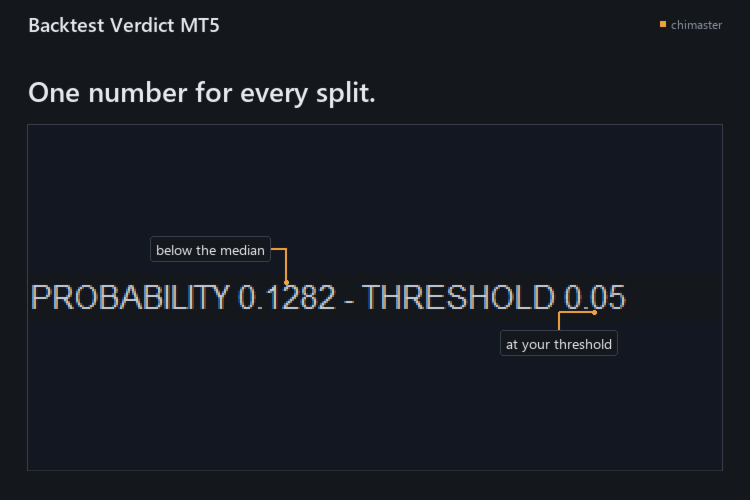
  • See whether the winner held up: the timeline is cut into S slices and every half-and-half split picks the best configuration on one side and ranks it on the other, and the share of splits where it fell below the median is your selection probability.
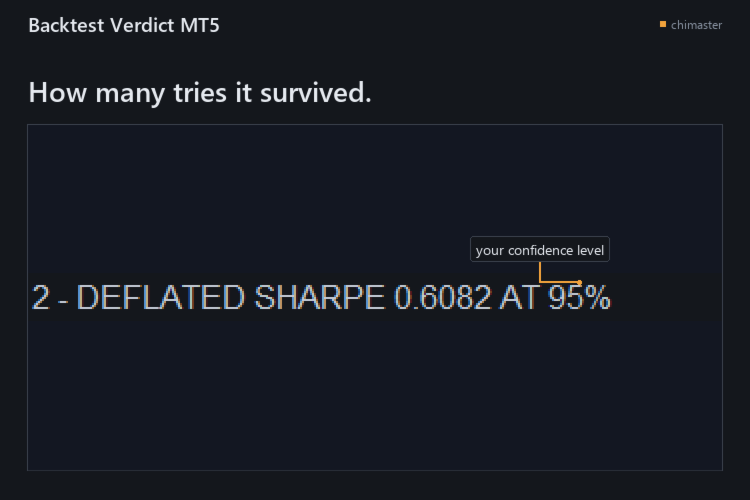
  • Count the tries behind the result: a deflated Sharpe ratio and a trial budget say how many configurations it would have survived at your confidence level.
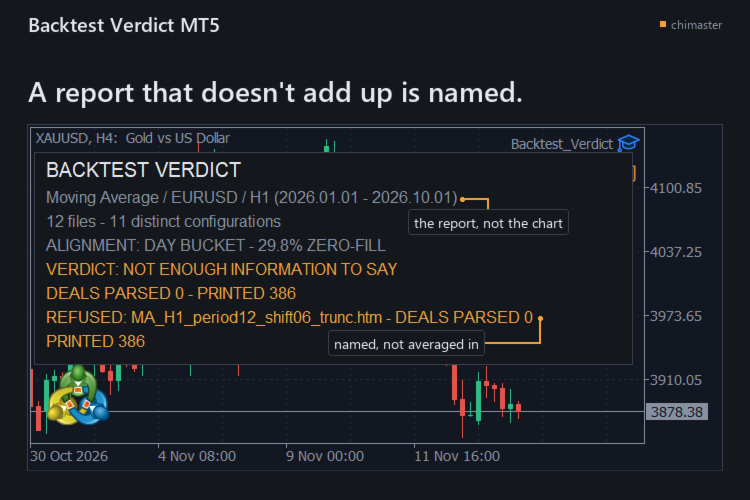
  • Catch a report that does not add up: every deal row must reconcile to the report's printed deal count and net within 0.01, or that file is named and refused instead of averaged in.
  • Read the folder as it is: the .htm and .html files the Strategy Tester wrote are enough, with no tester call, no re-export and no internet connection.
  • Keep the evidence: one text report holds the verdict, the numbers behind it, the settings used, and a SHA-256 fingerprint and deal counts for every report read.
  • Count configurations, not files: two reports with the same closed-operation series count as one configuration, so a copied export does not add a trial you never ran.

HOW IT WORKS

  • Export each configuration's report from the Strategy Tester as HTML into one folder.
  • Attach the tool to any chart, name the folder, and type the number you tried if the folder is missing some.
  • Read the verdict on the chart, then open the text report for the numbers behind it.

SETTINGS

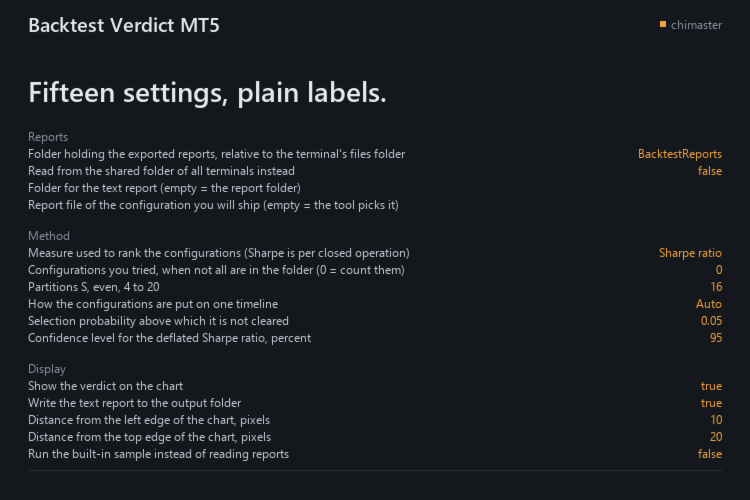
  • Reports folder: where the exported reports sit, relative to the terminal's files folder.
  • Shared folder: read from the shared folder of all terminals instead.
  • Report to ship: the configuration you will ship; empty lets the tool use the best on the whole sample.
  • Configurations you tried: your own count when not all are in the folder.
  • Partitions: how many slices the timeline is cut into, even, from 4 to 20.
  • Ranking measure: Sharpe, net profit or profit factor, with Sharpe per closed operation.
  • Selection probability threshold: above it the verdict is not cleared.
  • Confidence level: for the deflated Sharpe ratio, in percent.

All 15 inputs carry a plain-language label.

GOOD TO KNOW

  • Eleven configurations at minimum: below that it names the count it read and withholds the selection probability, the cleared verdict and the trial budget, and the trial count it can see is the weak point of the answer.
  • English reports only: the fields are read through the labels the Strategy Tester writes in the English interface, and a report from a terminal running another language has not been tested.
  • A verdict is not a forecast: it judges the way you chose a configuration, not what the next trade will do.

The demo runs in the Strategy Tester, whose folder holds none of your exported reports, so the tool prints NOT ENOUGH INFORMATION TO SAY there. A one-month rental runs the full tool on your exported HTML reports.

MetaTrader 5, any broker, netting and hedging accounts.

First reply within two working days.

If you have used it, I would welcome a short review of what worked and what did not.
作者的更多信息
柱回放会遮住你还没走到的柱。这个回放还会按入场所在柱记录的点差为每一笔虚拟入场定价,并以 R 为这次尝试计分,让手工演练的交易者看清这个决策值多少。 功能 会话中不会提前看到未来的柱:遮罩挡住回放还没走到的柱。 柱的点差:每笔虚拟成交都付该柱上记录的点差,绝不用你输入的点差;没有记录点差的柱会以 NO FILL - BAR SPREAD 0 拒绝市价单或平仓,而一笔穿过它的交易仍然开着。 不发送订单:每一笔订单都是虚拟的,它不读取持仓,也不打开文件,所以它无法对你的账户做任何操作,无法说出真实交易做了什么,也不会留下交易记录。 只用一个 R 计分:以你设置的止损距离为倍数,它打印的任何数字都不是金额,因为它不读取账户属性,包括存款货币。 没有止损的交易也算数:它被计入但不计分,面板会标出它,而不是编造一个 R。 算术看得见:每笔成交都用该柱记录的四个价格,开盘、最高、最低和收盘,而不是逐笔数据,也不读取实时报价。越过订单的缺口按该柱的开盘价成交:止损遇到跳空,就在比触发价更差的一侧成交;限价单在更好的一侧。 每次都以同样的方式结算:一根柱同时包含止损和目标时,按止损算,除非该柱的开盘已
FREE
默认扫描最近 300 根K线,为每个由三根K线构成的公允价值缺口画出方框,绘制其 50% 水平线,并标出价格首次回到近端边缘的位置。 功能 看涨与看跌的公允价值缺口,各自在第三根K线收盘后形成。 50% 的 Consequent Encroachment(CE)线,点线样式,在 InpShowCE 打开时显示。 触及时:裁剪到触及的那根K线、删除、变暗或保留;未被触及的缺口延伸 InpExtendBars 根K线。 该次触及的可选提醒,每个缺口一次。 参数 InpLookbackBars 300; InpMinGapPoints 0.0; InpMitigationMode MITIGATION_TRIM; InpShowCE true; InpExtendBars 20. InpBullishEnabled true; InpBullBorderColor clrMediumSeaGreen; InpBullFillColor C'220,245,230'; InpBullCEColor clrSeaGreen. InpBearishEnabled true; InpBearBord
FREE
Draws the four main trading session ranges on the chart in GMT, counts the range of each as it forms, and marks its high and low. FEATURES Four ranges: Asian, London Open, New York Open, London Close. Automatic GMT offset detection, with manual override. Session high and low levels, with a live range. HOW TO USE IT 1. Attach it to a chart. Default lookback is five days. 2. Check the detected GMT offset and correct it. 3. Enable or disable each session and set its hours. PARAMETERS InpDaysLookbac
FREE
Swap Cost Per Position
Jevon Naldo Yoshield
Swap Cost Per Position 把你今晚隔夜结算的持仓放进一张表,以金额显示。 我为持仓过夜的交易者写了它:把即将发生的费用与已记录的隔夜利息并排看清,并且在隔夜利息以点数报价时,看到正的隔夜利息要用多少个夜数才收回往返成本。 显示内容 每个持仓一行,按今晚定价:费用使用该持仓自己的交易量,超出你设置的行数上限的持仓,在最后一行计数。 两个数字,两个来源:累计隔夜利息列是终端自己的数字;今晚这一列由品种计算得出。 三倍日来自你的品种:表头打印图表品种的三倍日与所用系数,每一行都带上它实际应用的系数。 正的隔夜利息,以夜数计算:当隔夜利息以点数报价且利息为正时,回本夜数会显示收回往返成本所需的正常夜数,按今天的点差和你输入的佣金计算。 用横线,绝不用零:算不出的数字显示横线,原因只打印一次。隔夜利息不以点数报价时,回本夜数单元格打印原因而不是数字。 设定系数与佣金:三倍系数和往返佣金都是输入参数,所以今晚的费用和回本夜数跟随你的设置。 入场前先有答案:两行预览按你设置的交易量,为图表品种的多头和空头报价,让你在持有任何仓位之前就能读到这份费用表。 按报价货币显示:在你的存款
FREE
This library returns the largest lot whose loss at your stop does not exceed the money you allow it to risk, correct for any volume step, tick size and tick value the symbol reports. I wrote it for the MQL5 developer who has pasted a lot-normalising block into every EA and can no longer say which copy is right. One import, one version, and a call that refuses rather than oversizing. WHAT IT DOES It refuses instead of oversizing: when the smallest lot the symbol accepts would risk more than your
FREE
Drag the stop loss line to your level and the panel works out the lot size for the risk you set, from your broker's own contract size. FEATURES Entry, stop loss and take profit lines you drag. Lot size normalised to the broker's minimum, maximum and step. Risk as a percentage of balance or equity, fixed cash, or fixed lot. Live risk to reward ratio. HOW TO USE IT 1. Attach it to a chart and drag the three lines. 2. Set the risk basis and value in the inputs. 3. Read the lot size from the panel.
FREE
Order Entry Panel
Jevon Naldo Yoshield
Order Entry Panel 是一个交易面板,在图表上单击一次即可发送市价单,止损已随单附加。 我为手工执行、希望把决策放在图表上的交易者写了它。 功能 发送前先看清订单:每个请求行都会显示价格、交易量、止损和可能设置的目标。 每次入场都带止损,按你设置的距离计算,并在发送前附加。 点击前先看保证金:终端为该请求行算出的数值,或不足的差额。 一次点击发送一笔市价单:该请求仍在途中时再次点击会被拒绝,不会重试。 在对冲账户上查看经纪商的限制:止损水平和冻结水平,以及止损落在止损水平之内时允许的价格。 在对冲账户上管理交易:锁定盈亏平衡、部分平仓,或平掉面板在该品种上开出的全部持仓。 回查已发送的内容:请求、服务器的应答、订单号和成交号都会写入终端 Files 文件夹中的 CSV 日志。 使用方法 1. 把它挂到一张图表上,设置交易量、止损距离和目标。 2. 查看两条请求行和保证金。每一行就是其按钮发送的内容。 3. 点击 BUY 或 SELL。订单按该行显示的交易量、价格、止损和可能设置的目标发出。 参数 交易:你输入的交易量;以点为单位的止损与目标距离(默认 200 和 400,
FREE
Closes your positions and deletes your pending orders when the day's equity drawdown reaches your limit, and closes anything you open for the rest of that day. FEATURES On breach: closes every open position, deletes pending orders, locks the day. Panel: drawdown percentage, equity, state. HOW TO USE IT 1. Enable Allow Algo Trading. 2. Attach it to a chart and set the loss and warning levels. 3. Choose the breach actions. PARAMETERS InpDailyMaxLossPercent, InpDailyWarningPercent, InpAutoCloseOnBr
FREE
Shows the live spread, today's range against the daily ATR, the server time, GMT offset, the countdown and the open sessions. FEATURES Live spread in points and pips, colour coded tight, moderate or wide. Optional push alert. Today's range in pips, the daily ATR share, the server time, GMT offset, the countdown and the sessions. HOW TO USE IT 1. Attach it to any chart. 2. Set the spread limits for the symbol. 3. Choose the ATR period and corner. PARAMETERS InpCorner, InpOffsetX, InpOffsetY, InpS
FREE
Shows what each closed trade earned after commission, swap and fees, by symbol, session, hour, weekday or month. FEATURES Rebuilds each trade from its deals, costs apart from gross. Net result, R, summary, breakdowns, cost alarm, CSV export. HOW TO USE IT 1. Attach it to a chart. 2. Choose the window and table. 3. Read the panel or export the CSV. PARAMETERS InpRange, InpFilterMagic, InpRiskPercent, InpFixedStopPips, InpBreakdown. LIMITATIONS Trades opened before the window are counted, not reco
FREE
筛选:
无评论
回复评论