Power Magic Trade Analytics Pro
- 实用工具
-
Tomas Kotes
 MetaTrader 5 平台 Power Series EA 系列开发者 —— 基于规则的算法交易系统,专注于结构化执行与严格的风险管理。
专长领域:
• 趋势突破系统
• 动量与结构型交易策略
• 网格 / 对冲循环引擎
• 混合确认模型
核心特点:
• 兼容 ECN 的安全执行机制
• 固定及动态止损 / 止盈(SL/TP)
• 保本与跟踪止损逻辑
• 结构化 MagicNumber 管理
• 附带优化后的 .set 参数预设文件 - 版本: 1.43
- 更新: 12 十月 2026
- 激活: 10
Power Magic Trade Analytics Pro
Analyze the performance of a specific Expert Advisor or trading strategy directly inside MetaTrader 5.
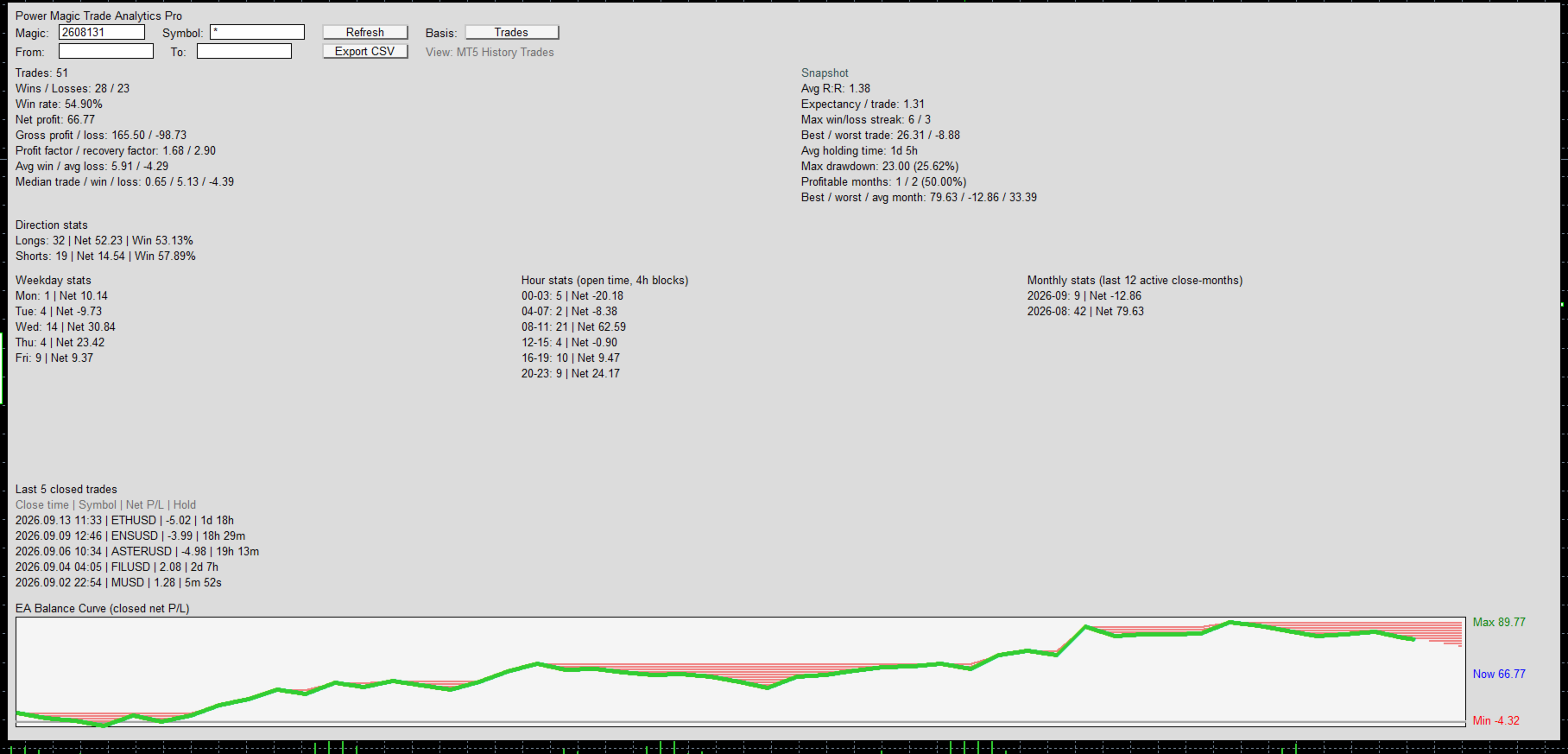
Power Magic Trade Analytics Pro is a closed-trade analytics panel designed for traders who use Magic Numbers to separate strategies, Expert Advisors or trading systems inside the same MT5 account.
Instead of manually searching through account history or rebuilding results in spreadsheets, enter the Magic Number, choose a symbol and optional date range, and the panel calculates the relevant trading statistics for you.
It is designed for practical strategy review, EA development, forward testing and post-trade analysis.
Analyze one strategy without mixing the rest of your account
A MetaTrader account may contain trades from several Expert Advisors, symbols and strategies at the same time.
Power Magic Trade Analytics Pro allows you to isolate the history you actually want to study.
Filter by:
- Magic Number
- Specific symbol
- All symbols using *
- From date
- To date
- All available history
This makes it possible to examine one EA separately from the rest of the account.
Broker-specific symbol names and suffixes are supported, such as stock exchange suffixes and broker-specific Forex symbols.
Trades or Deals — choose how you want to analyze the history
One of the main features of Power Magic Trade Analytics Pro is the selectable analysis basis.
Deals mode
Counts individual closing deals separately.
This view is useful when you want analysis closer to the information shown in MT5 History → Deals, including partial closing transactions.
Trades mode
Groups the trading activity by position lifecycle.
This is useful when you want to evaluate a completed position as one trading result rather than counting every closing execution separately.
Partial closes, position history and associated trading costs are reconstructed from the available MT5 history.
Because Deals and Trades use different accounting bases, their result counts and totals can legitimately differ.
Performance statistics
The panel calculates key closed-trade statistics including:
- Total Trades or Deals
- Wins and Losses
- Win Rate
- Net Profit
- Gross Profit
- Gross Loss
- Profit Factor
- Recovery Factor
- Average Win
- Average Loss
- Median Trade/Deal
- Median Win
- Median Loss
- Average Win/Loss Ratio
- Expectancy per Trade or Deal
- Maximum Winning Streak
- Maximum Losing Streak
- Best Result
- Worst Result
- Average Holding Time
- Maximum Closed-P/L Drawdown
Net results include available:
Profit + Commission + Swap
so trading costs recorded in MT5 history are incorporated into the analysis.
Why median statistics matter
Average performance can sometimes be distorted by one unusually large winner or loser.
For this reason, the panel also calculates:
- Median result
- Median winner
- Median loser
These values provide an additional way to understand what a more typical trade in the selected history looked like.
Long and Short performance
See whether the strategy behaves differently depending on direction.
The Direction section displays:
- Number of Long results
- Long Net P/L
- Long Win Rate
- Number of Short results
- Short Net P/L
- Short Win Rate
This can help identify whether performance is balanced or concentrated mainly on one side of the market.
Weekday analysis
Results are grouped according to the opening day of the position.
You can quickly compare performance across:
- Monday
- Tuesday
- Wednesday
- Thursday
- Friday
This can help reveal whether a strategy historically performs differently on particular trading days.
Time-of-day analysis
Opening times are divided into four-hour blocks:
- 00–03
- 04–07
- 08–11
- 12–15
- 16–19
- 20–23
Each block shows the number of results and its Net P/L.
This provides a simple way to identify whether performance has historically been concentrated during particular trading hours.
Times are based on the trading history supplied by the broker/server.
Monthly performance
The panel displays the most recent 12 active closing months and summarizes:
- Trades/Deals per month
- Monthly Net P/L
- Number of profitable months
- Percentage of profitable months
- Best month
- Worst month
- Average month
This provides a quick view of performance consistency over time instead of looking only at the final total profit.
Closed Net P/L Curve
The built-in graph visualizes cumulative closed Net P/L for the currently selected:
- Magic Number
- Symbol
- Date range
- Analysis basis
The curve also highlights periods below previous cumulative-P/L peaks, helping make drawdown periods easier to see.
This is a filtered closed-P/L curve, not the complete MT5 account equity curve.
Recent results
The panel displays the latest five closed results from the active filter, including:
- Closing time
- Symbol
- Net P/L
- Holding time
This makes it easier to confirm which trades are currently included in the analysis.
CSV export
The currently selected analysis can be exported to CSV for additional research or record keeping.
The export includes:
- Selected Magic Number
- Symbol filter
- Date range
- Deals/Trades basis
- Summary statistics
- Direction statistics
- Weekday statistics
- Hour statistics
- Monthly statistics
- Individual analyzed results
- Cumulative Net P/L
Deal-mode exports also include deal and position information together with available profit, commission and swap values.
Multi-asset use
Power Magic Trade Analytics Pro works with MT5 trading history and can be used with supported broker instruments such as:
- Forex
- Stocks
- Indices
- Metals
- Cryptocurrency CFDs
- Other MT5 instruments
The exact symbols and available history depend on your broker.
Designed for EA and strategy analysis
The utility is particularly useful for:
- Comparing Expert Advisors
- Reviewing forward-test performance
- Separating strategies by Magic Number
- Checking strategy performance by symbol
- Investigating partial-close activity
- Comparing Long vs Short performance
- Finding stronger or weaker trading hours
- Reviewing monthly consistency
- Exporting results for further research
Important
Power Magic Trade Analytics Pro is an analytics utility.
It does not:
- generate trading signals
- predict future market performance
- guarantee profitable trading
- open or close positions
- manage trading risk
- modify an Expert Advisor's strategy
It analyzes the closed trading history available in MetaTrader 5.
Historical performance does not guarantee future results.