Lot Dashboard Pro

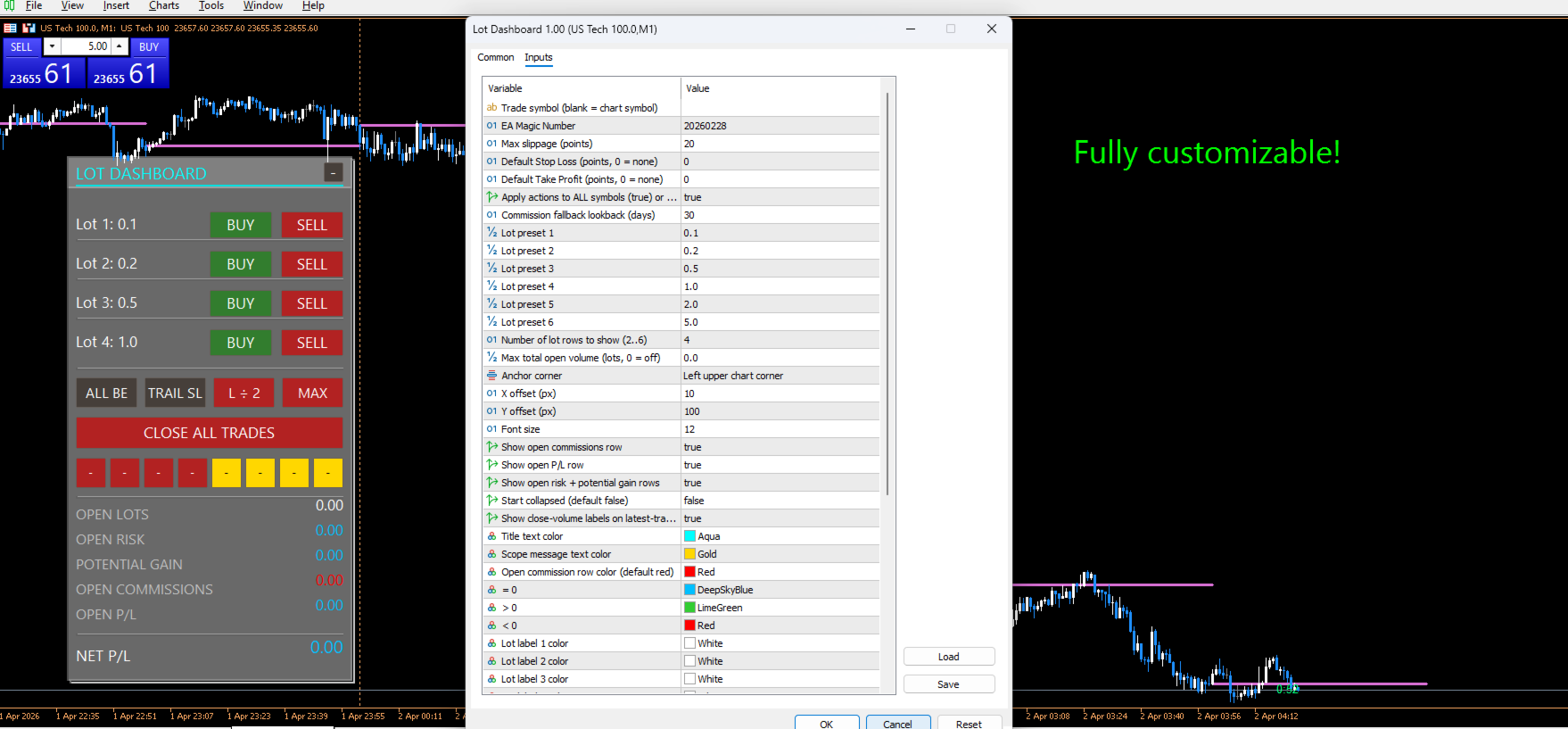
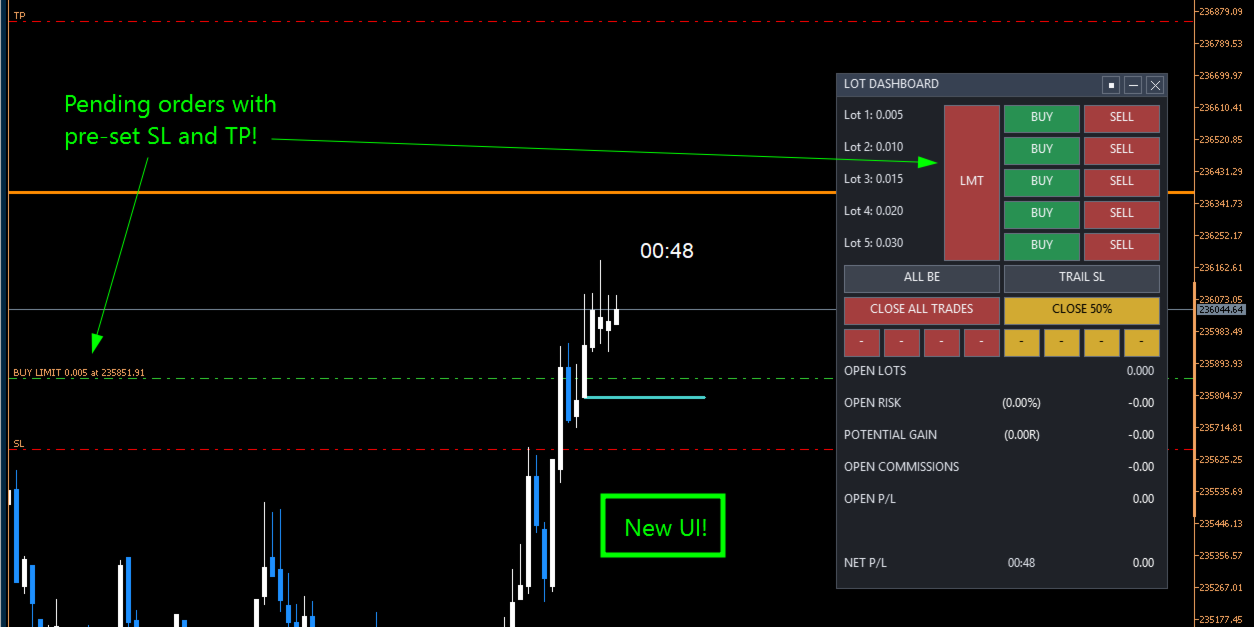
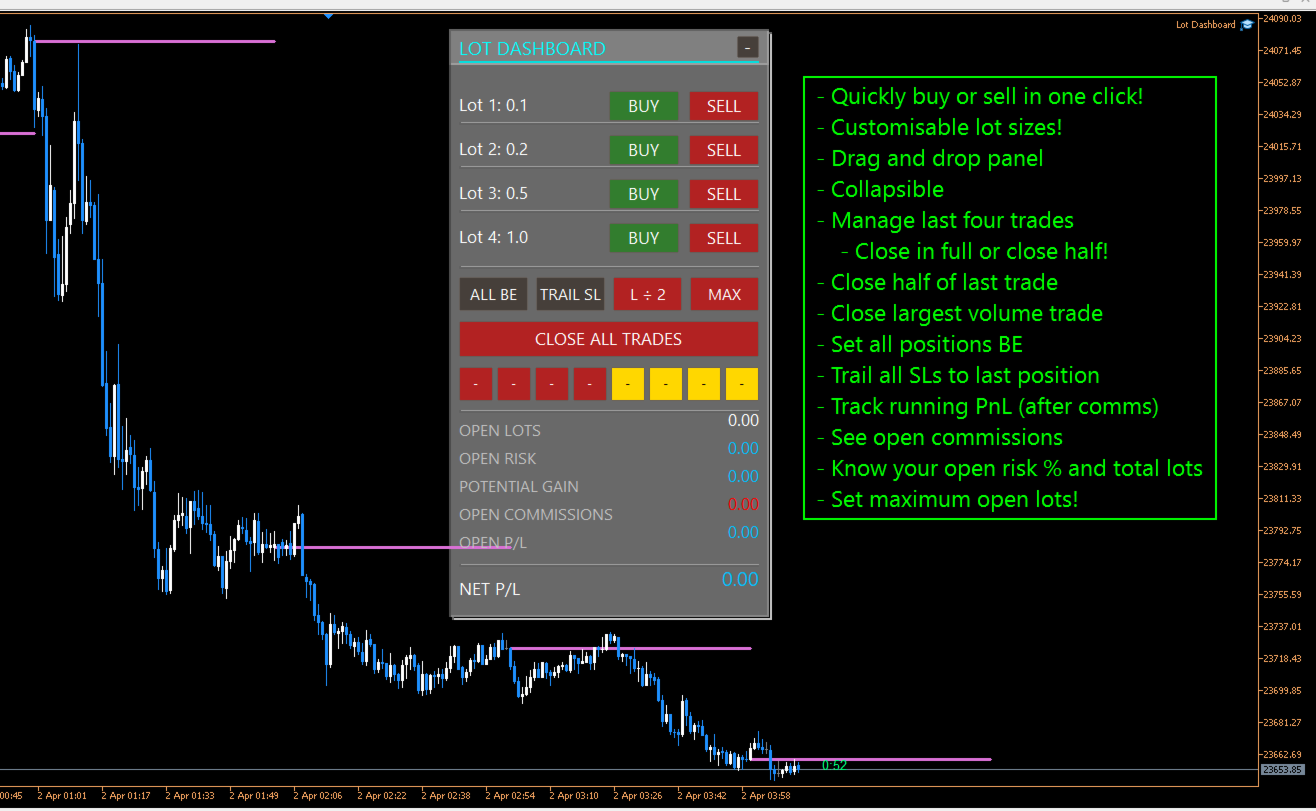
Lot Dashboard is a trade execution and position-management panel for MetaTrader 5. It is designed for traders who want faster entries, clearer exposure visibility, and more flexible manual exit planning directly on the chart.

The dashboard combines one-click market entries, quick management tools, live open-position metrics, and scenario-based exit lines in one compact panel. It is suitable for traders who scale in, manage multiple open positions, and want more control over how exits are planned and executed.

The main strength of the dashboard is its manual exit system. Two independent exit scenarios, A and B, can be placed on the chart and used to prepare different management outcomes before price reaches a level. Each scenario can be re-armed, paused, moved, and reused without rebuilding the setup from scratch.

Key features

  • One-click BUY and SELL entries using configurable lot presets
  • 2 to 6 visible lot rows for fast order execution
  • Default SL and TP support for market entries
  • Maximum total open lots limiter
  • Scope control for chart symbol only or all symbols
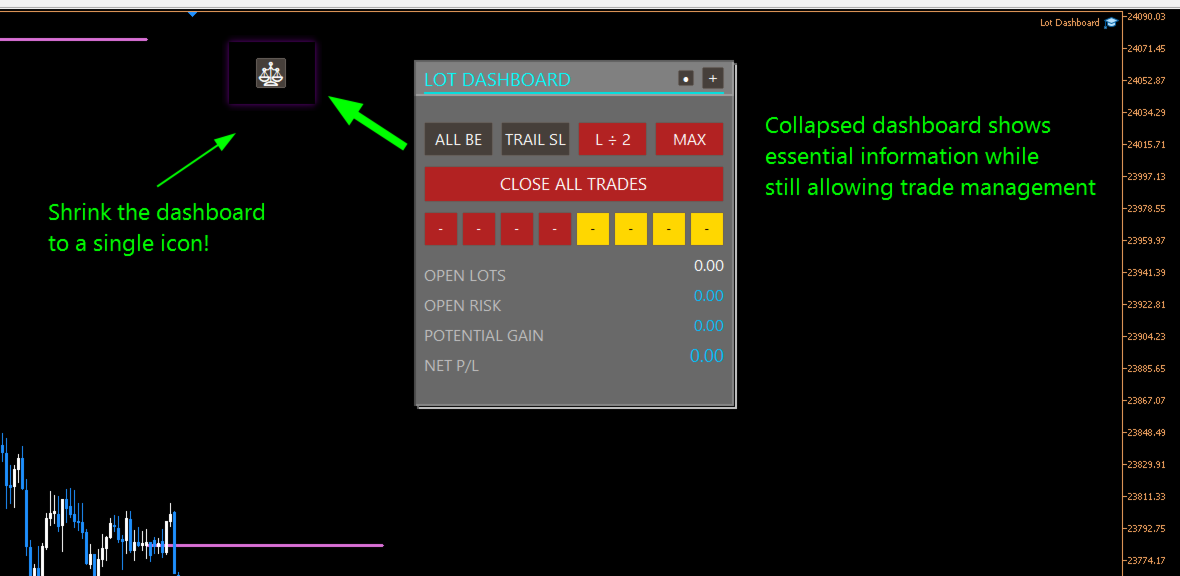
  • CLOSE ALL TRADES action
  • ALL BE function to move eligible positions to break-even
  • TRAIL SL function to move stop loss to the nearest entry per symbol
  • Quick-close buttons for the latest four positions
  • 100% close and 50% close actions for recent trades
  • Live display of open lots, open risk, potential gain, open commissions, open P/L, and net P/L
  • Draggable chart panel with stable shared drag handling

Manual exit scenarios

The dashboard includes two independent manual exit lines: A and B.

Each scenario can be placed on the chart and assigned to a closing mode. When price crosses the line, the selected action is applied to positions in scope.

Available scenario modes include:

  • Exit all — closes all eligible positions
  • Close largest — closes the largest eligible position
  • Close smallest — closes the smallest eligible position
  • -1 Near — closes the most advanced position relative to the exit line
  • -1 Far — closes the least advanced position relative to the exit line
  • 50% — reduces total scoped open volume toward half of the current amount using broker-valid close sizing

These modes allow the dashboard to be used for full exits, staged reductions, and selective position management.

Reusable inactive state

A major part of the current design is the inactive scenario workflow.

After any scenario triggers, the line stays on the chart and becomes inactive instead of being removed. This means:

  • the level remains visible
  • it does not trigger again until reactivated
  • the trader can drag it to a new price and reactivate it quickly
  • the scenario restores the prior active mode automatically when appropriate

This makes the dashboard useful for repeated management decisions without forcing the trader to rebuild exit lines each time.

Double-click line control

Scenario lines can also be controlled directly from the chart:

  • double-click an active line to make it inactive
  • double-click an inactive line to turn it off

This provides a fast way to pause or clear a scenario without cycling through panel buttons.

Safer drag behavior

The current dashboard also improves safety while adjusting exit lines:

  • scenario lines do not trigger while being dragged
  • a recent double-click will not accidentally reactivate the line through drag bleed-through
  • inactive-line reactivation is handled more safely after the interaction is complete

This helps prevent unintended closes during manual repositioning.

Who it is for

Lot Dashboard is suitable for traders who:

  • enter multiple positions in the same idea
  • want fast one-click execution
  • manage exits actively from the chart
  • scale out of trades in different ways
  • want a visual alternative to manual position-by-position handling

Summary

Lot Dashboard gives MT5 traders a practical chart panel for entries, exposure monitoring, and flexible manual exits. Its strongest features are the scenario-based exit lines, selective close modes, reusable inactive state, and fast trade management workflow.

推荐产品
Nebryx BandPulse Matrix Professional Bollinger Bands Volatility Context Indicator for MetaTrader 5 PRODUCT OVERVIEW Nebryx BandPulse Matrix is a clean volatility-context indicator built around Bollinger Bands. It is designed for traders who want more than a standard band overlay. The indicator combines classic Bollinger Bands with volatility squeeze detection, expansion confirmation, band-walk trend context, stretch/overextension markers, and a compact chart status label. The product focuses

FREE
Order PnL
Juan Pablo Sanchez Correa
Visualize your floating profits and losses in real-time directly above your open order line. Order PnL  is a minimalist indicator that calculates and renders the current floating (Profit + Swap) right above the entry price, allowing you to maintain 100% focus on the chart. Key Points: Dynamic Positioning: The text follows the entry price when scrolling or zooming. Zero Lag Visual: Optimized using a millisecond timer; it does not freeze the interface or overload tick processing. Clean Design: Au
FREE
Alpha Trend Analyzer
Le Trung Kien Hoang
SuperTrend Indicator – Description & Important Notice The SuperTrend is a composite technical indicator designed to help you identify the primary trend, measure its strength, and assess signal quality. However, an indicator is only a tool —it’s never 100% accurate and cannot replace sound risk management. 1. Core Formula & Components ATR (Average True Range): measures price volatility; customize sensitivity via Periods and Multiplier . Upper/Lower Bands: derived from ATR and your chosen source p
FREE
The indicator detects and displays М. Gartley's Butterfly pattern. The pattern is plotted by the extreme values of the ZigZag indicator (included in the resources, no need to install). After detecting the pattern, the indicator notifies of that by the pop-up window, a mobile notification and an email. The pattern and wave parameters are displayed on the screenshots. The default parameters are used for demonstration purposes only in order to increase the amount of detected patterns. Parameters z
Multi-timeframe trend indicator based on the ADX / ADXWilder indicator with Fibonacci levels The indicator shows trend areas using ADX or ADXWilder indicator data from multiple timeframes. The impulse mode of the indicator allows you to catch the beginning of a trend, and several "Screens" with different timeframes allow you to filter out market noise. Fibonacci levels are added to the price chart, which have flexible settings. How the indicator works: if PDI is greater than NDI, then   it`s
FREE
两条线,度量的是市场真实的旋转,而不是某条移动均线的形状。Vortex Indicator MTF在一个窗口上把向上和向下的涡旋运动分别求和,各自除以真实波幅,并从得到的这一对线的交叉处取得信号,也就是一次直接从K线本身量出来的方向变化。它内部完全没有递推,因此从任何一根K线接着往下算,在构造上都是精确一致的。它是免费的:没有试用期,没有锁定功能,没有升级页面。 在一个窗口上取三个总和:这根K线的最高价到上一根最低价的距离,也就是向上的涡旋运动;这根K线的最低价到上一根最高价的距离,也就是向下的涡旋运动;以及真实波幅。前两个各自除以第三个,就得到VI加和VI减。两者都围绕一上下摆动,它们的交叉就是信号。 本移植版中完全没有任何递推。这两条线是窗口作用在输入的最高价、最低价和收盘价上的纯函数,正因如此,从任何一根K线接着往下算都是构造上精确一致的,而不是近似。强度水平只是把一次交叉评为2而不是1,并把涡旋的增强与消退标记为独立事件;它不过滤任何东西,每一次交叉都会被发布。 图表上显示的内容 在独立窗口里:VI加和VI减围绕一这个水平画成两条线,两者之间的间距画成柱状图,按它在扩大还是在消
FREE
MSL Liquidity Zones
Andrei Lukoianov
Liquidity Zones is a free MetaTrader 5 indicator by MarketStructureLab. It automatically highlights support and resistance zones, counts separate price returns and marks broken zones. The indicator helps you keep important price areas in view and assess how the market reacts to them. Colored zones, compact labels and historical levels make it useful for both beginners and experienced traders with their own analysis methods. Main features Zones based on confirmed price swings. Support zones come
FREE
HighLow MT5
Azamat Mullayanov
4 (2)
The indicator plots two lines by High and Low prices. The lines comply with certain criteria. The blue line is for buy. The red one is for sell. The entry signal - the bar opens above\below the lines. The indicator works on all currency pairs and time frames It can be used either as a ready-made trading system or as an additional signal for a custom trading strategy. There are no input parameters. Like with any signal indicator, it is very difficult to use the product during flat movements. You
FREE
Cross MA histogram
Mariusz Piotr Rodacki
The Cossover MA Histogram indicator is a simple tool showing the trend based on crossover of moving averages. Simply specify two mobving averages and addicional parameters like MA method and Applied price. When fast MA is above slow MA the histogram is green, indicating an uptrend. When MA fast is below MA slow the histogram is red, indicating an downtrend.
FREE
Quick Close 1S
Tan Au Phuong
5 (9)
Quick Close 1S 是一款用于快速且有序交易管理的工具。它提供简洁的控制面板,可立即开仓或平仓,应用灵活的 SL/TP 设置,管理订单篮目标,并控制总体盈利或亏损。适合注重精准、高效和清晰执行的交易者日常使用。 主要功能 简化交易控制:通过直观面板管理持仓,可选择开/平特定类型订单或一次性全部执行。 灵活 SL/TP 设置:为单个订单或整个订单篮设置固定或基于K线的止损/止盈。 订单篮目标与移动止损:以点数设定订单篮 TP,并使用可自定义的移动止损维持仓位。 全局风险管理:当达到预设的盈利或亏损水平(金额或百分比)时自动平掉所有仓位。 可自定义界面:设置 Magic Number、滑点限制,并可启用按键点击音效。 感谢您选择此工具。如果您觉得它有帮助,请给予积极评价以肯定开发者的努力。本工具是无盈利分享的,您的反馈与支持对我们非常重要。
FREE
Trader Cockpit
Sofien Kaabar
Trader’s Cockpit is a simple non directional dashboard for MetaTrader 5 designed to give traders a quick, clear view of their trading environment directly on the chart. Creator:  https://www.quant-atlas.com/ The indicator does not generate buy or sell signals, does not predict market direction, and does not perform any trading action. Its purpose is to make the trader’s daily workflow easier by centralizing useful account, symbol, spread, session, and broker condition information in one compact
FREE
Fabii Memory Support Resistance
Fabien Georges Andre Guillemaud
不再猜测哪些支撑和阻力区域重要:每个区域都显示价格测试过它多少次。No repaint. 任何品种,任何 timeframe。2 分钟即可加载到您的图表。可在 Strategy Tester 中免费测试。 Get more indicators here Baselines, volatility filters and oscillators. No repaint. 为什么需要它 您手动绘制支撑和阻力,而且两位交易者在同一张图上绘制的水平从不相同。您不知道哪些水平值得关注。您把止损放在价格从未遵守过的水平之后,只有在它被突破时才会发现。 您将获得什么 Fabii Memory Support Resistance 按规则绘制支撑和阻力区域,并统计价格测试每个区域的次数,让您不再猜测哪些水平重要。 每个区域都来自规则,而不是凭眼睛判断,所以您和其他交易者看到的水平相同。 每个水平都显示触及次数(例如 x3),测试越多线条越粗,让您一眼看出价格最尊重哪些水平。 绿色区域在价格下方,红色区域在价格上方。被突破的水平变成灰色虚线,并在突破的那根 K 线处结束,让图表保持清晰。 新水平
Reversal Composite Candles
MetaQuotes Ltd.
3.69 (16)
该系统的思路是通过计算复合蜡烛来识别反转形态。 反转形态类似日本蜡烛条分析的 "锤头" 和 "吊颈" 形态。但它使用符合蜡烛替代单一的蜡烛,并且不需要复合蜡烛的小实体来确认反转。 输入参数: Range - 最大柱线数量, 计算复合蜡烛时用。 Minimum - 最小复合蜡烛大小 (传统的点数)。 ShadowBig and ShadowSmall - 影线 (复合蜡烛单元)。 Limit, StopLoss and TakeProfit - 开盘价, 止损位和止盈位, 它们是相对于复合蜡烛的收盘价 (复合蜡烛单元)。 Expiration - 订单过期时间 (单位柱线), 用于挂单 (Limit!=0.0)。 反向蜡烛条形态的判别如下。 它计算复合蜡烛参数,其自最后的完整柱线 (索引为 1) 至由 Range 输入参数定义的柱线数量。如果复合蜡烛大小大于由 Minimum 输入参数指定的数值, 它分析复合蜡烛的影线检测反转条件。 空头能量的特征是复合蜡烛的上影线为零, 多头能量的特征是复合蜡烛的下影线为零。 为确认空头趋势反转 (且多头开始),需要以下检查: 下影线的大小 (多头能量
FREE
Free automatic Fibonacci is an indicator that automatically plots a Fibonacci retracement based on the number of bars you select on the BarsToScan setting in the indicator. The Fibonacci is automatically updated in real time as new highest and lowest values appears amongst the selected bars. You can select which level values to be displayed in the indicator settings. You can also select the color of the levels thus enabling the trader to be able to attach the indicator several times with differe
FREE
TANIN ICHIMOKU CLOUD (EA20): The Ultimate Trend Rider & Prop Firm Shield Trading the Ichimoku Kinko Hyo system manually can be complex and emotionally draining. Are you tired of getting shaken out of massive trends by market noise? Meet EA20 Tanin Ichimoku Cloud , a fully automated trend-following system. It takes the guesswork out of Ichimoku by executing sniper entries and riding the mega trends with zero emotions. AUTO-LICENSE SYSTEM (NO KEY REQUIRED) This EA is 100% FREE. We have upgrad
FREE
Orange Indicator by Quant Atlas Creator:  https://www.quant-atlas.com/ Orange Indicator is a clean reversal focused indicator for MetaTrader 5, designed to highlight potential turning points directly on the chart using simple orange buy and sell markers. The indicator focuses on moments where price may be transitioning out of short term exhaustion and into a possible reaction phase. When a bullish setup appears, an orange upward triangle is displayed below the candle. When a bearish setup appear
FREE
ATC Alert Manager 让您直接在图表上设置价格警报,并从一个小的面板管理它们。每个警报都显示为图表上的一条线,您可以将其拖动到新的价格。 警报在价格穿越您水平的时刻触发一次,带有弹出警报、声音和可选的推送到您手机的推送通知。已经超过水平的价格不会触发它,因此您永远不会每个 tick 都收到重复警报。 此工具也是 All In One Trade Management Panel MT5 的一部分,与仓位工具、交易管理和绩效分析一起 演示账户的免费试用版 ——在实时图表上试用,无时间限制。 主要功能: 一键添加警报。价格字段从当前价格开始,您选择方向:Above 或 Below。 为任何警报添加备注,例如「伦敦高点」。备注包含在警报消息中。 每个警报都绘制为一条线,图表右侧带有价格标签。拖动标签以更改价格,警报在新水平重新武装。 每个标签旁边的齿轮按钮打开该警报的编辑窗口。 面板列出每个警报及其状态:Armed、Fired(带时间)或 Disabled。 从面板启用、禁用、编辑或删除任何警报。启用已触发的警报会再次武装它。 警报为每个账户保存,并在重启
FREE
Index Trend Monitor 是一款用于 MetaTrader 5 的指标,用于衡量指数 CFD 以及其他活跃市场的方向强度。 核心思路: 该指标结合 EMA 结构、ATR 标准化波动、动量与持续性逻辑,生成清晰的趋势评分, 并提供一个隐藏的市场状态缓冲区,方便 Expert Advisor 和自定义工具读取。 快速概览 产品类型 MetaTrader 5 指标 主要用途 方向强度、趋势评分与市场状态分类 视觉输出 多空柱状图与趋势评分逻辑 EA 集成 支持,通过可见和隐藏缓冲区 外部 DLL 不需要 主要功能 趋势强度范围从 -100 到 +100 。 提供多头和空头柱状图显示。 计算逻辑基于 EMA 方向、ATR 标准化、动量和持续性。 可选参考周期,用于更高层级背景分析。 可选仅按收盘 K 线计算。 可配置最大计算 bar 数量。 清晰区分强势、弱势和中性区域。 提供适合 EA 使用的缓冲区,包括隐藏的 Regime Code 。 开发者缓冲区 Trend Score: 主要方向强度值。 Bull Strength: 正值柱状图。 Bear Strength: 负值柱
FREE
Dynamic Zones
Kee Huang Tan
Dynamic Supply and Demand indicator automatically identifies and displays Supply and Demand Zones on your chart based on price action patterns and market structure.  These zones represent areas where institutional buying or selling pressure has historically occurred, making them key levels for potential price reactions. This form of indicator takes inspiration from ICT as well as traditional Support & Resistance formation. **For the first 50 candles (number depends on LookBackCandles) when indic
FREE
Read-only analytics for accounts running several EAs. Groups your closed trades by magic number and measures how much of their combined risk actually cancels out. Free measurement edition. The monitoring and alerting edition is Portfolio Command Desk:  https://www.mql5.com/en/market/product/188884 The problem You run five Expert Advisors. Each backtest looked fine on its own. But the account does not trade five systems, it trades one portfolio, and no report in MetaTrader tells you how those sys
FREE
TradeVision Pro
Ian Nganga Comba
TradeVisonPro Forex Analyzer Pro MT5 交易账户分析与监控仪表板 TradeVisonPro Forex Analyzer Pro 是一款专为 MetaTrader 5 用户设计的交易分析和账户监控解决方案。 本产品将 MT5 交易数据整理到结构化的网页仪表板中,使交易者能够查看账户信息、监控未平仓头寸、分析交易历史、跟踪策略、记录交易日志以及查看绩效统计数据。 TradeVisonPro Forex Analyzer Pro 旨在帮助交易者整理交易信息,并通过受支持的桌面和移动网页浏览器访问这些数据。 主要功能 • MT5 账户仪表板 • 未平仓头寸监控 • 交易历史分析 • 交易日历 • 策略跟踪 • 交易日志 • 账户绩效统计 • 绩效报告 • 交易通知 • 多账户支持 • 可分享的只读报告 MT5 账户仪表板 在一个结构化的仪表板中查看 MetaTrader 5 交易账户的重要信息。 可显示的信息包括: • 账户余额 • 净值 • 可用保证金 • 保证金水平 • 未平仓头寸 • 浮动盈亏 • 交易量 • 经纪商信息 • 账户信息 仪表板集中显示
FREE
GDS RiskLab TradeDesk Free Manual Trading Desk and Risk-Control Utility for MetaTrader 5 GDS RiskLab TradeDesk is a free chart-based utility for traders who want a cleaner manual trading workspace in MetaTrader 5. It is designed as a simple execution-support and risk-control panel. The goal is to keep the trading process more organized: review the chart, plan the trade, keep risk visible and execute manually with more structure. This tool does not generate buy or sell signals. It does not predic
FREE
Volatility Break Signals
Mahefa Raveloson
5 (1)
Volatility Break Signals Description: The  Volatility Break Signals  is an indicator designed to detect potential trend changes while partially filtering market noise. It uses an adaptive volatility measure based on the selected price (Close, Open, High, Low, etc.) and generates Buy and Sell signals when the price shows a reversal relative to the previous direction. How it works: Price Volatility Measurement The indicator calculates the absolute price changes from bar to bar ( |price - previous
FREE
MA Cross Signals
Quang Vinh Nguyen
5 (1)
MA Cross Marker helps traders visualize market direction with two customizable moving averages and clear crossover signals. It can display MA lines from one selected timeframe on the current chart and mark bullish or bearish crosses automatically. Designed for traders who want a lightweight, easy-to-read MA crossover tool. Key Features Display two customizable Moving Averages Automatic Buy/Sell signals on MA crossover Single timeframe MA selection (including higher timeframe display) Clean and
FREE
Tick Bars
Henrique Helmuth Kreutz Pfeifer
Indicator that show candlestick bars with an different sampling method than time fixed. Real time data is sourced to the indicator and it may be used as substitute of the default graph. Each bar is formed when a predefined amount of ticks is received, showing in the graph the OHLC of this clusteri of ticks. The input variable is the amount of ticks of each bar. It's a different approach of sampling, the amount of bars is proportional to the amount of negotiations insted of a sample in a fixed am
FREE
PRODUCT TITLE: Mindgame  SHORT DESCRIPTION (Max 150 chars): All-in-One professional indicator: 5 SMAs, Non-Repainting MACD Crossover Arrows, NY Session Shading, and Live HUD Dashboard for MT5. CATEGORY: Market > MetaTrader 5 > Indicators > Trend / Oscillators PRICE RECOMMENDATION: $39 - $59 (or Free with premium upgrade / rental options) ================================================================================ FULL PRODUCT DESCRIPTION (Copy-paste directly into MQL5 Market description
FREE
Blahtech VWAP MT5
Blahtech Limited
5 (1)
Blahtech VWAP - Volume Weighted Average Price (VWAP) is the ratio of price to total volume. It provides an average price over a specified time interval.  Links [  Install  |  Update  |  Documentation   ] Feature Highlights Configurable VWAP Line Sessions, intervals, anchored or continuous Previous day settlement line Standard Deviation bands Alerts at bar close or real time Automatic Broker or Tick volumes Significantly reduced CPU usage Input Parameters Expert Advisor Mode  - Reserved for iCu
FREE
Follow The Line MT5
Oliver Gideon Amofa Appiah
4.6 (35)
This indicator obeys the popular maxim that: "THE TREND IS YOUR FRIEND" It paints a GREEN line for BUY and also paints a RED line for SELL. (you can change the colors). It gives alarms and alerts of all kinds. IT DOES NOT REPAINT and can be used for all currency pairs and timeframes. Yes, as easy and simple as that. Even a newbie can use it to make great and reliable trades. NB: For best results, get my other premium indicators for more powerful and reliable signals. Get them here: https://www.m
FREE
ThreePointsChannelFree
Dimitr Trifonov
5 (1)
This is a free version of the indicator, the period between the vertical lines is always 30 bars. In the paid version the period can be set by user, so a configuration with many ThreePointsChannel indicators with different periods is possible. The principle of construction - on top of any number of bars set by the user, a channel is constructed with maximum and minimum lines so that the bars touch the maximum and minimum of the channel at exactly three points. The name of the indicator follows
FREE
KMB Smart Pattern Analyzer PRO
Karwan Msto Mohammed Mohammed
产品概述 KMB Smart Pattern Analyzer PRO 是一款高级技术分析指标,旨在用户自定义的图表区间内识别并排序高匹配度的市场形态。 该指标将多个分析引擎整合到一个专业工具中: K线形态分析 经典图表形态识别 谐波结构识别 智能市场结构 / SMC 分析 与在整个图表上显示随机信号不同,该指标允许用户专注于特定的市场区域,并获得最强形态匹配、预期方向、突破水平、失效水平以及预测目标区域的结构化分析。 这使其非常适合希望以更清晰、更专业的方式分析价格行为和形态结构的交易者。 主要功能 识别并排序 Top 3 最佳匹配形态 支持: K线形态 经典图表形态 谐波形态 市场结构 / SMC 逻辑 用户自定义区间分析 显示: 形态类型 市场方向 Score 动量 突破水平 T1 / T2 / T3 目标水平 失效水平 市场结构信息 在图表上显示所选分析区域 可拖动并移动分析区域 清晰专业的信息面板 支持浅色和深色图表主题 适用于主观交易者、形态交易者和技术分析师 工作方式 将指标添加到图表。 选择或移动分析区域。 指标扫描所选区域。 对最强的形态候选进行排序。 面板显示最佳匹
FREE
该产品的买家也购买
Trade Assistant MT5
Evgeniy Kravchenko
4.43 (216)
它有助于计算每笔交易的风险,容易安装新的订单,具有部分关闭功能的订单管理, 7 种类型的追踪止损和其他有用的功能。   附加材料和说明 安装说明   -   应用程序说明 线条功能  - 在图表上显示开仓线、止损线、止盈线。 有了这个功能,就可以很容易地设置一个新的订单,并在开仓前看到它的附加特性。   风险管理  - 风险计算功能在考虑到设定的风险和止损单的大小的情况下,计算新订单的成交量。它允许你设置任何大小的止损,同时观察设定的风险。 批量计算按钮 - 启用 / 禁用风险计算。 在 " 风险 " 一栏中设置必要的风险值,从 0 到 100 的百分比或存款的货币。 在 " 设置 " 选项卡上选择风险计算的变量: $ 货币, % 余额, % 资产, % 自由保证金, % 自定义, %AB 前一天, %AB 前一周, %AB 前一个月。   R/TP 和 R/SL - 设置止盈和止损的关系。 这允许你设置相对于损失的利润大小。 例如, 1 : 1 - 这决定了 TP = SL 的大小。 2 : 1 - 这意味着 TP 是 SL 的两倍。 RR - 它禁用比率。   订单管理 该面板支
欢迎来到 Trade Manager EA——这是一个终极风险管理工具,旨在使交易变得更直观、精准和高效。它不仅仅是一个下单工具,而是一个用于无缝交易计划、仓位管理和风险控制的全面解决方案。不论您是新手交易员、资深交易员,还是需要快速执行的剥头皮交易员,Trade Manager EA 都可以满足您的需求,适用于外汇、指数、大宗商品、加密货币等各种市场。 借助 Trade Manager EA,复杂的计算已成过去。只需分析市场,在图表上用水平线标记入场、止损和止盈,设置您的风险水平,Trade Manager 就会立即计算出理想的头寸规模,并实时显示以点、账户货币计价的止损和止盈。每笔交易都得以轻松管理。 主要功能: 头寸规模计算器 :根据定义的风险瞬间确定交易规模。 简单的交易计划 :在图表上用可拖动的水平线直接计划交易,设置入场、止损和止盈。 实时显示 SL 和 TP :以账户货币、点或分显示止损和止盈,便于分析。 高级保护工具 盈亏平衡选项 : 基本盈亏平衡 :当您的交易达到设定水平时自动保护利润。 多级盈亏平衡 :设置多达 4 个级别以逐步保护利润。 尾随止损选项 : 基本尾随
Farmed Hedge Yield Farming | All Markets (Manual - Hybrid - Semi/Automated EA) VERIFIED TRADING RESULTS - Farmed Hedge Yield Axi Copy:  https://www.mql5.com/en/signals/2356376 - Farmed Hedge Yield Exn Copy:   https://www.mql5.com/en/signals/2356404 - Farmed Hedge Yield V Copy:  https://www.mql5.com/en/signals/2357156 IMPORTANT NOTICE: FarmedHedge is a MANUAL-FOCUSED TRADING UTILITY ,not a fully automated EA. Results shown on this Signal include manual trades and overall strategic management.
Local Trade Copier EA MT5
Juvenille Emperor Limited
4.94 (150)
Local Trade Copier EA MT5 是一款快速、灵活的交易复制工具,用于在同一台 Windows 电脑或 Windows VPS 上的多个 MetaTrader 5 账户之间复制和管理交易。 它将本地交易同步与 Receiver 端的手数管理、风险管理、交易过滤、品种映射、交易管理和账户保护功能结合在一起。 只需约 1 分钟 即可完成 Transmitter 和 Receiver 终端的设置,并可在同一经纪商或不同经纪商的账户之间复制手动交易或 EA 交易。在合适的条件下,本地 MetaTrader 终端之间的交易信息可以在 0.5 秒以内 完成同步。实际交易执行速度取决于经纪商延迟、网络状况、电脑/VPS 性能以及终端负载。 购买前先试用免费演示版 您可以在 MT5 模拟账户上测试 功能完整的 Local Trade Copier EA MT5 免费演示版 ,每次可使用 4 小时 : 下载 Local Trade Copier EA MT5 免费演示版 将下载的文件放入: MT5 → 文件 → 打开数据文件夹 → MQL5 → Experts 然后重新启动 MT
Telegram to MT5 Multi-Channel Copier   可将您 Telegram 和 Discord 频道中的交易信号自动复制到 MetaTrader 5。无需机器人、无需浏览器扩展、无需手动复制。信号一到 Telegram 或 Discord,EA 几秒内就在您的终端开仓。 在复制某个频道之前,内置回测器还能告诉您该频道在您的账户上会有怎样的表现。 产品包含两个组件:一个监听您 Telegram 频道的 Windows 应用程序,以及在 MT5 终端执行信号的本 EA。同时提供 MT4 版本   点此 . 购买前先试用:   应用程序可免费下载。连接您自己的频道,查看每条信号的读取结果。Backtest 选项卡和实际交易需要已购买或已租用的 EA。本页面的免费演示版只能在策略测试器中运行,而策略测试器无法读取 Telegram 和 Discord。 设置指南与应用下载:   https://www.mql5.com/zh/blogs/post/779480 了解如何 回测任何 Telegram 信号频道 。 当前价格将来会上调。 工作原理 应用通过您自己的 Te
EA Overfitter
Stephen J Martret
5 (4)
回测看起来很漂亮。但它明天、下周、下个月还能继续赚钱吗? EA Overfitter 让您的 EA 在 100 段它从未见过的价格历史上重新运行。一个分数告诉您这个优势是否真实。 回测告诉您的,是 EA 在某一段价格历史上的表现——那段恰好发生过的历史。您无法从中判断,这个结果有多少来自策略本身,又有多少只是那一条特定路径带来的。 EA Overfitter 回答的正是这个问题。它构建最多 100 段您的 EA 从未交易过的合成价格历史,让策略在全部这些历史上重新运行,并展示它所产生的完整结果区间。您得到的不再是一条幸运或不幸路径上的单个数字,而是一幅真实的图景:策略在陌生数据上多久能赚钱、典型结果是什么样(而不是最好的那一次),以及您的回测离它有多远。 这些世界是由您自己的近期历史重建而成,因此这不是预测——任何从历史数据出发的检验都不可能是预测。它告诉您的是:这个优势是否依赖于价格的某一种特定排列,以及回测数字距离典型结果有多远。在投入资金之前,这才是值得回答的问题。 三个步骤 1. 构建。在图表上选择时间区间和世界数量,然后按 Build。EA Overfitter 会
TradePanel MT5
Alfiya Fazylova
4.89 (174)
交易面板是一款多功能交易助手。该应用包含超过50种手动交易功能,并允许您自动执行大多数交易任务。 应用程序说明 : https://www.mql5.com/zh/blogs/post/761102 用于模拟账户的应用程序试用版: https://www.mql5.com/zh/blogs/post/762579 如何安装应用程序: https://www.mql5.com/zh/blogs/post/762580 如何在可视化模式下测试应用程序: https://www.mql5.com/zh/blogs/post/770278 如何在VPS MetaTrader上安装应用程序: https://www.mql5.com/zh/blogs/post/770196 贸易. 只需单击一下即可执行交易操作: 打開掛單和頭寸,並自動計算風險。 一鍵打開多個訂單和頭寸。 打開訂單網格。 按組別關閉掛單和頭寸。 反轉頭寸方向(關閉買入>打開賣出,關閉賣出>打開買入)。 鎖定頭寸(通過開啟缺少的頭寸,使買入和賣出頭寸的數量相等)。 一鍵部分關閉所有頭寸。 將所有頭寸的止盈和止損設置在同一價格水平。
Exp COPYLOT CLIENT for MT5
Vladislav Andruschenko
3.97 (35)
适用于 MetaTrader 5 的专业交易复制器 快速、专业、稳定可靠的 交易复制器 ,适用于 MetaTrader 。 COPYLOT 可在 MT4 和 MT5 终端之间复制 Forex 交易,并支持 Hedge 和 Netting 账户。 COPYLOT 的 MT5 版本支持: - MT5 Hedge → MT5 Hedge - MT5 Hedge → MT5 Netting - MT5 Netting → MT5 Hedge - MT5 Netting → MT5 Netting - MT4 → MT5 Hedge - MT4 → MT5 Netting MT4 版本 完整说明 + DEMO + PDF 如何购买 如何安装 如何获取日志文件 如何测试和优化 Expforex 的所有产品 您也可以将交易复制到 MT4 终端(MT4 → MT4,MT5 → MT4): COPYLOT CLIENT for MT4 COPYLOT 是一款专业的交易和持仓复制器,可同时与 2、3 甚至 10 个终端协同工作。 支持从 模拟账户和投资者账户 复制,也支持同时在多个终端上运行。 您可以使
News Trade EA MT5
Konstantin Kulikov
4.55 (11)
在此向大家介绍一款我本人使用多年的机器人。该产品支持半自动和全自动交易模式。 >>> Chat <<< 本程序包含基于经济日历新闻的灵活交易设置功能。不支持策略测试器检验。仅可进行实际操作。 下載最新的設定檔: https://www.mql5.com/en/blogs/post/747929 訊號監控: https://www.mql5.com/en/signals/author/test-standart 请参考博客中各类参数说明自行实现个性化设置   : https://www.mql5.com/en/blogs/post/748545   。 主要默认设置说明 单一图表英镑/GBP(英镑美元/GBPUSD、欧元英镑/EURGBP、英镑日元/GBPJPY、英镑加拿大元/GBPCAD、英镑澳大利亚元/GBPAUD、英镑瑞士法郎/GBPCHF)货币对操作。英镑/GBP是波动性最大的货币,能够为用户顺利完成交易提供更多机会。 Use_Symbols_from_Line = true; Symbols_Line = GBPUSD, EURGBP, GBPJPY, GBPCAD, GB
Strategy Ledger Pro
Abdullah Uygar Tuna
5 (17)
现已支持中文。 Strategy Ledger Pro 是一款适用于 MetaTrader 5 的只读账户分析面板。它按智能交易系统(EA)、策略、品种和魔术号拆分账户结果,让您看清每一个的真实贡献。 面板支持 11 种语言:English、Français、Deutsch、Español、Italiano、Português、Русский、Türkçe、中文、日本語 和 한국어。 下载演示版之前请注意。 Market 仅在策略测试器中运行任何付费产品的演示版。本面板分析的是您自己账户上的交易,而策略测试器中没有可读取的账户历史,因此演示版会打开一个空面板并加以说明。这是演示机制的工作方式,并非产品的限制。 本描述中的视频展示了面板在真实账户上的运行效果。 详细的 使用手册 (英文)介绍了每项功能, AureusAI Trading Suite 群组欢迎交流讨论并发布公告。 MetaTrader 对整个账户只显示一个余额。当多个 EA 同时交易时,这个余额无法说明每个 EA 的贡献。Strategy Ledger Pro 读取账户历史,重建已平仓头寸,将其归入各个策略,并在一个
Power Candles Strategy Scanner:自我优化的多品种交易设置扫描器 一个风吹草动就提醒的扫描器,只会让您学会忽略它。一根K线收盘时行情一热闹,提醒接连不断,您真正要做的那个交易设置就被淹没在噪音里。 Power Candles Strategy Scanner 在您 Market Watch 中的每个品种上运行自我优化的 Power Candles 引擎,只针对通过您自己筛选条件的内容发出提醒:最后一根已收盘K线的强度、交易设置的盈亏比、实时点差,以及您交易的资产类别。一旦某个品种进入您的列表,扫描器就会通知您。被您筛掉的一切保持安静,同一根K线收盘的所有命中合并成一条消息送达。 购买前先看看面板和每一个筛选条件。 截图、完整功能导览以及与 Power Candles 的配合流程: stein.investments/products/power-candles-scanner 本工具属于 Stein Investments 生态系统:18 款以上工具,外加 Max,您的一对一 AI 交易导师。  全天候在线,深入了解每一个指标,在您需要把事情想清楚的那一刻
按照自己的交易规则复制 Telegram 信号 Telegram to MT5 Signal Trader 可将 Telegram 公开及私密频道和群组中的文字交易信号自动复制到 MetaTrader 5。通过一个桌面应用管理多个信号提供者和 MT5 账户,并为 每个提供者单独设置风险和交易参数 。 复制信号无需 Telegram 机器人,也无需配置 API。 只需通过手机号或二维码登录您自己的 Telegram 账户,然后选择您已加入的频道或群组。您无需创建机器人,也无需提供 Telegram API 令牌、API ID 或 API hash。 自行选择仓位大小,将平仓分配到多个止盈价位,并自动执行保本止损和移动止损。在跟随信号提供者的同时,掌握信号的实际交易方式。 本产品由这款 MT5 EA 和必须配合使用的 Windows 桌面应用组成。请参阅 安装指南及应用下载 。 管理多个信号提供者和账户 为每个提供者单独设置: 为每个频道设置专属的仓位计算方式、入场规则、止损、止盈和交易管理参数。 灵活分配至不同账户: 将同一提供者的信号复制到多个已连接的 MT5 账户,并为每个账户使用不
================================================================================ POC BREAKOUT - V20.72. Full Professional Grade Toolkit ================================================================================ POC Breakout is a full MetaTrader 5 trading dashboard for discretionary traders who want breakout signals, Point of Control (POC) context, volume profiles, order flow, market structure, news, alerts, and advanced trade planning in one professional workspace. Attached directly to you
The product will copy all telegram signal to MT5 ( which you are member) , also it can work as remote copier.  Easy to set up, copy order instant, can work with almost signal formats, image signal,  s upport to translate other language to English Work with all type of channel or group, even channel have "Restrict Saving Content", work with  multi channel, multi MT5 Work as remote copier: with signal have ticket number, it will copy exactly via ticket number. Support to backtest signal. How to s
HINN MagicEntry Extra
ALGOFLOW OÜ
4.74 (19)
HINN MAGIC ENTRY – the ultimate tool for entry and position management! SIMPLE. FASTEST. INTUITIVE. MAX AUTOMATED. Place orders by selecting a level directly on the chart! full description   ::  demo-version  :: 60-sec-video-description Key features: - Market, limit, and pending orders - Automatic lot size calculation - Automatic spread and commission accounting - Unlimited partitial take-profits  - Breakeven and trailing stop-loss and take-profit  functions - Invalidation leves - Intuitive, a
VirtualTradePad PRO SE MT5 — MetaTrader 5 专业交易控制中心 VirtualTradePad PRO SE 是一款基于图表的高级交易面板,也是适用于 MetaTrader 5 的交易管理工作区。它专为希望获得更快执行、更清晰持仓控制、结构化交易管理、可视化价位规划,以及直接在图表上完成专业交易流程的交易者而设计。 这不仅仅是一个 BUY / SELL 面板。PRO SE 将手动交易、挂单、持仓管理、部分平仓、篮子利润/亏损控制、加仓均价层级、ATM 规则、信号监控、实时市场信息、策略测试器 (Strategy Tester) 流程以及面向 VPS 的运行方式整合到一个互相关联的界面中。 MT4 版本 | 完整说明和截图 | 如何购买 | 如何安装 | 如何获取日志文件 | 如何测试与优化 | Expforex 的所有产品 为什么交易者会选择这套面板 图表一键交易 ,并支持键盘快速操作 快速完成开仓、平仓、修改、反转、锁仓与部分平仓 深度控制仓位、挂单、总利润与风控逻辑 自动参数计算,减少手动输入与重复劳动 为什么 PRO SE 比标准手动交易更高
Telegram To MT5 Ultra
Mirel Daniel Gheonu
5 (5)
Telegram To MT5 — 信号复制器 将您的 Telegram 频道中的交易信号变成真实的 MT5 订单 — 自动执行,可用于任意数量的账户,风险与规则完全由您掌控。 Telegram To MT5 将您已在 Telegram 关注的 VIP / 信号频道连接到您的 MetaTrader 5 终端。一个免费的配套桌面应用读取消息(即使是禁止机器人的频道),而本 EA 在您的账户上执行这些信号 — 应用您自己的风险设置、品种映射、止盈处理、交易时段与新闻过滤。 它是一个信号复制器,而非黑箱策略:由您决定信任哪些频道,以及每笔交易如何计算手数和管理。 分步设置与配套应用安装指南 工作原理 [您的 Telegram 频道] -> [配套桌面应用] -> [MT5 + 本 EA] -> 订单 配套桌面应用(免费,已包含)使用您的 Telegram 账户登录并监视您所选择的频道。即使是禁止机器人的 VIP 频道也能正常工作,它通过一个私有、加密的本地桥接转发每条消息。 本 EA 挂在一个图表上,在 MT5 接收这些信号,并按照您的规则开仓 / 管理交易。 应用与 EA 之间的连接是位于
Timeless Charts
Samuel Manoel De Souza
5 (9)
Timeless Charts is an all-in-one trading utility for professional traders. It combines custom chart types such as Seconds Charts and Renko with advanced order flow analysis using Footprints , Clusters , Volume Profiles , VWAP studies, and anchored analysis tools for deeper market insight. Trading and position management are handled directly from the chart through an integrated trade management panel , while Market Replay and Virtual Accounts provide environments for practicing trading skills and
下一次更新 — 版本 2.52 即将推出![全新功能] 准备迎接 4 项重大新功能,全面提升您的市场分析能力与交易流程! 我们将通过 4 项全新功能,进一步提升市场分析水平,满足您的交易需求。现为您介绍: 1. TRADE OVERVIEW DASHBOARD 2. CONFLUENCE AT ZONE 3. STRONG & WEAK HIGH/LOW 4. OTE 1. TRADE OVERVIEW DASHBOARD 一个帮助您更轻松地了解整体市场状况的仪表盘,为您的交易决策提供参考指引,帮助您系统地分析市场并规划交易,所有信息尽在一个屏幕中。 多时间周期市场概览(Multi-Timeframe Market Overview) 更清晰地了解市场方向与价格结构 快速查看市场状况 为系统化市场分析和入场规划提供指引。 2. CONFLUENCE AT ZONE 当价格进入关键区域时……您将了解有多少项支持因素相互吻合。 关键区域是交易决策至关重要的地方。但仅仅是价格进入某个区域还不够。此功能可帮助您在入场交易前,识别相互吻合的因素,包括信号及其他相关因素,从而进行更全面的分析,并
News Filter EA
Rashed Samir
5 (2)
News Filter EA: Advanced Algo Trading Assistant News Filter EA is an advanced algo trading assistant designed to enhance your trading experience. By using the News Filter EA , you can integrate a Forex economic news filter into your existing expert advisor, even if you do not have access to its source code. In addition to the news filter, you can also specify trading days and hours for your expert. The News Filter EA also includes risk management  and equity protection features. MT4 Version Ma
Strategy Builder offers an incredible amount of functionality. It combines a trade panel with configurable automation (covert indicators into an EA), real-time statistics (profit & draw down) plus automatic optimization of SL, TP/exit, trading hours, indicator inputs. Multiple indicators can be combined into an single alert/trade signal and can include custom indicators, even if just have ex4 file or purchased from Market. The system is easily configured via a CONFIG button and associated pop-u
EA Auditor
Stephen J Martret
5 (7)
EA Auditor is an independent analysis tool for traders evaluating Expert Advisors and trading signals on MetaTrader 5. It audits backtest reports, reviews posted developer signals, and cross-verifies the two against each other to help traders assess strategies before committing capital. The MQL5 market offers a wide range of Expert Advisors from many developers, with varying approaches, quality, and transparency. EA Auditor provides a consistent, data-driven framework for reviewing them, answer
Trade copier MT5
Alfiya Fazylova
4.61 (57)
Trade Copier 是一种专业实用程序,旨在复制和同步交易账户之间的交易。 复制发生从供应商的帐户/终端到收件人的帐户/终端,安装在同一台计算机或 vps 上。 在购买之前,您可以在演示帐户上测试演示版本。 演示 这里 。 完整说明 这里 。 主要功能和优点: 支持复制MT5>MT5、MT4>MT5、MT5>MT4,包括МТ5 netting账户。 供应商和收件人模式在同一产品中实现。 简单直观的界面,允许您直接从图表中实时控制复制。 连接中断或终端重新启动时不会丢失设置和位置。 允许您选择要复制的符号,也可以替换接收者的符号,例如 EURUSD> USDJPY。 允许为每个符号设置个性化的复制设置。 支持回拷贝。 能够仅复制某些订单。 允许您设置开仓交易价格的最大差异和最大时间延迟。 正确复制部分订单关闭的执行。 计算复制手数的几种方法。 同步止盈和止损。有几种方法可以计算它们的位置。 支持通过执行在“Market account”上工作,其中 SL / TP 仅在开仓后设置。 如何使用简单的设置复制交易 将供应商终端和接收终端安装在同一台计算机或 VPS 上。 在供应商终端上
EA Portfolio Control & Cloud Monitoring for MetaTrader 5 Your EAs manage trades. KONTROL_01 manages your EAs. A control system for traders running multiple Expert Advisors on the same account. Coordinate EA activity, manage trading risks and monitor your setup remotely. A detailed User Manual is available via DM after purchase. IN PRACTICE Multiple EAs. No coordination. Your EAs trade independently, unaware of each other's activity. KONTROL_01 coordinates them, limits simultaneous activity a
RS Trade Copier - 超快 本地跟单系统,配备 真正的 图形界面。别再手动输入账号了。告别200多个晦涩的参数设置。 一款可靠且灵活的工具,用于在 MT5 和 MT4 多个终端之间复制交易操作。适合专业交易员、信号服务商以及个人投资者使用。能够以高精度和低延迟将一个或多个信号源(Provider)的 交易操作同步 到一个或多个接收端(Client)。支持简单自动配置和高级手动设置。不会干扰手动或其他 EA 开的订单。完全 在 MT5 本地运行 ,无需第三方服务器。 RS Trade Copier 与其他解决方案的对比 RS Trade Copier 其他解决方案 设置 可视化分步向导。 设置大约需要 1 分钟。 200 多个晦涩的输入参数。 设置大约需要 20 分钟。 速度 异步交易操作。 批量平仓 50 个头寸仅需 ~1 秒。 缓慢的顺序执行。 批量平仓 50 个头寸需要约 25 秒。 界面 真正的图形界面,支持 11 种语言的工具提示。 无需手册即可上手。 EA 属性中“输入参数”选项卡下的长长参数列表。 需要阅读所有文档。 批量操作 完全支持。 接收端上的批量平仓瞬
Boleta Scalper Ultra
Nelson Lopes De Paula Neto
ScalperBoleta Ultra — MetaTrader 5 手动交易面板 ScalperBoleta Ultra 是一款专为 MetaTrader 5 开发的手动交易面板,主要面向超短线交易(Scalping)和日内交易。它将订单执行、持仓管理和风险控制功能集中在交易图表上,提高操作便利性和交易管理效率。 主要功能: 买入和卖出: 通过面板按钮或键盘快捷键执行交易订单。 持仓管理: 支持全部或部分平仓。 交易手数控制: 直接在面板上调整交易量。 止损和止盈: 设置交易保护水平和盈利目标。 保本功能(Break Even): 将止损移动至入场价格,并支持自定义偏移量。 移动止损(Trailing Stop): 根据设定参数,随着价格变化自动调整止损位置。 每日亏损限制: 当达到设定的每日亏损上限时,启动交易锁定机制。 K线计时器: 在图表上显示当前K线剩余时间及价格波动范围。 财经新闻信息: 通过交易面板查看和跟踪经济事件。 集成式操作界面: 无需频繁切换平台窗口,即可使用交易执行和持仓管理工具。
Trade Manager DaneTrades
Levi Dane Benjamin
4.13 (31)
交易管理器可帮助您快速进入和退出交易,同时自动计算风险。 包括帮助您防止过度交易、报复性交易和情绪化交易的功能。 交易可以自动管理,账户绩效指标可以在图表中可视化。 这些功能使该面板成为所有手动交易者的理想选择,并有助于增强 MetaTrader 5 平台。多语言支持。 MT4版本  |  用户指南+演示 交易经理在策略测试器中不起作用。 如需演示,请参阅用户指南 风险管理 根据%或$自动调整风险 可选择使用固定手数或根据交易量和点自动计算手数 使用 RR、点数或价格设置盈亏平衡止损 追踪止损设置 最大每日损失百分比,在达到目标时自动平仓所有交易。 保护账户免遭过多提款并阻止您过度交易 最大每日损失(以美元为单位)在达到目标时自动关闭所有交易。 保护账户免遭过多提款并阻止您过度交易 一键实现所有交易的盈亏平衡 自动计算从手机/电话发送的交易的风险 OCO 在设置中可用 交易和头寸管理 通过设置每月、每周、每天、每小时或每分钟的最大交易次数,停止过度交易和报复性交易。 高级挂单管理。 调整何时关闭挂单的规则 追踪挂单 支持市价订单和挂单 每日最大利润目标(以美元为单位)以确保头寸并停止
Local Trade Copier EA 是针对需要从外部来源执行交易信号或需要同时管理多个账户的个人交易者或账户经理的解决方案,无需 MAM 或 PAMM 账户。它可以从多达 8 个主帐户复制到无限的从帐户 [ 安装指南 | 更新指南 | 故障排除 | 常见问题 | 所有产品 ] 100% 自托管 容易安装和使用 不使用安装程序、配置文件、服务器、内存管道或 DLL 1000 次激活可永久使用 EA 本地执行,无网络延迟 它实现了您需要的所有功能: 最多8个主账户和无限从属账户 适用于所有经纪人和 DD/NDD/ECN/STP 执行 适用于具有不同帐户货币的帐户 在真实账户和模拟账户之间工作不明显 支持主从账户中的符号名称后缀 按幻数和订单评论过滤 不会干扰其他交易 可选择复制 SL 和 TP 水平 可选择复制挂单 支持符号翻译 支持部分关闭 反向模式 灵活的交易规模: - 固定地段 - 乘数 - 成比例的 - 与乘数成比例 EA 可以使用投资者或任何账户的主密码复制交易。 如何将交易从一个主账户复制到一个或多个从账户 在源终端中安装 EA 将 EA 加载到任何图表并选择“MA
Seconds Chart MT5
Boris Sedov
4.61 (18)
秒级图表 (Seconds Chart) - 一款专为 MetaTrader 5 设计的独特工具,用于创建秒级时间框架的图表。 通过 秒级图表 ,您可以构建以秒为单位的时间框架图表,获得标准分钟或小时图表无法提供的极致灵活性和分析精度。例如,时间框架 S15 表示每根蜡烛图持续15秒。您可以使用任何支持自定义交易品种的指标和EA交易系统。操作它们就像在标准图表上交易一样方便。 与标准工具不同, 秒级图表 让您能够在超短时间框架下进行高精度交易,无延迟干扰。 免费演示版: Seconds Chart v2.29 Demo.ex5 下载免费演示版,亲自体验: 功能齐全 - 所有功能均可使用 24小时测试 - 足够评估准确性和便利性 仅限模拟账户 - 大多数经纪商均可轻松开立 仅限GBPCAD图表 - 大多数终端均可使用 这些限制仅适用于演示版。完整版适用于任何账户类型(真实、演示、竞赛)和任何图表(XAUUSD、EURUSD 等),无任何限制。 如何安装演示版 通过上方链接下载演示文件 打开MetaTrader -> 文件 -> 打开数据文件夹 -> MQL5 -> Experts 将下
MetaTrader 5 的 order block、BOS 与 ChoCH 智能交易系统,带 Telegram 提醒 SMC Trade Pilot MT5 读取图表上的市场结构,并将信号发送到 Telegram。它标注结构突破(BOS)与性质改变(ChoCH),绘制 带强度评分的 order block ,跟踪 fair value gap(FVG)与 liquidity sweep,显示带 point of control、value area high 与 value area low 的 volume profile,并在一个紧凑面板中汇总多周期模块、共振评分与 kill zone 交易时段。 收盘即标注,随后确认 突破在K线收盘的瞬间被标为 PENDING ,早于任何确认。当出现新的高点或新的低点时转为已确认;它会在可设置的K线数量后自动失效,价格使其无效时也会消失。一个参数决定发送哪些提醒:仅待定、仅确认,或两者。 order block 计数器 面板会统计自己绘制的区域:检测到多少、仍然活跃多少、已被击穿多少、平均评分,以及在被击穿前曾引发价格反应的比例。这是对工具在您
作者的更多信息
Quick Draw Palette for MT5 Quick Draw Palette for MT5 is a compact drawing panel for MetaTrader 5. It gives fast access to common chart markup tools without repeatedly opening the standard MT5 drawing menus. The panel is designed for traders who want to mark charts quickly while keeping the workspace clean and organized. Key Features Fast access to rectangles, trendlines, and horizontal levels Predefined visual settings for consistent chart markup Draggable on-chart panel with saved position Op
FREE
Intra Candle Structure
Nathanael Ed Toussaint
Intra Candle Structure helps you see how price is developing inside a higher-timeframe candle while that candle is still forming. Instead of waiting for a candle to close and then guessing what happened inside it, the indicator builds a rolling structure line from live intra-candle segments and projects that structure clearly on the chart. This makes it much easier to read momentum shifts, pauses, continuation, and break behavior as they happen. It is especially useful in fast and volatile marke
FREE
Opening Levels Indicator MT5 Opening Levels is an MT5 indicator that displays open price levels from multiple timeframes directly on the chart. It provides a structured way to observe how price behaves around key reference levels such as the daily, weekly, and monthly open. Overview The indicator plots open price levels across selected timeframes and keeps them updated in real time. These levels can be used as reference points for: intraday trading levels market structure observation support and
FREE
Candle Disrespect
Nathanael Ed Toussaint
Candle Disrespect is an MT5 chart indicator that highlights candles breaking or wicking through prior candle structure. It scans a configurable lookback range and color-codes three disrespect levels: body close past the prior wick, body close past the prior body, and wick-only rejection. Toggle flip-only mode, category visibility, and colors to suit your trading style.
FREE
Easy Charting Toolbox
Nathanael Ed Toussaint
Trading Toolbox for MT5 Faster chart control. Clearer account tracking. Less friction. Trading Toolbox is a lightweight on-chart utility for MetaTrader 5 that brings essential trading controls directly to your chart. Track PnL from a marked balance, manage trade sound alerts, toggle Scale Fix instantly, and keep your preferred setup saved between sessions—all from one clean, compact panel. Main Features Real-Time PnL Tracking Mark your current account balance and instantly see your profit or lo
FREE
Trade Idea Tracker
Nathanael Ed Toussaint
Trade Idea Tracker Trade Idea Tracker is an indicator designed for traders who execute multiple entries within a single trading idea . Instead of evaluating trades individually, it allows you to track performance at the idea level , helping you understand whether your overall market bias and execution are profitable. Key Functionality Track multiple entries associated with a single trade idea Monitor realized profit and loss for the entire idea View combined results instead of isolated trades Or
FREE
筛选:
无评论
回复评论