Scout Alpha

Spread Arbitrage Line คืออะไร

อินดิเคเตอร์ตัวนี้เป็นเครื่องมือสำหรับดู ส่วนต่างราคา (Spread) ระหว่าง

  • สินทรัพย์ที่เปิดกราฟอยู่
    กับ

  • สินทรัพย์อีกตัวที่เราเลือก

พูดง่าย ๆ คือช่วยให้เห็นว่า
ตอนนี้ราคาของ 2 สินทรัพย์ “ห่างกันมากหรือน้อย” กว่าปกติหรือไม่

เหมาะกับคนที่ดูคู่สัมพันธ์ของราคา เช่น

  • Pair Trading

  • Spread Trading

  • Arbitrage แนวสถิติ

  • การหาจังหวะที่ราคาสองตัวเบี่ยงออกจากกันมากเกินไป

อินดิเคเตอร์นี้ดูอะไรได้บ้าง

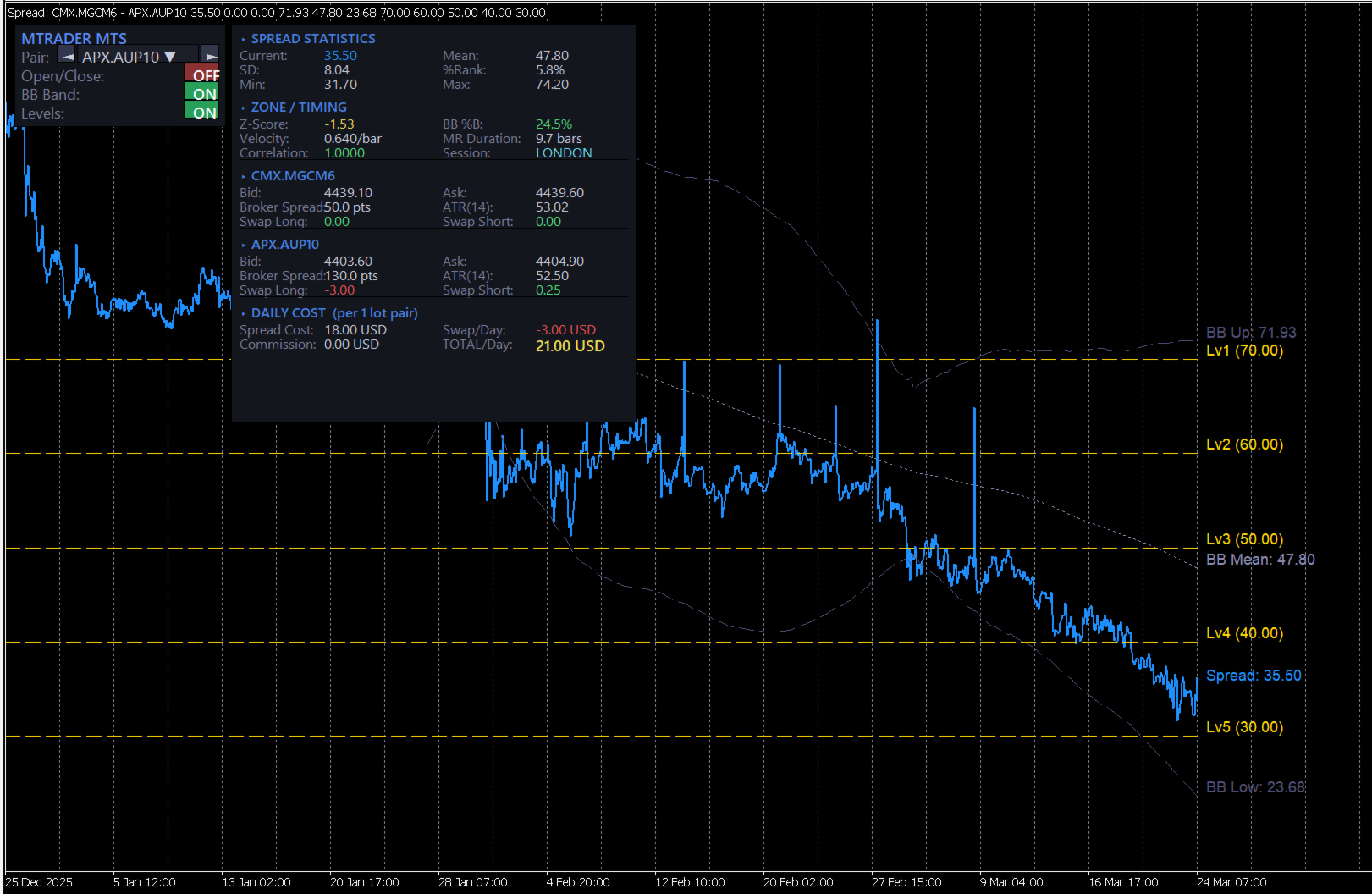
ตัวอินดิเคเตอร์จะมี 3 ส่วนหลัก

1) เส้น Spread

เป็นเส้นหลักของอินดิเคเตอร์
แสดงค่าความต่างของราคาสองสินทรัพย์

ถ้าเส้นขึ้นสูง
แปลว่า spread กว้างขึ้น

ถ้าเส้นลงต่ำ
แปลว่า spread แคบลง

2) เส้นช่วยตัดสินใจ

มีเส้นสำคัญที่ใช้ดูจังหวะ

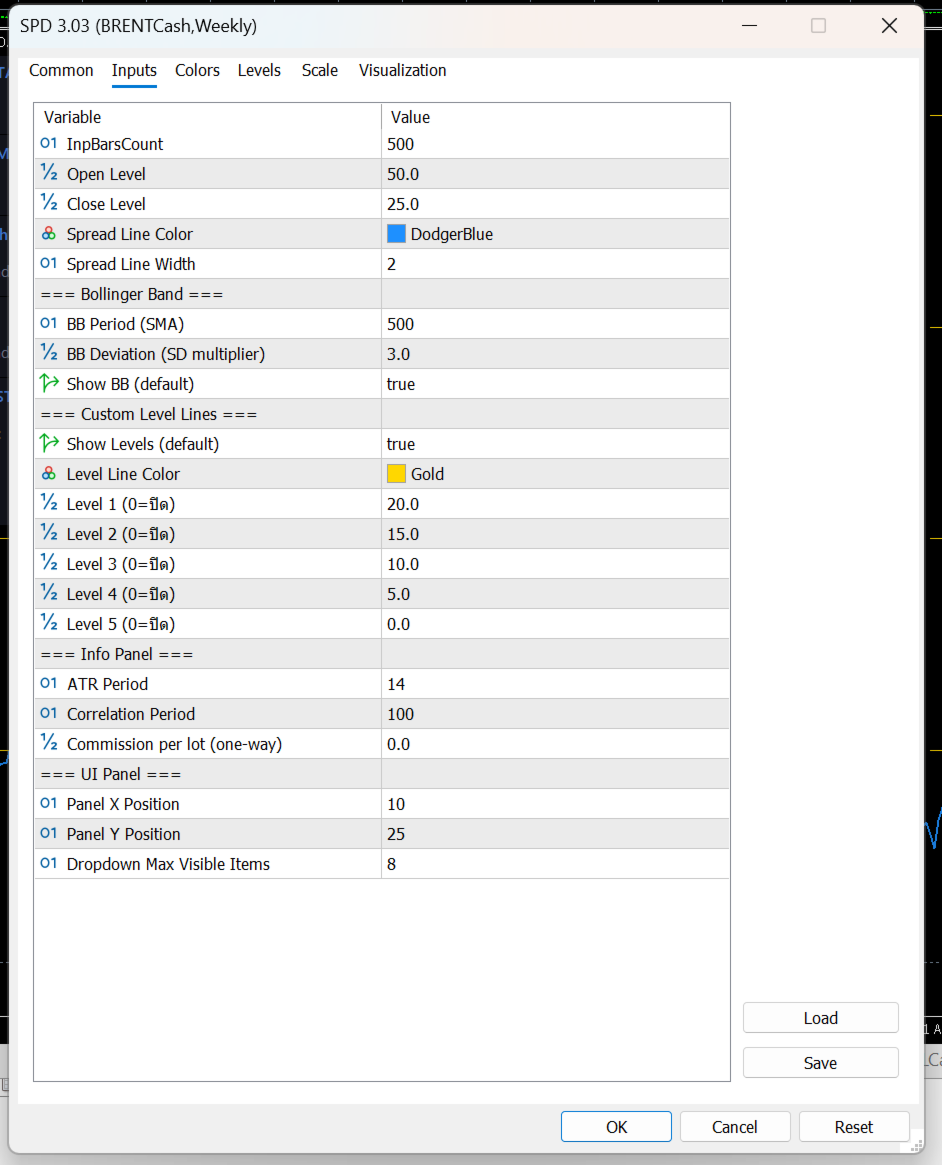
Open Level

เป็นระดับที่ใช้มองว่า
spread กว้างพอสำหรับเริ่มเปิดแผนเทรดหรือยัง

Close Level

เป็นระดับที่ใช้มองว่า
spread กลับเข้ามาแล้วหรือยัง เหมาะสำหรับปิดแผน

Bollinger Band

ช่วยบอกว่า spread ตอนนี้อยู่

  • ใกล้ค่าเฉลี่ย

  • สูงเกินปกติ

  • ต่ำเกินปกติ

เหมาะสำหรับคนที่ใช้แนวคิด mean reversion
คือรอให้ spread เบี่ยงออกไปก่อน แล้วคาดหวังให้กลับเข้าหาค่าเฉลี่ย

Level Lines

เป็นเส้นแนวนอนเพิ่มเติม
ไว้กำหนดโซนสำคัญตามสไตล์ของผู้ใช้เอง

เช่น

  • โซนเบา

  • โซนเริ่มน่าสนใจ

  • โซนเข้ม

  • โซนเสี่ยงสูง

3) กล่องข้อมูลด้านขวา

ช่วยสรุปข้อมูลสำคัญแบบดูเร็ว

เช่น

  • spread ตอนนี้อยู่ที่เท่าไร

  • ค่าเฉลี่ย spread

  • ความผันผวนของ spread

  • spread ตอนนี้อยู่สูงหรือต่ำกว่าปกติมากแค่ไหน

  • ความสัมพันธ์ของสินทรัพย์ 2 ตัว

  • ค่า ATR ของแต่ละตัว

  • ค่าสวอป

  • ต้นทุนโดยประมาณต่อวัน

จุดนี้มีประโยชน์มาก เพราะช่วยให้ไม่ดูแค่ “กราฟสวย” แต่ดูเรื่อง ต้นทุนจริงของการถือ pair ด้วย

ใช้งานยังไงแบบง่าย ๆ

ขั้นตอนที่ 1 เปิดกราฟสินทรัพย์หลัก

เช่นเปิดกราฟ

  • XAUUSD

  • EURUSD

  • US30

  • BTCUSD

ตัวที่เปิดกราฟอยู่จะเป็น ตัวหลัก

ขั้นตอนที่ 2 เลือกสินทรัพย์ตัวที่ 2

ที่แผงด้านซ้ายจะมีช่องให้เลือก Symbol

สามารถเลือกได้ 2 แบบ

  • กดปุ่มซ้าย/ขวา เพื่อเลื่อนไปทีละตัว

  • กด dropdown เพื่อเลือกจากรายการ Market Watch

เมื่อเลือกแล้ว อินดิเคเตอร์จะคำนวณ spread ใหม่ทันที

ขั้นตอนที่ 3 ดูเส้น Spread เทียบกับระดับต่าง ๆ

หลักการใช้งานแบบง่ายคือ

  • ถ้า spread ยังอยู่ใกล้ค่าเฉลี่ยมาก → ยังไม่ค่อยมีระยะ

  • ถ้า spread ขยายออกไปไกล → เริ่มน่าสนใจ

  • ถ้า spread กลับเข้ามา → เป็นจังหวะปิดแผนได้

ปุ่มต่าง ๆ ใช้ทำอะไร

Pair

ใช้เลือกสินทรัพย์ตัวที่ 2 ที่จะเอามาเทียบกับกราฟหลัก

Open/Close ON-OFF

เปิดหรือปิดการแสดงเส้น

  • Open Level

  • Close Level

เหมาะสำหรับคนที่อยากดูเฉพาะ spread อย่างเดียว หรืออยากดูพร้อมระดับตัดสินใจ

BB Band ON-OFF

เปิดหรือปิด Bollinger Band ของ spread

ถ้าเปิด จะช่วยเห็นว่า spread กำลังอยู่ในโซนปกติหรือเริ่มสุดขอบ

Levels ON-OFF

เปิดหรือปิดเส้นระดับเพิ่มเติมที่ตั้งไว้

เหมาะกับคนที่ชอบแบ่งโซนการตัดสินใจหลายชั้น

ข้อมูลในกล่องด้านขวาหมายถึงอะไร

SPREAD STATISTICS

เป็นสถิติพื้นฐานของ spread

Current

ค่า spread ปัจจุบัน

Mean

ค่าเฉลี่ยของ spread ในช่วงที่คำนวณ

SD

ระดับการกระจายตัวของ spread
ยิ่งมาก แปลว่า spread แกว่งกว้าง

%Rank

บอกว่า spread ตอนนี้อยู่ในระดับสูงหรือต่ำเมื่อเทียบกับอดีต

ตัวอย่าง:

  • %Rank สูงมาก = spread อยู่โซนสูงเมื่อเทียบกับอดีต

  • %Rank ต่ำมาก = spread อยู่โซนต่ำ

Min / Max

จุดต่ำสุดและสูงสุดของ spread ในช่วงที่ใช้วิเคราะห์

ZONE / TIMING

เป็นส่วนช่วยดูจังหวะ

Z-Score

บอกว่า spread ตอนนี้ห่างจากค่าเฉลี่ยมากแค่ไหน

ยิ่งค่าเยอะ
ยิ่งแปลว่า spread เบี่ยงออกจากภาวะปกติมาก

BB %B

บอกตำแหน่ง spread ภายใน Bollinger Band

  • ใกล้กลาง = ปกติ

  • ใกล้ขอบ = เริ่มตึง

  • เกินขอบ = เบี่ยงมาก

Velocity

ความเร็วของ spread ในช่วงล่าสุด
ช่วยดูว่า spread กำลังเร่งตัวหรือเริ่มชะลอ

MR Duration

ค่าเฉลี่ยคร่าว ๆ ว่า spread ใช้เวลากี่แท่งในการกลับเข้าหาค่าเฉลี่ย

Correlation

ดูว่าราคาของสองสินทรัพย์สัมพันธ์กันมากแค่ไหน

ถ้าค่าสูง
มักเหมาะกับการจับ spread มากกว่า

Session

บอกช่วงตลาดปัจจุบัน เช่น Asia / London / New York
ช่วยให้รู้ว่าตอนนี้อยู่ในช่วงตลาดไหน

SYMBOL 1 / SYMBOL 2

เป็นข้อมูลของสินทรัพย์ทั้งสองฝั่ง

มีข้อมูลเช่น

  • Bid

  • Ask

  • Broker Spread

  • ATR

  • Swap Long

  • Swap Short

ช่วยให้ลูกค้าดูได้ว่าแต่ละตัว

  • สเปรดโบรกเกอร์กว้างไหม

  • ผันผวนแค่ไหน

  • ถือข้ามวันต้นทุนดีหรือไม่ดี

DAILY COST

ส่วนนี้สำคัญมากสำหรับสาย pair trade

Spread Cost

ต้นทุนจาก bid/ask ของทั้งสองฝั่งรวมกัน

Swap/Day

ต้นทุนหรือผลตอบแทนจากการถือข้ามวัน

Commission

ค่าคอมมิชชั่นรวมของคู่เทรด

TOTAL/Day

ต้นทุนรวมต่อวันโดยประมาณต่อ 1 lot pair

ส่วนนี้ช่วยให้ลูกค้ารู้ว่า
แม้ spread ดูสวย แต่ถ้าต้นทุนถือแพงเกิน ก็อาจไม่คุ้ม

ใช้อ่านสัญญาณแบบง่ายอย่างไร

แนวคิดง่าย ๆ สำหรับลูกค้า

กรณีที่ 1: Spread ขยายออกไปมาก

ถ้าเส้น spread วิ่งออกห่างจากค่าเฉลี่ยมาก
และไปอยู่ใกล้หรือเกิน BB ด้านบน/ล่าง

อาจตีความว่า

  • spread เริ่มเบี่ยงออกมากผิดปกติ

  • มีโอกาสกลับเข้า mean ได้ในอนาคต

เหมาะกับคนที่ใช้แนว mean reversion

กรณีที่ 2: Spread กลับเข้ามาใกล้ค่าเฉลี่ย

ถ้า spread เริ่มย่อกลับเข้ามา
อาจใช้เป็นโซนพิจารณาปิดแผน

กรณีที่ 3: Correlation ต่ำเกินไป

ถ้าสินทรัพย์สองตัวไม่ค่อยสัมพันธ์กัน
spread ที่เห็นอาจไม่นิ่งและตีความยาก

ดังนั้นคู่ที่ correlation สูงกว่ามักใช้งานได้เป็นธรรมชาติกว่า

กรณีที่ 4: ต้นทุนต่อวันสูง

แม้ spread จะดูดี
แต่ถ้า total/day สูงมาก

แปลว่า

  • ถือต่อมีภาระ

  • กลยุทธ์ต้องการการกลับตัวเร็วขึ้น

  • ถ้ากลับช้า อาจโดนต้นทุนกินกำไร

เหมาะกับใคร

อินดิเคเตอร์นี้เหมาะกับ

  • คนที่เทรดคู่สัมพันธ์ของราคา

  • คนที่ชอบหา spread ที่เบี่ยงจากค่าเฉลี่ย

  • คนที่ต้องการดูทั้ง “สัญญาณ” และ “ต้นทุน”

  • คนที่ต้องการเปรียบเทียบสินทรัพย์ 2 ตัวแบบรวดเร็วบนหน้าจอเดียว

จุดเด่นที่ลูกค้าควรรู้
  • เลือกคู่เทียบได้จากหน้าจอทันที

  • เห็น spread แบบเรียลไทม์

  • มีเส้น open / close ช่วยตัดสินใจ

  • มี Bollinger Band ช่วยดูความสุดโต่งของ spread

  • มีข้อมูล correlation, ATR, swap, cost ครบ

  • เหมาะกับการคัดคู่และวางแผน pair trading

ข้อควรเข้าใจ

อินดิเคเตอร์นี้ ไม่ใช่ระบบส่งคำสั่งอัตโนมัติ
แต่เป็นเครื่องมือช่วยวิเคราะห์

ดังนั้นลูกค้าควรใช้ร่วมกับ

  • แผนการเข้าออกที่ชัดเจน

  • การบริหาร lot

  • การดูต้นทุนจริงของโบรกเกอร์

  • การเลือกคู่ที่มีความสัมพันธ์เหมาะสม

What is Spread Arbitrage Line?

Spread Arbitrage Line is an indicator designed to display the price difference (spread) between:

  • the symbol on your current chart
    and
  • another symbol that you choose

In simple terms, it helps you see whether the relationship between two instruments is currently:

  • wider than usual
  • narrower than usual
  • returning back toward normal levels

This makes it useful for traders who work with:

  • Pair Trading
  • Spread Trading
  • Statistical Arbitrage
  • Mean Reversion setups
What does this indicator show?

The indicator has 3 main parts:

1) The Spread Line

This is the main line of the indicator.

It plots the difference between the current chart symbol and the second selected symbol.

When the line rises, it means the spread is expanding.
When the line falls, it means the spread is narrowing.

This helps traders quickly see when two instruments are moving away from each other or coming back together.

2) Decision Support Levels

The indicator also includes important reference lines to help with trade planning.

Open Level

This is the level used to identify when the spread has moved far enough to consider opening a spread or pair trade setup.

Close Level

This is the level used to identify when the spread has reverted enough to consider closing the setup.

Bollinger Bands

The Bollinger Bands help show whether the spread is:

  • near its normal range
  • stretched higher than usual
  • stretched lower than usual

This is especially useful for traders using a mean reversion approach, where the idea is to wait for the spread to move away from normal and then look for it to return.

Custom Level Lines

These are additional horizontal levels that can be used as personal reference zones.

For example, they can help define:

  • mild deviation
  • moderate deviation
  • strong deviation
  • extreme zones

3) The Information Panel

On the right side, the indicator displays a full information panel with key trading statistics.

This includes:

  • current spread value
  • average spread
  • spread volatility
  • how far the current spread is from its usual range
  • correlation between the two symbols
  • ATR of both symbols
  • swap values
  • estimated daily holding cost

This is very helpful because it allows the trader to evaluate not only the setup itself, but also the real cost of holding the pair.

How to use it

Step 1: Open the main chart

Open the chart of the instrument you want to use as the main symbol.

Examples:

  • XAUUSD
  • EURUSD
  • BTCUSD
  • US30

The chart you open becomes Symbol 1.

Step 2: Choose the second symbol

On the left control panel, you can choose another symbol to compare against.

You can do this by:

  • clicking the left/right buttons
    or
  • opening the dropdown list and selecting from Market Watch

Once selected, the indicator recalculates the spread automatically.

Step 3: Watch the spread relative to the levels

The basic idea is simple:

  • if the spread is near its average, there may be less opportunity
  • if the spread moves far away from normal, it may become interesting
  • if the spread starts returning, it may be a possible exit zone
What do the buttons do?

Pair

This allows you to select the second symbol used for comparison.

Open/Close ON-OFF

This turns the Open Level and Close Level lines on or off.

Useful for traders who either want:

  • a clean spread-only view
    or
  • full entry/exit guidance on the chart

BB Band ON-OFF

This turns Bollinger Bands on or off.

When enabled, it helps show whether the spread is inside its normal range or moving into an extreme zone.

Levels ON-OFF

This turns the custom reference levels on or off.

Useful for traders who want multiple decision zones on the indicator.

What does the information panel mean?

SPREAD STATISTICS

This section shows the main statistics of the spread.

Current

The current spread value.

Mean

The average spread over the calculation period.

SD

The standard deviation of the spread.

A higher value means the spread has been moving more widely.

%Rank

This shows where the current spread stands compared to its historical range.

For example:

  • a high %Rank means the spread is relatively high versus recent history
  • a low %Rank means the spread is relatively low

Min / Max

The lowest and highest spread values within the selected lookback period.

ZONE / TIMING

This section helps evaluate timing.

Z-Score

Shows how far the current spread is from its average.

The larger the absolute value, the more unusual the spread currently is.

BB %B

Shows where the current spread sits inside the Bollinger Band structure.

  • near the middle = normal
  • near the edge = stretched
  • beyond the band = extreme

Velocity

Shows how fast the spread is moving over recent bars.

This helps identify whether the spread is accelerating or slowing down.

MR Duration

This is an estimate of how many bars the spread usually takes to revert around its mean.

Correlation

Shows how strongly the two instruments move in relation to each other.

Higher correlation is generally more suitable for spread-style analysis.

Session

Displays the current market session, such as:

  • Asia
  • London
  • New York

This helps traders understand which trading period they are currently in.

SYMBOL 1 / SYMBOL 2

These sections show real-time information for both instruments.

They include:

  • Bid
  • Ask
  • Broker Spread
  • ATR
  • Swap Long
  • Swap Short

This helps traders evaluate each symbol individually in terms of:

  • trading cost
  • volatility
  • overnight holding conditions

DAILY COST

This section is very important for pair traders.

Spread Cost

The estimated transaction cost from the bid/ask spread of both symbols combined.

Swap/Day

The overnight swap impact of holding the pair.

Commission

The commission cost for both sides of the pair.

TOTAL/Day

The estimated total daily holding cost for a 1-lot pair position.

This is useful because even if a spread setup looks attractive, the daily holding cost may still make it less practical.

How to read it in a simple way

Case 1: The spread moves far away from normal

If the spread line moves strongly away from its average and approaches or exceeds the Bollinger Band edges, it may suggest that the spread is unusually stretched.

For mean reversion traders, this may be a zone worth monitoring.

Case 2: The spread comes back toward the mean

If the spread starts moving back toward normal levels, this may be considered a possible exit area.

Case 3: Correlation is too low

If the two symbols are not closely related, the spread may be less stable and harder to interpret.

Pairs with stronger correlation are usually more natural candidates for this kind of analysis.

Case 4: Daily cost is too high

Even if the spread setup looks good, high daily cost can reduce the attractiveness of the trade.

This means the setup may require faster mean reversion, otherwise costs may eat into the result.

Who is this indicator for?

This indicator is suitable for traders who:

  • compare two correlated markets
  • trade spread or pair opportunities
  • look for mean reversion setups
  • want both visual signals and cost analysis in one place
Main advantages
  • Easy symbol selection directly from the chart
  • Real-time spread visualization
  • Open and Close reference levels
  • Bollinger Bands for spread extremes
  • Correlation, ATR, swap, and cost information included
  • Useful for pair selection and spread trade planning
Important note

This indicator is not an automatic trading system.

It is a decision-support tool designed to help analyze spread opportunities.

It works best when used together with:

  • a clear entry and exit plan
  • position sizing rules
  • broker cost awareness
  • proper pair selection


推荐产品
SMC TrendMatrix Pro
Mykhailo Karpiuk
ENGLISH DESCRIPTION (Full Version) SMC TrendMatrix PRO (v2.36) — Multi-Timeframe Smart Money Zone Matrix SMC TrendMatrix PRO is a professional analytical tool designed for traders utilizing the Smart Money Concepts (SMC) and Inner Circle Trader (ICT) methodologies. The indicator automatically scans up to 21 timeframes simultaneously, identifies strong institutional zones of interest (Order Blocks with strict liquidity sweep and momentum filters), and consolidates the entire analysis into a s
Quantum Trade Signals — Advanced Trading Indicator All-in-One Professional Trading Indicator! Quantum Trade Signals combines multiple trading strategies, Smart Money Concepts (SMC), and advanced technical analysis to identify potential trading opportunities. Key Features: Advanced BUY & SELL Signals Intelligent Signal Scoring System Multiple Trading Strategies BOS, CHoCH & Liquidity Sweeps Trend & Market Structure Analysis Breakout & Retest Detection Suggested Stop Loss & Ta
GoldPro Max
Taher Ahmed Mohamed Taha Elshafei
GOLDPRO MAX Advanced Multi-Timeframe and Smart Money Market Analysis for MetaTrader 5 GoldPro Max is a professional market analysis indicator for MetaTrader 5 designed to help traders study market direction, price structure, liquidity, market imbalance and potential trading areas from multiple perspectives. The indicator combines Multi-Timeframe Analysis, Smart Money Concepts, Market Structure, Liquidity Analysis, Order Blocks, Fair Value Gaps, Premium and Discount analysis, Smart Analytical Eng
Divergent Stochastic Filter II Catch Reversals Early, Filter Noise, Trade with Confidence The Edge: Why This Stochastic is Different  Every trader knows the Stochastic oscillator. But knowing when to trust its signals, that's the real challenge. The Divergent Stochastic Filter II transforms this classic indicator into a precision reversal detection system by adding critical elements: divergence intelligence, signal filtering and exhaustion detection.  While standard Stochastic oscillators fire s
Pulsar Terminal 是 Astralys LLC 旗下商标 Pulsar Technologies 的产品。 Pulsar Terminal是MetaTrader 5的实用工具插件。它是一个 可视化界面 ,结合了 配套应用程序 中的执行工具,通过 Expert Advisor 连接到您的MetaTrader 5账户。我们使用配套应用程序来最大化工具的功能,并提供比标准MT5面板更先进的可视化界面和工作流程。Pulsar Terminal不是独立应用程序,需要MetaTrader 5才能运行。EA与Pulsar Terminal配套应用程序 仅通过localhost 通信。配套应用程序的安装程序通过安装指南(MQL5博客文章)提供给购买者。 该界面允许您执行订单、管理风险、查看交易统计数据,以及通过连接到MetaTrader 5的配套应用程序中的高级图表工具直接进行图表分析。 安装指南(MQL5博客): 将在产品批准后发布 用户指南(MQL5博客) 重要 - 运行条件 1) MetaTrader 5必须在与配套应用程序相同的PC上打开(通过EA的仅限localhost连
POC Delta Order Blocks is a rule-based order block and volume-delta indicator designed to help traders clearly understand where real trading activity happened and how price reacts around those zones . Instead of drawing generic candle-based blocks, this indicator uses a Point of Control (POC) approach to identify the most actively traded price level between a swing high/low and a confirmed Break of Structure (BOS). The order block is then anchored to the earliest valid candle that interacted wit
CosmiCLab FIBO
Kirils Subins
CosmiCLab SMC FIBO CosmiCLab SMC FIBO is a professional trading indicator designed for traders who use Smart Money Concepts (SMC), market structure analysis and Fibonacci retracement levels. The indicator automatically detects market swings and builds Fibonacci levels based on the latest impulse movement. It also identifies market structure changes such as BOS (Break of Structure) and CHOCH (Change of Character), helping traders understand the current market direction. CosmiCLab SMC FIBO also pr
Magic Curves MT5
Aleksey Usachev
Indicator shows balance curves based on magic number for portfolio analysis. It allows to visually estimate different strategies performance on a single symbol. Any of magic number can be hidden by clicking on the value in legend. Parameters: HideAllOnStart - all magics are hidden and can be activated by clicking on its value; MAMode - shows average profit from trades; MAPeriod - Moving average period; Magics - a string with magic numbers separated by comma like "1,2,123". If this field is empty
Quant Direction MT5
Georgios Kalomoiropoulos
Quant Direction 是一款三维市场分析工具。它通过同时计算多个维度上的精确百分比偏差,提供完全客观的、基于算法的市场分析视角。该算法采用先进的人工智能建模工具开发,并经过全面测试,旨在以独特的精准度解读市场。它可以分析您平台上的任何货币对或金融工具。 无论您是短线 交易者、日内 交易者还是波段交易者,Quant Direction 都是您的理想之选。 交易者的真正优势 Quant Direction 的真正优势在于彻底消除情绪、屏幕疲劳和过度思考。它无需手动点击十几个图表来寻找方向并反复质疑自己的偏好,引擎即可在几毫秒内即时处理 8 个时间周期(从 5 个月到月线)。它能准确告诉你任何时刻谁在掌控市场,确保你始终朝着概率最高的方向进行交易。 市场分析的三个维度 该算法将市场分为三个不同的交易维度,为您提供完整的宏观和微观视角: 超短线交易分析: 捕捉即时、快速的动量变化和较低时间框架的执行点。 日内分析: 识别真实的、潜在的每日方向性偏差。 波动分析: 专注于宏观趋势,确保您不会与大盘机构的走势背道而驰。 独家评分引擎 Quant Direction 的底层采用了一套
TradePilotmt5
Hossein Khalil Alishir
TradePilot Expert Advisor (EA) for MetaTrader 5 TradePilot is a professional and user-friendly Expert Advisor (EA) for MetaTrader 5 (MT5) . It simplifies automated trading , risk management , and trade execution with a smart trading panel . Perfect for beginners and experienced traders looking for a reliable trade manager EA with automated lot size calculation and smart position management. Key Advantages User-Friendly Trading Panel: Customizable panel with buttons and hotkeys for fast ex
MACD Sniper Pro
Noppawat Tumjai
MACD Sniper Pro is an advanced automated trading system designed for traders seeking high-precision entries and robust risk management. By combining the classic momentum of MACD Crossover with a strict ADX Volatility Filter and Dynamic ATR Management , this EA completely eliminates emotional trading and filters out dangerous flat/sideways markets. Unlike standard MACD indicators that suffer during consolidation, MACD Sniper Pro verifies trend strength before entering and protects your capital us
PROMO: ONLY 10 LEFT AT $90! Next price:        $199 Price will be kept high to limit number of users for this strategy. This EA starts trading at the open of   London (UK) Session . It is based on analysis of advanced statistical distributions combined with short to medium term reversal patterns which have mean-reversion attributes. The EA includes several smart features and allows you to trade with a fixed or automatic lot size. The EA is not sensitive to spreads but can be backtested on both
RBreaker
Zhong Long Wu
RBreaker Gold Indicators 是黄金期货一种短线日内交易策略,它结合了趋势跟踪和日内反转两种交易方式,既能捕捉趋势行情的利润,又能在行情反转时及时止盈并顺势反手。 该策略曾连续15年被美国《Futures Truth》杂志评选为前十大最赚钱的交易策略之一,具有很长的生命周期,至今仍在国内外普遍使用与研究。 本指标结合了2026年期货黄金的走势,依据14日ATR指标,分别定义了突破系数A,观察系数B,反转系数R更合理的数值,非常不错的指标,已实现年稳定盈利,值得推荐~ 以上指标适合高波动品种,参数适合期货黄金,股指期货等,如果需要其他品种行情,需要单独设定 突破系数A,观察系数B,反转系数R,进行回测才能使用。 欢迎指标售后有问题可以加+V:504282029
Aurum Intraday EA
Rodrigo Leonardo Favreau Giuliodoro
Aurum Intraday EA – Advanced Gold Trading Algorithm The Aurum Intraday EA is a powerful automated trading system designed specifically for Gold (XAUUSD) traders who want to capture strong intraday movements while maintaining full control over risk and strategy configuration. Built with a robust algorithm and optimized for H1 and H4 timeframes (H4 recommended) , this Expert Advisor is capable of identifying high-probability opportunities in the gold market and executing trades with precision and
Bober Real MT5
Arnold Bobrinskii
4.88 (16)
Bober Real MT5 是一个全自动的外汇交易智能交易系统(EA)。该机器人创建于 2014 年 ,在此期间完成了大量盈利交易,在我的个人账户上实现了超过 7000% 的收益增长 。经过多次更新, 2019 年版本 是最稳定、最优秀的。机器人可用于任何交易品种,但在 EURGBP、GBPUSD(M5 周期) 上表现最佳。使用错误的参数会导致较差结果。 真实账户的 set 文件仅提供给购买者。 ️ 主要优势 无马丁格尔、无对冲、无加仓,始终使用 SL/TP 。 高速测试与优化。 可选 Dynamic Take-Profit ,自动适应价格通道高低点。 内置 新闻日历过滤器 ,自动避开重大事件。 自动检测 GMT 偏移 。 针对实盘交易长期优化,结果稳定。 设置后可自动运行,无需干预。 参数说明 Core / Trading type_order — 订单执行类型 (默认 ORDER_FILLING_FOK)。 ReverseTrade — 反转交易方向。 ToolEnter — 入场工具 (RSI 或 None)。 RSI304 / NoRSIbars — RSI 周期与
Fabii Half Trend Baseline
Fabien Georges Andre Guillemaud
不要再逆着更高周期的趋势交易。两条基准线,一张图表。不重绘。 任何品种,任何周期。2 分钟内用在您的图表上。可在 Strategy Tester 中免费试用演示。 Get more indicators here Baselines, volatility filters and oscillators. No repaint. 为什么需要它 您因为图表上的线变绿而入场。随后您打开更高周期,发现大趋势指向相反方向。信号是真实的,但信号背后的趋势并不站在您这一边。 每一笔逆着大趋势的交易,都会削弱您入场时的优势。 您将获得 Fabii Half Trend Baseline 在一张图表上同时显示您当前周期的趋势和更高周期的趋势,您不必再切换窗口去确认大方向。 来自更高周期的第二条基准线绘制在主线后方,因此您无需打开另一张图表就能看到大趋势。 基准线只随趋势移动,不会后退,因此您一眼就能看到趋势会在哪里被打破。 在已确认的反转处显示 Buy 和 Sell 箭头,因此趋势改变的那一刻您会得到清晰的标记。 可选的 K 线着色跟随趋势,因此您可以直接从 K 线读出趋势。 趋势转换和更高周期
R5U Gold Momentum Trader R5U Gold Momentum Trader 是一款专为 XAUUSD / 黄金(Gold) 开发的 MetaTrader 5(MT5)全自动交易 EA 。 系统结合 市场结构、价格行为与动量确认(Momentum) ,自动识别符合条件的黄金交易机会,并完成订单执行、持仓管理、仓位保护和风险控制。 R5U 采用 选择性市场参与 方式,并非持续交易或追求大量交易次数。只有当市场环境、方向、交易机会以及执行条件满足内部要求时,系统才会允许交易。 主要特点 专为 XAUUSD / Gold 黄金交易 开发 MetaTrader 5 全自动交易 EA 结合市场结构、价格行为与动量确认 自动完成入场、订单执行、持仓管理和退出 选择性交易逻辑,减少不必要的市场暴露 内置风险管理和仓位保护机制 内置经纪商交易条件与执行环境处理 支持 VPS 无人值守运行 无需外部技术指标、外部信号或第三方交易服务 核心策略逻辑与内部参数受到保护 交易方式 R5U 不会持续不断地进入市场。 系统会持续监测 XAUUSD,并根据内部交易条件判断当前市场是否存在有效机
PipFinite Trend PRO MT5
Karlo Wilson Vendiola
4.84 (560)
Breakthrough Solution For Trend Trading And Filtering With All Important Features Built Inside One Tool! Trend PRO's smart algorithm detects the trend, filters out market noise and gives entry signals with exit levels. The new features with enhanced rules for statistical calculation improved the overall performance of this indicator. Important Information Revealed Maximize the potential of Trend Pro, please visit www.mql5.com/en/blogs/post/713938 The Powerful Expert Advisor Version Automatin
HMA Scalper Pro EA
Vladimir Shumikhin
5 (2)
HMA Scalper Pro EA — 基于 Hull Moving Average (HMA) 指标的 MetaTrader 5 自动交易顾问 概述 HMA Scalper Pro EA 是一款专业的 MetaTrader 5 交易机器人(Expert Advisor),根据 Hull Moving Average (HMA) 的方向进行交易。HMA 指标确定当前趋势方向,顾问据此开仓,并辅以 Smart Risk 资金管理、自适应网格交易、追踪止损、保本止损和时间过滤器。 该顾问支持 Netting 和 Hedging 账户,适用于黄金(XAU/USD)、外汇货币对、原油、指数和加密货币的交易。 为什么选择 HMA SCALPER PRO EA - Hull Moving Average 信号 — 基于 HMA 方向入场,该指标对趋势变化的反应快于经典移动平均线 - 多时间框架 HMA 计算 — 方向可在独立于图表时间框架的单独时间框架上计算 - Smart Risk 替代经典马丁格尔 — 每个后续网格订单的手数都比前一个小 - 自适应网格交易 — 固定步长、订单限制、
Laguerre SuperTrend Clouds   adds an Adaptive Laguerre averaging algorithm and alerts to the widely popular SuperTrend indicator. As the name suggests,   Laguerre SuperTrend Clouds (LSC)   is a trending indicator which works best in trendy (not choppy) markets. The SuperTrend is an extremely popular indicator for intraday and daily trading, and can be used on any timeframe. Incorporating Laguerre's equation to this can facilitate more robust trend detection and smoother filters. The LSC uses the
Enhanced Elliott Wave Pro
Magdy Khames Aly Hasan
Enhanced Elliott Wave Pro – Advanced Market Structure & Wave Analysis   Enhanced Elliott Wave Pro is a lightweight, institutional-grade MT5 indicator that eliminates chart clutter by detecting and displaying only the current, active market structure: the 1-2-3-4-5 Impulse wave and the subsequent A-B-C Correction.   Built with classic Prechter wave rules and ATR-adaptive pivot detection, it delivers clean, real-time wave counts without bogging down your terminal.   ――――――――――――――――――――――――――――
Rainbow EA MT5
Jamal El Alama
Description : Rainbow EA MT5 is a simple Expert advisor based on   Rainbow MT5 indicator witch is based on Moving average with period 34. The indicator is incorporated in the EA, therefore, it is not required for the EA to operate, but if you wish, you can download it from   my product page . The Expert Advisor settings are as follows : Suitable for Timeframes up to H1 The parameters below can be set according to your trading rules. StopLoss ( Stop Loss in pips) TakeProfit ( Take Profit in pips
MTF Structure PRO
Louis Henry Marengo Toledo
Product name MTF Structure PRO Short description Multi-timeframe market structure dashboard with visual candle matrix, alignment score, bias heat map, and premium/discount zones. Full description MTF Structure PRO is a clean multi-timeframe dashboard for MetaTrader 5 traders who want to evaluate market structure quickly without switching between charts. The indicator displays a compact visual matrix of recent candles across key timeframes and summarizes the current directional bias, alignment sc
Confluence Meter:26 个指标,一个综合评级 Confluence Meter 会计算 26 个常用指标的信号,并将它们汇总为简洁的"卖出 / 中性 / 买入"评级。无需打开几十个窗口,也不必手动比对读数。看一眼面板,就能知道所选周期上市场偏向哪一边。 MT4-version:  https://www.mql5.com/en/market/product/199466 Our products: https://www.mql5.com/en/users/trendhunter/seller 图表上显示的内容 **Oscillators 仪表盘。**由 11 个震荡指标组成的评级:RSI、Stochastic、CCI、ADX、Awesome Oscillator、Momentum、MACD、Stochastic RSI、Williams %R、Bulls/Bears Power 和 Ultimate Oscillator。 **Moving Averages 仪表盘。**由 15 个趋势指标组成的评级:周期为 10、20、30、50、100、200 的 SMA 和
# Equity Monitor Pro  ## Short Description Equity Monitor Pro is a professional equity p**Equity Monitor Pro** is a powerful risk management tool that automatically protects your trading account by monitoring equity levels and enforcing prop firm style rules. Whether you're taking an FTMO challenge, trading a funded account, or just want to protect your capital, this EA runs silently alongside your trading strategy and takes action when it matters most. Protection tool designed for prop firm
RED ZONE Monitor Loss-Cut & Break-Even Risk Monitor for Averaging Traders (MT5) RED ZONE Monitor is a risk management indicator for traders who use averaging, scaling-in, or multiple open positions . It visually displays: The loss-cut (liquidation) risk zone The break-even price Based on current open positions, lots, and margin conditions This indicator does not provide entry signals. It does not promise profits. It shows where your account actually fails if price moves against you. What RED ZO
购买此指标,您就可以免费获得 ICT Concept MT5 或任何其他指标! 私信了解更多详情! 指标:Currency Strength Meter Pro (货币强弱计专业版) 市场广度可视化 (Market Breadth Visualization) 优点: 该指标以整洁的“仪表盘”形式显示,代替了杂乱的图表。交易者只需扫一眼即可知道市场上哪个货币对最强或最弱。 益处: 节省逐个查看图表的时间,并帮助快速做出选币决策。 自动排名与排序 (Auto-Ranking & Sorting) 优点: 拥有“水平排名”模式,自动将货币对从“最强”到“最弱”进行排序。 益处: 让您立即看到日/周/月的赢家 (Winners) 和输家 (Losers),这是相对强弱交易策略的核心。 智能货币逻辑 (Smart Currency Logic) 优点: 在垂直模式下,工具能智能处理基础货币位置不同的货币对(如 EURUSD 与 USDJPY)。系统会自动“反转”数值,使条形图方向与主货币(如 USD)的强弱一致。 益处: 减少分析基础货币或报价货币位置时的混淆。 多时间周期灵活性 (Mul
ReaperFusion Scalper Edition
Shaun-paul Louis Fourie
ReaperFusion V1 - 3TF SMC Dashboard Stop forced trades. Trade only STACKS. WHAT IT DOES: 3 Timeframe Confluence (EXT Bias + INT Setup + LTF Entry) FVG 50% MCT Auto Detection Confluence Scoring 70%+ Filter - Only shows high quality Toggle Buttons + Alerts (No chart clutter) Works on XAUUSD, BTCUSD, All Forex HOW IT WORKS: 1. EXT Timeframe defines bias 2. INT scans for 70%+ OB/FVG stack 3. LTF waits for Sweep + CHoCH entry 4. Dashboard shows WAIT or GO + Confidence Score INPUTS: - Co
Visual CrossPulse Dynamics Indicator
AL MOOSAWI ABDULLAH JAFFER BAQER
Visual CrossPulse Dynamics: Trade with the Market's True Rhythm Unlock a new level of market insight with Visual CrossPulse Dynamics, a sophisticated trading indicator designed to adapt to ever-changing volatility and reveal the true direction of the trend. Are you tired of indicators that lag in fast-moving markets or give false signals during consolidation? The Visual CrossPulse Dynamics indicator solves this problem by using an advanced, adaptive algorithm that intelligently adjusts to the m
该产品的买家也购买
Trend Sniper X
Sarvarbek Abduvoxobov
4.86 (42)
Trend Sniper X 是一款适用于 MetaTrader 5 的多周期趋势跟踪指标,可帮助交易者清晰精准地识别趋势方向和潜在的反转点。 适用于 MT4: https://www.mql5.com/en/market/product/193245 价格信息: 当前价格为促销价,随着后续更新和新功能的推出,价格可能会有所变动。 赠品优惠: 购买后联系作者,即可免费获取该指标的 Auto-Trade Assistant EA(自动交易助手 EA)。 Code2Profit 频道 通过多时间框架分析掌控市场! 如何使用 Trend Sniper X 最大化您的胜率:核心规则与交易时段技巧 技术规格 平台 MetaTrader 5 指标类型 多时间周期趋势指标 运行时间周期 任何图表时间周期,可独立选择更高的时间周期 (M1–MN1) 主要交易品种 外汇、黄金 (XAUUSD) 及其他差价合约 (CFD) 推荐账户 任何账户类型 可视化 彩色趋势蜡烛 (买入/卖出/微弱/变化) + 买入/卖出箭头 附加模块 交易时段方框 (悉尼、东京、伦敦、纽约) 主要功能 多时间周期趋势分析: 直接在
Smart Trend Trading System — MetaTrader 5 购买后,请在 MQL5 上给我发消息,即可免费获得 Smart Universal Expert Advisor,以及在线课程、PDF 手册和私人群组访问权限。 STTS 将趋势方向、入场和出场信号、反转区域及重要价格水平集中呈现在图表上。您可以根据系统手动交易,也可以连接单独的兼容 EA,按照您选择的设置自动执行交易。 一套系统,四种交易思路 STTS 将交易方法分为四大类: • 剥头皮交易 — 跟踪短期信号和市场波动。 • 趋势交易 — 评估方向,寻找趋势中的交易机会。 • 反转交易 — 识别潜在的转折区域和方向变化。 • 成交量交易 — 利用成交量相关信息评估市场活跃程度。 入场和出场箭头、趋势信息、支撑与阻力位及反转区域,帮助您直接在图表上分析交易形态。 先从一种方法开始。了解其信号和设置后,再探索其他方法。 从信号到自动化 Smart Universal Expert Advisor 可连接 STTS,让您自动执行受支持的交易信号。 启用自动交易前,请配置指标连接、仓位大小和交易管理设置
M5 Sniper
MeanFX
5 (3)
让您的交易优势尽在视野之中! M5 Sniper 是 MeanFX 推出的一款全新指标。它将 精准的交易信号 与 自适应 TP/SL 水平 相结合——从而创造出最佳的统计交易机会! 每售出 5 份,价格上涨一次,下一价格为 69$ 购买后请给我发消息,以获取技巧/指南和奖励 EA 它有哪些突出优势? 经过验证的统计表现 ,适用于 Gold XAUUSD( 几乎适用于每一种资产 ,专注于掌握一个时间周期,而不是试图面面俱到却无法获得稳定的结果) 每天每个交易品种 1 至 8 笔交易 ,具有较高的胜率百分比,并让所有统计优势站在我们这一边 图表上 仅显示已确认的 BUY 和 SELL 信号 自适应 TP 和 SL 水平 ,由指标针对每笔交易生成 平均胜率 75%+ 平均 Signal Ratio 最低 1.1+ 警报 和通知也会发送至 手机 **适合 Prop Firm(资金管理公司)**的交易方式 易于理解——适合 所有经验水平 的交易者 创作者提供的个人支持 100% 不重绘、不重新绘制、不滞后 奖励自动化 Expert Advisor(EA) 背后的策略: M5 Sniper 基于
全新王者降临 - 指标 + 订单管理提示(TP1 + TP2 + TP3)+ 可选 Telegram 信号发送器 INCLUDED(免费) (完整交易与信号系统) 我们最强的黄金 EA: Gold Slayer 该指标包含先进的交易策略、可自定义订单管理系统,以及结合 Envelope 扩展的均值回归系统,并通过 RSI 等多重智能确认过滤器进行验证,以捕捉高概率反转入场机会,提供 BUY 与 SELL 信号。 你不仅能够学习如何交易,还能学会如何高效管理多个仓位,并利用之前盈利的持仓来覆盖亏损交易。 专为 M5 周期打造并优化,在 BTCUSD 和 XAUUSD 上表现尤为出色,因为这些市场的流动性能够让信号更加干净、可靠。 该指标会自动生成清晰的多头(Long)与空头(Short)信号,同时基于 ATR 自动计算入场位、止损位和止盈位,让风险管理从一开始就融入系统之中。 多 TP 系统设有三个渐进式目标位,你可以在 TP1 锁定部分利润、在 TP2 继续持仓,并在更大的行情中将仓位持有至 TP3,而这正是平均风险回报比真正开始大放异彩的地方。 默认参数开箱即用,已经针对稳定表现进行
SMC Intraday Formula
VividMind Digital Solutions
5 (26)
让我们先坦诚一点。 没有任何一个指标可以单独让你实现盈利。如果有人告诉你可以,那他是在向你兜售一个梦想。任何显示完美买卖箭头的指标都可以被做得看起来毫无瑕疵——只需要放大历史中的某一段并截取成功交易的截图。我们不会这样做。 SMC Intraday Formula 是一个工具。 它为你读取市场结构,标记出概率最高的价格区域,并用简单直白的语言准确告诉你当前智能资金的行为轨迹。你仍然需要做决定。你仍然需要执行交易。但现在,你是带着精确性执行,而不是靠希望。 我们已经在黄金(XAUUSD)以及主要外汇货币对的日内剥头皮交易中使用该指标将近三年。这是我们在 M1、M5、M15 和 M30 上的日常主力工具。它之所以有效,是因为它不试图预测未来——它展示的是当前正在形成的高概率交易机会,并解释 为什么 。 它与其他所有指标有什么不同? 大多数交易指标只做一件事。移动平均线交叉。振荡指标触及某个水平。出现一个箭头。你进场交易。你亏损。你责怪指标。重复。 SMC Intraday Formula 将多个机构级概念整合为一个统一的市场解读: - 斐波那契共振引擎 不只是普通的斐波那契水平——该指标
Auto Optimized SpeedAngle 是一款机构级的动量向量化系统,通过持续的前瞻优化(Walk-Forward Optimization, WFO)彻底消除了曲线拟合(curve-fitting)。该指标没有采用在市场 状态转换时容易失效的静态输入参数,而是利用出样外验证(Out-of-Sample, OOS) dynamically 动态重新校准设置,从而确保显示的 信号代表真正的统计优势,而非历史巧合。 核心机构级架构 前瞻优化引擎(Walk-Forward Optimization Engine): 核心算法持续扫描数千种回溯周期(lookback)与阈值组合,严格将数据划分为样本内(in-sample)和样本外(out-of-sample)。只有当参数配置在未知数据环境中证明具备数学优越性时,系统才会对其进行 adoption。 量化目标函数(Quantitative Objective Functions): 优化引擎不一味追求绝对毛利,而是聚焦于机构级的稳定性指标。用户可针对系统质量数(SQN)、期望值(每笔交易的平均 R 倍数)或净 R 值进行优化,从而优
SuperScalp Pro
Van Minh Nguyen
4.54 (37)
SuperScalp Pro - Professional Multi-Layer Confluence Scalping System SuperScalp Pro 是一款先进的剥头皮交易指标,在经典 Supertrend 的基础上加入了多种智能确认过滤器。它可以帮助您识别成功概率更高的 Buy/Sell 交易机会,同时显著减少虚假信号。 清晰的 Buy 和 Sell 箭头会直接显示在图表上,并实时自动计算基于 ATR 的 Stop Loss 和 Take Profit 水平。 购买后,请联系我,以获取有关安装以及如何自动执行该指标交易信号的指导。 使用 SuperScalp Pro Auto Trader 轻松实现信号自动化: [Auto Trader] 下载推荐的设置文件: [Set File] 完整文档请参阅产品博客: [User Guide] 加入官方频道,获取最新更新: [Official Channel] SuperScalp Pro 如何工作? 只有当多个确认层同时满足条件时,指标才会生成信号(趋势 + 动量 + 成交量 + 波动率 + 高时间周期趋势)。 Mul
Boba Analysis Suite
Trade Ready Solutions LLC
5 (1)
Boba Analysis Suite Boba Analysis Suite 是一款适用于 MetaTrader 5 的分析指标。它将市场结构、关键价格区域和整体市场背景整合到同一图表视图中。 该指标源于交易及交易教学的实践经验,旨在帮助用户建立有条理的分析流程:评估市场方向、识别重要价位,并结合多个时间周期进行分析。 结合市场背景进行分析 单个信号的意义取决于市场背景。Boba Analysis Suite 帮助用户将当前图表状况与更大范围的市场结构相结合,并根据预先制定的规则评估交易思路。 分析功能包括: **趋势与市场结构:**评估市场方向及相关结构背景。 **关键价格区域与价位:**在图表上直观标示值得进一步分析的重要区域。 **多时间周期:**整合不同时间周期的信息,评估整体市场背景。 **可视化分析流程:**直接在图表上查看分析信息。 自主做出交易决策 Boba Analysis Suite 适合希望系统分析图表并结合多个时间周期信息的交易者。 该指标用于辅助分析,不会开仓或平仓,也不能替代交易策略或风险管理。每一笔交易的决策均由用户自行做出。 使用与许可 平台:Meta
Entry Points Pro for MT5
Yury Orlov
4.52 (152)
传奇回归:Entry Points Pro 10。 这款传奇指标曾 3 年稳居 MQL5 Market 前三,如今全面重启。 数百条热情好评(两个版本合计 589 条),每天有数千名交易者用它交易,演示版下载 31,000+   MT4+MT5  次。 五年来我读过你们的每一条评价——在第 10 版里,我没有给出许诺,而是把答案直接做进了产品。指标作者自 1999 年入市, 珍视诚信、自己的声誉和自己的客户 。 Entry Points Pro 给出的入场信号严格不重绘。 而且这一次不再只是作者的一面之词,而是可验证的事实:确认信号只在 K 线收盘后标出,自动化测试记录到 零重绘 (在 EURUSD、XAUUSD 和 BTCUSD 上共 2,486,568 次不变量检查——0 次违规)。测试方法完全公开——您可以在策略测试器中自行复现。 购买后请务必第一时间给我发私信。 我会发给您 扩展版说明书《交易者圣经》 ——使用本指标交易的完整指南——并告诉您如何免费获得 赠品:市场扫描器 ,它能同时分析多个品种和多个时间周期,并在一个界面上显示 Entry Points Pro 此刻在哪里表现
Adaptive Price Action Engine 买指标,免费送EA 自适应多时间框架趋势与K线形态智能分析系统 市场环境始终在变化,不同的市场阶段中,并非所有 Price Action 形态都具有相同的参考价值。 Adaptive Price Action Engine 旨在适应不断变化的市场条件,将 趋势结构、多时间框架分析、K线形态与统计优化 整合到一个统一的分析框架中。 两种自适应模式 Dual Alpha Trend Mode(双 Alpha Trend 模式) 自动搜索适合的 Alpha Trend 参数,并结合低周期与高周期市场结构,使指标能够根据近期市场行为动态调整趋势识别。 Candlestick + Alpha Mode(K线 + Alpha 模式) 将 Alpha Trend 市场状态与 22种多空K线形态 相结合。系统不会简单地对所有形态一视同仁,而是对不同的形态组合进行统计评估,并识别在特定市场环境下表现出更强历史统计特征的配置。 主要功能 趋势参数自动优化 多时间框架市场状态分析 22种多头与空头 Price Action K线形态 对数千种可能
M1 Sniper MT5
Oleg Rodin
5 (7)
M1 SNIPER   是一款易于使用的交易指标系统。它是一个专为 M1 时间框架设计的箭头指标。该指标可以作为独立的系统在 M1 时间框架下进行剥头皮交易,也可以作为您现有交易系统的一部分使用。虽然该交易系统专为 M1 时间框架交易而设计,但它也可以用于其他时间框架。我最初设计此方法是为了交易 XAUUSD 和 BTCUSD。但我发现这种方法在其他市场交易中也同样有用。 指标信号既可以顺势交易,也可以逆势交易。我教授一种特殊的交易技巧,帮助您利用指标信号进行双向交易。该方法基于使用特殊的动态支撑位和阻力位区域。 购买后,您可以立即下载 M1 SNIPER 箭头指标。此外,我还为所有 M1 SNIPER 工具用户免费提供下方屏幕截图所示的 Apollo Dynamic SR 指标!这两个指标的组合可以帮助您更轻松、更准确地利用 M1 时间框架进行交易。 购买后请联系我,免费获取交易提示和奖励指标! 祝您交易成功!
ARIPoint
Temirlan Kdyrkhan
1 (4)
ARIPoint is a powerful trading companion designed to generate high-probability entry signals with dynamic TP/SL/DP levels based on volatility. Built-in performance tracking shows win/loss stats, PP1/PP2 hits, and success rates all updated live. Key Features: Buy/Sell signals with adaptive volatility bands Real-time TP/SL/DP levels based on ATR Built-in MA Filter with optional ATR/StdDev volatility Performance stats panel (Success, Profit/Loss, PP1/PP2) Alerts via popup, sound, push, or email Cu
Gann Made Easy MT5
Oleg Rodin
5 (12)
Gann Made Easy   是一个专业且易于使用的外汇交易系统,它基于使用先生理论的最佳交易原则。 W.D.江恩。该指标提供准确的买入和卖出信号,包括止损和获利水平。您甚至可以使用推送通知在旅途中进行交易。 购买后请联系我,即可免费获得交易指导和超棒的额外指标! 您可能已经多次听说过江恩交易方法。通常 Gann 的理论不仅对于新手交易者而且对于那些已经有一定交易经验的人来说都是非常复杂的东西。这是因为江恩的交易方法在理论上并不那么容易应用。我花了几年时间来完善这些知识,并将最好的原则应用到我的外汇指标中。 该指标非常易于应用。您所需要的只是将其附加到您的图表并遵循简单的交易建议。该指标不断进行市场分析工作并寻找交易机会。当它检测到一个好的入口点时,它会为您提供一个箭头信号。该指标还显示止损和获利水平。 换句话说,当您像先生一样进行交易时,该指标会为您提供最佳江恩建议。江恩亲自告诉你此时此刻该做什么。但最好的部分是您不需要了解任何有关江恩交易原则的知识,因为该指标会为您完成整个市场分析工作。
FiboSniper Pro
Van Minh Nguyen
5 (4)
FiboSniper Pro – Multi-Filter Fibonacci System with Auto SL/TP and Control Panel FiboSniper Pro 是一款技术指标,将动态 Fibonacci Envelopes 与多个确认过滤器相结合,以生成经过筛选的 Buy 和 Sell 信号。Fibonacci 水平基于 Moving Average 和 ATR 计算,然后通过 ADX、EMA、RSI、ATR、Volume、Time 和 Candle 结构进行过滤。该指标直接在图表上显示基于 ATR 自动计算的 Stop Loss 和 Take Profit 水平,并提供交互式控制面板,以便快速调整参数。 购买后,请联系我以获取推荐的设置文件和详细使用说明。 使用 Auto Trader X 自动执行 FiboSniper Pro 信号: [Auto Trader X] 用户指南和设置文件: [Click here] 完整文档请参阅产品博客: [Click here] 加入官方频道获取最新更新: [Click here] 专为偏好结构化入场和清晰风险管理
Break and Retest Hunter
Mohamed Hassan
3.67 (3)
Break and Retest Hunter is a powerful MetaTrader 5 indicator designed to automatically identify support and resistance levels, breakout structures, and potential retest opportunities in real time. Bonus Indicator: After purchasing Break and Retest Hunter , contact me to receive Trade Indicator Assistant EA completely free as a bonus utility. $65 for the next 10 copies . Next price is $120.  Combining adaptive market analysis, clear BUY/SELL signals, Fibonacci-based profit targets, and a premiu
Apex Patterns PRO 购买指标 — 免费获取基于该指标的 Expert Advisor。 自我优化的图表形态与突破分析智能 传统的形态扫描器依赖固定输入,在市场波动和结构发生变化时通常表现不佳。 Apex Patterns PRO 旨在适应不断变化的市场条件,将结构性图表形态识别、动量过滤和统计自我优化结合到一个分析框架中。 适应性扫描引擎 自我优化形态模式 在近期历史数据中自动搜索合适的形态参数,使指标能够根据当前市场行为调整其结构检测,而不是使用静态配置。 智能突破过滤 将经典形态识别与动量、成交量和价格行为指标相结合。引擎不会同等对待每次突破,而是评估潜在的市场结构,以识别符合当前统计环境的交易设置。 主要功能 固定的、不重绘的实时信号 自我优化的形态检测参数 丰富的图表结构库(顶部/底部、头肩顶/底、三角形、楔形) 基于动量和成交量的突破过滤 基于市场结构的动态止损和止盈水平 图表信号和实时性能指标 标准的推送、电子邮件和平台提醒 专为适应不断变化的市场条件而设计,而非依赖永久固定的参数 核心理念 目标不是将静态的几何形状强加于动态的市场。 目标是让历史市场数据
下一次更新 — 版本 2.52 即将推出![全新功能] 准备迎接 4 项重大新功能,全面提升您的市场分析能力与交易流程! 我们将通过 4 项全新功能,进一步提升市场分析水平,满足您的交易需求。现为您介绍: 1. TRADE OVERVIEW DASHBOARD 2. CONFLUENCE AT ZONE 3. STRONG & WEAK HIGH/LOW 4. OTE 1. TRADE OVERVIEW DASHBOARD 一个帮助您更轻松地了解整体市场状况的仪表盘,为您的交易决策提供参考指引,帮助您系统地分析市场并规划交易,所有信息尽在一个屏幕中。 多时间周期市场概览(Multi-Timeframe Market Overview) 更清晰地了解市场方向与价格结构 快速查看市场状况 为系统化市场分析和入场规划提供指引。 2. CONFLUENCE AT ZONE 当价格进入关键区域时……您将了解有多少项支持因素相互吻合。 关键区域是交易决策至关重要的地方。但仅仅是价格进入某个区域还不够。此功能可帮助您在入场交易前,识别相互吻合的因素,包括信号及其他相关因素,从而进行更全面的分析,并
Neuro Poseidon MT5
Daria Rezueva
4.75 (52)
Neuro Poseidon is a new indicator by Daria Rezueva. It combines precise trading signals with adaptive TP/SL levels - creating best possible trades as a result! Message me and get  Neuro Poseidon Assistant  as a gift to automize your trading process! What makes it stand out? 1. Proven profitability on all assets and timeframes 2. Only confirmed BUY and SELL signals present on the chart 3. Adaptive TP & SL levels generated by the software for each trade 4. Easy to understand - suitable for al
Trend Catcher ind mt5
Ramil Minniakhmetov
5 (18)
趨勢捕捉指標 趨勢捕捉指標結合了作者獨有的客製化自適應趨勢分析指標,用於分析市場價格趨勢。它透過過濾掉短期噪音,並專注於潛在的動能強度、波動性擴張和價格結構行為,來識別真實的市場方向。此外,它還結合了平滑和趨勢過濾等客製化指標,例如移動平均線、相對強弱指標 (RSI) 和波動率過濾器。 您可以在這裡查看實際運行情況以及我的其他產品: https://www.mql5.com/en/users/mechanic/seller 請注意,我不會在 Telegram 上出售 EA 或任何設置,那是騙局。所有設定都可以在我的部落格上免費取得。 重要提示!購買後請立即聯繫我,以獲取使用說明和額外獎勵! 請注意,我不會在 Telegram 上出售 EA 或任何設置,那是騙局。所有設定都可以在我的部落格上免費取得。
Unix Scalper
Issam Kassas
4 (4)
Unix Scalper — MetaTrader 5 购买后,请在 MQL5 上给我发消息,即可免费获得 Smart Universal Expert Advisor,以及在线课程、PDF 手册和私人群组访问权限。 发现交易形态,看清交易计划,选择执行方式。 UNIX Scalper 将市场分析、BUY/SELL/WAIT 决策以及 Entry、Stop Loss、TP1 和 TP2 水平集中在一个清晰的面板中。 看清信号与交易计划 • 明确的决策:BUY、SELL 或 WAIT。 • 明确的价格水平:Entry、Stop Loss、TP1 和 TP2。 • 多时间周期概览:比较面板中各时间周期的信号。 • 辅助分析:趋势、动量、成交量、波动率、支撑与阻力,以及市场质量。 • 灵活的布局:Minimized、Compact、Standard 或 Full。 查看信号,检查价格水平,再判断该交易形态是否符合您的交易规则。 从黄金和比特币开始 建议首先使用的交易品种:XAUUSD 和 BTCUSD。 探索短期剥头皮交易和较高时间周期分析。选择历史K线范围,通过表现曲线查看所选设置
Advanced Supply Demand MT5
Bernhard Schweigert
4.53 (15)
任何新手或专业交易者的最佳解决方案! 该指标是一款独特、高质量、且价格合理的交易工具,因为我们已经整合了许多专有功能和新公式。 依据此更新,您将能够显示双重时间帧区域。 您不仅可以显示一个较高的时间帧,还可以同时显示图表时间帧,加上更高的时间帧:显示嵌套时区。 供需双方所有交易者都会喜欢它。 :) 重要信息披露 高级供需的最大潜力,请访问 https://www.mql5.com/zh/blogs/post/720245   想象您的交易如何得以改善,是因为您能够精准定位入场或目标位吗? 构建于新的底层算法,它可以更轻松地识别出买卖双方之间的潜在失衡。 这是因为它以图形方式展示供需最强劲区域,及其过去的表现(显示旧区域)。 这些功能旨在帮助您更轻松地发现最佳入场区域和价位。 现在您可以针对您的交易品种和时间帧来优化和编辑区域强度! 高级供需指标适用于所有产品和时间帧。 它是一个新的公式,非常新的功能是两个区域强度函数可由用户输入进行调整! 这在交易中是一大优势。 当您学习如何使用专有功能,例如带有价格游离最小 X 因子的区域强度时,您能够判断该区域强劲与否。 供需区域用作警报触发器。
FX Trend MT5 NG
Daniel Stein
5 (6)
FX Trend NG:新一代多市场趋势智能分析工具 概述 FX Trend NG 是一款专业的多时间周期趋势分析与市场监控工具,帮助您在几秒钟内全面了解市场结构。 无需在多个图表之间来回切换,您可以立即看到哪些品种处于趋势中、哪里动能正在减弱,以及哪些时间周期之间存在强烈共振。 限时发布优惠 – 仅需 $30(6个月) 或 $80 终身授权 即可拥有 FX Trend NG 。 已经是 Stein Investments 客户? -> 发送消息 以获取专属客户群访问权限。 需要帮助或安装指导? -> 请访问 Stein Investments 官方页面 。 1. FX Trend NG 的核心优势 三状态趋势逻辑 —— 不只是 Buy 或 Sell • 大多数指标仅显示两种状态:Buy 或 Sell。 • FX Trend NG 增加第三种状态: Fade 。 • Fade 表示趋势强度正在减弱,在完全反转之前提前发出信号。 这种结构化逻辑让您看到趋势变化过程,而不仅仅是简单方向信号。 多时间周期分析(M1 至 MN1) • 从短线交易到中长线交易全面覆盖。 • 快速识别趋势
介绍     Quantum Breakout PRO   ,突破性的 MQL5 指标,正在改变您交易突破区域的方式!由拥有超过13年交易经验的资深交易员团队开发,     量子突破 PRO     旨在通过其创新和动态的突破区域策略将您的交易之旅推向新的高度。 量子突破指标将为您提供带有 5 个利润目标区域的突破区域的信号箭头,以及基于突破框的止损建议。 它既适合新手交易者,也适合专业交易者。 量子 EA 通道:       点击这里 重要的!购买后请私信我领取安装手册。 建议: 时间范围:M15 货币对:GBPJPY、EURJPY、USDJPY、NZDUSD、XAUUSD 账户类型:ECN、Raw 或 Razor,点差极低 经纪商时间:GMT +3 经纪商:IC Markets、Pepperstone with Raw 和 Razor 的点差最低 规格: 不重漆! 最多 5 个建议利润目标区域 建议止损水平 可定制的盒子。您可以设置自己的 Box Time Start 和 Box Time End。 接触 如果您有任何疑问或需要帮助,请通过私人消息与我联系。
Scalper Vault MT5
Oleg Rodin
5 (1)
Scalper Vault 是一套功能强大且配置完善的交易系统,专为追求日内交易稳定性的交易者而设计。 作为一套完整且独立的交易系统,该高精度指标能够为外汇和二元期权交易者提供机构级的市场分析。 购买后请联系我,获取我的独家交易技巧以及一份超值赠品! Scalper Vault 能够消除凭感觉交易和复杂的各种手动分析,让您只需专注于执行交易,并运用简单易行的交易技巧进行操作。 精准的顺势交易信号:其核心算法通过分析市场结构,仅在市场主导趋势的方向上提供高胜率信号,从而大幅减少错误的入场操作。 精确的顶部与底部探测:系统能够识别市场动能耗尽的状态,从而锁定潜在的反转区域。 基于江恩(Gann)理论的买卖区域:系统会自动绘制江恩数学市场点位,让您能清晰洞察大型机构交易者在何处寻求买入或卖出。 100% 不会重绘(Non-Repainting):一旦K线收盘,生成的信号便会永久固定在图表上。绝无动态偏移,绝无虚假信号——您在历史数据中所见,即为该指标的真实表现。 广泛的市场适用性:适用于各类货币对、黄金、指数以及加密货币交易。
Volatility Master for MetaTrader is a real-time dashboard tool that scans up to  50 symbols  to identify high-volatility , trending markets instantly. With bullish/bearish signals, customizable alerts, and a user-friendly interface, it helps you avoid range-bound conditions and focus on high-probability trades. Clarity leads to confidence. Trade confidently and protect your capital effectively with this powerful dashboard. We don't offer free or bonus indicators in exchange of reviews from you.
SR Liquidity MT5
Oleg Rodin
5 (2)
SR Liquidity   是一款旨在揭示市场流动性高度集中且价格反应最剧烈的隐蔽区域的交易指标。这些特殊的流动性区域充当着强有力的支撑位与阻力位,为您清晰呈现市场最可能发生反转的位置。 SR Liquidity 指标并非简单地绘制常规的支撑/阻力线,而是通过分析实际的价格行为,识别买卖压力积聚的区域。这些区域实际上是推动市场真实波动的流动性池。通过在图表上直观呈现这些区域,该指标能助您在价格反应发生前预判走势——这意味着它实际上能够预测价格方向可能发生的变化。它将原始的价格行为转化为清晰且具实操价值的市场蓝图,标示出那些可能成为市场转折点的关键价位。 该指标适用于任何交易品种和时间周期——包括外汇、指数、金属、加密货币等。支持任意时间周期。 购买后请联系我,以获取交易指南及免费赠送的优质附加指标!
Precision Spike Detector
Francisco Mandomo Simbine
5 (2)
Precision Spike Detector V3 – Institutional-Grade AI Trading System Attention: The price increases by US$50 for every 10 purchases.  Final price: US$599 Precision Spike Detector V3   is a   state-of-the-art, institutional-grade market analysis system   for   MetaTrader 5 , designed to detect   high-probability market movements   in synthetic indices such as   Boom, Crash, GainX, and PainX . After purchase, send me a private message to receive the optimized configuration files,  the installation
Btmm state engine pro
Garry James Goodchild
5 (4)
BTMM State Engine Pro by G-Labs — Beat The Market Maker indicator for MetaTrader 5. Asian session range, London and New York kill zones, level progression (L1/L2/L3), peak formation detection (PFH/PFL), entry signals, and a multi-pair scanner from one chart. Stop scanning charts one pair at a time. The State Engine tracks the BTMM daily cycle automatically — Asian box, room boundaries, level blocks, peak formations, and filtered entries — while the scanner dashboard shows level, peak status, d
Power Candles MT5
Daniel Stein
4.58 (12)
Power Candles V3 - 自我优化的强度指标 Power Candles V3 把货币与品种的强度直接转化为图表上可执行的交易方案。指标不再仅根据强度给K线着色,而是在后台持续运行实时自动优化,为您正面对的品种给出最佳 Stop Loss、Take Profit 与信号阈值。一键采用,Entry、Stop Loss、Take Profit 线就以精确价格绘制在图表上,提醒消息中直接包含方向。 本工具是 Stein Investments 生态系统的一部分 - 18+ 款工具,加上 Max,您的一对一 AI 交易导师。  随时在线,深入了解每一款指标,在您需要梳理思路的那一刻就在那里。  立即认识他: https://stein.investments 每根收盘K线运行 3,000+ 次交易模拟。9 种强度状态。2 种策略并行测试。一键采用最优配置。 为什么需要这个 大多数强度指标只给您一个数值,然后留下三个问题:相信哪个阈值、用哪个 Stop Loss、走哪个交易方向。Power Candles V3 在每根收盘K线上自动回答这些问题。结果就是一个完整的交易方案 -
Matreshka
Dimitr Trifonov
5 (2)
Matreshka self-testing and self-optimizing indicator: 1. Is an interpretation of the Elliott Wave Analysis Theory. 2. Based on the principle of the indicator type ZigZag, and the waves are based on the principle of interpretation of the theory of DeMark. 3. Filters waves in length and height. 4. Draws up to six levels of ZigZag at the same time, tracking waves of different orders. 5. Marks Pulsed and Recoil Waves. 6. Draws arrows to open positions 7. Draws three channels. 8. Notes support and re
作者的更多信息
CapitalTrendline
Mr Nisit Noijeam
EnJoy  trend line It is a basic tool in technical analysis which is used to track and predict the direction of price movements. It is created by connecting the lowest or highest points of prices on the chart. To create a straight line that helps in interpreting market direction. For example: Uptrend Line: Connects multiple low points on the chart. It indicates a continuous increase in prices. Downtrend Line: Connects multiple highs. It indicates a continuous decrease in prices. เส้นเทรนด์ไลน์
CapitalMAGL
Mr Nisit Noijeam
GRID MA TRADING Trading Strategy Overview Moving Average (MA) Based Decisions : The EA uses a Moving Average (MA) as a key indicator for its trading decisions. The type (Simple, Exponential, Smooth, Linear Weighted), period, and shift of the MA are configurable. It decides whether to buy or sell based on the position of the price relative to the MA. For example, it may stop buying if the price is below the MA or stop selling if the price is above the MA. Grid Trading System : The EA appears to i
CapitalCraftpercent
Mr Nisit Noijeam
การดำเนินงานพื้นฐาน : EA ทำงานโดยใช้หลักการของการเทรดแบบกริด ซึ่งหมายถึงการวางคำสั่งซื้อและขายเป็นระยะๆ (กำหนดเป็นเปอร์เซ็นต์ของราคา) ภายในโซนที่กำหนดไว้ พารามิเตอร์ป้อนข้อมูล : EA ใช้พารามิเตอร์หลายอย่าง เช่น ขนาดกริด, กำไรที่คาดหวัง, การหยุดขาดทุน (ทั้งหมดเป็นเปอร์เซ็นต์), โซนสำหรับการซื้อและขาย, ขนาดล็อต, และจำนวนคำสั่งสูงสุดที่อนุญาต พารามิเตอร์เหล่านี้มีความสำคัญในการกำหนดวิธีการทำงานของ EA การเริ่มต้น (OnInit) : เมื่อ EA เริ่มทำงาน, มันจะทำการเริ่มต้นโดยสร้างป้ายบนกราฟ (ชื่อ "MTRADER_Labe
CapitalRiskPerTrade
Mr Nisit Noijeam
Expert Advisor (EA),  MA Following  commonly known as a trading bot. It implements a grid trading strategy with the following characteristics: Moving Average and Standard Deviation : The EA uses a Moving Average (MA) as the core of its trading strategy, combined with Standard Deviation (SD) for trade entry and exit decisions. There are four types of MAs available: Simple, Exponential, Smoothed, and Linear Weighted. Users can select the MA type and set its period, as well as the period and facto
CapitalAsgard
Mr Nisit Noijeam
This EA, named "MTRADER," is designed for the MT4 (MetaTrader 4) trading platform. It operates based on a grid trading strategy and includes functionality for both buy and sell orders. Here's an overview of its key features and functionalities: Trading Zones: The EA operates within specified price zones for buying and selling. BuyZoneStart and BuyZoneEnd define the range within which the EA will consider placing buy orders, while SellZoneStart and SellZoneEnd define the range for sell orders. Or
CapitalCraft
Mr Nisit Noijeam
A Grid EA (Grid Expert Advisor) is an automated trading system used in the financial markets that employs a grid trading strategy. Grid trading involves opening buy and sell orders at predetermined price levels, with a specified price interval, known as the price grid. This trading strategy is similar to placing Buy Limit and Sell Limit orders at pre-defined price and time intervals. The EA operates automatically based on predefined rules and typically includes the following features: Price Gr
CapitalRoyal
Mr Nisit Noijeam
MA trend following 1sd signal  The EA appears to use a combination of moving averages and standard deviation to make trading decisions, with the option to increase lot sizes after consecutive losses, potentially aiming for a martingale-like strategy. It's important to note that while EAs can automate trading, they come with risks, especially when using strategies like lot size increase on loss. Users should thoroughly backtest and understand the EA's strategy and risks before using it in live tr
Capital ATR
Mr Nisit Noijeam
Expert Advisor (EA) for MetaTrader 4 (MT4) platform, named MTRADER. Its primary strategy appears to be a grid trading strategy based on moving averages and average true range (ATR) volatility. Here's a breakdown of its key components and functionalities: Initialization Parameters : It defines various input parameters such as Moving Average Type (Simple, Exponential, Smoothed, or Linear Weighted), Moving Average Period, ATR Period, ATR Factor, Initial Lot Size, etc. These parameters can be adjust
Capitalgrid01
Mr Nisit Noijeam
A grid trading strategy is a method used in financial markets, particularly in forex trading, that involves placing buy and sell orders at regular intervals above and below a set price level. This creates a grid-like pattern of orders on the chart, hence the name "grid trading." Here’s a detailed explanation: Grid Trading Strategy Basic Concept : Grid trading is designed to capitalize on market volatility. The strategy works best in ranging or sideways markets, where prices fluctuate within a c
MAcapitalzone
Mr Nisit Noijeam
OIL Product setting  Define maximum allowed slippage as an input parameter (กำหนดค่า Slippage สูงสุดที่ยอมรับได้) ค่าที่ตั้งไว้: 50 อธิบาย: กำหนดความแตกต่างสูงสุดระหว่างราคาที่คาดว่าจะได้ซื้อขายกับราคาจริงที่เกิดขึ้นเพื่อป้องกันการซื้อขายที่เกิดขึ้นในราคาที่ไม่ต้องการ Enable buy orders (เปิดให้รับคำสั่งซื้อ) ค่าที่ตั้งไว้: true อธิบาย: กำหนดว่าจะเปิดใช้งานการซื้อ (Buy Orders) หรือไม่ ถ้า true แสดงว่าเปิดการซื้อขาย Initial price for red line (ราคาเริ่มต้นสำหรับเส้นแดง) ค่าที่ตั้งไว้: 85.0 อธิบ
Capitalformular
Mr Nisit Noijeam
กลยุทธ์ HFT Hedging แบบปรับลอตเพิ่ม ตั้งต้นด้วยสถานะสองฝั่ง (Long และ Short) ในการ Hedging คุณจะเปิดสถานะทั้งฝั่ง Long และ Short พร้อมกันในตราสารเดียวกันเพื่อป้องกันความเสี่ยงจากการเคลื่อนไหวในทิศทางใดทิศทางหนึ่ง คุณจะเริ่มเปิดสถานะโดยใช้ลอตต่ำที่สุด เพื่อทดสอบทิศทางการเคลื่อนไหวของตลาด ใช้เงื่อนไขในการเปิดสถานะเพิ่มเติม (ปรับลอตเพิ่ม) เมื่อสถานะหนึ่งขยับเข้าใกล้เป้าหมายกำไร (Take Profit หรือ TP) หรือเริ่มเข้าเขตทำกำไร (เช่น เมื่อ ATR หรือ ค่า Technical Indicator อื่นๆ บอกถึงความผันผวนที่เพิ่มขึ
Capitalrecover
Mr Nisit Noijeam
HFT  ZONE MOMENTUM RECOVERY EA_Name ค่า: HFT MTRADER ใช้สำหรับระบุชื่อของ EA เพื่อให้ง่ายต่อการจัดการหรือตรวจสอบในประวัติการเทรด (History) Lot_fix ค่า: 0.02 ใช้กำหนดขนาดของล็อตคงที่ (Fixed Lot Size) ที่ EA จะเปิดในแต่ละคำสั่งเทรด โดยไม่ขึ้นอยู่กับเงื่อนไขอื่น ๆ Lots_X ค่า: 1.5 ตัวคูณล็อต (Lot Multiplier) ซึ่งมักใช้ในการเพิ่มขนาดล็อตในลักษณะการ Martingale หรือ Hedging โดยเมื่อขาดทุนหรือเปิดคำสั่งถัดไป ระบบจะเพิ่มล็อตตามค่าที่กำหนดไว้ High_Low_end_candle ค่า: 10 จำนวนแท่งเทียนที่ใช้ในการคำนวณระ
CapitalTrendline2
Mr Nisit Noijeam
EnJoy  trend line It is a basic tool in technical analysis which is used to track and predict the direction of price movements. It is created by connecting the lowest or highest points of prices on the chart. To create a straight line that helps in interpreting market direction. For example: Uptrend Line: Connects multiple low points on the chart. It indicates a continuous increase in prices. Downtrend Line: Connects multiple highs. It indicates a continuous decrease in prices. เส้นเทรนด์ไลน์ เป
CapitalGrid
Mr Nisit Noijeam
Code Components and Functionality Basic Information #property : Used to define the EA properties like copyright, link, version, and description. input : Parameters that users can customize in the EA, such as enabling/disabling buy/sell orders, price levels, take profit points, lot sizes, etc. Main Functions OnInit() : Executes when the EA is initialized. It creates a label on the chart and draws red lines at specified price levels (Red Line). OnDeinit(const int reason) : Executes when the EA is
Capitalrecover2
Mr Nisit Noijeam
HFT  ZONE MOMENTUM RECOVERY EA_Name ค่า: HFT MTRADER ใช้สำหรับระบุชื่อของ EA เพื่อให้ง่ายต่อการจัดการหรือตรวจสอบในประวัติการเทรด (History) Lot_fix ค่า: 0.02 ใช้กำหนดขนาดของล็อตคงที่ (Fixed Lot Size) ที่ EA จะเปิดในแต่ละคำสั่งเทรด โดยไม่ขึ้นอยู่กับเงื่อนไขอื่น ๆ Lots_X ค่า: 1.5 ตัวคูณล็อต (Lot Multiplier) ซึ่งมักใช้ในการเพิ่มขนาดล็อตในลักษณะการ Martingale หรือ Hedging โดยเมื่อขาดทุนหรือเปิดคำสั่งถัดไป ระบบจะเพิ่มล็อตตามค่าที่กำหนดไว้ High_Low_end_candle ค่า: 10 จำนวนแท่งเทียนที่ใช้ในการคำนวณระ
Capitalallweather
Mr Nisit Noijeam
BB-Trader Pro: ปลดล็อกพลังการเทรดทำกำไรในทุกสภาวะตลาด! เบื่อไหม? กับ EA ที่ใช้ได้ดีแค่ในตลาดบางช่วง... พอตลาดเปลี่ยนจากมีเทรนด์เป็น Sideways สัญญาณก็เริ่มพลาด ล้างพอร์ตโดยไม่รู้ตัว ถึงเวลาแล้วที่จะปฏิวัติการเทรดของคุณด้วย BB-Trader Pro EA อัจฉริยะที่ถูกออกแบบมาให้ "คิดและปรับตัว" ได้เหมือนเทรดเดอร์มืออาชีพ! "สมองกลสองโหมด" กลยุทธ์ที่ไม่เคยหยุดนิ่ง หัวใจหลักของ BB-Trader Pro คือความสามารถในการวิเคราะห์ความผันผวนของตลาดจาก Bollinger Bands และปรับเปลี่ยนกลยุทธ์การเทรดโดยอัตโนมัติ โหมดเทรดปกติ (N
Doncapital
Mr Nisit Noijeam
https://youtu.be/j_LyNuxNmpc?si=8gKkEP8Mx11TAoqJ อีเอตัวนี้คือ "Grid Trading EA แบบ 2 ทาง (Buy/Sell ทำงานอิสระ)" ที่เสริมระบบป้องกันความเสี่ยงขั้นสูง กลยุทธ์หลัก (Independent Grid): วางตาข่าย Buy และ Sell แยกกัน ถ้าราคาขยับไปชนเส้น Grid ที่ตั้งไว้ บอทก็จะเปิดออเดอร์ฝั่งนั้นๆ สะสมไปเรื่อยๆ ตัวกรองเทรนด์ (Donchian Channel): ใช้ประเมินกรอบราคา สามารถสั่งให้บอท "หยุด" เปิดออเดอร์สวนเทรนด์ (เช่น ห้าม Buy ถ้าราคาอยู่ครึ่งล่าง) และใช้เส้น Donchian เป็นจุดเลื่อน Stop Loss อัตโนมัติได้ ระบบรวบกำไร (Auto
筛选:
无评论
回复评论