Scout Alpha

Spread Arbitrage Line คืออะไร

อินดิเคเตอร์ตัวนี้เป็นเครื่องมือสำหรับดู ส่วนต่างราคา (Spread) ระหว่าง

  • สินทรัพย์ที่เปิดกราฟอยู่
    กับ

  • สินทรัพย์อีกตัวที่เราเลือก

พูดง่าย ๆ คือช่วยให้เห็นว่า
ตอนนี้ราคาของ 2 สินทรัพย์ “ห่างกันมากหรือน้อย” กว่าปกติหรือไม่

เหมาะกับคนที่ดูคู่สัมพันธ์ของราคา เช่น

  • Pair Trading

  • Spread Trading

  • Arbitrage แนวสถิติ

  • การหาจังหวะที่ราคาสองตัวเบี่ยงออกจากกันมากเกินไป

อินดิเคเตอร์นี้ดูอะไรได้บ้าง

ตัวอินดิเคเตอร์จะมี 3 ส่วนหลัก

1) เส้น Spread

เป็นเส้นหลักของอินดิเคเตอร์
แสดงค่าความต่างของราคาสองสินทรัพย์

ถ้าเส้นขึ้นสูง
แปลว่า spread กว้างขึ้น

ถ้าเส้นลงต่ำ
แปลว่า spread แคบลง

2) เส้นช่วยตัดสินใจ

มีเส้นสำคัญที่ใช้ดูจังหวะ

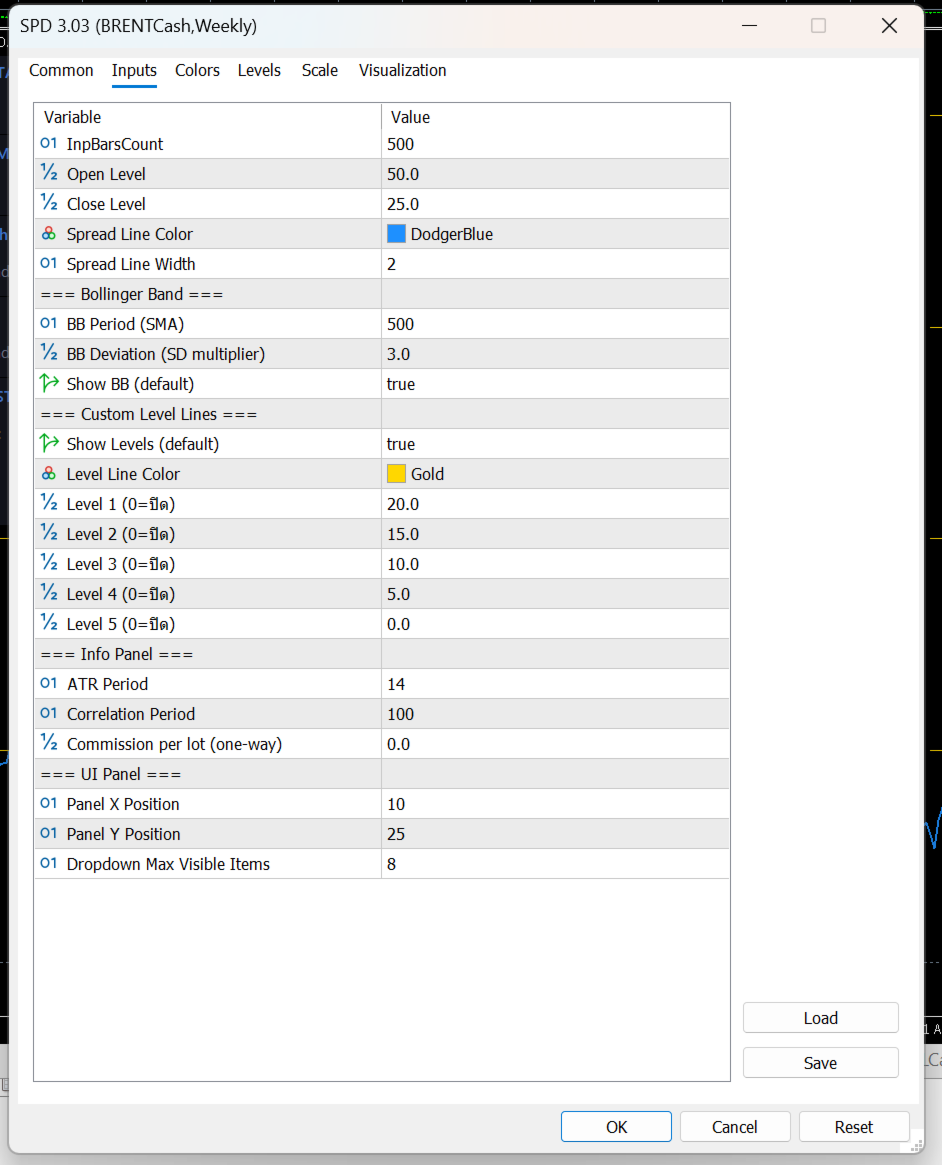
Open Level

เป็นระดับที่ใช้มองว่า
spread กว้างพอสำหรับเริ่มเปิดแผนเทรดหรือยัง

Close Level

เป็นระดับที่ใช้มองว่า
spread กลับเข้ามาแล้วหรือยัง เหมาะสำหรับปิดแผน

Bollinger Band

ช่วยบอกว่า spread ตอนนี้อยู่

  • ใกล้ค่าเฉลี่ย

  • สูงเกินปกติ

  • ต่ำเกินปกติ

เหมาะสำหรับคนที่ใช้แนวคิด mean reversion
คือรอให้ spread เบี่ยงออกไปก่อน แล้วคาดหวังให้กลับเข้าหาค่าเฉลี่ย

Level Lines

เป็นเส้นแนวนอนเพิ่มเติม
ไว้กำหนดโซนสำคัญตามสไตล์ของผู้ใช้เอง

เช่น

  • โซนเบา

  • โซนเริ่มน่าสนใจ

  • โซนเข้ม

  • โซนเสี่ยงสูง

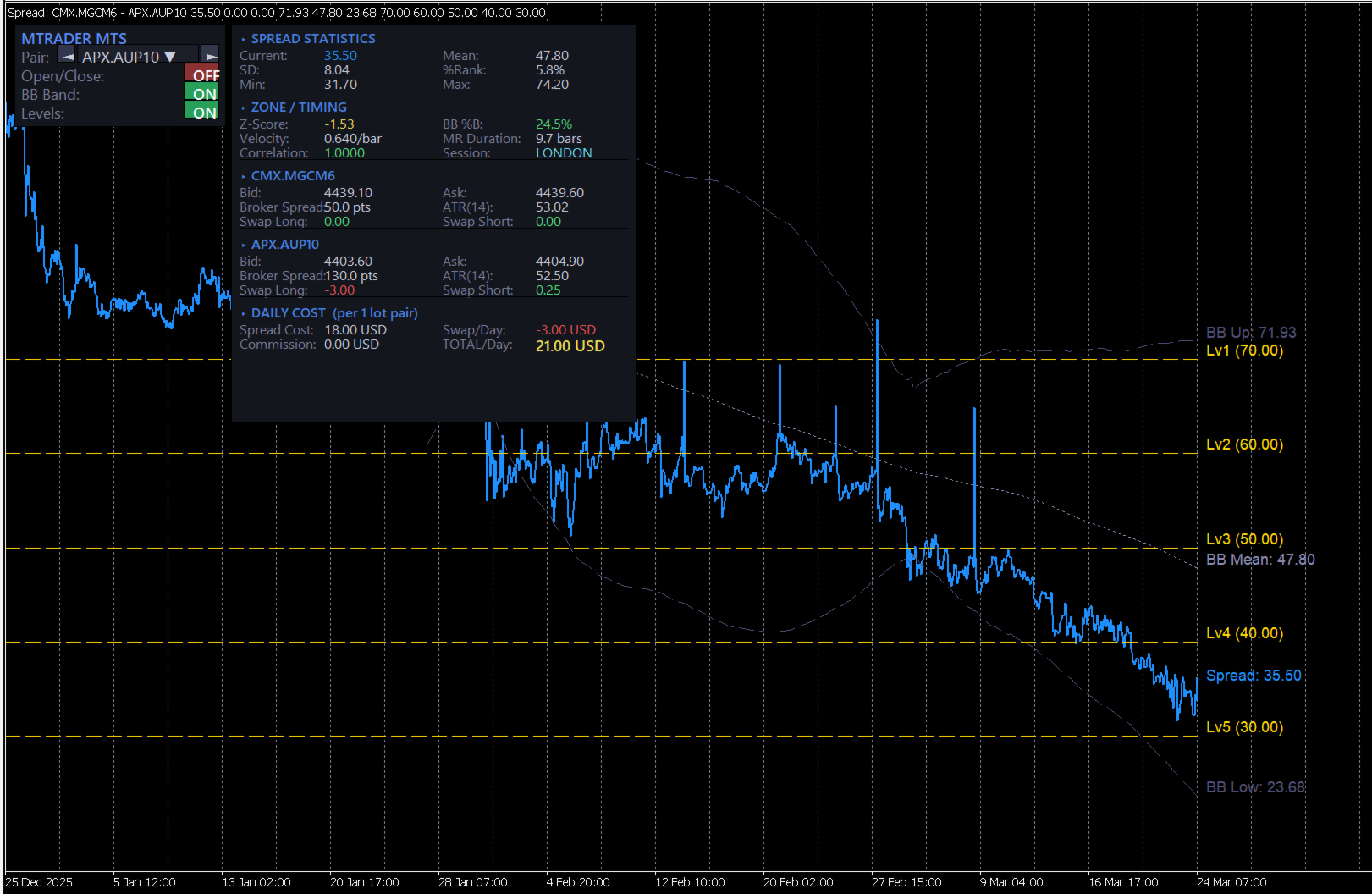
3) กล่องข้อมูลด้านขวา

ช่วยสรุปข้อมูลสำคัญแบบดูเร็ว

เช่น

  • spread ตอนนี้อยู่ที่เท่าไร

  • ค่าเฉลี่ย spread

  • ความผันผวนของ spread

  • spread ตอนนี้อยู่สูงหรือต่ำกว่าปกติมากแค่ไหน

  • ความสัมพันธ์ของสินทรัพย์ 2 ตัว

  • ค่า ATR ของแต่ละตัว

  • ค่าสวอป

  • ต้นทุนโดยประมาณต่อวัน

จุดนี้มีประโยชน์มาก เพราะช่วยให้ไม่ดูแค่ “กราฟสวย” แต่ดูเรื่อง ต้นทุนจริงของการถือ pair ด้วย

ใช้งานยังไงแบบง่าย ๆ

ขั้นตอนที่ 1 เปิดกราฟสินทรัพย์หลัก

เช่นเปิดกราฟ

  • XAUUSD

  • EURUSD

  • US30

  • BTCUSD

ตัวที่เปิดกราฟอยู่จะเป็น ตัวหลัก

ขั้นตอนที่ 2 เลือกสินทรัพย์ตัวที่ 2

ที่แผงด้านซ้ายจะมีช่องให้เลือก Symbol

สามารถเลือกได้ 2 แบบ

  • กดปุ่มซ้าย/ขวา เพื่อเลื่อนไปทีละตัว

  • กด dropdown เพื่อเลือกจากรายการ Market Watch

เมื่อเลือกแล้ว อินดิเคเตอร์จะคำนวณ spread ใหม่ทันที

ขั้นตอนที่ 3 ดูเส้น Spread เทียบกับระดับต่าง ๆ

หลักการใช้งานแบบง่ายคือ

  • ถ้า spread ยังอยู่ใกล้ค่าเฉลี่ยมาก → ยังไม่ค่อยมีระยะ

  • ถ้า spread ขยายออกไปไกล → เริ่มน่าสนใจ

  • ถ้า spread กลับเข้ามา → เป็นจังหวะปิดแผนได้

ปุ่มต่าง ๆ ใช้ทำอะไร

Pair

ใช้เลือกสินทรัพย์ตัวที่ 2 ที่จะเอามาเทียบกับกราฟหลัก

Open/Close ON-OFF

เปิดหรือปิดการแสดงเส้น

  • Open Level

  • Close Level

เหมาะสำหรับคนที่อยากดูเฉพาะ spread อย่างเดียว หรืออยากดูพร้อมระดับตัดสินใจ

BB Band ON-OFF

เปิดหรือปิด Bollinger Band ของ spread

ถ้าเปิด จะช่วยเห็นว่า spread กำลังอยู่ในโซนปกติหรือเริ่มสุดขอบ

Levels ON-OFF

เปิดหรือปิดเส้นระดับเพิ่มเติมที่ตั้งไว้

เหมาะกับคนที่ชอบแบ่งโซนการตัดสินใจหลายชั้น

ข้อมูลในกล่องด้านขวาหมายถึงอะไร

SPREAD STATISTICS

เป็นสถิติพื้นฐานของ spread

Current

ค่า spread ปัจจุบัน

Mean

ค่าเฉลี่ยของ spread ในช่วงที่คำนวณ

SD

ระดับการกระจายตัวของ spread
ยิ่งมาก แปลว่า spread แกว่งกว้าง

%Rank

บอกว่า spread ตอนนี้อยู่ในระดับสูงหรือต่ำเมื่อเทียบกับอดีต

ตัวอย่าง:

  • %Rank สูงมาก = spread อยู่โซนสูงเมื่อเทียบกับอดีต

  • %Rank ต่ำมาก = spread อยู่โซนต่ำ

Min / Max

จุดต่ำสุดและสูงสุดของ spread ในช่วงที่ใช้วิเคราะห์

ZONE / TIMING

เป็นส่วนช่วยดูจังหวะ

Z-Score

บอกว่า spread ตอนนี้ห่างจากค่าเฉลี่ยมากแค่ไหน

ยิ่งค่าเยอะ
ยิ่งแปลว่า spread เบี่ยงออกจากภาวะปกติมาก

BB %B

บอกตำแหน่ง spread ภายใน Bollinger Band

  • ใกล้กลาง = ปกติ

  • ใกล้ขอบ = เริ่มตึง

  • เกินขอบ = เบี่ยงมาก

Velocity

ความเร็วของ spread ในช่วงล่าสุด
ช่วยดูว่า spread กำลังเร่งตัวหรือเริ่มชะลอ

MR Duration

ค่าเฉลี่ยคร่าว ๆ ว่า spread ใช้เวลากี่แท่งในการกลับเข้าหาค่าเฉลี่ย

Correlation

ดูว่าราคาของสองสินทรัพย์สัมพันธ์กันมากแค่ไหน

ถ้าค่าสูง
มักเหมาะกับการจับ spread มากกว่า

Session

บอกช่วงตลาดปัจจุบัน เช่น Asia / London / New York
ช่วยให้รู้ว่าตอนนี้อยู่ในช่วงตลาดไหน

SYMBOL 1 / SYMBOL 2

เป็นข้อมูลของสินทรัพย์ทั้งสองฝั่ง

มีข้อมูลเช่น

  • Bid

  • Ask

  • Broker Spread

  • ATR

  • Swap Long

  • Swap Short

ช่วยให้ลูกค้าดูได้ว่าแต่ละตัว

  • สเปรดโบรกเกอร์กว้างไหม

  • ผันผวนแค่ไหน

  • ถือข้ามวันต้นทุนดีหรือไม่ดี

DAILY COST

ส่วนนี้สำคัญมากสำหรับสาย pair trade

Spread Cost

ต้นทุนจาก bid/ask ของทั้งสองฝั่งรวมกัน

Swap/Day

ต้นทุนหรือผลตอบแทนจากการถือข้ามวัน

Commission

ค่าคอมมิชชั่นรวมของคู่เทรด

TOTAL/Day

ต้นทุนรวมต่อวันโดยประมาณต่อ 1 lot pair

ส่วนนี้ช่วยให้ลูกค้ารู้ว่า
แม้ spread ดูสวย แต่ถ้าต้นทุนถือแพงเกิน ก็อาจไม่คุ้ม

ใช้อ่านสัญญาณแบบง่ายอย่างไร

แนวคิดง่าย ๆ สำหรับลูกค้า

กรณีที่ 1: Spread ขยายออกไปมาก

ถ้าเส้น spread วิ่งออกห่างจากค่าเฉลี่ยมาก
และไปอยู่ใกล้หรือเกิน BB ด้านบน/ล่าง

อาจตีความว่า

  • spread เริ่มเบี่ยงออกมากผิดปกติ

  • มีโอกาสกลับเข้า mean ได้ในอนาคต

เหมาะกับคนที่ใช้แนว mean reversion

กรณีที่ 2: Spread กลับเข้ามาใกล้ค่าเฉลี่ย

ถ้า spread เริ่มย่อกลับเข้ามา
อาจใช้เป็นโซนพิจารณาปิดแผน

กรณีที่ 3: Correlation ต่ำเกินไป

ถ้าสินทรัพย์สองตัวไม่ค่อยสัมพันธ์กัน
spread ที่เห็นอาจไม่นิ่งและตีความยาก

ดังนั้นคู่ที่ correlation สูงกว่ามักใช้งานได้เป็นธรรมชาติกว่า

กรณีที่ 4: ต้นทุนต่อวันสูง

แม้ spread จะดูดี
แต่ถ้า total/day สูงมาก

แปลว่า

  • ถือต่อมีภาระ

  • กลยุทธ์ต้องการการกลับตัวเร็วขึ้น

  • ถ้ากลับช้า อาจโดนต้นทุนกินกำไร

เหมาะกับใคร

อินดิเคเตอร์นี้เหมาะกับ

  • คนที่เทรดคู่สัมพันธ์ของราคา

  • คนที่ชอบหา spread ที่เบี่ยงจากค่าเฉลี่ย

  • คนที่ต้องการดูทั้ง “สัญญาณ” และ “ต้นทุน”

  • คนที่ต้องการเปรียบเทียบสินทรัพย์ 2 ตัวแบบรวดเร็วบนหน้าจอเดียว

จุดเด่นที่ลูกค้าควรรู้
  • เลือกคู่เทียบได้จากหน้าจอทันที

  • เห็น spread แบบเรียลไทม์

  • มีเส้น open / close ช่วยตัดสินใจ

  • มี Bollinger Band ช่วยดูความสุดโต่งของ spread

  • มีข้อมูล correlation, ATR, swap, cost ครบ

  • เหมาะกับการคัดคู่และวางแผน pair trading

ข้อควรเข้าใจ

อินดิเคเตอร์นี้ ไม่ใช่ระบบส่งคำสั่งอัตโนมัติ
แต่เป็นเครื่องมือช่วยวิเคราะห์

ดังนั้นลูกค้าควรใช้ร่วมกับ

  • แผนการเข้าออกที่ชัดเจน

  • การบริหาร lot

  • การดูต้นทุนจริงของโบรกเกอร์

  • การเลือกคู่ที่มีความสัมพันธ์เหมาะสม

What is Spread Arbitrage Line?

Spread Arbitrage Line is an indicator designed to display the price difference (spread) between:

  • the symbol on your current chart
    and
  • another symbol that you choose

In simple terms, it helps you see whether the relationship between two instruments is currently:

  • wider than usual
  • narrower than usual
  • returning back toward normal levels

This makes it useful for traders who work with:

  • Pair Trading
  • Spread Trading
  • Statistical Arbitrage
  • Mean Reversion setups
What does this indicator show?

The indicator has 3 main parts:

1) The Spread Line

This is the main line of the indicator.

It plots the difference between the current chart symbol and the second selected symbol.

When the line rises, it means the spread is expanding.
When the line falls, it means the spread is narrowing.

This helps traders quickly see when two instruments are moving away from each other or coming back together.

2) Decision Support Levels

The indicator also includes important reference lines to help with trade planning.

Open Level

This is the level used to identify when the spread has moved far enough to consider opening a spread or pair trade setup.

Close Level

This is the level used to identify when the spread has reverted enough to consider closing the setup.

Bollinger Bands

The Bollinger Bands help show whether the spread is:

  • near its normal range
  • stretched higher than usual
  • stretched lower than usual

This is especially useful for traders using a mean reversion approach, where the idea is to wait for the spread to move away from normal and then look for it to return.

Custom Level Lines

These are additional horizontal levels that can be used as personal reference zones.

For example, they can help define:

  • mild deviation
  • moderate deviation
  • strong deviation
  • extreme zones

3) The Information Panel

On the right side, the indicator displays a full information panel with key trading statistics.

This includes:

  • current spread value
  • average spread
  • spread volatility
  • how far the current spread is from its usual range
  • correlation between the two symbols
  • ATR of both symbols
  • swap values
  • estimated daily holding cost

This is very helpful because it allows the trader to evaluate not only the setup itself, but also the real cost of holding the pair.

How to use it

Step 1: Open the main chart

Open the chart of the instrument you want to use as the main symbol.

Examples:

  • XAUUSD
  • EURUSD
  • BTCUSD
  • US30

The chart you open becomes Symbol 1.

Step 2: Choose the second symbol

On the left control panel, you can choose another symbol to compare against.

You can do this by:

  • clicking the left/right buttons
    or
  • opening the dropdown list and selecting from Market Watch

Once selected, the indicator recalculates the spread automatically.

Step 3: Watch the spread relative to the levels

The basic idea is simple:

  • if the spread is near its average, there may be less opportunity
  • if the spread moves far away from normal, it may become interesting
  • if the spread starts returning, it may be a possible exit zone
What do the buttons do?

Pair

This allows you to select the second symbol used for comparison.

Open/Close ON-OFF

This turns the Open Level and Close Level lines on or off.

Useful for traders who either want:

  • a clean spread-only view
    or
  • full entry/exit guidance on the chart

BB Band ON-OFF

This turns Bollinger Bands on or off.

When enabled, it helps show whether the spread is inside its normal range or moving into an extreme zone.

Levels ON-OFF

This turns the custom reference levels on or off.

Useful for traders who want multiple decision zones on the indicator.

What does the information panel mean?

SPREAD STATISTICS

This section shows the main statistics of the spread.

Current

The current spread value.

Mean

The average spread over the calculation period.

SD

The standard deviation of the spread.

A higher value means the spread has been moving more widely.

%Rank

This shows where the current spread stands compared to its historical range.

For example:

  • a high %Rank means the spread is relatively high versus recent history
  • a low %Rank means the spread is relatively low

Min / Max

The lowest and highest spread values within the selected lookback period.

ZONE / TIMING

This section helps evaluate timing.

Z-Score

Shows how far the current spread is from its average.

The larger the absolute value, the more unusual the spread currently is.

BB %B

Shows where the current spread sits inside the Bollinger Band structure.

  • near the middle = normal
  • near the edge = stretched
  • beyond the band = extreme

Velocity

Shows how fast the spread is moving over recent bars.

This helps identify whether the spread is accelerating or slowing down.

MR Duration

This is an estimate of how many bars the spread usually takes to revert around its mean.

Correlation

Shows how strongly the two instruments move in relation to each other.

Higher correlation is generally more suitable for spread-style analysis.

Session

Displays the current market session, such as:

  • Asia
  • London
  • New York

This helps traders understand which trading period they are currently in.

SYMBOL 1 / SYMBOL 2

These sections show real-time information for both instruments.

They include:

  • Bid
  • Ask
  • Broker Spread
  • ATR
  • Swap Long
  • Swap Short

This helps traders evaluate each symbol individually in terms of:

  • trading cost
  • volatility
  • overnight holding conditions

DAILY COST

This section is very important for pair traders.

Spread Cost

The estimated transaction cost from the bid/ask spread of both symbols combined.

Swap/Day

The overnight swap impact of holding the pair.

Commission

The commission cost for both sides of the pair.

TOTAL/Day

The estimated total daily holding cost for a 1-lot pair position.

This is useful because even if a spread setup looks attractive, the daily holding cost may still make it less practical.

How to read it in a simple way

Case 1: The spread moves far away from normal

If the spread line moves strongly away from its average and approaches or exceeds the Bollinger Band edges, it may suggest that the spread is unusually stretched.

For mean reversion traders, this may be a zone worth monitoring.

Case 2: The spread comes back toward the mean

If the spread starts moving back toward normal levels, this may be considered a possible exit area.

Case 3: Correlation is too low

If the two symbols are not closely related, the spread may be less stable and harder to interpret.

Pairs with stronger correlation are usually more natural candidates for this kind of analysis.

Case 4: Daily cost is too high

Even if the spread setup looks good, high daily cost can reduce the attractiveness of the trade.

This means the setup may require faster mean reversion, otherwise costs may eat into the result.

Who is this indicator for?

This indicator is suitable for traders who:

  • compare two correlated markets
  • trade spread or pair opportunities
  • look for mean reversion setups
  • want both visual signals and cost analysis in one place
Main advantages
  • Easy symbol selection directly from the chart
  • Real-time spread visualization
  • Open and Close reference levels
  • Bollinger Bands for spread extremes
  • Correlation, ATR, swap, and cost information included
  • Useful for pair selection and spread trade planning
Important note

This indicator is not an automatic trading system.

It is a decision-support tool designed to help analyze spread opportunities.

It works best when used together with:

  • a clear entry and exit plan
  • position sizing rules
  • broker cost awareness
  • proper pair selection



추천 제품
SMC TrendMatrix Pro
Mykhailo Karpiuk
ENGLISH DESCRIPTION (Full Version) SMC TrendMatrix PRO (v2.36) — Multi-Timeframe Smart Money Zone Matrix SMC TrendMatrix PRO is a professional analytical tool designed for traders utilizing the Smart Money Concepts (SMC) and Inner Circle Trader (ICT) methodologies. The indicator automatically scans up to 21 timeframes simultaneously, identifies strong institutional zones of interest (Order Blocks with strict liquidity sweep and momentum filters), and consolidates the entire analysis into a s
Divergent Stochastic Filter II Catch Reversals Early, Filter Noise, Trade with Confidence The Edge: Why This Stochastic is Different  Every trader knows the Stochastic oscillator. But knowing when to trust its signals, that's the real challenge. The Divergent Stochastic Filter II transforms this classic indicator into a precision reversal detection system by adding critical elements: divergence intelligence, signal filtering and exhaustion detection.  While standard Stochastic oscillators fire s
POC Delta Order Blocks is a rule-based order block and volume-delta indicator designed to help traders clearly understand where real trading activity happened and how price reacts around those zones . Instead of drawing generic candle-based blocks, this indicator uses a Point of Control (POC) approach to identify the most actively traded price level between a swing high/low and a confirmed Break of Structure (BOS). The order block is then anchored to the earliest valid candle that interacted wit
CosmiCLab FIBO
Kirils Subins
CosmiCLab SMC FIBO CosmiCLab SMC FIBO is a professional trading indicator designed for traders who use Smart Money Concepts (SMC), market structure analysis and Fibonacci retracement levels. The indicator automatically detects market swings and builds Fibonacci levels based on the latest impulse movement. It also identifies market structure changes such as BOS (Break of Structure) and CHOCH (Change of Character), helping traders understand the current market direction. CosmiCLab SMC FIBO also pr
Magic Curves MT5
Aleksey Usachev
Indicator shows balance curves based on magic number for portfolio analysis. It allows to visually estimate different strategies performance on a single symbol. Any of magic number can be hidden by clicking on the value in legend. Parameters: HideAllOnStart - all magics are hidden and can be activated by clicking on its value; MAMode - shows average profit from trades; MAPeriod - Moving average period; Magics - a string with magic numbers separated by comma like "1,2,123". If this field is empty
TradePilotmt5
Hossein Khalil Alishir
TradePilot Expert Advisor (EA) for MetaTrader 5 TradePilot is a professional and user-friendly Expert Advisor (EA) for MetaTrader 5 (MT5) . It simplifies automated trading , risk management , and trade execution with a smart trading panel . Perfect for beginners and experienced traders looking for a reliable trade manager EA with automated lot size calculation and smart position management. Key Advantages User-Friendly Trading Panel: Customizable panel with buttons and hotkeys for fast ex
Universal Counter-Trend Grid EA — Smart Grid Trading, Redefined. For MT4 version :  https://www. mql5.com/en/market/product/143356 Tired of EAs that only work in one market condition? Universal Counter-Trend Grid EA is engineered to capitalize on the market's most rewarding moments — when price stretches too far and is ready to snap back to equilibrium. With intelligent grid technology and a multi-layer confirmation system , this EA captures opportunities that manual traders often miss.
Quant Direction MT5
Georgios Kalomoiropoulos
Quant Direction 은 3D 시장 분석 도구입니다. 다양한 매개변수에 걸쳐 정확한 백분율 편차를 계산하면서 완벽하게 객관적인 알고리즘 기반 시장 분석을 제공합니다. 첨단 AI 기반 모델링 도구와 엄격한 테스트를 거쳐 개발된 이 알고리즘은 타의 추종을 불허하는 정확도로 시장을 분석합니다. 플랫폼에서 모든 통화쌍 또는 금융 상품을 분석할 수 있습니다. 단기 거래, 데이 트레이딩, 스윙 트레이딩 등 어떤 유형의 거래를 하든 Quant Direction은 최적의 선택입니다. 운영자가 되는 것의 진정한 이점 퀀트 디렉션의 진정한 장점은 감정, 눈의 피로, 과도한 분석을 완전히 배제한다는 점입니다. 더 이상 수십 개의 차트를 일일이 살펴보며 방향을 찾거나 자신의 판단에 끊임없이 의문을 품을 필요가 없습니다. 이 시스템은 8개의 시간 간격(5개월에서 수개월까지)을 밀리초 단위로 처리합니다. 특정 시점의 주요 시장 참여자를 정확하게 식별하여 항상 성공 확률이 가장 높은 방향으로 거래할
RSI Currency Strength Meter is a powerful and elegant multi-currency indicator that measures the real-time relative strength of the 8 major currencies using RSI logic. By calculating the smoothed performance of each currency across its major pairs and applying the RSI formula, it delivers clean and responsive strength lines that make it easy to spot which currencies are truly strong or weak at any moment. This indicator is particularly useful for visualizing currency correlations and divergence
CasperIT Trend Reversal Signals Light Overview CasperIT Trend Reversal Signals Light is an enhanced version of the popular Trend Reversal Signals indicator, designed for traders who want more control, better customization, and advanced notifications while keeping the indicator simple and easy to use. 100% NO REPAINT! The indicator automatically identifies potential trend reversals and trend continuation opportunities by classifying market conditions into three clear signal categories: Reversal S
PROMO: ONLY 10 LEFT AT $90! Next price:        $199 Price will be kept high to limit number of users for this strategy. This EA starts trading at the open of   London (UK) Session . It is based on analysis of advanced statistical distributions combined with short to medium term reversal patterns which have mean-reversion attributes. The EA includes several smart features and allows you to trade with a fixed or automatic lot size. The EA is not sensitive to spreads but can be backtested on both
RBreaker
Zhong Long Wu
RBreaker Gold Indicators는 금 선물을 위한 단기 데이 트레이딩 전략으로, 추세 추종과 데이 내 반전의 두 가지 거래 방식을 결합합니다. 추세 장에서 수익을 포착할 수 있을 뿐만 아니라, 시장이 반전될 때 적시에 이익을 확정하고 추세에 맞춰 반대 포지션을 잡을 수 있습니다. 이 전략은 미국 잡지 Futures Truth에서 15년 연속으로 가장 수익성 높은 트레이딩 전략 상위 10위 안에 선정되었습니다. 긴 라이프사이클을 자랑하며, 현재까지 국내외에서 널리 사용되고 연구되고 있습니다. 본 지표는 2026년 금 선물의 움직임을 반영하여 14일 ATR 지표를 기반으로 돌파 계수 A, 관찰 계수 B, 반전 계수 R을 보다 합리적인 값으로 정의했습니다. 매우 훌륭한 지표이며, 안정적인 연간 수익성을 달성했습니다. 강력히 추천합니다~ 위 지표는 변동성이 높은 상품에 적합하며, 매개변수는 금 선물, 주가 지수 선물 등에 적합합니다. 다른 상품이 필요한 경우 돌파 계수 A
Aurum Intraday EA
Rodrigo Leonardo Favreau Giuliodoro
Aurum Intraday EA – Advanced Gold Trading Algorithm The Aurum Intraday EA is a powerful automated trading system designed specifically for Gold (XAUUSD) traders who want to capture strong intraday movements while maintaining full control over risk and strategy configuration. Built with a robust algorithm and optimized for H1 and H4 timeframes (H4 recommended) , this Expert Advisor is capable of identifying high-probability opportunities in the gold market and executing trades with precision and
Bober Real MT5
Arnold Bobrinskii
4.88 (16)
Bober Real MT5 is a fully automatic Forex trading Expert Advisor. This robot was made in 2014 year and did a lot of profitbale trades during this period. So far over 7000% growth on my personal account. There was many updates but 2019 update is the best one. The robot can run on any instrument, but the results are better with EURGBP, GBPUSD, on the M5 timeframe. Robot doesn't show good results in tester or live account if you run incorrect sets. Set files for Live accounts availible only for cu
PipFinite Trend PRO MT5
Karlo Wilson Vendiola
4.84 (557)
Breakthrough Solution For Trend Trading And Filtering With All Important Features Built Inside One Tool! Trend PRO's smart algorithm detects the trend, filters out market noise and gives entry signals with exit levels. The new features with enhanced rules for statistical calculation improved the overall performance of this indicator. Important Information Revealed Maximize the potential of Trend Pro, please visit www.mql5.com/en/blogs/post/713938 The Powerful Expert Advisor Version Automatin
Laguerre SuperTrend Clouds   adds an Adaptive Laguerre averaging algorithm and alerts to the widely popular SuperTrend indicator. As the name suggests,   Laguerre SuperTrend Clouds (LSC)   is a trending indicator which works best in trendy (not choppy) markets. The SuperTrend is an extremely popular indicator for intraday and daily trading, and can be used on any timeframe. Incorporating Laguerre's equation to this can facilitate more robust trend detection and smoother filters. The LSC uses the
Rainbow EA MT5
Jamal El Alama
Description : Rainbow EA MT5 is a simple Expert advisor based on   Rainbow MT5 indicator witch is based on Moving average with period 34. The indicator is incorporated in the EA, therefore, it is not required for the EA to operate, but if you wish, you can download it from   my product page . The Expert Advisor settings are as follows : Suitable for Timeframes up to H1 The parameters below can be set according to your trading rules. StopLoss ( Stop Loss in pips) TakeProfit ( Take Profit in pips
MTF Structure PRO
Louis Henry Marengo Toledo
Product name MTF Structure PRO Short description Multi-timeframe market structure dashboard with visual candle matrix, alignment score, bias heat map, and premium/discount zones. Full description MTF Structure PRO is a clean multi-timeframe dashboard for MetaTrader 5 traders who want to evaluate market structure quickly without switching between charts. The indicator displays a compact visual matrix of recent candles across key timeframes and summarizes the current directional bias, alignment sc
# Equity Monitor Pro  ## Short Description Equity Monitor Pro is a professional equity p**Equity Monitor Pro** is a powerful risk management tool that automatically protects your trading account by monitoring equity levels and enforcing prop firm style rules. Whether you're taking an FTMO challenge, trading a funded account, or just want to protect your capital, this EA runs silently alongside your trading strategy and takes action when it matters most. Protection tool designed for prop firm
RED ZONE Monitor Loss-Cut & Break-Even Risk Monitor for Averaging Traders (MT5) RED ZONE Monitor is a risk management indicator for traders who use averaging, scaling-in, or multiple open positions . It visually displays: The loss-cut (liquidation) risk zone The break-even price Based on current open positions, lots, and margin conditions This indicator does not provide entry signals. It does not promise profits. It shows where your account actually fails if price moves against you. What RED ZO
이 지표를 구매하시면 ICT Concept MT5 또는 다른 원하시는 지표를 무료로 받으실 수 있습니다! 자세한 내용은 개인 메시지로 문의해 주세요! 인디케이터: Currency Strength Meter Pro 시장 전반 시각화 (Market Breadth Visualization) 장점: 복잡한 차트 대신 깔끔한 "대시보드" 형태로 표시하여, 어떤 통화쌍이 강세인지 약세인지 한눈에 파악할 수 있습니다. 이점: 차트를 하나씩 확인하는 시간을 줄이고 매매할 통화쌍을 빠르게 결정할 수 있습니다. 자동 순위 및 정렬 (Auto-Ranking & Sorting) 장점: "수평 순위" 모드를 통해 "가장 강한" 통화쌍부터 "가장 약한" 통화쌍까지 자동으로 정렬합니다. 이점: 일간/주간/월간의 승자(Winners)와 패자(Losers)를 즉시 식별할 수 있어 상대 강도 전략에 유리합니다. 스마트 통화 로직 (Smart Currency Logic) 장점: 기준 통화(Base Currency
Visual CrossPulse Dynamics Indicator
AL MOOSAWI ABDULLAH JAFFER BAQER
Visual CrossPulse Dynamics: Trade with the Market's True Rhythm Unlock a new level of market insight with Visual CrossPulse Dynamics, a sophisticated trading indicator designed to adapt to ever-changing volatility and reveal the true direction of the trend. Are you tired of indicators that lag in fast-moving markets or give false signals during consolidation? The Visual CrossPulse Dynamics indicator solves this problem by using an advanced, adaptive algorithm that intelligently adjusts to the m
Advanced Trading Chaos
Sergei Gurov
5 (1)
Advanced Trading Chaos  The main purpose of the indicator is to help the trader detect the signals described by Bill Williams in his books to make a quick and correct trading decision. 1)Bullish/Bearish Reversal Bar(BDB) 2) Divergent Bar(DB) 3) Second Sage Signal — the third consecutive Awesome Oscillator bar  4) Working fractals (Fractals that worked above/below the red forehead  5) Three bar coloring modes 5.1) Coloring of bars according to the AO indicator (Including the squatting bar) 5.2
Maximum Trend Arrows OT MT5
Mulweli Valdaz Makulana
STRICTLY FOR BOOM INDEX ONLY!!!!! Here I bring the Maximum Trend Arrows OT1.0 MT5 indicator. This indicator is made up of a combination of different trend indicators for entries and exits, for entries an orange arrow will paint on the chart below the current market and a red flag for closing of trades and it produces buy arrows only. When the orange arrow appears, it will appear along with it's sound to notify you. The 1H timeframe is recommended, don't use it anywhere else than on the 1H timefr
SolarTrade Suite Financial Robot: LaunchPad Market Expert - 거래를 시작하도록 설계되었습니다! 이 거래 로봇은 특별하고 혁신적이며 고급 알고리즘을 사용하여 가치를 계산합니다. 금융 시장의 세계에서 여러분의 조수입니다. SolarTrade Suite 시리즈의 지표 세트를 사용하여 이 로봇을 시작할 순간을 더 잘 선택하세요. 설명 하단에서 SolarTrade Suite 시리즈의 다른 제품을 확인하세요. 투자와 금융 시장의 세계를 자신 있게 탐색하고 싶으신가요? SolarTrade Suite Financial Robot: LaunchPad Market Expert는 정보에 입각한 투자 결정을 내리고 수익을 늘리는 데 도움이 되도록 만들어진 혁신적인 소프트웨어입니다. SolarTrade Suite Financial Robot: LaunchPad Market Expert의 장점: - 정확한 계산: 로봇은 고급 알고리즘과 분석 방법을 사
Net Exposure & Net Average Price is a lightweight utility Expert Advisor for MetaTrader 5 hedge accounts . This tool helps traders instantly understand their true market exposure when multiple Buy and Sell positions are open on the same symbol. What the EA Does The EA displays a clear on-chart panel showing: Total Buy Trades Total Buy Lots Total Sell Trades Total Sell Lots Net Lots (Net Exposure) Net Average Price (hedge-adjusted breakeven) The Net Average Price represents the true breakeven
Step into the world of Forex trading with confidence, clarity, and precision using Gold Indicator a next-generation tool engineered to take your trading performance to the next level. Whether you’re a seasoned professional or just beginning your journey in the currency markets, Gold Indicator equips you with powerful insights and help you trade smarter, not harder. Built on the proven synergy of three advanced indicators, Gold Indicator focuses exclusively on medium and long-term trends elimina
Supply and Demand indicator powered by advanced multi-timeframe fractal algorithms, Zone Merging technology, and full EA readiness. -  Finding the exact areas where institutional buying and selling occur is the key to successful trading. Advanced Supply & Demand Zones Simple  takes the guesswork out of chart analysis. By utilizing a dual-layered fractal calculation (Fast and Slow points) combined with dynamic ATR scaling, this indicator pinpoints high-probability reversal and continuation zones
FREE
GoldSpire MT5
Mohamed Gaith Mouzeik
5 (4)
GoldSpire MT5는 MetaTrader 5용으로 개발된 전문 Grid 및 Basket Expert Advisor이며, XAUUSD / Gold 거래를 위해 설계되었습니다. 이 EA는 제어된 그리드 관리, 적응형 시장 필터, 내장 보호 기능을 결합하여 거래 사이클을 구조적이고 리스크를 고려한 방식으로 관리합니다. Live Signal: https://www.mql5.com/ko/signals/2377351 GoldSpire MT5는 지속적으로 포지션을 여는 단순한 grid 로봇이 아닙니다. EA는 현재 시장 환경을 분석하고 다양한 시장 레짐에 맞게 동작을 조정합니다. 비교적 안정적인 시장에서는 새로운 basket을 선택적으로 시작할 수 있으며, 불확실하거나 변동성이 높거나 리스크가 큰 상황에서는 추가 필터가 거래 활동을 제한할 수 있습니다. 핵심 초점 중 하나는 grid control입니다. 새로운 grid level을 열기 전에 GoldSpire MT5는 시장 구조, 반대 방
이 제품의 구매자들이 또한 구매함
Neuro Poseidon MT5
Daria Rezueva
4.84 (51)
Neuro Poseidon is a new indicator by Daria Rezueva. It combines precise trading signals with adaptive TP/SL levels - creating best possible trades as a result! Message me and get  Neuro Poseidon Assistant  as a gift to automize your trading process! What makes it stand out? 1. Proven profitability on all assets and timeframes 2. Only confirmed BUY and SELL signals present on the chart 3. Adaptive TP & SL levels generated by the software for each trade 4. Easy to understand - suitable for al
SuperScalp Pro
Van Minh Nguyen
4.68 (28)
SuperScalp Pro – 전문 멀티 레이어 컨플루언스 스캘핑 시스템 SuperScalp Pro는 지능형 다중 요소 확인 시스템을 통해 높은 확률의 거래 기회를 식별하도록 설계된 전문적인 다중 컨플루언스 트레이딩 시스템입니다. Supertrend, VWAP, EMA, RSI, ADX, 거래량 분석, 볼린저 밴드 및 MACD 다이버전스를 통합하여 저품질 신호를 필터링하고, 가짜 돌파 신호를 줄이며, 진입 정확도를 향상시킵니다. XAUUSD, BTCUSD 및 주요 Forex 통화쌍에 특별히 최적화된 SuperScalp Pro는 ATR 기반 변동성 로직과 규칙 기반 신호 검증을 통해 변화하는 시장 환경에 적응하며, M1부터 H4까지 다양한 시간대에서 일관되고 객관적인 거래 확인 신호를 제공합니다. 내장된 스마트 제어 패널을 통해 실시간으로 완전한 사용자 설정이 가능하며, 트레이더는 개별 확인 필터를 활성화하거나 비활성화하여 다양한 시장 환경, 거래 스타일 및 위험 선호도에 맞게 시스템
SMC Intraday Formula
Kareem Abbas
5 (17)
먼저 솔직하게 말하겠습니다. 어떤 인디케이터도 단독으로 당신을 수익성 있게 만들어주지 않습니다. 누군가 그렇게 말한다면, 그는 당신에게 꿈을 파는 것입니다. 완벽한 매수/매도 화살표를 보여주는 모든 인디케이터는 완벽하게 보이도록 만들 수 있습니다 — 단지 올바른 과거 구간을 확대하고 승리한 거래만 캡처하면 됩니다. 우리는 그렇게 하지 않습니다.  SMC Intraday Formula는 도구입니다. 시장 구조를 읽고, 가장 높은 확률의 가격 구간을 표시하며, 현재 스마트 머니의 흐름이 어떻게 보이는지 아주 단순한 언어로 보여줍니다. 최종 결정은 여전히 당신이 합니다. 실행도 당신이 합니다. 하지만 이제는 희망이 아니라 정확성으로 거래하게 됩니다. 우리는 이 인디케이터를 지난 약 3년 동안 골드(XAUUSD) 및 주요 외환 통화쌍의 데이 트레이딩 스캘핑에 사용해 왔습니다. M1, M5, M15, M30에서 우리의 핵심 도구입니다. 이 도구는 미래를 예측하려 하지 않습니다 — 지금 형성
M1 Quantum MT5
Hamed Dehgani
5 (5)
개발자 안내: 현재 149달러 가격의 라이선스가 2개만 남아 있습니다. 모두 판매되면 가격은 169달러 로 인상됩니다. 개발자 안내: 구매 후 저에게 연락하시면 최신 권장 설정 파일(Set File) , 사용 팁, 그리고 다른 M1 Quantum 사용자들과 소통할 수 있는 VIP 지원 그룹 초대장을 받으실 수 있습니다. M1 Quantum 은 M1 전용 전문 트레이딩 시스템으로, 손절(Stop Loss), 익절(Take Profit), 그리고 스마트 자금 관리 기능이 내장된 빠르고 정확한 거래 신호를 제공합니다. M1 Quantum 은 연속 수익 거래 에 집중하여 계좌를 빠르게 성장시키도록 설계된 전문 자금 관리 시스템을 포함하고 있습니다. M1 Quantum 인디케이터 의 주요 기능 M1 타임프레임 및 모든 주요 통화쌍 용으로 설계됨 모든 거래에 손절과 익절 적용 자금 관리 시스템 이 포함되어 트레이더가 쉽게 거래할 수 있도록 안내 높은 승률 및 높은 연속 수익률 리페인트 없음,
Entry In The Zone and SMC Multi Timeframe is a real-time 2-in-1 market analysis tool that combines market structure analysis and a No Repaint BUY / SELL signal system into a single indicator, built on Smart Money Concepts (SMC) — a widely adopted framework used by professional traders to understand market structure. This indicator helps you see the market more clearly, make decisions based on structure rather than guesswork, and focus on high-probability zones where price is more likely to react
Gann Made Easy MT5
Oleg Rodin
5 (6)
Gann Made Easy 는 mr.의 이론을 사용하여 최고의 거래 원칙을 기반으로 하는 전문적이고 사용하기 쉬운 Forex 거래 시스템입니다. W.D. 간. 이 표시기는 Stop Loss 및 Take Profit Levels를 포함하여 정확한 BUY 및 SELL 신호를 제공합니다. PUSH 알림을 사용하여 이동 중에도 거래할 수 있습니다. 구매 후 거래 방법 안내 및 유용한 추가 지표를 무료로 받으시려면 저에게 연락주세요! 아마도 Gann 거래 방법에 대해 이미 여러 번 들었을 것입니다. 일반적으로 Gann의 이론은 초보자 거래자뿐만 아니라 이미 거래 경험이 있는 사람들에게도 매우 복잡한 것입니다. Gann의 거래 방식은 이론적으로 적용하기 쉽지 않기 때문입니다. 나는 그 지식을 연마하고 Forex 지표에 최고의 원칙을 적용하기 위해 몇 년을 보냈습니다. 표시기는 적용하기가 매우 쉽습니다. 차트에 첨부하고 간단한 거래 권장 사항을 따르기만 하면 됩니다. 지표는 지속적으로 시장 분석
Divergence Bomber
Ihor Otkydach
4.9 (92)
이 지표를 구매하신 분께는 다음과 같은 혜택이 무료로 제공됩니다: 각 거래를 자동으로 관리하고, 손절/익절 수준을 설정하며, 전략 규칙에 따라 거래를 종료하는 전용 도우미 툴 "Bomber Utility" 다양한 자산에 맞게 지표를 설정할 수 있는 셋업 파일(Set Files) "최소 위험", "균형 잡힌 위험", "관망 전략" 모드로 설정 가능한 Bomber Utility의 셋업 파일 이 전략을 빠르게 설치, 설정, 시작할 수 있도록 돕는 단계별 영상 매뉴얼 주의: 위의 모든 보너스를 받기 위해서는 MQL5 개인 메시지 시스템을 통해 판매자에게 연락해 주세요. 독창적인 커스텀 지표인 “Divergence Bomber(다이버전스 봄버)”를 소개합니다. 이 지표는 MACD 다이버전스(괴리) 전략을 기반으로 한 올인원(All-in-One) 거래 시스템입니다. 이 기술 지표의 주요 목적은 가격과 MACD 지표 간의 다이버전스를 감지하고, **향후 가격이 어느 방향으로 움직일지를 알려주는
Power Candles MT5
Daniel Stein
5 (8)
Power Candles V3 - 자체 최적화 강도 지표 파워 캔들 V3는 적용된 모든 차트에서 통화 및 상품의 강세를 실행 가능한 거래 계획으로 전환합니다. 단순히 캔들에 색상을 입히는 대신, 백그라운드에서 실시간 자동 최적화를 수행하여 현재 보고 있는 종목에 대한 최적의 손절매, 익절 및 신호 임계값을 제공합니다. 한 번의 클릭으로 실시간 거래에 적용할 수 있으며, 진입점, 손절매 및 익절 선이 정확한 가격에 맞춰 차트에 표시되고, 방향과 함께 알림이 발령됩니다. 이 도구는 Stein Investments 에코시스템의 일부입니다. 18개 이상의 도구와 함께 당신의 1대1 AI 트레이딩 멘토 Max.  항상 대기 중, 모든 인디케이터를 깊이 있게 이해, 무언가를 차근차근 생각해보고 싶은 순간에 도움을 줍니다.  https://stein.investments 에서 만나보세요 매 종가 바마다 3,000회 이상의 트레이딩 시뮬레이션. 9가지 강도 상태. 2가지 전략을 병렬로 테스트.
PrimeScalping
Temirlan Kdyrkhan
PrimeScalping is a powerful trading companion designed to generate high-probability entry signals with dynamic TP/SL/DP levels based on volatility. Built-in performance tracking shows win/loss stats, PP1/PP2 hits, and success rates — all updated live. Key Features: Buy/Sell signals with adaptive volatility bands Real-time TP/SL/DP levels based on ATR Built-in MA Filter with optional ATR/StdDev volatility Performance stats panel (Success, Profit/Loss, PP1/PP2) Alerts via popup, sound, push, or e
이 제품은 2026년 시장에 맞게 업데이트되었으며 최신 MT5 빌드에 최적화되었습니다. 가격 업데이트 안내: Smart Trend Trading System은 현재 $99 에 제공됩니다. 다음 30회 구매 후 가격은 $199 로 인상됩니다. 특별 혜택: Smart Trend Trading System 구매 후 저에게 개인 메시지를 보내시면 Smart Universal EA를 무료 로 받을 수 있으며, Smart Trend 신호를 자동 거래로 전환할 수 있습니다. Smart Trend Trading System은 리페인트 없음, 재그리기 없음, 지연 없음의 완전한 트레이딩 시스템으로, 더 깨끗한 신호, 더 나은 추세 방향, 그리고 더 체계적인 시장 거래 방식을 원하는 트레이더를 위해 제작되었습니다. Online course , manual and [download presets] . 이 시스템은 추세 감지, 반전 구간, Smart Cloud, 트레일링 스톱 로직, 지지와 저항, 캔들
Trend Catcher ind mt5
Ramil Minniakhmetov
5 (7)
트렌드 캐처 인디케이터 트렌드 캐처 인디케이터는 개발자가 자체 개발한 맞춤형 적응형 트렌드 분석 지표들을 조합하여 시장 가격 움직임을 분석합니다. 단기적인 노이즈를 제거하고 근본적인 모멘텀 강도, 변동성 확대, 가격 구조 움직임에 집중하여 진정한 시장 방향을 파악합니다. 또한 이동 평균, RSI, 변동성 필터와 같은 맞춤형 지표들을 활용하여 가격을 평활화하고 트렌드를 필터링합니다. 실제 운영 모니터링 및 기타 제품은 다음 링크에서 확인하실 수 있습니다:   https://www.mql5.com/en/users/mechanic/seller 텔레그램에서는 EA나 설정 파일을 판매하지 않습니다. 사기이니 주의하세요. 모든 설정 파일은 블로그에서 무료로 제공됩니다. 중요! 구매 후 즉시 연락 주시면 사용 방법 및 보너스를 드립니다!
UZFX {SSS} 스캘핑 스마트 시그널 v4.0 MT5는 급변하는 시장에서 정확한 실시간 시그널을 필요로 하는 스캘퍼, 데이 트레이더, 스윙 트레이더를 위해 설계된 리페인팅이 없는 고성능 트레이딩 지표입니다. (UZFX-LABS)에서 개발한 이 지표는 가격 움직임 분석, 추세 확인 및 스마트 필터링을 결합하여 모든 통화 쌍과 시간대에서 높은 확률의 매수 및 매도 신호, 경고 신호, 추세 지속 기회를 생성합니다. 거래에 대한 의구심을 떨쳐버리고, 명확성, 정밀성, 그리고 규율 있는 시장 실행을 원하는 트레이더를 위해 설계된 체계적인 신호 시스템을 따르기 시작하세요. 제 추천* 최적의 시간대: 15분 이상. {H1}이 제가 가장 선호하는 시간대입니다. 그리고 그 결과는 정말 놀라울 정도입니다...!! 주요 기능 업데이트 • 자동 매수 및 매도 신호 감지 • 고급 반전 인식 로직 • 잠재적인 시장 반전 전 조기 경고 신호 • 추세 지속 확인 신호 • 진입, 손절, TP1, TP2,
Trend Sniper X
Sarvarbek Abduvoxobov
5 (2)
Trend Sniper X — 개요 Trend Sniper X 는 EMA 필터와 결합된 HTF SuperTrend 엔진을 기반으로 하는 MetaTrader 5용 멀티 타임프레임 추세 추종 지표입니다. 상위 타임프레임의 추세 방향에 따라 현재 타임프레임의 캔들 색상을 변경하고 추세 전환 지점을 BUY/SELL 화살표로 표시합니다. 가격 정보: 현재 가격은 프로모션 가격이며 향후 업데이트 및 새로운 기능 출시 시 변경될 수 있습니다. Code2Profit 채널   멀티 타임프레임 분석으로 시장을 마스터하세요!   기술 사양 플랫폼 MetaTrader 5 지표 유형 멀티 타임프레임 추세 캔들 (SuperTrend 기반) 신호 소스 HTF SuperTrend (ATR 기반) + HTF EMA 필터 작동 타임프레임 독립적으로 선택 가능한 상위 타임프레임(M1~MN1)을 지원하는 모든 차트 타임프레임 주요 상품 외환(Forex), 골드(XAUUSD) 및 기타 CFD 권장 계좌 모든 계좌 유형
소개       Quantum Breakout PRO   , 브레이크아웃 존 거래 방식을 변화시키는 획기적인 MQL5 지표! 13년 이상의 거래 경험을 가진 숙련된 트레이더 팀이 개발한       퀀텀 브레이크아웃 PRO       혁신적이고 역동적인 브레이크아웃 존 전략으로 거래 여정을 새로운 차원으로 끌어올리도록 설계되었습니다. Quantum Breakout Indicator는 5개의 이익 목표 영역이 있는 브레이크아웃 영역의 신호 화살표와 브레이크아웃 상자를 기반으로 한 손절 제안을 제공합니다. 초보자 거래자와 전문 거래자 모두에게 적합합니다. Quantum EA 채널:       여기를 클릭하세요 중요한! 구매 후 설치 매뉴얼을 받으려면 개인 메시지를 보내주십시오. 추천: 기간: M15 통화쌍: GBPJPY, EURJPY, USDJPY,NZDUSD, XAUUSD 계정 유형: 스프레드가 매우 낮은 ECN, Raw 또는 Razor 브로커 시간: GMT +3 중개인 :
Atomic Analyst MT5
Issam Kassas
4.32 (38)
이 제품은 2026년 시장에 맞게 업데이트되었으며 최신 MT5 빌드에 최적화되었습니다. 가격 업데이트 안내: Atomic Analyst는 현재 $99 에 제공됩니다. 다음 30회 구매 후 가격은 $199 로 인상됩니다. 특별 혜택: Atomic Analyst 구매 후 저에게 개인 메시지를 보내시면 Smart Universal EA를 무료 로 받을 수 있으며, Atomic Analyst 신호를 자동 거래로 전환할 수 있습니다. Atomic Analyst는 리페인트 없음, 재그리기 없음, 지연 없음의 Price Action 거래 인디케이터로, 수동 거래, 신호 명확성, EA 자동화를 위해 설계되었습니다. User manual: settings, inputs and strategy.   &   User Manual PDF . 가격 움직임, 강도, 모멘텀, 다중 시간대 방향 및 고급 필터를 분석하여 트레이더가 노이즈를 줄이고 약한 세팅을 피하며 더 체계적인 거래 결정을 내릴 수 있도록
Transaction Speed MT5
Ivan Stefanov
5 (3)
이 지표는 시장에서 관심이 나타나는 영역 을 강조 표시한 후, 주문이 누적되는 영역 을 보여줍니다. 이는 **대규모 오더북(호가창)**처럼 작동합니다. 이것은 거대한 자금 을 위한 인디케이터입니다. 성능은 탁월하며, 시장에서 어떤 관심이 있든 반드시 포착할 수 있습니다 . (이것은 완전히 새로 작성되고 자동화된 버전 입니다 – 이제 수동 분석은 필요하지 않습니다.) **거래 속도(Transaction Speed)**는 새로운 개념의 인디케이터로, 시장에 대규모 주문이 언제, 어디에 쌓이는지를 보여주며 , 그 이점을 분석합니다. 매우 초기 단계에서 트렌드 전환 을 감지할 수 있습니다. FX 시장에서 흔히 사용하는 "거래량(volume)"은 오해입니다. 실제로는 시간당 가격 변화량 이므로, 올바른 용어는 거래 속도 입니다. 우리가 어떻게 사고하고, 행동하며, 분석하느냐 가 가장 중요합니다. 분석 패러다임의 전환 은 필수적입니다. 이 인디케이터는 외환 시장에서의 볼륨 개념을 논리적으로
Quantum TrendPulse
Bogdan Ion Puscasu
5 (25)
SuperTrend   ,   RSI   ,   Stochastic   의 힘을 하나의 포괄적인 지표로 결합하여 트레이딩 잠재력을 극대화하는 궁극의 트레이딩 도구   인 Quantum TrendPulse를   소개합니다. 정밀성과 효율성을 추구하는 트레이더를 위해 설계된 이 지표는 시장 추세, 모멘텀 변화, 최적의 진입 및 종료 지점을 자신 있게 식별하는 데 도움이 됩니다. 주요 특징: SuperTrend 통합:   주요 시장 추세를 쉽게 따라가고 수익성의 물결을 타세요. RSI 정밀도:   매수 과다 및 매도 과다 수준을 감지하여 시장 반전 시점을 파악하는 데 적합하며 SuperTrend 필터로 사용 가능 확률적 정확도:   변동성이 큰 시장에서 숨겨진 기회를 찾기 위해 확률적 진동   을 활용하고 SuperTrend의 필터로 사용 다중 시간대 분석:   M5부터 H1 또는 H4까지 다양한 시간대에 걸쳐 시장을 최신 상태로 유지하세요. 맞춤형 알림:   맞춤형 거래 조건이 충족되면
Gem SIGNAL
Shengzu Zhong
5 (1)
GEM Signal Pro GEM Signal Pro는 MetaTrader 5용 추세추종형 지표로, 차트에서 더 명확한 신호, 더 구조적인 트레이드 설정, 그리고 더 실용적인 리스크 관리를 원하는 트레이더를 위해 설계되었습니다. 단순한 화살표만 표시하는 것이 아니라, GEM Signal Pro는 전체 트레이드 아이디어를 더 깔끔하고 읽기 쉬운 방식으로 보여줍니다. 조건이 확인되면 진입가, 손절가, 목표가를 차트에 표시하여 트레이더가 설정을 더 효율적으로 검토할 수 있도록 도와줍니다. 작동 방식 이 지표는 먼저 내부 로직에 따라 유효한 초기 신호를 식별합니다. 확인 조건이 충족되면, GEM Signal Pro는 차트에 전체 설정을 표시합니다. 이를 통해 트레이더는 거래 구조를 더 명확하게 보고, 수동 분석 작업을 줄일 수 있습니다. 차트에 표시되는 거래 레벨 확인된 신호에 대해, GEM Signal Pro는 다음을 표시할 수 있습니다. 진입가 손절가 목표가 1 목표가 2 목표가 3 손
ARIPoint
Temirlan Kdyrkhan
1 (1)
ARIPoint is a powerful trading companion designed to generate high-probability entry signals with dynamic TP/SL/DP levels based on volatility. Built-in performance tracking shows win/loss stats, PP1/PP2 hits, and success rates all updated live. Key Features: Buy/Sell signals with adaptive volatility bands Real-time TP/SL/DP levels based on ATR Built-in MA Filter with optional ATR/StdDev volatility Performance stats panel (Success, Profit/Loss, PP1/PP2) Alerts via popup, sound, push, or email Cu
Btmm state engine pro
Garry James Goodchild
5 (5)
BTMM State Engine Pro is a MetaTrader 5 indicator for traders who use the Beat The Market Maker approach: Asian session context, kill zone timing, level progression, peak formation detection, and a multi-pair scanner from a single chart. It combines cycle state logic with a built-in scanner dashboard so you do not need the same tool on many charts at once. What it does Draws the Asian session range; session times can follow broker server offset or be set in inputs. Tracks level progression (L
FX Trend MT5 NG
Daniel Stein
5 (6)
FX Trend NG: 차세대 멀티 마켓 트렌드 인텔리전스 개요 FX Trend NG 는 다중 시간 프레임 기반의 전문 트렌드 분석 및 시장 모니터링 도구입니다. 몇 초 만에 전체 시장 구조를 파악할 수 있도록 설계되었습니다. 여러 차트를 일일이 전환할 필요 없이, 어떤 종목이 추세에 있는지, 어디에서 모멘텀이 약화되고 있는지, 그리고 어떤 시간 프레임이 서로 정렬되어 있는지 즉시 확인할 수 있습니다. 출시 기념 특별 혜택 – FX Trend NG 를 $30 (6개월) 또는 $80 평생 라이선스 로 이용할 수 있습니다. 이미 Stein Investments 고객이신가요? -> 메시지를 보내 전용 고객 그룹에 참여하세요. 설정이나 사용 방법이 필요하신가요? -> Stein Investments 공식 페이지 를 방문하세요. 1. FX Trend NG가 특별한 이유 3단계 추세 로직 – 단순한 Buy / Sell이 아닙니다 • 대부분의 지표는 Buy 또는 Sell 두 가지 상태만 제
Crystal Heikin Ashi Signals
Muhammad Jawad Shabir
5 (2)
Crystal Heikin Ashi Signals - Professional Trend & Signal Detection Indicator Advanced Heikin Ashi Visualization with Intelligent Signal System for Manual & Automated Trading Final Price: $149 ---------> Price goes up $10 after every 10 sales . Limited slots available — act fast . Overview Crystal Heikin Ashi Signals is a professional-grade MetaTrader 5 indicator that combines pure Heikin Ashi candle visualization with an advanced momentum-shift detection system. Designed for both manual traders
Current event:  https://c.mql5.com/1/326/A2SR2025_NoMusic.gif MT5용 A2SR 지표: 자동화된 실제 수요 및 공급(S/R). + 거래 상품. Product description in English here. --   Guidance   : -- at   https://www.mql5.com/en/blogs/post/734748/page4#comment_16532516 -- and  https://www.mql5.com/en/users/yohana/blog 더욱 스마트한 거래 결정을 위한 강력하고, 정확하며, 시간 절약적인 기능 + EA 호환 객체. 주요 장점 선행 실제 SR 레벨(지연 또는 재표시 없음) 2014년부터 MT4 에서 수년간 입증된 신뢰성을 바탕으로 A2SR이 이제 MetaTrader 5에서도 사용 가능합니다. 가격이 도달하기 전에 실제 지지선과 저항선을 식별하는 선행적이고 재표시 없는 지표를 통해 트레이더에
FX Power MT5 NG
Daniel Stein
5 (33)
FX Power: 통화 강세 분석으로 더 스마트한 거래 결정을 개요 FX Power 는 어떤 시장 상황에서도 주요 통화와 금의 실제 강세를 이해하기 위한 필수 도구입니다. 강한 통화를 매수하고 약한 통화를 매도함으로써 FX Power 는 거래 결정을 단순화하고 높은 확률의 기회를 발견합니다. 트렌드를 따르거나 극단적인 델타 값을 사용해 반전을 예측하고자 한다면, 이 도구는 귀하의 거래 스타일에 완벽히 적응합니다. 단순히 거래하지 말고, FX Power 로 더 스마트하게 거래하세요. 1. FX Power가 거래자에게 매우 유용한 이유 통화와 금의 실시간 강세 분석 • FX Power 는 주요 통화와 금의 상대적 강세를 계산하고 표시하여 시장 역학에 대한 명확한 통찰력을 제공합니다. • 어떤 자산이 앞서고 있고 어떤 자산이 뒤처지는지 모니터링하여 보다 현명한 거래 결정을 내릴 수 있습니다. 포괄적인 멀티 타임프레임 뷰 • 단기, 중기 및 장기 타임프레임에서 통화와 금의 강세를
Azimuth Pro
Ottaviano De Cicco
5 (7)
Azimuth Pro V2: Synthetic Fractal Structure and Confirmed Entries for MT5 Overview Azimuth Pro is a multi-level swing structure indicator by Merkava Labs . Four nested swing layers, swing-anchored VWAP, ABC pattern detection, three-timeframe structural filtering, and closed-bar confirmed entries — one chart, one workflow from micro-swings to macro-cycles. This is not a blind signal product. It is a structure-first workflow for traders who care about location, context, and timing. ️ Summer Sale
Axiom Matrix
Issam Kassas
AXIOM MATRIX MT5 출시 가격: $99 Axiom Matrix는 출시 가격 $99에 제공됩니다. 첫 30회 구매 이후 가격은 $199로 인상됩니다. Axiom Matrix는 MetaTrader 5용 전문 멀티 심볼, 멀티 타임프레임 시장 스캐너이자 의사결정 대시보드입니다. Axiom Matrix는 사용자의 Market Watch를 스캔하고, 여러 타임프레임을 분석하며, 여러 근거 엔진을 읽고, 가장 강한 기회를 비교하여 하나의 깔끔한 매트릭스 대시보드 안에서 최적의 BUY, SELL, WAIT 또는 차단 상태를 보여줍니다. 저는 무거운 시장 스캔 작업을 대신 처리해 줄 수 있는 하나의 도구가 필요했기 때문에 Axiom Matrix를 만들었습니다. 저는 RSI만 따로 확인하고 싶지 않았습니다. 그다음 MACD만 따로 확인하고. 그다음 이동평균. 그다음 거래량. 그다음 변동성. 그다음 지지와 저항. 그리고 하나의 트레이딩 아이디어를 만들기 위해 심볼과 타임프레임을 수동으로 계
KURAMA GOLD SIGNAL PRO (MT5) — 7중 필터 · 자동 TP/SL · 품질 점수 · 시그널 기록 저장 | XAUUSD 완전 트레이딩 시스템 실시간 리페인트 없음. 시그널이 나타나는 순간 화살표, 진입, TP, SL이 그 자리에 고정되어 이후 절대 움직이지 않습니다. 여러분이 거래하는 것은 바로 이 실시간 시그널입니다. 그리고 v7.20에서는 실제로 발신된 모든 시그널이 자동 저장되어 재시작 후에도 정확히 복원됩니다. 구매자 전용 보너스 평생 라이선스를 구매하시면 AI Zone Radar($59 상당) + 완전 PDF 매뉴얼을 무료로 드립니다. 제품 가격에 더해 $59 상당의 보너스가 따라옵니다. 구매 후 MQL5로 메시지를 보내주세요. AI Zone Radar: https://www.mql5.com/en/market/product/175834 골드 트레이더 커뮤니티에서 실제로 사용되며 정확성과
The Oracle Pro
Ottaviano De Cicco
The Oracle Pro: Synthetic Multi-Timeframe Bias Engine for MT5 ️ Summer Launch Offer — Get The Oracle Pro for USD 199 (early buyers). Price rises with traction; final price USD 399. The Oracle Pro is a premium multi-timeframe bias engine for MetaTrader 5, built for demanding and professional traders. It answers one question with discipline: what is the directional bias on each timeframe right now, how strong is it, and how much do the timeframes agree? Everything is computed on closed bars only
ScalpPoint
Temirlan Kdyrkhan
ScalpPoint is a powerful trading companion designed to generate high-probability entry signals with dynamic TP/SL/DP levels based on volatility. Built-in performance tracking shows win/loss stats, PP1/PP2 hits, and success rates — all updated live. Key Features: Buy/Sell signals with adaptive volatility bands Real-time TP/SL/DP levels based on ATR Built-in MA Filter with optional ATR/StdDev volatility Performance stats panel (Success, Profit/Loss, PP1/PP2) Alerts via popup, sound, push, or emai
M1 SNIPER 는 사용하기 쉬운 거래 지표 시스템입니다. M1 시간대에 맞춰 설계된 화살표 지표입니다. 이 지표는 M1 시간대 스캘핑을 위한 단독 시스템으로 사용할 수 있으며, 기존 거래 시스템의 일부로도 사용할 수 있습니다. 이 거래 시스템은 M1 시간대 거래용으로 특별히 설계되었지만, 다른 시간대에도 사용할 수 있습니다. 원래는 XAUUSD와 BTCUSD 거래를 위해 이 방법을 설계했지만, 다른 시장 거래에도 유용하다는 것을 알게 되었습니다. 이 지표의 신호는 추세 방향과 반대로 거래될 수 있습니다. 저는 지표의 신호를 활용하여 양방향으로 거래할 수 있도록 돕는 특별한 거래 기법을 알려드립니다. 이 방법은 특별한 동적 지지선과 저항선 가격 영역을 활용하는 것을 기반으로 합니다. 구매하시면 M1 SNIPER 화살표 지표를 바로 다운로드하실 수 있습니다. 또한, 아래 스크린샷에 표시된 Apollo Dynamic SR 지표는 M1 SNIPER 도구를 사용하는 모든 사용자에게 무료로
제작자의 제품 더 보기
CapitalTrendline
Mr Nisit Noijeam
EnJoy  trend line It is a basic tool in technical analysis which is used to track and predict the direction of price movements. It is created by connecting the lowest or highest points of prices on the chart. To create a straight line that helps in interpreting market direction. For example: Uptrend Line: Connects multiple low points on the chart. It indicates a continuous increase in prices. Downtrend Line: Connects multiple highs. It indicates a continuous decrease in prices. เส้นเทรนด์ไลน์
CapitalMAGL
Mr Nisit Noijeam
GRID MA TRADING Trading Strategy Overview Moving Average (MA) Based Decisions : The EA uses a Moving Average (MA) as a key indicator for its trading decisions. The type (Simple, Exponential, Smooth, Linear Weighted), period, and shift of the MA are configurable. It decides whether to buy or sell based on the position of the price relative to the MA. For example, it may stop buying if the price is below the MA or stop selling if the price is above the MA. Grid Trading System : The EA appears to i
การดำเนินงานพื้นฐาน : EA ทำงานโดยใช้หลักการของการเทรดแบบกริด ซึ่งหมายถึงการวางคำสั่งซื้อและขายเป็นระยะๆ (กำหนดเป็นเปอร์เซ็นต์ของราคา) ภายในโซนที่กำหนดไว้ พารามิเตอร์ป้อนข้อมูล : EA ใช้พารามิเตอร์หลายอย่าง เช่น ขนาดกริด, กำไรที่คาดหวัง, การหยุดขาดทุน (ทั้งหมดเป็นเปอร์เซ็นต์), โซนสำหรับการซื้อและขาย, ขนาดล็อต, และจำนวนคำสั่งสูงสุดที่อนุญาต พารามิเตอร์เหล่านี้มีความสำคัญในการกำหนดวิธีการทำงานของ EA การเริ่มต้น (OnInit) : เมื่อ EA เริ่มทำงาน, มันจะทำการเริ่มต้นโดยสร้างป้ายบนกราฟ (ชื่อ "MTRADER_Labe
Expert Advisor (EA),  MA Following  commonly known as a trading bot. It implements a grid trading strategy with the following characteristics: Moving Average and Standard Deviation : The EA uses a Moving Average (MA) as the core of its trading strategy, combined with Standard Deviation (SD) for trade entry and exit decisions. There are four types of MAs available: Simple, Exponential, Smoothed, and Linear Weighted. Users can select the MA type and set its period, as well as the period and facto
CapitalAsgard
Mr Nisit Noijeam
This EA, named "MTRADER," is designed for the MT4 (MetaTrader 4) trading platform. It operates based on a grid trading strategy and includes functionality for both buy and sell orders. Here's an overview of its key features and functionalities: Trading Zones: The EA operates within specified price zones for buying and selling. BuyZoneStart and BuyZoneEnd define the range within which the EA will consider placing buy orders, while SellZoneStart and SellZoneEnd define the range for sell orders. Or
CapitalCraft
Mr Nisit Noijeam
A Grid EA (Grid Expert Advisor) is an automated trading system used in the financial markets that employs a grid trading strategy. Grid trading involves opening buy and sell orders at predetermined price levels, with a specified price interval, known as the price grid. This trading strategy is similar to placing Buy Limit and Sell Limit orders at pre-defined price and time intervals. The EA operates automatically based on predefined rules and typically includes the following features: Price Gr
CapitalRoyal
Mr Nisit Noijeam
MA trend following 1sd signal  The EA appears to use a combination of moving averages and standard deviation to make trading decisions, with the option to increase lot sizes after consecutive losses, potentially aiming for a martingale-like strategy. It's important to note that while EAs can automate trading, they come with risks, especially when using strategies like lot size increase on loss. Users should thoroughly backtest and understand the EA's strategy and risks before using it in live tr
Capital ATR
Mr Nisit Noijeam
Expert Advisor (EA) for MetaTrader 4 (MT4) platform, named MTRADER. Its primary strategy appears to be a grid trading strategy based on moving averages and average true range (ATR) volatility. Here's a breakdown of its key components and functionalities: Initialization Parameters : It defines various input parameters such as Moving Average Type (Simple, Exponential, Smoothed, or Linear Weighted), Moving Average Period, ATR Period, ATR Factor, Initial Lot Size, etc. These parameters can be adjust
Capitalgrid01
Mr Nisit Noijeam
A grid trading strategy is a method used in financial markets, particularly in forex trading, that involves placing buy and sell orders at regular intervals above and below a set price level. This creates a grid-like pattern of orders on the chart, hence the name "grid trading." Here’s a detailed explanation: Grid Trading Strategy Basic Concept : Grid trading is designed to capitalize on market volatility. The strategy works best in ranging or sideways markets, where prices fluctuate within a c
MAcapitalzone
Mr Nisit Noijeam
OIL Product setting  Define maximum allowed slippage as an input parameter (กำหนดค่า Slippage สูงสุดที่ยอมรับได้) ค่าที่ตั้งไว้: 50 อธิบาย: กำหนดความแตกต่างสูงสุดระหว่างราคาที่คาดว่าจะได้ซื้อขายกับราคาจริงที่เกิดขึ้นเพื่อป้องกันการซื้อขายที่เกิดขึ้นในราคาที่ไม่ต้องการ Enable buy orders (เปิดให้รับคำสั่งซื้อ) ค่าที่ตั้งไว้: true อธิบาย: กำหนดว่าจะเปิดใช้งานการซื้อ (Buy Orders) หรือไม่ ถ้า true แสดงว่าเปิดการซื้อขาย Initial price for red line (ราคาเริ่มต้นสำหรับเส้นแดง) ค่าที่ตั้งไว้: 85.0 อธิบ
Capitalformular
Mr Nisit Noijeam
กลยุทธ์ HFT Hedging แบบปรับลอตเพิ่ม ตั้งต้นด้วยสถานะสองฝั่ง (Long และ Short) ในการ Hedging คุณจะเปิดสถานะทั้งฝั่ง Long และ Short พร้อมกันในตราสารเดียวกันเพื่อป้องกันความเสี่ยงจากการเคลื่อนไหวในทิศทางใดทิศทางหนึ่ง คุณจะเริ่มเปิดสถานะโดยใช้ลอตต่ำที่สุด เพื่อทดสอบทิศทางการเคลื่อนไหวของตลาด ใช้เงื่อนไขในการเปิดสถานะเพิ่มเติม (ปรับลอตเพิ่ม) เมื่อสถานะหนึ่งขยับเข้าใกล้เป้าหมายกำไร (Take Profit หรือ TP) หรือเริ่มเข้าเขตทำกำไร (เช่น เมื่อ ATR หรือ ค่า Technical Indicator อื่นๆ บอกถึงความผันผวนที่เพิ่มขึ
Capitalrecover
Mr Nisit Noijeam
HFT  ZONE MOMENTUM RECOVERY EA_Name ค่า: HFT MTRADER ใช้สำหรับระบุชื่อของ EA เพื่อให้ง่ายต่อการจัดการหรือตรวจสอบในประวัติการเทรด (History) Lot_fix ค่า: 0.02 ใช้กำหนดขนาดของล็อตคงที่ (Fixed Lot Size) ที่ EA จะเปิดในแต่ละคำสั่งเทรด โดยไม่ขึ้นอยู่กับเงื่อนไขอื่น ๆ Lots_X ค่า: 1.5 ตัวคูณล็อต (Lot Multiplier) ซึ่งมักใช้ในการเพิ่มขนาดล็อตในลักษณะการ Martingale หรือ Hedging โดยเมื่อขาดทุนหรือเปิดคำสั่งถัดไป ระบบจะเพิ่มล็อตตามค่าที่กำหนดไว้ High_Low_end_candle ค่า: 10 จำนวนแท่งเทียนที่ใช้ในการคำนวณระ
CapitalTrendline2
Mr Nisit Noijeam
EnJoy  trend line It is a basic tool in technical analysis which is used to track and predict the direction of price movements. It is created by connecting the lowest or highest points of prices on the chart. To create a straight line that helps in interpreting market direction. For example: Uptrend Line: Connects multiple low points on the chart. It indicates a continuous increase in prices. Downtrend Line: Connects multiple highs. It indicates a continuous decrease in prices. เส้นเทรนด์ไลน์ เป
CapitalGrid
Mr Nisit Noijeam
Code Components and Functionality Basic Information #property : Used to define the EA properties like copyright, link, version, and description. input : Parameters that users can customize in the EA, such as enabling/disabling buy/sell orders, price levels, take profit points, lot sizes, etc. Main Functions OnInit() : Executes when the EA is initialized. It creates a label on the chart and draws red lines at specified price levels (Red Line). OnDeinit(const int reason) : Executes when the EA is
Capitalrecover2
Mr Nisit Noijeam
HFT  ZONE MOMENTUM RECOVERY EA_Name ค่า: HFT MTRADER ใช้สำหรับระบุชื่อของ EA เพื่อให้ง่ายต่อการจัดการหรือตรวจสอบในประวัติการเทรด (History) Lot_fix ค่า: 0.02 ใช้กำหนดขนาดของล็อตคงที่ (Fixed Lot Size) ที่ EA จะเปิดในแต่ละคำสั่งเทรด โดยไม่ขึ้นอยู่กับเงื่อนไขอื่น ๆ Lots_X ค่า: 1.5 ตัวคูณล็อต (Lot Multiplier) ซึ่งมักใช้ในการเพิ่มขนาดล็อตในลักษณะการ Martingale หรือ Hedging โดยเมื่อขาดทุนหรือเปิดคำสั่งถัดไป ระบบจะเพิ่มล็อตตามค่าที่กำหนดไว้ High_Low_end_candle ค่า: 10 จำนวนแท่งเทียนที่ใช้ในการคำนวณระ
Capitalallweather
Mr Nisit Noijeam
BB-Trader Pro: ปลดล็อกพลังการเทรดทำกำไรในทุกสภาวะตลาด! เบื่อไหม? กับ EA ที่ใช้ได้ดีแค่ในตลาดบางช่วง... พอตลาดเปลี่ยนจากมีเทรนด์เป็น Sideways สัญญาณก็เริ่มพลาด ล้างพอร์ตโดยไม่รู้ตัว ถึงเวลาแล้วที่จะปฏิวัติการเทรดของคุณด้วย BB-Trader Pro EA อัจฉริยะที่ถูกออกแบบมาให้ "คิดและปรับตัว" ได้เหมือนเทรดเดอร์มืออาชีพ! "สมองกลสองโหมด" กลยุทธ์ที่ไม่เคยหยุดนิ่ง หัวใจหลักของ BB-Trader Pro คือความสามารถในการวิเคราะห์ความผันผวนของตลาดจาก Bollinger Bands และปรับเปลี่ยนกลยุทธ์การเทรดโดยอัตโนมัติ โหมดเทรดปกติ (N
Doncapital
Mr Nisit Noijeam
https://youtu.be/j_LyNuxNmpc?si=8gKkEP8Mx11TAoqJ อีเอตัวนี้คือ "Grid Trading EA แบบ 2 ทาง (Buy/Sell ทำงานอิสระ)" ที่เสริมระบบป้องกันความเสี่ยงขั้นสูง กลยุทธ์หลัก (Independent Grid): วางตาข่าย Buy และ Sell แยกกัน ถ้าราคาขยับไปชนเส้น Grid ที่ตั้งไว้ บอทก็จะเปิดออเดอร์ฝั่งนั้นๆ สะสมไปเรื่อยๆ ตัวกรองเทรนด์ (Donchian Channel): ใช้ประเมินกรอบราคา สามารถสั่งให้บอท "หยุด" เปิดออเดอร์สวนเทรนด์ (เช่น ห้าม Buy ถ้าราคาอยู่ครึ่งล่าง) และใช้เส้น Donchian เป็นจุดเลื่อน Stop Loss อัตโนมัติได้ ระบบรวบกำไร (Auto
필터:
리뷰 없음
리뷰 답변