
Dashboard PRO MT5
- 指标
- 版本: 3.0

Hi Traders,
I coded a free analysis tool for you to use for your trading accounts, because there is nothing more important than tracking and understanding results.
Take a look at our website for full EA validation, and the deepest anti curv-fitting analysis: https://ergodiclabs.co/
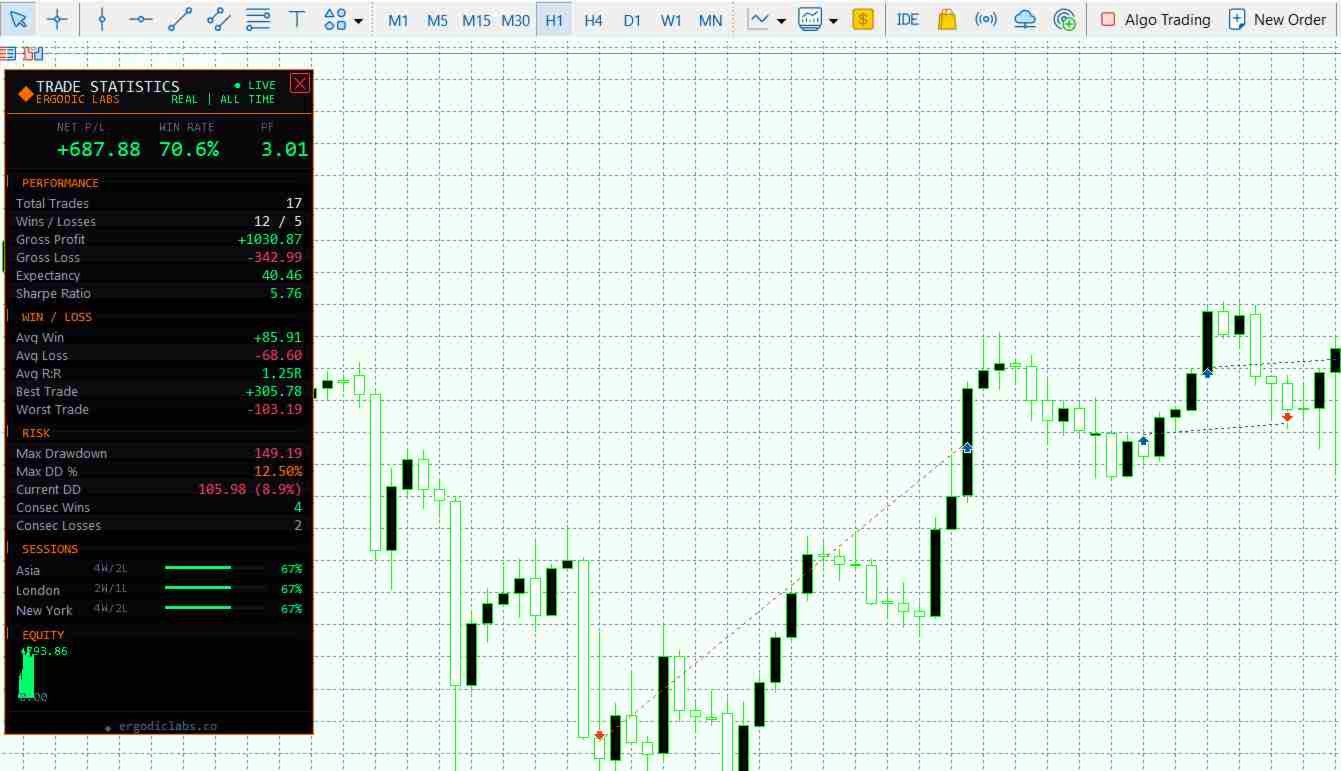
Trade Statistics Dashboard Pro is a real-time on-chart performance analytics panel that gives you instant visibility into your trading results. Built with an institutional-grade dark interface, it displays every critical metric a serious trader needs — without leaving the chart.
Whether you are running Expert Advisors, trading manually, or monitoring a signal service, this dashboard keeps your performance data front and center at all times.
🔗 From the Developer
This free dashboard is developed by Ergodic Labs, the team behind professional-grade trading tools and algorithmic validation systems.
For professional trading robots and Expert Advisors, visit:
https://nomadforexrobots.com/
For free online Monte Carlo simulation to stress-test your strategy beyond what any backtest can show:
https://ergodiclabs.co/monte-carlo/
Monte Carlo simulation helps you understand the probability distribution of your drawdowns and returns — essential for proper position sizing and risk management. Use it alongside this dashboard for a complete performance analysis workflow.
📊 Key Statistics Displayed
The dashboard calculates and displays the following metrics in real time:
- Net Profit/Loss with color-coded positive and negative values
- Win Rate percentage with dynamic threshold coloring
- Profit Factor calculated from gross profit divided by gross loss
- Expectancy per trade showing your average edge
- Sharpe Ratio annualized using 252 trading day standard
- Average Win and Average Loss with signed formatting
- Average Reward to Risk ratio
- Largest single winning and losing trade
- Maximum Drawdown in currency and percentage
- Current Drawdown with live tracking against equity peak
- Maximum Consecutive Wins and Consecutive Losses
- Session Breakdown showing win rate for Asia, London, and New York sessions with visual progress bars
- Mini Equity Curve plotted directly on the panel
⚙️ Flexible Filtering
Filter your statistics by multiple criteria to analyze exactly what you need:
Data Source options:
- All Account History — every closed trade on the account
- Filter by Magic Number — isolate a specific EA
- Current Symbol Only — see stats for the active chart symbol
- Magic plus Symbol — combine both filters for precise analysis
Time Period options:
- All Time, Today, This Week, This Month
- Last 30 Days, Last 90 Days, Year to Date
🎨 Fully Customizable Interface
Every visual element can be adjusted to match your chart setup:
- Panel corner placement — top left, top right, bottom left, or bottom right
- Adjustable X and Y offset for pixel-perfect positioning
- Configurable panel width
- Toggle equity curve, session breakdown, and branding individually
- Full color control for accent, positive, negative, cyan, and all text levels
- Refresh interval from 1 to 60 seconds
- Click header to minimize or expand the panel
- Built-in remove button to delete the indicator from chart
🏦 Institutional Design
The dashboard features a Bloomberg terminal inspired dark theme with:
- Solid black opaque background that never bleeds through to the chart
- Orange accent borders and section headers
- Consolas monospace font for precise data alignment
- Alternating row backgrounds for easy scanning
- Color-coded values that change based on performance thresholds
- Live or Demo account detection displayed in the header
📋 Input Parameters
Data Source section:
- Data Source — select All History, Magic Number, Symbol, or Magic plus Symbol
- Magic Number — specify the magic number when using filtered mode
- Time Period — choose from All Time through Year to Date
Panel Layout section:
- Corner — panel anchor position on chart
- X Offset — horizontal distance from corner in pixels
- Y Offset — vertical distance from corner in pixels
- Width — panel width in pixels, default 310
- Show Equity Curve — toggle the mini equity chart
- Show Sessions — toggle the session breakdown section
- Show Branding — toggle the Ergodic Labs footer
- Refresh Interval — update frequency in seconds
Colors section:
- Accent — main highlight color, default orange
- Positive — profit and bullish color, default green
- Negative — loss and bearish color, default red
- Cyan — secondary accent for ratios and badges
- Primary Text — main label color
- Secondary Text — row label color
- Muted Text — dimmed information color
📌 Important Notes
- The indicator reads closed deal history only. Open positions are not included in calculations.
- Swap and commission are included in all profit and loss calculations for accurate net figures.
- Session hours are based on server time. Asia is 00 to 08, London is 08 to 13, New York is 13 to 22.
- The Sharpe Ratio uses annualized calculation with square root of 252 scaling factor.
- Drawdown percentage is calculated relative to starting balance plus peak equity.
- Works on any symbol and any timeframe.
- Compatible with both Netting and Hedging account types.
















































Thanks Botond, it looks great. any planned updates or is this the final product?