 MetaTrader 5
 专家
专家
 指标
指标
 程序库
程序库
 实用工具
实用工具
 窗口小部件
窗口小部件
 规则
规则
MetaTrader 5 交易实用工具 - 48
 以下是可在MetaTrader 5中简化交易的交易程序。将鼠标悬停在一个工具上,阅读它的描述和用途。

You've probably heard that different brokers give different results? But what is the main problem when brokers have approximately the same trading conditions for spreads and commissions,you have the same ping.. but the results of trading on real accounts are very different. What's the matter?
There are situations when even good advisors give bad results and the point here may not be in the adviser, but in the broker and you can draw the wrong conclusion about the adviser without getting a good
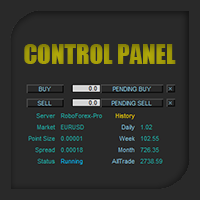
Control Panel mette a disposizione una semplificata ed avanzata gestione dedicata per ogni singolo mercato Forex, CFD, Materie Prime, Indici Azionari, Metalli Preziosi, Prodotti Energetici, Azioni & Crypto Valute, dal trade pad si posso aprire posizioni e ordini pendenti, visualizzare tutti i dati relativi alla quantità delle posizioni Buy, Sell e di tutti i trade oltre alla quantità espressa in lotti anche per i posizionamenti hedge indicando il valore espresso in lotti relativo all’esposizion

**This is a Utility so the DEMO does not work. Please leave a comment and we will reply** ‘Trader Pro – Any Broker’ is the ideal solution for beginners and professional traders who want to trade ANY Signals on MT5 with ANY broker. This unique service will complete all the technical set up, monitoring and maintenance, so you don’t have too.
This ground breaking service has been developed by experienced traders to solve real world problems and overcome Signal to Broker limitations so the user

SmartVSV Panel. Swing trade with pending orders or scalp with your keyboard . You can try this panel out with the free version SmartVSV1. https://www.mql5.com/en/market/product/91194 Chart objects. This tool will help you to find orderblocks , fair value gaps and liquidity . If you use session ranges or Sunday open in your strategy, it will draw them for you. If you are looking at another chart (such as DXY, Gold etc) while trading, SmartVSV has a minichart button for you. You can set an

Trade on Binance with MT5/MT4 EAs and indicators! GRat_BinanceImport is a tool for manual and automated trading , including ANY available EA, ANY cryptocurrency on the most popular crypto exchange Binance 24/7. Features 1. ALL Binance instruments are available. 2. Import(automatic copying) to the specified Binance currency all trades (made manually or by an EA) from an MT5 account (including demo) by the specified symbol and/or magic number. 3. Import(automatic copying) to the specifie
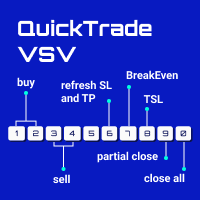
From 0 to 9... the only keyboard buttons you need to trade with this EA!
If I am wrong just write which button should I add in the comment section. I recommend you to test this tool on demo account first. This version of QuickTradeVSV can help you to: 1 - Open buy position with TakeProfit and StopLoss (Lotsize is calculated by your Account Balance and StopLoss). 2 - Open buy position with fixed LotSize. 3 - Open sell position with TakeProfit and StopLoss (Lotsize is calculated by your Account B

THIS RISK MANAGER WILL HELP YOU IN YOUR DAILLY TRADING, BY CALCULATING THE RISK AND THE LOTS, AND SET STOPLOSS, AND TAKE PROFIT, AND CAN CLOSE TRADES FOR YOU. RISK PERCENTAGE CASHRISK LOTS STOPLOSS TAKE PROFIT SELL AND BUY BUTTONS LOSE IN PROFIT BUTTON WICH WILL CLOSE ALL TRADES IN PROFIT SET BY THE USER CLOSE ON PROFIT BUTTON WICH WILL CLOSE ALL TRADES WHEN THE EQUALITY IS IN PROFIT SET BY THE USER AS WELL CLOSE TRADES BUTTON

Send your trades on the Metatrader 5 platform to your Telegram Group!
Simple to use, just follow the steps below:
Create a group in Telegram and enter the name in the robot parameters; Create a Bot in Telegram with the user BotFather: Send the following message-> /newbot; BotFather will ask for a name for your Bot; Send a message with the desired name; BotFather will ask for a username for your Bot; Send a message with the desired username; BotFather will send the Token; Insert the Token

二元交易面板是一款非常有用的工具,用于在 MT4/MT5 平台上进行二元期权交易。不再需要在 MT4/MT5 之外设置插件。这是 MT4/MT5 图表上简单方便的面板。 二元交易面板对于使用 MT4/MT5 平台交易二元期权的交易者来说是一个有用的工具。它是一个简单方便的面板,允许交易者直接从 MT4/MT5 图表进行二元期权交易,无需设置外部插件或浏览多个屏幕和菜单。 二元交易面板专为与提供 MT4/MT5 交易平台的二元期权经纪商合作而设计。 话虽这么说,如果您更喜欢二元期权交易的工作方式并希望继续与常规经纪商以这种方式进行交易,二元交易面板旨在为交易者提供与二元期权交易类似的体验,即使所使用的经纪商不是二元期权经纪人。 二元交易面板安装和输入指南 如果您想获取有关 EA 的通知,请将我们的 URL 添加到 MT4/MT5 终端(参见屏幕截图)。 MT4版本 https://www.mql5.com/en/market/product/48886 MT5版本 https://www.mql5.com/en/market/product/91749
主要特点:
面
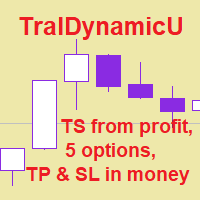
The utility for managing open positions can work with stops (take profit and stop loss) in money, percentages or points. The built-in trailing stop starts working from profit, the size of which can be set in currency or as a percentage. Trailing stop can work in three modes and for five instruments. With the help of the built-in trading simulator, you can check how the utility works in the strategy tester. Benefits setting stop loss and take profit in the deposit currency, as a percentage of the

Panel for send/modify orders/positions by handle moved levels for take profit, stop loss, open price and expire at with lot calculations in several modes. Settings: Risk management Lot calculation mode: default: Free margin, Modes: Fixed, Free margin, Equity, Balance Minimal lot size - default: 0.01 Maximal lot size - default: 0.1 Fixed lot - default: 0.01 Percents - default: 5 Trade when have free margin (0 - disabled) - default: 30 Levels Style - default: Dash Width - default: 1 Panel Positio

用於管理未平倉頭寸和掛單的實用程序。 內置追踪止損有五種模式和七種工具。 有虛擬止損和虛擬止盈,可以在圖表上自由移動。 借助內置的交易模擬器,您可以檢查 EA 在策略測試器中的工作方式。 UTralVirtualMT5 的詳細指南可以在“評論”部分找到。 在 MT5 策略測試器中,手動移動虛擬線(SL 和 TP)不起作用! 好處 5種追踪止損模式:虛擬、正常、總計、百分比和移動止損; 7 個選項:按點、按柱極值、按分形、按交易量、按 MA、按拋物線 SAR 和按 ATR; 虛擬 TP 和 SL - 根據圖表手動自由移動; 為所有未平倉頭寸添加止損和止盈; 通過以下方式設置止損:點、分形、ATR 指標、每日高/低; 圖表上打開的所有訂單的追踪止損; 迷你利潤開始追踪止損。; 通過幻數和方向為未平倉頭寸設置追踪止損; 掛單的尾隨:按類型、方向、點、分形、柱極值; 圖表上的“熱鍵”用於快速執行命令; 適用於具有 4 位和 5 位報價的帳戶; 5位數賬戶,參數自動加10; 用於處理加密貨幣、指數、期貨、差價合約的特殊參數乘數。. 參數 Block 1. GENERAL SETTINGS All

The purpose of this service is to warn you when the percentage of the margin level exceeds either a threshold up or down. Notification is done by email and/or message on mobile in the metatrader app. The frequency of notifications is either at regular time intervals or by step of variation of the margin. The parameters are: - Smartphone (true or false): if true, enables mobile notifications. The default value is false. The terminal options must be configured accordingly. - email (true or false)

Events Timer EA allows you to place a trade at a specific time and close it at a specific. The stop loss is trailed automatically. The EA performs one trade at time until the time elapses. Since it has a Trailing Stop, it will open another trader when it gets stopped out. It is ideal for trading news events using a very short trading time. Inpits: -Trade Time -Stop Trade Time -Trade Type(buy/sell) -lot -stoploss points

这是一个订单工具服务,你可以通过市场订单卖出、买入或交叉订单,同时设置止损(SL)和止盈(TP)。有两个选项来设置SL和TP:按点或按价格。
此外,只需点击一个按钮,您就可以改变您在该专家顾问(EA)所连接的图表中显示的符号的所有头寸的止损和止盈,或将它们关闭。它还提供了一个功能,当你使用上述的修改/关闭按钮时,可以排除你的卖出或买入头寸。
** 注意 **
1. 如果您的经纪人不支持交叉盘,请不要使用CROSS-ORDER按钮。
2. 当您使用本EA的卖出、买入或CROSS-ORDER按钮获得新的头寸时,设置在您头寸上的SL和TP点可能会滑落一些点。这是因为SL和TP值是根据你点击它们时的价格来计算的,而不是在你的订单成交时。我希望你能记住这一点,特别是当主要经济指标公布后,强势突破刚刚发生时,等等。
链接到Meow Orderer的说明视频: https://youtu.be/Nl8JGI-QRVU
控制面板上的GUI组件的说明:
组件名称 组件类型 说明 1. "REPEAT" 字段 这是用来重复您的卖出、买入或交叉指令的,根据在这个字段中输入的数字,重复几次。例

A utility for managing open positions using virtual (invisible to the broker) stops. Virtual stop loss and virtual take profit can be freely moved around the chart. If the price touches the virtual stop line (TP, SL, TS), the EA will close all orders of the same direction on the current chart. Closing orders by virtual take profit is possible only if there is a profit.
With the help of the built-in trading simulator, you can, in the strategy tester, see how the adviser works. Parameters Block
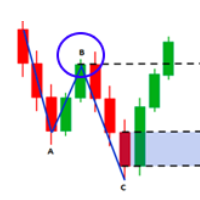
Fibo Musang FMBCR CB1 突破扫描器 MT5
Fibo Musang CB1 或 Candle Break 1 是一种非常适用于黄金 XAUUSD 和其他外汇交易品种的策略。 此扫描仪将帮助您非常快速地扫描多符号货币并在 FMCBR CB1 突破时获得警报
请查看视频了解更多详情,因为它完全可以根据交易者的喜好进行定制:
1. 您可以选择柱线的时间范围和历史记录
2. 您可以修改您喜欢的 ZigZag 设置:ExtDepth、ExtDeviation、ExtBackStep
3.获取终端警报或推送通知
4. 追踪斐波那契扩展的选项,如 1.618 2.618 或 4.236 或追踪 CB1 突破与 1.00
Fibo Musang FMBCR CB1 突破扫描器 MT5
Fibo Musang CB1 或 Candle Break 1 是一种非常适用于黄金 XAUUSD 和其他外汇交易品种的策略。 此扫描仪将帮助您非常快速地扫描多符号货币并在 FMCBR CB1 突破时获得警报
请查看视频了解更多详情,因为它完全可以根据交易者的喜好进行定制:

达尔文报告工具EA
异常的介绍性价格! 35美元
描述。
达尔文报告工具EA是达尔文系列中的新产品。
达尔文的产品因其质量和性能而在MQL5上广为人知并享有盛誉。
这一次,我向你推荐的不是专家顾问,而是一个旨在实现任务自动化的工具。
基本上,要对你的表现做出报告
解释:
事实上,由于这个工具,你将能够发送一个账户、一个策略、甚至几个可选择的EA的任何性能报告。
你可以通过电子邮件、Telegram等网络和短信、手机上的推送信息来发送你的报告。
福利待遇:
每天、每周或每月都能收到来自每个EA的报告,以研究其表现。
对你的交易账户进行准确的统计.....
--通过电子邮件发送
-- 在Telegram频道上发送
-- 通过Mt4/5平台的推送通知发送
-- 每日利润(在 "X "时间发送)。
-- 每周的利润(在X天X小时发送)。
-- 每月的利润(在X天X小时发送)。
-- 开设账户以来的总利润
-- 每一天,每一个月的利润......可以是%,可以是货币,也可以是两者。
-- 当天已结束的订单摘要
-- 本周订单汇总
-- 本月订单汇总
-- 能够以货币
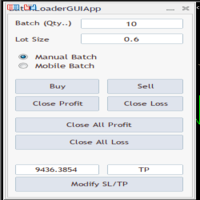
BatchLoaderGUIApp is a Utility tool that allows TRADERS to efficiently manage their trade with "ONE CLICK" such as "Closing All Positions In Profit or Loss", "Closing A Single or Batch Position In Loss or Profit" and "Modifying Positions". A Mobile Batch option enables a trader Batch Load a single Mobile Execution.. "Experience the ultimate trading efficiency with BatchLoaderGUIApp for MetaTrader - one-click management for opening, closing, and modifying positions, plus mobile batch execution fo
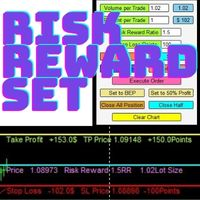
Risk Reward Manager is Utilities to help you calculate exact profit and loss or Risk Reward Ratio based on your preference Risks. There is panel you can change at anytime. The panel shows : Volume per Trade (Editable). You can change the volume you desire. Percent per Trade (Editable). You can change the Percentage of your desire Risks. You can change to 1% Risk per Trade for Conventional Trading Strategy. Risk Reward Ratio (Editable). You can change any Risk Reward Ratio you want. 1:1,5 || 1:2

在图表上显示高达 7个市场交易时段 和 3个每周范围 ,完全可自定义 每个时段和范围都可以显示或隐藏,并可根据每位交易者的需要适应特定的日内或周内时间段 使用以下任何一种方式定义时段的开始/结束时间: GMT/UTC 时间(可调整到任何时区) 服务器/经纪人时间(图表时间) 本地时间(您的计算机时间)
专业版功能
名称 : 使用特定名称区分每个时段和每周范围 开盘和收盘时间以分钟为单位 : 可以设置为小时:分钟(HH:mm)或仅小时(HH)格式 每周范围的开始和结束日期 : 为每周范围设置从一周的任何一天(星期日到星期一)到另一天的时间段 可调整的 GMT 时间偏移 : 设置时区偏移以匹配其位置的任何市场基准时间。例如,纽约时间:GMT -5 警报和移动通知 : 发送通知到 MetaTrader 安卓或 iPhone 应用程序*,在每个时段开始/结束时收到通知,还可以在之前提前提醒59分钟 最高和最低线 : 由价格的时段高/低范围定义,可以将它们延长至比时段结束时间长24小时。用于检查它们作为可能的支撑/阻力区域 水平线 : 基于时段范围幅度的比例。在范围内和范围外显示,可以延长至

This EA will provide you with the amount of points once you open a position, being a sell or a buy. I use it instead of the profit, as this plays some tricks in my mind. You can also set up a Take Profit and/or a Stop Loss in the settings of the EA.
The point calculation will only work with manual trade. Magic number is 0.
You also have the possibility to create labels for + Haut, - Haut, - Bas, + Bas and some trendlines at a 45 or - 45 degree angle.
Here are the settings :
Settings
Choices

Trace une ligne fléchée à la hauteur de votre choix, de la couleur de votre choix, sur la date d'aujourd'hui de 00h00 à 23h59 le même jour.
Choisissez à quelle hauteur (en points) vous souhaitez la tracer, la grosseur de la ligne ainsi que la couleur et voila, traçage automatique.
Paramètres
Choix Points
Mettre le chiffre en point de votre ligne
Couleur
Choisissez la couleur de la ligne
Style
Plusieurs styles disponibles, défaut est Solide
Grosseur Ligne
Grosseur de Très fine a Très large, d

Introducing the Revolutionary Trade Closing Assistant ! Are you tired of manually closing hundreds trades? Are you a scalper , day trader , swing trader and you want to maximize your profits and minimize your losses by closing multiple positions at thesame time under different conditions? Are you a Prop Firm Trader who wishes to avoid hitting maximum daily drawdown? Search no further. This kit is the ultimate solution for all you.
GUIDE TO USE THE KIT 1. Shows the total profit/los

使用Pips Pop Up可以很容易地知道你的盈利和亏损,以点为单位!
当该专家顾问(EA)处于激活状态时,关闭头寸的基本信息,如符号名称、结果pips,以及以您的货币计算的利润或损失,会在您关闭头寸的那一刻在该EA所连接的图表上弹出*。
它还提供可选的参数来改变字体风格、大小、颜色、显示结果的位置、滚动的速度、显示的时间等。你可以改变它们,并按你的要求进行定制。
此外,Pips Pop Up总结了平仓的pips和利润/亏损(结果显示在你的图表上)。总的pips和利润随时打印在工具箱中的专家选项卡上,只有在添加该EA的图表处于活动状态时按Esc键(默认)。
*本EA显示结果的时间可能会延迟(在这种情况下,通常会在几秒钟或更短的时间内显示),因为市场的情况,互联网连接,在同一时间处理大量的订单,等等。在这种情况下,请按下reload_key键(默认为F5,你可以通过编辑这个输入来改变为其他键)。
链接到Pips Pop Up的说明视频: https://youtu.be/s8U32mm0KBQ
本EA中输入的说明:
输入的名称 输入的值 说明 1. start_x 数字(整

AC Trade Assistant – Simplify Your Trading Experience The AC Trade Assistant is a compact and efficient tool designed to help traders execute orders quickly and manage trades with ease. Whether you’re a beginner or an experienced trader, this assistant streamlines your workflow and enhances your trading performance. Key Features : § Compact Design : A non-intrusive dialog box that keeps your chart clean and organized. § Fast Order Execution : Place market orders, pending orders, and manag
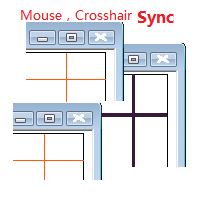
目标: 同品种多周期历史分析时候对齐时间很耗时,鼠标同步使得这一步骤可以自动完成。 使用: 1.下载程序并放在指标目录(MQL5/Indicators 或 MQL4/Indicators)里。
2.在所有需要同步的图表上加载这个指标。它就可以在同品种的图表里起作用了。 3.支持键盘的左右键,左右键在一个图表上移动时,同品种别的图表也会同步移动。
4.按下Ctrl键同时移动鼠标可以暂停或重启当前品种的同步。暂停或重启即使在所有图表关闭的状态下也是起作用的,当看见窗口没有同步时,请按住Ctrl键移动鼠标重启启动同步。 5.在未来时间区域暂停同步,工具会自动把当前品种的所有图表设置为autoscroll。在历史时间区域暂停,当前品种的所有图表会暂停在当时状态。 6.程序最大支持100个图表的鼠标和crosshair同步。
效果图如下:

Trade on Binance in MT5! GRat_Crypto is a tool for manual and automated trading , including ANY available EA, ANY cryptocurrency on most popular crypto exchange Binance in the familiar MT5 environment 24/7. Features 1. ALL instruments of the most popular crypto exchange Binance . 2. The ability to place ANY type of order available in MT5, both market and pending, to modify orders and positions, to delete orders and close positions (even partially), to set trailing stop and trailing profit. 3

Automatic Trade Calculation Panel One-Klick-Trading Automatic calculation of Lot sice Atuomatic calulation of Stop-Loss and TakeProfit Up to 3 partial closings Trailingstop (Stop-Loss moves automatically) The lot size is calculated by the previously determined risk (e.g. 1.0% of the account size) and the distance of the Stop Loss from the entry point. The distance from the Stop Loss to the entry point results from the ATR indicator multiplied by a freely selectable factor. The Stop Loss and

A depth of market product is a powerful trading tool that provides a comprehensive view of the supply and demand levels for a particular financial instrument. It provides traders with a real-time display of all the buy and sell orders that are currently available in the market, allowing them to make more informed trading decisions based on the most up-to-date information available. With Valle Depth Of Market , traders can see not only the best bid and ask prices, but also the volume of orders at

Blind Broker System 的唯一目的是隐藏您的交易计划并使它们对您的经纪人不可见。 如果您真的想让他“失明”并确保他事先不知道您的止损水平、获利水平、交易量 - 只需使用此交易机器人。
特别鸣谢先生 Henryk Kardas 感谢这个项目的发起和想法。 请记住,MQL 提供的免费演示无法让您测试此 EA 的功能。 如需真实测试,请下载真实的演示版。
演示版链接 https://www.mql5.com/en/market/product/94192
Blind Broker System 是另一种管理订单的系统。 在某种意义上,它与 Meta Trader Terminal 内的系统相同。
不同之处在于,所有通过 Blind Broker System 提交的订单不是写入经纪人的服务器,而是写入程序的内存。
经纪人仅在市场订单发生时收到市场订单请求 - 仅此而已。
笔记! 正确操作需要不间断电源,建议使用 VPS(虚拟专用服务器)。
您可以将此系统视为您自己坐在屏幕前进行交易的副本。 在那种情况下,没有人能读懂你的想法。 您做出交易决定并执行
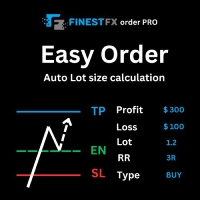
FinestFx order PRO is easy order execution and auto risk management tool developed by FinestFx official Programmer : Mohammed Rafi Just move SL,TP , Entry lines or Type SL,TP on entry columns . Lot are calculated automatically by fill out the loss cut amount. Work with all base currencies Fixed loss amount can be selected. Calculate risk rewards. Market order, limit order, and stop order are selected using buttons Supports FX, CFD, and crypto currency on MT5 Visit the owner website to see it

MAMMA 指标是初学者和高级交易者计算止损、交易量或风险水平的理想选择 。 您有一个驾驶舱来控制参数并使工具适应您的交易。 这个驾驶舱可以移动或简单地缩小以在您需要时放大。 有3种计算方法: 您可以根据您计划使用手数和止损大小自动计算风险 您可以根据预期风险和止损大小设置手数 您可以根据预期风险和手数设置理想的止损尺寸。 每次计算都可以让您知道确切的风险量,您还可以直接在图表上看到计划止损的位置。 为了不忘记您的计划,您可以设定一个目标和当天的最大损失。 最后,您可以综合查看当前市场的进度,或仅查看当天、本周和当月的进度。 作为奖励,您将收到每个新未平仓头寸的提醒,并提供理想的止损建议。 最后,驾驶舱可以在法语和英语之间进行编程。 您还有机会根据 3 个时区显示时间:经纪人的服务器、UTC 参考或您 PC 的时间。 MAMMA 仍然隐藏着一些宝藏,但我已将主要功能介绍给您。 当我开始交易时,MAMMA 是我最想念的工具,它可以保证我的结果稳定。 好交易 再见

PROTECT YOUR FTMO Account in a simplest way Must-Have Account Protector for any Prop-trading Account and Challenge MT4 / MT5 Expert Advisor that protects your Forex Prop Trading account from an unexpected drawdown! FTMO Protector is a Tool that lets you manage trades and control your profit and loss across multiple Robots and currency pairs using a simple parameters and settings. Use as many EAs and Instruments you need, the Protector will: 1. Calculate your midnight (01:00 System time) Balan

此EA讓您永遠不用再計算交易量。而這也意味著您可以 更專注於分析 更專注於交易心態 做出更好的決定 得到更穩定持續的盈利 除此之外,我們還增加了兩個功能---自動盈利價格計算與每日虧損控制系統,幫助使用者更輕鬆且有紀律地執行每筆交易 可使用貨幣: 貨幣對 加密貨幣 金屬 指數 股票 使用方式: 打開MT5並點擊「演算法交易」 打開任意圖表,並將EA拖移至圖表中
視窗欄位介紹: Select_Protect_Type: 提供兩種選擇方式: DailyBalanceAndEquity InitBalanceAndEquity 此處不詳細介紹兩種保護方式。如果您想了解更多,請查看FTMO和TFT對於每日Drawdown的規則。 InitBalanceAndEquity適用於FTMO,DailyBalanceAndEquity適用於TFT。 InitBalance: 如果Select_Protect_Type選擇InitBalanceAndEquity,那麼帳戶會查看每日虧損是否達到InitBalanceAndEquity*DailyMaxDDPercentage 如果Select_Pro

Line function : Displays the opening line, Stop Loss, Take Profit( 3:1 RR ) on the chart. Risk management : The risk calculation function calculates the volume of a new order taking into account the established risk and the size you want to risk. It allows you to set any Stop Loss size between 3 and 10 pips. Breakeven Button : Brings all open orders to Breakeven. Clear button : Clears the graph and the selected parameters. Trade Button : Execute the idea. Partials Button : Taking partials of al

Auto Take Profit MT5 is designed to take profits in automatic way.
As a trader (manual or auto), you define your own expected profits schema. When you open one or several orders, the AutoTP program calculates profits then update into SL or TP automatically. It also re-calculates and updates accordingly for remaining open positions when a new order opened or an existing position closed. ---------------------------------- (Watch live in this DEMO ONLY signal https://www.mql5.com/en/signals

This bot is designed to compliment your existing trading strategy. The Advanced Entry Bot is NOT FULLY AUTOMATED. Once the user finds an area of interest, he or she can set the bot to BUY or SELL and input their area of interest into the settings. In essence, this bot enables traders to do their analysis of the market; then utilize the Advanced Entry Bot to benefit from a mechanical and automated system that takes entries once price reaches their area of interest. I created this bot as a way to

A professional tool for real-time monitoring of the account status and the work of Expert Advisors. Information about the account status can be sent to Telegram chats automatically at a specified interval or upon request.
From the screenshots of the open charts of the terminal, you receive upon request from your Telegram bot. Account information includes: 13:02 Trade monitoring by Telegram v.1.0 (headline) Account : 6802ххх RoboForex-Pro (account information)
Profit start: 2661 USD (profit earne

With the 2UP Risk & Trade Management EA you will be able to enjoy seeing your positions being fulfilled all you gotta do is take the position and have the right lot size and the 2UP EA will do the rest
- You can set your risk per position so your account never losses more than what is supposed to, it will close automatically once you reach a certain % of DrawDown. - You can set your reward as well based on %, how much do you wanna grow your account in % per trade ?, it will close automatically

OrderHelper script is super easy and trader friendly to use. It would boost your trading experience. Because it is designed to open one to multiple orders quickly with just one click. Besides using the OrderHelper script, traders can define various parameters for open orders such as the symbol, order type, lot size, stoploss, takeprofit and more. Basically, with this script traders can manage their open orders more efficiently and save their trading time. OrderHelper manages:
Open the number of

Hello Partial N Trail Ea exists to make your trader life easier. How? Well.. With this ea you can be sure that your positions are safe when you´re away or doing something else! Features: 1) -Activate/Deactivate Partial Close -Partial Close at X Pips -% to be closed 2) - Activate/Deactivate SL to Break even -Break even start -Break even Profit 3) -Activate/Deactivate Trailing Stop -Trailing Start -Trailing Distance 4) Auto place TP at x pips Auto place SL at x pips above/below last closed c
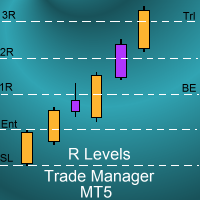
Introduction
The SDS_TradeManager EA is a powerful EA designed to manage your positions once you have been filled. It basically works a break-even stop and also a trailing stop where the trigger levels and trail levels are all specified in "R's", that is to say multiples of the initial trade risk. Many successful professional traders think about all their trades and profit taking in terms of multiples of the initial risk R. So for example, if your initial risk on your trade is 50 pips and you wa
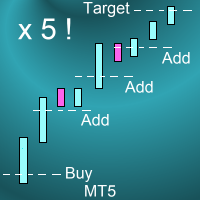
Introduction This powerful MT4 trade mangement EA offers a way potentially to aggressively multiply trade profits in a riskfree manner. Once a trade has been entered with a defined stoploss and take profit target then the EA will add three pyramid add-on trades in order to increase the overall level of profit. The user sets the total combined profit target to be gained if everything works out. This can be specified either as a multiple of the original trade profit or as a total dollar amount. Fo

Copy Trade EA(Expert Advisor)是一种自动交易软件,可以帮助投资者自动复制其他交易者的交易策略和操作,从而获得类似于其它交易者的交易结果。该软件基于MetaTrader平台,具有易于使用、高效、灵活和自适应的特点,为投资者提供了自动化交易的一站式解决方案。
该软件支持多种交易品种,包括外汇、商品、股票和指数。其主要功能包括:
复制交易:该软件可以在实时模式下复制其他交易者的交易操作,自动将交易操作应用到您的账户中。您可以根据其他交易者的历史表现选择要跟随的交易者,并设置复制比例和风险管理策略,以满足您的投资需求。
风险管理:该软件支持多种风险管理策略,如止损、追踪止损和限价订单,可以帮助投资者最大限度地降低风险和保护资金。此外,该软件还提供了实时的交易报告和交易统计信息,以便投资者对其交易行为进行分析和调整。
自定义设置:该软件支持用户自定义设置,包括复制比例、交易量、止损和追踪止损距离、交易时间和其他参数。这些自定义设置可以根据投资者的偏好和风险承受能力进行调整。
高效运行:该软件基于MetaTrader平台,具有高效、灵活和自适应的特点。该软件支
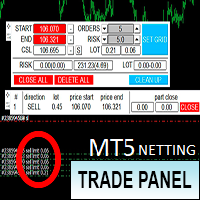
Торговая панель предназначена для установки сетки ордеров с различными параметрами. Предназначена для торговли акциями, где в одном лоте будет одна акция, на неттинговых видах счетов. Панель не дает дает открывать сетки на продажу, если уже стоят ордера на покупку и наоборот, есть возможность только управления текущей сеткой. Имеет несколько основных функций по установке ордеров в заданном диапазоне и с заданным риском, закрытию части ордеров из сетки, переносом в безубыток, закрытие части по п
Multi Chart Sync MT5 is a tool that synchronizes the chart symbol it is placed on to other charts, it can also be customized to exclude/skip some pairs from being synchronized to other charts, It also supports prefixes and suffixes that can be set from the input parameters for brokers with none-standard symbol formats, Synchronisation can be done once or continuously where if a synchronized chart symbol changes it will be reverted to the original/master symbol. This tool comes in handy for mult
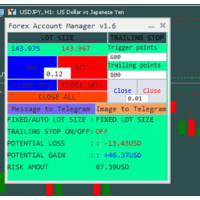
The "Lot Size" button toggles between fixed and auto lot size modes. Fixed mode uses a predetermined lot size, while auto mode calculates lot size based on a customizable percentage of the account balance, displayed at the bottom. The "Trailing Stop" button enables the activation or deactivation of the trailing stop feature. Initially set to "No Trailing," clicking the button changes it to "Trailing ON" when the trailing stop is active, and "Trailing OFF" when it is inactive. Below the button,

基于Goodtrade/GoodX 券商推出的黄金双仓对冲套利的交易模型/策略/系统,在日常的操作遇到的问题: 1、B账户跟随A账户即刻下单。 2:A账户 下单后 B账户 自动抄写止损止盈。 3:A账户平仓B账户同时平仓。 4:B账户平仓A账户也平仓。 5:不利点差下拒绝下单。 6:增加有利点值因子。 通过解决以上问题,改变了熬夜、手工出错、长期盯盘、紧张、恐慌、担心、睡眠不足、饮食不规律、精力不足等问题 目前解决这些问题后,有效提升了工作效率和盈利比例,由原来月10%盈利率提升到月45%的最佳盈利率。 原来的一名交易员只能管理操作两组账户,通过此EA提高到操作管理高达16组交易账户,或许你可以超越我们的记录,期待你的经验交流。 此EA分为: GoodtradeGoodX Tradercropy A GoodtradeGoodX Tradercropy B 是一个组合EA,假设您购买的额 GoodtradeGoodX Tradercropy A 必须同时购买 GoodtradeGoodX Tradercropy B 两个组合使用会到最佳效果。

Close it All is the EA that most of traders want because it help them did not miss their profit or protect them from the loss. Why you need the Close It All ? the EA work to close all open positions and the pending orders in the account when its reached to specified profit or loss. Input Parameters : ProfitInMoney : the number of profit in USD. LossInMoney : the number of loss in USD.
the upcoming versions including more helpful tools.

Trading ICT's OTE Concept is simplified with the ICT Optimal Trade Entry Tool. This semi-automatic EA/utility allows trading with manually defined Fibonacci retracement levels. Simply anchor the Fibonacci between swing highs and lows, select your desired entry level in the graphical panel, and the tool automatically opens positions based on your predefined direction. No more waiting in front of charts for price action to reach your entry levels; set the Fibonacci, enable your chosen entry level,

All in one Multipurpose Telegram Trade Management , Manage and Copy Trades on the go From Telegram Pro Version MT4: www.mql5.com/en/market/product/85691
Execute Trades on mobile with fast execution When away from desktop MT5, or scalping the market with mobile device, or needed to copy trades from telegram groups while away, or doing some other activities, Telegram EA Manager is an effective tool to perform any trade operation with swift execution. In other words, Our Telegram Trade Manag
This EA will set breakeven or breakeven-plus for your trades, whether you have manually or automatically set stop loss or not. If your broker charges commissions per trade, you need to set breakeven plus, not just breakeven, in order to cover up those charges and properly let your trades run at zero risk. Inputs:
In the inputs section , set BEPoffsetPips to 0, to use it as a "breakeven" EA. Or set BEPoffsetPips to any amount of pips you want, to use it as a "breakeven-plus" EA. "OnProf

Introducing the "Auto Timed Close Operations", a useful utility for MetaTrader 5 traders! This utility has been developed to help traders of all levels automatically close their open positions at the exact moment they desire. With the "Auto Timed Close Operations", you gain the required control over your trades and can avoid unwanted surprises at the end of the day or at any other predefined time. We know how important it is to protect your profits and limit your losses, and that's exactly what

该工具在您的头寸上设置止损
通过 Metatrade 策略测试器快速测试。 如果多头头寸,您的止损将在最后一个底部 或者在空头头寸的情况下,您的止损将在最后一个顶部
此外,该工具还管理您未平仓头寸的尾随。 始终将止损设置在最后形成的高点或最后形成的底部
要创建顶部和底部,我使用免费指标“支撑线和阻力线”,可通过此链接下载: 下载 metatrade 5 的免费顶部和底部指标
该工具移动资产上所有未平仓头寸的止损位置 gāi gōngjù zài nín de tóucùn shàng shèzhì zhǐ sǔn
tōngguò Metatrade cèlüè cèshì qì kuàisù cèshì. rúguǒ duōtóu tóucùn, nín de zhǐ sǔn jiàng zài zuìhòu yīgè dǐbù huòzhě zài kōngtóu tóucùn de qíngkuàng xià, nín de zhǐ sǔn jiàng zài zuìhòu yīgè dǐngbù
cǐwài, gāi gōngjù hái guǎnlǐ nín wèi

IMPORTANT: Blocks&Levels Alerts MT5 indicador.
Gives you the ability to easy draw Blocks and Levels (support and resistance) using key shortcuts and Alerts when price touch them. Please use it and give me feedback!! It really helps! Thank you very much! DESCRIPTION:
Blocks&Levels Indicator, has useful key shortcuts for draw Levels, Blocks Zones, change chart Time Frames, Select or Deselect all drew objects. SETUP: Just install the Indicator on the Chart
Open and navigate Indicator properties

Copy trades with ease using the MetaTrader5 trade copier - the quickest and easiest way to copy transactions between different MetaTrader 5 accounts! This innovative tool allows you to locally copy trades in any direction and quantity, giving you full control over your investments. Designed to work on both Windows PC and Windows VPS, this program is versatile and adaptable to your trading preferences. Whether you prefer to work from your desktop or a virtual private server, the MetaTrader5 trade
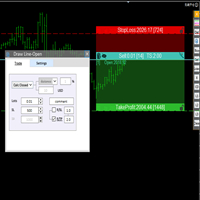
交易者的最佳伙伴! 基本使用设置 基本: 支持语言的选择切换(目前支持中文和英文) 自动识别语言 划线交易
支持英文中文自动选择,自动识别.
1.划线交易 ( 支持拖拉,支持多个订单线 ) 2.手数管理: 两种手数计算模式 ①资金的风险比例,例如设置风险百分比为1的时候,1万美金可交易1手. 计算手数 = 资金(净值或者余额或者剩余保证金) * RISK /10000 ②按亏损金额计算,本设置需要配合止损设置, 计算手数 = ( 当订单被初始下单设置的止损所止损的时候所亏损金额 计算得到的手数,小于最低手数会等于最小手数) ; 3.盈亏比等设置,
设置部分 1. 自动吸附最近高低点 2.高低点偏移 3.自动选择订单习惯 4.SL TP设置方式 5.语言设置

Bot to attach to any different chart than the one using to get the orders and send them to telegram Inputs: Telegram Bot Token, Telegram Chat ID Sends Open Price, Order Type, Lots, Take Profit and Stop Loss instantly after the trade is executed. Easy to SetUp and to use My other Bot for XAUUSD and USDCHF: https://www.mql5.com/en/market/product/94001 Just remember to go to Tolls->Options->ExpertAdvisors->Allow Web Request for listed URL: https://api.telegram.org/

Here is a powerful trading tool that will allow you to trade manually or automatically in any market, but is especially useful in markets with high volatility and liquidity.
This system has two EAs (Expert Advisors): one for Buy and one for Sell, which work independently. The operation is based on the hedging strategy and the increase in lots based on the Fibonacci sequence, which will allow you to always add the two previous lots: 1, 2, 3, 5, 8, 13...
You decide how you want to trade: you ca

Demo version T Position Size Calculator doesn't work in the strategy tester. The Strategy Tester does not support the processing of ChartEvent. It does not support most of the panel's functionality. Contact me for any questions or ideas for improvement or in case of a bug found. Control and manage your trading like a professional trader with T Position Size Calculator. T Position Size Calculator – an MT5 Expert Adviser, is a user-friendly custom tools (Dialog Panel and Three Lines, Order Line

PropAngel EA is a manager EA to help you to pass proprietary firm challenges and evaluations and to keep your funded accounts. PropAngel EA makes sure you do not breach daily drawdown limit which gives you change to continue trading the account and recover from the drawdown. PropAngel EA makes sure that at the moment you have reached your challenge, evaluation or scaling target all trading will be immediately stopped. This is done to prevent account falling away from the target. PropAngel EA giv

TrendFollowing is an multi-currency scanner that just indicates where to buy/sell: Abilities: Opens up the chart automatically with and arrow indicating where to take action. Send the signal to a telegram channel, see @fx_signal_com channel to get the idea. Configuration: Configure "Market Watch" with all the symbol you like to trade. Open a chart and attach the scanner to it. Trading Rules: Use only buystop/sellstop orders above/below arrow on the chart Delete the pending order if price retrac

Demo version T Trading Simulator doesn't work in the strategy tester. The Strategy Tester does not support the processing of ChartEvent. It does not support most of the panel's functionality. Contact me for any questions or ideas for improvement or in case of a bug found. Hi everyone, Trobotrader here. By T Trading Simulator , You can go back to past then analysis and trade with this simulator to develop trading skill. We are going to walk through step-by-step how you can use T Trading Simul

1. What is this Many of the EA's on the market have cheats inside to optimize its money curve, which results in the buyer wasting money and effort and buying a junk EA . This tool is an effective tool for detecting whether an EA is cheating by allowing the data to be panned to the left for 28 years. 2. How to use a. Load it and it will generate a new symbol, usually it will be named with a suffix. For example, EURUSD --> EURUSD_28year. b. If your want to test one EA, you should open The time fr

This utility is a stop loss assistant simply make a trade as you desire, ether a buy or a sell. Manually set your own stop loss as you desire the higher the timeline the lower the stop loss.
When the Algorithm Trading or Auto Trading is enabled the stop loss will follow the market price. Stop/disable the Algorithm Trading or Auto Trading.
This is a simple stop loss tailing utility use at own risk or pleasure.

[ MT4 Version ] [ Telegram Version ] [ Pro: Telegram + Discord ] Post your trades to Discord automatically via webhook — no bot setup, no permissions: paste ONE URL and you are live in 60 seconds . And keep every signal UPDATED: the original message is edited when you modify SL/TP or close the trade. Built for signal providers, trading communities and prop-firm teams living on Discord. WHY THIS ONE WEBHOOK-BASED — no bot to create, no tokens, no permissions. Disc

[ MT4 Version ] [ Discord Version ] [ Pro: Telegram + Discord ] Post your trades to Telegram automatically — and keep every signal UPDATED: this is the only sender that EDITS the original message when you modify SL/TP or close the trade. Your followers always see the real state of every trade, and your channel stays clean and professional. Built for signal providers, VIP channel owners and traders who share their trading. WHY THIS ONE ️ EDITS THE ORIGINAL SIGNAL

El EA Boton pone botones de Buy y Sell en la pantalla Ideal para usuarios que habren muchas ordenes y diferentes pares
9 botones buy desde 0.01 al 0.09 y 9 botones sell de 0.01 al 0.09 9 botones buy desde 0.1 al 0.9 y 9 botones sell de 0.1 al 0.9 Boton Close buy y sell Boton Close buy positivos y Boton Sell positivos Boton Close buy negativos y Boton Sell negativos un boton close all y botones buy de 1, 5 y 10 y botones de sell 1,5, 10
学习如何在MetaTrader AppStore上购买EA交易,MetaTrader平台的应用程序商店。
MQL5.community支付系统支持通过PayPay、银行卡和热门付款系统进行交易。为更好的客户体验我们强烈建议您在购买前测试EA交易。
