 MetaTrader 5
 专家
 指标
 程序库
 实用工具
 窗口小部件
 规则
MetaTrader 5 交易实用工具 - 54
 以下是可在MetaTrader 5中简化交易的交易程序。将鼠标悬停在一个工具上,阅读它的描述和用途。

This EA is capable of sending transaction details to any Telegram channel passed as a parameter.
The format in which the text will be sent to the Telegram channel is shown below:
BUY EURUSD SL XXXX.XX TP XXXX.XX
In case of TP donation, it will be sent to the telegram channel after the transaction is executed in a separate message and the format will be...
SET TP XXXX.XX
To set the SL, it will be sent to the telegram channel after the transaction is executed in a separate message and the fo

***This is a MT5 version of ZigZag Breaout*** --------------------------------------------------------------------------------------------------------------------------------- ***** Unlocking the Expertise: EA Source Code for Dedicated Learners
***** Commencing from November 2021 , the "EA + source code" version is at your disposal,
***** allowing those who purchase (not rent) this EA to explore its inner workings.
*****T o acquire the source code, kindly direct your request, along with purchase

Powering Your Operations with Desk Trading - Telegram Notifier
In financial markets, timely information is often the difference between success and loss. This is why the Desk Trading Indicator stands out as an essential tool for traders looking for a competitive advantage. This smart notifier is designed to notify, via Telegram, about critical regions on charts of different time frames, making it a valuable ally in your trading journey.
Desk Trading Indicator Notifier works as a dedicated vir

Risk-o-meter is a Risk calculator Panel designed to help people who are new to trading, better understand how much they are risking for potential profit or loss.
Inputs: 1. Enter your Risk in % or currency 2. Enter your Return Ratio 3. Enter your Lot Size
Results: 1. SL line 2. TP Line
Features: 1. By moving the SL line, lot size will adjust to keep Risk fixed. 2. By moving the TP line, Risk Ration will adjust to keep Risk fixed.
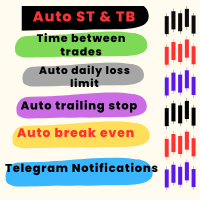
优化交易和风险管理的工具 该高级工具旨在提升交易性能并降低风险。通过避免复仇性交易或贪婪驱动的决策,它确保交易者在市场中保持纪律性。 主要功能 自动止损和止盈 在交易执行时自动设置止损和止盈水平,有效保护头寸。 交易间隔时间 允许用户设置交易间的冷却期(例如,15分钟)。 冷却期间禁用交易按钮并提供声音警告。 每日亏损限制 用户可以设定每日亏损上限(例如,20美元)。 达到上限时触发警报,并停用当天的交易功能。 每日盈利目标 类似于亏损限制,用户可以设置每日盈利目标(例如,40美元)。 达到目标后触发警报并禁用交易功能。 保本点调整 当达到指定盈利水平时,自动将止损调整至进场价,锁定利润并减少风险。 追踪止损 动态调整止损水平,随着交易进展锁定一部分利润,从而确保收益。 用户友好配置 默认设置已预先配置,便于快速使用。 可通过直观的交互式界面完全自定义所有参数。 附加功能 快速访问按钮 关闭所有头寸。 关闭亏损头寸。 关闭盈利头寸。 调整手数大小。 执行买入/卖出订单。 启用/禁用追踪止损等主要功能。 实时信息显示 显示点差、开盘价、收盘价、最高价和最低价,以便做出明智决策。 兼容性

Telegram Risk Exposure shows the risk exposure in total, by calculating the risk value of all the open positions that have stop loss orders, so you can clearly see the value being risked in dollar($) and percent(%).
Setup
A step by step user guide is available. No knowledge of Telegram API is required; all you need is provided by the developer.
Key Features Monitoring your risk exposure in real time Automatically get notified via telegram when your risk exposure changes Customize the

Unlock the Power of Automated Trading with Cutting-Edge Moving Average Signals!
Are you looking for a reliable and efficient way to trade the markets?
Our automated trading system leverages the power of moving average signals to identify high-probability trading opportunities with precision and speed. Why Choose Our Trading Bot? Advanced Moving Average Strategies – Our algorithm dynamically adapts to market conditions using short-term and long-term moving averages to detect optimal entry and

GGP Trade Copier EA is an automatic trading bot that can help traders automatically replicate the trading strategies and operations from one trading terminal to others by experiencing exceptionally fast trade copying system. Its easy-to-use setup allows you to copy trades between multiple MetaTrader terminals on the same Windows computer or Windows VPS with lightning-fast copying speeds of under 0.5 seconds. The software supports multiple trading varieties, including Forex, commodities, stocks

Use for risk management and opening positions as per the user settings. The user is allowed to set the stop loss and take profits in pips. The user can also choose the risk percentage per trade that he/she wants to use while opening the trade. The volume of the trade that the user wants to sent shall be calculator according to the stoploss and the risk percentage that the user has selected.

需要同时开立多个头寸/交易吗?我们已经为您创建了简单的解决方案。您现在可以一次输入多个仓位。您可以设置手数、持仓数量、止盈和止损。 例如:您想要购买 3、5、10 或任意数量的具有一定手数的头寸。 您现在只需点击“购买”按钮即可完成此操作。 或者 例如:您想要出售 3、5、10 或任意数量的具有一定手数的头寸。 您只需单击“出售”按钮即可完成此操作。 Xūyào tóngshí kāi lì duō gè tóucùn/jiāoyì ma? Wǒmen yǐjīng wèi nín chuàngjiànle jiǎndān de jiějué fāng'àn. Nín xiànzài kěyǐ yīcì shūrù duō gè cāngwèi. Nín kěyǐ shèzhì shǒushù, chícāng shùliàng, zhǐ yíng hé zhǐ sǔn. Lìrú: Nín xiǎng yào gòumǎi 3,5,10 huò rènyì shùliàng de jùyǒu yīdìng shǒu shǔ de tóucùn. Nín xiànzài zhǐ xū

Clean & Readable Grid Lines: Time and Price at Perfect Intervals.
The timeline will be displayed according to the set time difference. (Time differences in 30-minute increments are not supported.) Additionally, price lines are displayed at round numbers such as 100.000, 100.010, and 100.020. The standard gridlines are displayed with the time and price by MT4, but they are very confusing as they become the broker's time and are displayed at the halfway point along with the price. It hides them an
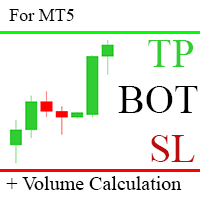
TP SL Bot - 新开立的 订单根据您的指示自动设置止损和止盈的工具。此外,还提供了一个计算器功能,可以计算在给定止损 / 止盈大小下,需要开立交易的数量来达到所需金 额。 有几种 选项来调整大小和参数: 1. 根据用 户指定的百分比来调整止损和止盈金额,作为账户余额的百分比。 2. 根據使用者指定的止盈和停損金額進行調整。 3. 根据开 仓价格的点数( tick )来 调整。 4. 根据开 仓价格的百分比来调整。 特点: 简单易用的界面 适用于市价 订单和挂单 适用于所有品种和 时间周期 多个工作模式 风险管理系统所需正确交易量的计算器 工作原理: !工具在 订单开仓后接收到第一个 tick 时更改订单参数。 模式 1 (存款百分比)。您 设置了存款百分比以计算止损和止盈金额。计算以点数 ( tick ) 为单位进行。 模式 2 ( 金 额 ) 。您设置了期望的止损和止盈金额。工具会自动计算点数 ( tick ) 大小。 注意 ! 前两种模式可能会有小 误差 , 因为指定的金额不一定是最小 tick 值的倍数。 模式 3 ( 点数 ) 。您 设置了止损和止盈的点数 ( tick
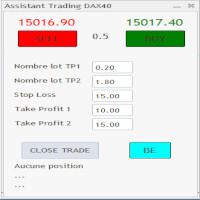
C'est un trade panel pour les indices 1 digit utilisé surtout sur le dax 40. Il y a 2 Take profit si TP1 atteint on passe en BE + 2 pt TP1 nbre lot et TP2 nbre : 2 positions sont ouverte ensemble ceci afin d'éviter si un problème connexion web. Attention c'est en nombre de points
Stop loss :15 (15 pts sur dax) Take Profit 1 : 10 Take Profit 2 : 15 Dans cet exemple si 10 pts atteint (spread prit en compte) on se met en BE + 1 pt Il y a un bouton BE qui met BE + 2 pt sur les trades et 1 bouton

This Dashboard is very useful . That will help us analyzing graph. In this dashboard has some functions. such as - Buy Stop - Sell Stop - Buy Limit Order - Sell Limit Order - Close All trade on this graph - Close All Profit - Delete Pending Order = Notify to enter an order - Percentage Calculation of chance to win an order On this strategy i calculated all Major EMA to find a higher chance and take more profits

Trade Shell, upgraded: P1 Prime Trade Manager The same product you know, rebuilt from the ground up by Denis Sotnikov, who has written trading programs for MetaTrader since 2008. A developer who stays Denis built Euronis Scalper, the example product MetaQuotes shows in the "How It Works" guide inside every MetaTrader 5 terminal (Navigator, Market, How It Works). He answers here in the comments, and he will still be here next year. Built from what traders report We read thousands of user comments

FISHERMAN'S ASSISTANT The Fisherman's Assistant is a powerful tool to assist in general operations. INTELLIGENT STOP LOSS With it, we can program the stop loss, take profit, break even, and trailing stop so that, in our manual operations, they are placed automatically. OPENING AND MANAGING POSITIONS We can use the Fisherman's Assistant to open positions within the programmed parameters, make re-entries, close positions by time, and much more. With it, we can manage all open positions of all lis

FISHERMAN'S ASSISTANT The Fisherman's Assistant is a powerful tool to assist in general operations. INTELLIGENT STOP LOSS With it, we can program the stop loss, take profit, break even, and trailing stop so that, in our manual operations, they are placed automatically. OPENING AND MANAGING POSITIONS We can use the Fisherman's Assistant to open positions within the programmed parameters, make re-entries, close positions by time, and much more. With it, we can manage all open positions of all lis

Dieser Expert Advisor unterstützt Sie bei Ihrem Handel. Er setzt für Sie automatisch, nach denen von Ihnen vordefinierten Parametern den Stopp Loss, den Take Profit. des Weiteren hat dieser Expert Advisor eine Break Even Funktion, der Ihre Positionen glattstellt, so dass Sie bei einem Rücksetzer des Kursen noch mit ein wenig Plus schliessen. Auch besitzt er eine Trailling Funktion, welche des SL für Sie automatisch nachzieht.

A Trade Manager with automatic volume calculation
Automatic Volume Calculation can be done either by percentage (from the lowest between Equity and Balance) or by value (Money amount) Market Order with drag-and-drop feature for Stop Loss and Take Profit Limit and Stop Orders drag-and-drop feature for Entry , Stop Loss and Take Profit Review Order Details before placing orders ( Entry Price , SL , TP , and Volume ) Open Positions Management with Automatic Break-Even when profit reaches predefin

将完全可定制的信号从 MT5 发送到 Telegram,并成为信号提供商! 该产品采用易于使用且具有视觉吸引力的图形界面。 自定义您的设置并在几分钟内开始使用该产品!
用户指南 + 演示 | MT4版本 | 不和谐版本 如果您想尝试演示,请参阅用户指南。 MT5 电报发送器在策略测试器中不起作用。
MT5 转 Telegram 功能 通过大量选项根据您的喜好完全定制信号 在信号之前或之后添加您自己的自定义消息。 这可以是标签、链接、频道或其他任何内容 在信号中添加、删除、自定义表情符号。 或者您可以将它们全部删除。 按交易品种或幻数过滤要发送的交易 排除发送特定符号 排除发送特定幻数 自定义与信号一起发送的交易详细信息 发送带有信号的屏幕截图 自定义要发送的信号类型 发送信号性能的每日、每周、每月和自定义时间报告
我总是愿意改进产品,所以如果您有想要看到的功能,请发表评论或给我留言。

将完全可定制的信号从 MT5 发送到 Discord 并成为信号提供商! 该产品采用易于使用且具有视觉吸引力的图形界面。 自定义您的设置并在几分钟内开始使用该产品!
用户指南 + 演示 | MT4版本 | 电报版本 如果您想尝试演示,请参阅用户指南。 MT5 To Discord 发送器在策略测试器中不起作用。
MT5 Discord 功能 通过大量选项根据您的喜好完全定制信号 在信号之前或之后添加您自己的自定义消息。 这可以是标签、链接、频道或其他任何内容 在信号中添加、删除、自定义表情符号。 或者您可以将它们全部删除。 按交易品种或幻数过滤要发送的交易 排除发送特定符号 排除发送特定幻数 自定义与信号一起发送的交易详细信息 发送带有信号的屏幕截图 自定义要发送的信号类型 发送信号性能的每日、每周、每月和自定义时间报告
我总是愿意改进产品,所以如果您有想要看到的功能,请发表评论或给我留言。

Magic News Trade Assistant是一个在新闻发生时进行交易的工具,这个工具对于为您创造利润非常有帮助,因为您可以清楚地设置自己的止损和止盈。 该工具非常适合 XAUUSD 交易。 我们可以利用 JOLTS 和 NFP 等交易的新闻是非常有利可图的。您将冷静地等待您的订单获利,这一切都取决于所产生的消息。 推荐 : • 货币对:XAUUSD • 手数与权益比率:1:1000(如果您有1000美元,则可以使用1手) • 最佳经纪商:Orbitrade(因为滑点非常低,如果您想创建 Orbitrade 账户,可以联系管理员) 规格: • 批次大小:确定您的批次数量 • 范围大小:计算距离范围是价格为2-3点差,可以根据您的意愿设置,它会自动填充 • 止损:正常止损距离为5x点差,可根据您的意愿设置,自动填充 • 止盈:止盈的正常距离是10x Spread,可以根据您的意愿设置,它会自动填充 • Trailing:订单仓位盈利时的距离,止损会增加以确保利润,自动距离0.5-2x Spread • 计数:新闻期间我们会下的订单数量,我通常使用2个订单,你可以填2 • 新闻定

该工具可以帮助你一键平仓所有持仓订单,只需要点击“Close all”.如果你只想平仓盈利中的订单时,就点击“Close profitable"按钮,点击之后,所有浮盈中的订单都会被全部平掉;如果你只想平仓浮亏中的订单,就点击“Close losable”按钮,点击之后,所有浮亏中的订单就会被全部平掉。
该工具经过一年的真实测试,一键平仓功能非常完善,平仓及时,延迟范围较小,当然,延迟和你所处的地区以及网络环境也有关系,这一点还请注意。
在历史数据的回测过程中,该工具表现更加完美,100张订单全部平仓完成最多只需要0.495秒。在真实交易过程中,本人最多持仓订单数量只有26笔,全部平仓完成的时间是1.28秒。

本EA提供以下功能: 开仓: 价格穿越趋势线时,开多单或者空单 平仓: 价格穿越趋势线时,平多单或者空单 追踪止损: EA会沿着趋势线,不停的提升多单的止损或者降低空单的止损 线可以是趋势线也可以是水平线, 趋势线可是射线或者线段,线段有个特别作用就是只在线所在的时段内交易。 这些能开仓和平仓的线都是有特定名称的线,EA提供了画线面板代替手工画线. 所有开仓,平仓都会有截图保存在MQL5/Files/Cross Trend Line to Trade文件夹中. 本EA只能用于对冲类型账号
MT4 版本: https://www.mql5.com/zh/market/product/4439
画线面板: 点击绿色的"+"按钮,会逐一生成6组面板,每组面板可以点击相应的按钮来绘制趋势线或者水平线 点击紫色按钮,可以选择线类型: Trend Line(趋势线) 或者水平线(Horizontal Line) 点击Del可以删除所有画线 点击X可以关闭面板,回到最初的状态. 点击按钮B1,B2,B3,B4,B5则会绘制五条线, 当价格穿越这五条线中的任何一条时开一个多单 点击按钮
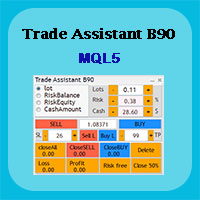
Trade Assistant B90 is designed for manual trading so that it helps us to manage capital and position well.
This expert has the ability to change the default inputs of the expert as desired before use.
You can see the expert entries in the photo below, each of which we explain below.
1. Background Color : With this entry, you can change the assistant's background
Color
2. Font size: You can change the size of the fonts used in the assistant.
3. Button color: Change the color of assis

The utility is designed to send signals from MT4 to Telegram. It has several unique features, allowing not only the sending of trade signals but also the following functionalities: Send messages directly from the terminal to Telegram Send emojis along with custom text Send text and images from Telegram All of these features enable users to manage a signal channel while focusing on trading and finding quality signals. Customizable Signal Messages You can fully customize the signal message: Specif

Rosy Trade Assistant A very easy to use EA, simple and friendly. Many features available to manage your trade. Compact panel with 4 sizes that can be selected according to your convenience. And trading in your local time has never been easier, using local timescale and clock. User Guide and Demo version Pages Trading Panel - Page to place an order and manage it's SL/TP Tools - Page to manage order: trailing, close on target, close all by categories Settings - Page to use custom time scale with s

Universal Indicator to Telegram Alerts is a smart trading tool that works seamlessly with both MT5 and Telegram, offering traders more flexibility and convenience. It connects your MT5 platform to Telegram, sending real-time alerts and chart screenshots directly to your Telegram from any indicator with buffers. This means you can stay updated on your trades even when you're not at your computer. Whether you're on your phone or tablet, you'll never miss an important trading opportunity. The aler

“Scalping Scale in”是一款实用工具,专为想要在固定距离的初始位置进行缩放而无需担心 S/L 和 T/P 位置的黄牛而设计,因为剥头皮时每一秒都很重要。
工作原理:
您在 EA 的输入选项卡中设置所需的值,更具体地说,您希望 T/P 放置的风险回报比、您希望 S/L 的宽度(以点为单位)-也是下一个止损订单的距离(位置比例)。您在 MT5 上手动点击“买入/卖出”,EA 会自动设置止损和止盈,同时在相同方向设置新的止损单,距离等于止损(以点数为单位)(即,如果您买入,止损/止损为 5 点,下一个买入止损订单将放置在高于初始入场价格 5 点的位置)。一旦止损挂单被执行,之前的仓位将被追至盈亏平衡点,并且将下达新的止损单,其止损位于之前交易的入场水平。 本质上,这个工具利用了均匀分布的规模来捕捉激进的动作。 输入参数说明: 自动跟踪 - 两个选项:开/关。如果设置为开,则启用自动追踪,并且在触发(输入)的每个新止损订单上,之前的交易将按照刚刚触发的订单的止损水平进行追踪。如果关闭,则不会发生任何事情,但请注意,新的头寸规模不会有 S/L,因此需要用户主动管理! 警报
This EA help trader to manage his pending orders, when you place many Pending Orders this utility monitor them and when of them get filed (executed) the EA cancel and delete all rest of pending orders, to avoid opening of all of pending orders at the same time , and lose your risk management. this utility is very useful for trader when he /she is not available on the desk.
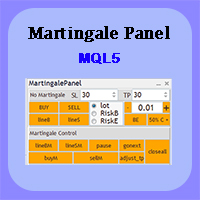
In this article, we would like to introduce the trade panel product with the Martingale panel.
This panel is made in such a way that it can meet the needs of traders to a great extent.
This trade panel actually consists of two trade panels at the same time, with the first one you can take positions with certain profit and loss limits, and with the second one, you can have positions with profit limits but without loss limits.
When positions lose, a new position will be added based on the settings

Ultimate Trade Panel MT5 是一款专为 MetaTrader 5 设计的强大工具,旨在提升新手和经验丰富交易者的交易体验。通过提供直观的界面和强大的功能,它帮助用户更高效、更准确地管理交易。 该工具简化了交易任务,使用户能够专注于策略而非手动流程。凭借一键交易和可自定义提醒等功能,交易者可以快速响应市场机会,确保他们不会错过关键的交易设置。 MQL 产品安装指南 | 在 MT4/MT5 上更新已购买的 MQL 产品 | 常见故障排除指南 | 指标设置 / 指南 主要特点 弹出提醒:在信号事件时触发 MetaTrader 提醒弹窗,让您不会错过任何交易设置。 推送通知:实时推送通知到您的 MetaTrader 移动应用,方便随时监控。 电子邮件提醒:在信号事件时发送电子邮件通知,便于远程监控,尤其是在离开终端时。 图表上的仪表板:在图表上直接显示实时信息面板,方便即时状态概览。 Ultimate Trade Panel MT5 是希望在 MetaTrader 5 中最大化效率和效果的交易者的完美工具。 您还可以查看该产品的 MT5 版本: Ultimate Trad

Introducing BoTutor - Simplify Candlestick Data Collection and Export! Are you tired of the hassle of manually collecting and exporting candlestick data from your charts? Look no further, because BoTutor is here to revolutionize your data mining experience . BoTutor offers a user-friendly graphical interface that is intuitive, clean, and easy to navigate. Say goodbye to complex data extraction procedures, and effortlessly gather candlestick data with just a few clicks. BoTutor lets you expo
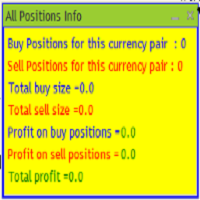
The provided MQL5 expert creates a custom information panel in the MetaTrader 5 (MT5) trading platform This panel displays information about the trading positions for the current symbol (currency pair) on the chart. It shows the number of buy and sell positions, their sizes, and profits. Provide traders with a quick overview of their trading positions for the current symbol It is very useful when you open several positions of several sizes and you want to know the exact situation of the number
大家好
在人们眼中,投资被认为是一件困难且有风险的事情。 但如果你通过获取知识和技能进行投资,市场永远不会伤害你。 资本市场的过滤写作是该领域专业人士为提高生产力和节省时间而采取的行动之一。 由于大量符号的活动,存储的信息和数据量非常大。 活跃在这个市场的人们有时需要一系列信息,由于事情的敏感性,他们应该尽快获得。 这些信息通常可以帮助他们预测市场的未来,并且非常重要。
通过我们的命令写入 Fitler 将找到符合请求条件的共享! 过滤我们选择的功能将搜索所有可交易股票并显示合适的股票。 资本市场上的每个人都有特定的交易策略,通过过滤很容易按照策略进行; 之后,他可以看到他的策略在不同时间范围内的结果。
过滤的优点 1-高速:每个股的信息都会根据您选择的特点,在最快的时间内提供给您。 2- 各种各样的功能和命令:您可以按照您想要的任何方式对共享进行分类和查看。
此过滤器检查所有市场观察交易品种、具有以下 5 个条件之一的 RSI 指标,并显示适用所选条件的交易品种:
1- 从第一个指定数字开始划线 2- 从下面第一个指定数字开始划线 3- 大于第一个指定

大家好
在人们眼中,投资被认为是一件困难且有风险的事情。 但如果你通过获取知识和技能进行投资,市场永远不会伤害你。 资本市场的过滤写作是该领域专业人士为提高生产力和节省时间而采取的行动之一。 由于大量符号的活动,存储的信息和数据量非常大。 活跃在这个市场的人们有时需要一系列信息,由于事情的敏感性,他们应该尽快获得。 这些信息通常可以帮助他们预测市场的未来,并且非常重要。
通过我们的命令写入 Fitler 将找到符合请求条件的共享! 过滤我们选择的功能将搜索所有可交易股票并显示合适的股票。 资本市场上的每个人都有特定的交易策略,通过过滤很容易按照策略进行; 之后,他可以看到他的策略在不同时间范围内的结果。
过滤的优点 1-高速:每个股的信息都会根据您选择的特点,在最快的时间内提供给您。 2- 各种各样的功能和命令:您可以按照您想要的任何方式对共享进行分类和查看。
此过滤器检查市场报价随机振荡器的所有交易品种是否符合以下 2 个条件之一,并显示适用所选条件的交易品种:
1- %K 线穿过 %D 线上方且 %K 小于指定数字 2- %K 线穿过 %D 线下方且

“烛台模式交易面板”对于使用烛台模式进行交易并希望快速、轻松地 识别模式和执行交易的交易者来说是终极工具 。该工具具有各种但关键的输入选项,适合那些想要自动化蜡烛图模式手动交易的人,或者帮助他们手动进行交易但比以前更快,或者只是告诉他们他们想要看到的模式的人。
当您在您想要使用的交易品种上激活 EA 后,让我们浏览一下 出现在图表左上角的 交易面板 。该面板经过精心设计,非常简单,仅使用交易者可能需要的主要功能,因为在实时交易中时间就是金钱。 禁止交易 :出于安全原因,已进行预先检查。它实质上表明您希望 EA 仅在烛台形态出现时显示箭头对象,仅此而已。 单击箭头进行交易:单击后,每次出现模式时, 只需单击箭头对象 即可进行半手动交易 ,止损、止盈和风险 已 在“交易设置”中预定义 ” 小组的部分。 自动交易 :单击后,EA 将 自动交易 您从输入选项卡中声明的您想要显示/交易的每个特定烛台形态。止损、止盈和风险取自 面板的“交易设置”部分。 在“交易选项”部分之后,是面板的“交易设置”部分。以下是交易者在 EA 的帮助下自动化交易所需的基本输入参数。 风险 :输入每笔交易的
Introducing the BlackWing Signal Provider—an advanced EA designed to enhance your trading experience by facilitating seamless communication between your MetaTrader 5 platform and Telegram channels, groups, or individual users.
Key Features:
1. Real-Time Event Notifications: Receive instant alerts on new trades, modified orders, closed positions, and deleted orders. Stay informed and make well-timed decisions.
2. Interactive Chart Snapshots: Share chart snapshots along with new trades and ord

A very usefull EA helps you control Trailing Stop and Break even point for single order
it works seperately for Buy side and Sell side
the EA displays some information useful when you load to your chart
all you need to do is to change the name of the pair you want to control TP and BEP
it works with all pairs and all types of accounts
if you have any questions you can always write to us at info@auranos.me

Multi-currency trading on one chart!
Creation and management of positions with trailing and breakeven, risk management and other useful functions. To fix profits, the Target profit parameter is provided; if it is greater than zero, all positions will be closed if the set value is exceeded. All positions and orders have set Stop Loss and Take profit. For multi-currency trading, taking into account the impact of news and switching symbols on the chart, it is useful to use the News impact indicato

EquitySafe V1.0 is a powerful risk management tool designed for MetaTrader 5 . It enables traders to effectively manage their risk by setting maximum loss limits based on custom time frames. With this tool, you have the flexibility to define your own time intervals and allocate specific risk thresholds accordingly. This helps you maintain control over your trading account and minimize potential losses. By utilizing EquitySafe, you can ensure that your trading strategy aligns with your risk tole
The tool for exploring seasonal patterns. It compares the chart with charts of other years and compares with the average for other years. Allows you to shift charts if necessary. Explore any year by specifying the zero point. Up to 10 charts in one tool. Works only on the daily chart ! The best for you! Enjoy your work! (It's not indicator - do not download demo it not work) for mt4 Seasonly MT4

Achieve peace of mind with our EA companion! Simply set it and let it roll. Safeguard your trades on sluggish market days and holidays. Get updates on your balance and EA status every Friday evening, for example. Stay in the loop even if your terminal or VPS decides to take a break. Trading made easy – enjoy the tranquility! This EA has several functionalities
Closing of pending or open positions during pre-configured holidays. Automatic closing and reopening of pending positions during the nig
Expert for setting stop loss and take profit simultaneously for all orders or positions of a currency pair Once attached to the graph, the expert panel will appear on which there are buttons for setting and a green horizontal line, if you click on the line you can move it on the graph and choose the stop loss or take profit threshold with it, move the cursor over the panel and the value will be set where you have positioned the horizontal green line, press the button for the setting you want t

MT4版本: https://www.mql5.com/zh/market/product/109262 MT5版本: https://www.mql5.com/zh/market/product/109258 使用说明: https://www.mql5.com/zh/blogs/post/755183
EA概述: 本EA利用A,B 2个平台进行对冲交易。当A平台的ASK小于B平台的ASK,A平台买入同时B平台卖出,然后观察2个帐户的盈亏,当合计利润达到目标,AB两个帐户再同时平仓。
应用场景: 1.汇差套利 :有时不同平台的报价是不同的,有时A平台报价大于B平台,而有时A平台报价又小于B平台。这样就有了套利赚钱的机会。 2.刷单赚返佣: 找一个提供返佣服务的代理商,那么AB两个帐户就算是不赚不亏,还可以赚返佣的利润。 3.利用平台的奖励: 很多平台提供的入金奖励,交易奖励,但是要把奖励提现,会有交易量的要求。可以通过对冲,低风险加大交易量,达到提现奖励的目的。 4.您可以想象到的其它场景...
功能特点: 1.一个
Multi Take Profit Manager Automatically close portions of your open trades at up to three profit targets. This utility is designed for manual traders who frequently open multiple positions and want to scale out of trades automatically as profit targets are reached. Instead of manually closing positions one by one, the utility can partially close your total open position at predefined Take Profit levels, helping you lock in profits while allowing the remaining positions to continue running. Key F
Supercharge Your Trading with HF TradeCopier !
Are you tired of manual trade execution and missed opportunities? Take your trading efficiency to new heights with the HF TradeCopier ! This cutting-edge solution empowers traders like you to effortlessly copy transactions between different MetaTrader 4 and MetaTrader 5 accounts, saving you time and maximizing your profit potential . With lightning-fast copying speeds of under 0.5 seconds , you can seize market opportunities instantly and s
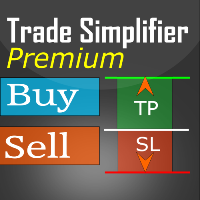
Trade simplifier premium is a trade panel that simplifies trade opening. It is simple and easy to understand, with key features to ease trading. Features include:
Order type selection Fixed lot entry from the chart user interface Easy Take profit entry field on the chart user interface Visual take profit selection and adjustment via the line that appears when you click the Take Profit button Easy Stop loss entry field in points on the chart user interface Visual Stop Loss selection and adjustm

Baby Shark Pro EA works using a series of indicators, mainly the RSI. This is an EA that uses martingale, so use with caution. But Baby Shark Pro EA gives you the ability to change the multiplier parameter, which allows it to decrease the martingale level. Thus, you determine the risk level you want. Unlike most of the other martingale, EA’s This doesn’t place random entries, rather it is riding on market movement RSI > 50. If the market moved the opposite direction after the first entry, th

注意 :要获取免费试用版,请访问我的网站。 使用手册
用户手册 RiskGuard Management — 您进行无妥协交易的终极盟友。 Lot Calculator — 自动计算手数。 Quantum — 自动风险控制,最大化利润并减少回撤。 Automatic Journal — 包含并可从我的网站免费下载。 Automatic Screenshot — 两张截图:开仓时一张,平仓时一张。 Partial Profit — 智能管理的部分平仓功能。 Smartphone Trading — 可通过手机下单,自动管理。 Stop Loss & DD Block — 每日资金的全面保护。 Automatic Break-Even — 轻松降低风险。 Closing Time — 精准控制交易时间。 Automatic Spread — 实时正确设置止损和止盈。 详细的多语言文档以及意大利语和英语的视频教程,可在我的网站上获取。

Introducing Orders Executor , your powerful and efficient trading companion designed to seamlessly execute orders directly from a user-specified text file . This innovative trading tool streamlines your trading process, providing a convenient and automated solution for executing trades with precision and speed.
Key Features :
**Text File Integration:** Orders Executor is designed to effortlessly read and interpret orders from a plain text file, eliminating the need for manual input. Simpl

The Wall Street Player (Ultimatum version). This EA tailored as a Discipline, Money and Risk Management tool is a powerful Trade Station utility designed for Forex, Cryptos, Commodities, Shares, Deriv synthetic pairs and any CFDs Market. It is designed to fit your strategy as a winner, and take your Edge of the market to the NEXT-LEVEL. The only thing to do is to get It on your chart and appreciate the possibilities and chart management abilities it has to offer for realizing that discipline and
Free until the end of the year.
Customer support : https://t.me/MeToolTrading
The free version will be published at the end of 2024.
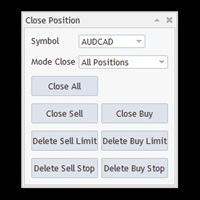
Close All With Just One Click MT4: https://www.mql5.com/en/market/product/110795 Close orders with just one click, quickly and neatly. Supported order types: Market order, limit order, stop order .
Note: This software is very fast, there is no warning every time you press the button, please use caution when using, or use it proficiently in a demo account firs

币安 MT5 交易工具
1. 本产品包含通过 WebSocket 获取的实时图表、历史图表,
并在 MT5 终端重启时自动更新,确保运行流畅,无需人工干预,让您在币安交易时体验流畅无阻。
现货和期货均可交易、实时图表和历史数据
图表功能:
1. 通过 WebSocket (WSS) 获取实时 OHLC 图表
2. 通过 API 更新历史记录
3. 每次打开 MT5 时自动更新图表历史记录
4. 支持从 M1 到 MN1 的所有时间范围
5. 可用数据:开盘价、最低价、收盘价、实际交易量和即时成交量
6. 您可以使用策略测试器,通过您的专家顾问对加密货币数据进行任何策略的回测
图表和历史记录使用说明:
1. 将 URL 添加到 MT5 选项
2. 在任何图表上加载实用程序,并选择“模式”为“实时”,然后选择交易所(例如币安现货),并在首次运行时将“创建交易品种”设置为“真”,以便创建交易品种。
3. 所有交易品种创建完成后,右键退出 EA,选择“Utility Crypto charts”(实用程序加密货币图表),然后点击“Remove”(移除)。重启 MT5(重要提示)
4

Just a panel for drawing levels. Minimal but very useful thing. This is a further development of the free version. This is the version that I use myself and it has many behavior adjustments. ---- 12 types of customized levels. Support for rectangle and line levels. If you need to prevent a level from extending, add "noext" to the end of the name level object. For any update idea please contact me here. ---- This is not an indicator, don't download the demo, it doesn't work For test see free ver

多货币前蜡烛或前柱扫描仪可帮助您扫描具有从指标设置中选择的任何自定义时间范围的多品种图表。
基于产品: https://www.mql5.com/en/market/product/78657
它可用于扫描前一天高低、前一周高低、上个月高低或任何自定义时间范围的多个交易品种,例如 前 4 小时图高低
当价格触及高线或低线时,它会过滤噪音并发出方向警报
策略很简单,当触及前一天、一周或一个月的高点和低点时,价格会在较小的时间范围(如 5 分钟)内被拒绝
它具有选择各种警报类型的选项
您可以选择并设置扫描频率(以毫秒为单位)
1000 表示每秒扫描市场观察中的所有交易品种
产品特点
1. 终端警报
2. 电子邮件提醒
3. 推送通知
多货币前蜡烛或前柱扫描仪可帮助您扫描具有从指标设置中选择的任何自定义时间范围的多品种图表。
基于产品: https://www.mql5.com/en/market/product/78657
它可用于扫描前一天高低、前一周高低、上个月高低或任何自定义时间范围的多个交易品种,例如 前 4 小时图高低
当价格触及高线或低线时,它会
枢轴点多符号扫描仪扫描市场观察中可用的所有符号,以查找地板、伍迪、卡玛利拉、丹麦或斐波那契枢轴点。
您可以选择任何时间范围来计算枢轴点,并在价格触及这些支撑位和阻力位时收到警报。
对于视觉枢轴点您可能对此产品感兴趣: https://www.mql5.com/en/market/product/110072
它具有选择各种警报类型的选项
您可以选择并设置扫描频率(以毫秒为单位)
1000 表示每秒扫描市场观察中的所有交易品种
产品特点
1. 终端警报
2. 电子邮件提醒
3. 推送通知
枢轴点多符号扫描仪扫描市场观察中可用的所有符号,以查找地板、伍迪、卡玛利拉、丹麦或斐波那契枢轴点。
您可以选择任何时间范围来计算枢轴点,并在价格触及这些支撑位和阻力位时收到警报。
对于视觉枢轴点您可能对此产品感兴趣: https://www.mql5.com/en/market/product/110072
它具有选择各种警报类型的选项
您可以选择并设置扫描频率(以毫秒为单位)
1000 表示每秒扫描市场观察中的所有交易品种
产品特点
1. 终端警报
2. 电子邮

发现新的波段交易策略 - 适用于AUDUSD.s等货币对 策略亮点 : 专门设计的趋势指示图像 :我们的策略提供了一个独特的图形界面,帮助交易者识别和利用市场波动。 回测验证 :鼓励交易者对AUDUSD.s等货币对进行回测,验证我们策略的有效性。 灵活的时间框架 :默认推荐在15分钟(M15)时间框架下交易,但我们也提供定制服务,以满足特殊需求。 风险控制 :对于大额交易者,我们提供个性化的风险管理咨询,确保您的资金安全。 为什么选择我们的波段交易策略? 超过200次的成功回测案例。 易于理解和应用,适合不同水平的交易者。 提供实时支持和策略调整建议。 立即体验我们的波段交易策略 ,并探索其潜力!如有特殊需求或疑问,欢迎随时联系我们进行讨论和数据定制。
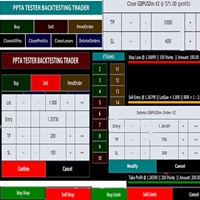
TESTER BACK TESTING AND TRADING MANAGER THE ONLY MT5 TOOL YOU CAN USE FOR BOTH LIVE TRADING AND BACKTESTING All functions can be used in both live trading and backtesting in MT5 Strategy Tester. This is one tool with many functionalities. Your ONLY tool for both trade management (live trading) and Backtesting in MQL5 Strategy Tester. The Tester Backtesting and Trading Manager can help you: 1. Trade Orders: a. Open Market Execution Orders (Buy or Sell)
b. Open Pending Orders (Buy Limit, Buy Stop
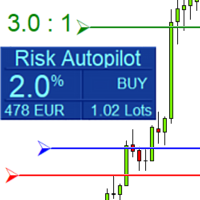
Maximize Your Trading Precision and Risk Management This unparalleled plugin ensures you trade at your desired risk level with automated precision, setting a new standard in efficient trading execution.
Exclusive Offer Limited time opportunity! Get this cutting-edge plugin for only $89 instead of $149 (Offer ends on October 31, 2025). Boost your trading potential now. This special discount won't last!
Streamlined Process 'Risk Autopilot Buttons' streamlines the process of setting StopLo
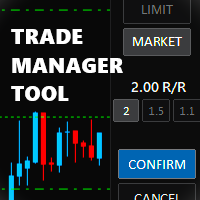
Trade Manager Tool uses adjustable lines displayed on your chart to let you prepare and visualize your order's entry, stop loss and take profit levels before you open a position. It will then use these levels along with your choice of maximum risk preset in order to calculate your optimal position size before sending the order to your broker. While providing an invaluable advantage to manual traders looking to control their risk and simplify their trading process, it also informs their deci

Risk-o-meter is a Risk calculator Panel designed to help people who are new to trading, better understand how much they are risking for potential profit or loss. And also place future orders. Premium Fetaure: 1. Set pending order 2. Set Profit in Cash (RR)
Inputs: 1. Enter your Risk in % or currency 2. Enter your Return Ratio 3. Enter your Lot Size
Results: 1. SL line 2. TP Line
Features: 1. By moving the SL line, lot size will adjust to keep Risk fixed. 2. By moving the TP line, Risk Ration

风险回报率管理器是一款可视化订单管理工具和头寸规模计算器,旨在支持严谨的交易和专业的风险管理。它允许交易者直接在图表上直观地设置入场、止损和止盈水平,并在下单前自动计算交易手数和风险回报率。该工具有助于标准化交易准备,并确保每个仓位都以预先设定且可控的风险水平开仓。 该工具适用于多种交易工具,包括货币对、指数、金属、大宗商品和加密货币。它既适合手动交易者,也适合注重策略、对每个仓位都应用风险管理规则的交易者。通过减少计算时间并避免手动错误,该工具可帮助交易者在执行过程中保持一致性和清晰度。 风险回报率经理 安装和输入指南 如果您想获取有关 EA 的通知,请添加 URL ( http://www.betasoft.dev ) MT4/MT5 终端(见截图)。 MT4版本 https://www.mql5.com/en/market/product/110797 MT5版本 https://www.mql5.com/en/market/product/110798 主要特点
可视化交易规划:该工具在图表上显示入场点、止损点和止盈点。这种可视化方法可帮助交易者在执行前查看

Anti Grid Position Protector 是一款实用工具,旨在保护您免受诱惑,为希望回撤而增加亏损头寸,或在无意时尝试对冲。
--------------------------输入------------------------ ---- 允许对冲亏损头寸吗? - 这是一个真/假输入 (双击切换其值), 允许/禁止 在现有 亏损 头寸(同一交易品种)上以 相反方向开仓交易(挂单或市场执行) 识别“亏损”头寸的方法 - 两种选择( 止损 和 盈亏 )。通过选择“止损”,如果运行头寸的止损位于亏损区域,则该工具将不允许您进行新交易,除非止损追踪到盈亏平衡水平。同样,通过选择“PnL”,该工具将不允许您以同一交易品种开立新交易,除非浮动头寸处于盈利状态 (> $0) 发送移动通知: 如果“true”,EA 将通过您的移动 MT5 应用程序向您发送通知。确保您已将其与计算机的终端连接。 终端警报: 如果为“true”,则当新模式形成或交易订单出现错误时,EA 将在新窗口中发送警报。 在日志上打印: 如果为“true”,EA 将在终端的“日志”选项卡中打印。这是

The SCT(Smart Candle Trigger) mt5 is designed for the manual trader who needs assistance to open and manage orders in defined SUPPLY and DEMAND zones. Trader based on his/her strategy define zones on the charts and SCT will open positions based on candle confirmation of Engulf and PinBar once price come into trader zones. SCT works on all kinds of symbols: currency pairs, indices, metals, commodities, cryptocurrencies, etc. Benefits Save trader time and energy to follow candles of market for co

ATTENTION: the utility cannot work in the Strategy Tester, if you want to try the demo version for free for a week, or have any questions, write me an email! You can find my address on my user profile.
TrendLine Auto Executor is a software capable of identifying the trendlines you have drawn on the chart and opening orders as soon as they are touched or exceeded. The software allows you to manage two orders at a time for each chart by tracking two groups of trendlines, one for each order, and e
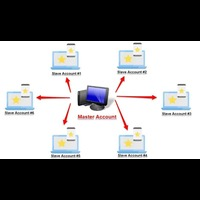
Forex Trade copier MT5. It copies forex trades, positions, orders from any accounts to any other account, MT5 even multiple accounts. The unique copying algorithm exactly copies all trades from the master account to your client account. It is also noted for its high operation speed and Tough error handling. It also can copy from demo account to live account too. It is one of the best free trade copiers that can do , MT5 or to multiple accounts MT5 to multiple accounts Features of Trade Copi
实时滴答声和1分钟数据导出记录器
不幸的是,您经纪商的历史价格数据不准确,这意味着存在数据缺失(缺口)、价格不正确,这会导致回测结果不正确。
数据记录器将可选的刻度/1 分钟数据或两者实时单独保存在 CSV 文件中。每月一份文件。
全部采用 MT5 格式,以便可以轻松导入这些数据,以创建具有来自经纪商的准确数据和真实点差的自定义交易品种,以进行回测。
只需将指标添加到您想要记录的 1 分钟图表中,选择重新编码模式即可开始记录。
如果您还有任何其他问题或要求,我将很乐意随时为您提供帮助。
实时滴答声和1分钟数据导出记录器
不幸的是,您经纪商的历史价格数据不准确,这意味着存在数据缺失(缺口)、价格不正确,这会导致回测结果不正确。
数据记录器将可选的刻度/1 分钟数据或两者实时单独保存在 CSV 文件中。每月一份文件。
全部采用 MT5 格式,以便可以轻松导入这些数据,以创建具有来自经纪商的准确数据和真实点差的自定义交易品种,以进行回测。
只需将指标添加到您想要记录的 1 分钟图表中,选择重新编码模式即可开始记录。
如果您还有任何其他问题或要求,我将很乐意随时为您提供

I'm proudly introducing "Spread Eliminator" - Your Ultimate Solution against High Spreads in Forex Trading! Are you tired of hitting Stop Losses or having pending orders triggered at a bad price due to high spreads while trading? All this is now over with our revolutionary EA , Spread Eliminator! Can be used on Prop Firms that enforce high overnight spreads and/or high spreads during high volatile market conditions. Key Features: Smart Spread Monitoring: Spread Eliminator constantly monitors mar

新闻过滤保护器旨在保护您免受新闻公告的未平仓头寸/订单的影响。在当今世界,新闻可能会导致不可预测的波动和扩大的损失,这样的工具对于您安心无忧非常有帮助,因为您无需再次检查日历!
让我们通过EA 的 输入 来了解每个参数的工作原理: --------------------------------新闻设置---------------- ---------------- 要过滤的新闻货币以逗号分隔(即 USD、EUR、GBP): 输入您要过滤的所有货币(如 MT5 日历窗口中所示),以逗号分隔(您可以在下面过滤掉更多指定的新闻,但首先您需要插入这些新闻的所有相关货币)。 关键字#1(针对要过滤的特定新闻 - 即“薪资”):在每个关键字上,仅输入一个关键字,与 MT5 日历上的描述完全一致 (而不是像 Forex Factory 上的那样)。 例如,您可以输入“CPI”,但您还需要在上面的第一个输入中指定货币,因为所有货币都有 CPI 新闻!如果不需要,请留空,但请注意该工具只会考虑货币和关闭/阻止交易的重要性。
关键字#2: 第二个新闻关键字,仅用于过滤特定新闻。如果不需要,请留空
MetaTrader市场是独有的自动交易和技术指标商店。
阅读MQL5.community用户备忘更多地了解我们提供给交易者的独特的服务:复制交易信号,自由职业者开发的自定义应用程序,通过支付系统完成的自动付款和MQL5云网络。
