Control Panel MT5

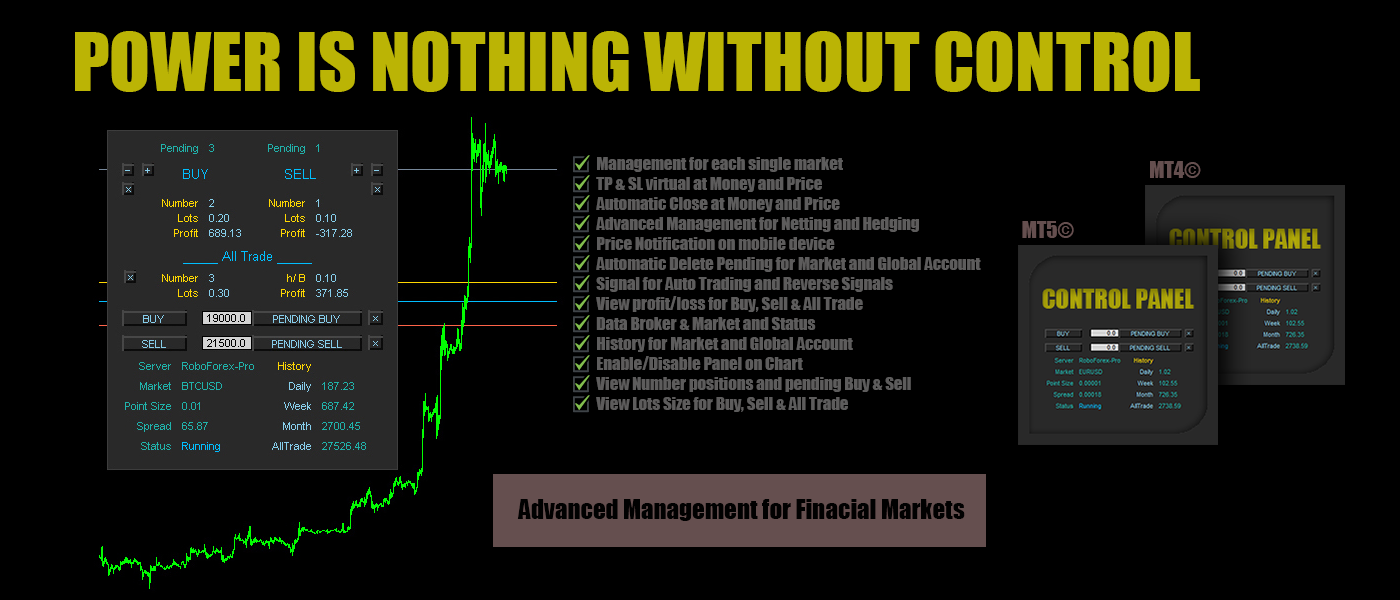
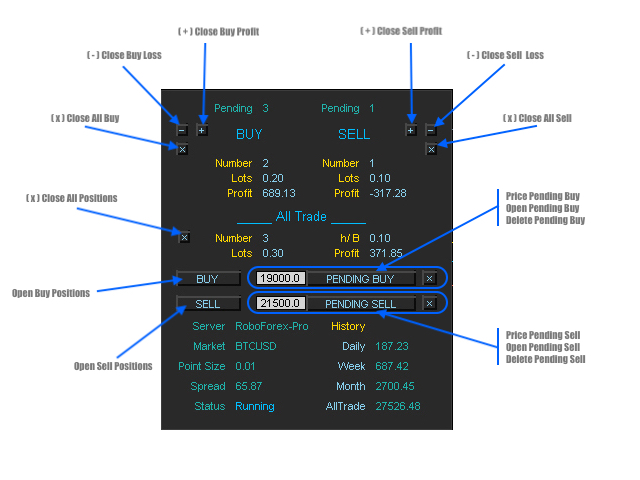
Control Panel mette a disposizione una semplificata ed avanzata gestione dedicata per ogni singolo mercato Forex, CFD, Materie Prime, Indici Azionari, Metalli Preziosi, Prodotti Energetici, Azioni & Crypto Valute, dal trade pad si posso aprire posizioni e ordini pendenti, visualizzare tutti i dati relativi alla quantità delle posizioni Buy, Sell e di tutti i trade oltre alla quantità espressa in lotti anche per i posizionamenti hedge indicando il valore espresso in lotti relativo all’esposizione, se la differenza di posizionamento misurata in lotti sarà di tipo Hedge Buy sul pannello di controllo sarà disponibile il dato h/B: e il valore di lotto, se di tipo Hedge Sell sarà disponibile il dato h/S: con il valore di lotto. Si possono chiudere posizioni in profitto o in perdita oppure passare alla chiusura totale in qualsiasi momento, impostare o cancellare ordini pendenti, tutte le funzioni sono disponibili in modalità manuale e automatica. Control Panel ha integrato un sistema di visualizzazione dei profitti/perdite con report giornaliero, settimanale e mensile ed il totale dei profitti per ogni singolo mercato o dell'intero account. Sul grafico sono disponibili le Open Price delle posizioni Buy ( linea blu ), Sell ( linea rossa ) e se presente del posizionamento Hedge ( linea oro ). Si possono impostare take profit ( linea blu tratteggiata ) e stop loss ( linea rossa tratteggiata ) virtuali basati sul raggiungimento di un determinato prezzo o profitto, impostare la cancellazione degli ordini pendenti al raggiungimento del target impostato ed impostare notifiche sullo smartphone per monitorare il profitto o la perdita ad un valore ed una frequenza impostati. Offre anche la possibilità di aprire una prima singola posizione per mercato basata sulla ricezione del segnale generato dall'indicatore Ichimoku, RSI e Moving Average su cui lavorare successivamente con il trade pad fino al raggiungimento del profitto.


Contro Panel possiede tutti i strumenti necessari per gestire ogni singolo mercato in modalità automatica e manuale nel breve e lungo periodo rendendo semplice e comprensibile la strategia da intraprendere per ottimizzare al massimo i propri investimenti, è uno strumento professionale dal codice pulito e stabile di cui sarà impossibile fare a meno non appena comprese le potenzialità che offre.


Input/impostazioni alle funzioni:

  • Market / inserire il simbolo del mercato come da grafico su cui attivare Control Panel ( esempio: EURUSD )
  • Lots Size / il lotto per il Trade Pad e per l'Auto Trading che attiva la sezione Signal
  • Auto Trading / true attiva, false disattiva la sezione Signal
  • Profit Control / true attiva, false disattiva la notifica mobile del profitto/perdita, è disponibile nella sezione Market per la notifica mobile di profitto/perdita relativa al solo Mercato impostato in Market oppure dell'intero Account
  • Money Move Up / invia una notifica sul mobile device quando il profitto è superiore al valore impostato ( esempio come da valore default impostato 50USD )
  • Money Move Down / invia una notifica sul mobile device quando il profitto è inferiore al valore impostato ( esempio come da valore default impostato -50USD )
  • Notification Mobile / la frequenza della ricezione delle notifiche, se ad esempio il valore è impostato come di default su 1 hour, Control Panel invierà una notifica ogni ora
  • Automatic Close / true attiva, false disattiva la chiusura di tutte le posizioni, è disponibile nella sezione Market per la chiusura automatica di tutte le posizioni relative al solo Mercato impostato e nella sezione Account per la chiusura automatica di tutte le posizioni presenti su ogni mercato
  • Close All Positions Market Move Up / true attiva, false disattiva il successivo input Take Profit: impostare un valore per la chiusura, esempio il valore di default è 500USD o altra valuta, quando il profitto relativo al market è uguale o superiore a 500 avvia il processo di chiusura automatica di tutte le posizioni relative al mercato o dell'intero account se attivo nella sezione Account
  • Close All Positions Market Move Down / true attiva, false disattiva il successivo input Stop Loss: impostare un valore per la chiusura, esempio ( il valore di default è impostato ad un valore alto per evitare chiusure errate prima dell'apprendimento delle funzioni ) -500USD o altra valuta, quando il profitto relativo al market è uguale o inferiore a -500 avvia il processo di chiusura automatica di tutte le posizioni relative al mercato o dell'intero account se attivo nella sezione Account
  • Delete Pending No Position Market / true attiva, false disattiva la cancellazione di tutti gli ordini pendenti quando non ci sono posizioni aperte sul mercato
  • Delete Pending No Position Account / true attiva, false disattiva la cancellazione di tutti gli ordini pendenti quando non ci sono posizioni aperte sull'intero account
  • Comment Order / il commento per le posizioni

Nella sezione (3) (4) (5) troviamo le impostazioni per la ricezione dei segnali Ichimoku, RSI e Moving Average con le relative impostazioni e il Reverse Signal, è possibile attivarle e disattivarle singolarmente ed è attiva solamente se il valore su Auto Trading nella sezione market e su true, se attiva aprirà un sola posizione per mercato alla ricezione del segnale attivo

Take Profit & Stop Loss i valori da inserire sono espressi in Points Digits, esempio: per impostare il Take Profit di 50 pips su EURUSD che ha un Point Size di 0.00001 ( calcolo: 1 pips = 10 points - 50 pips x 10 points = 500 points ) il valore da inserire sarà 500 a partire dall'ultimo decimale, quindi il valore da inserire sarà 0.00500

esempio per BTCUSD  che ha un Point Size di 0.01 ( calcolo: 1 pips = 10 points - 50 pips x 10 points = 500 points ) il valore da inserire sarà 500 a partire dall'ultimo decimale, quindi il valore da inserire sarà 5.00, lo stesso vale per tutti gli altri mercati partendo sempre dal l'ultimo decimale tenendo conto del ( Point Digits ) punto

  • Control Panel / true attiva, false disattiva il pannello dati sul grafico
  • Account Profit Stats / true attiva, false disattiva la cronologia dei profitti dell'intero account visibile sul grafico angolo destro superiore
  • Magic Number / il numero magico ( control panel è progettato per il supporto di tutte le posizioni, manuali o aperte da altri expert, quindi è possibile inserire il numero magico dell'expert su cui vogliamo applicare il supporto )


Control Panel offre funzioni aggiuntive non disponibili sulle comuni piattaforme, funzioni che i studi basati su anni di esperienza hanno rilevato fondamentali alla gestione del proprio portafoglio investiario!


#tag control panel gestione mercati finanziari dati hedge buy sell automatico manuale forex azioni metalli indici crypto valute notifiche mobili close profit control on pair signal reverse account history market stats trade pad pending delete
推荐产品
Just Copier MT5
Agung Imaduddin
4.75 (4)
"Just copier" is designed to copy trading without any complicated settings. The copy can be done in one PC. One EA can be set as master (provider) or slave (receiver). The receiver lot can be set to multiple providers lots. Please also check this product at fxina.hostingerapp.com.  Any type of copy is available. MT4 -> MT5 MT4 -> MT4 MT5 -> MT5 MT5 -> MT4 If you want to copy MT4 -> MT5 or MT5 -> MT4, please purchase "Just copier" for MT4 and "Just copier" for MT5 separately. Just Copier can copy
Trade Mirror Master
Nguyen Thanh Cong
5 (1)
Advanced Trade Mirror   is a powerful Forex tool designed for traders who need instant, seamless trade replication across multiple terminals on the same machine. With lightning-fast execution, it ensures zero lag in copying trades, maintaining precision and efficiency in high-speed trading environments. Get the Trade Mirror Follower here:  https://www.mql5.com/en/market/product/133890 Specification: Master ID: Identity value of master terminal, please use a unique value to prevent duplicated mas
FREE
Trade Mirror Follower
Nguyen Thanh Cong
5 (1)
Advanced Trade Mirror   is a powerful Forex tool designed for traders who need instant, seamless trade replication across multiple terminals on the same machine. With lightning-fast execution, it ensures zero lag in copying trades, maintaining precision and efficiency in high-speed trading environments. Get the Trade Mirror Master here:  https://www.mql5.com/en/market/product/133891 Specification: Master ID: Identity value of master terminal, please use a unique value to prevent duplicated mas
FREE
Free automatic Fibonacci is an indicator that automatically plots a Fibonacci retracement based on the number of bars you select on the BarsToScan setting in the indicator. The Fibonacci is automatically updated in real time as new highest and lowest values appears amongst the selected bars. You can select which level values to be displayed in the indicator settings. You can also select the color of the levels thus enabling the trader to be able to attach the indicator several times with differe
FREE
Get news5
Aleksander Gladkov
Utility for reading news from investing.com To access the site, you need to add WebRequest in the Options terminal menu on the Expert Advisors tab: https://sslecal2.investing.com If reading is successful, a message about writing the file is displayed. The INV_week_this.txt file is written to the MQL5\Files folder of the terminal and is kept up to date, updating data according to its own timer. The  INV_week_last.txt   file is recorded on Saturday and saves the news data of the previous week .
Global Market Risk Sentiment Meter 1. Abstraction The   Global Market Risk Sentiment Meter   is a sophisticated analytical tool designed for the MetaTrader 5 (MQL5) platform. Unlike traditional indicators that analyze a single asset in isolation, this utility employs an   Inter-Market Analysis   approach to reconstruct the psychological state of the global financial markets. By aggregating real-time data from US Indices, Global Equities, Cryptocurrencies, and Safe Haven assets (Gold and the US
FREE
The new version of  MirrorSoftware 2021  has been completely rewriten and optimized.  This version requires to be loaded only on a single chart because  it can detect all actions on every symbol and not only the actions of symbol where it is loaded. Even the  graphics and the configuration mode  have been completely redesigned. The MirrorSoftware is composed of two components (all components are required to work):  MirrorController  (free indicator): This component must be loaded into the MASTER
Show Pips for MT5
Roman Podpora
4.52 (27)
对于那些总是想了解帐户当前情况的人来说,此信息指示器将很有用。 VERSION MT 4 -   More useful indicators 该指标显示诸如利润点数、百分比和货币等数据,以及当前货币对的点差以及柱在当前时间范围内收盘的时间。 有多种选项可用于将信息线放置在图表上: 价格右侧(运行在价格后面); 作为评论(在图表的左上角); 在屏幕的选定角落。 还可以选择信息分隔符: | / \ # 该指标易于使用且信息丰富。可以在设置中禁用不必要的信息项目。 设置 外观类型     - 信息行的显示类型。有以下三种选择: 跟随价格     - 遵循价格; 作为评论     - 作为评论; 在屏幕的选定角落     - 在屏幕的选定角落。 附件图角     - 如果您选择屏幕选定角的显示类型,则此项目允许您选择四个捕捉角之一; 显示利润?       - 该参数负责以存款货币显示利润; 以百分比显示利润?       - 该参数负责以百分比形式显示利润; 显示传播?       - 该参数负责显示当前点差; 显示酒吧关闭时间?       - 该参数负责显示柱关闭之前的时间; 文字颜
FREE
The Bull DCA DowJones Signal – Premium Trend & Swing Indicator (WinWiFi Robot Series) Overview: Unlock the full potential of Index trading with the latest innovation from the WinWiFi Robot Series . "The Bull DCA DowJones Signal" is a precision-engineered indicator designed to conquer global Indices, Energy, and Forex markets. Optimized for the H4 Timeframe , this tool filters out market noise and delivers clear, actionable signals for Trend Following, Breakouts, and Pullbacks. Key Features & S
FREE
PZ Mean Reversion MT5
PZ TRADING SLU
3 (2)
采用专业和量化方法进行均值回归交易的独特指标。它利用了价格以可预测和可衡量的方式转移并返回均值这一事实,这允许明确的进入和退出规则大大优于非量化交易策略。 [ Installation Guide | Update Guide | Troubleshooting | FAQ | All Products ] 清晰的交易信号 非常容易交易 可定制的颜色和尺寸 实现性能统计 优于大多数交易策略 显示合适的止损和止盈水平 它实现了电子邮件/声音/视觉警报 这个怎么运作 该指标从更高的时间范围测量完全可定制的移动平均线的标准偏差,并使用趋势跟踪方法精确地找到交易。交易是通过深入当前图表的价格行为发现的,并在价格返回到平均价格区间时关闭,根据您选择的更高时间范围计算。由于其编码方式,该指标将远离高波动性和强劲趋势市场,并且仅在可预测的情况下进行交易,在可接受的波动性与方向性比率范围内,回归均值是可行的。 指标剖析 绿线是更高时间范围内的移动平均线(也就是平均值) 虚线区域是移动平均线周围的典型价格区间 蓝线是看涨交易的突破价格 红线是看跌交易的突破价格 交易是针对均值进行的,并在典型的价格
Axilgo PipPiper CoPilot
Theory Y Technologies Pty Ltd
5 (2)
Axilgo Pip Piper CoPilot Elevate your trading game with the Axilgo Pip Piper CoPilot, the first in our revolutionary Pip Piper Series. This all-inclusive toolset is meticulously crafted for serious traders, focusing on key areas such as Risk Management, Trade Management, Prop Firm Rule Compliance, and Advanced Account Management . With CoPilot, you’re not just investing in a tool—you’re gaining a strategic partner in the intricate world of trading. Important Notice: To ensure you receive the fu
FREE
High Low Open Close
Alexandre Borela
4.98 (43)
如果你象这个项目一样,就有5个饥饿审查。 这项指标采用了既定价格的公开、高、低价和关闭价格 可以对特定时间区加以调整。 许多机构和专业人士都认为这些是重要的。 贸易商可以为你了解他们可能更进一步的地点, 积极。 现有期间为: 前一日。 前一星期。 曾任Month。 曾任。 前一年。 或: 目前日。 目前周。 目前 Month。 目前配额。 今年。
FREE
Overview Mirror Signals Service EA (Text only)   is a powerful monitoring Expert Advisor that automatically sends   real-time Telegram notifications   for all important trade events on your MetaTrader 5 account. It is engineered specifically for   signal providers ,   trade-copier operators ,   auditors ,   educators , and   professional trading services   that require immediate, detailed, and reliable reporting. Everything from   entries, exits, SL/TP changes, comment changes, trailing sto
概述 本指标是经典 Donchian 通道 的增强版,增加了多种实用的交易功能。 除了标准的三条线(最高、最低和中线),系统能够检测 突破 ,并在图表上用箭头进行可视化标记,同时只显示 与当前趋势方向相反的那条线 ,让图表更加简洁。 功能包括: 可视化信号 :突破时在图表上绘制彩色箭头 自动通知 :弹窗、Push 推送和 Email 邮件 RSI 过滤 :根据市场相对强弱验证信号 个性化设置 :颜色、线条粗细、箭头符号、RSI 阈值等 工作原理 Donchian 通道计算: 上轨线 :最近 N 根已收盘 K 线的最高价 下轨线 :最近 N 根已收盘 K 线的最低价 中线 :最高价和最低价的平均值 看涨突破 :收盘价高于上轨线 看跌突破 :收盘价低于下轨线 指标会: 绘制三条 Donchian 通道线 仅在 方向变化后的首次突破 绘制箭头 隐藏顺应趋势方向的那条线(上涨趋势: 只显示红色下轨线;下跌趋势: 只显示绿色上轨线) 可选用 RSI 过滤突破信号,减少虚假突破 支持实时发送通知 参数说明 Donchian 通道设置 indPeriod :计算通道高低点的已收盘 K 线数量 Lin
FREE
Telegram Notify MT5 Telegram Notify MT5 is an utility tool to bridge your MetaTrader 5 activities to your Telegram chat/channel. It is useful for monitoring your MetaTrader 5 account by sending a notification to your particular Telegram chat/channel when someone/EA is placing trades, modifying order's TP/SL, closing trades and etc. This EA does not place any trade for your account. This EA also could be a convenient tool for monitoring other's EA trading activities or a tool for publishing your
## Features - Download historical rates via `CopyRates()` for many symbols and timeframes. - Works with Market Watch symbols or explicit symbol list. - Optional CSV export into the terminal `Files` folder (per symbol/timeframe). - Configurable retries, pause and exponential backoff. - Verbose logging and progress comments for convenience. ## Usage 1. Copy `AutoHistoryDownloader_mq5.mq5` into `MQL5/Scripts` or open in MetaEditor. 2. Attach / run the script from the Navigator (Scripts). 3. Confi
Manyal trading system, CovEchoTrend Robot, focuses on reliability and flexibility. By employing statistical analysis methods to study the relationships between the base indicator and market patterns, the system enables a deeper understanding of market processes. Intelligent pattern analysis: The application of statistical data processing helps identify key trend reversal points more accurately, signaling significant market shifts. Informed decision-making is based on the intersection of indicato
The program is use to copy trading from MT5 to MT4 and MT5 on local PC or copy  over the Internet .  Now you can easy copy trades to any where or share to friends. Only run one Flash Server on VPS, also need allow the apps if you turn on Windows Firewall. Can not add more than 20 account copier to server at same time,  include both  MT4 and MT5 Get free Copier EA  for MT4 and MT5 (only  receive signal), download here Instants copy, speed smaller 0.1 seconds, easy to setup How to setup and guide
Inverted_Chart_EA Utility Expert Advisor Inverted_Chart_EA creates and maintains a mirror-inverted chart of any symbol and timeframe. It automatically generates a custom instrument (e.g. US30_INV ) and keeps its price history updated in real time, with bars mirrored around a chosen pivot. This utility gives traders a new way to analyze the market from a different perspective by flipping the chart upside down. Why use an inverted chart? Highlight hidden patterns – price formations that look ordin
This indicator is a zero-lag indicator and displays  strength of trend change . True Trend  Oscillator Pro works best in combination with True Trend Moving Average Pro that displays exact trend as is. Oscillator value is exact price change in given direction of the trend. True Trend Moving Average Pro: https://www.mql5.com/en/market/product/103586 If you set PERIOD input parameter to 1 this indicator becomes a sharpshooter for binary options. Developers can use True Trend Oscillator in Exper
FREE
Lock Bot
Artem Alekseev
This utility is designed to automatically maintain a "locking" position and reopen it when necessary, which is suitable for position maintenance and protection strategies. A simple utility (hereinafter referred to as the bot) that implements a locking strategy with an infinitely reloadable locking trade. How the bot works: - When launched, select a buy or sell order with a specified TP - Set the SL parameter for the locking trade - The bot monitors the distance between the opening price of the f
Sonic R Pro Enhanced
Huu Thuong Nguyen
Sonic R Pro Enhanced EA - 2025 版本 $249 仅限前5名购买者! 实时信号 查看 Sonic R Pro Enhanced 的实时表现: 交易策略 Sonic R Pro Enhanced 是经典 Sonic R 策略的升级版,通过 Dragon Band(EMA 34 和 EMA 89)进行自动化交易,并结合先进算法以提高盈利能力。 时间周期:M15, M30 支持货币对:XAUUSD, BTCUSD, AUDJPY, USDJPY 交易风格:回调交易 & 反趋势交易 最低资金要求:500 USD 杠杆比例:1:200 起 用户指南 设置:只需配置一个参数 - RiskAmount 如果 RiskAmount < 0:按账户余额的百分比计算风险 如果 RiskAmount > 0:每笔交易的固定风险金额 (USD) 示例: RiskAmount = -1 : 风险为账户余额的 1% RiskAmount = -2.5 : 风险为账户余额的 2.5% RiskAmount = 50 : 每笔交易固定风险 50 USD RiskAmou
Edgezone Strategy Monitor Edgezone Strategy Monitor 是一款适用于 MetaTrader 5 的专业分析与监控工具, 旨在基于真实账户交易历史,对 交易策略进行客观评估 (包括智能交易系统、手动策略及投资组合方案)。 该工具 仅用于分析和可视化 交易表现, 不做任何交易决策 ,也 不会执行任何交易 。 主要功能 通过 Magic Number 监控最多 30 个交易策略 灵活的 时间周期选择 (Today、WTD、MTD、YTD、30D、90D、All) 按策略分类的 清晰、结构化表格视图 以 可视化卡片 形式展示的专业 KPI 分析 选择多个策略时自动汇总统计 基于 已平仓交易 的资金曲线 针对特定条件的 内置报警功能 丰富的 颜色和界面显示设置 适用于自主交易者和算法交易者 统计指标 净利润(包含佣金和隔夜利息) 交易数量 Profit Factor 胜率(Win %) 最大回撤 平均盈利与平均亏损 盈利与亏损连续次数 资金曲线变化 所有指标均基于 账户交易历史 计算, 并根据所选时间周期动态重新计算。 自定义与报警 多种 颜色和布
FREE
General Description In the simplest terms this is a contrarian intra-day scalping system. Built to try and let correct trades run as far as possible and flip the trade when indicated. The indicator looks at historical daily trading ranges to lay out levels at which it takes long and short positions based on the statistical levels. The indicator is built around index futures, mainly around S&P and the DOW but can be used an any futures contract mainly using AMP Futures to trade. The indicator is
AetherFlow AI DataBridge 用于机器学习和人工智能集成的高级多资产数据挖掘系统 构建有效的交易ML模型需要高质量的多维数据。手动收集跨多个资产和时间周期的技术指标、价格行为指标和市场结构数据既耗时又容易出错。 AetherFlow AI DataBridge自动化整个数据收集过程。这个EA同时从多个资产中挖掘全面的市场数据,并将所有内容导出到干净的CSV文件中,为您的AI/ML流程做好准备。它不执行交易——纯粹是为量化分析师和AI研究人员设计的数据挖掘工具。 了解更多: 完整设置指南和文档 (English) 限时优惠: 前50次下载免费!之后该产品将变为付费。立即下载以获取免费副本。 主要功能 OCM货币强度: Omni-Currency Matrix计算8种主要货币在多个货币对中的相对强度 IVC动量分析: Intrinsic Velocity Core测量经波动率标准化的价格动量 多时间周期数据: 收集从M5到D1的RSI、MACD、趋势、ADX、Supertrend、Ichimoku 成交量和情绪: 成交量突增、趋势和买卖压力分析 自动S/R检测: 基于分
Supported copying directions MetaTrader 4 → MetaTrader 4 MetaTrader 4 → MetaTrader 5 MetaTrader 5 → MetaTrader 4 MetaTrader 5 → MetaTrader 5 ️ For MT4 ↔ MT5 copying you need   both versions   (MT4 + MT5). Working modes Master mode -  The terminal is the source of trades (orders are sent from it). Slave mode -  The terminal receives and copies trades from the Master. “From myself” mode -  Deal multiplier mode (useful if you trade via Signals). What can be copied Buy / Sell trades All symbols or
Magic EA MT5
Kyra Nickaline Watson-gordon
Magic EA is an Expert Advisor based on Scalping, Elliot Waves and with filters such as RSI, Stochastic and 3 other strategies managed and decided with the robot smartly. Large number of inputs and settings are tested and optimized and embedded in the program thus inputs are limited and very simple. Using EA doesn't need any professional information or Forex Trading Knowledge. EA can trade on all symbols and all time frames, using special and unique strategies developed by the author. The EA w
VFI Quantum
Nikita Berdnikov
5 (1)
Introducing VFI (Volume Flow Indicator) – a trading indicator that analyzes the relationship between volume and price movement to identify key trading opportunities. The indicator displays the strength and direction of volume flow, providing clear signals about potential entry and exit points. Signals are formed based on zero line crossovers, crossovers between the VFI line and its exponential moving average (EMA), and when the indicator exits overbought and oversold zones. Attention! This stra
FREE
SMC Venom 模型 BPR 指標是針對在智慧貨幣 (SMC) 概念內工作的交易者的專業工具。它會自動辨識價格圖表上的兩種關鍵模式: FVG (公平價值缺口)是三根蠟燭的組合,其中第一根和第三根蠟燭之間存在缺口。它在水平之間形成一個沒有成交量支撐的區域,這通常會導致價格調整。 BPR (平衡價格區間)是兩種 FVG 模式的組合,形成一個「橋樑」 - 當價格以低成交量活動移動時,突破並返回到水平的區域,從而在蠟燭之間產生間隙。 這些模式可協助交易者透過分析圖表上的交易量和價格動態(大型市場參與者和普通參與者之間的互動)來識別關鍵的支撐/阻力位、突破區域和切入點。 此指標以矩形和箭頭的形式可視化模式,也支援靈活的警報設定。 主要特點: 模式顯示模式:選擇顯示 BPR 模式(看漲和看跌)或 FVG 模式(看漲和看跌)。 可以隱藏所有圖表分析模式。 以條數過濾:BPR 結構中 FVG 之間的最小/最大距離。 訊號的附加視覺化: 箭頭有 9 種類型可供選擇(標準、細、分形等)或手動輸入 Wingdings 代碼,其表格可以選擇性地顯示在圖表上。 設定顏色、尺寸及其縮放時相對於價格的動態
Bohemia Gold MT5
Vladislav Taska
4.67 (3)
Bohemia Gold MT5 is  Trend & Volatility EA trading system designed specifically for Gold (XAUUSD) . It combines higher-timeframe trend filtering , trend detection , volatility-based SL management , and advanced trade management to adapt market conditions. It uses style logic focused on trend strength, volatility, and capital protection. NOTE:   Based on backtests, I found better trading results with the following setup: D1/H4/H2 (Trend/ADX/ATR & trade). The SET file can be downloaded here … bohe
FREE
该产品的买家也购买
MarketCoachPanel
Maria Makarchuk
4 (1)
MarketCoach Panel — инструмент дисциплины и контроля риска для трейдера MarketCoach Panel — это вспомогательная панель для MetaTrader 5, разработанная для повышения дисциплины в торговле, контроля риска и принятия более осознанных решений. Приложение не совершает сделки и не является торговым советником. Оно помогает трейдеру анализировать текущую ситуацию и соблюдать собственные правила стратегии. Основные возможности • Расчёт лота по риску Автоматический расчёт объёма позиции на основе: проце
Farmed Hedge Yield Farming - Professional Pair Trading Dashboard (Manual - Hybrid - Semi/Automated EA) VERSION 3 - WILD HARVEST UPDATE Trading Approach: - Manual Trading: Primary focus - Auto Pilot: Optional supplementary feature - Full Automation: Not the main purpose Recommended Timeframe: H1-H4 DEMO VERSION Download the free demo to test functionality. Use Strategy Tester with Visual Mode to see how it works. VERIFIED TRADING RESULTS - Farmed Hedge Yield Axi Copy: https://www.mql5.com/en/si
YuClusters
Yury Kulikov
4.93 (43)
Attention: You can view the program operation in the free version  YuClusters DEMO .  YuClusters is a professional market analysis system. The trader has unique opportunities to analyze the flow of orders, trade volumes, price movements using various charts, profiles, indicators, and graphical objects. YuClusters operates on data based on Time&Sales or ticks information, depending on what is available in the quotes of a financial instrument. YuClusters allows you to build graphs by combining da
Mentfx Mmanage mt5
Anton Jere Calmes
4.25 (8)
The added video will showcase all functionality, effectiveness, and uses of the trade manager. Drag and Drop Trade Manager. Draw your entry and have the tool calculate the rest. Advanced targeting and close portions of a trade directly available in tool (manage trades while you sleep). Market order or limit order on either side with factored spread. Just draw the entry, the tool does the rest. Hotkey setup to make it simple. Draw where you want to enter, and the stop loss, the tool calculates al
GRat Crypto
Ivan Titov
4.5 (2)
Trade on crypto exchanges in MT5! GRat_Crypto is a tool for manual and automated trading , including ANY available EA, ANY  cryptocurrency  on most popular crypto exchanges in the familiar MT5 environment 24/7. Features 1. ALL instruments of the 9 most popular crypto exchanges are available: Binance, BingX, Bybit, Coinbase, CoinEx, Kraken,   KuCoin, MEXC and OKX . 2. The ability to place ANY type of order available in MT5, both market and pending, to modify orders and positions, to delete order

HINN Lazy Trader
ALGOFLOW OÜ
5 (2)
Lazy Trader is your personal risk management assistant that independently finds the best market entries, manages positions, and helps you extract maximum profit from every trading idea! It monitors charts from M1 to W1 , finds optimal entry points based on your parameters, and manages trades without your involvement: - Got an idea on the daily chart? No need to wait for lower timeframes to form a signal — Lazy Trader will check everything and open all necessary positions while you live your lif
Crystal Trade Manager – Advanced MT5 Risk and Trade Control Utility Overview Crystal Trade Manager (CTM) is a professional MetaTrader 5 utility designed for risk management, trade automation, and instant execution control. It provides traders with an integrated system for protecting equity, managing daily drawdowns, controlling lot sizes, and applying automation features such as automatic SL/TP, break-even, and trailing stop. The tool is suitable for manual traders, prop-firm challenge particip
Mt5 To InterativeBrokers Copier allows you to copy deals from MT5 account to Interactive Brokers. With this, you can run your EA strategy on a MT5 Demo/Real Account, then copy all the deals to Interactive Brokers account real time. Features: 1. Copy or Invert-Copy deals Realtime from MT5 to IB Account. 2. Synchronizing positions of both accounts periodicaly, in case any missing copying. 3. You can choose only Buy position or Sell position. Symbols Setup: General Format:  {MT Symbol} -> {IB S
Unlimited Trade Copier Pro MT5 is a tool to copy trade remotely to multiple MT4, MT5 and cTrader accounts at different computers/locations over internet. This is an ideal solution for you if you are a signal provider and want to copy your trades to other receivers globally on your own rules. One provider can copy trades to multiple receivers and one receiver can get trade from multiple providers as well. The provider can even set the subscription expiry for each receiver, so that receiver will n
The  Easy Strategy Builder (ESB)  is a " Do It Yourself " solution that allows you to create a wide range of the automated trading strategies without any line of codes. This is the world’s easiest method to automate your strategies that can be used in STP, ECN and FIFO brokers. No drag and drop is needed. Just by set conditions of your trading strategy and change settings on desired values and let it work in your account. ESB has hundreds of modules to define unlimited possibilities of strategi

FiboPlusWaves MT5
Sergey Malysh
5 (1)
FiboPlusWave Series products Ready-made trading system based on Elliott waves and Fibonacci retracement levels . It is simple and affordable. Display of the marking of Elliott waves (main or alternative option) on the chart. Construction of horizontal levels, support and resistance lines, a channel. Superposition of Fibonacci levels on waves 1, 3, 5, A Alert system (on-screen, E-Mail, Push notifications).    Features: without delving into the Elliott wave theory, you can immediately open one of
FTMO Protector 8
Vyacheslav Izvarin
PROTECT YOUR FTMO Account in a simplest way Must-Have Account Protector for any Prop-trading Account and Challenge MT4 / MT5 Expert Advisor that protects your Forex Prop Trading account from an unexpected drawdown! FTMO Protector  is a Tool that lets you manage trades and control your profit and loss across multiple Robots and currency pairs using a simple parameters and settings. Use as many EAs and Instruments you need, the Protector will: 1.   Calculate your midnight (01:00 System time) Balan
Live Forex Signals 专为现场信号交易而设计   https://live-forex-signals.com/en 和  https://foresignal.com/en . Live Forex Signal for MetaTrader 4   https://www.mql5.com/en/market/product/81445 参数 如果您已订阅网站,则用户名和密码live-forex-signals.com/foresignal.com ,然后您应该使用您的凭据填写这些参数;如果没有订阅,则将字段留空; 评论对正在开启的交易的评论 风险风险作为交易存款的百分比,如果风险=0,则使用价值地段 固定交易量 使用获利使用从网站获利 UseStopLoss从网站使用止损 FrequencySignalUpdateInMinute顾问访问网站的频率 交易的最大点差交易的最大允许点差,如果点差较高,则设置的挂单被取消 使用追踪止损 TrailingStop跟踪止损的值以点为单位 为了使实时外汇信号正常工作,您需要放置网站地址 https://live-forex
Trading Chaos Expert
Gennadiy Stanilevych
5 (11)
世界上没有本软件的同等产品,它代表一个覆盖交易信号的通用交易 "控制台",自动入场,设置止损和止盈,还有在单一窗口里同时进行多交易尾随终止。EA 的 "三次点击" 直观控制,确保在不同计算机上全方位使用所有功能,包括平板电脑。 与附加的信号指标交互来标记图标,给出实际市场的全貌,EA 令您做出正确的选择,以及在大多数情况下成为胜者一方。内置资金管理算法, 还有自动计算手数, 虚拟订单交易, 以及一些其它从崩溃账户里挽救交易者的 "诀窍"。它不是一个 "黑盒子"。而是一个深思熟虑的交易员的不可或缺的助理, 至少要尝试一次它的动作。 注,在面板上形成的 EA 不能在策略测试员中测试。可以在您的模拟账户里以实时模式检查它, 您可以下载本 EA 的免费版 - 混沌交易 EA 演示 。 EA 表现为一个面板,带有内置功能的交易机器人的,自动基于交易者可直观检查的交易信号入场,完全按照比尔·威廉姆斯的策略“混沌交易:第二版”和“新贸易维度”。在单独的窗口里,EA 识别价格走势的导向,用于指定品种和时间帧的全自动交易模式,也可以多品种并发。 它同时分析 MetaTrader 5“市场观察”窗口中显示
Gold instrument scanner is the chart pattern scanner to detect the triangle pattern, falling wedge pattern, rising wedge pattern, channel pattern and so on. Gold instrument scanner uses highly sophisticated pattern detection algorithm. However, we have designed it in the easy to use and intuitive manner. Advanced Price Pattern Scanner will show all the patterns in your chart in the most efficient format for your trading. You do not have to do tedious manual pattern detection any more. Plus you
ClusterSecond
Rafil Nurmukhametov
4.78 (32)
该工具允许绘制不同类型的图表。 秒图从1秒到86400秒 从1滴答开始的滴答图 成交量图 三角洲图 仁科图 范围图 用于体积分析的内置指标。 该工具的演示版 https://www.mql5.com/ru/channels/clustersecond 每日市场概况和所选时间框架的市场概况。 集群搜索。 不平衡。 VWAP。 动态POC、VAH、VAL 价格窗口简介 具有不同表现形式的垂直体积。 δ,有不同的可视化选项。 当前的和高的时间框架极 地下室指标烛台显示 也可以从图表中进行交易。 注意:该工具是为具有真实(交换)量的市场设计的。 它不适合外汇市场。它在VPS上不起作用。它在策略测试器中不起作用。 为了控制该图表,我们使用了 鼠标左键 - 移动图表,在设置中选择不同的模式,调用位于屏幕左下角带螺丝刀的钥匙图标下的主设置窗口。 鼠标右键 - 用于输入位于屏幕左上角图标下的图形结构的设置,以及绘制垂直、水平、趋势线和矩形的单独设置。 在图表区域旋转鼠标滚轮--左右移动图表,按住Ctrl键--上下移动图表,在价格比例区域--按价格比例,在时间轴区域--按时间比例。 H键--在
GT Trade Manager
Alexander Martin Koenig
This Utility is designed for price action strategies, trading flags and retests, such as Guerrilla Trading and similar strategies It allows to: place pending orders for retests (on the Retest line or x PIPs away from the retest line) place orders for flag formations calculate lotsizes based on account size, currency pair and risk percentage split trades and place multiple trades if lot size exceeds max lot size given by broker manage trades with a trailing SL/TP behind the most recent highs/lows
Best Renko Chart Generator
Mohammad Taher Halimi Tabrizi
5 (1)
This is the Best Renko chart generator ever in the market you can set the box sizes based on ATR or Fixed Size: 1. Fixed Box Size 2. Current ATR Size 3. ATR size of the Chart Start Time. also you can set the Renko chart cut of date and time to start as reference of creating renko charts. you need to attach to a symbol chart that want the renko chart of it, then immediately a new chart will be opened which is based on renko, you can use this generated chart and attach your EA to trade on or you e
TradePad
Ruslan Khasanov
5 (1)
TradePad 是一種既可用於手動交易又可用於演算法交易的工具。我們為您提供一個簡單的解決方案,用於快速交易操作和控制多種交易工具的持股。 注意,該應用程式不適用於策略測試器! 模擬帳戶應用程式的試用版和所有工具的描述 應用程式介面適應高解析度顯示器,簡單直覺。為了方便工作,我們為交易者提供了以下工具: 熱鍵管理器,用於管理交易操作、在主圖表的週期之間切換、在 TradePad 工具之間切換; 標記交易等級的工具,用於在開倉或設定掛單時評估虧損風險並計算潛在利潤; MultiCharts 工具用於直觀地監控多個交易符號,以及接收演算法交易的交易訊號。為了方便起見,您可以組織交易對的集合,這將使您有機會在多個時間範圍內監控價格並進行多幣種交易; 用於查看任何歷史時期的交易統計資料的資訊模組,能夠產生擴展的 HTML 報告、查看交易符號的特徵和有關交易帳戶的資訊; 掛單管理器用於管理掛單 - 設定單一或一組(網路)掛單,可按訂單類型和單一符號或交易帳戶上的所有類型進行分組刪除; 設定賣出停損限價和買入停損限價掛單的工具; 頭寸管理器用於管理一個或多個頭寸(取決於帳戶類型) - 全部
News Trader Pro is a unique robot that allows you to trade the news by your predefined strategy. It loads every piece of news from several popular Forex websites. You can choose any news and preset the strategy to trade it, and then News Trader Pro will trade that news by selected strategy automatically when the news comes. News release gives opportunity to have pips since the price usually has big move at that time. Now, with this tool, trading news becomes easier, more flexible and more exciti
If you wish to draw Support and Resistance lines, view: daily market opening, classical pivot levels, Fibonacci pivot levels, trend lines, Fibonacci levels, the remaining time to candle closing, and current spread. If you seek to place your orders with the exact lot that meets your desired stop loss risk. If you wish to do all this and more with just one click, then this is the perfect tool to use. This tool will allow you to feel more relaxed when deciding to open orders, as well as predicting
The script displays info about the share's corporate reports and dividends. The data is downloaded from   investing.com : Report date Profit per share (EPS) Revenue Market capitalization Amount of dividends Date of payment of dividends Dividend income The product cannot be tested in the tester (since it is not possible to receive data from the Internet). Before launching:  Add 2   URL   https://ru.investing.com/earnings-calendar/Service/getCalendarFilteredData  and   https://ru.investing.com/di
Telegram ChartSnap MT5 is an utility tool to bridge your MetaTrader 5 activities to your Telegram chat/group/channel. It will screen shot your MetaTrader 5 chart and send it to your dedicated Telegram chat/group/channel through a Telegram bot. The whole process will keep repeating based on a time cycle that predetermined by the user. It is a convenient tool for those who like to get access to their favorite system/dashboard that only available at MetaTrader Desktop. Beside that, trader can easi
Virtual Grid MT5
Volodymyr Hrybachov
用於半自動交易的實用程序。應用動態水平來設置經紀人不可見的止損、止損、止盈和追踪止損。適合與任何經紀人合作,包括具有 FIFO 要求的美國經紀人。 MT4 版顧問鏈接 可以使用按鈕或線條打開交易。為了讓顧問沿著這條線開倉:在圖表上畫一條線並重命名。當價格穿過它時,EA 將執行相應的命令。 OPEN_SELL - 開一個賣單 CLOSE_SELL - 關閉所有賣單 OPEN_BUY - 未結買單 CLOSE_BUY - 關閉所有買單 命令執行後,寫註釋“OK”,該行只執行一次命令。 該圖表顯示有關收到的利潤、當前未平倉頭寸(訂單數量、手數和利潤)、開倉訂單按鈕、執行速度和滑點的信息。 選項: MAGIC_NUMBER - 幻數; LOT_SIZE_MULTIPLY - 平均訂單的手數乘數; MIN_GRID_STEP - 平均訂單之間的最小步長; GRID_PRICE_STEP - 打開平均訂單前的最小步長; STOPLOSS - 一籃子訂單的止損; TAKEPROFIT - 一籃子訂單的獲利; TRAILING_STOP - 追踪期間的最低利潤; TRAILING_S
快捷操作,快速买,卖,清空操作。 提供三个按钮:Buy,Sell,清空。 Buy:点击后快速下多单,默认1手,盈利点和止损点都是110点,下单成功后可手动修改。 Sell:点击后快速下空单,默认1手,盈利点和止损点都是110点,下单成功后可手动修改。 清空:快速全部订单清仓,包括买,卖订单。 提供快速操作,默认大小,盈利点和止损点都可以单独找我,定制开发。    图表可以自行设定品种,时间周期。 快捷操作,快速买,卖,清空操作。 提供三个按钮:Buy,Sell,清空。 Buy:点击后快速下多单,默认1手,盈利点和止损点都是110点,下单成功后可手动修改。 Sell:点击后快速下空单,默认1手,盈利点和止损点都是110点,下单成功后可手动修改。 清空:快速全部订单清仓,包括买,卖订单。 
Copier MT5
Volodymyr Hrybachov
5 (1)
複製器 MT5 是安裝在一台計算機或 VPS 服務器上的多個 MetaTrader 4 (MT4) 和 MetaTrader 5 (MT5) 帳戶之間交易的最快和最可靠的複制器。交易從MASTER賬戶複製到SLAVE賬戶,複​​製是由於通過文本文件交換信息,速度小於0.5秒,參數可配置。交易複製器高精度控制MASTER賬戶的所有變化,調整SL和TP水平,支持部分和完全關閉訂單,修改掛單等。 複印機在同一台計算機上的終端之間工作,而不是通過互聯網!要在 MT4 和 MT5 終端之間複製交易,您需要購買兩個版本的產品。 MT4產品版本: https://www.mql5.com/en/market/product/45791 這個交易複印機可以做什麼: 將交易從一個帳戶複製到多個或從多個帳戶複製到一個; 複製市價單和掛單,可配置; 根據幻數或符號複製交易; 更改交易代碼,例如,在 GBPUSD 對上打開交易,而不是 EURUSD 對; 反向複製交易,例如,打開一個賣出訂單,而不是買入; 增加或減少複製交易量; 與 MASTER 賬戶完全或部分同步交易; 支持部分平倉和改
GRID for MT5
Volodymyr Hrybachov
GRID for MT5 是一種方便的工具,適用於那些使用訂單網格進行交易的人,專為在外匯金融市場上進行快速而舒適的交易而設計。 MT5 的 GRID 有一個可定制的面板,其中包含所有必要的參數。適合有經驗的交易者和初學者。與任何經紀商合作,包括有 FIFO 要求的美國經紀商 - 首先,關閉之前打開的交易。訂單網格可以是固定的——訂單以固定的步長開倉,或者有動態的開倉水平——以更好的價格開倉,它只適用於市價單。 GRID for MT5 交易面板具備開倉、平倉和追踪訂單功能。訂單由一籃子關閉,可以是單向 - 僅買入或賣出,或雙向買入和賣出。要平倉,可以使用止損、止盈、盈虧平衡和追踪止損功能。止損和止盈可以設置為餘額的百分比。具有最短持倉時間和新訂單開倉最小間隔(秒)功能。 MT4 版本: https://www.mql5.com/en/market/product/46234 選項: MULTIDIRECTIONAL_MODE - 同時關閉雙向訂單,如果為 true - 關閉一籃子訂單,如果為 false - 買入和賣出訂單分別關閉; MIN_HOLDING_SEC - 最小持
1.   记录每一个Tick交易的价格数据。     数据文件内容:“Tick时间”、“ASK价格”、“BID价格”、“SPREAD价差”、“Tick报价数量”。 2.   同时,生成一个1分钟周期的报价数据文件。     1min数据文件内容:“ASK时间”、“ ASK OPEN价格 ”、“ASK HIGH 价格”、“ASK LOW 价格”、“ASK CLOSE 价格”、 “ BID 时间”、“BID OPEN价格 ”、“ BID HIGH 价格”、“ BID LOW 价格”、“ BID CLOSE 价格”、 “Tick报价数量”。 3. 每天将所有报价数据保存在一个文件中,方便使用者进行数据分析和数据整理。 4.这个EA程序,任何时刻加载到MT5图表中,就可以直接开始价格数据的记录。确保记录下市场中出现的每一个报价。 5.文件存储位置:MQL4/Files/
Mt5BridgeBinary
Leandro Sanchez Marino
我自动其商业策略的使用二进制 MT5 和我们 Mt5BridgeBinary 我发送的命令其二进制账户和我名单: 开始使用这种方式容易! 专家顾问也容易形成、优化和实现抗寒试验; 还在测试中我们可以预测其长期盈利能力,所以我们创造了 Mt5BridgeBinary 连接其最佳战略二进制文件。 特点: 它可以使用很多战略如我所愿。 (专家顾问)。 他不需要额外的程序。 随函附上我方- EA 没有导入的时限。 它可以想象所有的公开行动。 他只需要执行我们 EA 只在一个图形采取所有的订单。 -它不需要复杂的配置,以使我们的就业工作。 输入参数: 电子邮件: 有关其电子邮件帐户的二进制文件。 -标记: 代码访问它生成的二进制来操作。 -数量操作: 该合同价值。 位置警报: 会启用/禁用警报作业时开放。 -小组菲尔斯滕: 它显示所有打开的行动。 注: -期限的合同: 请参阅《资产指数来了解这笔总额中,最小和最大期限的合同。 - Volatile 性质指标不能在德国、法国、西班牙、新加坡、澳大利亚、意大利和卢森堡。
Features   With MT5 to Interactive Brokers(IB) Trader, you can: 1. Load chart data from IB to MT5, and Analyze with all standard or customer Indicators. 2. Place Orders to IB Account Directly in MT5. 3. Make your Own EAs upon IB Securities by only making minus changes of the trading function. Usage 1) Installation Copy the "Mt5ToIBTraderEn.ex4" and sample files to [MT5 Data Folder]->MQL5->Experts.  2)  MT5 Settings Add the IP Address to the MT5 Allowed URLs in 'Tools->Options->Expert Adviso
作者的更多信息
Hedge Pro MT4
Alessandro Grossi
Hedge Pro sfrutta la tecnica dell'hedging gestendo simultaneamente posizioni Buy e Sell e grazie al sistema di Recovery Integrato assegna alle posizioni successive un Size Lots proporzionale ai punti da recuperare sulla controtendenza affinché i Take Profit del Both Side siano sempre vicini al prezzo attuale di mercato. Hedge Pro è un expert dal codice stabile, professionale e pulito che crea dei profitti costanti nel tempo con un processo completamente automatico ed è  immune da falsi e ritard
Flat MT4
Alessandro Grossi
Flat è una utility pensata per chi ama operare con take profit e stop loss virtuali ed ordini di copertura come sistema di protezione del capitale, ma a volte ad esempio la notte non è possibile operare quindi si è costretti ad intervenire nel momento e nel modo sbagliato Facciamo un esempio, dopo aver ricevuto un segnale ti posizioni sul mercato con una posizione Long ma il mercato a bassi volumi e comprendi che il tuo posizionamento è valido ma bisogna attendere più di quanto pensavi fosse ne
Profit X MT4
Alessandro Grossi
Profit X invia notifiche sul tuo dispositivo mobile mantenendoti aggiornato sul profitto dei tuoi investimenti anche nei momenti in cui non puoi fisicamente controllare i mercati, ad esempio quando sei alla guida, sul posto di lavoro, in una riunione o con amici, con parenti e non puoi distrarti Può essere disattivata e attivata ed è possibile scegliere la frequenza del aggiornamenti in minuti, ore, giorni, settimanale o mensile La configurazione e personalizzazione è molto semplice, di default
Equity X MT4
Alessandro Grossi
Equity X è una utility che chiude tutte le posizioni ed eventuali ordini pendenti ad un importo prestabilito, è possibile fissare il bilancio del tuo conto quando il netto e uguale o superiore oppure uguale inferiore all'importo desiderato Ha integrato un sistema per la notifica mobile instantanea che genera il messaggio ad operazione avvenuta Uno strumento che permette di ottimizzare al massimo il rendimento del tuo investimento, è possibile utilizzarlo anche come gestore virtuale di take prof
Hedge Edit MT4
Alessandro Grossi
Hedge Edit sfrutta la tecnica dell’hedging gestendo simultaneamente posizioni Buy e Sell, grazie alla elaborazione del lotto impostato nell’input Lots multiplier applica una strategia di recupero alle successive posizioni che verranno aperte in base al valore impostato nell’input Step Grid Points e mantiene il take profit impostato nell’input Take Profit Points di entrambi sempre raggiungibili dal prezzo prezzo attuale di mercato. La ricezione del segnale di entrata è elaborata dalla chiusura d
Steel MT4
Alessandro Grossi
Steel è un potente expert advisor dal codice stabile e pulito che apre un singolo trade per mercato impostando  Take Profit  e  Stop Loss  e sfrutta il  Trailing Stop Loss  per ottenere il migliore profitto. Può essere utilizzato e configurato su qualsiasi mercato in quanto il segnale di acquisto o vendita viene elaborato dalla sola lettura delle candele rendendolo immune da falsi e ritardatari segnali generati dagli indicatori. Si può impostare la lettura di una singola candela o di un gruppo,
Control Panel mette a disposizione una semplificata ed avanzata gestione dedicata per ogni singolo mercato Forex, CFD, Materie Prime, Indici Azionari, Metalli Preziosi, Prodotti Energetici, Azioni & Crypto Valute, dal trade pad si posso aprire posizioni e ordini pendenti, visualizzare tutti i dati relativi alla quantità delle posizioni Buy, Sell e di tutti i trade oltre alla quantità espressa in lotti anche per i posizionamenti hedge indicando il valore espresso in lotti relativo all’esposizion
Gobbo MT4
Alessandro Grossi
Gobbo è un indicatore professionale che evidenzia il trend del mercato con un aspetto grafico chiaro e comprensibile, è basato sulla Moving Average e può essere impostato su qualsiasi periodo di intervallo, di default impostato sul periodo 14, scegliendo un periodo più alto evidenzierà meno cambi di tendenza per un approccio sul medio o lungo periodo, con un periodo più basso più cambi di tendenza per un approccio sul breve termine L'aggiornamento e l'adattamento al time frame scelto avviene in
Vision MT4
Alessandro Grossi
Vision è un indicatore professionale che legge i dati storici del periodo impostato e in base a tali elabora una previsione scrivendo l'andamento sul grafico, l'impatto visivo eccellente rende chiaro l'andamento del prossimo trend e mette a fuoco il prezzo d'ingresso il posizionamento di ordini e la distanza per SL e TP, di default è impostato con un rapporto bilanciato 24 a 24 ciò significa che in base alle ultime 24 candele prevederà scrivendo sul grafico l'andamento delle 24 candele successiv
Disuman MT4
Alessandro Grossi
Sai intercettare i prezzi di ingresso di un mercato e prevedere se saliranno o scenderanno nelle prossime ore? Sai stabilire quanto tempo tenere aperta una posizione e riconoscere se corretta o sbagliata? Se corretta sai decidere se incrementarla e incassarla entro i giusti termini? Nel caso la tua posizione si rilevi errata sei in grado di pianificare un recupero nelle giusta direzione con la giusta misura? Sei in grado di prendere una decisione in qualsiasi situazione che protegga il tuo capi
Combat MT4
Alessandro Grossi
Sei pronto a Combattere? Stop Loss fisico a protezione del capitale e take profit invisibile, virtuale a percentuale, elaborazione dei dati inclusi tra due time frame o in single mode Possibilità di regolare la frequenza dei segnai generati per impostare una strategia estrema di primo grado, moderata o placata Può essere attivato su qualsiasi time frame in quanto opera esclusivamente sui periodi selezionati negli input CombatFrom e CombatTo rendendo libera la navigazione per la consultazione e
Flat MT5
Alessandro Grossi
Flat è una utility pensata per chi ama operare con take profit e stop loss virtuali ed ordini di copertura come sistema di protezione del capitale, ma a volte ad esempio la notte non è possibile operare quindi si è costretti ad intervenire nel momento e nel modo sbagliato Facciamo un esempio, dopo aver ricevuto un segnale ti posizioni sul mercato con una posizione Long ma il mercato a bassi volumi e comprendi che il tuo posizionamento è valido ma bisogna attendere più di quanto pensavi fosse ne
Equity X MT5
Alessandro Grossi
Equity X è una utility che chiude tutte le posizioni ed eventuali ordini pendenti ad un importo prestabilito, è possibile fissare il bilancio del tuo conto quando il netto e uguale o superiore oppure uguale inferiore all'importo desiderato Ha integrato un sistema per la notifica mobile instantanea che genera il messaggio ad operazione avvenuta Uno strumento che permette di ottimizzare al massimo il rendimento del tuo investimento, è possibile utilizzarlo anche come gestore virtuale di take prof
Hedge Pro MT5
Alessandro Grossi
Hedge Pro sfrutta la tecnica dell'hedging gestendo simultaneamente posizioni Buy e Sell e grazie al sistema di Recovery Integrato assegna alle posizioni successive un Size Lots proporzionale ai punti da recuperare sulla controtendenza affinché i Take Profit del Both Side siano sempre vicini al prezzo attuale di mercato. Hedge Pro è un expert dal codice stabile, professionale e pulito che crea dei profitti costanti nel tempo con un processo completamente automatico ed è  immune da falsi e ritard
Profit X MT5
Alessandro Grossi
Profit X invia notifiche sul tuo dispositivo mobile mantenendoti aggiornato sul profitto dei tuoi investimenti anche nei momenti in cui non puoi fisicamente controllare i mercati, ad esempio quando sei alla guida, sul posto di lavoro, in una riunione o con amici, con parenti e non puoi distrarti Può essere disattivata e attivata ed è possibile scegliere la frequenza del aggiornamenti in minuti, ore, giorni, settimanale o mensile La configurazione e personalizzazione è molto semplice, di default
Hedge Edit MT5
Alessandro Grossi
Hedge Edit sfrutta la tecnica dell’hedging gestendo simultaneamente posizioni Buy e Sell, grazie alla elaborazione del lotto impostato nell’input Lots multiplier applica una strategia di recupero alle successive posizioni che verranno aperte in base al valore impostato nell’input Step Grid Points e mantiene il take profit impostato nell’input Take Profit Points di entrambi sempre raggiungibili dal prezzo prezzo attuale di mercato. La ricezione del segnale di entrata è elaborata dalla chiusura d
Steel MT5
Alessandro Grossi
Steel è un potente expert advisor dal codice stabile e pulito che apre un singolo trade per mercato impostando Take Profit e Stop Loss e sfrutta il Trailing Stop Loss per ottenere il migliore profitto. Può essere utilizzato e configurato su qualsiasi mercato in quanto il segnale di acquisto o vendita viene elaborato dalla sola lettura delle candele rendendolo immune da falsi e ritardatari segnali generati dagli indicatori. Si può impostare la lettura di una singola candela o di un gruppo, quand
Gobbo MT5
Alessandro Grossi
Gobbo è un indicatore professionale che evidenzia il trend del mercato con un aspetto grafico chiaro e comprensibile, è basato sulla Moving Average e può essere impostato su qualsiasi periodo di intervallo, di default impostato sul periodo 14, scegliendo un periodo più alto evidenzierà meno cambi di tendenza per un approccio sul medio o lungo periodo, con un periodo più basso più cambi di tendenza per un approccio sul breve termine L'aggiornamento e l'adattamento al time frame scelto avviene in
Vision MT5
Alessandro Grossi
Vision è un indicatore professionale che legge i dati storici del periodo impostato e in base a tali elabora una previsione scrivendo l'andamento sul grafico, l'impatto visivo eccellente rende chiaro l'andamento del prossimo trend e mette a fuoco il prezzo d'ingresso il posizionamento di ordini e la distanza per SL e TP, di default è impostato con un rapporto bilanciato 24 a 24 ciò significa che in base alle ultime 24 candele prevederà scrivendo sul grafico l'andamento delle 24 candele successi
Disuman MT5
Alessandro Grossi
Sai intercettare i prezzi di ingresso di un mercato e prevedere se saliranno o scenderanno nelle prossime ore? Sai stabilire quanto tempo tenere aperta una posizione e riconoscere se corretta o sbagliata? Se corretta sai decidere se incrementarla e incassarla entro i giusti termini? Nel caso la tua posizione si rilevi errata sei in grado di pianificare un recupero nelle giusta direzione con la giusta misura? Sei in grado di prendere una decisione in qualsiasi situazione che protegga il tuo capi
Combat MT5
Alessandro Grossi
Sei pronto a Combattere? Stop Loss fisico a protezione del capitale e take profit invisibile, virtuale a percentuale, elaborazione dei dati inclusi tra due time frame o in single mode Possibilità di regolare la frequenza dei segnai generati per impostare una strategia estrema di primo grado, moderata o placata Può essere attivato su qualsiasi time frame in quanto opera esclusivamente sui periodi selezionati negli input CombatFrom e CombatTo rendendo libera la navigazione per la consultazione e
筛选:
无评论
回复评论