 MetaTrader 5
 专家
专家 指标
指标 程序库
程序库 实用工具
实用工具 窗口小部件
窗口小部件 规则
规则MetaTrader 5 交易实用工具 - 49
 以下是可在MetaTrader 5中简化交易的交易程序。将鼠标悬停在一个工具上,阅读它的描述和用途。
枢轴点多符号扫描仪扫描市场观察中可用的所有符号,以查找地板、伍迪、卡玛利拉、丹麦或斐波那契枢轴点。
您可以选择任何时间范围来计算枢轴点,并在价格触及这些支撑位和阻力位时收到警报。
对于视觉枢轴点您可能对此产品感兴趣: https://www.mql5.com/en/market/product/110072
它具有选择各种警报类型的选项
您可以选择并设置扫描频率(以毫秒为单位)
1000 表示每秒扫描市场观察中的所有交易品种
产品特点
1. 终端警报
2. 电子邮件提醒
3. 推送通知
枢轴点多符号扫描仪扫描市场观察中可用的所有符号,以查找地板、伍迪、卡玛利拉、丹麦或斐波那契枢轴点。
您可以选择任何时间范围来计算枢轴点,并在价格触及这些支撑位和阻力位时收到警报。
对于视觉枢轴点您可能对此产品感兴趣: https://www.mql5.com/en/market/product/110072
它具有选择各种警报类型的选项
您可以选择并设置扫描频率(以毫秒为单位)
1000 表示每秒扫描市场观察中的所有交易品种
产品特点
1. 终端警报
2. 电子邮

发现新的波段交易策略 - 适用于AUDUSD.s等货币对 策略亮点 : 专门设计的趋势指示图像 :我们的策略提供了一个独特的图形界面,帮助交易者识别和利用市场波动。 回测验证 :鼓励交易者对AUDUSD.s等货币对进行回测,验证我们策略的有效性。 灵活的时间框架 :默认推荐在15分钟(M15)时间框架下交易,但我们也提供定制服务,以满足特殊需求。 风险控制 :对于大额交易者,我们提供个性化的风险管理咨询,确保您的资金安全。 为什么选择我们的波段交易策略? 超过200次的成功回测案例。 易于理解和应用,适合不同水平的交易者。 提供实时支持和策略调整建议。 立即体验我们的波段交易策略 ,并探索其潜力!如有特殊需求或疑问,欢迎随时联系我们进行讨论和数据定制。
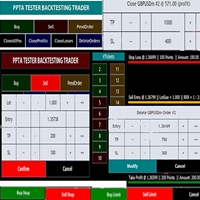
TESTER BACK TESTING AND TRADING MANAGER THE ONLY MT5 TOOL YOU CAN USE FOR BOTH LIVE TRADING AND BACKTESTING All functions can be used in both live trading and backtesting in MT5 Strategy Tester. This is one tool with many functionalities. Your ONLY tool for both trade management (live trading) and Backtesting in MQL5 Strategy Tester. The Tester Backtesting and Trading Manager can help you: 1. Trade Orders: a. Open Market Execution Orders (Buy or Sell)
b. Open Pending Orders (Buy Limit, Buy Stop
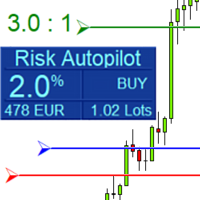
Maximize Your Trading Precision and Risk Management This unparalleled plugin ensures you trade at your desired risk level with automated precision, setting a new standard in efficient trading execution.
Exclusive Offer Limited time opportunity! Get this cutting-edge plugin for only $89 instead of $149 (Offer ends on October 31, 2025). Boost your trading potential now. This special discount won't last!
Streamlined Process 'Risk Autopilot Buttons' streamlines the process of setting StopLo
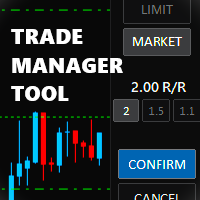
Trade Manager Tool uses adjustable lines displayed on your chart to let you prepare and visualize your order's entry, stop loss and take profit levels before you open a position. It will then use these levels along with your choice of maximum risk preset in order to calculate your optimal position size before sending the order to your broker. While providing an invaluable advantage to manual traders looking to control their risk and simplify their trading process, it also informs their deci

Risk-o-meter is a Risk calculator Panel designed to help people who are new to trading, better understand how much they are risking for potential profit or loss. And also place future orders. Premium Fetaure: 1. Set pending order 2. Set Profit in Cash (RR)
Inputs: 1. Enter your Risk in % or currency 2. Enter your Return Ratio 3. Enter your Lot Size
Results: 1. SL line 2. TP Line
Features: 1. By moving the SL line, lot size will adjust to keep Risk fixed. 2. By moving the TP line, Risk Ration

风险回报率管理器是一款可视化订单管理工具和头寸规模计算器,旨在支持严谨的交易和专业的风险管理。它允许交易者直接在图表上直观地设置入场、止损和止盈水平,并在下单前自动计算交易手数和风险回报率。该工具有助于标准化交易准备,并确保每个仓位都以预先设定且可控的风险水平开仓。 该工具适用于多种交易工具,包括货币对、指数、金属、大宗商品和加密货币。它既适合手动交易者,也适合注重策略、对每个仓位都应用风险管理规则的交易者。通过减少计算时间并避免手动错误,该工具可帮助交易者在执行过程中保持一致性和清晰度。 风险回报率经理 安装和输入指南 如果您想获取有关 EA 的通知,请添加 URL ( http://www.betasoft.dev ) MT4/MT5 终端(见截图)。 MT4版本 https://www.mql5.com/en/market/product/110797 MT5版本 https://www.mql5.com/en/market/product/110798 主要特点
可视化交易规划:该工具在图表上显示入场点、止损点和止盈点。这种可视化方法可帮助交易者在执行前查看

Anti Grid Position Protector 是一款实用工具,旨在保护您免受诱惑,为希望回撤而增加亏损头寸,或在无意时尝试对冲。
--------------------------输入------------------------ ---- 允许对冲亏损头寸吗? - 这是一个真/假输入 (双击切换其值), 允许/禁止 在现有 亏损 头寸(同一交易品种)上以 相反方向开仓交易(挂单或市场执行) 识别“亏损”头寸的方法 - 两种选择( 止损 和 盈亏 )。通过选择“止损”,如果运行头寸的止损位于亏损区域,则该工具将不允许您进行新交易,除非止损追踪到盈亏平衡水平。同样,通过选择“PnL”,该工具将不允许您以同一交易品种开立新交易,除非浮动头寸处于盈利状态 (> $0) 发送移动通知: 如果“true”,EA 将通过您的移动 MT5 应用程序向您发送通知。确保您已将其与计算机的终端连接。 终端警报: 如果为“true”,则当新模式形成或交易订单出现错误时,EA 将在新窗口中发送警报。 在日志上打印: 如果为“true”,EA 将在终端的“日志”选项卡中打印。这是

The SCT(Smart Candle Trigger) mt5 is designed for the manual trader who needs assistance to open and manage orders in defined SUPPLY and DEMAND zones. Trader based on his/her strategy define zones on the charts and SCT will open positions based on candle confirmation of Engulf and PinBar once price come into trader zones. SCT works on all kinds of symbols: currency pairs, indices, metals, commodities, cryptocurrencies, etc. Benefits Save trader time and energy to follow candles of market for co

ATTENTION: the utility cannot work in the Strategy Tester, if you want to try the demo version for free for a week, or have any questions, write me an email! You can find my address on my user profile.
TrendLine Auto Executor is a software capable of identifying the trendlines you have drawn on the chart and opening orders as soon as they are touched or exceeded. The software allows you to manage two orders at a time for each chart by tracking two groups of trendlines, one for each order, and e
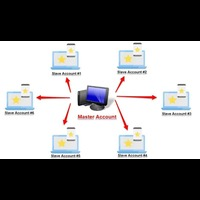
Forex Trade copier MT5. It copies forex trades, positions, orders from any accounts to any other account, MT5 even multiple accounts. The unique copying algorithm exactly copies all trades from the master account to your client account. It is also noted for its high operation speed and Tough error handling. It also can copy from demo account to live account too. It is one of the best free trade copiers that can do , MT5 or to multiple accounts MT5 to multiple accounts Features of Trade Copi
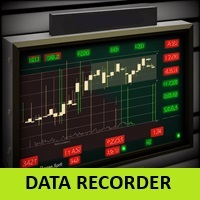
实时滴答声和1分钟数据导出记录器
不幸的是,您经纪商的历史价格数据不准确,这意味着存在数据缺失(缺口)、价格不正确,这会导致回测结果不正确。
数据记录器将可选的刻度/1 分钟数据或两者实时单独保存在 CSV 文件中。每月一份文件。
全部采用 MT5 格式,以便可以轻松导入这些数据,以创建具有来自经纪商的准确数据和真实点差的自定义交易品种,以进行回测。
只需将指标添加到您想要记录的 1 分钟图表中,选择重新编码模式即可开始记录。
如果您还有任何其他问题或要求,我将很乐意随时为您提供帮助。
实时滴答声和1分钟数据导出记录器
不幸的是,您经纪商的历史价格数据不准确,这意味着存在数据缺失(缺口)、价格不正确,这会导致回测结果不正确。
数据记录器将可选的刻度/1 分钟数据或两者实时单独保存在 CSV 文件中。每月一份文件。
全部采用 MT5 格式,以便可以轻松导入这些数据,以创建具有来自经纪商的准确数据和真实点差的自定义交易品种,以进行回测。
只需将指标添加到您想要记录的 1 分钟图表中,选择重新编码模式即可开始记录。
如果您还有任何其他问题或要求,我将很乐意随时为您提供

I'm proudly introducing "Spread Eliminator" - Your Ultimate Solution against High Spreads in Forex Trading! Are you tired of hitting Stop Losses or having pending orders triggered at a bad price due to high spreads while trading? All this is now over with our revolutionary EA , Spread Eliminator! Can be used on Prop Firms that enforce high overnight spreads and/or high spreads during high volatile market conditions. Key Features: Smart Spread Monitoring: Spread Eliminator constantly monitors mar

Risk Management Tool - Multi symbols: any symbol you want to manage - Manage manual orders / orders by EA - Limit spread - Open order by timeframe: 1m, 5m, 15m, 30m... - Auto set SL/TP by point range - Close orders by symbol - DCA / Martin option - Limit lot for DCA - Martin feature - Close all order when reach drawdown limit - Can set trading time: open hour - close hour - disable on Friday/Monday

Auto Trailing Assistant (ATA) - Revolutionary Forex Trade Management Utility Core Capability Auto Trailing Assistant is a sophisticated Meta Trader utility that helps traders automatically manage and optimize trading positions with unparalleled precision and flexibility. With its comprehensive set of features, this powerful tool enables traders determine minimum guaranteed profits for each position, displayed very colourfully on the Chart of your Meta Trader. Flexible Position Target

A simple script that closes all current orders.
Terminate once close all positions, so no worries about constantly closing your order.
How to use :
Drag the script from the navigator to the chart, and it will be activated.
Do remember to enable algo trading to use this script.
There are different version of the script that can choose whether to close all buy/sell posiitons, if you need this, do contact me in MQL5.

**MT5** Elevate your risk management game with Equity Savior, the go-to Expert Advisor designed to safeguard your equity during prop firm challenges. This powerful yet user-friendly tool lets you choose your preferred trading session, set a maximum lot size, and establish a daily trade limit effortlessly. Key Features: Session Selection: Tailor your trading approach by selecting specific sessions, aligning with your strategy and prop firm challenge requirements. Max Lot Size Control: Take co

A simple script to remove all indicators from the current chart/ all charts.
How to use: Simply double-click the script, choose either delete all indicators from this chart or all charts, and all is set.
Terminate once perform the deletion, so don't worry about constantly deleting your setup indicator.
Thanks for purchasing, wish you happy trading, thanks!
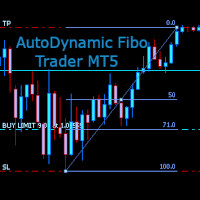
AutoDynamic Fibo Trader is a simple utility that allows the user to place a buy or sell limit or order based on the last fibonacci object drawn on the chart. This is to help the user to significantly reduce the amount of time the user takes to place a trade. All you need to do is draw a fib object with the low and high levels of where you want your stop loss and take profit to be, and decide where an entry level should be by specifying a fibo percentage level. The utility will automatically r

Expert Starco Assistance is designed as a trading assistant and will perform the best performance and most accurate calculations for capital management for your trades.
Features of this expert:
Candle closing timer
The possibility of determining the placement of the profit limit
Ability to calculate volume based on fixed amount, percentage, fixed amount
The possibility of opening a trade in the form of market or limit or stop limit

Crypto Ticks for MetaTrader 5 – 实时加密货币行情与订单簿集成 概述
Crypto Ticks 可将主要加密货币交易所的实时逐笔数据和订单簿深度直接传输至 MetaTrader 5。专为需要精准行情的高频交易者与算法策略开发者设计。 支持的交易所 Binance:现货 和期货 KuCoin:现货和期货(支持图表订单簿) Bybit:期货和反向期货 XT.com:现货和期货 主要功能 WebSocket 实时逐笔数据流 支持 Binance 数据流:@ticker、@bookTicker 使用交易所 API 获取完整 OHLCV 历史数据 订单簿深度可视化(买一/卖一+深度) 自动重连机制确保稳定数据流 定时替换数据提高K线准确性 MT5 重启时自动补全历史数据 与 Strategy Tester 兼容(基于逐笔数据) 完全兼容 VPS,无需外部 DLL 附加信息
适合需要高精度数据的高频与算法交易者
适合策略开发与逐笔回测 重要提示
MT5 的 Strategy Tester 不支持 WebRequest。
如需试用版本,请通过 MQL5 私信联系作

Smart Manager Dashboard - with auto virtual TP and auto virtual SL for all trades. [Converted from MT4 version - All screenshots are from MT4]
-this EA is a powerful trade manager that can manage all symbols and all trades at once , all from one chart so it is a must have tool for every trader who keeps more trades at once. -it mainly does 2 things : INFO ABOUT TRADES and CLOSING TRADES (grouped by their symbol, so with this tool it is very easy and fast to manage even hundreds

Position Manager serves as an expert advisor (EA) designed to enhance your trading experience by providing a user-friendly panel for intuitive management of your positions. This tool empowers you with a seamless interface, allowing for efficient handling of trades and improved control over your trading positions. The primary objective of Position Manager is to simplify and streamline the management of your positions, enabling you to make informed decisions with ease. Through its intuitive design

Welcome! We are delighted to introduce our latest expert, which is a semi-automatic trading system that includes all the features you need for position management. Simply draw a line on a significant trend or supply-demand level, and the expert will take care of the rest for you. It comes with a wide range of risk management and position management tools, such as trailing stop, partial closure, break even, determination of stop loss and take profit levels using ATR, as well as automatic lot sizi

Now, you have your very own SIMPLE LOT SIZE (POSITION SIZING) CALCULATOR ! There's no need to go to other websites just to compute for the exact lot size. It also opens the trade with a click of a button. All inputs on the calculator can be edited. So if you want to change the SL or TP or the lot size, you can do so before placing an order. ========================================== STOP LOSS . Stop loss in Pips (not points). Click on the SL Price text and it will change from green to red or r

Now, you have your very own PROP FIRM AUTO-CLOSER program! Once your account target or drawdown hits, all open orders will close automatically. “One mistake and your prop account is gone. Prop Firm Close All Orders for MT5 ensures that never happens.” All of your OPEN ORDERS will automatically close when: Your ACCOUNT TARGET is hit, OR Your specified ACCOUNT DRAWDOWN is hit, OR WEEKEND CLOSE is set and current time is already past the specified time, OR CLOSE ALL ORDERS button was clicked

Trading without consistent risk parameters is the fastest way to blow an account. Auto SL/TP/BE eliminates the execution gap between entering a trade and having your levels set. The instant a position opens — market order or triggered pending — the EA calculates and applies your predefined SL and TP based on the actual fill price. No delays, no missed trades, no manual errors. Break-Even Automation Once price moves a defined number of pips in your favor, the EA automatically shifts your Stop Los

Welcome to the Wolf Panel , an advanced MetaTrader 5 tool designed to enhance your trading experience. With its intuitive interface and powerful features, the Wolf Panel facilitates quick order entry, enabling traders to act promptly on market opportunities. Among its strengths, the Wolf Panel excels in providing constant control over profits and losses, allowing users to monitor the performance of their trades in real-time. Moreover, the indicator streamlines the closure of all orders at a pred
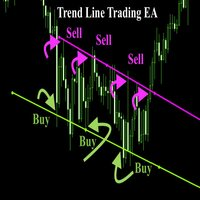
Trend Line Trade Assistant EA Semi-Automated Trading Assistant IMPORTANT : On the main/purchased program a user can click on the Trend line and change it to Buy or Sell, and drag by double clicking on it. Please keep in mind that this option is not available on demo version, due to some restrictions/limitations of Strategy Tester, some Object related operations are not available in the Strategy Tester. But, it will not prevent you from Testing, please drop an Object to chart and it wil

Horizontal Line Trade Assistant EA Semi-Automated Trading Assistant IMPORTANT : On the main/purchased program a user can click on the Horizontal line and change it to Buy or Sell, and drag by double clicking on it. Please keep in mind that this option is not available on demo version, due to some restrictions/limitations of Strategy Tester, some Object related operations are not available in the Strategy Tester. But, it will not prevent you from Testing, please drop an Object to chart

Indicador "MR BEAST - Detectador de Mejores Spikes" para el Índice CRASH 1000 (M1) El indicador "MR BEAST - Detectador de Mejores Spikes" es una herramienta especializada y altamente precisa diseñada exclusivamente para operar en el índice CRASH 1000, con un enfoque específico en el marco temporal de 1 minuto (M1). Desarrollado por el reconocido trader Mr. Beast, este indicador ha sido meticulosamente diseñado para identificar únicamente los mejores spikes, permitiendo a los operadores capitaliz

Indicador "MR BEAST - Detectador de Mejores Spikes" para el Índice CRASH 500(M1) El indicador "MR BEAST - Detectador de Mejores Spikes" es una herramienta especializada y altamente precisa diseñada exclusivamente para operar en el índice CRASH 1000, con un enfoque específico en el marco temporal de 1 minuto (M1). Desarrollado por el reconocido trader Mr. Beast, este indicador ha sido meticulosamente diseñado para identificar únicamente los mejores spikes, permitiendo a los operadores capitalizar

Indicador "MR BEAST - Detectador de Mejores Spikes" para el Índice CRASH 300(M1) El indicador "MR BEAST - Detectador de Mejores Spikes" es una herramienta especializada y altamente precisa diseñada exclusivamente para operar en el índice CRASH 1000, con un enfoque específico en el marco temporal de 1 minuto (M1). Desarrollado por el reconocido trader Mr. Beast, este indicador ha sido meticulosamente diseñado para identificar únicamente los mejores spikes, permitiendo a los operadores capitalizar

Indicador "MR BEAST - Detectador de Mejores Spikes" para el Índice BOOM1000 (M1) El indicador "MR BEAST - Detectador de Mejores Spikes" es una herramienta especializada y altamente precisa diseñada exclusivamente para operar en el índice CRASH 1000, con un enfoque específico en el marco temporal de 1 minuto (M1). Desarrollado por el reconocido trader Mr. Beast, este indicador ha sido meticulosamente diseñado para identificar únicamente los mejores spikes, permitiendo a los operadores capitalizar

Indicador "MR BEAST - Detectador de Mejores Spikes" para el Índice BOOM 500 (M1) El indicador "MR BEAST - Detectador de Mejores Spikes" es una herramienta especializada y altamente precisa diseñada exclusivamente para operar en el índice CRASH 1000, con un enfoque específico en el marco temporal de 1 minuto (M1). Desarrollado por el reconocido trader Mr. Beast, este indicador ha sido meticulosamente diseñado para identificar únicamente los mejores spikes, permitiendo a los operadores capitalizar

Indicador "MR BEAST - Detectador de Mejores Spikes" para el Índice BOOM 300 (M1) El indicador "MR BEAST - Detectador de Mejores Spikes" es una herramienta especializada y altamente precisa diseñada exclusivamente para operar en el índice CRASH 1000, con un enfoque específico en el marco temporal de 1 minuto (M1). Desarrollado por el reconocido trader Mr. Beast, este indicador ha sido meticulosamente diseñado para identificar únicamente los mejores spikes, permitiendo a los operadores capitalizar
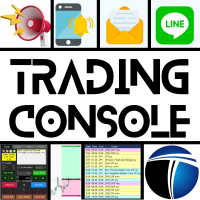
交易控制台:使您的交易体验更舒适 该应用无法在策略测试器中进行测试。
请从以下链接获取演示版本并进行测试。 Download DEMO ver. 这是用于演示帐户的。
1. 交易期间的功能: (1) 经济指标的显示和通知: 在经济指标发布前几分钟收到警报、推送通知和电子邮件。 在警报期间屏幕会闪烁,易于注意。 根据货币、关键词和指标重要性自定义通知。 指标按重要性进行颜色编码。 (2) 可视化的TP/SL订单: 在下单时以点数、pips和货币金额估算盈亏。 使用鼠标操作指定TP和SL值,可选择“固定RR值”或“单独更改”选项。 仅下TP、仅下SL或同时下单的选项。 支持市价订单(自动模式)、指定的止损订单和限价订单(手动模式)。 轻松修改多个仓位的TP和SL,显示盈亏估算。 (3) 自动手数(交易量)计算: 根据指定的保证金维持率计算最大手数。 以计算出的最大手数的分数或百分比计算单笔订单的手数。 也可以根据所需的保证金金额计算手数。 (4) 移动止损 (5) 止盈平仓: 通过添加指定的点数、pips或金额,在止盈值时接收通知或平仓。 (6) 结算时的批量操作: 无需等待服务器响应,

The utility is useful for those who are looking for an opportunity not to be present in front of the monitor while a pending order is being processed and closed. Using this utility, you can enter a pending order ticket, set a stop loss and calmly leave the terminal until its logical conclusion. If an order is opened, it will have 2 paths to profit or loss, and if the order is not opened and the scenario does not go according to plan, then upon reaching the price level where the stop loss of the

The Real Ticks Recording Indicator for MetaTrader 5 backtesting is a powerful tool designed to enable traders to simulate their trading strategies with utmost accuracy and realism. This indicator captures and stores real market ticks, allowing you to replay past market conditions with extreme fidelity, thereby enhancing the precision and reliability of strategy tests. Key Features: Real-Time Tick Capture: The indicator records each market price movement in real-time, ensuring an accurate represe
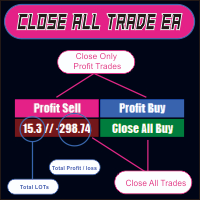
CLOSE ALL TRADE EA is made to make easy the traders instantly close the trades. FEATURES :
- CLOSE ALL TRADES : Traders can close ALL TRADES manually when reaching an AVERAGE PROFIT. Separated button for BUY and SELL trades. - CLOSE PROFIT TRADES : Traders can close PROFITABLE TRADES manually for increase the EQUITY and let the loss trade to reach a PROFIT. Separated button for BUY and SELL trades. - SHOW TOTAL LOSS / PROFIT : Traders will be informed about total LOSS / PROFIT for each BUY /
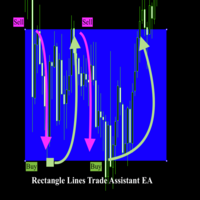
Rectangle line Trade Execution Assistant Rectangle Line Trade Assistant EA Semi-Automated Trading Assistant IMPORTANT : On the main/purchased program a user can click on the Rectangle line and move/ drag it around the chart, by double clicking on it. Please keep in mind that this option is not available on demo version, due to some restrictions/limitations of Strategy Tester, some Object related operations are not available in the Strategy Tester. But, it will not prevent you from Test

Introducing Risk Boss - master your trading with precision and ease! Elevate your trading strategy with Risk Boss, the most efficient tool designed to revolutionise your approach to risk management. With its intuitive design , it is all about setting you up for success and forget. You can go back on what matters most to you.
Features at a glance:
Seamless Order Creation: initiate pending orders with unparalleled precision. Risk Boss calculates the risk for you, ensuring each decision is inform

HYT(Help Your Trading)是一款帮助您对亏损持仓进行加仓操作的工具,支持两种主要策略: 标准加仓(Martingale); 对冲并顺势建仓。 该工具能够处理多个方向相反的订单,无论是买入还是卖出。 HYT 可自动计算下一笔订单的手数、挂单价格、加仓方向以及以设定的止盈水平平仓的逻辑。 此外,您还可以通过 Buy 和 Sell 按钮手动开仓,只需设置所需的止盈点位和初始手数。 使用方法非常简单:将工具拖入图表,设置止盈价格,点击 “Start Averaging” 按钮即可开始。 请确保初始订单手数不过大,并做好资金管理准备,因为在加仓过程中,工具会逐步增加持仓量。 HYT 同时具备自动交易功能。启用后,它将按照您设定的参数自动开平仓。 为什么选择 HYT 实用程序? HYT 是一款专为应对亏损局面而设计的智能工具,它通过系统化策略帮助您更有效地管理订单。无论是通过加仓,还是通过对冲后顺势开单,HYT 都能自动计算下单方向、手数和价格,协助您理性出场。 该工具支持混合持仓(买单和卖单同时存在)、可通过 Buy/Sell 按钮快速开仓、可设置止盈目标,同时也支持完全自动的

The script opens charts of all trading instruments that are listed in the Market Watch.
Convenient to use for choosing a trading instrument for intraday trading (and not only). MT4-version: https://www.mql5.com/en/market/product/113504 You can attach a pre-created template to each chart you open.
For an example of work, see the video for this post.
There are only two settings: Selection of timeframe; Template name. If you do not need to attach a template, you must leave the Name field em
功能介绍
本软件利用键盘快捷键来辅助短线操盘、快速刷单和组合下单,是短线操盘手的利器。 本软件支持快捷下单,批量平仓,批量挂单及平仓与开仓的组合交易,实现一键操作多个交易指令执行。 面对行情剧烈行情波动时,操盘手可从容应对,并快速准确的下单和平仓,让交易变的更简单。 适合人群 热爱交易并希望成为一名操盘手的人。 长时间盯盘,操盘风格为短平快的操盘手。 愿意提高短线操盘胜率并训练强大执行力的操盘手。 希望更加高效把握市场机会,并能快速且准确的执行交易指令的操盘手 安装和配置 先软件需要安装在Experts文件夹中。 在导航中刷新可显示本软件,然后双击在到图表。 输入参数中选择语言及界面主题。 主界面分两个标签栏目: 基本交易和组合交易。基本交易执行的是简单命令,组合交易执行多个命令捆绑。 设置要对应的交易参数之后,要选择启动,那么就按下对应的快捷键执行交易了。 修改快捷键和交易参数必须在非启用状态下,双击对应的表格单元填入参数,或者弹出下拉框选择。 快捷键列表
本软件支持的预设快捷键清单,包括买入、卖出、撤单等常见交易操作的快捷键。 双击快捷键弹出下拉框可以选择自定义快捷键,同时用

The M-Flow MFI (Money Flow Index) Scanner for MT5 is like having a super-smart buddy who keeps an eye on the markets for you, flagging up those overbought (>80) and oversold (<20) opportunities in real-time. It can also be used to spot divergences,which warn of a trend change in price.With the M-Flow Scanner, traders can swiftly identify potential trading opportunities.The scanner continuously monitors up to fifteen financial instruments in real-time,on five different timeframes, providing ins

Like you when I first started trading, It was overwhelming...learning about indicators, about lotsize, leverage and many more things. Its been almost 3 years. I am more knowledgeable in trading. My trading continues to improve as I work on my strategy, technical analysis, trading psychology and trade management. One thing I am not worried about though is being able to close my trades quicky if a trade goes against me or if the trade has reached my take profit level with the help of my Close Trad
I started of as a complete novice in trading not understanding what a pip was, not understanding leverage or how to factor in risk to manage my trades. Its been almost 3 years. I am more knowledgeable in trading. My trading continues to improve as I work on my strategy, technical analysis, trading psychology and risk management. One thing I am not worried about though is getting the right volume to match the risk for each trade. Not too long after I began trading, I learned how to code to make m

该系统提供每笔交易的精确风险计算和简便的RR(风险回报比)设置,同时一目了然地监控所有交易参数。通过一键执行简化新订单的开立,利用部分平仓、盈亏平衡和更多功能管理您的交易,全面控制每笔交易——集直观操作、丰富的自定义选项、闪电般的执行速度、精确的风险控制、持续开发和直接支持于一体。
您需要的一切: 安装指南 | 使用指南 | 演示版本
订单可视化 直接在图表上可视化显示入场价格、止损和止盈。精确规划新订单,在下单前一目了然地查看所有相关参数。用户友好的界面允许您根据个人需要单独显示或隐藏每个参数。
风险管理 风险计算系统根据您设定的风险和止损距离自动计算订单手数。设置任意止损距离——您的风险保持不变。以百分比(0-100%)或固定手数定义您的风险。在设置中选择计算方式:余额百分比、净值百分比或固定手数。 通过拖放便捷调整风险回报比(RR)。设定的比率自动定义止盈和止损之间的关系。根据风险设置您的盈利目标——例如,1:1表示相等的SL和TP,1:2表示两倍的止盈。
订单执行 从六种订单类型中选择:两种即时执行订单(市价买入/卖出)和四种挂单(买入
超短线交易助手 一键快捷交易
base lot: 底手数 Market buy/sell: base lot * level1 times Spread free buy/sell: base lot * level2 times Custom distance buy/sell limit: base lot * level3 times
快捷键: Q - 市价买入 W - Bid价挂buy limit E - 指定距离挂buy limit R - 关buy单 A - 市价卖出 S - Ask价挂sell limit D - 指定距离挂sell F - 关sell单 C - Hedge close all并清理未成交 P - 移动Stat Pannel到上一次鼠标点击的位置 风控:
止损(取最严苛者) 指定距离 base lot最大亏损金额 该单total lot最大亏损金额 最大单边 - maxOrders: 包含在仓单和未成交
统计: 只统计本交易日所累计 只统计当前symbol 显示spread 显示pending距离

Rayert - утилита, позволяющая расставлять уведомления на необходимых уровнях. Уведомления происходят как в самом терминале, так и на мобильныйх устройствах путем Push уведомлений. Варианты использования Разметка ликвидности на графике и реагирование при сборе ликвидности. Устанвока уведомлений на уровнях приняти решений. Настройка Можно указать различные цвета линий выше и ниже свечи, до пересечения ценой и после пересечения соответственно. Рисование линий на переднем или заднем фоне. Примагничи

Introducing our advanced MT5 Trade Manager – an indispensable tool tailored for astute traders employing the martingale strategy and executing multiple trades on a single chart. Key Features:
Effortless Lot Size Management: Streamline your trading process with intuitive and rapid lot size adjustments through simple mouse clicks. One-Click Trade Management: Close all trades or selectively close profitable ones with unparalleled ease, enhancing efficiency and saving valuable time. Comprehensive S

Automated Report Generator for the Spanish Treasury
This utility allows you to generate automated reports for the Spanish treasury with several advantages: A detailed report is generated in an HTML file in the MetaTrader 5 base directory. This report includes all operations individually. For accounts nominated in another currency, the report will automatically generate a profit column in euros using the same broker data. Profits in other currencies will be accounted for as indicated by the Spa
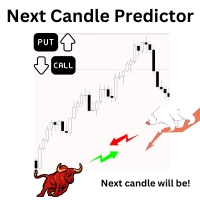
Introduction Our system is more than just a tool—it’s your personal guide in the dynamic trading landscape. Expertly developed and optimized using advanced strategies, this groundbreaking predictor gives traders a powerful edge. It’s not just about the features; it’s about a trading journey that stands out from the crowd. Get ready for an enhanced trading experience like never before! What It Does Next Candle Prediction: Imagine gaining insights into the market’s next move before it happens. Our

Automated Report Generator for the Spanish Treasury. Modelo 720.
This utility allows you to generate a panel report with the information necessary to fill out the Spanish tax form 720 form.
You just have to load this utility on any graph and timeframe, once the report and panel have been generated, the EA will close automatically.
This includes: Current account balance in the reference currency Calculated balance as of December 31, 20XX in the reference currency Total movements between Octob

This tool will help you calculate position size based on the lines that you draw on the chart. It will automatically create the trading setup in the background and provide adaptive buttons for market and pending order confirmation. The design is very simple and straightforward, with just a single click you will be able to place the trading setup. Features Set your risk based on your predefined amount or percent of your account balance. Drag the lines to define the entry, take profit target and s

Easy EA for closing positions with profit or loss. All positions of chart's symbol are counted separately.
Settings: TPforSymbol — set profit amount to indicate when to close every positions for the symbol of the chart. Swap and commission are decreasing your profit. SLforSymbol — set SL amount to indicate SL for every positions for the symbol of the chart. Swap and commission are increasing your loss. SLforSyblol is always below/equal zero.

The Co-Pilot is a simple trade management system designed to be the quickest way from your strategy to the market. It is optimized for single trade setups that might be short, medium or long term. The program allows you to set your trade setup directly from the chart using graphical objects, set your risk apetite and even provides oppurtunity for partial closes. It also has a built in alert system that keeps you informed on the actions taken by the copilot when youre offline.
It is designed to b

购买前的重要信息 提供完整演示版本 – 可在真实市场中测试
Trade Board MT5 提供完整功能的演示版本,交易者可以下载并使用模拟账户在真实市场环境中直接测试,且没有任何功能限制。在 Strategy Tester 中测试交易辅助工具无法提供真实的执行行为,因此我们强烈建议下载演示版本并在真实市场条件下测试产品,以体验其真实表现。 只需 联系我 即可获取用于真实测试的演示版本 加入 mql5 社区中的 Koala Trading Solution 频道 ,了解我所有产品的最新消息。 该产品的 MT4 版本可用 : 下载 Trade Board MT5 是一款高级交易辅助工具和交易管理面板,专为需要更快执行速度、更智能风险控制以及更好交易组织,同时不遮挡图表视图的 MetaTrader 5 交易者设计。 该产品是在详细分析市场上现有交易辅助工具后设计开发的。我们保留了它们的优点,并移除了常见的易用性问题。最终形成了一个简洁、高度用户友好且高效的交易界面,适合专业交易者和零售交易者。 交易管理功能
高级交易入场控制
使用固定手数开仓 基于风险金额和止损距离自动计算

"Coding and setting up automated processes can be complex and time-consuming. However, with our tool, you can streamline this process effortlessly. Once set up, it seamlessly integrates with MetaTrader 5, enabling automatic transmission of all your positions to your designated Telegram channel. This means you can focus on your trading strategies without the hassle of manually updating your positions on Telegram. Whether you're managing multiple positions or executing trades frequently, our tool

DYJ GameDevice 是一种实用工具软件,具有图形界面操作,它含有手动开仓和快速关仓按钮或者手机开仓,同时它接收DYJ特定指标信号源信号来实现自动开仓和平仓, 您可以按5大类策略方法跟单 趋势模式:接受每日收盘时市场派送给每一位交易者的盈亏比。实际操作每次1单,每次固定手数例如1手或0.01手等,同步信号源的开仓和关仓。所有利润参数均设置很大或者无限大,该模式对存款要求不算高,但需要您具备良好的心理素质应对一时的亏损。 对抗模式:在第1条基础上,加入博弈策略(扭亏为盈,使其达到99%的赢率),中途可能会有多个开仓出现,博弈策略需要适当存款支持。 网格马丁:在第1条基础上,加入网格、马丁策略,固定交易量,并设置好利润追踪和利润封顶金额参数,同步信号源开仓后会按指定金额快进快出,利润快速翻倍。 倍投策略:在第1或3基础上,加交易量倍投策略,利润将随倍投比例暴力增长,倍投时交易量自动按最新余额增减。 在第3条基础上,加入博弈策略,使其网格,马丁的每一节点订单都受到博弈策略的保护! 大大增加马丁网格的安全性,降低爆仓风险 DYJ GameDevice 可以显示单个信号源的指示器的名称和

交易复制器 - 投资者密码 - 复制交易 - MT4 x MT5 跨平台
注意:您需要在客户账户所跟随的主账户上安装“Mirror Copier Master”,并在跟随主账户的客户账户上安装“Mirror Copier Client”
博客: https://www.mql5.com/en/blogs/post/756897
工作原理:
https://www.youtube.com/watch?v=V7FNpuzrg5M
MT4 版本
主账户: https://www.mql5.com/en/market/product/114774
客户端: https://www.mql5.com/en/market/product/114843
MT5 版本
主账户: https://www.mql5.com/en/market/product/114775
客户端: https://www.mql5.com/en/market/product/114844
“Mirror Copier”EA 是一款功能强大的工具,旨在实现不同 MetaTrader(MT4 或 MT

This expert basically copies all trades from a prop trading account to a private live account (Master Slave Copier). USP! What it makes unique is the fact, that this EA can revert the trades and calculate orignal lots in way, that you earn money for every lost prop firm challange trade. For example: If you lose a 100K challange and you paid 500$ for it, the EA recovers those losses on your private live account. If you win the challange, sure, you lost around 500$ on your private live account b

GLX1 Renko Builder Expert Advisor (EA) can create the Renko bar charts on any symbol. The Renko charts are generated as real-time custom symbol charts which can be further used for technical analysis with any MT5 compatible indicator.
Find the free GLX1 Renko Euro Expert Advisor from here. https://www.mql5.com/en/market/product/115074
Included Features:
Truly responsive Renko Charting on a custom symbol chart Accurate automatic live chart update Ability to attach any MT5 indicator Abi
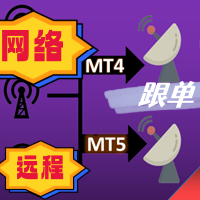
最友好的跟单交互界面,最丰富的易用功能,最优跟单方案. \
远程跟单版本!!!!! 需要找作者索要服务器身份ID
EASY :简单使用,加载选择信号源或者接收端即可简单使用 FAST: 快速复制订单,算法最优跟单机制,优先计算新信号,优先队列处理接收到特殊信号 Multiple: 1.支持多信号同时发送,多账户同时选择多个账户复制 2.多平台支持,MT4 和MT5互通.(需安装MT4和MT5) Powerful :强大的功能,你可以找到市面上没有的功能 . .支持 减仓 ,支持手动 订单绑定信号订单 上....提供各种 过滤以及指定个性化设置( 给每个信号源或者品种分别制定跟单方案 ) ... [支持 中文,英文 ] 增加大手数分单功能 (应用场景,需要跟单较大手数,手数超出平台上限,也可以自己设置的上限,一般应用前者,分单会造成不必要的跟单性能开销,当达到平台单笔手数上限可以分单进行) 增加多种跟单内核, ①传统的强映射强绑定方式 ②可以支持设置MAGIC为0 模拟人工开单 ③可以


Утилита работает на основе двух индикаторов Moving Average 100 и Stochastic (10/3/3). Как только сформировался выгодный сигнал, данный утилита пришлет сигнал в телеграм, который будет содержать актуальный скриншот, тип сделки, а так же две кнопки с возможностью войти в сделку или же отклонить сигнал. Утилита анализирует сразу все валютные пары. Помимо всего прочего утилита открывает сделку исходя из основ манименеджмента, устанавливает стоп лосс и тейк профит.
Подробнее смотрите в нашем телегр

Smart Trade Manager for Layering & BE This trading tool automates trade management by handling entry positions, Break-Even (BE), and Take Profit (TP) dynamically. It allows traders to layer trades and protect their profits without manual intervention. Key Features: Secure profits automatically by setting BE once a trade reaches profit. Distribute trade volume across multiple entries to average the price. Set multiple TP targets to scale out of positions efficiently. Use tick

Expert Description: Equity Profits EA ( Mt5 Version )
Overview: Hello everyone, I am back with a new and updated version of " Equity Profits EA ", but this time for MetaTrader 5.
Yes, the same utility Expert Advisor has been created before for MetaTrader 4.
You can find the explanation of how the Expert Advisor works and all the details in the following link: [Link] https://www.mql5.com/en/market/product/105174?source=Site +Market+Product+Page
Inputs Parameter:
input autoEquity_profits =

Description: Dimatis Sniper is a convenient tool designed to simplify order placement and risk evaluation for traders. By displaying the risk amount directly on the screen, this tool allows traders to assess risk in real-time, facilitating informed decision-making before executing transactions. Key Features: Real-Time Risk Assessment: Evaluate the risk associated with each transaction instantly on your screen, facilitating informed decision-making. Visual Representation of Risks: Use intuitive v
您知道为什么MetaTrader市场是出售交易策略和技术指标的最佳场所吗?不需要广告或软件保护,没有支付的麻烦。一切都在MetaTrader市场提供。
