 MetaTrader 5
 专家
专家
 指标
指标
 程序库
程序库
 实用工具
实用工具
 窗口小部件
窗口小部件
 规则
规则
全新的MetaTrader 5 交易实用工具 - 63
 以下是可在MetaTrader 5中简化交易的交易程序。将鼠标悬停在一个工具上,阅读它的描述和用途。
Copiador – La Mejor Herramienta para Copiar Operaciones en MetaTrader 4 Este no es un simple copiador de operaciones que únicamente permite copiar transacciones de forma local entre diferentes cuentas de MetaTrader 4 en cualquier dirección y cantidad. ¡Por supuesto que lo hace! ¡Pero Copiador hace mucho más! Descubre sus características y beneficios a continuación FUNCIONALIDADES DESTACADAS: Copiado entre brokers diferentes : Puedes copiar operaciones desde una cuenta e

GT No Trading Zone – Smart Trade Restriction for Enhanced Risk Management Overview The GT No Trading Zone indicator is a powerful tool designed for traders who want to implement structured trade restrictions during specific time intervals. This is ideal for avoiding high-risk periods, such as news releases, market opens/closes, or any other predefined time frames where trading may be unfavorable. With GT No Trading Zone , you can:
Define up to 5 custom no-trade periods during the day.
Automa
FREE

EA one click innesta was born with the purpose of helping traders to be more convenient and faster in transactions. There are functions that operate like oneclick with buying or selling positions with market orders, with pending orders, setting quick stoploss for all positions, total volume, closing orders quickly Close all oneclick. Calculate risks converted to USD for all positions. EA manages the trade orders magically to be able to run for many different assets. I am running with BTCUSD
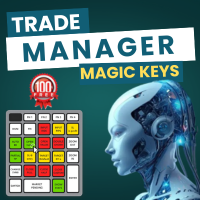
Crystal Trade Manager – 全能交易控制中心 概述
Crystal Trade Manager (CTM) 是一款 MetaTrader 5 风险管理与即时交易执行工具。集成风险保护、自动化和交易控制,适合手动交易者、挑战 prop firm 的交易者以及 专业资金管理者。 核心功能 风险保护 :每日回撤限制 (1–70%) ,自 动平仓,挂单删除,每日锁定 (FTMO 规则兼容 ) 。 盈 亏目 标 :自 动平仓达到的利润 / 亏 损目标。 自 动 SL/TP :新 订单自动附加 SL/TP 。 保本保 护 :到达盈利后自 动移动至 BE+ 缓冲。 移 动止损 : 动态跟随止损。 手数控制 : 设定最大手数,超出自动部分 / 全部平 仓。 快捷操作面板 : 6 个按 钮 ( 平 50% , 转 BE ,平全部, 删挂单,加倍仓位, Profit Shield) 。 信息面板 :余 额、净值、浮盈亏、当日盈亏 % 、 风险暴露、回撤。 通知系 统 :横幅、推送、声音提醒。 安全 逻辑 : 检测锁仓违规, pip 精度,重启恢复。 适用人群 Prop firm 交
FREE

Goldmine Train MT5:釋放自動化黃金交易的力量 使用 Goldmine Train MT5 徹底改變您的黃金交易。這是一款專為 MetaTrader 5 精心打造的高級專家顧問 (EA)。該強大工具利用尖端算法識別並捕捉高概率的黃金交易機會,提供穩定的業績並最大化您的獲利潛力。 為什麼選擇 Goldmine Train MT5? 精準進出場: Goldmine Train MT5 融合了獨特的技術指標和價格行為分析,精確定位最佳進出場點,確保您始終擁有交易優勢。 強大的風險管理: 內置智能風險管理功能,保護您的資金安全,自動調整手數並執行止損訂單,為您的投資保駕護航。 適應性市場策略: 我們的 EA 旨在適應不斷變化的市場環境,在趨勢和震盪的黃金市場中均能表現出色。其動態方法確保了持續的盈利能力。 經過回測驗證: Goldmine Train MT5 經過了多種歷史數據的嚴格回測,證明了其在長期運行中的可靠性和盈利能力。 用戶友好型設置: 直觀的設置流程讓您快速上手。Goldmine Train MT5 適合所有經驗水平的交易者,從新手到專業人士皆可輕鬆使用。 核心功能

The trading limiter that stops you from breaking your own daily loss and trade limits.
• Please test the product in the Strategy Tester before purchasing to understand how it works.
• If you face any issues, contact me via private message—I’m always available to help.
• After purchase, send me a screenshot of your order to receive a FREE EA as a gift. Auto Screenshot Utility - The Ultimate Trading Session Tracker & Screenshot Tool Revolutionize Your Trading Documentation with Precision Tim
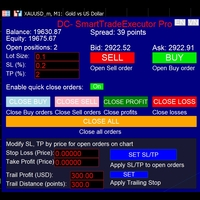
"If I had six hours to chop down a tree, I would spend the first four sharpening the axe." – Abraham Lincoln Entering the financial market means competing against the sharpest minds on the planet. As an amateur trader, what do you have besides your phone and… sheer guts? Do you think you can beat them without a powerful secret weapon? DC-SmartTradeExecutor Pro – The ultimate control center for lightning-fast and seamless trading. News trading is a speed race – You can’t afford to be

Hi Trade EA is an EA facilitating hand trading. Hi Trader EA is a trading assistant EA, not an automatic order placing EA. If you want to Backtest the functionality, please download the MT4 version for testing. Features of EAs Fix Lot will open positions based on the lot size specified by the user. Risk will calculate the lot size based on the percentage of the account balance, considering the distance from the open price to the Stop Loss. Therefore, a Stop Loss value greater than zero is requir

---
**Expert for managing manual trades**, allowing you to set a **Take Profit** and **Stop Loss** directly in the settings, expressed either in points or as a percentage. Additionally, there’s an option to immediately configure a **trailing stop** in points.
On the panel, alongside the buttons to open **long** and **short** positions, there are also buttons to **increase or decrease the lot size**. Furthermore, from the settings, you can define the **step size** for lot increase and decreas
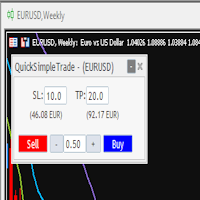
Quick Simple Trade is a very simple order panel for MT5 to quickly open a trade specifyng Stop Loss and Take Profit calculating and showing the price values. The panel can be also minimized to not interfere with the chart. When the order is open you can instantly move SL and TP directly on the chart. It makes up for one of the shortcomings of MT5, which I find most annoying.

Advanced Trade Mirror is a powerful Forex tool designed for traders who need instant, seamless trade replication across multiple terminals on the same machine. With lightning-fast execution, it ensures zero lag in copying trades, maintaining precision and efficiency in high-speed trading environments.
Get the Trade Mirror Follower here: https://www.mql5.com/en/market/product/133890 Specification:
Master ID: Identity value of master terminal, please use a unique value to prevent duplicated mas
FREE

Advanced Trade Mirror is a powerful Forex tool designed for traders who need instant, seamless trade replication across multiple terminals on the same machine. With lightning-fast execution, it ensures zero lag in copying trades, maintaining precision and efficiency in high-speed trading environments. Get the Trade Mirror Master here: https://www.mql5.com/en/market/product/133891
Specification:
Master ID: Identity value of master terminal, please use a unique value to prevent duplicated mas
FREE

This is a versatile tool designed to help traders analyze their trading performance on a MT5 account. It provides a detailed of profit, allowing users to review their overall account performance or filter trades based on specific criteria. With this tool, traders can: Check total profit across all trades. Filter by a single Magic Number or multiple Magic Numbers (enter directly, separated by ",") Analyze individual symbols or a custom set of symbols to evaluate different market instruments (
FREE

• Please test the product in the Strategy Tester before purchasing to understand how it works.
• If you face any issues, contact me via private message—I’m always available to help.
• After purchase, send me a screenshot of your order to receive a FREE EA as a gift. Smart Forex Session & Motivation Tracker – The Ultimate Trading Assistant
Price: $30 Are you struggling to track global trading sessions and missing out on crucial market movements? Do you sometimes feel demotivated during your

• Please test the product in the Strategy Tester before purchasing to understand how it works.
• If you face any issues, contact me via private message—I’m always available to help.
• After purchase, send me a screenshot of your order to receive a FREE EA as a gift. Session High Low Tracker - Essential Multi-Session Price Analysis Tool
Powerful Market Session Analysis for Serious Traders
Price: $30 Product Overview
Session High Low Tracker is an advanced MetaTrader utility that automaticall

• Please test the product in the Strategy Tester before purchasing to understand how it works.
• If you face any issues, contact me via private message—I’m always available to help.
• After purchase, send me a screenshot of your order to receive a FREE EA as a gift. One-Click Trader Utility for MT5
Professional Trading at Your Fingertips
One-Click Trader Utility is a premium MT5 tool designed for active traders who need lightning-fast execution and real-time performance metrics. For just $3

• Please test the product in the Strategy Tester before purchasing to understand how it works.
• If you face any issues, contact me via private message—I’m always available to help.
• After purchase, send me a screenshot of your order to receive a FREE EA as a gift. SL-TP Manager Utility for MT5 - Professional Risk Management Tool
Advanced Position Protection & Profit Management
SL-TP Manager Utility is a powerful, intuitive tool designed for traders who want precise control over their risk
• Please test the product in the Strategy Tester before purchasing to understand how it works.
• If you face any issues, contact me via private message—I’m always available to help.
• After purchase, send me a screenshot of your order to receive a FREE EA as a gift. Hidden SL-TP Manager for MT5
Protect Your Trades from Stop Hunting with Invisible SL/TP Levels
Price: $30 USD What is Hidden SL-TP Manager?
Hidden SL-TP Manager is an advanced MetaTrader 5 utility that creates invisible stop los

Trending Gold is one of the straightforward tool to analysis the volatile market of Gold with demands precision, in-depth analysis, strong risk management and eliminating the need for constant market monitoring. Trending Gold will find the good trade position with precise risk management on all market conditions on Gold. Trending Gold plug-and-play functionality means you can get started with minimal effort, Simply install me and let me handle the rest. We will diligently monitor the market
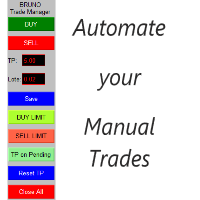
交易管理器 Bruno 可自动化您的手动交易。 注意: 参数已设置为两位小数的经纪商。如果您的经纪商使用三位小数,请不要忘记更新它们以确保正常功能。
您的持仓仍然开放,但您需要离开电脑?没问题!交易管理器将自动处理所有订单。 想要设置挂单来在市场走势不利于您的仓位时进行加仓?现在可以了!一旦触发,交易管理器会自动计算平均价格,并相应调整新的止盈目标。 通过便捷的操作,您可以在面板上直接输入新的止盈值(以点数计算)来调整订单的止盈水平。修改后,点击“保存”,然后点击“重置 TP”。交易管理器将为所有订单设定新的合并止盈目标。 在图表上特定点位放置挂单,使用 BUY LIMIT(买入限价)或 SELL LIMIT(卖出限价)订单。一旦触发,交易管理器将自动应用您的预设止盈。 更棒的是,想要增加更多挂单?完全可以!如果新的订单被触发且价格走势对您不利,您可以放心——当另一个挂单被激活时,交易管理器将自动计算平均价格,并根据预定的止盈目标一次性平仓所有订单。 使用“BUY”或“SELL”按钮立即执行市场订单。 “TP on Pending”按钮允许您在图表上放置带有预设止盈的挂单,非常适合首

Trade Algo 是一款革命性的工具,可简化和自动化以您期望的交易价格执行买卖订单的过程。
******************请至少阅读一次,因为几乎每个交易者都需要这个实用工具。 **********
问: 是什么让这款产品如此独特,或者它的独特销售主张 (USP) 是什么?
在案例 1 中: 假设一股的市场价格为 100,您想设置一个买入订单,只有当价格上涨至 110 以上时才会激活。目前,没有办法做到这一点。
在案例 2 中: 假设一股的市场价格为 100,您想设置一个卖出订单,当价格跌至 90 以下时才会触发。同样,现在没有选择这样做。
使用 Trade Algo ,您可以完成这两项任务!一旦您下了您想要的订单,它将在系统中保持活跃,直到满足您指定的所有条件。一旦满足所有条件,它将执行列表中的待处理买入或卖出订单。
使用 Trade Algo ,设置订单毫不费力 - 只需选择交易条件,输入执行价格、手数、止损和获利,然后按买入或卖出。 这个直观的平台允许您同时管理最多 5 个订单。 通过定期使用刷新列表按钮刷新订单列表,随时了解情况并掌控一切。使用 Trad

这个为MetaTrader 5设计的专家顾问(EA)旨在识别和通知交易者平均线图表上的趋势变化,为市场上的及时决策提供了一个有价值的工具。 主要特点: 平均线图表分析 :EA持续监控平均线图表,这种图表以能够平滑市场噪音和突出趋势而闻名。 趋势变化检测 :使用先进的算法来识别表明市场方向可能发生变化的蜡烛图模式。 多重警报系统 : MT5平台上的视觉和音频警报 向交易者的移动设备发送推送通知 通过Telegram发送即时消息 自定义功能 :允许调整参数,如要分析的时间框架、检测灵敏度和所需的警报类型。 低资源消耗 :经过优化,可以高效运行,不会减慢MT5平台的速度。 这个EA非常适合那些希望随时了解重大市场变化而无需不断监视屏幕的交易者。它通过多个渠道发送警报的能力确保用户永远不会错过重要的交易机会,从而提高他们的反应能力和盈利潜力。 平均线趋势变化检测器EA提供了技术分析和即时通信的无缝集成,使交易者能够根据实时市场动态做出明智的决策。无论您是日内交易者还是长期投资者,这个工具都可以通过提供有关潜在市场反转的及时洞察,显著增强您的交易策略。

以思维的速度交易,无需鼠标 最快的下单方式。 Magic Keyboard(MT5 工具)把普通键盘变成专业交易驾驶舱。不必再浪费时间把鼠标移到 "Buy" 按钮上,用方向键即可开仓、保护和平仓。 专为剥头皮和高频交易者设计,分秒必争。 默认快捷键 - 上箭头:立即买入(自动止损/止盈) - 下箭头:立即卖出(自动止损/止盈) - 右箭头:立即保本 - 左箭头:紧急按钮(立即平掉所有订单) 不喜欢方向键?可用按键代码把功能映射到任意键(空格、Enter、B、S 等)。 主要功能 1. 毫秒级执行:按下按键,订单即刻发送。 2. 自动保护:每笔订单立即设置止损和止盈。 3. 智能管理:自动保本和跟随价格的移动止损。 参数说明 - 按键代码(ASCII):Buy = 38(上),Sell = 40(下),Break-even = 39(右),Close All = 37(左)。空格 = 32。 - 手数、止盈和止损。 - Auto Break-even 和 Auto Trailing Stop(Stop、Step、Start)。 - Magic Number:0 = 手动订单;其他 EA

How many times have you failed a prop firm challenge, or how many real accounts have you broken? We know how painful and frustrating this problem is for traders. Emotions always force you to ignore your plan, make you want to take your anger out on the market, and your losses only increase. After so many bad experiences, you feel insecure, incapable, and afraid to try again. Yes, we've been there too. Today you've come to the right place. This is TraderLock!
How does it work?
In this Meta Trad
Introducing Auto Change , an Expert Advisor (EA) designed to automatically switch between charts according to the market watchlist. To use it, simply drag it onto the screen and confirm with "OK". Users can set the time interval in seconds for automatic chart switching and start the process by clicking "Start". For example, if a two-second interval is selected, the charts will switch automatically every two seconds. Additionally, the EA includes "Next" and "Back" buttons for manually advancing o
FREE

DC Invest Vip Trading Monitor Ver 1.09 Busy? No time to monitor orders? Don't let risks swallow your account! Whether you are a busy office worker or a shipper who is always on the go, constantly monitoring transactions on MetaTrader 5 (MT5) is almost impossible. But don't worry, DC Invest - VIP Trading Monitor will help you control your account and manage risks automatically! Calculate optimal order volume - No more worrying about placing orders that are too large or too small, the system au

Ranking Scalping allows you to quickly identify the best opportunities in the market, reducing analysis time and empowering your trading decisions. It is a robust and adaptable tool, ideal for traders looking to optimize their scalping and intraday strategies. With its automated analysis and clear visualization, discover how to maximize your opportunities and trade more efficiently with this innovative tool! Serie: Daytrading: Scalping & Intraday Top Symbols Analyzer General Description:
The "R
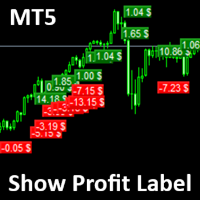
Show Label
Show your profit or loss next to the candle. This is a helpful tool if an EA don't have this feature build in. Support and questions via MQL5 product comments. For questions, updates, and to connect with other traders, join my official MQL5 group ForexEAandMore
Settings: Font color Background color for profits Background color for losses Font size Horizontal shift from candle (pixels) Vertical shift from candle high/low (pixels) Magic number filter (0 = all trades) Comment filter
FREE

The MetaTrader 5 script to set TP and SL for all positions during volatile market conditions in the current chart It is able to modify or close Key Features Absolute prices only
Leave as 0.0 if you don't want to change a particular value
No confirmation. The script executes immediately
Current symbol only. The script only affects positions in the chart the script is dragged to Use Cases Emergency exit
Risk management by changing SL and TP of all orders
FREE
Tools to open multiple positions/trades all at once?
We've created your easy solution.
You can now enter multiple positions at one time.
You can set you Lot size,
Number of positions,
Interval every open position,
Take profit, and stop loss
and trailing stop too.
an addition button for
Close All
Close All Profit
Close All Loss
Close All Sell
Close All Buy
For example: You want to buy 2, 4, 6 or any number of positions with a certain lot size, every 10 second. You can now do so by simply
Close ALL button for simply closing your trades. +Close all BUYS in profit button, for closing your trades that are in profit. Leaving the trades in a loss untouched. +Close all SELLS in profit button, for closing your trades that are in profit. Leaving the trades in a loss untouched. +Hide and unhide buttons. Easy for when you don't need them
Configurable options Option: Close All trades OR for current Symbol/Pair only Option: close pending orders Option: Edit button text Option: Locate button
FREE

The Manual Adjust SL/TP EA streamlines your risk management by enabling you to manually specify new SL and TP price levels for your open positions. The Levels is Price value and is NOT a pips or points distance from the Entry Levels. The EA automatically validates your inputs against the broker’s stop-level requirements (minimum distance) to prevent order adjustment rejections. It offers filtering options so you can choose to apply adjustments only to Buy orders, Sell orders, or both. Key Featur
FREE

Turn Economic Chaos into Consistent Opportunities
The financial markets move at the speed of news—miss a headline, and you miss a profit. Introducing the News Action AI Bot , a cutting-edge trading solution designed to capitalize on high-impact economic events with surgical precision. Built by traders, for traders, this bot combines real-time news analysis, AI-driven decision-making, and customizable risk management to transform volatility into your greatest advantage. Why This Bot Stands
FREE

Gold Adaptor – Your Ultimate Trading Edge! Tired of missing the perfect trade? Gold Adaptor does the heavy lifting for you! This powerful, precision-driven trading advisor scans the market in real-time, executing trades with unmatched accuracy. No more guesswork—just smart, adaptive strategy designed to keep you ahead of the game! Lightning-fast execution – Get in at the right moment, every time
Smart decision-making – Trades based on deep market analysis
Fully automated – Set it, fo
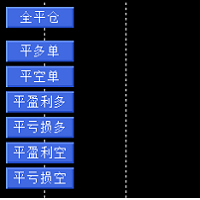
辅助交易多工能平他工具,细化管理仓位。工能有全部仓位平仓,平多仓,平空仓。平盈利多仓,平亏损多仓。平盈利空仓,平亏损空仓。 工能有全部仓位平仓,平多仓,平空仓。平盈利多仓,平亏损多仓。平盈利空仓,平亏损空仓。 工能有全部仓位平仓,平多仓,平空仓。平盈利多仓,平亏损多仓。平盈利空仓,平亏损空仓。 工能有全部仓位平仓,平多仓,平空仓。平盈利多仓,平亏损多仓。平盈利空仓,平亏损空仓。 工能有全部仓位平仓,平多仓,平空仓。平盈利多仓,平亏损多仓。平盈利空仓,平亏损空仓。 工能有全部仓位平仓,平多仓,平空仓。平盈利多仓,平亏损多仓。平盈利空仓,平亏损空仓。 工能有全部仓位平仓,平多仓,平空仓。平盈利多仓,平亏损多仓。平盈利空仓,平亏损空仓。

下一次更新 — 版本 2.52 即将推出![全新功能] 准备迎接 4 项重大新功能,全面提升您的市场分析能力与交易流程! 我们将通过 4 项全新功能,进一步提升市场分析水平,满足您的交易需求。现为您介绍: 1. TRADE OVERVIEW DASHBOARD 2. CONFLUENCE AT ZONE 3. STRONG & WEAK HIGH/LOW 4. OTE 1. TRADE OVERVIEW DASHBOARD 一个帮助您更轻松地了解整体市场状况的仪表盘,为您的交易决策提供参考指引,帮助您系统地分析市场并规划交易,所有信息尽在一个屏幕中。 多时间周期市场概览(Multi-Timeframe Market Overview) 更清晰地了解市场方向与价格结构 快速查看市场状况 为系统化市场分析和入场规划提供指引。 2. CONFLUENCE AT ZONE 当价格进入关键区域时……您将了解有多少项支持因素相互吻合。 关键区域是交易决策至关重要的地方。但仅仅是价格进入某个区域还不够。此功能可帮助您在入场交易前,识别相互吻合的因素,包括信号及其他相关因素,从而进行更全面的分析,并

每次交易都完美 – 为什么您需要这款交易助手EA 为什么这款EA是交易者的必备工具 交易讲究 时机、精准度和风险管理 。成功和失败的区别往往取决于您执行交易的 效率 以及如何管理风险。 这款EA旨在让交易变得 轻松无忧 ,确保每一笔交易 结构清晰、风险受控,并针对长期盈利进行优化 。 为什么这款EA是您的必备工具? 轻松执行交易 – 无需手动计算, 一键设置并执行交易 。
内置安全机制 – 防止误操作,限制风险,确保 您不会冒超出计划的风险 。
严格的风险控制 – 每笔交易 仅风险1%账户余额 ,防止无节制的仓位调整。
优化的风险回报比 (RR) – TP(止盈)自动计算 ,确保您的交易始终符合最佳风险收益比。
自动计算交易手数 – EA会 自动调整最佳交易手数 ,确保您的风险管理 始终一致 。
可视化交易确认 – 在执行交易前,您能 清楚地看到止损 (SL) 和止盈 (TP) 水平 ,避免意外错误。 这款EA 消除交易中的猜测 ,帮助您 保持纪律 ,并确保您的交易 始终受控且高效 。 如何使用这款交易助手EA 简单 & 安全的交易执行 与其他 立即
FREE
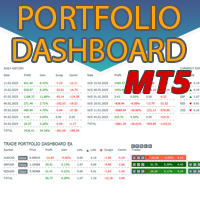
立即在一張圖表上查看按日和按週的已平倉交易歷史記錄、當前未平倉交易以及外匯風險敞口!使用熱圖來識別有利可圖的交易以及您交易組合中的當前虧損情況。
快速關閉按鈕 使用快速關閉按鈕可以關閉單一符號的每筆交易、全部關閉單筆交易,或點擊按鈕以取得部分利潤或損失。不再需要在清單中尋找交易並研究如何關閉部分交易。儀表板還會顯示您在交易外匯對時目前對每種貨幣符號的風險敞口,這可以幫助您識別重大新聞事件發生前可能過度暴露的領域。您可以使用按鈕在新聞發布前立即快速降低您的風險,或者如果新聞已經發生並為您帶來利潤,只需單擊即可快速獲得該利潤!
開放交易熱圖 交易熱圖是一種視覺化工具,專為使用頭寸交易或波段交易策略的交易者設計,使用美元成本平均法來擴大和縮小交易規模。您可以快速識別您的投資組合中可以存入的單一交易,以及您可以部分平倉的虧損交易。只需使用全部或部分關閉按鈕即可立即賺錢並降低風險。
快速識別控制回撤的機會 虧損控制切換「D 按鈕」將突出顯示您的投資組合中所有虧損高於每個交易符號平均價格的交易。這是透過在所有符號的單一交易周圍添加一個矩形來實現的,這樣您就可以看到首先要關注哪些交易。 這使

Simple Trade Terminal Simple Trade Terminal is a compact and performance-optimized on-chart panel for MetaTrader 5. It solves two of the biggest friction points in manual trading: time-consuming lot size calculations and inaccurate placement of Stop-Loss and Take-Profit levels. Instead of typing numbers into standard order masks, you plan your trade visually directly on the chart. The panel automatically calculates your exact position size based on your predefined risk and executes the order. Th
FREE

对于专业交易员和新手交易员来说,能够根据给定的止损水平立即计算仓位大小或风险的工具至关重要。
TRADE PRO 交易工具提供快速准确的计算,帮助您在时间紧迫且波动剧烈的市场条件下做出决策。 MT4 版本 / 其他安装材料 主要功能: 原创。简洁。有效。 打开主交易面板的一种独特便捷的方式:将鼠标悬停在图表右侧,然后单击相应的方向即可下单。 快速设置市价单 使用 TRADE PRO,您可以将风险水平设置为账户余额或资金的百分比,或者指定具体的风险金额。在图表上直观地定义止损位,工具将自动计算每个货币对的最佳仓位大小。该工具还可以根据指定的风险回报比自动设置盈利目标(止盈)。 下多个限价单,分担总风险(网格模式)。 无论你是进行多笔买入或卖出交易,还是采用网格策略,交易面板都提供了设置多个限价单的功能,使你可以将主要风险分散到每个部分,这些部分也可以进行调整。 在现有市价单的基础上添加额外的限价单。 为了方便起见,如果您已经有未结订单,我们添加了一项功能,允许您快速添加其他限价订单,并共享止损和止盈。 可设置额外的止盈水平,并能快速更改交易量。 新功能允许您快速设置额外的止盈点,

SymbolMonitor 1.3 – 全面掌控您的交易! 您交易多个金融工具,希望 实时查看您的利润 ?
SymbolMonitor 1.3 是一款强大的智能交易系统(EA),可 自动分析每个交易品种的盈利情况 ,并提供 灵活的设置和警报功能! 版本 1.3 新功能 可定制的视觉参数 – 调整 字体、大小和文本颜色
自动通知 – 当利润达到目标时收到警报
精准的收益计算 – 显示 总交易量、利润、库存费(Swap)和手续费
实时数据更新 – 所有指标自动刷新
支持两种语言 – Русский / English (可在设置中切换) 重要! 每手交易的手续费 需要手动输入 ,因为不同的经纪商和交易品种手续费不同。请在参数中设置,以获得准确的净利润计算! SymbolMonitor 适合谁? 交易多个资产的投资者 – 分别监控每个品种的利润
剥头皮和日内交易者 – 无需手动计算,快速分析
专业交易员和资金管理者 – 轻松监控收益并接收提醒 主要特点: 个性化视觉设置 – 选择字体、大小和文本颜色
FREE

LotMaster AI – 智能手数计算与风险控制! 自动计算交易手数,保护资金,实现稳定交易! LotMaster AI 是什么?
此智能交易顾问(EA) 根据您的账户资金和设定的风险比例自动计算交易手数 。
无需再猜测开仓手数—— LotMaster AI 将自动为您计算 ,并考虑 止损 (SL) 和市场条件 。 功能特点:
自动计算交易手数 – 基于账户资金和选定的风险百分比。
支持所有订单类型 – 市价单与挂单(BUY, SELL, BUY LIMIT, SELL LIMIT, BUY STOP, SELL STOP)。
灵活的风险管理 – 精确计算 止损 (SL) 和止盈 (TP) 。
错误防护 – 检查经纪商的最小 SL/TP 要求,防止设置错误。
订单管理 – 防止重复开仓,避免不必要的风险。
适用于所有交易品种和时间周期 – 适用于任何市场的通用解决方案! 为什么选择 LotMaster AI?
适合所有级别的交易者 – 从新手到专业人士皆可使用。
完全自动化 – 只需设置一次,EA 便可为您执行交
FREE

该工具向 Telegram 发送包含 MetaTrader 5 账户事件信息的消息(通知)。该工具正在更新和开发中。
1) 开仓和平仓
2) 下单和删除
3) 修改仓位的止盈/止损
4) 修改止盈/止损/挂单价格
5) 按字符名称纳入/排除筛选器
6) 按魔法编号纳入/排除筛选器
7) 按评论中的文字内容纳入/排除过滤器
8) 可为消息行选择图标
+ 以及许多其他有用的警报功能。
在启动该工具之前,您需要配置 MetaTrader 5 终端:
1) 进入终端菜单的 “工具 ”选项卡,然后选择 “选项”,再选择 "智能交易系统
2) 勾选 “允许对列出的 URL 进行网络请求 ”旁边的复选框
3) 点击下方的绿色加号 “添加新 URL,如 ” https://www.mql5.com “”,然后添加字符串 https://api.telegram.org
要在 Telegram 上接收消息,您需要创建自己的频道。您还应该创建一个机器人,并将其添加到该频道,使其具有管理权限。
1) 搜索 Telegram,找到昵称为 @BotFather 的用户
2) 打开与
Trade Table EP:全能智能交易平台 该交易工具是为活跃交易者提供的一站式解决方案,能够最大限度地简化和自动化图表工作流程。其主要功能包括: 预先设置 TP 和 SL: 在将交易放置于图表之前,您可以提前设定获利平仓(Take Profit)和止损(Stop Loss)参数,从而预先确定退出点,保护您的资金免受市场意外波动的影响. 双向开仓: 该工具支持同时开设多头(买入)和空头(卖出)仓位,为交易者在不同市场环境下提供灵活的操作空间. 一键平仓: 无论何时,您都可以通过单一操作关闭所有活跃交易,便于在突发情况下迅速锁定利润或限制损失. 该平台经过优化,专注于高效交易管理,使您能够将更多精力投入到市场分析,而无需在繁琐的日常操作上浪费时间.
FREE

Basket Close – Your Smart Trading Assistant for the Perfect Exit!
The Basket Close EA is the ideal solution for traders who want to efficiently manage their open positions. This simple Expert Advisor allows you to close all open positions simultaneously based on a predefined profit or loss target.
Automated Risk Management – Closes all positions as soon as a specific profit or loss (in percentage of the account balance) is reached.
Efficient Trade Control – No more manual monitoring or
FREE

Optimize Your Imported Data – Reduce Spread Effectively! When importing data, especially from sources like Ducas Copy , you may notice that the spread is significantly higher than usual. This free MQL5 script is designed to help you adjust and reduce the spread for more accurate backtesting and analysis. How It Works: Import the script into MetaTrader 5 . Open the chart where you want to apply the adjustment. Drag and drop the script onto the chart. A window will appear, asking how much (%) you
FREE
By :Rapid Growth Ea. 1.0 Positive Grid System With New Logic and The Best R/R Ratio. You Can Only lose on The First trade (The percentage That You Choose), On The Rest of The Top-ups you will BrakeEven. In

This utility is specially crafted for the Gold Trader Alliance Team. It will help you manage your positions really quick in the ever fast volatility of Gold. You have two functionalities Automate your trades to set BE after "x" points won (and take partial profits)
Manually manage your trades to set BE (one or all), take partials (one or all) and close all your positions. If you want to manage one position, you'll have to select it on the Control Panel shown.
You need to attach this EA to the c
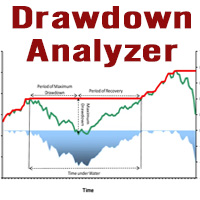
This tool is specifically designed to calculate drawdowns in a trading or investment account, expressed as a percentage, by using user-input balance figures. In essence, it allows users to track how much their account dips from a peak balance to a subsequent low point, a metric that is instrumental in understanding risk exposure. By supporting the option to choose a specific timeframe, it empowers traders and investors to pinpoint the start date of their measurement, ensuring that the data refle
FREE

SmartCloser MT5 SmartCloser MT5 is an advanced service application designed for the MetaTrader 5 platform that enables traders to automatically close open positions based on predefined profitability and loss criteria. This application is not a trading robot or script; it functions as a continuously active service within the trading environment, providing users with control and flexibility in managing their positions. Key Features: Close All Positions: Ability to close all open positions on the
FREE
please contact me 210zyx@gmail.com if you want a short DEMO version or shorter subscription (like 1 Month for 10 USD)
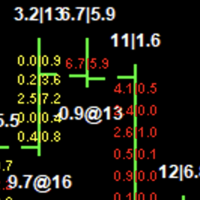
There already are some good EA's that can draw the FootPrint and Volume Profile, but they are using number of "ticks" as the unit of volume, which is not accurate. One tick sometimes can mean very large or very small volume and they should not be scaled to the same unit.
The innovation of this EA is that it is able to draw the FootPrint and Volume Profile based on real Binance

Simple Stats is utility for trades history management. (works as Expert Advisor)
Allowing you to:
see trading performance for each symbol separately , and so it helps you to find the M0ST and the W0RST profitable type of trades based on past results.
filters:
see only manual trades
see only EA trades
see only EA trades from one specific Magic Number
select time period for history
SS will distinguish reports with filename - each history report is named with account number an

TAKE PROFIT AND STOP LOSS SYNC is a utility for MetaTrader 5 that keeps the levels on the positions you already have open in step with each other. It is a take profit and stop loss tool for MetaTrader 5: it sets the take profit and the stop loss on every open trade at once, so a position opened on one chart is not left without protection while you work on another. It works on hedging and on netting accounts, it can group the positions by symbol and by direction, and it refuses to move a stop to

Welcome to Smart Algo Trade Panel Manager MT5 - the ultimate risk management tool designed to make trading more effective based on user needs. It is a comprehensive solution for seamless trade planning, position management, and enhanced control over risk. It does not matter weather you a beginner or an advanced trader, or a scalper needing rapid executions, SmartAlgo Trade Panel adapts to your needs offering flexibility across all markets of your choice. You can put SL, Lot and TP of choice
The Equity Closer Bot is a custom MetaTrader 5 (MT5) Expert Advisor (EA) designed to help traders manage their account equity levels automatically. It monitors the account's equity in real-time and closes all open trades when the equity reaches user-defined thresholds. This bot is ideal for traders who want to enforce strict risk management rules, protect their account from excessive losses, or lock in profits at specific equity levels. Key Features Dual Equity Thresholds : Below Equity Clos
FREE

This programm gives an Alert on Laptop and Phone when buy setup is detected. It also provides the SL,TP and when to go break even. This only provide alerts, so you still have to trade manually, this way you can see if u like the setup first.
some variabeles are: Timeframes, i recommend H1 or H4 timebetween alerts, so it stops looking for setups for a bit after detecting one. this way u get only one alert and prevent overtrading. Bullish candles needed for confrimsignal SL and TP to set in the
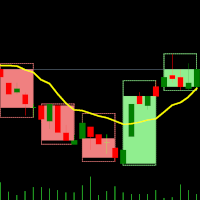
双时间框架指标 – 蜡烛嵌套蜡烛 概述 蜡烛嵌套蜡烛指标 是一款 多时间框架可视化工具 ,可在较低时间框架图表上叠加较高时间框架蜡烛图。无需频繁切换时间框架,交易者即可观察较小的蜡烛 如何嵌套在较大的蜡烛内 ,从而提升市场结构分析、趋势识别和交易精度。 该指标允许用户选择 基础(较低)时间框架 并应用 倍数 ,从而自动计算并绘制较高时间框架结构,使得交易者可以在一个图表上轻松分析多个时间周期。 指标工作原理 选择基础时间框架: 打开你希望使用的图表,例如 M1、M5、M10 等。 应用时间倍数: 设置一个倍数来确定较高的时间框架。 示例: M1 图表,倍数为 5 → 显示 M1 内嵌 M5 蜡烛。 M10 图表,倍数为 6 → 显示 M10 内嵌 H1 蜡烛。 绘制较高时间框架蜡烛: 指标将在较低时间框架图表上绘制较高时间框架蜡烛,并显示 开盘价、最高价、最低价、收盘价(OHLC) 。 每根 较高时间框架蜡烛 包括:
外部框 (High-Low): 代表该时间周期的最高价与最低价。
内部框 (Open-Close): 代表开盘价和收盘价。
实时更新: 当前蜡烛随着市场价格变
FREE

“一次设置,自动运行”的多品种风控管家 ️ 永远不要让您的交易裸奔。 Auto Stop Loss (MT5 Manager) 是注重资金安全的交易者的终极后台工具。与普通的交易面板不同,该工具在后台不知疲倦地运行,即时保护您的每一笔交易。无论您是手动开仓还是通过其他 EA 交易,该管家都能确保每个头寸立即附带硬止损 (Stop Loss)、止盈 (Take Profit) 和动态追踪止损 (Trailing Stop)。 颠覆性功能: 仅需在 一个图表 上即可管理您的整个投资组合。 无需打开 10 个不同的窗口拖慢电脑速度。只需列出您喜欢的货币对,该管家将同时监控所有货币对。 [ Get the MT4 Version Here ]
核心功能 多品种控制 (节省 CPU 资源) :从一个图表管理 EURUSD, GBPJPY, US30 和黄金 (Gold) 的所有交易。
工作原理: 在逗号分隔的列表中输入代码(例如:EURUSD, GBPUSD, XAUUSD)。EA 将即时扫描并管理所有这些品种。 即时注入止损和止盈 :消除“胖手指”错误或网络断开的风险。交

蜡烛倒计时器 – 抢占市场先机 你是否曾经想知道当前蜡烛关闭前还剩多少时间?在交易中,时机至关重要。蜡烛倒计时器是专为交易者打造的精准计时工具,帮助你高效执行交易策略。无论你是剥头皮交易者、日内交易者还是波段交易者,这款工具都能确保你不错过任何关键时刻。 什么是蜡烛倒计时器 蜡烛倒计时器是一款 轻量级且高效的MT4工具 ,可以显示当前K线的剩余时间,帮助交易者精准规划进场和出场时机。它实时自动更新,确保你随时掌握最新数据。 如何运作 实时倒计时 持续跟踪当前蜡烛的起始时间,并计算剩余时间 当新蜡烛形成时,倒计时会自动重置 颜色警示提醒 当蜡烛即将关闭时,标签颜色会发生变化,以提醒你注意 绿色 – 充足的剩余时间 黄色 – 提醒:蜡烛即将关闭 红色 – 紧急:蜡烛即将关闭 精准的进度追踪 显示自蜡烛开启以来的时间 计算蜡烛完成的百分比,帮助判断市场动能 可根据你的交易风格自定义 可调整的更新时间间隔(默认1秒) 选择字体大小、颜色和显示位置 可将显示界面放置在图表的任意角落,方便查看 为什么需要蜡烛倒计时器 适用于剥头皮和日内交易者。在低时间周期交易时,每秒都至关重要。这款工具可确保你

专业交易管理面板 —— 适用于手动与混合交易
更快执行。更聪明管理。锁定利润。
Fast Manager(MT5 工具)专为剥头皮和日内交易者设计,让您无需浪费时间计算手数或拖动止损线。它把您的 MT4 图表变成专业交易驾驶舱,自动完成计算和风险管理,让您专注于价格走势。
为什么选择 Fast Manager: - 速度:图表按钮一键开仓、平仓。 - 纪律:每笔交易都有止损。 - 保护:自动保本和智能移动止损。 - 灵活:手动剥头皮,或管理其他 EA 的订单。
主要功能 1. 一键交易面板:在图表上直接 Buy、Sell、Close All。高波动时一键全部平仓。 2. 自动风险管理:开仓时立即设置止损和止盈。 3. 自动保本:将止损移至开仓价(加少量偏移以覆盖佣金/隔夜费)。 4. 智能移动止损,带 "Start" 参数:只有在订单盈利后才启动。 5. 管理其他 EA:输入其 Magic Number,Fast Manager 即为其订单应用止损/止盈/移动止损。
参数说明 - Lot Size:面板固定手数。 - Take Profit / Stop Loss(点)。

"Smart Lot" 可视化交易面板
不再猜手数,精准交易。
The Super Manager(MT5 管理工具)替您完成所有计算。设置以账户货币(USD、EUR、GBP…)计的风险金额,在图表上拖动止损线,EA 即刻算出准确手数。
适合严格执行风险回报比(1:2、1:3)的交易者。
优势 1. 按风险自动计算手数:设定风险(如 50),无论止损 10 点还是 100 点,手数自动调整,亏损绝不超过设定值。 2. 可视化"拖放"交易: - 市价单:点击 [SL],拖动红线,然后点击 BUY 或 SELL。 - 挂单:点击 [LIMIT/STOP],拖动蓝线(入场)和红线(止损)。 3. 即时风险回报比:止盈按止损自动计算。例:TP = 200%,SL = 20 点 → TP = 40 点(1:2)。
控制面板 - Break-Even:将止损移至入场价。 - Close ALL:一键全部平仓。 - Delete P.O:删除所有挂单。 - Clean:清除图表上的线条。
参数说明 - Risk per Trade:每笔交易风险金额。 - Take Prof

Auto Position Manager is a unique services application of its kind across the entire MQL5 market, setting new standards for applications of this type. The Services app is a compact but powerful tool that significantly impacts the entire system. Its user-friendly interface and start-stop system make it excellent for automating repetitive tasks. Once it's set up, the service can be toggled on or off with a single click. Crucially, the configuration persists even if the platform is turned off and
FREE

Patrex Pro: Maximize Your Trading Potential Patrex Pro is an advanced trading bot designed to help traders optimize their trading strategies and maximize their potential returns. With its cutting-edge technology and user-friendly interface, Patrex Pro is the ultimate tool for traders seeking to elevate their trading game. Get MT4 Version Key Features: 1. Position Hedging: Patrex Pro allows users to hedge their positions based on their individual risk tolerance and market analysis. 2. Advanced R

The trading limiter that stops you from breaking your own daily loss and trade limits.
• Please test the product in the Strategy Tester before purchasing to understand how it works.
• If you face any issues, contact me via private message—I’m always available to help.
• After purchase, send me a screenshot of your order to receive a FREE EA as a gift.
Adjustable Chart Background Themes v2 — Chroma Studio You will stare at this chart for more hours this year than you will spend asleep with

AutoPilot Trading Service for MetaTrader 5 is an advanced application designed to enhance the MT5 platform by automating and optimizing both manual and algorithmic trading activities. By integrating seamlessly into the (recommended but not mandatory) <terminal_directory>\MQL5\Services directory, this service not only supports the automation of trading strategies but also improves the execution of trades, whether they are initiated manually or through Expert Advisors (EAs). The AutoPilot Trading
FREE

The trading limiter that stops you from breaking your own daily loss and trade limits.
• Please test the product in the Strategy Tester before purchasing to understand how it works.
• If you face any issues, contact me via private message—I’m always available to help.
• After purchase, send me a screenshot of your order to receive a FREE EA as a gift.
Auto Break-Even Utility MT5 Visualize Your Break-Even Levels Instantly! Auto Break-Even Utility MT5 is a powerful and straightforward tool

The trading limiter that stops you from breaking your own daily loss and trade limits.
• Please test the product in the Strategy Tester before purchasing to understand how it works.
• If you face any issues, contact me via private message—I’m always available to help.
• After purchase, send me a screenshot of your order to receive a FREE EA as a gift. Account Status Monitor — the numbers MetaTrader never puts in one place
Your terminal shows balance, equity and margin in three different c

Guardian Equity EA for MetaTrader 5 Guardian Equity EA is an Expert Advisor designed to automatically manage the closure of all open positions when predefined profit or drawdown levels are reached. It operates in real-time and is compatible with any broker or trading instrument supported by MetaTrader 5. Main Features Continuous monitoring of account balance and equity. Automatic closing of all trades if the maximum drawdown level is reached. Automatic closing if the configured profit target is

Lightning Hotkeys Trade Faster, Smarter & Safer Ever felt like you missed a great trade because you couldn't execute fast enough? Lightning Hotkeys turns your keyboard into a powerful trading command center, helping you trade in mili-seconds instead of minutes. Speed Up Your Trading Game Trade with the press of a key. No more clicking through menus or missing opportunities. Lightning Hotkeys lets you: Open buy/sell positions instantly Manage stop losses on the fly Close trades when you need to
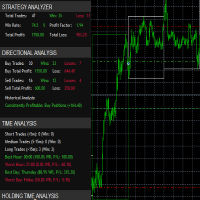
it's a fully built expert advisor with trading functionality with buy only or sell only or both options it's designed to be a tool that can be used for automate entry and exit in line with the overall Market Direction automatic risk management parameters fully comprehensive
STRATEGY ANALYZER Section Total Trades: Shows the overall number of trades taken Win Rate: Displays percentage of winning trades (color-coded green if >50%, red if <50%) Total Profit/Loss: Shows absolute profit and loss v
FREE
MetaTrader 市场 - 在您的交易程序端可以直接使用为交易者提供的自动交易和技术指标。
MQL5.community 支付系统 提供给MQL5.com 网站所有已注册用户用于MetaTrade服务方面的事务。您可以使用WebMoney,PayPal 或银行卡进行存取款。
