 MetaTrader 5
 专家
专家
 指标
指标
 程序库
程序库
 实用工具
实用工具
 窗口小部件
窗口小部件
 规则
规则
全新的MetaTrader 5 交易实用工具 - 59
 以下是可在MetaTrader 5中简化交易的交易程序。将鼠标悬停在一个工具上,阅读它的描述和用途。
AI Moving Average Trend Brief Description An innovative trend indicator utilizing neural network technology for adaptive price movement analysis, perfect for medium and long-term traders working across various timeframes. Full Description Operating Principle The indicator employs a single-layer neural network to analyze price movements and construct an adaptive trend line. The algorithm combines classical moving average with machine learning for precise trend determination. Calculation Algorithm

For DEMO - please contact me and I will send you demo version to test the product.
BreakEven ProSync – Advanced Trade Management Tool for MetaTrader 5 Overview The BreakEven ProSync is a powerful utility designed to enhance trade management in MetaTrader 5 . It provides one-click break-even functionality , hotkey trading , position synchronization , and visual SL/TP tracking —all in a single, user-friendly tool. Perfect for manual traders who want faster execution and better r

Optimize your trading management with Breakeven Bot, the essential tool for active traders managing multiple positions at once. No more wasting time manually adjusting your stops—one click is all it takes to secure your profits! Main Feature:
️ "BREAKEVEN" Button – Instantly set all profitable positions to breakeven and protect your gains quickly. ️ Customization Options:
Set breakeven in pips or currency, depending on your preference.
Choose whether breakeven should be at the entr
FREE

Close ALL OPEN TRADES on the dot! Set the exact day and time, click the START button and wait until it closes all trades. ========================================== INPUTS (Check screenshot for reference): Closing type: Set to specify if you wanted to close all of the trades on your account or just the trades under the current chart symbol. Magic number: Leave it to 0 if you want to close all trades. Set to specific magic number if you only want to close trades under that magic number. This

AlienTrader Pro – 未来已到来。 AlienTrader Pro 是一款手动交易工具,旨在简化您在 MetaTrader 4 和 5 上的操作。通过直观的快捷键、图表上的直接交互以及先进的可视化功能, AlienTrader Pro 能让您快速将想法转化为交易,并直接在图表上实现。 立即购买 | 免费演示 | 用户指南 | MT4 版本 | 联系我们 主要优势 快速: 一键下单,操作迅速。 精准: 直接从图表管理您的持仓。 清晰: 实时可视化交易区间、风险回报比(RR)以及收益。 个性化: 根据您的偏好调整手数大小、止损策略和显示主题。 可靠性: 减少操作失误,优化流程,专注于关键任务。
你的图表,你的规则 AlienTrader Pro 将您的图表转变为一个互动且清晰的操作空间。您可以立即查看持仓,直接在图表上执行订单,并根据您的偏好和交易风格享受灵活性。不论您喜欢短线交易还是长期交易, AlienTrader Pro 都能适应您的操作方式,使您的交易体验更加直观和个性化。
快捷键与光标:完美搭档 AlienTrader Pro 将快捷键的操作速度与图表上光标的精

Free indicator that displays the remaining time until the current candle closes directly on the chart. Designed for traders who demand precision and timing, this lightweight and fully customizable tool enhances your trading experience. It is easy to install, compatible with all assets, markets, and timeframes, and provides real-time updates to support smarter decision-making.
FREE

Risk Manager for Synthetic Index Calculate the appropriate lot size using two lines and trade across 11 synthetic index: Boom 1000, Boom 500, Boom 300, Crash 1000, Crash 500, Crash 300, Step Index, Dex 600 Down, Dex 600 UP, Dex 900 DOWN, and Dex 900 UP. Technical Features: Calculation based on percentage risk (R%) or fixed amount (R$). Market and pending order execution. Adjustable panel that can be minimized/maximized to avoid obstructing the chart. Dynamic lot size update when modifying chart
This is the Long Short NT-HDG Trading Panel , an Expert Advisor created with the function that will greatly facilitate Long & Short operations.
> With just one click, you can set up a position in two assets simultaneously, further accelerating your actions right after making a decision.
> With it, you can also operate in Hedge accounts, being able to set up a position in the same asset, for those who have strategies for this purpose.
> It can be used in several markets and assets.
> The new

Transform your Metatrader 5 trading experience with the Smart Trade Control for MT5, a sophsiticated yet intuitive trade managtement solution designed for traders of all levels. From precise position sizing to advanced basket management, this tool streamlines your trading workflow while enhancing risk control. Core Features: Smart Position Calculator: Enter risk amount and instantly get optimal lot size based on your stop loss - eliminate manual calculations and trading errors. Advanced Basket
FREE
Divergence Scanner Pro is an advanced utility designed to detect both regular and hidden divergences across three powerful indicators: RSI , MACD , and Stochastic . With its robust algorithm and user-friendly interface, this tool is perfect for traders seeking an edge in the market. Key Features: Comprehensive Divergence Detection : Identifies regular and hidden divergences to highlight potential trend reversals or continuation opportunities. Multi-Indicator Support : Scans for divergences on RS
FREE
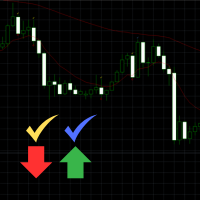
Engulfing Signal Indicator with EMA Confirmation This indicator is made to identify engulfing candlestick patterns in real-time using a mathematical approach and a constant bar-checking loop. It highlights these patterns as they occur, offering visual cues and confirmation when aligned with specific market conditions. How it works: Engulfing Pattern Detection : The indicator identifies engulfing candles using a division factor. A candle is considered engulfing if the entire range (body + wicks)
FREE

Simple But,Good Signal ...Demo expire 1 /04/ 2025 Less functions, fewer problems, easy to use. Trading assistant for professional traders Position size can be calculated automatically by simply dragging the stoploss line to the desired position and automatically placing take profit based on the risk reward you set. You can choose to limit your risk by the amount of your capital or the percentage of your capital. Reduce the process of calculating position size in realtime, so you can Focus only

An algorithm that uses artificial intelligence (AI) to analyze the best entries in the market over the 24 hours generally works by following these steps:
Real-Time Data Collection: The algorithm collects real-time information from various sources such as market prices, trading volumes, technical indicators, economic news, and fundamental analysis.
Data Processing: It uses data processing techniques such as time series analysis, noise filtering, and extraction of relevant features that help pr

QuickTrade Control (Free Version) The QuickTrade Control is a powerful and flexible Expert Advisor designed to give you complete control over your trades in MetaTrader 5. This free version includes a comprehensive set of tools and features that simplify decision-making and trade management. You can find more free products HERE . If you're looking for a low risk EA , check the Silent Pressure EA . Features: Instant closure of all open positions:
Close all active positions with a si
FREE

Equity Aler t can help you send notifications to your personal Telegram when your account equity reaches/ drops below a preset value. Additionally, you can check your MT4/5 account info anytime from your Telegram by simple command: /check . Get more free useful EAs here !
HOW TO SET UP? * Get inputs for EA: - Telegram Bot Token: Create a Telegram bot by @BotFather , and save your Bot Token. Find your bot by username & press "start". - Telegram User ID: Use your User ID by chatting
FREE

Quickly clear all open charts in MetaTrader 5 with a single script execution. Ideal for traders who want to reset their workspace before starting a new trading session or analysis. Implementation Notes: This script is designed to operate under strict coding standards ( #property strict ) to ensure reliability and efficiency. No user inputs are required, as it automatically processes all open charts.
FREE

Stealth Mode TP/SL Manager with AI Protection This AI-powered tool manages Stop Loss and Take Profit dynamically using either price-based or profit-and-loss (PnL) calculations while hiding these levels from the market . Also the this tool is very important to PROP FIRMS accounts , so you can set your stoploss to not hitting the daily stop loss ! Key Features: Supports BUY, SELL, or both position types. Flexible symbol selection: Manage the current chart, all symbols, or specific symbols

Панель облегчает работу трейдера во время постановки стоп лоссов и тейк профитов. Отображает информацию о потенциальных профитах и лоссах.
Удобно работать когда требуется массовая установка стопов и профитов. Создавалось как инструмент плавного набора позиции на m1 и быстрого перевода стопов в безубыток. Выглядит эстетично, вписывается в родной интерфейс MT5 идеально. Рекомендуемый брокер ByBit MT5.
описание кнопок панели и функций:
BE SELL - перевод в безубыток всех Sell сделок открытых на
FREE

Discover our all-in-one monitoring and notifications EA for MetaTrader. Designed to ensure traders’ security and peace of mind, this unique EA offers a full range of advanced features that will allow you to stay informed and control your account activity, anytime and anywhere. Key Features : Continuous server monitoring: real-time notification on server availability and performance (Cpu, Ram, disk), connectivity, latency and more Advanced account management: live tracking of margin calls, dro
FREE

Change lot size, set TP / SL points and with one click place an order. Track current order count and total running profit. Instant Close all Buy trades, Close all Sell trades or Close All open trades buttons. Trailing SL feature Support for Manual orders. Utility types Risk management, Graphical objects, Panels. Main features
Take Profit and Stop Loss in points (10pip = 100 points) After the price reaches the Take Profit threshold, orders will be closed in profit After the price reaches the St
FREE

此實用程式適用於水平線: Prof1、Prof2、Loss1、Loss2 。 這些線具有嚴格固定的名稱,由交易者在其終端的任何圖表上獨立繪製。 可以選擇一次建立所有線路,也可以選擇四條線路中的任一條。 只要看一下這些線條的名稱,其用途就一目了然了。 Prof1 和 Prof2 線指示交易的獲利水平,但以視覺化形式呈現,使交易者更容易感知資訊。 Loss1 和 Loss2 線反映停損水平,清晰直觀地呈現風險。 因此,該工具有助於創建關鍵層級的清晰視覺化,使交易者能夠做出更明智的決策。 此實用程式的獨特之處在於,只需將其安裝在一張圖表上,您就可以使用任何終端圖表上的線條。 專家實用程式可自動偵測終端中的所有 Prof1、Prof2、Loss1、Loss2 線,並產生有關該工具上所有交易的資訊(利潤、損失、數量)。 連結至 MT4 版本 該實用程式的第一個目的是有關盈虧的資訊。 使用停損線和獲利線來關閉交易 = 僅供參考,線下方的 OFF 符號禁止關閉交易。 計算並在這些線下放置一條此類線:Prof1 OFF +584$/19 -396$/7 = +187$/26 說明:線路名稱,線路是否

When executing an order, whether through the Metatrader ticket on a computer or the Metatrader app on a mobile device, either manual or pending,
Easy Trade will automatically set the take profit and stop loss levels, as well as a limit order with its respective take profit and stop loss levels. It follows the trading strategy for market open (US30, US100, US500), but it can be applied to any market asset.
FREE

When executing an order, whether through the Metatrader ticket on a computer or the Metatrader app on a mobile device, either manual or pending,
Easy Trade will automatically set the take profit and stop loss levels, as well as a limit order with its respective take profit and stop loss levels. It follows the trading strategy for market open (US30, US100, US500), but it can be applied to any market asset.

By :Forex For Baby Ea. 1.0
This EA is Famous Grid Strategy that open positive grid of trades with money management risk size, first and smaller size after. It makes PROFIT when the Forex price moves in th

An algorithm that uses artificial intelligence (AI) to analyze the best entry points in the market 24/7 typically operates following these steps: Real-Time Data Collection : The algorithm collects real-time data from various sources, such as market prices, trading volumes, technical indicators, economic news, and fundamental analysis. Data Processing : It uses data processing techniques like time series analysis, noise filtering, and feature extraction to identify relevant data that helps predi

Limit Open Positions EA
"Limit Positions EA is a powerful utility tool designed to provide strict control over the number of open positions in your trading account. This Expert Advisor continuously monitors your trading activity and ensures that no new positions are opened once the specified limit is reached. Ideal for traders seeking to mitigate overexposure and manage risk effectively, Limit Positions EA works seamlessly across all symbols and timeframes. Whether you're managing a large port
FREE

Bundle Risk Manager Pro EA
"Risk Manager Pro EA is an all-in-one trading utility that combines advanced risk management tools, ensuring full control over your trading account while protecting your capital and complying with trading regulations. By bundling Limit Positions , Concurrent Risk Capital , and the newly added Limit Profit , this EA is the ultimate solution for disciplined trading and achieving evaluation goals. Key Features: 1. Limit Positions : Enforces a maximum number of open posi
FREE

EA Utility Tool: Risk Consistency Manager The Risk Consistency Manager EA is a simple yet powerful tool that automates risk management across multiple open positions. It dynamically adjusts stop-loss levels to distribute a predefined total risk value (e.g., $10,000) evenly among all active trades. Key Features: Dynamic Risk Distribution: Automatically allocates an equal share of risk to each position (e.g. with total risk capital of $10,000, its will be distribute each trade with $3,333.33 risk
FREE

The program is use to copy trading from MT5 to MT4 and MT5 on same Windows PC or VPS . Now you can easy copy trades to any MT4 account or MT5 account. Instants copy, speed smaller 0.1 seconds, easy to setup. Need run EA as Signal provider on one MT5 account, other MT4 / MT5 will run EA as Trade copier. You can download and try demo version on demo account Copi Trade MT4 demo version here Copi Trade MT5 demo version here
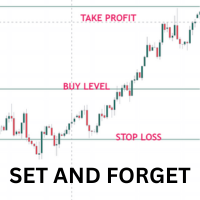
Once you have done your chart analysis there is no need to wait for the market to get to your levels. Just Set and Forget. The Ea will do this for you. How it works: - for buys. set the entry price, the stoploss and take profit. When price gets to entry price, It will wait till candle close above entry price, then when new candle opens and crosses above previous calndle high, the trade is triggered,
The reverse is true for sells. Other Ea setting incluse: - 1. trading days 2. trading time range

Would appreciate a review of the product if possible.
This program, is designed to automatically log and monitor trading account performance metrics in MetaTrader 5. It tracks daily balance and equity, calculates performance metrics, and records them in a CSV file for later analysis. Key Features: 1. Initialization: • Inputs for account name ( Account_Name ), starting day balance ( Start_Day_Balance ), and equity ( Start_Day_Equity ) are accepted. • If the starting balance or equity is not prov
FREE

Take full control of your trading with this cutting-edge panel for MetaTrader 5, designed to enhance efficiency and precision. Whether you're a seasoned trader or a beginner, TradeSphere offers robust features to simplify trade execution, manage risk effectively, and streamline your workflow. Key Features: Versatile Trade Execution Options
Execute trades seamlessly with support for stop, limit, and market orders. Our user-friendly panel ensures effortless trade management, saving you time and e
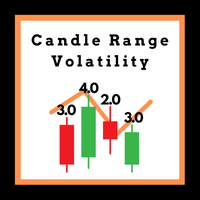
This Expert Advisor (EA) is designed to analyze and visualize the volatility levels of individual candles across any timeframe. By plotting and graphing the volatility data, it provides a clear and intuitive representation of market dynamics. The EA captures and displays volatility trends for each monthly period, making it an invaluable tool for traders who aim to understand market behavior over time. While it works on any timeframe, it is particularly optimized for the daily timeframe, where it

Layer Master:MT5 专业网格交易工具
50% DISCOUNT FOR LIMITED TIME ONLY - BE QUICK!!!
使用 Layer Master 改变您的网格交易 - 专为专业交易者设计的最直观、最强大的订单管理工具包。
MT4 Version: https://www.mql5.com/en/market/product/79133
精准掌握网格交易
Layer Master 彻底改变了您下达和管理网格交易的方式。借助我们的可视化界面,您可以: 立即部署数百个订单 轻松管理多个头寸 精准控制风险 实时监控性能
核心功能
高级订单管理 Layer Master 工具箱可帮助交易者一键部署多个订单。它可以让您绘制可视化区域图,以便精确下达网格订单。 Layer Master 支持所有订单类型(买入/卖出止损、买入/卖出限价),并通过提供实时价格水平和点差显示帮助您了解您的仓位
专业风险管理 我们通过可视化止损和获利管理、一键盈亏平衡功能、总风险计算、目标利润监控和批量仓位修改执行(更改止损、获利甚至部分退出)帮助交易管理风险。
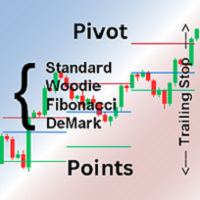
Pivot points are calculated based on the previous day's values - according to the most common formulas on the web - and serve as an important tool for many traders, especially in day trading.
They indicate possible resistance and support where increased buyer and seller interest can be expected.
This Pivot-Points-Trailing-Stop-Helper includes my Pivot Points Collection indicator and, based on your settings, gradually moves the SL to the corresponding pivot levels as soon as the current price

Mtf Candle Alert Telegram – A Reliable Tool for Market Analysis Analyze the market, identify trends, and refine your strategy. Mtf Candle is an advanced indicator designed for traders seeking a structured approach to market visualization. This tool enhances technical analysis by providing a clear and organized display of market trends. What Does Mtf Candle Offer? Comprehensive Bar Analysis – Monitor bars across multiple timeframes and assess market direction. Trend Statistics – Track the sequen

Autogrids Autogrids EA is a cutting-edge trading automation tool designed to give Forex traders an unparalleled edge in the market. Built on a powerful quantitative strategy, it analyzes the frequency distribution of daily price movements, leveraging historical data to create a highly optimized operational grid. ️ Key Features Dual Strategy Mode: Quantitative or Manual Grid: Choose between the Quantitative Mode, which automatically generates grids based on the statistical distribution of d

Скрипт для быстрого закрытия рыночных и отложенных ордеров. Этот зацикленный скрипт гарантированно закроет все выбранные ордера. Он будет работать, пока не закроет все выбранные позиции и удалится когда сделает свою работу. Если у Вас много открытых позиций этот скрипт поможет вам. Интуитивно понятный интерфейс 1) Просто бросьте его на график. 2) Выберите ордера, которые надо закрыть. По умолчанию выбраны все! 3) нажмите кнопку "Close". Если вы забыли включить Авто торговлю, будет выдано сообщен
FREE

Price Aler t can help you send notifications to your personal Telegram when the price crosses a preset value. Additionally, you can check your MT4/5 account info anytime from your Telegram by simple command: /check. Get more free useful EAs here !
HOW TO SET UP? * Get inputs for EA: - Telegram Bot Token: Create a Telegram bot by @BotFather , and save your Bot Token. Find your bot by username & press "start". - Telegram User ID: Use your User ID by chatting with @ userinfobot * Setup
FREE

How to Use All Symbols Opener Preparation : Open any symbol chart in your MetaTrader 5 platform. Select your preferred time frame for the open chart (e.g., M5, H1, D1). Launch All Symbols Opener : Attach the All Symbols Opener utility to the currently open chart: Drag and drop it from the Navigator window under Experts onto the chart. Alternatively, double-click All Symbols Opener from the Navigator to activate it. Automatic Operation : The tool will detect the active chart’s time frame and appl
FREE

Equity Shield Pro 1.1
Equity Shield Pro 1.1 is a powerful utility EA designed to safeguard your trading account by actively monitoring and enforcing equity protection and profit management rules. Whether you’re trading personal accounts or working through proprietary firm challenges, this EA ensures strict adherence to risk and profit targets, enabling you to maintain discipline and consistency. Fully compatible with all challenge types, Equity Shield Pro 1.1 is specifically crafted to meet th

SkyGeniX: Innovative Solutions for Intelligent Automation SkyGeniX is a cutting-edge tool designed to simplify and enhance your workflows with intelligent automation. Whether you're managing complex tasks or optimizing performance, SkyGeniX offers a seamless, user-friendly experience tailored to your needs. Key features include: Smart Optimization : Enhance efficiency and achieve your goals faster with advanced algorithms. Customizable Settings : Tailor the tool to your specific requirements for
FREE

Telegram 到 MT5: 终极信号复制解决方案 使用 Telegram 到 MT5 简化您的交易,这款现代化工具可直接从 Telegram 频道和聊天室复制交易信号到您的 MetaTrader 5 平台,无需 DLL 文件。这款强大的解决方案可确保精准的信号执行、丰富的自定义选项,节省时间并提高您的效率。 [ Instructions and DEMO ] 主要特点 直接 Telegram API 集成 通过电话号码和安全码进行身份验证。 通过用户友好的 EXE 桥轻松管理聊天 ID。 添加、删除和刷新多个频道/聊天以同时复制信号。 使用高级过滤器进行信号解析 跳过包含异常词(例如“报告”、“结果”)的不需要的信号。 支持灵活的 SL 和 TP 格式:价格、点数或点数。 自动计算指定点而不是价格的信号的切入点。 订单定制和灵活性 使用多种模式配置订单大小:固定手数、动态手数(% 风险)或特定符号手数。 使用信号数据或自定义参数调整 SL/TP。 设置滑点限制、挂单到期时间和重试参数,以实现无缝执行。 综合符号管理 排除特定符号或映射到特定经纪人的符号。 自定义信号和经纪商符号之间

Trade Manager Rocket The execution layer MetaTrader 5 was missing Your strategy is only as good as your execution. Most traders know what to trade — they lose consistency in how they execute it. Incorrect lot sizes, slow entries, and manual break-even management quietly destroy accounts that had every reason to survive.
MetaTrader 5 gives you a charting platform. It doesn't give you execution discipline.
That gap — between your decision and a correctly sized, cleanly executed trade — is where
FREE

Introducing our Expert Advisor (EA) that empowers you to create custom timeframes in MetaTrader 5, defined in seconds—from as short as 1 second. This EA generates a new symbol with your specified timeframe, updating with every tick. Utilize this symbol for real-time analysis, trading, and backtesting your strategies. Additionally, our EA allows you to adjust your chart's time zone independently of your broker's. Given that brokers operate across various time zones, their charts can differ. With

An excellent assistant for those who trade using Sniper strategy, Price Action, Smart Money.
The Advisor finds and draws:
-Reversal Levels and Reversal Zones
-Continued Movement
-Current trend and trend
-6 Patterns of the Sniper trading system
-Draws a story for a set number of bars
All graphical constructions can be customized to your taste, and you can also prohibit the construction of
separate formations.

[FEEL FREE TO DM ME IF YOU NEED SUPPORT] MANotifier.mq5 - Moving Average Crossover Notification Utility The MANotifier.mq5 is a utility designed for MetaTrader 5 that monitors the crossover of two Moving Averages (MAs) and sends notifications based on the crossing events. The utility supports various notification types, including mobile notifications , email alerts , and on-screen pop-up alerts , making it ideal for traders who want to stay informed of key market events in real-time. Key Feature

A trailing stop loss is a risk-management tool that automatically adjusts the sell trigger point for a financial instrument as its price rises or falls and by using this trailing sl program it insures that your trades will be risk free each and every time How it works A trailing stop loss is set at a fixed distance from the current market price, either as a percentage or a fixed dollar amount. When the price moves in a favorable direction, the stop price moves with it to maintain that distance

The Nrp Suchin Smart DCA Assistant v2.2 is a versatile Expert Advisor (EA) designed to enhance trading strategies with a focus on DCA (Dollar-Cost Averaging). It is a comprehensive tool that offers support for automated trading systems, assists other EAs, and provides functionality for manual traders. This EA stands out by seamlessly integrating with diverse trading environments, enabling traders to optimize their strategies with precision and flexibility. Whether you rely on automated trading o

Product Description: OnePrice Click MultiTrade EA The OnePrice Click MultiTrade EA is a powerful tool for traders who seek precision and efficiency in managing multiple trades within the MetaTrader 5 platform. This automated trading solution allows users to open multiple trades simultaneously, either at a specific price level or with the click of a button. Designed with flexibility and user-friendliness in mind, the OnePrice Click MultiTrade EA is perfect for both novice and experienced traders

Telegram Controls (Telecontrol) — 实现机器人 Telegram 与 MetaTrader 5 终端之间的通信。 它有助于聚合来自多个终端的数据,并使用 Telegram 机器人进行管理。该服务适合同时在多个 MT5 终端上工作,允许单独配置每个终端以实现最佳信息显示和感知效果。所有终端数据都集中在一个 Telegram 频道中,设置面板允许快速调整和保存操作和界面更改。 Telecontrol 的主要功能: 交易消息: 以方便的格式发送交易开始和结束的数据。 订单消息: 以方便的格式发送订单开始的数据。 聚合结果消息: 显示选定时间段(5、10、15、30、60分钟)内的总交易结果,包括利润、数量和回撤。 账户余额变动消息: 显示账户的存款或取款。 新闻事件消息: 根据交易员设置的标准生成新闻列表,并在30分钟内警告即将发生的事件。重要事件在终端中以颜色突出显示。 回撤消息: 警告超过设定阈值的回撤。 交易政策控制: 服务可配置为手动或自动交易。如果违反规则,操作将被取消,并向用户发送相应的通知。 手数限制控制: 如果超过最大手数限制,头寸或订单将自动
FREE
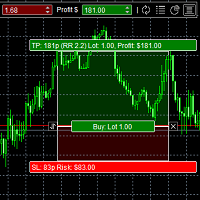
The panel was created to manage trading positions: to open new trades and close existing ones. To open new transactions, you can set the position volume, Stop Loss in points, risk in dollars or as a percentage, Take Profit in points or Profit in dollars, you can set the Profit/Risk parameter. It is possible to place a panel on the active chart to visually set the parameters of a new transaction, select a market order or a pending one. If you fix the RR parameter, then when Risk changes, Profit w
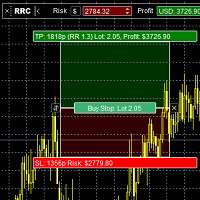
Risk Calculatorr Panel MT5
Professional trading assistant for MetaTrader 5.
Open trades faster, calculate precise risk instantly, and manage positions like a professional trader.
WHY TRADERS NEED THIS PANEL
Many traders lose money because they:
• use wrong lot size • risk too much per trade • enter too slowly • manage positions emotionally • open trades without clear RR ratio
This panel helps solve these problems in seconds.

Download DEMO here https://www.mql5.com/en/blogs/post/759772
An ultimate panel you've never seen before. Compact and nice Trade panel with large Total P/L and it's percentage display. Groups for trades summary available: Ticket, Symbol, Type, Category, and Magic. Average price field helps you know your trading average price and direction. Set magic and comment of your trading in a very easy way. Group closing by symbol, type, category or magic - only by one click. Close All button for a quick

Ruler is important but just a simple tool. Why people make it too complex? Easy Ruler makes it great again. Almost zero setup required, nothing annoying on chart, quick and accurate. Easy Ruler MT5 just help you measure 2 points on chart quickly and accurate. That's all!
To support you better, it has magnet mode to pick points more accurate and works on indicator windows too (38 indicators that provided by MT5 by default). This smart ruler provides these information right on chart in no time t

Auto SLTP Pro can help you setSL & TP automatically for positions & pending orders * 2 modes: - Points - USD * Symbol Filter: Select All or a specific symbol * For pending orders: Select true to set SLTP for pending orders Note: Only valid for positions (pending orders) without SL&TP! Join my channel here for more useful management tools: * Remote Tools via Telegram: Super Assistant, Master Close, Master Control, Master Notify * Free Tools: Tele Notify, Price Alert, Quick Close
FREE

Swap Sort is an MQL5 script designed for traders and investors to streamline their decision-making process by efficiently analyzing and organizing swap fees for financial instruments. This tool is ideal for professionals who want to optimize their trading strategies by minimizing costs and maximizing profits.
Swap fees can significantly impact the success or failure of a trade, as high fees can erode profits over time, while favorable swaps can enhance returns for positions held overnigh.
Wit

有没有想过是否有一个交易机器人可以在您确切的进入和退出条件下为您交易。不用担心,Pebble 就在这里!
只需在 RSI 交易面板中设置您的交易参数,然后按“开始交易”就可以了!Pebble 将负责其余的工作。
使用 Pebble 有几个好处:-
从交易中消除人类情感。 全天候活动并搜索您的交易条件。 自动下单并将止损移至盈亏平衡。 不仅可以根据 SL 和 TP 退出头寸,还可以根据 RSI 条件退出头寸。 直接从面板更改 RSI 周期。 在子窗口 1 上放置一条绿线和一条红线,以帮助您分别轻松查看买入和卖出水平。 这是自动化交易的最佳方式,让这个机器人在您睡觉时为您交易!RSI 是专业交易中最广为人知和最受欢迎的指标之一,在较高的时间范围内效果最佳。
FREE

MetaCluster Makes Any Market Transparent! MetaCluster is a professional trading and analytical system for effective trading on Forex , Crypto markets , and Binary Options . MetaCluster performs volume-cluster analysis simultaneously across multiple timeframes of an asset (Multi-Timeframe Analysis), identifying and displaying Target Zones for trade entries that remain invisible when analyzing a single timeframe. This allows you to see the traces of the Market Maker (smart money) and follow him,

Fe el free to contact me for any extra features :) [SEE MT4 VERSION https://www.mql5.com/en/market/product/128848 ] The Local Copier EA is an Expert Advisor (EA) designed to synchronize trading positions between a master account and a slave account, operating in either Master or Slave mode. Key Features: Master Mode :
In Master mode , the EA monitors open positions and stores relevant trade details. These details include symbol, volume, stop loss, take profit, and position type, which are used

Expert Advisor that synchronizes positions between a Master and Slave account but with a twist: it reverses every trade . Master opens Buy → Slave opens Sell (same volume, SL/TP mirrored) Master opens Sell → Slave opens Buy (adjusted SL/TP) Continuous sync: positions closed on Master = closed on Slave, new positions are instantly reversed Perfect for hedging , contrary strategies , or testing directional bias across two accounts. For Support & Customization I’m here to ensure you get the most

Introduction Welcome to the world of Forex trading, where every tick of the market can be influenced by news events. Introducing our expert advisor for MetaTrader, your ultimate tool for navigating the complexities of news trading. This innovative advisor is specifically designed to automate your trading strategy during key macroeconomic releases, ensuring you never miss an opportunity. When important indicators are announced, volatility often spikes, creating potential for profit. Our expert
FREE

Description The indicator based on Average True Range (ATR) is designed to accurately determine the possible range of price fluctuations on a selected timeframe. This tool is ideal for both beginner traders and experienced professionals looking to effectively plan their trades. Key Features: Displays possible price fluctuation levels on the chart, simplifying visual analysis. Utilizes the power of the ATR algorithm to calculate precise volatility values. Adapts to any timeframe, providing releva
FREE

This is a very simple backtesting tool. It starts from the most old chart in the past chart. It has 0.2pips spread, and you can do averaging 10 times. You can set the size of bars and the time frame as a parameter. You can't change the time frame during the backtest. These are the functions of buttons. ------------------------------------------------------------ Resume/Pause: Auto scroll stop and resume. Next bar: Showing candle sticks one by one. Speed1,2,3: The speed of auto scroll. Skip: ski
FREE

a script created with ChatGPT. It changes the symbol in every other chart window to the symbol of the window where you run the script. The story behind it. I use MT5 across 2 monitors. Same price/symbol, different candles. because changing the symbol in every window was tedious. So I had ChatGPT write this script. Important: this script only changes the symbol, everything else like indicators or objects is not transferred to other chart windows
FREE
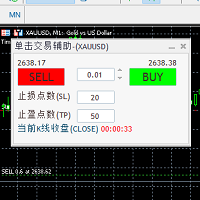
自带一键下单交易快捷键和K线收盘时间倒计时秒数的交易面板。 面板中可设置止盈止损点数;显示的倒计时秒数为图表周期中当前K线的收盘倒计时间; 自带一键下单交易快捷键和K线收盘时间倒计时秒数的交易面板。 自带一键下单交易快捷键和K线收盘时间倒计时秒数的交易面板。 自带一键下单交易快捷键和K线收盘时间倒计时秒数的交易面板。 自带一键下单交易快捷键和K线收盘时间倒计时秒数的交易面板。 自带一键下单交易快捷键和K线收盘时间倒计时秒数的交易面板。 自带一键下单交易快捷键和K线收盘时间倒计时秒数的交易面板。 自带一键下单交易快捷键和K线收盘时间倒计时秒数的交易面板。 自带一键下单交易快捷键和K线收盘时间倒计时秒数的交易面板。

A simple Reverse Position tool.
Just a simple tool to make you reverse your position from e.g long position to short position. This tool also allow you to set SL and Risk to Reward Ratio, so you are safe while reversing your position. Also calculates your all volume order in current open position and reverse all of the open position to make opposite position. works on any symbol, just load the EA and add to your symbol you want to trade.
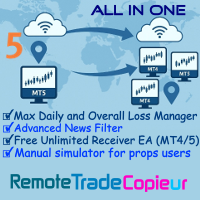
Remote Trade Copier is an advanced tool designed for efficiently copying trades between accounts in both local and remote modes. It allows for lightning-fast order replication from a master account to a slave account. In local mode, trades are copied instantly, while in remote mode, the copying process takes less than 1 second. MT4 Version (Only Local)
MT5 Version (Only Local)
MT4 Full Version (Local & Remote) Local mode refers to both MetaTrader platforms being installed on the same system,

The "Smart Partial TP & Daily Loss Limit Manager" is a versatile and powerful MQL5 indicator designed to help traders manage their trades more effectively. It combines two essential features that improve trading discipline and profitability: partial take-profit (TP) closing based on risk-reward ratios and a fixed daily loss limit to protect your capital. Key Features: Partial Take-Profit (TP) Close: This feature allows traders to set a percentage for partial TP closure (e.g., 50%). Once the pric
FREE

Advanced Trailing Stop Loss Utility Optimize your trading strategy with the Advanced Trailing Stop Loss Utility , a powerful tool designed to dynamically protect your profits and minimize losses. Whether you're a beginner or an experienced trader, this utility ensures that your trades remain secure while maximizing potential gains. Key Features: Dynamic Stop Adjustment : Automatically adjusts the stop loss level as the market moves in your favor, locking in profits while allowing for market fluc
MetaTrader市场是一个简单方便的网站,在这里开发者可以出售自己的交易应用程序。
我们将帮助您发布您的产品,并向您解释如何为市场准备您的产品描述。市场上所有的应用程序都是加密保护并且只能在买家的电脑上运行。非法拷贝是不可能的。
