 MetaTrader 5
 专家
专家
 指标
指标
 程序库
程序库
 实用工具
实用工具
 窗口小部件
窗口小部件
 规则
规则
全新的MetaTrader 5 交易实用工具 - 62
 以下是可在MetaTrader 5中简化交易的交易程序。将鼠标悬停在一个工具上,阅读它的描述和用途。
实时点差显示工具
实时点差显示工具是一种专门的软件或应用程序,旨在为交易者和投资者提供各类金融工具的 点差 实时数据 —— 点差即买入价(买方愿意购买某资产的价格)与卖出价(卖方愿意出售该资产的价格)之间的差额。这类工具在外汇(FX)、股票、期货和加密货币等市场中至关重要,因为价格波动和流动性会直接影响交易决策。 核心功能 实时更新 实时显示买卖点差,通常每秒更新多次,以反映最新市场状况。 这对剥头皮交易者、日内交易者和高频交易者至关重要,他们依赖及时数据捕捉微小价格波动获利。 应用场景 交易策略制定 :交易者通过点差数据识别流动性良好(点差窄)的资产,以便高效开仓 / 平仓,或避开交易成本高(点差宽)的非流动性资产。 风险管理 :在市场剧烈波动期间(如经济数据发布、地缘政治事件),点差扩大预示风险上升,交易者可据此调整仓位规模或离场。 经纪商比较 :投资者可用该工具对比不同经纪商对同一资产的点差,确保获得有竞争力的定价。 套利机会捕捉 :寻求跨交易所价格差异的交易者可通过实时监控点差发现套利机会。 重要性 点差直接影响交易盈利能力,因其代表每笔交易的隐性成本。实时点差显示工具使用

Это DEMO версия Renko Maker PRO к сожалению правила маркета не позволили указать это в названии. Почему то проверка маркета запрещает в названии слово DEMO. Демо версия строит ренко бары только на основе EURUSD из 1000 последних минутных баров. Revolution Renko Maker PRO — Инновационный Конструктор Ренко Графиков для MetaTrader 5
Создавайте идеальные ренко-бары с сохранением тиковых данных и реальных объемов — теперь с полной поддержкой индикаторов, советников и тестера стратегий!
FREE

Maximize your profits and protect your capital on any symbol, any broker, any digits. Demonstration video: https://youtube.com/shorts/enSPf2qCsVU?si=1LBVjmVzgFJE751C The Universal Trailing Stop and Breakeven EA is a powerful, beginner-friendly tool that automates trailing stop management across all your open trades. Whether you are scalping XAUUSD, swinging BTCUSD, or day trading EURUSD, this expert advisor ensures you are always locking in gains while minimizing risk.
What's New in 2.0? Perce
FREE

Daily PnL Notifier – Get Telegram alerts when your daily profit or loss target is reached! Looking for a simple, fast, and reliable way to monitor your daily performance on MetaTrader 5?
Daily PnL Notifier is the tool you need. ️ Key features : Sends an instant Telegram notification when your account hits a custom profit or loss threshold . Fully customizable : you set your own daily gain or loss limits. Ultra simple: minimal interface , no useless settings. Works on all accounts (demo or li
FREE

Core Features: Profit Target Control:
Automatically closes all open positions once a defined total profit value is reached. Drawdown Protection:
Monitors total floating losses and closes all trades if the loss exceeds a set percentage of the account balance. Trading Halt on Target:
Automatically stops further trading once a desired percentage profit of account balance is achieved. Dynamic SL/ TP Adjustment:
Optionally adjusts Take Profit and Stop Loss for all open trades to pr
FREE
NoSwapEA MT5 - Trade Smart, Avoid Swaps Overview
NoSwapEA is a smart and efficient Expert Advisor designed to help traders avoid overnight swap charges by automatically closing and reopening trades based on a customizable schedule. Developed by NeonTrade, this EA is perfect for traders who want to optimize their trading strategy while minimizing costs. Key Features
Swap-Free Trading : Automatically closes trades before swap charges are applied and reopens them the next day, saving you money

GoldScalper Script Category: Utilities (Script)
Version: 1.00
Author: Alfred Jaftha
Product Type: MQL5 Script Overview GoldScalper Script is a one‑click pending‑order generator for XAUUSDm, designed to lock in potential scalping entries based on H1 trend confirmation and M1 Bollinger Bands/ATR levels. Unlike an EA, this script executes a single trade setup when launched, making it ideal for traders who prefer manual control combined with algorithmic precision. Key Features Trend Confirmation: U

Here’s a professional product description for your OneClick28Chart script on the MQL5 Market: OneClick28Chart — Instantly Open All 28 Major FX Pairs Tired of manually opening chart windows one by one?
OneClick28Chart is your go-to utility script for quickly launching all 28 major forex pairs with just a single click — perfect for multi-timeframe traders, BBMA users, or scalpers who analyze numerous pairs simultaneously. Key Features: Instantly opens 28 standard forex charts (7 majors ×
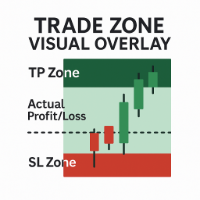
Trade Zone Visual Overlay – MT5 实时交易区域显示工具 即时可视化您的交易表现 —— 抢在为时已晚之前。 Trade Zone Visual Overlay 是一款强大的图表工具,可直接在图表上显示您当前持仓的关键区域。专为重视清晰度的主观交易者设计,此指标显示: 止盈区 – 高亮显示完整的止盈目标区域 止损区 – 明确标示您的风险暴露区域 实际盈亏区 – 根据扣除手续费后的实时盈亏情况进行可视化展示 通过可自定义的颜色和根据手续费调整的阈值,您将获得一目了然的交易快照: 您的交易当前是实际盈利还是亏损(扣除所有成本后) 当前价格距离止损或止盈还有多远 实时在图表上清晰展示风险回报比 功能特点: 自动检测当前持仓 从开仓点绘制向前预测的区域 考虑 手续费和点差 ,反映真实盈亏情况 简洁、不干扰的图层 —— 不会妨碍您的交易操作 兼容所有交易品种与时间周期 无论您是进行剥头皮交易还是波段交易, Trade Zone Visual Overlay 都能为您提供信心与控制所需的交易洞察力。

由于 MetaTrader 5 的限制,EA 无法在策略测试器模式下运行。 如需查看其运行效果, 您可以下载演示版本。 以下是使用本 EA 的两个基本步骤: How To Use 先将 EA 加载到您想要的符号上,并设置为 Constructor 输入。
然后将 EA 加载到新创建的自定义符号上,设置为 Controller 输入。 Overview MT5 Bar Replay Pro 是 MetaTrader 5 对 TradingView 的 Bar Replay 功能的回应。它配备了所有 21 个 MT5 时间框架,可回溯至您的经纪商数据所允许的最早时间。内置风险管理工具,便于正确练习策略,同时附带辅助图形对象。 每次练习会记录如下数据:交易品种、利润、点数、总交易数、胜率、盈利因子、回撤、恢复因子和预期收益。这些数据会被保存为 CSV 文件以供后续查看。EA 还会读取您过去的会话,并显示当前交易指标及每个策略名称的平均统计数据。 How It Works 此专家顾问从图表中加载数据,并为所有时间框架构建 K 线。具有两种操作模式: Bar-by-Bar 模式:每

功能:
自动使用 default.tpl 模板在当前时间周期(TF)打开市场观察中所有品种的图表,同时关闭其他所有图表(当前活动图表除外)。无需手动操作,快速分析多个品种的理想工具! 特点:
自动化: 一键打开数十个图表。
安全性: 关闭无关图表,保留当前活动图表。
灵活性: 使用自定义的 default.tpl 模板(提前配置好即可!)。
当前周期: 图表与脚本启动时的活动图表时间周期一致。 安装: 将 OpenAllSymbolsSafe.mq5 复制到 MetaTrader 5 终端的 MQL5/Scripts 文件夹。 重启终端或刷新脚本列表(右键“脚本”→ 刷新 )。 ️ 注意: 确保 default.tpl 保存在 MQL5/Profiles/Template/ 文件夹中。 脚本会关闭所有非当前图表,请确认不会影响工作流程。 若当前时间周期不支持,图表将使用该品种的最近可用周期。
FREE

CloseAllChartsExceptCurrent — MetaTrader 5 智能脚本 描述:
厌倦了手动关闭MT5终端中大量打开的图表? CloseAllChartsExceptCurrent 为您代劳!此脚本可立即关闭除当前运行图表外的所有图表。适合追求效率与秩序的交易者。 主要优势:
自动化操作 — 一键关闭所有无关图表。
节省时间 — 无需反复切换标签。
专注重点 — 仅保留需要关注的图表。 安装方法: 复制脚本文件 CloseAllChartsExceptCurrent.mq5 。 粘贴至文件夹:
MetaTrader 5终端的 MQL5/Scripts 目录下。 重启终端(或通过工具栏刷新脚本列表)。 使用方式: 在MT5中打开任意图表。 从导航器列表将脚本拖放到该图表上。 脚本将激活并关闭除当前图表外的所有图表。 注意: 仅支持 MT5 (不兼容MT4)。 无需设置 — 即开即用! 用CloseAllChartsExceptCurrent将混乱变为秩序!
FREE

Sentinel PRO — 由 RixiRoo 打造的资金保护工具
资金保护的终极方案。 Sentinel PRO 是 Sentinel 的完整版本。
资金保护没有上限。想在购买前试用一下吗?
请查看免费版本 Sentinel Equity Protector Mini MT5 一个错误,就可能触发追加保证金通知。
哨兵凭借Authorooty为您的资金保驾护航。
当您的账户权益跌破设定阈值时,哨兵将立即启动全面停机保护。 Sentinel 的功能: 关闭所有持仓交易。
取消所有挂单。
关闭所有已打开的图表(从而禁用其他EA)。
发送推送通知(需先启用)。 为什么选择 Sentinel: 只需一个输入:EquityToProtect。
无需复杂设置——插上即护。
专为速度与可靠性而设计。
安静运行于后台。
瞬间执行全面停机。 功能 Sentinel 其他 关闭所有持仓交易
取消所有挂单
有时 关闭所有已打开的图表
部分 发送推送通知
通常 极简设置(单一输入)
立即停机
可能会延迟 使
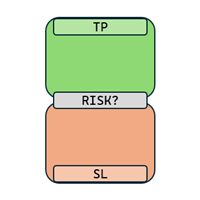
RRR Calculator is a gadget by MT4Gadgets that easily allows the trader to see the Risk to Reward Ratio for the desired trade. Given the Take Profit and Stop Loss levels, the tool will easily show the Risk to Reward Ratio. The simple interface and Drag and Drop feature makes it easy and quick to use. Risk to Reward is one of the most important aspects in a strategy and this tool allows an immediate view of the Risk to Reward Ratio, also known as R:R ratio.
Features: Visual interface Drag and Dro
FREE
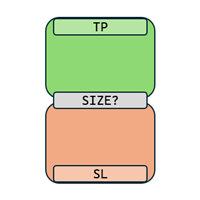
Position Size Calculator is a gadget by MT4Gadgets that easily allows the trader to see the position size for the desired trade. Given the risk and established the Stop Loss level, the tool will easily show the possible Stop Loss value, the Take Profit and the position size to meet the risk profile. The simple interface and Drag and Drop feature makes it easy and quick to use.
Features: Visual interface Drag and Drop panel Ease of use
FREE

Quantum Simulator – Discover the Power of Quantum Dynamic Risk Quantum Simulator is an Expert Advisor designed to demonstrate the effectiveness of the Quantum function, fully integrated into the RiskGuard Management system. Through a simple interface, you can simulate an equity curve starting from a fixed balance of €100,000 , using your own custom statistics: Win Rate (%) Average Risk/Reward Ratio Number of Trades Maximum Allowed Drawdown (Optional) Minimum Accepted Drawdown The EA performs a
FREE
DYJ NetPilot 是一款为 MetaTrader5 平台开发的智能交易系统(实用工具),旨在通过动态计算所有持仓的加权平均价格(Pmix),并据此自动调整退出价格,实现优化的平仓策略。 主要特点:
Pmix 计算: 根据所有持仓的订单价格和手数,计算出一个加权平均价格(Price Mix),为仓位管理提供清晰的参考依据。 动态退出策略: 统计多空订单数量,判断多数仓位方向,并针对主导方向设置统一止盈,针对反方向订单设置统一止损,确保交易能够同时以总体获利退出。 图表显示: 在图表上绘制出 Pmix 价格线和目标退出价格线,让交易者直观地看到关键价位。 风险管理: 内置最小止损距离检查,并自动调整止盈/止损价格,确保订单符合经纪商要求,降低修改失败的风险。 可定制参数: 用户可在点数与利润单位之间切换目标参数,满足不同交易策略的需求。 自动开仓信号:包括均线 策略和抛物线策略 和蜡烛收盘策略. DYJ NetPilot 非常适合需要精确自动化平仓管理的交易者,尤其适用于如 XAUUSD 等品种的低周期交易(例如 M1), 最佳匹配软件 DYJ OneClickClose
Description:
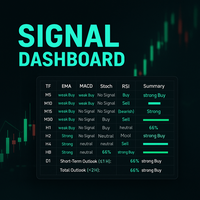
This powerful script provides traders with a comprehensive, real-time signal overview across multiple timeframes using some of the most trusted technical indicators. Designed as a clean, compact on-chart table, it displays actionable insights for 9 timeframes — from M5 to D1 — helping traders make well-informed decisions based on momentum, trend strength, and market conditions.
How it works:
For each timeframe (M5, M10, M15, M30, H1, H2, H4, H8, D1), the script calculates
Enough with all these complex and confusing trade assistants and trade managers! Go simple and user-friendly! With One Click Order you set your risk, prepare your long or short trade and submit, DONE in seconds!
One Click Order is very easy to use Set your default risk (in % or amount) Select if you want to go long or short Drag the Open Price to your desired level, or leave as is for market orders Drag the SL to your desired Stop Loss Drag the TP to your desired Take Profit The tool will calcu

Manual Trade Helper
is an MT5 Expert Advisor designed as an automated assistant for managing manually opened trades. This EA does not open trades on its own, but instead enhances manual trading by automatically managing risk and position settings. Remote Management via VPS + Mobile Devices When deployed on a Virtual Private Server (VPS), the RitzEAneha Manual Trade Helper allows traders to seamlessly manage their trades from anywhere using just a smartphone or tablet. Since the EA runs 24/7 on t
FREE
TickData Recorder (v1.3): Real Ticks Recording for Reliable Backtesting in MT5 Elevate the accuracy of your strategy testing significantly! Tired of unrealistic backtest results on standard MetaTrader 5 data that don't match your broker's conditions? "TickData Recorder" is your tool to solve this problem. This Expert Advisor meticulously records every single tick price change (time with milliseconds, Bid, Ask, Last, Volume) directly from your broker's server (FTMO, RoboForex, IC Markets,

Time-Based Trade Closer EA - Risk-Free Overnight? Yes! Time-Based Trade Closer Does It for You. Love it? Hate it? Let me know in a review! Feature requests and ideas for new tools are highly appreciated. :) Try "The AUDCAD Trader":
https://www.mql5.com/en/market/product/151841 ️ ALWAYS TEST THIS EA ON A DEMO ACCOUNT BEFORE USING IT LIVE! Overview The Time-Based Trade Closer EA is a powerful MetaTrader 5 Expert Advisor designed to automatically close all open positions and pending orders at
FREE

Tired of manually closing dozens of charts or managing multiple positions one by one?
With Close All Pro, you can clear your workspace in a flash—saving time, reducing clutter, and streamlining your trading workflow. Love it? Hate it? Let me know in a review! Feature requests and ideas for new tools are highly appreciated. :) Try "The AUDCAD Trader":
https://www.mql5.com/en/market/product/151841 ️ ALWAYS TEST THIS EA ON A DEMO ACCOUNT BEFORE USING IT LIVE! Description: Close All Pro is desi
FREE

Golden Sizer By SKPAD – Calculateur et Gestionnaire de Position Intelligent Golden Sizer est bien plus qu'un simple outil de trading : c'est un assistant stratégique complet pour la gestion des risques et des positions. Conçu pour s'adapter à tous les styles de trading – du débutant au professionnel, du swing trader au scalpeur – il transforme votre approche des marchés grâce à une interface intuitive, une précision de calcul optimale et une exécution rapide. Compatible avec tous les marchés (F
FREE

ATR RiskMaster – Lot Size Calculator Based on ATR Volatility ATR RiskMaster 1.00 is a powerful utility (runs as an Expert Advisor or Indicator) designed to automate lot size calculation, stop-loss, and take-profit levels based on market volatility using the Average True Range (ATR). Perfect for traders who prioritize consistent risk management and precision. Inputs & Features Explained ️ RiskPercent (1.0%)
Defines the percentage of your account you want to risk per trade. For example, with

️ PropShield is your automated guardian for proprietary trading firm challenges and funded accounts. If you've ever failed a challenge by exceeding the daily drawdown limit by just a few dollars, or if you struggle to enforce your own risk rules during volatile markets, PropShield is built for you. This is not a trading strategy - it's a safety system that watches your account 24/7, automatically closes positions when risk limits are breached, and keeps you on track to pass challenges and keep

Description: Advanced Position Closer EA monitors your open market orders per symbol, displays the counts directly on your chart, and automatically closes orders when configurable thresholds are met. It supports both global and per-symbol settings for direction, profit/loss filtering, and whether to close all matching orders or only those that passed your filters.
External Parameters:
1. GlobalMaxOpenOrders (int) - Sets a single maximum number of open market orders for every symbol. - 0

RexCatch EA is designed to recognize all forms of boxes or rectangles with the specified color which will later be used for order execution, both buy and sell in the form of Supply and demand. This EA is also able to read indicators installed on the chart that display box or rectangle shapes, such as the Supply Demand indicator or boxes and rectangles that are made manually by giving them the color as specified in the EA setting.
Can only open 1 order and will reopen the order when the active o

Advanced Take-profit Stop-loss EA v1.00 — Expert Advisor Description ===================================================================
Overview: --------- This Expert Advisor (EA) automatically monitors and closes positions based on overall profit or loss levels. Its primary goal is to help traders manage risk and lock in gains by defining thresholds for take-profit and stop-loss either globally or per individual symbol.
Key Features: ------------- 1. **Global and Per-Symbol Thresholds:*

Auto SL/TP Manager EA – Gestion Automatique Intelligente Auto SL/TP Manager EA est un Expert Advisor conçu pour automatiser la gestion des commandes avec une efficacité maximale et une grande discrétion. Il gère automatiquement : Le Stop Loss (SL) et le Take Profit (TP) Le Profit Lock (verrouillage progressif des bénéfices) Le Trailing Stop avec plusieurs méthodes avancées L' affichage masqué du SL et du TP pour plus de discrétion (non visible par le courtisan) C'est l'outil idéal pour les

Main Features Auto Entry & Exit
Automatically enters and closes positions when price reaches a trendline or horizontal line you draw.
Note: Your PC and MT5 must remain running. Quick & Easy Setup
Configure everything via on-chart input fields and buttons. Advanced Entry Controls
Includes trigger lines to refine entry conditions, invalidation lines to block unwanted entries, trailing stops, entry-time restrictions, and time-specified exits. How to Set Up Lines Draw your desired entry, exit, t

Overview Breakout Meter is a price action tool that identifies key breakout zones based on recent daily price activity. It highlights areas where momentum is likely to trigger, helping traders anticipate breakouts or reversals with minimal configuration. How It Works The EA analyzes a user-defined number of recent daily candles and marks high and low zones where price has shown strong reactions. It automatically updates levels with new data and removes outdated zones to keep charts clear. Users

EASY Insight – 更智能的交易从这里开始 概述
如果你能在几秒钟内扫描整个市场——外汇、黄金、加密货币、指数,甚至股票——完全不需要手动筛选图表,会是什么体验? EASY Insight 是一款为人工智能准备的数据导出工具,能将指标数据转化为可执行的交易情报。专为厌倦了猜测和视觉混乱的交易者设计,只需一个简洁的 CSV 文件,即可获得全市场快照。 这是全新的交易体验——没有无休止的窗口切换,没有杂乱的图表覆盖。只有你已经熟悉的工具带来的纯粹结构化洞察力:FX Power (FXP)、FX Volume (FXV)、FX Dynamic (FXD)、FX Levels (FXL),以及适用于所有非外汇资产的 IX Power (IXP)。 想要更方便?如果你希望所有功能集于一身,只需一次安装,无需设置、无需在图表上显示指标,只需纯粹的数据导出用于即时 AI 分析,选择 EASY Insight AIO 。 1. 为什么 EASY Insight 会改变你的交易方式 多资产覆盖
• 分析外汇、贵金属、加密货币、指数、股票——你的经纪商提供的所有资产。 AI 优化导出
•

Easy Trade – 智能、简洁且强大的交易管理工具 Easy Trade 是为 MetaTrader 用户打造的一体化交易管理解决方案,帮助您轻松掌控风险,实现流畅交易执行。
它是根据交易者的反馈从零开始开发的,简化了多品种交易的执行、监控和管理流程,无需繁琐的操作。 无论您是手动短线交易者,还是管理多个交易设置的小型投资组合,Easy Trade 都能让您专注于明智决策和稳定盈利。
⸻
为什么选择 Easy Trade? 精准风险管理:可选择固定手数或按百分比定义每笔交易的风险。实时显示风险与潜在收益。 篮子式跟踪止盈:追踪多笔交易的总利润,目标达成时自动锁定部分收益,适用于组合交易。 交易截图记录:每笔交易都可截图保存,方便日记记录、回顾与绩效分析。 定时自动平仓:可设定具体日期和时间自动关闭持仓,适合日终或周末前平仓。 界面可自定义:可调整按钮排序与大小、线条样式与颜色、缩放比例等,满足个人使用习惯。
⸻
主要功能(版本 1.0) 魔术号与策略标签: 使用注释标记轻松区分不同策略的交易,便于统计与复盘。 手数设置: 支持固定手数或基于止损与账户资金百分比的动态手

Drawdown Guardian Pro (v2.8) - 您的 MT5 增强型账户保护者! 在灾难性损失发生之前阻止它们!"Drawdown Guardian Pro" 是一款全面的风险管理工具,可持续监控您的 MetaTrader 5 账户,并在达到预设限制时自动应用安全措施。非常适合用于防范失控的 EA、市场波动或情绪化的手动交易。 主要特点 (v2.8): 多功能回撤限制:监控固定(每日/总体,以 % 或货币计)和追踪(Trailing)回撤。 绝对净值水平:设置最低和最高阈值。 灵活的时间过滤器:允许或阻止在特定时间和日期进行交易。 动态风险可视化:图表变身为指标!背景颜色变化和中心文本即时指示危险级别。 可自定义主要操作:平掉所有/亏损/盈利的受管理仓位、阻止新交易、通知。 删除挂单:达到限制时可选择自动删除受管理的挂单。 主动事后阻止:保证平掉在触发阻止 之后 开设的新的受管理市价单。 紧急关闭其他图表:(强制平仓后)可选择自动关闭终端中的 所有其他图表 。 紧急关闭终端:(强制平仓后)可选择自动关闭 整个 MT5 终端 (注意:务必极其谨慎使用!)。 详细的统计面

Flow – Hotkey Tool for Discretionary Traders Take full control of MT5 with your keyboard and mouse.
Flow is a powerful hotkey-based assistant designed specifically for discretionary traders who want to place orders, draw tools, and operate charts with speed and precision. No more right-click menus or wasting time. Just trade.
Key Features Order Execution Place pending Buy/Sell orders (limit or stop) instantly with just a mouse click. Stop Loss and Take Profit lines are automatically attac

Risk Management EA - Advanced Trading Tool with Visual Controls Description: This comprehensive Risk Management EA transforms your trading experience with an intuitive visual interface directly on your chart. Take full control of your trades with precise risk calculation, customizable entry/exit points, and one-click order execution. Key Features: Visual Trade Management : Drag-and-drop SL/TP lines with real-time profit/loss calculations Automated Risk-Based Position Sizing : Instantly calculate

Ultimate Chart Navigator - Instant Symbol Switcher for MetaTrader 5 Love it? Hate it? Let me know in a review! Feature requests and ideas for new tools are highly appreciated. :) Try "The AUDCAD Trader":
https://www.mql5.com/en/market/product/151841 Tired of Wasting Time Switching Charts? Save time and supercharge your trading workflow with the Ultimate Chart Navigator—the professional-grade tool that puts instant symbol switching at your fingertips.
Perfect for forex traders, commodity
FREE

Boost your forex profits with Blues Protector, an advanced MQL5 Expert Advisor designed for MetaTrader 5. This automated trading bot dynamically manages your stop-loss levels to secure gains and reduce risks. Blues Protector EA - User Manual (For MT5 - Ready-to-Use EX5 File) 1. What This EA Does The Blues Protector EA automatically secures your profits by smartly adjusting stop-loss levels when your trade reaches a predefined profit level. It works silently in the background, protecting

Ultimate MT5 Trade Panel – Full Control at Your Fingertips Take your trading to the next level with the Ultimate MT5 Trade Panel – a powerful, fully customizable tool designed for speed, precision, and complete control over your trades. Whether you manage a few positions or hundreds across multiple symbols, this panel will make your life easier! Key Features: Multiple Close Options Close All Positions & Orders with One Click Close Only Buy Positions Close Only Sell Positions Close All Pr

NY Open Breakout EA is a fully automated trading robot specifically designed to capture strong breakouts during the New York trading session, focusing on major forex pairs and indices correlated with the US Dollar. Key Features: Automatically defines the trading zone based on customizable time settings. Opens trades when the price breaks above or below the identified zone. Smart built-in risk management with automatic stop loss and take profit settings. Advanced Martingale loop system to reco

Copy signals from Telegram channel to MT4/MT5 (Telegram bot must be added as an Admin in the channel) Input * Telegram bot token: Get your bot token by chatting with @BotFather * Multi- order for multi-tp signals * Signals filter by "not included text" * Option to Modify/Close by Reply message * Range Entry Mode: No open order if the price is out of range Setup on your MT4/MT5: - MT4/MT5 => Tools => Options => Expert Advisors => Tick on Allow Algo Trading & Allow WebRequest, add API Telegram

Momentum Echo – Real-Multi Currency Alert System Overview: Momentum Echo is a real-time alert system designed to monitor price with precision. It identifies aggressive market moves, capturing critical moments when price moves against the normal range signifying possible: Never miss a retracement even when away from your trading computer Stop hunts to eliminate retail positions Volatility breaks out of consolidation zones Price luring traders into premature entries Momentum surges confirm market

CYP Trade Manager Pro MT5: The Trader's Edge in Position Management
Transform How You Manage Trades - Focus on What Matters Why Most Traders Fail - And How CYP Trade Manager Pro Solves It
Many traders have solid entry strategies but lack proper trade management - the key difference between professionals and amateurs. CYP Trade Manager Pro handles the critical "after entry" phase of trading that most EAs ignore, giving you the edge that institutional traders use every day. Who Is It For Manual

Waiting for Tsunami EA waiting for a sudden price change to occur. If the conditions defined as Tsunami occur, the program sends a message to the Meta Trader 5 application installed on the phone or to email. Program parameters: - change price in one tick, - first time period in minutes, - change price in first period, - second time period in minutes, - change price in second period, - third time period in minutes, - change price in third period - target high(upper price), - target low (lower pr

Key Note: Easy Install Instructions below. What's New: What’s New in StrategySuccessAnalyzer v2.0 – Major Upgrades Interactive GUI Dashboard
Visualize strategy health in real time with dynamic score gauges, equity projections, and color-coded performance alerts — directly on your MT5 chart. 30-Day Forward Performance Projection
Forecast equity growth, drawdown risk, and net PnL over the next month using realistic trade simulations and optional compounding logic. One-Click CSV Export
Save fu

Are you looking for an easy and effective way to keep your trading signals up-to-date? With TradeLink, you can now send all your MQL5 trading signals directly to Telegram with ease! Why is TradeLink the right choice for you? Ease of use: No technical expertise required. Just enter your token and start sending alerts. Ultra-fast: Instant alerts as soon as signals appear on MQL5. High security: Connectivity is via the encrypted and trusted Telegram API. Time saving: Never miss a trading op

MQL5 博客: https://www.mql5.com/en/blogs/post/761446
MT4 版本: https://www.mql5.com/en/market/product/136790
MT5 版本: https://www.mql5.com/en/market/product/136791
Time Wizard 是一款专业的交易助手,专为需要在简洁的控制面板上实现速度、时机和执行控制的交易者而设计。
这款智能交易系统 (EA) 专为事件驱动交易、定时执行和快速半自动订单管理而设计。它允许您提前准备订单、定义精确的执行时间、设置分层挂单、通过止损和止盈管理风险,并通过图表上的简洁界面监控所有信息。
无论您是围绕经济事件、开盘、突破点还是您自己的自定义计划进行交易,Time Wizard 都能帮助您以结构化和纪律性的方式执行交易。
主要功能
1. 基于时间的订单执行
设置具体的执行日期和时间,EA 即可在需要时精准下单。
此功能非常适合:
新闻交易
突破交易设置
预先计划的市场执行
定时下单
2. 挂单阶梯
创建多层挂单,层间距和

概述
EagleFX 是一个面向 MetaTrader 5 的全自动专家顾问(EA),在多种金融工具上全天候(24/7)执行高精度算法交易策略。它剔除交易决策中的情绪因素,对每个信号进行严格的历史回测,动态调整风险参数,并利用先进的机器学习启发式内存模块不断优化自身性能。 持续、无情绪执行
EagleFX 不知疲倦地 24/7 运行,持续监控价格走势,并在满足预设条件的瞬间执行交易。与易受恐惧与贪婪影响的人类交易者不同,它严格遵循预先编码的策略,杜绝任何情绪偏差。 经过验证的回测策略
所有进出场规则均基于量化指标(如 ATR、EMA、RSI),并在多年历史数据上反复回测以保证统计可靠性并避免过拟合。在上线实盘前,每组参数都经过严格的滚动前测(walk-forward)、不同波动率环境下的模拟,以及趋势和震荡市场条件下的双重优化。 先进架构与自适应
EagleFX 作为独立的 MT5 EA,采用 handle-方式调用指标以提高效率,并借鉴 LLM 代理(如 FinMem、TradingGPT)的分层记忆结构,以优先关注最近的市场动态同时保留长期背景。该多层设计使其信号可实时自适

EchoTrade Telegram to MT5 Copier Seamless, Instant, and Reliable Signal Copying - Direct from Telegram to MetaTrader 5!
The product does not run in the strategy tester but you can get free trial version here for testing before purchase.
Tired of manually executing trades from Telegram signals? EchoTrade automates the process, instantly copying trades from any Telegram channel or group directly into your MT5 account—accurately, efficiently, and without delay. Key Features: Universal Compatibi

多时间框架趋势及入场确认系统包含以下组件: 趋势信号:每个趋势均在两个时间框架内进行分析:5分钟和15分钟 强度(强度:最高价 | 最低价)—— 可能指示不同时间框架内的波动性或成交量强度。 入场确认 最终交易信号(交易信号:买入/卖出)—— 暗示潜在的做多(买入)/做空(卖出)机会 Duō shíjiān kuàngjià qūshì jí rù chǎng quèrèn xìtǒng bāohán yǐxià zǔjiàn: Qūshì xìnhào: Měi gè qūshì jūn zài liǎng gè shíjiān kuàngjià nèi jìn háng fēnxī:5 Fēnzhōng hé 15 fēnzhōng qiángdù (qiángdù: Zuìgāo jià | zuìdī jià)—— kěnéng zhǐshì bùtóng shíjiān kuàngjià nèi de bōdòng xìng huò chéngjiāo liàng qiángdù. Rù chǎng quèrèn zuìzhōng jiāoyì xìnhào (jiāoyì

Auto Volume & Risk Management Tool - Effortless Position Sizing & Entry It helps to calculate the risk per trade, the easy installation of a new order, order management Precise Position Sizing – A Critical Step Toward Successful Trading In the world of professional trading, accurately calculating position size while managing risk is one of the most crucial aspects of long-term success. Time and again, traders with solid, profitable strategies end up with negative statements. Upon review, it oft
FREE

此指标直观高效地展示您的总权益曲线,以及独立的多头(BUY)和空头(SELL)曲线。您可以按魔术编号和日期范围进行筛选,轻松对比不同的自动交易策略在特定周期内的表现。所有曲线均绘制于同一子窗口中,一目了然地查看各品种和交易方向的累计收益。 详细说明 魔术编号筛选 策略选择 :输入机器人(EA)的魔术编号(Magic Number),或留空为 0 以显示所有交易,只加载匹配该编号的交易记录。 快速对比 :无需切换模板,即可在同一图表上切换不同机器人,实时查看哪个策略表现更佳。 日期范围筛选 时间控制 :设置开始日期( Gb_StartDate ),仅包含该日期及之后的成交记录。 周期分析 :按月、季度或年度查看收益,识别季节性模式或市况影响。 子窗口可视化 整洁布局 :总权益、多头曲线与空头曲线同绘于独立窗口,避免与主图价格线重叠,保持界面清爽。 绘图优化 :利用 PLOT_DRAW_BEGIN 只绘制相关区间,提升重绘速度。 主要优势 全局与细分视角 同时监控 累计权益 和多空方向收益曲线。 明确哪种交易方向(买入或卖出)带来更多盈利或亏损。 高效分析 无需切换周期或模板,快速对比多个

Script "Bar Close Timer Pro" is designed to display a real-time countdown to the closure of the current bar. This professional tool is tailored for traders working on any timeframe, enhancing chart analysis efficiency through precise time control. The script automatically adapts to the chart’s current timeframe (M1, H1, D1, etc.), calculating the remaining time until the candle closes. (Note: When switching timeframes, the script must be reattached to the chart.) Flexible display settings: Cus
FREE

Shadow Mark Scanner Your Edge in Candle Range Theory – Automate Advanced Price Action Setups Introduction - Make sure you know those strategies and backtested them before using this scanner - Use at your own risk Shadow Mark Scanner is a cutting-edge MetaTrader 5 indicator that automatically identifies advanced price action setups using candle range theory . This powerful scanner detects high-probability patterns like Previous Candle Range (PCR) breakouts and Engulfing Sweeping Candles (also kn
FREE

"Tired of watching the charts 24/7? Missing profits because of poor risk management? Losing trades when you could’ve secured a win?" This is the ultimate automated assistant that protects your gains and limits your risks, and gives you time to focus on other important things. Key Features Break-Even Plus – Locks in your gains and moves your stop-loss automatically. Automatic Stop-Loss & TP – No more emotional trading, just smart execution. Trailing Stop – Ride the trend

EMA Line Visualizer with Trend Analysis Description:
The Exponential Moving Average (EMA) Line Visualizer EA plots multiple EMAs on your chart (25, 50, 100, 200, and a custom EMA) and analyzes real-time trend direction. It detects whether the market is currently in an Uptrend , Downtrend , or Flat condition based on the latest EMA relationships. Features: Multi-EMA Display
Plot multiple EMAs with customizable periods. Custom Colors
Set distinct colors for each EMA line for better visual trac
FREE

Dynamic ATR TP Ratio The ATR Take Profit Manager Expert Advisor (EA) automatically calculates and adjusts the take profit (TP) level for your open trades, based on market volatility. This EA uses the Average True Range (ATR) indicator, which measures market volatility, to set your TP level, ensuring it adapts to the current market conditions. What is ATR? The Average True Range (ATR) is a technical indicator that shows the volatility of an asset over a specific period. It measures how much the
FREE

Trade Performance Journal — Your Visual Trading Summary Tool Trade smarter by understanding your performance.
This Expert Advisor (EA) provides an instant visual summary of your trading results directly on the chart. Whether you’re a scalper, swing trader, or long-term investor, this tool helps you stay on top of your performance metrics with ease. Key Features Flexible Time Analysis
View your performance by Quarter, Month, or Half-Year. Easily switch between display modes to analyze your res
FREE

Position Size Tool – Smart Risk Management & Trade Execution Panel The Position Size Tool is a powerful and intuitive MT5 panel that simplifies your trading by combining position sizing , risk calculation , risk/reward visualization , and order placement —all in one place. ️ Clean & Functional Interface The tool features a compact, real-time panel with the following: Balance & Equity display Live Price tracking Customizable Risk % input Auto-calculated Lot Size based on SL and Risk Input for S
FREE

CloseOrders EA v1.06 - Professional One-Click Order Management Panel for MetaTrader 5
CloseOrders EA is an essential, high-performance order management tool for MetaTrader 5 traders and scalpers. It places a clean, responsive control panel directly onto your chart, allowing instant, selective execution for closing market positions and canceling pending limit orders with a single click.
================================================== KEY FEATURES ============================================

FREE

交易治疗师EA的优势 强化交易纪律 执行交易前,EA会引导您完成个性化检查清单——确保您每次都遵循交易计划。 减少情绪化交易 告别FOMO、报复性交易和冲动性进场。EA通过要求确认所有预设条件来鼓励耐心和清晰思考。 完全可定制的检查清单 根据您的个人策略添加最多10个交易前问题——无论您是短线交易者、日内交易者还是摇摆交易者。 无缝图表整合 检查清单以整洁、可拖动的框显示在您的图表上。您可以放大/缩小、最小化和重新定位它,以便不间断分析。 随时重置 只需一键即可轻松重置清单。适合在一个交易时段内分析多个机会的交易者。 跨时间框架工作 即使切换时间框架,突出显示也会保持,因此您在分析过程中不会丢失进度。 在满足所有条件前阻止交易执行 "确认并启用"按钮在所有检查点都完成前保持非活动状态。这可防止过早或情绪化交易。 提升交易信心 在建立仓位前,确保您已逐步遵循系统。这减少了犹豫和二次猜测。 随时间提高一致性 通过反复使用,EA帮助您形成强大的交易习惯——提高一致性、纪律性,并可能带来更好的结果。 ️ 要求: 专为 手动交易 设计(此E

Ultimate MT5 Auto SL/TP Assistant EA Our MT5 Expert Advisor is designed to automatically apply predefined SL and TP levels to any order you place – Fast, accurate, and fully automated, no manual errors, no delays. Perfect for scalpers, intraday traders, and anyone who values precision and speed. Auto SLTP Auto SL TP this is Utilities Scalper Auto SL TP fast Open Close https://www.mql5.com/en/market/product/158389
FREE

SmartClose Pro 是一款強大且操作簡便的智慧型交易助理(EA),專為 MetaTrader 5 平台設計,讓交易者能夠靈活掌握多筆持倉單的管理。不論您是想要一次性鎖定獲利,還是控制整體虧損, SmartClose Pro 都能透過智慧自動化與嚴謹計算,協助您達成交易目標。 您可以從介面上的上方表格中自由選取任意持倉,將其加入下方的監控清單,支援跨商品、多單同時管理,無數量限制。只需設定您希望的獲利或可接受虧損的美元金額(可為正值或負值),點擊「開始」後,EA 會自動即時計算所有選單的實際盈虧(包含手續費、隔夜利息與總手數),當達成目標時,將自動關閉所有選擇的訂單。 SmartClose Pro 最出色之處在於其 智慧風控設計 。即使正在執行中,只要其中一筆選單被手動平倉,系統就會自動停止運行,避免誤操作導致不預期的結果。此外,上下兩個表格都設有「即時更新」選項,確保數據隨時保持最新與正確。 不論您是短線交易者、中線佈局者,還是多品種資產管理者, SmartClose Pro 都是您不可或缺的利器。適用於籃子交易、網格策略、對沖操作與多幣組合。 主要功能特色 : 跨品種
This Ea. is very unique in his function, and not designed to be traded automatic. as the first option. It is a tool designed to be used by a mild experienced Forex trader that can: Trade manual or automated and can try to find a good entry price levels Trader that can enter the market using market or pending orders at specify price levels. Please watch the video about using the excel calculator when using the breakeven technic . The same idea used for the breakev
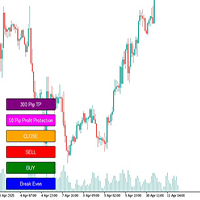
# Megathron Buttons EA User Guide
## 1. Overview Megathron Buttons EA is a helper tool designed for manual traders. It provides quick and easy trading through various buttons on the chart.
## 2. Installation 1. Install the EA on your MetaTrader 5 platform 2. Drag and drop it onto your desired chart 3. Configure the EA settings (detailed below)
## 3. Buttons and Their Functions
### Main Buttons 1. **BUY Button** (Green) - Opens a buy position with specified lot size - Automatically cal

Time Zone 指标通过为不同交易时区(如亚洲、欧洲、北美)设定时间段和颜色,使交易者能够直观了解各个市场的开盘和闭盘时间。用户可自定义显示几日内的交易时区,选择每个时区的开始和结束时间,颜色标记交易时段,并设置图表的刷新间隔,以确保时区信息的准确性。 主要功能: 显示交易时区: 用户可以选择显示过去几天内的交易时区,指标会按用户设定的时间和颜色在图表上标注各个交易时段,帮助交易者识别不同市场的活跃时间。 自定义交易时区: 用户可以为亚洲、欧洲、北美三个主要交易时区分别设定开盘时间、闭盘时间及显示颜色,确保根据不同市场的活跃时间段进行合理的策略安排。 颜色标记: 不同的交易时区可以通过自定义颜色进行标记,用户可以快速直观地识别不同市场的活跃时段,方便制定交易策略。 图表自动刷新: 用户可以设定图表的刷新间隔(默认每5分钟刷新一次),确保显示的交易时区信息实时更新。 使用场景: 跨时区交易策略: 对于关注全球市场的交易者,该指标可以帮助他们识别不同交易时段的活跃市场,从而调整交易策略。例如,在亚洲时区时可以更多关注该市场的资产,而欧洲或北美时区则转向相应的市场

This trading utility is designed for intraday traders who open a large number of transactions. It implements trading via hot keys, with automatic stop-loss setting for the minimum or maximum of the previous candle and take-profit at certain levels. Certain levels are the maximum and minimum of yesterday and their range measured from the maximum up and from the minimum down. The main elements that are necessary when working within a day are displayed at the top of the chart. This is a timer that

Expert Advisor to help beginners.
It allows you to adjust the following parameters:
Number of simultaneous positions The asset allowed to trade Maximum lots allowed per position Maximum number of positions per day When one of the parameters is not/no longer valid, the EA automatically closes new positions, preventing you from trading. This Expert Advisor helps you trade by mastering your trading psychology for you.
VPS essential.
Feel free to give me feedback and suggest further improvement
FREE
MetaTrader市场是独有的自动交易和技术指标商店。
阅读MQL5.community用户备忘更多地了解我们提供给交易者的独特的服务:复制交易信号,自由职业者开发的自定义应用程序,通过支付系统完成的自动付款和MQL5云网络。
