 MetaTrader 5
 专家
专家
 指标
指标
 程序库
程序库
 实用工具
实用工具
 窗口小部件
窗口小部件
 规则
规则
免费的MetaTrader 5 交易实用工具 - 29
 以下是可在MetaTrader 5中简化交易的交易程序。将鼠标悬停在一个工具上,阅读它的描述和用途。
The utility automatically sets the take-profit and stop-loss levels specified by the user in the parameters and moves the stop-loss line when the specified number of points above the trade price is exceeded. There are 4 trailing stop options: Disabled - Disabled Trail - Simply move the stop-loss level To breakeven - Move the stop-loss to breakeven when the value of points specified in the settings is exceeded and do not move the level any further As steps - Move the stop-loss to breakeven when
FREE

Share your trades with a Discord channel automatically. How it works Create a webhook in your Discord channel settings and paste the URL into the inputs. Allow WebRequest for https://discord.com in Tools, Options, Expert Advisors. New positions, SL and TP changes and closed positions are sent with symbol, direction, price, lots, pips and result, depending on your settings. Messages are queued and resent if Discord is busy. Key features Open, modify and close messages Optional lots, pips and prof
FREE

See the real cost of trading: live spreads, statistics and logs for every symbol you trade. How it works Every second the utility samples the spread of the chart symbol and any extra symbols you list. The panel shows current, minimum, average and maximum spread, and a bar chart of the average spread by server hour for the chart symbol. Samples can be logged to a CSV file and an alert can warn you when the spread is above your limit. Key features Multi symbol spread table Average spread by hour o
FREE

Spread Monitor Live Real-time Spread Monitoring Tool for MT5 Version: 1.00
Last update: 15.06.2026
Author: Aleksandr Bezverkhikh Description Spread Monitor Live is a lightweight and efficient indicator for MetaTrader 5 that displays the current spread in real time directly on your chart. Perfect for scalpers, day traders, and anyone who needs to keep a close eye on trading conditions. The indicator shows the spread in points with clear color coding, allowing you to instantly s
FREE
This indicator allows to hide MACD oscillator (on all MT5 timeframes) from a date define by the user, with a vertical line (Alone) or a panel (with "Hidden Candles").\ Indicator Inputs: Fast EMA Period Slow EMA Period Signal SMA Period Apply To Information on "MACD" indicator is available here: https://www.metatrader4.com/en/trading-platform/help/analytics/tech_indicators/macd ************************************************************* Hey traders!! Give me your feeds! We are a community
FREE

This EA gives traders a clean, full-window view of how large a position each Market Watch symbol can support at different percentages of account balance used as margin. It helps you quickly compare sizing options across symbols and risk levels without ever placing or modifying orders. The goal is simple position-size awareness so you can decide exposure before you trade.
Benefits Shows lot size potential across Market Watch symbols at up to three different % of balance margin levels side-by-sid
FREE

Shows what each closed trade earned after commission, swap and fees, by symbol, session, hour, weekday or month. FEATURES Rebuilds each trade from its deals, costs apart from gross. Net result, R, summary, breakdowns, cost alarm, CSV export. HOW TO USE IT 1. Attach it to a chart. 2. Choose the window and table. 3. Read the panel or export the CSV. PARAMETERS InpRange, InpFilterMagic, InpRiskPercent, InpFixedStopPips, InpBreakdown. LIMITATIONS Trades opened before the window are counted, not reco
FREE

SL Locker — Stop-Loss Discipline for MetaTrader 5 Your stop-loss is supposed to protect the trade. SL Locker is designed to stop that protection from being weakened after it has been established. SL Locker is a MetaTrader 5 risk-discipline Expert Advisor built around one focused principle: a protective stop may move in a safer direction — but it should not be casually moved back into a less protective one. Once SL Locker has recorded a valid Stop Loss for a position, it monitors that position a
FREE

MA & Price Display 是一款轻量级、易于使用的技术指标,旨在直接在图表上显示关键市场信息。它实时显示两条移动平均线(默认周期5和10)的当前数值,以及前一根K线的最高点和最低点,帮助您快速评估市场结构,无需切换窗口。 主要特点 实时显示基于收盘价的MA(5)和MA(10)数值。 显示前一根K线的最高点和最低点 – 对于支撑/阻力位和突破交易非常有用。 完全自定义外观:可独立设置字体大小、均线颜色和高低点颜色。 鼠标拖拽文本:只需按住任意一行文本上的左键,即可将其移动到图表的任何位置(可在参数中禁用此功能)。 适用于所有时间周期和交易品种(外汇、指数、大宗商品、加密货币、股票)。 无外部依赖 – 纯MQL5代码,无DLL,无任何使用限制。 输入参数 InpFontSize – 字体大小(像素),默认10。 InpColorMA – 均线文本颜色,默认红色。 InpColorHL – 前K线高低点文本颜色,默认蓝色。 InpXOffset / InpYOffset – 文本块距离图表左上角的初始位置。 InpDigits – 显示的小数位数(-1 =
FREE

Trend Falcon Signals is a professional-grade, lightweight signal indicator utility developed for MetaTrader 5. It is specifically designed to identify high-probability, trend-following entry points using a multiple-timeframe moving average crossover system. Please note: This utility is purely an analytical tool. It does NOT open, manage, or close trades automatically. It strictly provides visual arrows on the chart and sends mobile notifications to assist manual traders. Core Trading Logic & St
FREE

ABQ Portfolio Correlation Scorer: Inteligencia Artificial de Grado Institucional para la Gestión de Riesgo La mayoría de los traders no fracasan por una mala estrategia de entrada, sino por una falla invisible en la arquitectura de su portafolio . El error más común es la sobreexposición por correlación: abrir múltiples posiciones pensando que se está diversificando, cuando en realidad se está multiplicando el riesgo sobre un mismo factor. ABQ Portfolio Correlation Scorer es un Copiloto de Super
FREE

Order Book, known also as Market Book, market depth, Level 2, - is a dynamically updated table with current volumes of orders to buy and to sell specific financial instument at price levels near Bid and Ask. MetaTrader 5 provides the means for receiving market book from your broker in real time. The expert OrderBook Recorder records market book changes and stores them in local files for further usage in indicators and expert adviser, including testing in the tester. The expert stores market book
FREE

TRAILINATOR is a unique Solution to use different Trailing-Stop Variants and change your settings via Remotecontrol. You configure your Trailing-Stop for a specified Symbol only once. This setting will be used for all your Positions of the same Symbol. Currently we support these different Trailing-Stops: Standard : works like you use in Metatrader Terminal, starts trailing if your profit is greater than trailing stop Start after points : trailing stop will start after your defined points in p
FREE

I’m sharing this EA here for free to support the trading community. I hope it’s helpful, and don’t hesitate to reach out if you have any questions or feedback!
Closes all Trades with click on a button. This button will appear on the right bottom side of the chart. When you remove the utility, the button will also dissappear. It closes all trades, no matter if Sell, Buy, the Symbol, if in profit or loss. One Click - and you solve it all. Especially made for demo and testing purposes. Use it wi
FREE

交易中的点差是市场上金融工具的购买价格和销售价格之间的差额。 点差是交易者为交易机会向经纪人支付的佣金。
每个经纪人都提供自己的交易条款,这已经不是什么秘密了。 价差的大小很重要。 有很多顾问(特别是黄牛)在不同的经纪人表现出不同的结果。 我们一再遇到这种情况。 因此,使用此实用程序,找出您的经纪人在特定工具期间提供的价差。
运行该实用程序几天。 检查日志中的屏幕上的消息,以及在数据文件(。.\MQL5\Files)。
实用程序输入参数:
type_account -账户类型的名称,所有经纪商可能有不同的缩写(ECN,PRO,VIP,RAW等。) actual_spread -仅为活动期间选择数据(这是从2-22小时) save_file_result -将数据保存到文本文件
FREE

Chart Pro Classic Dark v1.00 Chart Pro Classic Dark is a professional MT5 chart styling and customization tool designed to give your charts a clean, modern, and professional dark appearance. Key Features Dark Black Background — Applies a clean black background to the chart. ️ Candlestick Chart — Automatically configures the chart to use candlesticks. Bullish Candles — Green/Lime bullish candles. Bearish Candles — White bearish candles. Grid Removal — Hides the chart grid for a clean
FREE

Forex Inspector Broker X-Ray See exactly what your broker charges, and how it compares, in one clean panel on your chart. ForexInspector Broker X-Ray reads your live account conditions and shows them in a professional tabbed panel: real spread, true cost per lot (spread plus commission), swaps in money, leverage, margin, execution type, stop-out, ping and a 0 to 10 broker score. It also shows how your broker ranks against the community on forexinspector.com. 100% FREE • It never trades • It
FREE

Get a Clean Chart Instantly
This script quickly and reliably removes everything unnecessary from the chart — all graphical objects and all indicators.
Key Benefits - Full Cleanup Removes all graphical objects (lines, arrows, shapes, etc.) Removes all indicators from the main and auxiliary windows - Logging Outputs detailed information about the cleanup process to the Experts tab
Recommendations - Read the product description carefully before purchasing - Back up importa
FREE

ActiveSnap 是一款专门为MetaTrader 5平台设计的智能吸附指标,它通过创建多个参考线并为用户拖动的对象提供"磁吸"效果,极大提高了技术分析的精确度和操作效率。
在MT5价差交易中的作用 1. 点差补偿交易 价差计算 :指标自动计算当前点差并加到价格上 真实成本考虑 :帮助交易者考虑到交易的实际成本(点差) 精确入场 :确保止损/止盈设置已包含点差因素 核心功能 1. 智能吸附系统 自动吸附 :当您拖动图表上的水平线时,指标会自动将其"吸附"到预设的关键价格位置 多类型吸附线 :提供三种不同类型的吸附参考线 精确控制 :可自定义吸附距离、位置偏移量和透明度 2. 三种吸附线类型 高价吸附线 位置 :每根K线的最高价 + 当前点差 + N个最小变动价格 用途 :识别阻力位、做空入场点 参数控制 : HighTickOffset 可调整N的值 低价吸附线 位置 :每根K线的最低价 + 当前点差 - N个最小变动价格 用途 :识别支撑位、做多入场点 参数控制 : LowTickOffset 可调整N的值 最低价吸附线 位置 :每
FREE

Msg2Slack 是将消息从 MT4/MT5 文本框发送到 Slack 的工具。 只需单击位于文本框右侧的按钮,您就可以轻松地将文本和图表图像发送到您的 Slack 频道。 即使您在图表上画线、标记、注释等,图像也会被发布。
无论您是想向自己还是群组发送消息,这个简单而强大的工具都可以让您非常轻松地捕获图表图像并即时发送消息。
Msg2Slack 工具显示在图表底部。 只需输入您的消息并单击右侧的按钮即可发布您的消息或带有图像的消息。
虽然效用水平因人而异,但任何使用 Slack 进行交流的人都可以从 Msg2Slack 即时发送图表图像的能力中获益。
获取 Slack API TOKEN 并将其设置为该工具的参数。
您还可以使用策略测试器来检查它是否有效。
FREE

Anti Revenge Trading Police Bot v1.80 (Revenge Trading Protector) 开发商: Mindfultradeness
你是否陷入复仇交易的循环,每一次亏损都诱惑你再次入场?想象一位守护者站在你身旁——Anti-Revenge Police Bot,你克服复仇交易的终极工具!这款创新实用工具时刻关注你的每一步,检测已关闭的亏损并触发可定制的冷却期,以阻止那些毒性冲动。凭借实时干预,它关闭所有头寸和挂单,引领你走向充满希望的 mindful 交易之旅。让我们一起探索其工作原理并完成设置!
关键功能与优势: - **实时多语言 HUD 带进度条和倒计时:** 立即获取以你语言显示的动态信息,确保交易清晰可见。 - **Anti-Revenge Police:关闭开放头寸并删除挂单:** 享受冲动再入场的平静保护,保障你的账户安全。 - **可配置冷却期(1-60 分钟):** 通过你控制的暂停时间进行反思——根据需求设置分钟数。 - **带冥想链接的警报以舒缓身心:** 接收平静的通知(需在 MT5 平台设置中配置),恢复专注
FREE

该工具可在设定的时间间隔(例如每根K线收盘时)自动截取 MT5 多个图表的画面,并将其发送至 Telegram 和 Discord。若需实现基于特定时间间隔(如 15 分钟 K 线收盘)的自动更新,建议搭配另一款专用指标使用;该指标会自动触发截图,并通过本工具发送到您的 Telegram/Discord 频道、群组或私聊窗口。
链接: https://www.mql5.com/en/market/product/183072
提供 Telegram 和 Discord 实时演示——请通过个人资料中的消息功能联系我。
利用此指标,您可以按预设频率自动将图表截图发送到移动端群组。
若不搭配相关指标,KS Smart Info Panel 将无法实现向 Telegram/Discord 群组自动发送图表截图的功能。
KS Smart Info Panel EA 工具是一款专为需要可靠、自动图表截图功能的交易者设计的 MetaTrader 5 实用程序。
核心功能:
自动截取 MT5 终端中已打开的多个图表画面
即时发送至 Telegram(群组、频道或私聊)及 Discord
FREE

MO Spread Monitor — know your spread before it costs you
Spread Monitor shows the live spread in points against a limit you set, with a clear OK / BLOCKED state and an alert whenever the spread blows past the limit. It also tracks the session maximum, the running average, and how many times the limit was exceeded.
Utility only: it never sends, modifies, or closes orders.
欢迎查看我的其他 MO 指标和 EA — 点击上方我的名称即可浏览全部免费和付费交易工具。
https://www.mql5.com/en/users/amrosama77/seller
FREE

Aurum Position Manager 是一款适用于 MetaTrader 5 的持仓管理工具。它监控图表品种上的现有持仓,并可将止损移动至保本锁定水平,随后应用基于 ATR 的移动止损。 这不是一个交易策略。它不开仓、不选择入场点,也不计算仓位大小。 功能 大约每秒检查一次匹配的未平仓持仓。 仅使用当前图表品种。 记录每个持仓票据从入场价到首次观察到的止损价之间的价格距离。 在达到配置的保本倍数后,将止损移动至入场价加上或减去配置的锁定金额。 在达到配置的追踪启动倍数后,可使用最新完成的 ATR K线应用基于 ATR 的追踪距离。 提交止损修改时,保持止盈值不变。 仅当新止损根据持仓方向和经纪商止损距离规则优于当前止损时,才接受新的止损设置。 默认输入参数 Magic filter: 0 保本阈值:1.0 捕获风险单位 锁定距离:0.10 捕获风险单位 追踪启动:1.5 捕获风险单位 ATR周期:H1上为14 ATR追踪倍数:1.5 该工具在首次观察持仓时需要存在一个止损,以便捕获初始的价格风险距离。它仅管理当前图表品种。 重要限制 该工具不会直接平仓。后续触发的止损仍受市场执
FREE

SymbolScope MT5 是您的个人品种规格助手。无需再在终端中查看合约规格或在互联网上搜索数据。所有必要信息都随时可得,就在图表上一个优雅简约的面板中。 它的用途是什么?
交易者在开仓前了解品种的精确参数至关重要:点值、合约规模、最小手数、掉期。SymbolScope MT5 为当前品种即时提供这些数据,并允许您快速切换到任何其他品种以研究其规格。 主要功能: 一键获取完整规格:按下 INFO 按钮,面板展开,显示所选品种的详尽参数列表。 所有重要参数一览无余: 当前的 ASK 和 BID 价格。 点值(最小价格变动单位)。 点值 Tick Value 和 点距 Tick Size。 合约规模 Contract Size。 最小手数 Volume MIN、最大手数 Volume MAX 和 手数步进 Volume Step。 多头掉期 Swap Long 和 空头掉期 Swap Short 的值。 快速切换品种:内置下拉列表,包含市场报价中所有可用的品种。选择新品种时,图表会自动切换,面板中的数据也会立即更新。 紧凑且不引人注目的界面:在折叠状态下,面板在图表上占用最小空间,
FREE

Description in English Spartan Radar Multi-Time is an advanced tactical information and alert dashboard engineered specifically for manual traders. The software monitors real-time price action and market momentum, streaming instant audio alerts and push notifications directly to your smartphone or tablet (iOS/Apple and Android). The system operates as a true tactical radar: it analyzes the mathematical convergence of Bollinger Bands and a 50-period Moving Average on the hourly (H1) structur
FREE

TradeNavigator AccountPilot v1.1 – 您的 MT5 账户管理助手 立即识别您正在使用的账户 – 使用 自定义名称,而不是复杂的账户编号!
清晰查看图表上的活跃账户 ,避免 昂贵的错误!
适用于拥有多个经纪商和账户的交易者 – 再也不会混淆账户! 主要优势:不再在错误的账户上交易! 你是否有多个账户,每个账户都有一个 冗长而混乱的编号 ?你开了一笔交易,却发现: 哦不!我用了错误的账户! 解决方案:TradeNavigator AccountPilot! 此EA允许您 为每个账户分配一个自定义名称 。而不是显示 “1345934” 或 “5406732” ,现在您可以在图表上直接看到您自定义的名称,例如: “主账户 – 剥头皮”
“波段交易 – 经纪商A”
“加密货币交易”
“Prop-Firm 账户” 这样,您 可以随时清楚地知道您正在使用哪个账户 , 避免任何错误! 功能与优势 自定义账户名称 – 为 最多20个账户 设置名称!
图表上实时显示账户信息 – 账户名称、经纪商和账号
FREE

Demo copier of deals from MetaTrader 5 to MetaTrader 5 ( MetaTrader 4<->MetaTrader 4 version is available ; with both versions, you can copy MetaTrader 5<->MetaTrader 4, MetaTrader 4<->MetaTrader 5, MetaTrader 5<->MetaTrader 5, MetaTrader 4<->MetaTrader 4). Works only in the mode of hedging. Spread filter. Select the best price (start copying positions with a profit or loss). Configure the lot size, fixed or ratio-based (provider signals can be copied with an increased lot). Configure order copy
FREE

Trade Assistant – Position & History Overview Streamline your trading workflow with a powerful all-in-one panel for MetaTrader 5. Trade Assistant is a professional EA panel that gives you full control over your trades — from order execution to real-time position monitoring — all within a clean, intuitive on-chart interface. Key Features One-Click Order Execution Instant Market Orders (Buy / Sell) with configurable Lot, SL and TP Full Pending Order support: Buy/Sell Limit & Buy/Se
FREE

PositionPilot — Менеджер позиций в один клик PositionPilot размещает исполнение сделок и управление позициями прямо на вашем графике. Один клик — и ваша сделка под защитой. В отличие от большинства советников, которые обрабатывают только собственные ордера, PositionPilot работает со ВСЕМИ позициями — открытыми вручную, другими советниками или через его панель. Исполнение в один клик Кнопки BUY/SELL с автоматическим лотом по проценту риска Горячие клавиши F1–F6 для торговли с клавиату
FREE
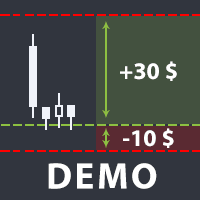
The utility helps open a deal with a stop loss that does not exceed the specified amount, or to refrain from it altogether. That is, it determines the number of lots to open the deal so that the stop loss is as close as possible to the specified amount in USD without exceeding it. For example, it will be indispensable when trading according to the Gerchik strategy. That is, when trading based on risks, with a fixed risk and a fixed take profit relative to stop loss. For example, if you always op
FREE

When creating, modifying and moving a trend line, two anchor points will be selected: high / low, open / close, median or weighted from the candlestick prices.
For high / low, open / close, if the anchor point is above the candlestick, the upper price will be taken, below the candlestick - the lower one. If the point is inside the candlestick, then if the first point is higher than the second, then the first one goes up, the second goes down. Conversely, if the second is higher than the first.
FREE

Draws trend lines from the high and / or low values of the week. The color and thickness of the levels are customizable. All trend lines can be edited. Suitable levels of the past can be renamed and other properties changed. Levels are re-read only on the H1 timeframe once an hour.
...
FREE

Account Info Utility is a free script for quick analysis of trading conditions for the current account and symbol.
It displays: - account information, balance, equity, margin, free margin and floating profit; - symbol trade restrictions, current price and trade mode; - minimum/maximum lot, lot step, real margin per 1 lot and maximum available lot; - point value for 0.01, 0.10 and 1.00 lots; - long/short swaps; - daily ATR(14) in pips and the value of that range for different lots; - trading se
FREE

Risk Control Utility: Margin Call & Loss Level Calculator Info Loss Level is an information utility for MetaTrader 5 traders that monitors critical risk levels in real-time and provides clear visualization of deposit loss points. Key Features Critical Risk Level Calculations Margin Call Level - price level where broker force-closes positions Loss Level - theoretical price level for complete deposit depletion The difference between levels shows your account's "safety buffer" Critica
FREE

Упростите свой технический анализ. Инструмент помогает быстро и точно определять на графике блоки заказов и размечать ликвидность. Превратите хаос ценовых движений в четкую торговую схему для более точных решений. Экономьте время на анализе, сосредоточьтесь на принятии решений. Инструмент заточен под торговую систему "Алхимия трейдинг", с его представлением о блоках заказа.
FREE

**Advanced Position Manager EA** is a professional-grade MetaTrader 5 Expert Advisor designed to protect and maximize trading profits through intelligent stop-loss management. It automatically trails stop losses as profits grow, ensuring you lock in gains while giving trades room to run.
Core Functionality
- **Automatic Profit Protection**: Trails SL as profits grow
- **Works Immediately**: Manages existing positions on startup
- **Two Trailing Modes**: STEP-based or CONTINUOUS
- **Two Manageme
FREE

Contrarian traders who've found a strategy that works better inverted — buys become sells, and vice versa Getting up and running (5 steps, no headaches) 1. Drop the EA into MT5 Copy SimpleTradeCopier.ex5 into <your MT5 terminal>\MQL5\Experts\. Then in MT5, open the Navigator (Ctrl+N) and drag SimpleTradeCopier onto any chart — it doesn't matter which one. 2. Set up your MASTER account This is the account whose trades you want to copy from. In the EA's inputs: InpMode = STC_MASTER ← this account
FREE

HorizonProbe measures how the size of a price move compares with the cost of trading it, across several holding times, on your broker's own history and your broker's own spread.
It is a single script. It places no orders, reads no positions, and has no external dependency. Copy the one file into a terminal and run it on a chart.
THE QUESTION IT ANSWERS
The cost of a trade is paid once, whatever happens next. The move you are paid for is not fixed: over a longer holding time, the average move
FREE

простой копировщик сделок между двух терминалов MT5, настраивается только коэффициент копирования на слейв части. мастер часть вешаете на любой новый график на терминал откуда нужно копировать сделки, а слейв часть вешаете на любой график в терминале в который нужно копировать «Программное обеспечение предоставляется по принципу "как есть" (As Is). Разработчик не дает никаких гарантий, явных или подразумеваемых, в отношении работоспособности программы, ее соответствия ожиданиям пользователя или
FREE

простой копировщик сделок между двух терминалов MT5, настраивается только коэффициент копирования на слейв части. мастер часть вешаете на любой новый график на терминал откуда нужно копировать сделки, а слейв часть вешаете на любой график в терминале в который нужно копировать «Программное обеспечение предоставляется по принципу "как есть" (As Is). Разработчик не дает никаких гарантий, явных или подразумеваемых, в отношении работоспособности программы, ее соответствия ожиданиям пользователя или
FREE

Management
The complete trade execution and position management toolkit for MetaTrader 5.
TEAM EA replaces your entire manual trading workflow with a single floating panel — from precision entry timing to live position management, all from one unified interface directly on your chart.
---
Overview
TEAM EA is a professional-grade Expert Advisor built for active traders who need speed, precision, and control. It provides four distinct execution modes, a live positions dashboard with automated mana
FREE
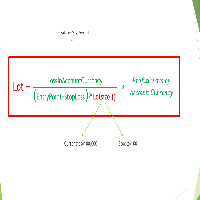
Important Note: Before using it in a real account test it in your demo account.
//+------------------------------------------------------------------+ //| Optimum_Lot_Size.mq5 | //| Copyright 2023, MetaQuotes Ltd. | //| https://www.mql5.com | //+------------------------------------------------------------------+ #property copyright "Copyright 2023, MetaQuotes Ltd." #property
FREE

For those who use the Trading Arrows on the chart for later study, but use the Triple Screen approach and got all those arrows everywhere on all additional charts, here it is: Arrows Cleaner! Just drop it on the chart and leave it there. When needed, just with 1-click you get rid of all those annoying arrows...
SETTINGS You can position the little Button on any corner of the chart. Additionally you can displace it with the Offset settings. You can enlarge or shrink its size, as well as the text
FREE
This is a utility for storing the data on open interest (OI), ratio of buyer/seller orders' number and the ratio of buyer/seller orders' volumes on the Russian FORTS futures market. This is the first product of the series. Now, you can trace history of the specified data in real time in МТ5 terminal. This allows you to develop brand new trading strategies or considerably improve the existing ones. The data received from FORTS market is stored as a database (text CSV or binary one at user's discr
FREE

Características Principales El bot actúa como una herramienta de supervisión y control automatizado de posiciones abiertas, enfocándose en la gestión dinámica basada en la detección de velas de expansión rápida ( Spikes ). 1. Detección Inteligente de Spikes Identificación Automática: Analiza si el símbolo activo corresponde a un índice Boom o Crash . Filtro de Cuerpo de Vela: Compara el tamaño de las velas recientes con un promedio dinámico (calculado sobre un periodo de referencia) para iden
FREE

Traderscope is a powerful and completely free advanced monitoring dashboard for MetaTrader 5, designed to monitor your Expert Advisors' live performance directly on your trading account. It delivers clear, real-time insights into your live trading performance — directly on your chart, with no complexity and zero impact on execution. Key Features Multi Magic Number Aggregation (up to 3)
Combine and analyze up to three different magic numbers (e.g., MagicA + MagicB + MagicC) in a single unified v
FREE

PulseBar takes the guesswork out of trade management. It puts a horizontal line on your chart that you can drag anywhere. At whatever price you place it, PulseBar shows what your open positions on that symbol would make or lose if price got there. The figure is in your account currency and already includes swap and commissions. It suits Price Action traders, scalpers and day traders who want to see Take Profit targets, partial exits, risk zones and their exact breakeven without leaving the char
FREE

COASYN ATR Table is a multi-timeframe volatility reference for MetaTrader 5. It displays Average True Range across up to four user-selected timeframes and converts the values into pips for a cleaner comparison of how much the market is currently moving. The indicator does not generate signals, determine direction, or execute trades. Its purpose is simple: Use ATR as a ruler for current market movement. Features Up to 4 selectable timeframes Adjustable ATR length ATR displayed in pips Optional ra
FREE

**DER AUTOR ÜBERNIMMT KEINE HAFTUNG FÜR VERLUSTE, DIE DURCH DIE NUTZUNG DIESER SOFTWARE ENTSTEHEN, INSBESONDERE NICHT FÜR VERLUSTE DURCH DAS AUTOMATISCHE SCHLIESSEN VON POSITIONEN (TRADES). BITTE TESTEN SIE DIE SOFTWARE AUSFÜHRLICH AUF EINEM DEMO-KONTO!** --- # Equity Drawdown Monitor - Ihr Wächter für Risikomanagement **Schützen Sie Ihr Kapital mit professionellem Multi-EA-Monitoring und automatischem Notfall-Stopp.** Der **Equity Drawdown Monitor** ist ein unverzichtbares Werkzeug für Trader,
FREE

PropCorrelation shows whether your open positions are really different trades. Three index shorts feel like three trades; most days they are one bet, sized three times. The panel puts the number on your chart: the correlation between every pair of open positions, signed by direction, next to the money each of them risks to its stop. Free. Setup takes a minute: attach it to one chart, and the matrix appears for whatever is open on the account. No inputs are required to start. Try it first
It is
FREE

EA REMOTE COPIER Copy Your Trades Across Different VPS — Fast, Secure & Reliable EA Remote Copier is a professional Expert Advisor designed to automatically copy trading activity between different VPS, trading accounts, and locations through the Internet . It is suitable for traders, money managers, signal providers, and anyone who needs to synchronize trades across multiple accounts efficiently.
Please download Slave EA here = https://www.mql5.com/en/market/product/190756
User Manual : do
FREE

お知らせ:新しいシリーズがあります この製品に新しい機能を追加する予定はありません。同じロット計算を使い、チャート上でドラッグできる損切りラインなどを備えた新しいシリーズがあります。 ・Prop Sizing Lot Size Calculator(MetaTrader 5用インジケーター・無料) ・Prop Sizing Lot Size Calculator MT4(MetaTrader 4用インジケーター・無料) ・Prop Sizing Trade Panel and Lot Calculator(MetaTrader 5用EA・有料) ・Prop Sizing Trade Copier EA(MetaTrader 5用EA・有料) MQL5マーケットで、これらの名前を検索してください。 この製品は、新しいインジケーターと同じチャートで一緒に使わないでください。
以下は、この製品のもとの説明文です。 !!ご自身の戦略と合っているのか必ず確認してください!!
※勝率重視の戦略に適しています プロップファームを経験した人なら、
一度はこう思ったことがあるはずです。 最大損失率に合
FREE

Breakup ZeeAM Khan Advanced multi-timeframe breakout Expert Advisor based on a proprietary higher-timeframe pattern and lower-timeframe confirmation system. Features dynamic lot sizing, multi-target profit management, break-even automation, momentum filtering, and fully customizable risk controls. This is the Best for All Brokers. Contact for Set Files or See the Screen Shots
WhatsApp: Text only +447716409196
Best for XAUUSD on All Brokers Key Features Proprietary Multi-Timeframe Strategy Det
FREE

Free MetaTrader 5 indicator that displays "CALL IT A DAY" when London & New York sessions close. Customizable alerts, session tracking, and a guilt-free reminder to log off. Perfect for workaholic traders!
Tired of staring at charts when the market’s already clocked out? Session Guardian is your sassy trading assistant that slaps a giant "CALL IT A DAY" on your screen when both London and New York sessions are closed—because even traders deserve happy hour. Key Features:
Big, Bo
FREE

How to Read GoldenLock GoldenLock is designed to make the current account-risk state easy to understand from one dashboard. The dashboard allows you to monitor important account information such as:
Current Equity Today P/L Daily Drawdown Maximum Drawdown Peak Equity Equity Giveback Current Protection Status
The Warning, Critical and Locked states make it easier to see how close the account is to the limits you have configured. GoldenLock monitors the risk. Your trading strategy remains separat
FREE

Greed Siphon - The Emotional Risk Manager "Secure the Bag. Automate Discipline. Eliminate Greed." Greed Siphon is not just a utility; it is an Emotional Firewall for your trading. It solves the #1 reason traders fail: Greed . How many times have you watched a winning trade turn into a loser because you held it too long, hoping for "just a little more"? Greed Siphon automatically detects when your trades hit a sophisticated, multi-metric profit target and instantly siphons the liquid (pro
FREE

Zone Eraser MT5 by Forex Persian Trading Effortlessly Clean Your Charts with a Single Click! Struggling with cluttered charts filled with unwanted objects?
Tired of manually deleting trade history lines, technical analysis tools, and shapes one by one? Zone Eraser MT5 is the ultimate script designed to streamline your workflow, helping you maintain a clean and organized trading chart with just a single action. Say goodbye to tedious manual deletions and hello to efficiency and precision!
FREE

TrendFollowing is an multi-currency scanner that just indicates where to buy/sell: Abilities: Opens up the chart automatically with and arrow indicating where to take action. Send the signal to a telegram channel, see @fx_signal_com channel to get the idea. Configuration: No need to configure "Market Watch". Open a chart and attach the scanner to it. Trading Rules: Use only buystop/sellstop orders above/below arrow on the chart. Delete the pending order if price retraces below/above the moving
FREE

️ Multi-Symbol ATR Drawdown Mitigation EA (Smart Risk Manager) Advanced Drawdown Control Using ATR-Based Dynamic Profit Balancing “Professional Risk Management Engine”
This Expert Advisor is designed to help traders actively reduce drawdown by intelligently closing losing trades using profits from winning positions — based on market volatility (ATR) . Core Concept Instead of letting losing trades grow uncontrollably, this EA: ️ Identifies the worst losing position
️ Selects profi
FREE
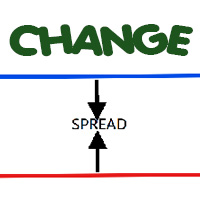
Most current tick data does not accurately reflect the actual spread levels. To achieve more precise backtest results, we need to adjust it to a higher value to account for slippage that may occur when Expert Advisors (EAs) execute orders in real trading.
This tool is used to change the Spread value in custom symbols created from tick data for backtesting purposes. Simply select the desired Spread value and wait for the tool to adjust it accordingly.
FREE
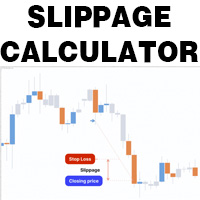
This is a tool that helps you calculate potential slippage you may encounter in real trading. This is quite important to understand how slippage can affect your strategy. It helps you gain a better understanding of your trading system and compare slippage levels among different brokers. Simply add it to the chart of the symbol you wish to estimate slippage for.
FREE

This is the FREE DEMO version of Vector Local Copier.
It's the complete copier — real-time local copying, symbol mapping, multipliers, SL/TP sync, the safety guards, the live dashboard — with one limitation: slave trades are capped to 0.01 lots. That's enough to prove it works perfectly on your exact terminals, brokers, and symbols before you buy the full-size version.
GET THE FULL VERSION (no lot cap) HERE: https://www.mql5.com/en/market/product/187169
Vector Local Copier mirrors trades
FREE

A simple utility that tells you to leave the computer and go for a walk and have a coffee every 60 minutes, or however long you configure.
The function is to remind us to get off the computer and go for a walk so as not to make the mistake of opening up an emotional order, taking every day to the end and a simple walk would solve the problem.
--- NEW VERSION FULL https://www.mql5.com/en/market/product/192677
Check out my FOMO blocker as well https://www.mql5.com/en/market/product/188473
Ch
FREE

PS4 Trading Controller lets you trade MetaTrader 5 using a DualShock 4 controller (USB or Bluetooth).
Designed for traders who want speed and convenience, this tool maps controller buttons to essential trading actions so you can execute and manage positions without touching the keyboard or mouse.
Key Features:
• Market Buy / Sell with R2 and L2
• Close one position at a time (R1 / L1)
• Close all profitable trades (Triangle)
• Close all losing trades (Circle)
• Adjust lot size with D-Pad
• Mov
FREE

DS Risk Calculator works out your lot size from the stop you actually intend to use, and shows how much room is left before your daily loss limit, your overall drawdown limit and your consistency rule are reached. It is built for funded account rules, and it works just as well on an ordinary account with rules you set yourself.
It does not place, modify or close orders. There are no trading functions in it. It reads your account and shows you arithmetic.
WHAT IT SHOWS
- Lot size for the sto
FREE

Position Story MT5 answers a practical history question: what happened inside this position?
Select a position from the account history and the panel rebuilds its story from the recorded deals. You can see the opening deal, partial exits, reversals or close-by events, their order, and the values MT5 recorded for each one.
What it shows
• Position summary with symbol, position ID, deal count, recorded entry/exit volume when that split is knowable, and coverage state. • Ordered deal sequence wi
FREE

Right here, is the utility tool to help traders with opening, managing, and closing multiple trading positions at the same time. This Utility tool does not work on strategy tester. To test this utility, follow the blog link below to download the demo version. https://www.mql5.com/en/blogs/post/751097
Specifications. 1) User-friendly - No complications and any trader can find it easy to use. - A simple click on a button is all it takes to perform the desired task. 2) Doe
FREE

直接在您的 MetaTrader 5 图表上提供简洁、快速的实时胜率(Win Rate)追踪。 告别杂乱的屏幕和笨重、卡顿的仪表盘。InnovaDash 推出的 Simple Win Rate Tracker 是一款超轻量级的小工具,能够在您最需要的地方为您提供最精确的数据。 为什么要追踪胜率? 准确了解您的盈利交易和亏损交易数量,有助于您在回撤期间管理预期,并验证您的交易系统在大量样本中是否具有真正的统计优势。 InnovaDash 生态系统 此小工具是 InnovaDash 分析引擎的免费示例。想一次性查看所有指标而不让 MT5 图表变得杂乱吗? 访问 innovadash.com 绑定您的账户并解锁完整的仪表盘。同时追踪 50 多项高级指标,按自定义日期范围筛选数据,分析特定交易品种,按注释进行筛选等等。
FREE

XFChart simplifies trading strategies with customizable options for informed decision-making across various styles, from scalping to position trading.
1. Risk Management: - XFChart offers automatic breakeven and trailing stop features to protect profits and reduce emotional decisions. - Auto Breakeven is disabled by default and can be enabled through the indicator properties window. - The "Auto Trailing Stop Loss" adjusts the stop loss based on market movement, facilitating profit lock
FREE
MetaTrader 市场 - 在您的交易程序端可以直接使用为交易者提供的自动交易和技术指标。
MQL5.community 支付系统 提供给MQL5.com 网站所有已注册用户用于MetaTrade服务方面的事务。您可以使用WebMoney,PayPal 或银行卡进行存取款。
