 MetaTrader 5
 专家
专家
 指标
指标
 程序库
程序库
 实用工具
实用工具
 窗口小部件
窗口小部件
 规则
规则
免费的MetaTrader 5 交易实用工具 - 24
 以下是可在MetaTrader 5中简化交易的交易程序。将鼠标悬停在一个工具上,阅读它的描述和用途。
Find Your Fibonacci Entry Levels Automatically Fibonacci Entries is a FREE trading utility that automatically displays key Fibonacci entry levels from the selected candle—so you can quickly identify potential pullback areas without manually drawing Fibonacci levels. KEY FEATURES Automatic Fibonacci Entries
Automatically calculate and display Fibonacci levels from the selected candle. Key Entry Levels
Displays: 23.6% • 38.2% • 50.0% Last Candle Analysis
Use the previous can
FREE

Panel Tool – Button Click Trading (Replaces Default Trade Panel)
Features
1. Open or close Long positions with a button click.
2. Open or close Short positions with a button click.
3. Set lot sizes.
4. Set Stop-Loss (SL) or Take-Profit (TP) points (0 = not used).
5. Set order comments.
6. Display the Break-Even price .
7. Show total Long and Short lot sizes.
8. Display Profit or Loss in USD.
9. Show daily Profit or Loss in USD.
10. Set ID = 0 to manage manual orders together .
FREE

Assistant_for_Reopen - an Expert Advisor that helps to re-set pending orders. Many brokers force the order to expire at the end of the trading session or at the end of the trading day. Therefore, a trader has to restore all pending orders manually every time at the beginning of a new trading session. Assistant_for_Reopen frees the trader from this routine work. It controls expiration by the order expiration time and resets it if the trader ticked the checkbox. The maximum number of orders the EA
FREE

How to run the script in MT5. Open MetaTrader 5. Press Ctrl + N to open the "Navigator" window. Locate the "Scripts" folder. Drag and drop RR Control Pro onto the chart with the open trade.
How it works.
Automatic detection: Once you drag the script onto the chart, it automatically identifies the most recently opened position on your trading account. Direction detection: The script checks whether the trade is a BUY or a SELL to calculate distances correctly. Formula: The ratio is calculated a
FREE
Template name allows you to write custom text that will show up on your charts. It allows you to position the text anywhere including selecting any color that you prefer. You can position the text at any of the 4 corners of your chart screen. This custom text can aid as a watermark for your screen shots. This text can act as a unique and true signature for your charts.
FREE

GMG KILL ZONE DISCIPLINE ENFORCER — FREE =========================================
The free discipline and risk management EA for MetaTrader 5 — for prop firm traders who trade the New York Kill Zone (ICT-style) manually, and need their rules enforced automatically.
You know the rules. One trade per session. Trade only the window. Be flat before the close. The problem was never knowing the rules — it is keeping them at the exact moment the market moves against you. This EA keeps them for you.
FREE

Msg2Slack 是将消息从 MT4/MT5 文本框发送到 Slack 的工具。 只需单击位于文本框右侧的按钮,您就可以轻松地将文本和图表图像发送到您的 Slack 频道。 即使您在图表上画线、标记、注释等,图像也会被发布。
无论您是想向自己还是群组发送消息,这个简单而强大的工具都可以让您非常轻松地捕获图表图像并即时发送消息。
Msg2Slack 工具显示在图表底部。 只需输入您的消息并单击右侧的按钮即可发布您的消息或带有图像的消息。
虽然效用水平因人而异,但任何使用 Slack 进行交流的人都可以从 Msg2Slack 即时发送图表图像的能力中获益。
获取 Slack API TOKEN 并将其设置为该工具的参数。
您还可以使用策略测试器来检查它是否有效。
FREE

UEX Reader - 智能交易系统
基于 UEX 指标的全自动交易 EA。
https://www.mql5.com/en/market/product/152936
UEX Reader 提供两种灵活的交易策略:
常规策略和均价策略。
交易仓位可以单独执行,也可以
根据 UEX 指标识别的市场方向同时执行。
尽管 UEX Reader 基于指标运行,但仍可在 MT5 测试器中进行测试。
- - - - - - - - - - - - - - - - - - - - - - - - - - - - - - - - - - - - - - - - - - - - -
UEX Reader 智能交易系统使用步骤: https://www.mql5.com/en/market/product/166805/comments PDF document :
https://c.mql5.com/31/1830/UEX_Reader_ExpertAdvisor.zip
- - - - - - - - - - - - - - - - - - - - - - - - -
FREE

Simple script for Buy by Market Execution on all financial instruments.
Inputs Volume - default: 0.10 Deviation - default: 10 points Stoploss - default: 50 points Takeprofit - default: 50 points Comment - default: Order by Market Confirm - default: false
Inputs Details Type Order Buy Order is preset. Deviation Maximum deviation from quoted price in points. Stoploss & Takeprofit In points value, be careful that this value will be added to minimum stop allowed by the broker. For example if you s
FREE

Phone Notification
Send Information from VPS direct to Phone No TradingOperation only MessageNotification Send Information to your selected Time-Window Configure Time when want to receive the Message What will be send:-Bull/Bear Candle Bull: 0 Bear: 0 Level that get Touched by Price most Level: 00000.00 any Question or modification ex5 Code write me a Message
FREE

The Teaching T-INN utility was created to train architecture neural networks (T-INN) Target-IntelNeuroNet adapted to the currency market. The utility file must be placed in the scripts folder and run on the chart and timeframe on which you want to train the neural network. The result of the training will be recorded in a file, and the entire training process is displayed in the console on the chart and an additional log file. Before starting the script, it is necessary to download all the stori
FREE

Risk Optimizer is the absolute solution for applying risk management on your account. Bad risk management is the main reason that causes traders to lose money. Risk Optimizer calculates and suggests the correct lot size for each position according to your personal, customized risk profile. You can give directly your preferred risk as percentage (%) for each position or you can trust our algorithms to calculate and optimize according to your risk category selection. But it is not only that! Selec
FREE

Position Closer MT5 是一款便捷的交易工具,直接显示在图表上,让您能够快速高效地管理平仓操作。无需逐个关闭仓位,一键即可全部平仓。 工作原理: 该面板由两个大型信息按钮组成: 绿色"关闭买入"按钮 — 显示当前品种的未平仓买入仓位数量及其总盈亏。 棕色"关闭卖出"按钮 — 显示当前品种的未平仓卖出仓位数量及其总盈亏。 按钮上的信息会随着市场情况的每次变化实时自动更新。 功能特点: 即时平仓:单击"关闭买入"按钮即可关闭当前品种的所有买入仓位。卖出仓位同理。 幻数过滤:仅关闭其幻数与输入参数中指定的幻数相匹配的仓位。这使得该面板可以与其他智能交易系统同时使用,而不会影响它们的仓位。 仅限当前品种:该面板仅关闭其所安装图表上的交易品种的仓位。这可以防止意外关闭其他货币对的仓位。 视觉控制:您无需打开终端中的"交易"选项卡,即可直接在面板上看到当前的仓位数量及其总盈亏。 操作反馈:在平仓操作执行期间,按钮会显示状态"...Loading...",操作完成后,终端日志中会输出一份关于已平仓数量的报告。 输入参数: 参数 描述 幻数 由面板管理的仓位的唯一标识符。仅关闭具有此幻
FREE

该智能交易顾问(EA)会在 MetaTrader 5 中监控所有交易品种上的所有持仓。一旦在任意持仓上 手动设置或调整 了止损(SL)或止盈(TP),EA 会将该值 自动应用于其他所有未平仓头寸 ,无论是买单还是卖单、哪个交易品种。这确保整个账户的 SL 和 TP 水平始终保持同步。
非常适合通过平板或智能手机进行移动交易!
......................................................................................................................................................
FREE
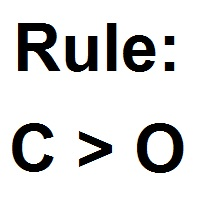
Patterns Wizard是一个用于创建蜡烛图形态的工具。通过它,您可以创建多种不同的图形形态,并在您的图表上添加任意数量的此指标的实例,每个实例都具有不同的形态。 为了更好地理解创建公式的方式,您可以使用名称为 My Candle的指标的示例,该指标包含70多个蜡烛图形态的示例 。 该指标的主要区别在于它具有 30个规则参数 ,这意味着您可以为前30根蜡烛分别设置不同的规则。 一旦出现图形形态,此工具可以执行以下操作: 播放自定义声音 在MetaTrader中发出警报 向您的手机发送通知 发送电子邮件 该指标不会重绘,只在蜡烛结束时执行,因此非常迅速。此外,它具有一个用于优化您想要分析的蜡烛的最大数量的参数。 在测试器中使用它,并随意使用它创建规则。当您准备迈出一步,拥有一款专业工具来帮助您分析交易时,就购买此工具吧。 蜡烛图形态的创建
您可以使用此工具创建任何您想要的蜡烛形态,以下是如何获取图表值的方法 数值 描述 O 开盘价 H 最高价 L 最低价 C 收盘价 因此,如果您希望蜡烛是 阳线 ,只需构建以下公式 C > O 负责 阴线 的公式相同 C < O 这里是一个 十字星
FREE

显示当前市场信息,每秒更新一次。 点差大小; 掉期大小: 多仓和空仓; 本地时间 (可选); 多功能工具 : 66+ 功能,包括此工具 | 联系我 如有任何问题 | MT4 版本 在指标设置中,您可以配置: 字体大小; 文本颜色; 选择位置: 图表的左/右角; 本地时间: 开/关; 程序文件应放在 " Indicators " 目录中。 多功能工具 : 66+ 功能,包括此工具 | 联系我 如有任何问题 | MT4 版本 多功能工具 : 66+ 功能,包括此工具 | 联系我 如有任何问题 | MT4 版本 多功能工具 : 66+ 功能,包括此工具 | 联系我 如有任何问题 | MT4 版本 多功能工具 : 66+ 功能,包括此工具 | 联系我 如有任何问题 | MT4 版本 多功能工具 : 66+ 功能,包括此工具 | 联系我 如有任何问题 | MT4 版本
FREE

Order Book, known also as Market Book, market depth, Level 2, - is a dynamically updated table with current volumes of orders to buy and to sell specific financial instument at price levels near Bid and Ask. MetaTrader 5 provides the means for receiving market book from your broker in real time. The expert OrderBook Recorder records market book changes and stores them in local files for further usage in indicators and expert adviser, including testing in the tester. The expert stores market book
FREE

Solarize – Professional Trading Panel for MetaTrader 5 Solarize is a premium trading panel designed for traders who demand speed, precision, and efficiency in every execution. Built with a luxurious Black & Gold interface, Solarize combines an elegant design with practical trading tools, allowing traders to manage positions, pending orders, risk, and account statistics from a single control panel. Whether you're a scalper, intraday trader, or swing trader, Solarize helps simplify your workflow
FREE

**DER AUTOR ÜBERNIMMT KEINE HAFTUNG FÜR VERLUSTE, DIE DURCH DIE NUTZUNG DIESER SOFTWARE ENTSTEHEN, INSBESONDERE NICHT FÜR VERLUSTE DURCH DAS AUTOMATISCHE SCHLIESSEN VON POSITIONEN (TRADES). BITTE TESTEN SIE DIE SOFTWARE AUSFÜHRLICH AUF EINEM DEMO-KONTO!** --- # Equity Drawdown Monitor - Ihr Wächter für Risikomanagement **Schützen Sie Ihr Kapital mit professionellem Multi-EA-Monitoring und automatischem Notfall-Stopp.** Der **Equity Drawdown Monitor** ist ein unverzichtbares Werkzeug für Trader,
FREE

Are you tired of execution delays, missing perfect entry points, or struggling to manage multiple open positions during high market volatility?
Welcome to Execution Suite Pro, the ultimate high-performance trading panel engineered specifically for manual traders and professional scalpers on MetaTrader 5.
Unlike standard one-click trading tools, this professional utility utilizes advanced Asynchronous Order Execution (Zero-Lag) to ensure your commands reach the broker's server instantly, with
FREE
TradeManagerEA — Full Trade Management Solution Overview (Short Description) The TradeManagerEA is a specialized Expert Advisor designed to manage open trades across all symbols. It provides automatic breakeven rules, trailing stops, and additional settings optimized for Gold (XAU/GOLD). This tool requires minimal user intervention and can enhance the consistency of your trading approach. Detailed Description 1. Core Features Breakeven Management : Automatically moves Stop Loss to entry price p
FREE

izi hedge is a tool that helps you manage risk, manage hedge orders and rebalance losing orders.
How it works It will place an order opposite to the order you placed with that currency pair. If the order you place is correct, the reverse order will be automatically deleted If the market unfortunately goes against your order and touches the hedge order, it will begin to calculate the hedging volume to limit the risk of the market going in reverse.
FREE

Overview Custom Logic for Trading MT5 Mini is the free version that designed to execute trades based on custom indicator signals, with robust position management features with break-even settings. This script allows traders to implement their strategies with high precision and flexibility, enhancing their trading efficiency and profitability. Input Parameters Indicator Settings indicator_name : Name of the custom indicator to be used for generating signals. buy_signal : Signal value indicating a
FREE

Point it at any indicator you already have, by file name, and it will alert you on that indicator's own buffers. It needs no source code: a compiled .ex5 you downloaded is enough. It can also read that indicator from a higher timeframe, and it re-reads closed bars to tell you whether the indicator repaints or merely lags. This is free. The problem it solves Two of the longest running threads on the MQL5 forum are about putting alerts on indicators and about reading them from a higher timeframe.
FREE

Chart Pro Classic Dark v1.00 Chart Pro Classic Dark is a professional MT5 chart styling and customization tool designed to give your charts a clean, modern, and professional dark appearance. Key Features Dark Black Background — Applies a clean black background to the chart. ️ Candlestick Chart — Automatically configures the chart to use candlesticks. Bullish Candles — Green/Lime bullish candles. Bearish Candles — White bearish candles. Grid Removal — Hides the chart grid for a clean
FREE
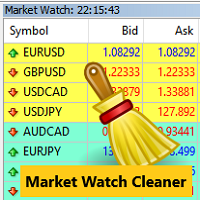
Clean up Market Watch from unused symbols.
If you use multiple advisors and terminals on the same account your Market Watch windows may get filled with unused symbols from orders and positions opened on other terminals. Every symbol in the Market Watch consumes cpu power and bandwidth to get constantly updated and if you are on a vps you want to minimize resources consumption. Market Watch Cleaner helps you with that by periodically cleaning your Market Watch window from unused symbols.
Param
FREE

Forex Inspector Broker X-Ray See exactly what your broker charges, and how it compares, in one clean panel on your chart. ForexInspector Broker X-Ray reads your live account conditions and shows them in a professional tabbed panel: real spread, true cost per lot (spread plus commission), swaps in money, leverage, margin, execution type, stop-out, ping and a 0 to 10 broker score. It also shows how your broker ranks against the community on forexinspector.com. 100% FREE • It never trades • It
FREE

Noetrix Sentinel 1.10
Noetrix Sentinel is a native, read-only MetaTrader 5 operational supervision utility. It monitors terminal connectivity, latency, trading permissions, chart and EA presence, watched market feeds, optional Magic mappings, alerts and diagnostic evidence from a single chart.
## Safety and distribution
- MetaEditor result: `0 errors, 0 warnings`. - Entry point: `MQL5/Experts/NoetrixSentinel/NoetrixSentinel.mq5`. - No trading library, order submission, position close, order
FREE

Prop Trade Guard is an on-chart discipline panel for MetaTrader 5.
It keeps you inside your own trading rules instead of relying on willpower after a loss. It tracks your account's closed trades for the day and shows a live session window, trade count, and daily P/L against your limits. A fully editable 5-item confluence checklist lets you define entry criteria for any strategy — check each box before you enter, and the panel only shows SETUP READY when everything lines up. Most importantly, it
FREE

mBer is a non-repainting scalping indicator purpose-built for EURUSD on the M5 chart . Instead of relying on generic moving averages, mBer calculates rolling Upper Quartile (Upper Q) and Lower Quartile (Lower Q) levels from recent price data — statistical boundaries that mark where price is trading relative to its own short-term distribution. When price pushes toward the Upper Q, it signals a statistically stretched, potentially overbought zone; when price pushes toward the Lower Q, it signals a
FREE

An EA to export trading history for FXer - Journaling and Analytics. fxer.net Register Create an API token Put EA on any chart (any TF is fine) Fill in the API token Follow analytics for better trading At FXer, our mission is clear: to empower traders like you with the tools needed to excel in the ever-changing world of trading. We are committed to providing top-tier, data-driven market analysis and trading intelligence, ensuring you can make well-informed decisions, manage risks effectively, an
FREE

ExportTradingDeals is a MetaTrader 5 script that exports your complete deal history to a CSV file. The file is consumed directly by the Trading Stats desktop application to produce charts and statistics about your trading performance. Trading Stats is a free, open-source application; pre-built Ubuntu / Debian and Windows packages are available on the project releases page (search: alinsoare/trading-stats on GitHub). What it does When you run the script, it reads all deals from your account histo
FREE

Investment Castle Panel — Your Trades, At a Glance
The Panel puts the numbers that matter right on your chart: floating profit and loss, drawdown and more — for manual trades and for any Expert Advisor. A clean, movable dashboard so you always know exactly where you stand.
What it does for you Live P/L on the chart: floating profit/loss for the current symbol, for both buy and sell orders, in your base currency and in pips. Max drawdown at a glance: keep an eye on risk without digging through
FREE

Smart Target Script Smart Target Script is an advanced risk management utility designed to simplify complex trading scenarios. When managing multiple open positions on a single symbol, calculating the exact exit price for a specific combined profit or acceptable loss can be mathematically challenging. This script automates that process instantly. By analyzing your total buy and sell volumes, the script calculates the true weighted break-even price. It then translates your desired profit or risk
FREE

Copier Provider RAlabs — a signal source for local trade copying. A lightweight trade publishing tool for a copying system consisting of Copier Provider RAlabs (signal source) and Copier Master RAlabs (receiver). Copier Provider RAlabs is installed on the donor account whose trades need to be copied and transmits those trades to the Copier Master RAlabs receiver. The provider publishes: position openings, modifications, and trade closures. Features: instant local transmission, minimal resource u
FREE

This is the Free Version of "Just Copier MT5" (Please check : https://www.mql5.com/en/market/product/20863) This free version is available to be used within 2 hours only, and it has limited features. Please also check this product at fxina.hostingerapp.com.
"Just copier" is designed to copy trading without any complicated settings. The copy can be done in one PC. One EA can be set as master (provider) or slave (receiver). The receiver lot can be set to multiple providers lots. Any type of cop
FREE

This non-trading expert utilizes so called custom symbols feature to build custom charts based on history of real ticks of selected standard symbol. New charts imitate one of well-known graphic structures: Point-And-Figure (PnF) or Kagi. The result is not exactly PnF's X/O columns or rectangular waves of Kagi. Instead it consists of bars, calculated from and denoting stable unidirectional price moves (as multiples of the box size), which is equivalent to XO columns or polygonal lines. These Poi
FREE

Session Stat is a utility for tracking the results of a trading session, as well as information about the position for the current instrument.
The panel displays:
Session statistics (for all instruments) Initial trading account balance Current trading account equity Profit during the operation of the utility Profit in % terms during the operation of the utility Session statistics (for the current instrument) Profit of the current position Profit of the current position in % terms Total volume
FREE

Read-only analytics for accounts running several EAs. Groups your closed trades by magic number and measures how much of their combined risk actually cancels out. Free measurement edition. The monitoring and alerting edition is Portfolio Command Desk: https://www.mql5.com/en/market/product/188884 The problem You run five Expert Advisors. Each backtest looked fine on its own. But the account does not trade five systems, it trades one portfolio, and no report in MetaTrader tells you how those sys
FREE

(加密货币图表)
将 Binance Spot 中的所有符号保存到自定义符号中。
为 Binance Spot 中的符号添加“S”前缀。
它创建了可以跟踪 Binance Spot 中的符号的基础设施。
您应该允许来自工具菜单 >> 选项 >> 智能交易系统的 WebRequest 并添加 URL: https://api.binance.com
只需双击脚本。
您可以在几秒钟内获得整个列表。
在链接中查看产品 https://www.mql5.com/en/market/product/69001 如果在安装过程中或售后出现任何问题,请随时与我们联系。 如果在安装过程中或售后出现任何问题,请随时与我们联系。 如果在安装过程中或售后出现任何问题,请随时与我们联系。
FREE

Precision Risk Manager and Multi-Order Controller for MT5 — Version 2 This utility provides risk-based lot size calculation, one-click order execution, and batch trade modification from a single collapsible panel. It is designed for manual traders who manage multiple entries on the same symbol. Features Lot Size Calculator: Enter a risk percentage and stop-loss price, then click Calculate Lot Size to receive the exact lot size for that risk amount. Order Execution: Click Buy or Sell to execute
FREE

自动将 MT5 交易的开仓、平仓、部分平仓及修改的实时通知发送到 Slack。 该工具支持16种语言:英语、法语、德语、印地语、印尼语、意大利语、哈萨克语、韩语、荷兰语、波兰语、葡萄牙语、俄语、西班牙语、土耳其语、乌克兰语和越南语。你也可以通过自定义通知文本使用其他语言。该产品专为无需持续监控终端即可接收 Slack 通知的交易者设计。适用于使用 Expert Advisor 的用户、交易多个品种的交易者以及 VPS 用户。 能够正确识别全部和平仓(例如:0.10 / 0.30 手),并实现了防止重复消息的机制。 通知可以发送到交易账户的所有品种,或仅发送到附加该工具的图表品种(可选)。
提供 Test Slack 按钮用于验证聊天功能,并可在设置后从图表中隐藏。还新增了 Send open positions 按钮,可将当前所有未平仓头寸以表格形式发送到 Slack。 通知内容: 开仓通知包括:交易品种、交易量、交易方向(BUY / SELL)、开仓价格,以及 Take Profit 和 Stop Loss(可选)。 平仓通知包括:交易品种、平仓量(部分或全部)、平仓价格(可选),以
FREE

️ The Must-Have Account Guard for Prop Firm Algo Traders Running third-party EAs on your funded accounts? Stop worrying about breaching firm rules. Most EAs bought from the MQL5 Market only focus on their own strategy—they know nothing about prop firm restrictions. Prop Firm Rules Manager MT5 bridges that gap completely by serving as an account-level management layer: Automated News Protection: Pauses trading and unloads EA activity before high-impact news, then automatically resumes after the
FREE

简介:(此版本用于模拟账号测试功能)
TradeCopy是一款高效,易用的跟单系统,通过简单的设置(可参考下方截图),即可以实现 MT5之间互相跟单 、 MT5与MT4之间互相跟单 。 需要注意的是,如果想要实现MT4与MT5之间互相跟单,还需要购买Tradecopy的MT4版本,MT4上运行MT4版本,MT5上运行MT5版本。 跟单的时候需要让MT4、MT5运行在同一台电脑上,如果不懂怎么在一个电脑上运行多个MT5客户端的朋友,可以私信我,非常乐意教你。 使用视频介绍 需要测试MT4效果的朋友可以下载免费的可以用于模拟帐号交易的版本 : MT4模拟账号测试版本地址: Trade Copy MT4 Demo Free
特点: 1、可实 MT5之间互相跟单 、 MT5与MT4之间互相跟单 。 2、发射端和接收端为同一个文件,使用时只需要在参数中设置成发射端或者接收端,非常方便。 3、跟单方式多, 可以按结余、净值、手数比例或者固定手数跟单 。 4、可以设置反向跟单。 5、币种不同名字,可以进行转换。 6、 1次购买获得20个激活码 ,极大节约多账号管理者的经费。 使用向导: 1
FREE

TradeSyncLive - For MT5 Trade Analytics Dashboard Automatically sync your MT5 trades to a web-based dashboard with real-time analytics and EA performance tracking. This app was made with AI assistance, it's not professional, don't expect something amazing, this is just a weekend project. Setup Attach TradeSyncLive EA to any chart (one chart for each account you want to analyze) Set your Username in the EA inputs (pick whatever username, this is your login for the web app) Add the Supabase URL to
FREE

概述
RealCost Spread Guard 是一款用于 MetaTrader 5 的点差监控工具。它不交易、不修改订单,也不会把数据发送到外部服务器。它会采样当前图表的点差,显示实时和历史点差统计,在点差超过用户设置的阈值时发出提醒,并可选择写入本地 CSV 文件,便于之后复盘。
该工具适合在手动进场、剥头皮策略、网格系统、跟单系统或任何对点差波动敏感的 EA 运行前使用。
典型使用场景
- 检查某个品种在交易时段内的点差是否稳定。 - 手动进场前观察点差变化。 - 运行 EA 或跟单系统前查看点差条件。 - 对比不同市场时段的点差变化。 - 将点差采样导出到 CSV,用于交易日志或之后复盘。
主要功能
- 显示当前图表点差,单位为 points。 - 统计平均点差、p95 点差和最大点差。 - 可配置点差提醒阈值。 - 弹窗提醒和可选手机推送。 - 可配置写入间隔的本地 CSV 导出。 - 紧凑的图表面板。 - 不执行交易动作。 - 不使用 DLL,不使用 WebRequest,不连接外部服务。
不包含的功能
- 不交易。 - 不修改持仓或订单。 - 不提供买入
FREE

RiskCalculator — Professional Risk Management Panel for MT5 RiskCalculator is a fully-featured, floating panel EA for MetaTrader 5 that automates risk management, position sizing, and trade monitoring — all from a single draggable interface directly on your chart. Designed for active traders who need fast, accurate lot sizing and real-time position oversight without switching between windows or doing manual math. Core Features ️ Risk Calculator (Calculate Tab) Enter your desired risk percentage
FREE

Broker Quality Monitor is a free utility that measures the real quality of your broker for trading. What it measures: - Live spread (current, average, min and max) - Real slippage from your own fills, separated by BUY and SELL - Execution latency - Broker Quality Score (0-100) - Suitability verdict for gold scalping Features: - Live panel with all metrics and color-coded status - Per-session spread averages (Asia, London, London+NY, NY close) - Alerts when spread or slippage exceed your configur
FREE

Stop Loss Basic Et for MT5 — a simple and adaptive Stop Loss utility with automatic trailing.
Core Logic
Stop Loss performs two key functions:
• protects the position from loss
• trails and protects profit
The utility automatically sets a Stop Loss and manages it as the price moves.
Offset values are calculated in currency units.
Candle Classification (ET)
The utility can work independently or together with the
Candle Volatility ET Classifier indicator (free).
ET classification is a s
FREE

Utility for order reversal. Closes orders on the chart on which it is launched and opens orders with the opposite direction instead of them. Has a simple and intuitive graphical interface. It is also possible to automatically reverse newly opened orders. MT4 version of the utility- https://www.mql5.com/en/market/product/74771 If you like this utility, take a look at my other products - https://www.mql5.com/en/users/nina_yermolenko/seller
FREE

Simple spread update script for updating your backtesting data and getting them as close as possible to your broker trading spread. This step is often overlooked but very important to do if you want to have reliable backtests.
Import downloaded data into your MT5 (e.g. dukascopy data), load specific period of ticks (usual time of your trading) and compare the provided spread with your broker at your trading time. To update the spread, load custom symbol to your market watch, open chart window a
FREE
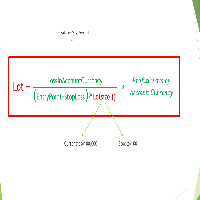
Important Note: Before using it in a real account test it in your demo account.
//+------------------------------------------------------------------+ //| Optimum_Lot_Size.mq5 | //| Copyright 2023, MetaQuotes Ltd. | //| https://www.mql5.com | //+------------------------------------------------------------------+ #property copyright "Copyright 2023, MetaQuotes Ltd." #property
FREE

AlgoWay Telegram Reporter is a free MetaTrader 5 utility that sends clear and detailed trading notifications directly to Telegram. The utility does not open, modify, or close trades. It only monitors trading activity on the account. It works with: • Manual trades
• Trades opened from mobile or web terminals
• Trades opened by Expert Advisors
• Trades opened through AlgoWay
• Netting and hedging accounts Main features • Position opening notifications
• Entry price, volume, Stop Loss and Take Prof
FREE

Automatic transmission is for the traders who are annoyed by constantly putting manual take profit and stop loss. This will take some of the burden. All you need is a laptop/pc at home or a VPS, so that you can press buy or sell on your phone and all will be automatically done for you. Check out parameters below.
This utility is for every symbol. Watch for oddities when trading crypto.
Other products Automatic Transmission MT4 XAU Breakout MT5
Parameters
-Manage Magic Number (0 = Disabled)
FREE

Script Name: Close All Positions Language: MQL5 Type: Utility Script Primary Function: Instantly close all open positions on the current trading account Purpose The “Close All Positions” script is a lightweight and efficient tool designed for traders using MetaTrader 5. Its main purpose is to help users quickly exit all active trades with a single click, especially during volatile market conditions or when risk management requires immediate action. Instead of manually closing each position on
FREE

Tired of laggy panels with a bunch of unnecessary buttons? This linker is designed for those who value clean graphics and speed. Nothing extra - just instant switching of tools in one click
Advantages: - Solves the main problem of the Meta Trader terminal - inconvenient and slow switching of charts -Not overloaded with unnecessary functionality - Works lightning fast -Easy to install and configure -Can be customized to suit your chart color scheme
This is the free Lite version. The difference
FREE

BacktestLab: a complete review of your Strategy Tester report, in one panel BacktestLab reads the HTML report exported by the MetaTrader 5 Strategy Tester and turns it into a full analysis dashboard, so you can judge a strategy the way an experienced trader would, not just look at profit and drawdown. It's organized into six panels, each answering one question: Summary : Is the strategy worth it? An overall 0 to 10 score built from five pillars (edge, risk, stability, robustness, reliability), t
FREE
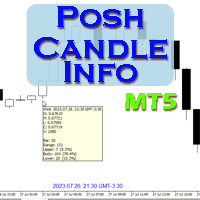
Show candle info with: Time in selected timezone Bar number Candle range points Upper wick points and percentage Body points and percentage Lower wick points and percentage Mark large/small candle body with customizable line. Settings group: Broker and local timezone. Lookback bars for candle marking. Large candle body Small candle body Date and time info with auto position or custom the x and y coordinate.
FREE

R.E.A. Automatic Risk Monetary(MT5)——按品种管理手动入场与挂单 摘要(首屏) 在 当前图表品种 上自动管理你的 手动订单(Magic=0) 与 挂单 :支持按 账户余额百分比或固定金额 设置 SL/TP ; 保本(BreakEven) 与 移动止损(Trailing) (仅对持仓);下单或成交后 即时响应 。 功能说明 EA 启动后 锁定为加载时的品种 ,仅管理: 该品种上的 手动持仓 ; 该品种上的 挂单 (限价/止损/止损限价)。 检测到订单/持仓后,立即计算并应用 止损/止盈 。订单成交后,立刻更新管理,并在启用时应用 保本 与 移动止损 ,且 只收紧不放松 。 核心特性 仅手动(Magic=0) , 按加载时品种锁定 。 SL/TP 支持按百分比或金额 (基于余额的百分比或固定金额)。 挂单 :即时设置/更新 SL/TP,不更改 入场价 与 到期时间 。 已成交持仓 :可选 保本门槛(%/金额) 与 移动止损(%/金额) ,遵守经纪商 StopLevel 限制。 通过 OnTradeTransaction 即时响应 ,并配合 定时循环 维护。
FREE

Monitor Your EAs and Manual Trading From One MT5 Dashboard One account. Multiple strategies. One clear overview. Quantum Magic Monitor is a professional MT5 trading dashboard designed to help traders monitor multiple Expert Advisors and manual trading activity separately and in one place . Instead of analysing a mixed account history, Quantum Magic Monitor lets you organise trading activity by Magic Number / EA group and monitor the performance of different strategies independently. WHY QUANTUM
FREE

NIVELES FIBONACCI 1.14 — Proyección de niveles Fibonacci personalizados Este script para MetaTrader 5 permite calcular y dibujar automáticamente niveles de Fibonacci personalizados a partir de dos precios conocidos y sus correspondientes niveles Fibonacci. La herramienta utiliza una relación matemática lineal entre los dos puntos introducidos para proyectar cualquier nivel Fibonacci que el usuario desee. ¿Cómo funciona? El usuario debe introducir: Precio del Punto A Nivel Fibonacci asignado al P
FREE

Market Grid View is a utility to replace the original 'Market Watch' window. It was designed to be fast and give the user the ability to navigate over all symbols with just a click, while watch the price change or last trade value. To use it, configure your "Market Watch" window with all the symbols you want to monitor, and you can close it. Then insert the indicator in the graph. The parameters window need to be configured: Columns: the number of columns you want to be drawn ShowInfo: the type
FREE

FREE
Minimalist and fully customizable info panel. It works on any chart and timeframe, with 2 - 4 digits brokers and with 3 - 5 digits ones. It can show: Current Spread in pips (1 decimal digit if you are on a 3 - 5 digits broker) ATR (Average True Range) in pips Current Server Time Current GMT Time Important Account Info: Current Leverage and Stop-out Level (%) Time left for the current bar. Very useful on 4 h charts All info labels have a tooltip with the same data Available customizations : Ena
FREE

DCA Tool All-in-One – MetaTrader 5 自动化与半自动化 DCA 交易工具 使用建议 DCA Tool All-in-One 是一款强大的交易工具,能够帮助交易者在 自动或半自动模式下执行定投 (DCA) 策略 ,优化在 MetaTrader 5 平台上的交易管理。
在真实账户使用前,建议 深入了解该工具的运行原理,进行充分的历史回测,并结合市场分析 ,以确保交易效果并降低风险。 1. 概述 此工具帮助交易者: 自动化处理重复性交易任务 (挂单、止损止盈、移动止损、部分平仓)。 结合人工决策 与快速精准的自动化执行。 更高效、安全地实施 基于价格区间的 DCA 策略 。 简洁直观的操作面板让交易者能够快速定义潜在入场区域,一键启动 DCA 策略,同时保持对 交易方向和入场点的完全掌控 。 2. 核心功能 2.1 半自动模式 交易者手动开仓后,工具自动按预设间距和手数挂单。 一键 重新调整 DCA 区域 ,灵活适应价格波动。 2.2 自动执行 (Semi-Auto) 在预先设定的价格区间自动布置一系列限价单。 使用 限价挂单 减少滑点,提高
FREE

当前符号关闭所有头寸 一个简单可靠的脚本,用于关闭当前符号上的所有头寸。它消除了繁琐的工作并节省宝贵的时间。 优势: 仅关注当前资产: 脚本仅关闭选定符号的交易,不影响其他头寸。 快速且方便: 一次运行即可在几秒钟内关闭所有头寸。 适用于任何策略: 适合处理多个头寸或专注于单一资产的用户。 安全性: 逐一处理头寸并记录错误,确保完全控制。 工作原理: 在您的MetaTrader 5终端中运行脚本。 脚本会自动找到当前符号的所有未结头寸。 一键关闭所有交易,其它资产保持不变。 适合谁使用此工具? 需要快速关闭单一符号头寸的交易者。 使用短期策略并注重效率的用户。 想节省时间并专注于重要决策的人。 我创建的其他工具: 清除 当前 符号 的 所有 止 损 和 止 盈
一个脚本,用于删除选定符号上的所有止损和止盈。 清除 所有 符号 的 所有 止 损 和 止 盈
用于同时删除所有符号上的SL和TP的工具。 StopAndTake
管理止损和止盈水平的基本工具。 当前 资产 平均 成本 (简化 版)
一个经济实惠的解决方案,用于计算当前符号头寸的平均成本。 当前 资产 平均 成本 (高级
FREE

Black Volume By ZeeAM Khan
a Multi-Engine EA
Professional Multi-Timeframe Volume & Breakout Trading System Black Volume Multi-Engine EA is an advanced automated trading system that combines volume analysis, spread analysis, liquidity sweeps, support/resistance breakouts, and multi-basket trade management into one powerful Expert Advisor. The EA continuously scans higher-timeframe candles to identify significant market activity, automatically draws key support and resistance zones, and executes
FREE

SmartCloser MT5 SmartCloser MT5 is an advanced service application designed for the MetaTrader 5 platform that enables traders to automatically close open positions based on predefined profitability and loss criteria. This application is not a trading robot or script; it functions as a continuously active service within the trading environment, providing users with control and flexibility in managing their positions. Key Features: Close All Positions: Ability to close all open positions on the
FREE

Unlock the full power of MT5 with NGA Next Gen Assistant — the most advanced trading assistant designed to give you full control over your trades… even from your phone! .
-Risk calculation, dollars stop loss based:
by using NGA you can set the exact amount you willing to lose each time, without having to deal with manual pips calculation, just drag the visual Stop loss line to your SL place and execute the trade, the NGA will automatically figure out the right lot size it needs to
FREE

Chart Service — improving the charts of the custom symbol. The service shows trading levels on the chart of a custom symbol. For example, it can be used when working on a seconds chart built using the Seconds Chart utility. Unlike Expert Advisors, indicators and scripts, services are not linked to a specific chart. Such applications run in the background and are launched automatically when the terminal is started (if they were previously launched). Use the Navigator to manage services. Services
FREE
MetaTrader市场是一个简单方便的网站,在这里开发者可以出售自己的交易应用程序。
我们将帮助您发布您的产品,并向您解释如何为市场准备您的产品描述。市场上所有的应用程序都是加密保护并且只能在买家的电脑上运行。非法拷贝是不可能的。
