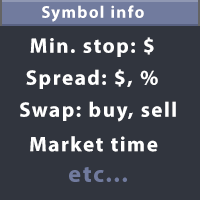
Information panel for traders

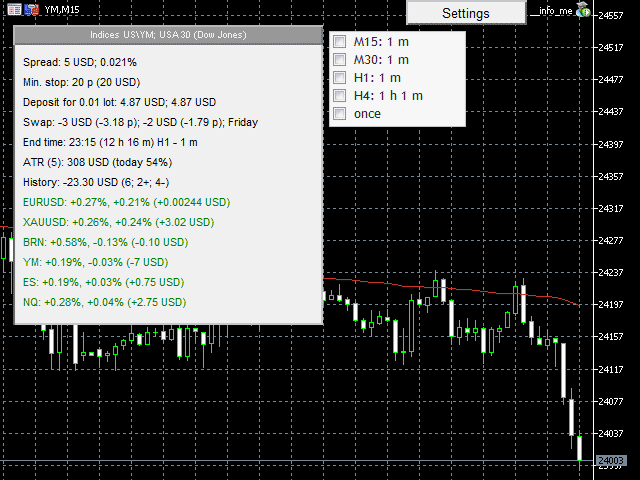
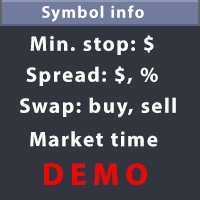
This utility displays the information required for making trades on each opened chart. For example: spread value, swap value; triple swap day; session closing time; ATR of the symbol by Gerchik; total profit/loss for the current symbol; the number of trades made earlier; the percentage change in the quotes of 6 selected instruments; and much more.

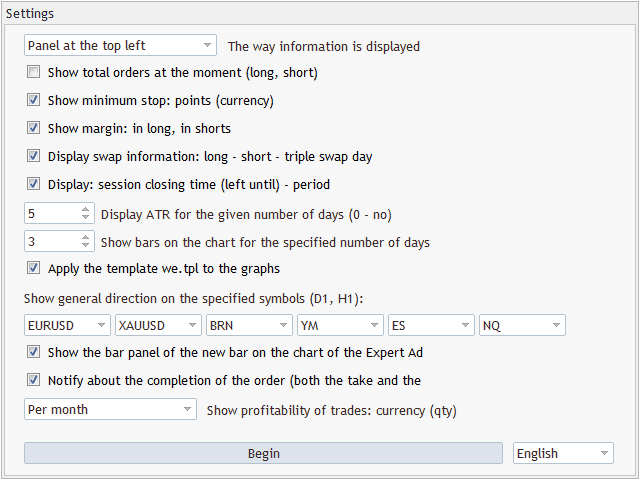
The spread value is always shown. The rest of the information is displayed depending on the settings:

  • Show total orders at the moment (long, short). If the broker provides such information, the utility shows the volume of long and short trades for the current day.
  • Show minimum stop: points (currency). Show the minimum stop distance (in points and in the profit currency) from the current price. For example, if the minimum stop is 5 cents, while the current price is $10, then you will not be able to set stop loss at $9.97, only at $9.94.
  • Show margin: in long, in shorts. Show the margin required to buy a minimum lot.
  • Display swap information: long - short - triple swap day. Show information about the swap (the amount to be paid for the position rollover) both for long and for short positions. It also shows the day of the triple swap for this instrument.
  • Display: session closing time (left until) - period. Display the trading closure time for the instrument, as well as the time left until the closure. If a timeframe smaller than daily is currently selected on the chart, then the utility also shows the number of minutes left until a new bar opens.
  • Apply the template we.tpl to the graphs. If enabled, a template with the name 'my' will be automatically applied to each opened chart.
  • Please note that before enabling this function, it is necessary to create the 'my' template. To do this, use the Templates/Save template… item of the chart's context menu.
  • The templates save the indicators, the selected scale, the chart type and other information, including the EA currently running on the chart. For this reason, do not create a template on a chart where this EA is running. Otherwise, when opening every new chart window, it will also launch this EA.
  • Show the bar panel of the new bar on the chart of the Expert Advisor. Show additional panel with information on new bar times for different timeframes on the chart where the EA is running. If any of the timeframes on the panel is ticked, then a sound signal will be played a minute before a new bar on the selected timeframe. You can quickly tick/untick a timeframe by pressing a corresponding number on the keyboard. For example, 1 - for M15, 2 - for M30, etc.
  • Notify about the completion of the order (both the take and the stop loss). Use a sound notification about reaching a take profit or stop loss level of current deals.
  • Display ATR for the given number of days (0 - no). Show the daily ATR of the instrument according to Gerchik. That is, without consideration of abnormally large or small bars.
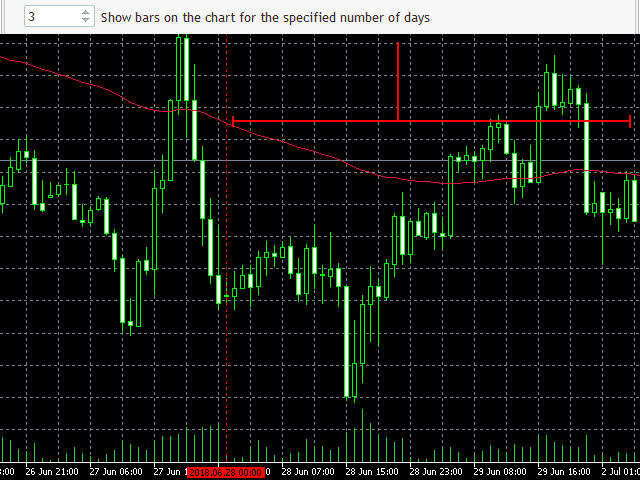
  • Show bars on the chart for the specified number of days. Show a vertical line on the bar, separating the selected number of days. For example, with this setting you can visualize where the bars for the last 3 days end on the chart.
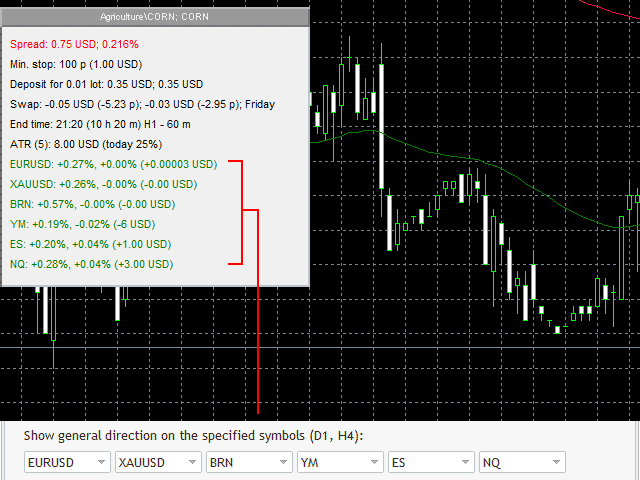
  • Show general direction on the specified symbols (D1, H4). Display the percentage change of quotes of 6 selected instruments for the day and for the last hour. This allows you to easily assess the overall market situation.
  • Show profitability of trades: currency (qty). Display the statistics on the deals previously made on the instrument: the amount of profit or loss, the total number of deals, the number of profitable and unprofitable deals.

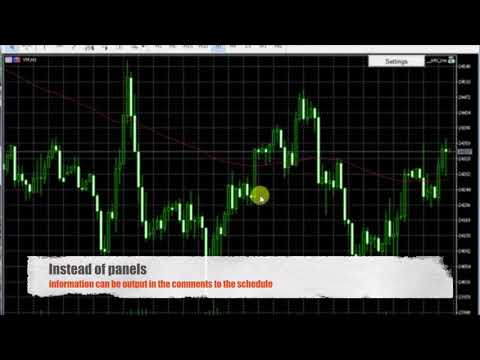
Simply attach the EA to one of th charts, and the selected information will be displayed on each chart. In this case, the display type depends on the value selected in the drop-down list The way information is displayed. You can display the information either in the chart comment (in the upper left corner) or in a separate panel in one of the four chart corners.
Önerilen ürünler
Boleta de negociação, adiciona automáticamente as ordens Take Profit e Stop Loss quando excutada uma ordem de compra ou venda. Ao apertar as teclas de atalho (A, D, ou TAB), serão inseridas duas linhas de pre-visualização, representando as futuras ordens de take profit (azul) e stop loss (vermelho), as quais irão manter o distanciamento especificado pelo usuário. Ditas ordens só serão adicionadas ao ser executada a ordem inicial. Ao operar a mercado, as ordens pendentes de take profit, e stop lo
Introducing a compact and handy panel for watching the market and estimating multicurrency price movements. It shows main parameters for a user defined group of symbols in the form of a table. Its functionality is checked on Forex and FORTS. The following information is displayed: Financial instrument name . Last price value - can be turned off for off-exchange markets. Ask price value . Bid price value . Spread size in pips. Stop level in pips - can be turned off for off-exchange markets. Chang
This tool allows you to export MetaTrader indicator data (buffers) for any financial instrument available in your MetaTrader 5. You can export multiple Symbols and Timeframes into a single CSV file. You can also schedule the export frequency (every 1 minute, 5 minutes, 60 minutes, etc.). There is no need to open multiple charts to retrieve recent data—the tool downloads the data directly. The CSV file will be saved in the folder: \MQL5\Files . How it works Report Tab Select the indicators and o
Binance is a world-renowned cryptocurrency exchange! In order to facilitate the real-time data analysis of the encrypted digital currency market, the program can automatically import the real-time transaction data of Binance Futures to MT5 for analysis. The main functions are: 1. Support the automatic creation of USD-M futures trading pairs of the Ministry of Currency Security, and the base currency can also be set separately. The base currency BaseCurrency is empty to indicate all currencies,
Order Selective Delete MT5
Francisco Manuel Vicente Berardo
The Order Selective Delete is a multi-symbol multi-timeframe script used to delete simultaneously various pending orders.  General Description   The Order Selective Delete   possesses   three operation modes (Intersection,   Union   and All) that control the way   as   three pending order features (symbol, magic   number   and type) are used. The modes, available through the Selection Mode input parameter, relate to the features, available through the “Select by Feature” and “Feature” input pa

FREE
FX28 Trader Dashboard Tanıtımı - Sizin için Ticaret Yöneticiniz FX28 Trader Dashboard ile Forex ticaretinizi yeni zirvelere taşıyacak kapsamlı ve sezgisel bir ticaret yöneticisini keşfedin. Deneyimli bir tüccar olun veya finansal yolculuğunuza yeni başlayan biri olun, bu güçlü araç, ticaret faaliyetlerinizi basitleştirmek ve karar alma sürecinizi geliştirmek için tasarlanmıştır. Ana Özellikler: Kullanıcı Dostu Arayüz: FX28 Trader Dashboard, tüm ticaret seviyelerine uygun kullanıcı dostu bir ara
Indicator Values Panel MT5
AL MOOSAWI ABDULLAH JAFFER BAQER
Indicator Values Panel – Your Ultimate Indicator Monitoring Solution! Are you tired of constantly switching between indicators to check values? Want a simple, elegant, and real-time solution that puts all key indicator readings in one place? Indicator Values Panel is the ultimate utility for traders who want a clear and concise display of important indicator values – directly on their chart! What is Indicator Values Panel? Indicator Values Panel is a sleek, easy-to-use utility that provides rea
Safety Control: Your Ultimate Balance Management Solution for Prop Firm Challenges Overview Tired of manually monitoring your trading activities in prop trading challenges? Meet Safety Control, an advanced Expert Advisor for MetaTrader 5 that will change the way you trade forever. This proprietary software aims to help you manage your balance effortlessly during prop firm challenges. Features Automated Drawdown Control : Safety Control continuously monitors your account's balance and equity in r
This script is designed to download a long history of cryptocurrency quotes from the Binance exchange. You will find it perfectly suitable if you want once to download the history of cryptocurrencies for charts analyzing, collecting statistics or testing trading robots in the MetaTrader 5 strategy tester, or if you need to update the history not very frequently (for example, once a day or once a week). After running the script, you will have fully featured (but not automatically updated) cryptoc
Description:   -   Chart Time + Indicator is very simple and easy, but it can be very important to control the time before opening any manual trade. This indicator shows the time in a panel between 3 different options. Can be possible to move the panel with mouse or with fixed coordinates on the chart. Input Parameters:   -   Local Time : Enable Local Time if you want to show it (Personal Computer Time).   -   Server Time : Enable Server Time if you want to show it (Broker Time).   -   GMT Time
Quant Panel
Kevin Craig E Gittins
Quant Panel Pro The Ultimate Multi-EA Performance Dashboard for Quantitative Traders Stop juggling multiple charts or external tools to monitor your algorithmic strategies! Quant Panel Pro delivers institutional-grade portfolio monitoring in one sleek, professional interface. Key Features Quantitative Analytics at Your Fingertips Real-time P&L aggregation   across all Expert Advisors Statistical win rate analysis   with trade frequency metrics Advanced drawdown tracking   (realized & unrealized
Real-Time Spread Display Tool A   real-time spread display tool   is a specialized software or application designed to provide traders and investors with instant, live data on the   spread —the difference between the bid price (the price at which buyers are willing to purchase an asset) and the ask price (the price at which sellers are willing to sell it)—for various financial instruments. This tool is critical in markets such as forex (FX), stocks, futures, and cryptocurrencies, where price f
This service is designed to stream online cryptocurrency quotes   from the Binance exchange to your MetaTrader 5 terminal. You will find it perfectly suitable if you want to see the quotes of cryptocurrencies in real time — in the Market watch window and on the MetaTrader 5 charts. After running the service, you will have fully featured and automatically updated  cryptocurrency charts in your MetaTrader 5. You can apply templates, color schemes, technical indicators and any non-trading tools to
CCI Dashboard for MT5
Taras Slobodyanik
5 (1)
Emtia Kanalı Endeksi (CCI) göstergesinin çok para birimi ve çok zaman çerçeveli modifikasyonu. Parametrelerde istediğiniz para birimini ve zaman dilimlerini belirtebilirsiniz. Ayrıca panel aşırı alım ve aşırı satım seviyelerini geçerken bildirim gönderebilir. Noktalı bir hücreye tıkladığınızda bu sembol ve nokta açılacaktır. Bu MTF Tarayıcıdır. Kontrol panelini grafikten gizlemenin anahtarı varsayılan olarak "D"dir Parametreler CCI Period — ortalama dönem. CCI Applied price — fiyat türü. Cl
G Trade Broker Check – Instantly Evaluate Broker Performance Across Multiple Accounts and Leverage Settings Take your trading to the next level by analyzing your broker’s performance in real time! With G Trade Broker Check , traders can effortlessly track their broker’s behavior over the past 24 hours on any symbol added to the Market Watch in MT5. Whether you’re comparing multiple brokers, testing different account types, or analyzing varying leverage setups, this powerful Expert Advisor prov
FREE
Welcome to Smart Algo Trade Panel Manager MT5 - the ultimate   risk management tool designed to make trading more effective based on user needs.  It is a comprehensive solution for seamless trade planning, position management, and enhanced control over risk. It does not matter weather you a beginner or an advanced trader, or a scalper needing rapid executions, SmartAlgo Trade Panel  adapts to your needs offering flexibility across all markets of your choice. You can put SL, Lot and TP of choice
Smart EA Summary MT5 – EA Profit Panel by Magic Number Do you run multiple Expert Advisors and want to track their individual performance? Smart EA Summary is a smart visual tool that displays the net profit/loss of all closed trades, grouped by Magic Number and Symbol, directly on your chart in a clean, responsive panel. Click Here for MT4 Version * Introductory Offer : the current price is only   49 USD   After the first 10 purchases, the price will increase to   75 USD , and gradually up to
Trade2Telegram
Strifor (Mauritius) Ltd
Trade2Telegram — a plugin for automatic trade notifications from MetaTrader to Telegram. This tool is designed for traders managing capital, running signal channels, or leading educational communities. The plugin copies all trading operations from the terminal and publishes them to a selected Telegram chat, group, or channel. Messages are sent automatically when positions are opened or closed, stop-loss or take-profit levels are changed, pending orders are triggered, or trades are partially clos
FREE
OnlyPlusCloser — Sadece kârlı işlemleri kapatır. Hızlı. Akıllı. Ne işe yarar? OnlyPlusCloser , MetaTrader 5 için geliştirilmiş akıllı bir script olup, yalnızca mevcut semboldeki kârlı pozisyonları otomatik olarak kapatır . Manuel filtreleme yok. Risk yok. Sadece kazançlı işlemler — tek tıklamayla kapatılır. Trader için avantajlar: Tam kontrol — zarar eden işlemlere dokunulmaz Anında hız — tüm kârlı işlemler derhal kapatılır Rutin işlemlerin otomasyonu — scalping ve gün içi işlemler
FREE
Utility for reading news from investing.com To access the site, you need to add WebRequest in the Options terminal menu on the Expert Advisors tab: https://sslecal2.investing.com If reading is successful, a message about writing the file is displayed. The INV_week_this.txt file is written to the MQL5\Files folder of the terminal and is kept up to date, updating data according to its own timer You can attach the utility to any chart with any time frame; just one is enough to support indicators
Draw Agent, tüm grafik analizlerinizi, karalamalarınızı, notlarınızı ve daha fazlasını oluşturmanız ve yönetmeniz için güzel ve yenilikçi bir yol olarak tasarlanmıştır. Bu araç, grafik alanını bir kara tahta olarak ele almak ve elle çizmek için serbest çizim yöntemi sağlar. Bu Serbest Çizim aracı, tablodaki olayları işaretlemek veya vurgulamak için MT4/MT5 tablolarına çizim yapmanızı sağlar. Elliott dalgalarını elle çizmek, çizelgede çizgiler çizmek veya çizelgenizdeki fikirleri göstermek istiy
Features 1️⃣ Flexible Grid Order Configuration Set price levels and spacing between orders. Customize order sizes and maximum number of positions for better risk control. 2️⃣ Hedge and Netting Modes Hedge Mode : Allows simultaneous long and short positions , ideal for advanced strategies. Netting Mode : Consolidates positions for easier balance management. 3️⃣ Supported Order Types Limit Orders : Buy and sell at predetermined prices. Market Orders : Instant execution. Integrated Take-Profit : Wi

This Order Risk Control Panel is designed with the core concept of "Simple, Efficient and Accurate Risk Control". Tailor-made for all types of traders, whether they are beginners or experienced professionals, it allows for quick mastery and realization of refined risk management in every trade. The panel deeply integrates risk control logic into the entire order placement process, fundamentally addressing the pain points of "cumbersome risk control settings and delayed operations" in traditiona
This   Trading Statistics Indicator   gives you an overview of your trade statistics for a selected period. You can set different periodsand filter for Symbols and magics to analyse your trading success. You can also create charts for Balance/Equity, MFE and MAE Periods: Total Time Today Yesterday This Week Last Week This Month Last Month This Year Last Year This Trading Statistics Indicator is still work in progress. In the next versions I will add telegram and email notifications and some more
This indicator shows both GMT time and your broker's time on the chart. Simply attach the indicator to a chart, and you will see the GMT time and your broker's time displayed in the top left corner, as shown in the screenshot. By using this indicator, you can always stay informed about your broker's time, which is especially useful during daylight saving changes. You won't have to worry about whether your broker follows the US or EU schedule, as the indicator automatically adjusts to reflect any
FREE
Script for quick updates (synchronization) trade history in the SQLite database. Saves closed positions and orders, symbols data. Take advantage of SQLite's capabilities for intermediate data storage, analytics, and integrations of the MetaTrader platform. Keep all your data in one place. Use the saved data in SQL analytical queries, from Python and other languages, to build dashboards Parameters useDefaults   true - use default parameters. Save data to the COMMON hierarchy, to the db/ram/{s
FREE
This program is designed to download economic calendar news events for a specified country over a selected date range, allowing traders to analyze and incorporate important economic data into their trading strategies. By specifying both a start and end date, as well as a country code, the program retrieves relevant news events within the defined period and exports them to a CSV file for easy review and analysis. This tool helps traders stay informed about scheduled economic events that may impac
FREE
"Support or Resistance Alert Broken" is a simple and very intuitive tool that allows you to create or eliminate horizontal and trend supports and / or resistances with a simple click. When the support or resistance line is broken by the closing price at the end of the current candle, the "Support or Resistance Alert Broken" tool will send an alert with sound, as well as a notification to the MT4 or MT5 mobile application. This tool can send alerts from multiple pairs at the same time. Utility
AUTO RISK MANAGER PRO: Forex ticaretindeki ortağınız! AUTO RISK MANAGER PRO_MT4 — MT4 için sürüm Demo sürümü + detaylı açıklama Duygular yüzünden para kaybetmeyi bırakın! Risk yönetimini profesyonel bir algoritmaya emanet etmenin zamanı geldi. Şu durumu hayal edin: piyasa pozisyonunuza karşı hızla hareket ediyor ve siz o sırada uyuyorsunuz, çalışıyorsunuz veya ailenizle vakit geçiriyorsunuz. Tanıdık bir senaryo, değil mi? Auto Risk Manager Pro ile — artık asla! Avantajlar: Risk yönetimine devr
Have you ever take a long time to watch a Symbol when the network link is not good ? Have you ever wait for a long time when you switch chart between different Symbols or different TimeFrames ? If you do long-term backtesting , Have you ever to be downloaded datas for a long time ? Yes, If there is no data in the system, those will happen.  1. What is this: Download all the Symbol data in Market Watch to the system. PS: This is not outputting data to Files. This Link go to Demo version: https:/
Bu ürünün alıcıları ayrıca şunları da satın alıyor
Trade Assistant MT5
Evgeniy Kravchenko
4.42 (204)
It helps to calculate the risk per trade, the easy installation of a new order, order management with partial closing functions, trailing stop of 7 types and other useful functions. Additional materials and instructions Installation instructions - Application instructions - Trial version of the application for a demo account Line function -   shows on the chart the Opening line, Stop Loss, Take Profit. With this function it is easy to set a new order and see its additional characteristics bef
Trade Manager EA’ye hoş geldiniz! Ticaretin daha sezgisel, hassas ve verimli hale gelmesi için tasarlanmış nihai risk yönetim aracı ile tanışın. Bu sadece bir emir verme aracı değil; ticaret planlaması, pozisyon yönetimi ve risk kontrolü için kapsamlı bir çözüm. İster yeni başlayan bir yatırımcı olun, ister deneyimli bir trader ya da hızlı emir gerektiren bir scalper, Trade Manager EA ihtiyaçlarınıza uyum sağlar ve forex, endeksler, emtialar ve kripto paralar dahil tüm piyasalarda esneklik sunar
TradePanel MT5
Alfiya Fazylova
4.86 (143)
Ticaret Paneli çok işlevli bir ticaret asistanıdır. Uygulama, manuel ticaret için 50'den fazla ticaret işlevi içerir ve çoğu ticaret işlemini otomatikleştirmenize olanak tanır. Dikkat, uygulama strateji test cihazında çalışmıyor. Satın almadan önce demo sürümünü bir demo hesabında test edebilirsiniz. Demo sürümü burada . Talimatların tamamı buraya . Ticaret. Tek tıklamayla alım satım işlemlerini gerçekleştirmenizi sağlar: Otomatik risk hesaplaması ile bekleyen emir ve pozisyonları açın. Tek tıkl
Local Trade Copier EA MT5
Juvenille Emperor Limited
4.96 (116)
Local Trade Copier EA MT5   ile olağanüstü hızlı işlem kopyalama deneyimi yaşayın. Kolay 1 dakikalık kurulumuyla bu işlem kopyalayıcısı, aynı Windows bilgisayarda veya Windows VPS'te birden fazla MetaTrader terminali arasında işlemleri kopyalamanıza olanak tanır ve 0.5 saniyenin altındaki şimşek hızında kopyalama hızları sunar. Başlangıç seviyesinde veya profesyonel bir tüccar olsanız da,   Local Trade Copier EA MT5 , spesifik ihtiyaçlarınıza göre özelleştirmek için geniş bir seçenek yelpazesi s
Tired of complex order placement and manual calculations? Trade Dashboard is your solution. With its user-friendly interface, placing orders becomes effortless, by a single click, you can open trades, set stop loss and take profit levels, manage trade lot size, and calculate risk to reward ratios, allowing you to only focus on your strategy. Say goodbye to manual calculations and streamline your trading experience with Trade Dashboard. Download  Demo Version  right now. You can find  Details of
Ultimate Extractor - Professional Trading Analytics for MT5 Ultimate Extractor transforms your MetaTrader 5 trading history into actionable insights with comprehensive analytics, interactive charts, and real-time performance tracking. What It Does Automatically analyzes your MT5 trading history across all Expert Advisors and generates detailed HTML reports with interactive visualizations. Tracks live performance metrics including open positions, floating P/L, and drawdown in real-time. Supports
Beta Sürümü Telegram to MT5 Signal Trader resmi alfa sürümüne neredeyse hazır. Bazı özellikler hâlâ geliştirilmekte olup küçük hatalarla karşılaşabilirsiniz. Sorun yaşarsanız lütfen bildirin, geri bildiriminiz yazılımın herkes için gelişmesine yardımcı olur. Fiyat 20 satıştan sonra artacaktır. Kalan $90 kopya: 2/20 . Telegram to MT5 Signal Trader , Telegram kanallarından veya gruplarından gelen işlem sinyallerini otomatik olarak MetaTrader 5 hesabınıza kopyalayan güçlü bir araçtır. Herkese açı
Smart Stop Scanner – Gerçek piyasa yapısına dayalı çoklu varlık stop-loss analizi Genel Bakış Smart Stop Scanner, birden fazla piyasadaki stop-loss seviyelerini profesyonel bir şekilde takip etmek için tasarlanmıştır. Sistem, gerçek piyasa yapısına dayanan breakout’ları, daha yüksek zirveleri ve daha düşük dipleri otomatik olarak algılar ve en önemli stop bölgelerini tespit eder. Tüm bilgiler, yüksek çözünürlüklü ekranlarla uyumlu (DPI-aware) net ve düzenli bir panelde sunulur. Forex, Altın, E
Copy Cat More Trade Copier MT5 (Kopyalayıcı Kedi MT5) , günümüzün ticaret zorluklarına yönelik tasarlanmış yerel bir ticaret kopyalayıcısı ve eksiksiz risk yönetimi ve yürütme çerçevesidir. Prop firması zorluklarından kişisel portföy yönetimine kadar, sağlam yürütme, sermaye koruması, esnek yapılandırma ve gelişmiş ticaret işleme kombinasyonu ile her duruma uyum sağlar. Kopyalayıcı hem Master (gönderici) hem de Slave (alıcı) modunda çalışır, piyasa ve bekleyen emirlerin, ticaret değişikliklerini
Smart Stop Manager – Profesyonel hassasiyetle otomatik stop-loss yönetimi Genel Bakış Smart Stop Manager, Smart Stop ürün serisinin yürütme katmanıdır. Birden fazla açık pozisyonda yapılandırılmış, güvenilir ve tamamen otomatik stop-loss yönetimi isteyen trader’lar için tasarlanmıştır. Tüm açık işlemleri sürekli izler, Smart Stop piyasa yapısı mantığını kullanarak en uygun stop seviyesini hesaplar ve stopları net ve şeffaf kurallarla otomatik olarak günceller. İster tek bir varlıkla işlem yapı
Trade Manager DashPlus
Henry Lyubomir Wallace
5 (11)
DashPlus , MetaTrader 5 platformunda işlem verimliliğinizi ve etkinliğinizi artırmak için tasarlanmış gelişmiş bir işlem yönetim aracıdır. Risk hesaplama, emir yönetimi, gelişmiş ızgara sistemleri, grafik tabanlı araçlar ve performans analitiği gibi kapsamlı bir özellik yelpazesi sunar. Temel Özellikler 1. Kurtarma Izgarası Olumsuz piyasa koşullarında işlemleri yönetmek için ortalama alma ve esnek bir ızgara sistemi uygular. İşlem kurtarma çabalarını optimize etmek için stratejik giriş ve çıkış
MT5 to Telegram Signal Provider , hesabınızı bir sinyal sağlayıcı haline getirerek belirtilen sinyalleri Telegram'ın sohbetine, kanalına veya grubuna göndermeyi sağlayan kullanımı kolay, tamamen özelleştirilebilir bir araçtır. Rakip ürünlerin çoğunun aksine, DLL içe aktarması yapmaz. [ Demo ] [ Kılavuz ] [ MT4 Versiyonu ] [ Discord Versiyonu ] [ Telegram Kanalı ]  New: [ Telegram To MT5 ] Kurulum Adım adım bir kullanıcı kılavuzu mevcuttur. Telegram API'si hakkında bilgi gerekmemektedir; ihtiyac
Seconds Chart — MetaTrader 5 için saniye bazlı grafikler oluşturmanıza olanak sağlayan eşsiz bir araçtır. Seconds Chart sayesinde saniye cinsinden zaman dilimleriyle grafik oluşturabilir, standart dakika veya saatlik grafiklerde mümkün olmayan esneklik ve analiz hassasiyetine ulaşabilirsiniz. Örneğin, S15 zaman dilimi 15 saniyelik mum çubuklarını ifade eder. Desteklenen özel sembollerle herhangi bir gösterge ve danışman kullanabilirsiniz. Onlarla çalışmak, standart grafiklerde işlem yapmak kadar
Grid Manual MT5
Alfiya Fazylova
4.9 (20)
Grid Manual, sipariş ızgarasıyla çalışmak için kullanılan bir ticaret yardımcı programıdır. Yardımcı program evrenseldir, esnek ayarlara ve sezgisel bir arayüze sahiptir. Sadece kayıpların ortalaması yönünde değil, aynı zamanda kazanç artışı yönünde de bir emir ızgarası ile çalışır. Tüccarın bir emir ızgarası oluşturmasına ve eşlik etmesine gerek yoktur, bu yardımcı programı yapacaktır. Emri açmanız yeterlidir ve Grid manual otomatik olarak ona bir emir ızgarası oluşturacak ve kapanana kadar ona
HINN MAGIC ENTRY – the ultimate tool for entry and position management! Place orders by selecting a level directly on the chart! Key features: - Market, limit, and pending orders - Automatic lot size calculation - Automatic spread and commission accounting - Unlimited partitial take-profits  - Breakeven and trailing stop-loss  functions - Intuitive, adaptive, and customizable interface - Session and strong algorithmic level visualization - Works with any assets and account types Join the   ALG
Exp COPYLOT CLIENT for MT5
Vladislav Andruschenko
3.82 (34)
MT5 için ticari kopyalayıcı, МetaТrader 5 platformu için bir ticari kopyalayıcıdır   . arasındaki   forex işlemlerini kopyalar.       COPYLOT MT5 sürümü için   herhangi bir hesap   MT5   -   MT5, MT4   -   MT5 (veya COPYLOT MT4 sürümü için   MT4 -   MT4 MT5   -  MT4) Güvenilir fotokopi makinesi! MT4 sürümü Tam tanım   +DEMO +PDF Nasıl alınır Nasıl kurulur     Günlük Dosyaları nasıl alınır?     Nasıl Test Edilir ve Optimize Edilir     Expforex'in tüm ürünleri Ayrıca МТ4 terminali   (МТ4   -  
Riskinizi otomatik olarak hesaplarken işlemlere hızlı bir şekilde girip çıkmanıza yardımcı olacak Ticaret Yöneticisi. Aşırı Ticaret, İntikam Ticareti ve Duygusal Ticaretten korunmanıza yardımcı olacak özellikler içerir. İşlemler otomatik olarak yönetilebilir ve hesap performans ölçümleri bir grafikte görselleştirilebilir. Bu özellikler, bu paneli tüm manuel yatırımcılar için ideal kılar ve MetaTrader 5 platformunun geliştirilmesine yardımcı olur. Çoklu Dil desteği. MT4 Sürümü  |  Kullanım Kılavu
EASY Insight AIO – Akıllı ve zahmetsiz yatırım için hepsi bir arada çözüm Genel Bakış Tüm piyasayı — Forex, Altın, Kripto, Endeksler ve hatta Hisseler — saniyeler içinde, manuel grafik incelemesi, gösterge kurulumu ya da karmaşık ayarlar olmadan analiz edebildiğinizi hayal edin. EASY Insight AIO , yapay zekâ destekli yatırım için nihai, kullanıma hazır dışa aktarma aracınızdır. Tüm piyasanın kapsamlı bir anlık görüntüsünü tek bir temiz CSV dosyasında sunar; bu dosya ChatGPT, Claude, Gemini, Pe
Fotokopi->Kullanışlı ve hızlı arayüz etkileşimi, kullanıcılar hemen kullanabilir       ->>>> Windows bilgisayarlarda veya VPS Windows'ta kullanılması önerilir Özellikler: Çeşitlendirilmiş ve kişiselleştirilmiş kopyalama ticareti ayarları: 1. Farklı sinyal kaynakları için farklı lot modları ayarlanabilir 2. İleri ve geri kopyalama ticareti için farklı sinyal kaynakları ayarlanabilir 3. Sinyaller yorumlarla ayarlanabilir 4. Lotun sözleşme lotuna göre kalibre edilip edilmeyeceği Çeşitlendirilmiş v
Cerberus Equity Watcher
Samuel Bandi Roccatello
5 (3)
Cerberus the Equity Watcher , hesap öz sermayenizi sürekli olarak izleyen ve hatalı EA'ların veya isteğe bağlı bir tüccarsanız duygusal davranışınızın neden olduğu büyük düşüşlerden kaçınan bir risk yönetimi aracıdır. Hatalar içerebilecek veya beklenmedik piyasa koşullarında iyi performans göstermeyebilecek EA'lara güvenen sistematik tüccarlar için son derece yararlıdır. Cerberus, bir minimum öz sermaye değeri ve (isteğe bağlı olarak) bir maksimum değer belirlemenize izin verir, bunlardan herhan
1 tıklama ile ticaret için Ticaret Paneli.   Pozisyonlar ve emirlerle çalışmak!   Grafikten veya klavyeden alım satım. Alım satım panelimizi kullanarak, grafikten tek bir tıklamayla alım satım yapabilir ve alım satım işlemlerini standart MetaTrader kontrolünden 30 kat daha hızlı gerçekleştirebilirsiniz. Bir tüccar için hayatı kolaylaştıran ve bir tüccarın ticaret faaliyetlerini çok daha hızlı ve daha rahat gerçekleştirmesine yardımcı olan parametrelerin ve işlevlerin otomatik hesaplamaları. Graf
Telegram'dan MT5'e:   Nihai Sinyal Kopyalama Çözümü Telegram'dan MT5'e işlemlerinizi basitleştirin, DLL'lere ihtiyaç duymadan işlem sinyallerini doğrudan Telegram kanallarından ve sohbetlerinden MetaTrader 5 platformunuza kopyalayan modern araç. Bu güçlü çözüm hassas sinyal yürütme, kapsamlı özelleştirme seçenekleri sağlar, zamandan tasarruf sağlar ve verimliliğinizi artırır. [ Instructions and DEMO ] Temel Özellikler Doğrudan Telegram API Entegrasyonu Telefon numarası ve güvenli kod ile kimlik
Easy Trade – Akıllı, Basit ve Güçlü İşlem Yönetimi Easy Trade, riski kontrol altında tutmak ve işlemleri sorunsuz gerçekleştirmek isteyen MetaTrader kullanıcıları için hepsi bir arada işlem yönetim çözümüdür. Gerçek kullanıcı geri bildirimleriyle sıfırdan tasarlanan Easy Trade, işlemleri birden fazla sembolde yürütmeyi, izlemeyi ve yönetmeyi kolaylaştırır – iş akışınızı karmaşıklaştırmadan. İster manuel olarak scalping yapın ister küçük bir işlem portföyü yönetin, Easy Trade dikkatinizi olması
Trade Assistant 38 in 1
Makarii Gubaydullin
4.91 (22)
Ultimate Trade Assistant MT5 — Çok Fonksiyonlu Ticaret Asistanı 66'dan fazla profesyonel araç tek bir panelde — daha hızlı, güvenli ve verimli işlem yapın. Bu asistan; risk yönetimi, emir kontrolü, piyasa analizi ve pozisyon takibini tek bir güçlü arayüzde birleştirir. Hem yeni başlayanlar hem de profesyonel yatırımcılar için uygundur. Neden trader’lar bu aracı tercih ediyor Tek tıklamayla hızlı emir açma ve yönetim Otomatik lot ve risk hesaplama Akıllı emirler: grid, OCO, gizli emirler, sanal S
Zentral Trading Manager
Ray Zeanrik Parreno Fredeluces
5 (4)
Zentral Trading Manager Your Command Center for Precision Trading — Now Stronger than Ever Take control of your trades like never before. Zentral Trading Manager is your all-in-one manual trading panel for MetaTrader 5 — built for scalpers, day traders, and serious strategy execution. Fully compatible with both Mac and Windows laptops. High-DPI safe. No more layout issues. Key Features (Latest 2025 Update): • One-Click Close – Instantly close Buy/Sell, winning/losing trades, or even half positi
The product will copy all telegram signal to MT5 ( which you are member) , also it can work as remote copier.  Easy to set up, copy order instant, can work with almost signal formats, image signal,  s upport to translate other language to English Work with all type of channel or group, even channel have "Restrict Saving Content", work with  multi channel, multi MT5 Work as remote copier: with signal have ticket number, it will copy exactly via ticket number. Support to backtest signal. How to s
MT5 → Tradovate Bridge (Prop-Firm Ready) Mirror your MT5 trades into Tradovate in real time—perfect for running your favorite indices/gold EA on MT5 while meeting the rules of top prop firms like Apex , etc. What it does Live mirroring: Replicates MT5 market executions (open/close) to Tradovate as market orders. Symbol routing:  Map your chart (e.g., US100/USTEC) to the right futures contract (MNQ/NQ/MES/ES/…); roll-aware (quarterly/monthly). Position cap: Limit how many MT5 positions are mirro
Auto Trade Copier is designed to copy trades to multiple MT4, MT5 and cTrader accounts/terminals with 100% accuracy. The provider and receiver accounts must be on the same PC/VPS. With this tool, you can copy trades to receiver accounts on the same PC/VPS. All trading actions will be copied from provider to receiver perfectly. This version can be used on MT5 accounts only. For MT4 accounts, you must use Auto Trade Copier (for MT4). Reference: - For MT4 receiver, please download Trade Receiver Fr
Custom Alerts AIO: Tüm Piyasaları Takip Et — Hiçbir Kurulum Gerekmez Genel Bakış Custom Alerts AIO , hiçbir ek yapılandırma gerektirmeyen, kullanıma hazır bir piyasa izleme çözümüdür. Gerekli tüm göstergeler — FX Power, FX Volume, FX Dynamic, FX Levels, IX Power — iç yapısına gömülüdür. Grafik görüntülemesi olmadan çalışır, bu da onu sessiz ve verimli bir şekilde gerçek zamanlı alarm üretimi için mükemmel hale getirir. Brokerınızın sunduğu tüm varlık sınıflarını destekler: Forex, Metaller, End
Entry In The Zone ve SMC Multi Timeframe, Smart Money Concepts (SMC) çerçevesine dayalı olarak geliştirilmiş gerçek zamanlı bir piyasa analiz aracıdır. Entry In The Zone ve SMC Multi Timeframe, yatırımcıların piyasa yapısını daha sistematik ve net bir şekilde analiz etmelerine yardımcı olmak, işlem verimliliğini artırmak ve stratejiniz için uzun vadeli sürdürülebilirlik yaratmak amacıyla geliştirilmiştir. Bu araç, Smart Money Concepts (SMC) çerçevesine dayanmaktadır. Birden fazla zaman diliminde
Yazarın diğer ürünleri
The utility helps open a deal with a stop loss that does not exceed the specified amount, or to refrain from it altogether. That is, it determines the number of lots to open the deal so that the stop loss is as close as possible to the specified amount in USD without exceeding it. For example, it will be indispensable when trading according to the Gerchik strategy. That is, when trading based on risks, with a fixed risk and a fixed take profit relative to stop loss. For example, if you always op
FREE
This utility displays the information required for making trades on each opened chart. For example: spread value, swap value; triple swap day; session closing time; ATR of the symbol by Gerchik; total profit/loss for the current symbol; the number of trades made earlier; the percentage change in the quotes of 6 selected instruments; and much more. The spread value is always shown. The rest of the information is displayed depending on the settings: Show total orders at the moment (long, short) .
FREE
Утилита помогает открыть сделку со стоп-лоссом не больше той суммы, которую вы указали, или же вообще отказаться от сделки. То есть, она определяет количество лотов, на которые нужно совершить сделку, чтобы стоп-лосс был максимально приближен, но не больше суммы, которую вы указали. Например, она будет незаменима при торговле по стратегии Герчика. То есть, при торговле от рисков, когда у вас фиксированный риск и фиксированный тейк-профит по отношению к стоп-лоссу. Например, если вы всегда входит
The utility helps open a deal with a stop loss that does not exceed the specified amount, or to refrain from it altogether. That is, it determines the number of lots to open the deal so that the stop loss is as close as possible to the specified amount in USD without exceeding it. For example, it will be indispensable when trading according to the Gerchik strategy. That is, when trading based on risks, with a fixed risk and a fixed take profit relative to stop loss. For example, if you always op
Filtrele:
İnceleme yok
İncelemeye yanıt