Backstop Daily Loss Limiter
- Yardımcı programlar
-
Matthew Vassallo
 IT engineer who got hooked on the markets. I'm currently trading my own FTMO challenge, and built Apex Gold Pro to solve a problem I was facing myself — removing emotion and inconsistency from execution. More gold and prop-firm-focused EAs are already in development.
 - Sürüm: 1.0
Backstop enforces the two rules that end funded accounts.
A daily loss limit and a maximum loss limit, applied to everything on the account — every Expert Advisor, every symbol, and every trade you place by hand. Attach it to any one chart and it governs the whole terminal.
It does not trade. It has no strategy, no signals and no opinion about the market. It is a governor.
What it does
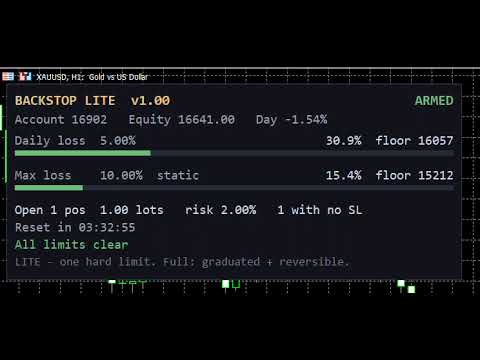
- Daily loss limit — measured from balance at the reset, equity at the reset, or a fixed account size. Firms differ, and getting this wrong is the most common way a tool says "you are fine" while the firm's dashboard says otherwise.
- Maximum loss limit — the overall floor. It does not reset.
- Reset on your firm's clock, not your broker's — server time or GMT, at any hour. Prop firms rarely reset at broker midnight.
- Both rules act at 90% of your limit, not at 100% — set 5% and it acts at 4.5% down. Your firm breaches you the moment equity touches the line, so a tool that aims exactly at the line will eventually overshoot past it.
- Monitor mode — watch and alert without ever sending an order. Run it this way for a few days and compare the panel against your firm's dashboard before you let it act.
- It governs other EAs — it is not limited to trades it opened.
Three things it gets right that free tools usually do not
1. The daily anchor survives a terminal restart. A mid-session restart or reconnect cannot reset your loss to zero. This matters more than it sounds: a governor that re-anchors on restart reports a clean slate at exactly the moment you are closest to breaching.
2. It tells you when it CANNOT act. If the terminal's Algo Trading button is off, a risk tool cannot close anything — every attempt fails silently into the log while the panel keeps showing states and floors. It looks exactly like protection. This tool puts a red ALGO TRADING IS OFF — CANNOT ENFORCE banner across the top of the panel and alerts you once.
3. Everything it knows is on the panel. Both floors in account currency, both budgets as bars, open exposure, how many positions have no stop, the countdown to your next reset, and a plain-language reason for its current state.
Setup
Attach to any one chart — the symbol does not matter, it governs the account. Two presets are included: load Monitor, first run to watch safely, then Standard 5 / 10 to enforce. Change your two limits and the reset hour to match your firm. A full PDF manual is included.
What the full version adds
This is one hard limit. The full version is a different shape of protection: graduated and reversible. It spends the daily budget in stages — warn, then refuse new trades while leaving open ones alone, then flatten — and steps back down again if the account recovers, with hysteresis so it cannot flap between states. It also adds per-EA risk budgets, exposure caps, emergency stops, a profit target, a give-back guard, and news, weekend and rollover blackouts.
One limitation, stated plainly
MetaTrader gives no way to block an order before it is sent — no tool can do this. It refuses a trade by closing it immediately after it opens, normally within a fraction of a second. A refused trade still costs you the spread. Nothing stays open.
Questions and problem reports in the comments are welcome and get answered.