StopFirst Account Guard

StopFirst Account Guard watches your whole account and enforces the loss limits you set: a daily loss limit, a maximum overall loss, and if you want, a profit target and time rules. When a limit is reached it closes every position on the account, deletes every pending order, and keeps the account flat until the limit resets.

It is built for prop-firm challenges and funded accounts, where one breach of the daily or overall limit ends the account and the rules are measured to the cent on equity, floating loss included. It works just as well as a hard daily stop on your own account.


WHAT IT CANNOT DO - PLEASE READ

- It reacts; it cannot prevent. No program in MetaTrader can stop you or another EA from sending an order. "Locked" means: anything opened is closed again at once.
- It acts only while this terminal runs and is connected. Trades from your phone or another terminal on the same account are closed only if this terminal is running. For a challenge, run it on a VPS.
- It closes at market. In a fast market closing several positions slips, so the guard acts before the limit, not at it - at 95 % of the limit by default.
- It does not know your firm's rules. You type them in. Below are the questions to ask your firm.


HOW TO USE IT

1. Attach it to any one chart and allow Algo Trading. It watches the whole account from there - every symbol, every EA, manual trades included.
2. Set the account size your firm's percentages refer to (100000 for a 100k challenge), the daily and overall limits, and when the firm's day resets.
3. Leave it running. The panel shows how much of each limit is used and how much room is left.


THE RULES

Daily loss limit (on by default, 4 %)
- In percent of the account size, or in money.
- Measured from the day-start balance (default), the higher of day-start balance and equity, or the day-start equity - the three ways firms define it.
- Floating loss included (default), or closed trades only. With closed trades only, an open position can run far past the limit before it closes - the guard acts on what has been closed. Use it only if your firm measures that way.
- The day resets at an hour you choose in the broker's time, GMT, Central European time or New York time, each with its own daylight saving dates. Default: midnight Central European time. Most protectors reset at the broker's midnight and are an hour off for part of the year.

Maximum overall loss (on by default, 8 %)
- Static: the floor is the account size minus the limit (default).
- Trailing the equity high, or trailing the closed-balance high, optionally stopping once the floor reaches the account size.
- The floor is shown as a number, the way firms show it in their dashboards.

Profit target (off by default)
- When equity reaches the target: close everything and lock, so a passed challenge is not given back before the day ends.

Buffer and warnings
- The guard acts at 95 % of each limit (adjustable, 50-100 %).
- At 70 % (adjustable) it warns: panel colour, an alert, and a push notification to your phone if MetaTrader is set up for it.

Time rules (each off by default)
- Close everything before the weekend: Friday at a time you set, on the same clock as the daily reset.
- Close positions before high-impact news: a number of minutes before an event in the currencies of your open positions, or of a list you give.
- No new positions outside hours: a position opened outside a GMT window you set is closed at once. Positions you already held when the guard was first attached are left alone.
These are reactions too - "no new positions" means a new position is closed immediately.


WHAT HAPPENS AT A BREACH

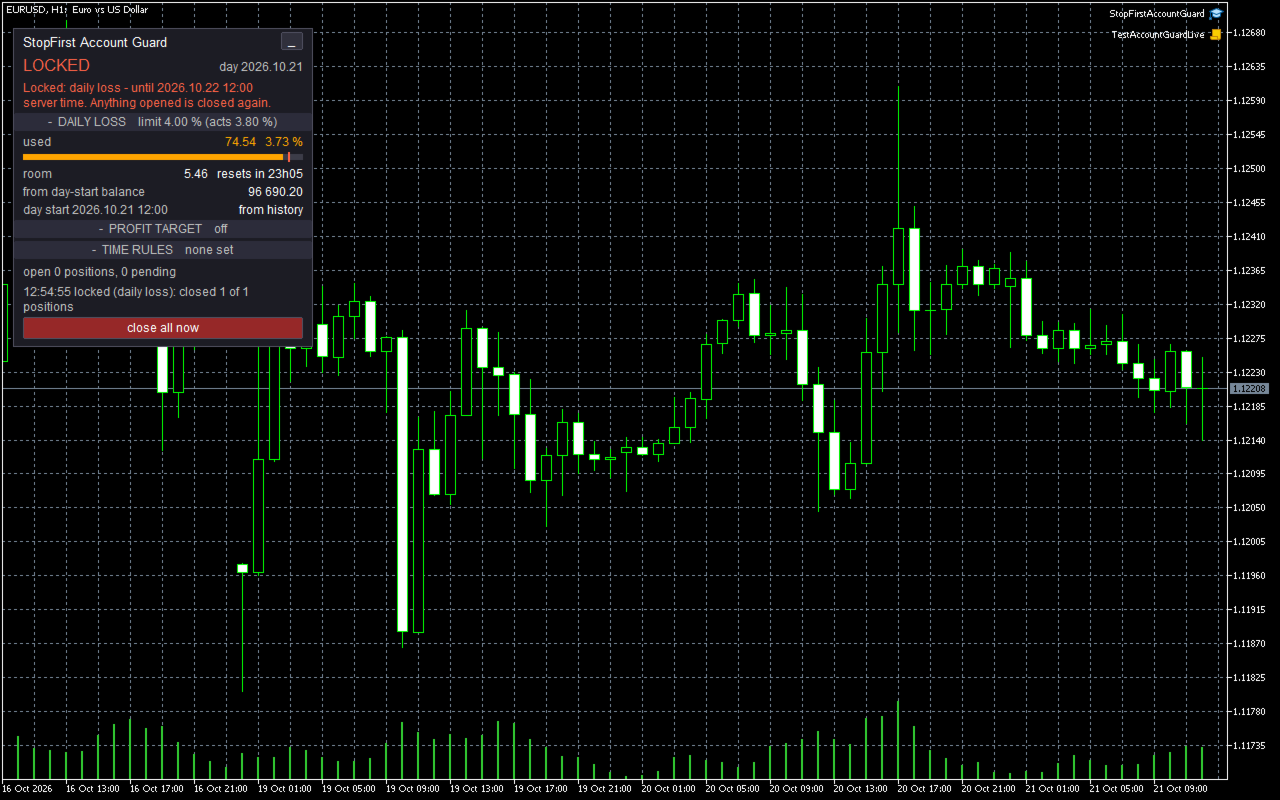
1. Every position on the account is closed - every symbol, every magic number, manual trades included - largest loss first, so the positions doing the damage go before the others.
2. Every pending order is deleted.
3. The account is locked:
   - after a daily breach, until the next daily reset;
   - after an overall breach or the profit target, until you clear the lock.
4. While locked, any new position or pending order - from any EA, from your phone, by hand - is closed or deleted again within a second. The journal records it once a minute.

The lock is stored on disk the moment it starts. Restarting the terminal or re-attaching the EA does not clear it.

Clearing a lock takes two clicks on the panel. A daily lock cannot be cleared early - that is the point of a daily stop - and an overall lock cannot be cleared while the loss is still past the limit. After a profit-target lock is cleared, the target fires again only once equity has been back under it.

Time rules close only what they concern and never lock.


NUMBERS YOU CAN TRUST

- Equity is measured four times a second, not only on ticks: a loss on another symbol does not wait for the next tick on the chart symbol.
- Deposits and withdrawals are not profit or loss. They are read from the deal history and move the limits' reference points; a withdrawal does not look like a 5 % loss, and a deposit does not hide one.
- If the terminal was off when the day reset, the day-start balance is rebuilt from the deal history - not taken as "the balance now", which would silently give you a fresh daily allowance after a losing morning and a restart.
- Nothing is measured until the terminal has synchronised with the server: until the deal history adds up to the balance to the cent. A guard that measures the moment it starts can see a balance of almost zero and close the account.


IT WARNS YOU BEFORE THE BREACH

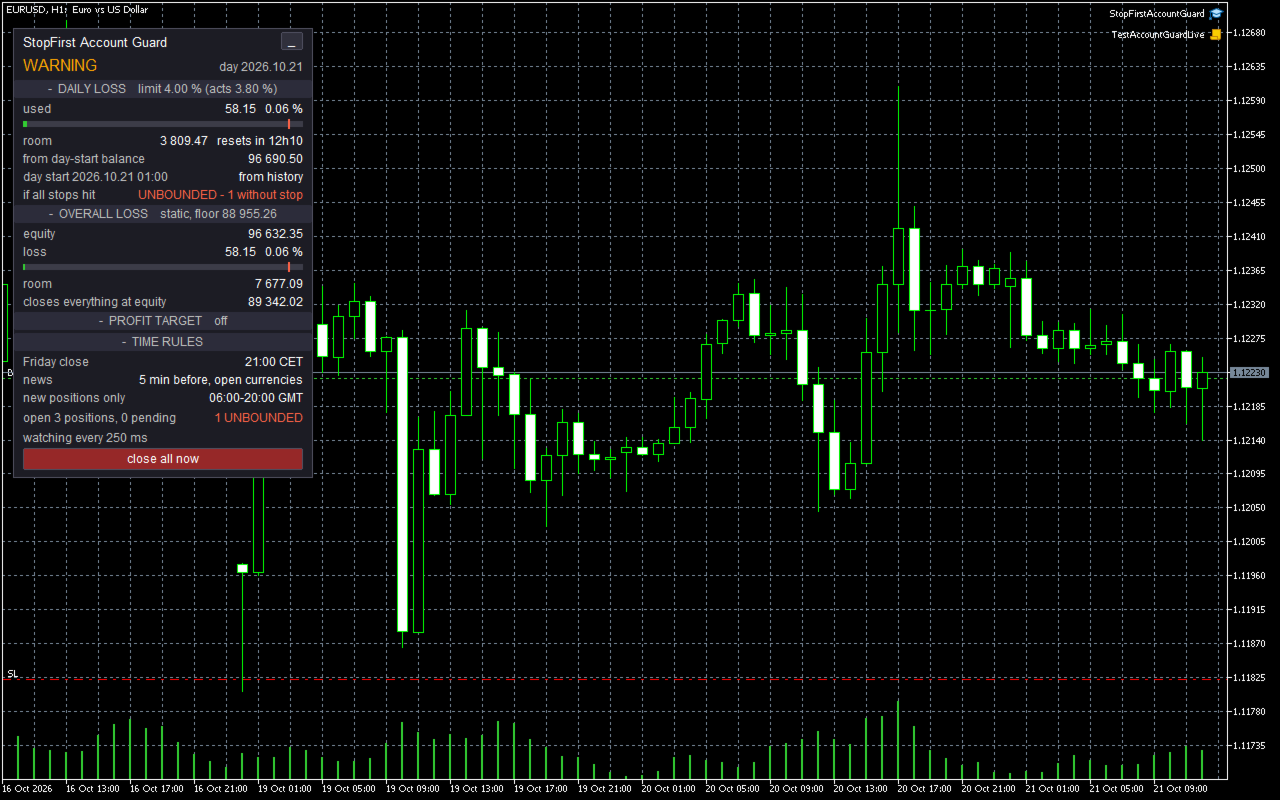
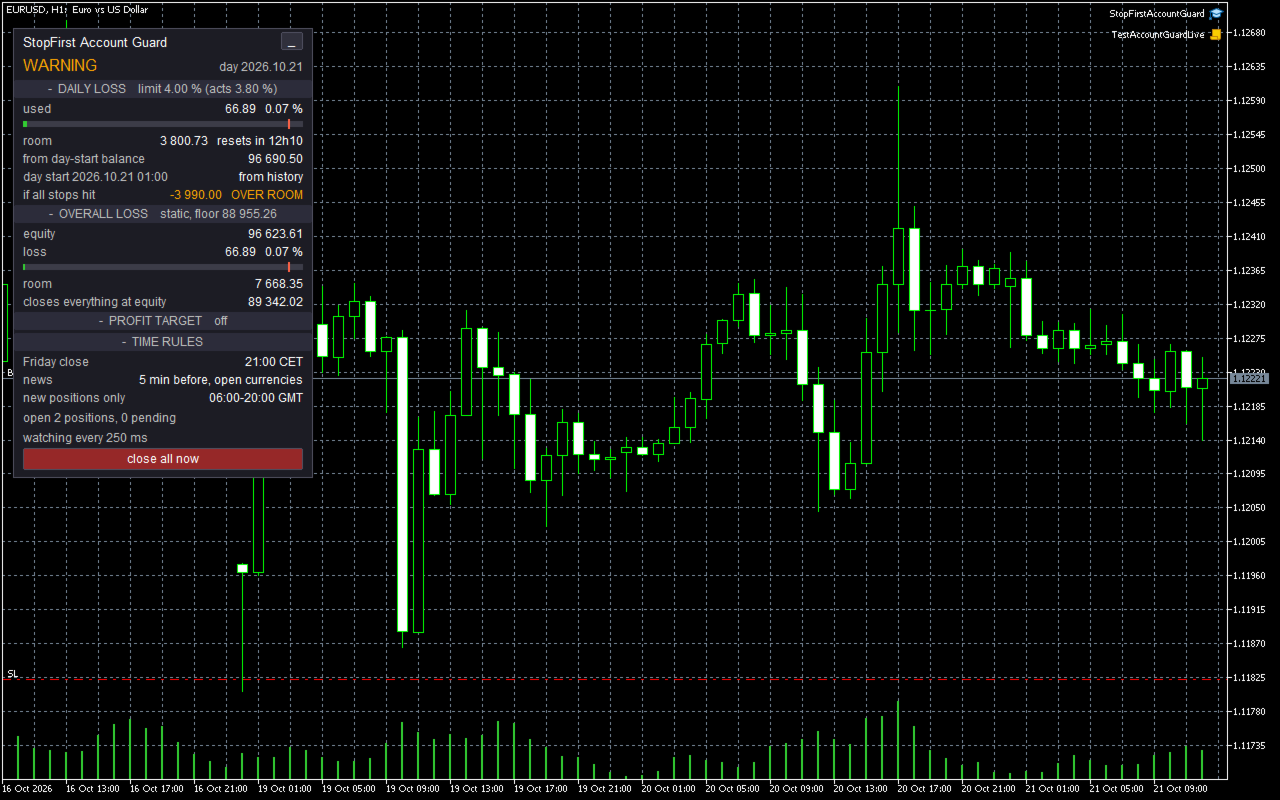
The panel compares what your open positions stand to lose if every stop is hit - from the current price - with the room left today:

  if all stops hit   -3 140.00   OVER ROOM

Your stops alone could breach the daily limit: you see it while there is still time to act. A position without a stop cannot be measured at all; it is shown in red as UNBOUNDED, and the panel shows WARNING.


THE PANEL

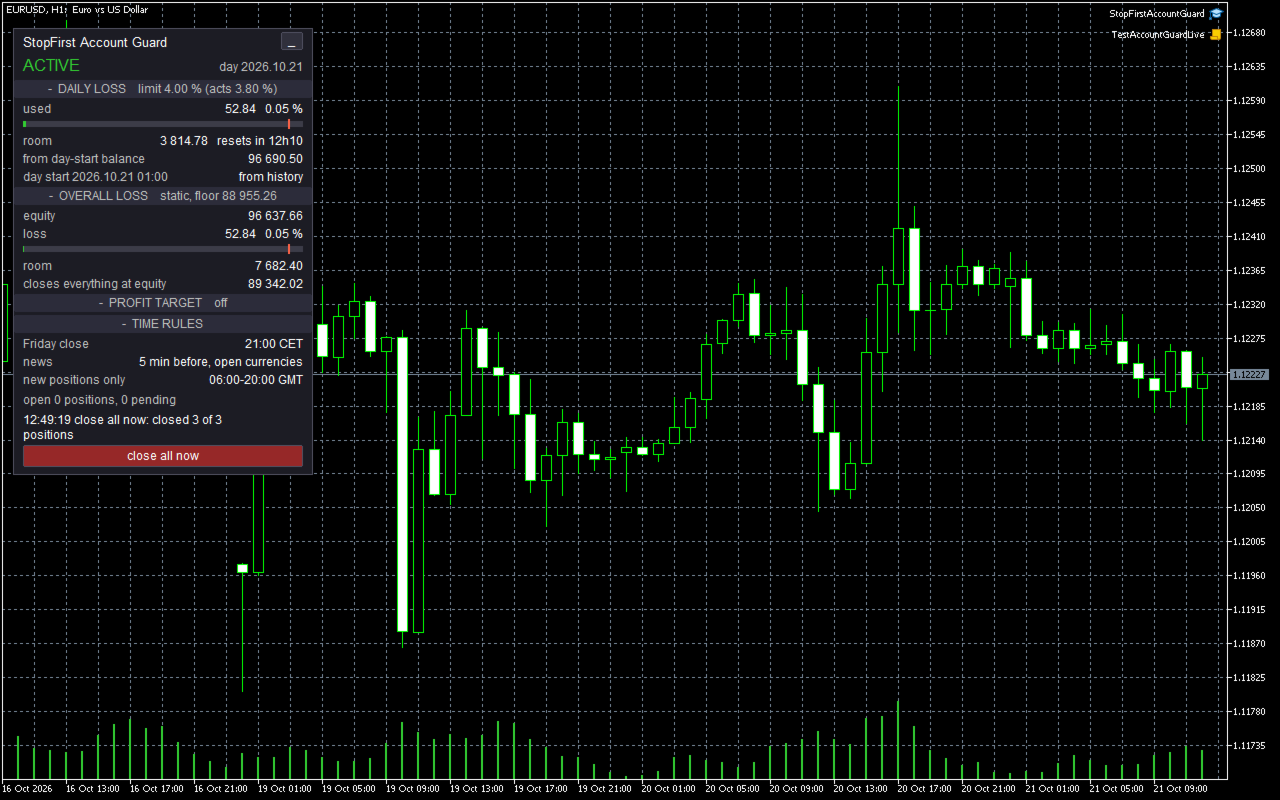
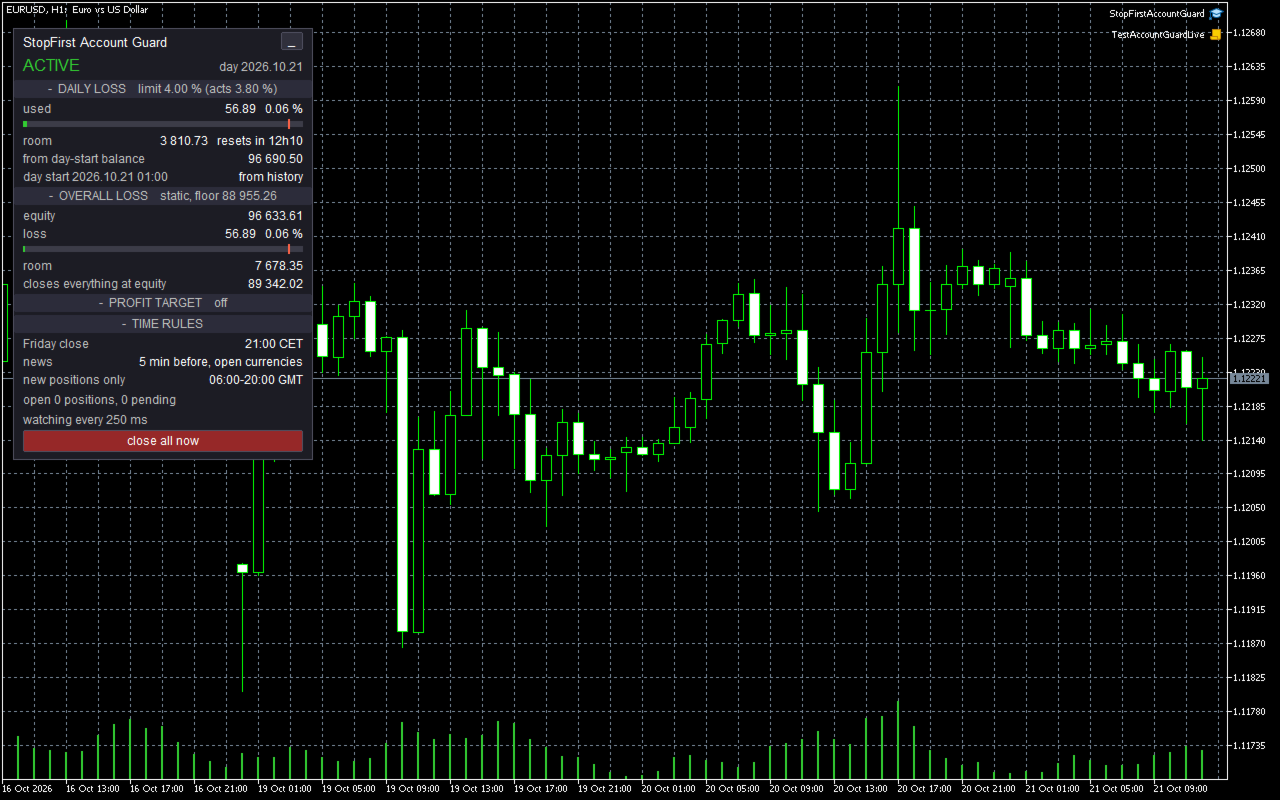
One word at the top, readable from across the room: ACTIVE, WARNING, LOCKED, CANNOT CLOSE or NO CONNECTION.

DAILY LOSS - used, in money and percent, with a bar to the point where the guard acts; room left and when the day resets; what the loss is measured from and where the day-start figure came from; the risk if all stops hit.
OVERALL LOSS - equity, loss, room, the equity at which the guard closes everything, the high for trailing modes.
PROFIT TARGET - the equity it fires at and how far away it is.
TIME RULES - what is set, and the event closing positions right now, if any.

Open positions and pending orders on the account, and the last action and its result. Each section can be collapsed and the whole panel minimised.

Two buttons, each acting on the second click within three seconds: "close all now" - your own flatten, without a lock - and, while an overall or target lock is in force, "clear lock".


IT NEVER SHOWS "OK" ON A GUESS

- Not connected: NO CONNECTION - limits not watched.
- Algo Trading off, or trading not allowed on the account: CANNOT CLOSE, in red, with an alert. Limits are still measured and a breach still locks; closing starts the moment it can.
- Broker GMT offset not measurable: the day resets by the broker's clock, and the panel says so. You can set the offset in the inputs.
- Day start rebuilt from history, or equity at the day start unknown: labelled on the panel.
- Economic calendar not loaded: the news rule says "calendar unavailable" and closes nothing on a guess.


QUESTIONS TO ASK YOUR FIRM

- Is the daily loss measured from the day-start balance, the day-start equity, or the higher of the two?
- Does it include floating loss?
- When does the day reset, and in which time zone?
- Is the maximum loss static, or does it trail? Trailing equity or closed balance? Does it stop trailing at the starting balance?
- Is there a profit target, and do you want to stop trading when you reach it?


STRATEGY TESTER

A guard that only watches shows nothing in a backtest, so in the Strategy Tester it opens demonstration trades: pairs sized so that a move of half an average day against them reaches the point where the guard acts. Good days end at the target; bad days show the warning, the breach, the close, the lock and its end at the next day. Under each lock one more trade is opened "as another program would", to show it closed again. Demonstration trades never happen outside the tester. On a deposit too small to carry the margin of one minimum lot it opens none, and logs no error. A longer backtest usually ends in an overall-loss lock: the demonstration loses on purpose, and after that the account stays flat, as it should.

In the tester:
- Set the broker's GMT offset in the inputs to reset the day in your firm's time zone; the tester cannot measure it, and the day otherwise resets by the broker's clock, which the journal says.
- There is no economic calendar, so the news rule is inactive and says so.
- Alerts and push notifications are ignored by the tester.


INPUTS

Account
- Account size the limits refer to (0 = the balance when the guard is first attached; setting it is recommended).

Daily loss limit
- On or off; percent or money; value (default 4 %); measured from; floating included; time zone and hour of the reset (default 00:00 Central European time).

Maximum overall loss
- On or off; percent or money; value (default 8 %); static or trailing; trailing stops at the account size.

Profit target
- On or off; percent or money; value.

Safety
- Act at this share of each limit (default 95 %); warn at this share (default 70 %); push notifications.

Time rules
- Friday close and its time; news close, importance, minutes before, currencies; no positions outside a GMT window; the broker's GMT offset (99 = measure it).

Strategy Tester
- Demonstration trades on or off, bars between them, their magic number; a withdrawal check used for testing.

Automation
- Accept panel commands from another program on the same chart. Off by default; used for automated testing.

Appearance
- Panel position, font size, colours.

Every input is checked when the EA starts. A wrong value stops it with a message saying which one and why.


TOGETHER WITH STOPFIRST TRADE MANAGER

On the same terminal, StopFirst Trade Manager (1.20 and later) reads what the guard publishes. While the account is locked it refuses an entry before sending it, instead of opening a trade the guard would close a second later. And it refuses a trade whose stop, together with the stops already open, could reach the point where the guard acts - the panel shows both figures.

The guard publishes its state - running, locked, the room left, the risk if every stop is hit - in terminal global variables: no DLL, no internet. Any EA on the same terminal can read them. Whatever is opened under a lock is still closed.


GOOD TO KNOW

- Attach it to one chart only. Two guards on one account would both close everything - harmless, but pointless.
- It never modifies a position - no stop added, no stop moved. It only closes.
- Its state is kept in terminal global variables named after the account number, so two accounts on one terminal stay apart. They are written to disk after every change.
- The equity high while the terminal was off cannot be known. Trailing modes use the stored high and the closed-balance high from the deal history, whichever is larger.
- Removing the EA leaves the account unguarded. The journal says so.
- It is an Expert Advisor, so it takes the chart's EA slot. Use a chart your own EA does not run on.
- No DLLs, no internet access, nothing sent anywhere. Push notifications go through MetaTrader's own channel.


QUESTIONS

Will it close my manual trades and other EAs' trades?
Yes - at a breach, under a lock, and when a time rule applies. That is its purpose. It never modifies them.

What if the terminal is closed when the limit is reached?
Nothing happens until it runs again: no program can act while MetaTrader is closed. Use a VPS for a challenge.

Can it stop me from opening a trade?
No program in MetaTrader can. Under a lock, a new trade is closed again within a second.

Why does it act at 3.8 % when my limit is 4 %?
That is the buffer. Closing several positions at market slips; acting at 95 % of the limit leaves room for it. You can set it to 100 %, and the journal will warn you.

I withdrew money. Will it count as a loss?
No. Deposits and withdrawals are read from the deal history and excluded.

Does it work with StopFirst Trade Manager?
Yes, on separate charts, and from Trade Manager 1.20 they work together: the Trade Manager refuses entries while the guard has locked the account, and entries whose stop could reach the limit. The guard still closes everything when it must, the Trade Manager's trades included.
Önerilen ürünler
Ticaret hacimlerini bir MT5 veya MT4 hesabından başka bir MT5 hesabına kopyalamak için basit bir yardımcı program. Netleştirme ve Riskten Korunma hesapları arasındaki pozisyonları herhangi bir kombinasyonda kopyalayabilirsiniz. Varsayılan olarak, aynı hacimlere sahip tüm eşleşen semboller tarafından açılan pozisyonlar kopyalanacaktır. Sembol adları farklıysa veya kopyalanan konumların hacmi farklıysa veya tüm konumlar kopyalanmıyorsa, istenen davranış bu   gönderide   açıklanan ayarlarda belirti
FREE
Stop And Close
Tetyana Shcherba
2.75 (4)
The utility (Expert Advisor) is designed for monitoring and controlling the total drawdown, as well as closing all positions after reaching the specified levels or upon the occurrence of a specified time with the ability to disable the operation of the automatic EAs running in the same terminal. It is capable of tracking the status of the entire account, as well as individual pairs. It works with the positions opened manually or by other automatic EAs. It tracks the open trades in real time mode
QuAI EA Preflight Check
Rui Fernando Pimentel De Oliveira
QuAI EA Preflight Check is a free MetaTrader 5 utility designed to answer one simple question before you run an Expert Advisor: Is this account, broker and symbol environment compatible with the EA settings you intend to use? Instead of showing only raw account information, the utility performs a practical preflight diagnostic and classifies the most important conditions as PASS, WARN or FAIL. The tool never opens, modifies or closes trades. Main checks - MetaTrader connection - Terminal A
FREE
Automatic calculation of a trading lot taking into account Stop Loss (in pips) and the percentage of risk from the account balance. The Expert Advisor panel is located on the chart at the top left. On the panel of the advisor, you can select the size of the stop loss in pips and the percentage of risk from the balance. You can set the deviation from the current price in pips for pending orders. The red color indicates the amount in the deposit currency that you can lose when the stop loss is tr
BossFXTradePanelEA (MT5)  [First 10 copies sold at 50 USD price will increase to 99USD] BossFXTradePanelEA is a fully interactive trade management panel designed for MetaTrader 5, providing traders with an easy-to-use, one-click interface to execute and manage trades. This EA simplifies trade execution , risk management, and position control by combining market orders, stop loss, take profit, trailing stops, and breakeven functionalities into a single, intuitive panel.  Key features include: On
justEnter is a semi-automatic trade management utility for MetaTrader 5. You choose the entry; the utility calculates position size, places the stop loss, and manages the position through breakeven, partial closes and trailing until exit. For traders following signals If you take your entries from a signal service, a mentor, or your own alerts, the entry decision is already made by the time you open the terminal. What remains is execution: sizing the position correctly, placing the stop, moving
Gap Straddle EA
Nazat Hossain Adi
Gap Straddle Trailing EA Automated Pending Order Management with Smart Trailing Stop Gap Straddle Trailing EA is an Expert Advisor for MetaTrader 5 designed to manage pending orders and trade protection through configurable settings. It includes automated order management, risk-based lot sizing, trailing stop functionality, session controls, and an on-chart dashboard. Key Features Buy Stop & Sell Stop Management — Automated pending-order placement and management. OCO Functionality — Opposite pen
Bu yardımcı program, mum manuel olarak yerleştirilen trend çizgisine dokunduğunda, sanki daha belirgin bir bekleyen emirmiş gibi emirleri açar.  Herhangi bir varlık üzerinde kullanılabilir, emri açtığında dokunduğu çizgiyi ortadan kaldırır ve Arrow'u oluşturur. Bu durumda, fiyat tersine çevirme işlemleri için kullanılır; yükseliş mumu alt çizgiye dokunduğunda bir satış emri açar ve düşüş mumu yukarıdan aşağıya çizgiye dokunduğunda bir satın alma emri açar.  Zararı durdurma ve kar almayı ayarla
FREE
Bneu Trade Manager
Marvinson Salavia Caballero
Bneu Trade Manager is a professional trading utility Expert Advisor for MetaTrader 5 designed to help manual traders plan, execute, protect and manage trades directly from a visual chart dashboard. It combines drag-and-drop trade planning, risk-based position sizing, one-click execution, pending orders, automated trade management for both EA and manual trades, protection tools, templates, reporting and performance analytics in one organized panel. The latest version includes a reorganized dash
FREE
This Expert Advisor (EA) for MetaTrader 5 (MT5) has been designed to automatically manage Stop Loss (SL) and Take Profit (TP). Main Features Automatic Detection of Manual Positions : Monitors new manual positions without SL/TP and applies the configured rules Multiple Orders : Opening of multiple orders under the same conditions as the original position Hidden SL/TP : The hidden mode allows creating SL/TP invisible to your broker  Equity Protection": Allows defining a threshold for the accou
Chart Link
David Gitau Gakunga
4.83 (12)
Chart Link  allows you to control multiple charts from one chart or multiple charts from multiple charts. Features 1. Synchronised Scrolling :     Scrolling the master chart also scrolls all linked sub charts to the same position.     Sub charts inherit offset and auto-scroll settings from the master chart. 2. Synchronised Timeframe :     Switching the master chart timeframe also switches all linked sub charts. 3. Synchronised   Symbol   :     Switching the master chart symbol also switches all
FREE
The utility for setting a common stop loss for multiple orders. Beta version. After the test,  common take profit function will be added, orders close function will be added , and other necessary features will be added. Please do not give bad ratings to this free beta version. If you like it, give it a good rating and write to the author about any errors you find and what you would like to see in the utility. I made this utility for myself and use it daily. I am sharing it with you. A commercial
FREE
HotKey Master — Trade From Your Keyboard Built for scalpers who can't afford to click.  Every millisecond counts when you're managing  multiple positions on a fast-moving market —  HotKey Master turns your keyboard into a full  trading console. WHY SCALPERS NEED THIS The mouse is the bottleneck. Finding the right  button, clicking precisely, waiting for the panel  to respond — every click costs you
Click Trading
Jawad Tauheed
5 (2)
One Click Trading – Auto TP SL Developer TraderLinkz Version 1.00 Category Utility What it does Adds missing TP and SL to your manual trades and pending orders Sets them once per ticket Lets you move TP and SL afterward Works on hedging and netting accounts Scans on every tick and reacts on trade events Why you want it You place faster entries You get consistent risk and exit targets You reduce fat finger errors You keep full manual control Quick start Attach the EA to any chart Keep TP and SL e
FREE
Introducing the  Precision Data Extractor: SMMA , an MQL5 utility crafted for traders, analysts and quants who need accurate historical data to build robust datasets. This tool lets you selectively pull historical price and indicator data—  Smoothed Moving Average  ( SMMA )—from  multiple applied prices, timeframes, and  periods , then stores it in a  CSV  format, making it easy to feed into  machine learning models, trading algorithms , or  in-depth market analyses . Compatible with  Forex ,  S
Hello, Every one  A script to close all market positions and/or pending orders. ----------------------------------------------------------------------------------- This is Close All      market positions and/or pending orders button  You can close all orders in 1 second by one click  For advanced version:  Advanced:  https://www.mql5.com/en/market/product/77763           https://www.mql5.com/en/market/product/89311 Key:  1 Close all button: The script will close All orders market + pending
FREE
AI Equity Drawdown Guardian is an account-wide protection utility for MetaTrader 5. It continuously monitors your account equity against a configurable daily and total drawdown limit, and automatically closes all open positions and blocks new trading the moment a limit is breached - across ALL symbols and ALL magic numbers, not just its own trades. Key features: Daily drawdown percent limit, calculated from the equity at the start of each trading day Total drawdown percent limit, calculated from
FREE
Grid Trading EA is a semi-automated one-click trading EA for both Normal Trading and Grid/Martingale Trading . Normal Trading Simply click Buy or Sell directly from the chart. The EA will automatically manage trades by: Setting Stop Loss and Take Profit Managing Trailing Stop Grid / Martingale Trading (For Hedging Account Type Only) When Grid Trading mode is enabled, the EA will automatically open additional grid orders at specified distances while increasing the lot size based on your settings.
Imagine flying a real aircraft without ever stepping into a flight simulator. That's what trading is like. You have to simulate your strategy before you can take it to a live market. It is good if you can simulate things speedily before even stepping into any live market, or before coming up with an automated system.  People don't have all day to stare at a higher timeframe chart until the entry signal finally arrives. That's why I built this so that you can simulate your strategy with speed. Th
FREE
AEGIS Account and Drawdown Protector Real-Time Account-Level Risk Enforcement for MetaTrader 5 AEGIS is a real-time account protection Expert Advisor designed to enforce strict equity and loss limits across your entire MT5 account. It continuously monitors account equity and intervenes immediately when user-defined thresholds are reached. AEGIS does not generate trading signals and does not open positions — its sole function is capital protection. IMPORTANT AEGIS operates exclusively as a protec
SymbolMonitor 1.3 – Ticaretiniz Üzerinde Tam Kontrol! Birden fazla enstrümanla işlem yapıyor ve kârınızı anında görmek mi istiyorsunuz? SymbolMonitor 1.3 , her sembolün kârlılığını otomatik olarak analiz eden ve esnek ayarlar ile bildirimler sunan güçlü bir uzman danışmandır (EA)! 1.3 Sürümündeki Yeni Özellikler Özelleştirilebilir görsel ayarlar – yazı tipi, boyut ve metin rengini değiştirin Otomatik bildirimler – kâr hedefinize ulaşıldığında bildirim alın Doğru kâr hesaplamas
FREE
MT5 işlemlerinin açılması, kapanması, kısmi kapanması ve değiştirilmesi hakkında gerçek zamanlı bildirimleri Discord’a otomatik olarak gönderir. Araç 16 dili destekler : İngilizce, Fransızca, Almanca, Hintçe (Hindi), Endonezce, İtalyanca, Kazakça, Korece, Felemenkçe, Lehçe, Portekizce, Rusça, İspanyolca, Türkçe, Ukraynaca ve Vietnamca. Bildirim metnini özelleştirerek başka herhangi bir dili de kullanabilirsiniz. Ürün, terminali sürekli izlemek zorunda kalmadan Discord bildirimleri almak isteyen
FREE
MT5 işlemlerinin açılması, kapanması, kısmi kapanması ve değiştirilmesi hakkında gerçek zamanlı bildirimleri Slack’a otomatik olarak gönderir. Araç 16 dili destekler : İngilizce, Fransızca, Almanca, Hintçe (Hindi), Endonezce, İtalyanca, Kazakça, Korece, Felemenkçe, Lehçe, Portekizce, Rusça, İspanyolca, Türkçe, Ukraynaca ve Vietnamca. Bildirim metnini özelleştirerek başka herhangi bir dili de kullanabilirsiniz. Ürün, terminali sürekli izlemek zorunda kalmadan Slack bildirimleri almak isteyen yat
FREE
Trendline Rebounce M5
Abd Rahman Bin Muhammad
Trendline Rebounce M5, M5 zaman diliminde trend çizgisi yeniden testlerini ve ret mumlarını arayan bir MetaTrader 5 Uzman Danışmanıdır. İlk pozisyonu açmadan önce daha yüksek zaman dilimlerindeki piyasa yönünü ve yapısını kontrol eder. Giriş değerlendirmesi beş koşulu birleştirir: EMA trendi, doğrulanmış salınım yapısı, trend çizgisi yeniden testi, ret mumu ve RSI momentumu. Varsayılan asgari giriş puanı dörttür. Varsayılan ayarlarda EMA trendi ve ret mumu zorunludur. İlk girişler için EA; H1 tr
FREE
Key Benefits at a Glance: Lorentzian ML signal generation Majority voting across 3 timeframes Automatic market regime detection Smart equity recovery with group profit targets 1% risk‑based adaptive lot sizing ATR‑based dynamic SL/TP & trailing Emergency drawdown cut Live on‑chart info panel Hybrid Lorentzian Gold ML EA v2.0 – Intelligent Adaptive Trading for XAUUSD Next‑Gen Machine Learning Core A Lorentzian KNN classifier analyzes 5 normalized features (RSI, WaveTren
FREE
FlexiTrade
Johny Gomez Macaranas
Flexi Trade   is a powerful, fully automated Expert Advisor (EA) designed for MetaTrader 5. It combines intelligent money management, dynamic trailing stops, and an intuitive draggable dashboard – all in one package. Whether you are a novice trader looking for a "set-and-forget" solution or an experienced trader wanting full control over risk and entry logic, Flexi Trade adapts to your needs. The EA is built with   robust risk management   at its core: it calculates lot sizes based on a percenta
RiskFrame Trade Manager for MetaTrader 5 Shape the trade plan around the chart. Size it from risk, check it before sending, and manage the resulting position from the same workspace. RiskFrame is a manual trade-planning, execution and position-management utility for discretionary MetaTrader 5 traders. Its central workflow is a flexible Visual Trade Plan that can be positioned, resized and flipped around the area you are analysing instead of forcing the chart to fit around the panel. Entry, St
ProTrade EA
Jim Ariel Camarce Ignao
Key Features   Automated Candle Pattern Recognition 10 Professional Patterns : Detects Bullish/Bearish Engulfing, Hammer/Shooting Star, Morning/Evening Star, Piercing/Dark Cloud, and 6 additional professional candlestick patterns Smart Filtering : Combine multiple patterns with configurable confirmation logic Volume Confirmation : Optional volume filter to validate pattern strength Multi-Timeframe Analysis : Separate execution and bias timeframes for better timing   Trading Dashboard Int
Vix Golden Harmony
Lefika Raphel Sebatane
5 (1)
Vix Golden Harmony Vix Golden Harmony is a fully automated Expert Advisor for MetaTrader 5. Once attached to a chart it handles everything on its own — identifying its own entries, managing each position while it is open, and closing it when its conditions are met. Every order is checked against your broker's trading requirements and your account's available margin before it is sent, and an internal protection layer monitors the account while a position is running. No manual intervention, no con
FREE
Prop Firm Shield Full
Pablo Adolfo Cantos
Prop Firm Shield is a risk management panel for MetaTrader 5, built for prop firm traders who need control over their daily limits. You configure each limit and the tool watches the account around the clock, acting automatically when a limit is reached: closing positions, deleting pending orders and blocking new trading until the next day. Features: - Daily Take Profit - three modes: fixed USD, percent of the day-start balance, or target balance - Daily Stop Loss - three modes: fixed USD, percen
Bu ürünün alıcıları ayrıca şunları da satın alıyor
Trade Assistant MT5
Evgeniy Kravchenko
4.43 (216)
It helps to calculate the risk per trade, the easy installation of a new order, order management with partial closing functions, trailing stop of 7 types and other useful functions. Additional materials and instructions Installation instructions - Application instructions Line function -   shows on the chart the Opening line, Stop Loss, Take Profit. With this function it is easy to set a new order and see its additional characteristics before opening.   Risk management  - The risk calculation
Trade Manager EA’ye hoş geldiniz! Ticaretin daha sezgisel, hassas ve verimli hale gelmesi için tasarlanmış nihai risk yönetim aracı ile tanışın. Bu sadece bir emir verme aracı değil; ticaret planlaması, pozisyon yönetimi ve risk kontrolü için kapsamlı bir çözüm. İster yeni başlayan bir yatırımcı olun, ister deneyimli bir trader ya da hızlı emir gerektiren bir scalper, Trade Manager EA ihtiyaçlarınıza uyum sağlar ve forex, endeksler, emtialar ve kripto paralar dahil tüm piyasalarda esneklik sunar
Local Trade Copier EA MT5
Juvenille Emperor Limited
4.94 (149)
Local Trade Copier EA MT5, aynı Windows bilgisayarı veya Windows VPS üzerinde çalışan birden fazla MetaTrader 5 hesabı arasında işlemleri kopyalamak ve yönetmek için hızlı ve esnek bir işlem kopyalayıcıdır. Yerel işlem senkronizasyonunu, Receiver tarafında lot büyüklüğü, risk yönetimi, işlem filtreleme, sembol eşleştirme, işlem yönetimi ve hesap koruması kontrolleriyle birleştirir. Transmitter ve Receiver terminallerinizi yaklaşık 1 dakika içinde ayarlayın ve aynı veya farklı brokerlardaki hesa
Farmed Hedge Yield Farming | All Markets (Manual - Hybrid - Semi/Automated EA) VERIFIED TRADING RESULTS - Farmed Hedge Yield Axi Copy:  https://www.mql5.com/en/signals/2356376 - Farmed Hedge Yield Exn Copy:   https://www.mql5.com/en/signals/2356404 - Farmed Hedge Yield V Copy:  https://www.mql5.com/en/signals/2357156 IMPORTANT NOTICE: FarmedHedge is a MANUAL-FOCUSED TRADING UTILITY ,not a fully automated EA. Results shown on this Signal include manual trades and overall strategic management.
Telegram to MT5 Multi-Channel Copier   , Telegram ve Discord kanallarınızdaki alım-satım sinyallerini doğrudan MetaTrader 5'e otomatik kopyalar. Bot yok, tarayıcı uzantısı yok, elle kopyalama yok. Sinyal Telegram'a veya Discord'a düşer ve EA birkaç saniye içinde terminalinizde işlemi açar. Ve bir kanalı kopyalamadan önce, yerleşik backtester o kanalın hesabınızda ne yapmış olacağını gösterir. Ürün iki bileşenden oluşur: Telegram kanallarınızı dinleyen bir Windows uygulaması ve sinyalleri MT5 ter
Telegram sinyallerini kendi işlem kurallarınızla kopyalayın Telegram to MT5 Signal Trader , herkese açık ve özel Telegram kanallarındaki ve gruplarındaki metin tabanlı işlem sinyallerini otomatik olarak MetaTrader 5'e kopyalar. Tek bir masaüstü uygulamasından birden fazla sinyal sağlayıcısını ve MT5 hesabını yönetin; her sağlayıcı için ayrı risk ve işlem ayarları belirleyin. Sinyal kopyalamak için Telegram botu veya API kurulumu gerekmez. Kendi Telegram hesabınızla telefon numarası veya QR kod k
================================================================================ POC BREAKOUT - V20.72. Full Professional Grade Toolkit ================================================================================ POC Breakout is a full MetaTrader 5 trading dashboard for discretionary traders who want breakout signals, Point of Control (POC) context, volume profiles, order flow, market structure, news, alerts, and advanced trade planning in one professional workspace. Attached directly to you
TradePanel MT5
Alfiya Fazylova
4.88 (170)
Trade Panel, çok işlevli bir ticaret asistanıdır. Uygulama, manuel ticaret için 50'den fazla ticaret fonksiyonu içerir ve çoğu ticaret görevini otomatikleştirmeyi mümkün kılar. Uygulama talimatları: https://www.mql5.com/en/blogs/post/756482 Demo hesabı için uygulamanın deneme sürümü: https://www.mql5.com/en/blogs/post/750865 Uygulamayı nasıl kurulur: https://www.mql5.com/en/blogs/post/756239 Uygulamayı görsel modda nasıl test edilir: https://www.mql5.com/en/blogs/post/770277 Uygulamayı VPS MetaT
News Trade EA MT5
Konstantin Kulikov
4.55 (11)
Birkaç yıldır kullandığım çok yararlı bir robotu tanıtıyorum. Hem yarı otomatik hem de tam otomatik modlarda kullanılabilir. >>> Chat <<< Program, ekonomik takvim haberlerinde esnek ticaret ayarlarını içeriyor. Stratejiler test cihazında kontrol edilemez. Sadece gerçek bir iş. Terminal ayarlarında, haberler sitesini izin verilen URL'ler listesine eklemeniz gerekir. Servisler > Araçlar > Danışmanlar'a tıklayın. "Aşağıdaki URL'ler için WebRequest'e İzin Ver:" kutucuğunu işaretle. Aşağıdakini ekl
Master Your Trading Discipline   Stop losing your hard-earned gains to overtrading and emotional decisions. The Discipline Tool is your ultimate trading assistant, ensuring strict risk management in real-time. Key Protection Features: Advanced Drawdown Defense : Automatically halts trading if your daily drawdown exceeds a preset threshold (percentage or dollar amount). Real-Time Equity Lock : Safeguard profits by referencing peak equity, ensuring drawdown stays within control. Hard Profit Target
The product will copy all telegram signal to MT5 ( which you are member) , also it can work as remote copier.  Easy to set up, copy order instant, can work with almost signal formats, image signal,  s upport to translate other language to English Work with all type of channel or group, even channel have "Restrict Saving Content", work with  multi channel, multi MT5 Work as remote copier: with signal have ticket number, it will copy exactly via ticket number. Support to backtest signal. How to s
Exp COPYLOT CLIENT for MT5
Vladislav Andruschenko
3.97 (35)
MetaTrader 5 için profesyonel işlem kopyalayıcı MetaTrader için hızlı, profesyonel ve güvenilir bir işlem kopyalayıcı . COPYLOT , MT4 ve MT5 terminalleri arasında Forex işlemlerini kopyalamanıza olanak tanır ve Hedge ile Netting hesaplarını destekler. COPYLOT MT5 sürümü şunları destekler: - MT5 Hedge → MT5 Hedge - MT5 Hedge → MT5 Netting - MT5 Netting → MT5 Hedge - MT5 Netting → MT5 Netting - MT4 → MT5 Hedge - MT4 → MT5 Netting MT4 sürümü Tam açıklama + DEMO + PDF Nasıl satın alınır Nasıl kurul
Entry In The Zone with SMC Multi Timeframe is a real-time market analysis tool based on Smart Money Concepts (SMC), designed to analyze market structure, price direction, and key trading zones. It supports both Single-Timeframe and Multi-Timeframe Analysis, providing a clearer view of overall market structure across multiple timeframes, with real-time BUY / SELL signals designed with a strict focus on No-Repaint principles.   The signals are designed to help filter unclear setups and evaluate tr
EASY Insight AIO – Akıllı ve zahmetsiz yatırım için hepsi bir arada çözüm Genel Bakış Tüm piyasayı — Forex, Altın, Kripto, Endeksler ve hatta Hisseler — saniyeler içinde, manuel grafik incelemesi, gösterge kurulumu ya da karmaşık ayarlar olmadan analiz edebildiğinizi hayal edin. EASY Insight AIO , yapay zekâ destekli yatırım için nihai, kullanıma hazır dışa aktarma aracınızdır. Tüm piyasanın kapsamlı bir anlık görüntüsünü tek bir temiz CSV dosyasında sunar; bu dosya ChatGPT, Claude, Gemini, Pe
Power Candles Strateji Tarayıcısı - Kendi Kendini Optimize Eden Çoklu Sembol Kurulum Bulucu Power Candles Strateji Tarayıcısı , Power Candles göstergesini çalıştıran aynı kendinden optimize edici motoru, Piyasa İzleyicinizdeki her sembol üzerinde yan yana çalıştırır. Tek bir panel, şu anda istatistiksel olarak hangi sembollerin işlem yapılabilir olduğunu, her birinde hangi stratejinin kazandığını, en uygun Stop Loss / Take Profit çiftini gösterir ve yeni bir sinyal geldiği anda size bildirim gön
Desteğe mi ihtiyacınız var? Nasıl kurulur? Sorunuz mu var? Buradan kendi dilinizde sorun, hızlı yanıt: https://www.mql5.com/en/market/product/139088/comments Çalışan Demo İndir Copy Cat More (Taklitçi Kedi) — İşlem Kopyalayıcı (Trade Copier) MT5 , yerel bir işlem kopyalayıcı ve bugünün ticaret zorlukları için tasarlanmış eksiksiz bir risk yönetimi ve yürütme çerçevesidir. Prop firm challenge'larından kişisel portföy yönetimine kadar, sağlam yürütme, sermaye koruması, esnek yapılandırma ve geli
MT5 to Telegram Signal Provider , hesabınızı bir sinyal sağlayıcı haline getirerek belirtilen sinyalleri Telegram'ın sohbetine, kanalına veya grubuna göndermeyi sağlayan kullanımı kolay, tamamen özelleştirilebilir bir araçtır. Rakip ürünlerin çoğunun aksine, DLL içe aktarması yapmaz. [ Demo ] [ Kılavuz ] [ MT4 Versiyonu ] [ Discord Versiyonu ] [ Telegram Kanalı ]  New: [ Telegram To MT5 ] Kurulum Adım adım bir kullanıcı kılavuzu mevcuttur. Telegram API'si hakkında bilgi gerekmemektedir; ihtiyac
Signal TradingView to MT5 Pro Automator TradingView ve MetaTrader 5 arasında anında profesyonel uygulama TradingView alarmları ile MT5'teki gerçek uygulama arasındaki en güçlü iletişim köprüsüyle ticaret stratejinizi otomatikleştirin. Hız, esneklik ve kusursuz risk yönetimi talep eden yatırımcılar için tasarlanan bu Uzman Danışman (Expert Advisor), herhangi bir alarm mesajını hassas bir piyasa (market) veya limit emrine dönüştürür. GÜÇLÜ YÖNLER VE AVANTAJLAR Evrensel Ayrıştırma Motoru (Tescilli)
Trade Indicator Assistant   is a powerful MT5 utility designed to turn indicators into automated trading systems. Its main feature is the ability to automatically detect an indicator’s   BUY and SELL signal buffers , without requiring you to know the buffer numbers, search through indicator settings, or modify the indicator source code. Bonus Indicator:   After purchasing Trade Indicator Assistant, contact me to receive   Trade Signal Pro   completely free as a bonus indicator. [Download Demo V
The Patch It never opens a trade. It walks behind the ones that did. Every open position, every pending order — checked twice a second for the one thing that's easy to forget: a stop, a target. Found bare, it doesn't ask. It writes the missing number in, measured in points from wherever the position began, and moves on to the next. No strategy, no opinion on direction. Just the quiet assumption that nothing should ever sit on the market unprotected — not because someone decided it shouldn't,
MetaTrader 5 için Trading Panel — grafik ve klavyeden profesyonel tek tıkla işlem kontrolü Aktif traderlar için geliştirilmiş güçlü bir Trading Panel; işlemleri standart MetaTrader arayüzüne göre çok daha hızlı açmanıza, yönetmenize ve kapatmanıza yardımcı olur. Bu çözüm; pozisyonları, bekleyen emirleri, toplam kârı ve işlem yürütmesini tek bir profesyonel çalışma alanında kontrol etmek isteyen kullanıcılar için tasarlanmıştır. Bu sadece sıradan bir yardımcı araç değildir. MetaTrader 5 için ger
Grid Manual MT5
Alfiya Fazylova
4.73 (22)
Grid Manual, sipariş ızgarasıyla çalışmak için kullanılan bir ticaret yardımcı programıdır. Yardımcı program evrenseldir, esnek ayarlara ve sezgisel bir arayüze sahiptir. Sadece kayıpların ortalaması yönünde değil, aynı zamanda kazanç artışı yönünde de bir emir ızgarası ile çalışır. Tüccarın bir emir ızgarası oluşturmasına ve eşlik etmesine gerek yoktur, bu yardımcı programı yapacaktır. Emri açmanız yeterlidir ve Grid manual otomatik olarak ona bir emir ızgarası oluşturacak ve kapanana kadar ona
Your EAs cannot see each other, but Anchor can. Anchor gives you one place to coordinate your EAs, manage risk, and decide when trading is allowed. It works alongside the trading bots you already use without any changes to them. The Problem One EA opens a trade. Then another starts trading. The next thing you know, you wake up to multiple grids built across your account. Each EA may be doing exactly what it was designed to do, but together they can place far more risk on your account than you in
RETAILBERG FOOTPRINT CHART PRO — Order-Flow Workspace for MetaTrader 5 Version 7.00  |  Professional System  |  31 tools  |  One chart A full 150-page illustrated User Manual is included. Please read the full manual to understand this feature packed footprint chart elements and ui. https://www.mql5.com/en/blogs/post/777982 DEMO / STRATEGY TESTER — PLEASE READ FIRST
Bu ürün, haber saatlerinde tüm uzman danışmanları ve manüel grafikleri filtreler, böylece manüel ticaret kurulumlarınızı veya diğer uzman danışmanlar tarafından girilen işlemleri yok edebilecek ani fiyat dalgalanmaları konusunda endişelenmenize gerek kalmaz. Bu ürün, herhangi bir haber yayınlanmadan önce açık pozisyonlarınızı ve bekleyen emirlerinizi yönetebilen tam bir sipariş yönetim sistemi ile birlikte gelir.   The News Filter'ı   satın aldığınızda, gelecekteki uzman danışmanlar için yerleşi
Floor Watch
Syed Tauqeer Hussain Shah
Floor Watch One number, watched every thirty seconds: how far equity has fallen since the day began — or since its highest point, if it's told to trail the peak instead of the open. Cross the line and it doesn't argue. Every open position closes, every pending order vanishes, and anything that slips through afterward gets shut the moment it appears. Not asked. Removed. The floor holds until the clock turns 5 AM Pakistan time — then, and only then, does the day start over. One rule. No except

Seconds Chart - MetaTrader 5 için saniye bazlı grafikler oluşturmanıza olanak sağlayan eşsiz bir araçtır. Seconds Chart sayesinde saniye cinsinden zaman dilimleriyle grafik oluşturabilir, standart dakika veya saatlik grafiklerde mümkün olmayan esneklik ve analiz hassasiyetine ulaşabilirsiniz. Örneğin, S15 zaman dilimi 15 saniyelik mum çubuklarını ifade eder. Desteklenen özel sembollerle herhangi bir gösterge ve danışman kullanabilirsiniz. Onlarla çalışmak, standart grafiklerde işlem yapmak kadar
Bir kez satın alın. Şu anda sunulan ve gelecekte yayımlayacağım tüm MT4 ve MT5 göstergelerimi ek ücret ödemeden edinin. Satın aldıktan sonra edinme talimatları için benimle iletişime geçin. Her 10 satın alımdan sonra fiyatın 50$ artırılarak en fazla 999$ olması planlanmaktadır. Ödeme sırasında Market’te görünen fiyat geçerlidir. Güvendiğiniz göstergeyi kullanmaya devam edin. Çevresindeki işleri otomatikleştirin. Sizin sinyaliniz. Sizin kurallarınız. Sizin işlem yürütmeniz. Güvendiğiniz bir MT5
25% discount on the release of the tool: only for the next 3 buyers Send a message to receive a demo version. AstroTrade Trading Assistant AstroTrade is a comprehensive multi-functional trading utility developed for the MetaTrader 5 platform. It integrates essential tools for trade execution, risk management, and technical monitoring into a single unified interface. The application is designed to assist traders in managing their daily operations through a visual and structured environment. Vi
SMT Trade Planner, MetaTrader grafigi uzerinde profesyonel bir risk hesaplayici ve islem yurutme panelidir. Risk ayarlariniza gore lot buyuklugunu hesaplar, grafikte suruklenebilir Giris, Stop Loss ve Take Profit cizgileri gosterir, yapilandiriabilir risk kurallarina gore islemi dogrular ve tek tikla islem yurutmenizi saglar.   Nasil calisir Trade Planner'i herhangi bir grafige ekleyin. Panel hesap bilgilerini ve hizli risk secim dugmelerini gosterir. Grafikte uc yatay cizgi belirir: Giris (mavi
Yazarın diğer ürünleri
StopFirst Lot Calculator answers one question before every trade: how many lots, if this is where my stop goes? You decide how much you are willing to lose and where the trade is wrong. The calculator turns those two decisions into a lot size, and shows you what that lot really puts at risk, what margin it needs and where the target sits. Drag the stop line and every figure follows. It is an indicator. It cannot place an order, it needs no Algo Trading permission, and it runs on the same char
FREE
StopFirst Trade Manager opens trades the way a careful trader does: the stop comes first, the lot size follows from it, and the whole account's risk is in front of you before you click. Once the trade is open, it moves the stop to breakeven, trails it and takes partial profits for you. Every entry carries a stop. There is no way to open a trade from the panel without one. HOW TO USE IT 1. Attach it to a chart and allow Algo Trading. The panel appears in the corner. 2. Set your risk - a perc
StopFirst Loss Limit Monitor shows, for your whole account, how much of a daily loss limit and a maximum overall loss you have used and how much room is left - measured the way prop firms measure them. Free. It is an indicator: it measures and warns, and it never closes anything. It runs beside any Expert Advisor without taking its place on the chart. WHAT IT MEASURES Daily loss limit (default 4 %) - In percent of the account size, or in money. - Measured from the day-start balance (default
FREE
Filtrele:
Değerlendirme yok
Değerlendirmeye yanıt