StopFirst Account Guard

  • Utilitaires
  • RUSLAN SLOBODIANIUK
    RUSLAN SLOBODIANIUK
    Знание языков и технологий:C
    C++
    Visual C++
    WinAPI
    C#
    GDI+
    ADO.NET
    LINQ to SQL
    WPF
    WCF
    SQL
    XHTML
    XML
    PHP
    MySQL
    JScript
    Unity3D(C# scripting)
  • Version: 1.10
  • Mise à jour: 22 octobre 2026
  • Activations: 10
StopFirst Account Guard watches your whole account and enforces the loss limits you set: a daily loss limit, a maximum overall loss, and if you want, a profit target and time rules. When a limit is reached it closes every position on the account, deletes every pending order, and keeps the account flat until the limit resets.

It is built for prop-firm challenges and funded accounts, where one breach of the daily or overall limit ends the account and the rules are measured to the cent on equity, floating loss included. It works just as well as a hard daily stop on your own account.


WHAT IT CANNOT DO - PLEASE READ

- It reacts; it cannot prevent. No program in MetaTrader can stop you or another EA from sending an order. "Locked" means: anything opened is closed again at once.
- It acts only while this terminal runs and is connected. Trades from your phone or another terminal on the same account are closed only if this terminal is running. For a challenge, run it on a VPS.
- It closes at market. In a fast market closing several positions slips, so the guard acts before the limit, not at it - at 95 % of the limit by default.
- It does not know your firm's rules. You type them in. Below are the questions to ask your firm.


HOW TO USE IT

1. Attach it to any one chart and allow Algo Trading. It watches the whole account from there - every symbol, every EA, manual trades included.
2. Set the account size your firm's percentages refer to (100000 for a 100k challenge), the daily and overall limits, and when the firm's day resets.
3. Leave it running. The panel shows how much of each limit is used and how much room is left.


THE RULES

Daily loss limit (on by default, 4 %)
- In percent of the account size, or in money.
- Measured from the day-start balance (default), the higher of day-start balance and equity, or the day-start equity - the three ways firms define it.
- Floating loss included (default), or closed trades only. With closed trades only, an open position can run far past the limit before it closes - the guard acts on what has been closed. Use it only if your firm measures that way.
- The day resets at an hour you choose in the broker's time, GMT, Central European time or New York time, each with its own daylight saving dates. Default: midnight Central European time. Most protectors reset at the broker's midnight and are an hour off for part of the year.

Maximum overall loss (on by default, 8 %)
- Static: the floor is the account size minus the limit (default).
- Trailing the equity high, or trailing the closed-balance high, optionally stopping once the floor reaches the account size.
- The floor is shown as a number, the way firms show it in their dashboards.

Profit target (off by default)
- When equity reaches the target: close everything and lock, so a passed challenge is not given back before the day ends.

Buffer and warnings
- The guard acts at 95 % of each limit (adjustable, 50-100 %).
- At 70 % (adjustable) it warns: panel colour, an alert, and a push notification to your phone if MetaTrader is set up for it.

Time rules (each off by default)
- Close everything before the weekend: Friday at a time you set, on the same clock as the daily reset.
- Close positions before high-impact news: a number of minutes before an event in the currencies of your open positions, or of a list you give.
- No new positions outside hours: a position opened outside a GMT window you set is closed at once. Positions you already held when the guard was first attached are left alone.
These are reactions too - "no new positions" means a new position is closed immediately.


WHAT HAPPENS AT A BREACH

1. Every position on the account is closed - every symbol, every magic number, manual trades included - largest loss first, so the positions doing the damage go before the others.
2. Every pending order is deleted.
3. The account is locked:
   - after a daily breach, until the next daily reset;
   - after an overall breach or the profit target, until you clear the lock.
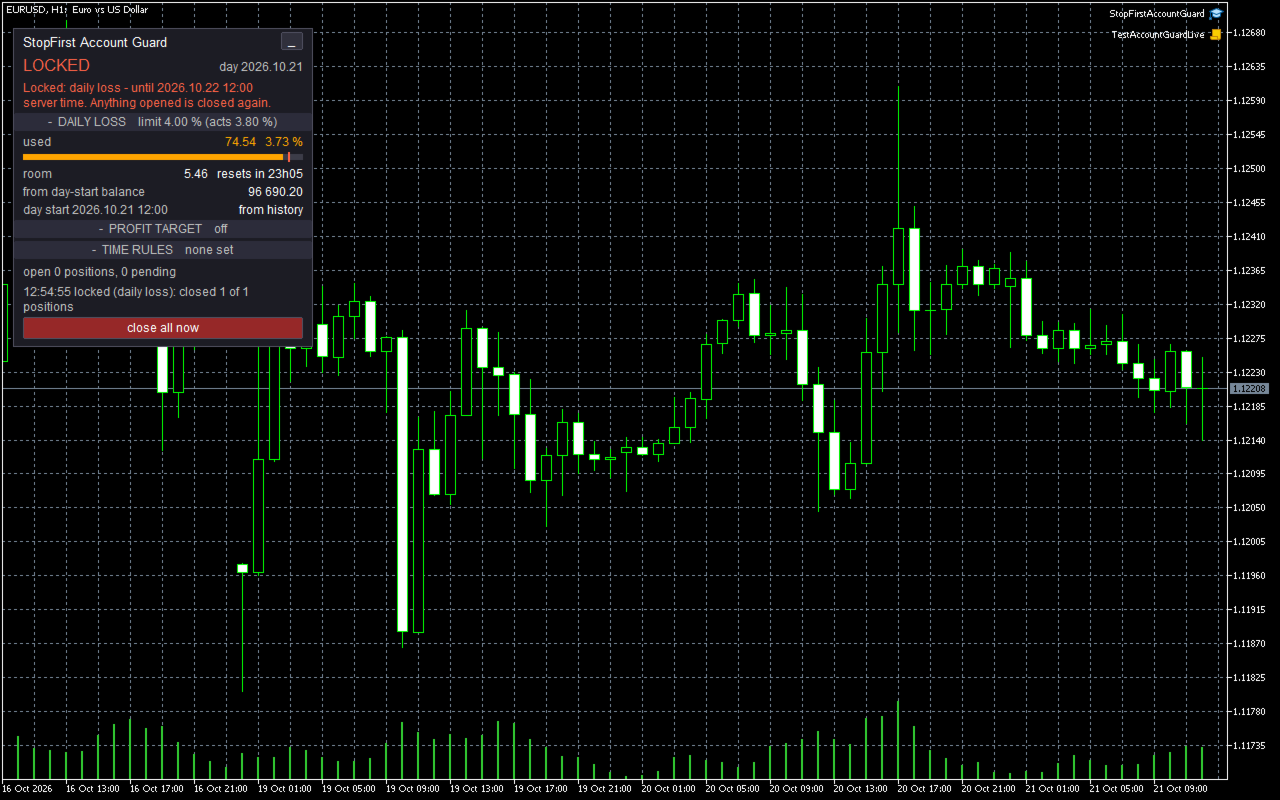
4. While locked, any new position or pending order - from any EA, from your phone, by hand - is closed or deleted again within a second. The journal records it once a minute.

The lock is stored on disk the moment it starts. Restarting the terminal or re-attaching the EA does not clear it.

Clearing a lock takes two clicks on the panel. A daily lock cannot be cleared early - that is the point of a daily stop - and an overall lock cannot be cleared while the loss is still past the limit. After a profit-target lock is cleared, the target fires again only once equity has been back under it.

Time rules close only what they concern and never lock.


NUMBERS YOU CAN TRUST

- Equity is measured four times a second, not only on ticks: a loss on another symbol does not wait for the next tick on the chart symbol.
- Deposits and withdrawals are not profit or loss. They are read from the deal history and move the limits' reference points; a withdrawal does not look like a 5 % loss, and a deposit does not hide one.
- If the terminal was off when the day reset, the day-start balance is rebuilt from the deal history - not taken as "the balance now", which would silently give you a fresh daily allowance after a losing morning and a restart.
- Nothing is measured until the terminal has synchronised with the server: until the deal history adds up to the balance to the cent. A guard that measures the moment it starts can see a balance of almost zero and close the account.


IT WARNS YOU BEFORE THE BREACH

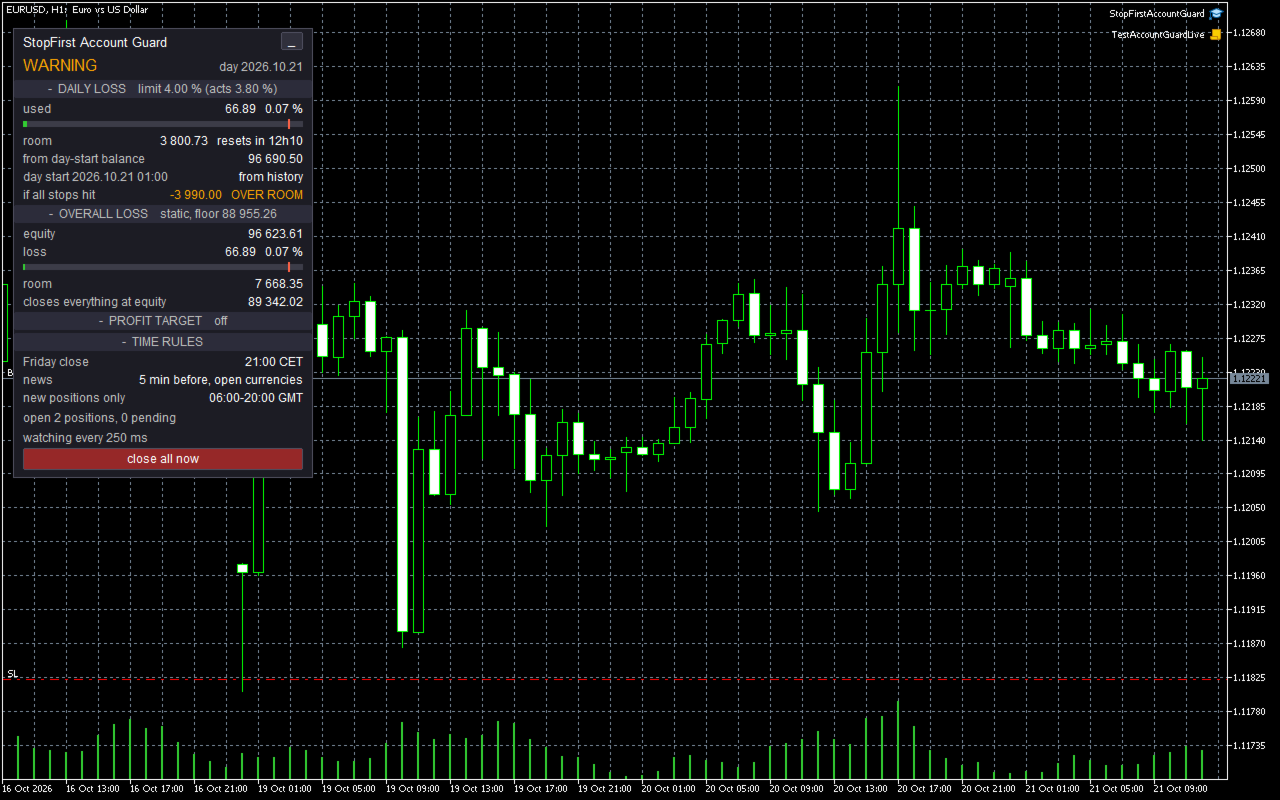
The panel compares what your open positions stand to lose if every stop is hit - from the current price - with the room left today:

  if all stops hit   -3 140.00   OVER ROOM

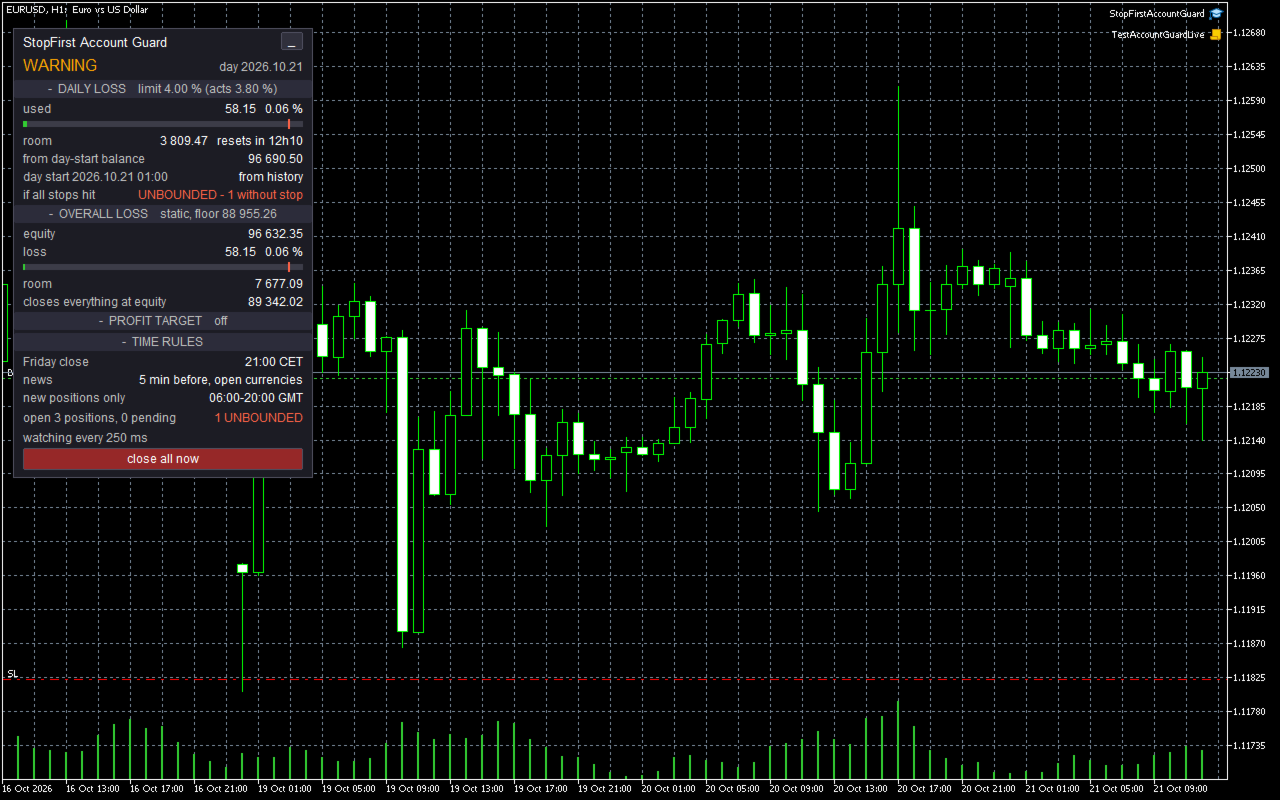
Your stops alone could breach the daily limit: you see it while there is still time to act. A position without a stop cannot be measured at all; it is shown in red as UNBOUNDED, and the panel shows WARNING.


THE PANEL

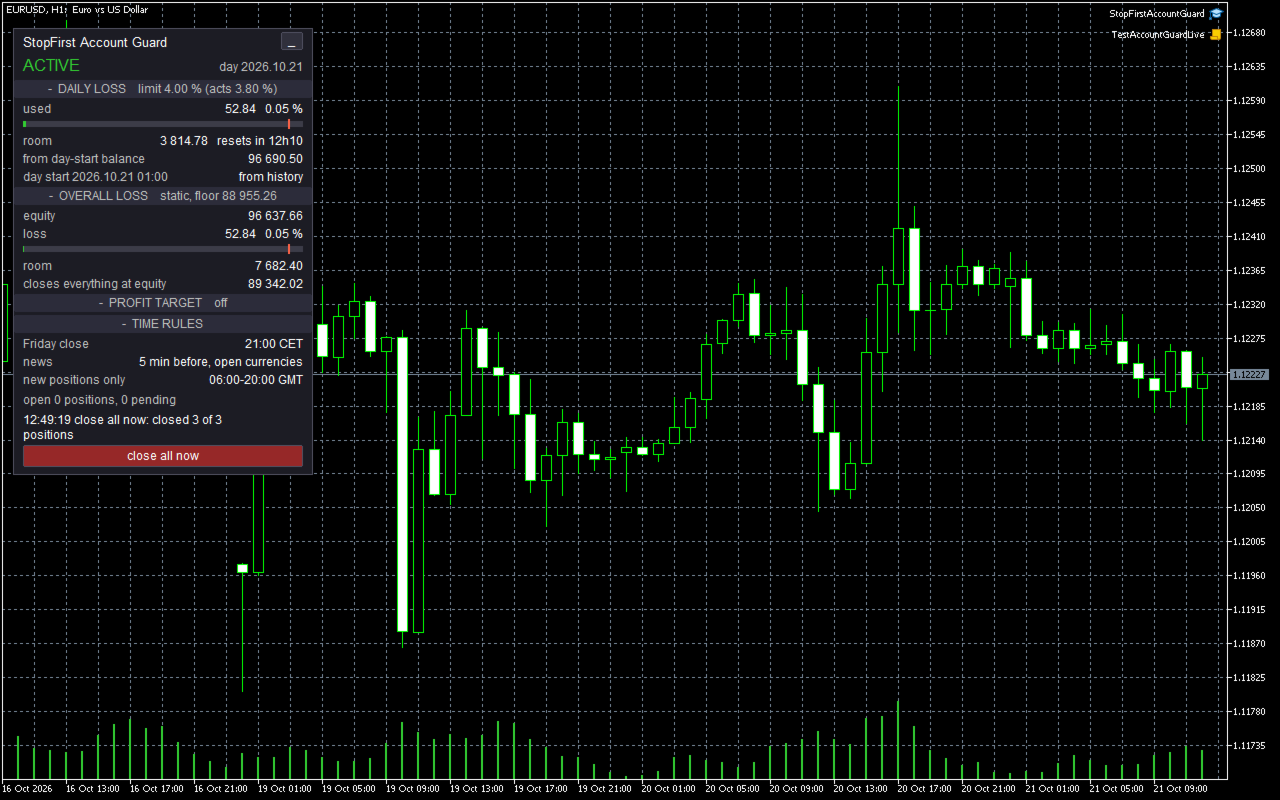
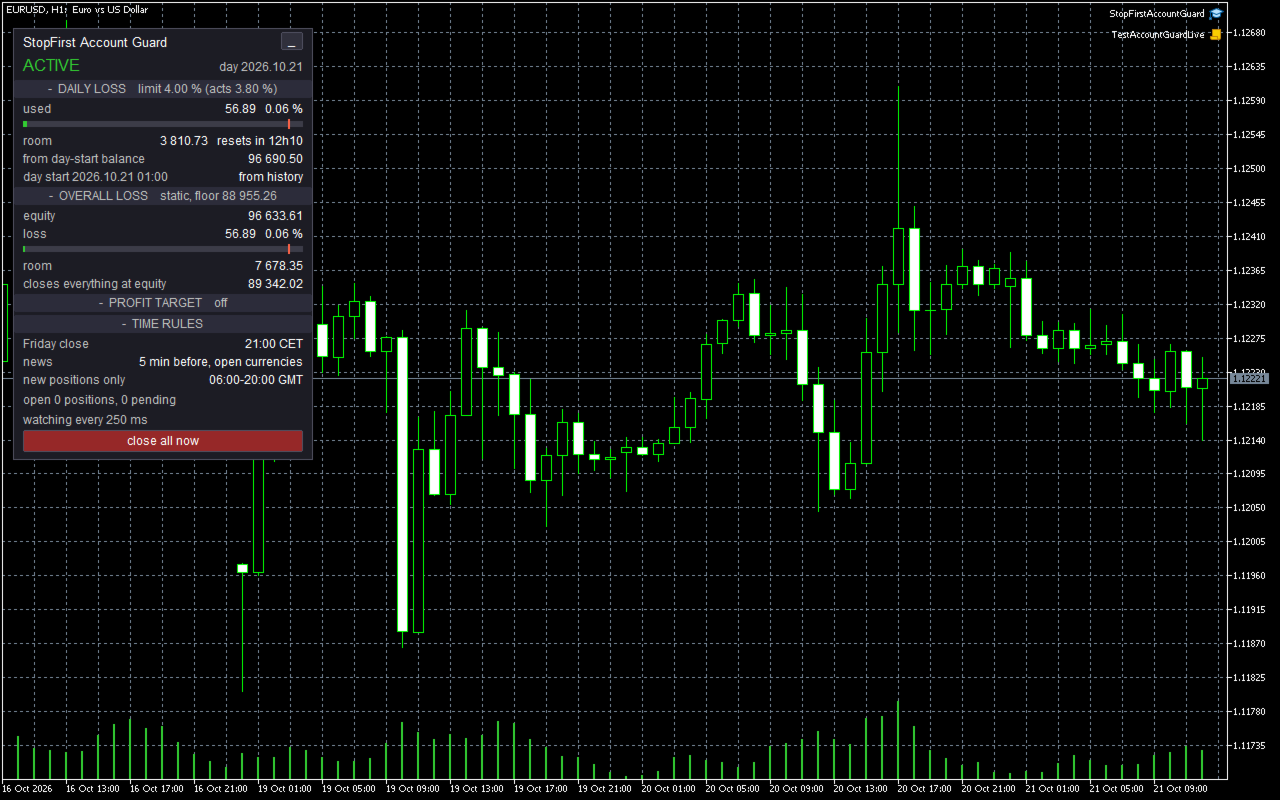
One word at the top, readable from across the room: ACTIVE, WARNING, LOCKED, CANNOT CLOSE or NO CONNECTION.

DAILY LOSS - used, in money and percent, with a bar to the point where the guard acts; room left and when the day resets; what the loss is measured from and where the day-start figure came from; the risk if all stops hit.
OVERALL LOSS - equity, loss, room, the equity at which the guard closes everything, the high for trailing modes.
PROFIT TARGET - the equity it fires at and how far away it is.
TIME RULES - what is set, and the event closing positions right now, if any.

Open positions and pending orders on the account, and the last action and its result. Each section can be collapsed and the whole panel minimised.

Two buttons, each acting on the second click within three seconds: "close all now" - your own flatten, without a lock - and, while an overall or target lock is in force, "clear lock".


IT NEVER SHOWS "OK" ON A GUESS

- Not connected: NO CONNECTION - limits not watched.
- Algo Trading off, or trading not allowed on the account: CANNOT CLOSE, in red, with an alert. Limits are still measured and a breach still locks; closing starts the moment it can.
- Broker GMT offset not measurable: the day resets by the broker's clock, and the panel says so. You can set the offset in the inputs.
- Day start rebuilt from history, or equity at the day start unknown: labelled on the panel.
- Economic calendar not loaded: the news rule says "calendar unavailable" and closes nothing on a guess.


QUESTIONS TO ASK YOUR FIRM

- Is the daily loss measured from the day-start balance, the day-start equity, or the higher of the two?
- Does it include floating loss?
- When does the day reset, and in which time zone?
- Is the maximum loss static, or does it trail? Trailing equity or closed balance? Does it stop trailing at the starting balance?
- Is there a profit target, and do you want to stop trading when you reach it?


STRATEGY TESTER

A guard that only watches shows nothing in a backtest, so in the Strategy Tester it opens demonstration trades: pairs sized so that a move of half an average day against them reaches the point where the guard acts. Good days end at the target; bad days show the warning, the breach, the close, the lock and its end at the next day. Under each lock one more trade is opened "as another program would", to show it closed again. Demonstration trades never happen outside the tester. On a deposit too small to carry the margin of one minimum lot it opens none, and logs no error. A longer backtest usually ends in an overall-loss lock: the demonstration loses on purpose, and after that the account stays flat, as it should.

In the tester:
- Set the broker's GMT offset in the inputs to reset the day in your firm's time zone; the tester cannot measure it, and the day otherwise resets by the broker's clock, which the journal says.
- There is no economic calendar, so the news rule is inactive and says so.
- Alerts and push notifications are ignored by the tester.


INPUTS

Account
- Account size the limits refer to (0 = the balance when the guard is first attached; setting it is recommended).

Daily loss limit
- On or off; percent or money; value (default 4 %); measured from; floating included; time zone and hour of the reset (default 00:00 Central European time).

Maximum overall loss
- On or off; percent or money; value (default 8 %); static or trailing; trailing stops at the account size.

Profit target
- On or off; percent or money; value.

Safety
- Act at this share of each limit (default 95 %); warn at this share (default 70 %); push notifications.

Time rules
- Friday close and its time; news close, importance, minutes before, currencies; no positions outside a GMT window; the broker's GMT offset (99 = measure it).

Strategy Tester
- Demonstration trades on or off, bars between them, their magic number; a withdrawal check used for testing.

Automation
- Accept panel commands from another program on the same chart. Off by default; used for automated testing.

Appearance
- Panel position, font size, colours.

Every input is checked when the EA starts. A wrong value stops it with a message saying which one and why.


TOGETHER WITH STOPFIRST TRADE MANAGER

On the same terminal, StopFirst Trade Manager (1.20 and later) reads what the guard publishes. While the account is locked it refuses an entry before sending it, instead of opening a trade the guard would close a second later. And it refuses a trade whose stop, together with the stops already open, could reach the point where the guard acts - the panel shows both figures.

The guard publishes its state - running, locked, the room left, the risk if every stop is hit - in terminal global variables: no DLL, no internet. Any EA on the same terminal can read them. Whatever is opened under a lock is still closed.


GOOD TO KNOW

- Attach it to one chart only. Two guards on one account would both close everything - harmless, but pointless.
- It never modifies a position - no stop added, no stop moved. It only closes.
- Its state is kept in terminal global variables named after the account number, so two accounts on one terminal stay apart. They are written to disk after every change.
- The equity high while the terminal was off cannot be known. Trailing modes use the stored high and the closed-balance high from the deal history, whichever is larger.
- Removing the EA leaves the account unguarded. The journal says so.
- It is an Expert Advisor, so it takes the chart's EA slot. Use a chart your own EA does not run on.
- No DLLs, no internet access, nothing sent anywhere. Push notifications go through MetaTrader's own channel.


QUESTIONS

Will it close my manual trades and other EAs' trades?
Yes - at a breach, under a lock, and when a time rule applies. That is its purpose. It never modifies them.

What if the terminal is closed when the limit is reached?
Nothing happens until it runs again: no program can act while MetaTrader is closed. Use a VPS for a challenge.

Can it stop me from opening a trade?
No program in MetaTrader can. Under a lock, a new trade is closed again within a second.

Why does it act at 3.8 % when my limit is 4 %?
That is the buffer. Closing several positions at market slips; acting at 95 % of the limit leaves room for it. You can set it to 100 %, and the journal will warn you.

I withdrew money. Will it count as a loss?
No. Deposits and withdrawals are read from the deal history and excluded.

Does it work with StopFirst Trade Manager?
Yes, on separate charts, and from Trade Manager 1.20 they work together: the Trade Manager refuses entries while the guard has locked the account, and entries whose stop could reach the limit. The guard still closes everything when it must, the Trade Manager's trades included.
Produits recommandés
Un utilitaire simple pour copier les volumes d'échanges d'un compte MT5 ou MT4 vers un autre compte MT5. Vous pouvez copier des positions entre les comptes de compensation et de couverture dans n'importe quelle combinaison. Par défaut, les positions ouvertes par tous les symboles correspondants avec les mêmes volumes seront copiées. Si les noms des symboles sont différents ou si le volume des positions copiées doit être différent ou si toutes les positions ne doivent pas être copiées, le comport
FREE
Stop And Close
Tetyana Shcherba
2.75 (4)
The utility (Expert Advisor) is designed for monitoring and controlling the total drawdown, as well as closing all positions after reaching the specified levels or upon the occurrence of a specified time with the ability to disable the operation of the automatic EAs running in the same terminal. It is capable of tracking the status of the entire account, as well as individual pairs. It works with the positions opened manually or by other automatic EAs. It tracks the open trades in real time mode
QuAI EA Preflight Check
Rui Fernando Pimentel De Oliveira
QuAI EA Preflight Check is a free MetaTrader 5 utility designed to answer one simple question before you run an Expert Advisor: Is this account, broker and symbol environment compatible with the EA settings you intend to use? Instead of showing only raw account information, the utility performs a practical preflight diagnostic and classifies the most important conditions as PASS, WARN or FAIL. The tool never opens, modifies or closes trades. Main checks - MetaTrader connection - Terminal A
FREE
Automatic calculation of a trading lot taking into account Stop Loss (in pips) and the percentage of risk from the account balance. The Expert Advisor panel is located on the chart at the top left. On the panel of the advisor, you can select the size of the stop loss in pips and the percentage of risk from the balance. You can set the deviation from the current price in pips for pending orders. The red color indicates the amount in the deposit currency that you can lose when the stop loss is tr
BossFXTradePanelEA (MT5)  [First 10 copies sold at 50 USD price will increase to 99USD] BossFXTradePanelEA is a fully interactive trade management panel designed for MetaTrader 5, providing traders with an easy-to-use, one-click interface to execute and manage trades. This EA simplifies trade execution , risk management, and position control by combining market orders, stop loss, take profit, trailing stops, and breakeven functionalities into a single, intuitive panel.  Key features include: On
justEnter is a semi-automatic trade management utility for MetaTrader 5. You choose the entry; the utility calculates position size, places the stop loss, and manages the position through breakeven, partial closes and trailing until exit. For traders following signals If you take your entries from a signal service, a mentor, or your own alerts, the entry decision is already made by the time you open the terminal. What remains is execution: sizing the position correctly, placing the stop, moving
Gap Straddle EA
Nazat Hossain Adi
Gap Straddle Trailing EA Automated Pending Order Management with Smart Trailing Stop Gap Straddle Trailing EA is an Expert Advisor for MetaTrader 5 designed to manage pending orders and trade protection through configurable settings. It includes automated order management, risk-based lot sizing, trailing stop functionality, session controls, and an on-chart dashboard. Key Features Buy Stop & Sell Stop Management — Automated pending-order placement and management. OCO Functionality — Opposite pen
Cet utilitaire ouvre les ordres lorsque la bougie touche la ligne de tendance placée manuellement, comme s'il s'agissait d'un ordre en attente plus articulé.  Il peut être utilisé sur n'importe quel actif, lorsqu'il ouvre la commande, il élimine la ligne qu'il a touchée et crée une flèche. Dans ce cas, il est utilisé pour les opérations de retournement de prix, il ouvre un ordre de vente lorsque la bougie haussière touche la ligne bottom-up et ouvre un ordre d'achat lorsque la bougie baissière
FREE
Bneu Trade Manager
Marvinson Salavia Caballero
Bneu Trade Manager is a professional trading utility Expert Advisor for MetaTrader 5 designed to help manual traders plan, execute, protect and manage trades directly from a visual chart dashboard. It combines drag-and-drop trade planning, risk-based position sizing, one-click execution, pending orders, automated trade management for both EA and manual trades, protection tools, templates, reporting and performance analytics in one organized panel. The latest version includes a reorganized dash
FREE
Cet Expert Advisor (EA) pour MetaTrader 5 (MT5) a été conçu pour gérer automatiquement les Stop Loss (SL) et Take Profit (TP). Fonctionnalités principales Détection Automatique des Positions Manuelles : Surveille les nouvelles positions manuelles sans SL/TP et applique les règles configurées. Ordres Multiples : Ouverture d'ordres multiples aux mêmes conditions que la position originale hidden  SL/TP : le mode hidden permet de créer SL/TP invisibles pour votre broker Equity protection  : permet
Chart Link
David Gitau Gakunga
4.83 (12)
Chart Link  allows you to control multiple charts from one chart or multiple charts from multiple charts. Features 1. Synchronised Scrolling :     Scrolling the master chart also scrolls all linked sub charts to the same position.     Sub charts inherit offset and auto-scroll settings from the master chart. 2. Synchronised Timeframe :     Switching the master chart timeframe also switches all linked sub charts. 3. Synchronised   Symbol   :     Switching the master chart symbol also switches all
FREE
The utility for setting a common stop loss for multiple orders. Beta version. After the test,  common take profit function will be added, orders close function will be added , and other necessary features will be added. Please do not give bad ratings to this free beta version. If you like it, give it a good rating and write to the author about any errors you find and what you would like to see in the utility. I made this utility for myself and use it daily. I am sharing it with you. A commercial
FREE
HotKey Master — Trade From Your Keyboard Built for scalpers who can't afford to click.  Every millisecond counts when you're managing  multiple positions on a fast-moving market —  HotKey Master turns your keyboard into a full  trading console. WHY SCALPERS NEED THIS The mouse is the bottleneck. Finding the right  button, clicking precisely, waiting for the panel  to respond — every click costs you
Click Trading
Jawad Tauheed
5 (2)
One Click Trading – Auto TP SL Developer TraderLinkz Version 1.00 Category Utility What it does Adds missing TP and SL to your manual trades and pending orders Sets them once per ticket Lets you move TP and SL afterward Works on hedging and netting accounts Scans on every tick and reacts on trade events Why you want it You place faster entries You get consistent risk and exit targets You reduce fat finger errors You keep full manual control Quick start Attach the EA to any chart Keep TP and SL e
FREE
Introducing the  Precision Data Extractor: SMMA , an MQL5 utility crafted for traders, analysts and quants who need accurate historical data to build robust datasets. This tool lets you selectively pull historical price and indicator data—  Smoothed Moving Average  ( SMMA )—from  multiple applied prices, timeframes, and  periods , then stores it in a  CSV  format, making it easy to feed into  machine learning models, trading algorithms , or  in-depth market analyses . Compatible with  Forex ,  S
Close All in 1s
Seng Yang
4.71 (24)
Hello, Every one  A script to close all market positions and/or pending orders. ----------------------------------------------------------------------------------- This is Close All      market positions and/or pending orders button  You can close all orders in 1 second by one click  For advanced version:  Advanced:  https://www.mql5.com/en/market/product/77763           https://www.mql5.com/en/market/product/89311 Key:  1 Close all button: The script will close All orders market + pending
FREE
AI Equity Drawdown Guardian
Fadi Hassan Khaled Ghanem
AI Equity Drawdown Guardian is an account-wide protection utility for MetaTrader 5. It continuously monitors your account equity against a configurable daily and total drawdown limit, and automatically closes all open positions and blocks new trading the moment a limit is breached - across ALL symbols and ALL magic numbers, not just its own trades. Key features: Daily drawdown percent limit, calculated from the equity at the start of each trading day Total drawdown percent limit, calculated from
FREE
Grid Trading EA is a semi-automated one-click trading EA for both Normal Trading and Grid/Martingale Trading . Normal Trading Simply click Buy or Sell directly from the chart. The EA will automatically manage trades by: Setting Stop Loss and Take Profit Managing Trailing Stop Grid / Martingale Trading (For Hedging Account Type Only) When Grid Trading mode is enabled, the EA will automatically open additional grid orders at specified distances while increasing the lot size based on your settings.
Imagine flying a real aircraft without ever stepping into a flight simulator. That's what trading is like. You have to simulate your strategy before you can take it to a live market. It is good if you can simulate things speedily before even stepping into any live market, or before coming up with an automated system.  People don't have all day to stare at a higher timeframe chart until the entry signal finally arrives. That's why I built this so that you can simulate your strategy with speed. Th
FREE
AEGIS Account and Drawdown Protector Real-Time Account-Level Risk Enforcement for MetaTrader 5 AEGIS is a real-time account protection Expert Advisor designed to enforce strict equity and loss limits across your entire MT5 account. It continuously monitors account equity and intervenes immediately when user-defined thresholds are reached. AEGIS does not generate trading signals and does not open positions — its sole function is capital protection. IMPORTANT AEGIS operates exclusively as a protec
SymbolMonitor
Oleksandr Kashyrnyi
SymbolMonitor 1.3 – Prenez le contrôle total de votre trading ! Vous tradez plusieurs instruments et souhaitez suivre vos profits en temps réel ? SymbolMonitor 1.3 est un Expert Advisor puissant qui analyse automatiquement la rentabilité de chaque symbole et offre des paramètres flexibles et des notifications ! Nouvelles fonctionnalités de la version 1.3 Paramètres visuels personnalisables – ajustez la police, la taille et la couleur du texte Notifications automatiques – recevez
FREE
Discord Notify
Aleh Piatrenka
5 (3)
Envoie automatiquement des notifications en temps réel concernant l’ouverture, la fermeture, la fermeture partielle et la modification des trades MT5 sur Discord. L’utilitaire prend en charge 16 langues : anglais, français, allemand, hindi, indonésien, italien, kazakh, coréen, néerlandais, polonais, portugais, russe, espagnol, turc, ukrainien et vietnamien. Vous pouvez également utiliser n'importe quelle autre langue en personnalisant le texte des notifications.  Le produit est conçu pour les t
FREE
Envoie automatiquement des notifications en temps réel concernant l’ouverture, la fermeture, la fermeture partielle et la modification des trades MT5 sur Slack. L’utilitaire prend en charge 16 langues : English, French, German, Indian (Hindi), Indonesian, Italian, Kazakh, Korean, Dutch, Polish, Portuguese, Russian, Spanish, Turkish, Ukrainian et Vietnamese. Vous pouvez également utiliser n'importe quelle autre langue en personnalisant le texte des notifications.  Il est destiné aux traders qui
FREE
Trendline Rebounce M5
Abd Rahman Bin Muhammad
Trendline Rebounce M5 est un Expert Advisor pour MetaTrader 5 qui recherche des retests de lignes de tendance et des bougies de rejet sur l’unité de temps M5. Avant d’ouvrir une première position, il vérifie la direction et la structure du marché sur des unités de temps supérieures. L’évaluation d’une entrée combine cinq conditions : la tendance selon l’EMA, une structure de swings confirmée, un retest de la ligne de tendance, une bougie de rejet et la dynamique du RSI. Le score minimum d’entrée
FREE
Key Benefits at a Glance: Lorentzian ML signal generation Majority voting across 3 timeframes Automatic market regime detection Smart equity recovery with group profit targets 1% risk‑based adaptive lot sizing ATR‑based dynamic SL/TP & trailing Emergency drawdown cut Live on‑chart info panel Hybrid Lorentzian Gold ML EA v2.0 – Intelligent Adaptive Trading for XAUUSD Next‑Gen Machine Learning Core A Lorentzian KNN classifier analyzes 5 normalized features (RSI, WaveTren
FREE
FlexiTrade
Johny Gomez Macaranas
Flexi Trade   is a powerful, fully automated Expert Advisor (EA) designed for MetaTrader 5. It combines intelligent money management, dynamic trailing stops, and an intuitive draggable dashboard – all in one package. Whether you are a novice trader looking for a "set-and-forget" solution or an experienced trader wanting full control over risk and entry logic, Flexi Trade adapts to your needs. The EA is built with   robust risk management   at its core: it calculates lot sizes based on a percenta
RiskFrame Trade Manager for MetaTrader 5 Shape the trade plan around the chart. Size it from risk, check it before sending, and manage the resulting position from the same workspace. RiskFrame is a manual trade-planning, execution and position-management utility for discretionary MetaTrader 5 traders. Its central workflow is a flexible Visual Trade Plan that can be positioned, resized and flipped around the area you are analysing instead of forcing the chart to fit around the panel. Entry, St
ProTrade EA
Jim Ariel Camarce Ignao
Key Features   Automated Candle Pattern Recognition 10 Professional Patterns : Detects Bullish/Bearish Engulfing, Hammer/Shooting Star, Morning/Evening Star, Piercing/Dark Cloud, and 6 additional professional candlestick patterns Smart Filtering : Combine multiple patterns with configurable confirmation logic Volume Confirmation : Optional volume filter to validate pattern strength Multi-Timeframe Analysis : Separate execution and bias timeframes for better timing   Trading Dashboard Int
Vix Golden Harmony
Lefika Raphel Sebatane
5 (1)
Vix Golden Harmony Vix Golden Harmony is a fully automated Expert Advisor for MetaTrader 5. Once attached to a chart it handles everything on its own — identifying its own entries, managing each position while it is open, and closing it when its conditions are met. Every order is checked against your broker's trading requirements and your account's available margin before it is sent, and an internal protection layer monitors the account while a position is running. No manual intervention, no con
FREE
Prop Firm Shield Full
Pablo Adolfo Cantos
Prop Firm Shield is a risk management panel for MetaTrader 5, built for prop firm traders who need control over their daily limits. You configure each limit and the tool watches the account around the clock, acting automatically when a limit is reached: closing positions, deleting pending orders and blocking new trading until the next day. Features: - Daily Take Profit - three modes: fixed USD, percent of the day-start balance, or target balance - Daily Stop Loss - three modes: fixed USD, percen
Les acheteurs de ce produit ont également acheté
Trade Assistant MT5
Evgeniy Kravchenko
4.43 (216)
It helps to calculate the risk per trade, the easy installation of a new order, order management with partial closing functions, trailing stop of 7 types and other useful functions. Additional materials and instructions Installation instructions - Application instructions Line function -   shows on the chart the Opening line, Stop Loss, Take Profit. With this function it is easy to set a new order and see its additional characteristics before opening.   Risk management  - The risk calculation
Bienvenue sur Trade Manager EA, l’outil ultime de gestion des risques conçu pour rendre le trading plus intuitif, précis et efficace. Ce n’est pas seulement un outil d’exécution d’ordres ; c’est une solution complète pour la planification des trades, la gestion des positions et le contrôle des risques. Que vous soyez débutant, trader expérimenté ou scalpeur ayant besoin d’une exécution rapide, Trade Manager EA s’adapte à vos besoins, offrant une flexibilité sur tous les marchés, des devises et i
Local Trade Copier EA MT5
Juvenille Emperor Limited
4.94 (149)
Local Trade Copier EA MT5 est un copieur de trades rapide et flexible permettant de copier et de gérer des trades entre plusieurs comptes MetaTrader 5 sur le même ordinateur Windows ou Windows VPS. Il combine la synchronisation locale des trades avec des contrôles côté Receiver pour la taille des lots, la gestion du risque, le filtrage des trades, le mappage des symboles, la gestion des trades et la protection du compte. Configurez vos terminaux Transmitter et Receiver en environ 1 minute et co
Farmed Hedge Yield Farming | All Markets (Manual - Hybrid - Semi/Automated EA) VERIFIED TRADING RESULTS - Farmed Hedge Yield Axi Copy:  https://www.mql5.com/en/signals/2356376 - Farmed Hedge Yield Exn Copy:   https://www.mql5.com/en/signals/2356404 - Farmed Hedge Yield V Copy:  https://www.mql5.com/en/signals/2357156 IMPORTANT NOTICE: FarmedHedge is a MANUAL-FOCUSED TRADING UTILITY ,not a fully automated EA. Results shown on this Signal include manual trades and overall strategic management.
Telegram to MT5 Multi-Channel Copier   copie automatiquement les signaux de trading de vos canaux Telegram et Discord directement vers MetaTrader 5. Pas de bots, pas d'extensions de navigateur, pas de copie manuelle. Un signal arrive sur Telegram ou Discord et l'EA ouvre le trade dans votre terminal en quelques secondes. Et avant de copier un canal, le backtester intégré vous montre ce que ce canal aurait fait sur votre compte. Le produit comprend deux composants : une application Windows qui éc
Copiez les signaux Telegram avec vos propres règles de trading Telegram to MT5 Signal Trader copie automatiquement les signaux de trading au format texte provenant de canaux et de groupes Telegram publics et privés vers MetaTrader 5. Gérez plusieurs fournisseurs et comptes MT5 depuis une seule application de bureau, avec des paramètres de risque et de trading propres à chaque fournisseur . Aucun bot Telegram ni configuration d'API n'est nécessaire pour copier les signaux. Connectez-vous simpleme
================================================================================ POC BREAKOUT - V20.72. Full Professional Grade Toolkit ================================================================================ POC Breakout is a full MetaTrader 5 trading dashboard for discretionary traders who want breakout signals, Point of Control (POC) context, volume profiles, order flow, market structure, news, alerts, and advanced trade planning in one professional workspace. Attached directly to you
TradePanel MT5
Alfiya Fazylova
4.88 (170)
Trade Panel est un assistant commercial multifonction. L'application contient plus de 50 fonctions de trading pour le trading manuel et permet d'automatiser la plupart des tâches commerciales. Instructions d'utilisation : https://www.mql5.com/fr/blogs/post/762589 Version d'essai de l'application pour un compte démo : https://www.mql5.com/fr/blogs/post/762644 Comment installer l'application : https://www.mql5.com/fr/blogs/post/762645 Comment tester l'application en mode visuel : https://www.mql5.
News Trade EA MT5
Konstantin Kulikov
4.55 (11)
Je voudrais vous présenter un robot efficace que j'utilise depuis plusieurs années. Il peut être utilisé en mode semi-automatique, comme en mode totalement automatique. >>> Chat <<< Le programme comporte des paramètres souples pour le commerce sur les nouvelles du calendrier économique. Il est impossible de le vérifier dans le testeur des stratégies. Ce qu’il faut, c’est le travail réel. Il faut ajouter à la liste des URL autorisées, dans les paramètres du terminal, un site d'actualités. Cliqu
Master Your Trading Discipline   Stop losing your hard-earned gains to overtrading and emotional decisions. The Discipline Tool is your ultimate trading assistant, ensuring strict risk management in real-time. Key Protection Features: Advanced Drawdown Defense : Automatically halts trading if your daily drawdown exceeds a preset threshold (percentage or dollar amount). Real-Time Equity Lock : Safeguard profits by referencing peak equity, ensuring drawdown stays within control. Hard Profit Target
The product will copy all telegram signal to MT5 ( which you are member) , also it can work as remote copier.  Easy to set up, copy order instant, can work with almost signal formats, image signal,  s upport to translate other language to English Work with all type of channel or group, even channel have "Restrict Saving Content", work with  multi channel, multi MT5 Work as remote copier: with signal have ticket number, it will copy exactly via ticket number. Support to backtest signal. How to s
Exp COPYLOT CLIENT for MT5
Vladislav Andruschenko
3.97 (35)
Copieur professionnel de trades pour MetaTrader 5 Un copieur de trades rapide, professionnel et fiable pour MetaTrader . COPYLOT permet de copier des trades Forex entre les terminaux MT4 et MT5 avec prise en charge des comptes Hedge et Netting . La version MT5 de COPYLOT prend en charge : - MT5 Hedge → MT5 Hedge - MT5 Hedge → MT5 Netting - MT5 Netting → MT5 Hedge - MT5 Netting → MT5 Netting - MT4 → MT5 Hedge - MT4 → MT5 Netting Version MT4 Description complète + DEMO + PDF Comment acheter Comme
Entry In The Zone with SMC Multi Timeframe is a real-time market analysis tool based on Smart Money Concepts (SMC), designed to analyze market structure, price direction, and key trading zones. It supports both Single-Timeframe and Multi-Timeframe Analysis, providing a clearer view of overall market structure across multiple timeframes, with real-time BUY / SELL signals designed with a strict focus on No-Repaint principles.   The signals are designed to help filter unclear setups and evaluate tr
EasyInsight AIO MT5
Alain Verleyen
4.92 (12)
EASY Insight AIO – La solution tout-en-un pour un trading intelligent et sans effort Présentation Imaginez pouvoir analyser l’ensemble du marché — Forex, Or, Crypto, Indices et même Actions — en quelques secondes, sans aucune analyse manuelle de graphiques, sans installation complexe ni configuration d’indicateurs. EASY Insight AIO est votre outil d’exportation ultime, prêt à l’emploi, pour un trading alimenté par l’IA. Il fournit une vue d’ensemble du marché dans un fichier CSV propre — prêt
Power Candles Strategy Scanner - Outil de recherche de configurations multi-symboles à optimisation automatique Le Power Candles Strategy Scanner utilise le même moteur d'auto-optimisation que celui qui alimente l'indicateur Power Candles, pour chaque symbole de votre Market Watch, en parallèle. Un panneau vous indique quels symboles sont statistiquement négociables à l'instant, quelle stratégie est la plus performante pour chacun, la paire Stop Loss / Take Profit optimale, et vous alerte dès qu
Besoin d'aide ? Comment le configurer ? Des questions ? Demandez ici dans votre langue, réponse rapide : https://www.mql5.com/en/market/product/139088/comments Télécharger la démo fonctionnelle Copy Cat More (Chat Copieur) — Copieur de Trades (Trade Copier) MT5 est un copieur de trades local et un cadre complet de gestion du risque et d'exécution, conçu pour les défis du trading d'aujourd'hui. Des challenges de prop firm à la gestion de portefeuille personnel, il s'adapte à chaque situation gr
MT5 to Telegram Signal Provider est un utilitaire facile à utiliser et entièrement personnalisable qui permet l'envoi de signaux spécifiés vers un chat, un canal ou un groupe Telegram, transformant ainsi votre compte en fournisseur de signaux. Contrairement à la plupart des produits concurrents, il n'utilise pas d'importations DLL. [ Démonstration ] [ Manuel ] [ Version MT4 ] [ Version Discord ] [ Canal Telegram ]  New: [ Telegram To MT5 ] Configuration Un guide utilisateur étape par étape est
Signal Trading View to MT5 Pro
Mirel Daniel Gheonu
4.5 (2)
Signal TradingView to MT5 Pro Automator Exécution professionnelle instantanée entre TradingView et MetaTrader 5 Automatisez votre stratégie de trading avec le pont de communication le plus robuste entre les alertes TradingView et l'exécution réelle sur MT5. Conçu pour les traders qui exigent vitesse, flexibilité et une gestion des risques impeccable, cet Expert Advisor transforme tout message d'alerte en un ordre au marché ou à cours limité précis. POINTS FORTS ET AVANTAGES Moteur d'analyse univ
Trade Indicator Assistant   is a powerful MT5 utility designed to turn indicators into automated trading systems. Its main feature is the ability to automatically detect an indicator’s   BUY and SELL signal buffers , without requiring you to know the buffer numbers, search through indicator settings, or modify the indicator source code. Bonus Indicator:   After purchasing Trade Indicator Assistant, contact me to receive   Trade Signal Pro   completely free as a bonus indicator. [Download Demo V
The Patch
Mian Rameez Ali
The Patch It never opens a trade. It walks behind the ones that did. Every open position, every pending order — checked twice a second for the one thing that's easy to forget: a stop, a target. Found bare, it doesn't ask. It writes the missing number in, measured in points from wherever the position began, and moves on to the next. No strategy, no opinion on direction. Just the quiet assumption that nothing should ever sit on the market unprotected — not because someone decided it shouldn't,
Panneau de trading pour MetaTrader 5 — contrôle professionnel du trading en un clic depuis le graphique et le clavier Un panneau de trading avancé conçu pour les traders actifs, afin d’ouvrir, gérer et clôturer des positions bien plus rapidement qu’avec l’interface standard de MetaTrader. Cette solution s’adresse à ceux qui veulent contrôler positions, ordres en attente, profit global et exécution depuis un seul espace de travail professionnel. Il ne s’agit pas d’un simple utilitaire. C’est un
Grid Manual MT5
Alfiya Fazylova
4.73 (22)
Grid Manual est un panneau de trading permettant de travailler avec une grille d'ordres. L'utilitaire est universel, possède des paramètres flexibles et une interface intuitive. Il fonctionne avec une grille d'ordres non seulement dans le sens des pertes, mais aussi dans le sens de l'augmentation des profits. Le commerçant n'a pas besoin de créer et de maintenir une grille d'ordres, l'utilitaire le fera. Il suffit d'ouvrir une ordre et "Grid Manual" créera automatiquement une grille de ordres po
Anchor Trade Manager
Kalinskie Gilliam
5 (9)
Your EAs cannot see each other, but Anchor can. Anchor gives you one place to coordinate your EAs, manage risk, and decide when trading is allowed. It works alongside the trading bots you already use without any changes to them. The Problem One EA opens a trade. Then another starts trading. The next thing you know, you wake up to multiple grids built across your account. Each EA may be doing exactly what it was designed to do, but together they can place far more risk on your account than you in
RETAILBERG FOOTPRINT CHART PRO — Order-Flow Workspace for MetaTrader 5 Version 7.00  |  Professional System  |  31 tools  |  One chart A full 150-page illustrated User Manual is included. Please read the full manual to understand this feature packed footprint chart elements and ui. https://www.mql5.com/en/blogs/post/777982 DEMO / STRATEGY TESTER — PLEASE READ FIRST
The News Filter MT5
Leolouiski Gan
4.79 (24)
Ce produit filtre tous les conseillers experts et les graphiques manuels pendant les heures de publication des actualités, de sorte que vous n'avez pas à vous soucier des pics de prix soudains qui pourraient détruire vos configurations de trading manuelles ou les transactions entrées par d'autres conseillers experts. Ce produit est également livré avec un système de gestion des ordres complet qui peut gérer vos positions ouvertes et vos ordres en attente avant la publication de toute actualité.
Floor Watch
Syed Tauqeer Hussain Shah
Floor Watch One number, watched every thirty seconds: how far equity has fallen since the day began — or since its highest point, if it's told to trail the peak instead of the open. Cross the line and it doesn't argue. Every open position closes, every pending order vanishes, and anything that slips through afterward gets shut the moment it appears. Not asked. Removed. The floor holds until the clock turns 5 AM Pakistan time — then, and only then, does the day start over. One rule. No except

Seconds Chart MT5
Boris Sedov
4.61 (18)
Seconds Chart - un outil unique pour créer des graphiques en secondes dans MetaTrader 5 . Grâce à Seconds Chart , vous pouvez créer un graphique avec une période définie en secondes, offrant une flexibilité et une précision idéales pour l'analyse, indisponibles sur les graphiques standards en minutes ou en heures. Par exemple, la période S15 indique un graphique avec des bougies d'une durée de 15 secondes. Vous pouvez utiliser n'importe quels indicateurs et experts advisors compatibles avec les
Un seul achat. Tous mes indicateurs MT4 et MT5, disponibles aujourd’hui et publiés à l’avenir, sans frais supplémentaires. Contactez-moi après l’achat pour connaître la procédure de réception. Il est prévu d’augmenter le prix de 50$ toutes les 10 ventes, jusqu’à 999$. Le prix du Market au moment du paiement fait foi. Gardez l’indicateur auquel vous faites confiance. Automatisez les tâches qui l’entourent. Votre signal. Vos règles. Votre exécution. Vous utilisez déjà un indicateur MT5 fiable, ma
Astro Trade MT5
Indra Maulana
5 (8)
25% discount on the release of the tool: only for the next 3 buyers Send a message to receive a demo version. AstroTrade Trading Assistant AstroTrade is a comprehensive multi-functional trading utility developed for the MetaTrader 5 platform. It integrates essential tools for trade execution, risk management, and technical monitoring into a single unified interface. The application is designed to assist traders in managing their daily operations through a visual and structured environment. Vi
SMT Trade Planner est un calculateur de risque professionnel et un panneau d'execution d'ordres directement sur le graphique MetaTrader. Il calcule la taille du lot, affiche des lignes visuelles d'entree, Stop Loss et Take Profit deplacables sur le graphique, valide le trade contre des regles de risque configurables et permet l'execution en un clic.   Fonctionnement Attachez le Trade Planner a n'importe quel graphique. Le panneau affiche les informations du compte et des boutons de selection rap
Plus de l'auteur
StopFirst Lot Calculator answers one question before every trade: how many lots, if this is where my stop goes? You decide how much you are willing to lose and where the trade is wrong. The calculator turns those two decisions into a lot size, and shows you what that lot really puts at risk, what margin it needs and where the target sits. Drag the stop line and every figure follows. It is an indicator. It cannot place an order, it needs no Algo Trading permission, and it runs on the same char
FREE
StopFirst Trade Manager opens trades the way a careful trader does: the stop comes first, the lot size follows from it, and the whole account's risk is in front of you before you click. Once the trade is open, it moves the stop to breakeven, trails it and takes partial profits for you. Every entry carries a stop. There is no way to open a trade from the panel without one. HOW TO USE IT 1. Attach it to a chart and allow Algo Trading. The panel appears in the corner. 2. Set your risk - a perc
StopFirst Loss Limit Monitor shows, for your whole account, how much of a daily loss limit and a maximum overall loss you have used and how much room is left - measured the way prop firms measure them. Free. It is an indicator: it measures and warns, and it never closes anything. It runs beside any Expert Advisor without taking its place on the chart. WHAT IT MEASURES Daily loss limit (default 4 %) - In percent of the account size, or in money. - Measured from the day-start balance (default
FREE
Filtrer:
Aucun avis
Répondre à l'avis