Magic Bulk Operations
- Yardımcı programlar
- Sürüm: 1.5

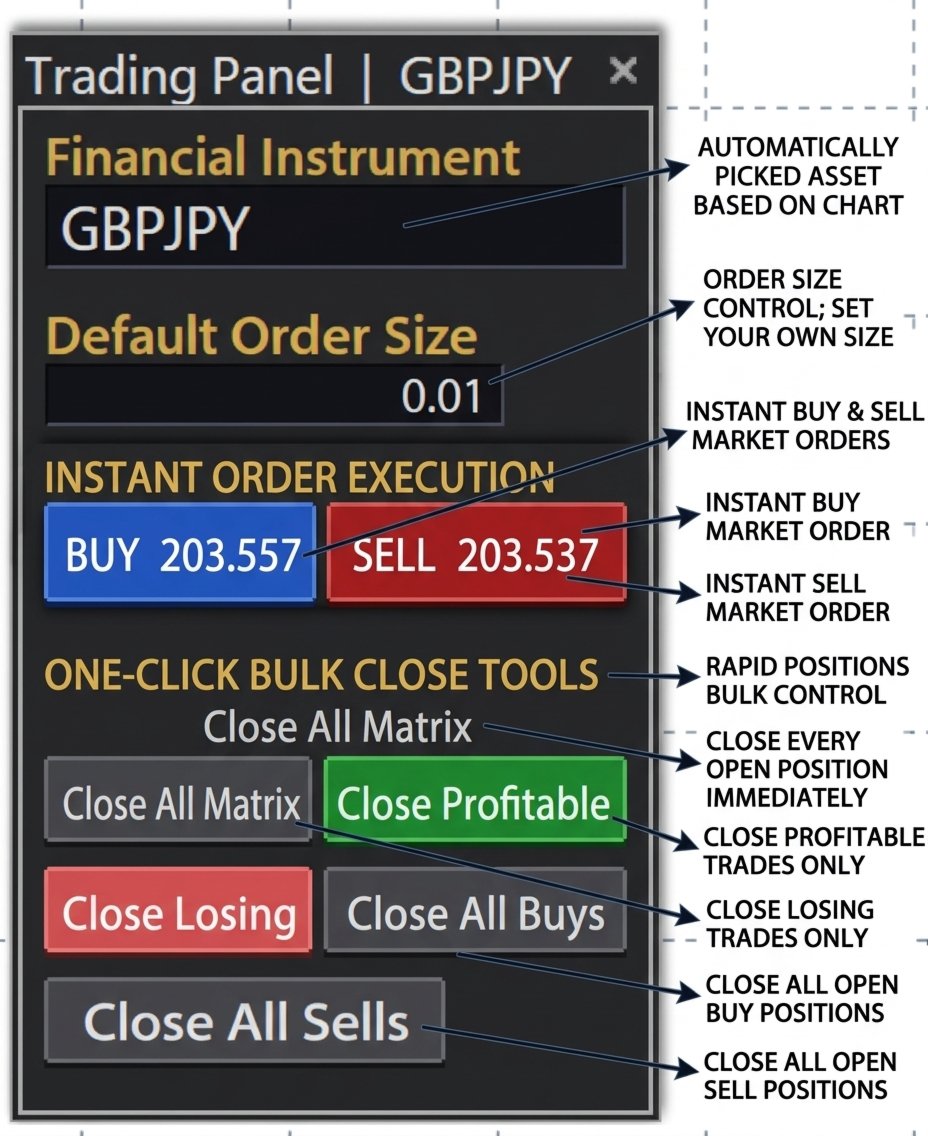
Trading Panel is an on-chart control panel for MetaTrader 5. You attach it to a chart and get a compact dark-themed window for placing market orders and closing groups of trades in one click.
Features
- Instant Buy and Sell: Two large buttons show the live Ask and Bid prices and place a market order immediately.
- Order size control: It starts at your broker’s minimum lot automatically, or you can set your own size. Whatever you type is corrected to fit the broker’s minimum, maximum and step, so orders aren’t rejected for a bad lot size.
- Automatic instrument: The panel picks up the symbol of the chart it sits on, so there’s nothing to select.
- One-click bulk close tools:
- Close All
- Close Profitable
- Close Losing
- Close All Buys
- Close All Sells
- Clear feedback: Every order and close is logged in the Experts tab, including the reason for any failure.
- Adjustable settings: You can set slippage tolerance, a magic number and an order comment.
Advantages
- Speed: Closing a whole basket takes one click instead of right-clicking each trade, which matters when the market is moving.
- Control: You can take profits only, cut only losers, or exit one direction without touching the rest.
- Safety: Bulk closing only affects the chart’s own symbol, so trades on other instruments are left alone.
- Ease of use: The layout is clean and compact, and the buttons are colour-coded: blue for buy, red for sell, green for profit and coral for loss.
- Fewer errors: Automatic lot correction and failure logging mean fewer surprises when you trade.
One thing to know: the bulk close buttons close every matching position on that symbol, including trades opened manually or by other EAs, not only those placed by the panel. If you want it limited to the panel’s own trades, filtering by the magic number is a small change.