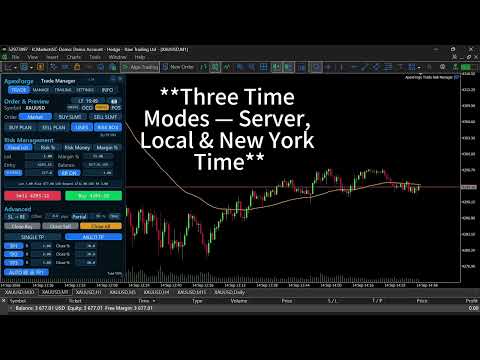
ApexForge Trade Risk Manager

  • Yardımcı programlar
  • Po-hsiung Huang
    Po-hsiung Huang
    • Founder & Developer at  ApexForge
    • Tayvan
    • 850
    Founder and developer of ApexForge.
    I develop practical trading tools for MetaTrader 5, focusing on usability, efficiency, stability, and low system resource usage.
  • Sürüm: 1.34
  • Güncellendi: 14 Eylül 2026
  • Etkinleştirmeler: 10
ApexForge Trade Risk Manager

MT5 Trade Manager + Risk Manager + Visual Trade Planner + Order Manager + Position Manager

A visual trading workspace designed specifically for MetaTrader 5 manual traders.

From:

Trade Planning → Risk Calculation → Order Execution → Position Navigation → Partial Exits → Position Management → Final Close

Everything is integrated into one trading interface.

ApexForge does not provide trading signals, nor does it decide whether you should Buy or Sell.

The trader decides the direction.

ApexForge helps you execute your trading plan faster, understand your risk more clearly, and manage your positions more efficiently.

◆ PLAN — Plan First, Then Decide How to Enter

After creating a BUY PLAN / SELL PLAN, you can visually plan directly on the chart:

Entry / SL / TP / Lot / Risk / Reward / RR

Without placing a real order, you can already see:

How much risk the trade would carry, the potential Reward, the RR, and whether the current setup complies with your own risk rules.

Entry Has Not Been Manually Moved

PLAN remains a Market Order.

Even if the market moves away from the original price while you are waiting, ApexForge will not automatically convert the plan into a Pending Order.

Entry Is Manually Moved by the Trader

ApexForge automatically determines the appropriate order type according to the Entry position relative to the current market price:

  • BUY: Buy Limit / Buy Stop

  • SELL: Sell Limit / Sell Stop

Originally planning to wait for a pullback, but later decide to trade a breakout instead?

Simply drag the Entry across the current market price.

There is no need to cancel the PLAN, manually select another pending order type, or configure SL / TP again.

◆ Smart Entry Bar — Trading Information Moves with the Price

PLAN, SLMT, OCO, and position management use visual Entry Bars.

The Bar displays important trading information and operation buttons directly on the chart, automatically adjusting its length according to the displayed content.

To prevent the Entry Bar from covering the currently forming price action:

All Entry Bars are positioned by default so that the right edge of the longest Bar stays approximately 10 candles to the right of the current price.

Therefore, even if the Bar becomes longer because of Lot, price, or P/L information, it will not simply expand from its left edge and cover the active market area.

🔒 / 🔓 Entry Bar Lock

🔒 Locked

The Entry Bar remains fixed at the default 10-Bar visual position.

🔓 Unlocked

The Entry Bar can be freely dragged horizontally to match your preferred chart layout.

PLAN, SLMT, and OCO all use the same visual interaction logic.

◆ Visual Risk Box — Drag Entry / SL / TP Directly

Risk Box turns trade setup from manual price entry into true chart-based interaction.

You can directly drag:

Entry / Stop Loss / Take Profit

Risk and Reward areas are displayed simultaneously.

Lot, Risk USD, Reward USD, RR, and other information are recalculated as the trade structure changes.

There is no need to return to the MT5 order window and re-enter prices every time you make an adjustment.

◆ Points SL / Structure SL

Stop Loss supports two primary methods.

POINTS

Set the Stop Loss using a fixed distance.

After changing SL Points, the trade structure and risk information are immediately recalculated according to the new setting.

STRUCTURE

Automatically build the Stop Loss according to recent market structure:

BUY → Nearest Valid Structure Low

SELL → Nearest Valid Structure High

A custom Structure Buffer can also be added.

Structure data is built during EA initialization and whenever the Symbol / Timeframe changes. After that, ApexForge mainly maintains newly formed structures instead of rescanning the entire chart every time the function is used.

◆ Four Independent Risk Profiles

ApexForge provides four independent Risk Profiles:

Fixed Lot / Risk % / Risk Money / Margin %

Each mode stores its own settings, so switching between Risk Modes does not mean reconfiguring the entire trading panel.

Fixed Lot

Lot size is completely controlled by the trader.

ApexForge does not automatically change your Lot because of the calculated risk.

Instead, it tells you:

With this Lot and this SL, how much Risk are you actually taking?

Even when the SL/TP Risk Box is disabled, Fixed Lot can still be used as the most direct manual trading mode.

Risk %

This is not an Auto Lot Calculator.

For example:

Risk Limit = 5%

ApexForge calculates:

Current Open Position SL Risk + Estimated Risk of the New Trade

If adding the new trade would reach or exceed the configured limit, the new order is blocked.

You still decide the Lot. Risk Guard prevents you from exceeding the risk limit you defined.

Risk Money

The same concept as Risk %, but expressed directly as a monetary amount.

For example:

Risk Money Limit = USD 500

If current position risk + estimated new trade risk reaches or exceeds USD 500, the new trade is blocked.

Margin %

Controls the maximum total Margin usage of the account.

ApexForge calculates both the current Margin and the estimated Margin required by the new trade.

If the configured limit would be exceeded, the order is blocked.

This is also one of the key differences of the original Risk Guard concept:

ApexForge does not automatically increase your Lot until the available risk capacity is fully used. You decide the Lot, and the system protects the limit.

◆ Real-Time Risk Status

Whenever Lot, Entry, SL, TP, RR, or Risk Mode settings change, the risk status is recalculated accordingly.

If the current setup does not allow the trade:

The Lot field turns red immediately.

The information area also displays the reason why the trade is blocked, such as:

Risk Limit, Margin Limit, Broker Volume Restriction, Invalid SL, Multi TP Volume, and more.

It does not simply tell you that the order cannot be placed.

ApexForge tells you why.

◆ NATIVE Mode — One Click Back to Native Manual Trading

v1.34 introduces NATIVE Mode.

When you need completely manual operation, there is no need to disable Risk Box, RR, Structure, Multi TP, or other functions one by one.

When NATIVE is enabled:

ApexForge temporarily disables advanced risk control and automated trade-management interfaces while keeping the essential manual trading functions available.

You can still use:

Lot Settings, Market Buy / Sell, Close Buy / Close Sell / Close All, Compact Close, Time, Camera, and Main Page Navigation.

Advanced controls such as Risk / PLAN / SLMT / OCO / TP / BE / Trailing are temporarily disabled.

Turn NATIVE off again to return to the complete ApexForge workflow.

Use ApexForge when you want complete management.

Switch to Native with one click when you want pure manual control.

◆ Visual Stop Limit — SLMT

Supports:

BUY SLMT / SELL SLMT

The Stop Trigger and Limit Entry can be dragged directly on the chart.

The SLMT Entry Bar also supports:

Default 10-Bar Positioning + 🔒 Locked / 🔓 Free Move

After configuration is complete, use Send to place the order.

Once the order has been sent, the interface automatically returns to Market Mode.

◆ Visual OCO — One Cancels the Other

Plan directly on the chart:

OCO Buy Entry + OCO Sell Entry

Both Entry levels can be visually dragged and use the same Entry Bar positioning and locking logic.

When one side is executed, ApexForge manages the cancellation of the pending order on the opposite side.

If Broker or network latency prevents the other leg from being cancelled immediately, OCO management enters a retry process.

The checking frequency is temporarily increased only when cancellation needs to be handled. Once completed, management returns to its normal low-frequency state.

◆ Single TP / Multi TP — TP1 / TP2 / TP3

Single TP

Traditional single Take Profit.

Multi TP

Supports:

TP1 / TP2 / TP3

For example:

TP1 = 30%

TP2 = 30%

TP3 = 40%

Multi TP uses Virtual TP Management.

The next stage becomes active only after the current stage has been completed:

TP1 → TP2 → TP3

The chart does not need to display three separate sets of actively managed TP Bars at the same time.

After TP1 is completed, management switches to TP2. After TP2 is completed, it switches to TP3.

◆ Multi-Position TP Management

When only one Position exists within the current management scope:

Multi TP performs partial exits based on that individual Position.

When multiple matching Positions exist:

ApexForge treats them as one combined position for management purposes.

TP1 / TP2 / TP3 do not create three duplicated target sets for every individual Position.

Instead, all matching Positions are managed under one combined Multi TP plan.

This allows traders using multiple entries to maintain one clear exit structure:

TP1 → TP2 → TP3

◆ AUTO BE @ TP1

Multi TP can be combined with:

AUTO BE @ TP1

After TP1 is completed, the remaining Position can automatically enter Break Even management.

This creates a complete staged exit process:

TP1 Partial Profit → BE Protection → TP2 → TP3

◆ Partial Close — Single Position / Combined Multi-Position Management

In v1.34, Partial Close determines how to execute according to the current position structure.

Only One Position

The Position is partially closed directly according to the configured percentage.

Multiple Positions

ApexForge no longer applies the percentage separately to every Position.

Instead, it first calculates:

The total volume of all matching Positions

Then calculates the total Lot to be closed according to the configured Partial %.

For example:

0.10 + 0.20 + 0.30 = 0.60 Lot

Partial = 50%

Total volume closed this time = 0.30 Lot

Instead of closing 50% of each of the three Positions individually.

Broker Minimum Volume and Volume Step are also taken into account to avoid invalid partial-close volumes or invalid remaining position sizes.

◆ POS — Position Navigator

PLAN manages trades that have not entered the market yet.

POS manages trades that are already open.

Open POS to select a current Position.

Once selected, ApexForge reads the trade's:

Entry / SL / TP

and links the information with the Risk Box.

Even if the SL or TP is outside the currently visible chart range, ApexForge can retrieve the actual trade structure that needs to be managed.

After locating the Position, SL / TP can be modified directly from the chart.

The original product concept remains unchanged:

PLAN manages trades before entry. POS manages trades after entry.

◆ Break Even / Partial / Trailing

After execution, you can continue managing the trade with:

Break Even

BE Offset

Partial Close

Trailing Stop

Trailing Distance

Trailing Step

Trailing Stop submits a new SL modification only when the new SL actually satisfies the configured Step condition, avoiding unnecessary trade modifications caused by every minor price movement.

◆ Close Buy / Close Sell / Close All

Quick position exit controls are provided:

Close Buy — BUY Positions

Close Sell — SELL Positions

Close All — All Positions within the current management scope

When there are no Positions in the corresponding direction, the button remains in a low-visibility state.

The corresponding directional state is displayed only when matching Positions exist.

◆ Compact Mode

The full panel can be minimized with one click.

Core trading functions remain available in Compact Mode, so you do not need to reopen the entire panel just for quick entries or exits.

Expand the panel again whenever you need PLAN, Risk, Multi TP, SLMT, OCO, or complete settings.

The interface gets smaller. Your trading efficiency does not.

◆ Event-Driven / Lightweight Design

ApexForge is designed to remain attached to trading charts for extended periods, so background performance is an important part of its architecture.

The UI and trading state are designed around:

Cache / Dirty Flag / In-place Update / Trade Event

Calculations and UI elements are updated only when values or states actually change.

Structure data is mainly built during initialization and when the Symbol / Timeframe changes, after which newly formed data is maintained incrementally.

OCO temporarily increases its checking frequency only when the sibling order needs to be cancelled.

Update only when an update is needed.

Use high-frequency checking only when high-frequency checking is temporarily required.

◆ Settings and Trade State Persistence

ApexForge saves settings and trade-management data that need to survive restarts, including:

Four Risk Profiles, Trading Parameters, Mode Settings, Multi TP Plans, OCO Management State, and more.

After MT5 / EA restarts, ApexForge can reload the management state required to continue managing active trades.

Multi TP also retains the original Persistence Safety design:

Plans that require continued management are saved. If a temporary file-writing problem occurs, existing in-memory management will not immediately stop simply because persistence failed.

◆ Market Means Market

The primary ApexForge:

BUY / SELL

buttons always mean:

Market Buy / Market Sell

PLAN has its own Send button.

SLMT has its own Send button.

OCO has its own Send button.

The purpose of the main BUY / SELL buttons does not suddenly change just because another trading mode is currently active.

Market means Market.

Who Is ApexForge For?

ApexForge is designed for manual traders who already have their own trading logic but want to improve their execution workflow.

If you want to:

  • Drag Entry / SL / TP directly on the chart

  • Quickly switch a trading plan between Market / Limit / Stop

  • Know Risk / Reward / RR / Margin before placing an order

  • Decide your own Lot while enforcing account Risk / Margin limits

  • Use Structure Stop Loss

  • Use Stop Limit / OCO

  • Use TP1 / TP2 / TP3 for staged exits

  • Manage Partial Close / Multi TP across multiple Positions as a combined position

  • Automatically move to BE after TP1

  • Quickly locate existing Positions and modify SL / TP directly

  • Manage positions with Partial / BE / Trailing

  • Switch back to pure manual trading with NATIVE Mode whenever needed

  • Quickly Close Buy / Sell / All

This is the workflow ApexForge Trade Risk Manager is built for.

Important Information

ApexForge Trade Risk Manager is designed for MetaTrader 5 and provides corresponding management logic for both Netting / Hedging Accounts.

Actual availability and behavior of Order Types, Minimum Volume, Volume Step, Stop Level, Freeze Level, Filling Mode, Tick Size, Tick Value, Margin Requirement, and other trading specifications depend on the Broker, Account, and Symbol Specification.

Spread, Slippage, actual execution price, and execution speed are determined by market conditions, the Broker, and the trading-server environment.

EA-managed functions such as Virtual TP / Multi TP / OCO require MT5, the EA, and the network connection to remain operational for continued management.

Native Pending Orders, SL, and TP that have already been submitted to the Broker Server are executed according to the Broker / MT5 Server's native rules.

This is consistent with the compatibility and risk disclosures of the original product design.

Before using ApexForge on a Live Account, it is recommended to test the required functions and Broker compatibility on a Demo Account first.

ApexForge is a trade execution, risk control, and position management tool.

It does not provide trading signals, investment advice, or profit guarantees.

ApexForge Trade Risk Manager

Visual Planning · Risk First · Direct Dragging · Fast Execution

PLAN — Plan your next trade

Risk Guard — Protect your account risk limits

NATIVE — Return to pure manual trading with one click

POS — Locate and manage existing Positions

Multi TP — Manage staged exits

Partial — Single-position partial close or combined multi-position management

Manage the entire process — from “Where do I want to enter?” to “Where do I finally exit?”


Önerilen ürünler
Akıllı Uzaktan İşlem Asistanı MT5: MetaTrader 5 için Telegram Üzerinden Uzaktan İşlem Paneli Akıllı Uzaktan İşlem Asistanı MT5, işlemlerini hızlı, güvenli ve uzaktan, doğrudan Telegram üzerinden kontrol etmesi gereken yatırımcılar için tasarlanmış gelişmiş bir MetaTrader 5 panelidir. Windows Köprü Uygulama Dosyası ve Eğitimi Edinin Telegram İşlem Panelini MT5 EA'ya bağlamak için köprü dosyası gereklidir. Windows 10 ve Windows 11 - 64 bit - ve 2016'dan itibaren Windows Server ile uyumludur. Bu
**Forex Trade Manager Pro MT5** **Trade Manager MT5** , MetaTrader 5 için kapsamlı bir işlem yönetim yardımcı programıdır ve bir işlemi planladığınız andan kapattığınız ana kadar pozisyonunuzun her yönü üzerinde size tam kontrol sağlar. Riski ciddiye alan yatırımcılar için tasarlanmıştır; disiplin oluşturan acemiden, birden çok pozisyonda anında işlem yapması gereken profesyonel skalpera kadar herkes için uygundur. Araç herhangi bir grafiğe eklenir ve temiz, kompakt bir panel sunar. Grafik üz
RiskPilot Pro
Mohamed Zein Mohamed Zein Soliman
RiskPilot Pro Plan risk clearly. Execute efficiently. Manage positions from one professional MT5 dashboard. RiskPilot Pro is a visual trade-planning and position-management utility for MetaTrader 5. It helps manual traders define risk before entry, calculate position size, place market or pending orders, and manage open positions from one chart panel. Important: RiskPilot Pro does not generate trading signals and does not choose trade direction. The trader defines the setup and remains responsib
Trade Panel HotKey – MT5 Scalping Utility Fast Trade Panel HotKey is a lightweight MT5 trading utility designed for traders who need to open, manage, and close positions as quickly as possible . The main purpose of this tool is to reduce the time between a trading decision and execution. Instead of moving the mouse, opening order windows, or manually modifying multiple positions, most important actions can be performed instantly through customizable keyboard hotkeys or directly from the compact
Trade Control Panel Function Normal One Click Function Close All Close All Profit Close All Loss Close All Pending Order Close All Sell Close All Buy Advance One Click Function 1.  Close Partial Lot Sell by Percent It will help you partial close for all open position by desire percent you wanted. No longer partial close one by one for every open position Manual input for desire percent 2. Close Partial Lot Buy by Percent It will help you partial close for all open position by desire percent
TRADE MANAGER G2 – PRODUCT DESCRIPTION By Ida Bagus Putu Mahardika Trade Manager G2 – All-in-One Trading Panel for Professional Execution & Risk Management Trade Manager G2 is a next-generation trading panel designed to give you full control over order execution, position management, and profit optimization in real time on MetaTrader 5. With a modern card-based user interface and individual TP actions per level, this panel elevates your trading experience to the next level. KEY ADVANTAGES OF
Risk calculator for MetaTrader 5. Precision Position Calculator is a MetaTrader 5 utility that helps calculate trade volume based on the risk configured by the user. The panel allows the user to work with Entry, Stop Loss and up to three Take Profit levels directly on the chart. Main description Precision Position Calculator is a utility for MetaTrader 5 designed to help calculate the volume of a trade before opening it. The panel allows the user to configure risk, select the order type, set th
Fotokopi->Kullanışlı ve hızlı arayüz etkileşimi, kullanıcılar hemen kullanabilir       ->>>> Windows bilgisayarlarda veya VPS Windows'ta kullanılması önerilir Özellikler: Çeşitlendirilmiş ve kişiselleştirilmiş kopyalama ticareti ayarları: 1. Farklı sinyal kaynakları için farklı lot modları ayarlanabilir 2. İleri ve geri kopyalama ticareti için farklı sinyal kaynakları ayarlanabilir 3. Sinyaller yorumlarla ayarlanabilir 4. Lotun sözleşme lotuna göre kalibre edilip edilmeyeceği Çeşitlendirilmiş v
Manual Trading Assistant Pro 【Manuel Yatırımcılar İçin Nihai "Hayatta Kalma" Aracı】 Hızlı piyasa hareketleri sırasında lot hesaplamaları veya TP/SL ayarlarıyla hiç zorlandınız mı? Bu araç, %100 "Giriş (Saldırı)" üzerine odaklanmak ve "Çıkış (Savunma)" işini makineye bırakmak isteyen yatırımcılar için tasarlanmıştır. 【V3.82'de Yeni: Tanı Özelliği】 Dahili Ayar Tanısı (Pips Check) Yanlış ayarlar konusunda endişelenmeyin. [Pips Check] düğmesi, çarpan ayarlarınızın aracı kurumunuzun formatına (JPY
Point & Trade Risk Manager MT5 Overview Stop wasting time calculating lot sizes manually! Point & Trade Risk Manager is a lightning-fast execution Expert Advisor designed for scalpers, day traders, and Prop Firm challengers. It allows you to enter trades instantly using a keyboard hotkey while automatically calculating the exact lot size based on your predefined risk percentage. Perfect for highly volatile instruments where every millisecond counts, such as XAUUSD (Gold) and NDX100 (Nasdaq) . Ho
This Expert Advisor monitors all open positions across all symbols in MetaTrader 5. Whenever a Stop Loss (SL) or Take Profit (TP) is manually set or adjusted on any position, the EA automatically applies that value to all other open positions , regardless of symbol or order type (Buy/Sell). This ensures consistent and synchronized SL and TP levels across your account. Perfect for mobile trading via tablet or smartphone!
SwiftEdge Scalper Tam Manuel Kontrollü Profesyonel Tick Scalping EA Scalping, anlık kararlar, hassas risk yönetimi ve kusursuz emir yürütme gerektirir. Fiyat hareketini izlerken başabaş hesaplamalarını, takip eden stopları ve birden fazla pozisyonu yönetmek, doğru araçlar olmadan bunaltıcıdır. SwiftEdge Scalper, aktif scalper'lar ve günlük trader'lar için tasarlanmış profesyonel trading asistanınızdır. Tek tıklama veya klavye kısayolu ile işlem yapın, EA otomatik olarak başabaş, takip eden stop
Executor Trader Panel (Sta) - Standard Version   is a multi-functional trading tool designed for traders. The trading panel integrates over 30 individual functions and more than 10 combined functions, providing traders with a highly flexible operational approach. Adapted for DPI: 96, 192. Main Features of the Executor: Instant Connection Status:   Immediately know if the connection with the broker is lost. Time Synchronization:   Instantly know the current local time and the time of the trad
Partial
Pablo Filipe Soares De Almeida
Partial Close Manager – İşlem Hacmi Ayarlama Aracı Bu araç, MetaTrader 5’te açık işlemlerde kısmi kapatma yapmanızı sağlar. Özellikler Kısmi Kapatma: Açık işlemlerin bir kısmını tek işlemle kapatın. Hacim Hesaplama: Kapatılacak hacmi otomatik hesaplar, manuel giriş gerekmez. Çoklu Emir Desteği: Aynı semboldeki tüm açık emirlerde kısmi kapatma uygular. Taşınabilir Tablo: Başlığı tıklayıp basılı tutarak tabloyu grafikte istediğiniz yere taşıyın.
Lot Architect — Trade Panel & Risk-Based Position Size Calculator for MT5 Lot Architect is a one-click trade panel and risk-based position size calculator for MetaTrader 5. It works out your exact lot size from the risk you choose, shows risk, reward and risk-to-reward (R:R) before you enter, and places Market, Limit or Stop orders in a single click. In short: position sizing, risk management and fast trade execution in one clean panel on your chart. The problem every trader knows Most accounts
Manually enter the price for Buy position or Sell position. This EA will automatically open 3 orders and also 3 Pending (In deposited position) = Total 6 orders per one click Please see Screenshot or Videos for more explanation. - Easy to manage your different order. - Fast in modification for SL and TP. - Can modified the SL and TP depends on individual techniques.
Tek bir MT5 hesabında birden fazla Expert Advisor (EA) yönetmek göründüğünden daha zordur. Her EA tek başına iyi performans gösterir — ancak birlikte kullanıldıklarında riski sessizce yoğunlaştırabilir, drawdown sırasında korelasyon gösterebilir ve bireysel backtest sonuçlarının öngördüğünden çok farklı davranabilirler. PortfolioLab Pro, portföyünüzün tam analitik görünümünü doğrudan MetaTrader 5 içinde sunar. Harici araç yok, dışa aktarma yok, manuel hesaplama yok. EA’leriniz işlem yaparken he
Capital Management EA – Smart Risk Management & Profit Optimization for MT5 Take control of your trading capital with smart, automated strategies — fully optimized for MetaTrader 5 (MT5). Looking to protect your capital and maximize profits through automated money management strategies ? Capital Management EA is the all-in-one Expert Advisor for MetaTrader 5 (MT5) that helps you trade smarter, not harder. Core Features: 5-in-1 Capital Management Strategies – Built-in versatility Gr
This   is   an   extended and modified    version   of   the   free   utility   Prop   Protector.   The   price   will   increase   as   more   users   join. Prop Protector   is a powerful trading assistant designed to solve the main problem traders face: maintaining discipline and managing risk. If you work with proprietary trading firms or simply want to adhere strictly to your trading plan, this tool will become your indispensable assistant. It takes care of routine calculations and monitor
SafeZone Auto Close – Smart Equity Protection Script (MT5) Automatically protects your trading account by closing all positions once your equity reaches a defined profit target or critical loss limit – with optional time filter for trading hours. What This Script Does SafeZone Auto Close is a lightweight yet powerful MetaTrader 5 (MT5) script designed to monitor your equity in real time and instantly close all open positions based on two conditions: Profit Target Reached – Close all positio
Equity Firewall, MT5 için tasarlanmış bir yardımcı programdır ve hesap düzeyinde otomatik zarar kontrolü ve risk yönetimi sağlar. Birden fazla uzman danışman (EA) aynı hesapta işlem yaparken, pozisyonların ani artışı veya zarar riski durumunda sermayeyi korur. Demo hesaplar için deneme sürümünü yükleyin Equity Firewall, maksimum toplam zarar, günlük kayıp limiti ve kar hedefi belirlemenize olanak tanır ve limitlere ulaşıldığında yapılacak işlemi seçebilirsiniz: tüm pozisyon ve emirleri kapatmak,
LotCalculatorPro
Reynaldo Jr Audencial Pascual
LotCalculatorPro + Akıllı Trading Paneli LotCalculatorPro , risk yönetimini, lot büyüklüğü hesaplamayı ve işlemleri doğrudan grafik üzerinden kolayca yapmanızı sağlayan güçlü bir hepsi-bir-arada trading asistanıdır. Bu araç, traderların riski kontrol etmesine, doğru lot büyüklüklerini hesaplamasına ve Break-Even, kısmi kapatma ve günlük kar/zarar koruma gibi akıllı özelliklerle işlemleri otomatik yönetmesine yardımcı olur. Özellikle MetaTrader 5 içinde temiz ve verimli bir trading iş akışı iste
Bneu News Filter Pro
Marvinson Salavia Caballero
Bneu News Filter is a trading utility for MetaTrader 5 that monitors economic calendar events and manages trading activity during high-impact news releases. The utility provides automatic position protection, real-time spread monitoring, and optional news trading functionality through a visual panel interface. Main Functionality Economic Calendar Integration Automatic retrieval of economic calendar events from the MetaTrader 5 built-in calendar. Monitors 8 major currencies: USD, EUR, GBP, JP
Trade Manager Panel ## Short description  Manage your manual trades with one click: automatic break-even, trailing stop, two-level partial close and risk-based lot sizing — all from a single on-chart panel. --- ## Full description Trade Manager Panel is an on-chart utility that takes care of your open trades so you can focus on the market instead of the order ticket. Drop it on any chart and it manages every position on that symbol automatically, while an interactive panel lets you size new
Lot Sizer & Dynamic Risk Management Panel for MT5 Take full control of your trading risk with Lot Sizer & Dynamic Risk Management Panel —an essential, high-speed execution utility designed for discretionary traders, prop firm account evaluators, and scalp/intraday traders. Calculating position size manually during fast-moving market sessions (London/New York opens or news releases) leads to execution delays and costly sizing errors. This interactive panel automates your risk management directly
This tool will perform Trailing stop loss and Break even management for orders. Helps you limit or reduce the time spend watching orders on the screen, especially when you need to go to sleep. Just add this EA to 1 chart, you can manage all pairs. You can filter orders by comment, magic number, symbol and order ticket number. When Breakeven it can add shift/offset pips (to cover the commission...). You can try in strategy tester before purchase. The EA will add Buy and Sell alternately, so you
️ Not: Bu EA manuel işlem panelidir. MQL5 Market doğrulamasında sadece bir test işlemi otomatik açar. Normal kullanımda tüm işlemler manuel yapılır. fRC Trade Assistant — Akıllı Manuel İşlem Paneli fRC Trade Assistant , manuel işlem yapanlar için geliştirilmiş, tek tıkla pozisyon açma, risk bazlı lot hesaplama ve otomatik SL/TP yerleştirme özelliklerine sahip akıllı bir işlem panelidir. Örneğin 1000$ bakiyeniz var ve %1 risk belirlediniz. Panel otomatik olarak lotu hesaplar; işlem açıldığınd
With the 2UP Risk & Trade Management EA you will be able to enjoy seeing your positions being fulfilled all you gotta do is take the position and have the right lot size and the 2UP EA will do the rest - You can set your risk per position so your account never losses more than what is supposed to, it will close automatically once you reach a certain % of DrawDown. - You can set your reward as well based on %, how much do you wanna grow your account in % per trade ?,  it will close automatically
Rhino Backtest Manager - canlı işlem ve strateji test edicisi için işlem yönetim paneli Rhino Backtest Manager, hem canlı işlemde hem de MetaTrader 5 strateji test edicisinde çalışan bir işlem yönetim panelidir. Canlı hesapta kullanılan arayüzün aynısıyla test edicinin içinde elle emir girmenize ve bu emirleri yönetmenize olanak tanır; böylece bir strateji geçmiş veriler üzerinde denendikten sonra araç değiştirmeden işleme alınabilir. Panel, pozisyon hacmini risk ayarlarınıza göre hesaplar, emi
Use for risk management and opening positions as per the user settings. The user is allowed to set the stop loss and take profits in pips. The user can also choose the risk percentage per trade that he/she wants to use while opening the trade. The volume of the trade that the user wants to sent shall be calculator according to the stoploss and the risk percentage that the user has selected.
Bu ürünün alıcıları ayrıca şunları da satın alıyor
Trade Assistant MT5
Evgeniy Kravchenko
4.43 (215)
It helps to calculate the risk per trade, the easy installation of a new order, order management with partial closing functions, trailing stop of 7 types and other useful functions. Additional materials and instructions Installation instructions - Application instructions - Trial version of the application for a demo account Line function -   shows on the chart the Opening line, Stop Loss, Take Profit. With this function it is easy to set a new order and see its additional characteristics bef
Trade Manager EA’ye hoş geldiniz! Ticaretin daha sezgisel, hassas ve verimli hale gelmesi için tasarlanmış nihai risk yönetim aracı ile tanışın. Bu sadece bir emir verme aracı değil; ticaret planlaması, pozisyon yönetimi ve risk kontrolü için kapsamlı bir çözüm. İster yeni başlayan bir yatırımcı olun, ister deneyimli bir trader ya da hızlı emir gerektiren bir scalper, Trade Manager EA ihtiyaçlarınıza uyum sağlar ve forex, endeksler, emtialar ve kripto paralar dahil tüm piyasalarda esneklik sunar
================================================================================ POC BREAKOUT - V20.72. Full Professional Grade Toolkit ================================================================================ POC Breakout is a full MetaTrader 5 trading dashboard for discretionary traders who want breakout signals, Point of Control (POC) context, volume profiles, order flow, market structure, news, alerts, and advanced trade planning in one professional workspace. Attached directly to you
TradePanel MT5
Alfiya Fazylova
4.88 (167)
Trade Panel, çok işlevli bir ticaret asistanıdır. Uygulama, manuel ticaret için 50'den fazla ticaret fonksiyonu içerir ve çoğu ticaret görevini otomatikleştirmeyi mümkün kılar. Uygulama talimatları + video talimatları: https://www.mql5.com/en/blogs/post/772292 Demo hesabı için uygulamanın deneme sürümü: https://www.mql5.com/en/blogs/post/750865 Uygulamayı nasıl kurulur: https://www.mql5.com/en/blogs/post/756239 Uygulamayı görsel modda nasıl test edilir: https://www.mql5.com/en/blogs/post/770277
Telegram to MT5 Multi-Channel Copier   , Telegram kanallarınızdaki alım-satım sinyallerini doğrudan MetaTrader 5'e otomatik kopyalar. Bot yok, tarayıcı uzantısı yok, elle kopyalama yok. Sinyal Telegram'a düşer ve EA birkaç saniye içinde terminalinizde işlemi açar. Ve bir kanalı kopyalamadan önce, yerleşik backtester o kanalın hesabınızda ne yapmış olacağını gösterir. Ürün iki bileşenden oluşur: Telegram kanallarınızı dinleyen bir Windows uygulaması ve sinyalleri MT5 terminalinizde yürüten bu Exp
Farmed Hedge Yield Farming | All Markets (Manual - Hybrid - Semi/Automated EA) VERIFIED TRADING RESULTS - Farmed Hedge Yield Axi Copy:  https://www.mql5.com/en/signals/2356376 - Farmed Hedge Yield Exn Copy:   https://www.mql5.com/en/signals/2356404 - Farmed Hedge Yield V Copy:  https://www.mql5.com/en/signals/2357156 IMPORTANT NOTICE: FarmedHedge is a MANUAL-FOCUSED TRADING UTILITY ,not a fully automated EA. Results shown on this Signal include manual trades and overall strategic management.
Telegram sinyallerini kendi işlem kurallarınızla kopyalayın Telegram to MT5 Signal Trader , herkese açık ve özel Telegram kanallarındaki ve gruplarındaki metin tabanlı işlem sinyallerini otomatik olarak MetaTrader 5'e kopyalar. Tek bir masaüstü uygulamasından birden fazla sinyal sağlayıcısını ve MT5 hesabını yönetin; her sağlayıcı için ayrı risk ve işlem ayarları belirleyin. Sinyal kopyalamak için Telegram botu veya API kurulumu gerekmez. Kendi Telegram hesabınızla telefon numarası veya QR kod k
Premium Trade Manager - İçine Koç Yerleştirilmiş İşlem Paneli Premium Trade Manager , grafiğinizin içine bir trading koçu yerleştirir; altında tam bir yürütme motoru çalışır. İşlemi her zamanki gibi kurun, ardından yapay zeka trading koçunuz Max, o kurulumu tam olarak okusun ve canlı hesabınıza göre taahhüt etmeden önce size net bir değerlendirme sunsun: stop disiplinli bir yaklaşıma uyuyor mu, risk büyüklüğü makul mü, yüksek etkili bir haber dakikalar sonra mı geliyor, prop firm limitinize yakl
EA Overfitter
Stephen J Martret
5 (1)
That backtest looks great. But will it still be making money tomorrow, next week, next month? EA Overfitter re-runs your EA on 100 price histories it has never seen. One score tells you if the edge is real. A backtest tells you what an EA did on one price history — the one that happened to occur. What you cannot tell from it is how much of that result was the strategy and how much was the particular path. EA Overfitter answers that. It builds up to 100 synthetic price histories your EA has n
Welcome to ENTRY IN THE ZONE WITH SMC MULTI TIMEFRAME Entry In The Zone and SMC Multi Timeframe is a real-time market analysis tool based on Smart Money Concepts (SMC), designed to analyze market structure, price direction, and key trading zones. It supports both Single-Timeframe Analysis and Multi-Timeframe Analysis, providing a clearer view of the overall market structure across multiple timeframes, with real-time BUY / SELL signals that do not repaint. It is designed to help filter trading op
The product will copy all telegram signal to MT5 ( which you are member) , also it can work as remote copier.  Easy to set up, copy order instant, can work with almost signal formats, image signal,  s upport to translate other language to English Work with all type of channel or group, even channel have "Restrict Saving Content", work with  multi channel, multi MT5 Work as remote copier: with signal have ticket number, it will copy exactly via ticket number. Support to backtest signal. How to s
Footprint Chart Pro — Professional OrderFlow EA for MetaTrader 5 Version 6.34 | Professional tool for real traders | Institutional-Grade Visualization DEMO USERS - PLEASE SELECT EVERY TICK / REAL TICK WHEN TESTING AND YOU HAVE DOWNLOADED HISTORICAL DATA. IF YOU SEE A WAITING SCREEN AND IT IS NOT DOWNLOADING, IT MEANS YOU HAVE LOW HISTORICAL DATA. TRY 1 MIN AND 5 MIN FIRST ON 1 DAY DATA. ONE DAY DATA SHOULD BE THE NEWEST AND MOST CURRENT DATE. PLEASE WAIT UNTIL THE MARKET HAS ROLLED OVER PERIOD.
FUTURES ORDERFLOW FOOTPRINT CHART Professional OrderFlow EA for MetaTrader 5 Version 1.01| Professional tool for real traders | Institutional-Grade Visualization STRATEGY TESTER USERS - PLEASE SELECT EVERY REAL TICK WHEN TESTING AND YOU HAVE DOWNLOADED HISTORICAL DATA. IF YOU SEE A WAITING SCREEN AND IT IS NOT DOWNLOADING, IT MEANS YOU HAVE LOW HISTORICAL DATA. TRY 1 MIN AND 5 MIN FIRST ON 1 DAY DATA. ONE DAY DATA SHOULD BE THE NEWEST AND MOST CURRENT DATE. PLEASE WAIT UNTIL THE MARKET HAS ROL
Grid Manual MT5
Alfiya Fazylova
4.73 (22)
Grid Manual, sipariş ızgarasıyla çalışmak için kullanılan bir ticaret yardımcı programıdır. Yardımcı program evrenseldir, esnek ayarlara ve sezgisel bir arayüze sahiptir. Sadece kayıpların ortalaması yönünde değil, aynı zamanda kazanç artışı yönünde de bir emir ızgarası ile çalışır. Tüccarın bir emir ızgarası oluşturmasına ve eşlik etmesine gerek yoktur, bu yardımcı programı yapacaktır. Emri açmanız yeterlidir ve Grid manual otomatik olarak ona bir emir ızgarası oluşturacak ve kapanana kadar ona
Timeless Charts
Samuel Manoel De Souza
5 (8)
Timeless Charts, profesyonel yatırımcılar için hepsi bir arada bir trading aracıdır. Saniye Grafikleri ve Renko gibi özel grafik türlerini, Footprints , Clusters , Hacim Profilleri , VWAP çalışmaları ve gelişmiş piyasa analizi sağlayan sabitlenmiş analiz araçlarıyla gelişmiş emir akışı analiziyle birleştirir. İşlem ve pozisyon yönetimi, entegre işlem yönetim paneli aracılığıyla doğrudan grafik üzerinden gerçekleştirilirken, Market Replay ve Sanal Hesaplar trading becerileri ve stratejileri üzeri
MT5 to Telegram Signal Provider , hesabınızı bir sinyal sağlayıcı haline getirerek belirtilen sinyalleri Telegram'ın sohbetine, kanalına veya grubuna göndermeyi sağlayan kullanımı kolay, tamamen özelleştirilebilir bir araçtır. Rakip ürünlerin çoğunun aksine, DLL içe aktarması yapmaz. [ Demo ] [ Kılavuz ] [ MT4 Versiyonu ] [ Discord Versiyonu ] [ Telegram Kanalı ]  New: [ Telegram To MT5 ] Kurulum Adım adım bir kullanıcı kılavuzu mevcuttur. Telegram API'si hakkında bilgi gerekmemektedir; ihtiyac
Trade Indicator Assistant   is a powerful MT5 utility designed to turn indicators into automated trading systems. Its main feature is the ability to automatically detect an indicator’s   BUY and SELL signal buffers , without requiring you to know the buffer numbers, search through indicator settings, or modify the indicator source code. Bonus Indicator:   After purchasing Trade Indicator Assistant, contact me to receive   Trade Signal Pro   completely free as a bonus indicator. [Download Demo V
Your EAs cannot see each other, but Anchor can. Anchor gives you one place to coordinate your EAs, manage risk, and decide when trading is allowed. It works alongside the trading bots you already use without any changes to them. The Problem One EA opens a trade. Then another starts trading. The next thing you know, you wake up to multiple grids built across your account. Each EA may be doing exactly what it was designed to do, but together they can place far more risk on your account than you in
Trade Manager DashPlus
Henry Lyubomir Wallace
4.85 (13)
DashPlus , MetaTrader 5 platformunda işlem verimliliğinizi ve etkinliğinizi artırmak için tasarlanmış gelişmiş bir işlem yönetim aracıdır. Risk hesaplama, emir yönetimi, gelişmiş ızgara sistemleri, grafik tabanlı araçlar ve performans analitiği gibi kapsamlı bir özellik yelpazesi sunar. Temel Özellikler 1. Kurtarma Izgarası Olumsuz piyasa koşullarında işlemleri yönetmek için ortalama alma ve esnek bir ızgara sistemi uygular. İşlem kurtarma çabalarını optimize etmek için stratejik giriş ve çıkış
Power Candles Strateji Tarayıcısı - Kendi Kendini Optimize Eden Çoklu Sembol Kurulum Bulucu Power Candles Strateji Tarayıcısı , Power Candles göstergesini çalıştıran aynı kendinden optimize edici motoru, Piyasa İzleyicinizdeki her sembol üzerinde yan yana çalıştırır. Tek bir panel, şu anda istatistiksel olarak hangi sembollerin işlem yapılabilir olduğunu, her birinde hangi stratejinin kazandığını, en uygun Stop Loss / Take Profit çiftini gösterir ve yeni bir sinyal geldiği anda size bildirim gön
This Expert Advisor waits a position to be opened, no matter if you open manually or with the EA buttons or eventually via mobile: it creates a Grid in Anti Martingale with pending stop orders in the same direction of the first position. You can specify the number of orders, the size and the distance between the orders. You can also adjust the Monetary Target of the Grid, the monetary Stop Loss, the Intermediate Target (when reached the EA insert an order with opposite direction of the total pos
YuClusters
Yury Kulikov
4.93 (43)
Attention: You can view the program operation in the free version  YuClusters DEMO .  YuClusters is a professional market analysis system. The trader has unique opportunities to analyze the flow of orders, trade volumes, price movements using various charts, profiles, indicators, and graphical objects. YuClusters operates on data based on Time&Sales or ticks information, depending on what is available in the quotes of a financial instrument. YuClusters allows you to build graphs by combining da
Copy your MT5 trades to Interactive Brokers You keep using MT5. Every order you open or close is sent to your IB account. In real time. No coding. No changes to your strategy or EA. Try it first Rent 1 month: $30. Test on a live or paper account. What it does Real-time copying: same direction, reverse, or one side only. Map any MT5 symbol to any IB symbol. Set a lot ratio for each. Forex, Futures, Stocks, CFDs, Metals and Crypto. Position sync: both accounts checked, any difference fixed. Optio
EchoTrade Telegram to MT5 Copier Seamless, Instant, and Reliable Signal Copying - Direct from Telegram to MetaTrader 5! The product does not run in the strategy tester but you can get free trial version here  for testing before purchase. Tired of manually executing trades from Telegram signals? EchoTrade automates the process, instantly copying trades from any Telegram channel or group directly into your MT5 account—accurately, efficiently, and without delay. Key Features: Universal Compatibi
Ultimate Extractor - Professional Trading Analytics for MT5 *****this is the local HTML version of Ultimate Extractor. !!!!!it is not compatible with Cloud!!!! For the online version please reach out to me directly****** Ultimate EA manager also now available when you use cloud pro and above for free!! Ultimate Extractor transforms your MetaTrader 5 trading history into actionable insights with comprehensive analytics, interactive charts, and real-time performance tracking. What It Does Automa
AI Agent Supervisor is NOT an Expert Advisor. AI Agent Supervisor   is a   multi-agent AI risk & portfolio supervisor   that watches every EA on your account and intervenes in real time.  WANT AN AI PORTFOLIO MANAGER WATCHING YOUR FLEET 24/7?   Run your fleet on the same brokers I do:   IC MARKETS , IC TRADING   .  Unlike the centralized stock market, Forex has no single, unified price feed.  Every broker sources liquidity from different providers, creating unique data streams. The Supervisor r
Quant AI Agents are independent trading Expert Advisors. Instead of trading using a fixed strategy like other conventional EAs, Quant AI Agents   is a   multi-agent AI trading framework   that turns natural-language strategy prompts into live.  WANT THE SAME RESULTS AS MY LIVE SIGNAL?   Use the exact same brokers I do:   IC MARKETS , IC TRADING   .  Unlike the centralized stock market, Forex has no single, unified price feed.  Every broker sources liquidity from different providers, creating un
EA Auditor
Stephen J Martret
5 (5)
EA Auditor is an independent analysis tool for traders evaluating Expert Advisors and trading signals on MetaTrader 5. It audits backtest reports, reviews posted developer signals, and cross-verifies the two against each other to help traders assess strategies before committing capital. The MQL5 market offers a wide range of Expert Advisors from many developers, with varying approaches, quality, and transparency. EA Auditor provides a consistent, data-driven framework for reviewing them, answer
Riskinizi otomatik olarak hesaplarken işlemlere hızlı bir şekilde girip çıkmanıza yardımcı olacak Ticaret Yöneticisi. Aşırı Ticaret, İntikam Ticareti ve Duygusal Ticaretten korunmanıza yardımcı olacak özellikler içerir. İşlemler otomatik olarak yönetilebilir ve hesap performans ölçümleri bir grafikte görselleştirilebilir. Bu özellikler, bu paneli tüm manuel yatırımcılar için ideal kılar ve MetaTrader 5 platformunun geliştirilmesine yardımcı olur. Çoklu Dil desteği. MT4 Sürümü  |  Kullanım Kılavu
Global Investing FX Terminal
Santiago Nicolas Pla Casuriaga
5 (1)
Global Investing FX Terminal , MetaTrader 5 için hepsi bir arada bir FX dashboard'udur — merkez bankası politika faizleri, CFTC COT pozisyonlanması, carry sıralamaları, ekonomik sürprizler, opsiyon skew'u, perakende duyarlılığı ve korelasyonlar, toplamda on üç panel — titremesiz tek bir canvas katmanında görüntülenir ve tek bir ekli EA'dan her 10 saniyede bir güncellenir. Harici yazılım gerekmez. Profesyonel FX analizi, normalde ayrı platformlarda bulunan verilere eş zamanlı erişim gerektirir: f
Yazarın diğer ürünleri
ApexForge Candle Timer Never lose track of the current candle again. ApexForge Candle Timer is a lightweight and efficient countdown indicator that displays the remaining time of the current candle directly on your chart. Designed for traders who rely on precise timing, it helps you anticipate candle closes and make better trading decisions. Features Displays real-time candle countdown. Supports all timeframes. Automatic market closed detection. Customizable font, color, size and position. Optio
FREE
ApexForge MA Radar  Lightweight Automatic MA Direction Panel ApexForge MA Radar  is a lightweight moving-average direction panel for MT5. It automatically detects EMA indicators attached to the current chart and displays them in real time according to their price order. Designed for traders who want a clean market overview with extremely low CPU usage. Features Automatic EMA detection Real-time MA sorting Bullish / Neutral / Bearish direction display Ultra-low CPU usage Automatic chart sync
FREE
ApexForge Price Ray Marker ApexForge Price Ray Marker is a lightweight MT5 utility designed for fast and efficient price structure analysis. With a simple keyboard shortcut, you can instantly place horizontal price rays and price labels on candle highs or lows without manually drawing objects. It is ideal for Price Action traders, Smart Money Concepts (SMC), ICT methodologies, support and resistance analysis, liquidity mapping, and multi-timeframe trading. Features Shift + Left Click → Ma
FREE
# ApexForge One Click Close EA ## Overview **ApexForge One Click Close EA** is a lightweight, non-blocking trading utility that allows you to close all matching positions—and optionally delete pending orders—with a single click. Instead of manually closing trades one by one during volatile markets, this EA provides a fast, reliable, and visually clear way to manage your exposure instantly. > ️ This tool does not generate trading signals or open positions automatically. It is designed purely
FREE
ApexForge Quote Paused Notification is a lightweight monitoring utility designed for MetaTrader 5 that detects when market quotes stop updating and immediately alerts you when abnormal quote interruptions occur. Whether caused by server issues, network disconnections, market closures, or temporary liquidity interruptions, the tool helps traders recognize quote freezes before they lead to missed opportunities or unexpected trading behavior. A notification is also generated once normal price upda
FREE
ApexForge MA Radar Advanced is designed for traders who need more powerful market analysis without sacrificing performance. Building on the core features of the free edition, the Advanced version introduces professional tools that help you evaluate moving averages, trend strength, and market structure faster and more efficiently. The indicator automatically detects moving averages on the current chart and sorts them by price position, giving you an instant overview of market alignment. It suppor
ApexForge MA Trend Strength Professional is the flagship edition of the ApexForge product line, delivering the most complete feature set for traders who demand professional-grade market analysis. Built for serious traders, it combines powerful trend evaluation with extensive customization, providing a flexible solution for scalping, intraday trading, swing trading, and multi-timeframe analysis. The indicator automatically evaluates moving average slopes and converts them into five intuitive tren
ApexForge Trader Safety Dashboard MT5 Economic Calendar・High-Speed One-Click Close・Economic Event Alerts・Holiday & Early-Close Detection・Mobile Push ApexForge Trader Safety Dashboard is an MT5 risk-awareness and trade-management utility . It combines: MT5 Economic Calendar Economic event countdowns Actual / Forecast / Previous Holiday detection Broker Trading Sessions Early-Close Risk High-Speed One-Click Close Directional Buy / Sell close controls Real-time Floating P/L Position Hover informati
ApexForge Visual Pending Orders Visual Drag-and-Drop Pending Orders | Multi-Chart Sync | Host Chart (H) | Quick Send / Cancel ApexForge Visual Pending Orders is a visual pending-order tool designed for MT5 manual traders. Instead of repeatedly opening the MT5 order window and manually entering prices, simply select a pending-order mode and the EA will create the required price lines directly on the chart. Drag the lines with your mouse to adjust the order price, review the setup visually, and se
ApexForge Multi Chart Symbol Timeframe Changer MT5 Symbol Changer | Timeframe Changer | Multi Chart Switcher | Multi Timeframe Tool ApexForge Multi Chart Symbol Timeframe Changer is an MT5 Symbol Changer, Timeframe Changer, Multi Chart Switcher and Workspace Manager designed for traders using multiple MetaTrader 5 charts. Instead of changing every chart manually, control multiple charts from one panel and quickly switch: Symbols / Timeframes / Complete Multi-Chart Configurations Features include
Filtrele:
Değerlendirme yok
Değerlendirmeye yanıt