All Market Cockpit EA
- Uzmanlar
- Sürüm: 1.42
- Etkinleştirmeler: 20

All Market Cockpit EA for MT4
Multi-Market Trading Signals, Advanced Quality Filtering & Smart Trade Execution
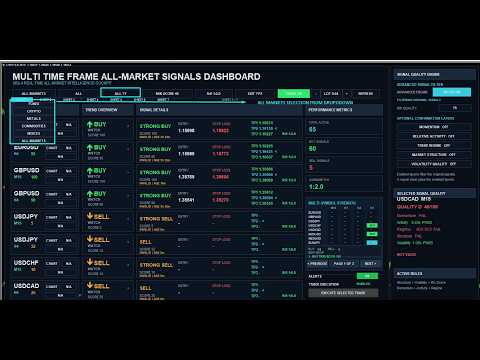
All Market Cockpit EA is an advanced MetaTrader 4 (MT4) Expert Advisor designed to help traders analyze and execute opportunities across multiple markets from a single professional trading dashboard.
Instead of relying on a single indicator or isolated trading signal, All Market Cockpit combines a core market signal engine, an Advanced Signal Filter, and optional confirmation layers to help traders identify higher-quality setups before executing a trade.
One Cockpit. Multiple Markets. Smarter Trade Selection.
Forex • Crypto • Metals • Indices • Commodities
Trade Smarter With a Multi-Layer Signal Architecture
All Market Cockpit EA is built around a three-stage decision process:
1. Core Market Signal
The cockpit continuously analyzes selected instruments and timeframes to identify potential:
-
BUY
-
SELL
-
STRONG BUY
-
STRONG SELL
-
Valid trading setups
-
Entry levels
-
Stop Loss
-
Take Profit targets
-
Risk/Reward levels
-
Signal age and freshness
This is the foundation of the system.
2. Advanced Signal Filter
The optional Advanced Signal Filter adds an additional quality-control layer to the original signals.
When enabled, the EA evaluates the setup against an overall quality threshold, such as:
Minimum Quality: 75
This helps eliminate some weaker setups before they reach the final trading decision.
3. Optional Confirmation Layers
For traders who want an additional level of selectivity, the EA provides separate confirmation controls:
-
Momentum
-
Relative Activity
-
Trend Regime
-
Market Structure
-
Volatility Quality
These are optional additional confirmation gates.
This means you can choose between a broader signal flow or a more selective trading approach.
Advanced Signal FilterThe Advanced Signal Filter is designed to help answer an important trading question:
Is this signal strong enough to consider trading?
Rather than simply reacting to BUY or SELL labels, the quality engine evaluates additional market characteristics.
Advanced Quality Factors
Momentum
Helps evaluate whether price movement has sufficient directional strength.
Relative Activity
Examines market activity relative to its recent behavior.
Trend Regime
Helps determine whether the market is exhibiting a meaningful directional environment.
Market Structure
Evaluates structural characteristics of the current price movement.
Volatility Quality
Helps assess whether current volatility conditions are suitable for the setup.
The architecture gives traders flexibility.
Standard Mode
Advanced Filter OFF
Use the original All Market Cockpit signal engine without the additional Advanced Quality gate.
Advanced Mode
Advanced Filter ON
Apply the Advanced Quality Filter to the core signals.
Example:
Quality ≥ 75
Advanced + Confirmation Mode
Enable the Advanced Signal Filter and selectively activate the confirmation layers.
For example:
Advanced Filter: ON
Minimum Quality: 75
Momentum: ON
Relative Activity: ON
Trend Regime: ON
Market Structure: OFF
Volatility Quality: ON
This allows traders to create a more selective trading workflow without changing the underlying core signal engine.
Professional MT4 Trading DashboardAll Market Cockpit EA is designed around a centralized dashboard so you don't need to constantly switch between charts to understand the current market environment.
The cockpit can display:
-
Symbol
-
Timeframe
-
Action
-
Trend overview
-
Signal details
-
Entry
-
Stop Loss
-
Take Profit
-
Risk/Reward
-
Signal age
-
Signal validity
-
Market strength
-
Advanced signal quality
-
Confirmation status
-
Trade execution controls
Instead of analyzing one currency pair at a time, All Market Cockpit allows you to monitor multiple instruments from a centralized interface.
Depending on your broker's available symbols, the cockpit can be used with markets such as:
Forex
-
EURUSD
-
GBPUSD
-
USDJPY
-
USDCHF
-
USDCAD
-
AUDUSD
-
NZDUSD
-
EURGBP
-
EURJPY
-
GBPJPY
-
EURCHF
-
And other available currency pairs
Metals
-
XAUUSD / Gold
-
XAGUSD / Silver
-
Copper
-
Other broker-supported metals
Indices
-
NAS100
-
US30
-
SPX500
-
GER40 / DAX
-
UK100
-
Other broker-supported indices
Crypto
-
BTCUSD
-
ETHUSD
-
BNBUSD
-
XRPUSD
-
Other broker-supported cryptocurrency symbols
Commodities
The EA can also work with broker-supported commodity instruments where the required symbols and market data are available.
Symbol availability depends on your MT4 broker.
Smart Trade ExecutionAll Market Cockpit isn't just a signal display.
The EA includes an integrated execution workflow.
When a valid setup is selected, traders can use the OPEN action directly from the cockpit.
The execution workflow can include:
Signal → Select → OPEN → Confirmation → Order Execution
This allows traders to review the setup before sending the order.
Trade Execution ON / OFFA dedicated TRADE ON / TRADE OFF control is available directly from the dashboard.
TRADE ON
The EA is permitted to execute trades through the dashboard.
TRADE OFF
The EA remains useful for analysis and signal monitoring while preventing the execution workflow from sending new trades.
This provides a simple additional safety control directly from the trading interface.
Adjustable Lot SizeThe cockpit also provides an on-screen lot-size control.
Use the:
− / LOT / +
controls to adjust the trading volume directly from the dashboard.
The lot size can be adjusted according to the broker's supported trading parameters and the trader's risk-management plan.
Aged Signal Protection & Signal FreshnessOne of the most important features of a signal-based trading system is understanding when the signal was generated.
All Market Cockpit displays signal age and distinguishes between fresh and aged setups.
A fresh setup can be presented as:
LIVE | ACT NOW
While an older but still valid setup can be identified as:
VALID | AGED
Before executing an aged setup, the EA can provide a clear confirmation message showing the signal's age.
For example:
AGED SIGNAL – CONFIRM TRADE
Signal Age: 10h 57m
This setup is valid but is not a fresh ACT NOW signal.
Do you want to continue?
This gives the trader an opportunity to reconsider an older signal before execution.
Dynamic Risk/Reward & Take Profit ManagementThe cockpit supports adjustable exit and Risk/Reward settings.
Traders can work with different target configurations such as:
-
1:1
-
1:2
-
1:3
-
1:4
-
And other configured Risk/Reward targets
The selected target configuration is reflected in the trade setup and execution workflow.
Designed for Discretionary + Systematic TradingAll Market Cockpit EA is not designed to force every trader into the same trading style.
Instead, it provides different levels of selectivity.
For active traders
Use the core signal engine with the Advanced Filter OFF.
For selective traders
Enable the Advanced Filter with a quality threshold.
For highly selective traders
Combine the Advanced Filter with multiple confirmation layers.
This makes the cockpit useful as both a market scanning tool and a trade execution assistant.
Why Use All Market Cockpit EA?One Dashboard
Monitor multiple instruments from one MT4 interface.
Multi-Timeframe Analysis
Evaluate opportunities across different trading timeframes.
Advanced Quality Filtering
Go beyond simple BUY/SELL signals.
Optional Confirmation
Add Momentum, Activity, Regime, Structure and Volatility confirmation when desired.
Integrated Execution
Open trades directly from the cockpit.
Trade Safety Control
Turn execution ON or OFF from the dashboard.
Adjustable Lot Size
Modify trading volume without leaving the cockpit.
Signal Freshness
See how old a signal is before acting on it.
Risk/Reward Awareness
Review entry, SL, TP and RR before execution.
Professional Interface
Designed as a centralized trading workstation rather than a conventional single-chart indicator.
Who Is All Market Cockpit EA For?All Market Cockpit EA may be suitable for:
-
Forex traders
-
Crypto traders
-
Index traders
-
Gold and metals traders
-
Multi-asset traders
-
MT4 discretionary traders
-
Technical traders
-
Multi-timeframe traders
-
Traders who want centralized market scanning
-
Traders who prefer additional signal confirmation
-
Traders who want integrated MT4 trade execution
The workflow is simple:
Step 1
Open the All Market Cockpit EA on your MT4 chart.
Step 2
Select the market category and instruments you want to monitor.
Step 3
Review the core signals and trend information.
Step 4
Enable the Advanced Signal Filter if you want additional quality screening.
Step 5
Optionally activate the confirmation layers.
Step 6
Review:
Symbol → Timeframe → Action → Entry → SL → TP → RR → Signal Age → Quality
Step 7
Select OPEN.
Step 8
Review the confirmation dialog.
Step 9
Execute the trade if it matches your trading plan.
Built for MetaTrader 4Platform: MetaTrader 4
Product Type: Expert Advisor
Trading Style: Multi-market / multi-timeframe technical analysis
Execution: Manual confirmation-based EA execution
Markets: Forex, Crypto, Metals, Indices and supported Commodities
Risk Management: Adjustable lot size, SL, TP and Risk/Reward configuration
Most MT4 trading tools concentrate on a single pair, a single timeframe or a single indicator.
All Market Cockpit takes a different approach.
It combines:
MULTI-MARKET SCANNING
MULTI-TIMEFRAME SIGNAL ANALYSIS
ADVANCED QUALITY FILTERING
OPTIONAL CONFIRMATION LAYERS
SIGNAL FRESHNESS
TRADE EXECUTION
into one centralized MT4 trading cockpit.
No Need to Chase Every SignalThe objective isn't to trade every BUY or SELL signal.
The objective is to help you identify, filter and review setups systematically.
A signal can be generated by the core engine.
The Advanced Filter can then reject weaker setups.
Optional confirmation layers can provide another level of selectivity.
Finally, the trader decides whether the setup fits their strategy and risk parameters.
Important Risk DisclosureAll Market Cockpit EA is a trading analysis and execution tool. It does not guarantee profitable trades or any specific level of trading accuracy.
Financial markets are inherently risky. Past performance, backtesting results, signal scores or historical accuracy do not guarantee future results.
Always use appropriate risk management, test the EA on a demo account before live deployment, verify your broker's symbol specifications and execution conditions, and never risk more than you can afford to lose.
Your Multi-Market MT4 Trading CockpitScan more markets. Filter stronger setups. Review signal quality. Execute with control.
Core Signals + Advanced Quality + Optional Confirmation
Built for traders who want more than a simple BUY/SELL indicator.
GET THE EA NOW>>>>>