TS Super Panel MT5

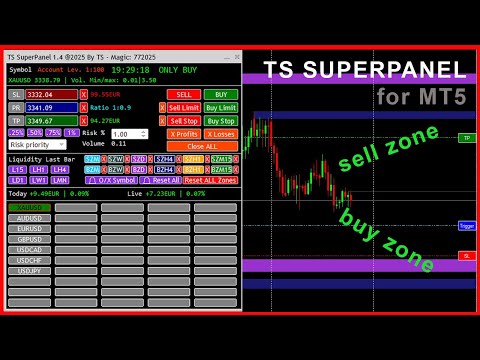
TS Super Panel es una utilidad de trading para dibujar en el gráfico zonas BUY y zonas SELL relevantes. 

NUEVO PRODUCTO. PRECIO ESPECIAL POR TIEMPO LIMITADO

Esta utilidad no se puede probar desde el probador de estrategias. Para descargar una versión DEMO puedes hacerlo desde la entrada del blog: https://www.mql5.com/es/blogs/post/763961

Con TS Super Panel podremos trabajar con hasta 50 símbolos de forma independiente. Conmutar entre un símbolo y otro es realmente rápido. En cada símbolo se podrá dibujar hasta 12 zonas BUY y SELL que resulten relevantes. TS Super Panel dispone de un sistema de alertas para avisar al usuario, cuando el precio entre en alguna de  las zonas definidas.

De forma sencilla podremos fijar sobre el gráfico los precios de StopLoss, TakeProfit y disparo, que luego se utilizarán para poder abrir posiciones BUY y SELL directamente a mercado, o bien a través de órdenes BUY STOP, SELL STOP, BUY LIMIT o SELL LIMIT. Una vez fijados los valores iniciales, dichos valores se podrán modificar directamente en el gráfico mediante el uso del ratón. El tamaño de las posiciones es configurable con un volumen fijo o bien con un porcentaje de riesgo sobre el balance de la cuenta.

  • Multi-Símbolo. Hasta 50 símbolos configurables desde la ventana de parámetros.
  • Hasta 12 zonas relevantes BUY y SELL, en los TimeFrame más habituales: Mensual, Semanal, Diario, H4, H1 y M15.
  • Posibilidad de recibir alarmas PUSH o EMAIL cuando el precio entra en alguna de las zonas definidas.
  • Posibilidad de dibujar zonas o líneas de liquidez (Máximos y mínimos) para las temporalidades más habituales: Mensual, Semanal, Diario, H4, H1 y M15.
  • Botones para apertura de posiciones BUY o SELL a mercado
  • Botones para apertura de órdenes BUY LIMIT, SELL LIMIT, BUY STOP y SELL STOP.
  • Botones para cierre de posiciones abiertas en beneficio, en pédidas o todas las posiciones.
  • Configuración del volumen de una posición de forma fija, o bien por un porcentaje de riesgo sobre el balance de la cuenta.
  • Botones con configuraciones de riesgo pre configuradas: 0.25%, 0.50%, 0.75% y 1.00%.
  • Posibilidad de minimizar y mover la ventana del panel para evitar que tape zonas importantes del gráfico.

MANUAL DE USUARIO

A continuación se detalla como usar las distintas características y funciones de TS SUPER PANEL

    Añadir símbolos al panel.

    Es posible añadir hasta  50 símbolos al panel para poder trabajar con ellos de forma independiente. Para ello abriremos la ventana de parámetros y veremos que están enumerados desde el símbolo 1 al símbolo 50. Debemos añadir aquí, los símbolos deseados. Los símbolos deben estar añadidos previamente a metatrader. Se deben escribir exactamente como aparecen en el broker.

    Una vez se cierra la ventana de parámetros, los símbolos añadidos aparecerán en el panel como un botón. Pulsando en el botón del símbolo deseado, el gráfico cambiará a dicho símbolo.

    Fijar precio del StopLoss

    Para fijar el precio del StopLoss, pulsaremos sobre el botón "SL". El botón cambiará a color "Rojo". En ese momento el sistema queda a la espera de que se haga clic con el ratón sobre el punto del gráfico donde se quiera fijar este nivel de StopLoss. Una vez hecho clic, aparecerá una linea horizontal sobre el punto marcado. A la derecha de la pantalla aparecerá un botón rojo con el texto "SL" sobre la linea dibujada. Si hacemos clic sobre este botón y arrastramos hacia arriba o hacia abajo, podremos ajustar el precio del StopLoss al nivel deseado.

    Fijar precio del TakeProfit

    Para fijar el precio del TakeProfit, pulsaremos sobre el botón "TP". El botón cambiará a color "Verde". En ese momento el sistema queda a la espera de que se haga clic con el ratón sobre el punto del gráfico donde se quiera fijar este nivel de TakeProfit. Una vez hecho clic, aparecerá una linea horizontal sobre el punto marcado. A la derecha de la pantalla aparecerá un botón verde con el texto "TP" sobre la linea dibujada. Si hacemos clic sobre este botón y arrastramos hacia arriba o hacia abajo, podremos ajustar el precio del TakeProfit al nivel deseado.

    Fijar precio de disparo. (Trigger)

    Para fijar el precio Trigger, necesario para las ordenes BuyLimit, SellLimit, BuyStop y SellStop, pulsaremos sobre el botón "PR". El botón cambiará a color "Azul". En ese momento el sistema queda a la espera de que se haga clic con el ratón sobre el punto del gráfico donde se quiera fijar este nivel de Trigger. Una vez hecho clic, aparecerá una linea horizontal sobre el punto marcado. A la derecha de la pantalla aparecerá un botón verde con el texto "Trigger" sobre la linea dibujada. Si hacemos clic sobre este botón y arrastramos hacia arriba o hacia abajo, podremos ajustar el precio del Trigger al nivel deseado.

    El botón "PR", tiene una doble funcionalidad. Si pulsamos sobre él nuevamente, el color pasará a color violeta. En ese momento se está capturando de forma automática el precio actual. Esto será útil, por si abrimos una posición BUY o SELL a mercado, porque en tiempo real se estarán actualizando los valores de perdida y beneficio estimado en función de los niveles de TakeProfit y StopLoss establecidos.

    Fijar el volumen de una posición

    El panel permite establecer el volumen de una posición de forma fija, o bien a través de un porcentaje de riesgo sobre el balance de la cuenta. En el caso de establecer el % de riesgo, podemos hacerlo de forma manual o mediante la ayuda de los botones "0.25%", "0.50%", "0.75%" y "1.00%"que establecerán dichos valores de forma rápida.

    Abrir posiciones a mercado

    Con los botones "SELL" y "BUY" podremos abrir operaciones a mercado, es decir, al precio actual, con los takeprofit y stoploss especificados.

    Abrir ordenes Stop y ordenes Limit.

    Con los botones "SELL LIMIT", "BUY LIMIT", "SELL STOP" y "BUY STOP" se abren las diferentes ordenes con los niveles de takeprofit, stoploss y trigger establecidos. Con la cruz a la izquierda de los botones, se podrá eliminar las ordenes que activas en el sistema.

    Cerrar posiciones abiertas

    Hay 3 botones para cerrar las posiciones abiertas. En este caso, podremos cerrar únicamente las posiciones que se encuentren en beneficio (Botón "X Profits"), únicamente las posiciones que se encuentren en pérdida (Botón "X Losses"), o bien cerrar todas las posiciones (Botón "Close ALL")

    Dibujar líneas o zonas de liquidez.

    Con los botones L15, LH1, LH4, LD1, LW1 y LMN se dibujan las líneas o zonas de liquidez de las temporalidades 15 minutos, 1 hora, 4 horas, 1 día, 1 semana y 1 mes respectivamente. En el caso de representar la liquidez en formato de línea, al pulsar el botón deseado, se dibujará una linea en el máximo y otra linea en el mínimo de la última vela cerrada del gráfico en la temporalidad asociada. En la ventana de parámetros es posible definir los colores de estas dos líneas. También desde la ventana de parámetros se puede definir la visualización como línea o como zona. Para eliminar del gráfico la línea o zona de liquidez dibujada, simplemente hay que pulsar de nuevo sobre el botón asociado, y las líneas desaparecerán del gráfico.

    Dibujar zonas SELL y zonas BUY.

    Muchos traders basan su operativa en analizar los gráficos e identificar zonas relevantes donde el precio podría reaccionar de una forma esperada. TS Super Panel permite dibujar de forma rápida estas zonas importantes sobre el gráfico con los botones disponibles para esta función. Las zonas "SELL-ZONE" serían zonas que se dibujarían en zonas de máximos anteriores del precio y donde el precio podría reaccionar hacia abajo. Por el contrario, las zonas "BUY-ZONE" serían zonas que se dibujarían en zonas de mínimos anteriores del precio, y donde el precio podría reaccionar hacia arriba.

    El dibujo en el gráfico de estas zonas, podremos realizarlas mediante los botones SZM, SZW, SZD, SZH4, SZH1 y SZM15 que se corresponderían con las "SELL-ZONE" de las temporalidades 1 mes, 1 semana, 1 día, 4 horas, 1 hora y 15 minutos. Igualmente disponemos de los botones BZM, BZW, BZD, BZH4, BZH1 y BZM15 que se corresponderían con las "BUY-ZONE" de las temporalidades 1 mes, 1 semana, 1 día, 4 horas, 1 hora y 15 minutos.

    Para dibujar una zona, en primer lugar hay que visualizar el gráfico en la temporalidad deseada. A continuación hay que hacer clic en el botón de zona y temporalidad deseada. El botón se queda destacado, esperando el sistema que se haga clic en algún punto del gráfico para poder dibujar la zona. Se deberá hacer clic ligeramente a la derecha de la mecha de la vela que queramos marcar. Automáticamente aparecerá dibujada la zona. La zona abarcará desde la vela seleccionada, hasta la derecha de la ventana del gráfico. Para eliminar la zona dibujada, se puede hacer clic en el botón "X" que hay a la derecha de cada botón de zona. 

    Hay un botón especial "Reset ALL Zones" que elimina todas las zonas dibujadas en el símbolo activo. En la ventana de parámetros, se pueden definir los colores de cada zona, según las preferencias del usuario.

    Alertas para las zonas "BUY-ZONE" y "SELL-ZONE"

    TS Super Panel dispone de un sistema de alertas para las zonas relevantes que se hayan dibujado en el gráfico. Esta opción se puede activar o desactivar desde la ventana de parámetros. Si tenemos la opción activa, cada vez que el precio entre en una de las zonas dibujadas, se genera una alerta que se enviará por email/push. Además el botón del símbolo en el que se haya generado la alerta, quedará destacado en el panel con un borde de color rojo.

    Con el botón "🔔 O/X Symbol" se resetean las alertas del símbolo actual que se está visualizando en el gráfico. Con el botón "🔔 Reset All" se resetean todas las alertas de todos los símbolos.

    Hay que tener en cuenta que para la correcta recepción de las alertas por email o las notificaciones Push, debe estar correctamente configurados estos parámetros en la configuración de Metatrader 5.

    Önerilen ürünler
    Custom Alerts: Birden Fazla Piyasayı Takip Edin ve Hiçbir Önemli Sinyali Kaçırmayın Genel Bakış Custom Alerts , birden fazla enstrümanı tek bir yerden takip etmek isteyen yatırımcılar için dinamik bir çözümdür. FX Power, FX Volume, FX Dynamic, FX Levels ve IX Power gibi önde gelen araçlarımızdan gelen verileri entegre ederek, Custom Alerts sizi grafikler arasında geçiş yapmak zorunda kalmadan önemli piyasa gelişmeleri hakkında otomatik olarak bilgilendirir. Artık broker’ınızın sunduğu tüm varl
    Description: Stop leaving your capital exposed. Trade Sentinel Pro is a high-performance utility designed specifically for manual traders using MetaTrader 5. Whether you are scalping Gold (XAUUSD) or trading major pairs, this tool acts as your automated safety shield. It does not open trades for you; it protects the trades you open. It eliminates human error, ensures every trade has a hard Stop Loss instantly, and automates profit-taking logic that is impossible to execute manually at high speed
    Trading Pozisyonu ve Geri Test Aracı: "Trading Pozisyonu ve Geri Test Aracı", aynı zamanda "Risk Ödül Oranı Aracı" olarak da bilinen kapsamlı ve yenilikçi bir göstergedir ve teknik analizinizi ve ticaret stratejilerinizi geliştirmek için tasarlanmıştır. Risk Aracı, forex ticaretinde etkili risk yönetimi için kapsamlı ve kullanıcı dostu bir çözümdür. Giriş fiyatı, stop-loss (SL) ve take-profit (TP) seviyeleri de dahil olmak üzere ticaret pozisyonlarını önizleme yeteneği ile gelecek işlemlerin ş
    FREE
    MOST IMPORTANT INFORMATION <1> Exactly this program was used to set World Record in Trading 2020 Account Equity was increased from $1,000,000 to $100,000,000 in 16 days Details => www.mql5.com/en/users/AIS <2> In the last days of this record the position was creating by 1000-2000 orders It was used the computer with 1 core Pentium 4 CPU at 2.8 GHz and 1 GB memory In the last two days the daily profit was $40,000,000 every day <3> It was 100% manual trading And this special program was used to s
    This indicator is based on a mathematical formula which gives you the possibility to seek and find the right frequency of the movement, and to determine its key level; just adjust the frequency parameter! Simple and highly effective; using this indicator you can easily predict the next support and  resistance    levels of the day. Also, this indicator determines the range and the next two importants levels of the movement outside this range so far. SGFL3 and RGFL3  are levels with high certainty
    Introducing RSIScalperPro - the revolutionary RSI-based indicator for Metatrader 5, specifically designed for scalping in the one-minute chart. With RSIScalperPro, you'll have a powerful toolkit for precise entry and exit signals to take your trading to the next level. RSIScalperPro utilizes two different RSI indicators that provide clear signals for overbought and oversold areas. You can customize the time periods and limit values of the two RSIs according to your preferences to achieve the be
    Disclaimer : Keep in mind that seasonal patterns are not always reliable. Therefore, thoughtful risk management is crucial to minimize losses.  Seasonal patterns in the financial world are like a well-guarded secret that successful investors use to their advantage. These patterns are recurring price movements that occur during specific periods or around special events. Additionally, there are also intraday patterns that repeat. For example, Uncle Ted from Forex Family suggests examining previou
    Sadece grafik formasyonlarını ararken çok fazla zaman mı kaybediyorsunuz? Belirli bir kurulumu bulmak için ekranı sürekli kaydırmak yorucu olabilir. Nihayet bulduğunuzda, alt zaman dilimine geçmek genellikle tam konumu kaybetmenize neden olur. Basit bir yakınlaştırma veya uzaklaştırma bile analiz etmeye çalıştığınız fiyat hareketini gözden kaçırmanıza yol açabilir. Bu araçla şunları yapabilirsiniz: Verimli bir arama için geçmiş grafikleri otomatik ve yüksek hızda tarayabilirsiniz. İstediğiniz za
    CrossMaster PRO
    Abderrahmane Benali
    CrossMaster PRO – Where Trends Reveal Themselves CrossMaster PRO is a precision-built indicator designed to identify critical moments where market direction begins to shift. By monitoring the interaction between two moving averages, it delivers clear signals exactly when timing matters most. Built for traders who value clarity over noise, this tool transforms simple crossovers into actionable insights, supported by intelligent alerts and a clean visual structure. Core Advantages Real-time detec
    Twitter Model MMXM Indicator (ICT Style) for MetaTrader 5 The Twitter Model MMXM Indicator (ICT Style) for MetaTrader 5 is designed to help traders identify high-probability reversal and continuation zones using key Smart Money and ICT concepts . This indicator focuses on detecting liquidity grabs , Fair Value Gaps (FVGs) , and CISD levels , offering structured trade setup signals based on institutional price behavior. The tool monitors the daily high and low within a 24-hour cycle , applying sw
    VIDYA Enhanced
    David Ben Svaiter
    VIDYA-ENHANCED göstergesi (Değişken Endeks Dinamik Ortalama) trendleri ve yatay hareketleri belirlemek için kullanılan bir teknik analiz aracıdır. Chande Momentum Osilatörünü bir volatilite endeksi olarak kullanarak hassasiyetini piyasa volatilitesine göre dinamik olarak ayarlar. Bu özellik, VIDYA-ENHANCED'in önemli fiyat hareketleri dönemlerinde daha çevik olmasını sağlarken, daha az değişken aşamalarda daha istikrarlı kalmasını sağlar.  Özellikler: - Fiyatı 12 seçenek arasından seçin - Met
    Special
    Ivan Simonika
    The indicator monitors the market trend, ignoring sharp fluctuations in the market and noise around the average price. Shows points for entering the market, points of potential market reversal. The indicator implements a kind of technical analysis based on the idea that the market is cyclical in nature. The indicator can be used both for pipsing on small periods, and for long-term trading.
    Linear Trend Predictor - Giriş noktalarını ve yön destek çizgilerini birleştiren bir trend göstergesi. Yüksek/Düşük fiyat kanalını kırma prensibiyle çalışır. Gösterge algoritması piyasa gürültüsünü filtreler, oynaklığı ve piyasa dinamiklerini dikkate alır. Gösterge yetenekleri  Düzeltme yöntemleri kullanılarak piyasa trendi ve ALIM veya SATIŞ emirlerinin açılabileceği giriş noktaları gösterilir.  Herhangi bir zaman dilimindeki grafikleri analiz ederek kısa ve uzun vadeli piyasa hareketlerini
    Premium Risk , özellikle scalper işlem yapan yatırımcılar için geliştirilmiş akıllı bir risk yönetim ve pozisyon alma uygulamasıdır. Uygulama; risk–ödül oranınızı (R:R) ve sermaye bazlı risk miktarınızı otomatik olarak hesaplayarak doğru lot ve pozisyon büyüklüğünü belirlemenize yardımcı olur. POS modülü sayesinde işlemlerinizi otomatik olarak takip edebilir, yönetebilir ve hızlı aksiyon alabilirsiniz. Ayrıca magnet (mıknatıs) özelliği ile anlık piyasa fiyatını otomatik algılayarak hızlı ve doğr
    Glider
    Vitalii Zakharuk
    The Glider indicator gives accurate and timely signals to enter and exit the transaction that appear on the current candle. Using the indicator is very simple. When a dot and a blue line appear, open a buy deal. When a dot and a red line appear, open a sell deal. The main purpose of this indicator is to determine the moments of entry and exit from transactions, therefore the Glider indicator will display only the trend line and entry points, i.e. displays displays the entry points to the marke
    Expert Market Edge is scalping, trending, reversal indicator, with alerts . You can use it all and fit with your strategy whatever it fits you. My recommendation is to combine with my Colored RSI , and when 2 signals are matched, and pointing same direction (for example buy on this indicator, and green on RSI, you can take a long position, stop loss should be last local low, if you want to be more conservative, add ATR. ) you can take position. If you using moving averages, that's even better i
    Friends, this tool does not work in backtesting and you must run it live. Chat Ai assistant a versatile and intelligent AI assistant Talk to the AI, get advice from it, give it orders Can be used in all charts, time frames, symbols, markets and... With a very simple interface This tool is an artificial intelligence assistant that you can chat with. You can give him different commands. for example: Tell him to open a buy order for you. Or tell him to close your sales deals Or tell it to change
    ️ KP Stability Engine – Professional Risk Infrastructure for MT5 KP Stability Engine is not a trading robot. It is a professional-grade account protection and risk control engine. Designed for traders and developers running one or multiple Expert Advisors, KP Stability Engine acts as a central risk governor that continuously monitors your account and dynamically limits exposure, drawdown, and floating losses in real time. It publishes live risk permissions using MT5 Global Variables, allowing
    I recommend you to read the  product's blog  (manual) from start to end so that it is clear from the beginning what the indicator offers. This multi time frame and multi symbol supply and demand zone dashboard indicator sends alerts when the price has reached a supply/demand zone. It is also possible to use it to be alerted about regular double tops/bottoms instead of zones. It can be used with all time frames from M1 to MN. Maximum 9 time frames can be shown in the dashboard at the same time. 
    The utility is designed to display on the chart the margin zones built on the basis of margin requirements for futures of the Chicago Mercantile exchange (CME). These margin zones are good levels of resistance and support, as seen in the screenshots. How to use To trade on margin zones, use the following rules: buy after the day has closed above one of the zones to the next zone; sell after the day has closed below one of the zones to the next zone; after opening a sell trade, place limit sell
    Automated Supply and Demand Tracker MT5. The following videos demonstrate how we use the system for trade setups and analysis.US PPI, Fed Interest Rates, and FOMC Trade Setup Time Lapse: U.S. dollar(DXY) and Australian dollar vs U.S. dollar(AUD/USD)  https://youtu.be/XVJqdEWfv6s  The EUR/USD Trade Setup time lapse 8/6/23.  https://youtu.be/UDrBAbOqkMY . US 500 Cash Trade Setup time lapse 8/6/23  https://youtu.be/jpQ6h9qjVcU .  https://youtu.be/JJanqcNzLGM ,  https://youtu.be/MnuStQGjMyg,&nbsp ;

    Just $10 for six months!!!. This will draw Order Blocks just by clicking on a candle. It will use the body or the wicks. It can also draw the mean threshold of the candle open/close or high/low. As a drawing tool, it is not active all the time after adding it to the chart. Activate by pressing 'b' twice on the keyboard within a second. If activated but then decided not to draw, deactivate by pressing 'b' once.  Box color depends if candle is above or below current price. Settings/Inputs: Number
    DrawTrade MT5
    Benjamin Daniel Suarez Luque
    Enhance Your Manual Trading Workflow in MetaTrader DrawTrade is a total reimagining of how you interact with MetaTrader by introducing a flexible and intuitive interface designed specifically for manual traders. It enhances chart navigation, improves drawing responsiveness, and streamlines trade execution — all with tools that feel natural to use and quick to master.   Core Navigation Improvements Mouse Flick Navigation Quickly pan across charts with a flick of the mouse, improving chart expl
    Bu gösterge, pratik ticaret için mükemmel olan otomatik dalga analizine yönelik bir göstergedir! Dava... Not:   Dalga sınıflandırması için Batılı isimleri kullanmaya alışkın değilim. Tang Lun'un (Tang Zhong Shuo Zen) adlandırma kuralının etkisiyle, temel dalgayı   kalem   , ikincil dalga bandını ise   segment   olarak adlandırdım. aynı zamanda segmentin trend yönü vardır. Adlandırma   esas olarak trend segmentidir   (bu adlandırma yöntemi gelecekteki notlarda kullanılacaktır, öncelikle söyleyey
    GRID for MT5 is a convenient tool for those who trade a grid of orders, designed for quick and comfortable trading in the FOREX financial markets. GRID for MT5 has a customizable panel with all the necessary parameters. Suitable for both experienced traders and beginners. It works with any brokers, including American brokers, requiring FIFO to close primarily previously opened transactions. The grid of orders can be either fixed - orders are opened with a fixed step, or have dynamic levels of op
    Didi Index
    Flavio Javier Jarabeck
    4.8 (25)
    The famous brazilian trader and analyst Didi Aguiar created years ago a study with the crossing of 3 Simple Moving Averages called "Agulhada do Didi", then later was also named Didi Index, as a separate indicator. The period of those SMAs are 3, 8 and 20. As simple as that, this approach and vision bring an easy analysis of market momentum and trend reversal to those traders looking for objective (and visual) information on their charts. Of course, as always, no indicator alone could be used wit
    FREE
    If you are unsure how to use this indicator, please feel free to reach out to me. I will explain it to you and provide reading materials to help you make the most of it. TD Sequential Scanner: An Overview The TD Sequential scanner is a powerful technical analysis tool designed to identify potential price exhaustion points and trend reversals in financial markets. Developed by Tom DeMark, this method is widely used by traders to gauge market cycles and potential turning points with precision. Ho
    MiniFullIndexTrader
    Francisco Eugenio Martoni M De Andrada
    FA MiniFullIndexTrader: Scalper versátil para índices mini e completos Este Expert Advisor (EA) é uma estratégia de scalping automatizada para MetaTrader 5, otimizada para contratos de índice como WIN@, WINQ25, WINFUT e WIN$. Ele utiliza rompimentos diários para entradas rápidas, com gerenciamento de risco avançado para proteger o capital. Principais vantagens: Rentável e consistente: Em backtests, gera lucro líquido de até 14.310 pontos com fator de lucro de 1,44 e Sharpe 16,77 (alto retorno p
    Headline: Stop Guessing. Start Quantifying. Discover Your Market's Golden Crossover with the Quantum Comprehensive MA Analyzer. Short Description: Are you tired of relying on the same lagging indicators and generic moving average settings that everyone else uses? Frustrated with crossover strategies that work one week and fail the next? It's time to stop trading on hope and start making decisions based on powerful, historical data. The Quantum Comprehensive MA Analyzer is not just another indica
    Algo octa
    Firas Al-qasimi
    Algo Octa - Indicateur d'Analyse Technique Avancé Indicateur professionnel combinant ZigZag, SAR parabolique, canaux de tendance et niveaux de Fibonacci pour une analyse technique complète.  if you don't understand how to use Technical Support via product feedback or MQL5 messaging system.  Fonctionnalités Principales Analyse Multi-Composants  ZigZag coloré avec détection automatique des extremums  Intégration du SAR parabolique pour la confirmation de tendance  Création automatique de canau
    Bu ürünün alıcıları ayrıca şunları da satın alıyor
    Trade Assistant MT5
    Evgeniy Kravchenko
    4.41 (205)
    It helps to calculate the risk per trade, the easy installation of a new order, order management with partial closing functions, trailing stop of 7 types and other useful functions. Additional materials and instructions Installation instructions - Application instructions - Trial version of the application for a demo account Line function -   shows on the chart the Opening line, Stop Loss, Take Profit. With this function it is easy to set a new order and see its additional characteristics bef
    Trade Manager EA’ye hoş geldiniz! Ticaretin daha sezgisel, hassas ve verimli hale gelmesi için tasarlanmış nihai risk yönetim aracı ile tanışın. Bu sadece bir emir verme aracı değil; ticaret planlaması, pozisyon yönetimi ve risk kontrolü için kapsamlı bir çözüm. İster yeni başlayan bir yatırımcı olun, ister deneyimli bir trader ya da hızlı emir gerektiren bir scalper, Trade Manager EA ihtiyaçlarınıza uyum sağlar ve forex, endeksler, emtialar ve kripto paralar dahil tüm piyasalarda esneklik sunar
    Local Trade Copier EA MT5
    Juvenille Emperor Limited
    4.96 (116)
    Local Trade Copier EA MT5   ile olağanüstü hızlı işlem kopyalama deneyimi yaşayın. Kolay 1 dakikalık kurulumuyla bu işlem kopyalayıcısı, aynı Windows bilgisayarda veya Windows VPS'te birden fazla MetaTrader terminali arasında işlemleri kopyalamanıza olanak tanır ve 0.5 saniyenin altındaki şimşek hızında kopyalama hızları sunar. Başlangıç seviyesinde veya profesyonel bir tüccar olsanız da,   Local Trade Copier EA MT5 , spesifik ihtiyaçlarınıza göre özelleştirmek için geniş bir seçenek yelpazesi s
    TradePanel MT5
    Alfiya Fazylova
    4.86 (146)
    Ticaret Paneli çok işlevli bir ticaret asistanıdır. Uygulama, manuel ticaret için 50'den fazla ticaret işlevi içerir ve çoğu ticaret işlemini otomatikleştirmenize olanak tanır. Dikkat, uygulama strateji test cihazında çalışmıyor. Satın almadan önce demo sürümünü bir demo hesabında test edebilirsiniz. Demo sürümü burada . Talimatların tamamı buraya . Ticaret. Tek tıklamayla alım satım işlemlerini gerçekleştirmenizi sağlar: Otomatik risk hesaplaması ile bekleyen emir ve pozisyonları açın. Tek tıkl
    Ultimate Extractor - Professional Trading Analytics for MT5 Ultimate Extractor transforms your MetaTrader 5 trading history into actionable insights with comprehensive analytics, interactive charts, and real-time performance tracking. What It Does  Phase 1: Automatically analyzes your MT5 trading history across all Expert Advisors and generates detailed HTML reports with interactive visualizations. Tracks live performance metrics including open positions, floating P/L, and drawdown in real-time.
    Beta Sürümü Telegram to MT5 Signal Trader resmi alfa sürümüne neredeyse hazır. Bazı özellikler hâlâ geliştirilmekte olup küçük hatalarla karşılaşabilirsiniz. Sorun yaşarsanız lütfen bildirin, geri bildiriminiz yazılımın herkes için gelişmesine yardımcı olur. Fiyat 20 satıştan sonra artacaktır. Kalan $90 kopya: 2/20 . Telegram to MT5 Signal Trader , Telegram kanallarından veya gruplarından gelen işlem sinyallerini otomatik olarak MetaTrader 5 hesabınıza kopyalayan güçlü bir araçtır. Herkese açı
    Tired of complex order placement and manual calculations? Trade Dashboard is your solution. With its user-friendly interface, placing orders becomes effortless, by a single click, you can open trades, set stop loss and take profit levels, manage trade lot size, and calculate risk to reward ratios, allowing you to only focus on your strategy. Say goodbye to manual calculations and streamline your trading experience with Trade Dashboard. Download  Demo Version  right now. You can find  Details of
    Smart Stop Scanner – Gerçek piyasa yapısına dayalı çoklu varlık stop-loss analizi Genel Bakış Smart Stop Scanner, birden fazla piyasadaki stop-loss seviyelerini profesyonel bir şekilde takip etmek için tasarlanmıştır. Sistem, gerçek piyasa yapısına dayanan breakout’ları, daha yüksek zirveleri ve daha düşük dipleri otomatik olarak algılar ve en önemli stop bölgelerini tespit eder. Tüm bilgiler, yüksek çözünürlüklü ekranlarla uyumlu (DPI-aware) net ve düzenli bir panelde sunulur. Forex, Altın, E
    Smart Stop Manager – Profesyonel hassasiyetle otomatik stop-loss yönetimi Genel Bakış Smart Stop Manager, Smart Stop ürün serisinin yürütme katmanıdır. Birden fazla açık pozisyonda yapılandırılmış, güvenilir ve tamamen otomatik stop-loss yönetimi isteyen trader’lar için tasarlanmıştır. Tüm açık işlemleri sürekli izler, Smart Stop piyasa yapısı mantığını kullanarak en uygun stop seviyesini hesaplar ve stopları net ve şeffaf kurallarla otomatik olarak günceller. İster tek bir varlıkla işlem yapı
    EASY Insight AIO – Akıllı ve zahmetsiz yatırım için hepsi bir arada çözüm Genel Bakış Tüm piyasayı — Forex, Altın, Kripto, Endeksler ve hatta Hisseler — saniyeler içinde, manuel grafik incelemesi, gösterge kurulumu ya da karmaşık ayarlar olmadan analiz edebildiğinizi hayal edin. EASY Insight AIO , yapay zekâ destekli yatırım için nihai, kullanıma hazır dışa aktarma aracınızdır. Tüm piyasanın kapsamlı bir anlık görüntüsünü tek bir temiz CSV dosyasında sunar; bu dosya ChatGPT, Claude, Gemini, Pe
    Bu ürün, haber saatlerinde tüm uzman danışmanları ve manüel grafikleri filtreler, böylece manüel ticaret kurulumlarınızı veya diğer uzman danışmanlar tarafından girilen işlemleri yok edebilecek ani fiyat dalgalanmaları konusunda endişelenmenize gerek kalmaz. Bu ürün, herhangi bir haber yayınlanmadan önce açık pozisyonlarınızı ve bekleyen emirlerinizi yönetebilen tam bir sipariş yönetim sistemi ile birlikte gelir.   The News Filter'ı   satın aldığınızda, gelecekteki uzman danışmanlar için yerleşi
    Exp COPYLOT CLIENT for MT5
    Vladislav Andruschenko
    3.82 (34)
    MT5 için ticari kopyalayıcı, МetaТrader 5 platformu için bir ticari kopyalayıcıdır   . arasındaki   forex işlemlerini kopyalar.       COPYLOT MT5 sürümü için   herhangi bir hesap   MT5   -   MT5, MT4   -   MT5 (veya COPYLOT MT4 sürümü için   MT4 -   MT4 MT5   -  MT4) Güvenilir fotokopi makinesi! MT4 sürümü Tam tanım   +DEMO +PDF Nasıl alınır Nasıl kurulur     Günlük Dosyaları nasıl alınır?     Nasıl Test Edilir ve Optimize Edilir     Expforex'in tüm ürünleri Ayrıca МТ4 terminali   (МТ4   -  
    MT5 to Telegram Signal Provider , hesabınızı bir sinyal sağlayıcı haline getirerek belirtilen sinyalleri Telegram'ın sohbetine, kanalına veya grubuna göndermeyi sağlayan kullanımı kolay, tamamen özelleştirilebilir bir araçtır. Rakip ürünlerin çoğunun aksine, DLL içe aktarması yapmaz. [ Demo ] [ Kılavuz ] [ MT4 Versiyonu ] [ Discord Versiyonu ] [ Telegram Kanalı ]  New: [ Telegram To MT5 ] Kurulum Adım adım bir kullanıcı kılavuzu mevcuttur. Telegram API'si hakkında bilgi gerekmemektedir; ihtiyac
    Copy Cat More Trade Copier MT5 (Kopyalayıcı Kedi MT5) , günümüzün ticaret zorluklarına yönelik tasarlanmış yerel bir ticaret kopyalayıcısı ve eksiksiz risk yönetimi ve yürütme çerçevesidir. Prop firması zorluklarından kişisel portföy yönetimine kadar, sağlam yürütme, sermaye koruması, esnek yapılandırma ve gelişmiş ticaret işleme kombinasyonu ile her duruma uyum sağlar. Kopyalayıcı hem Master (gönderici) hem de Slave (alıcı) modunda çalışır, piyasa ve bekleyen emirlerin, ticaret değişikliklerini
    1 tıklama ile ticaret için Ticaret Paneli.   Pozisyonlar ve emirlerle çalışmak!   Grafikten veya klavyeden alım satım. Alım satım panelimizi kullanarak, grafikten tek bir tıklamayla alım satım yapabilir ve alım satım işlemlerini standart MetaTrader kontrolünden 30 kat daha hızlı gerçekleştirebilirsiniz. Bir tüccar için hayatı kolaylaştıran ve bir tüccarın ticaret faaliyetlerini çok daha hızlı ve daha rahat gerçekleştirmesine yardımcı olan parametrelerin ve işlevlerin otomatik hesaplamaları. Graf
    Seconds Chart — MetaTrader 5 için saniye bazlı grafikler oluşturmanıza olanak sağlayan eşsiz bir araçtır. Seconds Chart sayesinde saniye cinsinden zaman dilimleriyle grafik oluşturabilir, standart dakika veya saatlik grafiklerde mümkün olmayan esneklik ve analiz hassasiyetine ulaşabilirsiniz. Örneğin, S15 zaman dilimi 15 saniyelik mum çubuklarını ifade eder. Desteklenen özel sembollerle herhangi bir gösterge ve danışman kullanabilirsiniz. Onlarla çalışmak, standart grafiklerde işlem yapmak kadar
    Grid Manual MT5
    Alfiya Fazylova
    4.9 (20)
    Grid Manual, sipariş ızgarasıyla çalışmak için kullanılan bir ticaret yardımcı programıdır. Yardımcı program evrenseldir, esnek ayarlara ve sezgisel bir arayüze sahiptir. Sadece kayıpların ortalaması yönünde değil, aynı zamanda kazanç artışı yönünde de bir emir ızgarası ile çalışır. Tüccarın bir emir ızgarası oluşturmasına ve eşlik etmesine gerek yoktur, bu yardımcı programı yapacaktır. Emri açmanız yeterlidir ve Grid manual otomatik olarak ona bir emir ızgarası oluşturacak ve kapanana kadar ona
    HYT (İşlemlerinize Yardımcı Olun),   iki temel teknik kullanarak zarar eden pozisyonlarınızın   ortalamasını düşürmenize   yardımcı olmak için tasarlanmış bir araçtır: Standart ortalama. Trend yönünde pozisyon açılması ile korunma. Bu araç, hem alım hem de satım için farklı yönlerde açılan birden fazla pozisyonu yönetmenize olanak tanır. HYT, bir sonraki pozisyonun büyüklüğünü, emir fiyatını, ortalama yönünü ve pozisyonun belirlenen kar alma seviyesiyle kapatılmasını otomatik olarak hesaplar. Ay
    HINN MAGIC ENTRY – the ultimate tool for entry and position management! Place orders by selecting a level directly on the chart! Key features: - Market, limit, and pending orders - Automatic lot size calculation - Automatic spread and commission accounting - Unlimited partitial take-profits  - Breakeven and trailing stop-loss  functions - Intuitive, adaptive, and customizable interface - Session and strong algorithmic level visualization - Works with any assets and account types Join the   ALG
    Riskinizi otomatik olarak hesaplarken işlemlere hızlı bir şekilde girip çıkmanıza yardımcı olacak Ticaret Yöneticisi. Aşırı Ticaret, İntikam Ticareti ve Duygusal Ticaretten korunmanıza yardımcı olacak özellikler içerir. İşlemler otomatik olarak yönetilebilir ve hesap performans ölçümleri bir grafikte görselleştirilebilir. Bu özellikler, bu paneli tüm manuel yatırımcılar için ideal kılar ve MetaTrader 5 platformunun geliştirilmesine yardımcı olur. Çoklu Dil desteği. MT4 Sürümü  |  Kullanım Kılavu
    The product will copy all telegram signal to MT5 ( which you are member) , also it can work as remote copier.  Easy to set up, copy order instant, can work with almost signal formats, image signal,  s upport to translate other language to English Work with all type of channel or group, even channel have "Restrict Saving Content", work with  multi channel, multi MT5 Work as remote copier: with signal have ticket number, it will copy exactly via ticket number. Support to backtest signal. How to s
    Zentral Trading Manager
    Ray Zeanrik Parreno Fredeluces
    5 (4)
    Zentral Trading Manager Your Command Center for Precision Trading — Now Stronger than Ever Take control of your trades like never before. Zentral Trading Manager is your all-in-one manual trading panel for MetaTrader 5 — built for scalpers, day traders, and serious strategy execution. Fully compatible with both Mac and Windows laptops. High-DPI safe. No more layout issues. Key Features (Latest 2025 Update): • One-Click Close – Instantly close Buy/Sell, winning/losing trades, or even half positi
    Telegram'dan MT5'e:   Nihai Sinyal Kopyalama Çözümü Telegram'dan MT5'e işlemlerinizi basitleştirin, DLL'lere ihtiyaç duymadan işlem sinyallerini doğrudan Telegram kanallarından ve sohbetlerinden MetaTrader 5 platformunuza kopyalayan modern araç. Bu güçlü çözüm hassas sinyal yürütme, kapsamlı özelleştirme seçenekleri sağlar, zamandan tasarruf sağlar ve verimliliğinizi artırır. [ Instructions and DEMO ] Temel Özellikler Doğrudan Telegram API Entegrasyonu Telefon numarası ve güvenli kod ile kimlik
    Patrex pro
    Chioma Obunadike
    5 (1)
    Patrex Pro: Maximize Your Trading Potential Patrex Pro is an advanced trading bot designed to help traders optimize their trading strategies and maximize their potential returns. With its cutting-edge technology and user-friendly interface, Patrex Pro is the ultimate tool for traders seeking to elevate their trading game. Get MT4 Version Key Features: 1. Position Hedging: Patrex Pro allows users to hedge their positions based on their individual risk tolerance and market analysis. 2. Advanced R
    Lazy Trader is your personal risk management assistant that independently finds the best market entries, manages positions, and helps you extract maximum profit from every trading idea! It monitors charts from M1 to W1 , finds optimal entry points based on your parameters, and manages trades without your involvement: - Got an idea on the daily chart? No need to wait for lower timeframes to form a signal — Lazy Trader will check everything and open all necessary positions while you live your lif
    Trade Assistant 38 in 1
    Makarii Gubaydullin
    4.91 (22)
    Ultimate Trade Assistant MT5 — Çok Fonksiyonlu Ticaret Asistanı 66'dan fazla profesyonel araç tek bir panelde — daha hızlı, güvenli ve verimli işlem yapın. Bu asistan; risk yönetimi, emir kontrolü, piyasa analizi ve pozisyon takibini tek bir güçlü arayüzde birleştirir. Hem yeni başlayanlar hem de profesyonel yatırımcılar için uygundur. Neden trader’lar bu aracı tercih ediyor Tek tıklamayla hızlı emir açma ve yönetim Otomatik lot ve risk hesaplama Akıllı emirler: grid, OCO, gizli emirler, sanal S
    Devrim niteliğindeki X2 Copy MT5 ile Anında Trade Kopyalamayı Keşfedin. Sadece 10 saniyelik bir kurulumla, tek bir Windows bilgisayarda veya VPS'te MetaTrader terminalleri arasında trades senkronizasyonu için güçlü bir araç elde edeceksiniz - benzeri görülmemiş bir hızla, 0.1 saniyenin altında. İster birden fazla hesap yönetin, ister sinyalleri takip edin, ister stratejinizi ölçeklendirin, X2 Copy MT5 eşsiz bir hassasiyet ve kontrolle iş akışınıza uyum sağlar. Beklemeyi bırakın — piyasa lideri h
    Trade Manager DashPlus
    Henry Lyubomir Wallace
    5 (12)
    DashPlus , MetaTrader 5 platformunda işlem verimliliğinizi ve etkinliğinizi artırmak için tasarlanmış gelişmiş bir işlem yönetim aracıdır. Risk hesaplama, emir yönetimi, gelişmiş ızgara sistemleri, grafik tabanlı araçlar ve performans analitiği gibi kapsamlı bir özellik yelpazesi sunar. Temel Özellikler 1. Kurtarma Izgarası Olumsuz piyasa koşullarında işlemleri yönetmek için ortalama alma ve esnek bir ızgara sistemi uygular. İşlem kurtarma çabalarını optimize etmek için stratejik giriş ve çıkış
    News Filter EA: Advanced Algo Trading Assistant News Filter EA is an advanced algo trading assistant designed to enhance your trading experience. By using the News Filter EA , you can integrate a Forex economic news filter into your existing expert advisor, even if you do not have access to its source code. In addition to the news filter, you can also specify trading days and hours for your expert. The News Filter EA also includes risk management  and equity protection features. MT4 Version KEY
    This is exactly what the name says. Visual strategy builder . One of a kind. Turn your trading strategies and ideas into Expert Advisors without writing single line of code. Generate mql source code files with a few clicks and get your fully functional Expert Advisors, which are ready for live execution, strategy tester and cloud optimization. There are very few options for those who have no programming skills and can not create their trading solutions in the MQL language. Now, with Bots Builde
    Yazarın diğer ürünleri
    TS Market Sessions
    Aurelio Manuel Peral Garcia
    5 (1)
    Indicador gratuito para Metatrader 5 que muestra en pantalla una caja rectangular para cada una de las sesiones de mercado "Londres, New York y Tokio". Se puede establecer la zona horaria de forma automática o mediante un valor de offset. Parámetros de configuración para cada una de las sesiones. Visible / No visible Hora Inicial Hora Final Caja sólida o transparente. Estilo del borde de la caja. Grosor del borde de la caja. Color.
    FREE
    TS Time Remaining
    Aurelio Manuel Peral Garcia
    TS Time Remaining - Indicador de Cuenta Regresiva para Velas en MetaTrader 5 El TS Time Remaining es un indicador gratuito diseñado para la plataforma MetaTrader 5 que permite a los traders visualizar en tiempo real el tiempo restante de la vela actual. Esta herramienta es especialmente útil para aquellos operadores que trabajan con estrategias basadas en la acción del precio y patrones de velas japonesas, ya que les permite anticiparse al cierre de la vela y tomar decisiones con mayor precisión
    FREE
    TS PerfectDays MT5
    Aurelio Manuel Peral Garcia
    Perfect Days: El Robot de Trading Inteligente para el Oro (XAUUSD) Perfect Days es un avanzado robot de trading automático desarrollado específicamente para operar con alta eficiencia en el par XAUUSD (oro frente al dólar estadounidense) dentro de la plataforma MetaTrader 5 . Diseñado tanto para traders profesionales como para quienes buscan una solución robusta y segura, este experto asesor (EA) combina tecnología de vanguardia con una operativa responsable y personalizable. Características Pri
    Filtrele:
    İnceleme yok
    İncelemeye yanıt