TS Super Panel MT5

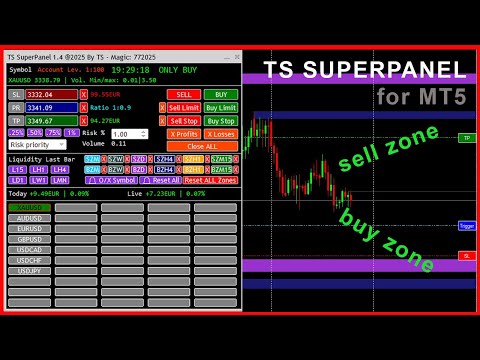
TS Super Panel es una utilidad de trading para dibujar en el gráfico zonas BUY y zonas SELL relevantes. 

NUEVO PRODUCTO. PRECIO ESPECIAL POR TIEMPO LIMITADO

Esta utilidad no se puede probar desde el probador de estrategias. Para descargar una versión DEMO puedes hacerlo desde la entrada del blog: https://www.mql5.com/es/blogs/post/763961

Con TS Super Panel podremos trabajar con hasta 50 símbolos de forma independiente. Conmutar entre un símbolo y otro es realmente rápido. En cada símbolo se podrá dibujar hasta 12 zonas BUY y SELL que resulten relevantes. TS Super Panel dispone de un sistema de alertas para avisar al usuario, cuando el precio entre en alguna de  las zonas definidas.

De forma sencilla podremos fijar sobre el gráfico los precios de StopLoss, TakeProfit y disparo, que luego se utilizarán para poder abrir posiciones BUY y SELL directamente a mercado, o bien a través de órdenes BUY STOP, SELL STOP, BUY LIMIT o SELL LIMIT. Una vez fijados los valores iniciales, dichos valores se podrán modificar directamente en el gráfico mediante el uso del ratón. El tamaño de las posiciones es configurable con un volumen fijo o bien con un porcentaje de riesgo sobre el balance de la cuenta.

  • Multi-Símbolo. Hasta 50 símbolos configurables desde la ventana de parámetros.
  • Hasta 12 zonas relevantes BUY y SELL, en los TimeFrame más habituales: Mensual, Semanal, Diario, H4, H1 y M15.
  • Posibilidad de recibir alarmas PUSH o EMAIL cuando el precio entra en alguna de las zonas definidas.
  • Posibilidad de dibujar zonas o líneas de liquidez (Máximos y mínimos) para las temporalidades más habituales: Mensual, Semanal, Diario, H4, H1 y M15.
  • Botones para apertura de posiciones BUY o SELL a mercado
  • Botones para apertura de órdenes BUY LIMIT, SELL LIMIT, BUY STOP y SELL STOP.
  • Botones para cierre de posiciones abiertas en beneficio, en pédidas o todas las posiciones.
  • Configuración del volumen de una posición de forma fija, o bien por un porcentaje de riesgo sobre el balance de la cuenta.
  • Botones con configuraciones de riesgo pre configuradas: 0.25%, 0.50%, 0.75% y 1.00%.
  • Posibilidad de minimizar y mover la ventana del panel para evitar que tape zonas importantes del gráfico.

MANUAL DE USUARIO

A continuación se detalla como usar las distintas características y funciones de TS SUPER PANEL

    Añadir símbolos al panel.

    Es posible añadir hasta  50 símbolos al panel para poder trabajar con ellos de forma independiente. Para ello abriremos la ventana de parámetros y veremos que están enumerados desde el símbolo 1 al símbolo 50. Debemos añadir aquí, los símbolos deseados. Los símbolos deben estar añadidos previamente a metatrader. Se deben escribir exactamente como aparecen en el broker.

    Una vez se cierra la ventana de parámetros, los símbolos añadidos aparecerán en el panel como un botón. Pulsando en el botón del símbolo deseado, el gráfico cambiará a dicho símbolo.

    Fijar precio del StopLoss

    Para fijar el precio del StopLoss, pulsaremos sobre el botón "SL". El botón cambiará a color "Rojo". En ese momento el sistema queda a la espera de que se haga clic con el ratón sobre el punto del gráfico donde se quiera fijar este nivel de StopLoss. Una vez hecho clic, aparecerá una linea horizontal sobre el punto marcado. A la derecha de la pantalla aparecerá un botón rojo con el texto "SL" sobre la linea dibujada. Si hacemos clic sobre este botón y arrastramos hacia arriba o hacia abajo, podremos ajustar el precio del StopLoss al nivel deseado.

    Fijar precio del TakeProfit

    Para fijar el precio del TakeProfit, pulsaremos sobre el botón "TP". El botón cambiará a color "Verde". En ese momento el sistema queda a la espera de que se haga clic con el ratón sobre el punto del gráfico donde se quiera fijar este nivel de TakeProfit. Una vez hecho clic, aparecerá una linea horizontal sobre el punto marcado. A la derecha de la pantalla aparecerá un botón verde con el texto "TP" sobre la linea dibujada. Si hacemos clic sobre este botón y arrastramos hacia arriba o hacia abajo, podremos ajustar el precio del TakeProfit al nivel deseado.

    Fijar precio de disparo. (Trigger)

    Para fijar el precio Trigger, necesario para las ordenes BuyLimit, SellLimit, BuyStop y SellStop, pulsaremos sobre el botón "PR". El botón cambiará a color "Azul". En ese momento el sistema queda a la espera de que se haga clic con el ratón sobre el punto del gráfico donde se quiera fijar este nivel de Trigger. Una vez hecho clic, aparecerá una linea horizontal sobre el punto marcado. A la derecha de la pantalla aparecerá un botón verde con el texto "Trigger" sobre la linea dibujada. Si hacemos clic sobre este botón y arrastramos hacia arriba o hacia abajo, podremos ajustar el precio del Trigger al nivel deseado.

    El botón "PR", tiene una doble funcionalidad. Si pulsamos sobre él nuevamente, el color pasará a color violeta. En ese momento se está capturando de forma automática el precio actual. Esto será útil, por si abrimos una posición BUY o SELL a mercado, porque en tiempo real se estarán actualizando los valores de perdida y beneficio estimado en función de los niveles de TakeProfit y StopLoss establecidos.

    Fijar el volumen de una posición

    El panel permite establecer el volumen de una posición de forma fija, o bien a través de un porcentaje de riesgo sobre el balance de la cuenta. En el caso de establecer el % de riesgo, podemos hacerlo de forma manual o mediante la ayuda de los botones "0.25%", "0.50%", "0.75%" y "1.00%"que establecerán dichos valores de forma rápida.

    Abrir posiciones a mercado

    Con los botones "SELL" y "BUY" podremos abrir operaciones a mercado, es decir, al precio actual, con los takeprofit y stoploss especificados.

    Abrir ordenes Stop y ordenes Limit.

    Con los botones "SELL LIMIT", "BUY LIMIT", "SELL STOP" y "BUY STOP" se abren las diferentes ordenes con los niveles de takeprofit, stoploss y trigger establecidos. Con la cruz a la izquierda de los botones, se podrá eliminar las ordenes que activas en el sistema.

    Cerrar posiciones abiertas

    Hay 3 botones para cerrar las posiciones abiertas. En este caso, podremos cerrar únicamente las posiciones que se encuentren en beneficio (Botón "X Profits"), únicamente las posiciones que se encuentren en pérdida (Botón "X Losses"), o bien cerrar todas las posiciones (Botón "Close ALL")

    Dibujar líneas o zonas de liquidez.

    Con los botones L15, LH1, LH4, LD1, LW1 y LMN se dibujan las líneas o zonas de liquidez de las temporalidades 15 minutos, 1 hora, 4 horas, 1 día, 1 semana y 1 mes respectivamente. En el caso de representar la liquidez en formato de línea, al pulsar el botón deseado, se dibujará una linea en el máximo y otra linea en el mínimo de la última vela cerrada del gráfico en la temporalidad asociada. En la ventana de parámetros es posible definir los colores de estas dos líneas. También desde la ventana de parámetros se puede definir la visualización como línea o como zona. Para eliminar del gráfico la línea o zona de liquidez dibujada, simplemente hay que pulsar de nuevo sobre el botón asociado, y las líneas desaparecerán del gráfico.

    Dibujar zonas SELL y zonas BUY.

    Muchos traders basan su operativa en analizar los gráficos e identificar zonas relevantes donde el precio podría reaccionar de una forma esperada. TS Super Panel permite dibujar de forma rápida estas zonas importantes sobre el gráfico con los botones disponibles para esta función. Las zonas "SELL-ZONE" serían zonas que se dibujarían en zonas de máximos anteriores del precio y donde el precio podría reaccionar hacia abajo. Por el contrario, las zonas "BUY-ZONE" serían zonas que se dibujarían en zonas de mínimos anteriores del precio, y donde el precio podría reaccionar hacia arriba.

    El dibujo en el gráfico de estas zonas, podremos realizarlas mediante los botones SZM, SZW, SZD, SZH4, SZH1 y SZM15 que se corresponderían con las "SELL-ZONE" de las temporalidades 1 mes, 1 semana, 1 día, 4 horas, 1 hora y 15 minutos. Igualmente disponemos de los botones BZM, BZW, BZD, BZH4, BZH1 y BZM15 que se corresponderían con las "BUY-ZONE" de las temporalidades 1 mes, 1 semana, 1 día, 4 horas, 1 hora y 15 minutos.

    Para dibujar una zona, en primer lugar hay que visualizar el gráfico en la temporalidad deseada. A continuación hay que hacer clic en el botón de zona y temporalidad deseada. El botón se queda destacado, esperando el sistema que se haga clic en algún punto del gráfico para poder dibujar la zona. Se deberá hacer clic ligeramente a la derecha de la mecha de la vela que queramos marcar. Automáticamente aparecerá dibujada la zona. La zona abarcará desde la vela seleccionada, hasta la derecha de la ventana del gráfico. Para eliminar la zona dibujada, se puede hacer clic en el botón "X" que hay a la derecha de cada botón de zona. 

    Hay un botón especial "Reset ALL Zones" que elimina todas las zonas dibujadas en el símbolo activo. En la ventana de parámetros, se pueden definir los colores de cada zona, según las preferencias del usuario.

    Alertas para las zonas "BUY-ZONE" y "SELL-ZONE"

    TS Super Panel dispone de un sistema de alertas para las zonas relevantes que se hayan dibujado en el gráfico. Esta opción se puede activar o desactivar desde la ventana de parámetros. Si tenemos la opción activa, cada vez que el precio entre en una de las zonas dibujadas, se genera una alerta que se enviará por email/push. Además el botón del símbolo en el que se haya generado la alerta, quedará destacado en el panel con un borde de color rojo.

    Con el botón "🔔 O/X Symbol" se resetean las alertas del símbolo actual que se está visualizando en el gráfico. Con el botón "🔔 Reset All" se resetean todas las alertas de todos los símbolos.

    Hay que tener en cuenta que para la correcta recepción de las alertas por email o las notificaciones Push, debe estar correctamente configurados estos parámetros en la configuración de Metatrader 5.

    추천 제품
    Custom Alerts: 여러 시장을 동시에 모니터링하고 중요한 기회를 놓치지 마세요 개요 Custom Alerts 는 여러 종목에 걸쳐 잠재적 트레이딩 기회를 한눈에 파악하고자 하는 트레이더를 위한 동적인 솔루션입니다. FX Power, FX Volume, FX Dynamic, FX Levels, IX Power와 같은 Stein Investments의 주요 도구들과 통합되어, 여러 차트를 오가거나 기회를 놓치는 일 없이 중요한 시장 변화를 자동으로 알림으로 제공합니다. 이제 브로커가 제공하는 모든 자산군을 지원하며, 기호를 입력할 필요 없이 자산 유형만 선택하면 설정이 완료됩니다. 1. Custom Alerts가 트레이더에게 매우 유용한 이유 올인원 시장 모니터링 • Custom Alerts 는 외환, 금속, 암호화폐, 지수, 주식(브로커가 지원하는 경우)까지 다양한 자산군의 신호를 수집하고 통합합니다. • 여러 차트를 전환할 필요 없이 하나의 창에서 명확한 알림을 받아보
    Description: Stop leaving your capital exposed. Trade Sentinel Pro is a high-performance utility designed specifically for manual traders using MetaTrader 5. Whether you are scalping Gold (XAUUSD) or trading major pairs, this tool acts as your automated safety shield. It does not open trades for you; it protects the trades you open. It eliminates human error, ensures every trade has a hard Stop Loss instantly, and automates profit-taking logic that is impossible to execute manually at high speed
    거래 포지션 및 백테스팅 도구: "거래 포지션 및 백테스팅 도구"는 "리스크 리워드 비율 도구"로도 알려진 포괄적이고 혁신적인 지표로, 기술적 분석과 거래 전략을 향상시키기 위해 설계되었습니다. 리스크 도구는 외환 거래에서 효과적인 리스크 관리를 위한 포괄적이고 사용하기 쉬운 솔루션입니다. 입찰 가격, 손실 중지 (SL) 및 이익 중지 (TP)를 포함한 거래 포지션을 미리 볼 수 있어 다가올 거래에 대한 투명한 개요를 제공합니다. 사용자 친화적인 패널은 자동 잔액 및 사용자 정의 잔액 옵션과 함께 자동 로트 및 리스크 계산을 제공합니다. 시장 매수 및 매도, 바이 스톱 및 세일 스톱 주문을 포함한 다양한 거래 미리보기를 지원합니다. 이 도구는 구매 및 판매 설정과 함께 차트 어디서나 매우 사용자 정의 가능한 움직임을 제공하는 고급 리스크 리워드 비율 기능을 포함하고 있습니다. 거래 정보의 스마트한 표시는 개방용 로트 크기, 스톱 로스, TP 및 주문 유형과 같은 중요한 세부 정보
    FREE
    MOST IMPORTANT INFORMATION <1> Exactly this program was used to set World Record in Trading 2020 Account Equity was increased from $1,000,000 to $100,000,000 in 16 days Details => www.mql5.com/en/users/AIS <2> In the last days of this record the position was creating by 1000-2000 orders It was used the computer with 1 core Pentium 4 CPU at 2.8 GHz and 1 GB memory In the last two days the daily profit was $40,000,000 every day <3> It was 100% manual trading And this special program was used to s
    This indicator is based on a mathematical formula which gives you the possibility to seek and find the right frequency of the movement, and to determine its key level; just adjust the frequency parameter! Simple and highly effective; using this indicator you can easily predict the next support and  resistance    levels of the day. Also, this indicator determines the range and the next two importants levels of the movement outside this range so far. SGFL3 and RGFL3  are levels with high certainty
    RSIScalperPro
    PATRICK WENNING
    RSIScalperPro를 소개합니다 - 메타트레이더 5용 RSI 기반의 혁신적인 인디케이터로, 1분 차트에서의 스캘핑에 최적화되어 있습니다! RSIScalperPro를 사용하면 정확한 진입 및 청산 신호를 제공하는 강력한 도구를 손에 넣을 수 있습니다. RSIScalperPro는 서로 다른 두 가지 RSI 지표를 사용하여 과매수 및 과매도 레벨에 대한 명확한 신호를 제공합니다. 2개의 RSI의 시간 프레임 및 제한 값을 원하는 대로 조정하여 트레이딩 전략에 최적화된 결과를 얻을 수 있습니다. 차트 상의 개별 화살표는 거래 진입 및 청산 타이밍을 쉽게 파악하는 데 도움이 됩니다. 또한 RSIScalperPro의 특징 중 하나는 사용자 정의 가능한 3개의 이동 평균선입니다. 이를 통해 트렌드의 방향을 판단하고 강력한 거래 신호를 확인하는 데 도움이 됩니다. 이를 통해 조기에 트렌드를 감지하고 수익성 높은 거래에 참여할 수 있습니다. 뿐만 아니라 RSIScalperPro는 새로운 거래
    Seasonal Pattern Trader
    Dominik Patrick Doser
    Disclaimer : Keep in mind that seasonal patterns are not always reliable. Therefore, thoughtful risk management is crucial to minimize losses.  Seasonal patterns in the financial world are like a well-guarded secret that successful investors use to their advantage. These patterns are recurring price movements that occur during specific periods or around special events. Additionally, there are also intraday patterns that repeat. For example, Uncle Ted from Forex Family suggests examining previou
    차트 패턴을 찾는 데 너무 많은 시간을 허비하고 계시지 않나요? 원하는 차트 모양을 찾기 위해 계속해서 화면을 스크롤하는 것은 매우 피곤한 일입니다. 겨우 찾아냈더라도 하위 시간대로 변경하면 그 위치가 어디였는지 놓치기 일쑤입니다. 차트를 조금 움직이거나 확대/축소를 하는 것만으로도 분석 중이던 위치를 잃어버릴 수 있습니다. 본 도구를 사용하면 다음과 같은 이점이 있습니다: 과거 차트를 자동 및 고속으로 이동할 수 있어 효율적인 검색이 가능합니다. 주목하고 싶은 시간 포인트가 결정되면, 차트를 아무리 움직여도 즉시 그곳으로 이동할 수 있습니다. 과거 차트를 재생하여 실제 상황과 같은 시세 움직임을 재현할 수 있습니다. 분석의 효율화와 모의 트레이딩 경험의 반복을 통해 귀하의 트레이딩 실력을 획기적으로 향상시킬 수 있습니다. 제품 개요 차트 검색 및 모의 트레이딩 효율을 극대화하는 'Chart Auto Flow'와 분석 정밀도를 높이는 'Focus Time Line'을 완벽하게 통합한
    CrossMaster PRO
    Abderrahmane Benali
    CrossMaster PRO – Where Trends Reveal Themselves CrossMaster PRO is a precision-built indicator designed to identify critical moments where market direction begins to shift. By monitoring the interaction between two moving averages, it delivers clear signals exactly when timing matters most. Built for traders who value clarity over noise, this tool transforms simple crossovers into actionable insights, supported by intelligent alerts and a clean visual structure. Core Advantages Real-time detec
    Twitter Model MMXM Indicator (ICT Style) for MetaTrader 5 The Twitter Model MMXM Indicator (ICT Style) for MetaTrader 5 is designed to help traders identify high-probability reversal and continuation zones using key Smart Money and ICT concepts . This indicator focuses on detecting liquidity grabs , Fair Value Gaps (FVGs) , and CISD levels , offering structured trade setup signals based on institutional price behavior. The tool monitors the daily high and low within a 24-hour cycle , applying sw
    VIDYA Enhanced
    David Ben Svaiter
    The VIDYA-ENHANCED indicator (Variable Index Dynamic Average) is a technical analysis tool used to identify trends and sideways movements. It dynamically adjusts its sensitivity based on market volatility, using the Chande Momentum Oscillator as a volatility index. This feature allows VIDYA-ENHANCED to be more agile during periods of significant price movements, while remaining more stable during less volatile phases.  Features: - Select the price from 12 options - 5 more than the Metatrader
    Special
    Ivan Simonika
    The indicator monitors the market trend, ignoring sharp fluctuations in the market and noise around the average price. Shows points for entering the market, points of potential market reversal. The indicator implements a kind of technical analysis based on the idea that the market is cyclical in nature. The indicator can be used both for pipsing on small periods, and for long-term trading.
    Linear Trend Predictor - 진입 지점과 방향성 지원선을 결합한 추세 지표입니다. 고가/저가 채널을 돌파하는 원칙에 따라 작동합니다. 지표 알고리즘은 시장 노이즈를 걸러내고 변동성과 시장 역학을 고려합니다. 표시기 기능  평활화 방법을 사용하여 시장 추세와 BUY 또는 SELL 주문을 시작하기 위한 진입 시점을 보여줍니다.  모든 기간의 차트를 분석하여 단기 및 장기 시장 움직임을 파악하는 데 적합합니다.  어떠한 시장과 시간대에도 적용할 수 있으며, 입력 매개변수를 통해 거래자는 자신에게 맞게 지표를 독립적으로 사용자 지정할 수 있습니다.  설정된 지표 신호는 사라지거나 다시 그려지지 않습니다. 이는 캔들 마감 시 결정됩니다.  여러 유형의 알림이 화살표와 결합되어 있습니다.  이 지표는 독립적인 거래 시스템으로 사용할 수도 있고, 다른 거래 시스템에 추가하는 용도로도 사용할 수 있습니다.  모든 수준의 경험을 가진 거래자가 사용할 수 있습니다. 주요 매
    Premium Risk is an intelligent risk-management and trade-execution tool designed especially for scalpers. It automatically calculates your risk-reward ratio (R:R) and capital-based risk amount , helping you determine accurate lot size and position volume. With the POS module , you can automatically monitor and manage your trades. The magnet feature detects current market price instantly, allowing fast and precise order execution. In short, Premium Risk is a professional, risk-focused trading ass
    Glider
    Vitalii Zakharuk
    The Glider indicator gives accurate and timely signals to enter and exit the transaction that appear on the current candle. Using the indicator is very simple. When a dot and a blue line appear, open a buy deal. When a dot and a red line appear, open a sell deal. The main purpose of this indicator is to determine the moments of entry and exit from transactions, therefore the Glider indicator will display only the trend line and entry points, i.e. displays displays the entry points to the marke
    Expert Market Edge
    SASA MIJIN
    5 (7)
    Expert Market Edge is scalping, trending, reversal indicator, with alerts . You can use it all and fit with your strategy whatever it fits you. My recommendation is to combine with my Colored RSI , and when 2 signals are matched, and pointing same direction (for example buy on this indicator, and green on RSI, you can take a long position, stop loss should be last local low, if you want to be more conservative, add ATR. ) you can take position. If you using moving averages, that's even better i
    Chat Ai MT5
    Indra Maulana
    3 (2)
    Friends, this tool does not work in backtesting and you must run it live. Chat Ai assistant a versatile and intelligent AI assistant Talk to the AI, get advice from it, give it orders Can be used in all charts, time frames, symbols, markets and... With a very simple interface This tool is an artificial intelligence assistant that you can chat with. You can give him different commands. for example: Tell him to open a buy order for you. Or tell him to close your sales deals Or tell it to change
    ️ KP Stability Engine – Professional Risk Infrastructure for MT5 KP Stability Engine is not a trading robot. It is a professional-grade account protection and risk control engine. Designed for traders and developers running one or multiple Expert Advisors, KP Stability Engine acts as a central risk governor that continuously monitors your account and dynamically limits exposure, drawdown, and floating losses in real time. It publishes live risk permissions using MT5 Global Variables, allowing
    I recommend you to read the  product's blog  (manual) from start to end so that it is clear from the beginning what the indicator offers. This multi time frame and multi symbol supply and demand zone dashboard indicator sends alerts when the price has reached a supply/demand zone. It is also possible to use it to be alerted about regular double tops/bottoms instead of zones. It can be used with all time frames from M1 to MN. Maximum 9 time frames can be shown in the dashboard at the same time. 
    The utility is designed to display on the chart the margin zones built on the basis of margin requirements for futures of the Chicago Mercantile exchange (CME). These margin zones are good levels of resistance and support, as seen in the screenshots. How to use To trade on margin zones, use the following rules: buy after the day has closed above one of the zones to the next zone; sell after the day has closed below one of the zones to the next zone; after opening a sell trade, place limit sell
    Automated Supply and Demand Tracker MT5. The following videos demonstrate how we use the system for trade setups and analysis.US PPI, Fed Interest Rates, and FOMC Trade Setup Time Lapse: U.S. dollar(DXY) and Australian dollar vs U.S. dollar(AUD/USD)  https://youtu.be/XVJqdEWfv6s  The EUR/USD Trade Setup time lapse 8/6/23.  https://youtu.be/UDrBAbOqkMY . US 500 Cash Trade Setup time lapse 8/6/23  https://youtu.be/jpQ6h9qjVcU .  https://youtu.be/JJanqcNzLGM ,  https://youtu.be/MnuStQGjMyg,&nbsp ;

    Just $10 for six months!!!. This will draw Order Blocks just by clicking on a candle. It will use the body or the wicks. It can also draw the mean threshold of the candle open/close or high/low. As a drawing tool, it is not active all the time after adding it to the chart. Activate by pressing 'b' twice on the keyboard within a second. If activated but then decided not to draw, deactivate by pressing 'b' once.  Box color depends if candle is above or below current price. Settings/Inputs: Number
    DrawTrade MT5
    Benjamin Daniel Suarez Luque
    Enhance Your Manual Trading Workflow in MetaTrader DrawTrade is a total reimagining of how you interact with MetaTrader by introducing a flexible and intuitive interface designed specifically for manual traders. It enhances chart navigation, improves drawing responsiveness, and streamlines trade execution — all with tools that feel natural to use and quick to master.   Core Navigation Improvements Mouse Flick Navigation Quickly pan across charts with a flick of the mouse, improving chart expl
    이 지표는 실제 거래에 완벽한 자동 파동 분석 지표입니다! 사례... 참고:   웨이브 그레이딩에 서양식 이름을 사용하는 데 익숙하지 않습니다. Tang Lun(Tang Zhong Shuo Zen)의 명명 규칙의 영향으로 기본 웨이브를   펜   으로 명명하고 2차 웨이브 밴드를   세그먼트   로 명명했습니다. 동시에, 세그먼트에는 추세 방향이 있습니다.   주요 추세 세그먼트에는   이름이 지정되지만(이 이름 지정 방법은 향후 노트에서 사용됩니다. 먼저 말씀드리겠습니다.) 알고리즘은 굴곡 이론과 거의 관련이 없으므로 그렇게 해서는 안 됩니다. 이는 나의 시장 분석을   통해 요약된 끊임없이 변화하고 복잡한 운영 규칙을   반영합니다. 밴드는 더 이상 사람마다 다르지 않도록 표준화되고 정의되었습니다. 인위적인 간섭의 드로잉 방법은 시장 진입을 엄격하게 분석하는 데 핵심적인 역할을 합니다. 이 지표를 사용하는 것은 거래 인터페이스의 미학을 개선하고 원래의 K-line 거래를
    GRID for MT5
    Volodymyr Hrybachov
    GRID for MT5는 FOREX 금융 시장에서 빠르고 편안한 거래를 위해 설계된 주문 그리드로 거래하는 사람들을 위한 편리한 도구입니다. GRID for MT5에는 필요한 모든 매개변수가 포함된 사용자 정의 가능한 패널이 있습니다. 숙련된 트레이더와 초보자 모두에게 적합합니다. FIFO 요구 사항이 있는 미국 중개인을 포함한 모든 중개인과 협력하여 우선 이전에 열린 거래를 마감합니다. 주문 그리드는 고정되어 있을 수 있습니다. 주문은 고정된 단계로 열리거나 동적 오픈 수준을 가질 수 있습니다. 더 나은 가격으로 열리며 시장 주문에서만 작동합니다. GRID for MT5 트레이딩 패널은 오픈, 클로징, 오더 추적 기능을 갖추고 있습니다. 주문은 바스켓으로 마감되며, 단방향 - BUY 또는 SELL만 가능하거나 양방향 BUY 및 SELL을 함께 사용합니다. 포지션을 청산하기 위해 손절매, 이익실현, 손익분기점 및 추적 정지 기능을 사용할 수 있습니다. 손절매 및 이익실현은 잔액의
    Didi Index
    Flavio Javier Jarabeck
    4.8 (25)
    The famous brazilian trader and analyst Didi Aguiar created years ago a study with the crossing of 3 Simple Moving Averages called "Agulhada do Didi", then later was also named Didi Index, as a separate indicator. The period of those SMAs are 3, 8 and 20. As simple as that, this approach and vision bring an easy analysis of market momentum and trend reversal to those traders looking for objective (and visual) information on their charts. Of course, as always, no indicator alone could be used wit
    FREE
    If you are unsure how to use this indicator, please feel free to reach out to me. I will explain it to you and provide reading materials to help you make the most of it. TD Sequential Scanner: An Overview The TD Sequential scanner is a powerful technical analysis tool designed to identify potential price exhaustion points and trend reversals in financial markets. Developed by Tom DeMark, this method is widely used by traders to gauge market cycles and potential turning points with precision. Ho
    MiniFullIndexTrader
    Francisco Eugenio Martoni M De Andrada
    FA MiniFullIndexTrader: Scalper versátil para índices mini e completos Este Expert Advisor (EA) é uma estratégia de scalping automatizada para MetaTrader 5, otimizada para contratos de índice como WIN@, WINQ25, WINFUT e WIN$. Ele utiliza rompimentos diários para entradas rápidas, com gerenciamento de risco avançado para proteger o capital. Principais vantagens: Rentável e consistente: Em backtests, gera lucro líquido de até 14.310 pontos com fator de lucro de 1,44 e Sharpe 16,77 (alto retorno p
    Headline: Stop Guessing. Start Quantifying. Discover Your Market's Golden Crossover with the Quantum Comprehensive MA Analyzer. Short Description: Are you tired of relying on the same lagging indicators and generic moving average settings that everyone else uses? Frustrated with crossover strategies that work one week and fail the next? It's time to stop trading on hope and start making decisions based on powerful, historical data. The Quantum Comprehensive MA Analyzer is not just another indica
    Algo octa
    Firas Al-qasimi
    Algo Octa - Indicateur d'Analyse Technique Avancé Indicateur professionnel combinant ZigZag, SAR parabolique, canaux de tendance et niveaux de Fibonacci pour une analyse technique complète.  if you don't understand how to use Technical Support via product feedback or MQL5 messaging system.  Fonctionnalités Principales Analyse Multi-Composants  ZigZag coloré avec détection automatique des extremums  Intégration du SAR parabolique pour la confirmation de tendance  Création automatique de canau
    이 제품의 구매자들이 또한 구매함
    Trade Assistant MT5
    Evgeniy Kravchenko
    4.41 (205)
    거래당 위험 계산, 라인을 사용한 손쉬운 신규 주문, 부분 청산 기능을 통한 주문 관리, 7가지 유형의 트레일링 스탑 및 기타 유용한 기능을 제공합니다. 추가 자료 및 지침 설치 지침   -   애플리케이션 지침   -   데모 계정용 애플리케이션 평가판 라인 기능       - 차트에 개시선, 손절매, 차익실현을 표시합니다. 이 기능을 사용하면 새로운 주문을 쉽게 하고 개봉 전에 추가 특성을 볼 수 있습니다. 위기 관리       -       위험 계산 기능은 설정된 위험과 손절매 주문의 크기를 고려하여 새 주문의 볼륨을 계산합니다. 이를 통해 손절매 크기를 설정하고 동시에 설정된 위험을 존중할 수 있습니다. 로트 계산 버튼 - 위험 계산을 활성화/비활성화합니다. 필요한 위험 값은 위험 필드에 0에서 100 사이의 백분율 또는 예금 통화로 설정됩니다. 설정 탭에서 위험 계산 옵션을 선택합니다. $ 통화, % 잔액, % 지분, % 자유 마진, % 사용자 정의, % AB 이전
    Trade Manager EA에 오신 것을 환영합니다. 이 도구는 거래를 보다 직관적이고 정확하며 효율적으로 만들기 위해 설계된 궁극적인 리스크 관리 도구 입니다. 단순한 주문 실행 도구가 아닌, 원활한 거래 계획, 포지션 관리 및 리스크 제어를 위한 종합 솔루션입니다. 초보자부터 고급 트레이더, 빠른 실행이 필요한 스캘퍼에 이르기까지 Trade Manager EA는 외환, 지수, 상품, 암호화폐 등 다양한 시장에서 유연성을 제공합니다. Trade Manager EA를 사용하면 복잡한 계산은 이제 과거의 일이 됩니다. 시장을 분석하고 진입, 손절 및 익절 수준을 차트의 수평선으로 표시한 후 리스크를 설정하면, Trade Manager가 이상적인 포지션 크기를 즉시 계산하고 SL 및 TP 값을 실시간으로 표시합니다. 모든 거래가 간편하게 관리됩니다. 주요 기능: 포지션 크기 계산기 : 정의된 리스크에 따라 거래 크기를 즉시 결정합니다. 간단한 거래 계획 : 진입, 손절, 익절을 위한
    Local Trade Copier EA MT5
    Juvenille Emperor Limited
    4.96 (116)
    Local Trade Copier EA MT5 를 사용하여 매우 빠른 거래 복사 경험을 해보세요. 1분 안에 간편하게 설정할 수 있으며, 이 거래 복사기를 사용하면 Windows 컴퓨터 또는 Windows VPS에서 여러 개의 MetaTrader 터미널 간에 거래를 0.5초 미만의 초고속 복사 속도로 복사할 수 있습니다. 초보자든 전문가든   Local Trade Copier EA MT5 는 다양한 옵션을 제공하여 사용자의 특정 요구에 맞게 맞춤 설정할 수 있습니다. 이는 수익 잠재력을 높이려는 모든 사람을 위한 최고의 솔루션입니다. 지금 사용해보시고 이것이 왜 시장에서 가장 빠르고 쉬운 무역용 복사기인지 알아보세요! 팁: 여기 에서 데모 계정에서 Local Trade Copier EA MT5 데모 버전을 다운로드하여 사용해 볼 수 있습니다. 다운로드한 무료 데모 파일을 MT5 >> File >> Open Data Folder >> MQL5 >> Experts 폴더에 붙여넣고 터
    TradePanel MT5
    Alfiya Fazylova
    4.86 (146)
    Trade Panel은 다기능 거래 보조원입니다. 이 애플리케이션에는 수동 거래를 위한 50개 이상의 거래 기능이 포함되어 있으며 대부분의 거래 작업을 자동화할 수 있습니다. 전략 테스터에서는 애플리케이션이 작동하지 않습니다. 구매하기 전에 데모 계정에서 데모 버전을 테스트할 수 있습니다. 데모 버전 여기 . 전체 지침 여기 . 거래. 한 번의 클릭으로 거래 작업을 수행할 수 있습니다: 자동 위험 계산을 통해 지정가 주문 및 포지션을 엽니다. 한 번의 클릭으로 여러 주문과 포지션을 열 수 있습니다. 주문 그리드를 엽니다. 그룹별 대기 주문 및 포지션을 마감합니다. 포지션 반전(매수 청산 후 매도 개시 또는 매도 청산 후 매수 개시). 포지션 고정(매수 포지션과 매도 포지션의 양을 동일하게 하는 추가 포지션 개설). 한 번의 클릭으로 모든 포지션을 부분 청산합니다. 모든 포지션의 이익실현과 손절매를 동일한 가격 수준으로 설정합니다. 모든 포지션에 대한 손절매를 해당 포지션의 손익 분기
    Ultimate Extractor
    Clifton Creath
    5 (7)
    Ultimate Extractor - Professional Trading Analytics for MT5 Ultimate Extractor transforms your MetaTrader 5 trading history into actionable insights with comprehensive analytics, interactive charts, and real-time performance tracking. What It Does  Phase 1: Automatically analyzes your MT5 trading history across all Expert Advisors and generates detailed HTML reports with interactive visualizations. Tracks live performance metrics including open positions, floating P/L, and drawdown in real-time.
    베타 출시 Telegram to MT5 Signal Trader 는 곧 공식 알파 버전을 출시할 예정입니다. 일부 기능은 아직 개발 중이며, 작은 버그가 발생할 수 있습니다. 문제가 있으면 꼭 보고해 주세요. 여러분의 피드백은 소프트웨어 개선에 도움이 됩니다. 가격은 20건 판매 후 인상됩니다. 남은 $90 카피: 2/20 . Telegram to MT5 Signal Trader 는 Telegram 채널 또는 그룹의 거래 신호를 자동으로 MetaTrader 5 계정으로 복사하는 강력한 도구입니다. 공개 및 비공개 채널을 모두 지원하며, 여러 신호 제공자를 여러 MT5 계정에 연결할 수 있습니다. 소프트웨어는 빠르고 안정적으로 동작하며, 복사된 거래를 완벽히 제어할 수 있습니다. 인터페이스는 깔끔하며 대시보드와 차트가 시각적으로 구성되어 있고, 직관적인 네비게이션이 가능합니다. 여러 Signal Account를 관리하고, 공급자별 설정을 세밀하게 조정하며, 모든 동작을 실시간으로
    Trade Dashboard MT5
    Fatemeh Ameri
    4.96 (103)
    Tired of complex order placement and manual calculations? Trade Dashboard is your solution. With its user-friendly interface, placing orders becomes effortless, by a single click, you can open trades, set stop loss and take profit levels, manage trade lot size, and calculate risk to reward ratios, allowing you to only focus on your strategy. Say goodbye to manual calculations and streamline your trading experience with Trade Dashboard. Download  Demo Version  right now. You can find  Details of
    Smart Stop Scanner – 실제 시장 구조 기반의 멀티자산 스톱로스 분석 시스템 개요 Smart Stop Scanner는 여러 시장에서 스톱로스 구조를 전문적으로 모니터링하기 위해 설계된 강력한 도구입니다. 실제 시장 구조, 핵심 브레이크아웃, 가격 행동 로직을 기반으로 가장 의미 있는 스톱 영역을 자동으로 감지하며, 고해상도(DPI 지원)의 깔끔하고 일관된 패널에 모든 정보를 표시합니다. 포렉스(FOREX), 금, 지수, 금속, 암호화폐 등 다양한 자산군을 지원합니다. 스톱 레벨 계산 방식 이 시스템은 기존의 인디케이터 공식을 사용하지 않습니다. 대신 브레이크아웃, 더 높은 고점, 더 낮은 저점 과 같은 실제 시장 구조 이벤트를 분석합니다. 스톱 레벨은 이러한 구조적 지점에서 직접 생성되므로 시장의 실제 움직임과 자연스럽게 일치하며, 더 신뢰도 높은 스톱 시스템을 제공합니다. 주요 기능 • 고정밀 멀티자산 호환성 포렉스, 금속, 금, 지수, 암호화폐 등 다양한
    Smart Stop Manager – 전문 트레이더 수준의 자동 스톱로스 실행 개요 Smart Stop Manager는 Smart Stop 라인업의 실행 계층으로, 여러 개의 오픈 포지션을 보유한 트레이더를 위해 설계된 구조적이고 신뢰할 수 있으며 완전 자동화된 스톱로스 관리 시스템입니다. 모든 활성 거래를 지속적으로 모니터링하고, Smart Stop 시장 구조 로직을 사용해 최적의 스톱레벨을 계산하며, 명확하고 투명한 규칙에 따라 스톱을 자동으로 업데이트합니다. 단일 자산부터 전체 멀티심볼 포트폴리오까지, Smart Stop Manager는 모든 거래에 규율, 일관성, 그리고 완전한 리스크 가시성을 제공합니다. 감정적 판단을 제거하고, 수동 작업을 줄이며, 모든 스톱이 항상 시장 구조 기반의 논리적 진행을 따르도록 보장합니다. 하이라이트 시장 구조 기반 자동 스톱 배치 • 모든 오픈 포지션을 평가하여 Smart Stop 로직에 기반한 최적의 스톱로스를 자동 적용합니다. 포트폴
    EasyInsight AIO MT5
    Alain Verleyen
    4.91 (11)
    EASY Insight AIO – 스마트하고 손쉬운 트레이딩을 위한 올인원 솔루션 개요 외환, 금, 암호화폐, 지수, 심지어 주식까지 — 전 시장을 몇 초 만에, 수동 차트 확인이나 복잡한 설치, 인디케이터 설정 없이 스캔할 수 있다고 상상해 보세요. EASY Insight AIO 는 AI 기반 트레이딩을 위한 궁극의 플러그 앤 플레이(Plug & Play) 데이터 내보내기 도구입니다. 단 하나의 깔끔한 CSV 파일로 전체 시장 스냅샷을 제공하며, ChatGPT, Claude, Gemini, Perplexity 등 다양한 AI 플랫폼에서 즉시 분석할 수 있습니다. 창 전환, 복잡함, 차트 오버레이는 더 이상 필요 없습니다. 자동으로 내보내지는 순수하고 구조화된 데이터 인사이트만으로, 반복적인 차트 감시 대신 데이터 기반의 스마트한 의사결정에 집중할 수 있습니다. 왜 EASY Insight AIO인가요? 진정한 올인원 • 별도의 설정, 인디케이터 설치, 차트 오버레이가 필요 없습
    The News Filter MT5
    Leolouiski Gan
    4.74 (19)
    이 제품은 뉴스 시간 동안 모든 전문가 어드바이저 및 수동 차트를 필터링하여 수동 거래 설정이나 다른 전문가 어드바이저가 입력한 거래가 파괴될 수 있는 급격한 가격 상승으로부터 걱정하지 않아도 됩니다. 이 제품은 또한 뉴스 발표 전에 열린 포지션과 대기 주문을 처리할 수 있는 완전한 주문 관리 시스템이 함께 제공됩니다.   The News Filter  를 구매하면 더 이상 내장 뉴스 필터에 의존할 필요가 없으며 이제부터 모든 전문가 어드바이저를 여기서 필터링할 수 있습니다. 뉴스 선택 뉴스 소스는 Forex Factory의 경제 캘린더에서 얻어집니다. USD, EUR, GBP, JPY, AUD, CAD, CHF, NZD 및 CNY와 같은 어떤 통화 기준으로 선택할 수 있습니다. Non-Farm (NFP), FOMC, CPI 등과 같은 키워드 식별을 기준으로 선택할 수도 있습니다. 저, 중, 고 영향을 가지는 뉴스를 필터링할 수 있도록 선택할 수 있습니다. 차트와 관련된 뉴스만 선
    Exp COPYLOT CLIENT for MT5
    Vladislav Andruschenko
    3.82 (34)
    MT5용 트레이드 복사기는 metaТrader 5 플랫폼용 트레이드 복사기입니다   . 그것은 사이의   외환 거래를 복사합니다       모든 계정   COPYLOT MT5 버전의 경우   MT5   -   MT5, MT4   -   MT5 (또는 COPYLOT MT4 버전의 경우   MT4 -   MT4 MT5   -  MT4) 믿을 수 있는 복사기! MT4 버전 전체 설명   +DEMO +PDF 구입 방법 설치하는 방법     로그 파일을 얻는 방법     테스트 및 최적화 방법     Expforex의 모든 제품 МТ4 터미널에서 거래를 복사할 수도 있습니다(   МТ4   -   МТ4, МТ5   -   МТ4   ):   COPYLOT CLIENT for MT4 이 버전은 МТ5   -   МТ5, МТ4   -   МТ5   터미널 간을 포함합니다. 거래 복사기는 2/3/10 터미널 사이의 거래/포지션을 복사하기 위해 만들어졌습니다. 데모 계정 및 투자 계정에서
    MT5 to Telegram Signal Provider 는 사용하기 쉽고 완전히 커스터마이즈 가능한 유틸리티로, 특정 신호를 Telegram의 채팅, 채널 또는 그룹으로 전송하고, 귀하의 계정을 신호 제공자 로 만듭니다. 경쟁 제품과 달리 DLL 임포트를 사용하지 않습니다. [ 데모 ] [ 매뉴얼 ] [ MT4 버전 ] [ 디스코드 버전 ] [ 텔레그램 채널 ]  New: [ Telegram To MT5 ] 설정 단계별 사용자 가이드 가 제공됩니다. 텔레그램 API에 대한 지식은 필요하지 않습니다; 개발자가 제공하는 모든 것이 필요합니다. 주요 특징 구독자에게 보낸 주문 상세 정보를 커스터마이즈할 수 있습니다. 예를 들어, 브론즈, 실버, 골드와 같은 계층 구독 모델을 만들 수 있습니다. 골드 구독에서는 모든 신호를 받습니다. id, 심볼, 또는 코멘트로 주문을 필터링할 수 있습니다. 주문이 실행된 차트의 스크린샷이 포함됩니다 보낸 스크린샷에 닫힌 주문을 그려 추가 검증을 합니다
    Copy Cat More Trade Copier MT5 (복사 고양이 MT5) 는 오늘날의 거래 과제를 위해 설계된 로컬 거래 복사기이자 완전한 위험 관리 및 실행 프레임워크입니다. 프롭펌 챌린지부터 개인 포트폴리오 관리까지, 견고한 실행, 자본 보호, 유연한 구성 및 고급 거래 처리의 조합으로 모든 상황에 적응합니다. 복사기는 마스터(송신자)와 슬레이브(수신자) 모드 모두에서 작동하며, 시장 주문과 예약 주문, 거래 수정, 부분 청산 및 헷지 청산 작업의 실시간 동기화를 제공합니다. 데모 및 실계좌, 거래 또는 투자자 로그인과 호환되며, EA, 터미널 또는 VPS가 재시작되어도 지속적인 거래 메모리 시스템을 통해 복구를 보장합니다. 고유 ID로 여러 마스터와 슬레이브를 동시에 관리할 수 있으며, 브로커 간 차이는 접두사/접미사 조정 또는 사용자 정의 심볼 매핑을 통해 자동으로 처리됩니다. 매뉴얼/설정  | Copy Cat More MT4 | 채널  특별 기능: 설정이 간편함 —
    한 번의 클릭으로 거래할 수 있는 거래 패널.   위치 및 주문 작업!   차트 또는 키보드에서 거래. 당사의 거래 패널을 사용하면 차트에서 직접 클릭 한 번으로 거래를 실행할 수 있으며 표준 MetaTrader 컨트롤보다 30배 빠르게 거래 작업을 수행할 수 있습니다. 매개변수와 기능의 자동 계산을 통해 트레이더는 더욱 빠르고 편리하게 거래할 수 있습니다. 그래픽 팁, 정보 라벨, 무역 거래에 대한 전체 정보는 MetaTrader 차트에 있습니다. MT4 버전 전체 설명   +DEMO +PDF 구입 방법 설치하는 방법     로그 파일을 얻는 방법     테스트 및 최적화 방법     Expforex의 모든 제품 열기 및 닫기, 반전 및 잠금, 부분 닫기/오토로트. 가상/실제 손절매/이익 실현/후행 정지/손익분기점, 주문 그리드 ... MetaТrader 5   의 주요 주문 거래 컨트롤 패널: 구매, 판매, 구매 중지, 구매 제한, 판매 중지, 판매 제한, 닫기, 삭제, 수
    Seconds Chart MT5
    Boris Sedov
    4.59 (17)
    Seconds Chart — MetaTrader 5에서 초 단위 차트를 생성하는 독특한 도구입니다. Seconds Chart 를 사용하면 초 단위로 설정된 타임프레임으로 차트를 작성할 수 있어, 표준 분 또는 시간 단위 차트에서는 불가능한 유연성과 정밀한 분석이 가능합니다. 예를 들어, S15 타임프레임은 15초 동안의 캔들로 구성된 차트를 의미합니다. 사용자 정의 심볼을 지원하는 모든 인디케이터와 전문가 어드바이저를 사용할 수 있습니다. 이를 사용하는 것은 표준 차트에서 거래하는 것만큼 편리합니다. 표준 도구와 달리, Seconds Chart 는 초고속 타임프레임에서도 높은 정확도와 지연 없이 작업할 수 있도록 지원합니다. Seconds Chart의 장점 1초부터 900초까지 의 타임프레임 지원. 내장 틱 데이터베이스 덕분에 역사 데이터 즉시 로딩 . 실시간 데이터 업데이트로 지연이나 차이 없음 . 여러 초 단위 차트를 동시에 생성 가능. Seconds Chart가 이상적인 경우
    Grid Manual MT5
    Alfiya Fazylova
    4.9 (20)
    "Grid Manual"은 주문 그리드 작업을 위한 거래 패널입니다. 이 유틸리티는 보편적이며 유연한 설정과 직관적인 인터페이스를 제공합니다. 그것은 손실을 평균화하는 방향뿐만 아니라 이익을 증가시키는 방향으로 주문 그리드와 함께 작동합니다. 거래자는 주문 그리드를 만들고 유지할 필요가 없으며 유틸리티에서 수행합니다. 거래자가 주문을 시작하는 것으로 충분하며 "Grid Manual"는 자동으로 그를 위한 주문 그리드를 생성하고 거래가 마감될 때까지 그와 동행할 것입니다. 전체 설명 및 데모 버전 여기 . 유틸리티의 주요 기능: 모바일 터미널을 포함하여 어떤 방식으로든 열린 주문과 함께 작동합니다. "제한" 및 "중지"의 두 가지 유형의 그리드와 함께 작동합니다. 고정 및 동적(ATR 표시기 기반)의 두 가지 유형의 그리드 간격 계산과 함께 작동합니다. 오픈 오더 그리드의 설정을 변경할 수 있습니다. 차트에서 각 주문 그리드의 손익분기점 수준을 표시합니다. 각 주문 그리드에 대한 이익
    HYT utility
    Sergey Batudayev
    HYT(Help Your Trading)   는 두 가지 주요 기술을 사용하여 손실 포지션의   평균을 낮추는 데   도움이 되도록 설계된 도구입니다. 표준 평균화. 추세 방향으로 포지션을 개시하여 헤지하는 방식입니다. 이 도구를 사용하면 매수와 매도 모두에서 여러 방향으로 개설된 여러 포지션을 관리할 수 있습니다. HYT는 다음 포지션의 크기, 주문 가격, 평균화 방향, 지정된 이익 실현 수준으로 포지션을 마감하는 것을 자동으로 계산합니다. 또한 매수 및 매도 버튼을 사용하여 포지션을 개설하고, 원하는 이익 실현 수준과 초기 로트를 지정하는 옵션도 제공합니다. 사용을 시작   하려면 도구를 차트로 끌어다 놓고, 이익 실현 수준을 설정한 후 "평균화 시작" 버튼을 클릭하면 됩니다. 초기 포지션이 너무 크지 않도록   주의하고, 평균화할 때 도구가 포지션 크기를 늘리므로 추가 비용이 발생할 수 있음을 대비하세요. HYT는   자동 거래   도 가능합니다. 자동 거래가 활성화되면, 도구
    HINN MagicEntry Extra
    ALGOFLOW OÜ
    4.64 (11)
    HINN MAGIC ENTRY – the ultimate tool for entry and position management! Place orders by selecting a level directly on the chart! Key features: - Market, limit, and pending orders - Automatic lot size calculation - Automatic spread and commission accounting - Unlimited partitial take-profits  - Breakeven and trailing stop-loss  functions - Intuitive, adaptive, and customizable interface - Session and strong algorithmic level visualization - Works with any assets and account types Join the   ALG
    Trade Manager DaneTrades
    Levi Dane Benjamin
    4.33 (27)
    거래 관리자는 위험을 자동으로 계산하는 동시에 거래를 빠르게 시작하고 종료하는 데 도움을 줍니다. 과잉 거래, 복수 거래 및 감정 거래를 방지하는 데 도움이 되는 기능이 포함되어 있습니다. 거래를 자동으로 관리할 수 있으며 계정 성과 지표를 그래프로 시각화할 수 있습니다. 이러한 기능은 이 패널을 모든 수동 거래자에게 이상적으로 만들고 MetaTrader 5 플랫폼을 향상시키는 데 도움이 됩니다. 다중 언어 지원. MT4 버전  |  사용자 가이드 + 데모 트레이드 매니저는 전략 테스터에서 작동하지 않습니다. 데모를 보려면 사용자 가이드로 이동하세요. 위기 관리 % 또는 $를 기준으로 위험 자동 조정 고정 로트 크기 또는 거래량과 핍을 기반으로 한 자동 로트 크기 계산을 사용하는 옵션 RR, Pips 또는 Price를 사용한 손익분기점 손실 설정 추적 중지 손실 설정 목표 달성 시 모든 거래를 자동으로 마감하는 최대 일일 손실률(%)입니다. 과도한 손실로부터 계정을 보호하고 과도한
    The product will copy all telegram signal to MT5 ( which you are member) , also it can work as remote copier.  Easy to set up, copy order instant, can work with almost signal formats, image signal,  s upport to translate other language to English Work with all type of channel or group, even channel have "Restrict Saving Content", work with  multi channel, multi MT5 Work as remote copier: with signal have ticket number, it will copy exactly via ticket number. Support to backtest signal. How to s
    Zentral Trading Manager
    Ray Zeanrik Parreno Fredeluces
    5 (4)
    Zentral Trading Manager Your Command Center for Precision Trading — Now Stronger than Ever Take control of your trades like never before. Zentral Trading Manager is your all-in-one manual trading panel for MetaTrader 5 — built for scalpers, day traders, and serious strategy execution. Fully compatible with both Mac and Windows laptops. High-DPI safe. No more layout issues. Key Features (Latest 2025 Update): • One-Click Close – Instantly close Buy/Sell, winning/losing trades, or even half positi
    Telegram to MT5 Coppy
    Sergey Batudayev
    5 (7)
    Telegram에서 MT5로:   최고의 신호 복사 솔루션 DLL 없이도 Telegram 채널과 채팅에서 MetaTrader 5 플랫폼으로 거래 신호를 직접 복사하는 최신 도구인 Telegram to MT5를 사용하여 거래를 간소화하세요. 이 강력한 솔루션은 정밀한 신호 실행, 광범위한 사용자 정의 옵션을 제공하고 시간을 절약하며 효율성을 높여줍니다. [ Instructions and DEMO ] 주요 특징 직접 Telegram API 통합 전화번호와 보안 코드를 통해 인증하세요. 사용자 친화적인 EXE 브리지를 통해 채팅 ID를 쉽게 관리하세요. 여러 채널/채팅을 추가, 삭제, 새로 고침하여 동시에 신호를 복사합니다. 고급 필터를 사용한 신호 파싱 예외 단어(예: "보고서", "결과")가 포함된 원치 않는 신호를 건너뜁니다. 유연한 SL 및 TP 형식을 지원합니다: 가격, 핍 또는 포인트. 가격 대신 포인트를 지정하는 신호에 대한 진입 포인트를 자동으로 계산합니다. 주문 맞춤화 및
    Patrex pro
    Chioma Obunadike
    5 (1)
    Patrex Pro: Maximize Your Trading Potential Patrex Pro is an advanced trading bot designed to help traders optimize their trading strategies and maximize their potential returns. With its cutting-edge technology and user-friendly interface, Patrex Pro is the ultimate tool for traders seeking to elevate their trading game. Get MT4 Version Key Features: 1. Position Hedging: Patrex Pro allows users to hedge their positions based on their individual risk tolerance and market analysis. 2. Advanced R
    HINN Lazy Trader
    ALGOFLOW OÜ
    5 (2)
    Lazy Trader is your personal risk management assistant that independently finds the best market entries, manages positions, and helps you extract maximum profit from every trading idea! It monitors charts from M1 to W1 , finds optimal entry points based on your parameters, and manages trades without your involvement: - Got an idea on the daily chart? No need to wait for lower timeframes to form a signal — Lazy Trader will check everything and open all necessary positions while you live your lif
    Trade Assistant 38 in 1
    Makarii Gubaydullin
    4.91 (22)
    Ultimate Trade Assistant MT5 — 다기능 트레이딩 어시스턴트 66개 이상의 전문 기능을 하나의 인터페이스로 통합. 더 빠르고 안전한 트레이딩을 경험하세요. 리스크 관리, 주문 자동화, 포지션 제어, 시장 분석 을 한 번에 수행할 수 있는 강력한 도구입니다. 초보자부터 전문 트레이더까지 모두에게 적합합니다. 트레이더가 선택하는 이유 원클릭으로 빠른 주문 실행 및 관리 자동 로트 및 리스크 계산 스마트 주문: 그리드, OCO, 가상 SL/TP, 숨김 주문 포지션 관리: 부분 청산, 브레이크이븐, 자동 트레일링 스톱 시장 분석: 수요/공급 구역, 변동성, 통화 강도, 세션 상세 통계 및 다중 심볼 지원 Telegram 알림 기능 주요 기능 (66+) 리스크 관리: 자동 로트 계산, 손익비 관리 주문 관리: SL/TP, 트레일링 스톱(11가지 모드), 부분 청산 스마트 주문: 그리드, OCO, 가상 및 예약 주문 시장 분석: 변동성, 지지/저항, 세션 인디케이터 통계:
    X2 Copy MT5
    Liubov' Shkandrii
    혁신적인 X2 Copy MT5로 즉각적인 트레이드 복사를 발견하세요. 단 10초의 설정만으로 단일 Windows 컴퓨터 또는 VPS에서 MetaTrader 터미널 간에 전례 없는 속도(0.1초 미만)로 트레이드를 동기화하는 강력한 도구를 얻을 수 있습니다. 여러 계정을 관리하든, 신호를 따르든, 전략을 확장하든, X2 Copy MT5는 비교할 수 없는 정밀도와 제어로 여러분의 워크플로우에 적응합니다. 기다림을 멈추세요 — 시장을 선도하는 속도와 신뢰성으로 복사를 시작하세요. 지금 체험판 을 다운로드하세요. *중요: MT4 터미널 작업에는 별도의 X2 Copy MT4 버전이 필요합니다 X2 Copy MT4/5 설정 및 기능 설명 | X2 Copy 체험판 설치 방법 주요 기능 고속 복사 — 0.1초 미만의 트레이드 전송 모든 복사 유형에 대한 범용 지원: MT4>MT4, MT4>MT5, MT5>MT4, MT5>MT5 직관적인 인터페이스로 10초 만에 즉시 설정 연중무휴 안정적 작동 —
    Trade Manager DashPlus
    Henry Lyubomir Wallace
    5 (12)
    DashPlus 는 MetaTrader 5 플랫폼에서 거래 효율성과 효과를 향상시키기 위해 설계된 고급 거래 관리 도구입니다. 리스크 계산, 주문 관리, 고급 그리드 시스템, 차트 기반 도구 및 성과 분석 등 포괄적인 기능을 제공합니다. 주요 기능 1. 리커버리 그리드 불리한 시장 상황에서 거래를 관리하기 위한 평균화 및 유연한 그리드 시스템을 구현합니다. 거래 회복을 최적화할 수 있도록 전략적인 진입 및 종료 포인트를 제공합니다. 2. 스택 그리드 강한 시장 움직임 동안 포지션을 추가하여 유리한 거래에서 잠재적 수익을 극대화하도록 설계되었습니다. 유리한 시장 트렌드에서 승률을 높이며 거래를 확장할 수 있도록 합니다. 3. 손익(P&L) 라인 차트에서 잠재적인 수익 및 손실 시나리오를 시각적으로 표현합니다. 설정을 조정하고 P&L 라인을 드래그하여 실행 전에 다양한 거래 결과를 평가할 수 있습니다. 4. 바스켓 모드 동일한 심볼에 여러 포지션을 단일 집계 포지션으로 결합하여 관리합니
    News Filter EA: Advanced Algo Trading Assistant News Filter EA is an advanced algo trading assistant designed to enhance your trading experience. By using the News Filter EA , you can integrate a Forex economic news filter into your existing expert advisor, even if you do not have access to its source code. In addition to the news filter, you can also specify trading days and hours for your expert. The News Filter EA also includes risk management  and equity protection features. MT4 Version KEY
    Bots Builder Pro MT5
    Andrey Barinov
    4.17 (6)
    This is exactly what the name says. Visual strategy builder . One of a kind. Turn your trading strategies and ideas into Expert Advisors without writing single line of code. Generate mql source code files with a few clicks and get your fully functional Expert Advisors, which are ready for live execution, strategy tester and cloud optimization. There are very few options for those who have no programming skills and can not create their trading solutions in the MQL language. Now, with Bots Builde
    제작자의 제품 더 보기
    TS Market Sessions
    Aurelio Manuel Peral Garcia
    5 (1)
    Indicador gratuito para Metatrader 5 que muestra en pantalla una caja rectangular para cada una de las sesiones de mercado "Londres, New York y Tokio". Se puede establecer la zona horaria de forma automática o mediante un valor de offset. Parámetros de configuración para cada una de las sesiones. Visible / No visible Hora Inicial Hora Final Caja sólida o transparente. Estilo del borde de la caja. Grosor del borde de la caja. Color.
    FREE
    TS Time Remaining
    Aurelio Manuel Peral Garcia
    TS Time Remaining - Indicador de Cuenta Regresiva para Velas en MetaTrader 5 El TS Time Remaining es un indicador gratuito diseñado para la plataforma MetaTrader 5 que permite a los traders visualizar en tiempo real el tiempo restante de la vela actual. Esta herramienta es especialmente útil para aquellos operadores que trabajan con estrategias basadas en la acción del precio y patrones de velas japonesas, ya que les permite anticiparse al cierre de la vela y tomar decisiones con mayor precisión
    FREE
    TS PerfectDays MT5
    Aurelio Manuel Peral Garcia
    Perfect Days: El Robot de Trading Inteligente para el Oro (XAUUSD) Perfect Days es un avanzado robot de trading automático desarrollado específicamente para operar con alta eficiencia en el par XAUUSD (oro frente al dólar estadounidense) dentro de la plataforma MetaTrader 5 . Diseñado tanto para traders profesionales como para quienes buscan una solución robusta y segura, este experto asesor (EA) combina tecnología de vanguardia con una operativa responsable y personalizable. Características Pri
    필터:
    리뷰 없음
    리뷰 답변