Full Control Trader

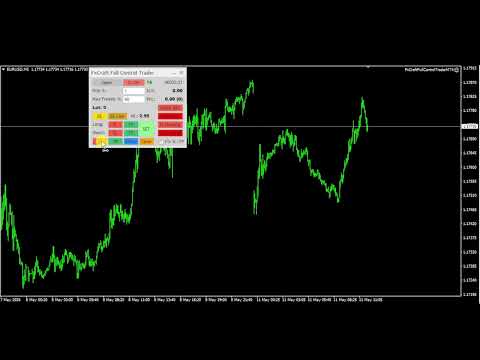
Full Control Trader is an excellent tool for fast and convenient trading. It gives you full control over the risk of every position you open.

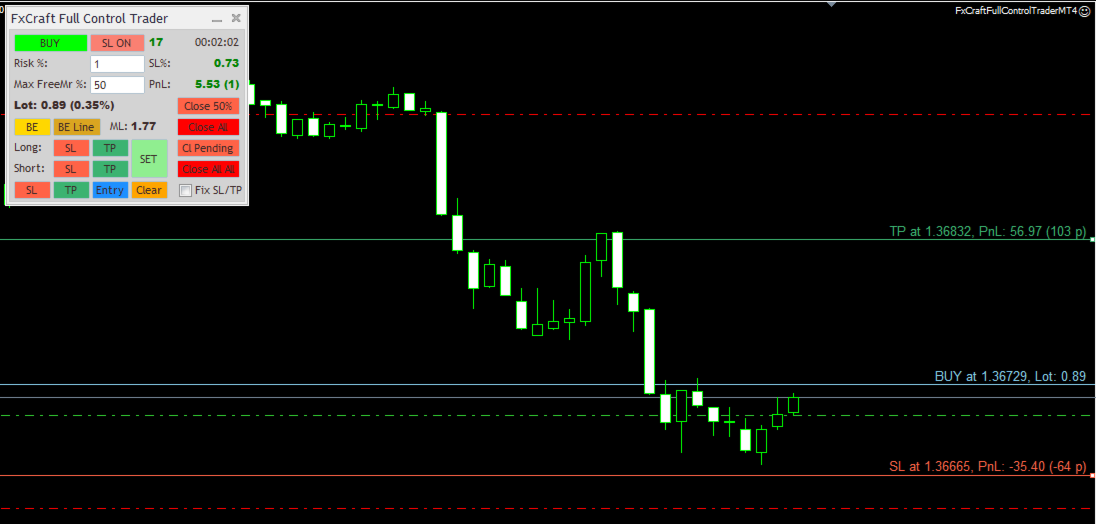
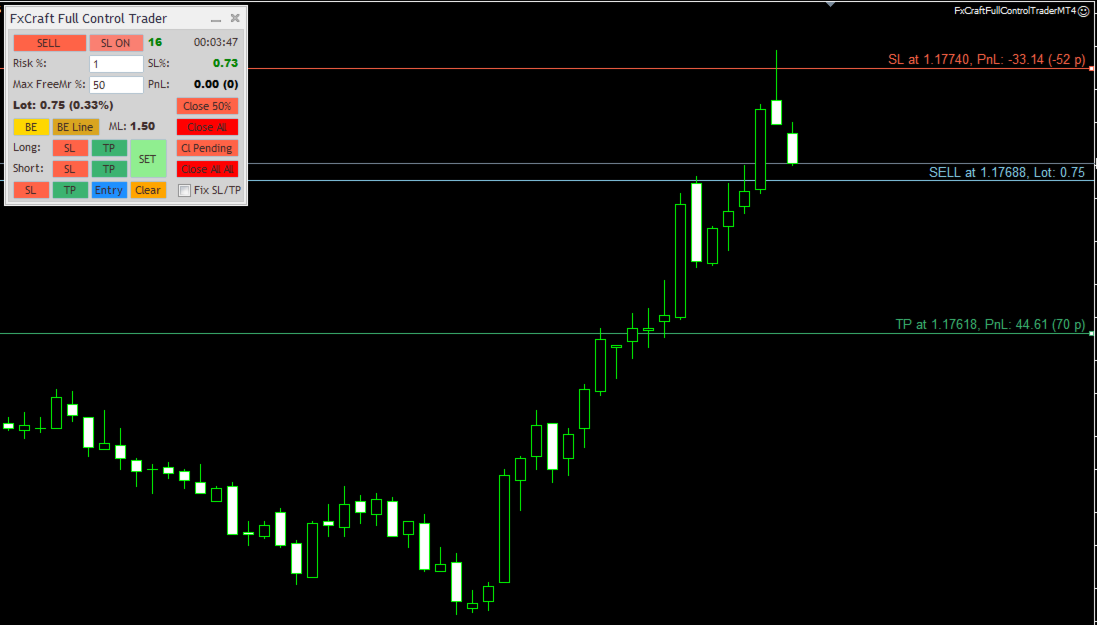
The tool requires a Stop Loss to be set. Based on the Stop Loss level and the defined risk, it dynamically calculates the appropriate order lot size.

You can adjust the Stop Loss, Take Profit, or order entry price directly on the chart using the mouse, and the lot size will automatically update in real time to reflect these changes.

You can also specify the maximum percentage of your available funds (Free Margin) that can be used for a single order.

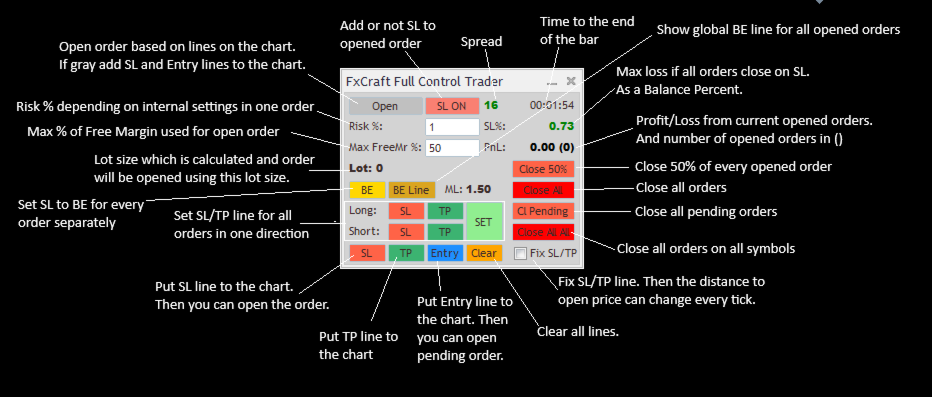
First, place the Stop Loss line on the chart (by clicking the "SL" or "Open" button). Then, depending on the Stop Loss position relative to the entry price, you can open the appropriate trade position.

You can use the tool on MT4 tester using visual mode and simulate your manual trading!

Main Features:

  • Dynamic lot size calculation based on changes to Stop Loss or risk.
  • Convenient and intuitive placement of Stop Loss, Take Profit, and Entry Price lines on the chart using the mouse before opening an order.
  • Fast and easy adjustment of Stop Loss and Take Profit levels for all open orders to a single price level.
  • Useful information about profits, lot size, Stop Loss risk, and more displayed on the panel.
  • Ability to close all orders on the account at a specified profit/loss level or daily profit/loss target.

Other Useful Features:

  • Multiple lot size calculation methods:
    • Risk percentage of Balance / Equity / Custom Amount
    • Fixed amount risked per order
    • Fixed lot size
  • Risk is defined as the maximum amount that can be lost if the order closes at the Stop Loss level.
  • Lot size can be limited by a specified percentage of available Free Margin. The tool calculates the lot size so that it does not exceed the defined percentage of current Free Margin.
  • Manual and automatic Break Even functionality applied separately to each order.
  • Trailing Stop functionality applied separately to each order.
  • Maximum spread filter — orders will not be opened if the spread exceeds the specified value.
  • Maximum total Stop Loss risk protection — the tool prevents opening an order if the total potential loss from all Stop Losses exceeds the specified percentage of account Balance.
  • Close All All function based on a specified profit/loss amount in account currency. "Close All All" means that all orders across all symbols on the platform are taken into account.
  • Daily Stop Loss / Take Profit limits in percentage values. If all orders across all symbols on the platform reach the specified percentage of current Balance, Equity, or Balance from the beginning of the day, all positions will be closed automatically.
    Daily profit/loss limits can also be defined as a fixed amount in account currency ( custom_amount_in_currency option).
  • Ability to set a custom order comment for trades opened by the tool.
  • Ability to specify a Magic Number used by the tool.

    Parameters Description
    • Lot_Risk_Mode – Selects how the lot size is calculated. Available options:
      • risk_percentage_balance – You define the risk percentage (on the panel; the initial value is set by the initial_Risk_Percent parameter) and the Stop Loss level. The order lot size is calculated so that if the order closes at Stop Loss, the loss will not exceed the specified percentage of the account Balance.
      • risk_percentage_equity – Same as above, but the percentage is calculated based on the current Equity.
      • risk_percentage_customAmount – Same as above, but the percentage is calculated from the custom amount defined in the CustomAmount_for_Risk_Percent parameter.
      • customAmount_in_currency – The risk amount is defined directly in the account currency (on the panel; the initial value is set by the initial_Risk_CustomAmount parameter).
      • fixed_lot – The tool opens orders with a fixed lot size defined on the panel. The initial value is set by the initial_fixedLotSize parameter.
    • initial_MaxEq_Percent – Initial value for the panel field: "Max FreeMr %". It defines the maximum percentage of Free Margin that can be used to open an order. The calculated lot size is limited by this value. The tool will neither display nor open a position with a lot size exceeding this limit.
    • Max Lot Size – Defines the maximum lot size that the tool can open. If the calculated lot size exceeds this value, the tool will display and open the maximum allowed lot size instead.
    • BE Gain (points) – If you click the "BE" button on the panel, the Stop Loss for every order will be moved to the order open price plus the specified BE Gain (in points).
    • Max Spread (points) – Defines the maximum allowed spread (in points) for opening an order. If the current spread exceeds this value, the order will not be opened. You can monitor the current spread at the top of the panel. If the value is displayed in red, it means the spread exceeds the Max Spread limit and opening an order is blocked.
    • Max Loss % on SL – If opening a new order would cause the total potential loss from all opened orders Stop Losses to exceed the specified percentage of the account Balance, the order will not be opened.
    • use Auto BE – Enables/disables the automatic Break Even function. If an order reaches the profit level defined in Auto BE start (points), the Stop Loss for that order will automatically be moved to Open Price + Auto BE gain (points).
    • use Auto Trailing Stop – Enables/disables the automatic Trailing Stop function. If an order reaches at least the profit level defined in Auto TrailingStop Start (points), the Stop Loss for that order will trail the current price at a distance defined in Auto TrailingStop Distance (points).
      The Stop Loss will be updated every Auto TrailingStop Step (points)

    • use CloseAllAll On Global Profit – Enables/disables automatic closing of all orders across all symbols on the platform when the total profit of all open orders reaches the value defined in Global Profit to Close (currency).
    • use CloseAllAll On Global Loss – Enables/disables automatic closing of all orders across all symbols on the platform when the total loss of all open orders reaches the value defined in Global Loss to Close (currency).
    • use Daily StopLoss – Enables/disables automatic closing of all orders across all symbols on the platform if the combined result of: currently open orders and orders closed during the current day exceeds the limit defined in the following parameters: Daily StopLoss Mode and Daily StopLoss amount/%.

    • Daily StopLoss Mode – Defines how the Daily Stop Loss trigger is calculated. Available options:
      • custom_amount_in_currency – Uses a fixed amount in account currency defined in Daily StopLoss amount/%.
      • percent_from_balance – Daily Stop Loss is calculated as a percentage of the current account Balance. The percentage value is defined in Daily StopLoss amount/%.
      • percent_from_starting_balance – Daily Stop Loss is calculated as a percentage of the account Balance at the beginning of the day. The percentage value is defined in Daily StopLoss amount/%.
      • percent_from_equity – Daily Stop Loss is calculated as a percentage of the current Equity. The percentage value is defined in Daily StopLoss amount/%.
    • order_Comment – Defines the comment added to every order opened by the tool.
    • magic [-1 = all magics] – Defines the Magic Number managed by the tool. The tool opens, manages, and closes orders with this Magic Number. If set to -1, the tool will manage orders with all Magic Numbers.
      ATTENTION – All Global Close functions take into account all orders on the platform, regardless of Magic Number settings.
    • slippage – Defines the maximum allowed price slippage during order execution (in points).
    • Visual_Settings – In this section, you can define the colors and styles of the lines plotted by the tool.
    • initial panel X offset – Initial X coordinate of the panel when displayed on the chart. The panel can later be moved using the mouse.
    • initial panel Y offset – Initial Y coordinate of the panel when displayed on the chart. The panel can later be moved using the mouse.
    • font size – Defines the font size of all texts displayed on the panel.

      Önerilen ürünler
      Virtual Collider Manual   is a trading assistant with a built-in panel for manual trading. It automatically moves a position opened by a trader in profit using innovative adaptive grid algorithm of averaging and adaptive pyramiding Know-how of the grid algorithm of averaging and pyramiding of the   Virtual Collider Manual   trading robot is based on fully automatic adaptation of all characteristics of dynamically build order grid and pyramid with actual price movement with no need for adjusting
      Çok İşlevli Ticaret Aracı: Lot Hesaplayıcı, Grid Emirleri, R/R Oranı, Ticaret Yöneticisi, Arz ve Talep Bölgeleri, Fiyat Hareketi ve Daha Fazlası Demo Sürüm   |   Kullanım Kılavuzu Ticaret Asistanı strateji test cihazında çalışmaz: bu yardımcı programı test etmek için Demo Sürümünü BURADAN indirebilirsiniz. Herhangi bir soru /iyileştirme fikri/hatalar için benimle iletişime geçin MT5 sürümüne ihtiyacınız varsa, burada mevcuttur Ticaret sürecinizi basitleştirin, hızlandırın ve otomatikleştirin. St
      Product Name: Risk Commander: Trade Assistant & Strategy Simulator Risk Commander is more than just a trade panel—it is a complete Manual Trading Ecosystem . It serves two powerful purposes: Live Assistant: Helps you execute trades with speed, precision, and perfect risk management in real-time markets. Training Simulator: Fully compatible with the Strategy Tester (Visual Mode) , allowing you to practice manual trading on historical data without risking a cent. NEW! Built-in Simulator Mode Stop
      Otomatik Trade Kapatma: zamana göre veya Kâr / Zarar tetikleyicisi Bu araçla, belirli bir koşul altında trade'leri otomatik olarak kapatabilirsiniz. Çok fonksiyonlu araç : 66+ özellik, bu araç dahil  |   Sorularınız için iletişime geçin   |   MT5 versiyonu Otomatik Kapatmayı etkinleştirmek için aşağıdaki parametreleri ayarlamanız gerekir (panelde): 1. Sembol   fonksiyonun uygulanacağı: belirli bir   [Symbol]   / veya   [ALL]   tüm semboller. 2.   Koşul,   ne zaman kapatılacağı: [if total] / [if
      Angry bull Option Binary
      Fabio Oliveira Magalhaes
      1 (1)
      Angry Bull Option Binary   This is a Binary Options robot, which contains 7 strategies, you can backtest it to check what the best strategies are Settings Initial Batch Value Dynamic Investment = If activated it will use an automatic lot according to its capital Balance ($) w/ backtest = Starting balance to backtest PorcRiscoInvestment = It will be the value of % for the automatic lot if it is activated Expiration (in minutes) = It will be the expiration time of orders in Binary Options Magic
      Auto SLTP Maker MT4  is an assistant for all those who forget to set StopLoss and/or TakeProfit in deal parameters, or trade on a very fast market and fail to place them in time. This tool automatically tracks trades without StopLoss and/or TakeProfit and checks what level should be set in accordance with the settings. The tool works both with market and pending orders. The type of orders to work with can be set in the parameters. It can track either trades for the instrument it runs on, or all
      Margin Call Shield – Defend Your Margin on Your Terms Margin Call Shield   is a tool for MetaTrader 4 traders who want to decide for themselves which open positions are closed during margin call situations before the platform does so automatically based on its internal rules. By default, the broker or platform decides which positions to close, often using undisclosed algorithms. Margin Call Shield lets you set this order according to your own strategy. Why Was Margin Call Shield Created? In a  
      Order Panel 28
      Pablo Sebastian Nequecaur
      Order Panel 28 — Professional Manual Execution Panel for MT4 Trade 28 forex pairs from a single on-chart panel — with automatic lot sizing, split entries, auto break-even, and stealth SL management. Order Panel 28 is a precision execution tool built for manual traders who want full control over their entries while eliminating the repetitive calculations that slow you down and cause mistakes. No indicators, no black-box signals — just a clean, fast panel that does the math so you can focus on you
      Utility, which draws buy or sell trendlines, which can also become support or resistances able to close any position on the screen Algorithm that calculates the gain of the position, at the touch closure of the line.   The benefits you get: Works on forex and CFD, timeframe from M1 to Weekly. Easy to use screen control panel. Audible warning messages at the touch of the line. Easy to use.
      Speedy Tiger
      Che Jeib Che Said
      SPEEDY TIGER https://www.mql5.com/en/users/earobotkk/seller#products Speedy Tiger is a fully automated EA that uses our innovative algorithm combined with our money management concept. This EA is designed for easy to use with simple inputs parameters. INPUTS Trade Comment: user comment Magic No: unique EA Number Time Frame: default is H1 Min Lot: EA will execute not less than the minimum lot size for starting lot, taking into account the calculated risk set in percentage trade risk feature. Max
      Expert Advisor for MT4 Useful utility MUST have for all traders.  With 1 click button, you're able to close all your open positions. Its come with a warning pop up notification when you click to close all your trades, to avoid an accident press the button. Just press 'Yes' to confirm or 'No' to cancel it. The expert will close all your open positions no matter what pairs you currently open or directions. Just attach the expert on 1 of your chart, and you're good to go.
      Golden Gestion TP SL
      Matthias Hubert Patrick Snidaro
      Auto SL/TP Manager EA – Gestion Automatique Intelligente Auto SL/TP Manager EA est un Expert Advisor conçu pour automatiser la gestion des commandes avec une efficacité maximale et une grande discrétion. Il gère automatiquement : Le Stop Loss (SL) et le Take Profit (TP) Le Profit Lock (verrouillage progressif des bénéfices) Le Trailing Stop avec plusieurs méthodes avancées L' affichage masqué du SL et du TP pour plus de discrétion (non visible par le courtisan) C'est l'outil idéal pour les
      TradePilot
      Hossein Khalil Alishir
      TradePilot Expert Advisor (EA) for MetaTrader 4 TradePilot is a professional and user-friendly Expert Advisor (EA) for MetaTrader 4 (MT4) . It simplifies automated trading , risk management , and trade execution using a smart trading panel . Perfect for beginners and experienced traders looking for a reliable trade manager EA with automated lot size calculation . Key Advantages User-Friendly Trading Panel: Customizable panel with buttons and hotkeys. Smart Risk Management: Supports percen
      The Infinity Expert Advisor is a scalper. When the resistance and support levels are broken, trades are opened in the direction of the price movement. Open positions are managed by several algorithms based on the current market situation (fixed stop loss and take profit, trailing stop, holding positions in case of trend indication, etc.). Requirements for the broker The EA is sensitive to spread, slippages and execution quality. It is strongly recommended not to use the EA for currencies with s
      Golden Shield – Account Protection Utility Golden Shield   is a professional risk management utility that automatically closes   ALL open positions   when your account equity falls below a critical level. It works as a "circuit breaker" for your trading account.   Key Features Feature Description Equity Protection Closes all positions when Equity ≤ STOP level Instant Monitoring Checks equity every 50 milliseconds – immediate reaction Interactive Panel Gainsboro panel with Teal ON / Red O
      This trading system requires the user to manually add Fibonacci, trend lines, horizontal lines, channel to perform semi-automatic or manual trading. The trading system can also be used in the tester. Trading panel provides: spread information margin information free marging Information The swap information to order for lots (requires your dealer support)
      Grid Manual MT4
      Alfiya Fazylova
      4.71 (17)
      Grid Manual, sipariş ızgarasıyla çalışmak için kullanılan bir ticaret yardımcı programıdır. Yardımcı program evrenseldir, esnek ayarlara ve sezgisel bir arayüze sahiptir. Sadece kayıpların ortalaması yönünde değil, aynı zamanda kazanç artışı yönünde de bir emir ızgarası ile çalışır. Tüccarın bir emir ızgarası oluşturmasına ve eşlik etmesine gerek yoktur, bu yardımcı programı yapacaktır. Emri açmanız yeterlidir ve Grid manual otomatik olarak ona bir emir ızgarası oluşturacak ve kapanana kadar ona
      <p><b><i>Easy Trade Executor, MT4 için hızlı lot hesaplama, emir yürütme ve işlem yönetimi aracıdır.</i></b></p> <p>Entry Price, Stop Loss ve Take Profit seviyelerini doğrudan grafik üzerinde belirleyin, lot büyüklüğünü otomatik olarak hesaplayın ve yalnızca birkaç tıklamayla kontrollü risk altında işlemler açın.</p> <p><br></p> <h3>Neden Easy Trade Executor?<br></h3> <p>Easy Trade Executor, yalnızca risk hesaplamasından daha fazlasını isteyen traderlar için geliştirilmiştir. Traderlar işle
      Binary panel for MT4. My development - a dashboard for binary options in MT4 (for example, the broker Grant Capital) has functions such as buy and sell (up and down), expiration time settings as on binary platforms (analogous) from 1 minute and up, increments of, for example, 5 minutes and up. It has lot settings from $1 and up. It has a balance level on the panel.

      Virtual SL TP Trailing Pro for MT4 – Client-Side Stop Loss / Take Profit and Trade Management Looking for MetaTrader 5 version?  I t is available separately in the Market:   Virtual SL TP Trailing Pro MT5 Public channel:   CLICK HERE Virtual SL TP Trailing Pro for MT4 is a trade management utility that keeps Stop Loss (SL) and Take Profit (TP) levels on the client side instead of sending them to the trading server. It is designed to help you manage exits in a structured way using a clear on-cha
      Set TP & SL by Price – Auto Order Modifier for MT4 Her emir için kesin TP ve SL seviyelerini otomatik olarak ayarlar ️ Tüm semboller ve EA’lerle uyumludur, sembole veya sihirli numaraya göre filtrelenebilir Bu Uzman Danışman (EA), kesin fiyat değerleri kullanarak (örneğin EURUSD için 1.12345 ) Take Profit (TP) ve Stop Loss (SL) seviyelerini belirlemenize olanak tanır. Pip yok, nokta yok — sadece kesin fiyat kontrolü. Tüm emirlerde veya belirli grafik/magic number’a göre uygulanabilir. T
      Vizzion
      Joel Protusada
      Vizzion is a fully automated scalping Expert Advisor that can be run successfully using GBPJPY currency pair at H1 timeframe. Very Important This Expert Advisor can not run with any EAs in the same account. As part of the money management plan, it calculates and monitors the Margin Level % and assumes that all open trades are created by it. If you want an Expert Advisor that trades in a daily basis, this EA is not for you because using this requires a patience to wait for a few days or weeks on
      | Fully-automated Smart Money Concept (ICT) inspired trading solution with multi-strategy capabilities | Built by a grid trader >> for grid traders.  This is MT4 version, click  here  for  Blue CARA MT5  (settings and logics are same in both versions)     Real monitoring signal  -->  Cara Gold Intro Blue CARA EA   ('CARA') - short for  C omprehensive  A lgorithmic R esponsive A dvisor is a next-gen  multi-currency    multi-timeframe  EA base on the widely known (and perhapse most popular) Inn
      Slow Pips OCO Trade Panel is an advanced trading panel for placing pending orders. Traders can use this panel to place two pending orders at once. One pending order would be of buy entry type and the other one would be of sell entry type. Both orders will have Stop Loss and Take Profit parameters. Since two pending orders are placed at the same time, the pending order for which the price hits first gets converted into a market order and the other pending order gets deleted (one order cancels the
      This utility is designed to help you with your Manual Trading. It allows different ways of closing trades. It can display total number of BUY and SELL orders individually and also their individual profits. It can enter trades without stopl loss and take profits. However upon selecting UseStopLossTakeProfit from the settings it can use best possible stop loss and take profits based on the market conditions. Upon selecting the CloseOppositeTrades  from the settings it can close opposite trades. Fo
      High Freq Grid Scalper
      Letsekang Bruno Sekhosana
      This E.A is designed to wait for the perfect opportunity to get in the market, take a few trades (low risk) and get out. There is an option to Cut Loss at specific percentage of balance, this should be set to a max of 1% since we scalping. Very cautious EA, can go up to a few days without taking a trade. This should not alarm you, it simply means there currently is no opportunity available. Mainly designed for low spread brokers. Tested Pairs and their settings: EURUSD M1 : Jan 2022 - Dec 2022
      Exp Averager
      Vladislav Andruschenko
      4.82 (22)
      Averager for MetaTrader 4 — profesyonel pozisyon kurtarma ve işlem sepeti yönetim sistemi Drawdown'a giren açık işlemleri daha kontrollü yönetmek, ortalama giriş fiyatını iyileştirmek ve tüm pozisyon serisini tek bir mantık altında toparlamak isteyen yatırımcılar için geliştirilmiş profesyonel bir Expert Advisor. Averager yalnızca yeni işlemler ekleyen basit bir ortalama alma aracı değildir. Mevcut pozisyonları yeniden yapılandıran, zarar baskısını azaltan ve tüm sepeti daha verimli bir çıkış n
      Trading panel for manual trading. Has a fairly wide functionality. Allows you to automatically calculate the order size, open both market and pending orders. It has a wide range of options for closing orders, it is possible to partially close orders, close orders after reaching a certain profit or loss, separately close profitable and unprofitable, buy and sell, as well as pending orders. The panel also contains a simple implementation of a grid of pending orders, reverse and lock functions, tr
      RJDJ Trade Manager is a powerful all-in-one MetaTrader 4 trade management panel for traders who want faster chart-based execution, cleaner position control, and a more efficient manual trading workflow. With built-in tools for market orders, pending orders, trailing stop management, account monitoring, and a dedicated MANAGE dialog, it helps simplify daily trading operations directly on the chart. Product Description RJDJ Trade Manager is a professional chart-based trading panel for MetaTrader 4
      This tool will perform Trailing stop loss and Break even management for orders. Helps you limit or reduce the time spend watching orders on the screen, especially when you need to go to sleep. Just add this EA to 1 chart, you can manage all pairs. You can filter orders by comment, magic number, symbol, and order ticket number. When Breakeven it can add shift/offset pips (to cover the commission...). You can try in strategy tester before purchase. The EA will add Buy and Sell alternately, so yo
      Bu ürünün alıcıları ayrıca şunları da satın alıyor
      Trade Manager EA’ye hoş geldiniz! Ticaretin daha sezgisel, hassas ve verimli hale gelmesi için tasarlanmış nihai risk yönetim aracı ile tanışın. Bu sadece bir emir verme aracı değil; ticaret planlaması, pozisyon yönetimi ve risk kontrolü için kapsamlı bir çözüm. İster yeni başlayan bir yatırımcı olun, ister deneyimli bir trader ya da hızlı emir gerektiren bir scalper, Trade Manager EA ihtiyaçlarınıza uyum sağlar ve forex, endeksler, emtialar ve kripto paralar dahil tüm piyasalarda esneklik sunar
      TradePanel MT4
      Alfiya Fazylova
      4.84 (95)
      Trade Panel, çok işlevli bir ticaret asistanıdır. Uygulama, manuel ticaret için 50'den fazla ticaret fonksiyonu içerir ve çoğu ticaret görevini otomatikleştirmeyi mümkün kılar. Satın almadan önce demo hesapta demo sürümü test edebilirsiniz. Demo hesap için uygulamanın deneme sürümünü indirin: https://www.mql5.com/en/blogs/post/750865 . Talimatların tamamı buraya . Ticaret. Tek tıklamayla ticaret işlemleri yapmayı sağlar: Risk otomatik hesaplaması ile bekleyen emirleri ve pozisyonları açmak. Bird
      TradeMirror, MT4/MT5 platformları için geliştirilmiş, gerçek zamanlı işlem senkronizasyonu destekleyen yerel bir emir kopyalama aracıdır. Eğitim Daha fazla eğitim görmek için lütfen Trademirror Eğitimi bağlantısına tıklayın. Ürün Avantajları Finansal yazılımlar için güvenlik, istikrar ve gizlilik standartlarına uygun olarak üç temel alanda iyileştirme yapılmıştır: Kullanıcı dostu arayüz ile kolay kullanım Finansal senaryolarda hassas veri izolasyonu için gelişmiş gizlilik koruması Milisanlık emi
      Простая в управлении Торговая панель обеспечит безопасную торговлю. Вычислит объём сделки от заданного уровня Stop Loss и величины убытка. Поможет рассчитать сейф, и в ноль закрыть неверную сделку. Интуитивно понятный интерфейс делает панель удобной в управлении, освобождая внимание трейдера для принятия решения о входе в сделку. Программа сделает все расчёты за вас. Поэтому работа с помощью панели Снайпер - оптимальное решение для торговли с соблюдением Мани-менеджмента. А это главный ключ к по
      " Trader Evolution " - A utility designed for traders who use wave and technical analysis in their work. One tab of the utility is capable of money management and opening orders, and the other can help in making Elliott wave and technical analysis. Manual (Be sure to read before purchasing) | Version for MT5 Advantages 1. Trading in a few clicks. Immediate and pending orders are available in the panel 2. Money management. The program automatically selects the appropriate lot size 3. Simplifies
      MT4 to Telegram Signal Provider , Telegram'a sinyal göndermeyi sağlayan ve hesabınızı bir sinyal sağlayıcısına dönüştüren kullanımı kolay ve tamamen özelleştirilebilir bir araçtır. Mesajların formatı tamamen özelleştirilebilir! Ancak basit kullanım için, önceden tanımlanmış bir şablonu seçebilir ve mesajın belirli kısımlarını etkinleştirebilir veya devre dışı bırakabilirsiniz. [ Demo ]  [ Kullanım Kılavuzu ] [ MT5 Sürümü ] [ Discord Sürümü ] [ Telegram Kanalı ]  New: [ Telegram To MT5 ] Kurulum
      The product will copy all telegram signal to MT4   ( which you are member  ) , also it can work as remote copier.  Easy to set up, copy order instant, can work with almost signal formats, image signal, s upport to translate other language to English Work with all type of channel or group, even channel have "Restrict Saving Content", work with  multi channel, multi MT5 Work as remote copier: with signal have ticket number, it will copy exactly via ticket number. Support to backtest signal. How to
      EASY Insight AIO – Akıllı ve zahmetsiz yatırım için hepsi bir arada çözüm Genel Bakış Tüm piyasayı — Forex, Altın, Kripto, Endeksler ve hatta Hisseler — saniyeler içinde, manuel grafik incelemesi, gösterge kurulumu ya da karmaşık ayarlar olmadan analiz edebildiğinizi hayal edin. EASY Insight AIO , yapay zekâ destekli yatırım için nihai, kullanıma hazır dışa aktarma aracınızdır. Tüm piyasanın kapsamlı bir anlık görüntüsünü tek bir temiz CSV dosyasında sunar; bu dosya ChatGPT, Claude, Gemini, Pe
      Effortlessly calculate lot sizes and manage trades to save time and avoid costly errors The Trade Pad Pro EA is a tool for the Metatrader Platform that aims to help traders manage their trades more efficiently and effectively. It has a user-friendly visual interface that allows users to easily place and manage an unlimited number of trades, helping to avoid human errors and enhance their trading activity. [ Installation Guide | Update Guide | Troubleshooting | FAQ | All Products ] One of the k
      In the current version this filter will only work with my   night scalpers and the EA Profitection Filter  or with other EAs that utilize the global variables set by this EA.  An MT5 version is availalble   here .  Many scalpers these days have a "normal" news filter, which filters calendar news such as interest rate decisions or CPI releases.  However, this breaking news filter is able to filter non-standard breaking news. It will check every minute for news and if it finds a news event, it w
      Riskinizi otomatik olarak hesaplarken işlemlere hızlı bir şekilde girip çıkmanıza yardımcı olacak Ticaret Yöneticisi. Aşırı Ticaret, İntikam Ticareti ve Duygusal Ticaretten korunmanıza yardımcı olacak özellikler içerir. İşlemler otomatik olarak yönetilebilir ve hesap performans ölçümleri bir grafikte görselleştirilebilir. Bu özellikler, bu paneli tüm manuel yatırımcılar için ideal kılar ve MetaTrader 4 platformunun geliştirilmesine yardımcı olur. Çoklu Dil desteği. MT5 Sürümü  |  Kullanım Kılavu
      Custom Alerts AIO: Tüm Piyasaları Takip Et — Hiçbir Kurulum Gerekmez Genel Bakış Custom Alerts AIO , hiçbir ek yapılandırma gerektirmeyen, kullanıma hazır bir piyasa izleme çözümüdür. Gerekli tüm göstergeler — FX Power, FX Volume, FX Dynamic, FX Levels, IX Power — iç yapısına gömülüdür. Grafik görüntülemesi olmadan çalışır, bu da onu sessiz ve verimli bir şekilde gerçek zamanlı alarm üretimi için mükemmel hale getirir. Brokerınızın sunduğu tüm varlık sınıflarını destekler: Forex, Metaller, End
      THIS EA IS A SEMI-AUTO EA, IT NEEDS USER INPUT. Manual & Test Version Please TEST this product before   BUYING  and watch my video about it. Contact me for user support or bug reports, or if you want the MT5 version! MT5 Version I do not guarantee any profits or financial success using this EA. With this Expert Advisor, you can: Implement your own   Zone Recovery   strategy to capitalize on trending markets. Create   Grid   trading strategies, to profit from ranging markets. Place orders easil
      Unlimited Trade Copier Pro is a tool to copy trade remotely to multiple MT4, MT5 and cTrader accounts at different computers/locations over internet. This is an ideal solution for you if you are a signal provider and want to copy your trades to other receivers globally on your own rules. One provider can copy trades to multiple receivers and one receiver can get trade from multiple providers as well. The provider can even set the subscription expiry for each receiver, so that receiver will not b
      Auto Trade Copier is designed to copy trades to multiple MT4, MT5 and cTrader accounts/terminals with 100% accuracy. The provider and receiver accounts must be on the same PC/VPS. With this tool, you can copy trades to receiver accounts on the same PC/VPS. All trading actions will be copied from provider to receiver perfectly. This version can be used on MT4 accounts only. For MT5 accounts, you must use Auto Trade Copier for MT5 . Reference: - For MT4 receiver, please download Trade Receiver Fre
      MT4 to Discord Signal Provider , ticaret sinyallerini doğrudan Discord'a göndermek için tasarlanmış kullanıcı dostu ve tamamen özelleştirilebilir bir araçtır. Bu araç, ticaret hesabınızı etkili bir sinyal sağlayıcısına dönüştürür. Mesaj formatlarını tarzınıza uyacak şekilde özelleştirin! Kolay kullanım için önceden tasarlanmış şablonlardan seçim yapın ve hangi mesaj öğelerini dahil etmek veya çıkarmak istediğinize karar verin. [ Demo ] [ Kullanım Kılavuzu ] [ MT5 Versiyonu ] [ Telegram Versiyonu
      EchoTrade Telegram to MT5 Copier Seamless, Instant, and Reliable Signal Copying - Direct from Telegram to MetaTrader 4! The product does not run in the strategy tester but you can get free trial version   here  for testing before purchase. Tired of manually executing trades from Telegram signals? EchoTrade automates the process, instantly copying trades from any Telegram channel or group directly into your MT5 account—accurately, efficiently, and without delay. Key Features: Universal Compatib
      Riskless Pyramid
      Snapdragon Systems Ltd
      5 (1)
      Introduction This powerful MT4 trade mangement EA offers a way potentially to aggressively multiply trade profits in a riskfree manner. Once a trade has been entered with a defined stoploss and take profit target then the EA will add three pyramid add-on trades in order to increase the overall level of profit. The user sets the total combined profit target to be gained if everything works out. This can be specified either as a multiple of the original trade profit or as a total dollar amount. Fo
      VirtualTradePad PRO SE MT4 — MetaTrader 4 için gelişmiş işlem paneli ve grafik çalışma alanı VirtualTradePad PRO SE , MetaTrader 4 için profesyonel bir işlem paneli ve trade yönetim çalışma alanıdır. Traderların işlemleri tek bir grafik tabanlı arayüzden daha hızlı açmasına, yönetmesine, korumasına, kapatmasına ve analiz etmesine yardımcı olur. Ürün, basit bir buton setinden daha fazlasına ihtiyaç duyan aktif manuel traderlar için oluşturulmuştur. PRO SE; tek tıkla emir yürütme, bekleyen emirler
      Time saving and fast execution Whether you’re traveling or sleeping, always know that Telegram To Mt4 performs the trades for you. In other words, Our   Telegram MT4 Signal Trader  will analyze the trading signals you receive on your selected Telegram channels and execute them to your Telegram to MT4 account. Reduce The Risk Telegram To Mt4   defines the whole experience of copying signals from   Telegram signal copier to mt4 platforms. Users not only can follow all instructions from the signa
      This EA Utility allows you to manage (with advanced filtering) unlimited open orders (manual or EA) with 16 trailing stop methods: fixed, percent, ATR Exit, Chandelier Exit, Moving Average, Candle High Low Exit, Bollinger Bands, Parabolic, Envelope, Fractal, Ichimoku Kijun-Sen, Alligator, Exit After X Minutes or Bars, RSI and Stochastic. The trailing stop can be either real or virtual, and you can exit fully or with a partial close percent on touch or bar close.  Moreover, you can add (overrid
      MT4 Professional Copy Trading System (MT4 Sürümü) Endüstriyel seviye, ultra hızlı LOCAL Trade Copier . Profesyoneller ve çoklu hesap yönetimi için. Endüstriyel LOCAL Mimari Aynı Windows ortamında çalışır (aynı PC / aynı Windows VPS). Düşük gecikme, yüksek stabilite, 7/24. Master / Slave / Self + Cross Copy (MT4 ↔ MT5) Master/Slave/Self-Copier destekli. MT4→MT4, MT4→MT5, MT5→MT4, MT5→MT5. Önemli: MT4↔MT5 için MT4 ve MT5 sürümleri birlikte gerekir. Ne yapar Master işlemlerini anlık kopyalar:
      Smart Channel M4
      Vahidreza Heidar Gholami
      The trend in the market can be predicted using trend lines but the problem is you don’t know where exactly the price is going to touch the trend line where you can put your pending orders on. Smart Channel Expert Advisor makes it possible to put an advanced channel around the price data, which can be configured to handle placing orders, opening and closing positions, managing risk per trade, spread, slippage, and trailing stop-loss and take-profit automatically. Features Money Management (Calcul
      Local Trade Copier EA , bir MAM veya PAMM hesabına ihtiyaç duymadan, harici kaynaklardan ticaret sinyalleri yürütmesi veya aynı anda birkaç hesabı yönetmesi gereken bireysel tüccarlar veya hesap yöneticileri için bir çözümdür. 8 ana hesaptan sınırsız bağımlı hesaba kopyalar [ Kurulum Kılavuzu | Güncelleme Kılavuzu | Sorun Giderme | SSS | Tüm Ürünler ] %100 kendi kendine barındırılan Kurulumu ve kullanımı kolay Hiçbir yükleyici, yapılandırma dosyası, sunucu, bellek kanalı veya DLL kullanılmadı E
      MultiOrder Assistent V3.0   - Your professional trading assistant for MetaTrader 4 The  MultiOrder Manager  is a powerful trading tool designed to optimize your trading while managing risk efficiently. With intuitive features and a user-friendly interface, this Tool is ideal for traders who want to manage multiple orders simultaneously without losing track.   Symbols: FX pairs, gold and cryptocurrencies Here you get a detailed description of the parameters and functions Manual     Features and
      Comprehensive on chart trade panel with the unique ability to be controllable from mobile as well. Plus has a library of downloadable configuration, e.g. exit rules, extra panel buttons, pending order setup and more. Please see our product video. Works with all symbols not just currency pairs. Features On chart panel plus controllable from free app for Windows, iPhone and Android Built-in script engine with library of downloadable configuration, e.g. add 'Close All Trades in Profit' button, exit
      Measures the length of the selected movement in points, shows the duration of the movement, as well as the speed of movement.   Outputs the average value of each dimension. It is designed to calculate the expected target based on typical market movements. The intended goal will provide information about the ratio of the stop size to the possible profit and will allow you not to open positions with a small expected profit. It will also help you determine the point at which it is more logical to c
      This trade copy utility allows you to instantly and seamlessly replicate and synchronize unlimited orders from multiple master accounts to multiple slave accounts on your local machine. You can create custom channels (or portfolios) with advanced filtering capabilities to copy from multiple master accounts to multiple slave accounts. Moreover, you can tailor these channels with a range of lot sizing and trade condition options to ensure that copied trades outperform the original source. You can
      The Expert Advisor will help you forward all pop-up alert with screenshot from  MetaTrader 4 to Telegram channel/ group, also forward all notifications to Telegram. Parameters  -  Telegram Bot Token - create bot on Telegram and get token.  -  Telegram Chat ID  - input your Telegram user ID,  group / channel ID  -  Forward Alert - default true, to forward alert.  -  Send message as caption of Screenshot - default false, set true to send message below Screenshot  How to setup and guide  - Telegram
      Automate Risk Management with Smart Trailing Stop Manager for MetaTrader 4 Looking for MetaTrader 5 version? I t is available separately in the Market:   Smart Trailing Stop Manager MT5 Full User Guide    –  Public channel:   CLICK HERE Struggling with manually adjusting stops and securing profits? Smart Trailing Stop Manager MT4 is an intelligent utility for MetaTrader 4 that automates trailing stops, break-even management, partial closes, and auto SL. Optimized specifically for MT4 users, it e
      Yazarın diğer ürünleri
      Full Control Trader   is an excellent tool for fast and convenient trading. It gives you full control over the risk of every position you open. The tool requires a Stop Loss to be set. Based on the Stop Loss level and the defined risk, it dynamically calculates the appropriate order lot size. You can adjust the Stop Loss, Take Profit, or order entry price directly on the chart using the mouse, and the lot size will automatically update in real time to reflect these changes. You can also specify
      Filtrele:
      Değerlendirme yok
      Değerlendirmeye yanıt