Full Control Trader

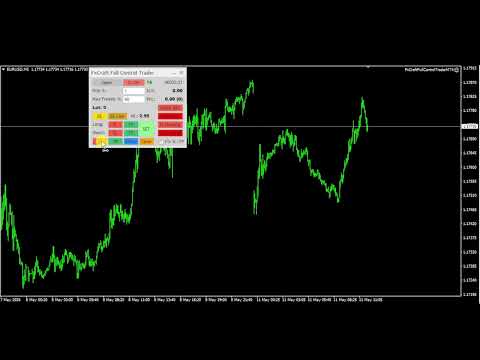
Full Control Trader is an excellent tool for fast and convenient trading. It gives you full control over the risk of every position you open.

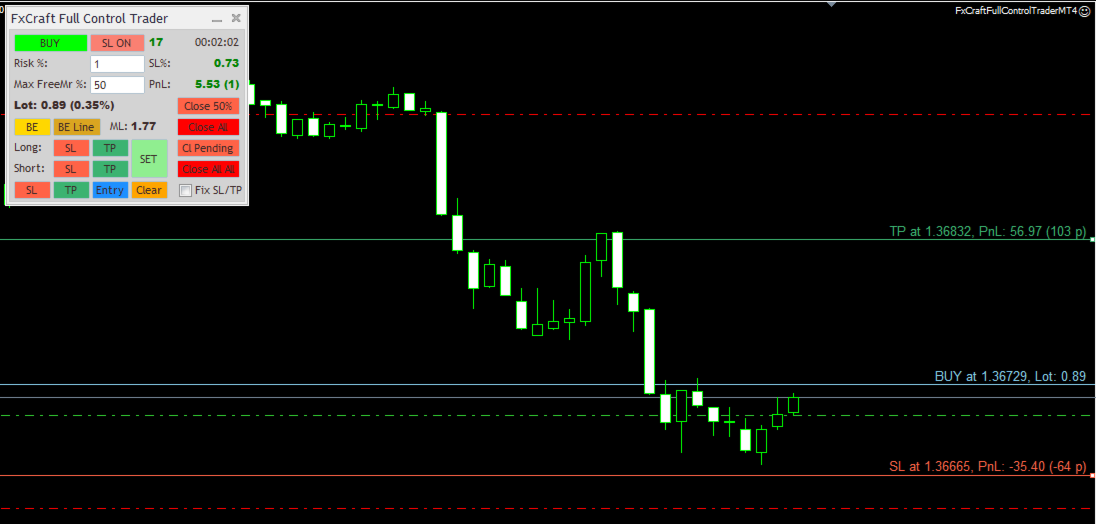
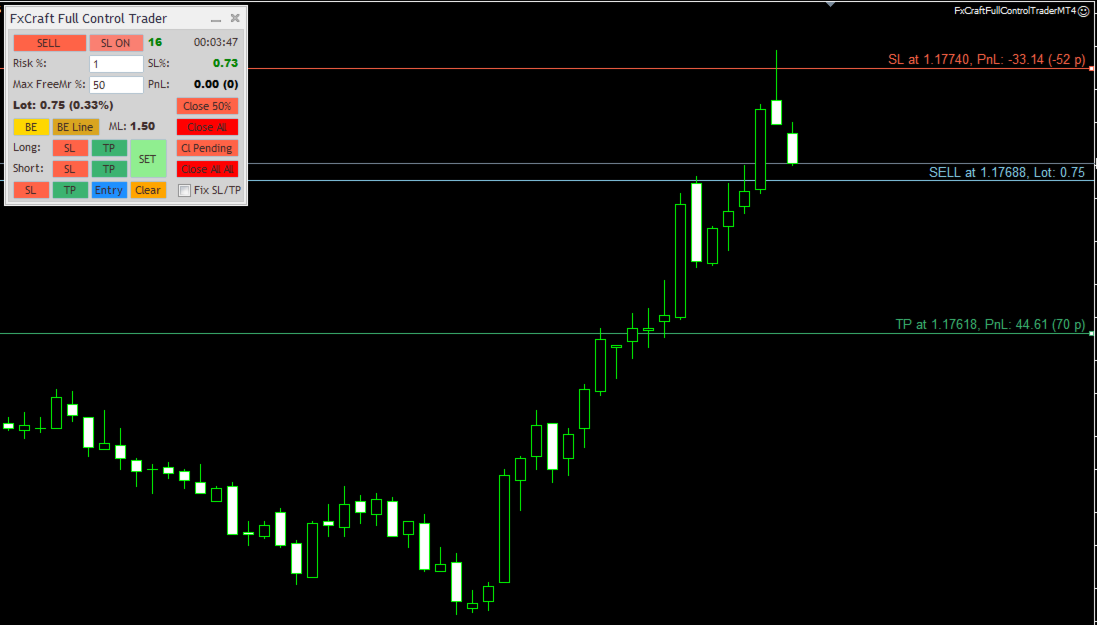
The tool requires a Stop Loss to be set. Based on the Stop Loss level and the defined risk, it dynamically calculates the appropriate order lot size.

You can adjust the Stop Loss, Take Profit, or order entry price directly on the chart using the mouse, and the lot size will automatically update in real time to reflect these changes.

You can also specify the maximum percentage of your available funds (Free Margin) that can be used for a single order.

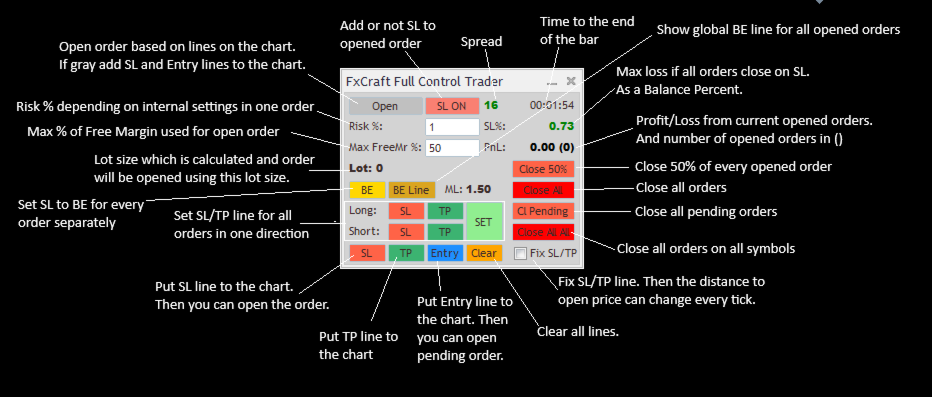
First, place the Stop Loss line on the chart (by clicking the "SL" or "Open" button). Then, depending on the Stop Loss position relative to the entry price, you can open the appropriate trade position.

You can use the tool on MT4 tester using visual mode and simulate your manual trading!

Main Features:

  • Dynamic lot size calculation based on changes to Stop Loss or risk.
  • Convenient and intuitive placement of Stop Loss, Take Profit, and Entry Price lines on the chart using the mouse before opening an order.
  • Fast and easy adjustment of Stop Loss and Take Profit levels for all open orders to a single price level.
  • Useful information about profits, lot size, Stop Loss risk, and more displayed on the panel.
  • Ability to close all orders on the account at a specified profit/loss level or daily profit/loss target.

Other Useful Features:

  • Multiple lot size calculation methods:
    • Risk percentage of Balance / Equity / Custom Amount
    • Fixed amount risked per order
    • Fixed lot size
  • Risk is defined as the maximum amount that can be lost if the order closes at the Stop Loss level.
  • Lot size can be limited by a specified percentage of available Free Margin. The tool calculates the lot size so that it does not exceed the defined percentage of current Free Margin.
  • Manual and automatic Break Even functionality applied separately to each order.
  • Trailing Stop functionality applied separately to each order.
  • Maximum spread filter — orders will not be opened if the spread exceeds the specified value.
  • Maximum total Stop Loss risk protection — the tool prevents opening an order if the total potential loss from all Stop Losses exceeds the specified percentage of account Balance.
  • Close All All function based on a specified profit/loss amount in account currency. "Close All All" means that all orders across all symbols on the platform are taken into account.
  • Daily Stop Loss / Take Profit limits in percentage values. If all orders across all symbols on the platform reach the specified percentage of current Balance, Equity, or Balance from the beginning of the day, all positions will be closed automatically.
    Daily profit/loss limits can also be defined as a fixed amount in account currency ( custom_amount_in_currency option).
  • Ability to set a custom order comment for trades opened by the tool.
  • Ability to specify a Magic Number used by the tool.

    Parameters Description
    • Lot_Risk_Mode – Selects how the lot size is calculated. Available options:
      • risk_percentage_balance – You define the risk percentage (on the panel; the initial value is set by the initial_Risk_Percent parameter) and the Stop Loss level. The order lot size is calculated so that if the order closes at Stop Loss, the loss will not exceed the specified percentage of the account Balance.
      • risk_percentage_equity – Same as above, but the percentage is calculated based on the current Equity.
      • risk_percentage_customAmount – Same as above, but the percentage is calculated from the custom amount defined in the CustomAmount_for_Risk_Percent parameter.
      • customAmount_in_currency – The risk amount is defined directly in the account currency (on the panel; the initial value is set by the initial_Risk_CustomAmount parameter).
      • fixed_lot – The tool opens orders with a fixed lot size defined on the panel. The initial value is set by the initial_fixedLotSize parameter.
    • initial_MaxEq_Percent – Initial value for the panel field: "Max FreeMr %". It defines the maximum percentage of Free Margin that can be used to open an order. The calculated lot size is limited by this value. The tool will neither display nor open a position with a lot size exceeding this limit.
    • Max Lot Size – Defines the maximum lot size that the tool can open. If the calculated lot size exceeds this value, the tool will display and open the maximum allowed lot size instead.
    • BE Gain (points) – If you click the "BE" button on the panel, the Stop Loss for every order will be moved to the order open price plus the specified BE Gain (in points).
    • Max Spread (points) – Defines the maximum allowed spread (in points) for opening an order. If the current spread exceeds this value, the order will not be opened. You can monitor the current spread at the top of the panel. If the value is displayed in red, it means the spread exceeds the Max Spread limit and opening an order is blocked.
    • Max Loss % on SL – If opening a new order would cause the total potential loss from all opened orders Stop Losses to exceed the specified percentage of the account Balance, the order will not be opened.
    • use Auto BE – Enables/disables the automatic Break Even function. If an order reaches the profit level defined in Auto BE start (points), the Stop Loss for that order will automatically be moved to Open Price + Auto BE gain (points).
    • use Auto Trailing Stop – Enables/disables the automatic Trailing Stop function. If an order reaches at least the profit level defined in Auto TrailingStop Start (points), the Stop Loss for that order will trail the current price at a distance defined in Auto TrailingStop Distance (points).
      The Stop Loss will be updated every Auto TrailingStop Step (points)

    • use CloseAllAll On Global Profit – Enables/disables automatic closing of all orders across all symbols on the platform when the total profit of all open orders reaches the value defined in Global Profit to Close (currency).
    • use CloseAllAll On Global Loss – Enables/disables automatic closing of all orders across all symbols on the platform when the total loss of all open orders reaches the value defined in Global Loss to Close (currency).
    • use Daily StopLoss – Enables/disables automatic closing of all orders across all symbols on the platform if the combined result of: currently open orders and orders closed during the current day exceeds the limit defined in the following parameters: Daily StopLoss Mode and Daily StopLoss amount/%.

    • Daily StopLoss Mode – Defines how the Daily Stop Loss trigger is calculated. Available options:
      • custom_amount_in_currency – Uses a fixed amount in account currency defined in Daily StopLoss amount/%.
      • percent_from_balance – Daily Stop Loss is calculated as a percentage of the current account Balance. The percentage value is defined in Daily StopLoss amount/%.
      • percent_from_starting_balance – Daily Stop Loss is calculated as a percentage of the account Balance at the beginning of the day. The percentage value is defined in Daily StopLoss amount/%.
      • percent_from_equity – Daily Stop Loss is calculated as a percentage of the current Equity. The percentage value is defined in Daily StopLoss amount/%.
    • order_Comment – Defines the comment added to every order opened by the tool.
    • magic [-1 = all magics] – Defines the Magic Number managed by the tool. The tool opens, manages, and closes orders with this Magic Number. If set to -1, the tool will manage orders with all Magic Numbers.
      ATTENTION – All Global Close functions take into account all orders on the platform, regardless of Magic Number settings.
    • slippage – Defines the maximum allowed price slippage during order execution (in points).
    • Visual_Settings – In this section, you can define the colors and styles of the lines plotted by the tool.
    • initial panel X offset – Initial X coordinate of the panel when displayed on the chart. The panel can later be moved using the mouse.
    • initial panel Y offset – Initial Y coordinate of the panel when displayed on the chart. The panel can later be moved using the mouse.
    • font size – Defines the font size of all texts displayed on the panel.

      Produits recommandés
      Virtual Collider Manual   is a trading assistant with a built-in panel for manual trading. It automatically moves a position opened by a trader in profit using innovative adaptive grid algorithm of averaging and adaptive pyramiding Know-how of the grid algorithm of averaging and pyramiding of the   Virtual Collider Manual   trading robot is based on fully automatic adaptation of all characteristics of dynamically build order grid and pyramid with actual price movement with no need for adjusting
      Trade Assistant Pro 36 in 1
      Makarii Gubaydullin
      4.76 (21)
      Outil Multifonction : Calculatrice de Lots, Ordres Grid, Ratio R/R, Gestionnaire de Trades, Zones d'Offre et de Demande, Price Action et bien plus Version Démo   |   Manuel d'utilisation L'Assistant de Trading ne fonctionne pas dans le testeur de stratégies : vous pouvez télécharger la Version Démo ICI pour tester l' utilitaire . Contactez-moi pour toute question / idées d'amélioration / en cas de bug trouvé Si vous avez besoin d'une version MT5, elle est disponible ici Simplifiez, accélérez et
      Risk Commander
      Adisorn Soodkanueng
      Product Name: Risk Commander: Trade Assistant & Strategy Simulator Risk Commander is more than just a trade panel—it is a complete Manual Trading Ecosystem . It serves two powerful purposes: Live Assistant: Helps you execute trades with speed, precision, and perfect risk management in real-time markets. Training Simulator: Fully compatible with the Strategy Tester (Visual Mode) , allowing you to practice manual trading on historical data without risking a cent. NEW! Built-in Simulator Mode Stop
      Trade Auto Close
      Makarii Gubaydullin
      Fermeture automatique des trades : à un moment donné, ou déclenchement de Profit / Perte Avec cet utilitaire, vous pouvez automatiser la fermeture des trades selon une condition donnée. Utilitaire multifonction : 66+ fonctionnalités, incluant cet outil  |   Contactez-moi  si vous avez des questions  |   Version MT5 Pour activer la Fermeture Auto, vous devez définir les paramètres suivants (sur le panneau) : 1. Symbole   auquel la fonction sera appliquée : pour un   [Symbol]   spécifique / ou po
      Angry bull Option Binary
      Fabio Oliveira Magalhaes
      1 (1)
      Angry Bull Option Binary   This is a Binary Options robot, which contains 7 strategies, you can backtest it to check what the best strategies are Settings Initial Batch Value Dynamic Investment = If activated it will use an automatic lot according to its capital Balance ($) w/ backtest = Starting balance to backtest PorcRiscoInvestment = It will be the value of % for the automatic lot if it is activated Expiration (in minutes) = It will be the expiration time of orders in Binary Options Magic
      Auto SLTP Maker MT4  is an assistant for all those who forget to set StopLoss and/or TakeProfit in deal parameters, or trade on a very fast market and fail to place them in time. This tool automatically tracks trades without StopLoss and/or TakeProfit and checks what level should be set in accordance with the settings. The tool works both with market and pending orders. The type of orders to work with can be set in the parameters. It can track either trades for the instrument it runs on, or all
      Margin Call Shield – Defend Your Margin on Your Terms Margin Call Shield   is a tool for MetaTrader 4 traders who want to decide for themselves which open positions are closed during margin call situations before the platform does so automatically based on its internal rules. By default, the broker or platform decides which positions to close, often using undisclosed algorithms. Margin Call Shield lets you set this order according to your own strategy. Why Was Margin Call Shield Created? In a  
      Order Panel 28
      Pablo Sebastian Nequecaur
      Order Panel 28 — Professional Manual Execution Panel for MT4 Trade 28 forex pairs from a single on-chart panel — with automatic lot sizing, split entries, auto break-even, and stealth SL management. Order Panel 28 is a precision execution tool built for manual traders who want full control over their entries while eliminating the repetitive calculations that slow you down and cause mistakes. No indicators, no black-box signals — just a clean, fast panel that does the math so you can focus on you
      TSTrendLineSymbol
      Salvatore Labriola
      Utility, which draws buy or sell trendlines, which can also become support or resistances able to close any position on the screen Algorithm that calculates the gain of the position, at the touch closure of the line.   The benefits you get: Works on forex and CFD, timeframe from M1 to Weekly. Easy to use screen control panel. Audible warning messages at the touch of the line. Easy to use.
      Speedy Tiger
      Che Jeib Che Said
      SPEEDY TIGER https://www.mql5.com/en/users/earobotkk/seller#products Speedy Tiger is a fully automated EA that uses our innovative algorithm combined with our money management concept. This EA is designed for easy to use with simple inputs parameters. INPUTS Trade Comment: user comment Magic No: unique EA Number Time Frame: default is H1 Min Lot: EA will execute not less than the minimum lot size for starting lot, taking into account the calculated risk set in percentage trade risk feature. Max
      Expert Advisor for MT4 Useful utility MUST have for all traders.  With 1 click button, you're able to close all your open positions. Its come with a warning pop up notification when you click to close all your trades, to avoid an accident press the button. Just press 'Yes' to confirm or 'No' to cancel it. The expert will close all your open positions no matter what pairs you currently open or directions. Just attach the expert on 1 of your chart, and you're good to go.
      Golden Gestion TP SL
      Matthias Hubert Patrick Snidaro
      Auto SL/TP Manager EA – Gestion Automatique Intelligente Auto SL/TP Manager EA est un Expert Advisor conçu pour automatiser la gestion des commandes avec une efficacité maximale et une grande discrétion. Il gère automatiquement : Le Stop Loss (SL) et le Take Profit (TP) Le Profit Lock (verrouillage progressif des bénéfices) Le Trailing Stop avec plusieurs méthodes avancées L' affichage masqué du SL et du TP pour plus de discrétion (non visible par le courtisan) C'est l'outil idéal pour les
      TradePilot
      Hossein Khalil Alishir
      TradePilot Expert Advisor (EA) for MetaTrader 4 TradePilot is a professional and user-friendly Expert Advisor (EA) for MetaTrader 4 (MT4) . It simplifies automated trading , risk management , and trade execution using a smart trading panel . Perfect for beginners and experienced traders looking for a reliable trade manager EA with automated lot size calculation . Key Advantages User-Friendly Trading Panel: Customizable panel with buttons and hotkeys. Smart Risk Management: Supports percen
      The Infinity Expert Advisor is a scalper. When the resistance and support levels are broken, trades are opened in the direction of the price movement. Open positions are managed by several algorithms based on the current market situation (fixed stop loss and take profit, trailing stop, holding positions in case of trend indication, etc.). Requirements for the broker The EA is sensitive to spread, slippages and execution quality. It is strongly recommended not to use the EA for currencies with s
      GoldenShield MT4
      Aleksandr Bezverkhikh
      Golden Shield – Account Protection Utility Golden Shield   is a professional risk management utility that automatically closes   ALL open positions   when your account equity falls below a critical level. It works as a "circuit breaker" for your trading account.   Key Features Feature Description Equity Protection Closes all positions when Equity ≤ STOP level Instant Monitoring Checks equity every 50 milliseconds – immediate reaction Interactive Panel Gainsboro panel with Teal ON / Red O
      This trading system requires the user to manually add Fibonacci, trend lines, horizontal lines, channel to perform semi-automatic or manual trading. The trading system can also be used in the tester. Trading panel provides: spread information margin information free marging Information The swap information to order for lots (requires your dealer support)
      Grid Manual MT4
      Alfiya Fazylova
      4.71 (17)
      Grid Manual est un panneau de trading permettant de travailler avec une grille d'ordres. L'utilitaire est universel, possède des paramètres flexibles et une interface intuitive. Il fonctionne avec une grille d'ordres non seulement dans le sens des pertes, mais aussi dans le sens de l'augmentation des profits. Le commerçant n'a pas besoin de créer et de maintenir une grille d'ordres, l'utilitaire le fera. Il suffit d'ouvrir une ordre et "Grid Manual" créera automatiquement une grille de ordres po
      Easy Trade Executor est un outil de calcul rapide du volume, d’exécution d’ordres et de gestion des positions pour MT4. Placez directement les niveaux de Prix d'entrée, Stop Loss et Take Profit sur le graphique, obtenez automatiquement le volume adapté à votre risque et ouvrez vos trades en quelques clics seulement. Pourquoi choisir Easy Trade Executor ? Easy Trade Executor a été conçu pour les traders qui recherchent bien plus qu’un simple calculateur de risque. Ils veulent gérer leurs trades
      Binary panel for MT4. My development - a dashboard for binary options in MT4 (for example, the broker Grant Capital) has functions such as buy and sell (up and down), expiration time settings as on binary platforms (analogous) from 1 minute and up, increments of, for example, 5 minutes and up. It has lot settings from $1 and up. It has a balance level on the panel.

      Virtual SL TP Trailing Pro for MT4 – Client-Side Stop Loss / Take Profit and Trade Management Looking for MetaTrader 5 version?  I t is available separately in the Market:   Virtual SL TP Trailing Pro MT5 Public channel:   CLICK HERE Virtual SL TP Trailing Pro for MT4 is a trade management utility that keeps Stop Loss (SL) and Take Profit (TP) levels on the client side instead of sending them to the trading server. It is designed to help you manage exits in a structured way using a clear on-cha
      Set TP & SL by Price – Auto Order Modifier for MT4 Définissez automatiquement des niveaux précis de TP et SL sur n'importe quelle position ️ Compatible avec tous les symboles et EAs, filtrage par symbole ou magic number Ce robot expert vous permet de définir les niveaux de Take Profit (TP) et Stop Loss (SL) à l’aide de valeurs de prix exactes (ex: 1.12345 sur EURUSD). Pas de pips ou points — uniquement une gestion précise des ordres, filtrables par symbole ou magic number. Caractéristiq
      Vizzion
      Joel Protusada
      Vizzion is a fully automated scalping Expert Advisor that can be run successfully using GBPJPY currency pair at H1 timeframe. Very Important This Expert Advisor can not run with any EAs in the same account. As part of the money management plan, it calculates and monitors the Margin Level % and assumes that all open trades are created by it. If you want an Expert Advisor that trades in a daily basis, this EA is not for you because using this requires a patience to wait for a few days or weeks on
      | Fully-automated Smart Money Concept (ICT) inspired trading solution with multi-strategy capabilities | Built by a grid trader >> for grid traders.  This is MT4 version, click  here  for  Blue CARA MT5  (settings and logics are same in both versions)     Real monitoring signal  -->  Cara Gold Intro Blue CARA EA   ('CARA') - short for  C omprehensive  A lgorithmic R esponsive A dvisor is a next-gen  multi-currency    multi-timeframe  EA base on the widely known (and perhapse most popular) Inn
      Slow Pips OCO Trade Panel is an advanced trading panel for placing pending orders. Traders can use this panel to place two pending orders at once. One pending order would be of buy entry type and the other one would be of sell entry type. Both orders will have Stop Loss and Take Profit parameters. Since two pending orders are placed at the same time, the pending order for which the price hits first gets converted into a market order and the other pending order gets deleted (one order cancels the
      Smartility
      Syed Oarasul Islam
      This utility is designed to help you with your Manual Trading. It allows different ways of closing trades. It can display total number of BUY and SELL orders individually and also their individual profits. It can enter trades without stopl loss and take profits. However upon selecting UseStopLossTakeProfit from the settings it can use best possible stop loss and take profits based on the market conditions. Upon selecting the CloseOppositeTrades  from the settings it can close opposite trades. Fo
      High Freq Grid Scalper
      Letsekang Bruno Sekhosana
      This E.A is designed to wait for the perfect opportunity to get in the market, take a few trades (low risk) and get out. There is an option to Cut Loss at specific percentage of balance, this should be set to a max of 1% since we scalping. Very cautious EA, can go up to a few days without taking a trade. This should not alarm you, it simply means there currently is no opportunity available. Mainly designed for low spread brokers. Tested Pairs and their settings: EURUSD M1 : Jan 2022 - Dec 2022
      Exp Averager
      Vladislav Andruschenko
      4.82 (22)
      Averager pour MetaTrader 4 — système professionnel de récupération de positions et de gestion de paniers d’ordres Un Expert Advisor conçu pour les traders qui veulent gérer intelligemment des positions en drawdown, améliorer leur prix moyen d’entrée et piloter toute une série d’ordres comme une seule structure cohérente. Averager ne se limite pas à ouvrir des ordres supplémentaires. Il aide à reconstruire un panier de positions avec une logique claire de récupération, de protection et de sortie
      Lucky Trade Panel MT4
      Nina Yermolenko
      5 (1)
      Trading panel for manual trading. Has a fairly wide functionality. Allows you to automatically calculate the order size, open both market and pending orders. It has a wide range of options for closing orders, it is possible to partially close orders, close orders after reaching a certain profit or loss, separately close profitable and unprofitable, buy and sell, as well as pending orders. The panel also contains a simple implementation of a grid of pending orders, reverse and lock functions, tr
      RJDJ Trade Manager is a powerful all-in-one MetaTrader 4 trade management panel for traders who want faster chart-based execution, cleaner position control, and a more efficient manual trading workflow. With built-in tools for market orders, pending orders, trailing stop management, account monitoring, and a dedicated MANAGE dialog, it helps simplify daily trading operations directly on the chart. Product Description RJDJ Trade Manager is a professional chart-based trading panel for MetaTrader 4
      This tool will perform Trailing stop loss and Break even management for orders. Helps you limit or reduce the time spend watching orders on the screen, especially when you need to go to sleep. Just add this EA to 1 chart, you can manage all pairs. You can filter orders by comment, magic number, symbol, and order ticket number. When Breakeven it can add shift/offset pips (to cover the commission...). You can try in strategy tester before purchase. The EA will add Buy and Sell alternately, so yo
      Les acheteurs de ce produit ont également acheté
      Bienvenue sur Trade Manager EA, l’outil ultime de gestion des risques conçu pour rendre le trading plus intuitif, précis et efficace. Ce n’est pas seulement un outil d’exécution d’ordres ; c’est une solution complète pour la planification des trades, la gestion des positions et le contrôle des risques. Que vous soyez débutant, trader expérimenté ou scalpeur ayant besoin d’une exécution rapide, Trade Manager EA s’adapte à vos besoins, offrant une flexibilité sur tous les marchés, des devises et i
      TradePanel MT4
      Alfiya Fazylova
      4.84 (95)
      Trade Panel est un assistant commercial multifonction. L'application contient plus de 50 fonctions de trading pour le trading manuel et permet d'automatiser la plupart des tâches commerciales. Avant l'achat, vous pouvez tester la version de démonstration sur un compte de démonstration. Télécharger la version d'essai de l'application pour un compte de démonstration : https://www.mql5.com/fr/blogs/post/762644 . Instructions complètes ici . Commerce. Permet d'effectuer des opérations commerciales e
      Custom Alerts AIO : Surveillez tous les marchés à la fois — sans aucune configuration Présentation Custom Alerts AIO est une solution de surveillance du marché prête à l’emploi, sans configuration nécessaire. Tous les indicateurs requis — FX Power, FX Volume, FX Dynamic, FX Levels, IX Power — sont directement intégrés. Aucun graphique n’est affiché, ce qui rend cet outil idéal pour la génération d’alertes en temps réel. Il prend en charge toutes les classes d’actifs proposées par votre courtie
      Le MT4 to Telegram Signal Provider est un outil facile à utiliser et entièrement personnalisable qui permet d'envoyer des signaux à Telegram, transformant ainsi votre compte en fournisseur de signaux. Le format des messages est entièrement personnalisable ! Cependant, pour une utilisation simple, vous pouvez également opter pour un modèle prédéfini et activer ou désactiver des parties spécifiques du message. [ Démonstration ]   [ Manuel ] [ Version MT5 ] [ Version Discord ] [ Canal Telegram ]  N
      Unlimited Trade Copier Pro is a tool to copy trade remotely to multiple MT4, MT5 and cTrader accounts at different computers/locations over internet. This is an ideal solution for you if you are a signal provider and want to copy your trades to other receivers globally on your own rules. One provider can copy trades to multiple receivers and one receiver can get trade from multiple providers as well. The provider can even set the subscription expiry for each receiver, so that receiver will not b
      The product will copy all telegram signal to MT4   ( which you are member  ) , also it can work as remote copier.  Easy to set up, copy order instant, can work with almost signal formats, image signal, s upport to translate other language to English Work with all type of channel or group, even channel have "Restrict Saving Content", work with  multi channel, multi MT5 Work as remote copier: with signal have ticket number, it will copy exactly via ticket number. Support to backtest signal. How to
      VirtualTradePad PRO SE MT4 — panneau de trading avancé et espace graphique pour MetaTrader 4 VirtualTradePad PRO SE est un panneau de trading professionnel et un espace de gestion des trades pour MetaTrader 4 . Il aide les traders à ouvrir, gérer, protéger, fermer et analyser leurs trades plus rapidement depuis une seule interface basée sur le graphique. Le produit a été créé pour les traders manuels actifs qui ont besoin de plus qu’un simple ensemble de boutons. PRO SE combine l’exécution en un
      Smart Channel M4
      Vahidreza Heidar Gholami
      The trend in the market can be predicted using trend lines but the problem is you don’t know where exactly the price is going to touch the trend line where you can put your pending orders on. Smart Channel Expert Advisor makes it possible to put an advanced channel around the price data, which can be configured to handle placing orders, opening and closing positions, managing risk per trade, spread, slippage, and trailing stop-loss and take-profit automatically. Features Money Management (Calcul
      Le MT4 to Discord Signal Provider est un outil convivial et entièrement personnalisable conçu pour envoyer directement des signaux de trading à Discord. Cet outil transforme votre compte de trading en un fournisseur de signaux efficace. Personnalisez les formats de messages pour qu'ils correspondent à votre style ! Pour plus de facilité, choisissez parmi des modèles pré-conçus et décidez quels éléments du message inclure ou exclure. [ Démo ] [ Manuel ] [ Version MT5 ] [ Version Telegram ]  New:
      ManHedger MT4
      Peter Mueller
      5 (2)
      THIS EA IS A SEMI-AUTO EA, IT NEEDS USER INPUT. Manual & Test Version Please TEST this product before   BUYING  and watch my video about it. Contact me for user support or bug reports, or if you want the MT5 version! MT5 Version I do not guarantee any profits or financial success using this EA. With this Expert Advisor, you can: Implement your own   Zone Recovery   strategy to capitalize on trending markets. Create   Grid   trading strategies, to profit from ranging markets. Place orders easil
      Trade Manager MT4 DaneTrades
      Levi Dane Benjamin
      4.09 (11)
      Trade Manager pour vous aider à entrer et sortir rapidement des transactions tout en calculant automatiquement votre risque. Y compris des fonctionnalités pour vous aider à éviter le sur-trading, le trading de vengeance et le trading émotionnel. Les transactions peuvent être gérées automatiquement et les mesures de performances du compte peuvent être visualisées dans un graphique. Ces fonctionnalités rendent ce panneau idéal pour tous les traders manuels et contribuent à améliorer la plateforme
      The Expert Advisor will help you forward all pop-up alert with screenshot from  MetaTrader 4 to Telegram channel/ group, also forward all notifications to Telegram. Parameters  -  Telegram Bot Token - create bot on Telegram and get token.  -  Telegram Chat ID  - input your Telegram user ID,  group / channel ID  -  Forward Alert - default true, to forward alert.  -  Send message as caption of Screenshot - default false, set true to send message below Screenshot  How to setup and guide  - Telegram
      Crystal Trade Manager PRO – Système Avancé de Gestion du Risque et de Contrôle des Positions pour MT4 Version gratuite : https://www.mql5.com/en/market/product/150632 Présentation Générale Crystal Trade Manager PRO (CTM) est un utilitaire professionnel pour MetaTrader 4 dédié à la gestion du risque, au contrôle des opérations et à l’automatisation intelligente du trading. Il a été conçu pour les traders qui exigent une exécution disciplinée, une protection solide du capital et un contrôle avancé
      Riskless Pyramid
      Snapdragon Systems Ltd
      5 (1)
      Introduction This powerful MT4 trade mangement EA offers a way potentially to aggressively multiply trade profits in a riskfree manner. Once a trade has been entered with a defined stoploss and take profit target then the EA will add three pyramid add-on trades in order to increase the overall level of profit. The user sets the total combined profit target to be gained if everything works out. This can be specified either as a multiple of the original trade profit or as a total dollar amount. Fo
      The product will copy all  Discord  signal   to MT4   ( which you are member  ) , also it can work as remote copier.  Easy to set up. Work with almost signal formats, support to translate other language to English Work with multi channel, multi MT4. Work with Image signal. Copy order instant, auto detect symbol. Work as remote copier: with signal have ticket number, it will copy exactly via ticket number. How to setup and guide: Let read all details about setup and download Discord To MetaTrader
      Auto Trade Copier
      Vu Trung Kien
      4.76 (85)
      Auto Trade Copier is designed to copy trades to multiple MT4, MT5 and cTrader accounts/terminals with 100% accuracy. The provider and receiver accounts must be on the same PC/VPS. With this tool, you can copy trades to receiver accounts on the same PC/VPS. All trading actions will be copied from provider to receiver perfectly. This version can be used on MT4 accounts only. For MT5 accounts, you must use Auto Trade Copier for MT5 . Reference: - For MT4 receiver, please download Trade Receiver Fre
      EchoTrade Telegram to MT4 Copier
      Perpetual Chinemerem Vincent
      5 (2)
      EchoTrade Telegram to MT5 Copier Seamless, Instant, and Reliable Signal Copying - Direct from Telegram to MetaTrader 4! The product does not run in the strategy tester but you can get free trial version   here  for testing before purchase. Tired of manually executing trades from Telegram signals? EchoTrade automates the process, instantly copying trades from any Telegram channel or group directly into your MT5 account—accurately, efficiently, and without delay. Key Features: Universal Compatib
      Offre spéciale trading – 40 % de réduction Gestionnaire de transactions avancé – La solution tout-en-un par excellence pour un trading manuel plus rapide, plus intelligent et plus sûr. Transformez votre trading manuel avec NextGen Trade Manager AI – le panneau professionnel intégré au graphique qui combine exécution instantanée, planification visuelle des transactions et gestion des risques performante dans un outil intuitif. Exécutez vos ordres, gérez les risques et protégez vos profits plus
      Ultimate Trailing Stop EA
      BLAKE STEVEN RODGER
      4.33 (15)
      This EA Utility allows you to manage (with advanced filtering) unlimited open orders (manual or EA) with 16 trailing stop methods: fixed, percent, ATR Exit, Chandelier Exit, Moving Average, Candle High Low Exit, Bollinger Bands, Parabolic, Envelope, Fractal, Ichimoku Kijun-Sen, Alligator, Exit After X Minutes or Bars, RSI and Stochastic. The trailing stop can be either real or virtual, and you can exit fully or with a partial close percent on touch or bar close.  Moreover, you can add (overrid
      TradeMirror est un outil de copie d'ordres localisé, spécialement conçu pour les plateformes MT4/MT5, qui synchronise les opérations de trading en temps réel. Tutoriel Veuillez cliquer sur le lien Tutoriel Trademirror pour voir plus de tutoriels. Avantages du produit En se basant sur les normes élevées des logiciels financiers en matière de sécurité, de stabilité et de protection de la vie privée, nous avons procédé à des optimisations en profondeur sur trois dimensions principales : Une interfa
      Comprehensive on chart trade panel with the unique ability to be controllable from mobile as well. Plus has a library of downloadable configuration, e.g. exit rules, extra panel buttons, pending order setup and more. Please see our product video. Works with all symbols not just currency pairs. Features On chart panel plus controllable from free app for Windows, iPhone and Android Built-in script engine with library of downloadable configuration, e.g. add 'Close All Trades in Profit' button, exit
      RedFox Copier Pro
      Rui Manh Tien
      4.7 (10)
      Time saving and fast execution Whether you’re traveling or sleeping, always know that Telegram To Mt4 performs the trades for you. In other words, Our   Telegram MT4 Signal Trader  will analyze the trading signals you receive on your selected Telegram channels and execute them to your Telegram to MT4 account. Reduce The Risk Telegram To Mt4   defines the whole experience of copying signals from   Telegram signal copier to mt4 platforms. Users not only can follow all instructions from the signa
      MT4 Professional Copy Trading System (Édition MT4) Copieur de trades LOCAL ultra-rapide, niveau industriel, pour pros, fournisseurs de signaux et multi-comptes. Architecture LOCAL industrielle Fonctionne dans le même environnement Windows (même PC / même VPS Windows). Faible latence, haute stabilité, 24/7. Master / Slave / Self + Cross Copy (MT4 ↔ MT5) Modes Master/Slave/Self-Copier. MT4→MT4, MT4→MT5, MT5→MT4, MT5→MT5. Important : le cross-copy MT4↔MT5 nécessite les deux versions (MT4 & MT5)
      Le Local Trade Copier EA est une solution pour les commerçants individuels ou les gestionnaires de compte qui ont besoin d'exécuter des signaux commerciaux à partir de sources externes ou qui ont besoin de gérer plusieurs comptes en même temps, sans avoir besoin d'un compte MAM ou PAMM. Il copie jusqu'à 8 comptes maîtres vers un nombre illimité de comptes esclaves [ Guide d'installation | Guide de mise à jour | Dépannage | FAQ | Tous les produits ] 100% auto-hébergé Facile à installer et à util
      MultiOrder Assistent V3.0   - Your professional trading assistant for MetaTrader 4 The  MultiOrder Manager  is a powerful trading tool designed to optimize your trading while managing risk efficiently. With intuitive features and a user-friendly interface, this Tool is ideal for traders who want to manage multiple orders simultaneously without losing track.   Symbols: FX pairs, gold and cryptocurrencies Here you get a detailed description of the parameters and functions Manual     Features and
      Length Movement
      Pavel Verveyko
      5 (1)
      Measures the length of the selected movement in points, shows the duration of the movement, as well as the speed of movement.   Outputs the average value of each dimension. It is designed to calculate the expected target based on typical market movements. The intended goal will provide information about the ratio of the stop size to the possible profit and will allow you not to open positions with a small expected profit. It will also help you determine the point at which it is more logical to c
      Ultimate MT4 to Telegram (UMT) sends controlled trades (via symbol, magic, comment) to your telegram channel. It sends open and closed trades, including pending orders and TP/SL modifications, along with chart screenshots, to any telegram channel. Additionally, you can send trade reports of open trades and summary profit/pip reports for day, week, or month. You can customize the design of the trade actions or reports with variables and emoticons.  A beautiful panel allows you to visualize all t
      Ultimate Trade Copier
      BLAKE STEVEN RODGER
      5 (2)
      This trade copy utility allows you to instantly and seamlessly replicate and synchronize unlimited orders from multiple master accounts to multiple slave accounts on your local machine. You can create custom channels (or portfolios) with advanced filtering capabilities to copy from multiple master accounts to multiple slave accounts. Moreover, you can tailor these channels with a range of lot sizing and trade condition options to ensure that copied trades outperform the original source. You can
      Trader Evolution MT4
      Siarhei Vashchylka
      5 (2)
      " Trader Evolution " - A utility designed for traders who use wave and technical analysis in their work. One tab of the utility is capable of money management and opening orders, and the other can help in making Elliott wave and technical analysis. Manual (Be sure to read before purchasing) | Version for MT5 Advantages 1. Trading in a few clicks. Immediate and pending orders are available in the panel 2. Money management. The program automatically selects the appropriate lot size 3. Simplifies
      Rocket FX Trading Manager PRO Note: Once you download the manager, message me for the background files The Ultimate All-in-One Trade Management Solution for MetaTrader 4 Version:   4.5 |   Platform:   MetaTrader 4 |   Category:   Utility / Trade Manager   Overview Rocket Fx Trading Manager v4.5 is a comprehensive, all-in-one trade management system designed to transform your trading experience. This powerful utility combines   intelligent position sizing ,   multi-target order placement
      Plus de l'auteur
      Full Control Trader   is an excellent tool for fast and convenient trading. It gives you full control over the risk of every position you open. The tool requires a Stop Loss to be set. Based on the Stop Loss level and the defined risk, it dynamically calculates the appropriate order lot size. You can adjust the Stop Loss, Take Profit, or order entry price directly on the chart using the mouse, and the lot size will automatically update in real time to reflect these changes. You can also specify
      Filtrer:
      Aucun avis
      Répondre à l'avis