MT5 Trade Management

AIP – TradeManagement

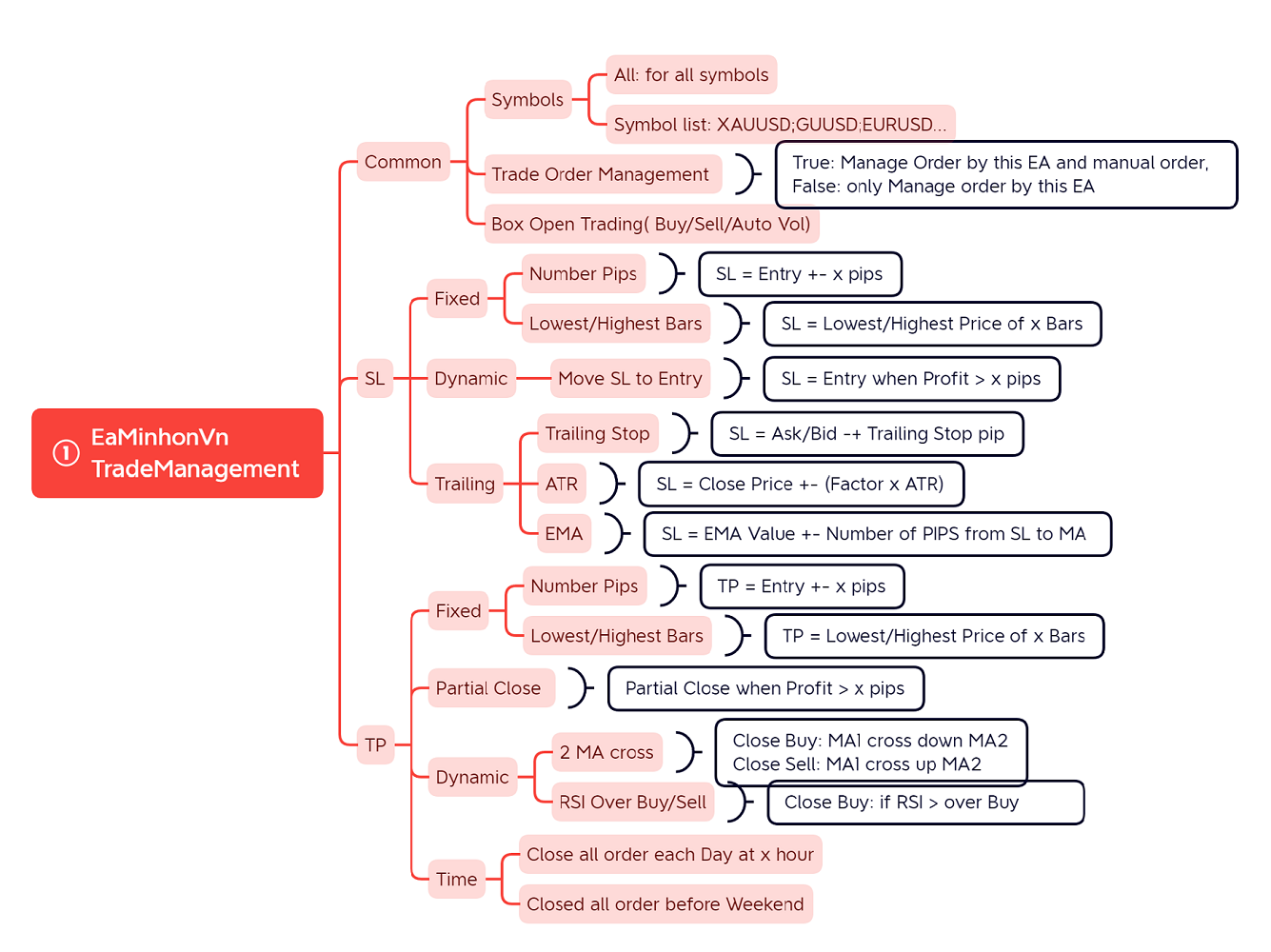
The main functions of Ea TradeManagement

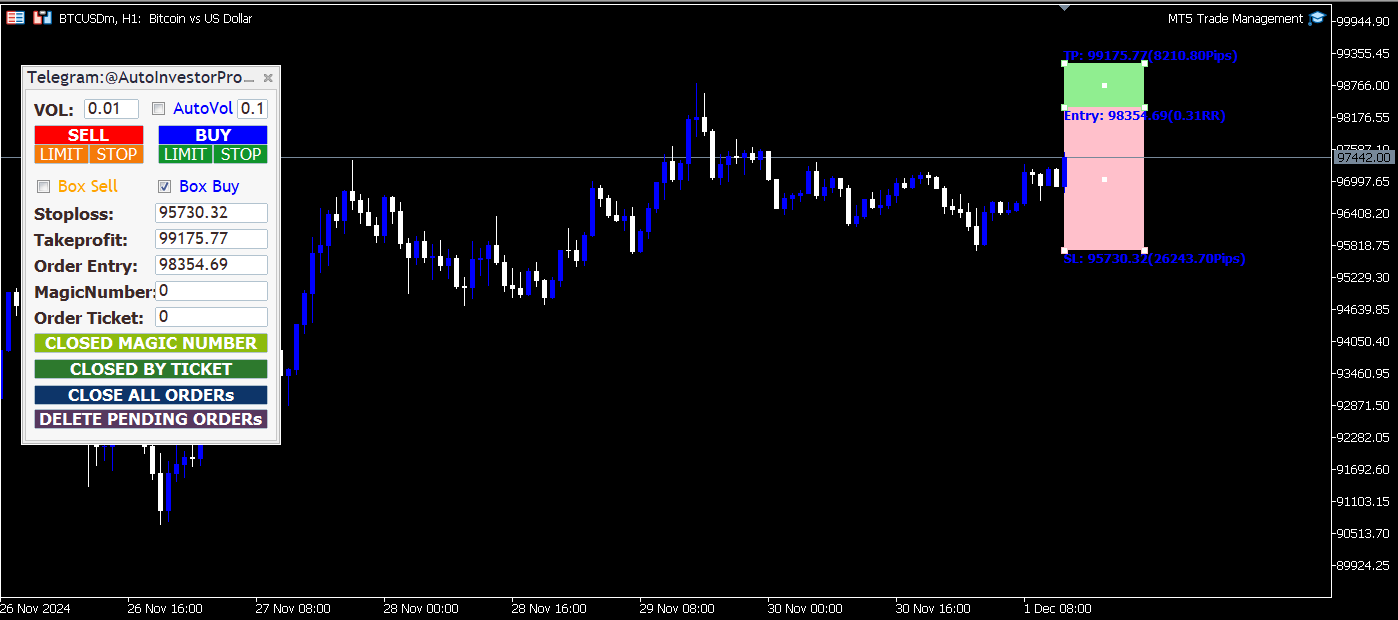
1. GUI

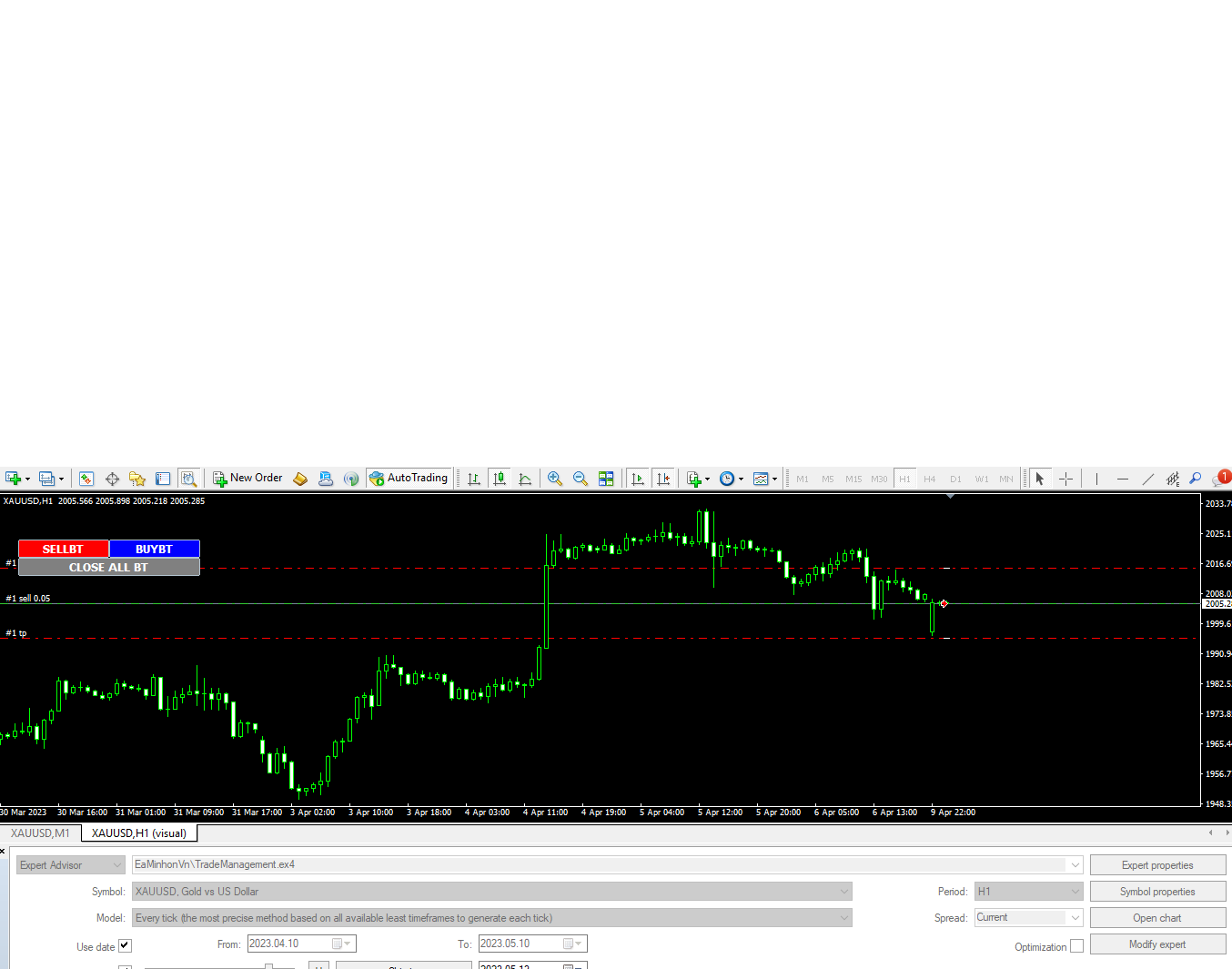
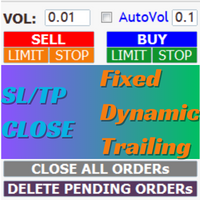
o   Interact with running EAs

o   GUI for placing orders

o   Closing orders by Ticket

o   Closing orders by MagicNumber

o   Closing all orders

o   Delete Pending orders

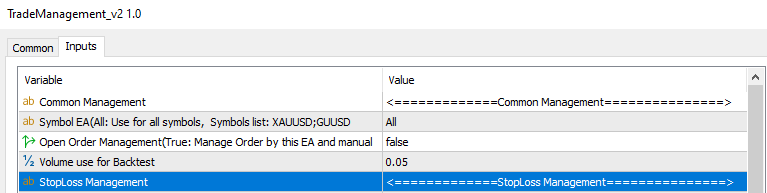
2. General management:

o   Management based on Symbol, manually orders , orders from the EA, and orders from other EAs

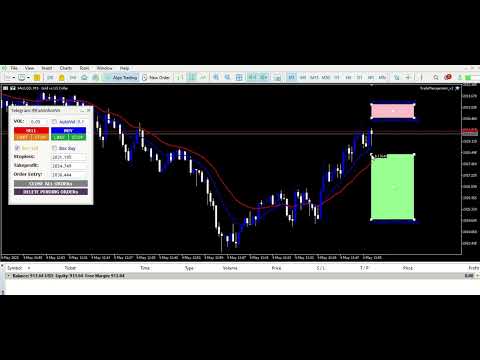
o   User-friendly trade interface with the ability to drag and drop SL,TP,Entry

o   Support backtest

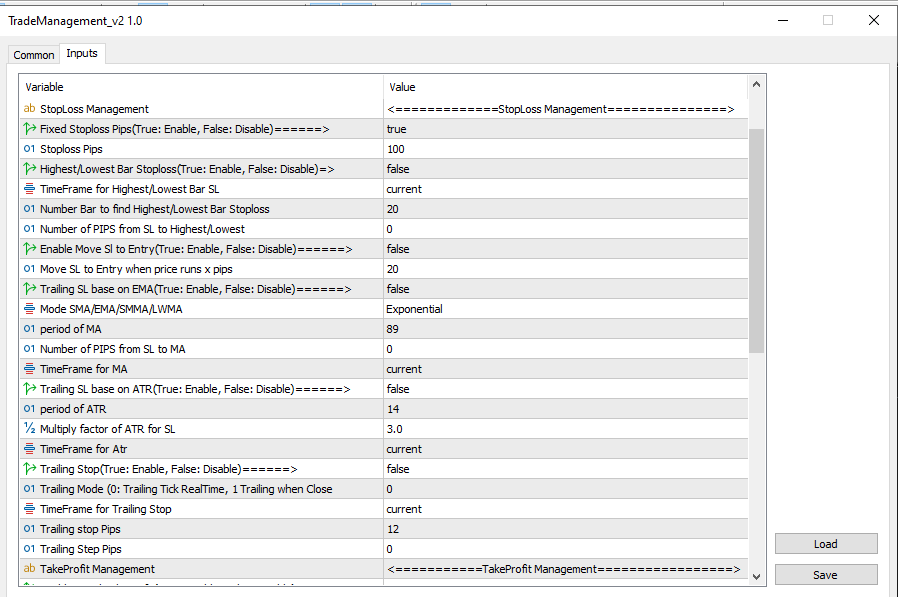
3. Stoploss management

o   Automatic placement of Stoploss based on fixed Pips number

o   Automatic placement of Stoploss at the highest and lowest price in x candles

o   Automatic moving of Stoploss to the Entry price after the price has moved x Pips

o   Automatic trailing Stop after the price has moved x Pips

o   Automatic trailing Stop based on ATR indicator

o   Automatic trailing Stop based on EMA indicator

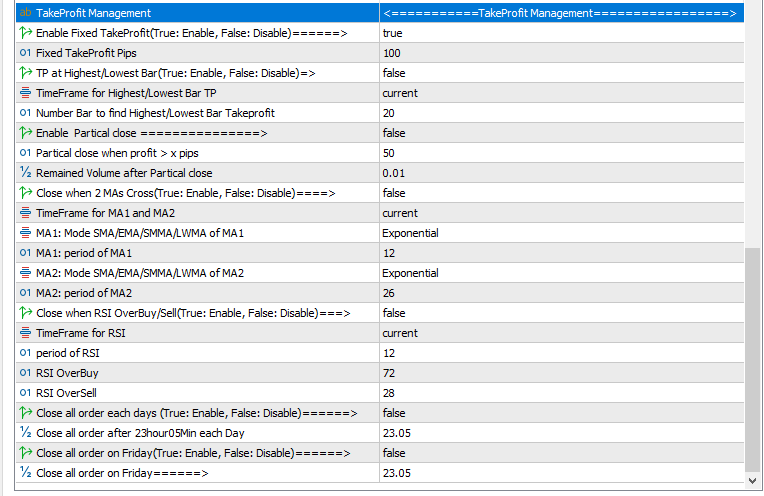
4. TakeProfit management

o   Automatic placement of Takeprofit based on fixed Pips number

o   Automatic placement of Takeprofit at the highest and lowest price in x candles

o   Automatically close of a portion of the Volume after reaching a profit of x Pips

o   Automatically close a position when 2 MA lines cross

o   Automatically close a position when RSI crosses the overbought or oversold threshold

o   Automatically close all positions each day at a specific time

o   Automatically close all positions at the end of weekend

Free and Test Version only works on GPBUSD Symbol:

MT5: https://www.mql5.com/en/market/product/116135 

MT4: https://www.mql5.com/en/market/product/116137

Full Symbols:

MT5: https://www.mql5.com/en/market/product/98252

MT4: https://www.mql5.com/en/market/product/98476


If you need to add more strategy and customization to trade management. Let us know 

Рекомендуем также
MQL5 Trading Panel SL TP — это мощный инструмент, призванный помочь трейдерам эффективно управлять своими позициями на платформе MetaTrader 5.   Эта торговая панель предоставляет простой в использовании интерфейс для установки уровней Stop Loss (SL) и Take Profit (TP) для открытых позиций. MQL5 Trading Panel SL TP обладает широкими возможностями настройки и может быть адаптирована к конкретным потребностям отдельных трейдеров.   Панель можно изменять в размере, перемещать и настраивать с помощь
Imagine flying a real aircraft without ever stepping into a flight simulator. That's what trading is like. You have to simulate your strategy before you can take it to a live market. It is good if you can simulate things speedily before even stepping into any live market, or before coming up with an automated system.  People don't have all day to stare at a higher timeframe chart until the entry signal finally arrives. That's why I built this so that you can simulate your strategy with speed. Th
FREE
The purpose   of this utility is to manage one or more subwindow in the same chart by opening and closing them through a button or the keyboard keys How it works: If you want to handle more than one subwindow you need to reinstall the indicator . In this case some setups has to be customized onlu in the last subwindow installed and others setups in the installed subwindow during the first time installation. They are denoted in the input rispectively as ' LW ' and ' IW '. First of all install
Grid Trading - полуавтоматический советник для торговли по сетке в один клик на хеджевых счетах. Также доступна версия для MetaTrader 4 . *Данный советник предназначен только для счетов с хеджинговой системой учета позиций Обычный режим Вы нажимаете на кнопку Sell или Buy на графике, затем эксперт добавит уровни стоп-лосс, тейк-профит для сделки, а функции трейлинг-стопа и безубытка позаботятся о сделке, если она не сможет достичь цели профита. Хеджирование При выборе торговли с использованием
HedgeSafe Trade Assistant Торговая панель для MetaTrader 5 с приоритетом контроля риска. HedgeSafe помогает подготовить, проверить и сопровождать ручную сделку прямо на графике до нажатия BUY или SELL. HedgeSafe не является сервисом сигналов, прогнозным инструментом, AI-ботом или автоматической стратегией. Продукт не выбирает направление сделки и не обещает прибыль. Каждое торговое решение остаётся за трейдером. Основные возможности Расчёт лота от процента баланса или фиксированной суммы в валют
Protect your funded accounts and personal capital with military-grade precision. This utility continuously monitors your floating equity against your daily starting balance. The moment your custom drawdown threshold is breached, it instantly liquidates all open positions, deletes pending orders, and completely unloads from the chart. Stop revenge trading and never fail a prop firm evaluation due to a margin breach again.
FREE
Trade Performance Journal — Your Visual Trading Summary Tool Trade smarter by understanding your performance. This Expert Advisor (EA) provides an instant visual summary of your trading results directly on the chart. Whether you’re a scalper, swing trader, or long-term investor, this tool helps you stay on top of your performance metrics with ease. Key Features Flexible Time Analysis View your performance by Quarter, Month, or Half-Year. Easily switch between display modes to analyze your res
FREE
Советник  Auto SLTP Maker MT5  призван помочь тем, кто забывает устанавливать в сделках параметры StopLoss и/или TakeProfit, либо торгуют на слишком быстром рынке, чтобы успевать это сделать вовремя. Он автоматически отслеживает сделки без уровней StopLoss и/или TakeProfit и проверяет, какой их уровень, согласно настройкам, необходимо установить для сделок. Данный продукт работает как с рыночными ордерами, так и с отложенными. Тип ордеров, на которые он будет реагировать можно выбрать в настройк
Don't want to risk or loose your personal trading account or prop trading firm account because of a simple Margin Call or exceeded Loss Limit? Then this Utility Expert Advisor is the solution for you! This Expert Advisor monitors your account Equity or Balance or even both! If the Equity and/ or Balance fall under your defined stop limits, the EA closes all of your positions and keeps you so on track. Options and Variables: Monitored Values: Choose which values should get monitored Equity: if
Net Z
Sugianto
5 (1)
NET Z uses a very well-known trend reversal technique to determine position entry with slight modifications by using virtual trade techniques and virtual pending orders so that position entry is not too early or too late. Why NETZ? NET Z does not require complicated settings and is easy to use because user only need to upload a set file that is already available. Currently there are set files for 20 fx pairs. The best GRID EA with the ability to control risks. I will share my personal daily rou
Trade Panel Pro — Профессиональный терминал управления рисками и исполнения ордеров для MetaTrader 5 Trade Panel Pro — это продвинутая и универсальная утилита для MetaTrader 5, созданная для активных дейтрейдеров и профессионалов. Она объединяет в себе точный расчет рисков и молниеносное исполнение ордеров, помогая защищать капитал и легко управлять сделками с несколькими целями. Главные преимущества и ключевые особенности Автоматический расчет лота: Забудьте о ручных расчетах объема! Панел
Automatic TP and SL
Dushshantha Rajkumar Jayaraman
TradeGuard    by Chart Walker TradeGuard is a MT5 Expert Advisor (EA) designed to enhance your trading experience by automating key aspects of trade management. This EA excels in efficiently managing Take Profit (TP) and Stop Loss (SL) levels, offering a seamless and intelligent approach to trailing stops. One of TradeGuard's standout features is its Smart Trailing Stop, which dynamically adjusts the trailing distance based on market conditions. This adaptive approach helps maximize profits dur
Breakevan Utility
Jose Luis Thenier Villa
BreakEvan Utility  Is a simple tool in a panel with this utilities: This utility will draw a Golden Line in the chart applied showing the breakeven price, considering all the positions opened for that specific symbol. Also the information panel shows: Balance Breakeven Price for that chart Force Breakeven (for that symbol) as ON/OFF Force Breakeven Global (takes into account all trades opened) as ON/OFF Total Lots opened for Symbol Total Lots opened Global And two buttons: Force Breakeven: Whe
See what your broker statement never shows. Test it before you buy. An on-chart analytics panel that reads your account history and your open positions, and turns them into a compact table right on the chart. No external file, no third-party service, no upload of your trading data anywhere. Around that, four things you will not find in your terminal report. Try it for real, before you buy Download the free demo and run it in the Strategy Tester in visual mode. This is not a stripped-down previe
The Ultimate All-In-One Trade Manager & Prop Firm Guardian for MT5. Nexus Pro Trade Manager is the most advanced, all-in-one trading assistant designed for both manual traders and Prop Firm challengers. Featuring a stunning, lag-free UI (Dark/Light mode), it completely transforms your MT5 into a professional trading terminal. Whether you are trading a personal account or trying to pass evaluations for FTMO, FundedNext, or other prop firms, Nexus Pro protects your capital, automates your risk cal
GOLD/USDT M15 Dynamic ATR Expert Advisor Designed specifically for GOLD/USDT on the M15 timeframe, this Expert Advisor adapts perfectly to non-standard price scales, digits, and tick structures typical of crypto and synthetic gold contracts. By replacing fixed points with dynamic ATR volatility metrics, it delivers robust risk control and precision execution. Key Features Dynamic ATR Risk Management: Stop Loss, Take Profit, and Trailing Stop are calculated using ATR multipliers based on real-tim
SmartTrade EA is a trading panel that puts order entry, position management and risk control directly on the chart. Instead of opening a dialog and typing a volume every time, you set up the trade once by dragging two lines, and the panel does the arithmetic for you. It is a tool, not a signal generator. SmartTrade EA never decides when to enter a trade — you do. Its automation only manages positions that already exist: break-even, trailing stop, partial take-profit and the risk guard. There i
User Manual Buy Trading Utility, Get 2 indicators FREE ! After purchase contact me for your " TWO indicators GIFT (Any one you want) ", adding you in group. Trading Utility MT5 The manual trader's cockpit. Size every trade by risk, place it from the chart, and manage it without ever opening the order dialog. Eight tabs, seven trailing engines, and every stop and target draggable with one click. One panel between you and the order window. Risk-sized entries, draggable stops, seven trailing modes
Q-Dragon Dashboard Monitor — это мощная и элегантная автономная утилита, предназначенная для предоставления трейдерам комплексного обзора их торговых результатов в режиме реального времени. Независимо от того, торгуете ли вы вручную или используете несколько советников, эта панель легко рассчитывает и визуализирует вашу статистику, не мешая вашим сделкам. Ключевые особенности: - Мониторинг портфеля в реальном времени: мгновенно просматривайте свои открытые позиции, текущую прибыль/убыток и общ
FREE
Trade assistant pro v8
Ahmed Mohammed Bakr Bakr
FREE FREE FREE Trade Assistant MT5 – Professional Trading & Risk Management Panel Trade Assistant MT5 is an advanced trading panel designed to help traders execute orders faster, safer, and more professionally . It simplifies manual trading by combining smart order management , precise risk control , and one-click execution , making it ideal for both beginners and advanced traders. This tool does not trade automatically . Instead, it empowers you with full control while applying professional-gra
FREE
Recovery Assistant Pro for MT5 Professional Manual Recovery Trading Assistant Recovery Assistant Pro is a powerful and easy-to-use Manual Trading Assistant EA. Helps calculate the appropriate Lot Size . Designed to help traders recover losing positions back to profit based on the desired Target USD . Reduces the complexity of Recovery calculations and minimizes errors caused by manual calculations. With a beautiful and user-friendly trading panel (shown above), you can control your trades qu
Click Trading
Jawad Tauheed
5 (2)
One Click Trading – Auto TP SL Developer TraderLinkz Version 1.00 Category Utility What it does Adds missing TP and SL to your manual trades and pending orders Sets them once per ticket Lets you move TP and SL afterward Works on hedging and netting accounts Scans on every tick and reacts on trade events Why you want it You place faster entries You get consistent risk and exit targets You reduce fat finger errors You keep full manual control Quick start Attach the EA to any chart Keep TP and SL e
FREE
Easy Trade Executor — инструмент для быстрого расчета лота, открытия и сопровождения сделок в MT5. Размещайте уровни Open Price, Stop Loss и Take Profit прямо на графике, получайте автоматический расчет объема позиции и открывайте сделки с контролируемым риском всего за несколько кликов. Почему Easy Trade Executor? Easy Trade Executor создан для трейдеров, которые хотят не только рассчитывать риск, но и быстро управлять сделками на графике. Инструмент объединяет расчет позиции, открытие ордеро
Resiko
Monita Melyana Sinurat
This tool functions to: 1. Manage Risk - Set SL and TP for all open orders - Close all open orders according to the set risk 2. Manage Orders - This tool also functions as an assistant for Martingale or Grid trading, according to the set order spacing. This tool is ideal for traders who prefer to use Grid or Martingale systems with strict risk management..........
EA Hedger MT5
Sergej Chukhista
3 (2)
Купили торговый советник, подписались на сигнал или торгуете вручную?! Не забывайте об управлении рисками. EA Hedger   – это профессиональная торговая утилита с множеством настроек, которая позволяет управлять рисками с помощью хеджирования. Хеджирование – это методика торговли, которая предполагает открытие противоположных позиций к уже открытым позициям. С помощью хеджирования позиция может быть полностью или частично локирована (взята в замок). Например, на вашем счёте открыты три позиции: E
Trade Panel by RWBTradeLab — The Ultimate Trade & Risk Management Utility Take full control of your MetaTrader 5 trading with the   Trade Panel by RWBTradeLab ! Designed by RWBTradeLab, this all-in-one utility is built for both professional and beginner traders who want to execute trades faster, manage risk perfectly, and analyse their account performance in real-time. Say goodbye to manual lot calculations and slow trade execution. With a sleek, draggable, and highly intuitive User Interfa
TradeOS - панель для MetaTrader 5. Считает объём от заданного риска, выставляет сделку, ведёт её по вашим правилам, следит за лимитами проп-счёта и за новостями. А потом показывает, что в итоге получилось из вашего плана. Направление и точку входа выбираете вы.  Попробовать TradeOS перед покупкой: Доступна бесплатная версия TradeOS Demo , которая позволяет протестировать возможности TradeOS на онлайн DEMO-счёте MetaTrader 5. Demo Edition работает только на DEMO-счетах. Для использования TradeOS
Lot calculator tool MT5
Ernestas Kvedaras
3.67 (3)
More stable MetaTrader 4 version is available here:  Lot Calculator Tool . This tool helps you to automatically calculate and manage risk, conveniently place orders visually, schedule orders, trail stops, move them to break-even and more. Features Place market or pending orders using draggable lines Schedule orders Calculate and limit risk using various methods See current spread See time till next candle Set custom order comments Trail stops Move stops to break-even See order profit/loss in p
Product introduction : Trade Manager Tool for MT5 Trade Manager Tool will help trader calculate almost exactly the risk based on your account automatically. Along with that, there are features to support capital preservation with Trailing Stop, BreakEven, Risk Limit such as Daily Limit Profit/Loss,etc.. helps you avoid overtrading.In particular, the panel is simply designed with many interactive buttons inside the panel and outside the chart to help trader interact more easily.These features re
DESCRIPTION: The EA is a trade manager for managing manual or other trades by EA. It can place Stoploss, Takeprofit, Trailing, and Martingale/Average all open positions. Make sure to just place 1 type of open orders for each symbols     (Examples: 1 Buy or 1 Sell). The EA will not open the initial trades, but can be backtested to see how it works. FEATURES: Multicurrency or Single Pair Mode. Placing Stoploss / Takeprofit. Auto Martingale / Average Positions. Trailing for All Open Positions (Sin
С этим продуктом покупают
Trade Assistant MT5
Evgeniy Kravchenko
4.41 (216)
Помогает рассчитать риск на сделку, простая установка нового ордера с помощью линий, управление ордерами с функциями частичного закрытия, 7 типов трейлинг-стопа и другие полезные функции. Дополнительные материалы и инструкции Инструкция по установке - Инструкция к приложению - Пробная версия приложения для демо счета Функция Линии   - отображает на графике линию открытия, стоп-лосс, тейк-профит. С помощью этой функции легко установить новый ордер и увидеть его дополнительные характеристики пе
Добро пожаловать в Trade Manager EA — лучший инструмент для управления рисками, предназначенный для упрощения, точности и эффективности торговли. Это не просто инструмент для размещения ордеров; это комплексное решение для удобного планирования торгов, управления позициями и усиленного контроля над рисками. Независимо от того, начинающий вы трейдер, опытный специалист или скальпер, нуждающийся в быстром исполнении, Trade Manager EA адаптируется к вашим потребностям и работает с любыми активами:
Astro Trade MT5
Indra Maulana
5 (2)
AstroTrade Trading Assistant AstroTrade is a comprehensive multi-functional trading utility developed for the MetaTrader 5 platform. It integrates essential tools for trade execution, risk management, and technical monitoring into a single unified interface. The application is designed to assist traders in managing their daily operations through a visual and structured environment. Visual Trade Execution and Risk Management The application includes a specialized trading panel that assists in c
TradePanel MT5
Alfiya Fazylova
4.88 (167)
Trade Panel — это многофункциональный торговый помощник. Приложение содержит более 50 торговых функций для ручной торговли и позволяет автоматизировать большинство торговых операций. Перед покупкой вы можете протестировать демоверсию на демо-счете. Скачать пробную версию приложения для демонстрационного аккаунта: https://www.mql5.com/ru/blogs/post/750864 . Полная инструкция здесь . Торговля. Позволяет совершать торговые операции в один клик: Открыть отложенные ордера и позиции с автоматическим р
================================================================================ POC BREAKOUT - V20.72. Full Professional Grade Toolkit ================================================================================ POC Breakout is a full MetaTrader 5 trading dashboard for discretionary traders who want breakout signals, Point of Control (POC) context, volume profiles, order flow, market structure, news, alerts, and advanced trade planning in one professional workspace. Attached directly to you
Бета-версия Telegram to MT5 Signal Trader почти готов к официальному альфа-релизу. Некоторые функции все еще находятся в разработке, и вы можете столкнуться с небольшими ошибками. Если вы заметите проблемы, пожалуйста, сообщите о них, ваша обратная связь помогает улучшать программное обеспечение для всех. Telegram to MT5 Signal Trader — мощный инструмент, который автоматически копирует торговые сигналы из каналов и групп Telegram прямо в ваш счёт MetaTrader 5 . Поддерживаются как публичные, так
Telegram to MT5 Multi-Channel Copier автоматически копирует торговые сигналы из ваших Telegram-каналов напрямую в MetaTrader 5. Никаких ботов, никаких браузерных расширений, никакого ручного копирования. Вы получаете сигнал в Telegram, и советник открывает сделку на вашем терминале за несколько секунд. Продукт включает два компонента: приложение для Windows, которое слушает ваши Telegram-каналы, и этот советник, который исполняет сигналы на терминале MT5. Также доступна версия для MT4. Руководст
Grid Manual MT5
Alfiya Fazylova
4.73 (22)
Grid Manual — это торговая панель для работы с сеточными стратегиями. Утилита универсальная, имеет гибкие настройки и понятный интерфейс. Работает с сеткой ордеров не только в сторону усреднения убытков, но и в сторону наращивания прибыли. Трейдеру не нужно создавать и сопровождать сетку ордеров, это сделает утилита. Достаточно открыть ордер и Grid manual автоматически создаст ему сетку ордеров и будет сопровождать его до самого закрытия. Полная инструкция и демо-версия здесь . Основные особенно
Exp COPYLOT CLIENT for MT5
Vladislav Andruschenko
3.97 (35)
Профессиональный копировщик сделок для MetaTrader 5 Быстрый, профессиональный и надежный копировщик сделок для MetaTrader . COPYLOT позволяет копировать сделки Forex между терминалами MT4 и MT5 с поддержкой счетов Hedge и Netting . Версия COPYLOT для MT5 поддерживает: - MT5 Hedge → MT5 Hedge - MT5 Hedge → MT5 Netting - MT5 Netting → MT5 Hedge - MT5 Netting → MT5 Netting - MT4 → MT5 Hedge - MT4 → MT5 Netting Версия MT4 Полное описание + DEMO + PDF Как купить Как установить Как получить файлы жур
Signal TradingView to MT5 Pro Automator Мгновенное профессиональное исполнение между TradingView и MetaTrader 5 Автоматизируйте свою торговую стратегию с помощью самого надежного моста связи между алертами TradingView и реальным исполнением в MT5. Разработанный для трейдеров, которым требуются скорость, гибкость и безупречное управление рисками, этот советник (Expert Advisor) превращает любое сообщение с алертом в точный рыночный или лимитный ордер. ПРЕИМУЩЕСТВА И СИЛЬНЫЕ СТОРОНЫ Универсальный д
Trade Copier Ultimate
Janitha Sandaruwan Amaradasa Wickramasingha Arachchilage
5 (4)
Trade Copier Ultimate - Telegram to MT5 Signal Copier Trade Copier Ultimate automatically copies Telegram trading signals into MetaTrader 5. The EA can read signal messages, detect the symbol, order type, entry price, Stop Loss, Take Profit levels and selected update commands, then execute or manage the trade in MT5 using your lot and risk settings. It is more than a basic Telegram to MT5 copier. TCU also supports Bot API and user-account Bridge workflows, Discord signal routing, local MT5 to MT
Timeless Charts
Samuel Manoel De Souza
5 (8)
Timeless Charts is an all-in-one trading utility for professional traders. It combines custom chart types such as Seconds Charts and Renko with advanced order flow analysis using Footprints , Clusters , Volume Profiles , VWAP studies, and anchored analysis tools for deeper market insight. Trading and position management are handled directly from the chart through an integrated trade management panel , while Market Replay and Virtual Accounts provide environments for practicing trading skills and
Footprint Chart Pro — Professional OrderFlow EA for MetaTrader 5 Version 6.34 | Professional tool for real traders | Institutional-Grade Visualization DEMO USERS - PLEASE SELECT EVERY TICK / REAL TICK WHEN TESTING AND YOU HAVE DOWNLOADED HISTORICAL DATA. IF YOU SEE A WAITING SCREEN AND IT IS NOT DOWNLOADING, IT MEANS YOU HAVE LOW HISTORICAL DATA. TRY 1 MIN AND 5 MIN FIRST ON 1 DAY DATA. ONE DAY DATA SHOULD BE THE NEWEST AND MOST CURRENT DATE. PLEASE WAIT UNTIL THE MARKET HAS ROLLED OVER PERIOD.
Farmed Hedge Yield Farming | All Markets (Manual - Hybrid - Semi/Automated EA) VERIFIED TRADING RESULTS - Farmed Hedge Yield Axi Copy:  https://www.mql5.com/en/signals/2356376 - Farmed Hedge Yield Exn Copy:   https://www.mql5.com/en/signals/2356404 - Farmed Hedge Yield V Copy:  https://www.mql5.com/en/signals/2357156 * Before purchasing, please feel free to send me a message if you have any questions about the product or setup. ** After purchase,  Contact me via private message to receive t
Anchor Trade Manager
Kalinskie Gilliam
5 (7)
Anchor: The EA Manager Your EAs manage their own trades. Anchor manages the account around them. Anchor gives you one place to control your EAs, manage risk and decide when trading is allowed. Any EA, any vendor, any broker or symbol. No source-code changes required. The Problem Most EAs only know what they are doing. They cannot see when another EA is already trading, when several EAs open and are stacking risk or when the account has reached your loss limit. Even using just one EA, it may not
Global Investing FX Terminal
Santiago Nicolas Pla Casuriaga
Global Investing FX Terminal — это комплексный FX-дашборд для MetaTrader 5 — процентные ставки центральных банков, позиции COT CFTC, рэнкинг carry, индексы экономических сюрпризов, перекос опционов, настроения ритейла и корреляции, тринадцать панелей в общей сложности — отображается на едином канвасе без мерцания и обновляется каждые 10 секунд через один прикреплённый EA. Никаких внешних программ не требуется. Профессиональный анализ валютного рынка требует одновременного доступа к данным, котор
Premium Trade Manager - Торговая панель со встроенным коучем Premium Trade Manager помещает торгового коуча прямо в ваш график, а под ним работает полноценный движок исполнения. Настройте сделку так, как вы всегда это делаете, затем позвольте Max, вашему ИИ-наставнику по трейдингу, прочитать именно эту настройку с учётом вашего живого счёта и дать чёткое заключение до того, как вы входите: соответствует ли стоп дисциплинированному подходу, разумен ли риск, не выходит ли высоковолатильный релиз ч
Trading Chaos Expert
Gennadiy Stanilevych
5 (11)
Этот программный продукт не имеет аналогов в мире, поскольку он является универсальным "пультом управления" торговых операций, начиная от получения торговых сигналов, автоматизации входа в позиции, установки стоп-лоссов и тейк-профитов, а также трейлинга прибыли одновременно по множеству сделок в одном открытом окне. Интуитивно понятное управление экспертом в "три клика" на экране монитора позволяет полноценно использовать все его функции на разного рода компьютерах, включая планшетные. Взаимоде
MT5 to Telegram Signal Provider — это простой в использовании полностью настраиваемый инструмент, который позволяет отправлять определённые сигналы в чат, канал или группу Telegram, превращая вашу учётную запись в провайдера сигналов . В отличие от большинства конкурирующих продуктов, он не использует импорт DLL. [ Демо ]   [ Руководство ] [ Версия MT4 ] [ Версия для Discord ] [ Канал в Telegram ]  New: [ Telegram To MT5 ] Настройка Доступно пошаговое руководство пользователя . Никаких знаний A
Power Candles Strategy Scanner — самооптимизирующийся инструмент для поиска настроек по нескольким инструментам Power Candles Strategy Scanner использует тот же самооптимизирующийся движок, что и индикатор Power Candles — для всех символов в вашем Market Watch, одновременно. На одной панели отображается информация о том, какие символы в данный момент являются статистически торгуемыми, какая стратегия выигрывает на каждом из них, оптимальная пара Stop Loss / Take Profit, а также отправляется увед
Welcome to ENTRY IN THE ZONE WITH SMC MULTI TIMEFRAME Entry In The Zone and SMC Multi Timeframe is a real-time market analysis tool based on Smart Money Concepts (SMC), designed to analyze market structure, price direction, and key trading zones. It supports both Single-Timeframe Analysis and Multi-Timeframe Analysis, providing a clearer view of the overall market structure across multiple timeframes, with real-time BUY / SELL signals that do not repaint. It is designed to help filter trading op
VirtualTradePad PRO SE MT5 — профессиональный торговый центр управления для MetaTrader 5 VirtualTradePad PRO SE — это премиальная торговая панель и рабочая среда управления сделками на графике для MetaTrader 5 . Она создана для трейдеров, которым нужны более быстрое исполнение, более понятный контроль позиций, структурированное управление сделками, визуальное планирование уровней и профессиональный рабочий процесс прямо с графика. Это не просто панель BUY / SELL. PRO SE объединяет ручную торговл
Trade Manager DaneTrades
Levi Dane Benjamin
4.23 (30)
Trade Manager, который поможет вам быстро входить и выходить из сделок, автоматически рассчитывая риск. Включает функции, которые помогут предотвратить чрезмерную торговлю, торговлю из мести и эмоциональную торговлю. Сделками можно управлять автоматически, а показатели эффективности счета можно визуализировать в виде графика. Эти функции делают эту панель идеальной для всех трейдеров, занимающихся ручной торговлей, и помогают улучшить платформу MetaTrader 5. Многоязычная поддержка. Версия для МТ
YuClusters
Yury Kulikov
4.93 (43)
Внимание: Ознакомиться с работой программы можно с помощью бесплатной версии  YuClusters DEMO . YuClusters это профессиональная система анализа рынка. Для трейдера открываются уникальные возможности анализа потока ордеров, объемов торговли, движения цены используя различные графики, профили, индикаторы, графические объекты. YuClusters оперирует данными на основе ленты сделок или тиковой информации, в зависимости от того, что доступно в котировках финансового инструмента.  YuClusters позволяет с
Quant AI Agents
Ho Tuan Thang
5 (1)
Quant AI Agents are independent trading Expert Advisors. Instead of trading using a fixed strategy like other conventional EAs, Quant AI Agents   is a   multi-agent AI trading framework   that turns natural-language strategy prompts into live.  WANT THE SAME RESULTS AS MY LIVE SIGNAL?   Use the exact same brokers I do:   IC MARKETS , IC TRADING   .  Unlike the centralized stock market, Forex has no single, unified price feed.  Every broker sources liquidity from different providers, creating un
The product will copy all telegram signal to MT5 ( which you are member) , also it can work as remote copier.  Easy to set up, copy order instant, can work with almost signal formats, image signal,  s upport to translate other language to English Work with all type of channel or group, even channel have "Restrict Saving Content", work with  multi channel, multi MT5 Work as remote copier: with signal have ticket number, it will copy exactly via ticket number. Support to backtest signal. How to s

Trade Manager DashPlus
Henry Lyubomir Wallace
4.85 (13)
DashPlus – это продвинутое средство для управления торговлей, разработанное для повышения эффективности и результативности торговли на платформе MetaTrader 5. Оно предлагает широкий набор функций, включая расчет рисков, управление ордерами, продвинутые системы сеток, инструменты на основе графиков и аналитику производительности. Основные функции Восстановительная Сетка Внедряет систему усреднения и гибкую сетку для управления сделками в неблагоприятных рыночных условиях. Позволяет стратегически
Risk Manager Pro MT5 - это советник для защиты торгового счета и контроля рисков в MetaTrader 5. Утилита отслеживает equity, дневной и недельный результат, просадку, открытые позиции, количество сделок, серии убыточных сделок и разрешенное торговое время. Когда заданный лимит достигнут, Risk Manager Pro MT5 может автоматически закрыть позиции, удалить отложенные ордера, остановить другие советники, отправить уведомление или закрыть терминал. Вместо того чтобы полагаться только на дисциплину во в
Trump Shock Guard
Thomas Christoph Lipka
TRUMP SHOCK – Real-Time Market Protection for MT5 TRUMP SHOCK is a MetaTrader 5 risk-management utility designed to react to sudden market-moving news and unexpected volatility. Markets such as Gold, Oil and USD-related instruments can move within seconds following major political statements or breaking news. TRUMP SHOCK monitors important Truth Social posts and general breaking news and can automatically trigger predefined protective actions in MetaTrader 5 — helping you reduce unwanted exposur
AlgoRadar
Stephen J Martret
5 (4)
AlgoRadar is an on-chart analytics dashboard for MT5 that aggregates Expert Advisor performance across multiple accounts, brokers, and platforms, including both MT4 and MT5 data, into a single live view on your MT5 chart. All analysis runs from the chart interface, with no external applications or manual report processing required. EA Analysis and Ranking For traders running multiple Expert Advisors, AlgoRadar provides a consolidated view of each EA's performance across accounts. Active EAs a
Другие продукты этого автора
EaMinhonVN – TradeManagement The main functions of Ea TradeManagement 1. GUI o      Interact with running EAs o      GUI for placing orders o      Closing orders by Ticket o      Closing orders by MagicNumber o      Closing all orders o      Delete Pending orders 2.  General management: o      Management based on Symbol, manually orders , orders from the EA, and orders from other EAs o      User-friendly trade interface with the ability to drag and drop SL,TP,Entry o      Support backtest 3. 
Strategy: The strategy will follow the high   Timeframe   trend and find spikes in the smaller Timeframe. Stoploss and Takeprofit orders from 1-3 days. Maximum 3 Orders, the strategy uses a combination of EMA, Stochatic, Volatility, and Strength indicators Real Signal:   https://www.mql5.com/en/signals/2244878 Symbol:    The best Symbol (BTCUSD and Crypto) Volume: suggestion 0.05lot/1000$, dropdown about 30% Stoploss: Fixed or   according to   Signal Takeprofit:    Fixed or   according to signa
AIP – MT4/MT5 To Telegram 1         Main features of MT4/MT5 EA To Telegram: Send all types of orders (Open Order/Close Order/Partial Close/Modify Order/Pending Order/Delete Order) Close and Modify Order with replies to the corresponding Open Order   Support sending to both private, public channels and group, topic group  Support sending to multiple channels simultaneously Send Chart Screenshots Manage all symbols with a single EA on one terminal Automatic loading of templates, logos, and screen
AIP – MT4/MT5 To Telegram 1         Main features of MT4/MT5 EA To Telegram: Send all types of orders (Open Order/Close Order/Modify Order/Pending Order/Delete Order) Close and Modify Order with replies to the corresponding Open Order Support sending to both private, public channels and group, topic group Support sending to multiple channels simultaneously Send Chart Screenshots Manage all symbols with a single EA on one terminal Automatic loading of templates, logos, and screenshots Support sen
Strategy: The strategy will follow the high Timeframe trend and find spikes in the smaller Timeframe. Stoploss and Takeprofit orders from 1-3 days. Maximum 3 Orders, the strategy uses a combination of EMA, Stochatic, Volatility, and Strength indicators Real Signal:   https://www.mql5.com/en/signals/2244878 Symbol:  The best Symbol (BTCUSD and Crypto) Volume: suggestion 0.05lot/1000$, dropdown about 30% Stoploss: Fixed or according to Signal Takeprofit:  Fixed or according to signal Auto Trailin
Фильтр:
Нет отзывов
Ответ на отзыв