Order Management EA

5
  • Утилиты
  • Wartono
  • Версия: 2.1
  • Обновлено: 6 сентября 2023
  • Активации: 10

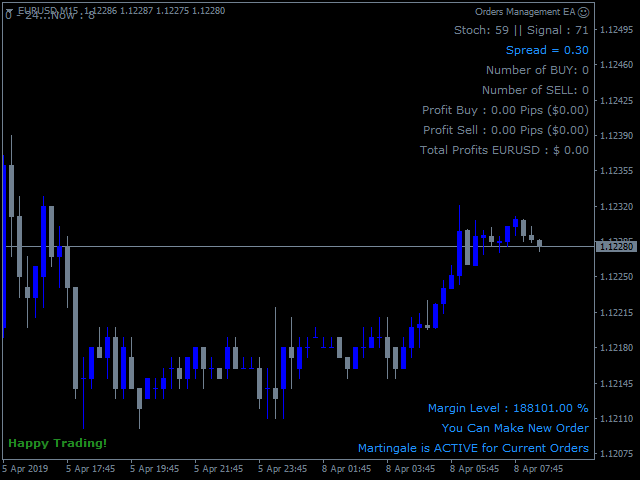
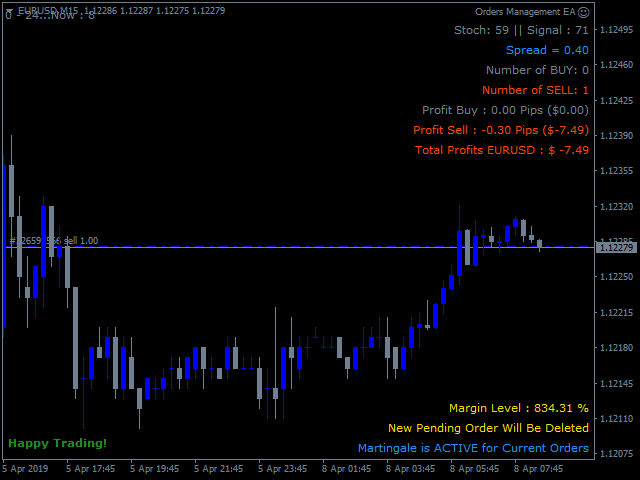
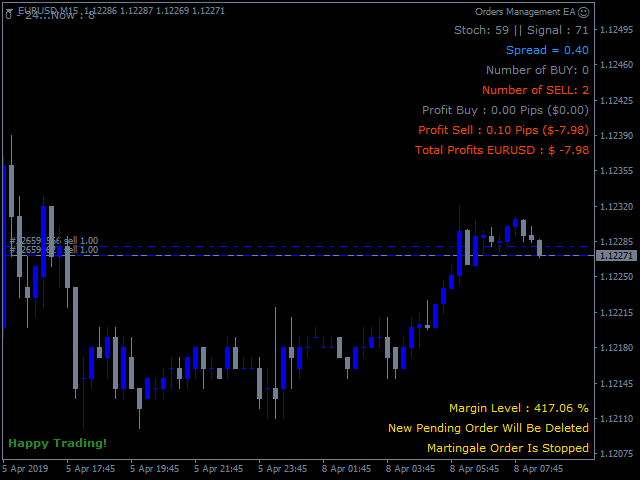
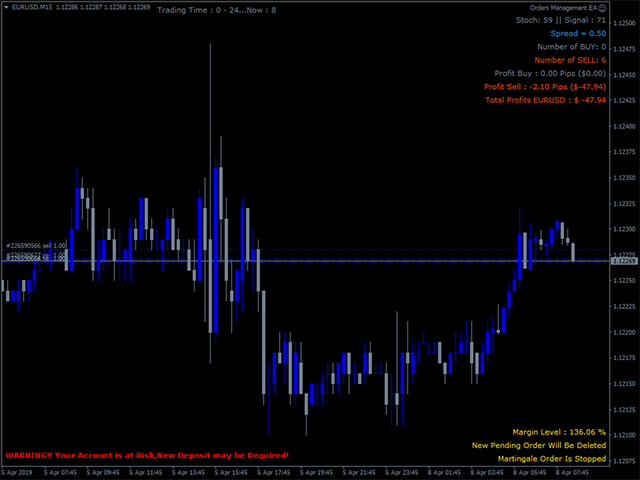
Order Management EA (OME). The software will manage your trades based on 2 options: Magic Number or Order Comment. Both the Trades from the other EA or from Manual Trading. Drawing Stop Loss/Take Profit, Close All the positions, manages Multiple Orders, determining grid range and entry signals automatically.  Sending Martingale Orders, if necessary, that can be turn off/on. Including 2 options lot calculation: Multiplication or Addition.  You install OME in your account, you place order, and it will manage the rest. Save your time, increase your profits.

About OME (Version 1.7)

  • OME is a tool to help trader, not fully automatic trading EA. A position active in the current symbol is required. It can be from Manual trading or from the other EA. Although the feature to place the first order is available, it is for Tester or Demo Account for simulation purpose only, not recommended for Real Account. Because the signal is from the stochastic only, it may provide low accuracy and cause a higher risk for Real Account. You can place order manually or use another EA in Real account and let OME to manage it.
  • OME in particular will only scan and manage trades with the following specifications: current symbol and magic number if selected Scan Base is Magic Number or Order Comment if selected Scan Base is Order Comment. Trades outside of that will be ignored. A New installation of associated symbols is required. 
  • If a position with the specifications above is found, then it will start to manage it. Drawing Stop Loss/ Take Profit, Martingale Orders with auto Lot calculation, grid range in pips and entry signal, Auto Close and more.
  • Available feature to use the same StopLoss or Take Profit to all positions in the same specifications.
  • Martingale Order is based on 2 variables: Minimum range in pips and Stoch Signal. And option to follow signal: true/false. Buy Stoch Signal occurs when Stochastic exits the OverSold area and Sell Stoch Signal occurs when Stochastic exits the Overbought area. The Stoch signal is useful to avoid blindly opening positions that only rely on the grid range. Please note that the Stoch Signal works on the current timeframe. The higher Timeframe will be the longer time to find the signal and vice versa. 


PARAMETERS

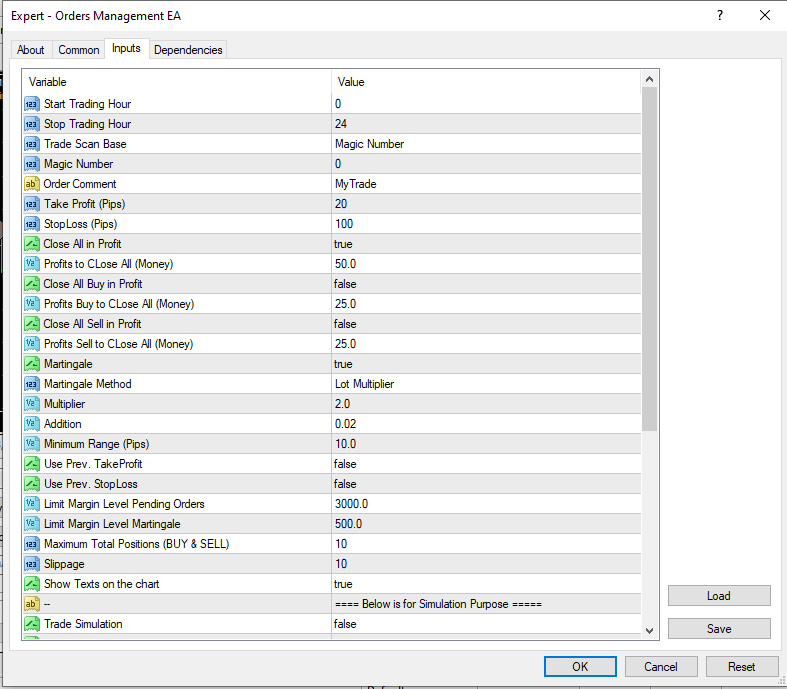
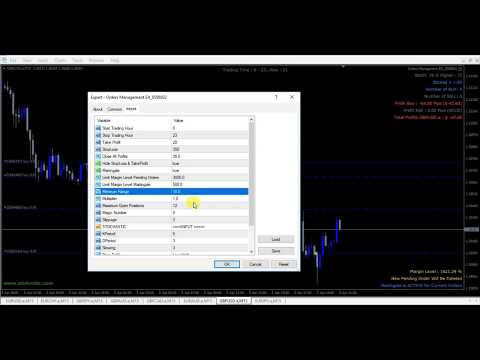
  1.  Start Trading Hour – Stop Trading Hour: the time range for the EA to work. Outside of the time, EA will stop to make new Martingale Orders in case Martingale is true.
  2. Trade Scan Base: The option to select the scanning base. There are 2 options: Order Comment or Magic Number. 
  3. Magic Number: if Trade Scan Base is Magic Number, then define the Magic Number value here. Magic Number for manual order is 0.
  4. Order Comment:  if Trade Scan Base is Order Comment, then define the String value here.
  5. Take Profit – Stop Loss: The value in Pips for Stop Loss and Take Profit.
  6. Close All in Profit: The option true/false to close all Buy & Sell positions if the minimum value is reached.
  7. Profits to CLose All (Money): In case Close All in Profit is true then define the minimum value of money here where the EA will close all positions.
  8. Close All Buy in Profit:  The option true/false to close all Buy positions if the minimum value is reached.
  9. Profits Buy to CLose All (Money):  In case Close All Buy in Profit is true then define the minimum value of money here where the EA will close all Buy positions.
  10. Close All Sell in Profit:  The option true/false to close all Sell positions if the minimum value is reached.
  11. Profits Sell to CLose All (Money):  In case Close All Sell in Profit is true then define the minimum value of money here where the EA will close all Sell positions.
  12.  Martingale: The option true/false. If true, EA will open new order with the same direction when existing position is floating loss and reaches the minimum range in pips and Stoch signal occurs. Otherwise select false to deactivate Martingale.
  13. Martingale Method: If Martingale is true. Select the option here. This is a lot size calculation method. Lot Multiplier is the multiply of the latest active lot size and Lot Addition is the addition of the latest active lot size. Example: If Martingale Method is Lot Addition and the latest active lot size: 0.5 
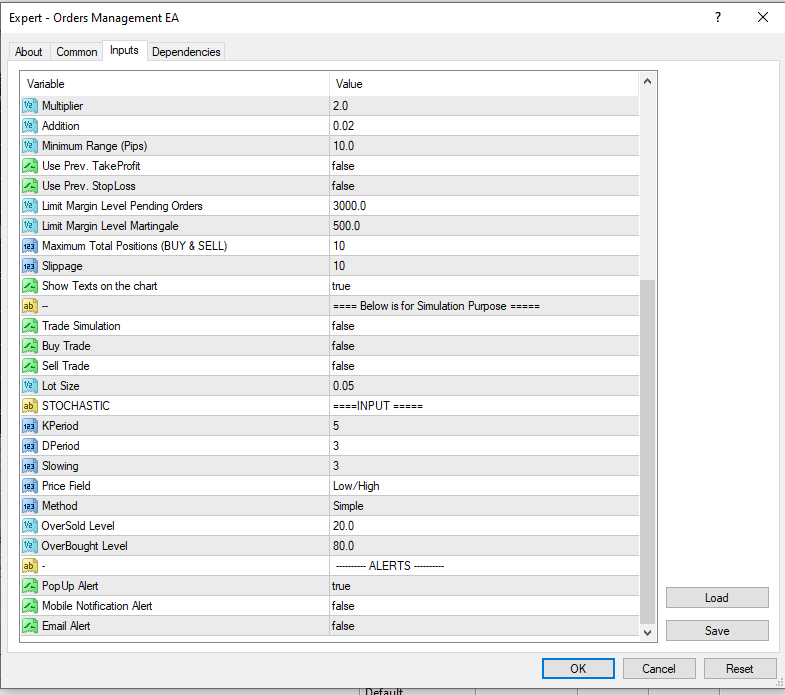
  14. Multiplier: Define the value here if Martingale Method is Multiplier.  Example: If latest active lot size: 0.5 and the value here is 2 then EA will place order with loth size 0.5 x 2 = 1.0
  15. Addition:  Define the value here if Martingale Method is Addition.  Example: If latest active lot size: 0.5 and the value here is 2 then EA will place order with loth size 0.5 + 2 = 2.5
  16. Minimum Range (Pips): The minimum grid range in pips between the position in the same direction.
  17. Use Prev. TakeProfit: Option true/false to use the previous Take Profit. If true, the EA will draw the same Take Profit instead of using the value of Take Profit input above. Otherwise, false and EA will use Take Profit value as defined in the Take Profit value above if the input value > 0.
  18. Use Prev. StopLoss: Option true/false to use the previous Stop Loss. If true, the EA will draw the same Stop Loss instead of using the value of Stop Loss input above. Otherwise, false and EA will use Stop Loss value as defined in the StopLoss value above if the input value > 0.
  19. Follow Signal: The option to follow signal for martingale orders. If true, the EA will open Martingale orders when the price is on the grid range and Stoch Signal occurs. If false, the EA will open the Martingale orders when the price is on the grid range without following Stoch Signal. 
  20.  Limit Margin Level Pending Orders: This is the minimum value of Margin Level. If value is reached, EA will close all existing pending orders.
  21.  Limit Margin Level Martingale:  This is the minimum value of Margin Level.  If value is reached, EA will stop to make new martingale order.
  22. Close Marti Orders if the First Order Closed. The option true/false to close the Martingale Orders if the first Order closed.
  23.  Maximum Total Positions (BUY & SELL): The Maximum Total positions both Buy and Sell. If the value is reached, the EA will not place new orders.
  24. Slippage: The difference between the expected price of a trade and the price at which the trade is executed. 
  25. Stochastic parameter is to provide martingale order signals. This is same with regular stochastic.
  26. Show Texts on the chart: The option true/false to show texts on the chart. The information about the current trades.
  27. Trade Simulation: The option true/false to activate the first order for simulation purpose. You can use this feature on Strategy Tester or Demo account to see how the EA works and manages the trades. Be careful, it could be activated on Real account but not recommended.
  28. Buy Trade: Option true/false to place the first Buy order. Only if Trade Simulation: true.
  29. Sell Trade: Option true/false to place the first Sell order. Only if Trade Simulation: true.
  30. Lot Size: The Lot Size of the first Order.  Only if Trade Simulation: true.

Recommended to install the EA on the VPS.

If you need more details related to the use of this EA, please don't hesitate to contact me.


Отзывы 1
pcarrero
176
pcarrero 2023.08.21 21:06 
 

This dev is incredible. The EA was nearly perfect for what I was looking for. I reached out to the dev to ask about a few features. He replied to me within a few minutes and told me he could add them. A few short days later they were added and are working great! Wonderful EA and amazing dev.

Рекомендуем также
The Expert Advisor will help you forward all pop-up alert with screenshot from  MetaTrader 4 to Telegram channel/ group, also forward all notifications to Telegram. Parameters  -  Telegram Bot Token - create bot on Telegram and get token.  -  Telegram Chat ID  - input your Telegram user ID,  group / channel ID  -  Forward Alert - default true, to forward alert.  -  Send message as caption of Screenshot - default false, set true to send message below Screenshot  How to setup and guide  - Telegram
This tool working You can buy or sell from the button of this tool, the lot size can be filled manually, as for the close all buy button to end all buy positions, close all sell button to end all sell positions, Close All profit button to end  All  profit position, Close All Loss button to end all loss position, Delete Pending button to delete all Pending order, close all orders to end all orders. The variable, you can use close all percent for close all orders when profit in percent, if close
BreakEven ProSync EA – Инструмент для управления сделками и контроля рисков Обзор BreakEven ProSync EA — это советник для   MetaTrader 4 , который помогает трейдерам эффективно управлять открытыми позициями за счет автоматической настройки стоп-лосса и синхронизации уровней SL/TP. Этот инструмент предназначен для трейдеров, которые хотят стандартизировать уровни   Stop Loss   и   Take Profit   для нескольких сделок, а также использовать функцию безубыточности. Советник рассчитывает   среднюю це
Chart Button позволяет перемещаться по всем графикам одним кликом. Утилита располагает символы как по вертикали, так и по горизонтали. Позволяет производить изменения на нескольких графиках одновременно. Утилита оптимизирует навигацию и ускоряет анализ. Значения входных параметров Direction (расположение кнопок символов) Horizontal – горизонтальное Vertical – вертикальное 32 SYMBOLS – 32 символа Forex_Suffix_Symbols – суффикс символа (не отображается на соответствующей кнопке символа) COLORS AN
Trade Info
Johannes Schoeman
Trade and Account Information Panel The Trade Info Panel allows you to easily see the status of you trading by pair and account. Minimise the panel by clicking on it to reduce the display area. Easily Identify loosing pairs/ instruments traded by the change of header colour. The HEADER change colour should the months losses exceed the months gains. Displayed information: General Account information Account Leverage Spread Bar Time remaining Account Balance  Account Equity Margin Free Margin Acc
This utility sends notification to trader’s MT4 (for MT5 version, checkout this link ) mobile app, to remind traders about their open positions. Super useful for part time traders to keep track and not forget any positions. To turn on notification, please visit this link (https://www.metatrader4.com/en/trading-platform/help/setup/settings_notifications) Features Keep track on open orders (pending orders, running orders) Customize time to send notification Customize notification interval (send ev
Скрипт BuyLimit_SellLimit_Grid открывает отложенные ордера BuyLimit и SellLimit. Просто перетащите скрипт на график нужной пары.  Перед установкой всех отложенных ордеров открывается окно ввода входных параметров: LongPos - при TRUE открывается ордер BuyStop. ShortPos - при TRUE открывается ордер SellStop. InitLot - начальный лот. LotCoeff - при 1 все отложенные ордера имеют одинаковый размер лота. InitStep - разница между двумя следующими друг за другом ордерами в пунктах. StepCoeff - коэффицие
Данная утилита поможет немедленно закрыть все прибыльные ордера ОДНИМ НАЖАТИЕМ КНОПКИ. Работает очень быстро. Вы можете выбрать один или все символы для закрытия. Быстрая работа утилиты обеспечит более оперативное управление вашей торговлей. Если вы хотите работать со всеми символами, оставьте параметр symbol пустым (как в настройке по умолчанию). Если вы хотите работать с одним символом (например, ордера по EURUSD), укажите symbol =EURUSD (см. скриншот ниже). Это скрипт, а следовательно хранить
================================ ENGLISH MANUAL ================================ Product Name: One-Click Close Utility v9.4 Developer: Gemini Partner Version: 9.40 Platform: MetaTrader 4 Type: Expert Advisor I. PRODUCT OVERVIEW --------------- One-Click Close is a professional order management utility designed for  MetaTrader 4 platform. It provides rapid batch closing operations through  intuitive button interface, integrated with intelligent risk management  system. Suitable for both manual
Скрипт создает в отдельном окне краткий торговый отчет. Отчет можно создавать как для всех совершенных сделок, так и для сделок по отдельным финансовым инструментам. Есть возможность задавать временной интервал расчета, записать отчет в htm-файл. Входные параметры скрипта report starting date - начальная дата составления отчета. symbols selection for report - вариант выбора инструмента составления отчета. allSymbol - отчет составляется для сделок всех инструментов. onlyCurrentSymbol - отчет сос
Индикатор Pointer synchronization позволяет синхронизировать указатель на всех видимых графиках терминала. Он показывает перекрестие на всех видимых графиках терминала, которые располагаются относительно курсора на активном графике. Для включения индикатора просто нажмите на кнопку в одном из углов графика после добавления индикатора на график. Для отключения индикатора просто нажмите кнопку еще раз. Как только индикатор будет отключен, перекрестия на всех графиках также исчезнут. Цвет кнопок и
Close Asistent
Catur Sulistiyanto A Md Tem
metatrader 4 close asisstent install ea in any pair and run it.. Congratulations on using the ea close assistant you can get free ea by registering FBS broker through my link https://fbs.partners?ibl=621087&ibp=24536958 Button Function : Close Open Order        = function to close all open orders Close Sell                    = function to close all open sell orders Close Buy                    = function to close all open buy orders Close Profit                 = function to close all profita
AW Metatrader to Telegram
AW Trading Software Limited
Автоматизированная система для отправки уведомлений, чтобы ни один из ваших подписчиков не пропустил события о вашей торговле из вашего торгового терминала. Утилита, которая отправляет уведомления в мессенджер Telegram о любых торговых операциях на вашем счете.   Пошаговая инструкция по подключению утилиты к каналу в Телеграм ->   ЗДЕСЬ  / MT5 ->   ЗДЕСЬ Преимущества: Легкая настройка и подробная инструкция,  Возможность отправки регулируемых скриншотов, Настраиваемый текст уведомлений с исполь
Send periodic (Health Check) notification from your MT4 terminal to your mobile phone to be sure that your MT4 terminal is still running. When you did not receive the notification, it means that your terminal is unavailable. Optional information like Account Equity and Trading Pairs are also available. Notification Period - 1 Hour, 2 Hours, 4 Hours, 8 Hours, 12 Hours, 24 Hours Attach EA to any H1 chart
MagicExcel
Alessandro Brunelli
MagicExcel will allow you to extrapolate, from your trades, reports split down by Expert Advisor. The generated reports allow you to quickly compare statistics of trades data from different Expert Advisors, different symbols and also the behavior of an Expert Advisor against different symbols. Additionally, if selected, a report will be created that shows the behavior of the Expert Advisor over time. This is a very useful tool for a trader who works with many Expert Advisors at the same time. R

Поднимите свой уровень предоставления сигналов форекс с помощью Telegram Signal Sender MT4 — мощной утилиты, разработанной для автоматизации и упрощения процесса отправки торговых сигналов в ваш Telegram-канал, идеально подходящей как для начинающих, так и для опытных поставщиков сигналов. Широко хвалится в торговых сообществах, таких как Forex Factory и Reddit’s r/Forex, и отмечается в обсуждениях на Investopedia и форумах MQL5 за эффективность в распространении сигналов, этот инструмент пользу
Advanced Pending Orders
Fernando Jose Velasco Borea
This EA facilitates sending multiple orders simultaneously. It also facilitates a function designed to be executed in a specific hour, ideal to facilitate its operation during the night, allowing to schedule positions while we are not next to the graph. The system can send direct orders at the market price or pending orders, speeding up the execution of operations with multiple Take Profit as well as controlling the Slippage of each order. The parameters of the system are: •          Broker Info
Это готовая система для выставления сетки отложенных ордеров . Она открывает любые комбинации отложенных ордеров (Buy Stop, Sell Stop, Buy Limit и Sell Limit) и закрывает все существующие отложенные ордера. Вы можете установить любую допустимую цену открытия первой позиции в сетке. Обычно она располагается в области линий поддержки/сопротивления. Просто перетащите данный скрипт на график с выбранной валютной парой. Входные параметры Перед выставлением отложенных ордеров открывается окно входных
Risk Control Utility MT4   designed for manual trading. It helps to calculate and control your risks, transfer transactions to breakeven and accompany positions with trailing stop. Easy to set up and use. It can be used for calculating a trading lot, calculating stop loss and take profit levels. Works with currency pairs, CFDs, stocks, indices, futures, cryptocurrencies Displays   volume,   potential loss and profit before   placing an order Ability to set the expiration time of a pending order
This is a very simple, and easy-to-use Trade Manager with features like   Auto Partial Close, Auto Stop-loss, Breakeven. EA  closes a profitable position in partial closes when the price moves first in the direction of profits, and then comes back. EA monitors the position. If the price moves in the direction of profits, then ea establish the first level of rollback price at a distance. If the price continues to move in the direction of profits, this level of profit continues modifying this lev
All the buttons  and info you need as a trader in just one interface No need to navigate between multiple interfaces and waste time and money This cutting-edge trading tool is designed bu a trader for a trader to meet all your trading needs and more, offering an array of features and functionalities to enhance your trading success. 45 Features: Buy       :Open long positions Sell       :Open short positions  HG        : HEDGE :Buy and Sell(same lot) S.Pdg    : Sell-Stop and Sell-Limit  Red X 
A tool to notify  You via MT4 Mobile App messages, Telegram, and Email when price reach certain Horizontal Line that You place This Line Alarm tool is an Indicator, so it works well in coexistence with other expert advisor on the same chart $30 for the next 25 downloaders, next price: $45 Try it out on demo account for free: Download Demo Features: Line(s) Notification : Place Horizontal Line(s) and be notified when the Price reach them OHLC Line Magnet : Make the   horizontal lines more attr
One Click Trader - это инструмент для MetaTrader 4, который позволяет поднять вашу торговлю на новый уровень. Он позволяет открывать, управлять и закрывать сделки простым эффективным способом за один щелчок мыши. Стрелка вверх сворачивает панель OCT Стрелка вниз разворачивает панель OCT Стрелка вправо отображает следующую панель с дополнительными функциями Стрелка влево скрывает панель с дополнительными функциями Красная кнопка SELL позволяет открывать короткие рыночные ордера Красная кнопка SEL
HotKeys MT4
Alexey Valeev
3 (1)
Утилита для ручной торговли с помощью "горячих клавиш". Позволяет моментально реагировать на текущую ситуацию на рынке. "Горячие клавиши" можно назначить на открытие позиций по типу, закрытие позиций по типу или всех позиций на текущем графике, удаление всех ордеров на текущем графике. Также можно задать "горячие клавиши" на пять предопределённых торговых объёмов и переключаться между ними в зависимости от ситуации без необходимости периодически менять объём вручную. Так же возможно задать автом
Ultimate MT4 Trade Manager help you to enter multiple (1-10) trades quickly from your pc or android. Trade Manager make trading safe . Precise and efficient placement tool that make it easy and fast to enter trades. Trade Manager will manage your trade from start to finish. No more entering sl or tp from your android, trade from work with automatic predefined sl and tp. Features: -Every trade will have a stop loss and take profit as defined in the ea. -Breakeven after first tp -Trailing sl from
This Expert provides a panel to manage all positions you have on different pairs or any instruments. not only you can close your positions just by clicking the amount of profit or loss shown on the related cell, but also you can customize whatever you see on the panel from font size  to lines and background colors. Remember ,  auto trading on MT4 panel must be active, but in our Expert we have provided a key on the panel to activate or deactivate the panel to avoid closing by accident. Any qu
Скрипт BuyStop_SellStop_Grid открывает отложенные ордера BuyStop и SellStop. Просто перетащите скрипт на график нужной пары.  Перед установкой всех отложенных ордеров открывается окно ввода входных параметров: LongPos - при TRUE открывается ордер BuyStop. ShortPos - при TRUE открывается ордер SellStop. InitLot - начальный лот. LotCoeff - при 1 все отложенные ордера имеют одинаковый размер лота. InitStep - разница между двумя следующими друг за другом ордерами в пунктах. StepCoeff - коэффициент ш
Этот советник представляет собой торговую панель для нескольких пар в один клик. Нажмите       ОТКРЫТЬ       кнопка для открытия ордеров по выбранным парам. Нажмите       ЗАКРЫВАТЬ       кнопка закрытия ордеров по выбранным парам. Лот ордера — это число, введенное пользователем. Положительное число соответствует ордеру на покупку, отрицательное — ордеру на продажу. Нажмите кнопку   ЗАКРЫТЬ   , чтобы закрыть весь ордер, а не частичное закрытие. Действие закрытия не имеет ничего общего с количест
Auto Trade Manager MT4
Benjamin Yew Loong Thong
Наконец, вы можете оставить сделку работающей, не беспокоясь! Что такое Auto Trade Manager ? Это советник, который не принимает сделки, а управляет активной сделкой; это делается путем автоматического перемещения стоп-лосса в соответствии с указаниями пользователя. Особенности! - Автоматически размещает стоп-лосс на уровне безубыточности (Настройки: пипсы в прибыли,% от TP,% от SL) - Автоматически отслеживает ваш стоп-лосс (настройки: пипсы в прибыли, деньги в прибыли, стоп-лосс по скользящей ср
Rosy Pro Panel MT4
Theresia Yovitha Herwanda
5 (1)
Download DEMO here:  https://www.mql5.com/en/blogs/post/759769   An ultimate panel you've never seen before.  Compact and nice Trade panel with large Total P/L and it's percentage display. Groups for trades summary available: Ticket, Symbol, Type, Category, and Magic. Average price field helps you know your trading average price and direction. Set magic and comment of your trading in a very easy way. Group closing by symbol, type, category or magic - only by one click. Close All button for a qu
С этим продуктом покупают
Добро пожаловать в Trade Manager EA — лучший инструмент для управления рисками, предназначенный для упрощения, точности и эффективности торговли. Это не просто инструмент для размещения ордеров; это комплексное решение для удобного планирования торгов, управления позициями и усиленного контроля над рисками. Независимо от того, начинающий вы трейдер, опытный специалист или скальпер, нуждающийся в быстром исполнении, Trade Manager EA адаптируется к вашим потребностям и работает с любыми активами:
The product will copy all telegram signal to MT4   ( which you are member  ) , also it can work as remote copier.  Easy to set up, copy order instant, can work with almost signal formats, image signal, s upport to translate other language to English Work with all type of channel or group, even channel have "Restrict Saving Content", work with  multi channel, multi MT5 Work as remote copier: with signal have ticket number, it will copy exactly via ticket number. Support to backtest signal. How to
Ultimate Extractor - Professional Trading Analytics for MT4 Ultimate Extractor transforms your MetaTrader 4 trading history into actionable insights with comprehensive analytics, interactive charts, and real-time performance tracking. Ability to combine multiple accounts and MT4 and MT5 into a single dashboard. What It Does Automatically analyzes your MT4 trading history across all Expert Advisors and generates detailed HTML reports with interactive visualizations. Tracks live performance metric
Копир->Удобное и быстрое взаимодействие с интерфейсом, пользователи могут использовать его сразу       ->>>> Рекомендуется использовать на компьютерах Windows или VPS Windows Функции: Разнообразные и персонализированные настройки копирования сделок: 1. Различные режимы лота могут быть установлены для различных источников сигналов. 2. Различные источники сигналов могут быть установлены для прямого и обратного копирования сделок. 3. Сигналы могут быть установлены с комментариями. 4. Следует ли ка
TradePanel MT4
Alfiya Fazylova
4.84 (89)
Trade Panel — это многофункциональный торговый помощник. Приложение содержит более 50 торговых функций для ручной торговли и позволяет автоматизировать большинство торговых операций. Внимание приложение не работает в тестере стратегий. Перед покупкой вы можете протестировать демоверсию на демо-счете. Демоверсия здесь . Полная инструкция здесь . Торговля. Позволяет совершать торговые операции в один клик: Открыть отложенные ордера и позиции с автоматическим расчетом риска. Открыть несколько ордер
MT4 к Telegram Signal Provider - это простой в использовании и полностью настраиваемый инструмент, который позволяет отправлять сигналы в Telegram, превращая ваш аккаунт в поставщика сигналов. Формат сообщений полностью настраиваем! Однако для простого использования вы также можете выбрать предопределенный шаблон и включать или отключать определенные части сообщения. [ Демо ]  [ Руководство ] [ Версия для MT5 ] [ Версия для Discord ] [ Телеграм-канал ]  New: [ Telegram To MT5 ] Настройка Шаг за
Copy Cat More Trade Copier MT4 (Копия Кот MT4) — это не просто локальный торговый копировщик; это полноценная система управления рисками и исполнения, созданная для современных условий торговли. От испытаний в prop-фирмах до личного управления счетами — он адаптируется к любой ситуации, сочетая надежное исполнение, защиту капитала, гибкую настройку и расширенные функции обработки сделок. Копировщик работает как в режиме Master (отправитель), так и в режиме Slave (получатель), обеспечивая синхрон
News Filter EA: Advanced Algo Trading Assistant News Filter EA is an advanced algo trading assistant designed to enhance your trading experience. By using the   News Filter EA , you can integrate a Forex economic news filter into your existing expert advisor, even if you do not have access to its source code. In addition to the news filter, you can also specify   trading days   and   hours   for your expert. The News Filter EA also includes   risk management   and   equity protection   features
Draw Agent разработан как красивый и инновационный способ создавать и управлять всеми вашими анализами диаграмм, каракулями, заметками и многим другим. Этот инструмент обеспечивает метод рисования от руки, чтобы рассматривать пространство диаграммы как классную доску и рисовать от руки. Этот инструмент рисования от руки позволяет рисовать на графиках MT4/MT5, чтобы отмечать или выделять события на графике. Это полезный инструмент, если вам нравится   чертить волны Эллиотта вручную, рисовать лин
TPSpro Trade PRO
Roman Podpora
4.67 (6)
Критически важен инструмент, способный мгновенно рассчитать объем позиции или риск на основе заданного уровня стоп-лосса, как для профессиональных трейдеров, так и для новичков. Торговая утилита TRADE PRO предоставляет быстрые и точные расчеты, помогая вам принимать решения в условиях ограниченного времени и повышенной волатильности рынка. MT5 VERSION    /   Дополнительные материалы по установке Основные функции: Оригинально. Просто. Эффективно. Оригинальное и удобное открытие основной торгово
DFGX Dashboard
Tsvetan Tsvetanov
5 (2)
Улучшите свою торговлю с помощью DFGX - следующего поколения Dynamic Fibonacci Grid. Это новое, эффективное и простое в использовании приложение специально разработано и оптимизировано для внутридневных торгов, скальпинга и торговли на новостях на рынке Форекс. Система хорошо подходит профессиональным трейдерам и скальперам, которые ищут новые способы оптимизации своих стратегий. Система также полезна для новичков, которые хотят учиться торговать систематически и последовательно, как профессиона
Take a Break
Eric Emmrich
5 (31)
The most advanced news filter on MQL market - free demo available Take a Break has transformed from a basic news filter into a comprehensive account protection solution. It seamlessly pauses any other Expert Advisors during news events or based on your custom filters, all while safeguarding your EA settings - restoring them automatically when trading resumes for complete peace of mind. Typical use cases: A single news filter for all your EAs. Stop trading during news/high volatility (+ close all
News Dashboard MT4
Taras Slobodyanik
4.5 (8)
Этот дашбоард отображает текущие новости с сайтов ForexFactory.com (календарь FFC) и Investing.com. Вы можете одним кликом сортировать новости по важности и стране, и отображать их на чарте. При удержании клавиши 'Ctrl' вы можете выбрать несколько разных валют или 'важностей влияния' для сортировки. Также это утилита показывает не только прогноз, но и актуальные значения после их появления на сайте. На каждую новость вы можете устанавливать отдельное уведомление. Вы можете использовать новости
Averaging Helper
Sergey Batudayev
5 (2)
Averaging Helper - Это некий разруливатель поможет вам усреднить открытые вами ранее убыточные позиции с помощью двух техник: стандартного усреднения хеджирования с последующим открытием позиций по тренду Утилита имеет возможность разрулить сразу несколько позиций открытых в разных направлениях как на бай так и на селл. К примеру вы открыли 1 позицию на селл и вторую на бай, и они обе в минусе, или одна в минусе а одна в плюсе но недостаточном и вы бы хотели усреднить две эти позиции что-бы зак
With this Expert Advisor, you can seamlessly integrate various channel, arrow, and reversal indicators. It offers the flexibility to use all popular channel trading strategies, while also providing powerful tools to customize your trading conditions and risk management system.   The Expert Advisor opens orders when the price crosses the channel boundaries. Multiple crossing conditions are available for customization: Price touches boundary on re-entry into the channel Price touches boundary on
Custom Alerts AIO: Универсальный сканер рынка — Без настройки Обзор Custom Alerts AIO — это самый быстрый и простой способ отслеживать рыночные сигналы в реальном времени на множестве инструментов без дополнительной настройки и без необходимости покупать другие продукты. В состав входят все необходимые индикаторы от Stein Investments, что делает этот инструмент идеальным решением «всё в одном» для трейдеров, ценящих простоту и эффективность. Просто установите на график и сразу получайте сигнал
Мгновенно просматривайте историю закрытых сделок по дням и неделям, текущие открытые сделки и экспозицию форекс на одном графике! Используйте тепловую карту для определения прибыльных сделок и текущего проседания в вашем торговом портфеле. Кнопки быстрого закрытия Используйте кнопки быстрого закрытия, чтобы закрыть каждую сделку по одному символу, закрыть отдельные сделки полностью или зафиксировать частичную прибыль или убыток одним нажатием кнопки. Больше не нужно искать сделки в списке и ду
Автоматически торгуйте зонами поддержки и сопротивления или спроса и предложения, как только вы определите ключевые области, из которых хотите торговать. Этот советник позволяет вам рисовать зоны покупки и продажи одним щелчком мыши, а затем размещать их именно там, где вы ожидаете разворота цены. Затем советник отслеживает эти зоны и автоматически совершает сделки на основе ценового действия, которое вы указываете для зон. После совершения первоначальной сделки советник выйдет с прибылью в про
Trade Manager MT4 DaneTrades
Levi Dane Benjamin
4.09 (11)
Trade Manager, который поможет вам быстро входить и выходить из сделок, автоматически рассчитывая риск. Включает функции, которые помогут предотвратить чрезмерную торговлю, торговлю из мести и эмоциональную торговлю. Сделками можно управлять автоматически, а показатели эффективности счета можно визуализировать в виде графика. Эти функции делают эту панель идеальной для всех трейдеров, занимающихся ручной торговлей, и помогают улучшить платформу MetaTrader 4. Многоязычная поддержка. Версия MT5  |
Remote Trade Copier   is an advanced tool designed for efficiently copying trades between accounts in both   local   and   remote   modes. It allows for lightning-fast order replication from a master account to a slave account. In local mode, trades are copied instantly, while in remote mode, the copying process takes a second.  In new version, in remote mode , the copy operation can be performed with a delay of milliseconds or zero . After purchase, ask how to activate it MT4 Version (Only Loc
Trade Copier Pro
Vu Trung Kien
4.57 (14)
Trade Copier Pro - это мощный инструмент для удаленного копирования сделок между несколькими счетами MetaTrader 4/MetaTrader 5, расположенными в разных местах, по сети интернет. Это идеальное решение для провайдеров сигналов, которые хотят поделиться своей торговлей с другими трейдерами по всему миру. Один поставщик может копировать сделки на множество счетов-получателей, а один получатель может копировать торговлю множества провайдеров. Поставщик может указать срока завершения подписки для кажд
The News Filter
Leolouiski Gan
5 (25)
Этот продукт фильтрует всех экспертных советников и ручные графики во время новостей, так что вам не нужно беспокоиться о внезапных скачках цены, которые могут разрушить ваши ручные торговые настройки или сделки, введенные другими экспертными советниками. Этот продукт также поставляется с полной системой управления ордерами, которая может обрабатывать ваши открытые позиции и ордера на ожидание перед выпуском новостей. После покупки The News Filter вам больше не придется полагаться на встроенные
Telegram To MT4 Receiver
Levi Dane Benjamin
3.67 (6)
Копируйте сигналы из любого канала, участником которого вы являетесь (в том числе частного и ограниченного), прямо на свой MT4. Этот инструмент был разработан с учетом потребностей пользователей и предлагает множество функций, необходимых для управления и мониторинга сделок. Этот продукт представлен в простом в использовании и визуально привлекательном графическом интерфейсе. Настройте свои параметры и начните использовать продукт в течение нескольких минут! Руководство пользователя + Демо  |
Если нужен советник по сигналах   любого стрелочного индикатора   - эта утилита однозначно вам поможет.  Вы сможете, с помощью этой утилиты сформировать неограниченное количество советников по ВАШИХ сигналах , с вашим набором настроек, с вашим копирайтом и полным исходным кодом . Вы сможете неограниченно использовать полученные советники, в том числе размещать на Маркете и других ресурсах.  Бесплатная простая версия скрипта для генерации,  которая поможет вам понять принцип работы - вот Что дела
Gann Model Forecast
Kirill Borovskii
5 (1)
Представляю вашему вниманию мощную утилиту по прогнозированию будущего движения актива основанную на законе вибрации W.D.Ganna. Данная утилита анализирует выбранную модель рынка и выдает коды будущих возможных моделей движение рынка. Если ввести выбранный код в соответствующее окошко вы получите прогноз потенциального возможного движения рынка. Утилита имеет возможность вывода нескольких потенциальных моделей прогноза. Прогноз пока не имеет привязку ко времени и цене и выдает прогноз как есть. Н
ManHedger MT4
Peter Mueller
5 (1)
THIS EA IS A SEMI-AUTO EA, IT NEEDS USER INPUT. Manual & Test Version Please   DON'T BUY   this product before   TESTING  and watching my video about it. Contact me for user support or bug reports, or if you want the MT5 version! MT5 Version I do not guarantee any profits or financial success using this EA. With this Expert Advisor, you can: Implement your own   Zone Recovery   strategy to capitalize on trending markets. Create   Grid   trading strategies, to profit from ranging markets. Place
The Ultimate Drawdown Recovery & Trade Protection EA for MT4! Your Trades Deserve a Second Chance. Give Them This Soldier. Struggling with floating losses or sudden drawdowns that threaten your account? Stop watching your trades drown in red and let the Ultimate Drawdown Recovery EA (UDR) recover, protect, and empower your trading strategy automatically. What Is UDR? UDR is an ultra-smart, lightning-fast MT4 Expert Advisor designed to recover drawdowns, secure break-even exits, manage trades wi
EASY Insight AIO – Всё-в-одном для умного и простого трейдинга Обзор Представьте, что вы можете просканировать весь рынок — Форекс, золото, криптовалюты, индексы и даже акции — всего за несколько секунд, без ручного просмотра графиков, сложной установки или настройки индикаторов. EASY Insight AIO — это ваш идеальный инструмент экспорта для трейдинга с поддержкой искусственного интеллекта. Он предоставляет полный снимок рынка в одном аккуратном CSV-файле — готовом к мгновенному анализу в ChatGP
Telegram to MT4 Coppy
Sergey Batudayev
3.57 (7)
Telegram to MT4: Идеальное решение для копирования сигналов Упростите свою торговлю с Telegram to MT4 — современным инструментом, который копирует торговые сигналы прямо из каналов и чатов Telegram на вашу платформу MetaTrader 4, без необходимости использования DLL. Это мощное решение обеспечивает точное исполнение сигналов, широкие возможности настройки, экономит время и повышает вашу эффективность. [ Instructions and DEMO ] Ключевые возможности Прямая интеграция с Telegram API Аутентификация
Everything for chart Technical Analysis indicator MT4 in one tool Draw your supply demand zone with rectangle and support resistance with trendline and get alerts to mobile phone or email alert -  Risk reward indicator Video tutorials, manuals, DEMO download   here .  Find contacts on my   profile . 1.   Extended rectangles and trendlines Object will be extended to the right edge of the chart when price will draw new candles on chart. This is rectangle extender or trendline extender. 2. Price to
Другие продукты этого автора
This is MT4 version of StochScanner It scans Stochastic from Multi Symbols and Multi Timeframes and displayed on the dashboard on a single chart. . 4 scanning modes: 1. Mode OverBought/OverSold Indicator scans Overbought and OverSold . OverBought : current stochastic is above level 80 and OverSold : current stochastic is below level 20 2. Mode Signal It means if the previous stochastic is on OverBought or OverSold ( either Main Line and Signal Line ) and the current Main Line cross over the curr
Индикатор стохастических свечей Он преобразует стохастический индикатор из отдельного окна в окно графика, рисуя раскрашенные перекупленные свечи. Красный перекуплен, а синий перепродан по умолчанию. Позже вы можете изменить цвет в настройке внешнего индикатора. Это индикатор мульти таймфрейма, который означает, что он может показывать результат появления с другого таймфрейма. Например: если вы установите таймфрейм H1, он будет отображаться свечи с таймфрейма H1 на любой таймфрейм Это будет по
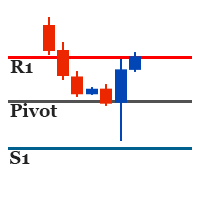
It identifies the pivot, support, and resistance price levels of the selected timeframe and then draws lines onto the chart. FEATURES: Option to specify the Timeframe Period in the PivotSR calculation. Option to display the PivotSR of the last candle, of every candle, or of the current candle. Options for displaying labels, line thickness, and line color. PivotSR can be interpreted as reversal levels or past price reactions that can be used as the basis for current price analysis. Some traders b
FREE
It works based on the Stochastic Indicator algorithm. Very useful for trading with high-low or OverSold/Overbought swing strategies. StochSignal will show a buy arrow if the two lines have crossed in the OverSold area and sell arrows if the two lines have crossed in the Overbought area. You can put the Stochastic Indicator on the chart with the same parameters as this StochSignal Indicator to understand more clearly how it works. This indicator is equipped with the following parameters: Inputs d
FREE
MACD Scanner provides the multi symbols and multi-timeframes of MACD signals. It is useful for trader to find the trading idea quickly and easily. User-friendly, visually clean, colorful, and readable. Dynamic dashboard display that can be adjusted thru the external input settings. Total Timeframes and Total symbols as well as the desired total rows/panel, so it can maximize the efficiency of using the chart space. The Highlight Stars on the certain matrix boxes line based on the selected Scan M
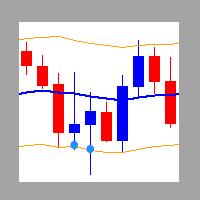
It is a custom non-repaint indicator to identify trade opportunities in swing action as prices move within an upper and lower band. Inspired by the Keltner Channel, the most popular channel Indicator introduced by Chester Keltner. It is different with a Bollinger Bands. It represents volatility using the high and low prices, while Bollinger's studies rely on the standard deviation. The algorithm for this indicator is also available in the EntryMaximator EA. Including the option to use it or not.
FREE
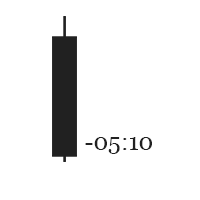
This is the countdown of the last candle Indicator. How much time remains in the current candle of your chart CTime display exactly how many hours, minutes and seconds remain before the current candle closes, and a new one opens. This allows you to be on the ball as soon as the next candle appears It could be useful for a trader who trades with candles as the main attention Available option to change the text color to suit the chart background. This Indicator is related to the system here .
FREE
Индикатор основан на множестве EMA. Идея состоит в легком отображении нескольких экспоненциальных скользящих средних на одном гнрафике, без необходимости добавлять их по отдельности. В индикатор также встроена линия тренда: она синяя при растущем тренде и красная при падающем тренде. Цвета линий можно поменять в настройках индикатора. В индикаторе 2 внешних параметра. Это параметры периода и сдвига. При их изменении (период и/или сдвиг), остальные параметры подстраиваются автоматически. Подходит
Индикатор Range Multi Alligators отображает информацию о максимуме и минимуме канала диапазона, а также о тренде, который рисуется в центре канала в виде гистограммы красного и синего цвета. Линии канала диапазона позволяют определять уровни стоп-лосс и тейк-профит. Это трендовый индикатор на основе использования нескольких "Аллигаторов". Запустите индикатор на графике и настройте один или все параметры, при этом все линии будут перемещаться синхронно. Описание настраиваемых параметров Period :
Autobot Retracement Code (ARC) A robot trading that works based on retracement strategy while following the market trend.It has  made average profits up to 25% /month that is relatively a High Return of Investment.Real Account proof. Fully automation. Auto Lot sizing, Auto TakeProfit Calculation, Auto StopLoss Calculation. Currently Running on Real account , it has more than 100% growth / 5 months. NEW UPDATE RELEASED, VERSION 3.0  FEATURES on Version 3: FIFO rules Auto LotSize Auto StopLoss 
Strategy – Bollinger Band, Moving Average and Price Actions. Bollinger Bands to identify High-Low Price, Moving Average to identify Trend and Price Action is to synchronize both of them.  SardaFx 4.1 has average holding time 24 hours (1 day) on timeframe H1. It is not a Martingale EA or Averaging EA. The work is simple, BUY and Exit or SELL and Exit. No recurring BUY and or SELL in the same time and the same symbol except you adjust Max BUY/SELL  more than 1,default setting is 1 BUY and 1 SELL.
Some informations on the chart with the single attachment. RangeBorder Buy Sell (RBBS) Non Repaint Indicator will provide trend line, buy sell arrows,reversal arrows, range channel, order exit area,high average price line and low average price line.All arrows and lines don't repaint and not lagging. Once candle closed it won't  repaint. Reading Indicator: 1. Small Stars , Indicates oversold and overbought with certain logic and price may reverse when this small star triggers. Useful to identify
Oversold and Overbought Candles, Trendlines, and BUY-SELL arrows in the single Indicator. Built from 8 default MT4 Indicators. Stochastic,RSI,SAR,CCI,RVI,DeMarker,WPR and MA. It is " NON REPAINT " indicator. All buffers do not repaint.  Double Trendline buffers that can also be used to identify sideway market and support resistance area.  Any timeframes and any currency pairs. Parameters: Show Trend . TRUE/FALSE to show trendlines on the chart Follow Trend. If TRUE , Dapitrend will show only
TrendWavePattern  an another way to trade with a harmonic pattern, a maestro classic pattern . I made some improvements and combinations with my own strategy. Trend direction, buy-sell signal ,hi-low area and pivot line. These will be helpful for trader to read the current market condition. So it is not blindly following the pattern itself but also following other informations from the market. Readable chart appearance . Designed to be user friendly even you are a new trader. BUY-SELL zone, Tak
It is an expert advisor that scans the last patterns on defined symbols and timeframes . Multi Symbols /pairs , Multi timeframes .  There are 2 ways to specify symbols : Automatically scan all symbols available on the market watch (true/false) Type any symbols ,separated by comma.   There are also 2 ways to specify timeframes : Automatically scan all timeframes available on mt4 (true/false) Type any timeframes,separated by comma.   Unlimited symbols available in an account and unlimited timefra
GOLDEN RETRACEMENT POWER indicator draws fibonacci levels automatically. Defines the golden entry buy/sell area, support and resistant lines , signals arrows and strength 'Power Bars Level' based on price action . Some indicators also work behind the chart: Stochastic,RSI,MFI,DeMarker and WPR . Fibonacci retracements are a popular form of technical analysis used by traders in order to predict future potential prices in the financial markets. If used correctly, Fibonacci retracements and ratios c
Lemurian Trader is a multi symbols  EA/robot. User can input symbols in the external parameter separated by comma. Only need to place on the single chart, no need to open multiple chart,no limited symbols as long the symbol is available on the market watch. Sweeping signals from timeframe M15 to H4 on each symbol to find the best high/low price while it also keeps to follow the trend. Lower TF M15 as a signal and higher(M30,H1,H4) to indentify trend and high low. It means whatever timeframe we p
RSI Scanner Plus Indicator scans RSI values in multiple symbols and timeframes. Plus trend line buffer on the chart.  Features: -Trend Line :  We add trend line on the chart in the hope it help you to see current trend on the chart while following oversold and overbought  from RSI. This is additional feature in the indicator. We consider that following the trend is very important in trading. -Changeable Panel Display :  Change the value of Max.Symbols/Panel and  the indicator will adjust the da
TrendScanner XTra scans market trends from Multi Symbols and Multi Timeframes with extra additional Entry Point Signals arrow on the current chart. Features: -Entry Point SIgnals :  This is additional feature in the indicator. No repaint arrows. The Trading system in the single indicator. MTF Trend informations and Entry Signals. In order to make it easier for trader to get trading moments from a single chart and  deciding entry time.  -Changeable Panel Display :  Change the value of Max.Symbol
PullbackMatrix provides the key information of the trading transactions when it finds the right market moment based on its built-in logic algorithm. The high accuracy signals including Trading Symbol, Entry Price, Entry Time, TakeProfit, Stoploss, and more. And that's all will be available instantly in your chart panel, drawing the position lines and also sending signal notification to email, mobile phone, and screen popup. More important is that also saves signals into a .csv file which is usef

Non-repaint indicator    to identify trade opportunities in swing action as prices move within an upper and lower band. Inspired by the Keltner Channel, the most popular channel Indicator introduced by Chester Keltner. It is different with a Bollinger Bands. It represents volatility using the high and low prices, while Bollinger's studies rely on the standard deviation. Customized by adding the trends exactly in the middle line, arrows when price cross over the outer lines and Fibonacci Levels L
Профессиональный торговый индикатор с возможностью двойного входа. Ценные Гладкие Линии Канала в отдельном окне, Линии Тренда как в главном окне, так и отдельное окно и стрелки входа. Подходит для скальпинга на младших таймфреймах. Также он может работать и давать сигналы на старших таймфреймах для более длительных торговых периодов. НАСТРОЙКИ ИНДИКАТОРА: 1. Сигнальный режим. Есть 2 варианта: Стандартный и Компактный. Если выбрано значение по умолчанию, в главном окне будут отображаться 3 раз
Provides Regression Channel on the current chart. Combined by Trend of Moving Averages and Multi timeframes Oscillator Indicators: CCI, RSI, Stochastic, and MACD with specific working logic . It could make us easier to identify swing high-low as an entry point, the retracement area while following the current trend. Consists of 2 types of signal, main and secondary. The main signal will draw very clearly triangle and lines on the chart with the word " BUY" or 'SELL'. and the secondary is the sta
It could help to calculate Risk-Reward easily before placing a BUY-SELL position. TradeSizeCalculator is a Multi-Tasking Calculator. It will calculate the others when we define the value in one of the columns. Stoploss, risk percentage, risk-money, lot size, take-profit , reward-money, and reward-ratio. Depending on which value is changed. All values in the columns are editable. Also, we can get those calculation results by drag-drop the stop-loss/take-profit line. Parameter: The inputs below ar
MACD Scanner provides the multi symbols and multi-timeframes of MACD signals. It is useful for trader to find the trading idea quickly and easily. User-friendly, visually clean, colorful, and readable. Dynamic dashboard display that can be adjusted thru the external input settings. Total Timeframes and Total symbols as well as the desired total rows/panel, so it can maximize the efficiency of using the chart space. The Highlight Stars on the certain matrix boxes line based on the selected Scan M
It has 3 capabilities at once and can be adjusted according to needs. Full Auto, Semi-Auto, or Warning Signals only. You can choose it by setting the parameters provided. Built to help Traders work much easier than doing it manually. Sharpen the accuracy of market analysis performed by a Trader by only executing in certain price areas and adjustable signal parameters. Features Ability to manage trading management, including automatically determining stop loss/take profit, calculating lot size ba
GU Spot is a One Shot One Kill EA. A  Scalping EA   for GBPUSD .   No Martingale, No Averaging, No Grid or other high-risk strategies.  Working with up to the best 100 trading signals algorithm from various Trading Systems. The combination of Price Action, High Low, Trend, Range Levels, Pullback /  Retracement and Reversal. This is Fully Automatic Trading Robot . High Accuracy Entry Signals and protected by a proper Money Management. A tight Stop Loss with SL:TP ratio 1:3 by default, Trailing an
SignalPinner is a trend line Indicator which can detect market trends early by including three types of signal arrows. Non repaint and trend following. Signals on the strong trend, signals in the beginning of trend and signals with multiple market analysis algorithm as the main signals. Supported by alert notification message to keep you getting signals while on the go. Symbols: Any Timeframes: Any Features Histogram buffers as a sign the trend is started. It can help the trader knowing the mar
Scanning   Multi Symbols Scalping Signals based on 3 kinds of Market Analysis methods. Trend, Signal, and Reversator. And each method consists of its own multi timeframes algorithm functions. Summarized to become clear signals direction BUY/SELL, including the signals strength scoring and sending message to all available alert tools. Displayed on a User Friendly and customizable Dashboard. Size, colors, coordinates, highlight, hidden/show and more. Base Timeframe: M15. And M5 to Daily to confirm
Provides instant signals on the chart in panel form. Equipped with signal description and trading analysis tools such as drawing auto trendlines, support/resistance area, regression channel, Fibonacci levels, Pivot levels and current signal price, signal time, signal expiry and stoploss recommendation. Also sending alert messages to all available mt4 alert tool. A detailed description panel provides information about where the signal comes from and what indicators are behind the signal. Includin
Фильтр:
pcarrero
176
pcarrero 2023.08.21 21:06 
 

This dev is incredible. The EA was nearly perfect for what I was looking for. I reached out to the dev to ask about a few features. He replied to me within a few minutes and told me he could add them. A few short days later they were added and are working great! Wonderful EA and amazing dev.

Wartono
17808
Ответ разработчика Wartono 2023.08.21 21:20
Thank you, pcarrero
Hope you get profits with this tool.
Happy Trading
Ответ на отзыв