PRE-SALE SPECIAL OFFER
The first 20 licenses are available at $59 (Lifetime) and $39 (3-Month Rental Package). After these 20 limited spots are filled, the price will increase to $79 for Lifetime, and the rental option will shift to $39 for 1 Single Month. Secure your RMD Pro Risk Rules Discipline Manager protection frame now at the lowest entry price.
IMPORTANT NOTE
RMD Pro does not generate signals. It does not open trades on its own. It does not predict the market.
Every entry is manual — you take the trade, RMD Pro takes over from there and enforces what you decided before the session started. If you're looking for a bot, this is not for you.
A psychological aid that keeps you mechanical and disciplined, without the emotional weight of your trading sessions. RMD Pro is a risk management panel for MetaTrader 5.
You decide your daily loss limit. You decide your session hours. If you try to break your own rules, you get a message telling you exactly what stopped the entry. RMD Pro remembers all of it and holds you to it while you trade. If you try to break your own rules, a message appears on the panel telling you exactly what stopped the entry.
FEATURES
Daily Loss and Profit Lock
Set a hard daily loss limit — fixed amount or percentage of your start balance. The panel tracks realized and floating P&L together and locks the execute button the moment the threshold is hit. One bad trade or ten, the total is what counts. Your worst day is capped before it starts. No more "one more trade to recover".
The same logic applies on the upside. Set a daily profit cap and new entries are blocked once you hit it. Both ends of the day are defined before you start, so the session has a floor and a ceiling.
Session Filter
Define the hours of your broker's session. Entries outside that window are blocked. If your edge lives in a specific market session, RMD Pro removes the decision to trade outside it. The temptation to take an off-hours setup stops being a choice.
Spread Ceiling
Set a fixed maximum spread. On top of that, the panel applies a second, dynamic cap based on current ATR. The lower of the two applies, and the ATR-based cap adjusts automatically as volatility shifts. Orders only go through inside your tolerance. When the market is hostile, the panel keeps you out of it.
Cooldown After Closing a Trade
Mandatory execution lock for 5, 10, or 15 minutes after any trade closes. Two scopes:
COOLDOWN_CURRENT_SYMBOL (blocks only the symbol you just closed)
COOLDOWN_ALL_MANAGED_SYMBOLS (blocks every symbol handled by this EA's MagicNumber)
The button doesn't work — that's the point. You can't revenge trade what you can't click.
Risk Triangulation
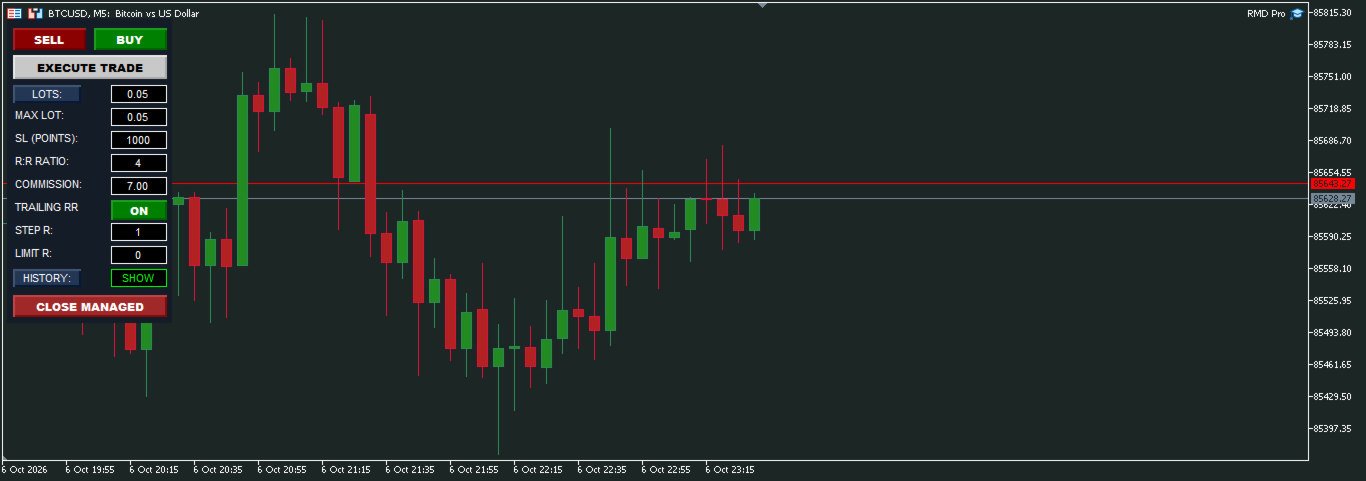
Drag the stop loss line on the chart, or type a fixed currency amount into the panel. The algorithm calculates the exact lot size in real time. Your technical parameters define price and stop distance; the panel handles the math. The decision of how much to risk is taken out of the heat of the moment.
Visual SL and TP Lines
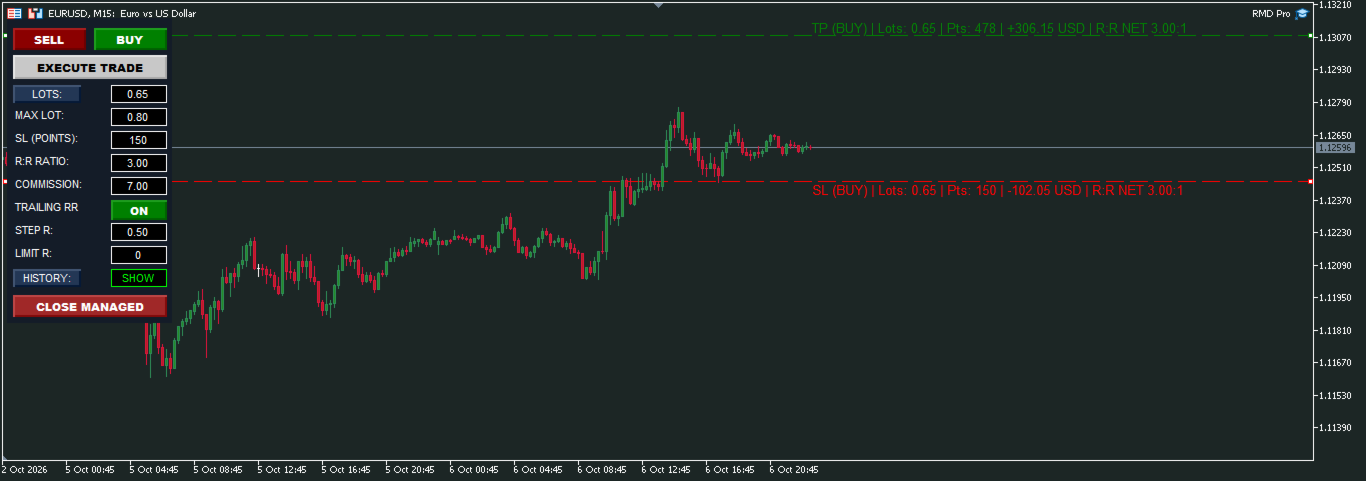
Stop loss and take profit are drawn directly on the chart as draggable lines. Moving the SL recalculates the TP automatically to keep your net R:R intact. Each line shows direction, lot size, points, cash value, net R:R, and trailing state, updated tick by tick. Nothing is calculated in your head. Nothing is improvised.
Trailing Stop by R
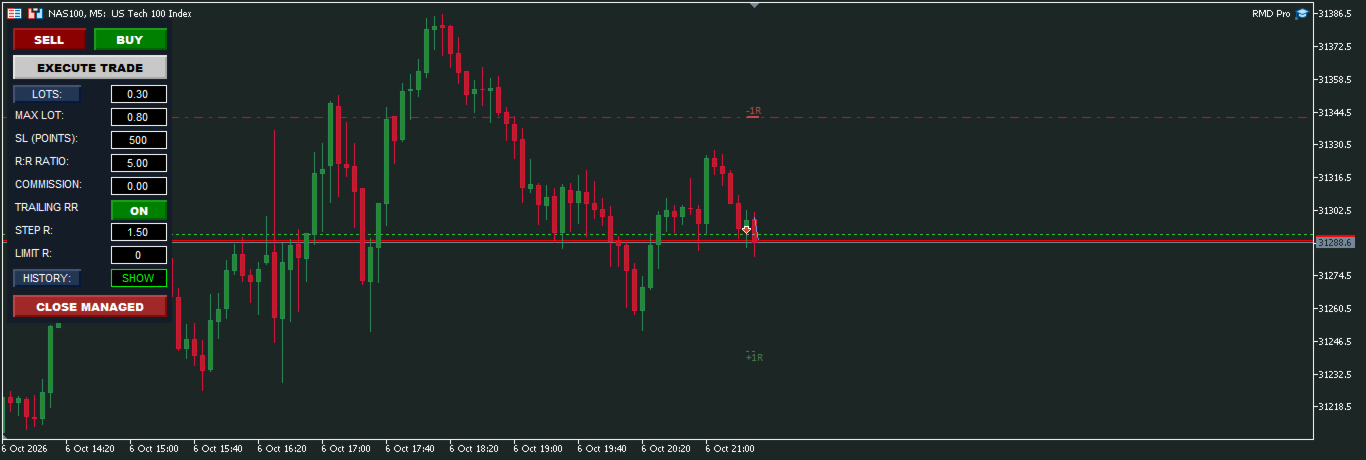
The trailing algorithm moves the stop loss in fixed R-based steps as the trade progresses in profit. Steps are calculated from your initial risk unit. The stop follows price on rules, not on fear or greed. You don't have to decide when to move it — it moves itself.
True Net Breakeven
The panel factors in your commission per lot and locks the stop loss at the cost-adjusted breakeven price, while expanding the TP to fully absorb broker fees. Your net R:R target stays mathematically intact. No more "I thought I was flat" when you were actually down on fees.
Slippage Protection
After execution, the panel compares the fill price against your pre-calculated entry. If server slippage pushes the actual monetary risk above your configured parameter, the SL is recalculated and modified to restore the target risk. If broker distance rules block that modification, the position is closed immediately. Your planned risk is what matters, not the risk the server hands you.
Trade Journal
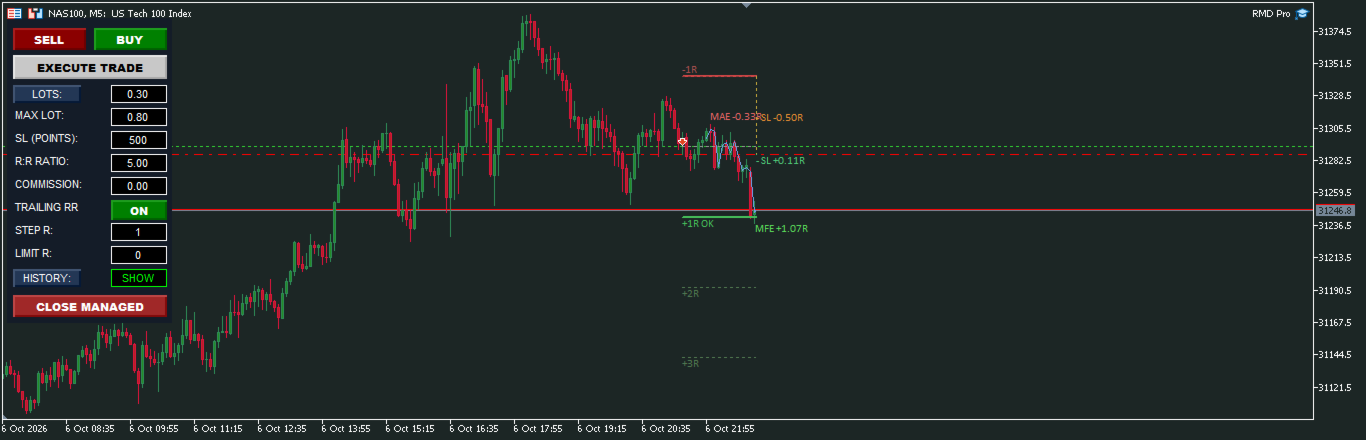
Every closed position leaves a permanent trace on the chart: entry, exit, the full SL path (every trailing step), MFE and MAE in R-multiples, and net result. The journal is collapsible, hidden with one click from the panel, and auto-purges data older than the number of days you configure (1 to 30). It is the evidence of what you actually did, laid out in front of you, so you can review without lying to yourself.
After every close, the panel plots the exact MAE (how far the trade went against you) and MFE (how far it went in your favor) in R-multiples. Those two numbers tell you whether your stops and exits are actually working — the review stops being guesswork.
COMPATIBILITY & PERSISTENCE
Works on netting and hedging accounts. Commission handling supports both ROUND_TURN and PER_SIDE broker models — configure CommissionMode and CommissionPerLot for your account's fee structure. Trade logs and protection state persist across terminal restarts: on re-init, the day's history is rebuilt and the current session is restored.
INPUT PARAMETERS REFERENCE
Account & Configuration Tags
AccountMode: PERSONAL_ACCOUNT or PROP_CHALLENGE. Used as a tag to separate saved panel configurations per account type. Does not change trading logic.
TraderExperience: BEGINNER or ADVANCED. Used as a tag to separate saved panel configurations per experience level. Does not change trading logic.
MagicNumber: Unique identifier. Only positions and orders carrying this number are managed by the panel.
Lot Size & Commission Settings
DefaultLot: Initial lot size loaded when the panel is first attached.
MaxLot: Hard ceiling for lot size. Any input above this value is clamped down.
CommissionMode: ROUND_TURN (full round-trip cost per lot) or PER_SIDE (cost for one side, doubled internally).
CommissionPerLot: Broker cost per lot in account currency. Used to calculate true net breakeven and net R:R.
Trade Execution & Lines Control
SLPoints: Default stop loss distance in points, used to draw the initial SL line on the chart.
TargetRR: Target net reward-to-risk ratio. Used to calculate TP distance and to expand TP when breakeven is reached.
AutoFollowPrice: When true, the SL/TP lines follow live Bid/Ask automatically. When false, the lines stay where you last placed them.
ManagedCloseScope: MANAGED_CURRENT_SYMBOL_ONLY or ALL_MANAGED_SYMBOLS. Defines the scope of the CLOSE MANAGED button (double-click to confirm).
Session Window Filters
ValidateSessionHours: Enables the session window filter. Entries outside that window are blocked.
SessionStartTime / SessionEndTime: Session window in broker server time, format HH:MM.
CloseAllAtSessionEnd: If true, all managed positions are closed automatically when the session window ends.
Spread & Market Filters
ValidateSpread: Enables the spread ceiling filter.
MaxSpreadPoints: Hard spread ceiling in points.
UseSpreadATR: If true, a second dynamic spread cap is calculated from current ATR.
MaxSpreadATRPercent: ATR-based spread cap, expressed as a percentage of current ATR. The lower of the two caps applies.
Post-Trade Cooldown
UsePostTradeCooldown: Enables the post-close execution lock.
CooldownMinutes: Lock duration after a trade closes: 5, 10, or 15 minutes.
CooldownScope: COOLDOWN_CURRENT_SYMBOL (blocks only the symbol just closed) or COOLDOWN_ALL_MANAGED_SYMBOLS (blocks every symbol handled by this EA's MagicNumber, not the whole terminal).
Daily Protection Limits
DailyLimitMode: MONEY_AMOUNT (fixed value in account currency) or START_BALANCE_PERCENT (percentage of the balance recorded at the start of the day).
LimitDailyLoss: Enables the daily loss lock.
MaxDailyLoss: Daily loss threshold, interpreted according to DailyLimitMode. The execute button locks when reached.
LimitDailyProfit: Enables the daily profit lock.
IncludeFloatingInDailyProfit: If true, open floating P&L counts toward the daily profit cap. If false, only realized P&L counts.
MaxDailyProfit: Daily profit threshold, interpreted according to DailyLimitMode. New entries are blocked once reached.
Trailing Stop & Risk Management
EnableTrailingRR: Enables the R-step trailing stop.
TrailStepR: Size of each trailing step in R (1R = initial stop distance). Example with 0.5: at +0.5R the SL moves to −0.5R, at +1R it moves to breakeven + commission, at +1.5R it moves to +0.5R.
TrailMaxR: Maximum R the trailing stop is allowed to lock. 0 = no limit.
News & Calendar Filter
AvoidHighImpactNews: Enables the economic calendar filter.
NewsMarginMinutes: Minutes before and after a high-impact event during which entries are blocked.
Panel Interface & Journal History
SolidBackground: If true, the panel is drawn with a solid background instead of a transparent one.
BackgroundColor: Background color of the panel.
EnablePopupAlerts: If true, panel alerts use popup windows. If false, they are written to the Experts log only.
ShowTrailingAudit: Initial visibility of the trade journal on the chart. Can be toggled from the panel with the HISTORY button.
LogFontSize: Font size in the trade journal cards. Range: 6 to 16 points.
HistoryExpirationDays: Number of days a closed trade log is kept before being purged. Range: 1 to 30.
STRATEGY TESTER NOTE
Designed for live and demo accounts. The Strategy Tester is not applicable: entries are user-driven and OnChartEvent does not fire in non-visual mode, so no trades occur. This is a manual utility — validated live, not backtested.