RMD Pro

The most complete risk architecture and execution system for MetaTrader 5 — designed to protect your capital from emotional mistakes, enforce every rule and manage positions live on the chart, and audit the full lifecycle of every closed trade with step-by-step trailing logs, MFE/MAE metrics, and exact R and cash breakdowns.


LAUNCH SPECIAL OFFER

Secure RMD Pro at our introductory pricing before standard rates ($79 Lifetime / $39 Monthly) take effect:
- Lifetime License: $59 (7 activations)
- 1-Month Rental: $20 — ideal for testing full live/demo challenge cycles without a long-term commitment.


IMPORTANT NOTE

RMD Pro does not generate signals. It does not open trades on its own. It does not predict the market.

Every entry is manual — you take the trade, RMD Pro takes over from there and enforces what you decided before the session started. If you're looking for a bot, this is not for you.

A psychological aid that keeps you mechanical and disciplined, without the emotional weight of your trading sessions. RMD Pro is a risk management panel for MetaTrader 5.

You decide your daily loss limit. You decide your session hours. You decide how much spread you're willing to pay, how much you're willing to risk per entry. RMD Pro remembers all of it and holds you to it while you trade. If you try to break your own rules, you get a message telling you exactly what stopped the entry.


FEATURES


Daily Loss and Profit Lock

Set a hard daily loss limit — fixed amount or percentage of your start balance. The panel tracks realized and floating P&L together and locks the execute button the moment the threshold is hit. One bad trade or ten, the total is what counts. Your worst day is capped before it starts. No more "one more trade to recover".

The same logic applies on the upside. Set a daily profit cap and new entries are blocked once you hit it. Both ends of the day are defined before you start, so the session has a floor and a ceiling.


Session Filter

Define the hours of your broker's session. Entries outside that window are blocked. If your edge lives in a specific market session, RMD Pro removes the decision to trade outside it. The temptation to take an off-hours setup stops being a choice.


Spread Ceiling

Set a fixed maximum spread. On top of that, the panel applies a second, dynamic cap based on current ATR. The lower of the two applies, and the ATR-based cap adjusts automatically as volatility shifts. Orders only go through inside your tolerance. When the market is hostile, the panel keeps you out of it.


Cooldown After Closing a Trade

Mandatory execution lock for 5, 10, or 15 minutes after any trade closes. Two scopes:

COOLDOWN_CURRENT_SYMBOL (blocks only the symbol you just closed)
COOLDOWN_ALL_MANAGED_SYMBOLS (blocks every symbol handled by this EA's MagicNumber)

The button doesn't work — that's the point. You can't revenge trade what you can't click.


Risk Triangulation

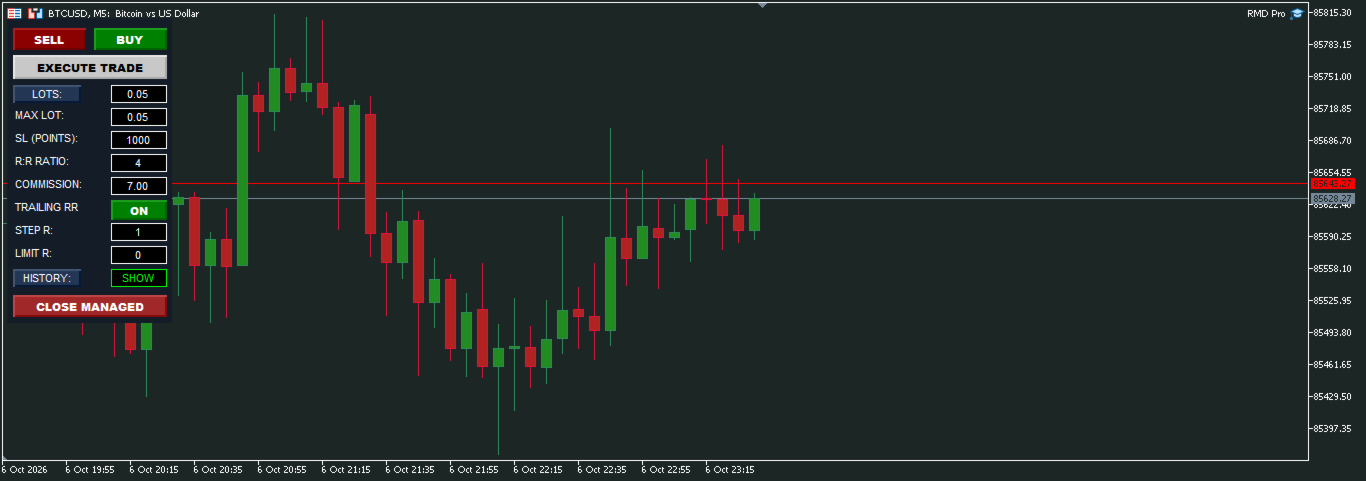
Drag the stop loss line on the chart, or type a fixed currency amount into the panel. The algorithm calculates the exact lot size in real time. Your technical parameters define price and stop distance; the panel handles the math. The decision of how much to risk is taken out of the heat of the moment.


Visual SL and TP Lines

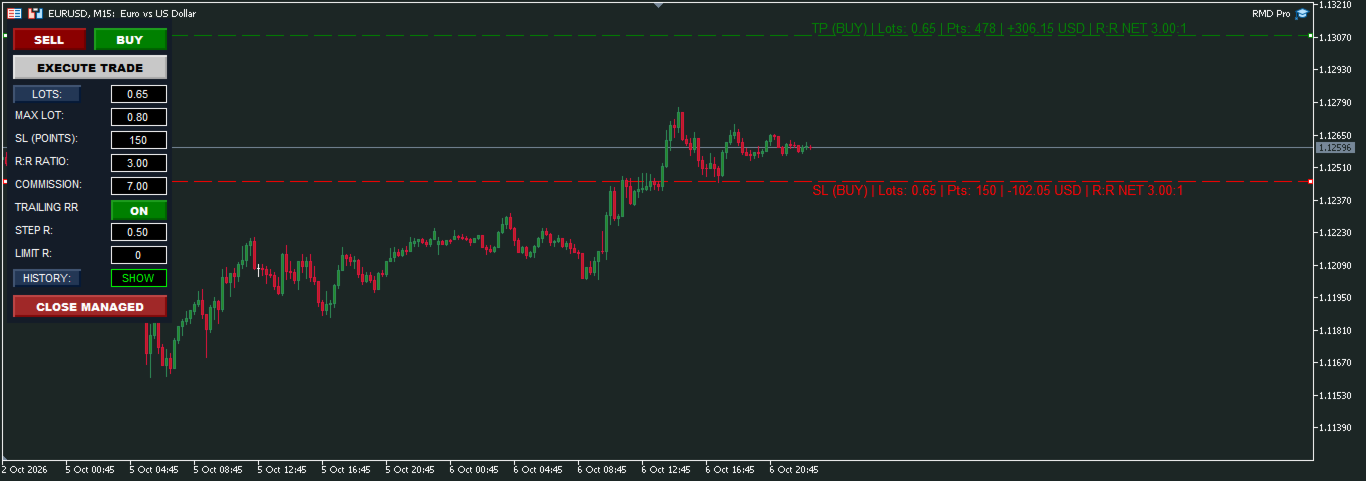
Stop loss and take profit are drawn directly on the chart as draggable lines. Moving the SL recalculates the TP automatically to keep your net R:R intact. Each line shows direction, lot size, points, cash value, net R:R, and trailing state, updated tick by tick. Nothing is calculated in your head. Nothing is improvised.


Trailing Stop by R

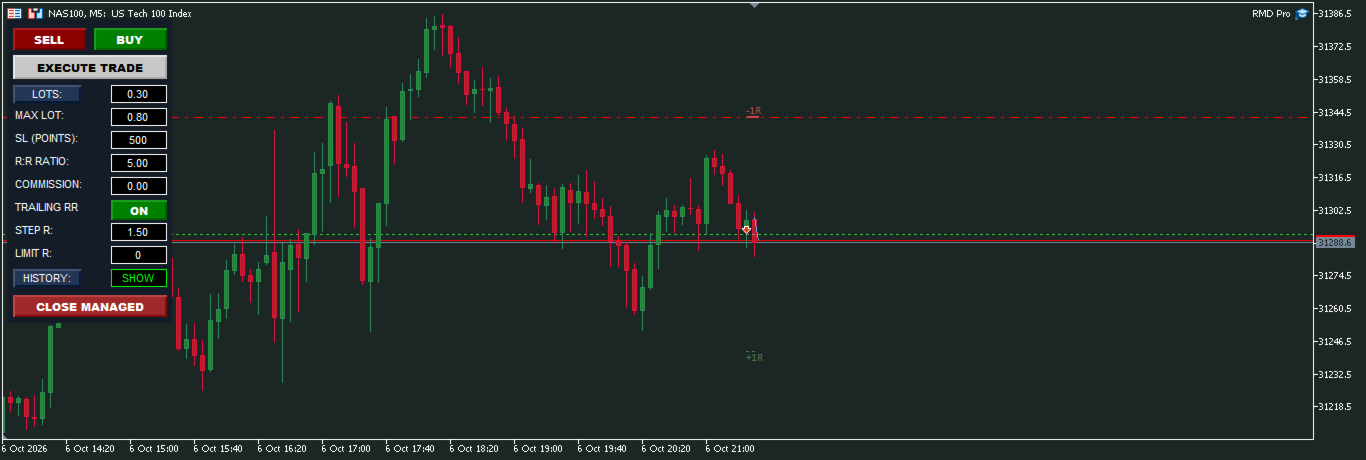
The trailing algorithm moves the stop loss in fixed R-based steps as the trade progresses in profit. Steps are calculated from your initial risk unit. The stop follows price on rules, not on fear or greed. You don't have to decide when to move it — it moves itself.


True Net Breakeven

The panel factors in your commission per lot and locks the stop loss at the cost-adjusted breakeven price, while expanding the TP to fully absorb broker fees. Your net R:R target stays mathematically intact. No more "I thought I was flat" when you were actually down on fees.


Slippage Protection

After execution, the panel compares the fill price against your pre-calculated entry. If server slippage pushes the actual monetary risk above your configured parameter, the SL is recalculated and modified to restore the target risk. If broker distance rules block that modification, the position is closed immediately. Your planned risk is what matters, not the risk the server hands you.


Trade Journal

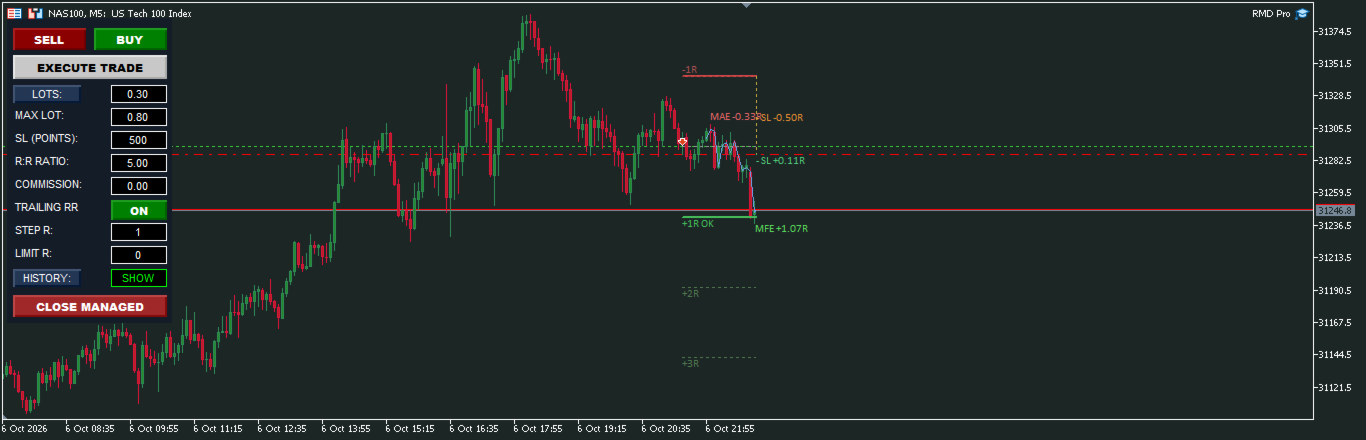
Every closed position leaves a permanent trace on the chart: entry, exit, the full SL path (every trailing step), MFE and MAE in R-multiples, and net result. The journal is collapsible, hidden with one click from the panel, and auto-purges data older than the number of days you configure (1 to 30). It is the evidence of what you actually did, laid out in front of you, so you can review without lying to yourself.

After every close, the panel plots the exact MAE (how far the trade went against you) and MFE (how far it went in your favor) in R-multiples. Those two numbers tell you whether your stops and exits are actually working — the review stops being guesswork.


COMPATIBILITY & PERSISTENCE

Works on netting and hedging accounts. Commission handling supports both ROUND_TURN and PER_SIDE broker models — configure CommissionMode and CommissionPerLot for your account's fee structure. Trade logs and protection state persist across terminal restarts: on re-init, the day's history is rebuilt and the current session is restored.


INPUT PARAMETERS REFERENCE


Account & Configuration Tags

AccountMode: PERSONAL_ACCOUNT or PROP_CHALLENGE. Used as a tag to separate saved panel configurations per account type. Does not change trading logic.

TraderExperience: BEGINNER or ADVANCED. Used as a tag to separate saved panel configurations per experience level. Does not change trading logic.

MagicNumber: Unique identifier. Only positions and orders carrying this number are managed by the panel.


Lot Size & Commission Settings

DefaultLot: Initial lot size loaded when the panel is first attached.

MaxLot: Hard ceiling for lot size. Any input above this value is clamped down.

CommissionMode: ROUND_TURN (full round-trip cost per lot) or PER_SIDE (cost for one side, doubled internally).

CommissionPerLot: Broker cost per lot in account currency. Used to calculate true net breakeven and net R:R.


Trade Execution & Lines Control

SLPoints: Default stop loss distance in points, used to draw the initial SL line on the chart.

TargetRR: Target net reward-to-risk ratio. Used to calculate TP distance and to expand TP when breakeven is reached.

AutoFollowPrice: When true, the SL/TP lines follow live Bid/Ask automatically. When false, the lines stay where you last placed them.

ManagedCloseScope: MANAGED_CURRENT_SYMBOL_ONLY or ALL_MANAGED_SYMBOLS. Defines the scope of the CLOSE MANAGED button (double-click to confirm).


Session Window Filters

ValidateSessionHours: Enables the session window filter. Entries outside that window are blocked.

SessionStartTime / SessionEndTime: Session window in broker server time, format HH:MM.

CloseAllAtSessionEnd: If true, all managed positions are closed automatically when the session window ends.


Spread & Market Filters

ValidateSpread: Enables the spread ceiling filter.

MaxSpreadPoints: Hard spread ceiling in points.

UseSpreadATR: If true, a second dynamic spread cap is calculated from current ATR.

MaxSpreadATRPercent: ATR-based spread cap, expressed as a percentage of current ATR. The lower of the two caps applies.


Post-Trade Cooldown

UsePostTradeCooldown: Enables the post-close execution lock.

CooldownMinutes: Lock duration after a trade closes: 5, 10, or 15 minutes.

CooldownScope: COOLDOWN_CURRENT_SYMBOL (blocks only the symbol just closed) or COOLDOWN_ALL_MANAGED_SYMBOLS (blocks every symbol handled by this EA's MagicNumber, not the whole terminal).


Daily Protection Limits

DailyLimitMode: MONEY_AMOUNT (fixed value in account currency) or START_BALANCE_PERCENT (percentage of the balance recorded at the start of the day).

LimitDailyLoss: Enables the daily loss lock.

MaxDailyLoss: Daily loss threshold, interpreted according to DailyLimitMode. The execute button locks when reached.

LimitDailyProfit: Enables the daily profit lock.

IncludeFloatingInDailyProfit: If true, open floating P&L counts toward the daily profit cap. If false, only realized P&L counts.

MaxDailyProfit: Daily profit threshold, interpreted according to DailyLimitMode. New entries are blocked once reached.


Trailing Stop & Risk Management

EnableTrailingRR: Enables the R-step trailing stop.

TrailStepR: Size of each trailing step in R (1R = initial stop distance). Example with 0.5: at +0.5R the SL moves to −0.5R, at +1R it moves to breakeven + commission, at +1.5R it moves to +0.5R.

TrailMaxR: Maximum R the trailing stop is allowed to lock. 0 = no limit.

Panel Interface & Journal History

SolidBackground: If true, the panel is drawn with a solid background instead of a transparent one.

BackgroundColor: Background color of the panel.

EnablePopupAlerts: If true, panel alerts use popup windows. If false, they are written to the Experts log only.

ShowTrailingAudit: Initial visibility of the trade journal on the chart. Can be toggled from the panel with the HISTORY button.

LogFontSize: Font size in the trade journal cards. Range: 6 to 16 points.

HistoryExpirationDays: Number of days a closed trade log is kept before being purged. Range: 1 to 30.


STRATEGY TESTER NOTE

Designed for live and demo accounts. The Strategy Tester is not applicable: entries are user-driven and OnChartEvent does not fire in non-visual mode, so no trades occur. This is a manual utility — validated live, not backtested.
추천 제품
Anchor Pro: Funded Guard & Trade Manager Stop Blowing Your Funded Accounts. Trade Visually. Protect Your Capital. Anchor Pro is not just a trade manager—it is a complete Funded Account Guardian and Visual Trading Suite . Designed specifically for traders taking Prop Firm challenges (FTMO, MyForexFunds, etc.), it combines institutional-grade risk protection with a revolutionary "Draw-to-Trade" engine. Whether you are trying to pass a challenge or keep your funded account safe, Anchor Pro locks in
Trade Assistant MT5 — Trade Manager for Prop Firms Trade Manager for MT5 that calculates position size, manages risk, visualises your trade setup in real time and protects your account with built-in daily loss and trade limits — everything you need to trade with consistency and pass your prop firm challenge. > Trade Tab — Position Sizing & Execution **Automatic lot calculation** Enter your risk as a percentage of account balance or as a fixed dollar amount and the panel instantly calculates t
Why execution quality matters more than you think You can have the best trading strategy, perfect entry points, and proper risk management. But if your broker consistently executes orders at worse prices, you lose money before the market even moves. A slippage of 0.01% seems insignificant. But over 100 trades per month, it becomes a noticeable amount. Over 1000 trades, it becomes a serious problem. Scalpers and algorithmic traders understand this well: execution quality directly affects your bot
AO Trade
Ka Lok Louis Wong
AO Trade 시스템은 경매 또는 뉴스 시간을 기준으로 하여 다른 특정 주문 시간과 비교하여 시장 트렌드를 예측하기 위해 특별히 설계되었습니다. **EA에서 사용하는 모든 시간 매개 변수는 귀하의 터미널 시간을 기반으로 합니다. 다양한 브로커들은 서로 다른 GMT 시간대에서 작동할 수 있으며, 여름 시간 조정으로 인해 더욱 다양할 수 있습니다.** **구현하기 전에 귀하의 터미널에 맞는 시간 설정을 주의 깊게 확인하십시오.** 권장 설정: M1 시간대에서 사용 HK50 / DE40 / ustec / UK100 시간 체크 중에는 특정 체크 시간 분(1.2 체크 시간 분) 후에 가격 확인이 발생한다는 것을 알 수 있습니다. 이 설계는 의도적으로 이루어졌으며, 참조중인 바(bar)가 완료되도록하고, 주문 시간과의 정확한 비교를 위해 개방, 고점, 저점 및 종가 값을 활용할 수 있도록 합니다. 설정 -----------------1 타이머------------------- 1.1
Multiple Order Manager
Ameerul Afiq Bin Abd Halim
The Multi-Order Execution is an Expert Advisor for MetaTrader 5, designed to simplify the placement of multiple pending orders through a convenient on-chart control panel. The EA supports four pending order types: Buy Limit, Sell Limit, Buy Stop, and Sell Stop. Traders can configure the entry price, lot size, number of orders, price interval, take-profit (TP), and stop-loss (SL) directly from the chart. The EA automatically calculates each order's entry price based on the selected order type and
Prop Account Shield
Laurentiu-marian Ghinda
Prop Account Shield 은 프롭 펌 챌린지나 펀딩 계좌의 규칙 위반으로부터 MetaTrader 5 계좌 전체를 보호합니다. 차트 하나에 실행하면 누가 연 포지션이든(수동 거래, 다른 EA, 모바일 앱) 모든 심볼과 매직 넘버에서 계좌의 모든 포지션을 감시합니다. 직접 거래를 열지 않으며 감시, 경고, 청산만 합니다. 1. 손실 한도 (계좌 전체) 최대 일일 손실(% 또는 금액): 하루 시작 시점의 잔고, 자산 또는 둘 중 높은 값을 기준으로 측정 회사 시간에 맞춘 일일 리셋, 서버 시간과의 시차 설정 가능 최대 드로다운: 고정, 또는 최고 자산/잔고 기준 트레일링, 선택적 고정 수준(예: 초기 잔고에서 멈춤) 실시간 자산: 모든 심볼의 모든 포지션, 스왑과 수수료(청산 수수료 추정 선택 가능) 안전 버퍼: Shield가 회사 한도보다 먼저 작동(예: 한도 5%일 때 4.5%에서 작동) 2. 한도에 도달하면 손실이 가장 큰 포지션부터 모든 포지션을 청산하고 모든 대기 주문
PropShield Guardian MT5 – Ultimate Drawdown Protection & Trade Control EA 계좌를 보호하고 규율을 강제합니다. 프로프 플럼 챌린지에 자신감을 갖고 이겨나세요. 계좌가 파손되지 않을 것입니다. 전문 트레이더로서 시작하세요. PropShield Guardian MT5는 강력한 유틸리티 전용 전문가 어시스턴러(EA)로, 계좌 보호를 하고 위험 규칙을 강제하며 감정적 거래 실수를 방지하도록 설계되었습니다. 주요 기능: 드로다운 보호 시스템 – 일일 및 총계 드로다운을 모니터링합니다. 자동으로 모든 트레이드가 종료되고, 제한이 초과되면 트레이딩이 잠김입니다. 스마트 트레이드 블ocker – 매뉴얼도 EA의 어느 트레이드도 통제합니다. 제한이 설정되어 있으면, 세션 내 거래 시간 외 및 로트 크기를 초과할 경우 자동으로 종료됩니다. 반전 트레이딩 방지 시스템 – 연속 손실을 감지하고, 그 후 냉각 기간 동안 트레이딩을 잠김합니다
ProBridger
Marius Ovidiu Sunzuiana
How Traders and Analysts Can Use the Data Export Bridge to Improve Their Analytics The MQL Data Export Bridge unlocks a new level of analytical power by transforming MetaTrader into a real‑time data provider for any external research environment. Here are the most impactful ways different users can apply the bridge to enhance their trading performance. Build Predictive Models with Machine Learning Who benefits: Quantitative traders, data scientists, algorithm developers How it helps: Export t
Pro Trader Assistant 1.1 - The Ultimate Trading Companion NB: DOES NOT WORK ON STRATEGY TESTER. FOR TESTING, DM ME   Trade Simple, Smarter, Safer, and More Efficiently Are you ready to transform your trading with institutional-grade risk management? Pro Trader Assistant 1.1  is your complete solution for mastering trading psychology, risk control, and execution efficiency. Built for both prop firm challenges and retail trading. Why Choose Pro Trader Assistant 1.1 Perfect for retail trading
EA NAME: Trade Manager mit Signalgeber OPTIMIERT FÜR TIMEFRAMES: Alle Timeframes KURZBESCHREIBUNG: Ein hochentwickelter, semi-automatischer Expert Advisor mit einem dualen Strategiesystem für Swing-Trading auf Forex-Paaren und spezialisiertem Scalping auf Gold. Die Strategie basiert auf einem Scoring-System aus mehreren Indikatoren. Empfohlene Timeframes sind M5/M15 für Scalping und H1/H4 für Swing-Trading. Dieser Expert Advisor ist ein hybrides Trading-Tool, das einen automatischen Signal-G
News Guard Manager watches every robot on your account and protects them around high impact economic news.   -- THE PROBLEM --   You run several Expert Advisors. Each one manages its own trades, but none of them knows what the others are doing, and none of them knows that NFP is in twelve minutes. One news spike can undo a week of careful work across all of them at once.   -- WHAT THIS UTILITY DOES --   ONE PANEL FOR THE WHOLE ACCOUNT Every robot running on the account is listed with its magic n
FREE
Prop Challenge Command Center — Keep prop-style account rules, progress and open-risk context together in a MetaTrader 5 command workspace. Who it is for For traders managing their own account limits who need a consolidated rule review before making trading decisions. Main functions Configurable rule profiles Persisted daily and peak-equity baselines Daily and overall drawdown monitoring Profit-target and minimum-day progress Consistency and exposure views Warning ladder with guarded lock, reset
Trade By Time
Alexandr Gladkiy
Утилита Trade By Time предназначена для автоматизации торговли для списка валютных пар в определённое время, например, во время выхода новостей. Принцип работы будет описан немного ниже.   Сама утилита работает только с заранее подготовленным файлом с таймингом и списком инструментов. Сам файл нужно положить в каталоге данных в папку Files , указать название этого файла в настройках утилиты и перезапустить её. Файл должен содержать строки с данными следующей структуры: yyyy.mm.dd hh:mm; <EURUSD|
Quant Signal Indicator Panel The Indicator Panel displays the internal state of the system in real time. It allows the user to monitor how signals are generated, filtered, and validated before execution. Important Notice Before using the system, make sure to correctly configure the input symbols according to your broker specifications. The default symbol names in the inputs are examples only You must replace them with the exact symbol names used by your broker Symbols must also be added and visi
MetaTrader 5용 이 유틸리티 EA(Expert Advisor)는 계좌의 보유 포지션을 바스켓으로 묶고, 바스켓의 합계 수익 또는 손실이 설정한 수준에 도달하면 바스켓 전체를 청산합니다. 포지션은 수동 거래에서 연 것이든 다른 EA가 연 것이든 상관없습니다. 차트의 패널에는 짧은 이름 "Basket P/L Closer"가 표시됩니다. 이것이 아닌 것: 실계좌나 데모 계좌에서 거래를 절대 열지 않으며, 매수·매도 신호를 주지 않고, 매매 전략도 아닙니다. 네 가지 청산 조건은 모두 기본값이 끔(OFF)이므로, 붙인 뒤에는 조건을 켤 때까지 바스켓을 표시만 합니다. 손실을 막을 수는 없습니다. 수준에 도달한 뒤에 시장가 청산 주문을 보내므로 결과가 그 수준보다 나빠질 수 있습니다(아래 한계를 참고하세요). 바스켓 - 묶는 방식: 모든 포지션을 하나의 바스켓, 종목별 바스켓(기본값), 매직 넘버별 바스켓, 또는 종목 + 매직 넘버별 바스켓. - 매수와 매도: 하나의 바스켓에 함
Protect My Trades is an EA (expert advisor bot) that automatically put stop loss and take profit on market trades and pending orders. You can specify if want it to do this only on actual symbol trades or in all others. Its configuration is very simple. Functions: Take profit: distance to TP (0 = disabled, no TP will be created). Stop loss: distance to SL (0 = disabled, no SL will be created). Price type: price type in pips or pipets/points (pips is common in Forex). Actual symbol only: manage th
FREE
All In One Trade Manager is a trade manager and one-click trading panel for manual traders on MetaTrader 5. It works as a trading assistant, risk manager and position size calculator in one dashboard. It brings together everything below in one panel: order entry with risk sizing automatic trade management advanced order types account protection statistics Its entry checks run in the background and tell you, before you click BUY or SELL, when something speaks against the trade. Also available
EasyInsight MT5
Alain Verleyen
5 (7)
EASY Insight – 더 스마트한 트레이딩, 여기서 시작하세요 개요 만약 단 몇 초 만에 외환, 금, 암호화폐, 지수, 심지어 주식 시장까지 전체를 수동 차트 확인 없이 스캔할 수 있다면 어떨까요? EASY Insight 는 인디케이터 데이터를 실행 가능한 트레이딩 인사이트로 바꿔주는 AI 준비형 데이터 내보내기 도구입니다. 추측이나 복잡한 시각적 혼란에 더 이상 시간을 낭비하고 싶지 않은 트레이더를 위해 개발되었으며, 하나의 깔끔한 CSV 파일로 전체 시장 스냅샷을 제공합니다. 이것이야말로 완전히 새로운 차원의 트레이딩입니다. 끝없는 창 전환도, 복잡한 차트 오버레이도 없습니다. 여러분이 이미 잘 알고 있는 도구(FX Power (FXP), FX Volume (FXV), FX Dynamic (FXD), FX Levels (FXL), 그리고 비외환 자산용 IX Power (IXP))에서 얻는 구조화된 순수 인사이트만을 제공합니다. 더욱 편리함을 원한다면, EASY Insig
News Day Blocker
Augusto Martin D'anna
News Day Blocker stops new trades on US inflation (CPI) release days and Federal Reserve decision (FOMC) days. The days are counted by the New York date, and the calendar for 2015-2027 is built in, so it works the same live and in the Strategy Tester. It never opens trades. What it does on a news day Closes any position opened that day, manual or from any EA (optional magic number filter). Deletes pending orders (optional). Closes positions that are still open at a New York time you choose, for
FREE
한 계좌에서 여러 EA를 돌리면 MetaTrader는 잔고 하나만 보여 줍니다. 조용히 손실을 내는 EA가 수익을 내는 EA 뒤에 몇 달씩 숨어 있다가, 계좌가 줄어든 뒤에야 알아차리게 됩니다. Halberd Portfolio Monitor는 EA마다 한 줄씩 보여 줍니다 (매직 넘버별). 거래 수, 승률, 프로핏 팩터, 순손익, 드로다운, 보유 포지션, 건강 상태. 리스크 화면에서는 전략이 아직 정상 범위 안에 있는지, 무너지기 시작했는지 알 수 있고, 계좌가 설정한 한도를 넘으면 알림을 받을 수 있습니다. 계좌의 아무 차트에나 붙이세요. 이미 있는 거래 내역을 읽기 때문에 첫 결과가 바로 나타납니다. 이 프로그램은 주문을 내거나 수정하거나 청산하지 않습니다. 사용자 본인 계좌의 이력과 보유 포지션을 읽기만 합니다. 데이터는 터미널 밖으로 나가지 않습니다. 전략별로 표시하는 항목 거래 수, 승률, 수익 팩터. 순손익, 최대 드로다운, 그 전략의 최고점 대비 현재 드로다운(청산된 거
Daily and Max Loss Limit Guard는 MetaTrader 5 계좌의 순자산(에퀴티)을 감시하고, 설정한 한도에 도달하면 거래를 멈춥니다. 한도는 일일 손실 한도, 고정 또는 트레일링 하한이 있는 최대(전체) 손실 한도, 선택 사항인 일일 수익 목표입니다. 한도에 도달하면 대상 범위의 대기 주문을 삭제하고 포지션을 청산합니다. 이 정지 상태가 유지되는 동안에는 수동이든 다른 EA든 새로 생긴 포지션도 청산합니다. 차트의 패널에는 짧은 이름 "Equity DD Guard"가 표시됩니다. 이것은 리스크 관리 유틸리티입니다. 실계좌나 데모 계좌에서 거래를 열지 않으며, 매수·매도 신호를 주지 않고, 매매 전략도 아닙니다. 손실을 막을 수는 없습니다. 한도에 도달한 뒤에 청산 주문을 보내므로 최종 결과가 한도보다 나빠질 수 있습니다(아래 한계를 참고하세요). 이 설명에서 "잠금"은 EA의 정지 상태(포지션 청산, 신규 포지션 청산)를 뜻합니다. 헤지 락(양방향 포지션)
A script for closing positions If you need to quickly close several positions, but it requires specifying maximal deviation and the number of attempt to close, this script will do all the routine for you! Allow AutoTrading before running the script. Usage: Run the script on a chart. Input Parameters: Language of messages displayed (EN, RU, DE, FR, ES) - language of the output messages (English, Russian, German, French, Spanish). Slippage - acceptable slippage when closing. Specified as for 4-di
Signals Executor for Telegram is a Utility that allows you to execute and manage positions from messages sent in Telegram Chats. Chat messages are processed to check for the existence of commands, and the command will be executed if its parameters are valid. You need the Telegram Bot Token and Chat Id to configure the input parameters. It is possible to restrict the sending of commands through the User Id, which must be configured in the input parameters. Valid Commands: Buy and Sell: Market or
Trade Performance Dashboard – EA Analytics & Prop Firm Risk Monitor Take control of your trading performance with a comprehensive MetaTrader dashboard designed to monitor account statistics, analyze Expert Advisors and track trading risk. This professional dashboard brings your essential trading information together in one organized interface, helping you understand account performance, evaluate individual trading strategies and monitor important risk limits. MAIN FEATURES 1. Account Performance
XAU KRONOS DUAL GRID MATRIX Dual-Mind Hedging Grid | Ghost Protocol V4 | Smart Candle Hedge Xau Kronos Dual Grid Matrix is an advanced dual-mind hedging engine meticulously engineered for Gold (XAUUSD). Equipped with the exclusive Machine Gun Mode, it delivers rapid-fire grid recovery without delay. Combined with the Aegis 7-Stage Shield, Ghost Protocol V4, Smart Candle Hedge Filter, and the Aegis Counter-Strike recovery mode, Kronos navigates the market by keeping your SL/TP completely hidden f
• Please test the product in the Strategy Tester before purchasing to understand how it works. • If you face any issues, contact me via private message—I’m always available to help. • After purchase, send me a screenshot of your order to receive a   FREE EA   as a gift. MT5 Drawdown Tracker & Auto Screenshot Utility Professional Trading Session Monitor & Risk Management Tool Price: $30.00 - Lifetime license with updates Overview The MT5 Drawdown Tracker & Auto Screenshot Utility is an all-in-on
AlgoSuitePro Prop Guardian protects your prop firm account from rule breaches. It checks equity on every tick, every second and on every trade event. When a loss limit gets close, it closes all positions, deletes pending orders and blocks new trades until the next daily reset. It works with any EA or manual trading on the account. Attach it to one chart and it guards the whole account. Rules it enforces - Max daily loss (% of initial balance), measured from the start of day balance or the hig
Visual Position Risk Tool
AL MOOSAWI ABDULLAH JAFFER BAQER
• Please test the product in the Strategy Tester before purchasing to understand how it works. • If you face any issues, contact me via private message—I’m always available to help. • After purchase, send me a screenshot of your order to receive a   FREE EA   as a gift. Position Risk Tool — Professional Risk Management & Visual Trade Planning for MetaTrader 5 Short Description Plan every trade with confidence using an advanced visual Risk:Reward planner, built-in position size calculator, dragg
GTC Trade Manager
Alberto Garcia Puras
GTC TRADE MANAGER  ( Unlimited use download in   https://geckotradingclub.com/producto/gtc-trade-manager-mt5/ ) The visual trade manager for MetaTrader 5 that does NOT freeze — not at the New York open, not after hours of inactivity. Trade, manage and protect your account from a single on-chart panel. One-click entry with exact risk, a professional-grade position manager, a visual margin radar, and a stability engine that keeps the chart smooth no matter what. Built for scalpers, day traders an
Overview (main description) Stop guessing your lot size. Start trading with precision. Firefly Position Manager V1 is a chart-based position sizer and trade manager for MetaTrader 5. It gives you the same workflow serious traders use with professional sizing tools: set your entry, stop, and target, see exact risk and reward in money and R:R, then execute — without spreadsheets or mental math. Whether you scalp, swing, or manage multiple symbols, FPM keeps every decision visible on one clean pane
이 제품의 구매자들이 또한 구매함
Trade Assistant MT5
Evgeniy Kravchenko
4.43 (216)
거래당 위험 계산, 라인을 사용한 손쉬운 신규 주문, 부분 청산 기능을 통한 주문 관리, 7가지 유형의 트레일링 스탑 및 기타 유용한 기능을 제공합니다. 추가 자료 및 지침 설치 지침   -   애플리케이션 지침   라인 기능       - 차트에 개시선, 손절매, 차익실현을 표시합니다. 이 기능을 사용하면 새로운 주문을 쉽게 하고 개봉 전에 추가 특성을 볼 수 있습니다. 위기 관리       -       위험 계산 기능은 설정된 위험과 손절매 주문의 크기를 고려하여 새 주문의 볼륨을 계산합니다. 이를 통해 손절매 크기를 설정하고 동시에 설정된 위험을 존중할 수 있습니다. 로트 계산 버튼 - 위험 계산을 활성화/비활성화합니다. 필요한 위험 값은 위험 필드에 0에서 100 사이의 백분율 또는 예금 통화로 설정됩니다. 설정 탭에서 위험 계산 옵션을 선택합니다. $ 통화, % 잔액, % 지분, % 자유 마진, % 사용자 정의, % AB 이전 일, % AB 이전 주, % AB 이전
Trade Manager EA에 오신 것을 환영합니다. 이 도구는 거래를 보다 직관적이고 정확하며 효율적으로 만들기 위해 설계된 궁극적인 리스크 관리 도구 입니다. 단순한 주문 실행 도구가 아닌, 원활한 거래 계획, 포지션 관리 및 리스크 제어를 위한 종합 솔루션입니다. 초보자부터 고급 트레이더, 빠른 실행이 필요한 스캘퍼에 이르기까지 Trade Manager EA는 외환, 지수, 상품, 암호화폐 등 다양한 시장에서 유연성을 제공합니다. Trade Manager EA를 사용하면 복잡한 계산은 이제 과거의 일이 됩니다. 시장을 분석하고 진입, 손절 및 익절 수준을 차트의 수평선으로 표시한 후 리스크를 설정하면, Trade Manager가 이상적인 포지션 크기를 즉시 계산하고 SL 및 TP 값을 실시간으로 표시합니다. 모든 거래가 간편하게 관리됩니다. 주요 기능: 포지션 크기 계산기 : 정의된 리스크에 따라 거래 크기를 즉시 결정합니다. 간단한 거래 계획 : 진입, 손절, 익절을 위한
Black Week: 구매 가격 69.99 USD. 이 혜택은 11월 27일(금요일)에 종료됩니다. Telegram to MT5 Multi-Channel Copier   는 Telegram 및 Discord 채널의 트레이딩 시그널을 MetaTrader 5로 자동 복사합니다. 봇도, 브라우저 확장도, 수동 복사도 필요 없습니다. Telegram이나 Discord에 시그널이 도착하면 EA가 몇 초 안에 터미널에서 주문을 실행합니다. 그리고 채널을 복사하기 전에, 내장 백테스터가 그 채널이 내 계좌에서 어떤 결과를 냈을지 보여줍니다. 제품은 두 가지 구성 요소로 이루어집니다: Telegram 채널을 수신하는 Windows 애플리케이션과, MT5 터미널에서 시그널을 실행하는 본 EA입니다. MT4 버전도 제공됩니다   여기 . 구매 전에 사용해 보세요:   애플리케이션은 무료로 다운로드할 수 있습니다. 본인의 채널을 연결하고 각 시그널이 어떻게 읽히는지 확인하세요. Backtest 탭과 실
Farmed Hedge Yield Farming | All Markets (Manual - Hybrid - Semi/Automated EA) VERIFIED TRADING RESULTS - Farmed Hedge Yield Axi Copy:  https://www.mql5.com/en/signals/2356376 - Farmed Hedge Yield Exn Copy:   https://www.mql5.com/en/signals/2356404 - Farmed Hedge Yield V Copy:  https://www.mql5.com/en/signals/2357156 IMPORTANT NOTICE: FarmedHedge is a MANUAL-FOCUSED TRADING UTILITY ,not a fully automated EA. Results shown on this Signal include manual trades and overall strategic management.
TradePanel MT5
Alfiya Fazylova
4.89 (175)
Trade Panel은 다기능 거래 도우미입니다. 이 애플리케이션에는 50개 이상의 수동 거래 기능이 포함되어 있으며 대부분의 거래 작업을 자동화할 수 있습니다. 앱 사용 설명서: https://www.mql5.com/en/blogs/post/756482 데모 계정용 앱 체험판: https://www.mql5.com/en/blogs/post/750865 앱 설치 방법: https://www.mql5.com/en/blogs/post/756239 시각 모드에서 앱 테스트 방법: https://www.mql5.com/en/blogs/post/770277 VPS MetaTrader에 앱 설치 방법: https://www.mql5.com/en/blogs/post/770190 거래. 한 번의 클릭으로 거래를 수행할 수 있습니다: 리스크 자동 계산과 함께 예약 주문 및 포지션 열기. 한 번의 클릭으로 여러 주문 및 포지션 열기. 주문 그리드 열기. 예약 주문 및 포지션을 그룹별로 닫기. 포지션
EA Overfitter
Stephen J Martret
5 (4)
That backtest looks great. But will it still be making money tomorrow, next week, next month? EA Overfitter re-runs your EA on 100 price histories it has never seen. One score tells you if the edge is real. A backtest tells you what an EA did on one price history — the one that happened to occur. What you cannot tell from it is how much of that result was the strategy and how much was the particular path. EA Overfitter answers that. It builds up to 100 synthetic price histories your EA has n
내 거래 규칙에 맞춰 Telegram 신호 복사 Telegram to MT5 Signal Trader 는 공개 및 비공개 Telegram 채널과 그룹의 텍스트 기반 거래 신호를 MetaTrader 5로 자동 복사합니다. 하나의 데스크톱 앱에서 여러 신호 제공자와 MT5 계좌를 관리하고, 제공자마다 위험 관리 및 거래 설정을 개별적으로 지정 할 수 있습니다. 신호 복사에는 Telegram 봇이나 API 설정이 필요하지 않습니다. 전화번호 또는 QR 코드로 본인의 Telegram 계정에 로그인한 후, 이미 가입한 채널이나 그룹을 선택하면 됩니다. 봇을 만들거나 Telegram API 토큰, API ID 또는 API 해시를 입력할 필요가 없습니다. 포지션 크기를 선택하고, 여러 익절 목표에 청산 물량을 배분하며, 손익분기점 이동과 트레일링 스톱을 자동화하세요. 제공자의 신호를 따르면서도 실제 거래 방식은 직접 설정할 수 있습니다. 이 제품은 MT5 Expert Advisor와 필수 Win
AI Agent Supervisor is NOT an Expert Advisor. AI Agent Supervisor   is a   multi-agent AI risk & portfolio supervisor   that watches every EA on your account and intervenes in real time.  WANT AN AI PORTFOLIO MANAGER WATCHING YOUR FLEET 24/7?   Run your fleet on the same brokers I do:   IC MARKETS , IC TRADING   .  Unlike the centralized stock market, Forex has no single, unified price feed.  Every broker sources liquidity from different providers, creating unique data streams. The Supervisor r

The product will copy all telegram signal to MT5 ( which you are member) , also it can work as remote copier.  Easy to set up, copy order instant, can work with almost signal formats, image signal,  s upport to translate other language to English Work with all type of channel or group, even channel have "Restrict Saving Content", work with  multi channel, multi MT5 Work as remote copier: with signal have ticket number, it will copy exactly via ticket number. Support to backtest signal. How to s
================================================================================ POC BREAKOUT - V20.72. Full Professional Grade Toolkit ================================================================================ POC Breakout is a full MetaTrader 5 trading dashboard for discretionary traders who want breakout signals, Point of Control (POC) context, volume profiles, order flow, market structure, news, alerts, and advanced trade planning in one professional workspace. Attached directly to you
Power Candles Strategy Scanner: 스스로 최적화하는 멀티 심볼 셋업 파인더 작은 움직임마다 울리는 스캐너는 결국 무시하게 됩니다. 분주한 캔들 마감 한 번에 알림이 연달아 쏟아지고, 정작 실제로 거래하는 단 하나의 셋업은 소음에 묻혀 버립니다. Power Candles Strategy Scanner 는 스스로 최적화하는 Power Candles 엔진을 Market Watch의 모든 심볼에서 실행하고, 당신이 직접 정한 필터를 통과한 것만 알려줍니다. 기준은 마지막 확정 캔들의 강도, 셋업의 손익비, 실시간 스프레드, 그리고 당신이 거래하는 자산군입니다. 심볼이 리스트에 들어오면 스캐너가 당신을 부릅니다. 필터로 걸러낸 것은 모두 조용히 남아 있고, 같은 캔들 마감에서 나온 모든 신호는 하나의 메시지로 도착합니다. 구매 전에 패널과 모든 필터를 확인하세요. 스크린샷, 전체 기능 투어, Power Candles와 함께 쓰는 워크플로: stein.investment
Unlimited Trade Copier Pro MT5 is a tool to copy trade remotely to multiple MT4, MT5 and cTrader accounts at different computers/locations over internet. This is an ideal solution for you if you are a signal provider and want to copy your trades to other receivers globally on your own rules. One provider can copy trades to multiple receivers and one receiver can get trade from multiple providers as well. The provider can even set the subscription expiry for each receiver, so that receiver will n
News Trade EA MT5
Konstantin Kulikov
4.55 (11)
제가 몇 년 동안 사용하고 있는 유용한 로봇을 소개드립니다. 반자동뿐만 아니라 자동 모드로도 사용할 수 있습니다. >>> Chat <<< 본 프로그램에는 경제 캘린더의 뉴스별로 유연한 거래 설정이 포함되어 있습니다. 전략 테스터에서 확인할 수 없습니다. 진짜 작업뿐입니다. 최신 설정 아카이브 다운로드: https://www.mql5.com/en/blogs/post/747929 신호 모니터링: https://www.mql5.com/en/signals/author/test-standart 이 전문가를 위해 고유 설정 세트를 만들 때 블로그의 모든 매개변수에 대한 설명을 참조하십시오: https://www.mql5.com/en/blogs/post/748545 . 기본 설정 설명 작업은 한 차트에서 GBP(GBPUSD, EURGBP, GBPJPY, GBPCAD, GBPAUD, GBPCHF)와 쌍으로 이루어집니다. GBP는 가장 변동성이 큰 통화로서 거래 수행 시 거래를 성공적으로
VirtualTradePad PRO SE MT5 — MetaTrader 5용 전문 트레이딩 컨트롤 센터 VirtualTradePad PRO SE 는 MetaTrader 5 용 프리미엄 차트 기반 트레이딩 패널이자 거래 관리 워크스페이스입니다. 더 빠른 주문 실행, 더 명확한 포지션 관리, 구조화된 거래 관리, 시각적인 레벨 계획, 그리고 차트에서 직접 작업하는 전문적인 워크플로를 원하는 트레이더를 위해 설계되었습니다. 이 제품은 단순한 BUY / SELL 패널이 아닙니다. PRO SE는 수동 트레이딩, 예약 주문, 포지션 관리, 부분 청산, 바스켓 손익 관리, 평균가 레벨, ATM 규칙, 신호 모니터링, 실시간 시장 정보, 전략 테스터 (Strategy Tester) 워크플로, VPS 중심 운용을 하나의 연결된 인터페이스로 통합합니다. MT4 버전 | 전체 설명 및 스크린샷 | 구입 방법 | 설치 방법 | 로그 파일을 얻는 방법 | 테스트 및 최적화 방법 | Expforex의 모든
Strategy Builder offers an incredible amount of functionality. It combines a trade panel with configurable automation (covert indicators into an EA), real-time statistics (profit & draw down) plus automatic optimization of SL, TP/exit, trading hours, indicator inputs. Multiple indicators can be combined into an single alert/trade signal and can include custom indicators, even if just have ex4 file or purchased from Market. The system is easily configured via a CONFIG button and associated pop-u
Astro Trade MT5
Indra Maulana
5 (8)
25% discount on the release of the tool: only for the next 3 buyers Send a message to receive a demo version. AstroTrade Trading Assistant AstroTrade is a comprehensive multi-functional trading utility developed for the MetaTrader 5 platform. It integrates essential tools for trade execution, risk management, and technical monitoring into a single unified interface. The application is designed to assist traders in managing their daily operations through a visual and structured environment. Vi
News Filter EA
Rashed Samir
5 (2)
News Filter EA: Advanced Algo Trading Assistant News Filter EA is an advanced algo trading assistant designed to enhance your trading experience. By using the News Filter EA , you can integrate a Forex economic news filter into your existing expert advisor, even if you do not have access to its source code. In addition to the news filter, you can also specify trading days and hours for your expert. The News Filter EA also includes risk management  and equity protection features. MT4 Version Ma
훌륭한 신호를 찾았지만 공급자의 로트가 너무 작습니까? 더 큰 위치 볼륨이 필요하지만 터미널 설정이 너무 좋지 않습니까? Signal Lot Manager는 필요한 볼륨의 중복 주문을 통해 공급자의 포지션 볼륨을 증가시킵니다. 주문을 복사하기 위한 로트 크기와 신호 이름을 설정하기만 하면 됩니다. Signal Lot Manager는 터미널에서 주문을 복제하기 위한 로트 승수 유틸리티입니다. 소스는 고문, 수동 거래, 별도의 거래 신호를 선택할 수 있습니다. 간단한 설정으로 다양한 기능을 제공할 뿐만 아니라 빠른 속도와 안정성을 제공합니다. Signal Lot Manager 설치 및 입력 가이드 EA에 대한 알림을 받으려면 MT4/MT5 터미널에 URL을 추가하십시오(스크린샷 참조). MT4 버전       https://www.mql5.com/en/market/product/34864 MT5 버전       https://www.mql5.com/en/market/product/416
MetaTrader 5용 order block, BOS, ChoCH 전문가 어드바이저, Telegram 알림 포함 SMC Trade Pilot MT5는 차트의 시장 구조를 읽고 신호를 Telegram으로 전송합니다. 구조 돌파(BOS)와 성격 변화(ChoCH)를 표시하고, 강도 점수가 있는 order block 을 그리며, fair value gap(FVG)과 liquidity sweep을 추적하고, point of control, value area high, value area low가 포함된 volume profile을 표시하며, 멀티 타임프레임 패널, 컨플루언스 점수, kill zone 세션을 갖춘 간결한 대시보드에 모두 요약합니다. 종가에 표시하고, 그다음 확정 돌파는 캔들 종가 즉시 PENDING 으로 표시되며, 어떤 확인보다 먼저 나타납니다. 새로운 고점 또는 저점이 확인하면 확정으로 바뀌고, 설정한 캔들 수가 지나면 스스로 만료되며, 가격이 무효화하면 사라집니다. 하나
KT Equity Protector MT5
KEENBASE SOFTWARE SOLUTIONS
3.6 (5)
An equity protection EA for MetaTrader that enforces your loss limits and profit target for you: when your account reaches a rule you set, it closes your trades on every symbol, before one bad day turns into a lost account. It suits prop firm challenges and personal accounts alike. Attach it to one chart, answer a few questions in the on-chart setup wizard, and it watches your whole account in the background while you trade by hand or with other EAs. What it protects Daily loss limit: a percenta
Trade Manager DashPlus
Henry Lyubomir Wallace
4.85 (13)
DashPlus 는 MetaTrader 5 플랫폼에서 거래 효율성과 효과를 향상시키기 위해 설계된 고급 거래 관리 도구입니다. 리스크 계산, 주문 관리, 고급 그리드 시스템, 차트 기반 도구 및 성과 분석 등 포괄적인 기능을 제공합니다. 주요 기능 1. 리커버리 그리드 불리한 시장 상황에서 거래를 관리하기 위한 평균화 및 유연한 그리드 시스템을 구현합니다. 거래 회복을 최적화할 수 있도록 전략적인 진입 및 종료 포인트를 제공합니다. 2. 스택 그리드 강한 시장 움직임 동안 포지션을 추가하여 유리한 거래에서 잠재적 수익을 극대화하도록 설계되었습니다. 유리한 시장 트렌드에서 승률을 높이며 거래를 확장할 수 있도록 합니다. 3. 손익(P&L) 라인 차트에서 잠재적인 수익 및 손실 시나리오를 시각적으로 표현합니다. 설정을 조정하고 P&L 라인을 드래그하여 실행 전에 다양한 거래 결과를 평가할 수 있습니다. 4. 바스켓 모드 동일한 심볼에 여러 포지션을 단일 집계 포지션으로 결합하여 관리합니
TradingView-grade charts, native in MT5, with Pine Script v4 and up support A complete charting replacement built inside MetaTrader 5: a custom rendering engine, a Pine Script v4-v6 interpreter, 10+ built-in indicators, professional drawing tools, multi-chart layouts, a forex sessions overview, a bar replay simulator, and an integrated trade manager with risk-based position sizing. One license. Free updates for life. Why ChartZephyr MT5 gives you world-class execution. Its charting engine hasn't
Custom Alerts: 여러 시장을 동시에 모니터링하고 중요한 기회를 놓치지 마세요 개요 Custom Alerts 는 여러 종목에 걸쳐 잠재적 트레이딩 기회를 한눈에 파악하고자 하는 트레이더를 위한 동적인 솔루션입니다. FX Power, FX Volume, FX Dynamic, FX Levels, IX Power와 같은 Stein Investments의 주요 도구들과 통합되어, 여러 차트를 오가거나 기회를 놓치는 일 없이 중요한 시장 변화를 자동으로 알림으로 제공합니다. 이제 브로커가 제공하는 모든 자산군을 지원하며, 기호를 입력할 필요 없이 자산 유형만 선택하면 설정이 완료됩니다. 1. Custom Alerts가 트레이더에게 매우 유용한 이유 올인원 시장 모니터링 • Custom Alerts 는 외환, 금속, 암호화폐, 지수, 주식(브로커가 지원하는 경우)까지 다양한 자산군의 신호를 수집하고 통합합니다. • 여러 차트를 전환할 필요 없이 하나의 창에서 명확한 알림을 받아보
차트 기반 거래 어시스턴트 및 리스크 관리 패널 다양한 모드의 SL 및 TP(ATR, 손익비 R:R, 포인트, 계좌 통화), 실시간 분석 및 경제 캘린더를 탑재한 차트 기반 거래 종합 도구 Ergotick Trade Manager 는 주관 거래자, 프랍 챌린지 트레이더 및 스캘퍼를 위해 설계된 올인원 전문 거래 패널입니다. 이 도구는 즉각적인 자동 랏 크기 계산, 다중 모드 손절매(SL) 및 익절매(TP) 설정, 고급 바스켓(Basket) 주문 관리, 실시간 계좌 통계, 그리고 내장된 경제 뉴스 캘린더를 MetaTrader 5의 단일하고 깔끔한 인터페이스 하나로 결합했습니다. 수동으로 포지션 크기를 계산하던 번거로움에서 벗어나세요! 밀리초 단위로 랏 크기를 자동 계산하고, 리스크가 관리된 주문을 즉시 실행하며, 내장된 일일 손실 한도 보호 기능으로 소중한 자본을 지킬 수 있습니다. 주요 특징 1. 대화형 시각적 도구 및 자동 랏 크기 계산기 차트 상 드래그 앤 드롭(Drag & Dr
Trade Assistant 38 in 1
Makarii Gubaydullin
4.91 (23)
다기능 도구: 로트 계산기, 그리드 주문, R/R 비율, 트레이드 관리자, 수급 구역, 가격 행동 등 데모 버전   |   사용자 설명서 트레이드 어시스턴트   는 전략 테스터에서 작동하지 않습니다 :   여기에서 데모 버전을 다운로드  하여 유틸리티 를 테스트하세요. 질문/개선 아이디어/버그 발견 시 연락주세요 MT4 버전이 필요하시면 여기 에서 이용 가능합니다 거래   프로세스 를 간소화, 가속화, 자동화하세요. 이   대시보드 로 표준 터미널 기능을 확장합니다. 트레이딩 패널은  모든 거래 상품에서 작동: 외환, 주식, 지수, 암호화폐 등. 1. 새 거래 개시 : 로트 / 위험 / RR 계산 : 수동 거래를 위한 위험 관리 로트 계산기 (위험 크기 기반 거래량 계산) 위험 계산기 (로트 크기 기반 위험 금액) 위험 대비 보상   비율 그리드 주문:  + 동적 간격 옵션, 로트 분할 옵션 주문 활성화 트리거, + 매수 스톱리밋 / 매도 스톱리밋 가상 SL, 가상 TP (숨김
MT5 to Telegram Signal Provider 는 사용하기 쉽고 완전히 커스터마이즈 가능한 유틸리티로, 특정 신호를 Telegram의 채팅, 채널 또는 그룹으로 전송하고, 귀하의 계정을 신호 제공자 로 만듭니다. 경쟁 제품과 달리 DLL 임포트를 사용하지 않습니다. [ 데모 ] [ 매뉴얼 ] [ MT4 버전 ] [ 디스코드 버전 ] [ 텔레그램 채널 ]  New: [ Telegram To MT5 ] 설정 단계별 사용자 가이드 가 제공됩니다. 텔레그램 API에 대한 지식은 필요하지 않습니다; 개발자가 제공하는 모든 것이 필요합니다. 주요 특징 구독자에게 보낸 주문 상세 정보를 커스터마이즈할 수 있습니다. 예를 들어, 브론즈, 실버, 골드와 같은 계층 구독 모델을 만들 수 있습니다. 골드 구독에서는 모든 신호를 받습니다. id, 심볼, 또는 코멘트로 주문을 필터링할 수 있습니다. 주문이 실행된 차트의 스크린샷이 포함됩니다 보낸 스크린샷에 닫힌 주문을 그려 추가 검증을 합니다
Elliott Wave Helper
Siarhei Vashchylka
4.93 (14)
Elliott Wave Helper is a panel for constructing wave analysis. Manual (Be sure to read before purchasing) | Version for MT4 Advantages 1. Constructing wave analysis and wave structure in a few clicks 2. Availability of all wave analysis patterns, including triangles and combinations 3. All nine wave display styles, including a special circle font 4. Change colors and display styles of wave groups directly from the chart 5. Binding all elements to a set timeframe or timeframes 6. A template syste
Trade Manager DaneTrades
Levi Dane Benjamin
4.13 (31)
거래 관리자는 위험을 자동으로 계산하는 동시에 거래를 빠르게 시작하고 종료하는 데 도움을 줍니다. 과잉 거래, 복수 거래 및 감정 거래를 방지하는 데 도움이 되는 기능이 포함되어 있습니다. 거래를 자동으로 관리할 수 있으며 계정 성과 지표를 그래프로 시각화할 수 있습니다. 이러한 기능은 이 패널을 모든 수동 거래자에게 이상적으로 만들고 MetaTrader 5 플랫폼을 향상시키는 데 도움이 됩니다. 다중 언어 지원. MT4 버전  |  사용자 가이드 + 데모 트레이드 매니저는 전략 테스터에서 작동하지 않습니다. 데모를 보려면 사용자 가이드로 이동하세요. 위기 관리 % 또는 $를 기준으로 위험 자동 조정 고정 로트 크기 또는 거래량과 핍을 기반으로 한 자동 로트 크기 계산을 사용하는 옵션 RR, Pips 또는 Price를 사용한 손익분기점 손실 설정 추적 중지 손실 설정 목표 달성 시 모든 거래를 자동으로 마감하는 최대 일일 손실률(%)입니다. 과도한 손실로부터 계정을 보호하고 과도한
다음 업데이트 — 버전 2.52 곧 출시! [신규] 시장 분석 및 트레이딩 워크플로를 향상시키기 위해 설계된 4가지 주요 신규 기능을 기대해 주세요. 트레이딩 요구 사항을 충족하도록 설계된 4가지 새로운 기능으로 시장 분석을 한 단계 더 발전시킵니다. 다음 기능을 소개합니다: 1. TRADE OVERVIEW DASHBOARD 2. CONFLUENCE AT ZONE 3. STRONG & WEAK HIGH/LOW 4. OTE 1. TRADE OVERVIEW DASHBOARD 시장 전체 상황을 더 쉽게 파악할 수 있도록 도와주는 대시보드입니다. 트레이딩 의사결정을 지원하는 가이드를 제공하며, 하나의 화면에서 시장을 분석하고 체계적으로 트레이딩을 계획할 수 있도록 도와줍니다. 멀티 타임프레임 시장 개요 (Multi-Timeframe Market Overview) 시장 방향과 가격 구조를 더욱 명확하게 파악 시장 상황을 빠르게 확인 체계적인 시장 분석 및 진입 계획을 위한 가이드 2. CO
REVDEN AI Desk: REVDEN의 시장 컨텍스트 위에서, 당신만의 AI와 나누는 하나의 대화로 트레이딩을 운영하세요 하나의 대화로 트레이딩을 운영한다고 상상해 보세요. REVDEN AI Desk 는 이를 MetaTrader 5로 가져옵니다. 당신만의 AI에게 시장을 어떻게 읽는지 물으면, AI는 당신이 거래하는 종목에 대한 REVDEN의 전체 컨텍스트, 즉 각 종목의 상태와 리스크 현황, 예정된 발표를 바탕으로 답합니다. AI의 제안은 진입, 스톱, 타겟, 리스크를 갖추고 도착하며, 맞는 제안을 당신이 승인합니다. 규칙도 같은 방식으로 바뀝니다. 무엇을 바꿀지 적으면 AI가 새 룰북의 초안을 작성하고, 받아들일지 버릴지는 당신이 정합니다. 대화를 둘러싸고 시장 전체가 하나의 화면에 펼쳐집니다. 데스크와 설정 가이드를 확인하세요. 모든 화면, 모든 설정, 그리고 당신만의 AI와 함께하는 첫 단계: stein.investments/products/revden-ai-desk 당신
필터:
리뷰 없음
리뷰 답변