Risk Control Pro

Overview

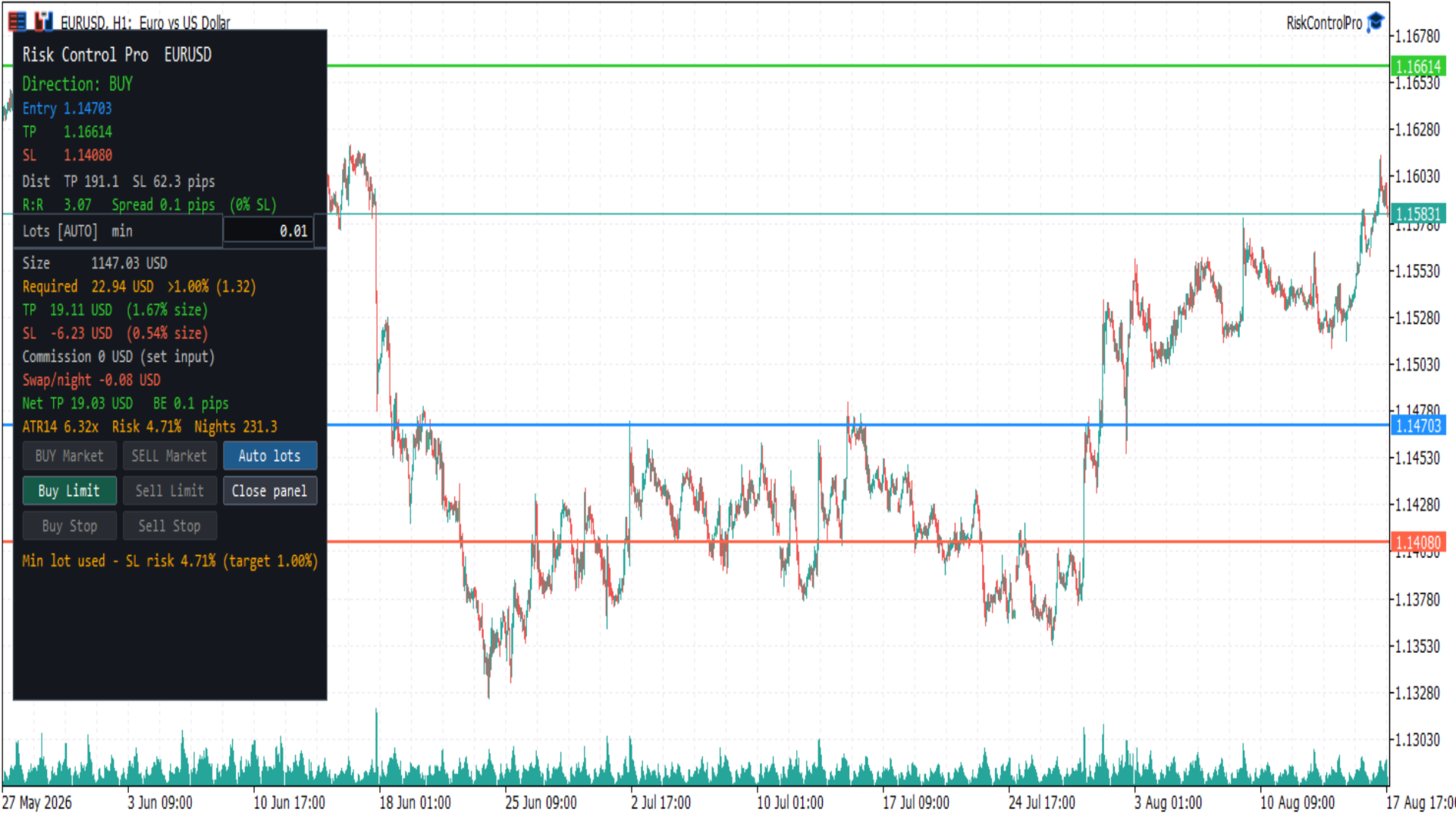
Risk Control Pro is a MetaTrader 5 Expert Advisor (utility) for planning and checking trade risk before you enter. It draws three draggable horizontal lines (Entry, Take Profit, Stop Loss) and a panel with direction, distances, risk/reward, lot size, money and percent of balance, spread, commission, swap, and optional order buttons.

It is a risk tool. Order buttons send trades immediately when enabled; they do not open the standard MetaTrader order ticket. Always confirm lot size, stop distance, and account permissions before clicking.

Before you start

This product is an Expert Advisor (trade utility), not an indicator. MetaTrader allows only one EA per chart. To use it with another EA such as DualVisionAI, open a second chart of the same symbol.

In the EA Common tab, enable Allow Algo Trading. Also turn on AutoTrading in the toolbar (the button must show a green smiley on this EA).

To send orders from the panel:

  1. Turn on AutoTrading in the MetaTrader toolbar.
  2. Keep input Show order buttons enabled.
  3. The market session for the symbol must be open. Forex is typically closed on weekends.

If AutoTrading is off or the market is closed, the panel still calculates risk. Order buttons stay disabled and the last panel line explains why.

Chart objects

Horizontal lines (drag to set prices):

  • Entry (blue) — planned fill price. Starts at the Bid/Ask midpoint.
  • Take Profit (green)
  • Stop Loss (red)

On first load, direction is BUY: Stop Loss is about 1× ATR(14) below Entry and Take Profit about 1.5× ATR above Entry. If ATR is not ready, a pip fallback is used. Line prices can be restored between sessions when persistence is enabled.

Panel (floating box):

  • Risk metrics for the current lines and lot size
  • Editable lot field
  • Order buttons when trading is allowed
  • Status line at the bottom

Close panel hides the box and leaves a small Open chip. The three lines stay on the chart.

How to use

  1. Attach Risk Control Pro from Navigator → Expert Advisors (not Indicators). Allow Algo Trading, then turn on AutoTrading.
  2. Drag Entry, Take Profit, and Stop Loss to the prices you want to evaluate.
  3. Read direction, R:R, lot size, and money / percent of balance in the panel.
  4. Adjust lot size if needed (see Auto lots below).
  5. If you want to place the trade from the panel, use an enabled order button. A click sends the order at once, with the current lot, TP, and SL.

On fast symbols (for example BTCUSD), price can move away from Entry in seconds. Market buttons then turn off and a pending type (Limit or Stop) may stay on. That is expected: Market requires Entry near the current Bid or Ask.

Direction

  • BUY — Take Profit above Entry and Stop Loss below Entry
  • SELL — Take Profit below Entry and Stop Loss above Entry
  • INVALID — Take Profit and Stop Loss on the same side of Entry, or two lines on the same price. Order buttons stay off.

Only the matching side is enabled. A BUY layout never enables SELL buttons, and the reverse.

Order buttons

Which button turns on depends on Entry versus live Bid/Ask and the broker stop level:

  • BUY Market / SELL Market — Entry is close to the fill price (Ask for buy, Bid for sell). Distance must be within the spread or SYMBOL_TRADE_STOPS_LEVEL, whichever is larger. The order is sent at market; TP and SL are taken from the lines.
  • Buy Limit — BUY layout and Entry below Ask (buy cheaper if price falls to Entry)
  • Sell Limit — SELL layout and Entry above Bid (sell higher if price rises to Entry)
  • Buy Stop — BUY layout and Entry above Ask (buy if price breaks up to Entry)
  • Sell Stop — SELL layout and Entry below Bid (sell if price breaks down to Entry)

Grey buttons do not send orders. There is no extra confirmation dialog.

Pending orders use the Entry line as the order price. Market orders ignore a far Entry and require it to be near the current quote.

Auto lots

Lot size can follow account risk or a value you type.

  • AUTO — lot is calculated so that Stop Loss risk equals Risk % of balance (default 1%). Moving the Stop Loss updates the lot. The panel shows Lots [AUTO] and a suggested size.
  • MAN — you edited the lot field. The value is kept until you press Auto lots.

Suggested lot is clamped to the symbol volume minimum, maximum, and step. Formula:

Lot = (balance × risk percent / 100) / (SL distance in pips or ticks × pip/tick value per lot)

You can also type auto in the lot field to return to AUTO.

Panel information

  • Direction — BUY, SELL, or INVALID
  • Entry / TP / SL — prices of the three lines
  • Dist — Take Profit and Stop Loss distance in pips (Forex) or ticks (indices, crypto, and similar)
  • R:R — Take Profit distance divided by Stop Loss distance. Color: red below 1, gold from 1 to 2, green above 2
  • Spread — current spread in pips or ticks, and as a percent of Stop Loss. A warning appears when that percent is at or above Warn if spread > % of SL
  • Lots — AUTO or MAN, suggested lot, and editable lot field
  • Size — position value in account currency (lot × price × contract). This is the dollar amount the margin formula is based on, not what is taken from the account.
  • Required — margin the broker locks (debits from free margin) to open that lot. LOW means free margin is below that amount. This is not Stop Loss risk. If Required is larger than your risk budget (balance × risk %), the line turns orange and shows >N% (for example min lot on gold needs more margin than 1% of a small account). If AUTO risk % implies a lot below the symbol minimum, the minimum lot is used and SL risk will be higher than the target percent.
  • TP / SL money — estimated profit and loss in account currency, each as a percent of Size (position value), not of account balance. Account-balance risk remains on the Risk line.
  • Commission — round-trip commission for the current lot, from the input (not read automatically from the broker)
  • Swap/night — estimated overnight swap for the inferred direction. Shown as n/a for unsupported swap modes
  • Net TP — Take Profit money minus commission plus one night of swap. Negative swap is a cost and reduces Net TP; positive swap increases it.
  • BE — breakeven distance in pips or ticks covering spread and commission
  • ATR — Stop Loss distance compared with ATR (for example 1.20× means SL is 1.2 times ATR)
  • Risk % — Stop Loss money as percent of balance
  • Nights — estimated nights of negative swap before net Take Profit is consumed; n/a when swap is not negative

The last line is status: ready, market closed, turn on AutoTrading, invalid lines, high spread, or the last order result / error.

Inputs

Open Inputs from the EA properties (right-click the chart, Expert List, RiskControlPro, Properties, Inputs).

Risk

  • Risk % of balance — percent of account balance used to size the AUTO lot from Stop Loss (default 1.0). Must be greater than 0 and at most 100.
  • Round-trip commission per lot — commission to open and close 1.0 lot, in account currency. Default 0. If your broker charges commission, enter the round-trip amount (example: 3.5 open + 3.5 close = 7). If the symbol is spread-only, leave 0. The panel shows “set input” while this is 0 so it is clear the value is not taken from the broker.
  • ATR period — period of the Average True Range used for the first TP/SL placement and the ATR comparison (default 14).
  • Warn if spread > % of SL — spread warning threshold as a percent of Stop Loss distance (default 25).
  • Decimals for money / ratio — decimal places for money, percent, and R:R (default 2).

Lines

  • Entry / TP / SL color — line colors
  • Line width — thickness of the three lines
  • Save line prices between sessions — when true, Entry/TP/SL are stored in terminal GlobalVariables per symbol and timeframe and restored on the next attach

Panel

  • Corner — chart corner used as the panel origin
  • Offset X / Offset Y — pixel offset from that corner
  • ATR, % balance, swap nights — show or hide the extra metrics row

Trading

  • Show order buttons — when false, the panel is read-only (no order buttons)
  • Magic number — identifier written on orders sent by this EA
  • Deviation (points) — maximum price deviation for market orders
  • Order comment — comment string on sent orders

Pip and tick value

Monetary estimates use the symbol tick value:

Pip value per lot = SYMBOL_TRADE_TICK_VALUE × (pip size / SYMBOL_TRADE_TICK_SIZE)

Pip size:

  • Forex with 3 or 5 digits — 10 × Point
  • Forex with 2 or 4 digits — Point
  • Other symbols (indices, crypto, and similar) — tick size; distances are labeled in ticks

These figures are estimates. Live fill, spread, commission, and swap depend on the broker and can differ from the panel.

Notes

Risk Control Pro does not guarantee profit, fill quality, or exact commission/swap. Fast markets can move between the panel update and the order. Use your own rules for risk, and check the lot field before sending an order. Removing the EA from the chart deletes its objects. Saved line prices remain in GlobalVariables only if persistence is enabled.

Рекомендуем также
Pro Trader Assistant 1.1 - The Ultimate Trading Companion NB: DOES NOT WORK ON STRATEGY TESTER. FOR TESTING, DM ME   Trade Simple, Smarter, Safer, and More Efficiently Are you ready to transform your trading with institutional-grade risk management? Pro Trader Assistant 1.1  is your complete solution for mastering trading psychology, risk control, and execution efficiency. Built for both prop firm challenges and retail trading. Why Choose Pro Trader Assistant 1.1 Perfect for retail trading
LT Round Numbers MT5
Thiago Duarte
4.86 (21)
Round numbers (or key levels) is an amazing strategy. These numbers are strong support and resistance levels. So what this indicator does is draw horizontal lines on the chart to help you find these levels. Configurations: Key levels in pips - distance between the lines. Color -   lines color. Style -   lines style. Width -  lines width. Display at background -  draw lines in front or back of candles. Selectable -  turn on or off the option to select the lines. Lines identification -  identifica
FREE
Это последняя итерация моего известного скальпера, Goldfinch EA, впервые опубликованная почти десять лет назад. Он скальпирует рынок при внезапном увеличении волатильности, которое происходит в короткие промежутки времени: он предполагает и пытается извлечь выгоду из инерции движения цены после внезапного ускорения цены. Эта новая версия была упрощена, чтобы позволить трейдеру легко использовать функцию оптимизации тестера, чтобы найти лучшие торговые параметры. [ Руководство по установке | Руко
FREE
Советник предназначен для защиты счета, фиксации прибыли (убытка) и отображения текущей прибыли. Защита торгового счета осуществляется путем закрытия всех открытых ордеров в терминале и/или закрытия всех графиков.  При запуске советника с параметрами по умолчанию, он будет отображать только информацию по вашему счету и будет иметь уменьшенный размер. Далее вы можете установить условия, при которых будет происходить защита вашего торгового счета.   Лимиты прибыли и убытков могут быть установлены
FREE
Adhera II
Putu Hery Siswanto
ADHERA II ADHERA II is a free MetaTrader 5 Expert Advisor designed primarily for Gold trading using a structured ALPHA + HERO bounded recovery system . The EA begins each trading cycle with one initial position called ALPHA . If the market moves against ALPHA, the HERO system may add recovery positions sequentially at predefined price distances. Recovery positions are not opened simultaneously. ADHERA II is a complete free product. It is not a demo, trial or intentionally restricted edition. Tr
FREE
Donchian Channel is an indicator created by Richard Donchian. It is formed by taking the highest high and the lowest low of the last specified period in candles. The area between high and low is the channel for the chosen period. Its configuration is simple. It is possible to have the average between the upper and lower lines, plus you have alerts when price hits one side. If you have any questions or find any bugs, please contact me. Enjoy!
FREE
Pro Spread Monitor Pro Spread Monitor is a specialized, professional-grade utility designed to provide real-time, low-latency monitoring of market spreads directly on your trading chart. In high-volatility environments, sudden spread spikes can significantly impact your execution quality and the integrity of your stop-loss levels. This indicator provides immediate visual feedback, allowing you to identify "danger zones" instantly and avoid trading during periods of unfavorable liquidity. Key Fea
FREE
Rainbow MT5
Jamal El Alama
4 (1)
Description : Rainbow MT5 is a technical indicator based on Moving Average with period 34 and very easy to use. When price crosses above MA and MA changes color to green, then this is a signal to buy. When price crosses below MA and MA changes color to red, then this is a signal to sell. The Expert advisor ( Rainbow EA MT5 ) based on Rainbow MT5 indicator is now available here . MT4 version is available here .
FREE
================================================================ MATRIX CONDITION MONITOR Live Trade Condition Panel for MetaTrader 5 Fully Automatic -- Works with ALL Matrix EAs ================================================================ NEVER MISS A TRADE SETUP AGAIN Matrix Condition Monitor is a free utility that attaches to any chart and automatically checks all 10 trade conditions in real time -- showing you exactly why a trade will or will not open, and alerting you the moment ever
FREE
PZ Trade Pad MT5
PZ TRADING SLU
4.46 (24)
Утилита PZ Trade Pad позволяет торговать с помощью панели прямо на ценовом графике. Продукт имеет встроенное управление риском и может работать с уже открытыми сделками. Возможность совершать сделки прямо на ценовом графике Управление капиталом Возможность установки стоп-уровней Закрытие всех открытых сделок в один клик Удаление всех отложенных ордеров в один клик Частичное закрытие прибыльных сделок в один клик Без входных параметров. Использование Утилита проста в использовании. Выберите знач
FREE
XAU VWAP Mean Reversion H4 Expert Advisor for MetaTrader 5 — Gold / XAUUSD focus Version: 1.00 What it is XAU VWAP Mean Reversion H4 is an Expert Advisor for gold on the H4 chart. Intraday VWAP mean-reversion style participation on gold H4. Built for structured automated participation — not grid , not martingale . Evaluate on your broker and risk profile before any live use. This product is a technical system . Exact thresholds and entry equations remain internal product design and are not publ
FREE
Discover the power of automated trading with **SimpleTradeGioeste**, an Expert Advisor (EA) designed to optimize your trading operations in the Forex market. This innovative EA combines advanced trading strategies with proven technical indicators, offering an unparalleled trading experience. video backtest :  https://youtu.be/OPqqIbu8d3k?si=xkMX6vwOdfmfsE-A ****Strengths**** - **Multi-Indicator Strategy**: SimpleTradeGioeste employs an integrated approach that combines four main technical ind
FREE
King_Expert EA - Professional Trading System Overview King_Expert EA is a sophisticated automated trading system for MetaTrader 5 that combines trend-following strategies with intelligent risk management. The EA uses a multi-layered approach to identify high-probability trading opportunities while incorporating advanced features like grid averaging and dynamic position management. Core Trading Strategy Primary Signal Generation EMA Crossover System : Uses dual Exponential Moving Averages (21/50
FREE
Mini Charts MTF EMA Mini Charts MTF EMA is a MetaTrader 5 indicator that displays multiple mini charts from selected timeframes directly on the main chart. It helps traders monitor multi-timeframe price movement and EMA direction in one clean visual layout. Main Features Multiple mini charts on the main chart Custom timeframe selection for each mini chart Up to 4 EMA lines for every mini chart Custom EMA period, shift, method, applied price, color, style, and width Custom mini chart width, heigh
FREE
Golden Square X
Huynh Tan Linh N
4.18 (11)
This is my latest Free version for Gold. With optimized parameters and user-friendly features, this version is likely very easy to use and highly effective. You can customize TP and SL parameters as you wish, but the default settings should work well for you without the need for further adjustments.  This version is designed for the M5. This version does not require a large capital investment; only $100-$200 is sufficient for Golden Square X to run and generate profits for you. Based on backtest
FREE
Indicator Description 4 Hull MA Color + Envelopes is a powerful trend-following indicator for MetaTrader 5 that combines four Hull Moving Averages (HMA) with Moving Average Envelopes to clearly identify market direction, trend strength, and potential reversal or pullback zones. This indicator is designed to reduce noise, react quickly to price movement, and provide a clean visual structure for professional trading.   Key Features   4 Hull Moving Averages (20, 50, 100, 200) Automatic color change
FREE
Follow The Line MT5
Oliver Gideon Amofa Appiah
4.6 (35)
This indicator obeys the popular maxim that: "THE TREND IS YOUR FRIEND" It paints a GREEN line for BUY and also paints a RED line for SELL. (you can change the colors). It gives alarms and alerts of all kinds. IT DOES NOT REPAINT and can be used for all currency pairs and timeframes. Yes, as easy and simple as that. Even a newbie can use it to make great and reliable trades. NB: For best results, get my other premium indicators for more powerful and reliable signals. Get them here: https://www.m
FREE
"Manage multiple positions as a single unit with hidden targets." The Virtual Basket TP SL Manager is a professional MetaTrader 5 utility designed to automate the closing of positions based on the total profit or loss of a group of orders (a "basket"). By utilizing Virtual Levels , all Take Profit (TP) and Stop Loss (SL) targets are stored locally within the EA's memory and are not sent to the broker's server, keeping your strategy safe from stop-hunting and price manipulation. Key Features Virt
FREE
This EA finds Fair Value Liquidity (FVL) on the chart, tracks when they get mitigated , and then looks for an inversion signal (price “fails” through the zone). When that inversion happens, it places a trade in the opposite direction of the original Liquidity gap (an Inverse FVG approach). It also lets you control when it trades using market sessions , and it can auto-close positions at New York open (all positions or profitable-only). Key advantages Clear, rule-based entries (no guessing): trad
FREE
If you like BTC Speed Alpha Indicator, you can also check BTC Speed Alpha EA on my MQL5 profile. The EA version is designed for automated BTCUSD trading with risk control, Break Even, trailing stop, position assist and dashboard panel. BTC Speed Alpha is a free MetaTrader 5 indicator designed for Bitcoin / BTCUSD traders who want a clean visual tool for reading market direction, impulse movement and potential BUY / SELL opportunities directly on the chart. The indicator combines an adaptive t
Coral trend is   a trend-following indicator that is widely popular among FOREX traders . It is usually used as a confluence with other indicators. It uses combinations of moving averages with complex smoothing formulas! It has two configurable parameters: Coefficient   - smoothing ratio (*) Applied price Calculation: Coral = (-0.064) * B6 + 0.672 * B5 - 2.352 * B4 + 2.744 * B3
FREE
AutoGen Hybrid Mean Reversion EA MT5 Designed for Gold (XAUUSD) and major forex pairs, AutoGen Hybrid Mean Reversion EA MT5 is a fully automated expert advisor for MetaTrader 5 that trades the classic Bollinger Bands mean-reversion setup, filtered by the ADX indicator to stay out of strong trending markets. It combines two well-known concepts — reversion to the mean and trend-strength filtering — into a single robust trading robot. The strategy is symbol-agnostic: the same Bollinger / ADX / ATR
FREE
Brent Trend Bot
Maksim Kononenko
4.5 (16)
Особенность советника — простые базовые инструменты и логика работы. Здесь нет множества стратегий и десятков настроек, как у другого EA, он работает по одному алгоритму. Принцип работы — стратегия следования за трендом с попыткой получить максимальную доходность с поправкой на риск. Поэтому его можно рекомендовать начинающим. Его сильная сторона — принцип закрытия сделок. Его цель — не погоня за прибылью, а минимизация количества убыточных сделок. Советник не может похвастаться высокой доходнос
FREE
Общее описание Этот индикатор — усовершенствованная версия классического канала Дончия с добавлением практических функций для реальной торговли. Помимо стандартных трёх линий (верхняя, нижняя и средняя), система определяет пробои и отображает их на графике стрелками, показывая только линию, противоположную текущему направлению тренда для более чистого восприятия. Индикатор включает: Визуальные сигналы : цветные стрелки при пробое Автоматические уведомления : всплывающие окна, push и email Фильтр
FREE
Candle by Seconds
Marcelo Akio Iqueuti
4.46 (46)
Он был разработан специально для внутридневных операций, позволяя оператору рынка создавать нетрадиционные графики свечей, избегая традиционных точек OHLC (Open, Hight, Low и Close). Этот советник (EA) создать свечи в любой промежуток времени в секундах. Вы можете генерировать графики, которые недоступны в стандартных периодах Metatrader 5, например: Создать график из нетрадиционного периода времени в 27 секунд или, если вы хотите создать период времени в 7 минут, просто введите «420 секунд»
FREE
Эксперт  MACD_LevelTrader MT5   создан для торговле валютной пары XAUUSD. Данная версия это наработки того, что можно извлечь  из  индикатора MACD и Moving Average.  Важно   перед тестированием изменить настройку с 1000 на 5000                       Offset in points UP from SMA200 for sell              5000                       Offset in points DOWN from SMA200 for buy        5000   Тайм фрейм  М5. Два варианта логики, П араметр  true=вход по уровню  MACD +   SMA200, false=вход по MACD  Тестиру
FREE
Представляем NAS100 Auto SL и TP Maker для MT5: Никогда больше не пропустите установку StopLoss и TakeProfit с нашим NAS100 Auto SL и TP Maker, незаменимым помощником для трейдеров, работающих на рынке Nasdaq 100 в MetaTrader 5. Этот инструмент предназначен для тех, кто ищет беспроблемное решение для автоматизации управления уровнями StopLoss и TakeProfit. Ключевые особенности: Эффективная автоматизация: Автоматически отслеживает сделки Nasdaq 100 без StopLoss и/или TakeProfit. Динамически ре
FREE
Important Lines
Terence Gronowski
4.88 (24)
Индикатор отображает линии пивот, уровни максимума, минимума и закрытия предыдущего дня, а также минимум и максимум предыдущего часа. Нужно просто установить этот индикатор на график, чтобы отобразить все эти важные линии, нет необходимости настраивать множество отдельных индикаторов. Почему важны определенные линии Максимум и минимум предыдущего дня : эти уровни используются для торговли на дневном графике. Очень часто, если цена становится выше или ниже минимума/максимума предыдущего дня, про
FREE
Equity monitor Это простой информер изменения средств. Писал для себя, может кому пригодится... 1. Отображает изменение средств за день. Каждый день, при первом запуске терминала, запоминает текущие средства и в течении дня мониторит изменения. 2. Первого числа месяца, как же запоминает средства и, в течении месяца,  мониторит изменения. 3. Ну и отображает профит открытой позиции. Для работы  необходимо создать 4 глобальные переменные: gvarEqityDay , gvarEquityMonth , gvarMonth , gvarToday 
FREE
С этим продуктом покупают
Trade Assistant MT5
Evgeniy Kravchenko
4.41 (215)
Помогает рассчитать риск на сделку, простая установка нового ордера с помощью линий, управление ордерами с функциями частичного закрытия, 7 типов трейлинг-стопа и другие полезные функции. Дополнительные материалы и инструкции Инструкция по установке - Инструкция к приложению - Пробная версия приложения для демо счета Функция Линии   - отображает на графике линию открытия, стоп-лосс, тейк-профит. С помощью этой функции легко установить новый ордер и увидеть его дополнительные характеристики пе
Добро пожаловать в Trade Manager EA — лучший инструмент для управления рисками, предназначенный для упрощения, точности и эффективности торговли. Это не просто инструмент для размещения ордеров; это комплексное решение для удобного планирования торгов, управления позициями и усиленного контроля над рисками. Независимо от того, начинающий вы трейдер, опытный специалист или скальпер, нуждающийся в быстром исполнении, Trade Manager EA адаптируется к вашим потребностям и работает с любыми активами:
Local Trade Copier EA MT5
Juvenille Emperor Limited
4.97 (146)
Опыт экстремально быстрого копирования сделок с помощью Local Trade Copier EA MT5 . Благодаря простой установке в течение 1 минуты этот копировщик сделок позволяет вам копировать сделки между несколькими терминалами MetaTrader на одном компьютере с Windows или на Windows VPS с крайне быстрыми скоростями копирования менее 0.5 секунды. Независимо от того, новичок вы или профессиональный трейдер, Local Trade Copier EA MT5 предлагает широкий спектр опций, чтобы настроить его под ваши конкретные по
TradePanel MT5
Alfiya Fazylova
4.88 (166)
Trade Panel — это многофункциональный торговый помощник. Приложение содержит более 50 торговых функций для ручной торговли и позволяет автоматизировать большинство торговых операций. Перед покупкой вы можете протестировать демоверсию на демо-счете. Скачать пробную версию приложения для демонстрационного аккаунта: https://www.mql5.com/ru/blogs/post/750864 . Полная инструкция здесь . Торговля. Позволяет совершать торговые операции в один клик: Открыть отложенные ордера и позиции с автоматическим р
================================================================================ POC BREAKOUT - V20.72. Full Professional Grade Toolkit ================================================================================ POC Breakout is a full MetaTrader 5 trading dashboard for discretionary traders who want breakout signals, Point of Control (POC) context, volume profiles, order flow, market structure, news, alerts, and advanced trade planning in one professional workspace. Attached directly to you
Бета-версия Telegram to MT5 Signal Trader почти готов к официальному альфа-релизу. Некоторые функции все еще находятся в разработке, и вы можете столкнуться с небольшими ошибками. Если вы заметите проблемы, пожалуйста, сообщите о них, ваша обратная связь помогает улучшать программное обеспечение для всех. Telegram to MT5 Signal Trader — мощный инструмент, который автоматически копирует торговые сигналы из каналов и групп Telegram прямо в ваш счёт MetaTrader 5 . Поддерживаются как публичные, так
Astro Trade MT5
Indra Maulana
5 (2)
AstroTrade Trading Assistant AstroTrade is a comprehensive multi-functional trading utility developed for the MetaTrader 5 platform. It integrates essential tools for trade execution, risk management, and technical monitoring into a single unified interface. The application is designed to assist traders in managing their daily operations through a visual and structured environment. Visual Trade Execution and Risk Management The application includes a specialized trading panel that assists in c
Exp COPYLOT CLIENT for MT5
Vladislav Andruschenko
3.97 (35)
Профессиональный копировщик сделок для MetaTrader 5 Быстрый, профессиональный и надежный копировщик сделок для MetaTrader . COPYLOT позволяет копировать сделки Forex между терминалами MT4 и MT5 с поддержкой счетов Hedge и Netting . Версия COPYLOT для MT5 поддерживает: - MT5 Hedge → MT5 Hedge - MT5 Hedge → MT5 Netting - MT5 Netting → MT5 Hedge - MT5 Netting → MT5 Netting - MT4 → MT5 Hedge - MT4 → MT5 Netting Версия MT4 Полное описание + DEMO + PDF Как купить Как установить Как получить файлы жур
Power Candles Strategy Scanner — самооптимизирующийся инструмент для поиска настроек по нескольким инструментам Power Candles Strategy Scanner использует тот же самооптимизирующийся движок, что и индикатор Power Candles — для всех символов в вашем Market Watch, одновременно. На одной панели отображается информация о том, какие символы в данный момент являются статистически торгуемыми, какая стратегия выигрывает на каждом из них, оптимальная пара Stop Loss / Take Profit, а также отправляется увед
Telegram to MT5 Multi-Channel Copier автоматически копирует торговые сигналы из ваших Telegram-каналов напрямую в MetaTrader 5. Никаких ботов, никаких браузерных расширений, никакого ручного копирования. Вы получаете сигнал в Telegram, и советник открывает сделку на вашем терминале за несколько секунд. Продукт включает два компонента: приложение для Windows, которое слушает ваши Telegram-каналы, и этот советник, который исполняет сигналы на терминале MT5. Также доступна версия для MT4. Руководст
Trade copier MT5
Alfiya Fazylova
4.58 (52)
Trade Copier — это профессиональная утилита, предназначенная для копирования и синхронизации сделок между торговыми счетами. Копирование происходит от счета/терминала поставщика к счету/терминалу получателя, которые установлены на одном компьютере или vps. АКЦИЯ - Если вы уже приобрели "Trade copier MT5", вы можете получить "Trade copier MT4" бесплатно (для копирования MT4 > MT5 и MT4 < MT5). Для получения более подробной информации об условиях, пожалуйста, свяжитесь с нами через личные сообщени
Farmed Hedge Yield Farming | All Markets (Manual - Hybrid - Semi/Automated EA) MULTI-ASSET SUPPORT Trade any asset available on your broker - Forex: Major, Minor, Exotic pairs - Crypto: BTC, ETH, XRP, SOL, BNB - Stocks: Apple, Tesla, Amazon, Google, etc. - Commodities: Gold, Silver, Oil, Gas - Indices: US30, NAS100, SPX500, DAX40 - Any CFD your broker offers VERIFIED TRADING RESULTS - Farmed Hedge Yield Axi Copy:  https://www.mql5.com/en/signals/2356376 - Farmed Hedge Yield Exn Copy:   https:/
Telegram To MT5 Ultra
Mirel Daniel Gheonu
5 (4)
Telegram To MT5 — копировщик сигналов Превратите торговые сигналы из ваших Telegram-каналов в реальные ордера MT5 — автоматически, на любом количестве счетов, с полным контролем над риском и правилами. Telegram To MT5 связывает VIP / сигнальные каналы, на которые вы уже подписаны в Telegram, с вашим терминалом MetaTrader 5. Бесплатное приложение-компаньон для ПК читает сообщения (даже из каналов, которые не допускают ботов), а этот советник исполняет их на вашем счёте — применяя ваши настройки р
Premium Trade Manager - Торговая панель со встроенным коучем Premium Trade Manager помещает торгового коуча прямо в ваш график, а под ним работает полноценный движок исполнения. Настройте сделку так, как вы всегда это делаете, затем позвольте Max, вашему ИИ-наставнику по трейдингу, прочитать именно эту настройку с учётом вашего живого счёта и дать чёткое заключение до того, как вы входите: соответствует ли стоп дисциплинированному подходу, разумен ли риск, не выходит ли высоковолатильный релиз ч
VirtualTradePad PRO SE MT5 — профессиональный торговый центр управления для MetaTrader 5 VirtualTradePad PRO SE — это премиальная торговая панель и рабочая среда управления сделками на графике для MetaTrader 5 . Она создана для трейдеров, которым нужны более быстрое исполнение, более понятный контроль позиций, структурированное управление сделками, визуальное планирование уровней и профессиональный рабочий процесс прямо с графика. Это не просто панель BUY / SELL. PRO SE объединяет ручную торговл
Trade Manager DaneTrades
Levi Dane Benjamin
4.23 (30)
Trade Manager, который поможет вам быстро входить и выходить из сделок, автоматически рассчитывая риск. Включает функции, которые помогут предотвратить чрезмерную торговлю, торговлю из мести и эмоциональную торговлю. Сделками можно управлять автоматически, а показатели эффективности счета можно визуализировать в виде графика. Эти функции делают эту панель идеальной для всех трейдеров, занимающихся ручной торговлей, и помогают улучшить платформу MetaTrader 5. Многоязычная поддержка. Версия для МТ
Anchor Trade Manager
Kalinskie Gilliam
5 (7)
Anchor: The EA Manager Your EAs manage their own trades. Anchor manages the account around them. Anchor gives you one place to control your EAs, manage risk and decide when trading is allowed. Any EA, any vendor, any broker or symbol. No source-code changes required. The Problem Most EAs only know what they are doing. They cannot see when another EA is already trading, when several EAs open and are stacking risk or when the account has reached your loss limit. Even using just one EA, it may not
Trade Dashboard MT5
Fatemeh Ameri
4.95 (132)
Trade Dashboard simplifies how you open, manage, and control your trades, with built-in lot size calculation. It allows you to execute trades, manage risk, and control positions directly on the chart, with tools such as partial close, breakeven, and trailing stop. Designed to reduce manual work and help you stay focused on your trading decisions. A demo version is available for testing. Detailed explanations of features are provided within the MQL5 platform. Installation instructions are include
Custom Alerts AIO: Универсальный сканер рынка — Без настройки Обзор Custom Alerts AIO — это самый быстрый и простой способ отслеживать рыночные сигналы в реальном времени на множестве инструментов без дополнительной настройки и без необходимости покупать другие продукты. В состав входят все необходимые индикаторы от Stein Investments, что делает этот инструмент идеальным решением «всё в одном» для трейдеров, ценящих простоту и эффективность. Просто установите на график и сразу получайте сигнал
Footprint Chart Pro — Professional OrderFlow EA for MetaTrader 5 Version 6.34 | Professional tool for real traders | Institutional-Grade Visualization DEMO USERS - PLEASE SELECT EVERY TICK / REAL TICK WHEN TESTING AND YOU HAVE DOWNLOADED HISTORICAL DATA. IF YOU SEE A WAITING SCREEN AND IT IS NOT DOWNLOADING, IT MEANS YOU HAVE LOW HISTORICAL DATA. TRY 1 MIN AND 5 MIN FIRST ON 1 DAY DATA. ONE DAY DATA SHOULD BE THE NEWEST AND MOST CURRENT DATE. PLEASE WAIT UNTIL THE MARKET HAS ROLLED OVER PERIOD.
Timeless Charts
Samuel Manoel De Souza
5 (8)
Timeless Charts is an all-in-one trading utility for professional traders. It combines custom chart types such as Seconds Charts and Renko with advanced order flow analysis using Footprints , Clusters , Volume Profiles , VWAP studies, and anchored analysis tools for deeper market insight. Trading and position management are handled directly from the chart through an integrated trade management panel , while Market Replay and Virtual Accounts provide environments for practicing trading skills and
YuClusters
Yury Kulikov
4.93 (43)
Внимание: Ознакомиться с работой программы можно с помощью бесплатной версии  YuClusters DEMO . YuClusters это профессиональная система анализа рынка. Для трейдера открываются уникальные возможности анализа потока ордеров, объемов торговли, движения цены используя различные графики, профили, индикаторы, графические объекты. YuClusters оперирует данными на основе ленты сделок или тиковой информации, в зависимости от того, что доступно в котировках финансового инструмента.  YuClusters позволяет с
Seconds Chart MT5
Boris Sedov
4.61 (18)
Seconds Chart - уникальный инструмент для создания секундных графиков в MetaTrader 5 . С помощью Seconds Chart вы можете построить график с таймфреймом, заданным в секундах, получая идеальную гибкость и точность анализа, недоступную на стандартных минутных или часовых графиках. Например, таймфрейм S15 обозначает график со свечами продолжительностью 15 секунд. Вы можете использовать любые индикаторы и советники с поддержкой пользовательских символов. Работать с ними так же удобно, как и на станда
Quant AI Agents
Ho Tuan Thang
5 (1)
Quant AI Agents are independent trading Expert Advisors. Instead of trading using a fixed strategy like other conventional EAs, Quant AI Agents   is a   multi-agent AI trading framework   that turns natural-language strategy prompts into live.  WANT THE SAME RESULTS AS MY LIVE SIGNAL?   Use the exact same brokers I do:   IC MARKETS , IC TRADING   .  Unlike the centralized stock market, Forex has no single, unified price feed.  Every broker sources liquidity from different providers, creating un
The product will copy all telegram signal to MT5 ( which you are member) , also it can work as remote copier.  Easy to set up, copy order instant, can work with almost signal formats, image signal,  s upport to translate other language to English Work with all type of channel or group, even channel have "Restrict Saving Content", work with  multi channel, multi MT5 Work as remote copier: with signal have ticket number, it will copy exactly via ticket number. Support to backtest signal. How to s
Features   With MT5 to Interactive Brokers(IB) Trader, you can: 1. Load chart data from IB to MT5, and Analyze with all standard or customer Indicators. 2. Place Orders to IB Account Directly in MT5. 3. Make your Own EAs upon IB Securities by only making minus changes of the trading function. Usage 1) Installation Copy the "Mt5ToIBTraderEn.ex4" and sample files to [MT5 Data Folder]->MQL5->Experts.  2)  MT5 Settings Add the IP Address to the MT5 Allowed URLs in 'Tools->Options->Expert Adviso
Trade Command Center
Nguyen Thanh Trieu
5 (2)
Дополнительные материалы и инструкции Инструкция по установке - Демо-версия приложения для тренировочного счета ; Официальная информация Официальный канал Профиль продавца Trade Command Center — Профессиональная панель управления ордерами и контроля рисков Risk Guard в реальном времени Trade Command Center — это высокопроизводительная визуальная торговая панель, калькулятор лота и утилита управления рисками для платформы MetaTrader 5. Она разработана специально для трейдеров, которым треб
Welcome to ENTRY IN THE ZONE WITH SMC MULTI TIMEFRAME Entry In The Zone and SMC Multi Timeframe is a real-time market analysis tool based on Smart Money Concepts (SMC), designed to analyze market structure, price direction, and key trading zones. It supports both Single-Timeframe Analysis and Multi-Timeframe Analysis, providing a clearer view of the overall market structure across multiple timeframes, with real-time BUY / SELL signals that do not repaint. It is designed to help filter trading op
MT5 to Telegram Signal Provider — это простой в использовании полностью настраиваемый инструмент, который позволяет отправлять определённые сигналы в чат, канал или группу Telegram, превращая вашу учётную запись в провайдера сигналов . В отличие от большинства конкурирующих продуктов, он не использует импорт DLL. [ Демо ]   [ Руководство ] [ Версия MT4 ] [ Версия для Discord ] [ Канал в Telegram ]  New: [ Telegram To MT5 ] Настройка Доступно пошаговое руководство пользователя . Никаких знаний A
Торговая панель для MetaTrader 5 — профессиональная торговля в один клик с графика и клавиатуры Мощная торговая панель для активного ручного трейдинга, которая позволяет открывать, сопровождать и закрывать сделки значительно быстрее и удобнее, чем стандартными средствами MetaTrader. Панель создана для тех, кто хочет получить полный контроль над позициями, ордерами, прибылью и торговыми сценариями в одном рабочем пространстве. Это не просто вспомогательная утилита. Это полноценный торговый интер
Другие продукты этого автора
SMA Riels
Andres Eduardo Rodriguez Fortunato
Overview SMARiels is a MetaTrader 5 chart indicator for structural price analysis. The user selects a price range with two vertical lines. Inside that range, the indicator calculates horizontal price levels, directional slope, zone force, zone touches, imbalance, and the strongest BUY and SELL rails by signed zone score. The indicator is an analysis tool. It does not place orders and it does not replace risk management. Strong BUY and Strong SELL rails show where buying or selling pressure is co
DualVision AI
Andres Eduardo Rodriguez Fortunato
Overview DualVision AI is a MetaTrader 5 Expert Advisor for vision-based chart analysis. The user selects a candle range with two vertical lines and runs an AI analysis on demand. DualVision AI builds an optimized candlestick image and normalized OHLC data for that range, then sends them to Claude (Anthropic) or ChatGPT (OpenAI). The model returns a structured signal with trend, local pattern, conflict flag, confidence, take profit, and stop loss. DualVision AI is an analysis assistant. It does
Фильтр:
Нет отзывов
Ответ на отзыв