Virtual Trailing SL TP MT5

5

The utility places virtual (hidden from your broker) trailing stop, breakeven, stop loss and take profit.‌

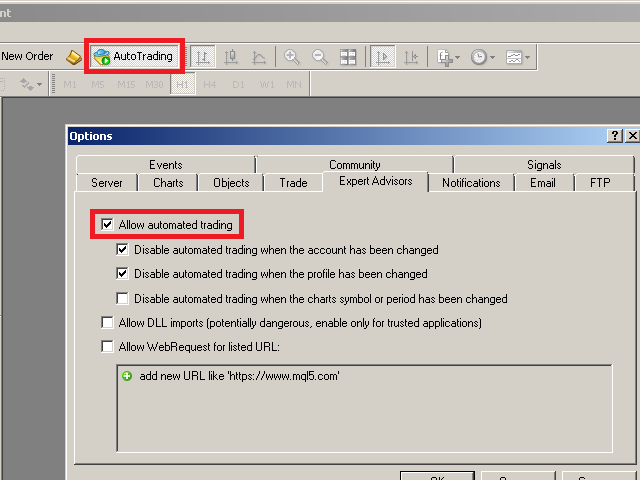
It is necessary to allow automated trading in the terminal settings.

In testing mode, the utility opens Buy or Sell positions on the first ticks, which allows you to visually observe the given logic, changing the utility parameters. In real mode, the utility does not open positions.

Discuss the complexities of Forex trading here: chat "Age of Expert Advisors".

Parameters

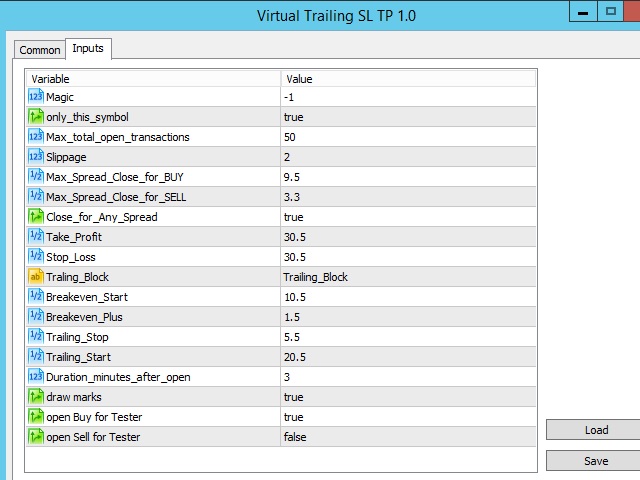
  • magic - magic number. If less than 0, positions with any magic number are tracked.
  • only_this_symbol - only chart symbol. If false, positions of any symbols are tracked.
  • Max_total_open_transactions - maximum number of positions opened simultaneously (the lesser the Max_total_open_transactions value, the less memory is consumed by the utility).
  • Slippage - acceptable slippage in points when closing positions (does not work in case of a Market execution).
  • Max_Spread_Close_for_BUY - maximum acceptable spread when closing Buy (in points).
  • Max_Spread_Close_for_SELL - maximum acceptable spread when closing Sell (in points).
  • Close_for_Any_Spread - close positions in case of any spread.
  • Take_Profit - take-profit. 0 - disabled.
  • Stop_Loss - stop loss. 0 - disabled.
  • Breakeven_Start - necessary amount of points from an position Open price for setting a breakeven. 0 - disabled.
  • Breakeven_Plus - increase a breakeven by a number of points.
  • Trailing_Stop -  trailing stop value. 0 - disabled.
  • Trailing_Start - necessary amount of points from an position Open price for setting a trailing stop.
  • Duration_minutes_after_open - necessary amount of minutes after an position Open price for setting a trailing stop.
  • draw marks - draws marks of levels on chart (only for the chart to which the utility is attached).
  • open Buy for Tester - open the position of Buy in a Strategy Tester.
  • open Sell for Tester - open the position of Sell in a Strategy Tester.

For ease standard points are always indicated in the parameters (by the 4th digit). On five-digit brokers points are recalculated automatically.


Real (standard) trailing stop, breakeven, stop loss and take profit: https://www.mql5.com/en/market/product/44030

Pay attention to the useful information in my profile: https://www.mql5.com/en/users/test-standart
Comentários 1
Nail Sharipov
423
Nail Sharipov 2023.02.08 06:46 
 

Очень хорошая утилита .

Produtos recomendados
Níveis de breakeven: mova o SL com apenas 1 clique. Evite perder lucro existente Usando esta ferramenta, você pode proteger rapidamente seu lucro com apenas um clique. Especialmente importante para negociações de curto prazo. Opção de deslocamento também disponível. Utilitário multifuncional : 66+ recursos, incluindo esta ferramenta | Contate-me se tiver dúvidas | Versão MT4 Como mover os níveis SL: 1. Especifique um [Ativo] específico, ou selecione [TODOS] os ativos. 2. Selecione o tipo de neg
T Manager for Price action Traders
Haidar Lionel Haj Ali
4.5 (10)
T Manager, the ultimate trade management solution designed by traders for traders. If you are searching for a simple and efficient trade panel, trade manager, or trade assistant, you are at the right place.   The market contains a diverse number of those tools , but this one is designed by traders for traders . I designed this tool, and I am using it daily. Take my advice and stop buying tools blended with un-useful features that you will never use,   T Manager provides you with the essential y
English: Binarias_Script.mq5 is a technical script designed for binary options traders who wish to evaluate the market from a multi-timeframe, multi-indicator perspective (M15, M5, M1). This tool does not trade , but rather provides a structured signal assessment for manual decision-making. ️ Highlighted Features: CALL/PUT signal analysis with confidence percentages. Validations include: EMA21, MACD, RSI, ADX, ATR, CCI, Donchian Channel, volume, and structure. On-screen output with clear si
Auto Stop Loss MT5
Nabil Oukhouma
5 (1)
O Gerenciador de Risco "Configure e Esqueça" para Trading Multiativos ️ Nunca deixe uma operação desprotegida. Auto Stop Loss (MT5 Manager) é a ferramenta de background definitiva para traders que priorizam a segurança. Diferente de painéis comuns, esta ferramenta trabalha incansavelmente nos bastidores para proteger instantaneamente cada trade que você abre. Seja operando manualmente ou via outro Robô (EA), este gerenciador garante que cada posição tenha Stop Loss, Take Profit e Trailing Stop
Instructions for Using Reverse Copier EA Attach EA to Charts Open MetaTrader and attach the EA to any chart on both accounts (master & slave). Make sure AutoTrading is enabled. Master Account (Signal Sender) Set Mode = Master in EA settings. This account will send trade signals. Slave Account (Signal Receiver) Set Mode = Slave in EA settings. This account will receive trades in reverse (opposite direction). Lot Multiplier In Slave EA settings, set Multiplier to control lot size. Example: 1.0
Auto close
Raudel Umaran Elias
4.33 (9)
Simple program to automatically close positions by profit or loss. User can select "Total Profit" to close all positions at the same time, once the total profit or loss is reached. User can select "Single Profit" to close one by one positions, once single profit or loss is reached. Notes: 1. The assistant will not open any position. 2. The assistant only provide market orders, so due maket volatility positions can suffer slippage. 
FREE
Trailing Stop loss last X candles swing high and low.  X is a value of candles you can set as an input parameter. This Trailing stop loss moves the SL below the last X candles low(if BUY positions) or high(for SELL positions) If we are in a trend and we open a position following the trend, the SL will be automatically placed at the low or high of the last X bars. contact me if you need further assistence
Trading Room Indcator
Meshari F M Alkhawaled
Trading Room Indicator is a professional market-structure tool built to give traders a clear, complete trading framework — combining CPR levels, dynamic targets, and trend direction in one clean view. Instead of guessing direction or overloading the chart with indicators, Trading Room Indicator focuses on what actually matters : levels, direction, and potential price expansion. What This Indicator Provides CPR Structure BUY level SELL level Pivot Point (PP) Designed to highlight equilibrium
Show Account Information Custom showing your MT5 account information Indicators add account information to chart. Profit, Balance, Equity, Free Margin, Margin and Margin Level % Profit.... Hide account information: Click anywhere on account information text.     The hide/show response is dependent on incoming ticks or chart refresh. In tick scarce or closed markets the indicator hide/show click will appear not to function while waiting for a tick or chart refresh. It is only necessary to attac
EA SB8 Panel Trade
Juan Manuel Bernal Martin
SB-8 – Manual Trading Panel with Fixed Risk & TradingView-Style Visualization for MT5 SB-8 is an advanced manual trading panel for MetaTrader 5 , designed to execute trades visually, quickly and without calculations . It is especially built for traders coming from TradingView , who often find MT5 confusing when it comes to risk management and trade visualization. With SB-8, you don’t calculate lot size, percentages or risk . You simply move the Stop Loss line , and the panel handles everything a
This is an EA (Expert Advisor) designed to support manual and automatic order closing. Main Features: Automatically adjust Stop Loss (SL) and Take Profit (TP) for all buy and sell orders based on the specified points. Automatically close buy or sell orders when the specified profit level is reached. Automatically close all buy and sell orders when their total profit reaches the desired level. Can be closed manually: Buy orders, Sell orders, Close all with buttons Display the average price of buy
FREE
This Expert Advisor monitors all open positions across all symbols in MetaTrader 5. Whenever a Stop Loss (SL) or Take Profit (TP) is manually set or adjusted on any position, the EA automatically applies that value to all other open positions , regardless of symbol or order type (Buy/Sell). This ensures consistent and synchronized SL and TP levels across your account. Perfect for mobile trading via tablet or smartphone!
Breakevan Utility
Jose Luis Thenier Villa
BreakEvan Utility  Is a simple tool in a panel with this utilities: This utility will draw a Golden Line in the chart applied showing the breakeven price, considering all the positions opened for that specific symbol. Also the information panel shows: Balance Breakeven Price for that chart Force Breakeven (for that symbol) as ON/OFF Force Breakeven Global (takes into account all trades opened) as ON/OFF Total Lots opened for Symbol Total Lots opened Global And two buttons: Force Breakeven: Whe
EA Hedger MT5
Sergej Chukhista
3 (2)
Have you bought a trading advisor, subscribed to a signal, or are you trading manually ?! Don't forget about risk management. EA Hedger   is a professional trading utility with many settings that allows you to manage risks using hedging. Hedging is a trading technique that involves opening opposite positions to those already open positions. With the help of hedging, the position can be completely or partially blocked (locked). For example, you have three open positions on your account: EURUSD b
Lot by Risk MT5
Sergey Vasilev
4.93 (14)
O painel de negociação Lot by Risk é projetado para negociação manual. Este é um meio alternativo para enviar ordens. A primeira característica do painel é a colocação conveniente de ordens usando linhas de controle. A segunda característica é o cálculo do volume da transação de acordo com um determinado risco, se houver uma linha stop loss. As linhas de controle são definidas usando as teclas de atalho: take profit-tecla T padrão; price-tecla padrão P; stop loss - tecla padrão S; Você mesmo
FREE
Indicador Crypto_Forex "WPR com 2 Médias Móveis" para MT5, sem repintura. - O WPR em si é um dos melhores osciladores para scalping. - O indicador "WPR e 2 Médias Móveis" permite visualizar as Médias Móveis Rápida e Lenta do oscilador WPR. - O indicador oferece oportunidades para identificar correções de preço muito cedo. - É muito fácil configurar este indicador através de parâmetros, podendo ser usado em qualquer período gráfico. - Você pode ver as condições de entrada de compra e venda nas
StopLoss and TakeProfit Utility MT5 for automatic setting of stop loss and take profit levels. Created by a professional trader for traders.   The utility   works with any market orders opened by a trader manually or using advisors. Can filter trades by magic number. The utility can work with any number of orders simultaneously. WHAT THE UTILITY CAN DO: Set virtual stop loss and take profit from 1 pip Real   stop loss and take profit W ork with each order separately (   stop loss and take prof
Pro Trader Assistant 1.1 - The Ultimate Trading Companion NB: DOES NOT WORK ON STRATEGY TESTER. FOR TESTING, DM ME   Trade Simple, Smarter, Safer, and More Efficiently Are you ready to transform your trading with institutional-grade risk management? Pro Trader Assistant 1.1  is your complete solution for mastering trading psychology, risk control, and execution efficiency. Built for both prop firm challenges and retail trading. Why Choose Pro Trader Assistant 1.1 Perfect for retail trading
The Ultimate Visual Trading Assistant for MT5 Stop calculating lot sizes manually. Stop guessing your risk. The Stoploss and Profit Manager  turns your chart into a fully interactive trading cockpit. Draw your setup, define your risk, and execute trades with laser precision—all without opening a calculator. Why You Need This Tool Trading requires speed and accuracy. This tool allows you to visually identify a setup using a drag-and-drop box, automatically calculates the perfect lot size based
Executor Trader Panel (Sta) - Standard Version   is a multi-functional trading tool designed for traders. The trading panel integrates over 30 individual functions and more than 10 combined functions, providing traders with a highly flexible operational approach. Main Features of the Executor: Instant Connection Status:   Immediately know if the connection with the broker is lost. Time Synchronization:   Instantly know the current local time and the time of the trading server. Universal Compati
Equity X MT5
Alessandro Grossi
Equity X è una utility che chiude tutte le posizioni ed eventuali ordini pendenti ad un importo prestabilito, è possibile fissare il bilancio del tuo conto quando il netto e uguale o superiore oppure uguale inferiore all'importo desiderato Ha integrato un sistema per la notifica mobile instantanea che genera il messaggio ad operazione avvenuta Uno strumento che permette di ottimizzare al massimo il rendimento del tuo investimento, è possibile utilizzarlo anche come gestore virtuale di take prof
Broker Analysis Utility MT5
AL MOOSAWI ABDULLAH JAFFER BAQER
Broker Analysis Utility – Your Ultimate Broker Performance Monitor! Get Full Transparency on Your Broker's Execution Quality! Are you a trader who values precision, transparency, and performance? Broker Analysis Utility is an essential tool designed to monitor your broker's execution quality, connection stability, spreads, slippage, and trading costs in real-time. Whether you are a scalper, day trader, or long-term investor, understanding your broker's performance is crucial to optimizing your
Symbol Manager for MT5
Taras Slobodyanik
5 (3)
Symbol Manager or Grid Manager, designed to group orders into one position (by Symbol or by Magic Number). This utility will be useful to multi-currency traders (many EAs), who can have multiple orders on several pairs. You will be able to see the total number of lots, the total profit, and set virtual stop loss and virtual take profit. To set a real TP (or SL), you must first set the virtual value, and then enter the command in this cell: "set". If you want to set real TP/SL for all orders at
Trading Utility for Forex Currency Pairs Only not for Gold  Functions Auto Lot Calculation based on Risk Auto stoploss  Auto TakeProfit Breakeven Auto Close Half % Close in percentage with respect to the PIPs Pending Orders BuyLimit Sell Limit with distances BuyStop Sell Stop    with distances Trading Informations Risk in percentage For Multiple trades Combine Takeprofit and Combine Stoplosses
For MT4: TP SL Calculator for MT4 This tool helps you to automatically calculate profit at Take - Profit price and loss at Stop - Loss price. Feature: - Calculate profit at TP price. Apply to all operators (BUY / BUY LIMIT / BUY STOP / SELL / SELL LIMIT / SELL STOP), with TP price is greater than 0. Profit is expressed in money and points. - Calculate loss at SL price. Apply to all operators (BUY / BUY LIMIT / BUY STOP / SELL / SELL LIMIT / SELL STOP), with SL price is greater than 0.   Loss is
One Click Trader  is a tool designed for MetaTrader 4 platform, which enables you to take your trading to the next level. It enables you to open, manage and close your trades in simple an efficient way by just one click of your mouse button. "-"   ,  "+"  change OCT window size  Up arrow minimizes the OCT panel Down arrow maximizes the OCT panel Right arrow displays the next panel with additional features Left arrow hides the panel with additional features Red  SELL  button enables you to open s
Use for risk management and opening positions as per the user settings. The user is allowed to set the stop loss and take profits in pips. The user can also choose the risk percentage per trade that he/she wants to use while opening the trade. The volume of the trade that the user wants to sent shall be calculator according to the stoploss and the risk percentage that the user has selected.
This is an EA that can help you set stop loss, take profit or close order for all open orders of any Symbol. Simply use it by entering the Symbol you are trading, then fill in the stop loss or take profit price and click the Update button. Similar to the batch order closing function, just enter the symbol you want to close the order, then click the "Close All Symbol" button. Immediately your orders will be closed gradually until all orders are closed. This tool is suitable for those of you wh
Size calculator by soa
Laurentiu Marian Bordian
Introduction to SWARM CALCULATOR The SWARM CALCULATOR is a revolutionary tool designed for traders who prioritize effective risk management and optimized trading strategies. With its advanced features and intuitive interface, the SWARM CALCULATOR enhances your trading experience, allowing you to make informed and precise decisions. Key Features: Customized Risk Management: Automatic Position Size Calculation: Automatically determine the optimal position size based on the percentage of risk you a
Os compradores deste produto também adquirem
Trade Assistant MT5
Evgeniy Kravchenko
4.42 (207)
Ajuda a calcular o risco por comércio, a fácil instalação de uma nova encomenda, gestão de encomendas com funções de fecho parcial, trailing stop de 7 tipos e outras funções úteis. Materiais e instruções adicionais Instruções de instalação   -   Instruções para a aplicação   -   Versão de teste da aplicação para uma conta de demonstração Função de linha Mostra no gráfico a linha de Abertura, Stop Loss, Take Profit. Com esta função é fácil definir uma nova ordem e ver as suas características ad
Bem-vindo ao Trade Manager EA—uma ferramenta de gestão de risco criada para tornar o trading mais intuitivo, preciso e eficiente. Não é apenas uma ferramenta para executar ordens, mas uma solução abrangente para planejamento de operações, gerenciamento de posições e controle de risco. Seja você um iniciante, trader avançado ou scalper que precisa de execução rápida, o Trade Manager EA adapta-se às suas necessidades, oferecendo flexibilidade em todos os mercados, desde forex e índices até commodi
Local Trade Copier EA MT5
Juvenille Emperor Limited
4.96 (124)
Experimente uma cópia de negociação excepcionalmente rápida com o Local Trade Copier EA MT5 . Com sua fácil configuração de 1 minuto, este copiador de negociações permite que você copie negociações entre vários terminais MetaTrader no mesmo computador Windows ou em um Windows VPS com velocidades de cópia ultra rápidas de menos de 0.5 segundos. Seja você um trader iniciante ou profissional, o   Local Trade Copier EA MT5   oferece uma ampla gama de opções para personalizá-lo de acordo com suas ne
TradePanel MT5
Alfiya Fazylova
4.86 (148)
O Trade Panel é um assistente comercial multifuncional. A aplicação contém mais de 50 funções de negociação para negociação manual e permite automatizar a maioria das operações de negociação. Atenção, a aplicação não funciona no testador de estratégia. Antes de comprar, pode testar a versão de demonstração numa conta de demonstração. Versão de demonstração aqui . Instruções completas aqui . Comércio. Permite realizar operações de negociação com um clique: Abra as ordens e posições pendentes com
Trade Dashboard MT5
Fatemeh Ameri
4.96 (113)
Tired of complex order placement and manual calculations? Trade Dashboard is your solution. With its user-friendly interface, placing orders becomes effortless, by a single click, you can open trades, set stop loss and take profit levels, manage trade lot size, and calculate risk to reward ratios, allowing you to only focus on your strategy. Say goodbye to manual calculations and streamline your trading experience with Trade Dashboard. Download  Demo Version  right now. You can find  Details of
Versão Beta O Telegram to MT5 Signal Trader está quase no lançamento oficial da versão alfa. Alguns recursos ainda estão em desenvolvimento e você pode encontrar pequenos erros. Se tiver problemas, por favor reporte, seu feedback ajuda a melhorar o software para todos. O preço aumentará após 20 vendas. Cópias restantes a $90: 2/20 . Telegram to MT5 Signal Trader é uma ferramenta poderosa que copia automaticamente sinais de trading de canais ou grupos do Telegram diretamente para sua conta Meta
Trade copier MT5
Alfiya Fazylova
4.61 (36)
Trade Copier é um utilitário profissional projetado para copiar e sincronizar negociações entre contas de negociação. A cópia ocorre da conta / terminal do fornecedor para a conta / terminal do destinatário, instalada no mesmo computador ou vps. Antes de comprar, você pode testar a versão demo em uma conta demo. Versão de demonstração aqui . Instruções completas aqui . Principais funcionalidades e benefícios: Suporta a cópia de MT5> MT5, MT4> MT5, MT5> MT4, incluindo contas "MT5 netting". Os mod
HINN MagicEntry Extra
ALGOFLOW OÜ
4.67 (12)
HINN MAGIC ENTRY – the ultimate tool for entry and position management! Place orders by selecting a level directly on the chart! full description   ::  demo-version Key features: - Market, limit, and pending orders - Automatic lot size calculation - Automatic spread and commission accounting - Unlimited partitial take-profits  - Breakeven and trailing stop-loss and take-profit  functions - Invalidation leves - Intuitive, adaptive, and customizable interface - Works with any assets and account t
Farmed Hedge Yield Farming - Professional Pair Trading Dashboard (Manual - Hybrid - Semi/Automated EA) VERSION 3 - WILD HARVEST UPDATE Trading Approach: - Manual Trading: Primary focus - Auto Pilot: Optional supplementary feature - Full Automation: Not the main purpose Recommended Timeframe: H1-H4 DEMO VERSION Download the free demo to test functionality. Use Strategy Tester with Visual Mode to see how it works. VERIFIED TRADING RESULTS - Farmed Hedge Yield Axi Copy: https://www.mql5.com/en/si
Exp COPYLOT CLIENT for MT5
Vladislav Andruschenko
3.82 (34)
Copiadora de comércio para MT5 é um  comércio   copiadora para a plataforma МetaТrader 5 . Ele copia negociações forex  entre   qualquer conta   MT5  - MT5, MT4  - MT5 para a versão COPYLOT MT5 (ou MT4  - MT4 MT5  - MT4 para a versão COPYLOT MT4) Copiadora confiável! Versão MT 4 Descrição completa +DEMO +PDF Como comprar Como instalar    Como obter arquivos de log    Como testar e otimizar    Todos os produtos da Expforex Você também pode copiar negociações no terminal МТ4 ( МТ4  - МТ4, МТ5  -
Copy Cat More Trade Copier MT5 (Gato Copiador MT5) é um copiador de negociações local e uma estrutura completa de gestão de riscos e execução projetada para os desafios comerciais de hoje. Desde desafios de prop firms até gestão de portfólio pessoal, ele se adapta a cada situação com uma combinação de execução robusta, proteção de capital, configuração flexível e manuseio avançado de negociações. O copiador funciona tanto no modo Master (remetente) quanto Slave (receptor), com sincronização em t
Telegram to MT5 Coppy
Sergey Batudayev
5 (8)
Telegram para MT5:   A solução definitiva para cópia de sinais Simplifique suas negociações com o Telegram para MT5, a ferramenta moderna que copia sinais de negociação diretamente dos canais e chats do Telegram para a sua plataforma MetaTrader 5, sem a necessidade de DLLs. Esta solução poderosa garante execução precisa dos sinais, amplas opções de personalização, economiza tempo e aumenta sua eficiência. [ Instructions and DEMO ] Principais características Integração direta da API do Telegram A
Trade Manager DashPlus
Henry Lyubomir Wallace
5 (13)
DashPlus é uma ferramenta avançada de gerenciamento de operações projetada para melhorar a eficiência e a eficácia das suas transações na plataforma MetaTrader 5. Ela oferece um conjunto completo de funcionalidades, incluindo cálculo de risco, gestão de ordens, sistemas de grade avançados, ferramentas baseadas em gráficos e análise de desempenho. Principais Funcionalidades 1. Grade de Recuperação Implementa um sistema de grade flexível e de média para gerenciar operações em condições adversas de
Equity Protect Pro: Seu Especialista em Proteção de Contas Abrangente para Negociação Tranquila Se você está procurando recursos como proteção de conta, proteção de patrimônio, proteção de portfólio, proteção de múltiplas estratégias, proteção de lucro, coleta de lucro, segurança de negociação, programas de controle de risco, controle automático de risco, liquidação automática, liquidação condicional, liquidação programada, liquidação dinâmica, trailing stop loss, fechamento com um clique, liqu
MT5 to Telegram Signal Provider é uma utilidade fácil de usar e totalmente personalizável que permite o envio de sinais especificados para o chat, canal ou grupo do Telegram, tornando sua conta um fornecedor de sinais . Ao contrário da maioria dos produtos concorrentes, ele não usa importações de DLL. [ Demonstração ] [ Manual ] [ Versão MT4 ] [ Versão Discord ] [ Canal do Telegram ]  New: [ Telegram To MT5 ] Configuração Um guia do usuário passo a passo está disponível. Não é necessário conhec
Ultimate Extractor
Clifton Creath
5 (9)
Ultimate Extractor - Professional Trading Analytics for MT5 *****this is the local HTML version of Ultimate Extractor. Check out Ultimate Extractor Cloud on mql5 for the Cloud version****** Ultimate Extractor transforms your MetaTrader 5 trading history into actionable insights with comprehensive analytics, interactive charts, and real-time performance tracking. What It Does Automatically analyzes your MT5 trading history across all Expert Advisors and generates detailed HTML reports with inte
Seconds Chart MT5
Boris Sedov
4.59 (17)
Seconds Chart — uma ferramenta exclusiva para criar gráficos de segundos no MetaTrader 5 . Com o Seconds Chart , você pode criar gráficos com períodos definidos em segundos, proporcionando flexibilidade e precisão ideais para análise, indisponíveis em gráficos padrão de minutos ou horas. Por exemplo, o período S15 indica um gráfico com velas de 15 segundos. Você pode usar qualquer indicador ou Expert Advisor com suporte a símbolos personalizados. Trabalhar com eles é tão conveniente quanto negoc
The product will copy all telegram signal to MT5 ( which you are member) , also it can work as remote copier.  Easy to set up, copy order instant, can work with almost signal formats, image signal,  s upport to translate other language to English Work with all type of channel or group, even channel have "Restrict Saving Content", work with  multi channel, multi MT5 Work as remote copier: with signal have ticket number, it will copy exactly via ticket number. Support to backtest signal. How to s
Trade Manager DaneTrades
Levi Dane Benjamin
4.36 (28)
Trade Manager para ajudá-lo a entrar e sair rapidamente de negociações enquanto calcula automaticamente seu risco. Incluindo recursos para ajudar a evitar negociações excessivas, negociações de vingança e negociações emocionais. As negociações podem ser gerenciadas automaticamente e as métricas de desempenho da conta podem ser visualizadas em um gráfico. Esses recursos tornam este painel ideal para todos os traders manuais e ajudam a aprimorar a plataforma MetaTrader 5. Suporte multilíngue. Vers
YuClusters
Yury Kulikov
4.93 (43)
Atenção: A versão demo para revisão e teste está aqui . YuClusters é um sistema profissional de análise de mercado. O trader tem oportunidades únicas para analisar o fluxo de pedidos, volumes de negociação, movimentos de preços usando vários gráficos, perfis, indicadores e objetos gráficos. O YuClusters opera com base em dados de Tempos e Negócios ou informações de ticks, dependendo do que está disponível nas cotações de um instrumento financeiro. O YuClusters permite que você crie gráficos com
Painel de negociação para negociação em 1 clique. Trabalhando com posições e pedidos! Negociar a partir do gráfico ou do teclado. Com nosso painel de negociação, você pode executar negociações com um único clique diretamente no gráfico e realizar operações de negociação 30 vezes mais rápido do que com o controle MetaTrader padrão. Cálculos automáticos de parâmetros e funções tornam a negociação mais rápida e conveniente para os traders. Dicas gráficas, rótulos informativos e informações completa
DrawDown Limiter
Haidar Lionel Haj Ali
5 (20)
Drawdown Limiter EA You are in the right place if you were searching for Drawdown control, Drawdown limiter, Balance protection, Equity Protection or Daily Drawdown Limit related to Prop Firm, FTMO, or Funded account trading, or if you want to protect your trading account. Have you suffered from controlling your drawdown when trading funded accounts? This EA is meant for you. Prop firms usually set a rule called “Trader Daily Drawdown”, and if it is not respected, you are disqualified.  I am an
Custom Alerts AIO: Monitoramento inteligente de múltiplos mercados – pronto para uso, sem configuração Visão geral Custom Alerts AIO é uma ferramenta avançada de varredura de mercado que funciona imediatamente após a instalação — sem necessidade de configurar indicadores adicionais. Inclui internamente todos os principais indicadores da Stein Investments (FX Power, FX Volume, FX Dynamic, FX Levels e IX Power), permitindo que você monitore facilmente todas as principais classes de ativos: Forex
Grid Manual MT5
Alfiya Fazylova
4.9 (20)
"Grid Manual" é um painel comercial para trabalhar com uma grade de ordens. O utilitário é universal, possui configurações flexíveis e uma interface intuitiva. Ele trabalha com uma grade de ordens não apenas na direção da média das perdas, mas também na direção do aumento dos lucros. O trader não precisa criar e manter uma grade de ordens, tudo será feito pelo ""Grid Manual". Basta abrir um orden e o "Grid manual" criará automaticamente uma grade de ordens para ele e trabalhará com ele até que s
Dynamic Fibonacci Grid
Tsvetan Tsvetanov
5 (1)
Apresentando a versão mais recente do Dynamic Fibonacci Grid Dashboard para MT5. Agora repleto de muitos novos recursos, este novo painel transforma sua experiência de trading e permite que você veja o mercado e a ação do preço de uma perspectiva completamente diferente. Descubra novas possibilidades com a análise simultânea de múltiplos timeframes e múltiplos símbolos. Interface amigável para trading manual e gerenciamento de posições, além de uma capacidade ampliada para aplicar estratégias a
Timeless Charts
Samuel Manoel De Souza
5 (2)
Timeless Charts é uma solução avançada de gráficos desenvolvida para traders profissionais que buscam controle total sobre a construção e visualização de gráficos, além das limitações do sistema de gráficos nativo do MetaTrader 5. Diferente dos gráficos offline tradicionais ou indicadores personalizados simplistas, esta solução constrói barras totalmente personalizadas com precisão real de carimbo de tempo , até milissegundos, proporcionando uma experiência de trading poderosa e precisa. Este a
Smart Stop Manager – Execução automática de stop-loss com precisão profissional Visão geral O Smart Stop Manager é a camada de execução da linha Smart Stop, desenvolvido para traders que precisam de uma gestão de stop-loss estruturada, fiável e totalmente automatizada em múltiplas posições abertas. Ele monitora continuamente todas as operações ativas, calcula o nível ideal de stop usando a lógica de estrutura de mercado do Smart Stop e atualiza os stops automaticamente com regras claras e tran
Risk Manager for MT5
Sergey Batudayev
4.35 (17)
O Expert Advisor Risk Manager para MT5 é um programa muito importante e, na minha opinião, necessário para todos os traders. Com este Expert Advisor você poderá controlar o risco em sua conta de negociação. O controle de risco e lucro pode ser realizado tanto em termos monetários quanto em termos percentuais. Para que o Expert Advisor funcione, basta anexá-lo ao gráfico de pares de moedas e definir os valores de risco aceitáveis ​​na moeda de depósito ou em % do saldo atual. [Instruction for
Smart Stop Scanner – Sistema multiactivo de análise de stops baseado em estrutura de mercado Visão geral O Smart Stop Scanner oferece aos traders um monitoramento profissional de níveis de stop-loss em múltiplos mercados. O sistema identifica automaticamente as zonas de stop mais relevantes com base na estrutura real do mercado, rupturas significativas e lógica de price action — tudo apresentado em um painel unificado, claro e totalmente compatível com telas de alta resolução (DPI-aware). Func
Comprehensive on chart trade panel with the unique ability to be controllable from mobile as well. Plus has a library of downloadable configuration, e.g. exit rules, extra panel buttons, pending order setup and more. Please see our product video. Works with all symbols not just currency pairs. Features On chart panel plus controllable from free app for Windows, iPhone and Android Built-in script engine with library of downloadable configuration, e.g. add 'Close All Trades in Profit' button, exit
Mais do autor
Hello friends. I wrote this utility specifically for use in my profile with a large number of Expert Advisors and sets ("Joint_profiles_from_grid_sets" https://www.mql5.com/en/blogs/post/747929 ). Now, in order to limit losses on the account, there is no need to change the "Close_positions_at_percentage_of_loss" parameter on each chart. Just open one additional chart, attach this utility and set the desired percentage for closing all trades on the account. The utility has the following function
Trust EA
Konstantin Kulikov
5 (1)
Trust EA is a real trader's tool, working on a clear principle, with its advantages and disadvantages, so it will not suit everyone, but for some users it can become the best trading robot. Discuss the complexities of Forex trading here:  chat "Age of Expert Advisors" . Logic I have been working with algorithmic trading systems since 2015, and in my experience, systems with a small StopLoss size are capable of working stably for a long time only in the "Scalping" mode. The best time for scalpin
Virtual Trailing SL TP
Konstantin Kulikov
5 (3)
The utility places virtual (hidden from your broker) trailing stop, breakeven, stop loss and take profit.‌ It is necessary to allow automated trading in the terminal settings. In testing mode, the utility opens Buy or Sell positions on the first ticks, which allows you to visually observe the given logic, changing the utility parameters. In real mode, the utility does not open positions. Discuss the complexities of Forex trading here:  chat "Age of Expert Advisors" . Parameters magic   - magic
GridMartin Conqueror MT5
Konstantin Kulikov
4 (6)
An automated trading system with smart entry/exit algorithms that uses grid and martingale techniques to maximize profits. You can search for current signals on this page, or write me a personal message: https://www.mql5.com/en/signals/author/test-standart The default settings ( M1 timeframe ) are suitable for currency pairs, especially for pairs with GBP. All new sets appear here:  https://www.mql5.com/en/blogs/post/747929 A description of the Expert's parameters can be found in the comment th

GoldenScalp MT5
Konstantin Kulikov
4.2 (5)
Hello algo traders.  The Expert Advisor trades on gold (XAUUSD), any timeframe (the same on any TF), the initial account balance is from $100. The following presets are available "GS SL dynamic 001for100" . Each position has several closing logics, including a hidden StopLoss, which is calculated individually for each position, based on the volatility of the last hours. (If you have special stop requirements, then you can set your SL and TP in points via the parameters: "TakeProfit_Safety" and
Buy by Trend MT4
Konstantin Kulikov
Sometimes the markets are in such a trending phase that it is impossible not to notice and it is enough to simply buy with the trend. 1) So, we scroll through the charts of different instruments, and see a good entry point, so let's specify the desired price for the first order in the Price_for_First_Order parameter and the direction in the Trend_Direction parameter, this is already enough for a good deal. (If Price_for_First_Order=0, the position will open immediately at the market price.) 2) T
This utility trails not each position separately, but the entire profit on the account (by money or by percentage). Activate_Trailing - activation of trailing by money or by percentage of profit.  Start_Trailing - the required profit value to start the trailing.  Size_Trailing - the size of the trailing stop. Min_Value_for_Close - the minimum profit value after the start of trailing to close positions (in case of a large negative gap to stay in the game).  Select_trades - selecting positions t
Total Trailing
Konstantin Kulikov
This utility trails not each position separately, but the entire profit on the account (by money or by percentage). Activate_Trailing - activation of trailing by money or by percentage of profit.  Start_Trailing - the required profit value to start the trailing.  Size_Trailing - the size of the trailing stop. Min_Value_for_Close - the minimum profit value after the start of trailing to close positions (in case of a large negative gap to stay in the game).  Select_trades - selecting positions t
Hello friends. I wrote this utility specifically for use in my profile with a large number of Expert Advisors and sets ("Joint_profiles_from_grid_sets"   https://www.mql5.com/en/blogs/post/747929 ). Now, in order to limit losses on the account, there is no need to change the "Close_positions_at_percentage_of_loss" parameter on each chart. Just open   one   additional chart, attach this utility and set the desired percentage for closing all trades on the account. The utility has the following fu
Spread Record
Konstantin Kulikov
This utility allows to record the spread value to the file, which is equal to or greater than the value specified in the settings, at the specified time. The utility also displays useful information on the symbol's chart: current spread value in points, name of account holder, name of trading server, leverage, the size of the swap for buy orders, the size of the swap for sell orders, day of the week for accruing triple swap, the size of a point in the quote currency, the minimum allowed level of
FrankoScalp
Konstantin Kulikov
3.79 (116)
Parabéns! Você chegou à página do Expert Advisor mais antigo do mercado Forex! Por mais de 5 anos, este EA está bem conhecido e em vários tops. Em qualquer fórum Forex você pode encontrar tópicos de discussão do EA FrankoScalp, mas apenas no mql5 você pode comprar a versão original atualizada do consultor, bem como entrar em contato com o autor e entrar na amigável comunidade de usuários do FrankoScalp. >>> Chat <<< Detalhes da compra Quando você compra um consultor especialista, você o obtém
Breakthrough Strategy
Konstantin Kulikov
4.46 (35)
Este sistema foi desenvolvido para trabalhar com um grande número de conjuntos e depois de um certo tempo mostrou-se bem ao trabalhar no fechamento do pregão de sexta-feira. Como resultado, essa direção de negociação se tornou a principal para trabalhar com este Expert Advisor. No entanto, pode criar as suas próprias configurações de negociação e escolher qualquer dia da semana para negociar. A coleção de conjuntos de definições pode ser expandida. Conjuntos de configuração foram desenvolvidos
The utility places stop loss and take profit for opened orders. It is necessary to allow automated trading in the terminal settings. Discuss the complexities of Forex trading here:  chat "Age of Expert Advisors" . Parameters magic - magic number. If less than 0, orders with any magic number are processed. Select_Symbol  - selection of symbols. Positions with selected symbols will be accompanied by. Take_Profit - take profit (TP). If the value is less than 0, then TP does not change. If the value
GridMartin Conqueror
Konstantin Kulikov
4.69 (13)
An automated trading system with smart entry/exit algorithms that uses grid and martingale techniques to maximize profits. You can search for current signals on this page, or write me a personal message:  https://www.mql5.com/en/signals/author/test-standart The default settings ( M1 timeframe ) are suitable for currency pairs, especially for pairs with GBP All new sets appear here:  https://www.mql5.com/en/blogs/post/747929 A description of the Expert's parameters can be found in the comment th
Trailing and SL TP
Konstantin Kulikov
5 (1)
The utility places trailing stop, breakeven, stop loss and take profit.‌ It is necessary to allow automated trading in the terminal settings. In testing mode, the utility opens Buy or Sell positions on the first ticks, which allows you to visually observe the given logic, changing the utility parameters. In real mode, the utility does not open positions. Discuss the complexities of Forex trading here:  chat "Age of Expert Advisors" . Parameters magic  - magic number. If less than 0, positions wi
Good Monday
Konstantin Kulikov
5 (8)
The expert trades at the opening of the market after the weekend, focusing on the price gap (GAP). Various sets of settings are ready (trading against or towards the GAP). At the same time, various options are available in the expert settings, allowing you to create your own unique sets yourself.    >>> Chat <<< Currency pairs for which the sets have been developed: GBPUSD, AUDUSD, NZDUSD, USDCAD, EURGBP, EURCHF, GBPCAD, GBPAUD, AUDCHF, AUDJPY, AUDNZD, CHFJPY, CADJPY, NZDJPY, NZDCHF, EURUSD, G
Trailing by SAR
Konstantin Kulikov
Tracking positions using trailing on the Parabolic SAR indicator. It is necessary to allow automated trading in the terminal settings. In testing mode, the utility opens Buy or Sell positions on the first ticks, which allows you to visually observe the given logic, changing the utility parameters. In real mode, the utility does not open positions. Discuss the complexities of Forex trading here:  chat "Age of Expert Advisors" . Parameters Select_Magic - selection of magic numbers. Positions with
Friday Monday
Konstantin Kulikov
5 (2)
This EA trades a weekly GAP, opening trades on the Friday before the market close and closing trades on Monday morning. The expert works from one chart for all currency pairs:   EURUSD, GBPUSD, USDCHF, AUDUSD, USDCAD, EURJPY, EURCHF, EURAUD, EURCAD, EURNZD, GBPJPY, GBPCHF, GBPAUD, GBPCAD, CHFJPY, AUDJPY, CADJPY, AUDCHF, AUDCAD, AUDNZD. If the symbols in the "Market Watch" have a suffix, then specify it in the expert parameter "Symbol_suffix". Version for MT5 >>> Chat <<< Expert setup Download t
GoldenScalp MT4
Konstantin Kulikov
4 (3)
Hello algo traders.  The Expert Advisor trades on gold (XAUUSD), any timeframe (the same on any TF), the initial account balance is from $100. The following presets are available "GS SL dynamic 001for100" . Each position has several closing logics, including a hidden StopLoss, which is calculated individually for each position, based on the volatility of the last hours. (If you have special stop requirements, then you can set your SL and TP in points via the parameters: "TakeProfit_Safety" and
News Trade EA MT4
Konstantin Kulikov
4.38 (16)
Apresento um robô útil que eu mesmo uso há vários anos. Pode ser usado nos modos semiautomático e totalmente automático. >>> Chat <<< O programa contém configurações flexíveis para negociação nas notícias do calendário econômico. Não pode ser verificado no testador de estratégia. Somente trabalho real. Nas configurações do terminal, você precisa adicionar o site de notícias à lista de URLs permitidos. Clique em Serviço > Opções > Conselheiros. Marque com V a caixa "Permitir WebRequest para os
Hello everyone, this is another utility that I wrote specifically for users using my profile with a large number of experts and sets ( https://www.mql5.com/en/blogs/post/750723 ) . This utility is useful for working with a profile using grid strategies (averaging and martingale). As we know, such strategies periodically fall into a large drawdown and you need to be careful when opening averaging positions (do not open too many). In my profile, I use a limit of 3 positions for each EA, if this w
FrankoScalp MT5
Konstantin Kulikov
4.25 (28)
Parabéns! Você chegou à página do Expert Advisor mais antigo do mercado Forex! Por mais de 5 anos, este EA está bem conhecido e em vários tops. Em qualquer fórum Forex você pode encontrar tópicos de discussão do EA FrankoScalp, mas apenas no mql5 você pode comprar a versão original atualizada do consultor, bem como entrar em contato com o autor e entrar na amigável comunidade de usuários do FrankoScalp. >>> Chat <<< Detalhes da compra Quando você compra um consultor especialista, você o obtém
The utility places trailing stop, breakeven, stop loss and take profit.‌ It is necessary to allow automated trading in the terminal settings. In testing mode, the utility opens Buy or Sell positions on the first ticks, which allows you to visually observe the given logic, changing the utility parameters. In real mode, the utility does not open positions. Discuss the complexities of Forex trading here:  chat "Age of Expert Advisors" . Parameters magic   - magic number. If less than 0, positions w
Good Monday MT5
Konstantin Kulikov
4.5 (2)
The expert trades at the opening of the market after the weekend, focusing on the price gap (GAP). Various sets of settings are ready (trading against or towards the GAP). At the same time, various options are available in the expert settings, allowing you to create your own unique sets yourself.    >>> Chat <<< Currency pairs for which the sets have been developed: GBPUSD, AUDUSD, NZDUSD, USDCAD, EURGBP, EURCHF, GBPCAD, GBPAUD, AUDCHF, AUDJPY, AUDNZD, CHFJPY, CADJPY, NZDJPY, NZDCHF, EURUSD, G
Tracking positions using trailing on the Parabolic SAR indicator. It is necessary to allow automated trading in the terminal settings. In testing mode, the utility opens Buy or Sell positions on the first ticks, which allows you to visually observe the given logic, changing the utility parameters. In real mode, the utility does not open positions. Discuss the complexities of Forex trading here:  chat "Age of Expert Advisors" . Parameters Select_Magic - selection of magic numbers. Positions with
Breakthrough Strategy MT5
Konstantin Kulikov
4.2 (10)
Este sistema foi desenvolvido para trabalhar com um grande número de conjuntos e depois de um certo tempo mostrou-se bem ao trabalhar no fechamento do pregão de sexta-feira. Como resultado, essa direção de negociação se tornou a principal para trabalhar com este Expert Advisor. No entanto, pode criar as suas próprias configurações de negociação e escolher qualquer dia da semana para negociar. A coleção de conjuntos de definições pode ser expandida. Conjuntos de configuração foram desenvolvidos
Friday Monday MT5
Konstantin Kulikov
3.71 (7)
This EA trades a weekly GAP, opening trades on the Friday before the market close and closing trades on Monday morning. The expert works from one chart for all currency pairs: EURUSD, GBPUSD, USDCHF, AUDUSD, USDCAD, EURJPY, EURCHF, EURAUD, EURCAD, EURNZD, GBPJPY, GBPCHF, GBPAUD, GBPCAD, CHFJPY, AUDJPY, CADJPY, AUDCHF, AUDCAD, AUDNZD. If the symbols in the "Market Watch" have a suffix, then specify it in the expert parameter "Symbol_suffix". Version for MT4 >>> Chat <<< Expert setup Download the
News Trade EA MT5
Konstantin Kulikov
4.55 (11)
Apresento um robô útil que eu mesmo uso há vários anos. Pode ser usado nos modos semiautomático e totalmente automático. >>> Chat <<< O programa contém configurações flexíveis para negociação nas notícias do calendário econômico. Não pode ser verificado no testador de estratégia. Somente trabalho real. Nas configurações do terminal, você precisa adicionar o site de notícias à lista de URLs permitidos. Clique em Serviço > Opções > Conselheiros. Marque com V a caixa "Permitir WebRequest para os
Hello everyone, this is another utility that I wrote specifically for users using my profile with a large number of experts and sets ( https://www.mql5.com/en/blogs/post/750723 ) . This utility is useful for working with a profile using grid strategies (averaging and martingale). As we know, such strategies periodically fall into a large drawdown and you need to be careful when opening averaging positions (do not open too many). In my profile, I use a limit of 3 positions for each EA, if this w
Buy by Trend
Konstantin Kulikov
Sometimes the markets are in such a trending phase that it is impossible not to notice and it is enough to simply buy with the trend. 1) So, we scroll through the charts of different instruments, and see a good entry point, so let's specify the desired price for the first order in the Price_for_First_Order parameter and the direction in the Trend_Direction parameter, this is already enough for a good deal. (If Price_for_First_Order=0, the position will open immediately at the market price.) 2) T
Filtro:
Nail Sharipov
423
Nail Sharipov 2023.02.08 06:46 
 

Очень хорошая утилита .

Responder ao comentário