TSC Telegram Signal Copier
- Utilitários
- Versão: 1.0
- Ativações: 10

Telegram Signal Copier copies the trade signals of the Telegram channels you follow into MetaTrader 5 — including entry zones, several take profits, edited messages and every follow-up the provider posts later: break-even, close all, close half or a percentage, move SL or TP, cancel the pending order, "TP1 hit", "SL hit". It is built around one question every copier buyer has: "Is it reading MY channel right?" — and lets you check that before real money is involved.
Works with Windows, macOS and Linux. The free companion app TSC Reader reads your channels with your own Telegram account and passes the signals to the EA through files in the terminal's Common folder. No DLL, no WebRequest, no extra service in between. The reader runs on Windows, on macOS next to MetaTrader 5 for Mac, and headless on a Linux VPS.
Your Telegram account stays safe. The reader is read-only: it never sends messages, never joins or leaves channels, never reacts and never marks messages as read. It talks only to Telegram and to the EA on your own computer — nothing is sent to us or to any other server. Your Telegram session is stored encrypted on your machine and appears in Telegram → Settings → Devices as "TSC Reader", where you can end it with one click at any time.
Read before you trade
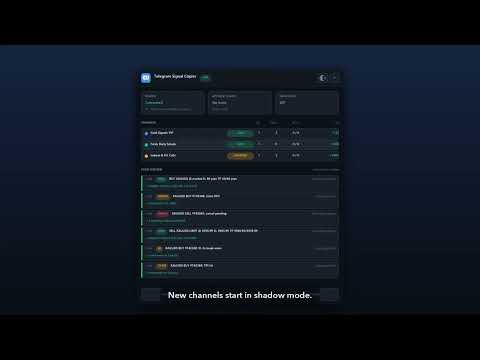
- Live parse preview on the chart – every message appears on the panel with how it was read (symbol, side, entry or zone, SL, TPs, follow-up type) and what the EA did: opened, updated, closed, or why it was skipped (too old, SL on the wrong side, lot below the broker minimum, news blackout, market closed…).
- Shadow mode per channel – a new channel starts in shadow mode: it is read and paper-traded on live prices with its own win/loss and P/L, without any order. One click on the panel switches it to LIVE (or OFF).
- Template wizard (in TSC Reader) – paste 3–5 example messages of a channel and see the reading at once. Accept the proposals (footer lines to ignore, an unknown label such as "Objective" read as TP, a default symbol) or click any word and say what it means. No keyword lists to fill in.
- Test message – type a message exactly as the channel would post it and send it through the whole chain to the EA.
- Doctor – checks the Telegram login, selected channels, Common folder, EA connection, Algo Trading, account permissions, symbol mapping and lot size, and says in plain words what to fix.
Replay a channel in the Strategy Tester
- TSC Reader exports a channel's message history; the EA replays it in the MT5 Strategy Tester on your broker's real ticks, spread and commission, with the same execution code that runs live. You see how the channel would have traded with your settings before you copy it.
- The free demo works: it contains a built-in sample channel (gold and EURUSD, May–October 2026) and a built-in demo channel for any other symbol, so you can watch entries, zones, multi-TP, follow-ups and protections in the tester. The sample channel is a rule-based example made for the demo, not a real provider and not a trading recommendation.
Signals it understands
- BUY / SELL / LONG / SHORT, "NOW" / market, BUY LIMIT / SELL STOP and other pending orders, entry price or entry zone.
- SL and TP1…TPn in price, pips or points, "TP open", lot size or risk % written in the signal.
- Symbol names and nicknames: GOLD / XAU, SILVER, US30 / DOW, NAS100 / NASDAQ / USTEC, US500, GER40 / DAX, UK100, oil, BTC, ETH and all forex pairs with or without "/".
- Bold "fancy" letters, emojis, decimal commas, thousands separators, footers and adverts.
- Signals as threads: a reply or a later message is linked to its signal. "GOLD BUY NOW" first and SL/TP in an edit or a second message – merged. A ✅ added to "TP1" in an edit – recognised. Duplicates – ignored. An edit that changes the side – the old trade is closed and the new one opened.
Execution
- Market or pending by distance: market when the price is at or better than the entry, a limit order otherwise; stop orders when the signal says so. Maximum slippage protects against chasing a price that already ran away.
- Entry zones: near edge, middle, far edge, or split into up to 5 entries across the zone.
- One position per TP with your allocation (equal or e.g. 50/30/20); "TP open" gets a part without target.
- Lot size: fixed lot, risk % of balance or equity, fixed money risk, lot per balance step, or the lot / risk % from the signal (capped). Per-channel risk multiplier and max lot.
- Clear minimum-lot handling: if a part would be below the broker's minimum, the EA uses fewer TPs, then the minimum lot only if the risk stays under your cap – and writes exactly what it did ("lot too small for 3 TPs, using 2", "min lot 0.01 would risk 3.1% – skipped").
- Signals without SL: wait for the SL to arrive (edit or next message), then use a default SL or skip – your choice.
- Break-even after a TP, trailing after TP n, actions for "TP hit", "SL hit", deleted messages and "cancel".
- Symbol mapping with automatic suffix: finds XAUUSD.a, XAUUSDm, GOLD, USTEC, DE40… on your broker by itself; your own map for anything special. Tradable symbols win over close-only ones.
- Free-margin check before every order, volume limits and step, stop and freeze levels, filling and expiration modes, every trade return code handled; hedging and netting accounts (virtual TPs on netting).
- Closing or modifying while the market is closed is queued and done when it opens.
Account protection built in
- Daily loss limit (% or money, day start at your server hour, base = higher of balance and equity) and max drawdown (static from the start balance or trailing from the equity peak), profit target stop. On a breach: block new signals, or close the copier's trades and block.
- News blackout from the economic calendar built into MT5: minutes before/after, minimum impact, currencies; optionally close the symbol's trades before the release.
- Trading hours and days, Friday close, max open orders, max total lots, max spread.
- The copier only manages its own orders (own magic number per channel); your other EAs and manual trades are never touched.
Panel
- Reader status, account guard, news filter; channels with mode (LIVE / SHADOW / OFF), signals, open orders, wins/losses and P/L; the parse preview; Pause copying and Close all copier trades.
- Dark and light themes, sharp at any screen scaling, movable and minimisable. Optional pop-up and push notifications.
TSC Reader (free)
- Your own free Telegram API key, created once in about 3 minutes with the step-by-step guide built into the reader (copy buttons for every field). Then log in with a QR code or phone number and code, including 2-step verification.
- Read-only by design: it cannot send messages, join or leave channels, react or mark messages as read. It never joins anything for you, waits automatically when Telegram asks to slow down, and supports SOCKS5, HTTP and MTProxy proxies.
- Local web interface (works the same on a VPS through an SSH tunnel): channel picker, live preview, template wizard, history export, test message, Doctor, support bundle without your session.
- Your session is stored encrypted on your computer and listed in Telegram → Settings → Devices; end it there or with Log out in the reader.
- Ready-to-run programs for Windows (installer), macOS (Apple Silicon and Intel) and Linux. No Python or other software to install.
Getting started
- Download TSC Reader (free; see Links below), create your personal Telegram API key with the guide on its Login page, and log in to Telegram.
- Tick your signal channels.
- Attach the EA to one chart (any symbol) and enable Algo Trading.
- Watch the parse preview and shadow results, then switch the channel to LIVE.
Links
- Download TSC Reader (free, Windows / macOS / Linux): tsc-copier.pages.dev/download
- User guide (setup, EA inputs, replay, troubleshooting): tsc-copier.pages.dev/guide
- Website with video and screenshots: tsc-copier.pages.dev
- Setup article on MQL5: www.mql5.com/en/blogs/post/780140
Notes. You need a Telegram account that is a member of the channels. Image-only signals are not read. The reader must run while you copy (on your PC, Mac or VPS). Results from the Strategy Tester and from shadow mode are simulations; past results of a channel do not guarantee future results.