EA Performance Ledger

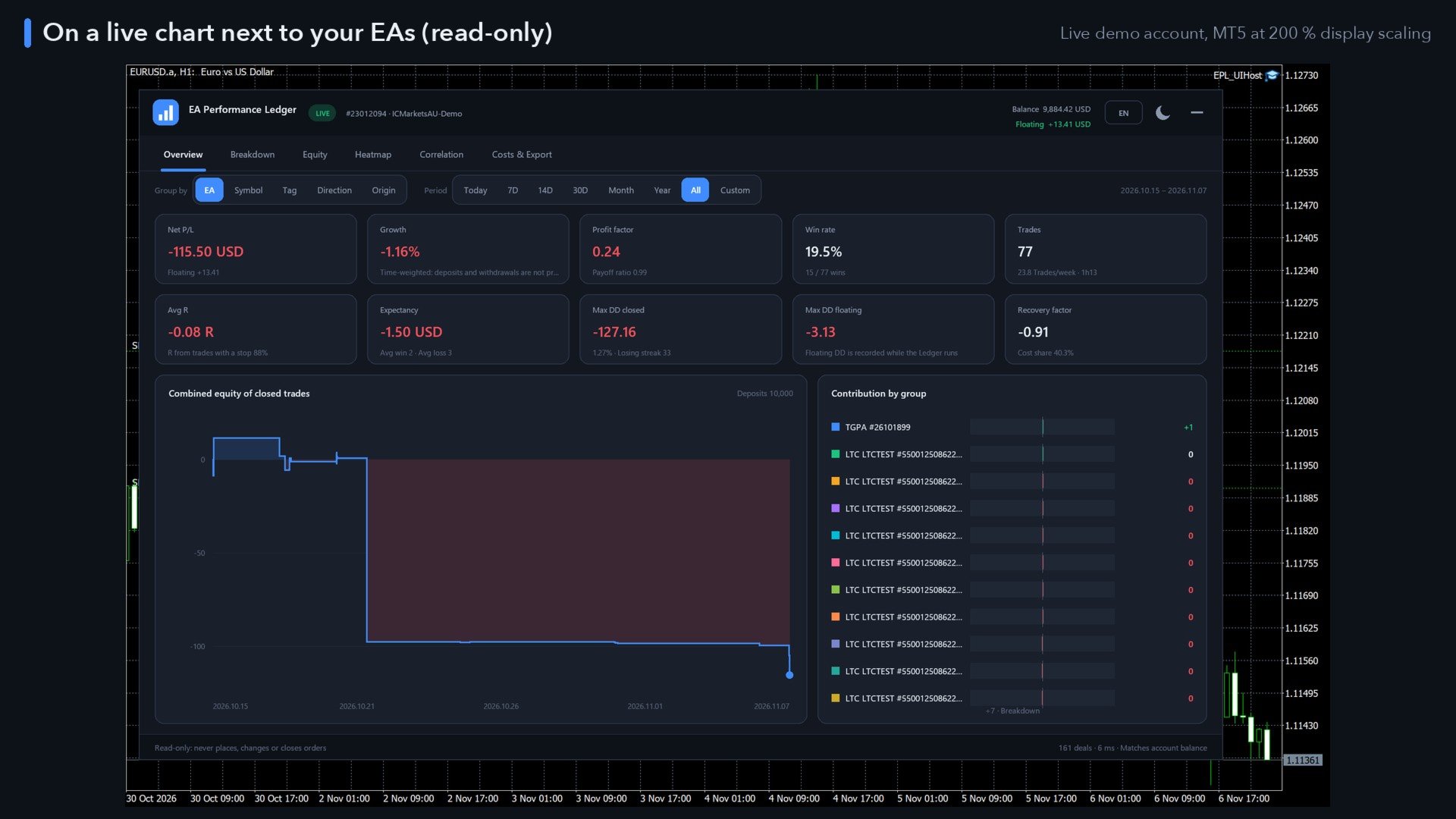
EA Performance Ledger shows what every Expert Advisor on your account really earns. MetaTrader shows one balance for the whole account; when several EAs, manual trades and copied signals share it, you cannot see which one carries the account and which one drains it. The Ledger reads the account history, rebuilds every closed position and splits the results by EA, symbol, strategy tag, direction and manual vs automated trading, in one clear dashboard.

Read-only. The Ledger never places, modifies or closes an order. It contains no trading strategy and works next to any EA, on any symbol and timeframe, on hedging and netting accounts.

Group your results five ways

  • EA – by magic number; optionally split one EA into strategies by its order comment. Names are learned from the comments, and you can give every EA your own name (click its name, or use the Names input, e.g. 1101=Trend Rider; 2202=Mean Reversion).
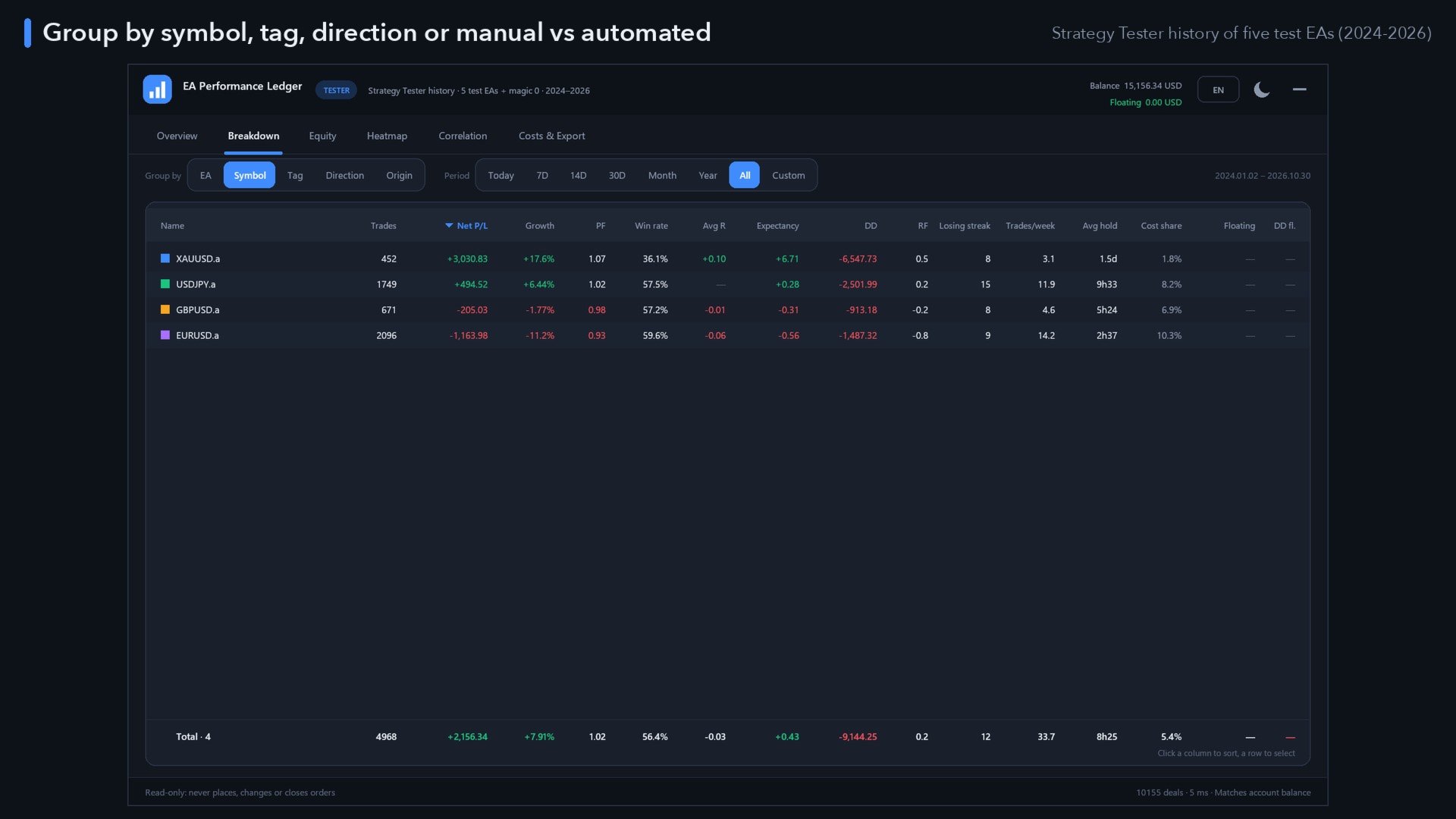
  • Symbol, strategy tag (first word of the comment), direction (buy / sell) and origin (manual vs automated).
  • Manual trades can be included or left out with one switch.

Metrics for every group and for the total

  • Net P/L and growth % – time-weighted, so deposits and withdrawals never count as profit or loss.
  • Profit factor, win rate, payoff ratio, best and worst trade.
  • Average R and expectancy – R is measured from each position's first stop loss; trades without a stop are left out and the coverage is shown, nothing is guessed.
  • Max drawdown closed (money and % of the balance at the high) and max drawdown floating (closed result plus open P/L, recorded while the Ledger runs).
  • Recovery factor, longest losing streak, trades per week, average holding time.
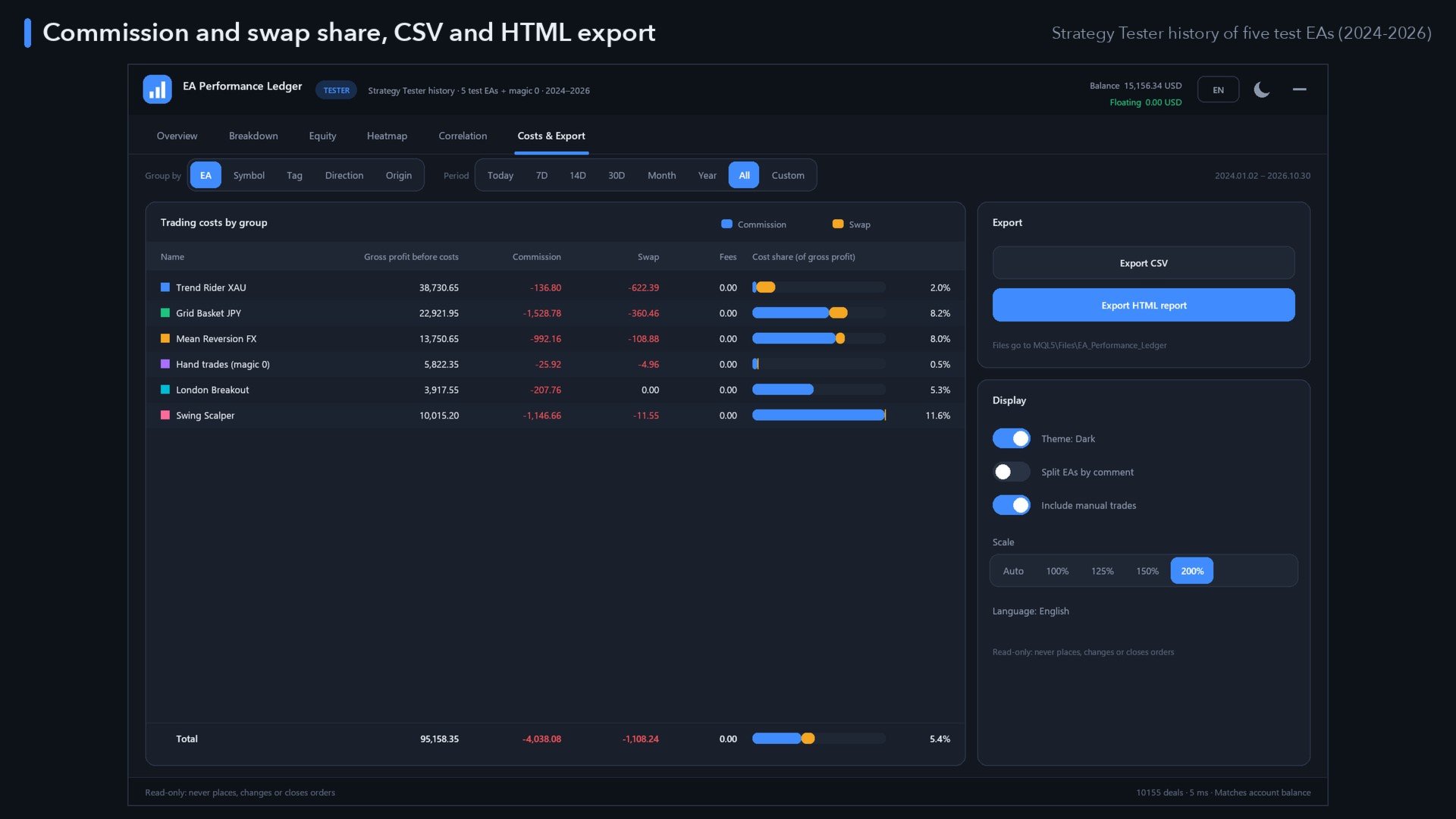
  • Commission and swap share – how much of the gross profit your costs eat.
  • Floating P/L and number of open positions per group.

Six tabs

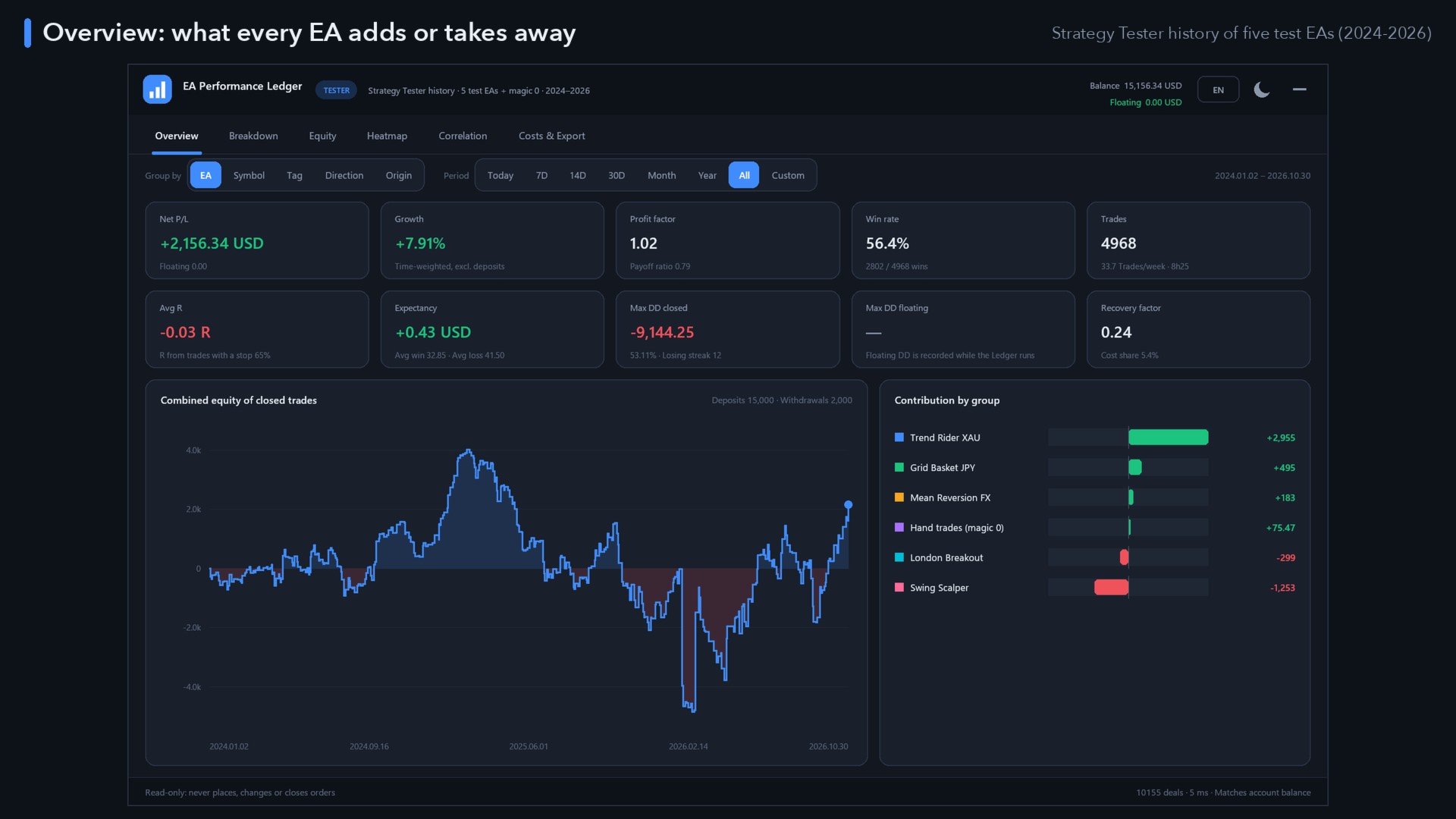
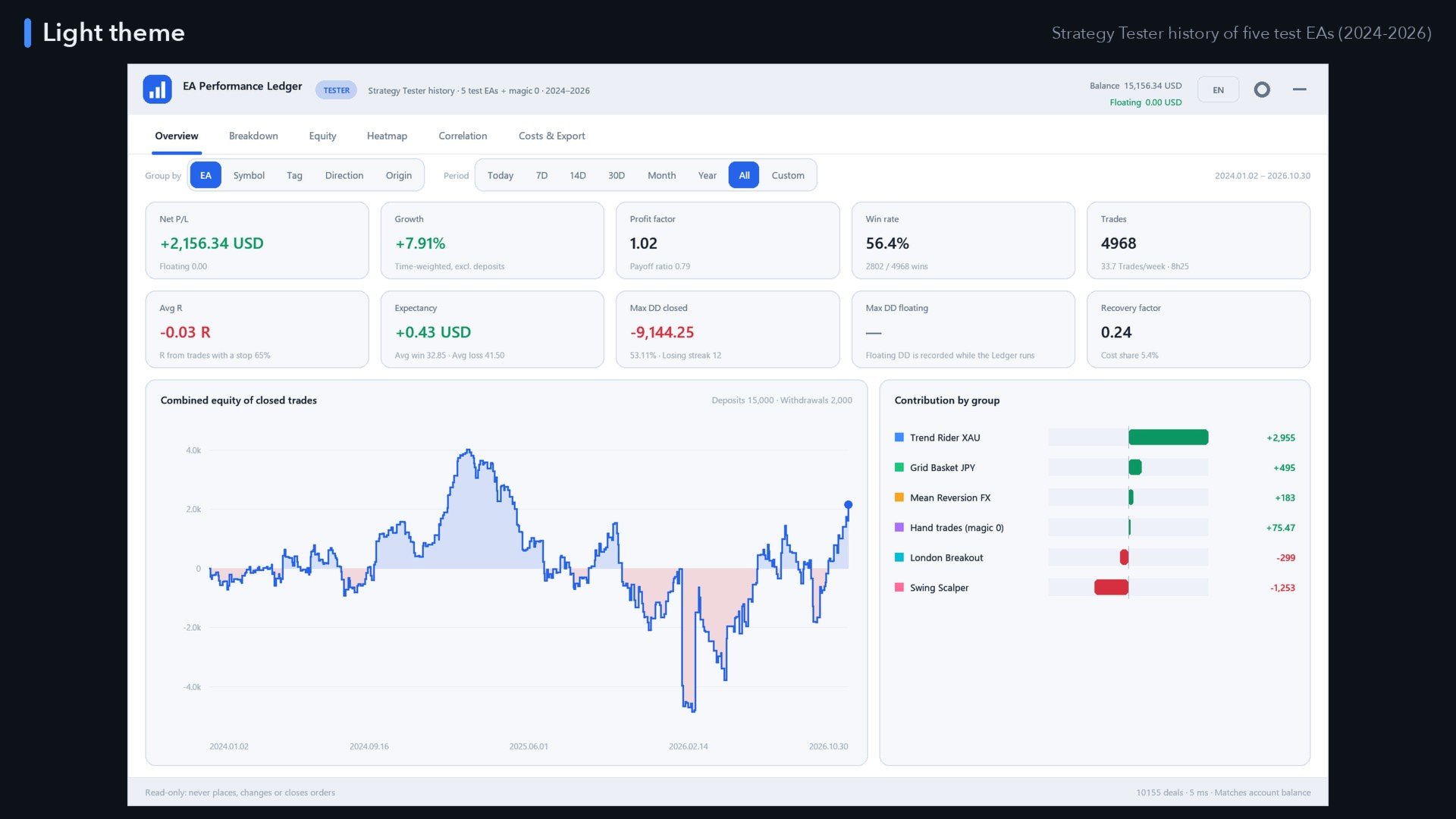
  • Overview – ten key figures, the combined equity curve of closed trades with deposits and withdrawals noted, and a contribution chart: who adds, who takes away.
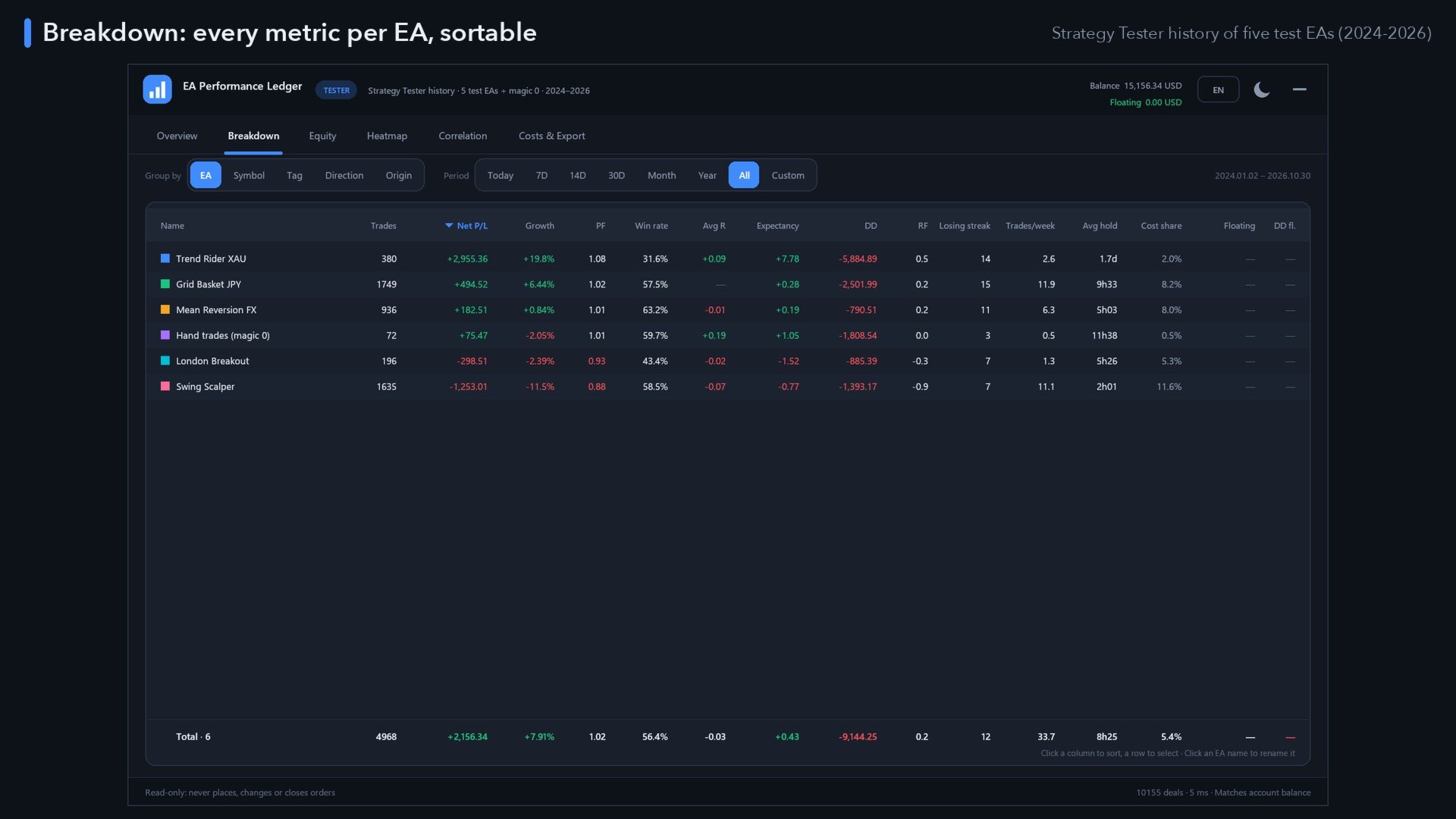
  • Breakdown – a sortable table with every metric per group and a total row; click a row to select it, click a name to rename the EA.
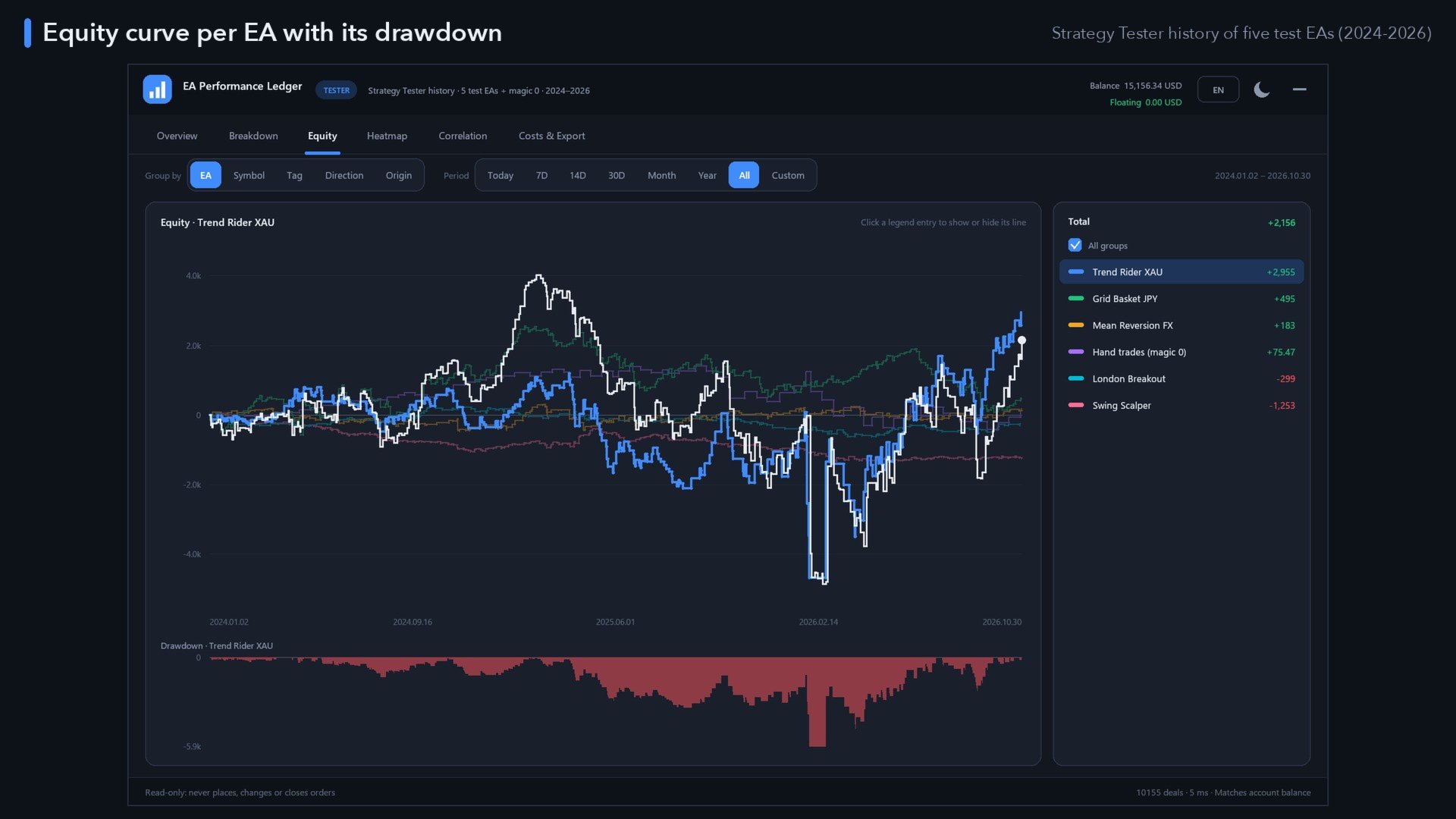
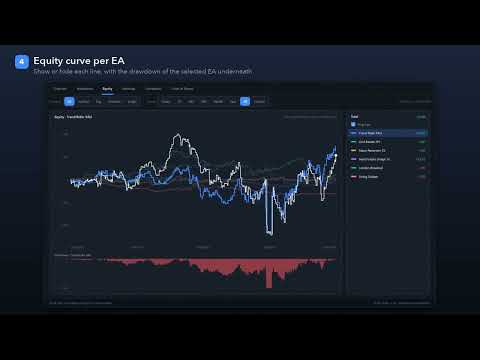
  • Equity – an equity curve per group plus the combined curve, a legend to show or hide lines, and the drawdown ("underwater") chart of the selected group.
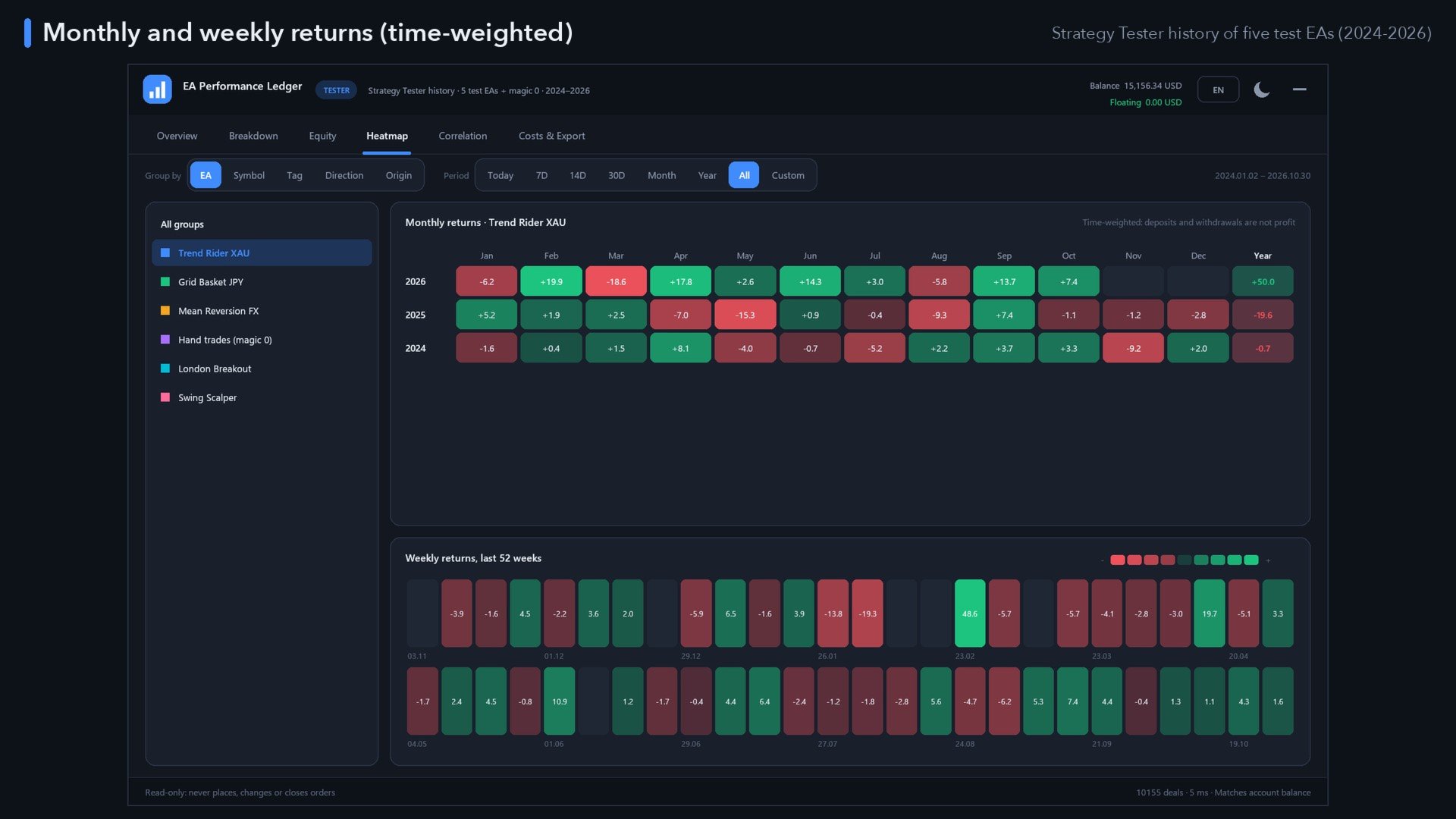
  • Heatmap – monthly returns (year × month with year totals) and the last 52 weeks, for all groups or one selected EA.
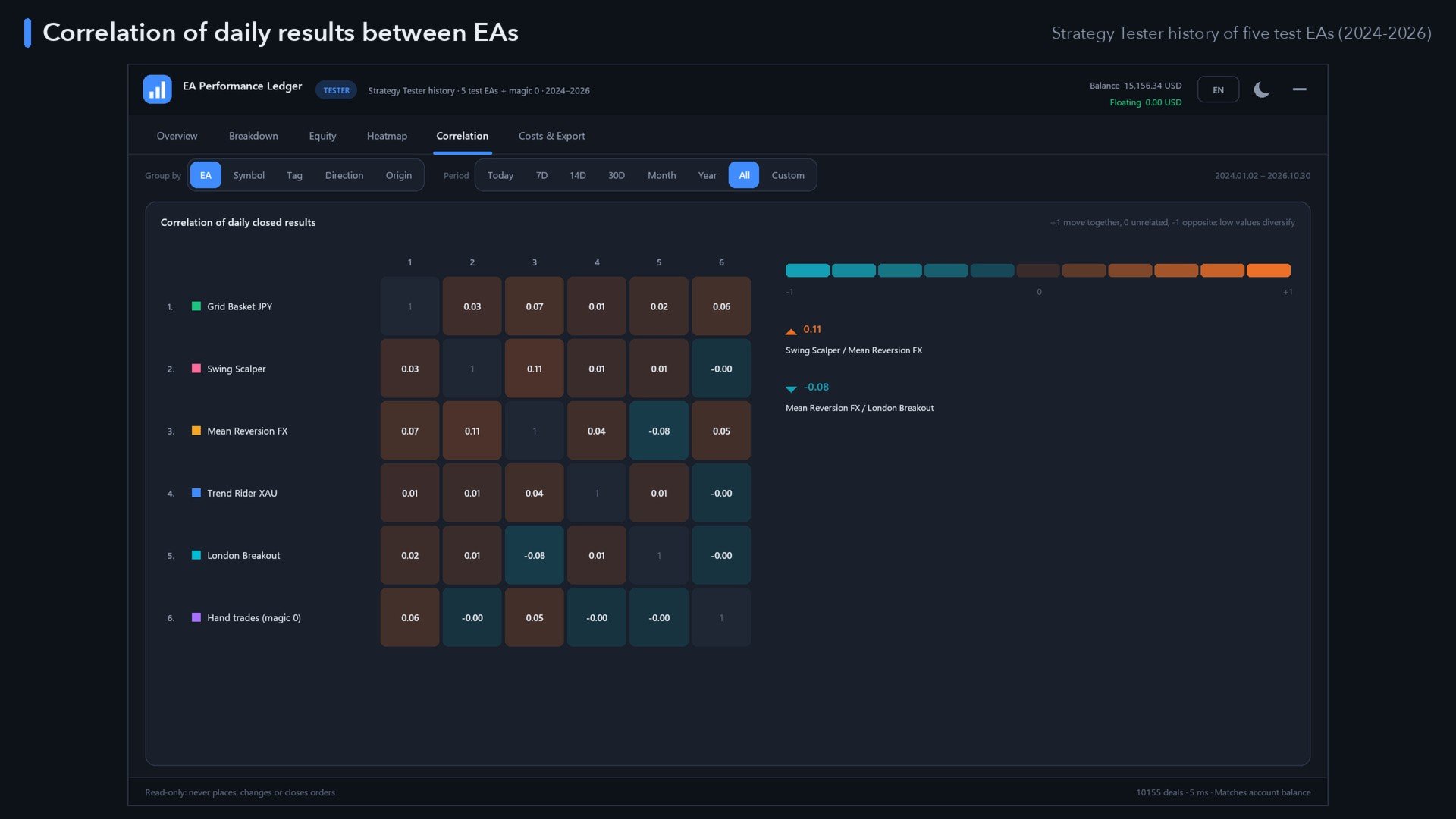
  • Correlation – correlation of the daily closed results of up to 12 EAs, with the most and the least correlated pair: see whether your EAs really diversify.
  • Costs & Export – gross profit, commission, swap and fees per group, CSV export (groups and every trade with its R) and a self-contained HTML report you can open in any browser or share.

Periods

One click: Today, 7 days, 14 days, 30 days, this month, this year, all history, or a custom date range.

Built for real accounts

  • Partial closes, several entries per position and netting reversals are merged into correct trades.
  • The rebuilt result is reconciled with your account balance; any difference is shown in the footer.
  • Fast: tens of thousands of deals load in a fraction of a second, and the panel updates as soon as a deal closes.

Dashboard

  • Dark and light themes (automatic from your chart colours), sharp on any screen: automatic DPI scaling or 100–200 % (up to 300 % via input).
  • Movable (drag the header) and minimisable to one line with the period's net result.
  • 11 languages: English, Deutsch, Español, Français, Italiano, Português, Русский, Türkçe, 中文, 日本語, 한국어 – switch in the panel at any time.
  • Your choices (tab, grouping, period, theme, language, names, position) are remembered per account.

Free demo

The Market runs demos in the Strategy Tester, where an account has no trading history. So that you can still try every tab, the demo shows a clearly labelled sample portfolio (five EAs and manual trades over two years). On your own account the Ledger shows only your real history.

How to use

  1. Attach EA Performance Ledger to any chart (one chart is enough; it does not need trading permission).
  2. Pick a grouping and a period at the top of the panel.
  3. Click EA names to rename them; use the Costs & Export tab to save CSV or HTML (files go to MQL5\Files\EA_Performance_Ledger).

Inputs

  • Group results by, Period, Split an EA by comment, Include manual trades, EA names.
  • Language, Theme, Scale %, Panel X / Y position, Refresh of open positions (seconds).

The Ledger reports past results of your account; past results do not guarantee future results.
Produtos recomendados
Galaxy Elegance
Gezani Paulus Nkuna
G.X.L (GALAXY ELEGANCE) Product Overview G.X.L is an automated trading robot for MetaTrader 5 that operates based on price action analysis. The system processes real-time market data to identify trading opportunities. It provides information and recommendations aligned with user-defined trading preferences. Core Functionality The robot analyzes price movements without relying on traditional lagging indicators. It focuses on current market structure, including swing points and fractals, to determ
Close Partial Orders
Marco Aurelio Santos Costa
De forma simples e prática, você pode gerenciar melhor suas operações escolhendo a quantidade de lotes que deseja fechar diretamente a mercado. Essa funcionalidade permite reduzir sua exposição ao risco e realizar vendas parciais, ajudando a proteger lucros e equilibrar sua posição com mais controle. De forma simples com apenas um botão escolha a quantidade de lotes. Escolha qual ordem você deseja fechar. E pronto, diminuiu o seu risco!
Global Stop Loss and Take Profit Manager Drag Lines Auto Apply Already using my free Global Stop Loss and Take Profit Setter? This is the always on version. Instead of setting levels once, you drag two lines on the chart and every manual position on that symbol — plus every new one you open — instantly inherits the Stop Loss and Take Profit. No clicking into each order. No forgetting a stop. Global Stop Loss and Target Manager is a drag-and-drop risk tool for manual traders on MetaTrader 5. Pu
# Universal Smart Manual Trade Manager MT5 v1.00 ## What the EA does Universal Smart Manual Trade Manager MT5 is a protective and management Expert Advisor for manually opened trades. It does not open new entries by itself. It only adopts already open positions that pass the selected filters, and can add missing SL/TP, manage break-even, profit lock, ATR trailing, send Telegram notifications, and display status information on the chart. The default setup is intentionally safe: the EA manages
News widens the spread. Kairos waits until it is back. One chart guards the whole terminal: a lock before a release, and it only lifts when the live spread has returned to normal, not when a timer runs out. One chart for every symbol and every EA   Waits for the market, not the clock   Position size 100% → 50% → 0% instead of only on/off   Anomaly detection without a calendar event   Broker rollover and triple-swap warning   Never opens a trade   100% native MQL5, no DLLs, no web
Flow – Hotkey Tool for Discretionary Traders Take full control of MT5 with your keyboard and mouse. Flow is a powerful hotkey-based assistant designed specifically for discretionary traders who want to place orders, draw tools, and operate charts with speed and precision. No more right-click menus or wasting time. Just trade. Key Features Order Execution Place pending Buy/Sell orders (limit or stop) instantly with just a mouse click. Stop Loss and Take Profit lines are automatically attac
MT5 Bar Replay Pro
Tinashe Ndarimani
3.5 (2)
Devido a limitações do MetaTrader 5, o EA não funciona no modo Testador de Estratégia. Para ver como funciona, você pode baixar a versão demo. Estes são os dois passos básicos para usar este EA: How To Use Carregue o EA no símbolo desejado com a entrada Constructor primeiro. Depois, carregue o EA no símbolo personalizado recém-criado, com a entrada Controller. Overview MT5 Bar Replay Pro é a resposta do MetaTrader 5 ao recurso Bar Replay do TradingView. Ele vem totalmente equipado com os
Monitor Dashboard
Johann Dominique Carnevali
Clear EA & Internal Strategy Performance Separation The core purpose of MONIT Dashboard MT5 is to help traders clearly identify where their real performance comes from . On a MetaTrader 5 account, the global balance result is often not enough. A profitable account can hide a weak EA, an overactive strategy, a manual trading loss, or one specific Magic Number group generating most of the drawdown. This becomes even more important when several Expert Advisors are running on the same account, or w
One Click Trader  is a tool designed for MetaTrader 4 platform, which enables you to take your trading to the next level. It enables you to open, manage and close your trades in simple an efficient way by just one click of your mouse button. "-"   ,  "+"  change OCT window size  Up arrow minimizes the OCT panel Down arrow maximizes the OCT panel Right arrow displays the next panel with additional features Left arrow hides the panel with additional features Red  SELL  button enables you to open s
Holiday Guard
Nataliia Vyhovska
Achieve peace of mind with our EA companion! Simply set it and let it roll. Safeguard your trades on sluggish market days and holidays. Get updates on your balance and EA status every Friday evening, for example. Stay in the loop even if your terminal or VPS decides to take a break. Trading made easy – enjoy the tranquility! This EA has several functionalities Closing of pending or open positions during pre-configured holidays. Automatic closing and reopening of pending positions during the nig
Trade Assistant X
Calvin Andile Mahlangu
Trade Assistant X – MT5 Trade Execution and Management Trade Assistant X is a chart-based trade execution and management Expert Advisor for MetaTrader 5. It provides tools for placing market and pending orders, calculating position sizes, and managing open trades directly from a chart. The EA combines order placement, visual trade planning, risk calculation and automated trade management in a single movable panel. It is designed for traders who prefer to manage their trades manually while using
AutoCloseTPSL
Calvin Andrew Jenkins
Expert advisor that automatically closes all open positions when a specific profit amount or loss amount is reached. The profit and loss amounts are configurable inputs and can be set when attaching the EA to a chart. This EA has proven to be useful in high quantity trading strategies to control and minimize risk. The EA works for all account currencies and is designed to close out all trades once the desired profit or loss is hit.
ATR Trade Assistant Gestão Dinâmica de Operações Baseada na Volatilidade para MetaTrader 5 O ATR Trade Assistant é um Expert Advisor (EA) dinâmico de gestão de operações para MetaTrader 5, desenvolvido para administrar uma posição desde o momento da entrada até ao seu encerramento final. Quer prefira abrir operações manualmente através dos botões personalizados de BUY e SELL diretamente no gráfico, quer prefira utilizar a Estratégia de Amostra incluída para entradas automatizadas, este EA fornec
A simple script that closes all current orders. Terminate once close all positions, so no worries about constantly closing your order. How to use : Drag the script from the navigator to the chart, and it will be activated. Do remember to enable algo trading to use this script. There are different version of the script that can choose whether to close all buy/sell posiitons, if you need this, do contact me in MQL5.
Garner Trade Pad EA
Garner Edward Bennie
Garner Trade Pad EA is an MT5 Expert Advisor that brings trade planning and position sizing directly onto your chart. Position your Stop Loss and Take Profit, choose the amount you want to risk, and view the calculated lot size before placing an order.TP1 buy The dark navy panel with blue accents provides a clear view of your proposed trade. It is a manually operated calculator and order-entry tool: you choose the direction, levels and timing of every trade. ## Movable chart panel - Drag t
InfoRisk
Andrej Nikitin
Info tool helps to estimate the current risks of open positions and orders. It allows to analyze open positions or/and pending orders, also there are USD/Percentage modes. Expands the margin load and the share of profit participation for individual positions. Информационная панель помогает оценить текущие риски по открытым позициям и ордерам. Есть возможность отдельного анализа рисков по позициям/отложенным ордерам, а также в режимах USD/Percentage. Раскладывает маржинальную нагрузку и долю учас
OneClick Risk Manager — Manual Trading Assistant OneClick Risk Manager is a manual trading panel for MetaTrader 5. It does not trade on its own — you stay in control and open, close and manage every position with one click. Its job is to do the math for you: position size, risk, partial take-profits, break-even and trailing, so you can trade fast and precisely without manual calculations. Works on any symbol — XAUUSD (gold), US100/NAS100, US30/DJ30, FX pairs and more. The panel is fully scalable
PropAngel EA is a manager EA to help you to pass proprietary firm challenges and evaluations and to keep your funded accounts. PropAngel EA makes sure you do not breach daily drawdown limit which gives you change to continue trading the account and recover from the drawdown. PropAngel EA makes sure that at the moment you have reached your challenge, evaluation or scaling target all trading will be immediately stopped. This is done to prevent account falling away from the target. PropAngel EA giv

Make grid trading safe again | Built by a grid trader >> for grid traders.     Walkthrough Video  <==   Get Grid Rescue up and running in 5 minutes   This is MT5 version, click  here  for  BlueSwift GridRescue MT4     (settings and logics are same in both versions)   BlueSwift Grid Rescue   MT5    is a risk management   utility  MT5 EA  (used together with other grid trading experts) that can help you trade aggressive grid / averaging / martingale systems with manageable drawdown, therefore

Auto Gold Signals Telegram Bot – French Edition Automatisez entièrement votre canal Telegram de signaux Gold Auto Gold Signals Telegram Bot – French Edition est un Expert Advisor MetaTrader 5 développé pour automatiser entièrement la publication de vos signaux de trading XAUUSD (Gold) sur Telegram. Conçu pour les traders, fournisseurs de signaux, influenceurs Trading et gestionnaires de communautés Telegram, le bot détecte automatiquement les opérations exécutées sur votre compte MetaTrader 5 et
ATRStopLoss
Maksim Zakharov
The ATRStopLoss Expert Advisor determines where best to put a stop relative to the current price. How it works ATRStopLoss gets the size of ATR for the selected period ATRStopLoss draws Stop-Loss levels from the current price with the size of the ATR. As the price and the timeframe change, ATRStopLoss also adjusts the Stop-Loss levels. Settings MA_Period - period of the ATR MA_Timeframe - ATR timeframe
TradeMind Assistant — панель дисциплины и риск-контроля для MetaTrader 5 Привет, трейдер. TradeMind Assistant — это утилита-панель для MT5, созданная для того, чтобы вы торговали спокойнее, структурнее и безопаснее. Я не торговый советник и не открываю сделки вместо вас. Моя задача — дать вам контроль, подсказки и понятные расчёты прямо на графике. Что я делаю в этой версии: Работа прямо в MT5 Устанавливаюсь на график как обычный инструмент и отображаю всю ключевую информацию без лишних настрое
Echo Simulator Trader MT5
Frank William Jr Colbert
Echo Simulator Trader is a powerful hybrid simulation-to-live EA that runs thousands of pure price-action simulated trades in parallel with your live account. It opens simulated LONG and SHORT positions at regular intervals on multiple pairs, meticulously tracks their performance using your exact risk rules, and only activates real trading once simulated strategies pass your custom performance filters (Net Profit, Profit Factor, Win Rate, Drawdown, etc.). Built for complete control and proof-of
Ronin Shield - Daily Loss Limiter & Account Guard (MT5) When your loss limit is hit, your trading day is over. A utility built to stop the "just one more trade" moment during prop firm challenges. Attach it to just one chart and it protects the whole account: every symbol and every position, including manual trades and other EAs. No need to open a chart for each symbol. No external DLLs. No web requests. ============================== THREE PROTECTION LINES ============================== 1.
This Expert Advisor (EA) is designed to monitor trades on MetaTrader 5 and send notifications to one or more Telegram channels. It supports configurable messages, filters by symbol and magic number, and handles free trade signals on selected days. It also offers daily, weekly, and monthly trade reports. Features: - Sends notifications of trade openings, closings, and breakeven adjustments - Configurable message content, including simplified TP/SL/BE notifications with RR calculations - O
ManualEdge ∴ Manual Trading & Basket Risk Panel Trade by hand. Let the system watch your back. ManualEdge is a one-click chart panel built for discretionary traders who want the speed of manual execution combined with the discipline of automated risk management. Instead of choosing between a dumb button panel and a black-box EA, ManualEdge gives you both: you decide when to enter, the panel handles the boring ∴ and dangerous ∴ parts of managing the trade afterward. Protect yourself from bad habb
This Expert Advisor (EA) for MetaTrader 5 is designed to identify and notify traders of trend changes in Heiken Ashi charts, providing a valuable tool for timely decision-making in the market. Key Features: Heiken Ashi Chart Analysis : The EA continuously monitors Heiken Ashi charts, known for their ability to smooth out market noise and highlight trends. Trend Change Detection : It employs advanced algorithms to identify candle patterns that indicate a potential shift in market direction. Multi
Fast closing of all positions in one click. A very useful button when you use position averaging, adding new orders, and when the price returns for a few seconds to the desired point, and there are more than 10 orders, it is very important to have time to close all of them. The second time the price may not return. Super fast execution. Orders are closed asynchronously without waiting for the previous result. The utility allows you to add a button to any window. Multiple buttons can be added fo
BulkOp Trade Manager
Ahmed Jumaa Saif Ali Almheiri
BulkOp Trade Manager Trade faster. Manage smarter. Close with confidence. BulkOp Trade Manager is a powerful MT5 utility EA built for traders who need speed, control, and clean execution directly from the chart. It is designed for active manual traders, scalpers, gold traders, and anyone who wants to manage multiple positions with less delay and fewer clicks. Why BulkOp? Ultra-fast Buy and Sell execution One-click Bulk Close Profit One-click Bulk Close Loss Keyboard trading control Bulk order e
SynthGuard Account Protector
PROSPRA IQ ENTERPRISES (PTY) LTD
SynthGuard is a utility Expert Advisor that does not open trades. It watches the account and enforces the limits you set. When a limit is hit it closes positions, adds missing stop-losses and shows the reason on the chart. It was built for synthetic indices (Volatility, Boom and Crash, Step, Jump) and for accounts between 50 and 500 USD, where one unmanaged trade can be the whole account. It works on any symbol and any MetaTrader 5 broker, hedging or netting. WHAT IT DOES 1. Daily loss limit
Os compradores deste produto também adquirem
Trade Assistant MT5
Evgeniy Kravchenko
4.43 (216)
Ajuda a calcular o risco por comércio, a fácil instalação de uma nova encomenda, gestão de encomendas com funções de fecho parcial, trailing stop de 7 tipos e outras funções úteis. Materiais e instruções adicionais Instruções de instalação   -   Instruções para a aplicação   Função de linha Mostra no gráfico a linha de Abertura, Stop Loss, Take Profit. Com esta função é fácil definir uma nova ordem e ver as suas características adicionais antes da abertura.   Gestão de risco A função de cálcul
Bem-vindo ao Trade Manager EA—uma ferramenta de gestão de risco criada para tornar o trading mais intuitivo, preciso e eficiente. Não é apenas uma ferramenta para executar ordens, mas uma solução abrangente para planejamento de operações, gerenciamento de posições e controle de risco. Seja você um iniciante, trader avançado ou scalper que precisa de execução rápida, o Trade Manager EA adapta-se às suas necessidades, oferecendo flexibilidade em todos os mercados, desde forex e índices até commodi
Farmed Hedge Yield Farming | All Markets (Manual - Hybrid - Semi/Automated EA) VERIFIED TRADING RESULTS - Farmed Hedge Yield Axi Copy:  https://www.mql5.com/en/signals/2356376 - Farmed Hedge Yield Exn Copy:   https://www.mql5.com/en/signals/2356404 - Farmed Hedge Yield V Copy:  https://www.mql5.com/en/signals/2357156 IMPORTANT NOTICE: FarmedHedge is a MANUAL-FOCUSED TRADING UTILITY ,not a fully automated EA. Results shown on this Signal include manual trades and overall strategic management.
O Telegram to MT5 Multi-Channel Copier copia automaticamente os sinais de trading dos seus canais de Telegram e Discord diretamente para o MetaTrader 5. Sem bots, sem extensões de navegador, sem copiar à mão. O sinal chega ao Telegram ou ao Discord e o EA abre a operação no seu terminal em poucos segundos. E antes de copiar um canal, o backtester integrado mostra o que esse canal teria feito na sua conta. O produto inclui dois componentes: um aplicativo de Windows que escuta os seus canais de Te
Local Trade Copier EA MT5
Juvenille Emperor Limited
4.94 (150)
Local Trade Copier EA MT5 é um copiador de operações rápido e flexível para copiar e gerenciar operações entre várias contas MetaTrader 5 no mesmo computador Windows ou Windows VPS. Ele combina a sincronização local de operações com controles no lado do Receiver para tamanho de lote, gerenciamento de risco, filtragem de operações, mapeamento de símbolos, gerenciamento de operações e proteção da conta. Configure seus terminais Transmitter e Receiver em aproximadamente 1 minuto e copie operações
TradePanel MT5
Alfiya Fazylova
4.88 (172)
Trade Panel é um assistente de negociação multifuncional. O aplicativo contém mais de 50 funções de negociação para trading manual e permite automatizar a maioria das tarefas de negociação. Instruções para o aplicativo: https://www.mql5.com/pt/blogs/post/762435 Versão de teste do aplicativo para conta demo: https://www.mql5.com/pt/blogs/post/762547 Como instalar o aplicativo: https://www.mql5.com/pt/blogs/post/762548 Como testar o aplicativo no modo visual: https://www.mql5.com/pt/blogs/post/770
News Trade EA MT5
Konstantin Kulikov
4.55 (11)
Apresento um robô útil que eu mesmo uso há vários anos. Pode ser usado nos modos semiautomático e totalmente automático. >>> Chat <<< O programa contém configurações flexíveis para negociação nas notícias do calendário econômico. Não pode ser verificado no testador de estratégia. Somente trabalho real. Descarregue o ficheiro mais recente de definições: https://www.mql5.com/en/blogs/post/747929 Monitorização de sinais: https://www.mql5.com/en/signals/author/test-standart Ao criar suas próprias
Copie sinais do Telegram com suas próprias regras de negociação Telegram to MT5 Signal Trader copia automaticamente sinais de negociação em texto de canais e grupos públicos e privados do Telegram para o MetaTrader 5. Gerencie vários provedores e contas MT5 em um único aplicativo para desktop, com configurações individuais de risco e de negociação para cada provedor . Você não precisa de um bot do Telegram nem configurar uma API para copiar sinais. Basta entrar com sua própria conta do Telegram
Strategy Ledger Pro
Abdullah Uygar Tuna
5 (14)
Agora disponível em português. Strategy Ledger Pro é um painel de análise de conta somente leitura para o MetaTrader 5. Ele separa os resultados da conta por Expert Advisor, estratégia, símbolo e número mágico, para que você veja o que cada um realmente contribui. O painel está disponível em 11 idiomas: English, Français, Deutsch, Español, Italiano, Português, Русский, Türkçe, 中文, 日本語 e 한국어. Antes de baixar a demo. O Market executa a demo de qualquer produto pago somente no Testador de Estratég
================================================================================ POC BREAKOUT - V20.72. Full Professional Grade Toolkit ================================================================================ POC Breakout is a full MetaTrader 5 trading dashboard for discretionary traders who want breakout signals, Point of Control (POC) context, volume profiles, order flow, market structure, news, alerts, and advanced trade planning in one professional workspace. Attached directly to you
Exp COPYLOT CLIENT for MT5
Vladislav Andruschenko
3.97 (35)
Copiador profissional de operações para MetaTrader 5 Um copiador de operações rápido, profissional e confiável para MetaTrader . COPYLOT permite copiar operações de Forex entre terminais MT4 e MT5 com suporte para contas Hedge e Netting . A versão MT5 do COPYLOT oferece suporte a: - MT5 Hedge → MT5 Hedge - MT5 Hedge → MT5 Netting - MT5 Netting → MT5 Hedge - MT5 Netting → MT5 Netting - MT4 → MT5 Hedge - MT4 → MT5 Netting Versão MT4 Descrição completa + DEMO + PDF Como comprar Como instalar Como
The product will copy all telegram signal to MT5 ( which you are member) , also it can work as remote copier.  Easy to set up, copy order instant, can work with almost signal formats, image signal,  s upport to translate other language to English Work with all type of channel or group, even channel have "Restrict Saving Content", work with  multi channel, multi MT5 Work as remote copier: with signal have ticket number, it will copy exactly via ticket number. Support to backtest signal. How to s
EA Overfitter
Stephen J Martret
5 (3)
That backtest looks great. But will it still be making money tomorrow, next week, next month? EA Overfitter re-runs your EA on 100 price histories it has never seen. One score tells you if the edge is real. A backtest tells you what an EA did on one price history — the one that happened to occur. What you cannot tell from it is how much of that result was the strategy and how much was the particular path. EA Overfitter answers that. It builds up to 100 synthetic price histories your EA has n
Power Candles Strategy Scanner - Localizador de configurações multissímbolo com auto-otimização O Power Candles Strategy Scanner utiliza o mesmo motor de auto-otimização que alimenta o indicador Power Candles — em todos os símbolos da sua lista de observação, lado a lado. Um painel indica-lhe quais os símbolos que são estatisticamente negociáveis neste momento, qual a estratégia vencedora para cada um, o par ideal de Stop Loss / Take Profit, e avisa-o assim que um novo sinal é emitido. Esta ferr
Telegram To MT5 Ultra
Mirel Daniel Gheonu
5 (5)
Telegram To MT5 — Copiador de sinais Transforme as chamadas de trading dos seus canais do Telegram em ordens reais no MT5 — automaticamente, em quantas contas quiser, com o risco e as regras totalmente sob o seu controlo. O Telegram To MT5 liga os canais VIP / de sinais que já segue no Telegram ao seu terminal MetaTrader 5. Um aplicativo de desktop complementar gratuito lê as mensagens (mesmo de canais que bloqueiam bots), e este Expert Advisor executa-as na sua conta — aplicando as suas própria
Timeless Charts
Samuel Manoel De Souza
5 (9)
Timeless Charts é um utilitário de trading tudo-em-um para traders profissionais. Ele combina tipos de gráficos personalizados, como Gráficos por Segundos e Renko , com análise avançada de fluxo de ordens utilizando Footprints , Clusters , Perfis de Volume , estudos VWAP e ferramentas de análise ancorada para uma visão mais profunda do mercado. O gerenciamento de ordens e posições é realizado diretamente no gráfico por meio de um painel integrado de gerenciamento de operações , enquanto o Market
Painel de Trading para MetaTrader 5 — controle profissional de trading em um clique a partir do gráfico e do teclado Um painel de trading avançado para traders ativos, criado para abrir, gerenciar e fechar operações muito mais rápido do que com a interface padrão do MetaTrader. Esta solução foi desenvolvida para quem deseja controlar posições, ordens pendentes, lucro total e execução em um único espaço de trabalho profissional. Não se trata apenas de mais um utilitário. É um verdadeiro cockpit
Anchor Trade Manager
Kalinskie Gilliam
5 (8)
Your EAs cannot see each other, but Anchor can. Anchor gives you one place to coordinate your EAs, manage risk, and decide when trading is allowed. It works alongside the trading bots you already use without any changes to them. The Problem One EA opens a trade. Then another starts trading. The next thing you know, you wake up to multiple grids built across your account. Each EA may be doing exactly what it was designed to do, but together they can place far more risk on your account than you in
VirtualTradePad PRO SE MT5 — centro profissional de controle de trading para MetaTrader 5 VirtualTradePad PRO SE é um painel de trading premium baseado no gráfico e um ambiente de gerenciamento de operações para MetaTrader 5 . Ele foi desenvolvido para traders que desejam execução mais rápida, controle de posições mais claro, gerenciamento de trades estruturado, planejamento visual de níveis e um fluxo de trabalho profissional diretamente no gráfico. Não é apenas um painel de COMPRA / VENDA. O P
Trade Indicator Assistant   is a powerful MT5 utility designed to turn indicators into automated trading systems. Its main feature is the ability to automatically detect an indicator’s   BUY and SELL signal buffers , without requiring you to know the buffer numbers, search through indicator settings, or modify the indicator source code. Bonus Indicator:   After purchasing Trade Indicator Assistant, contact me to receive   Trade Signal Pro   completely free as a bonus indicator. [Download Demo V
Trade Manager DaneTrades
Levi Dane Benjamin
4.13 (31)
Trade Manager para ajudá-lo a entrar e sair rapidamente de negociações enquanto calcula automaticamente seu risco. Incluindo recursos para ajudar a evitar negociações excessivas, negociações de vingança e negociações emocionais. As negociações podem ser gerenciadas automaticamente e as métricas de desempenho da conta podem ser visualizadas em um gráfico. Esses recursos tornam este painel ideal para todos os traders manuais e ajudam a aprimorar a plataforma MetaTrader 5. Suporte multilíngue. Vers
Próxima Atualização — Versão 2.52 em Breve! [NOVO] Prepare-se para 4 Grandes Novos Recursos Projetados para Aprimorar sua Análise de Mercado e seu Fluxo de Trabalho de Trading Estamos levando a análise de mercado a um novo nível com 4 novos recursos desenvolvidos para atender às suas necessidades de trading. Apresentamos: 1. TRADE OVERVIEW DASHBOARD 2. CONFLUENCE AT ZONE 3. STRONG & WEAK HIGH/LOW 4. OTE 1. TRADE OVERVIEW DASHBOARD Um painel que ajuda você a compreender mais facilmente o panoram
MT5 to Telegram Signal Provider é uma utilidade fácil de usar e totalmente personalizável que permite o envio de sinais especificados para o chat, canal ou grupo do Telegram, tornando sua conta um fornecedor de sinais . Ao contrário da maioria dos produtos concorrentes, ele não usa importações de DLL. [ Demonstração ] [ Manual ] [ Versão MT4 ] [ Versão Discord ] [ Canal do Telegram ]  New: [ Telegram To MT5 ] Configuração Um guia do usuário passo a passo está disponível. Não é necessário conhec
Seconds Chart MT5
Boris Sedov
4.61 (18)
Seconds Chart - uma ferramenta exclusiva para criar gráficos de segundos no MetaTrader 5 . Com o Seconds Chart , você pode criar gráficos com períodos definidos em segundos, proporcionando flexibilidade e precisão ideais para análise, indisponíveis em gráficos padrão de minutos ou horas. Por exemplo, o período S15 indica um gráfico com velas de 15 segundos. Você pode usar qualquer indicador ou Expert Advisor com suporte a símbolos personalizados. Trabalhar com eles é tão conveniente quanto negoc
Trade copier MT5
Alfiya Fazylova
4.61 (57)
Trade Copier é um utilitário profissional projetado para copiar e sincronizar negociações entre contas de negociação. A cópia ocorre da conta / terminal do fornecedor para a conta / terminal do destinatário, instalada no mesmo computador ou vps. Antes de comprar, você pode testar a versão demo em uma conta demo. Versão de demonstração aqui . Instruções completas aqui . Principais funcionalidades e benefícios: Suporta a cópia de MT5> MT5, MT4> MT5, MT5> MT4, incluindo contas "MT5 netting". Os mod
DrawDown Limiter
Haidar Lionel Haj Ali
5 (23)
DrawDown Limiter v5.0 — Controlador Avançado de Proteção de Conta O DrawDown Limiter v5.0 é um controlador de proteção de conta executado no lado do cliente, desenvolvido para monitorar sua conta de trading e reagir automaticamente quando os limites configurados de risco, lucro, notícias, horário, rollover ou número de posições forem atingidos. Ele pode monitorar operações manuais, estratégias automatizadas, vários Expert Advisors, ordens pendentes e posições abertas a partir de um único gráfico
Telegram to MT5 Coppy
Sergey Batudayev
5 (10)
Telegram para MT5:   A solução definitiva para cópia de sinais Simplifique suas negociações com o Telegram para MT5, a ferramenta moderna que copia sinais de negociação diretamente dos canais e chats do Telegram para a sua plataforma MetaTrader 5, sem a necessidade de DLLs. Esta solução poderosa garante execução precisa dos sinais, amplas opções de personalização, economiza tempo e aumenta sua eficiência. [ Instructions and DEMO ] Principais características Integração direta da API do Telegram A
RS Trade Copier - o local trade copier ultrarrápido com uma interface gráfica verdadeira . Pare de digitar números de conta manualmente. Chega daquela lista enorme de 200+ parâmetros de entrada incompreensíveis. Uma ferramenta confiável e flexível para cópia de operações comerciais entre múltiplos terminais MT5 e MT4. Atende tanto traders experientes e serviços de sinais quanto investidores individuais. Permite sincronizar negociações de um ou múltiplos Provedores para um ou múltiplos Clientes c
Entrada dimensionada pelo risco, break-even, fechamentos parciais, trailing stop e um limite de perda diária, em um só painel para o MetaTrader 5. Arraste o seu stop até onde a operação deixa de fazer sentido e o tamanho do lote acompanha o seu risco. O botão dele envia a ordem com esse tamanho. Depois ele gerencia a operação a cada tick, seja ela aberta pelo painel, à mão, pelo celular ou por outro EA, e para você pelo resto do dia quando o seu limite de perda é atingido. Ele nunca decide opera
RETAILBERG FOOTPRINT CHART PRO — Order-Flow Workspace for MetaTrader 5 Version 7.00  |  Professional System  |  31 tools  |  One chart A full 150-page illustrated User Manual is included. Please read the full manual to understand this feature packed footprint chart elements and ui. https://www.mql5.com/en/blogs/post/777982 DEMO / STRATEGY TESTER — PLEASE READ FIRST
Mais do autor
Trend Signal Navigator EA – free companion EA for the Trend Signal Navigator indicator This EA trades the confirmed, non-repainting signals of the Trend Signal Navigator indicator automatically, with professional risk and trade management. It is free: you don't need to send a private message or wait for a "bonus EA". How it works Live and demo charts : the EA reads the signals, stop loss and targets of the Trend Signal Navigator indicator through iCustom (default path Market\Trend Signal Navigat
FREE
Overview SR Confluence Pro is a professional MetaTrader 5 indicator for support & resistance and chart pattern analysis. It combines dual S&R engines (high-volume box engine + multi-timeframe pivot engine), automatic detection of 16+ classic chart patterns , and a confluence scoring system that rates how closely price structure and S&R levels align. Every zone is back-tested on the chart history — touches, bounces, breaks, false breaks and bounce rate are combined into a 0–100 strength score — a
A chart overlay indicator for traders who want a structured view of Smart Money Concepts, market structure shifts, order block patterns, fair value gaps, equal highs and lows, and key multi-timeframe price levels directly inside MetaTrader 5. BOS and CHoCH · Internal and Swing Structure · Order Block Finder · Input-Controlled FVG Colors · EQH and EQL · Premium and Discount Zones Product Overview SMC Price Action Patterns is designed to convert raw price action into a clear, visual market map. T
FREE
MACD Divergence Radar Pro Multi-Symbol Divergence Scanner & Visual Dashboard for MetaTrader 5 Regular & Hidden Divergence 20+ Pairs Simultaneous Scan Entry / SL / TP Levels History Statistics One-Click Chart Opening Auto Oscillator Sub-Window Overview MACD Divergence Radar Pro is a professional-grade divergence detection indicator that continuously scans multiple currency pairs and timeframes in real time. It identifies both regular and hidden MACD divergences — bullish and bearish — and presen
Professional account protection for prop-firm challenges and funded accounts. It monitors drawdown, open risk, news windows, trading sessions, manual trades, profit targets, and challenge progress in real time, then warns, locks, de-risks, deletes orders, or closes managed exposure according to your rules. Two draggable on-chart panels — Economic Calendar and Performance Stats — keep news planning and account analytics on the chart without leaving MT5. Built for Prop-Firm Traders This EA does no
VoidFlow IFVG Trade Assistant Pro is a manual-first MetaTrader 5 trading panel for Inverse Fair Value Gap (IFVG) setups. It finds fair value gaps, confirms when price closes through them, scores every setup from 0 to 100, draws a complete trade plan and lets you place the order with one click and one confirmation. Automatic entries are available as an option you switch on yourself. Video walk-through: see the video on this page. Free demo: download it and run it in the Strategy Tester (the demo
ICT Market Structure Pro ICT Market Structure Pro is a Smart Money Concepts / ICT trading tool designed to automatically draw the most important structural and liquidity elements directly on the chart. The indicator helps traders read price action through an institutional lens by mapping market structure shifts, liquidity pools, order blocks, imbalances, premium/discount zones, and key ICT session windows in one place. It supports both single-timeframe and multi-timeframe analysis modes, with a
Trade Assistant Risk Calculator is an all-in-one floating trading panel (Expert Advisor) designed for professional manual traders on MetaTrader 5. It combines Visual Chart Trading , Automatic Risk Calculation , and Advanced Position Management into a single, compact interface. Stop calculating lot sizes manually. Stop guessing your Risk:Reward ratio. Simply drag lines on the chart, and the EA calculates the exact lot size to match your risk percentage, equity, or money target. Important Notes Th
Trade Assistant Risk Calculator is an all-in-one floating trading panel Expert Advisor for MetaTrader 5, built for professional manual traders. It combines visual chart trading , automatic risk calculation , and advanced position management in one compact interface. Stop calculating lot sizes manually. Stop guessing your Risk:Reward ratio. Drag the planning lines on the chart and the EA calculates the exact lot size for your selected risk percentage, equity, fixed-money risk, or fixed-lot workfl
MT5 Indicator · All Markets · Non-Repainting Signals · Entry / SL / TP1-TP3 · MTF + Scanner Momentum Pulse colors every candle by the real momentum behind it, not by price alone. Each bar is scored on five dimensions and placed in one of nine strength states . On top of that you get buy/sell signals with Entry, Stop Loss and three Take Profit levels , a multi-timeframe bias dashboard , a multi-symbol scanner , a forward test of every past signal with win rate and profit factor, and a risk-based
Supertrend core · 11 click-to-toggle confirmation filters · Multi-timeframe trend dashboard · Entry / SL / TP1-TP3 levels · Higher-timeframe filter · Trend cloud · 5,000-bar performance simulation with profit factor & drawdown TrendGuard Pro is a professional-grade MT5 scalping indicator that fortifies every entry signal with up to 11 independent confirmation filters . False breakouts are systematically eliminated before an arrow ever appears on the chart, letting you trade only the highest-pro
ICT Market Structure EA ICT Market Structure EA trades fair value gaps in the direction of market structure, only inside the ICT Silver Bullet hours, and only when the H4 and D1 structure agree. One EA on one chart trades a whole portfolio — by default EURUSD, XAUUSD, USTEC and US500 . Its higher-timeframe context uses the same detection code as the indicator ICT Market Structure Pro (swings, BOS / CHoCH, order blocks, FVGs, premium / discount). The default portfolio and settings were checked wi
Price Action 10 Setups EA Price Action 10 Setups EA automates ten classic bar-by-bar price-action setups — the patterns that discretionary price-action traders consider the most reliable: major trend reversals, final flags, breakouts, High 2 / Low 2 pullbacks, wedges, channels, measured moves, trading-range reversals, opening reversals and magnet (breakout) tests. Every setup is a fully coded rule set with a precise entry, stop and target, so the EA trades the patterns the same way every time. O
MACD Divergence Radar EA MACD Divergence Radar EA trades MACD divergences automatically. It uses the same signal engine as the indicator MACD Divergence Radar Pro — price pivots compared with the MACD histogram (OsMA) or the MACD main line, regular and hidden divergences, bullish and bearish — and turns every freshly confirmed divergence into a trade with a stop beyond the divergence pivot and a fixed reward-to-risk target. One EA on one chart can trade a whole portfolio; by default EURUSD, GBPU
TrendGuard Pro Auto EA is a fully automated trend-following Expert Advisor built on the TrendGuard Pro signal engine. It enters when the Supertrend flips and the confirmation filters agree, protects every trade with an ATR stop loss, can bank profits in steps at TP1 / TP2 / TP3, lets winners run with an ATR trailing stop, and exits on the opposite signal. It trades the chart symbol, or a whole portfolio of symbols from one chart, and is controlled from an interactive on-chart dashboard. Signal e
Price Action 10 Setups Indicator Price Action 10 Setups Indicator finds ten classic bar-by-bar price-action setups on your chart and turns every one of them into a complete trade plan: entry, stop loss and target , drawn on the chart, tracked bar by bar and summarised in a modern dashboard with per-setup statistics, a multi-symbol scanner and alerts. The detection is the same code as in Price Action 10 Setups EA (the automated version on the MQL5 Market): the indicator shows a signal exactly whe
Momentum Pulse EA trades the signals of the Momentum Pulse indicator automatically. The complete Momentum Pulse signal engine is built into the EA: every closed bar is coloured in one of nine momentum states, and a change of state becomes a buy or sell signal with its own Entry, Stop Loss and three take-profit levels. The EA takes those trades with risk-based position sizing, banks profit in steps at TP1 / TP2 / TP3 and manages the rest with breakeven and an ATR trailing stop. One chart can trad
Harmonic patterns with an honest track record. The indicator finds Gartley, Bat, Alt Bat, Butterfly, Crab, Deep Crab, Shark, Cypher, 5-0 and AB=CD patterns on your chart and on dozens of symbols and timeframes at once, draws the XABCD shape with its Potential Reversal Zone (PRZ) and Fibonacci ratios, gives entry, stop loss and three targets, and shows how often each pattern actually worked on each symbol: PRZ hold rate, TP1 and TP2 hit rate and average result in R , measured with exactly the sam
Currency Strength Matrix measures the strength of the 8 major currencies from all 28 pairs , plus gold and any indices you add, and shows it three ways on one chart: a multi-timeframe heatmap (M5 to D1), strength lines in a sub-window, and an automatic strongest-vs-weakest pair picker . Click any cell or pair and the chart switches to it. Closed bars never repaint, and the indicator shows you how its own picks behaved on the history you have loaded. How strength is measured Each currency is comp
Bitcoin Trend Rider EA Bitcoin Trend Rider EA is a trend-following and volatility-breakout Expert Advisor for BTCUSD , ETHUSD and other crypto CFDs. It stays out of sideways and dead markets, enters only when a trend is confirmed, puts a hard ATR stop on every order and lets winning trends run with a chandelier trailing stop. No grid, no martingale, no averaging down, no hedging tricks. Everything is visible: every input is in the Inputs window, the ready-made setups are listed below, and the lo
Gold Edge Portfolio EA trades XAUUSD with six independent, simple strategies at the same time . Each engine has its own on/off switch, its own magic number and its own risk per trade, and every trade is placed with a hard stop loss . There is no grid, no martingale, no averaging and no hedging — one position per engine at most. What makes it different is transparency : a dashboard on the chart shows the live state and the real statistics of every engine — trades, win rate, profit factor, net pro
Session Breakout Portfolio EA A session-range breakout portfolio for gold, the Nikkei and the yen, traded from one chart. Every market has a quiet session and an active open. The EA builds the range in the quiet session (Asian range, pre-open or opening range), in the exchange's own time zone with automatic daylight saving, and trades the breakout at the active session open with OCO stop orders. One stop-protected trade per market per day. No grid, no martingale, no averaging. Default portfolio
Trend Signal Navigator – trend, signals, targets and honest statistics in one indicator Trend Signal Navigator is an all-in-one trend signal system for MetaTrader 5. It shows the trend direction and regime, gives confirmed non-repainting BUY/SELL signals with an adaptive stop loss and three take-profit targets , marks reversal zones and key levels, and measures how its own signals performed on your chart in a live statistics panel. No hidden rules: every number in the panel can be re-counted fro
Evening Cross MeanReversion EA — Institutional Multi-Pair FX Cross Mean-Reversion Portfolio Evening Cross MeanReversion EA is a professional, non-grid, non-martingale multi-currency mean-reversion Expert Advisor engineered for the post-London evening session and the calm Asian liquidity window. By attaching the EA to a single M15 chart (for example, EURNZD M15 ), it simultaneously monitors and trades up to 8 liquid FX cross pairs ( EURNZD, GBPCAD, GBPJPY, AUDNZD, GBPCHF, EURCHF, GBPAUD, EURCAD )
Local Trade Copier Pro copies trades between MetaTrader 5 terminals running on the same Windows PC or VPS . One EA, two modes: run it as Master on the account that trades and as Receiver on every account that should follow. Positions, pending orders, SL/TP changes, partial closes and closes are copied within a few hundred milliseconds including the broker's execution (median 333 ms in our live test), through the terminals' shared Common Files folder: no DLL, no internet connection, no extra soft
Currency Strength Matrix EA — Strength Exhaustion on all 28 FX pairs Currency Strength Matrix EA measures the strength of the 8 major currencies ( EUR, GBP, AUD, NZD, USD, CAD, CHF, JPY , optionally plus gold) from all 28 currency pairs on three timeframes, and trades the moment when the strongest and the weakest currency are stretched too far. It is the automated companion of our Currency Strength Matrix Pro indicator and uses the same strength engine. Attach it to one chart (any symbol, any ti
Turn your MT5 account into a signal channel. TradeCast posts every trade action of your account to up to three Telegram channels, groups or private chats: new trades, pending orders, stop-loss and take-profit changes, breakeven, partial and full closes with the result in money, pips and R , a chart screenshot, and daily, weekly and monthly performance summaries. Trades opened by hand, by any Expert Advisor or from the MT5 mobile app are all detected, because TradeCast watches the account itself.
Custom Charts Pro builds seconds charts (S1 … S3600, any value), Renko , Range bars and Tick charts as real MetaTrader 5 custom symbols, from your broker's real ticks . It fills the history first, then keeps every chart updated live, for as many symbols and chart types as you like, from one control panel. The generated charts are normal MT5 charts: your indicators, templates, drawings and Expert Advisors work on them, and so does the Strategy Tester . Chart types Seconds : bars of N seconds (S1,
EA Robustness Lab tells you whether an Expert Advisor's results are robust or overfitted. A good backtest is not proof: it can come from a lucky order of trades, a few outsized wins, costs that were too optimistic, parameters fitted to the past, or a market regime that is gone. The Lab takes the closed trades of a strategy, puts them through Monte Carlo, walk-forward, stability, regime and optimisation tests, compares live trading with the backtest, and sums it all up in one robustness score fro
Volume Profile OrderFlow Suite puts volume profiles, VWAP and tick order flow on one MetaTrader 5 chart, with one panel. It also measures how price actually reacted at the profile levels on your symbol, so you can see from your broker's own data whether a level has been worth watching. The panel always shows which data is used. Forex and CFD symbols in MT5 only have tick volume (the number of price changes), so on those symbols the buy/sell side is an estimate. Symbols with exchange trades use r
Filtro:
Sem comentários
Responder ao comentário