Trend Signal Navigator

Trend Signal Navigator – trend, signals, targets and honest statistics in one indicator

Trend Signal Navigator is an all-in-one trend signal system for MetaTrader 5. It shows the trend direction and regime, gives confirmed non-repainting BUY/SELL signals with an adaptive stop loss and three take-profit targets, marks reversal zones and key levels, and measures how its own signals performed on your chart in a live statistics panel. No hidden rules: every number in the panel can be re-counted from the result tags drawn on the chart.

A companion EA is available for free on the Market: Trend Signal Navigator EA. You can download it right away. You don't need to send a private message and wait.

Trend direction and regime

  • Adaptive trend line: an efficiency-ratio adaptive average with an ATR band that trails like a stop. It moves fast in clean trends and slowly in noise.
  • Regime colouring: green = bullish trend, red = bearish trend, grey = the market is ranging (trend strength below the preset threshold).
  • Higher-timeframe bias: the trend of a higher timeframe (automatic, e.g. H1 → H4, or chosen by you), always taken from closed higher-timeframe bars.
  • Trend strength in % and the number of bars since the last trend change.

Confirmed, non-repainting signals

  • BUY/SELL arrows are decided only when a bar closes. Once drawn, an arrow never moves or disappears.
  • Signals come at the start of a new trend (within a few bars of the flip, as soon as all filters agree) and, optionally, as continuation signals after a pullback to the trend line.
  • Confluence filters, each can be left on the preset default or forced on/off:
    • Regime – a trend must be present (no signals while the line is grey)
    • Momentum – RSI on the trend side and not over-extended
    • Volatility – ATR above a share of its average (no signals in dead markets)
    • Structure – close beyond the recent swing high/low
    • Session – trading-hours window in server time
    • Higher-timeframe bias – signal only in the direction of the higher timeframe
  • Presets: Scalp (M1–M15), Intraday (M15–H1), Swing (H4–D1). A trend band multiplier lets you make the trend line slower or faster.

Adaptive stop loss and three targets

  • Stop loss behind the recent swing plus an ATR buffer, limited to a minimum and maximum ATR distance.
  • TP1, TP2, TP3 as multiples of the risk (R). Defaults 1R / 2R / 3R (Swing 3.5R), all adjustable.
  • The latest signals show entry, SL and targets as lines with price labels, plus a shaded risk and reward box.
  • Every past signal gets a small result tag (SL, TP1, TP2, TP3, or the R result of a reversal exit).

Live statistics panel – what makes it different

Most signal indicators ask you to trust screenshots. Trend Signal Navigator counts its own history on the chart you are looking at:

  • Number of signals, signals per trading day
  • TP1, TP2 and TP3 hit rates and the share of signals that hit the stop before TP1
  • Average R per signal, total R, profit factor in R and winning-trade rate

The rules are fixed and documented: only closed bars are used; if one bar touches both the stop and a target, the stop counts first (worst case); the measured trade closes 1/3 at each target, moves the stop to entry after TP1 and closes the rest when the trend line flips – the same management the companion EA uses by default. Change the symbol, timeframe or settings and the statistics update immediately, so you can see which markets suit the system before you trade it.

Reversal zones and key levels

  • Reversal zones: the nearest unbroken swing highs above price and swing lows below price, drawn as zones.
  • Key levels: previous day high/low and previous week high/low.

Dashboard

  • Signal tab: trend and strength, regime, higher-timeframe bias, the last signal with entry, SL, TP1–TP3 (distance in pips, or price distance for gold, indices and crypto), live status and R, and the current state of every filter.
  • Stats tab: the live statistics described above.
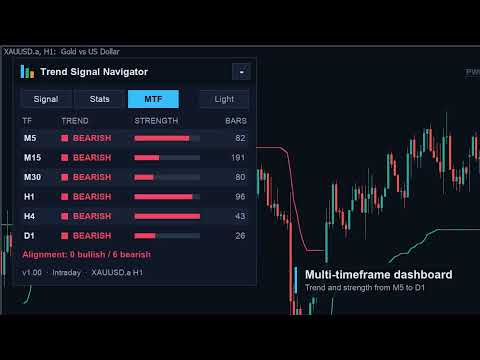
  • MTF tab: trend, strength and bars since the change on M5, M15, M30, H1, H4 and D1, plus an alignment summary.
  • Dark and light themes (automatic from the chart background, or switch with one click), sharp on high-DPI screens (layout scales with the Windows display scaling), movable by dragging the header and minimisable to a small title bar. Position, tab and theme are remembered per chart.

Alerts

  • Popup, sound, push notification and e-mail on every new signal, with entry, SL and all three targets in the message.
  • Optional alerts when the latest signal reaches TP1/TP2/TP3, the stop, break-even or a reversal exit.
  • Telegram messages are sent by the free companion EA (MQL5 rules do not allow indicators to use web requests).

Free companion EA

"Trend Signal Navigator EA" trades the indicator's signals: risk-% position size (or fixed lots), partial closes at TP1 and TP2, TP3 as the final target, break-even after TP1, optional ATR trailing, exit on trend flip, daily-loss guard, spread guard, maximum positions, Telegram and push notifications. On a live chart it reads this indicator; in the Strategy Tester it uses the identical built-in engine, so you can backtest every setting for free.

Backtests of the indicator + EA

We backtested the companion EA on 10 markets (forex, gold, indices, BTC) with several timeframes and presets, choosing settings on 2022–2024 and checking them on 2025–2026 that were not used for the choice. The honest result: trend following depends on the market regime, and no setting wins everywhere.

  • XAUUSD H4, Swing preset (all other inputs default) was profitable in both test periods: profit factor 2.45 in 2022–2024 and 3.09 in 2025–2026. From January 2022 to October 2026 with real ticks: +24.8 % at 4.3 % maximum equity drawdown, risk 1 % per signal.
  • The same settings on XAGUSD H4: profit factor 2.21 (2022–2026). USDJPY H4, Intraday preset: profit factor 1.41 (2022–2026, real ticks).
  • In 2018–2021, when gold mostly moved sideways, the same gold setup lost (profit factor 0.85). Most forex pairs and indices were not profitable in 2025–2026, and the M15 Scalp preset lost on most symbols because of spread costs.

So use the live statistics panel and the free EA in the Strategy Tester to check a market before you trade it. Backtests are historical and do not guarantee future results.

For EA developers

Buffers for iCustom: 6 = signal (+1 buy, −1 sell, closed bars only), 7 = entry, 8 = stop loss, 9–11 = TP1–TP3, 12 = trend (+1/−1), 13 = trend strength (0–1). The input "Calculation only" turns off all drawing and alerts.

Inputs (main)

  • Preset, higher timeframe, trend band multiplier
  • Filters: momentum, volatility, structure, session (start/end hour), higher-timeframe bias, continuation signals – each "Preset default / On / Off"
  • TP1/TP2/TP3 in R, maximum stop in ATR
  • Bars to calculate (statistics window), panel on/off, theme, SL/TP lines, result tags, reversal zones, key levels, colours
  • Alerts: popup, sound, push, e-mail, target/stop alerts

Notes

  • Works on any symbol and timeframe (forex, metals, indices, crypto). In our tests H4 gave steadier results than lower timeframes; low timeframes pay relatively more spread.
  • All statistics and backtests are historical results. They do not guarantee future results. Always test on a demo account first.
Mais do autor
MACD Divergence Radar Pro Multi-Symbol Divergence Scanner & Visual Dashboard for MetaTrader 5 Regular & Hidden Divergence 20+ Pairs Simultaneous Scan Entry / SL / TP Levels History Statistics One-Click Chart Opening Auto Oscillator Sub-Window Overview MACD Divergence Radar Pro is a professional-grade divergence detection indicator that continuously scans multiple currency pairs and timeframes in real time. It identifies both regular and hidden MACD divergences — bullish and bearish — and presen
Professional account protection for prop-firm challenges and funded accounts. It monitors drawdown, open risk, news windows, trading sessions, manual trades, profit targets, and challenge progress in real time, then warns, locks, de-risks, deletes orders, or closes managed exposure according to your rules. Two draggable on-chart panels — Economic Calendar and Performance Stats — keep news planning and account analytics on the chart without leaving MT5. Built for Prop-Firm Traders This EA does no
Overview SR Confluence Pro is a professional MetaTrader 5 indicator for support & resistance and chart pattern analysis. It combines dual S&R engines (high-volume box engine + multi-timeframe pivot engine), automatic detection of 16+ classic chart patterns , and a confluence scoring system that rates how closely price structure and S&R levels align. Every zone is back-tested on the chart history — touches, bounces, breaks, false breaks and bounce rate are combined into a 0–100 strength score — a
ICT Market Structure Pro ICT Market Structure Pro is a Smart Money Concepts / ICT trading tool designed to automatically draw the most important structural and liquidity elements directly on the chart. The indicator helps traders read price action through an institutional lens by mapping market structure shifts, liquidity pools, order blocks, imbalances, premium/discount zones, and key ICT session windows in one place. It supports both single-timeframe and multi-timeframe analysis modes, with a
A chart overlay indicator for traders who want a structured view of Smart Money Concepts, market structure shifts, order block patterns, fair value gaps, equal highs and lows, and key multi-timeframe price levels directly inside MetaTrader 5. BOS and CHoCH · Internal and Swing Structure · Order Block Finder · Input-Controlled FVG Colors · EQH and EQL · Premium and Discount Zones Product Overview SMC Price Action Patterns is designed to convert raw price action into a clear, visual market map. T
FREE
VoidFlow IFVG Trade Assistant Pro VoidFlow IFVG Trade Assistant Pro VoidFlow IFVG Trade Assistant Pro is a manual-first MetaTrader 5 trading assistant built for traders who want a cleaner Inverse Fair Value Gap (IFVG) workflow with structured trade planning, chart context, and optional automatic execution only when it is explicitly enabled by the user. It scans the selected signal timeframe for raw Fair Value Gaps, confirms true inversions, filters weak setups, draws the full trade plan on the c
Trade Assistant Risk Calculator is an all-in-one floating trading panel Expert Advisor for MetaTrader 5, built for professional manual traders. It combines visual chart trading , automatic risk calculation , and advanced position management in one compact interface. Stop calculating lot sizes manually. Stop guessing your Risk:Reward ratio. Drag the planning lines on the chart and the EA calculates the exact lot size for your selected risk percentage, equity, fixed-money risk, or fixed-lot workfl
Trade Assistant Risk Calculator is an all-in-one floating trading panel (Expert Advisor) designed for professional manual traders on MetaTrader 5. It combines Visual Chart Trading , Automatic Risk Calculation , and Advanced Position Management into a single, compact interface. Stop calculating lot sizes manually. Stop guessing your Risk:Reward ratio. Simply drag lines on the chart, and the EA calculates the exact lot size to match your risk percentage, equity, or money target. Important Notes Th
MT5 Indicator · All Markets · Non-Repainting Signals · Entry / SL / TP1-TP3 · MTF + Scanner Momentum Pulse colors every candle by the real momentum behind it, not by price alone. Each bar is scored on five dimensions and placed in one of nine strength states . On top of that you get buy/sell signals with Entry, Stop Loss and three Take Profit levels , a multi-timeframe bias dashboard , a multi-symbol scanner , a forward test of every past signal with win rate and profit factor, and a risk-based
Supertrend core · 11 click-to-toggle confirmation filters · Multi-timeframe trend dashboard · Entry / SL / TP1-TP3 levels · Higher-timeframe filter · Trend cloud · 5,000-bar performance simulation with profit factor & drawdown TrendGuard Pro is a professional-grade MT5 scalping indicator that fortifies every entry signal with up to 11 independent confirmation filters . False breakouts are systematically eliminated before an arrow ever appears on the chart, letting you trade only the highest-pro
ICT Market Structure EA ICT Market Structure EA trades fair value gaps in the direction of market structure, only inside the ICT Silver Bullet hours, and only when the H4 and D1 structure agree. One EA on one chart trades a whole portfolio — by default EURUSD, XAUUSD, USTEC and US500 . Its higher-timeframe context uses the same detection code as the indicator ICT Market Structure Pro (swings, BOS / CHoCH, order blocks, FVGs, premium / discount). The default portfolio and settings were checked wi
Price Action 10 Setups EA Price Action 10 Setups EA automates ten classic bar-by-bar price-action setups — the patterns that discretionary price-action traders consider the most reliable: major trend reversals, final flags, breakouts, High 2 / Low 2 pullbacks, wedges, channels, measured moves, trading-range reversals, opening reversals and magnet (breakout) tests. Every setup is a fully coded rule set with a precise entry, stop and target, so the EA trades the patterns the same way every time. O
MACD Divergence Radar EA MACD Divergence Radar EA trades MACD divergences automatically. It uses the same signal engine as the indicator MACD Divergence Radar Pro — price pivots compared with the MACD histogram (OsMA) or the MACD main line, regular and hidden divergences, bullish and bearish — and turns every freshly confirmed divergence into a trade with a stop beyond the divergence pivot and a fixed reward-to-risk target. One EA on one chart can trade a whole portfolio; by default EURUSD, GBPU
TrendGuard Pro Auto EA is a fully automated trend-following Expert Advisor built on the TrendGuard Pro signal engine. It enters when the Supertrend flips and the confirmation filters agree, protects every trade with an ATR stop loss, can bank profits in steps at TP1 / TP2 / TP3, lets winners run with an ATR trailing stop, and exits on the opposite signal. It trades the chart symbol, or a whole portfolio of symbols from one chart, and is controlled from an interactive on-chart dashboard. Signal e
Price Action 10 Setups Indicator Price Action 10 Setups Indicator finds ten classic bar-by-bar price-action setups on your chart and turns every one of them into a complete trade plan: entry, stop loss and target , drawn on the chart, tracked bar by bar and summarised in a modern dashboard with per-setup statistics, a multi-symbol scanner and alerts. The detection is the same code as in Price Action 10 Setups EA (the automated version on the MQL5 Market): the indicator shows a signal exactly whe
Momentum Pulse EA trades the signals of the Momentum Pulse indicator automatically. The complete Momentum Pulse signal engine is built into the EA: every closed bar is coloured in one of nine momentum states, and a change of state becomes a buy or sell signal with its own Entry, Stop Loss and three take-profit levels. The EA takes those trades with risk-based position sizing, banks profit in steps at TP1 / TP2 / TP3 and manages the rest with breakeven and an ATR trailing stop. One chart can trad
Harmonic patterns with an honest track record. The indicator finds Gartley, Bat, Alt Bat, Butterfly, Crab, Deep Crab, Shark, Cypher, 5-0 and AB=CD patterns on your chart and on dozens of symbols and timeframes at once, draws the XABCD shape with its Potential Reversal Zone (PRZ) and Fibonacci ratios, gives entry, stop loss and three targets, and shows how often each pattern actually worked on each symbol: PRZ hold rate, TP1 and TP2 hit rate and average result in R , measured with exactly the sam
Currency Strength Matrix measures the strength of the 8 major currencies from all 28 pairs , plus gold and any indices you add, and shows it three ways on one chart: a multi-timeframe heatmap (M5 to D1), strength lines in a sub-window, and an automatic strongest-vs-weakest pair picker . Click any cell or pair and the chart switches to it. Closed bars never repaint, and the indicator shows you how its own picks behaved on the history you have loaded. How strength is measured Each currency is comp
Bitcoin Trend Rider EA Bitcoin Trend Rider EA is a trend-following and volatility-breakout Expert Advisor for BTCUSD , ETHUSD and other crypto CFDs. It stays out of sideways and dead markets, enters only when a trend is confirmed, puts a hard ATR stop on every order and lets winning trends run with a chandelier trailing stop. No grid, no martingale, no averaging down, no hedging tricks. Everything is visible: every input is in the Inputs window, the ready-made setups are listed below, and the lo
Gold Edge Portfolio EA trades XAUUSD with six independent, simple strategies at the same time . Each engine has its own on/off switch, its own magic number and its own risk per trade, and every trade is placed with a hard stop loss . There is no grid, no martingale, no averaging and no hedging — one position per engine at most. What makes it different is transparency : a dashboard on the chart shows the live state and the real statistics of every engine — trades, win rate, profit factor, net pro
Session Breakout Portfolio EA A session-range breakout portfolio for indices, gold and forex, traded from one chart. Every market has a quiet session and an active open. The EA builds the range in the quiet session (Asian range, pre-open or opening range), in the exchange's own time zone with automatic daylight saving, and trades the breakout at the active session open with OCO stop orders. One stop-protected trade per market per day. No grid, no martingale, no averaging. Default portfolio (5 m
Trend Signal Navigator EA – free companion EA for the Trend Signal Navigator indicator This EA trades the confirmed, non-repainting signals of the Trend Signal Navigator indicator automatically, with professional risk and trade management. It is free: you don't need to send a private message or wait for a "bonus EA". How it works Live and demo charts : the EA reads the signals, stop loss and targets of the Trend Signal Navigator indicator through iCustom (default path Market\Trend Signal Navigat
FREE
Filtro:
Sem comentários
Responder ao comentário