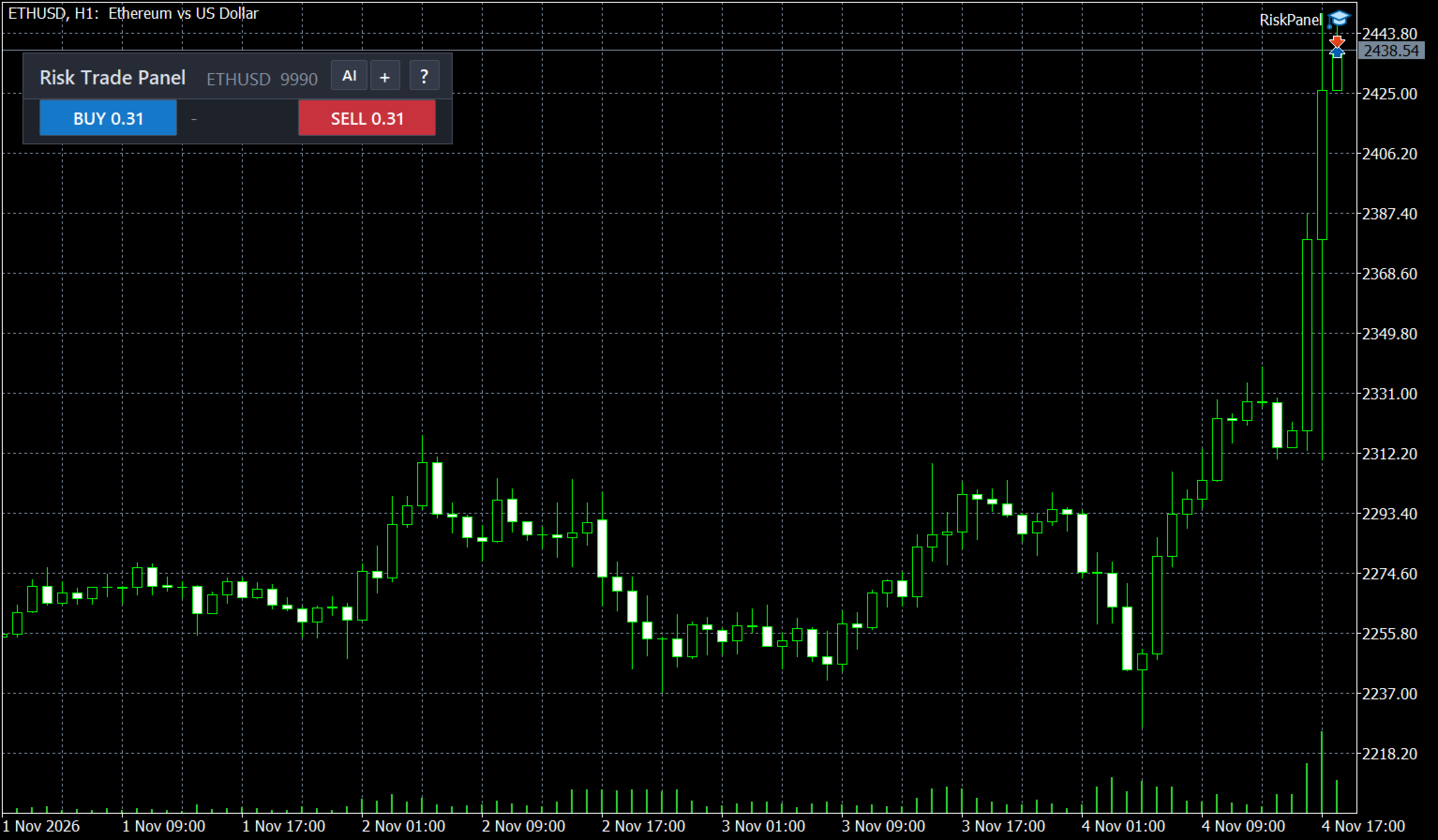
Risk Trade Panel MT5

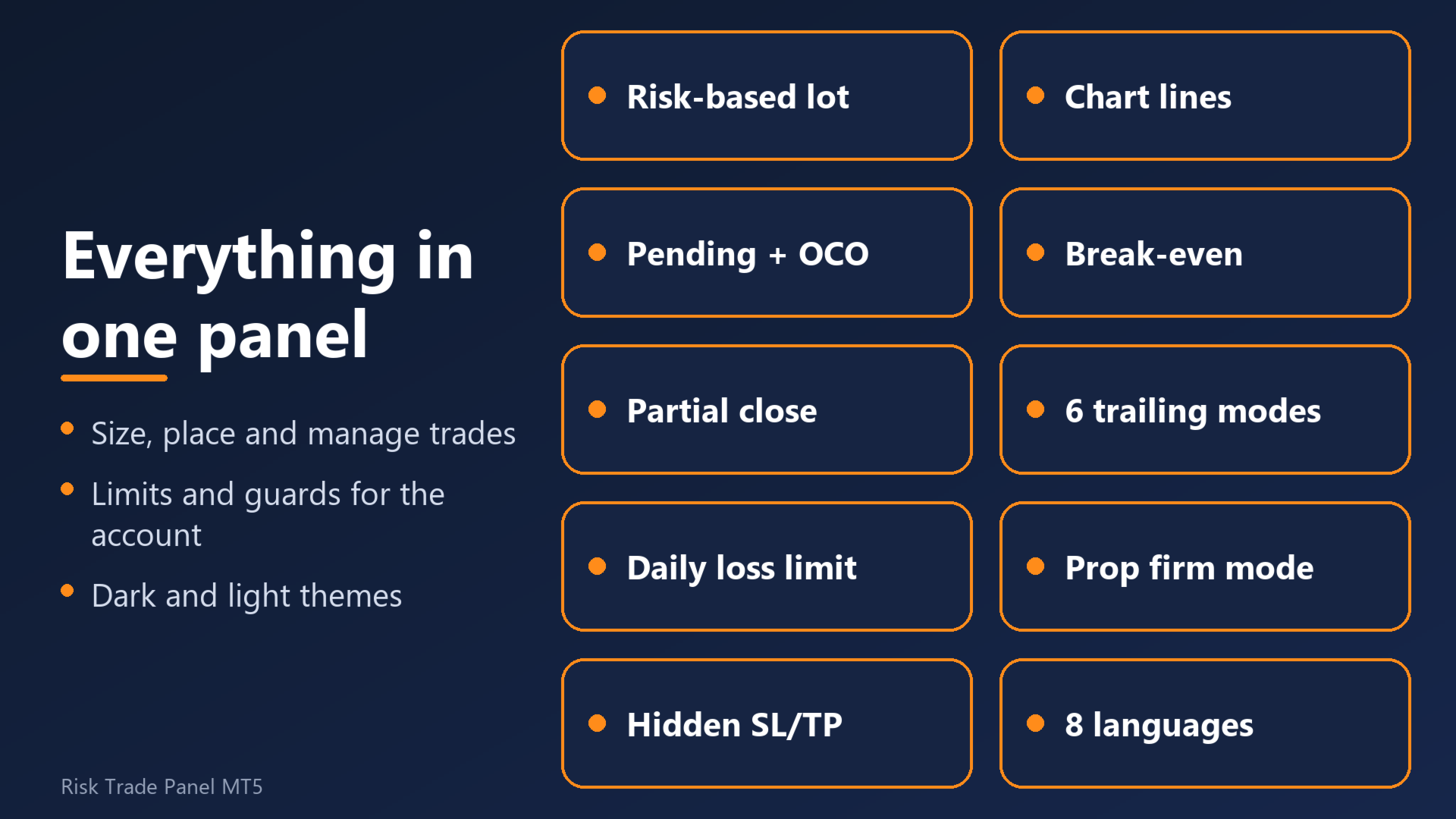
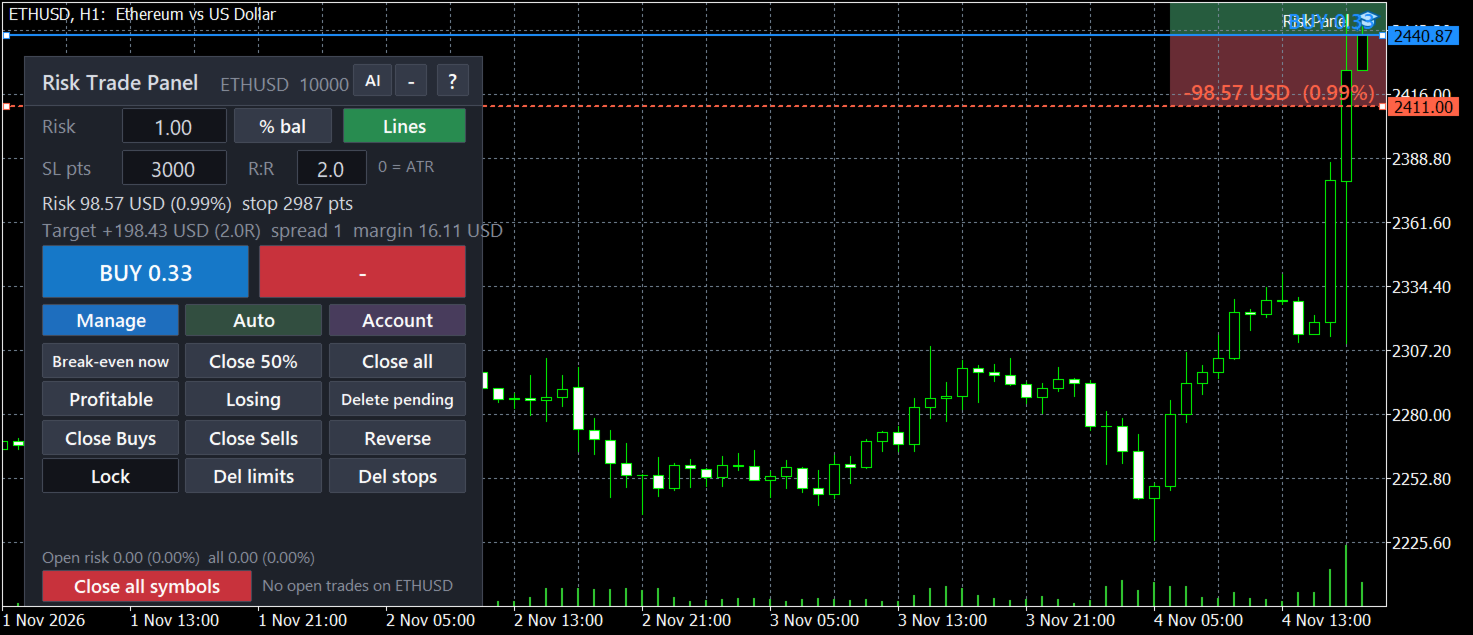
Set the risk, drag the lines, click. The panel sizes the lot and manages the trade.

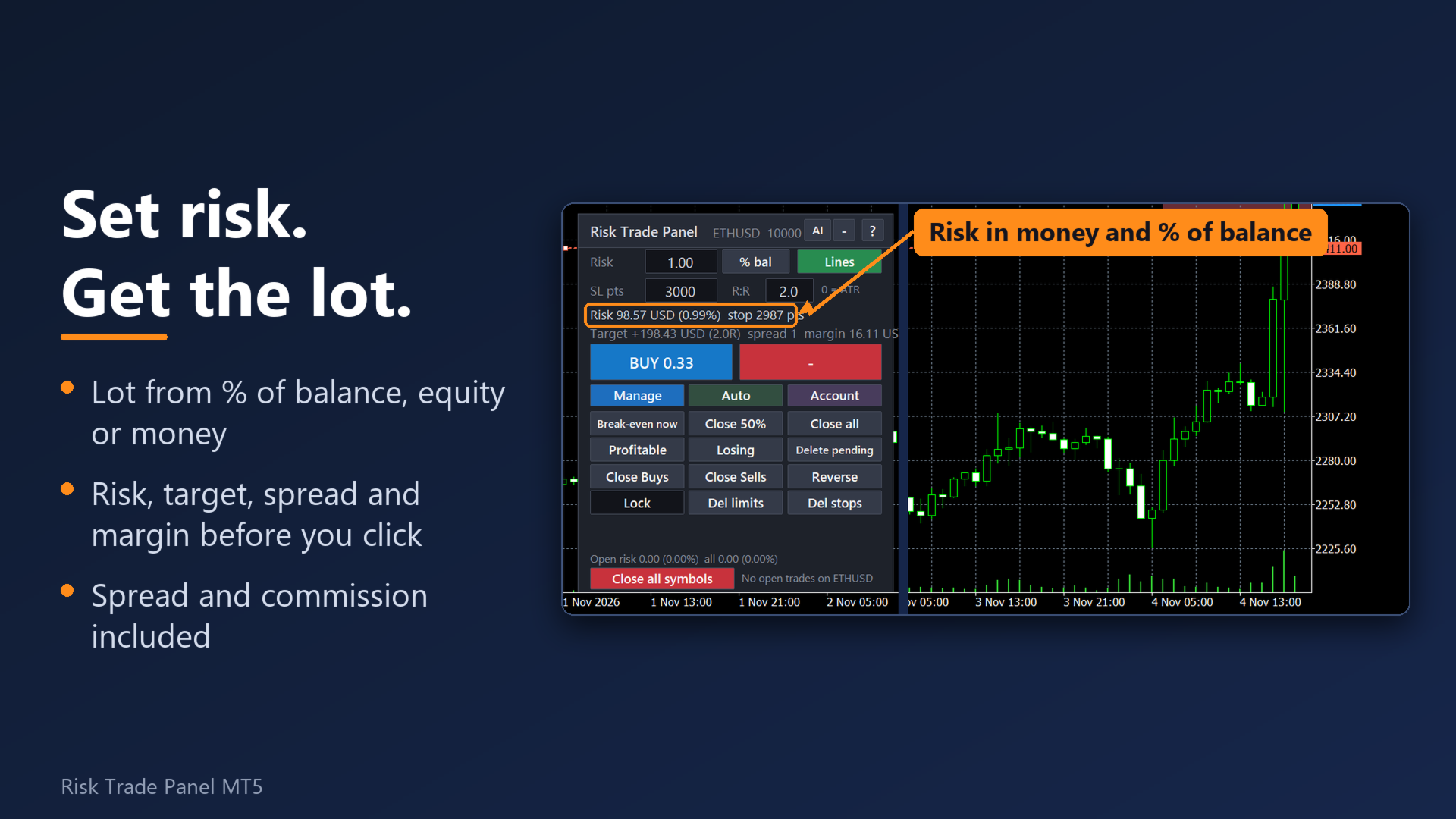
Risk is entered as % of balance, % of equity, a fixed amount or % of the day / week / month start balance. Before you send the order the panel shows the lot and the money at the stop and at the target, with spread and commission included.

Why traders pick this panel

  • The lot is right on every symbol. Forex, gold, silver, indices, crypto and stocks: the lot comes from the symbol's own contract data, spread and commission are included. If the broker's tick value looks inconsistent, the panel says so instead of quietly sending a wrong lot.
  • Nothing is forgotten after a restart. Break-even, partials, hidden levels, virtual orders, the daily counters and the drawdown peak are saved to files and restored after a restart of the terminal, VPS or PC.
  • One click = one order. A double-click guard and a check of open positions before each send. Optional two-click confirmation on BUY / SELL; no modal window that could freeze trade management on a VPS.
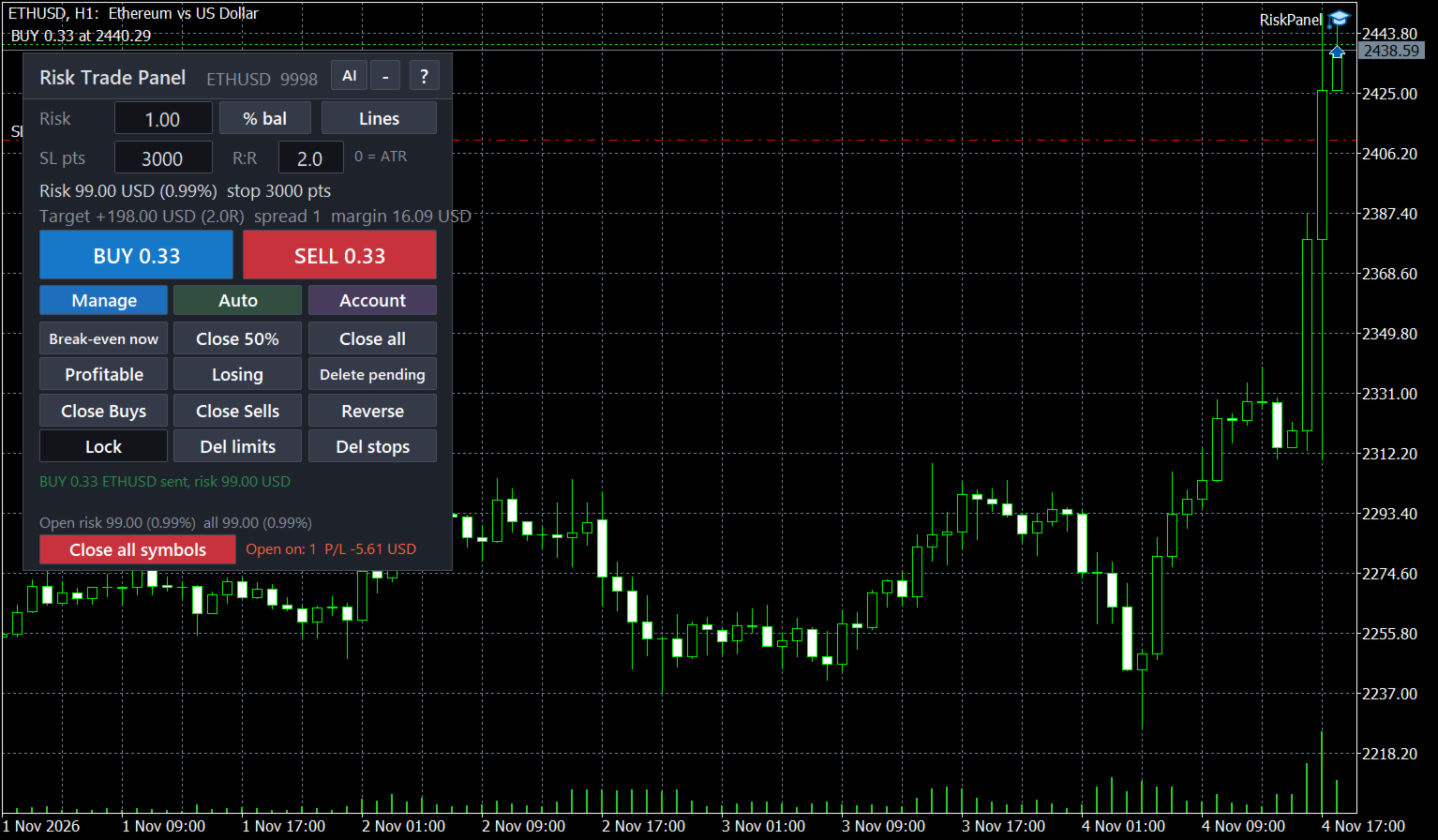
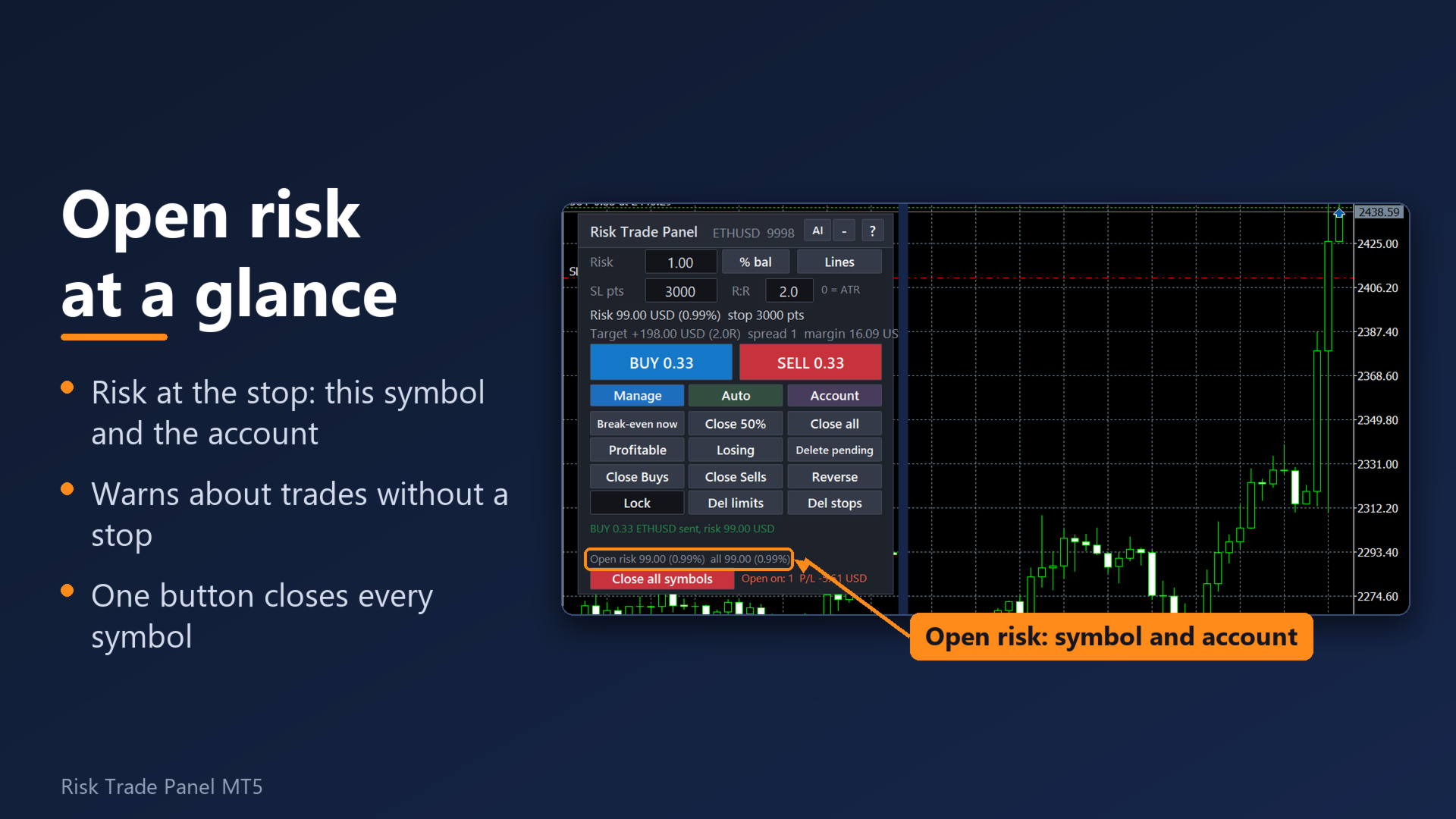
  • Your real exposure on one line. The open-risk strip shows the money at risk for the symbol and the whole account, net of hedges, and flags positions without a stop.
  • Guards a prop-firm style account. Daily loss limit, daily profit target, trailing drawdown from the equity peak, losing-streak stop, trade count limits, equity floor and news pause. Each one is your own setting.
  • Clear about errors. 16 common broker errors are explained in plain words with what to do next ("the market is closed now", "AutoTrading is off: press the Algo Trading button"), in 8 languages.

Risk and entry

  • 7 risk modes: % of balance, % of equity, money, % of the start-of-day balance, % of free margin, % of the start-of-week or start-of-month balance. One button cycles them.
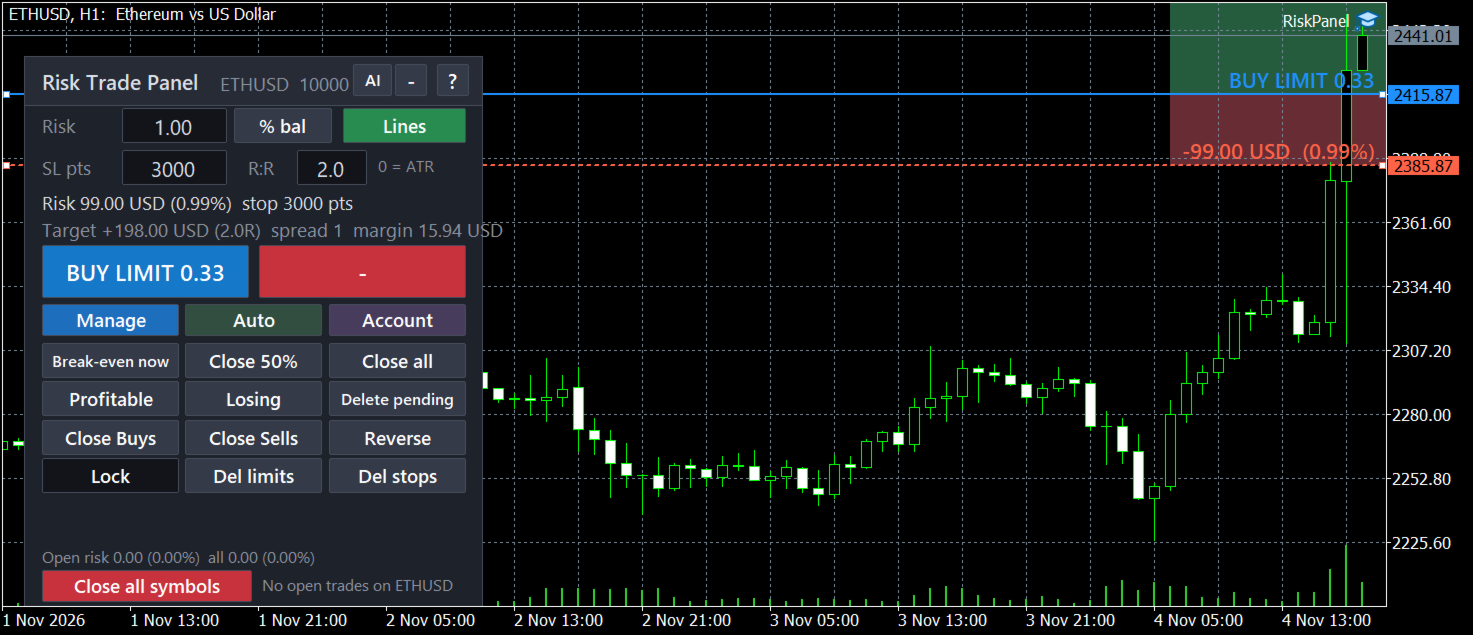
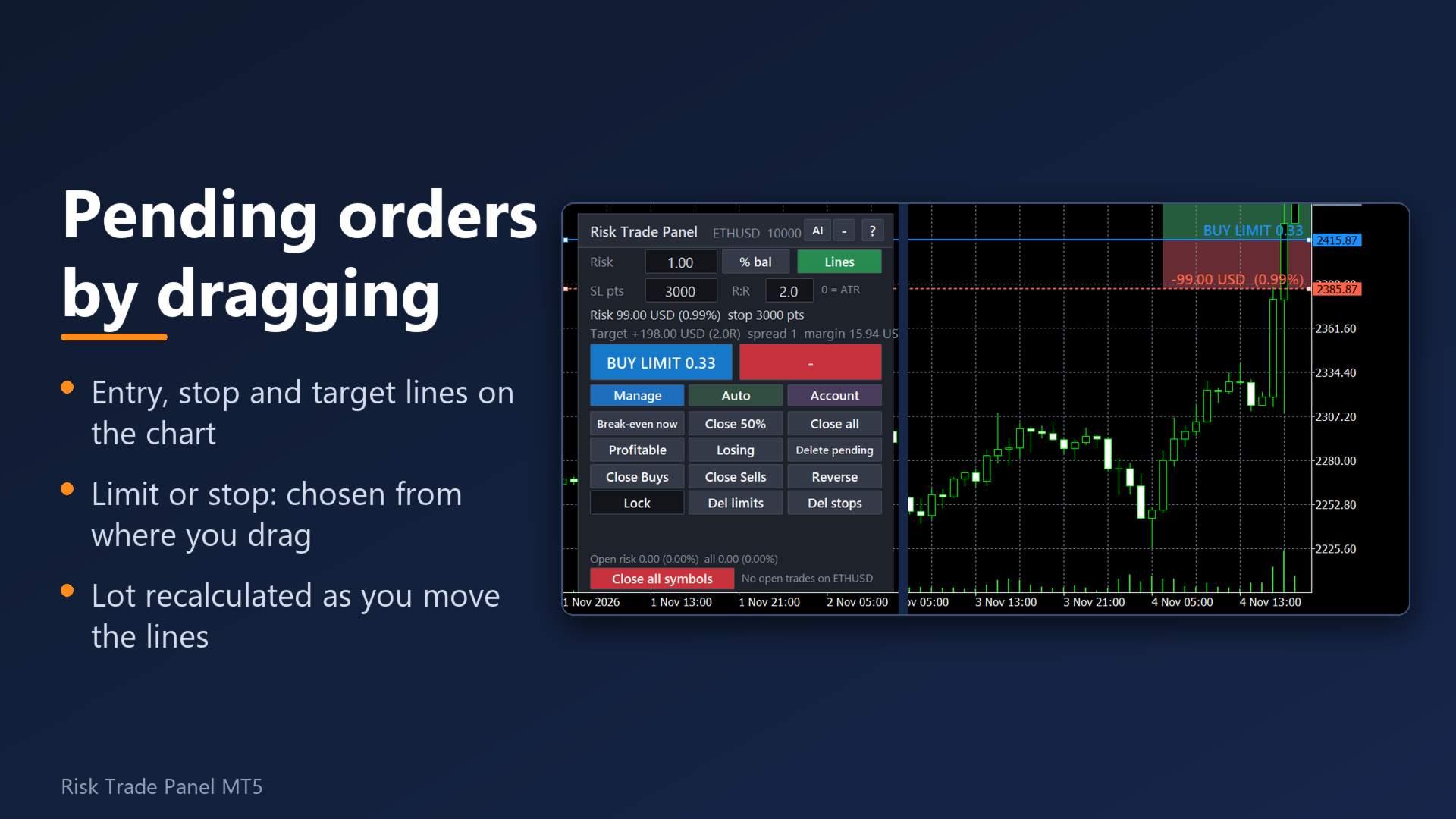
  • Entry, stop and target lines on the chart with the money printed next to each. Entry away from the price becomes a pending order (limit or stop picked automatically). Optional stop-limit orders for breakouts.
  • Stop in points, by ATR or from the last N candles; take profit as an R multiple.
  • Commission is learned from your last closed trade on the symbol or typed in. Margin and stop level are checked before sending.
  • High-risk question: a trade that risks more than 2% of balance (1% in the prop profile) needs a second click. It catches a typo in the risk box and a minimum lot that is bigger than your risk.
  • Maximum lot per order (option). A lot above the broker's maximum can be sent as several orders instead of being cut.
  • Split one order into up to 10 parts with one total risk (hedging accounts): targets as a ladder, or a grid of pending orders further from the price.
  • Presets: save and load the main panel settings by name.

Trade management

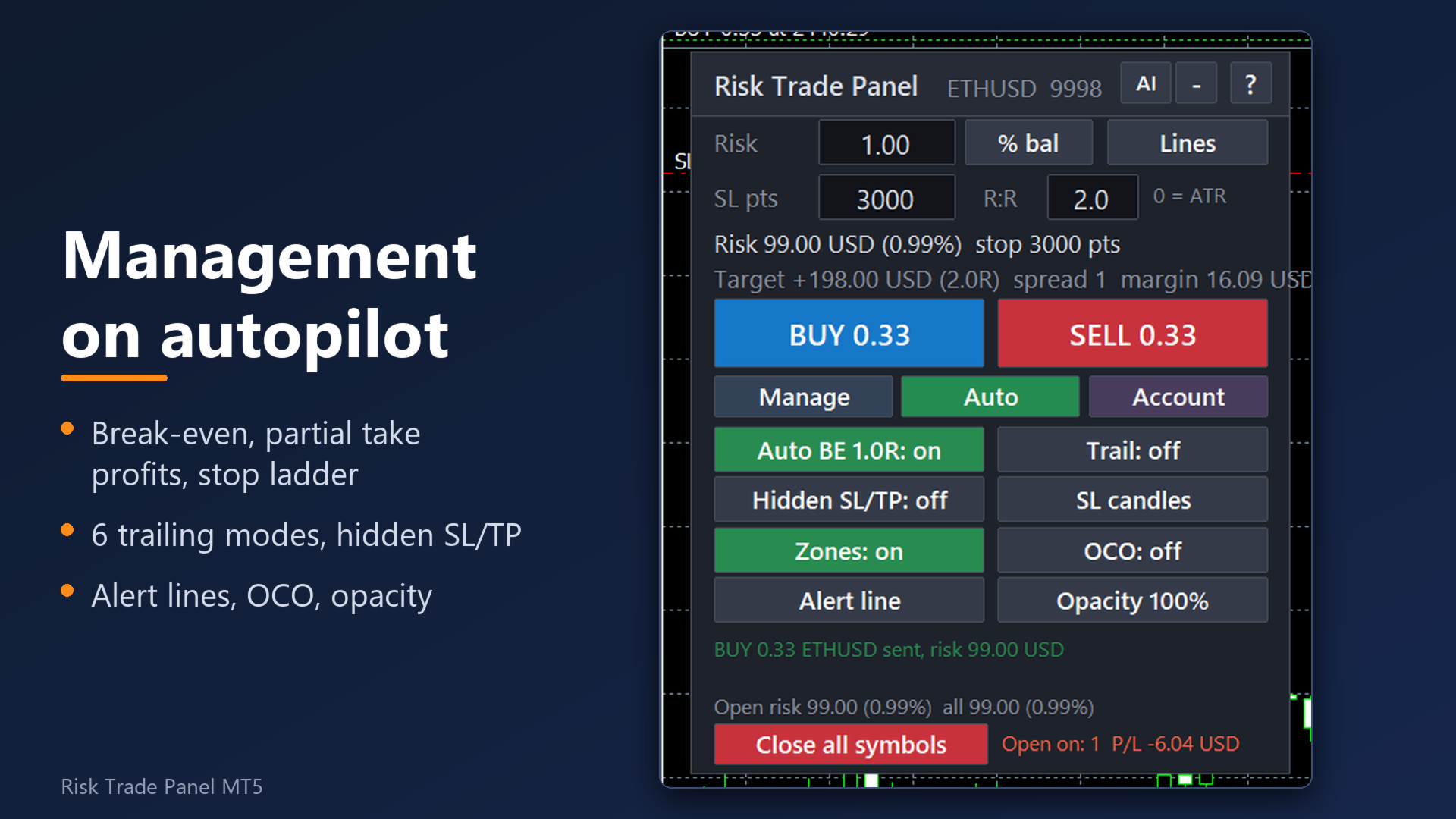
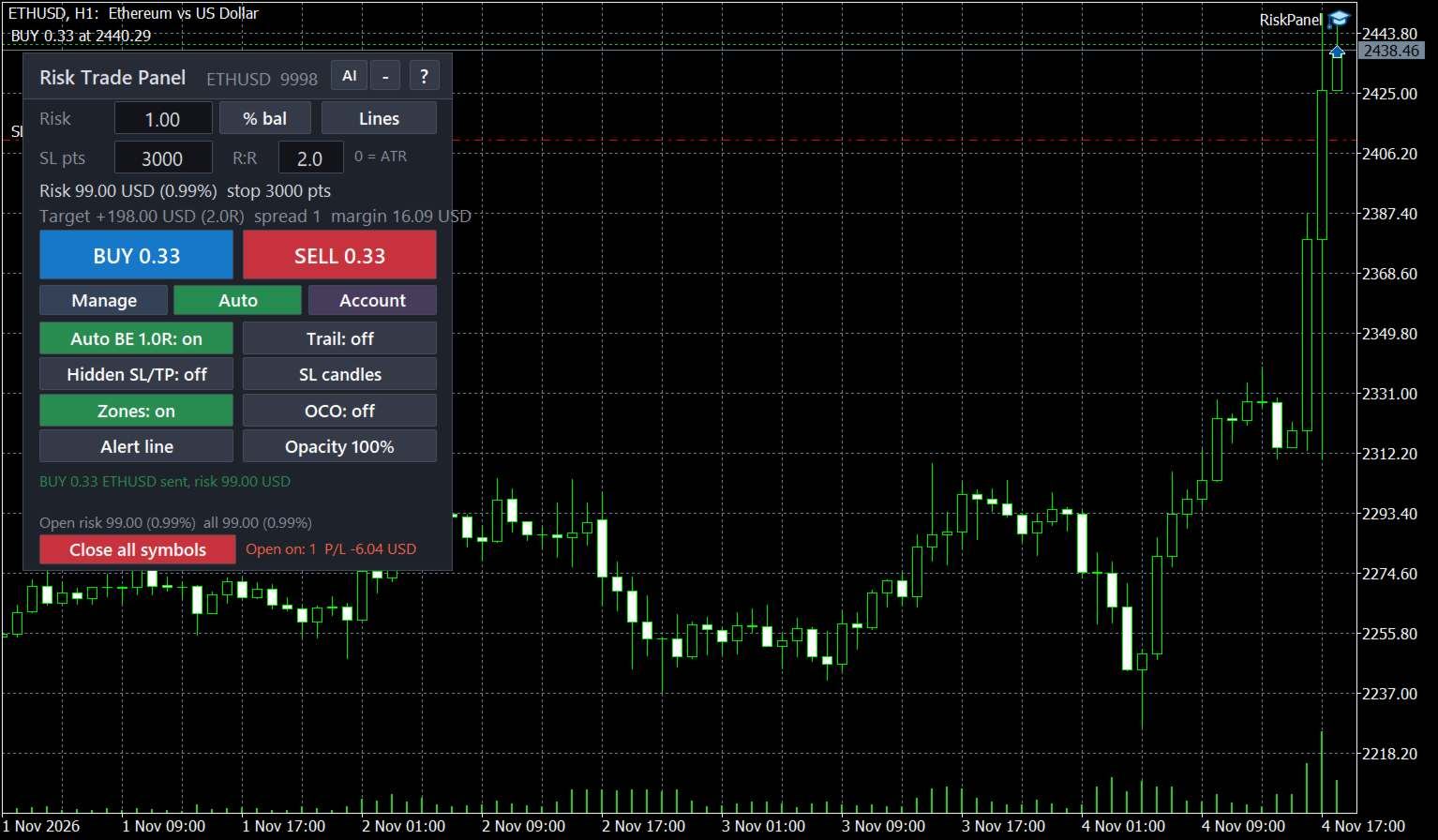
  • Break-even at a chosen R with commission covered, plus a "Break-even now" button.
  • Profit lock steps, e.g. "1:0, 2:1, 3:2": at +1R the stop goes to break-even, at +2R it locks +1R, and so on (up to 8 steps, the stop only tightens).
  • Up to 3 partial closes at chosen R levels; stop ladder after each partial (on by default); if a gap takes the price past the ladder level, the stop is pulled as close to the price as the broker allows. Works on hedging and netting accounts.
  • Partial close on loss: at a set fraction of R the panel closes a part of the trade and keeps the original stop for the rest.
  • Trailing stop in 6 modes: points, ATR, previous bar, moving average, Parabolic SAR, fractals. Trailing by partial close: every N R of profit close a % of what is left.
  • Hidden stop and target kept by the panel, with a real emergency stop at the server 1R further (on by default, re-placed if removed; 0 = none).
  • Virtual pending orders: in hidden mode the broker sees no pending order; at the price the panel enters at market with your stop, target and plan.
  • Trades opened by hand or from the MT5 mobile app get a stop automatically; their volume can be cut to your risk. Other robots' trades only if you list their magic numbers.
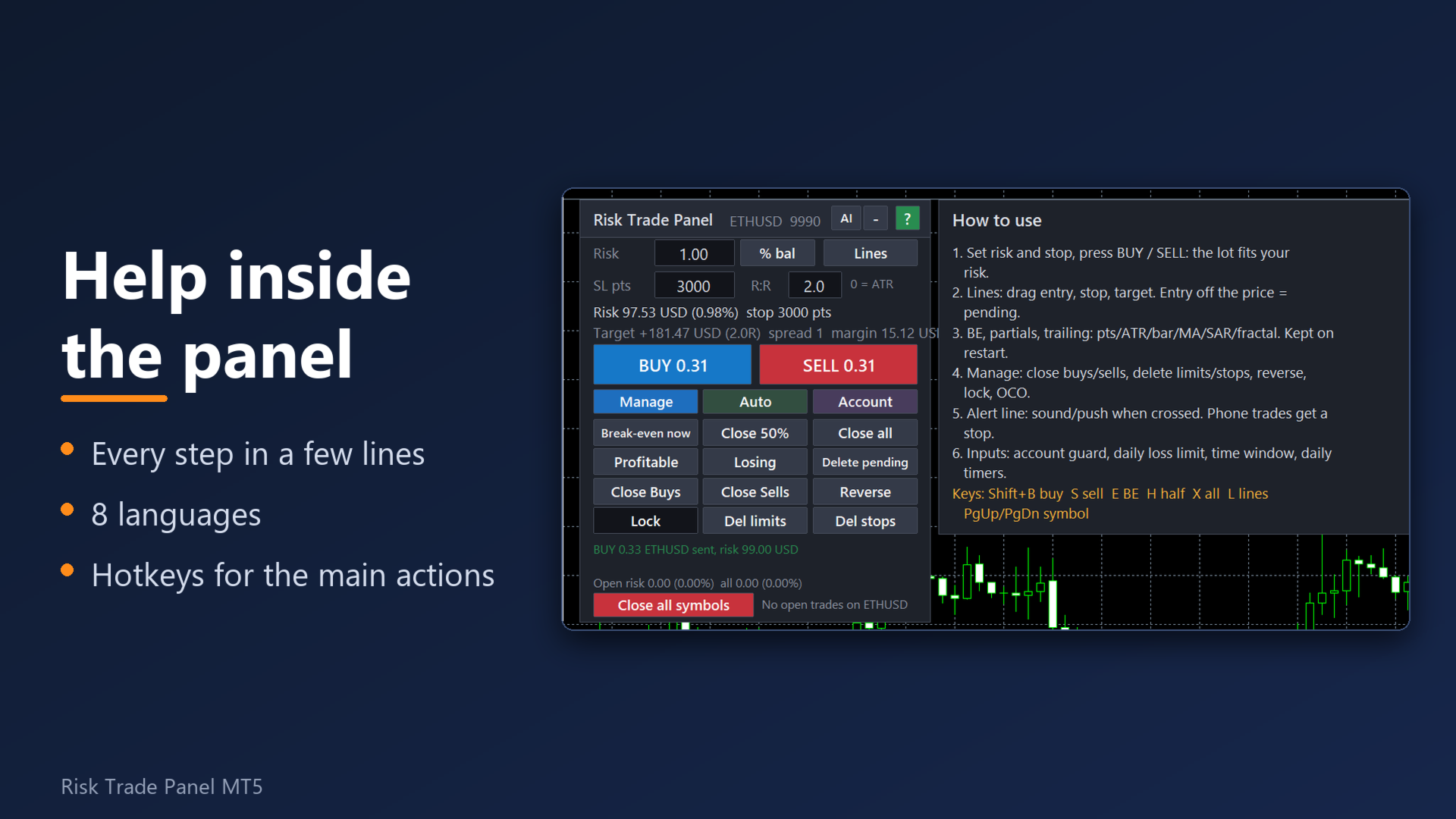
  • 12 one-click actions: close all / buys / sells / profitable / losing / half, delete all / limit / stop pending orders, reverse, lock (hedge), break-even.
  • OCO pairs, pending order trailing toward the price, pending order expiry done by the panel (works with brokers that have no expiry).

Account guard

  • Daily loss limit and daily profit target (money or % of the start-of-day balance): after either one the panel refuses new orders until the next day. The counter survives a restart.
  • Maximum trailing drawdown of equity from its peak (%), losing-streak limit for the day, max new trades per day, max open trades (positions + pending).
  • Optional: close everything when the loss or drawdown limit is hit. Equity floor. Cap on the open risk of the whole account.
  • News pause: no new orders N minutes before and after a calendar event of the symbol's currencies (built-in MT5 economic calendar, no web setup).
  • Trading window, close-all and delete-pending times once a day (server time).
  • "Close all symbols" button with a two-click confirmation.
  • Normal / Prop button on the Account tab: the prop profile turns on a 4.5% daily loss limit and a 9% drawdown stop unless you set your own. Check your firm's own rules: the limits are yours to set.

Warnings before the trap

  • Stop closer than N current or N average spreads.
  • Session close within N minutes, and the rollover window around midnight (or your own window).
  • Warn only by default; optionally refuse new orders in these windows.

Notifications and remote control

  • Phone push through MetaTrader's MetaQuotes ID and e-mail through the terminal's e-mail settings: orders sent, closed trades with the result, panel warnings. No web setup.
  • Alert lines: drag a line on the chart, get a pop-up, sound, push or Telegram message when the price crosses it.
  • Telegram (optional, your own bot): the same messages, plus commands from your private chat if you switch them on: /status, /stats, /help, and trade commands /buy, /sell, /be, /half, /close, /flat. Trade commands are off by default and use the symbol panel's own risk settings and limits.

AI assistant (optional, your own key)

  • An "AI" button sends this chart (last 80 bars, daily closes, spread, ATR and your plan) or your journal (last 90 days of closed trades and the balance) to the AI provider you choose, with your own API key, and shows the answer in the panel language. Supported: OpenAI, Claude, DeepSeek, Grok, OpenRouter.
  • The assistant never places or changes a trade. Its view of the chart is an opinion, not investment advice and not a signal; you decide.
  • Local statistics by panel, manual trades and each robot (trades, win rate, net, profit factor, max drawdown) need no AI and nothing leaves your PC.

Interface

  • 8 languages: English, Russian, Spanish, Portuguese, German, French, Turkish, Indonesian (terminal language or your choice). Built-in short manual ("?"), every input has a description.
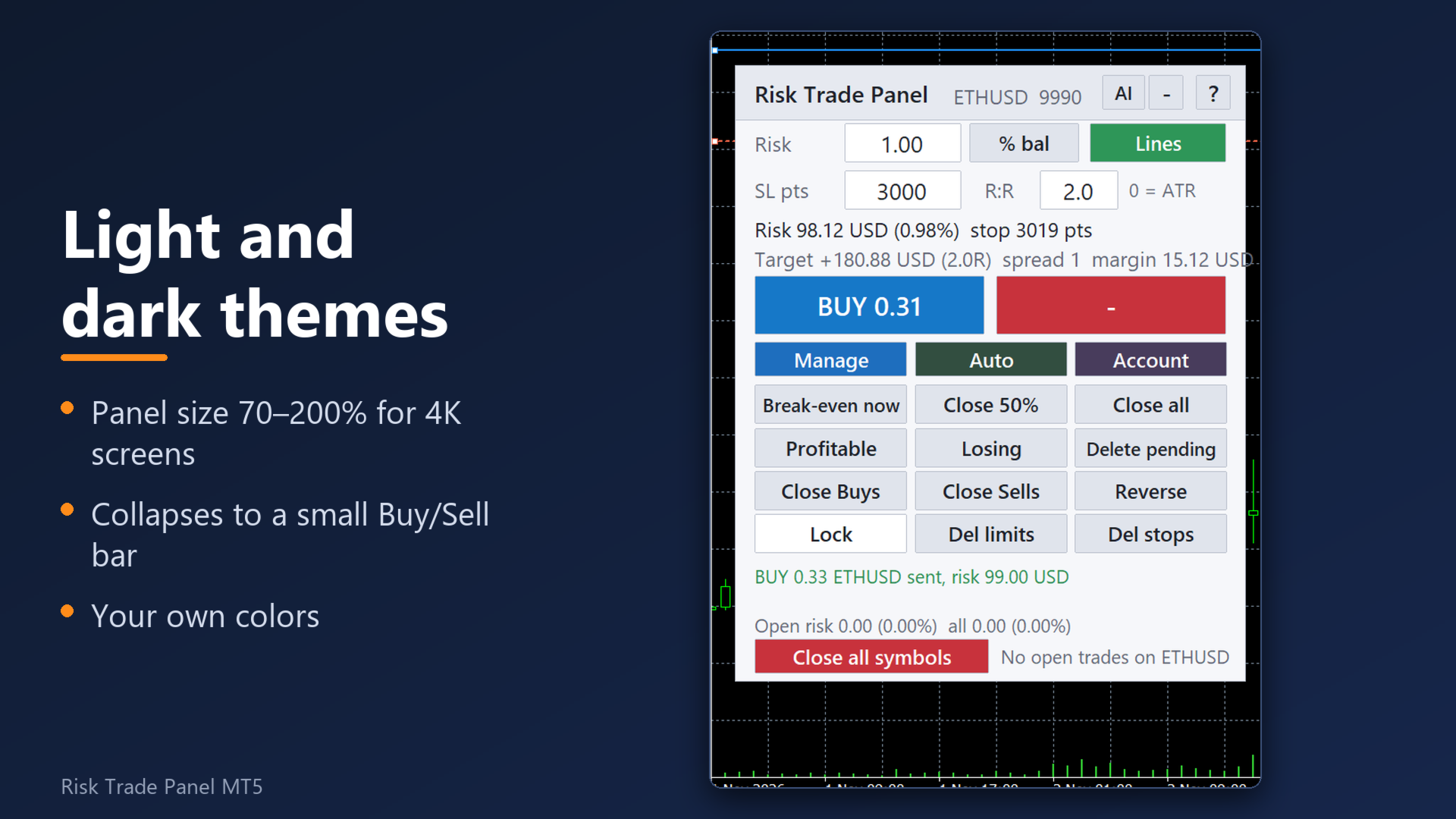
  • Three tabs under BUY / SELL: Manage, Auto, Account. About 316 px high at 100%, fits a chart with the Toolbox open; size 70–200% for large screens.
  • Light or dark theme, 16 colour settings, opacity 30–100% with optional fade when the mouse is away. Collapse to a small bar with BUY, SELL and the floating P/L.
  • 31 hotkey actions (8 set by default: Shift+B buy, Shift+S sell, Shift+E break-even, Shift+H close half, Shift+X close all, Shift+L lines, Shift+PgUp / PgDn symbol), all re-assignable.
  • Week and month statistics on the Account tab: net result after costs, closed trades, win rate, profit factor.
  • Works in the visual Strategy Tester: buttons and hotkeys are active there.

Reliability

  • State and panel values are written to files per account and symbol and read back after a restart, an update or a VPS migration of the chart.
  • Light on the CPU: the panel redraws only when a value changes. Measured: the whole terminal with the panel and another EA used under 2% of one CPU core.
  • An automated self-test runs in the Strategy Tester before each release: risk at the stop, partial volumes, break-even, trailing, schedule, no duplicate orders, on BTC, gold, silver, EURUSD, USDJPY, an S&P 500 CFD and a stock (AAPL). PASS or FAIL.
  • No DLL. No login of its own and no licence check of its own: activations are counted by the Market.

Start in 3 steps

1. Drag the panel onto a chart and allow algo trading (the toolbar button and "Allow Algo Trading" in the panel's properties).

2. Set the risk and the stop (or keep the ATR default). Drag the entry, stop and target lines if you want.

3. Press BUY or SELL. Break-even, the first partial (50% at 1R) and your other rules run by themselves. "?" opens the short manual.

FAQ

What is switched on by default?

Auto break-even at 1R, the first partial close (50% at 1R), the stop ladder, spread and gap warnings, the open-risk strip, and adoption of manual trades (a stop by ATR is added to a manual trade without one). Everything else, including Telegram, AI, flatten, equity floor and the news pause, is off until you turn it on.

Does it open trades by itself?

No. An order is sent only when you click BUY / SELL, press the buy / sell hotkey, when the price reaches a virtual pending order you placed, or when you send /buy or /sell from your own Telegram chat after turning trade commands on.

Which trades does it touch?

By default its own trades and your manual or mobile trades. Other robots' trades are touched only if you list their magic numbers. Manual trades can be excluded with one setting.

What has to be allowed in Tools > Options > Expert Advisors > WebRequest?

Nothing for the panel itself, phone push, e-mail or the news pause. For Telegram: api.telegram.org. For the AI: only the host of the provider you chose (api.openai.com, api.anthropic.com, api.deepseek.com, api.x.ai or openrouter.ai). Keep your bot token and API key private: do not share screenshots of the inputs.

Does the AI cost money?

The AI provider bills your own API key for each request. The panel adds no fee. While a request is running (up to 60 seconds) the panel waits, so AI requests are refused while hidden stops or virtual orders are active.

Do Telegram, AI and the news pause work in the Strategy Tester demo?

No, they need the live terminal. Everything else can be tried in the tester.

How does the licence work?

The product has the maximum of 20 activations the Market allows, so a reinstall, a new PC or a VPS needs no support request.

The panel is blank or gone (VPS, after a pause).

All elements are rebuilt on every start, timeframe change and reconnect, and the saved state is read from files. Check that algo trading is allowed and that the panel is listed in the top-right corner of the chart. Only one panel can run per symbol: a second one on the same symbol explains this and stops.

Does it run on Mac?

MT5 on Mac runs through a compatibility layer from the broker or MetaQuotes. The panel uses only standard terminal functions and no DLL. Please try the free Strategy Tester demo first.

Is the lot exact? What about slippage?

The lot is sized so that the stop costs about your risk, spread and commission included. The fill price and the price at which a stop executes belong to the broker: slippage and gaps can make a loss larger than planned. Warnings and the open-risk strip are information, not a guarantee. Check your settings on a demo account first.

Inputs (groups)

Risk: risk mode (7), risk per trade, stop in points / ATR multiple, take profit in R, commission per lot (-1 = learn), allow minimum lot, maximum lot, split above broker maximum, max spread, high-risk threshold.

Management: auto break-even (R, extra points), profit lock steps, trailing mode, distance, start, step and indicator settings, trailing by partial close, partials 1-3, partial close on loss, stop ladder, hidden stop and target, emergency stop (R), virtual pending orders, stop-limit offset, pending order trailing and expiry.

Manual trades and robots: manage manual trades (this chart / all symbols), stop and target for trades without one, cut volume to risk, delete manual pending orders too, other robots' magic numbers.

Account guard: close at floating profit / loss, daily loss limit, daily profit target, max drawdown from the peak, losing streak, trades per day, open trades, close everything on limit, equity floor, open-risk cap, account profile, spread added to sell stops.

Spread, gaps, news, schedule: stop vs current / average spread, warning before session close, rollover window, refuse orders in gap windows, news pause (minutes, high impact only), trading window, close-all time, delete-pending time, OCO.

Notifications: alert-line pop-up / sound / push, phone push, e-mail, trade sound, Telegram bot token and chat id, Telegram commands, Telegram trade commands.

AI assistant: provider, API key, model, your own tasks for chart and journal review, extra rules for every answer.

Hotkeys: 31 actions, risk step for the risk keys.

Look: language, theme, size, position, opacity, fade, 16 colours, hide the terminal's own trade lines, zones on the chart.

Other: magic number, order comment, max slippage, file command interface (automation).

Trading involves risk. The panel is a tool for sizing and managing orders; it does not predict the market and does not promise any result.
Produtos recomendados
Click Trading
Jawad Tauheed
5 (2)
One Click Trading – Auto TP SL Developer TraderLinkz Version 1.00 Category Utility What it does Adds missing TP and SL to your manual trades and pending orders Sets them once per ticket Lets you move TP and SL afterward Works on hedging and netting accounts Scans on every tick and reacts on trade events Why you want it You place faster entries You get consistent risk and exit targets You reduce fat finger errors You keep full manual control Quick start Attach the EA to any chart Keep TP and SL e
FREE
Quick Trade Panel Pro
Nicolas Olivier Menetrey
5 (1)
Painel de trading one-click com gestão automática de lote e risco Quick Trade Panel Pro é um painel de trading intuitivo projetado para traders que querem executar ordens rapidamente mantendo controle total sobre seu risco. Funcionalidades principais Cálculo automático do tamanho do lote baseado em uma porcentagem da sua margem disponível Stop Loss configurável em pontos, aplicado automaticamente a cada trade Tamanho do lote bloqueado durante uma série de trades para garantir tamanho de posição
FREE
Trade assistant pro v8
Ahmed Mohammed Bakr Bakr
2 (1)
FREE FREE FREE Trade Assistant MT5 – Professional Trading & Risk Management Panel Trade Assistant MT5 is an advanced trading panel designed to help traders execute orders faster, safer, and more professionally . It simplifies manual trading by combining smart order management , precise risk control , and one-click execution , making it ideal for both beginners and advanced traders. This tool does not trade automatically . Instead, it empowers you with full control while applying professional-gra
FREE
Grid Trading EA is a semi-automated one-click trading EA for both Normal Trading and Grid/Martingale Trading . Normal Trading Simply click Buy or Sell directly from the chart. The EA will automatically manage trades by: Setting Stop Loss and Take Profit Managing Trailing Stop Grid / Martingale Trading (For Hedging Account Type Only) When Grid Trading mode is enabled, the EA will automatically open additional grid orders at specified distances while increasing the lot size based on your settings.
Trade Manager DaneTrades
Levi Dane Benjamin
4.13 (31)
Trade Manager para ajudá-lo a entrar e sair rapidamente de negociações enquanto calcula automaticamente seu risco. Incluindo recursos para ajudar a evitar negociações excessivas, negociações de vingança e negociações emocionais. As negociações podem ser gerenciadas automaticamente e as métricas de desempenho da conta podem ser visualizadas em um gráfico. Esses recursos tornam este painel ideal para todos os traders manuais e ajudam a aprimorar a plataforma MetaTrader 5. Suporte multilíngue. Vers
Core function Intelligent transaction management one-click opening and closing operation, which supports user-defined lots to set multiple closing modes: all closing, closing by direction and closing by profit and loss status. Professional risk control, real-time risk monitoring and spread control to avoid high-cost trading environment. Visual control panel has an intuitive graphical interface, and all functions can be operated with one button to display position information, profit and loss sta
FREE
The Ultimate All-In-One Trade Manager & Prop Firm Guardian for MT5. Nexus Pro Trade Manager is the most advanced, all-in-one trading assistant designed for both manual traders and Prop Firm challengers. Featuring a stunning, lag-free UI (Dark/Light mode), it completely transforms your MT5 into a professional trading terminal. Whether you are trading a personal account or trying to pass evaluations for FTMO, FundedNext, or other prop firms, Nexus Pro protects your capital, automates your risk cal
Ao executara ordem, seja ela pela boleta do metatrader no computador ou pelo metatrader no celular, seja ordem manual ou pendente, o Easy Trade irá posicionar os níveis de take profit e stop loss, bem como uma ordem limit e seus respectivos take profit e stop loss de forma automática. Seguindo a estratégia de negociação para abertura de Bolsa (us30, us100,us500) porém, pode ser ultilizada em quaisquer ativo do mercado.
EasyTradePad for MT5
Sergey Batudayev
5 (5)
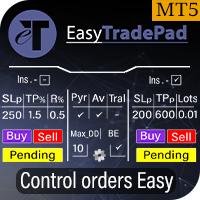
EasyTradePad – Painel de Negociação para MetaTrader 5 O EasyTradePad   é uma ferramenta para negociação manual e semiautomática. O painel permite o gerenciamento rápido de ordens e posições, bem como cálculos de gerenciamento de risco com um clique. Características do painel: Abra e feche negociações com risco predefinido (% ou moeda de depósito) Defina SL e TP em pontos, porcentagens ou valores monetários Calcular automaticamente a relação risco-recompensa Mover stop loss para o ponto de equil
Account Monitor Pro — Your Ultimate Trade Statistics Hub Account Monitor Pro is a professional information dashboard designed for traders who combine Expert Advisors (EAs) and manual trading. The indicator separates statistics in real-time based on your Magic Number, allowing you to clearly see who is driving the profit: the algorithm or yourself. Key Features: Split Monitoring: Instant separation of "Robot" positions (by Magic Number) and "Manual" trades. Multi-language Support: 11 languages in
FREE
Open Risk Budget Cap enforces a total open stop-loss risk budget across your account. It does not choose direction and does not open discretionary trades on a live chart. Attach it to one chart; the symbol and timeframe do not matter. What it measures Every open position and every pending order is priced to its stop-loss in account currency using OrderCalcProfit. Positions or orders without a stop-loss are counted and shown on the panel as "without stop-loss". They are excluded from the budget
Easy Trade Executor é uma ferramenta para cálculo rápido do tamanho da posição, execução de operações e gerenciamento de trades no MT5. Posicione os níveis de Open Price, Stop Loss e Take Profit diretamente no gráfico, obtenha cálculos automáticos do tamanho da posição e abra operações com risco controlado em apenas alguns cliques. Por que escolher o Easy Trade Executor? O Easy Trade Executor foi desenvolvido para traders que desejam mais do que apenas calcular riscos — eles querem gerenciar op
TradeMngrMT5
Edgar Enrique Retontali
TradeManager 1.0   is an Expert Advisor for MetaTrader 4 y 5 that streamlines real-time trade management. Through a graphical control panel, you can send market and pending orders, move stop losses to breakeven, and automatically calculate position size based on your risk settings. Below is a comprehensive overview of its features and input parameters. Key Features Market Orders & Pending Orders BUY/SELL Buttons : Instantly open long or short positions at market. BUY STOP / SELL STOP / BUY LIMI
CosmiCLab SMC FIBO CosmiCLab SMC FIBO is a professional trading indicator designed for traders who use Smart Money Concepts (SMC), market structure analysis and Fibonacci retracement levels. The indicator automatically detects market swings and builds Fibonacci levels based on the latest impulse movement. It also identifies market structure changes such as BOS (Break of Structure) and CHOCH (Change of Character), helping traders understand the current market direction. CosmiCLab SMC FIBO also pr
ATC Alert Manager permite definir alarmes de preço diretamente no gráfico e gerenciá-los a partir de um pequeno painel. Cada alarme é mostrado como uma linha no gráfico que você pode arrastar para um novo preço. Um alarme dispara uma vez, no momento em que o preço cruza seu nível, com um alerta popup, um som e uma notificação push opcional para o seu telefone. Preço que já passou do nível não o dispara, então você nunca recebe alertas repetidos a cada tick. Esta ferramenta também faz parte do
FREE
VR Color Levels é uma ferramenta útil para quem aplica análises técnicas usando elementos como linha de tendência, retângulo e texto. É possível adicionar texto diretamente ao gráfico e fazer capturas de tela. Configurações, arquivos de configuração, versões demo, instruções, solução de problemas podem ser obtidos em [blog] Você pode ler ou escrever comentários em [ссылке] Versão para [MetaTrader 4] O trabalho com o indicador é realizado com um clique . Para fazer isso, clique no botão com a l
FREE
Protect your funded accounts and personal capital with military-grade precision. This utility continuously monitors your floating equity against your daily starting balance. The moment your custom drawdown threshold is breached, it instantly liquidates all open positions, deletes pending orders, and completely unloads from the chart. Stop revenge trading and never fail a prop firm evaluation due to a margin breach again.
FREE
WAP TP Stealth EA – Intelligent Basket Management for Precision Exits WAP TP Stealth EA is a specialized trade management expert advisor designed for traders who rely on basket strategies, recovery systems, and multi-position workflows. Instead of closing trades individually, the EA dynamically calculates the Weighted Average Price (WAP) of all open positions and executes a coordinated closure once your defined profit target is reached. This approach enables efficient drawdown management, smooth
FREE
Use for risk management and opening positions as per the user settings. The user is allowed to set the stop loss and take profits in pips. The user can also choose the risk percentage per trade that he/she wants to use while opening the trade. The volume of the trade that the user wants to sent shall be calculator according to the stoploss and the risk percentage that the user has selected.
RBM Quick Entry Panel
Renato Brendim Medici
RBM Quick Entry Panel PRO A fast-entry panel directly on your chart: lot size, stop loss, target, up to 3 partial take-profits, and automatic breakeven—all in one click. Traders know the problem is rarely the analysis. It is execution. Opening the order window, entering the lot size, calculating the stop loss, remembering to take partial profits, and moving the stop to breakeven at the right time. In a fast market, every step costs seconds and creates room for mistakes. RBM Quick Entry Panel PRO
FREE
Breakevan Utility
Jose Luis Thenier Villa
BreakEvan Utility  Is a simple tool in a panel with this utilities: This utility will draw a Golden Line in the chart applied showing the breakeven price, considering all the positions opened for that specific symbol. Also the information panel shows: Balance Breakeven Price for that chart Force Breakeven (for that symbol) as ON/OFF Force Breakeven Global (takes into account all trades opened) as ON/OFF Total Lots opened for Symbol Total Lots opened Global And two buttons: Force Breakeven: Whe
️ Trade Manager oneclick  ( Reverse Trade,  Partial Close,  Breakeven, Close All Running Trade )   control – Smart Manual Trade Control for MT5 Trade Manager oneclick control is a powerful yet lightweight trade management utility built for manual traders who want precise control over their open positions — directly from the MT5 chart. This EA does not open or close trades automatically based on any strategy. It simply provides one-click management tools to handle your running trades efficient
FREE
Smart SLTP ATR Trade Manager A trade management utility for MetaTrader 5 that automatically assigns Stop Loss and Take Profit levels to open positions, and trails Stop Loss as price moves in the trader's favor. Compatible with manual trades, Expert Advisors, and copy trading signals simultaneously. Overview The utility monitors all open positions on the chart and assigns SL/TP levels immediately upon trade entry, based on one of four configurable calculation modes. An optional step-based traili
FREE
HedgeSafe Trade Assistant Painel de negociação manual para MetaTrader 5 com foco no controle de risco. O HedgeSafe ajuda a preparar, validar e gerenciar uma operação diretamente no gráfico antes de clicar em BUY ou SELL. O HedgeSafe não é um serviço de sinais, previsor de mercado, robô de IA ou estratégia automática. Ele não escolhe a direção da operação nem promete lucro. Todas as decisões permanecem sob responsabilidade do trader. Principais recursos Cálculo do lote por percentual do saldo ou
A position size calculator that won’t round you past your risk. QRM Risk Calculator sizes your trade from your risk %, stop distance and current broker data, separately for BUY and SELL, because Bid/Ask prices, currency conversion and broker rules can give different results in each direction. Volume is never rounded up if that would exceed your risk budget. If the broker’s minimum lot would break it, the calculator shows RISK_BELOW_MIN_LOT instead of forcing the trade. What you see. For each dir
FREE
Trade Manager G2 MT5
Ida Bagus Putu Mahardika
TRADE MANAGER G2 – PRODUCT DESCRIPTION By Ida Bagus Putu Mahardika Trade Manager G2 – All-in-One Trading Panel for Professional Execution & Risk Management Trade Manager G2 is a next-generation trading panel designed to give you full control over order execution, position management, and profit optimization in real time on MetaTrader 5. With a modern card-based user interface and individual TP actions per level, this panel elevates your trading experience to the next level. KEY ADVANTAGES OF
Equity monitor This is a simple means change informer. I wrote it for myself, maybe someone will need it... 1. Displays the change in funds for the day. Every day, when the terminal is first launched, it remembers the current funds and monitors changes throughout the day. 2. The first day of the month, well remembers the money and, within months, to monitor changes. 3. Well, it displays the profit of the open position. To work, you need to create 4 global variables: gvarEqityDay , gvarEq
FREE
This tool will perform Trailing stop loss and Break even management for orders. Helps you limit or reduce the time spend watching orders on the screen, especially when you need to go to sleep. Just add this EA to 1 chart, you can manage all pairs. You can filter orders by comment, magic number, symbol and order ticket number. When Breakeven it can add shift/offset pips (to cover the commission...). You can try in strategy tester before purchase. The EA will add Buy and Sell alternately, so you
SLTPSetter
Raphael Djangmah Osro Agbo
SLTPSetter - StopLoss Take Profit Setter HOW DOES IT WORK? Risk and account management is a very critical aspect of trading. Before entering a position, you must be fully aware how much you will be willing to loss both in percentage and value. This is where SLTPSetter gets you covered.  All you need to do is attach the indicator on the chart and PRESS BUY OR SELL automatically, all parameters needed for placing the trades will be provided at the top left corner of the screen. Feel free to adjust
Real Trade Assistant
Muhammad Muzaffar Hussan
Real Trade Assistant Plan it. Size it. Place it. Manage it. Practise it. All from one panel on your chart. Real Trade Assistant is a trading cockpit for MetaTrader 5. It does not trade for you. It gives you fast, precise control over your own trades, and it adds a complete practice lab inside the same panel, so you can rehearse a setup before risking money. Real Trade Assistant User guide. Only in Real Trade Assistant Seconds Chart Open a 1s, 5s, 15s, 90s chart, or any number of seconds you choo
Os compradores deste produto também adquirem
Trade Assistant MT5
Evgeniy Kravchenko
4.43 (216)
Ajuda a calcular o risco por comércio, a fácil instalação de uma nova encomenda, gestão de encomendas com funções de fecho parcial, trailing stop de 7 tipos e outras funções úteis. Materiais e instruções adicionais Instruções de instalação   -   Instruções para a aplicação   Função de linha Mostra no gráfico a linha de Abertura, Stop Loss, Take Profit. Com esta função é fácil definir uma nova ordem e ver as suas características adicionais antes da abertura.   Gestão de risco A função de cálcul
Bem-vindo ao Trade Manager EA—uma ferramenta de gestão de risco criada para tornar o trading mais intuitivo, preciso e eficiente. Não é apenas uma ferramenta para executar ordens, mas uma solução abrangente para planejamento de operações, gerenciamento de posições e controle de risco. Seja você um iniciante, trader avançado ou scalper que precisa de execução rápida, o Trade Manager EA adapta-se às suas necessidades, oferecendo flexibilidade em todos os mercados, desde forex e índices até commodi
Farmed Hedge Yield Farming | All Markets (Manual - Hybrid - Semi/Automated EA) VERIFIED TRADING RESULTS - Farmed Hedge Yield Axi Copy:  https://www.mql5.com/en/signals/2356376 - Farmed Hedge Yield Exn Copy:   https://www.mql5.com/en/signals/2356404 - Farmed Hedge Yield V Copy:  https://www.mql5.com/en/signals/2357156 IMPORTANT NOTICE: FarmedHedge is a MANUAL-FOCUSED TRADING UTILITY ,not a fully automated EA. Results shown on this Signal include manual trades and overall strategic management.
O Telegram to MT5 Multi-Channel Copier copia automaticamente os sinais de trading dos seus canais de Telegram e Discord diretamente para o MetaTrader 5. Sem bots, sem extensões de navegador, sem copiar à mão. O sinal chega ao Telegram ou ao Discord e o EA abre a operação no seu terminal em poucos segundos. E antes de copiar um canal, o backtester integrado mostra o que esse canal teria feito na sua conta. O produto inclui dois componentes: um aplicativo de Windows que escuta os seus canais de Te
TradePanel MT5
Alfiya Fazylova
4.88 (172)
Trade Panel é um assistente de negociação multifuncional. O aplicativo contém mais de 50 funções de negociação para trading manual e permite automatizar a maioria das tarefas de negociação. Instruções para o aplicativo: https://www.mql5.com/pt/blogs/post/762435 Versão de teste do aplicativo para conta demo: https://www.mql5.com/pt/blogs/post/762547 Como instalar o aplicativo: https://www.mql5.com/pt/blogs/post/762548 Como testar o aplicativo no modo visual: https://www.mql5.com/pt/blogs/post/770
News Trade EA MT5
Konstantin Kulikov
4.55 (11)
Apresento um robô útil que eu mesmo uso há vários anos. Pode ser usado nos modos semiautomático e totalmente automático. >>> Chat <<< O programa contém configurações flexíveis para negociação nas notícias do calendário econômico. Não pode ser verificado no testador de estratégia. Somente trabalho real. Descarregue o ficheiro mais recente de definições: https://www.mql5.com/en/blogs/post/747929 Monitorização de sinais: https://www.mql5.com/en/signals/author/test-standart Ao criar suas próprias
Copie sinais do Telegram com suas próprias regras de negociação Telegram to MT5 Signal Trader copia automaticamente sinais de negociação em texto de canais e grupos públicos e privados do Telegram para o MetaTrader 5. Gerencie vários provedores e contas MT5 em um único aplicativo para desktop, com configurações individuais de risco e de negociação para cada provedor . Você não precisa de um bot do Telegram nem configurar uma API para copiar sinais. Basta entrar com sua própria conta do Telegram
================================================================================ POC BREAKOUT - V20.72. Full Professional Grade Toolkit ================================================================================ POC Breakout is a full MetaTrader 5 trading dashboard for discretionary traders who want breakout signals, Point of Control (POC) context, volume profiles, order flow, market structure, news, alerts, and advanced trade planning in one professional workspace. Attached directly to you
The product will copy all telegram signal to MT5 ( which you are member) , also it can work as remote copier.  Easy to set up, copy order instant, can work with almost signal formats, image signal,  s upport to translate other language to English Work with all type of channel or group, even channel have "Restrict Saving Content", work with  multi channel, multi MT5 Work as remote copier: with signal have ticket number, it will copy exactly via ticket number. Support to backtest signal. How to s
EA Overfitter
Stephen J Martret
5 (3)
That backtest looks great. But will it still be making money tomorrow, next week, next month? EA Overfitter re-runs your EA on 100 price histories it has never seen. One score tells you if the edge is real. A backtest tells you what an EA did on one price history — the one that happened to occur. What you cannot tell from it is how much of that result was the strategy and how much was the particular path. EA Overfitter answers that. It builds up to 100 synthetic price histories your EA has n
Power Candles Strategy Scanner - Localizador de configurações multissímbolo com auto-otimização O Power Candles Strategy Scanner utiliza o mesmo motor de auto-otimização que alimenta o indicador Power Candles — em todos os símbolos da sua lista de observação, lado a lado. Um painel indica-lhe quais os símbolos que são estatisticamente negociáveis neste momento, qual a estratégia vencedora para cada um, o par ideal de Stop Loss / Take Profit, e avisa-o assim que um novo sinal é emitido. Esta ferr
Trade Indicator Assistant   is a powerful MT5 utility designed to turn indicators into automated trading systems. Its main feature is the ability to automatically detect an indicator’s   BUY and SELL signal buffers , without requiring you to know the buffer numbers, search through indicator settings, or modify the indicator source code. Bonus Indicator:   After purchasing Trade Indicator Assistant, contact me to receive   Trade Signal Pro   completely free as a bonus indicator. [Download Demo V
Próxima Atualização — Versão 2.52 em Breve! [NOVO] Prepare-se para 4 Grandes Novos Recursos Projetados para Aprimorar sua Análise de Mercado e seu Fluxo de Trabalho de Trading Estamos levando a análise de mercado a um novo nível com 4 novos recursos desenvolvidos para atender às suas necessidades de trading. Apresentamos: 1. TRADE OVERVIEW DASHBOARD 2. CONFLUENCE AT ZONE 3. STRONG & WEAK HIGH/LOW 4. OTE 1. TRADE OVERVIEW DASHBOARD Um painel que ajuda você a compreender mais facilmente o panoram
DrawDown Limiter
Haidar Lionel Haj Ali
5 (23)
DrawDown Limiter v5.0 — Controlador Avançado de Proteção de Conta O DrawDown Limiter v5.0 é um controlador de proteção de conta executado no lado do cliente, desenvolvido para monitorar sua conta de trading e reagir automaticamente quando os limites configurados de risco, lucro, notícias, horário, rollover ou número de posições forem atingidos. Ele pode monitorar operações manuais, estratégias automatizadas, vários Expert Advisors, ordens pendentes e posições abertas a partir de um único gráfico
RETAILBERG FOOTPRINT CHART PRO — Order-Flow Workspace for MetaTrader 5 Version 7.00  |  Professional System  |  31 tools  |  One chart A full 150-page illustrated User Manual is included. Please read the full manual to understand this feature packed footprint chart elements and ui. https://www.mql5.com/en/blogs/post/777982 DEMO / STRATEGY TESTER — PLEASE READ FIRST
Master Your Trading Discipline   Stop losing your hard-earned gains to overtrading and emotional decisions. The Discipline Tool is your ultimate trading assistant, ensuring strict risk management in real-time. Key Protection Features: Advanced Drawdown Defense : Automatically halts trading if your daily drawdown exceeds a preset threshold (percentage or dollar amount). Real-Time Equity Lock : Safeguard profits by referencing peak equity, ensuring drawdown stays within control. Hard Profit Target
Dealer's Panel No signal decides anything here — a hand does. One click, and the panel calculates what's underneath: lot size from risk, target from a 30-step balance ladder that remembers exactly how far an account has climbed. Toggle between market and pending without touching an input field. Set a stop, and the take-profit can write itself — a fixed share of the balance, translated into price with no arithmetic left for the trader to get wrong. One trade live at a time; it won't let a seco
My Chart Generator
Trade The Volume Waves Single Member P.C.
5 (1)
What if your chart adapted to the market instead of the clock?   THE PROBLEM IT SOLVES   Instead of trying to find the best indicator that fits your timeframe chart, build a chart and find the most appropriate indicator.   My Chart Generator is a MetaTrader 5 background service that builds  live, fully historical three types of custom charts :1. Range/Volume Balanced chart, 2.  Range/Volume Absorption chart and 3. Constant Volume chart from any symbol — Forex pairs, crypto, indices, commodities,
Auto DCA EA
Truong Giang Hoang
5 (1)
All new interface and function Add telegram notify (you have to get Telegram bot API and chat ID). With this ea, you can earn 10-40% even more profit/month! 1. This EA is used to automatically take profit or DCA your orders on MT5 according to the parameters you set. You can enter first order on your phone or MT5 terminal on your computer and it automatically take profit or DCA your orders. 2. Enter buy/sell limit-stop price * Buy limit price/ Sell limit price/ Buy stop price/ Sell stop price:
AlgoRadar
Stephen J Martret
5 (4)
AlgoRadar is an on-chart analytics dashboard for MT5 that aggregates Expert Advisor performance across multiple accounts, brokers, and platforms, including both MT4 and MT5 data, into a single live view on your MT5 chart. All analysis runs from the chart interface, with no external applications or manual report processing required. EA Analysis and Ranking For traders running multiple Expert Advisors, AlgoRadar provides a consolidated view of each EA's performance across accounts. Active EAs a
REVDEN AI Desk: Conduza Seu Trading a Partir de Uma Conversa com Sua Própria IA, sobre o Contexto de Mercado do REVDEN Imagine conduzir seu trading a partir de uma única conversa. O REVDEN AI Desk traz isso para o MetaTrader 5: você pergunta à sua própria IA como ela lê o mercado, e ela responde a partir do contexto completo do REVDEN sobre os símbolos que você opera, com o estado de cada um, o quadro de risco e as divulgações que vêm pela frente. As propostas dela chegam com entrada, stop, alvo
Grid Manual MT5
Alfiya Fazylova
4.74 (23)
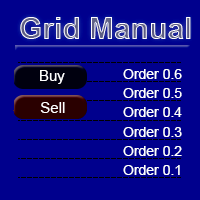
"Grid Manual" é um painel comercial para trabalhar com uma grade de ordens. O utilitário é universal, possui configurações flexíveis e uma interface intuitiva. Ele trabalha com uma grade de ordens não apenas na direção da média das perdas, mas também na direção do aumento dos lucros. O trader não precisa criar e manter uma grade de ordens, tudo será feito pelo ""Grid Manual". Basta abrir um orden e o "Grid manual" criará automaticamente uma grade de ordens para ele e trabalhará com ele até que s
Quant AI Agents
Ho Tuan Thang
5 (1)
Quant AI Agents are independent trading Expert Advisors. Instead of trading using a fixed strategy like other conventional EAs, Quant AI Agents   is a   multi-agent AI trading framework   that turns natural-language strategy prompts into live.  WANT THE SAME RESULTS AS MY LIVE SIGNAL?   Use the exact same brokers I do:   IC MARKETS , IC TRADING   .  Unlike the centralized stock market, Forex has no single, unified price feed.  Every broker sources liquidity from different providers, creating un
EasyInsight AIO MT5
Alain Verleyen
4.92 (12)
EASY Insight AIO – A solução tudo-em-um para trading inteligente e sem esforço Visão geral Imagine analisar todo o mercado — Forex, Ouro, Cripto, Índices e até Ações — em segundos, sem precisar examinar gráficos manualmente, instalar indicadores ou lidar com configurações complicadas. EASY Insight AIO é sua ferramenta definitiva de exportação para trading com IA, pronta para usar. Ela oferece um panorama completo do mercado em um único arquivo CSV limpo — pronto para análise imediata no ChatGP
YuClusters
Yury Kulikov
4.93 (43)
Atenção: A versão demo para revisão e teste está aqui . YuClusters é um sistema profissional de análise de mercado. O trader tem oportunidades únicas para analisar o fluxo de pedidos, volumes de negociação, movimentos de preços usando vários gráficos, perfis, indicadores e objetos gráficos. O YuClusters opera com base em dados de Tempos e Negócios ou informações de ticks, dependendo do que está disponível nas cotações de um instrumento financeiro. O YuClusters permite que você crie gráficos com
EA Portfolio Control & Cloud Monitoring for MetaTrader 5 Your EAs manage trades. KONTROL_01 manages your EAs. A control system for traders running multiple Expert Advisors on the same account. Coordinate EA activity, manage trading risks and monitor your setup remotely. A detailed User Manual is available via DM after purchase. IN PRACTICE Multiple EAs. No coordination. Your EAs trade independently, unaware of each other's activity. KONTROL_01 coordinates them, limits simultaneous activity a
MT5 Trading Deck
Manuel Michiels
5 (2)
One button. One trade. MT5 Trading Deck is a hotkey trading panel for MetaTrader 5 that turns the platform into a keyboard-driven execution cockpit. Stop loss, take profit and lot size are pre-calculated for every key; the moment you press, a market order is live on the broker. A complete technical user manual is attached in the product Comments section. It documents every input parameter, the full hotkey map, the recommended Stream Deck XL layout, and the advanced workflows for Pre-Limit orders
Premium Trade Manager - O Painel de Operações com um Coach Integrado Premium Trade Manager coloca um coach de trading dentro do seu gráfico, com um motor de execução completo por baixo. Configure a operação da forma que sempre faz e deixe o Max, seu coach de trading com IA, ler exatamente esse setup em relação à sua conta ao vivo e dar um veredicto direto antes de confirmar: se o stop é disciplinado, se o risco faz sentido, se há um evento de alto impacto a minutos de distância, se você está pró
Prop Guardian Risk Manager MT5 – Drawdown, Risk & Hedge Protection for Prop Firm and Managed Accounts Prop Guardian Risk Manager is a professional risk-control utility for MetaTrader 5, designed for prop firm traders, money managers and anyone who wants strict account-level risk protection. It does not generate trading signals, strategy entries or trading decisions. Instead, it runs in the background, monitors your account risk and can automatically block new exposure, close managed positions or
EA Auditor
Stephen J Martret
5 (7)
EA Auditor is an independent analysis tool for traders evaluating Expert Advisors and trading signals on MetaTrader 5. It audits backtest reports, reviews posted developer signals, and cross-verifies the two against each other to help traders assess strategies before committing capital. The MQL5 market offers a wide range of Expert Advisors from many developers, with varying approaches, quality, and transparency. EA Auditor provides a consistent, data-driven framework for reviewing them, answer
Filtro:
Sem comentários
Responder ao comentário