NVR Trade Manager
- Utilitários
- Versão: 1.2
- Ativações: 5

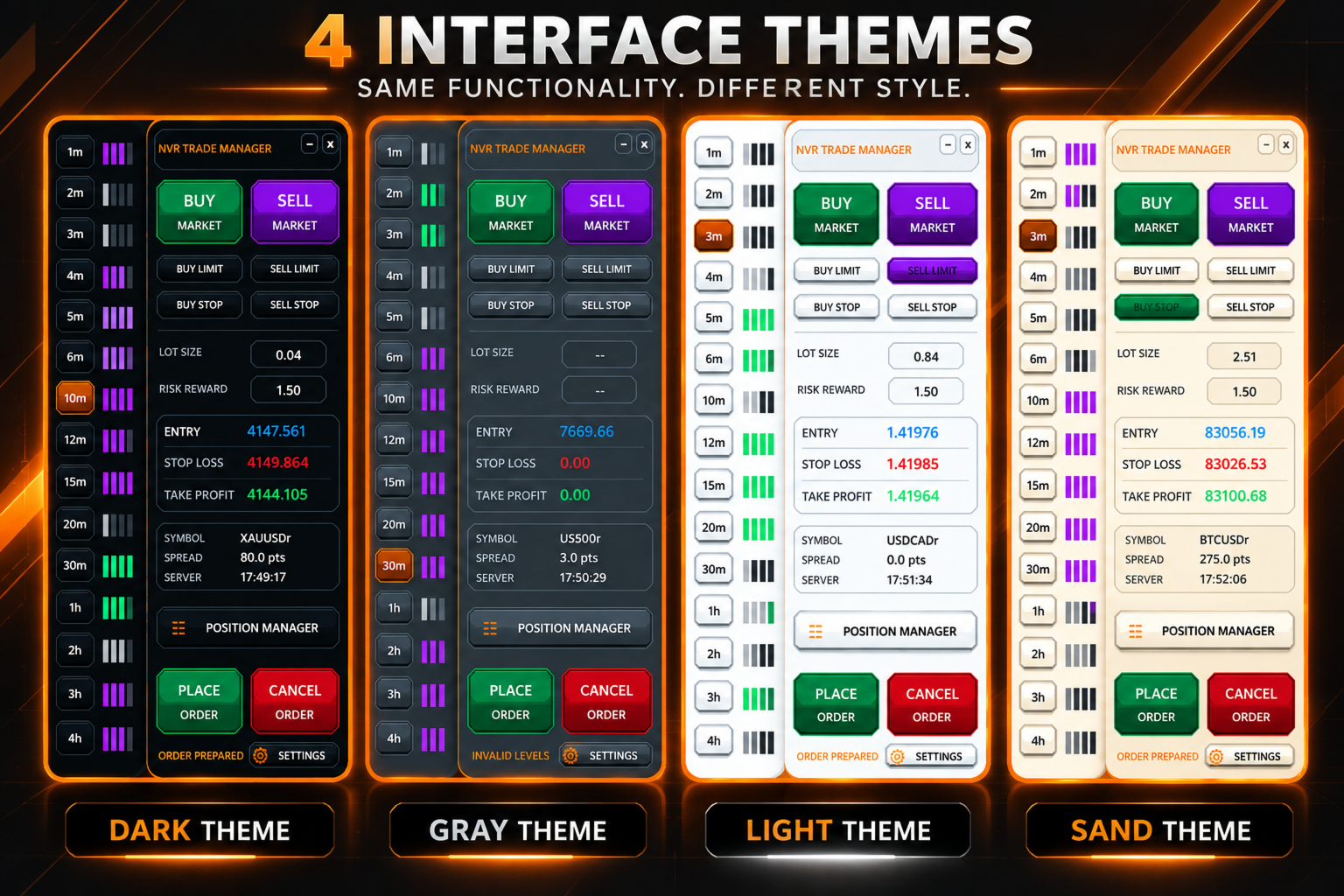
NVR Trade Manager is a professional manual trade management panel for MetaTrader 5. It combines risk calculation, order preparation, visual Entry / Stop Loss / Take Profit management and open-position management in one compact interface.
The product is designed for traders who make their own trading decisions and want to execute them faster and more precisely in MetaTrader 5.
Main Features
• Market orders: Buy Market and Sell Market
• Pending orders: Buy Limit, Sell Limit, Buy Stop and Sell Stop
• Visual trade preparation with draggable Entry, Stop Loss and Take Profit levels
• Automatic position-size calculation based on selected risk and Stop Loss distance
• Three risk modes: Balance, Equity and Fixed
• Automatic Risk/Reward calculation
• Potential loss and profit displayed in USD directly next to the SL and TP levels
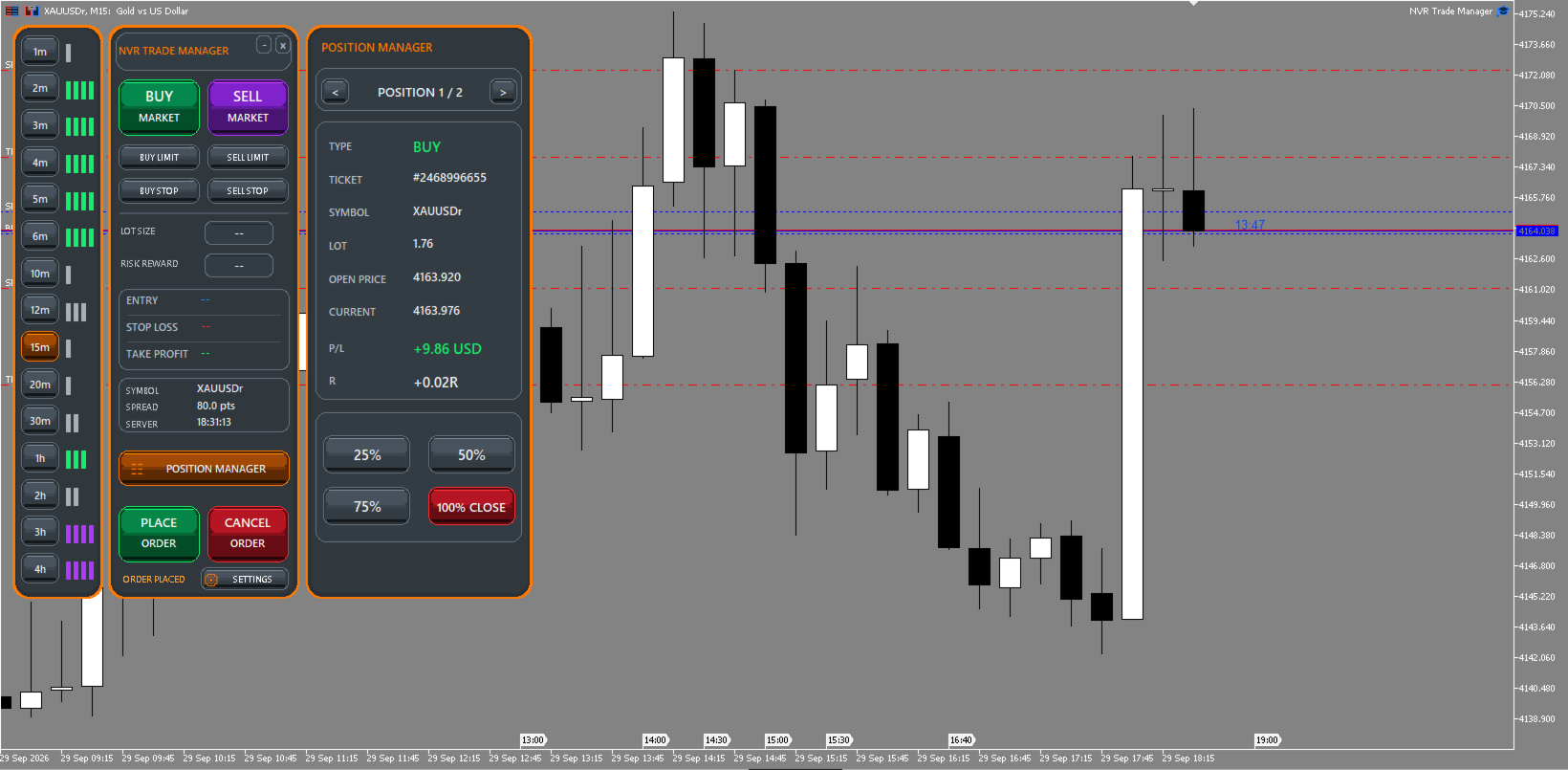
• Position Manager for managing open positions
• Partial closing: 25%, 50%, 75% and 100%
• Navigation between multiple open positions
• Multiple positions can be managed without waiting for a previous position to close
• Free-margin check before an order is sent
• Trading-permission and symbol-restriction checks
• Automatic volume normalization according to the symbol's minimum volume, maximum volume and volume step
• Stop Level and Freeze Level validation
• Four interface themes: Dark, Light, Gray and Sand
• Customizable candle timer
• Quick timeframe navigation panel
• Multi-factor market assessment based on EMA, ADX, Efficiency Ratio and Linear Regression Slope
• Color-coded market state: green for bullish, purple for bearish and gray for neutral/flat conditions
• Multi-segment strength display for quick visual comparison across multiple timeframes
• Individual settings are preserved for each trading symbol
Risk Management
Balance mode calculates position size relative to the current account balance. Equity mode uses current account equity. Fixed mode allows the user to specify a fixed monetary risk amount.
After the Stop Loss level is defined, NVR Trade Manager automatically calculates the appropriate position size using the trading specifications of the current symbol.
Trade Preparation
Select the required order type. Entry, Stop Loss and Take Profit levels will appear on the chart. Move them to the desired prices and NVR Trade Manager will automatically recalculate position size and Risk/Reward. Review the parameters and press Place Order when ready.
Changing the chart timeframe cancels the current order preparation. Select the order type again to create new Entry, Stop Loss and Take Profit levels.
Multi-Timeframe Trend Indication
The timeframe navigation panel includes a visual market-state assessment for each timeframe.
The assessment combines EMA, ADX, Efficiency Ratio and Linear Regression Slope to evaluate the direction, strength and quality of the current price movement. Color and active strength segments provide a quick way to compare market conditions across multiple timeframes without opening additional indicators individually.
This feature is an informational market-analysis tool and does not represent a standalone trading signal.
Position Manager
Position Manager allows you to browse and manage open positions. For the selected position it displays type, ticket, symbol, volume, open price, current price, P/L and R. The position can be closed by 25%, 50%, 75% or 100%.
Important
NVR Trade Manager is an execution and risk-management tool. It is not a trading strategy, does not generate trading signals and does not make trading decisions for the user.
Before using the product on a live account, familiarize yourself with its operation on a demo account. Availability of individual trading operations depends on the symbol specification, account type and broker trading conditions.