FDT Guardian

FDT Guardian — the stop loss MetaTrader doesn't give you

MetaTrader lets you set a stop loss per position. What it doesn't let you set is a loss limit for the account as a whole. And that's precisely the number that matters when you aren't the one opening the trades: when you copy another trader, when several robots are running at once, or simply when you're away from the screen.

FDT Guardian tracks the total floating P/L of your account — every open position across every symbol, swaps and commissions included — and acts the moment that figure reaches the limit you set.

One chart watches the entire account

This is the key difference from similar utilities. FDT Guardian doesn't rely on the ticks of the chart it's attached to. It runs on an internal timer that scans the full account several times per second, whether or not the chart symbol is moving.

Attach it once, to any chart, any symbol, any timeframe. From there it sees everything you have open.

Guardian mode: protection doesn't stop at the first close

Most tools of this kind close your positions and switch off. The problem is that if something keeps opening trades — a copy subscription, a runaway robot — your account fills back up within seconds.

FDT Guardian stays in guardian mode after it fires: every new position that appears is closed immediately. That state holds until you press RESET, and it survives a terminal restart, recompilation and timeframe changes. It never disarms itself.

It tells you when you are NOT protected

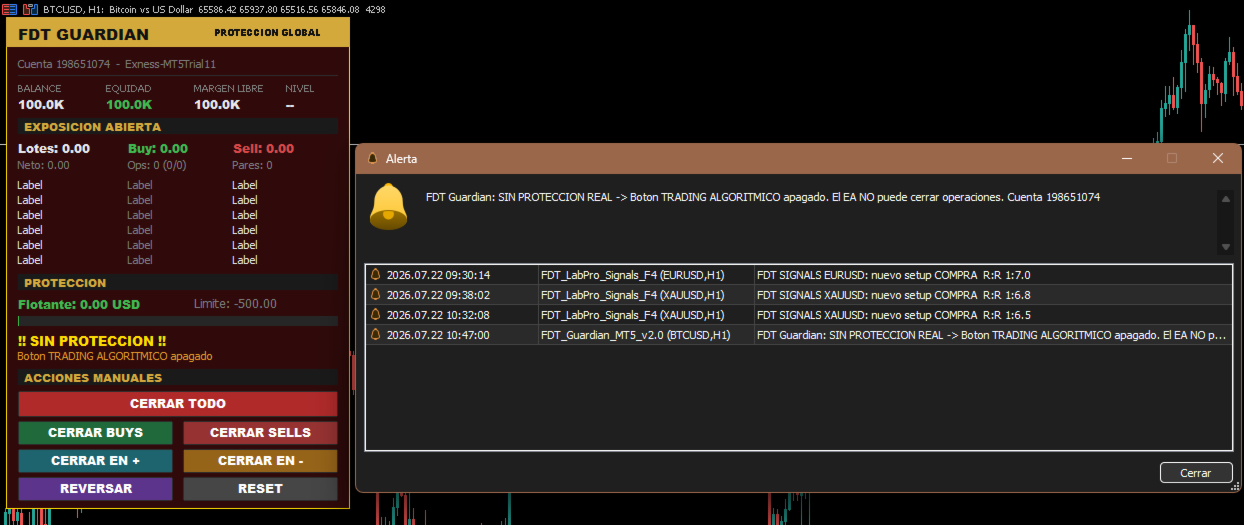
A panel showing "protecting" while algorithmic trading is switched off is worse than no panel at all — it creates a false sense of safety.

FDT Guardian detects the five conditions that would stop it from closing positions:

  • Algorithmic trading button disabled in the terminal
  • Algo trading permission unchecked in the expert's settings
  • Account not permitted to trade by the server
  • Server does not allow expert advisors
  • Terminal disconnected

Whenever any of these occurs, the panel turns to a flashing red warning stating the exact reason, and sends both a platform alert and a push notification to your phone.

An important detail: if the limit is reached while trading is blocked, the expert does not mark itself as triggered, because nothing was actually closed. It keeps alerting, and the instant you enable trading it closes everything. You never end up with losses still open and the expert believing its job is done.

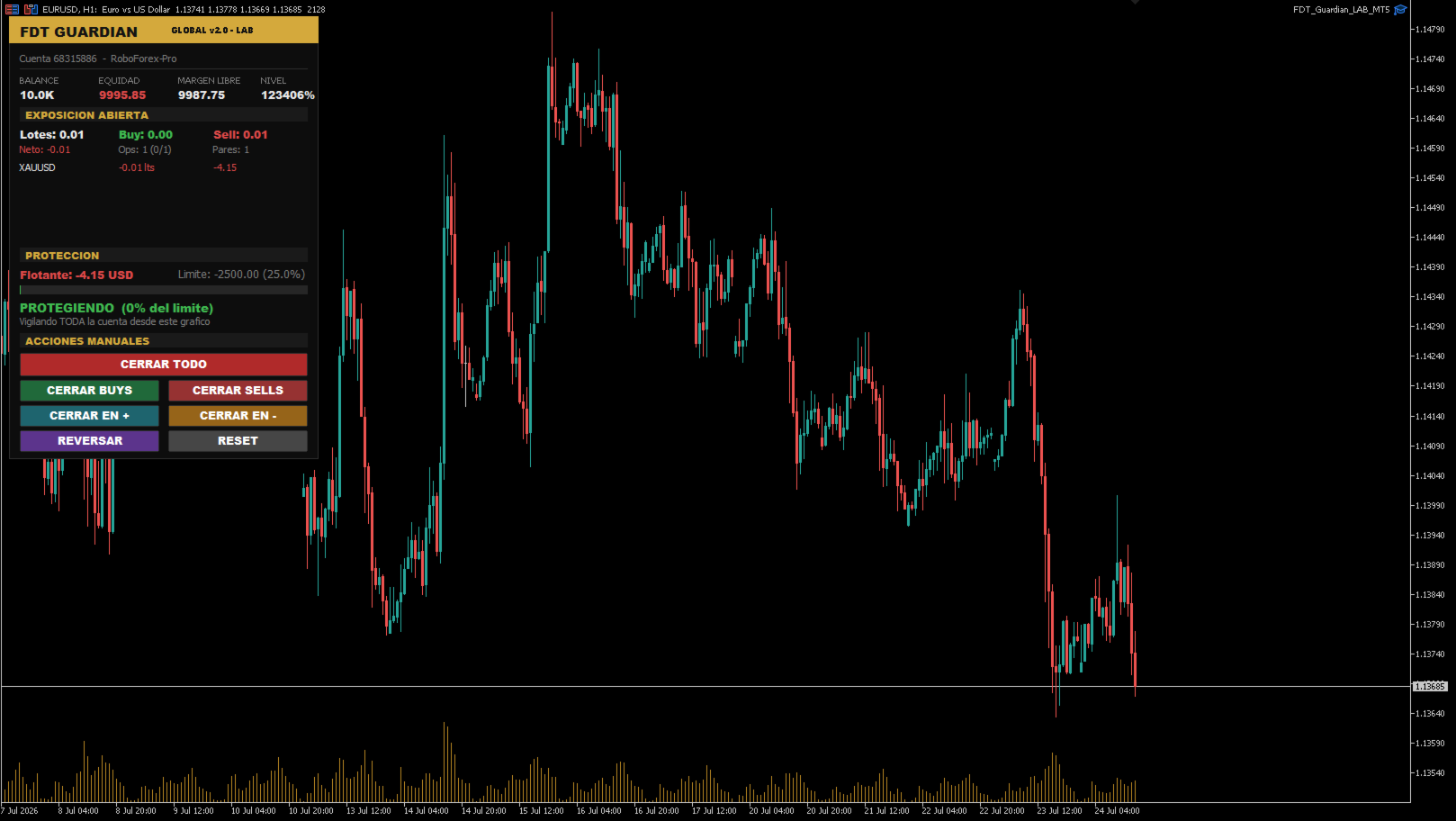
On-chart control panel

Everything about your account in one place, updated in real time:

  • Account status: balance, equity, free margin and margin level
  • Open exposure: total lots, buy/sell breakdown, net volume, position count and symbol count
  • Per-symbol breakdown: net lots and P/L for each pair, sorted worst first, so the symbol bleeding the most is always at the top
  • Limit consumption bar: green, amber or red depending on how far you are from the trigger
  • Protection status showing the percentage of your limit already used

Seven manual actions

Quick-management buttons, all with confirmation prompts:

Button Action
CLOSE ALL Closes every open position on the account
CLOSE BUYS Closes long positions only
CLOSE SELLS Closes short positions only
CLOSE WINNERS Closes positions currently in profit
CLOSE LOSERS Closes positions currently in loss
REVERSE Closes everything and opens the net volume in the opposite direction
RESET Re-arms protection after a trigger

Each one checks that trading is enabled first — if it isn't, it says so on screen instead of failing silently.

REVERSE is the only function that opens positions. It ships disabled by default and always requires explicit confirmation. The positions it creates are unmanaged: no copy provider and no other expert will look after them.

Who it's for

Copy trading accounts. When you copy another trader you inherit their trades but not their risk discipline. You don't know whether they set a stop, whether they'll move it, or how far they're prepared to let a drawdown run. FDT Guardian lets you set your own limit, on your side of the account.

Multi-EA portfolios. If you run five, six or seven robots in parallel, each manages its own risk in isolation and none of them knows what the others are doing. Several moderate simultaneous drawdowns add up to one large drawdown that no expert is watching. FDT Guardian is the missing layer — the one that looks at the total.

Unattended manual trading. A safety limit for positions left open while you're away from the screen.

How to choose your limit

The right limit is not a universal percentage. It depends on how whoever opens the trades in your account actually operates.

If you set a limit below that system's normal drawdown, you aren't protecting it — you'll be cutting trades that would have recovered, paying the spread every time.

The correct reference is the maximum historical drawdown of the trader or expert doing the trading, plus a margin of safety. If the resulting figure exceeds what you're willing to risk, the answer isn't to tighten the limit — it's to reduce your volume until that system's normal drawdown fits inside your tolerance.

Inputs

Protection limit

  • InpMode — Calculation mode: by money or by percentage
  • InpValue — Limit value (account currency or percentage, depending on mode)
  • InpPctBase — Percentage base: current balance or equity at startup

Behaviour

  • InpKeepGuarding — Stay in guardian mode after triggering
  • InpDeletePendings — Also delete pending orders
  • InpMagic — Filter by magic number (0 = all positions)
  • InpTimerMs — Scan interval in milliseconds
  • InpSlippage — Maximum slippage on close, in points

Confirmations and alerts

  • InpConfirmReset — Ask for confirmation before re-arming
  • InpConfirmButtons — Ask for confirmation on the close buttons
  • InpAlertPopup — Show platform alert
  • InpPush — Send push notification to your phone
  • InpPersist — Keep the triggered state after a terminal restart

Trading-disabled warning

  • InpWarnNoAlgo — Warn when the expert is unable to trade
  • InpBlinkWarning — Flashing panel in that state
  • InpReAlertSec — Repeat the warning every X seconds (0 = once only)

Manual actions

  • InpEnableReverse — Enable the REVERSE button (disabled by default)

Panel

  • InpX , InpY — Panel position on the chart

Requirements and usage notes

  • Compatible with both netting and hedging accounts
  • Works on any symbol and any timeframe
  • Attach to one chart only. A single instance covers the entire account; multiple instances simply duplicate the work
  • Algorithmic trading must be enabled. If you run several experts and want to stop them, remove them from their charts rather than switching off that button — it's global and would disable this protection too
  • The terminal must stay open for monitoring to be active. A VPS is recommended for continuous protection
  • Test on a demo account first

Disclaimer

FDT Guardian is a risk management utility. It generates no signals, performs no market analysis and opens no trades of its own (with the sole exception of the REVERSE function, which is disabled by default and manually operated).

It does not guarantee that losses will stop at exactly the configured value: during fast markets, thin liquidity or widened spreads, closing execution may occur at a worse level than expected.

Trading leveraged instruments carries the risk of losing your invested capital.

Produtos recomendados
Quick Trade Panel Pro
Nicolas Olivier Menetrey
5 (1)
Painel de trading one-click com gestão automática de lote e risco Quick Trade Panel Pro é um painel de trading intuitivo projetado para traders que querem executar ordens rapidamente mantendo controle total sobre seu risco. Funcionalidades principais Cálculo automático do tamanho do lote baseado em uma porcentagem da sua margem disponível Stop Loss configurável em pontos, aplicado automaticamente a cada trade Tamanho do lote bloqueado durante uma série de trades para garantir tamanho de posição
FREE
This is a common, simple and easy to use but effective tool to manage trading risks for all traders. It also help trader places stop loss and take profit levels at the same time the order is filled. How to set the expert advisor's parameters to support your trading style? Lots size. Fixed lots size - For traders who prefered to trade with fixed lots size, they can input the lots size in 'User lots' menu in the expert advisor's properties. The input value should be from the 'Minimum Volume' to th
This tool will perform Trailing stop loss and Break even management for orders. Helps you limit or reduce the time spend watching orders on the screen, especially when you need to go to sleep. Just add this EA to 1 chart, you can manage all pairs. You can filter orders by comment, magic number, symbol and order ticket number. When Breakeven it can add shift/offset pips (to cover the commission...). You can try in strategy tester before purchase. The EA will add Buy and Sell alternately, so you
Symbol Manager for MT5
Taras Slobodyanik
5 (3)
Symbol Manager or Grid Manager, designed to group orders into one position (by Symbol or by Magic Number). This utility will be useful to multi-currency traders (many EAs), who can have multiple orders on several pairs. You will be able to see the total number of lots, the total profit, and set virtual stop loss and virtual take profit. To set a real TP (or SL), you must first set the virtual value, and then enter the command in this cell: "set". If you want to set real TP/SL for all orders at
Breakevan Utility
Jose Luis Thenier Villa
BreakEvan Utility  Is a simple tool in a panel with this utilities: This utility will draw a Golden Line in the chart applied showing the breakeven price, considering all the positions opened for that specific symbol. Also the information panel shows: Balance Breakeven Price for that chart Force Breakeven (for that symbol) as ON/OFF Force Breakeven Global (takes into account all trades opened) as ON/OFF Total Lots opened for Symbol Total Lots opened Global And two buttons: Force Breakeven: Whe
Blues Protector
Andtle Austin Dube
Boost your forex profits with Blues Protector, an advanced MQL5 Expert Advisor designed for MetaTrader 5. This automated trading bot dynamically manages your stop-loss levels to secure gains and reduce risks. Blues Protector EA - User Manual   (For MT5 - Ready-to-Use EX5 File)   1. What This EA Does    The Blues Protector EA automatically secures your profits by smartly adjusting stop-loss levels when your trade reaches a predefined profit level. It works silently in the background, protecting
SLTPSetter
Raphael Djangmah Osro Agbo
SLTPSetter - StopLoss Take Profit Setter HOW DOES IT WORK? Risk and account management is a very critical aspect of trading. Before entering a position, you must be fully aware how much you will be willing to loss both in percentage and value. This is where SLTPSetter gets you covered.  All you need to do is attach the indicator on the chart and PRESS BUY OR SELL automatically, all parameters needed for placing the trades will be provided at the top left corner of the screen. Feel free to adjust
Risk Calculator Veqrix
Jose Luis Heredia Padilla
Risk Calculator Veqrix  Risk Calculator Veqrix is a risk calculation, visual trade planning, and manual order execution tool for MetaTrader 5. The EA automatically calculates the trade volume using the configured risk, entry price, and distance to the Stop Loss. It also displays the planned trade directly on the chart and distributes the total volume across up to three Take Profit targets. This tool does not generate trading signals . The user selects the direction, configures the levels, and
FREE
Ao executara ordem, seja ela pela boleta do metatrader no computador ou pelo metatrader no celular, seja ordem manual ou pendente, o Easy Trade irá posicionar os níveis de take profit e stop loss, bem como uma ordem limit e seus respectivos take profit e stop loss de forma automática. Seguindo a estratégia de negociação para abertura de Bolsa (us30, us100,us500) porém, pode ser ultilizada em quaisquer ativo do mercado.
Tyumex Trade Assistant PRO is a trading utility for MT5: open a trade in one click with automatic risk-based lot sizing and a stop loss placed automatically at the candle extremum. The tool removes the three most common manual mistakes: wrong lot size, a missing or badly placed stop, and slow entry. You set the risk as a percent of your balance — everything else is calculated automatically. KEY FEATURES - One-click entry (BUY/SELL) at market or as a limit pending order from the current price
ATR Stop Loss Manager— Smarter Risk Awareness for Forex Traders Confident trading begins with clear risk management. The ATR Stop Loss Expert is a powerful utility tool that automatically adjusts your stop-loss levels using ATR (Average True Range) — a proven volatility measure — so your trades are protected by logic, not guesswork. What This Tool Does This EA monitors your open trades and sets a stop-loss based on recent market volatility, calculated from the ATR indicator. It doesn’t place t
FREE
Automatic Trade Calculation Panel   One-Klick-Trading Automatic calculation of Lot sice Atuomatic calulation of Stop-Loss and TakeProfit Up to 3 partial closings Trailingstop (Stop-Loss moves automatically)   The lot size is calculated by the previously determined risk (e.g. 1.0% of the account size) and the distance of the Stop Loss from the entry point. The distance from the Stop Loss to the entry point results from the ATR indicator multiplied by a freely selectable factor. The Stop Loss and
Core function Intelligent transaction management one-click opening and closing operation, which supports user-defined lots to set multiple closing modes: all closing, closing by direction and closing by profit and loss status. Professional risk control, real-time risk monitoring and spread control to avoid high-cost trading environment. Visual control panel has an intuitive graphical interface, and all functions can be operated with one button to display position information, profit and loss sta
FREE
Golden Gestion TP SL No Limit MT5
Matthias Hubert Patrick Snidaro
Auto SL/TP Manager EA – Gestion Automatique Intelligente Auto SL/TP Manager EA est un Expert Advisor conçu pour automatiser la gestion des commandes avec une efficacité maximale et une grande discrétion. Il gère automatiquement : Le Stop Loss (SL) et le Take Profit (TP) Le Profit Lock (verrouillage progressif des bénéfices) Le Trailing Stop avec plusieurs méthodes avancées L' affichage masqué du SL et du TP pour plus de discrétion (non visible par le courtisan) C'est l'outil idéal pour les
Trade Panel Pro — Terminal Profissional de Gestão de Risco e Execução de Ordens para MetaTrader 5 Trade Panel Pro é uma utilidade avançada de gestão de risco e trading "tudo-em-um" para MetaTrader 5, projetada para traders ativos e profissionais. Combina o cálculo preciso de risco com a execução de ordens extremamente rápida, ajudando-o a proteger o seu capital e a gerir operações com múltiplos objetivos com facilidade. Principais Vantagens e Funcionalidades Cálculo Automático de Lote: Esqu
DDKiller Pro
Njaratahiry Michael Randrianiaina
Stop Blowing Your Account. Once and For All. DDKiller Pro is the MT5 risk guardian that runs silently on your chart and shuts down trading the moment you hit a limit — whether you're grinding a prop firm challenge or managing your own CFD account. The problem every trader knows: You set your rules. You break them anyway. One revenge trade. One overleveraged position. One session that erases a month of gains. DDKiller Pro removes that decision from your hands entirely. What it does: The second yo
Lot calculator tool MT5
Ernestas Kvedaras
3.67 (3)
More stable MetaTrader 4 version is available here:  Lot Calculator Tool . This tool helps you to automatically calculate and manage risk, conveniently place orders visually, schedule orders, trail stops, move them to break-even and more. Features Place market or pending orders using draggable lines Schedule orders Calculate and limit risk using various methods See current spread See time till next candle Set custom order comments Trail stops Move stops to break-even See order profit/loss in p
Lot by Risk MT5
Sergey Vasilev
4.88 (16)
O painel de negociação Lot by Risk é projetado para negociação manual. Este é um meio alternativo para enviar ordens. A primeira característica do painel é a colocação conveniente de ordens usando linhas de controle. A segunda característica é o cálculo do volume da transação de acordo com um determinado risco, se houver uma linha stop loss. As linhas de controle são definidas usando as teclas de atalho: take profit-tecla T padrão; price-tecla padrão P; stop loss - tecla padrão S; Você mesmo
FREE
**Forex Trade Manager Pro MT5** **Trade Manager MT5** é um utilitário abrangente de gerenciamento de negociações para o MetaTrader 5 que oferece controle total sobre todos os aspectos da sua posição, desde o momento em que você planeja uma negociação até o momento em que a encerra. Ele foi desenvolvido para traders que levam o risco a sério, desde o iniciante construindo disciplina até o profissional scalper que precisa de execução instantânea em múltiplas posições. A ferramenta se anexa a qu
Ultimate Pro Trading Panel — All-In-One Manual & Grid Trading Dashboard Pro Trading Panel   is an all-in-one on-chart control panel that gives discretionary and semi-automated traders a complete toolkit for entries, exits, risk management, and grid trading — without leaving the chart. Every function is visual, draggable, and updates in real time. If you want to test this utility feel free to download the basic preview version of this tool here:  https://www.mql5.com/en/market/product/181435 Who
Trader SWORD
Tiofelo Da Olga Gilbert Teles
Trader [SWORD] is a panel EA designed to help the trader [scalper]. From the dashboard, the trader can: set the order volume, stop loss and take profit values [in points]; open a market order with its respective stop loss and take profit values. close all [win only, loss only or win and loss] positions opened through the EA.  On the panel we have:   the buttons to open new market orders [buy and sell];   the buttons to set the order volume [increasing and decreasing de volume order]; the buttons
Professional risk management utility. Auto lot-size calculator + live risk panel. Works alongside any other EA — does not open trades independently. - **Auto lot size**: calculated from % risk per trade + SL distance in pips + balance - **Live dashboard**: Balance | Equity | Drawdown % | Suggested Lot | R:R ratio - **Daily drawdown alert**: notification when daily DD exceeds threshold - **Auto-close option**: closes all positions on daily DD breach (configurable) - Zero trade opening — purely a
Easy Trade Executor é uma ferramenta para cálculo rápido do tamanho da posição, execução de operações e gerenciamento de trades no MT5. Posicione os níveis de Open Price, Stop Loss e Take Profit diretamente no gráfico, obtenha cálculos automáticos do tamanho da posição e abra operações com risco controlado em apenas alguns cliques. Por que escolher o Easy Trade Executor? O Easy Trade Executor foi desenvolvido para traders que desejam mais do que apenas calcular riscos — eles querem gerenciar op
# Zikiman Risk Panel Pro — Gerenciador de risco MT5, calculadora de lote e Trade Manager Zikiman Risk Panel Pro é um EA de gerenciamento de risco para MT5 voltado ao trading manual. Ele reúne em um único fluxo no gráfico um gerenciador de risco para MT5, calculadora de tamanho de lote, calculadora de tamanho de posição, calculadora de risco, painel de negociação, gerenciador de operações e gerenciador de posições. Você escolhe a direção, o risco e os níveis de preço. O painel calcula o lote,
EasyTrade Pro - Painel de Trading Manual para MT5 Opere de forma mais rápida, simples e eficiente com o EasyTrade Pro. EasyTrade Pro é um painel de trading manual leve e intuitivo, desenvolvido para traders que desejam executar operações rapidamente e ter sempre as informações mais importantes do mercado diretamente no gráfico. Sem configurações complicadas. Sem indicadores desnecessários. Apenas as ferramentas que você realmente precisa todos os dias. Recursos Abertura rápida de ordens BUY e
FREE
Nebula Trading Manager
Sina Mohammadamin Shahriari Moghadam
This expert advisor named   TradeManager   provides a manual trading management panel in MetaTrader 5 that allows precise control over open positions. It is designed for traders who want dynamic management of Stop Loss (SL), Take Profit (TP), Break Even (BE), and Partial Close functionality. Key Features: Dynamic Trade Management : Manually set or drag-and-drop SL, TP, and BE levels. Supports partial closing at different profit levels (1:1, 1:1.5, 1:2). Automated Drawing : Automatically draw
PZ Trade Pad MT5
PZ TRADING SLU
4.46 (24)
This simple visual expert advisor allows you to trade easily from the chart. It handles risk management for you and can perform several useful tasks with your existing trades, saving time and making risk-management for each individual trade easier.  [ Installation Guide | Update Guide | Troubleshooting | FAQ | All Products  |  Get Help ] Trade easily from the chart Trade with precise risk management, hassle free Trade pending order with drag and drop price selection Set SL and TP levels with d
FREE
XBOOT BOLETA PRO A ferramenta profissional para operações manuais no MetaTrader 5 A XBOOT Boleta Pro é um painel completo desenvolvido para traders que realizam operações manuais e desejam mais agilidade, organização e controle durante a execução das operações. Muito mais do que uma simples boleta de compra e venda, a XBOOT Boleta Pro reúne em um único painel diversas ferramentas que auxiliam desde a leitura do mercado até o gerenciamento das posições abertas. Seu objetivo é reduzir o tempo gast
Equity Master Stop v2 MT5
Frank William Jr Colbert
Trading tool combining a sophisticated equity stop-loss, dynamic take-profit management (Breakeven & Trailing), and symbol-group-based closing logic. It is a complete risk management and trade supervision tool. Features: All features of `Equity Master Stop v1` (floating profit/loss limits, exit protection, skip hours). Take-Profit Override: Can force a TP on any order to lock in a `MAX_FLOATING_PROFIT`. Step Breakeven: Locks in increasing amounts of profit as a trade moves favorably (e.g., aft
Rhino Backtest Manager - gestor de operações para o trading real e o testador de estratégia Rhino Backtest Manager é um painel de gestão de operações que funciona tanto no trading real quanto no testador de estratégia do MetaTrader 5. Ele permite enviar e gerir ordens manualmente dentro do testador com a mesma interface usada numa conta real, de modo que uma estratégia pode ser verificada em dados históricos e depois negociada sem trocar de ferramenta. O painel calcula o volume da posição a par
Os compradores deste produto também adquirem
Trade Assistant MT5
Evgeniy Kravchenko
4.41 (216)
Ajuda a calcular o risco por comércio, a fácil instalação de uma nova encomenda, gestão de encomendas com funções de fecho parcial, trailing stop de 7 tipos e outras funções úteis. Materiais e instruções adicionais Instruções de instalação   -   Instruções para a aplicação   -   Versão de teste da aplicação para uma conta de demonstração Função de linha Mostra no gráfico a linha de Abertura, Stop Loss, Take Profit. Com esta função é fácil definir uma nova ordem e ver as suas características ad
Bem-vindo ao Trade Manager EA—uma ferramenta de gestão de risco criada para tornar o trading mais intuitivo, preciso e eficiente. Não é apenas uma ferramenta para executar ordens, mas uma solução abrangente para planejamento de operações, gerenciamento de posições e controle de risco. Seja você um iniciante, trader avançado ou scalper que precisa de execução rápida, o Trade Manager EA adapta-se às suas necessidades, oferecendo flexibilidade em todos os mercados, desde forex e índices até commodi
Farmed Hedge Yield Farming | All Markets (Manual - Hybrid - Semi/Automated EA) VERIFIED TRADING RESULTS - Farmed Hedge Yield Axi Copy:  https://www.mql5.com/en/signals/2356376 - Farmed Hedge Yield Exn Copy:   https://www.mql5.com/en/signals/2356404 - Farmed Hedge Yield V Copy:  https://www.mql5.com/en/signals/2357156 * Before purchasing, please feel free to send me a message if you have any questions about the product or setup. - You can test the system using Strategy Tester: Visual Mode , a
Versão Beta O Telegram to MT5 Signal Trader está quase no lançamento oficial da versão alfa. Alguns recursos ainda estão em desenvolvimento e você pode encontrar pequenos erros. Se tiver problemas, por favor reporte, seu feedback ajuda a melhorar o software para todos. Telegram to MT5 Signal Trader é uma ferramenta poderosa que copia automaticamente sinais de trading de canais ou grupos do Telegram diretamente para sua conta MetaTrader 5 . Suporta canais públicos e privados do Telegram, e você
TradePanel MT5
Alfiya Fazylova
4.88 (167)
Trade Panel é um assistente de negociação multifuncional. O aplicativo contém mais de 50 funções de negociação para trading manual e permite automatizar a maioria das tarefas de negociação. Instruções para o aplicativo + vídeo-instruções: https://www.mql5.com/pt/blogs/post/762435 Versão de teste do aplicativo para conta demo: https://www.mql5.com/pt/blogs/post/762547 Como instalar o aplicativo: https://www.mql5.com/pt/blogs/post/762548 Como testar o aplicativo no modo visual: https://www.mql5.co
================================================================================ POC BREAKOUT - V20.72. Full Professional Grade Toolkit ================================================================================ POC Breakout is a full MetaTrader 5 trading dashboard for discretionary traders who want breakout signals, Point of Control (POC) context, volume profiles, order flow, market structure, news, alerts, and advanced trade planning in one professional workspace. Attached directly to you
EA Overfitter
Stephen J Martret
That backtest looks great. But will it still be making money tomorrow, next week, next month? EA Overfitter re-runs your EA on 100 price histories it has never seen. One score tells you if the edge is real. A backtest tells you what an EA did on one price history — the one that happened to occur. What you cannot tell from it is how much of that result was the strategy and how much was the particular path. EA Overfitter answers that. It builds up to 100 synthetic price histories your EA has n
O   Telegram to MT5 Multi-Channel Copier   copia automaticamente os sinais de trading dos seus canais de Telegram diretamente para o MetaTrader 5. Sem bots, sem extensões de navegador, sem copiar à mão. O sinal chega ao Telegram e o EA abre a operação no seu terminal em poucos segundos. O produto inclui dois componentes: um aplicativo de Windows que escuta os seus canais de Telegram, e este Expert Advisor que executa os sinais no seu terminal MT5. Também há uma versão para MT4 disponível   aqui
Astro Trade MT5
Indra Maulana
5 (6)
25% discount on the release of the tool: only for the next 3 buyers Send a message to receive a demo version. AstroTrade Trading Assistant AstroTrade is a comprehensive multi-functional trading utility developed for the MetaTrader 5 platform. It integrates essential tools for trade execution, risk management, and technical monitoring into a single unified interface. The application is designed to assist traders in managing their daily operations through a visual and structured environment. Vi
HINN MagicEntry Extra
ALGOFLOW OÜ
4.74 (19)
HINN MAGIC ENTRY – the ultimate tool for entry and position management! SIMPLE. FASTEST. INTUITIVE. MAX AUTOMATED. Place orders by selecting a level directly on the chart! full description   ::  demo-version  :: 60-sec-video-description Key features: - Market, limit, and pending orders - Automatic lot size calculation - Automatic spread and commission accounting - Unlimited partitial take-profits  - Breakeven and trailing stop-loss and take-profit  functions - Invalidation leves - Intuitive, a
Premium Trade Manager - O Painel de Operações com um Coach Integrado Premium Trade Manager coloca um coach de trading dentro do seu gráfico, com um motor de execução completo por baixo. Configure a operação da forma que sempre faz e deixe o Max, seu coach de trading com IA, ler exatamente esse setup em relação à sua conta ao vivo e dar um veredicto direto antes de confirmar: se o stop é disciplinado, se o risco faz sentido, se há um evento de alto impacto a minutos de distância, se você está pró
Exp COPYLOT CLIENT for MT5
Vladislav Andruschenko
3.97 (35)
Copiador profissional de operações para MetaTrader 5 Um copiador de operações rápido, profissional e confiável para MetaTrader . COPYLOT permite copiar operações de Forex entre terminais MT4 e MT5 com suporte para contas Hedge e Netting . A versão MT5 do COPYLOT oferece suporte a: - MT5 Hedge → MT5 Hedge - MT5 Hedge → MT5 Netting - MT5 Netting → MT5 Hedge - MT5 Netting → MT5 Netting - MT4 → MT5 Hedge - MT4 → MT5 Netting Versão MT4 Descrição completa + DEMO + PDF Como comprar Como instalar Como
Anchor Trade Manager
Kalinskie Gilliam
5 (9)
Your EAs cannot see each other, but Anchor can. Anchor gives you one place to coordinate your EAs, manage risk, and decide when trading is allowed. It works alongside the trading bots you already use without any changes to them. The Problem One EA opens a trade. Then another starts trading. The next thing you know, you wake up to multiple grids built across your account. Each EA may be doing exactly what it was designed to do, but together they can place far more risk on your account than you in
Power Candles Strategy Scanner - Localizador de configurações multissímbolo com auto-otimização O Power Candles Strategy Scanner utiliza o mesmo motor de auto-otimização que alimenta o indicador Power Candles — em todos os símbolos da sua lista de observação, lado a lado. Um painel indica-lhe quais os símbolos que são estatisticamente negociáveis neste momento, qual a estratégia vencedora para cada um, o par ideal de Stop Loss / Take Profit, e avisa-o assim que um novo sinal é emitido. Esta ferr
Grid Manual MT5
Alfiya Fazylova
4.73 (22)
"Grid Manual" é um painel comercial para trabalhar com uma grade de ordens. O utilitário é universal, possui configurações flexíveis e uma interface intuitiva. Ele trabalha com uma grade de ordens não apenas na direção da média das perdas, mas também na direção do aumento dos lucros. O trader não precisa criar e manter uma grade de ordens, tudo será feito pelo ""Grid Manual". Basta abrir um orden e o "Grid manual" criará automaticamente uma grade de ordens para ele e trabalhará com ele até que s
Signal TradingView to MT5 Pro Automator Execução profissional instantânea entre TradingView e MetaTrader 5 Automatize a sua estratégia de trading com a ponte de comunicação mais robusta entre os alertas do TradingView e a execução real no MT5. Concebido para traders que exigem velocidade, flexibilidade e uma gestão de risco impecável, este Expert Advisor transforma qualquer mensagem de alerta numa ordem de mercado ou de limite precisa. PONTOS FORTES E VANTAGENS Motor de Parsing Universal (Propri
The News Filter MT5
Leolouiski Gan
4.78 (23)
Este produto filtra todos os consultores especializados e gráficos manuais durante o horário das notícias, para que você não precise se preocupar com picos de preços repentinos que possam destruir suas configurações de negociação manuais ou negociações realizadas por outros consultores especializados. Este produto também vem com um sistema de gerenciamento de pedidos completo que pode lidar com suas posições abertas e ordens pendentes antes do lançamento de qualquer notícia. Depois de comprar o
Trade Dashboard MT5
Fatemeh Ameri
4.95 (132)
Trade Dashboard simplifies how you open, manage, and control your trades, with built-in lot size calculation. It allows you to execute trades, manage risk, and control positions directly on the chart, with tools such as partial close, breakeven, and trailing stop. Designed to reduce manual work and help you stay focused on your trading decisions. A demo version is available for testing. Detailed explanations of features are provided within the MQL5 platform. Installation instructions are include
Trade Copier Ultimate
Janitha Sandaruwan Amaradasa Wickramasingha Arachchilage
5 (5)
Trade Copier Ultimate - Telegram to MT5 Signal Copier Trade Copier Ultimate automatically copies Telegram trading signals into MetaTrader 5. The EA can read signal messages, detect the symbol, order type, entry price, Stop Loss, Take Profit levels and selected update commands, then execute or manage the trade in MT5 using your lot and risk settings. It is more than a basic Telegram to MT5 copier. TCU also supports Bot API and user-account Bridge workflows, Discord signal routing, local MT5 to MT
FUTURES ORDERFLOW FOOTPRINT CHART Professional OrderFlow EA for MetaTrader 5 Version 1.01| Professional tool for real traders | Institutional-Grade Visualization STRATEGY TESTER USERS - PLEASE SELECT EVERY REAL TICK WHEN TESTING AND YOU HAVE DOWNLOADED HISTORICAL DATA. IF YOU SEE A WAITING SCREEN AND IT IS NOT DOWNLOADING, IT MEANS YOU HAVE LOW HISTORICAL DATA. TRY 1 MIN AND 5 MIN FIRST ON 1 DAY DATA. ONE DAY DATA SHOULD BE THE NEWEST AND MOST CURRENT DATE. PLEASE WAIT UNTIL THE MARKET HAS ROL
Ultimate Extractor
Clifton Creath
5 (8)
Ultimate Extractor - Professional Trading Analytics for MT5 *****this is the local HTML version of Ultimate Extractor. !!!!!it is not compatible with Cloud!!!! For the online version please reach out to me directly****** Ultimate EA manager also now available when you use cloud pro and above for free!! Ultimate Extractor transforms your MetaTrader 5 trading history into actionable insights with comprehensive analytics, interactive charts, and real-time performance tracking. What It Does Automa
Risk Manager Pro MT5 is an account protection Expert Advisor for traders who want strict risk control inside MetaTrader 5. The utility monitors your account equity, daily and weekly results, drawdown, open positions, trade count, consecutive losses, and trading hours. When a configured limit is reached, it can automatically close positions, cancel pending orders, stop other EAs, send notifications, or close the terminal. Instead of relying on discipline during a stressful trading session, you de
Telegram To MT5 Receiver
Levi Dane Benjamin
4.53 (15)
Copie os sinais de qualquer canal do qual você seja membro (incluindo privados e restritos) diretamente para o seu MT5.  Esta ferramenta foi projetada com o usuário em mente, oferecendo muitos recursos que você precisa para gerenciar e monitorar as negociações. Este produto é apresentado em uma interface gráfica fácil de usar e visualmente atraente. Personalize suas configurações e comece a usar o produto em minutos! Guia do usuário + Demo  | Versão MT4 | Versão Discord Se deseja experimentar
Welcome to ENTRY IN THE ZONE WITH SMC MULTI TIMEFRAME Entry In The Zone and SMC Multi Timeframe is a real-time market analysis tool based on Smart Money Concepts (SMC), designed to analyze market structure, price direction, and key trading zones. It supports both Single-Timeframe Analysis and Multi-Timeframe Analysis, providing a clearer view of the overall market structure across multiple timeframes, with real-time BUY / SELL signals that do not repaint. It is designed to help filter trading op
The product will copy all telegram signal to MT5 ( which you are member) , also it can work as remote copier.  Easy to set up, copy order instant, can work with almost signal formats, image signal,  s upport to translate other language to English Work with all type of channel or group, even channel have "Restrict Saving Content", work with  multi channel, multi MT5 Work as remote copier: with signal have ticket number, it will copy exactly via ticket number. Support to backtest signal. How to s
Prop Firm Os
Gayathiri Gopalakrishnan
5 (1)
PROP FIRM OS Structured Trading Assistant for MetaTrader 5 PROP FIRM OS is a structured trading assistant designed for MetaTrader 5 users who prefer rule-based market analysis and organized trading workflows. The Expert Advisor combines market analysis tools, scanner functions, dashboard monitoring, alerts, risk-control settings, and trade management features inside one system. PROP FIRM OS is designed to help traders follow selected rules, filters, and monitoring conditions during trading activ
MT5 to Telegram Signal Provider é uma utilidade fácil de usar e totalmente personalizável que permite o envio de sinais especificados para o chat, canal ou grupo do Telegram, tornando sua conta um fornecedor de sinais . Ao contrário da maioria dos produtos concorrentes, ele não usa importações de DLL. [ Demonstração ] [ Manual ] [ Versão MT4 ] [ Versão Discord ] [ Canal do Telegram ]  New: [ Telegram To MT5 ] Configuração Um guia do usuário passo a passo está disponível. Não é necessário conhec
News Filter EA
Rashed Samir
5 (2)
News Filter EA: Advanced Algo Trading Assistant News Filter EA is an advanced algo trading assistant designed to enhance your trading experience. By using the News Filter EA , you can integrate a Forex economic news filter into your existing expert advisor, even if you do not have access to its source code. In addition to the news filter, you can also specify trading days and hours for your expert. The News Filter EA also includes risk management  and equity protection features. MT4 Version Ma
Trade Manager DashPlus
Henry Lyubomir Wallace
4.85 (13)
DashPlus é uma ferramenta avançada de gerenciamento de operações projetada para melhorar a eficiência e a eficácia das suas transações na plataforma MetaTrader 5. Ela oferece um conjunto completo de funcionalidades, incluindo cálculo de risco, gestão de ordens, sistemas de grade avançados, ferramentas baseadas em gráficos e análise de desempenho. Principais Funcionalidades 1. Grade de Recuperação Implementa um sistema de grade flexível e de média para gerenciar operações em condições adversas de
EA Auditor
Stephen J Martret
5 (5)
EA Auditor is an independent analysis tool for traders evaluating Expert Advisors and trading signals on MetaTrader 5. It audits backtest reports, reviews posted developer signals, and cross-verifies the two against each other to help traders assess strategies before committing capital. The MQL5 market offers a wide range of Expert Advisors from many developers, with varying approaches, quality, and transparency. EA Auditor provides a consistent, data-driven framework for reviewing them, answer
Mais do autor
Bollinger Filter Pro es un Expert Advisor de mean-reversion para EURUSD M15 desarrollado por Fans del Trading LAB. Opera mediante grillas de martingala controlada con apertura en las Bandas de Bollinger, filtro de tendencia ADX, filtro horario y stop loss porcentual. Incluye una segunda grilla paralela (Grid B) con stop loss independiente y equity scaling compuesto. El EA ha sido diseñado para operar de forma completamente automatica en MetaTrader 4. Funciona en cuentas Cent, Standard y Raw Spre
FDT Guardian — the stop loss MetaTrader doesn't give you MetaTrader lets you set a stop loss per order. What it doesn't let you set is a loss limit for the account as a whole . And that's precisely the number that matters when you aren't the one opening the trades: when you copy another trader, when several robots are running at once, or simply when you're away from the screen. FDT Guardian tracks the total floating P/L of your account — every open order across every symbol, swaps and commission
Human opens. Robot manages. Most traders lose money not because they enter badly, but because of what happens after the click. The stop moved too late. The partial nobody took. The position left open over the weekend. The trade that was up 80 pips and closed at break-even because you were asleep. LABPro GOLD does not try to replace your judgement. It is a Trade Manager , not a signal generator. You decide when to enter — from your PC, from MT5 Mobile, from any platform connected to your account
Filtro:
Sem comentários
Responder ao comentário