FDT Guardian

FDT Guardian — the stop loss MetaTrader doesn't give you

MetaTrader lets you set a stop loss per position. What it doesn't let you set is a loss limit for the account as a whole. And that's precisely the number that matters when you aren't the one opening the trades: when you copy another trader, when several robots are running at once, or simply when you're away from the screen.

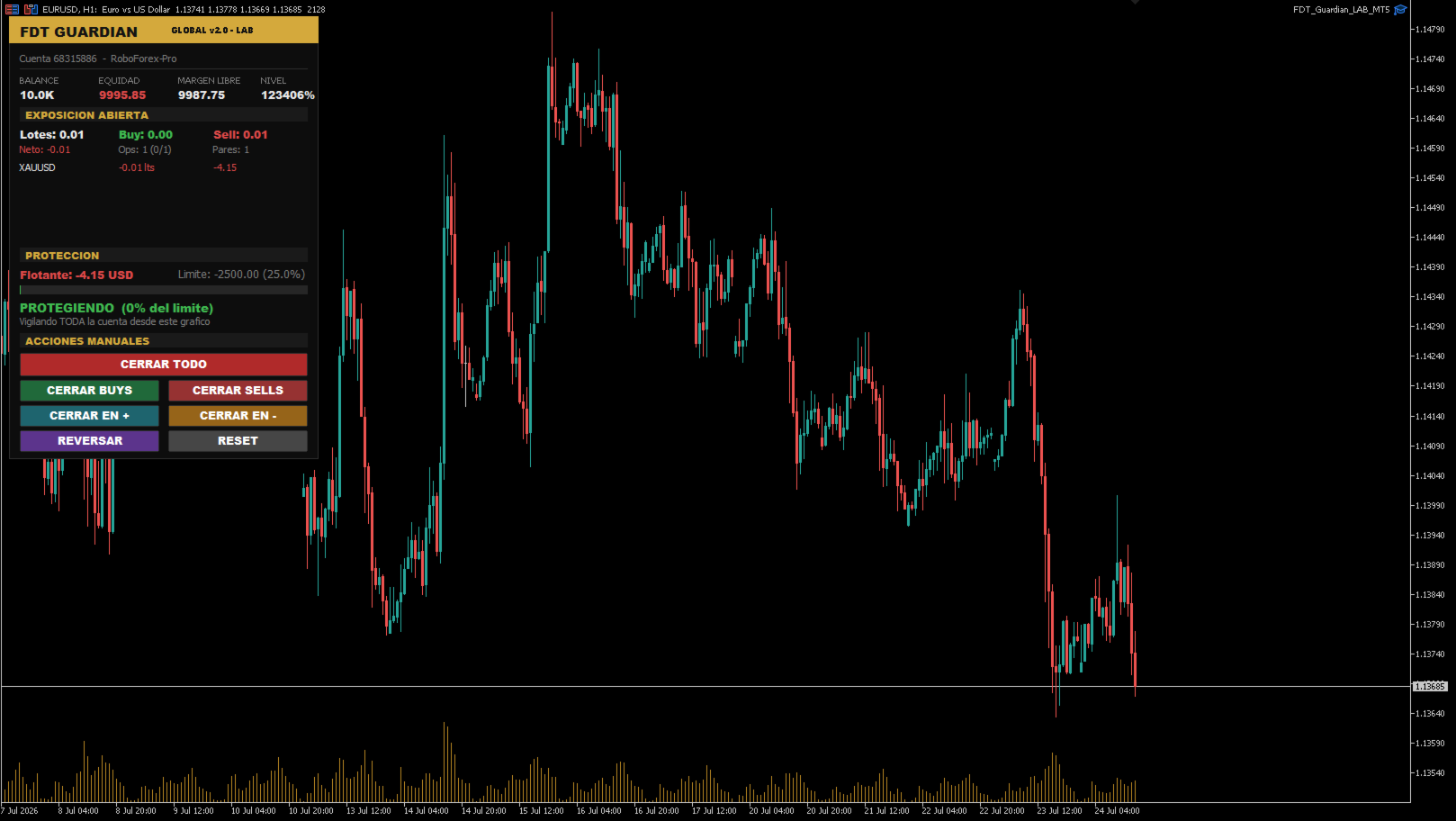
FDT Guardian tracks the total floating P/L of your account — every open position across every symbol, swaps and commissions included — and acts the moment that figure reaches the limit you set.

One chart watches the entire account

This is the key difference from similar utilities. FDT Guardian doesn't rely on the ticks of the chart it's attached to. It runs on an internal timer that scans the full account several times per second, whether or not the chart symbol is moving.

Attach it once, to any chart, any symbol, any timeframe. From there it sees everything you have open.

Guardian mode: protection doesn't stop at the first close

Most tools of this kind close your positions and switch off. The problem is that if something keeps opening trades — a copy subscription, a runaway robot — your account fills back up within seconds.

FDT Guardian stays in guardian mode after it fires: every new position that appears is closed immediately. That state holds until you press RESET, and it survives a terminal restart, recompilation and timeframe changes. It never disarms itself.

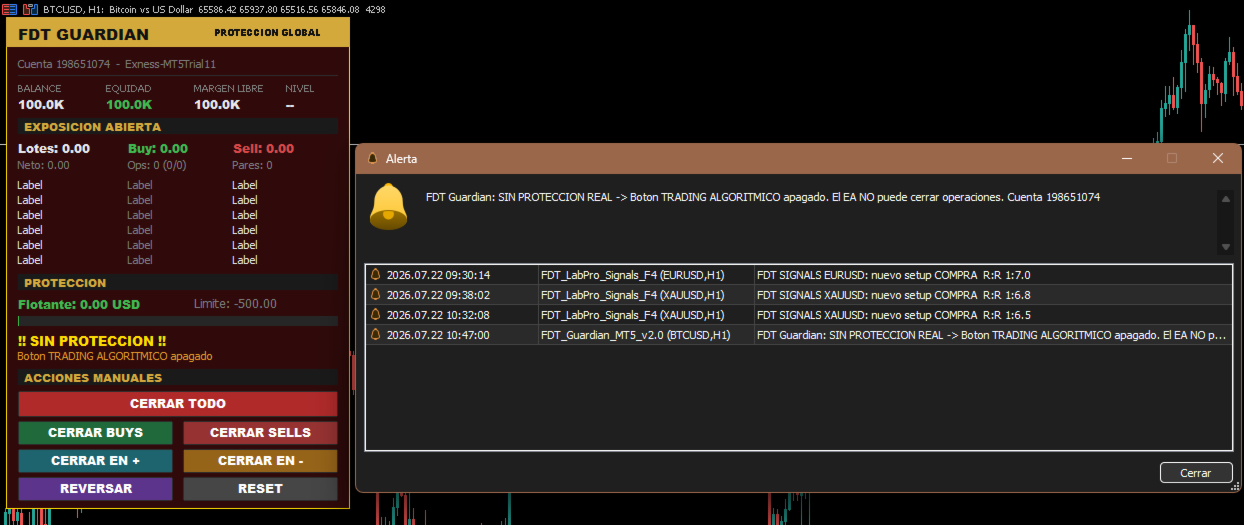
It tells you when you are NOT protected

A panel showing "protecting" while algorithmic trading is switched off is worse than no panel at all — it creates a false sense of safety.

FDT Guardian detects the five conditions that would stop it from closing positions:

  • Algorithmic trading button disabled in the terminal
  • Algo trading permission unchecked in the expert's settings
  • Account not permitted to trade by the server
  • Server does not allow expert advisors
  • Terminal disconnected

Whenever any of these occurs, the panel turns to a flashing red warning stating the exact reason, and sends both a platform alert and a push notification to your phone.

An important detail: if the limit is reached while trading is blocked, the expert does not mark itself as triggered, because nothing was actually closed. It keeps alerting, and the instant you enable trading it closes everything. You never end up with losses still open and the expert believing its job is done.

On-chart control panel

Everything about your account in one place, updated in real time:

  • Account status: balance, equity, free margin and margin level
  • Open exposure: total lots, buy/sell breakdown, net volume, position count and symbol count
  • Per-symbol breakdown: net lots and P/L for each pair, sorted worst first, so the symbol bleeding the most is always at the top
  • Limit consumption bar: green, amber or red depending on how far you are from the trigger
  • Protection status showing the percentage of your limit already used

Seven manual actions

Quick-management buttons, all with confirmation prompts:

Button Action
CLOSE ALL Closes every open position on the account
CLOSE BUYS Closes long positions only
CLOSE SELLS Closes short positions only
CLOSE WINNERS Closes positions currently in profit
CLOSE LOSERS Closes positions currently in loss
REVERSE Closes everything and opens the net volume in the opposite direction
RESET Re-arms protection after a trigger

Each one checks that trading is enabled first — if it isn't, it says so on screen instead of failing silently.

REVERSE is the only function that opens positions. It ships disabled by default and always requires explicit confirmation. The positions it creates are unmanaged: no copy provider and no other expert will look after them.

Who it's for

Copy trading accounts. When you copy another trader you inherit their trades but not their risk discipline. You don't know whether they set a stop, whether they'll move it, or how far they're prepared to let a drawdown run. FDT Guardian lets you set your own limit, on your side of the account.

Multi-EA portfolios. If you run five, six or seven robots in parallel, each manages its own risk in isolation and none of them knows what the others are doing. Several moderate simultaneous drawdowns add up to one large drawdown that no expert is watching. FDT Guardian is the missing layer — the one that looks at the total.

Unattended manual trading. A safety limit for positions left open while you're away from the screen.

How to choose your limit

The right limit is not a universal percentage. It depends on how whoever opens the trades in your account actually operates.

If you set a limit below that system's normal drawdown, you aren't protecting it — you'll be cutting trades that would have recovered, paying the spread every time.

The correct reference is the maximum historical drawdown of the trader or expert doing the trading, plus a margin of safety. If the resulting figure exceeds what you're willing to risk, the answer isn't to tighten the limit — it's to reduce your volume until that system's normal drawdown fits inside your tolerance.

Inputs

Protection limit

  • InpMode — Calculation mode: by money or by percentage
  • InpValue — Limit value (account currency or percentage, depending on mode)
  • InpPctBase — Percentage base: current balance or equity at startup

Behaviour

  • InpKeepGuarding — Stay in guardian mode after triggering
  • InpDeletePendings — Also delete pending orders
  • InpMagic — Filter by magic number (0 = all positions)
  • InpTimerMs — Scan interval in milliseconds
  • InpSlippage — Maximum slippage on close, in points

Confirmations and alerts

  • InpConfirmReset — Ask for confirmation before re-arming
  • InpConfirmButtons — Ask for confirmation on the close buttons
  • InpAlertPopup — Show platform alert
  • InpPush — Send push notification to your phone
  • InpPersist — Keep the triggered state after a terminal restart

Trading-disabled warning

  • InpWarnNoAlgo — Warn when the expert is unable to trade
  • InpBlinkWarning — Flashing panel in that state
  • InpReAlertSec — Repeat the warning every X seconds (0 = once only)

Manual actions

  • InpEnableReverse — Enable the REVERSE button (disabled by default)

Panel

  • InpX , InpY — Panel position on the chart

Requirements and usage notes

  • Compatible with both netting and hedging accounts
  • Works on any symbol and any timeframe
  • Attach to one chart only. A single instance covers the entire account; multiple instances simply duplicate the work
  • Algorithmic trading must be enabled. If you run several experts and want to stop them, remove them from their charts rather than switching off that button — it's global and would disable this protection too
  • The terminal must stay open for monitoring to be active. A VPS is recommended for continuous protection
  • Test on a demo account first

Disclaimer

FDT Guardian is a risk management utility. It generates no signals, performs no market analysis and opens no trades of its own (with the sole exception of the REVERSE function, which is disabled by default and manually operated).

It does not guarantee that losses will stop at exactly the configured value: during fast markets, thin liquidity or widened spreads, closing execution may occur at a worse level than expected.

Trading leveraged instruments carries the risk of losing your invested capital.

Рекомендуем также
Quick Trade Panel Pro
Nicolas Olivier Menetrey
5 (1)
Панель торговли в один клик с автоматическим управлением лотом и риском Quick Trade Panel Pro — это интуитивно понятная торговая панель, разработанная для трейдеров, которые хотят быстро исполнять ордера, сохраняя полный контроль над рисками. Основные функции Автоматический расчёт размера лота на основе процента от доступной маржи Настраиваемый Stop Loss в пунктах, автоматически применяемый к каждой сделке Размер лота фиксируется во время серии сделок для обеспечения постоянного размера позиции
FREE
This is a common, simple and easy to use but effective tool to manage trading risks for all traders. It also help trader places stop loss and take profit levels at the same time the order is filled. How to set the expert advisor's parameters to support your trading style? Lots size. Fixed lots size - For traders who prefered to trade with fixed lots size, they can input the lots size in 'User lots' menu in the expert advisor's properties. The input value should be from the 'Minimum Volume' to th
This tool will perform Trailing stop loss and Break even management for orders. Helps you limit or reduce the time spend watching orders on the screen, especially when you need to go to sleep. Just add this EA to 1 chart, you can manage all pairs. You can filter orders by comment, magic number, symbol and order ticket number. When Breakeven it can add shift/offset pips (to cover the commission...). You can try in strategy tester before purchase. The EA will add Buy and Sell alternately, so you
Менеджер символов или Сеточный менеджер, разработан для группировки ордеров в одну позицию (по символу и по направлению). Эта утилита будет полезна сеточникам и мультивалютникам, тем у кого может быть открыто множество ордеров по нескольким парам. Вы сможете видеть общее количество лотов, общую прибыль, и устанавливать виртуальные стоплосс и тейкпрфит. Для установки реального ТП (или СЛ) необходимо сначала задать виртуальное значение, а затем ввести в этой ячейке команду: "set". Если вы хотите
Breakevan Utility
Jose Luis Thenier Villa
BreakEvan Utility  Is a simple tool in a panel with this utilities: This utility will draw a Golden Line in the chart applied showing the breakeven price, considering all the positions opened for that specific symbol. Also the information panel shows: Balance Breakeven Price for that chart Force Breakeven (for that symbol) as ON/OFF Force Breakeven Global (takes into account all trades opened) as ON/OFF Total Lots opened for Symbol Total Lots opened Global And two buttons: Force Breakeven: Whe
Boost your forex profits with Blues Protector, an advanced MQL5 Expert Advisor designed for MetaTrader 5. This automated trading bot dynamically manages your stop-loss levels to secure gains and reduce risks. Blues Protector EA - User Manual   (For MT5 - Ready-to-Use EX5 File)   1. What This EA Does    The Blues Protector EA automatically secures your profits by smartly adjusting stop-loss levels when your trade reaches a predefined profit level. It works silently in the background, protecting
SLTPSetter
Raphael Djangmah Osro Agbo
SLTPSetter - StopLoss Take Profit Setter HOW DOES IT WORK? Risk and account management is a very critical aspect of trading. Before entering a position, you must be fully aware how much you will be willing to loss both in percentage and value. This is where SLTPSetter gets you covered.  All you need to do is attach the indicator on the chart and PRESS BUY OR SELL automatically, all parameters needed for placing the trades will be provided at the top left corner of the screen. Feel free to adjust
Risk Calculator Veqrix
Jose Luis Heredia Padilla
Risk Calculator Veqrix  Risk Calculator Veqrix is a risk calculation, visual trade planning, and manual order execution tool for MetaTrader 5. The EA automatically calculates the trade volume using the configured risk, entry price, and distance to the Stop Loss. It also displays the planned trade directly on the chart and distributes the total volume across up to three Take Profit targets. This tool does not generate trading signals . The user selects the direction, configures the levels, and
FREE
When executing an order, whether through the Metatrader ticket on a computer or the Metatrader app on a mobile device, either manual or pending, Easy Trade will automatically set the take profit and stop loss levels, as well as a limit order with its respective take profit and stop loss levels. It follows the trading strategy for market open (US30, US100, US500), but it can be applied to any market asset.
Tyumex Trade Assistant PRO — торговый помощник (утилита) для MT5: открытие сделки в один клик с автоматическим расчётом лота от риска и стоп-лоссом под экстремум свечи. Утилита убирает три самые частые ручные ошибки трейдера: неверный размер лота, забытый или криво выставленный стоп и медленный вход. Вы задаёте риск в процентах от депозита — всё остальное считается автоматически. ОСНОВНЫЕ ВОЗМОЖНОСТИ — Вход в один клик (BUY/SELL) по рынку или лимитной отложкой от текущей цены. — Автоматическ
ATR Stop Loss Manager— Smarter Risk Awareness for Forex Traders Confident trading begins with clear risk management. The ATR Stop Loss Expert is a powerful utility tool that automatically adjusts your stop-loss levels using ATR (Average True Range) — a proven volatility measure — so your trades are protected by logic, not guesswork. What This Tool Does This EA monitors your open trades and sets a stop-loss based on recent market volatility, calculated from the ATR indicator. It doesn’t place t
FREE
Automatic Trade Calculation Panel   One-Klick-Trading Automatic calculation of Lot sice Atuomatic calulation of Stop-Loss and TakeProfit Up to 3 partial closings Trailingstop (Stop-Loss moves automatically)   The lot size is calculated by the previously determined risk (e.g. 1.0% of the account size) and the distance of the Stop Loss from the entry point. The distance from the Stop Loss to the entry point results from the ATR indicator multiplied by a freely selectable factor. The Stop Loss and
Core function Intelligent transaction management one-click opening and closing operation, which supports user-defined lots to set multiple closing modes: all closing, closing by direction and closing by profit and loss status. Professional risk control, real-time risk monitoring and spread control to avoid high-cost trading environment. Visual control panel has an intuitive graphical interface, and all functions can be operated with one button to display position information, profit and loss sta
FREE
Golden Gestion TP SL No Limit MT5
Matthias Hubert Patrick Snidaro
Auto SL/TP Manager EA – Gestion Automatique Intelligente Auto SL/TP Manager EA est un Expert Advisor conçu pour automatiser la gestion des commandes avec une efficacité maximale et une grande discrétion. Il gère automatiquement : Le Stop Loss (SL) et le Take Profit (TP) Le Profit Lock (verrouillage progressif des bénéfices) Le Trailing Stop avec plusieurs méthodes avancées L' affichage masqué du SL et du TP pour plus de discrétion (non visible par le courtisan) C'est l'outil idéal pour les
Trade Panel Pro — Профессиональный терминал управления рисками и исполнения ордеров для MetaTrader 5 Trade Panel Pro — это продвинутая и универсальная утилита для MetaTrader 5, созданная для активных дейтрейдеров и профессионалов. Она объединяет в себе точный расчет рисков и молниеносное исполнение ордеров, помогая защищать капитал и легко управлять сделками с несколькими целями. Главные преимущества и ключевые особенности Автоматический расчет лота: Забудьте о ручных расчетах объема! Панел
DDKiller Pro
Njaratahiry Michael Randrianiaina
Stop Blowing Your Account. Once and For All. DDKiller Pro is the MT5 risk guardian that runs silently on your chart and shuts down trading the moment you hit a limit — whether you're grinding a prop firm challenge or managing your own CFD account. The problem every trader knows: You set your rules. You break them anyway. One revenge trade. One overleveraged position. One session that erases a month of gains. DDKiller Pro removes that decision from your hands entirely. What it does: The second yo
Lot calculator tool MT5
Ernestas Kvedaras
3.67 (3)
More stable MetaTrader 4 version is available here:  Lot Calculator Tool . This tool helps you to automatically calculate and manage risk, conveniently place orders visually, schedule orders, trail stops, move them to break-even and more. Features Place market or pending orders using draggable lines Schedule orders Calculate and limit risk using various methods See current spread See time till next candle Set custom order comments Trail stops Move stops to break-even See order profit/loss in p
Lot by Risk MT5
Sergey Vasilev
4.88 (16)
Торговая панель Lot by Risk предназначена для торговли вручную . Это альтернативное средство для отправки ордеров. Первая особенность панели –   удобное выставление ордеров при помощи контрольных линий. Вторая особенность – расчёт объёма сделки по заданному риску при наличии линии stop loss . Контрольные линии выставляются при помощи горячих клавиш: take profit – по умолчанию клавиша T ; price – по умолчанию клавиша P ; stop loss – по умолчанию клавиша S ; Настроить клавиши можно самостоятельно
FREE
**Forex Trade Manager Pro MT5** **Trade Manager MT5** — это многофункциональная утилита для управления торговлей в MetaTrader 5, которая предоставляет вам полный контроль над каждым аспектом вашей позиции: от момента планирования сделки до её закрытия. Она создана для трейдеров, которые серьезно относятся к риску, — от новичков, вырабатывающих дисциплину, до профессионалов-скальперов, которым нужно мгновенное исполнение по множеству позиций. Инструмент прикрепляется к любому графику и отображ
Ultimate Pro Trading Panel — All-In-One Manual & Grid Trading Dashboard Pro Trading Panel   is an all-in-one on-chart control panel that gives discretionary and semi-automated traders a complete toolkit for entries, exits, risk management, and grid trading — without leaving the chart. Every function is visual, draggable, and updates in real time. If you want to test this utility feel free to download the basic preview version of this tool here:  https://www.mql5.com/en/market/product/181435 Who
Trader SWORD
Tiofelo Da Olga Gilbert Teles
Trader [SWORD] is a panel EA designed to help the trader [scalper]. From the dashboard, the trader can: set the order volume, stop loss and take profit values [in points]; open a market order with its respective stop loss and take profit values. close all [win only, loss only or win and loss] positions opened through the EA.  On the panel we have:   the buttons to open new market orders [buy and sell];   the buttons to set the order volume [increasing and decreasing de volume order]; the buttons
Утилита профессионального риск-менеджмента. Расчёт лота и панель рисков в реальном времени. Работает совместно с любым советником — самостоятельно сделки не открывает. - Автоматический расчёт лота: % риска + расстояние SL + баланс - Панель: Баланс | Эквити | Просадка % | Рекомендуемый лот | R:R - Оповещение о дневной просадке + авто-закрытие (опционально) ️ При включении Auto_Close закрывает все позиции при достижении порога просадки. Sabino Gervasio — sabbonzo.gumroad.com
Easy Trade Executor — инструмент для быстрого расчета лота, открытия и сопровождения сделок в MT5. Размещайте уровни Open Price, Stop Loss и Take Profit прямо на графике, получайте автоматический расчет объема позиции и открывайте сделки с контролируемым риском всего за несколько кликов. Почему Easy Trade Executor? Easy Trade Executor создан для трейдеров, которые хотят не только рассчитывать риск, но и быстро управлять сделками на графике. Инструмент объединяет расчет позиции, открытие ордеро
# Zikiman Risk Panel Pro — риск-менеджер MT5, калькулятор лота и Trade Manager Zikiman Risk Panel Pro — советник для управления риском в MT5, созданный для ручной торговли. Он объединяет в одном интерфейсе на графике риск-менеджер для MT5, калькулятор лота, калькулятор размера позиции, калькулятор риска, торговую панель, менеджер сделок и менеджер позиций. Направление, риск и ценовые уровни выбираете вы. Панель рассчитывает объём позиции, показывает планируемый риск и потенциальную прибыль, о
EasyTrade Pro - Панель для Ручной Торговли MT5 Торгуйте быстрее, проще и эффективнее с EasyTrade Pro. EasyTrade Pro — это лёгкая и удобная панель для ручной торговли, созданная для трейдеров, которым нужны быстрые сделки и вся важная рыночная информация прямо на графике. Никаких сложных настроек. Никаких лишних индикаторов. Только инструменты, которые действительно нужны каждый день. Возможности Быстрое открытие BUY и SELL Кнопка закрытия всех позиций Настраиваемые Stop Loss и Take Profit
FREE
Nebula Trading Manager
Sina Mohammadamin Shahriari Moghadam
This expert advisor named   TradeManager   provides a manual trading management panel in MetaTrader 5 that allows precise control over open positions. It is designed for traders who want dynamic management of Stop Loss (SL), Take Profit (TP), Break Even (BE), and Partial Close functionality. Key Features: Dynamic Trade Management : Manually set or drag-and-drop SL, TP, and BE levels. Supports partial closing at different profit levels (1:1, 1:1.5, 1:2). Automated Drawing : Automatically draw
PZ Trade Pad MT5
PZ TRADING SLU
4.46 (24)
Утилита PZ Trade Pad позволяет торговать с помощью панели прямо на ценовом графике. Продукт имеет встроенное управление риском и может работать с уже открытыми сделками. Возможность совершать сделки прямо на ценовом графике Управление капиталом Возможность установки стоп-уровней Закрытие всех открытых сделок в один клик Удаление всех отложенных ордеров в один клик Частичное закрытие прибыльных сделок в один клик Без входных параметров. Использование Утилита проста в использовании. Выберите знач
FREE
XBOOT BOLETA PRO Professional Manual Trading Panel for MetaTrader 5 XBOOT Boleta Pro is a complete trading panel designed for traders who execute manual trades and want greater speed, organization, and control during every trading session. More than a standard Buy and Sell panel, XBOOT Boleta Pro combines powerful trading tools into a single interface, helping traders analyze the market, manage risk, execute orders, and monitor trading performance without leaving the chart. Its purpose is to sim
Trading tool combining a sophisticated equity stop-loss, dynamic take-profit management (Breakeven & Trailing), and symbol-group-based closing logic. It is a complete risk management and trade supervision tool. Features: All features of `Equity Master Stop v1` (floating profit/loss limits, exit protection, skip hours). Take-Profit Override: Can force a TP on any order to lock in a `MAX_FLOATING_PROFIT`. Step Breakeven: Locks in increasing amounts of profit as a trade moves favorably (e.g., aft
Rhino Backtest Manager - менеджер сделок для реальной торговли и тестера стратегий Rhino Backtest Manager - это торговая панель, которая работает как в реальной торговле, так и в тестере стратегий MetaTrader 5. Она позволяет выставлять и сопровождать ордера вручную внутри тестера в том же интерфейсе, что и на реальном счёте, поэтому стратегию можно проверить на истории и затем торговать, не меняя инструмент. Панель рассчитывает объём позиции по заданным параметрам риска, показывает денежную сто
С этим продуктом покупают
Trade Assistant MT5
Evgeniy Kravchenko
4.41 (216)
Помогает рассчитать риск на сделку, простая установка нового ордера с помощью линий, управление ордерами с функциями частичного закрытия, 7 типов трейлинг-стопа и другие полезные функции. Дополнительные материалы и инструкции Инструкция по установке - Инструкция к приложению - Пробная версия приложения для демо счета Функция Линии   - отображает на графике линию открытия, стоп-лосс, тейк-профит. С помощью этой функции легко установить новый ордер и увидеть его дополнительные характеристики пе
Добро пожаловать в Trade Manager EA — лучший инструмент для управления рисками, предназначенный для упрощения, точности и эффективности торговли. Это не просто инструмент для размещения ордеров; это комплексное решение для удобного планирования торгов, управления позициями и усиленного контроля над рисками. Независимо от того, начинающий вы трейдер, опытный специалист или скальпер, нуждающийся в быстром исполнении, Trade Manager EA адаптируется к вашим потребностям и работает с любыми активами:
Farmed Hedge Yield Farming | All Markets (Manual - Hybrid - Semi/Automated EA) VERIFIED TRADING RESULTS - Farmed Hedge Yield Axi Copy:  https://www.mql5.com/en/signals/2356376 - Farmed Hedge Yield Exn Copy:   https://www.mql5.com/en/signals/2356404 - Farmed Hedge Yield V Copy:  https://www.mql5.com/en/signals/2357156 * Before purchasing, please feel free to send me a message if you have any questions about the product or setup. - You can test the system using Strategy Tester: Visual Mode , a
Бета-версия Telegram to MT5 Signal Trader почти готов к официальному альфа-релизу. Некоторые функции все еще находятся в разработке, и вы можете столкнуться с небольшими ошибками. Если вы заметите проблемы, пожалуйста, сообщите о них, ваша обратная связь помогает улучшать программное обеспечение для всех. Telegram to MT5 Signal Trader — мощный инструмент, который автоматически копирует торговые сигналы из каналов и групп Telegram прямо в ваш счёт MetaTrader 5 . Поддерживаются как публичные, так
TradePanel MT5
Alfiya Fazylova
4.88 (167)
Trade Panel — это многофункциональный торговый помощник. Приложение содержит более 50 торговых функций для ручной торговли и позволяет автоматизировать большинство торговых операций. Инструкция к приложению + видео-инструкции: https://www.mql5.com/ru/blogs/post/756476 Пробная версия приложения для демо-счета: https://www.mql5.com/ru/blogs/post/750864 Как установить приложение: https://www.mql5.com/ru/blogs/post/750096 Как тестировать приложение в визуальном режиме: https://www.mql5.com/ru/blogs/
================================================================================ POC BREAKOUT - V20.72. Full Professional Grade Toolkit ================================================================================ POC Breakout is a full MetaTrader 5 trading dashboard for discretionary traders who want breakout signals, Point of Control (POC) context, volume profiles, order flow, market structure, news, alerts, and advanced trade planning in one professional workspace. Attached directly to you
Бэктест выглядит отлично. Но будет ли советник зарабатывать завтра, через неделю, через месяц? EA Overfitter прогоняет вашего советника по 100 историям цены, которых он никогда не видел. Одна оценка показывает, реально ли преимущество. Бэктест показывает, что советник сделал на одной истории цены — на той, которая случайно произошла. Из него невозможно понять, какая часть результата была заслугой стратегии, а какая — конкретного пути цены. EA Overfitter отвечает на этот вопрос. Он строит до 10
Telegram to MT5 Multi-Channel Copier   automatically copies trading signals from your Telegram channels straight to MetaTrader 5. No bots, no browser extensions, no manual copying. A signal arrives in Telegram and the EA opens the trade in your terminal within seconds. The product has two components: a Windows application that listens to your Telegram channels, and this Expert Advisor that executes the signals in your MT5 terminal. An MT4 version is also available   here . Setup guide and appli
Astro Trade MT5
Indra Maulana
5 (6)
25% discount on the release of the tool: only for the next 3 buyers Send a message to receive a demo version. AstroTrade Trading Assistant AstroTrade is a comprehensive multi-functional trading utility developed for the MetaTrader 5 platform. It integrates essential tools for trade execution, risk management, and technical monitoring into a single unified interface. The application is designed to assist traders in managing their daily operations through a visual and structured environment. Vi
HINN MAGIC ENTRY - лучший инструмент для входа и менеджмента позиций! ПРОСТО. БЫСТРО. ИНТУИТИВНО. МАКСИМАЛЬНО АВТОМАТИЗИРОВАНО. Выставляет ордера через выбор уровня на графике! полное описание    ::    demo-версия    ::   60-sec-video-description Основные функции: - Рыночные, лимитные и отложенные ордера -  Автоматический подсчет лоттажа  -  Автоматический учет спреда и комиссий -  Неограниченное количество промежуточных тейков для позиций - Перевод в безубыток и трейл стоп-лосса и тейк-проф
Premium Trade Manager - Торговая панель со встроенным коучем Premium Trade Manager помещает торгового коуча прямо в ваш график, а под ним работает полноценный движок исполнения. Настройте сделку так, как вы всегда это делаете, затем позвольте Max, вашему ИИ-наставнику по трейдингу, прочитать именно эту настройку с учётом вашего живого счёта и дать чёткое заключение до того, как вы входите: соответствует ли стоп дисциплинированному подходу, разумен ли риск, не выходит ли высоковолатильный релиз ч
Exp COPYLOT CLIENT for MT5
Vladislav Andruschenko
3.97 (35)
Профессиональный копировщик сделок для MetaTrader 5 Быстрый, профессиональный и надежный копировщик сделок для MetaTrader . COPYLOT позволяет копировать сделки Forex между терминалами MT4 и MT5 с поддержкой счетов Hedge и Netting . Версия COPYLOT для MT5 поддерживает: - MT5 Hedge → MT5 Hedge - MT5 Hedge → MT5 Netting - MT5 Netting → MT5 Hedge - MT5 Netting → MT5 Netting - MT4 → MT5 Hedge - MT4 → MT5 Netting Версия MT4 Полное описание + DEMO + PDF Как купить Как установить Как получить файлы жур
Anchor Trade Manager
Kalinskie Gilliam
5 (8)
Anchor: The EA Manager Your EAs cannot see each other, but Anchor can. Anchor gives you one place to coordinate your EAs, manage risk, and decide when trading is allowed. It works alongside the trading bots you already use without any changes to them. The Problem One EA opens a trade. Then another starts trading. The next thing you know, you wake up to multiple grids built across your account. Each EA may be doing exactly what it was designed to do, but together they can place far more risk on y
Power Candles Strategy Scanner — самооптимизирующийся инструмент для поиска настроек по нескольким инструментам Power Candles Strategy Scanner использует тот же самооптимизирующийся движок, что и индикатор Power Candles — для всех символов в вашем Market Watch, одновременно. На одной панели отображается информация о том, какие символы в данный момент являются статистически торгуемыми, какая стратегия выигрывает на каждом из них, оптимальная пара Stop Loss / Take Profit, а также отправляется увед
Grid Manual MT5
Alfiya Fazylova
4.73 (22)
Grid Manual — это торговая панель для работы с сеточными стратегиями. Утилита универсальная, имеет гибкие настройки и понятный интерфейс. Работает с сеткой ордеров не только в сторону усреднения убытков, но и в сторону наращивания прибыли. Трейдеру не нужно создавать и сопровождать сетку ордеров, это сделает утилита. Достаточно открыть ордер и Grid manual автоматически создаст ему сетку ордеров и будет сопровождать его до самого закрытия. Полная инструкция и демо-версия здесь . Основные особенно
Signal TradingView to MT5 Pro Automator Мгновенное профессиональное исполнение между TradingView и MetaTrader 5 Автоматизируйте свою торговую стратегию с помощью самого надежного моста связи между алертами TradingView и реальным исполнением в MT5. Разработанный для трейдеров, которым требуются скорость, гибкость и безупречное управление рисками, этот советник (Expert Advisor) превращает любое сообщение с алертом в точный рыночный или лимитный ордер. ПРЕИМУЩЕСТВА И СИЛЬНЫЕ СТОРОНЫ Универсальный д
The News Filter MT5
Leolouiski Gan
4.78 (23)
Этот продукт фильтрует всех экспертных советников и ручные графики во время новостей, так что вам не нужно беспокоиться о внезапных скачках цены, которые могут разрушить ваши ручные торговые настройки или сделки, введенные другими экспертными советниками. Этот продукт также поставляется с полной системой управления ордерами, которая может обрабатывать ваши открытые позиции и ордера на ожидание перед выпуском новостей. После покупки   The News Filter   вам больше не придется полагаться на встроен
Trade Dashboard MT5
Fatemeh Ameri
4.95 (132)
Trade Dashboard simplifies how you open, manage, and control your trades, with built-in lot size calculation. It allows you to execute trades, manage risk, and control positions directly on the chart, with tools such as partial close, breakeven, and trailing stop. Designed to reduce manual work and help you stay focused on your trading decisions. A demo version is available for testing. Detailed explanations of features are provided within the MQL5 platform. Installation instructions are include
Trade Copier Ultimate
Janitha Sandaruwan Amaradasa Wickramasingha Arachchilage
5 (5)
Trade Copier Ultimate - Telegram to MT5 Signal Copier Trade Copier Ultimate automatically copies Telegram trading signals into MetaTrader 5. The EA can read signal messages, detect the symbol, order type, entry price, Stop Loss, Take Profit levels and selected update commands, then execute or manage the trade in MT5 using your lot and risk settings. It is more than a basic Telegram to MT5 copier. TCU also supports Bot API and user-account Bridge workflows, Discord signal routing, local MT5 to MT
FUTURES ORDERFLOW FOOTPRINT CHART Professional OrderFlow EA for MetaTrader 5 Version 1.01| Professional tool for real traders | Institutional-Grade Visualization STRATEGY TESTER USERS - PLEASE SELECT EVERY REAL TICK WHEN TESTING AND YOU HAVE DOWNLOADED HISTORICAL DATA. IF YOU SEE A WAITING SCREEN AND IT IS NOT DOWNLOADING, IT MEANS YOU HAVE LOW HISTORICAL DATA. TRY 1 MIN AND 5 MIN FIRST ON 1 DAY DATA. ONE DAY DATA SHOULD BE THE NEWEST AND MOST CURRENT DATE. PLEASE WAIT UNTIL THE MARKET HAS ROL
Ultimate Extractor - Professional Trading Analytics for MT5 *****this is the local HTML version of Ultimate Extractor. !!!!!it is not compatible with Cloud!!!! For the online version please reach out to me directly****** Ultimate EA manager also now available when you use cloud pro and above for free!! Ultimate Extractor transforms your MetaTrader 5 trading history into actionable insights with comprehensive analytics, interactive charts, and real-time performance tracking. What It Does Automa
Risk Manager Pro MT5 - это советник для защиты торгового счета и контроля рисков в MetaTrader 5. Утилита отслеживает equity, дневной и недельный результат, просадку, открытые позиции, количество сделок, серии убыточных сделок и разрешенное торговое время. Когда заданный лимит достигнут, Risk Manager Pro MT5 может автоматически закрыть позиции, удалить отложенные ордера, остановить другие советники, отправить уведомление или закрыть терминал. Вместо того чтобы полагаться только на дисциплину во в
Telegram To MT5 Receiver
Levi Dane Benjamin
4.53 (15)
Копируйте сигналы из любого канала, участником которого вы являетесь (в том числе частного и ограниченного), прямо на свой MT5. Этот инструмент был разработан с учетом потребностей пользователей и предлагает множество функций, необходимых для управления и мониторинга сделок. Этот продукт представлен в простом в использовании и визуально привлекательном графическом интерфейсе. Настройте свои параметры и начните использовать продукт в течение нескольких минут! Руководство пользователя + Демо  |
Welcome to ENTRY IN THE ZONE WITH SMC MULTI TIMEFRAME Entry In The Zone and SMC Multi Timeframe is a real-time market analysis tool based on Smart Money Concepts (SMC), designed to analyze market structure, price direction, and key trading zones. It supports both Single-Timeframe Analysis and Multi-Timeframe Analysis, providing a clearer view of the overall market structure across multiple timeframes, with real-time BUY / SELL signals that do not repaint. It is designed to help filter trading op
The product will copy all telegram signal to MT5 ( which you are member) , also it can work as remote copier.  Easy to set up, copy order instant, can work with almost signal formats, image signal,  s upport to translate other language to English Work with all type of channel or group, even channel have "Restrict Saving Content", work with  multi channel, multi MT5 Work as remote copier: with signal have ticket number, it will copy exactly via ticket number. Support to backtest signal. How to s
Prop Firm Os
Gayathiri Gopalakrishnan
5 (1)
PROP FIRM OS Structured Trading Assistant for MetaTrader 5 PROP FIRM OS is a structured trading assistant designed for MetaTrader 5 users who prefer rule-based market analysis and organized trading workflows. The Expert Advisor combines market analysis tools, scanner functions, dashboard monitoring, alerts, risk-control settings, and trade management features inside one system. PROP FIRM OS is designed to help traders follow selected rules, filters, and monitoring conditions during trading activ
MT5 to Telegram Signal Provider — это простой в использовании полностью настраиваемый инструмент, который позволяет отправлять определённые сигналы в чат, канал или группу Telegram, превращая вашу учётную запись в провайдера сигналов . В отличие от большинства конкурирующих продуктов, он не использует импорт DLL. [ Демо ]   [ Руководство ] [ Версия MT4 ] [ Версия для Discord ] [ Канал в Telegram ]  New: [ Telegram To MT5 ] Настройка Доступно пошаговое руководство пользователя . Никаких знаний A
News Filter EA
Rashed Samir
5 (2)
News Filter EA: Advanced Algo Trading Assistant News Filter EA is an advanced algo trading assistant designed to enhance your trading experience. By using the News Filter EA , you can integrate a Forex economic news filter into your existing expert advisor, even if you do not have access to its source code. In addition to the news filter, you can also specify trading days and hours for your expert. The News Filter EA also includes risk management  and equity protection features. MT4 Version Ma
Trade Manager DashPlus
Henry Lyubomir Wallace
4.85 (13)
DashPlus – это продвинутое средство для управления торговлей, разработанное для повышения эффективности и результативности торговли на платформе MetaTrader 5. Оно предлагает широкий набор функций, включая расчет рисков, управление ордерами, продвинутые системы сеток, инструменты на основе графиков и аналитику производительности. Основные функции Восстановительная Сетка Внедряет систему усреднения и гибкую сетку для управления сделками в неблагоприятных рыночных условиях. Позволяет стратегически
EA Auditor
Stephen J Martret
5 (5)
EA Auditor is an independent analysis tool for traders evaluating Expert Advisors and trading signals on MetaTrader 5. It audits backtest reports, reviews posted developer signals, and cross-verifies the two against each other to help traders assess strategies before committing capital. The MQL5 market offers a wide range of Expert Advisors from many developers, with varying approaches, quality, and transparency. EA Auditor provides a consistent, data-driven framework for reviewing them, answer
Другие продукты этого автора
Bollinger Filter Pro es un Expert Advisor de mean-reversion para EURUSD M15 desarrollado por Fans del Trading LAB. Opera mediante grillas de martingala controlada con apertura en las Bandas de Bollinger, filtro de tendencia ADX, filtro horario y stop loss porcentual. Incluye una segunda grilla paralela (Grid B) con stop loss independiente y equity scaling compuesto. El EA ha sido diseñado para operar de forma completamente automatica en MetaTrader 4. Funciona en cuentas Cent, Standard y Raw Spre
FDT Guardian — the stop loss MetaTrader doesn't give you MetaTrader lets you set a stop loss per order. What it doesn't let you set is a loss limit for the account as a whole . And that's precisely the number that matters when you aren't the one opening the trades: when you copy another trader, when several robots are running at once, or simply when you're away from the screen. FDT Guardian tracks the total floating P/L of your account — every open order across every symbol, swaps and commission
Human opens. Robot manages. Most traders lose money not because they enter badly, but because of what happens after the click. The stop moved too late. The partial nobody took. The position left open over the weekend. The trade that was up 80 pips and closed at break-even because you were asleep. LABPro GOLD does not try to replace your judgement. It is a Trade Manager , not a signal generator. You decide when to enter — from your PC, from MT5 Mobile, from any platform connected to your account
Фильтр:
Нет отзывов
Ответ на отзыв