Gold Scalp Blast MT4 EA
- Experts
-
Prabir Sarkar
 Hello! I’m Prabir Sarkar, the creator behind AlgoMatrix, a brand focused on developing clean, stable and algorithmically-sound trading systems for MetaTrader 4 & MetaTrader 5.
My work specializes in:
• Trend-based Expert Advisors
• High-precision scalping systems - Versão: 1.20
- Ativações: 10
Gold Scalp Blast EA MT4 -- Professional XAUUSD Scalping Expert Advisor with Multi-TP Batch Trading
Gold Scalp Blast EA is a fully automated gold trading robot built for XAUUSD on the MetaTrader 4 platform. It uses a proven trend-following strategy based on Parabolic SAR and 200 EMA crossover signals to identify high-probability scalping entries on the M15 timeframe. Every trade is backed by a multi-take-profit batch system that opens up to 11 positions per signal, each with its own TP level, giving you layered profit extraction from a single entry.
This is not a grid EA, not a martingale-only system, and not a news trader. It is a clean, signal-based scalper designed specifically for gold with built-in risk management, trailing stop logic, and a fully interactive dashboard panel.
How It Trades
The EA waits for two conditions to align on the M15 chart. Price must be on the correct side of the 200-period EMA to confirm the trend direction, and the Parabolic SAR must flip to confirm momentum. When both conditions are met, the EA opens a batch of positions with staggered take profit targets from TP1 through TP10, plus one runner position that trails without a fixed TP.
An optional Trend Only filter adds a third confirmation layer. It checks that the SAR has been consistently on the same side for the last three bars before allowing entry. This prevents the EA from entering during choppy or indecisive price action.
To avoid low-quality setups, built-in ADX and ATR filters can be enabled to skip trades when the market is ranging or volatility is too low. These values are adjustable directly from the panel at runtime.
Multi-TP Batch System
Instead of placing a single trade with one take profit, Gold Scalp Blast opens multiple positions simultaneously. Each position in the batch gets a different TP target. As price moves in your favor, positions close one by one at their individual TP levels, locking in partial profits along the way. The final position in the batch runs without a TP and relies entirely on the trailing stop to capture extended moves.
All 10 TP levels are fully customizable from the dedicated TP tab on the dashboard. You can adjust each level in real time without restarting the EA. Default TP values are spaced at 3000-point intervals, ranging from 3000 to 30000 points, but you can set them to any value that suits your trading style.
Six Trailing Stop Modes
The EA includes six different trailing stop strategies that you can switch between at any time from the dashboard.
None keeps the stop loss fixed at the original entry distance. Breakeven moves the stop loss to entry once price reaches 50 percent of the first TP level, protecting your capital. Step trailing advances the stop loss upward through each TP level as price hits those targets, systematically locking in gains at each stage. ATR trailing uses a dynamic stop distance based on the Average True Range, adapting to current market volatility. Intelligent mode removes all take profits and uses a pure ATR-based trailing system for maximum trend capture. SL-Only mode also opens positions without take profits but trails the stop loss by TP-level steps, combining the structure of step trailing with the freedom of no fixed exits.
Four Lot Sizing Modes
Fixed Lot uses a constant lot size for every trade. Risk Percent calculates lot size based on a percentage of your account balance and the stop loss distance, so your risk stays proportional as your account grows. Compound mode works the same way but uses equity instead of balance, which accounts for open floating profit or loss. Auto Step increases the lot by 0.01 for every set dollar increment in your balance.
An optional Smart Lot feature analyzes your recent trading performance and automatically scales the lot size up or down. When your win rate is high and drawdown is low, it increases the lot by up to 1.3 times. When performance drops, it scales down to as low as 0.5 times. If you hit three or more consecutive losses, the multiplier is capped at 0.7. After five consecutive losses, it drops to 0.5. This keeps risk in line with actual results without requiring manual intervention.
Risk Management and Safety
Gold Scalp Blast EA takes capital protection seriously. A daily loss limit halts all new trading if your daily drawdown exceeds a set percentage. An equity stop shuts down the EA entirely if your account equity falls below a defined threshold. Every trade passes a free margin check before execution to ensure your account can handle the position. A spread filter automatically skips entries when the spread is abnormally wide, protecting you from slippage during news events or low-liquidity periods.
The recovery system provides three optional modes for handling losing streaks. Safe mode applies a mild 1.3x lot increase after a loss to recover faster. Moderate uses 1.5x. Aggressive uses 2.0x. All modes auto-reset after a winning trade. A separate cooldown system can be enabled to reduce lot size by 50 percent for a set number of trades after consecutive losses, giving your account time to stabilize.
Interactive Dashboard Panel
The EA comes with a professional neon-themed dark panel that gives you full control without touching the input settings. Five tabs organize everything clearly.
The Trade tab shows the current signal direction, open position count, floating profit or loss, and active configuration. The Stats tab displays your win rate, total wins and losses, consecutive streak records, and maximum drawdown in both percentage and dollar terms. The Risk tab has 15 editable parameters with plus and minus buttons for instant adjustment, covering risk percentage, daily loss limit, equity stop, lot mode, trailing mode, trade direction, ADX and ATR filters, No TP mode, Smart Lot, and Trend Only. The TP tab lets you edit all 10 take profit levels individually. The Guide tab contains a scrollable built-in user manual.
A Stop and Resume button lets you pause new entries while keeping existing positions managed. A Close All button immediately exits every open position. A Reset button restores all settings to their original defaults. All changes are automatically saved to a CSV file and persist across restarts.
Chart Visualization
When chart drawing is enabled, the EA displays SAR dots, the 200 EMA line, entry and stop loss levels, TP zones, and signal arrows directly on the chart. A TradingView-style dark theme is applied automatically for a clean visual experience.
Recommended Setup
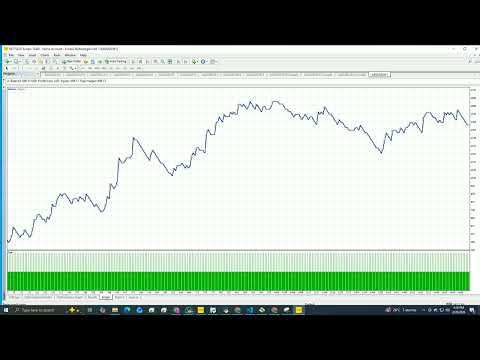
Use XAUUSD on the M15 timeframe with a low-spread ECN broker. A minimum deposit of 500 USD is recommended, though larger accounts will benefit from better lot sizing flexibility. Leverage of 1:100 or higher is ideal. Start with 1 percent risk, Step or ATR trailing mode, and Trend Only enabled. Run a backtest using Every Tick model over at least six months of M15 data before going live.
What Makes This EA Different
It does not hide behind a black box. Every parameter is visible, editable, and explained in the built-in guide. The multi-TP batch system gives you structural profit-taking instead of relying on a single exit. Six trailing modes let you adapt to different market conditions. Smart Lot and Trend Only add intelligent automation without overcomplicating the strategy. And the full dashboard means you never have to restart the EA to change a setting.
Gold Scalp Blast EA is built for traders who want a transparent, configurable, and professional gold scalping tool for MetaTrader 4.