CopyMasterPro MT4

3
# CopyMaster Pro Trade Copier

## What Is This

CopyMaster Pro is a local trade copying tool that syncs trades between multiple MT4/MT5 terminals. One account trades, others follow automatically. No server needed, no VPS required. Works on a single computer with multiple terminals.

## What It Does

Copies trades from one account to others. You open a gold position on Account A, Account B and C will follow. You close on A, others close too. Simple as that.

## Why This One

**Free** — No monthly fees, no subscription, no hidden charges. Download it and it is yours.

**Private** — All data stays on your computer. Nothing goes through third party servers. Your trading info remains yours.

**Easy** — Works out of the box. Click a few buttons in the interface and you are set. No config files, no command lines.

**Cross Platform** — MT4 and MT5 can copy from each other. You run MT5 as master, your friend follows on MT4. Works fine.

## Main Features

**Flexible Lot Sizing** — Copy by multiplier, fixed lots, or auto calculate based on balance ratio. Small accounts can safely follow large ones.

**Smart Symbol Matching** — Different brokers name symbols differently. XAUUSD might be GOLD somewhere else, or have a suffix. The system figures it out automatically. You can also set manual mappings.

**Reverse Copy** — Think a signal source always loses money? Turn on reverse mode. They buy, you sell.

**Risk Controls** — Set limits on max lot size, max positions, max drawdown percentage. Copying stops automatically when limits are hit.

**UI Scaling** — Interface size is adjustable from 50% to 200%. Works great on high-DPI screens or small monitors.

**Independent Settings** — Each account saves its own settings file. Multiple receivers won't overwrite each other's configuration.

## Who Should Use This

- Traders managing multiple personal accounts
- Those helping friends or clients with their accounts
- People sharing signals within a small group
- Testing execution speed across different brokers

## Who Should Not

- Those building large scale commercial copy trading services — this is a local tool, no remote support
- Ultra low latency high frequency strategies — local file sync has about 500ms delay
- Anyone needing complex permission management or billing systems

---

## Detailed Usage Guide

### Installation

1. After purchasing from the MQL5 Market, the EA will be installed automatically in your terminal
2. Find CopyMaster Pro under "Expert Advisors" in the Navigator panel
3. Drag the EA onto any chart
4. Confirm the settings in the popup parameters window and click OK

### Input Parameters

When dragging the EA onto a chart, a parameters window will appear:

| Parameter | Default | Description |
|-----------|---------|-------------|
| Language | English | Interface language, English or Chinese |
| Panel X | -1 | Horizontal panel position, -1 means auto-center |
| Panel Y | 10 | Vertical panel position, pixels from top |
| UI Scale % | 100 | Interface scaling, range 50-200. Increase for high-DPI screens, decrease for small monitors |

These parameters are set once at load time. All other configuration is done through the interface.

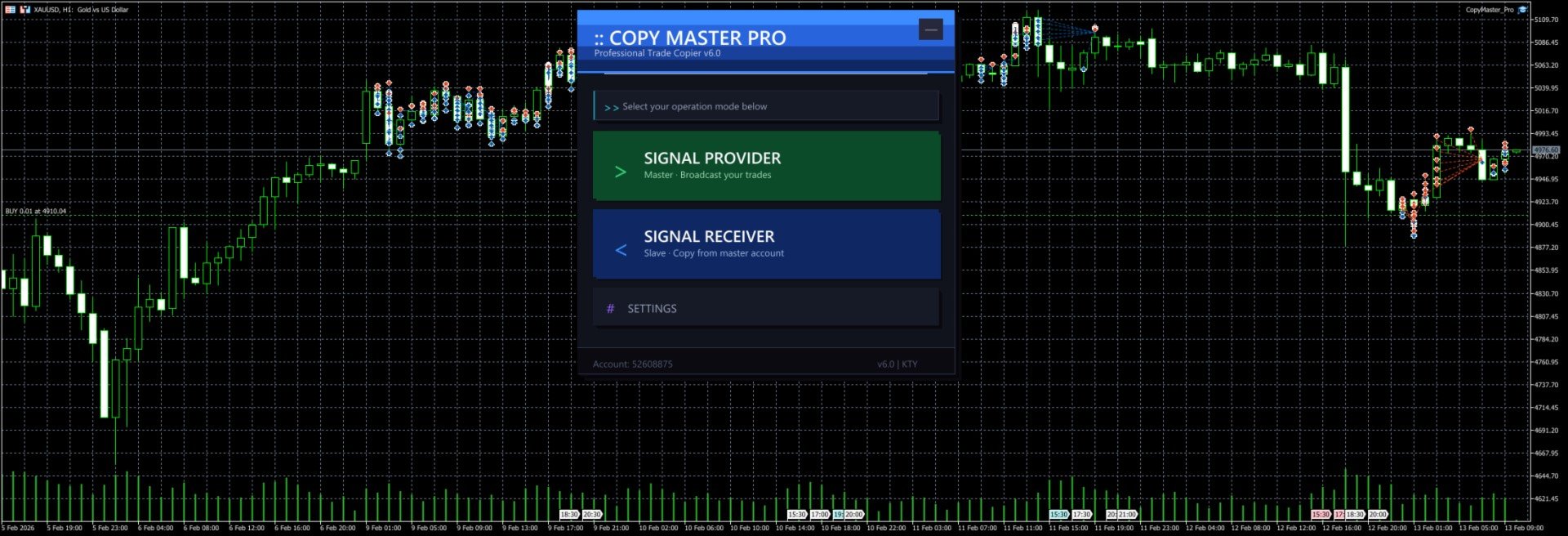
### Main Interface

After launch you will see the selection screen with three options:

- **Signal Provider** — Your account acts as the signal source, broadcasting trades to other accounts
- **Signal Receiver** — Your account follows trades from another signal source
- **Settings** — Configure lot sizing, risk controls, symbol mapping and other parameters

The `--` button in the top right corner minimizes the panel to a floating bar. Click `[]` on the floating bar to restore.

### Signal Provider Mode

1. Click "Signal Provider" on the main screen
2. Enter a server name (e.g. `MySignal` or `Gold_Strategy`). This name will appear in the receiver's server list
3. Click the "Start" button
4. Trade normally. All open and close operations are broadcast automatically
5. The panel shows real-time position count and online follower count
6. Click "Stop" to end broadcasting
7. Click "Back to Menu" at the bottom to switch modes

Notes:
- Server name cannot be empty
- Do not start multiple providers with the same server name on the same computer
- Closing the EA or switching charts will automatically stop broadcasting and clean up signal files

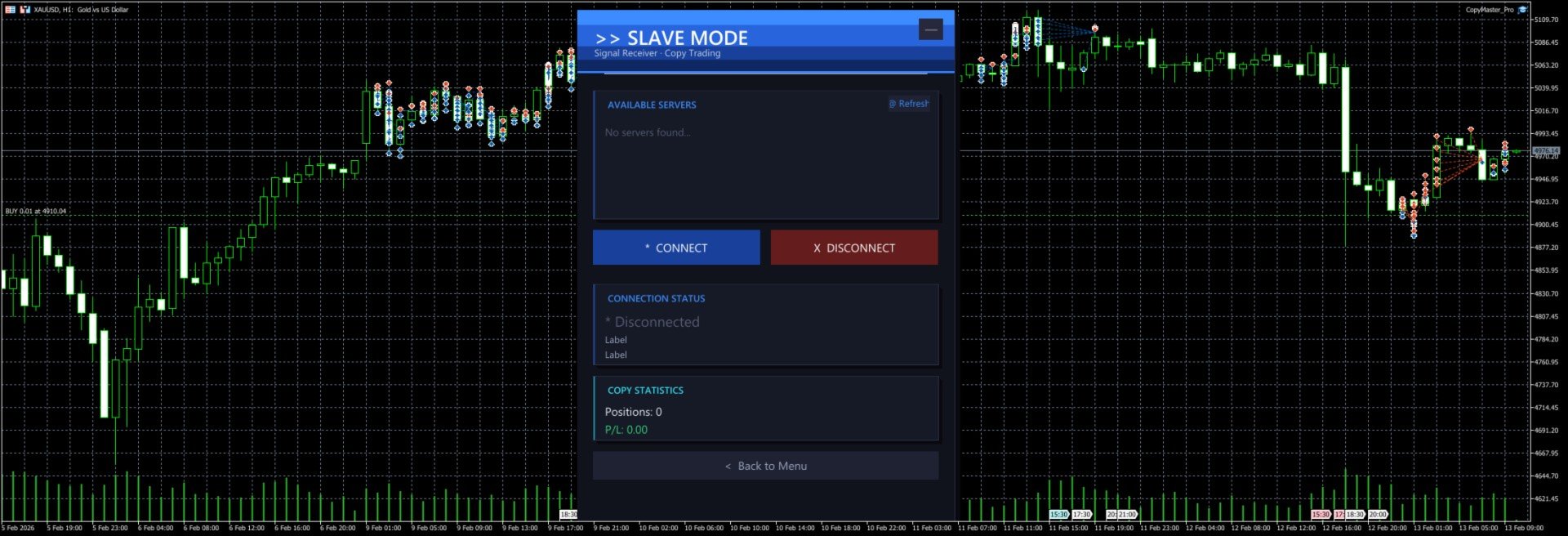
### Signal Receiver Mode

1. Click "Signal Receiver" on the main screen
2. The system automatically scans for available signal servers and displays them in the list
3. Click a server name in the list to select it (selected server is highlighted)
4. Click "Connect" to start copying
5. The panel shows real-time connection status, copied position count and profit/loss
6. Click "Disconnect" to stop copying (existing positions will not be closed automatically)
7. If no servers appear in the list, click "Refresh" to rescan

Notes:
- You must select a server before connecting
- After connecting, new positions from the signal source are copied automatically. When the source closes a position, the copied position is closed too
- Positions that existed before connecting are not copied. Only new trades after connection are processed
- Copied orders have a `CMP_` prefix in their comment field for easy identification

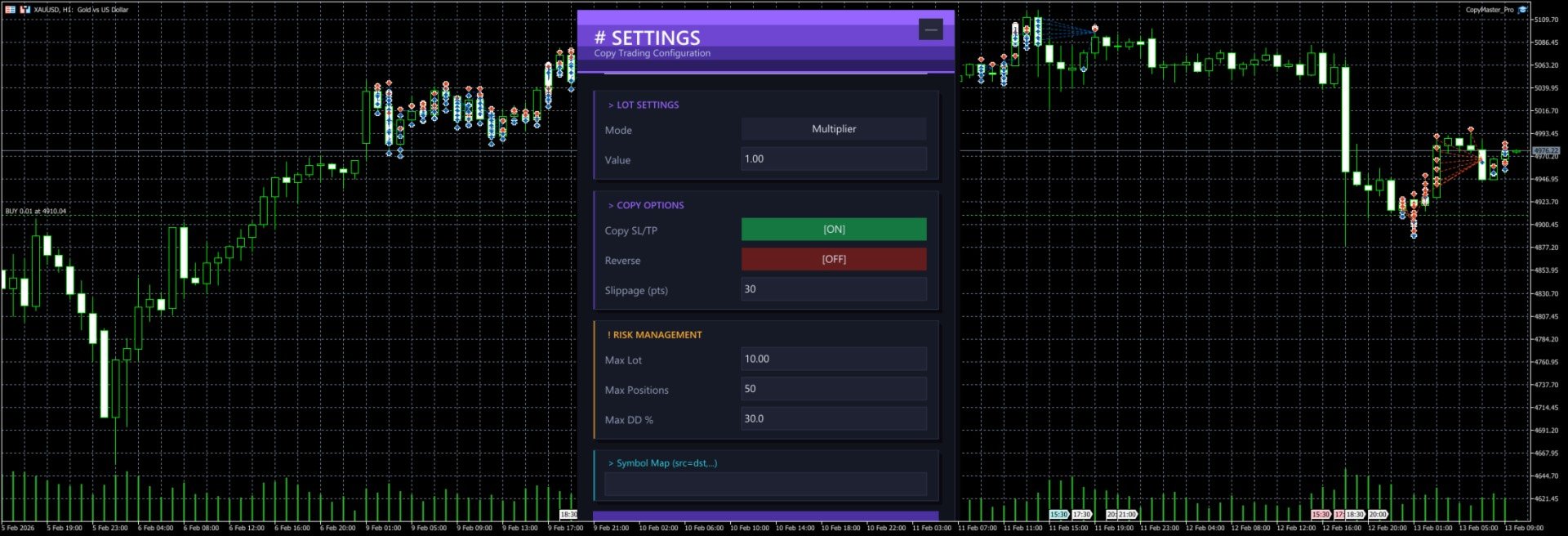
### Settings Panel

Click "Settings" on the main screen to open the configuration page. All changes require clicking "Save Settings" to take effect.

#### Lot Settings

**Mode** — Click the button to cycle through three modes:

| Mode | Description | Example |
|------|-------------|---------|
| Multiplier | Multiply the source lot size by a factor | Source opens 0.5 lots, multiplier is 2.0, copy opens 1.0 lots |
| Fixed | Use a fixed lot size regardless of source | Source opens 1.0 lots, fixed is 0.1, copy opens 0.1 lots |
| Risk % | Auto-calculate lot size based on account balance and risk percentage | Balance 10000, risk 1%, system calculates appropriate lot size |

**Value** — The number used with the selected mode. For multiplier mode enter the factor (e.g. 1.0, 0.5, 2.0), for fixed mode enter the lot size (e.g. 0.01, 0.1), for risk mode enter the percentage (e.g. 1, 2, 5).

#### Copy Options

**Copy SL/TP** — When enabled, copies the stop loss and take profit from the signal source. When disabled, positions are opened without SL/TP. Enabled by default.

**Reverse** — When enabled, buy signals become sell orders and vice versa. SL and TP are also swapped. Disabled by default.

**Slippage (pts)** — Maximum allowed slippage in points. Too small may cause order failures, too large may result in poor fill prices. Default is 30 points, usually no need to change.

#### Risk Management

**Max Lot** — Maximum lot size per copied trade. Even if the calculated lot exceeds this value, it will be capped. Default 10.0 lots.

**Max Positions** — Maximum number of copied positions. No new positions are opened once this limit is reached. Default 50.

**Max DD %** — Maximum drawdown percentage. When (Balance - Equity) / Balance exceeds this ratio, no new positions are opened. Default 30%.

#### Symbol Mapping

**Symbol Map** — Manually specify symbol mappings in the format `source=destination`, separated by commas for multiple pairs.

Examples:
- `XAUUSD=GOLD` — Signal source's XAUUSD trades as GOLD locally
- `XAUUSD=GOLD,EURUSD=EURUSDm` — Multiple mappings
- `NAS100=USTEC,US30=DJ30` — Index symbol mapping

If left empty, the system will try to match automatically:
1. First tries using the source symbol name directly
2. Tries removing common suffixes (.pro, .ecn, .std, etc.)
3. Tries auto-mapping common symbols (XAUUSD to GOLD, NAS100 to USTEC, etc. across 20 groups)

### Cross-Platform Usage

MT4 and MT5 can copy from each other as long as they run on the same computer.

Common setups:
- MT5 provider → MT4 receiver
- MT4 provider → MT5 receiver
- MT5 provider → Multiple MT4/MT5 receivers

When copying across platforms, symbol names may differ. Configure symbol mappings in settings or rely on the auto-matching feature.

### Typical Use Cases

#### One-to-Many Copying

You run the provider on MT5. Three friends each run a receiver on their own MT4/MT5. You trade normally, their accounts follow automatically. Each person can set their own lot multiplier based on their account size.

#### Multi-Account Sync

You have 3 accounts at different brokers. Run the provider on your main account, receivers on the other two. Open one trade, all three accounts open simultaneously.

#### Reverse Copying

You notice a friend has a very low win rate. Have them run the provider, you run the receiver with reverse mode enabled. They lose, you win.

### FAQ

**Q: Receiver cannot see any servers?**
Make sure the provider is running and shows "Broadcasting" status. Both terminals must be on the same computer. Click the Refresh button to retry.

**Q: Orders fail to open?**
Check if the symbol is matched correctly, if the account balance is sufficient, and if the lot size is within the broker's allowed range. Check the Journal tab in MT4/MT5 for detailed error messages.

**Q: How much latency?**
Typically around 500 milliseconds (timer interval). Perfectly fine for intraday and swing trading. Not suitable for millisecond-level high frequency strategies.

**Q: What happens to existing positions after disconnecting?**
After disconnecting, copied positions that are already open will not be closed automatically. You need to manage them manually.

**Q: Where are settings saved?**
Settings are saved in `CopyMaster/settings_{account_number}.ini` in the MT4/MT5 common data folder. Each account has its own file, so multiple receivers won't overwrite each other.

**Q: Interface too big or too small?**
Adjust the `UI Scale %` parameter in the EA settings. Range is 50-200. 100 is default size, 150 enlarges by 50%, 75 shrinks by 25%. Requires reloading the EA after changing.

---

CopyMaster Pro v1.2 | Copyright 2026, KUM TONG YU

Produtos recomendados
Market Profile 3
Hussien Abdeltwab Hussien Ryad
3 (2)
Market Profile 3 MetaTrader 4 indicator  — is a classic Market Profile implementation that can show the price density over time, outlining the most important price levels, value area, and control value of a given trading session. This indicator can be attached to timeframes between M1 and D1 and will show the Market Profile for daily, weekly, monthly, or even intraday sessions. Lower timeframes offer higher precision. Higher timeframes are recommended for better visibility. It is also possible t
FREE
Candle Pattern Finder Candle Pattern Finder is a powerful MT4 indicator designed to help traders easily detect key candlestick patterns in real-time. Whether you're trading trends, reversals, or consolidations, this tool highlights important price action signals directly on the chart — helping you make faster and more confident trading decisions. Detects popular candlestick patterns: Bullish/Bearish Engulfing Hammer & Inverted Hammer Shooting Star & Hanging Man Three White Soldiers Three Black
FREE
Free automatic Fibonacci is an indicator that automatically plots a Fibonacci retracement based on the number of bars you select on the BarsToScan setting in the indicator. The Fibonacci is automatically updated in real time as new highest and lowest values appears amongst the selected bars. You can select which level values to be displayed in the indicator settings. You can also select the color of the levels thus enabling the trader to be able to attach the indicator several times with differe
FREE
Smart FVG Indicator MT4 – Detecção Avançada de Fair Value Gap para MetaTrader 4 O Smart FVG Indicator para MetaTrader 4 oferece detecção, monitorização e alertas profissionais de Fair Value Gap (FVG) diretamente nos seus gráficos. Ele combina filtragem baseada em ATR com lógica sensível à estrutura para remover ruído, adaptar‑se à liquidez e manter apenas os desequilíbrios mais relevantes para decisões precisas. Principais vantagens Deteção precisa de FVG: identifica ineficiências reais de pre
FREE
Email Drawdown Alert
Roman Starostin
5 (12)
Free informative Indicator-helper. It'll be usefull for traders who trade many symbols or using grid systems (Averaging or Martingale). Indicator counts drawdown as percent and currency separate. It has a number of settings: Count deposite drawdown according equity value and send e-mail or notifications to user if DD more than set; Sending e-mail when max open orders reached; Shows price and remaining pips amount before MarginCall on current chart and Account generally; Display summary trade lot
FREE
FREE UNTIL FEBRUARY 14, 2023 SPEND MORE TIME WITH YOUR FAMILY. ENJOY LIFE… DO NOTHING. This version is only auto set of Takeprofit and StopLoss Main Version  of  TropangFX:   MT4 Version  |  MT5 Version Recommended timeframe:   H1 Supported currency pairs:  GBPUSD, EURUSD, EURCHF ,   USDCAD, USDCHF ,  AUDCAD, EURCAD, EURAUD and many more... Requirements The EA requires good brokerage conditions:   low spread   and   slippage   during the rollover time. I advise using a really   good ECN brok
FREE
NAS100 Auto Sl And TP
Moustapha Boulouz
5 (2)
Apresentando o NAS100 Auto SL e TP Maker para MT4: Nunca mais perca a definição de StopLoss e TakeProfit com o nosso NAS100 Auto SL e TP Maker, um assistente indispensável para os traders que navegam no mercado Nasdaq 100 no MetaTrader 4. Esta ferramenta foi concebida para aqueles que procuram uma solução perfeita para automatizar a gestão dos níveis de StopLoss e TakeProfit. Caraterísticas principais: Automação sem esforço: Monitoriza automaticamente as transacções Nasdaq 100 sem StopLoss e/ou
FREE
SnowyOwlFree
RODION SLOTIN
3 (2)
The free version of the snowyowl trend adviser, which is based on determining combinations of candle patterns. A virtual trailing stop tracks each open order and groups open orders to close them simultaneously. In the free version, you can only work on one timeframe, while in the paid version, opening orders on the selected TF is a signal to open orders on lower TF.
FREE
SX Supply Demand Zones accurately identifies and draws high-probability Supply and Demand zones using a sophisticated algorithm. Unlike traditional indicators that clutter your chart, this indicator is designed with a focus on performance and a clean user experience. New Unique Feature: Interactive Legend System What truly sets this indicator apart from everything else is the Interactive Control Legend. You have a professional dashboard directly on your chart that allows you to: Show/Hide: Ins
FREE
Follow The Line
Oliver Gideon Amofa Appiah
3.94 (16)
FOLLOW THE LINE GET THE FULL VERSION HERE: https://www.mql5.com/en/market/product/36024 This indicator obeys the popular maxim that: "THE TREND IS YOUR FRIEND" It paints a GREEN line for BUY and also paints a RED line for SELL.  It gives alarms and alerts of all kinds. IT DOES NOT REPAINT and can be used for all currency pairs and timeframes. Yes, as easy and simple as that. Even a newbie can use it to make great and reliable trades. NB: For best results, get my other premium indicators for more
FREE
FRM Half Trend
Noiros Tech
3.5 (2)
YOU CAN NOW DOWNLOAD FREE VERSIONS OF OUR PAID INDICATORS . IT'S OUR WAY OF GIVING BACK TO THE COMMUNITY ! >>>    GO HERE TO DOWNLOAD   The system is a free open source pine script originally published on TradingView by everget   . It was converted to Mt4 by Forex Robot Makers. This system is a  popular trend indicator based on ATR ( Average True Range ) , Moving Averages and the Donchian channel . System BackGround ATR The average true range is an indicator of the price volatility of an asse
FREE
Rainbow MT4
Jamal El Alama
Rainbow MT4 is a technical indicator based on Moving average with period 34 and very easy to use. When price crosses above MA and MA changes color to green, it’s a signal to buy. When price crosses below MA and MA changes color to red, it’s a signal to sell. The Expert advisor ( Rainbow EA MT4) based on Rainbow MT4 indicator, as you can see in the short video below is now available here .
FREE
ENGLISH DESCRIPTION (MQL5 Standard Optimized) Product Name: Aether Elliott Wave Zigzag Pro (MT4) [Subtitle: Wave 3 Hunter | Fib 0.618 Retracement | Margin Guard] Introduction Aether Elliott Wave Zigzag Pro is a lightweight, market-compliant scalping system designed to automate the classic Elliott Wave theory. Instead of complex wave counting, it uses a precision ZigZag algorithm to identify the high-probability 1-2-3 Structure and targets the Wave 3 impulse. Engineered for MT4 stability, it feat
FREE
Period Change Button
Rainer Albrecht
3 (1)
Fastest way to change the period. Suitable for traders who use many charts and timeframes. Size, shape and color can be customized. Inputs Parameters Corner — Choose corner placement Standart is "Right lower chart corner" Color — Background color of the button ColorText — Text color of the button ColorOn — Background color of the button for the current period ColorOnText — Text color of the button for the current period Font — Arial, Verdana... FontSize — Size of the font in pixels DistanceX —
FREE
High Low Open Close MT4
Alexandre Borela
4.81 (21)
Se você gosta deste projeto, deixe uma revisão de 5 estrelas. Este indicador desenha os preços abertos, altos, baixos e finais para o especificado período e pode ser ajustado para um fuso horário específico. Estes são níveis importantes olhados por muitos institucional e profissional comerciantes e pode ser útil para você saber os lugares onde eles podem ser mais activa. Os períodos disponíveis são: Dia anterior. Semana anterior. Mês anterior. Quarto anterior. Ano anterior. Ou: Dia atual. Seman
FREE
5/35 Oscillator to be used with our Elliott Wave Indicator as part of the overall strategy on trading the 5th wave. The Elliott Wave Indicator Suite is designed around a simple but effective Swing Trading Strategy. The Indicator Suite is great for Stocks, Futures and Forex trading on multiple timeframes You can find the main Elliott Wave Indicator here  https://www.mql5.com/en/market/product/44034
FREE
This indicator shows the latest untouched support and resistance as horizontal lines. The indicator can show support/resistance from higher timeframes. With this indicator you can e.g. easily see the support/resistance of the timeframes H4, D1 and W1 on a H1 chart, which can be a big advantage while time your entry on H1. This is the FREE version of the indicator: Support Resistance Multi Time Frame The free version works only on EURUSD and GBPUSD! Parameters referenceTF: the timeframe from whi
FREE
Fully functional manual trade panel with risk/reward, auto SL, lot size calculation, one-click trading, hidden (virtual) stop loss/take profit and pending orders, scale in and out of trades (partial close), news events and more. Works with all symbols not just currency pairs. Brings an incredible amount of functionality to MetaTrader for free and for both demo and live accounts. Features Lot size calculation - based on % of account to risk, fixed amount or dynamic lots Automatic take profit base
FREE
Apex Origin MT4
Yi Hsiu Tsai
5 (1)
O trading é um processo baseado em probabilidades. Lógica precisa e disciplina rigorosa são os pilares fundamentais das estratégias da série Apex. Sinais de Trading Oficiais em Tempo Real (Conta Flagship MT5) Para demonstrar a estabilidade de longo prazo da nossa estratégia, as nossas contas reais oficiais operam num ambiente MT5. A versão MT4 partilha exatamente a mesma lógica central e algoritmos de trading: Sinal 1 (Pepperstone): Ver detalhes do sinal Sinal 2 (TMGM): Ver detalhes do sinal Fi
FREE
Double HMA lines MTF
Pavel Zamoshnikov
5 (1)
This is a multi-timeframe version of the popular Hull Moving Average (HMA). The Double HMA MTF Light indicator combines two timeframes on a single chart. The HMA of the higher timeframe defines the trend, and the HMA of the current timeframe defines short-term price movements. The indicator is freely distributed and hasn't audio signals or messages. Its main function is the visualization of price movements. If you need advanced functionality of the HMA multi-timeframe indicator (information ab
FREE
SL and TP Setter
Giacomo Barone
4 (1)
You can manually open a trade (one click), and this EA will take care of setting the SL and TP. SL and TP are set based on the number of pips you specify in the input screen. You can also choose monetary SL and TP. SL and TP are determined based on the weighted average price (WAP), so if you open a new trade, SL and TP will be updated according to the new WAP. The WAP is not unique but differentiated between buy and sell trades (this is useful only if you open opposite trades on the same chart)
FREE
**Squeeze Box Indicator**   Squeeze Box  is a powerful technical analysis indicator developed for the MetaTrader 4 platform, designed to support day trading strategies. This indicator analyzes market movements to detect bullish and bearish breakout signals, enabling traders to capture trends early. With its customizable features and user-friendly interface, it is ideal for both novice and experienced traders. ### Features and Functions - **Bullish and Bearish Signals**: Identifies market break
FREE
Sentinel Arrow
Dmytro Kasianov
1 (1)
Sentinel Arrow Principais Características: ⊗Um algoritmo único para identificar tendências, reversões e mudanças de momentum de forma rápida e precisa. ⊗Projetado para uso profissional, apresenta uma lógica de sinal robusta que elimina atrasos ou atualizações falsas. ⊗Adequado para vários prazos. ⊗Não redesenha, elimina ou modifica sinais anteriores. ⊗Todos os sinais de COMPRA e VENDA são gerados no próprio candle e mantêm-se fixos. ⊗Na negociação real, não há redesenho — os sinais aparec
FREE
PZ Penta O MT4
PZ TRADING SLU
2.33 (3)
The Penta-O is a 6-point retracement harmonacci pattern which usually precedes big market movements. Penta-O patterns can expand and repaint quite a bit. To make things easier this indicator implements a twist: it waits for a donchian breakout in the right direction before signaling the trade. The end result is an otherwise repainting indicator with a very reliable trading signal. The donchian breakout period is entered as an input. [ Installation Guide | Update Guide | Troubleshooting | FAQ | A
FREE
Vanexio
Sayan Vandenhout
VANEXIO USES THE TREND WAVE INDICATOR AND IT CAN IDENTIFY THE BEGINNING AND THE END OF A NEW WAVE TREND MOVEMENT. AS AN OSCILLATOR, THE INDICATOR IDENTIFIES THE OVERBOUGHT AND OVERSOLD ZONES. IT WORKS GREAT TO CATCH THE SHORT TERM PRICE REVERSALS AND USES A MARTINGALE STRATEGY TO CLOSE ALL TRADES IN PROFIT. USE DEFAULT SETTINGS ON H1 OR HIGHER TIME FRAME ON ANY PAIR FOR MORE ACCURATE TRADES WHY THIS EA : Smart entries calculated by 5 great strategies The EA can be run on even a $20000 acco
FREE
.....................................hi....................... ................for showing high s and low s and support and resistanses .....................we have a lot of ways............................... it can be helpful for finding trends , higher highs , higher lows , lower highs , lower lows .......................today i write on of thems.......................... ........................you can enter the number of last support and resistanses .........................and it will dra
FREE
Update:ver1.53 (2023/08/16) ・概要と必要環境 手動発注もしくは他ツール等からの発注に対し、指値発注予約の複製を生成します。こちらは「発注操作の簡易化」に特化したものになります。発注判断となる分析は、資料を漁る、経験則を導く、他の分析ツールやEAを併用する等、利用者ご自身で頑張ってください。なお、ver1.28より、「決済後、自動で再発注する」機能が実装されました。(有償版でのみ有効化できます) ・導入と導入後の操作 導入そのものは簡単です。「自動売買可能なEA」として、適当なチャートにて動作させるだけです。(チャートの対象相場は問いません。このEAは、チャートを見ていません)。あとは、「このEAでのローカルコピー以外の発注」があれば、それに応じて「損失が出た場合に備えての追加取引の予約」という形で、指値発注が自動生成されます。 導入操作上の注意として、「本EAを、複数のチャートで動作」はできません。EAがチャート自体を見ておらず、注文状況だけを見ているため、複数のチャートで動かす意味もありません。また、ターミナルとEAの設定として「自動売買」を許可しない
FREE
O Pivot Point Fibo RSJ é um indicador que traça as linhas de suporte e resistência do dia usando as proporções   de Fibonacci. Este indicador espetacular cria até 7 níveis de suporte e resistência por meio do Pivot Point usando proporções de Fibonacci. É fantástico como os preços respeitam cada nível deste suporte e resistência, onde é possível perceber possíveis pontos de entrada / saída de uma operação. Recursos Até 7 níveis de suporte e 7 níveis de resistência Defina as cores dos níveis indi
FREE
DF Fib Trader Pro O DF Fib Trader Pro é um sistema de negociação automatizado desenvolvido para o MetaTrader 4. Utiliza níveis de preços baseados em Fibonacci combinados com análise de tendências e estrutura para definir pontos de entrada e saída. O EA suporta posições longas e curtas e inclui parâmetros de gestão de risco integrados. Principais Recursos: • Utiliza a lógica de retração e extensão de Fibonacci para traçar pontos de entrada, SL e TP. • Tamanho de lote e níveis de stop loss/take
FREE
O indicador Crypto_Forex "Auto FIBO Pro" é uma ótima ferramenta auxiliar na negociação! - O indicador calcula e coloca automaticamente no gráfico os níveis de Fibonacci e as linhas de tendência locais (cor vermelha). - Os níveis de Fibonacci indicam áreas-chave onde o preço pode reverter. - Os níveis mais importantes são 23,6%, 38,2%, 50% e 61,8%. - Pode utilizá-lo para scalping de reversão ou para negociação de grelha de zona. - Existem muitas oportunidades para melhorar o seu sistema atual u
Os compradores deste produto também adquirem
Local Trade Copier EA MT4
Juvenille Emperor Limited
4.96 (110)
Experimente uma cópia de negociação excepcionalmente rápida com o Local Trade Copier EA MT4 . Com sua fácil configuração de 1 minuto, este copiador de negociações permite que você copie negociações entre vários terminais MetaTrader no mesmo computador Windows ou em um Windows VPS com velocidades de cópia ultra rápidas de menos de 0.5 segundos. Seja você um trader iniciante ou profissional, o Local Trade Copier EA MT4 oferece uma ampla gama de opções para personalizá-lo de acordo com suas necess
Bem-vindo ao Trade Manager EA—uma ferramenta de gestão de risco criada para tornar o trading mais intuitivo, preciso e eficiente. Não é apenas uma ferramenta para executar ordens, mas uma solução abrangente para planejamento de operações, gerenciamento de posições e controle de risco. Seja você um iniciante, trader avançado ou scalper que precisa de execução rápida, o Trade Manager EA adapta-se às suas necessidades, oferecendo flexibilidade em todos os mercados, desde forex e índices até commodi
Trade Assistant MT4
Evgeniy Kravchenko
4.43 (195)
Ajuda a calcular o risco por comércio, a fácil instalação de uma nova encomenda, gestão de encomendas com funções de fecho parcial, trailing stop de 7 tipos e outras funções úteis. Materiais e instruções adicionais Instruções de instalação - Instruções para a aplicação - Versão de teste da aplicação para uma conta de demonstração Função de linha Mostra no gráfico a linha de Abertura, Stop Loss, Take Profit. Com esta função é fácil definir uma nova ordem e ver as suas características adicionais
Copy Cat More Trade Copier MT4 (Cópia Gato MT4) não é apenas um simples copiador local de operações; é uma estrutura completa de gestão de risco e execução, projetada para os desafios atuais do trading. Desde desafios de prop firms até a gestão de contas pessoais, adapta-se a cada situação com uma combinação de execução robusta, proteção de capital, configuração flexível e tratamento avançado das operações. O copiador funciona tanto no modo Master (emissor) quanto no modo Slave (receptor), sincr
The product will copy all telegram signal to MT4   ( which you are member  ) , also it can work as remote copier.  Easy to set up, copy order instant, can work with almost signal formats, image signal, s upport to translate other language to English Work with all type of channel or group, even channel have "Restrict Saving Content", work with  multi channel, multi MT5 Work as remote copier: with signal have ticket number, it will copy exactly via ticket number. Support to backtest signal. How to
Trade copier MT4
Alfiya Fazylova
4.58 (33)
Trade Copier é um utilitário profissional projetado para copiar e sincronizar negociações entre contas de negociação. A cópia ocorre da conta / terminal do fornecedor para a conta / terminal do destinatário, instalada no mesmo computador ou vps. PROMOÇÃO - Se você já adquiriu o "Trade copier MT5", pode receber o "Trade copier MT4" gratuitamente (para cópia MT4 > MT5 e MT4 < MT5). Para obter informações mais detalhadas sobre os termos, por favor, entre em contato conosco através de mensagens priv
Exp COPYLOT CLIENT for MT4
Vladislav Andruschenko
4.65 (66)
Copiador profissional de operações para MetaTrader 4 Copiador de operações rápido, profissional e confiável para MetaTrader 4 . COPYLOT permite copiar operações de Forex entre os terminais MetaTrader 4 e MetaTrader 5 , com sincronização flexível para diferentes tipos de conta e cenários de negociação. A versão COPYLOT MT4 oferece suporte para: MetaTrader 4 → MetaTrader 4 MetaTrader 5 Hedge → MetaTrader 4 MetaTrader 5 Netting → MetaTrader 4   Versão MT5 Descrição completa + DEMO + PDF Como compra
TradePanel MT4
Alfiya Fazylova
4.84 (94)
Trade Panel é um assistente de negociação multifuncional. O aplicativo contém mais de 50 funções de negociação para trading manual e permite automatizar a maioria das tarefas de negociação. Atenção! Os descontos são válidos até 05/05/2026. A partir de 06/05/2026, o preço será de 80$. Antes da compra, você pode testar a versão de demonstração em uma conta demo. Baixe a versão experimental do aplicativo para uma conta de demonstração: https://www.mql5.com/pt/blogs/post/762547 . Instruções completa
Edge Zone EA
FXsolutions
5 (1)
With this Expert Advisor you will follow the sound trading principle Buy Low and Sell High by default ! And you can do that even with a normal day job . You will be even able to trade on lower timeframes which you could never do without such an Expert Advisor. And the best thing is that you are in control! You can tell the Edge Zone EA where it has to enter and where it has to exit. And you can do that even many hours before the trade will occur . This EA is therefore an excellent assistant for
MultiOrder Assistent V3.0   - Your professional trading assistant for MetaTrader 4 The  MultiOrder Manager  is a powerful trading tool designed to optimize your trading while managing risk efficiently. With intuitive features and a user-friendly interface, this Tool is ideal for traders who want to manage multiple orders simultaneously without losing track.   Symbols: FX pairs, gold and cryptocurrencies Here you get a detailed description of the parameters and functions Manual     Features and
Grid Manual MT4
Alfiya Fazylova
4.71 (17)
"Grid Manual" é um painel comercial para trabalhar com uma grade de ordens. O utilitário é universal, possui configurações flexíveis e uma interface intuitiva. Ele trabalha com uma grade de ordens não apenas na direção da média das perdas, mas também na direção do aumento dos lucros. O trader não precisa criar e manter uma grade de ordens, tudo será feito pelo ""Grid Manual". Basta abrir um orden e o "Grid manual" criará automaticamente uma grade de ordens para ele e trabalhará com ele até que s
EasyTrade MT4
Alain Verleyen
5 (1)
Easy Trade – Gestão de Operações Inteligente, Simples e Poderosa Easy Trade é a solução completa de gestão de operações para usuários do MetaTrader que desejam manter o risco sob controle e uma execução ultra suave. Desenvolvido do zero com base no feedback de traders reais, o Easy Trade facilita a execução, o monitoramento e a gestão de operações em vários símbolos – sem complicar o seu fluxo de trabalho. Seja você um scalper manual ou esteja gerenciando uma pequena carteira de setups, o Easy
Fixação automática de lucro ao atingir o lucro alvo EquityTargetCloser   — é um consultor especialista utilitário para MetaTrader 5 que fecha automaticamente todas as posições de mercado e exclui as ordens pendentes assim que   o patrimônio (Equity) exceder o saldo atual no valor de lucro especificado . Após fechar todas as posições, o alvo aumenta automaticamente: o novo limite = novo saldo + lucro especificado. O EA não abre negociações, apenas gerencia as posições existentes, ajudando a fixar
Take a Break
Eric Emmrich
5 (31)
News filter, equity guard & session control for all your EAs — one tool, full protection Take a Break has evolved from a basic news filter into a comprehensive account protection solution . It pauses your other Expert Advisors during news events or based on custom filters. When trading resumes, it automatically restores your entire chart setup , including all EA settings. Why traders choose Take a Break One news filter for all your EAs — no more relying on individual built-in filters that may o
Auto Trade Copier
Vu Trung Kien
4.76 (85)
Auto Trade Copie é projetado para copiar negociações entre multi contas/terminais MetaTrader 4 com 100% de precisão. Com esta ferramenta, você pode atuar tanto como um provedor (origem) ou um recebedor (destino). Todas as ações de negociação serão copiadas do fornecedor ao recebedor sem demora. Demo: Versão demonstração para teste pode ser baixado em: https://www.mql5.com/pt/market/product/4904 Referência: Se você precisa copiar entre diferentes locais através da Internet, por favor veja o Trad
Exp SafetyLock PRO
Vladislav Andruschenko
4.57 (28)
SAFETYLOCK for MetaTrader 4 é um utilitário premium de proteção de trades, criado para defender posições abertas contra reversões bruscas do mercado, colocando automaticamente uma ordem de segurança oposta. Assim que um trader ou um Expert Advisor (EA) abre uma posição, o SAFETYLOCK for MT4 cria uma ordem pendente correspondente (Buy Stop ou Sell Stop) na direção oposta. Se o mercado se mover contra a operação original, a ordem pendente é ativada e forma um lock de proteção, ajudando o trader a
The News Filter
Leolouiski Gan
5 (25)
Este produto filtra todos os consultores especializados e gráficos manuais durante o horário das notícias, para que você não precise se preocupar com picos de preços repentinos que possam destruir suas configurações de negociação manuais ou negociações realizadas por outros consultores especializados. Este produto também vem com um sistema de gerenciamento de pedidos completo que pode lidar com suas posições abertas e ordens pendentes antes do lançamento de qualquer notícia. Depois de comprar o
Trade Manager MT4 DaneTrades
Levi Dane Benjamin
4.09 (11)
Trade Manager para ajudá-lo a entrar e sair rapidamente de negociações enquanto calcula automaticamente seu risco. Incluindo recursos para ajudar a evitar negociações excessivas, negociações de vingança e negociações emocionais. As negociações podem ser gerenciadas automaticamente e as métricas de desempenho da conta podem ser visualizadas em um gráfico. Esses recursos tornam este painel ideal para todos os traders manuais e ajudam a aprimorar a plataforma MetaTrader 4. Suporte multilíngue. Vers
Telegram to MT4 Coppy
Sergey Batudayev
3.89 (9)
Telegram para MT4:   A solução definitiva para cópia de sinais Otimize suas negociações com   o Telegram para MT4   , o utilitário de última geração desenvolvido para copiar sinais de negociação diretamente de canais e chats do Telegram para sua plataforma MetaTrader 4 — sem a necessidade de DLLs. Esta solução robusta garante a execução perfeita de sinais com precisão incomparável e opções de personalização, economizando seu tempo e aumentando sua eficiência. [ Instructions and DEMO ] Principais
Work with gold and Japanese yen. Now working without pips! While you are trading,  Auto StopLoss Defender  doing all the routine work. "Must have" for scalping. Best way to save account balance in case of force majeure.(Internet connection loss, power outage, sharp change in price direction) The Utilite automatically adds a stop loss to open and pending orders that have no stoploss set. The anti-requote system is built into the Utilite. That means  the stop loss will be registered anyway! In the
Drawdown Manager MT4 é uma ferramenta essencial para traders que utilizam MetaTrader 4, projetada para proteger seu capital de negociação gerenciando ativamente os drawdowns e salvaguardando seus investimentos. Ideal tanto para traders individuais quanto para empresas de trading proprietárias, essa ferramenta oferece uma solução robusta para manter a integridade da sua estratégia de negociação e a segurança do capital. Com recursos avançados como alertas em tempo real e parâmetros de risco perso
VirtualTradePad mt4 Extra
Vladislav Andruschenko
4.85 (61)
Painel de negociação para negociação em 1 clique.  Trabalhando com posições e pedidos!  Negociar a partir do gráfico ou do teclado. Usando nosso painel de negociação, você pode negociar com um clique no gráfico e realizar operações de negociação 30 vezes mais rápido do que o controle MetaTrader padrão. Cálculos automáticos de parâmetros e funções que tornam a vida mais fácil para um trader e ajudam-no a conduzir suas atividades de trading com muito mais rapidez e conveniência. Dicas gráficas e i
Smart Copy Local MT4
Kyra Nickaline Watson-gordon
5 (7)
Smart Copy is an Easy-to-Use EA that supports Multi Copying Metatrader4 and Metatrader5 and Local/Remote Copying. (Remote Version is coming soon) Free version is available on Smart Copy Local Free MT4 Specifications :     Real Time, Multi Terminal - Multi Account - MT4/MT5 trade copying     Copy from netting to hedge and hedge to netting is supported.     Fast and instant copy     All settings are input visually.     Easy modifying symbol names, prefix, suffix     Enable/Disable copying s
Trading History MT4
Siarhei Vashchylka
5 (9)
Trading History - A program for trading and money management on the history of quotes in stratagy tester. It can work with pending and immediate orders, and is equipped with trailing stop, breakeven and take profit functions. Very good for training and testing different strategies. Manual (Be sure to read before purchasing) Advantages 1. Allows you to test any trading strategy in the shortest possible time 2. An excellent simulator for trading training. You can gain months of trading experience
Crystal Trade Manager PRO – Sistema Avançado de Gestão de Risco e Controle de Operações para MT4 Versão Gratuita: https://www.mql5.com/en/market/product/150632 Visão Geral Crystal Trade Manager PRO (CTM) é uma ferramenta profissional de execução de ordens e gestão de risco desenvolvida para MetaTrader 4. Foi projetada para traders que necessitam de disciplina, forte proteção de capital e automação inteligente dentro do MT4. O sistema controla o risco, protege o patrimônio da conta, aplica limite
Fast copier for sending trades to multiple MT4 / MT5 accounts. Perfect for copying trades from MT4 to MT5 accounts. MT4 Trade Copier Master EA sends trades instantly from your master account to one or multiple slave accounts. Supports copying to: • MT5 accounts • MT4 accounts Perfect for: • Multi-account traders • Signal providers • Account managers • Personal account mirroring Main Features • Fast local trade copying • Low latency execution • Multiple slave accounts support • Copy open position
News Filter EA: Advanced Algo Trading Assistant News Filter EA is an advanced algo trading assistant designed to enhance your trading experience. By using the   News Filter EA , you can integrate a Forex economic news filter into your existing expert advisor, even if you do not have access to its source code. In addition to the news filter, you can also specify   trading days   and   hours   for your expert. The News Filter EA also includes   risk management   and   equity protection   features
O MT4 para Telegram Signal Provider é uma ferramenta fácil de usar e totalmente personalizável que permite o envio de sinais para o Telegram, transformando sua conta em um provedor de sinais. O formato das mensagens é totalmente personalizável! No entanto, para uso simples, você também pode optar por um modelo predefinido e habilitar ou desabilitar partes específicas da mensagem. [ Demonstração ]   [ Manual ] [ Versão MT5 ] [ Versão Discord ] [ Canal do Telegram ]  New: [ Telegram To MT5 ] Conf
Riskless Pyramid
Snapdragon Systems Ltd
5 (1)
Introduction This powerful MT4 trade mangement EA offers a way potentially to aggressively multiply trade profits in a riskfree manner. Once a trade has been entered with a defined stoploss and take profit target then the EA will add three pyramid add-on trades in order to increase the overall level of profit. The user sets the total combined profit target to be gained if everything works out. This can be specified either as a multiple of the original trade profit or as a total dollar amount. Fo
ManHedger MT4
Peter Mueller
5 (2)
THIS EA IS A SEMI-AUTO EA, IT NEEDS USER INPUT. Manual & Test Version Please TEST this product before   BUYING  and watch my video about it. Contact me for user support or bug reports, or if you want the MT5 version! MT5 Version I do not guarantee any profits or financial success using this EA. With this Expert Advisor, you can: Implement your own   Zone Recovery   strategy to capitalize on trending markets. Create   Grid   trading strategies, to profit from ranging markets. Place orders easil
Mais do autor
# CopyMaster Pro Trade Copier ## What Is This CopyMaster Pro is a local trade copying tool that syncs trades between multiple MT4/MT5 terminals. One account trades, others follow automatically. No server needed, no VPS required. Works on a single computer with multiple terminals. ## What It Does Copies trades from one account to others. You open a gold position on Account A, Account B and C will follow. You close on A, others close too. Simple as that. ## Why This One **Free** — No monthl
FREE
# QuickTrade Panel - Professional Trading Panel ## Overview QuickTrade Panel is a professional quick trading panel designed for MT5, integrating market orders, pending orders, iceberg orders, grid orders, smart close functions, and history statistics analysis. It helps traders execute various trading operations quickly and analyze trading performance in depth. ## Core Features ### 1. Market Orders - One-click buy/sell with real-time Ask/Bid prices - Quick lot switching with 6 preset lot siz
FREE
# QuickTrade Panel - Professional Trading Panel ## Overview QuickTrade Panel is a professional quick trading panel designed for MT5, integrating market orders, pending orders, iceberg orders, grid orders, smart close functions, and history statistics analysis. It helps traders execute various trading operations quickly and analyze trading performance in depth. ## Core Features ### 1. Market Orders - One-click buy/sell with real-time Ask/Bid prices - Quick lot switching with 6 preset lot siz
FREE
Filtro:
Yusuke Goto
250
Yusuke Goto 2026.03.10 02:34 
 

The software is easy to use, but the transaction to be copied ends automatically even though the transaction from the source has not ended.

Responder ao comentário