GS trade report

5

3 in 1 : Report + monitoring + sending messages (Telegram, ...) to optimize trading and use of advisors.

Monitoring:

  • Panel on the chart
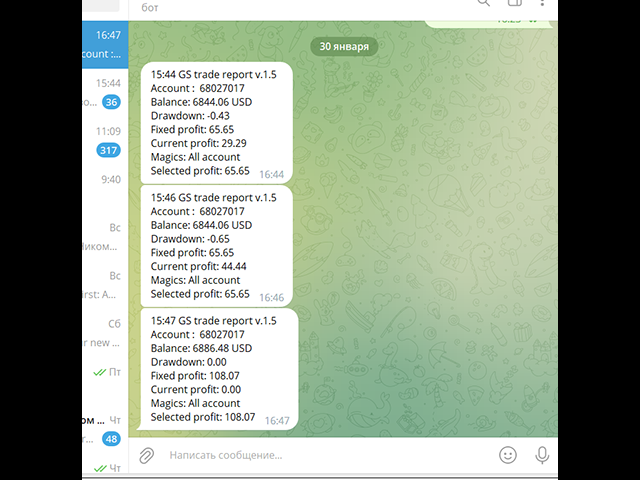
  • Sending messages to Telegram
  • Sending messages to Email
  • Sending Notifications
  • Sending pop-up messages
  • Sound notifications when the established Profit/Loss levels are exceeded
Monitoring is activated by pressing the Start button.

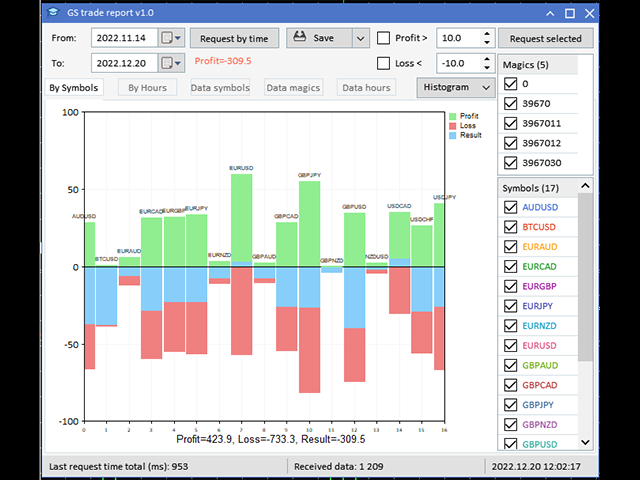
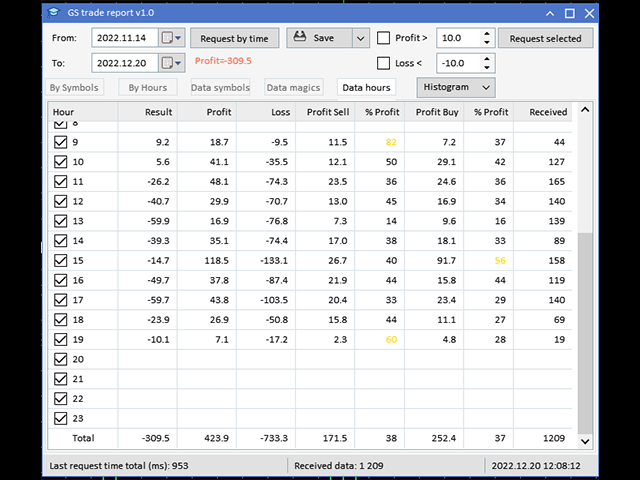
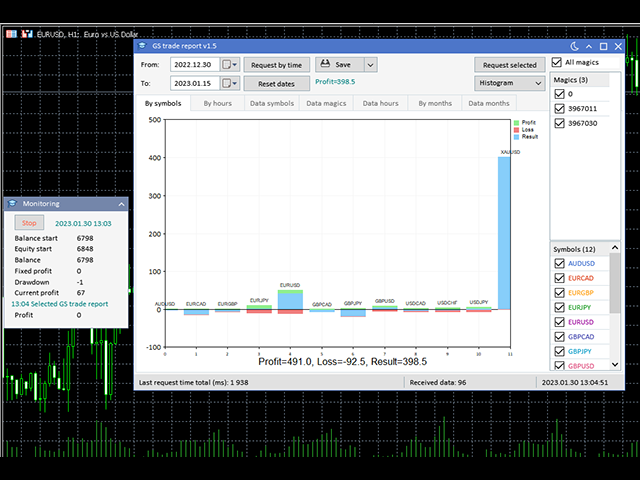
Profit for the period by currency pairs, hours and Magic number for the current account.

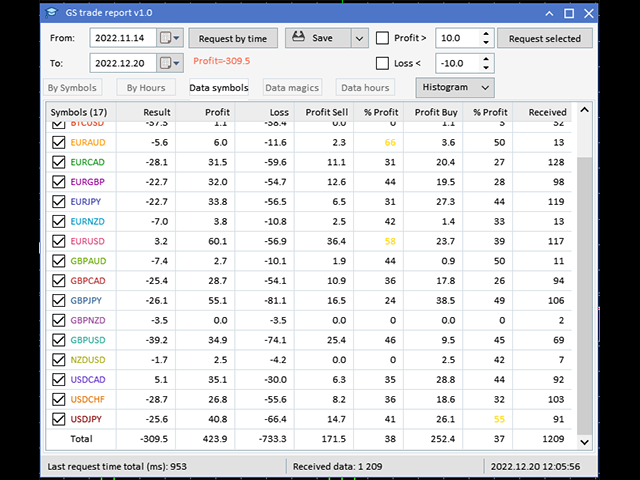
Forms four tables: by symbols, by magic numbers, by months and by hours of closing orders, divided by Sell and Buy orders.

The tables have separate columns for the profit of Sell and Buy orders and the percentage of profitable ones.

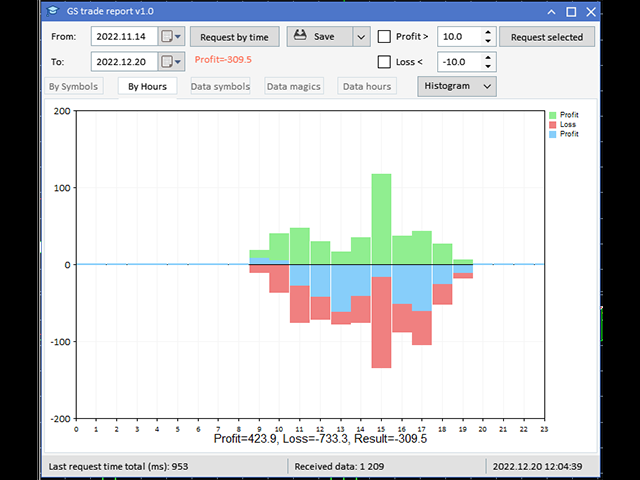
Displays three profit/loss distribution graphs:

  1. by currency pairs
  2. by trading hours (terminal time)
  3. by months

Allows you to visually see the instruments on which the account earns and the period of time when it loses.

Has custom filters:

  • currency pairs
  • magic numbers
  • profit margin
  • loss

Output files in HTML format (you can choose HTML or CSV) to the ../MQL5/Files/Trade_report/ folder of the terminal.

The ability to take a screenshot of the chart and send it to Telegram.

Operating procedure

  1. Customize date fields: From and To
  2. Press the Request by time button, the following will be generated :
    • lists of Symbols and Magics found in trades for the period
    • trading results in the form of charts and tables on the corresponding tabs of the adviser
  3. Save results to files Save button (by symbols, by Magics, by hours)
  4. Customize filters
    • by profit/loss
    • by Magics number (allows you to get a report on the work of advisors and / or manual trading)
    • by currency pairs
  5. Start Request selected button to generate results based on filters
  6. Save results to files Save button (by symbols, by Magics, by hours), after renaming the existing ones

The Histogram button allows you to select the style of displaying graphs.

If you purchased my advisor, your wishes will be taken into account when developing new versions

Leave review and comments, they will help my products become better

    Parameters

    Magic numbers list (111,222,...) = "";
    Output file type = 2;
    Use account monitoring = true;
    Use send messages and alerts = true;
    Hide account number = false;
    ------- Monitoring -------
    Popup Alerts = false;
    Sound Alerts = true;
    Send email = false;
    Send push notification = false;
    Telegram Token = "";
    Telegram Channel id = 0;
    Period for updating monitoring, sec = 60;
    Timer for monitoring Alerts, minutes = 60;
    Limit profit for sound, usd (0 -not use) = 200;
    Limit loss for sound, usd (0 -not use) = 100;
    Comentários 1
    Wolfgang Rockert
    2415
    Wolfgang Rockert 2023.01.14 19:05 
     

    hello, looks good but needs small improvements.

    Vers.1.2 is more flexible with magicnumbers

    Produtos recomendados
    This tool can help you close all open orders with one click, just click "Close all". If you only want to close profitable orders, click the "Close profitable" button. After clicking, all floating orders will be closed; If you only want to close the orders with floating losses, click the "Close losable" button. After clicking, all orders with floating losses will be closed. This tool has been tested for a year. The one-click position closing function is very complete, the position closing is time
    One Click Trader  is a tool designed for MetaTrader 4 platform, which enables you to take your trading to the next level. It enables you to open, manage and close your trades in simple an efficient way by just one click of your mouse button. "-"   ,  "+"  change OCT window size  Up arrow minimizes the OCT panel Down arrow maximizes the OCT panel Right arrow displays the next panel with additional features Left arrow hides the panel with additional features Red  SELL  button enables you to open s
    AW Metatrader to Telegram MT5
    AW Trading Software Limited
    5 (1)
    Um sistema automatizado para enviar notificações para que nenhum de seus assinantes perca seus eventos de negociação do seu terminal de negociação. Um utilitário que envia notificações ao mensageiro do Telegram sobre quaisquer operações de negociação em sua conta. Instruções passo a passo para conectar o utilitário a um canal no Telegram ->   AQUI   / MT4 ->   AQUI Vantagens: Fácil configuração e instruções detalhadas, Possibilidade de enviar screenshots ajustáveis, Texto de notificação persona
    Trade Control Panel
    Jerry Jilun Anak Liban
    Trade Control Panel Function Normal One Click Function Close All Close All Profit Close All Loss Close All Pending Order Close All Sell Close All Buy Advance One Click Function 1.  Close Partial Lot Sell by Percent It will help you partial close for all open position by desire percent you wanted. No longer partial close one by one for every open position Manual input for desire percent 2. Close Partial Lot Buy by Percent It will help you partial close for all open position by desire percent
    This Expert Advisor monitors all open positions across all symbols in MetaTrader 5. Whenever a Stop Loss (SL) or Take Profit (TP) is manually set or adjusted on any position, the EA automatically applies that value to all other open positions , regardless of symbol or order type (Buy/Sell). This ensures consistent and synchronized SL and TP levels across your account. Perfect for mobile trading via tablet or smartphone!
    Trade HotKeys é uma utilidade de trading manual que permite execução instantânea de ações de trading usando atalhos de teclado. Foi desenvolvida para traders discricionários e scalpers que precisam de controle rápido de ordens sem usar os botões da interface do MetaTrader 5. Em vez de clicar em botões ou navegar por menus, você executa ações diretamente pelo teclado. O que você pode fazer Abrir BUY / SELL instantaneamente via hotkeys Fechar posições BUY ou SELL separadamente Fechar todas as pos
    Pending Orders Grid Complete System   opens any combination of Buy Stop, Sell Stop, Buy Limit and Sell Limit pending orders and closes all existing pending orders. Only one time of the pending order at the same time!!! You will have a possibility to put a legitimate   Open Price   for the first position in the grid. Usually it should in the area of Support/Resistance lines. You just need to drop this script on the chart of a desired currency pair. Input Parameters Before placing all pending ord
    Spread and Swap monitor
    Gennadiy Stanilevych
    5 (1)
    O indicador tem o objetivo de determinar o tamanho do spread e swap, a distância para configurar ordens pendentes, stop loss permitido com o preço atual e o risco por 1 ponto na moeda de depósito. O indicador informa ao trader sobre possíveis despesas e os lucros adicionais relacionados com a transferência de uma posição para a próxima sessão de negociação do instrumento financeiro. Ele também informa sobre o tamanho do spread, a distância das ordens pendentes, stop loss e o trailing stop a part
    T Manager for Price action Traders
    Haidar Lionel Haj Ali
    4.5 (10)
    T Manager, the ultimate trade management solution designed by traders for traders. If you are searching for a simple and efficient trade panel, trade manager, or trade assistant, you are at the right place.   The market contains a diverse number of those tools , but this one is designed by traders for traders . I designed this tool, and I am using it daily. Take my advice and stop buying tools blended with un-useful features that you will never use,   T Manager provides you with the essential y
    This utility provides the ability to use hot keys in manual trading instantly responding to the current market situation. You can assign hot keys to open/close positions by their type, open/close all positions on the current chart and remove all orders on the current chart. You can also assign hot keys for five predefined trade volumes and switch between them if necessary with no need to change the volume manually from time to time. It is also possible to set the auto calculation of a trade volu
    ReverseTune
    Konstantin Chernov
    A script for quick reversing positions and/or orders. If you need to reverse a position with the same volume, open an opposite position of a different volume or change the type of existing orders (for example, Buy Limit -> Sell Limit, Buy Stop -> Sell Limit, etc.) with the same or different take profit/stop loss, this script will make all the routine for you! Allow AutoTrading before running the script. Usage: Run the script on a chart. Input Parameters: Language of messages displayed (EN, RU, D
    Adaptive ATR Trailing Stop
    Seref Oliver Joisten
    4.5 (2)
    Adaptive ATR Trailing Stop (MT5) Overview Adaptive ATR Trailing Stop is a utility Expert Advisor for MetaTrader 5 that manages stop loss levels for existing open positions. It uses the Average True Range (ATR) to calculate a volatility-based trailing distance. This EA does not open trades. It only modifies the Stop Loss (SL) of existing positions and keeps the current Take Profit (TP) unchanged. How it works - The EA runs on every tick of the chart where it is attached. - For each open posit
    FREE
    Order Trailing
    Makarii Gubaydullin
    Trailing de ordens: obtenha o melhor preço de execução conforme o mercado se move O trailing de ordens pendentes permitirá que você mantenha a distância para o preço de entrada na distância especificada. A ordem se moverá se o preço do mercado se afastar dela. Utilitário multifuncional : 66+ recursos, incluindo esta ferramenta | Entre em contato se tiver dúvidas | Versão MT4 Para ativar o Trailing de Ordens, você precisa definir os 4 parâmetros principais (no painel): 1. Símbolo ou Negociação p
    Virtual TP SL TS
    Andrei Sviatlichny
    Torne seus níveis Take Profit, Stop Loss e Trailing Stop invisíveis para o corretor! Opção principal: STEALTH MODE Virtual Trailing Stop Virtual Take Profit Ponto de equilíbrio virtual Virtual Stop Loss Vida útil dos pedidos virtuais AVISO: O Expert Advisor não faz pedidos sozinho. Você mesmo deve abrir os pedidos (inclusive por meio do painel de Especialistas) ou usar um Especialista terceirizado em outro gráfico do mesmo par de moedas. Especifique o número mágico "-1" nas configurações do Espe
    Forget about enabling templates when you launch the window. Auto Template Master Service  is a professional utility tool that runs as a system service in MetaTrader 5, and it will do it for you. Unlike traditional indicators or expert advisors (EAs), the program runs in the background of the entire terminal and doesn't require you to add it to each window individually. As soon as you open a new chart of any instrument (Forex, Stocks, Crypto), the service immediately detects the new window and a
    Olá, comerciantes! Sou o seu assistente comercial. Para não falar muito, deixe-me lhe dizer a minha especialidade: 1. Eu sou bom em gerenciar suas posições, não importa em qual extremidade você coloca uma ordem, eu posso ajudá-lo a adicionar uma linha de stop-loss razoável e um stop-loss móvel pela primeira vez. 2. Eu posso ajudá-lo a evitar a subida e a queda e a erradicar as fraquezas humanas das raízes dos princípios. 3. Eu lhe enviarei uma mensagem de notificação para o cliente MT5 do seu d
    The utility is designed to send signals from MT4 to Telegram. It has several unique features, allowing not only the sending of trade signals but also the following functionalities: Send messages directly from the terminal to Telegram Send emojis along with custom text Send text and images from Telegram All of these features enable users to manage a signal channel while focusing on trading and finding quality signals. Customizable Signal Messages You can fully customize the signal message: Specif
    OrderManager MT5
    Lukas Roth
    4.81 (27)
    Apresentando o   OrderManager : Uma Ferramenta Revolucionária para MT5 Gerencie suas operações como um profissional com o novo utilitário Order Manager para MetaTrader 5. Projetado com simplicidade e facilidade de uso em mente, o Order Manager permite que você defina e visualize facilmente o risco associado a cada operação, possibilitando tomar decisões informadas e otimizar sua estratégia de trading. Para mais informações sobre o OrderManager, por favor, consulte o manual. [ Manual ] [ Versão M
    Ultimate MT5 to Telegram Public Channel sends controlled trades (via symbol, magic, comment) to a public telegram channel. It sends open and closed trades, including pending orders and TP/SL modifications, along with chart screenshots, to this public telegram channel. Additionally, you can send trade reports of open trades and summary profit/pip reports for day, week, or month. You can customize the design of the trade actions or reports with variables and emoticons.  A beautiful panel allows
    FREE
    A professional tool for real-time monitoring of the account status and the work of Expert Advisors. Information about the account status can be sent to Telegram chats automatically at a specified interval or upon request. From the screenshots of the open charts of the terminal, you receive upon request from your Telegram bot. Account information includes: 13:02 Trade monitoring by Telegram v.1.0 (headline) Account : 6802ххх RoboForex-Pro (account information) Profit start: 2661 USD (profit earne
    Telegram ChartSnap MT5 is an utility tool to bridge your MetaTrader 5 activities to your Telegram chat/group/channel. It will screen shot your MetaTrader 5 chart and send it to your dedicated Telegram chat/group/channel through a Telegram bot. The whole process will keep repeating based on a time cycle that predetermined by the user. It is a convenient tool for those who like to get access to their favorite system/dashboard that only available at MetaTrader Desktop. Beside that, trader can easi
    Operative Management Pro – Advanced Trading Utility Operative Management Pro is a smart visual tool for traders who want to analyze and simulate their trades before placing them on the market. This panel displays in real-time the most important parameters of the current symbol: Current price and minimum lot size Required margin Spread cost in USD and pips Take Profit and Stop Loss value in USD Automatic risk and reward calculation With just a click on the chart, you can simulate BUY or SELL t
    Quick Exit
    Jefferson Judge Metha
    This MT5 Utility is designed to simplify the process of managing multiple trades. If you have several open positions, it can be time-consuming to close each one manually. With this tool, you can easily close all profit trades, losing trades, or just the trades that are linked to the chart you're currently viewing. It saves you time and effort by allowing you to manage your trades with just a few clicks, making your trading experience smoother and more efficient. Whether you're focusing on profit
    FREE
    ProBridger
    Marius Ovidiu Sunzuiana
    How Traders and Analysts Can Use the Data Export Bridge to Improve Their Analytics The MQL Data Export Bridge unlocks a new level of analytical power by transforming MetaTrader into a real‑time data provider for any external research environment. Here are the most impactful ways different users can apply the bridge to enhance their trading performance. Build Predictive Models with Machine Learning Who benefits: Quantitative traders, data scientists, algorithm developers How it helps: Export t
    This utility sends notification to trader’s MT5 (for MT4 version, checkout this link ) mobile app, to remind traders about their open positions. Super useful for part time traders to keep track and not forget any positions. To turn on notification, please visit   this link   (https://www.metatrader4.com/en/trading-platform/help/setup/settings_notifications) Features Keep track on open orders (pending orders, running orders) Customize time to send notification Customize notification interval (se
    Trade Guardian Risk Manager is a MT5 utility Expert Advisor dedicated to risk control and equity protection. Many know how to trade. Few know when to stop. Trade Guardian formalizes discipline and mechanically enforces your limits when emotions or over-exposure take over. Risk management utility No trading logic — Does NOT open trades : does not open positions, does not provide signals, contains no strategy, and does not guarantee results. Operating principle — Equity Monitoring + rule enf
    Photocopy MT5
    Nguyen Nghiem Duy
    Photocopy MT5 is an Copier of transactions through Telegram channel. Will help you instantly publish your trade in Telegram channel or copy trades from Telegram channel. The utility can work in two directions by receiving signals in MT5 and transmitting signals to Telegram   . No more missed deals No more panic Capital Management Ease of use You can use it for: Copying your own deals through Telegram channel (via the Internet); Copying trades from MT5 to MT4 and vice versa. Propagation of signa
    Risk Controller Expert Advisor, um programa que permite controlar o risco total de seus consultores de negociação em sua conta. Com este programa, você pode controlar o risco máximo que será permitido na conta de todos os conselheiros. Por exemplo, você define o risco de 30% do rebaixamento máximo, o que significa que se seus robôs de negociação de ações excederem o risco de 30%, o Controlador de Risco fechará todas as posições dos consultores e também poderá fechar todos os gráficos abertos, p
    Trading panel for fast and convenient trading. The panel allows you to quickly open and close orders. Separate closing of orders for Sell and Buy positions. It is also possible to close all orders completely. The trading panel displays information about profit, total volume and number of orders for Sell and Buy positions. Sometimes some positions may not be closed due to market volatility. In this case, click close the position again.
    This EA help trader to manage his pending orders, when you place many Pending Orders this utility monitor them and when of them get filed (executed) the EA cancel and delete all rest of pending orders, to avoid  opening of all of pending orders at the same time , and lose your risk management. this utility is very useful for trader when he /she is not available on the desk.
    Os compradores deste produto também adquirem
    Trade Assistant MT5
    Evgeniy Kravchenko
    4.42 (211)
    Ajuda a calcular o risco por comércio, a fácil instalação de uma nova encomenda, gestão de encomendas com funções de fecho parcial, trailing stop de 7 tipos e outras funções úteis. Materiais e instruções adicionais Instruções de instalação   -   Instruções para a aplicação   -   Versão de teste da aplicação para uma conta de demonstração Função de linha Mostra no gráfico a linha de Abertura, Stop Loss, Take Profit. Com esta função é fácil definir uma nova ordem e ver as suas características ad
    Bem-vindo ao Trade Manager EA—uma ferramenta de gestão de risco criada para tornar o trading mais intuitivo, preciso e eficiente. Não é apenas uma ferramenta para executar ordens, mas uma solução abrangente para planejamento de operações, gerenciamento de posições e controle de risco. Seja você um iniciante, trader avançado ou scalper que precisa de execução rápida, o Trade Manager EA adapta-se às suas necessidades, oferecendo flexibilidade em todos os mercados, desde forex e índices até commodi
    Quant AI Agents is NOT AN Expert Advisor. Quant AI Agents   is a   multi-agent AI trading framework   that turns natural-language strategy prompts into live.  WANT THE SAME RESULTS AS MY LIVE SIGNAL?   Use the exact same brokers I do:   IC MARKETS , IC TRADING   .  Unlike the centralized stock market, Forex has no single, unified price feed.  Every broker sources liquidity from different providers, creating unique data streams. Other brokers can only achieve trading performance equivalent to 60
    Local Trade Copier EA MT5
    Juvenille Emperor Limited
    4.96 (138)
    Experimente uma cópia de negociação excepcionalmente rápida com o Local Trade Copier EA MT5 . Com sua fácil configuração de 1 minuto, este copiador de negociações permite que você copie negociações entre vários terminais MetaTrader no mesmo computador Windows ou em um Windows VPS com velocidades de cópia ultra rápidas de menos de 0.5 segundos. Seja você um trader iniciante ou profissional, o   Local Trade Copier EA MT5   oferece uma ampla gama de opções para personalizá-lo de acordo com suas ne
    TradePanel MT5
    Alfiya Fazylova
    4.87 (155)
    Trade Panel é um assistente de negociação multifuncional. O aplicativo contém mais de 50 funções de negociação para trading manual e permite automatizar a maioria das tarefas de negociação. Antes da compra, você pode testar a versão de demonstração em uma conta demo. Baixe a versão experimental do aplicativo para uma conta de demonstração: https://www.mql5.com/pt/blogs/post/762547 . Instruções completas aqui . Comércio. Permite realizar operações de negociação com um clique: Abrir ordens pendent
    Versão Beta O Telegram to MT5 Signal Trader está quase no lançamento oficial da versão alfa. Alguns recursos ainda estão em desenvolvimento e você pode encontrar pequenos erros. Se tiver problemas, por favor reporte, seu feedback ajuda a melhorar o software para todos. Telegram to MT5 Signal Trader é uma ferramenta poderosa que copia automaticamente sinais de trading de canais ou grupos do Telegram diretamente para sua conta MetaTrader 5 . Suporta canais públicos e privados do Telegram, e você
    Farmed Hedge Yield Farming | All Markets (Manual - Hybrid - Semi/Automated EA) MULTI-ASSET SUPPORT Trade any asset available on your broker - Forex: Major, Minor, Exotic pairs - Crypto: BTC, ETH, XRP, SOL, BNB - Stocks: Apple, Tesla, Amazon, Google, etc. - Commodities: Gold, Silver, Oil, Gas - Indices: US30, NAS100, SPX500, DAX40 - Any CFD your broker offers VERIFIED TRADING RESULTS - Farmed Hedge Yield Axi Copy:  https://www.mql5.com/en/signals/2356376 - Farmed Hedge Yield Exn Copy:   https:/
    Premium Trade Manager - Gestão de operações rápida e disciplinada para MetaTrader 5 Premium Trade Manager é um painel rápido no gráfico para MetaTrader 5 que elimina o trabalho mecânico de cada operação. Você decide a direção, o símbolo e o timing - o painel calcula o tamanho da posição com base no seu risco, coloca a ordem com stop e alvo, reduz em parciais, move o stop e acompanha o calendário econômico por você. A inteligência de notícias integrada vai um passo além: pontua os próximos evento
    Power Candles Strategy Scanner - Localizador de configurações multissímbolo com auto-otimização O Power Candles Strategy Scanner utiliza o mesmo motor de auto-otimização que alimenta o indicador Power Candles — em todos os símbolos da sua lista de observação, lado a lado. Um painel indica-lhe quais os símbolos que são estatisticamente negociáveis neste momento, qual a estratégia vencedora para cada um, o par ideal de Stop Loss / Take Profit, e avisa-o assim que um novo sinal é emitido. Esta ferr
    YuClusters
    Yury Kulikov
    4.93 (43)
    Atenção: A versão demo para revisão e teste está aqui . YuClusters é um sistema profissional de análise de mercado. O trader tem oportunidades únicas para analisar o fluxo de pedidos, volumes de negociação, movimentos de preços usando vários gráficos, perfis, indicadores e objetos gráficos. O YuClusters opera com base em dados de Tempos e Negócios ou informações de ticks, dependendo do que está disponível nas cotações de um instrumento financeiro. O YuClusters permite que você crie gráficos com
    Trade Dashboard MT5
    Fatemeh Ameri
    4.94 (125)
    Trade Dashboard simplifies how you open, manage, and control your trades, with built-in lot size calculation. It allows you to execute trades, manage risk, and control positions directly on the chart, with tools such as partial close, breakeven, and trailing stop. Designed to reduce manual work and help you stay focused on your trading decisions. A demo version is available for testing. Detailed explanations of features are provided within the MQL5 platform. Installation instructions are include
    Exp COPYLOT CLIENT for MT5
    Vladislav Andruschenko
    3.91 (33)
    Copiador profissional de operações para MetaTrader 5 Um copiador de operações rápido, profissional e confiável para MetaTrader . COPYLOT permite copiar operações de Forex entre terminais MT4 e MT5 com suporte para contas Hedge e Netting . A versão MT5 do COPYLOT oferece suporte a: - MT5 Hedge → MT5 Hedge - MT5 Hedge → MT5 Netting - MT5 Netting → MT5 Hedge - MT5 Netting → MT5 Netting - MT4 → MT5 Hedge - MT4 → MT5 Netting Versão MT4 Descrição completa + DEMO + PDF Como comprar Como instalar Como
    Trade copier MT5
    Alfiya Fazylova
    4.53 (43)
    Trade Copier é um utilitário profissional projetado para copiar e sincronizar negociações entre contas de negociação. A cópia ocorre da conta / terminal do fornecedor para a conta / terminal do destinatário, instalada no mesmo computador ou vps. PROMOÇÃO - Se você já adquiriu o "Trade copier MT5", pode receber o "Trade copier MT4" gratuitamente (para cópia MT4 > MT5 e MT4 < MT5). Para obter informações mais detalhadas sobre os termos, por favor, entre em contato conosco através de mensagens priv
    AntiOverfit PRO MT5
    Enrique Enguix
    5 (5)
    Antes de comprar um EA, verifique se ele realmente se sustenta ou se apenas teve sorte num backtest. A maioria dos robôs é vendida com um backtest bonito. Curva ascendente. Bom profit factor. Poucas dúvidas. E, ainda assim, muitos desses EAs desmoronam assim que o mercado deixa de se mover como nesse histórico. Porquê? Porque um backtest só prova uma coisa: que essa estratégia funcionou num percurso específico do preço. Não prova que vá aguentar outros percursos. Não prova que seja robusta. E mu
    MT5 to Telegram Signal Provider é uma utilidade fácil de usar e totalmente personalizável que permite o envio de sinais especificados para o chat, canal ou grupo do Telegram, tornando sua conta um fornecedor de sinais . Ao contrário da maioria dos produtos concorrentes, ele não usa importações de DLL. [ Demonstração ] [ Manual ] [ Versão MT4 ] [ Versão Discord ] [ Canal do Telegram ]  New: [ Telegram To MT5 ] Configuração Um guia do usuário passo a passo está disponível. Não é necessário conhec
    Seconds Chart MT5
    Boris Sedov
    4.59 (17)
    Seconds Chart - uma ferramenta exclusiva para criar gráficos de segundos no MetaTrader 5 . Com o Seconds Chart , você pode criar gráficos com períodos definidos em segundos, proporcionando flexibilidade e precisão ideais para análise, indisponíveis em gráficos padrão de minutos ou horas. Por exemplo, o período S15 indica um gráfico com velas de 15 segundos. Você pode usar qualquer indicador ou Expert Advisor com suporte a símbolos personalizados. Trabalhar com eles é tão conveniente quanto negoc
    Ultimate Extractor
    Clifton Creath
    5 (9)
    Ultimate Extractor - Professional Trading Analytics for MT5 *****this is the local HTML version of Ultimate Extractor. !!!!!it is not compatible with Cloud!!!! For the online version please reach out to me directly****** Ultimate Extractor transforms your MetaTrader 5 trading history into actionable insights with comprehensive analytics, interactive charts, and real-time performance tracking. What It Does Automatically analyzes your MT5 trading history across all Expert Advisors and generates
    Copy Cat More Trade Copier MT5 (Gato Copiador MT5) é um copiador de negociações local e uma estrutura completa de gestão de riscos e execução projetada para os desafios comerciais de hoje. Desde desafios de prop firms até gestão de portfólio pessoal, ele se adapta a cada situação com uma combinação de execução robusta, proteção de capital, configuração flexível e manuseio avançado de negociações. O copiador funciona tanto no modo Master (remetente) quanto Slave (receptor), com sincronização em t
    Custom Alerts AIO: Monitoramento inteligente de múltiplos mercados – pronto para uso, sem configuração Visão geral Custom Alerts AIO é uma ferramenta avançada de varredura de mercado que funciona imediatamente após a instalação — sem necessidade de configurar indicadores adicionais. Inclui internamente todos os principais indicadores da Stein Investments (FX Power, FX Volume, FX Dynamic, FX Levels e IX Power), permitindo que você monitore facilmente todas as principais classes de ativos: Forex
    Poc Breakout Signal: The Ultimate Institutional Order Flow & Price Action System Elevate your trading with Poc Breakout, a comprehensive technical analysis tool designed to bridge the gap between retail trading and institutional market understanding. This all-in-one system combines powerful Buy/Sell signals, advanced Volume Profile analysis, real-time Order Flow (Depth of Market), and critical macroeconomic data to give you a clear, unambiguous edge in the markets. Poc Breakout Signal decodes c
    Timeless Charts
    Samuel Manoel De Souza
    5 (5)
    Timeless Charts é um utilitário de trading tudo-em-um para traders profissionais. Ele combina tipos de gráficos personalizados, como Gráficos por Segundos e Renko , com análise avançada de fluxo de ordens utilizando Footprints , Clusters , Perfis de Volume , estudos VWAP e ferramentas de análise ancorada para uma visão mais profunda do mercado. O gerenciamento de ordens e posições é realizado diretamente no gráfico por meio de um painel integrado de gerenciamento de operações , enquanto o Market
    The News Filter MT5
    Leolouiski Gan
    4.77 (22)
    Este produto filtra todos os consultores especializados e gráficos manuais durante o horário das notícias, para que você não precise se preocupar com picos de preços repentinos que possam destruir suas configurações de negociação manuais ou negociações realizadas por outros consultores especializados. Este produto também vem com um sistema de gerenciamento de pedidos completo que pode lidar com suas posições abertas e ordens pendentes antes do lançamento de qualquer notícia. Depois de comprar o
    HINN MagicEntry Extra
    ALGOFLOW OÜ
    4.71 (14)
    HINN MAGIC ENTRY – the ultimate tool for entry and position management! Place orders by selecting a level directly on the chart! full description   ::  demo-version  :: 60-sec-video-description Key features: - Market, limit, and pending orders - Automatic lot size calculation - Automatic spread and commission accounting - Unlimited partitial take-profits  - Breakeven and trailing stop-loss and take-profit  functions - Invalidation leves - Intuitive, adaptive, and customizable interface - Works
    Uber Trade Manager
    Meelis Hynninen
    4.88 (16)
    O UTM Manager é uma ferramenta intuitiva e fácil de usar que oferece uma execução de negociação rápida e eficiente. Um dos recursos de destaque é o modo "Ignorar spread", que permite negociar ao preço das velas, ignorando completamente os spreads (por exemplo, permite negociar pares de spread mais alto em LTF, evitando ser retirado de negociações por spread). Outro aspecto importante do UTM Manager é sua copiadora comercial local exclusiva, permitindo a flexibilidade de executar diferentes estra
    Footprint Chart Pro — Professional OrderFlow EA for MetaTrader 5 Version 6.34 | Professional tool for real traders | Institutional-Grade Visualization DEMO USERS - PLEASE SELECT EVERY TICK / REAL TICK WHEN TESTING AND YOU HAVE DOWNLOADED HISTORICAL DATA. IF YOU SEE A WAITING SCREEN AND IT IS NOT DOWNLOADING, IT MEANS YOU HAVE LOW HISTORICAL DATA. TRY 1 MIN AND 5 MIN FIRST ON 1 DAY DATA. ONE DAY DATA SHOULD BE THE NEWEST AND MOST CURRENT DATE. PLEASE WAIT UNTIL THE MARKET HAS ROLLED OVER PERIOD.
    The Ultimate TradingView to MT5 Bridge Automation Pare com o trading manual e problemas de latência. TradingView to MT5 Copier PRO é a ponte mais rápida e confiável para executar seus alertas do TradingView diretamente no MetaTrader 5. Quer você use indicadores personalizados, scripts do Strategy Tester ou desenhos manuais, este EA (Expert Advisor) executa suas negociações instantaneamente usando tecnologia WebSocket de Alta Velocidade . Diferente de copiadores simples, esta versão PRO inclui Ar
    AlgoRadar
    Stephen J Martret
    5 (4)
    AlgoRadar is an on-chart analytics dashboard for MT5 that aggregates Expert Advisor performance across multiple accounts, brokers, and platforms, including both MT4 and MT5 data, into a single live view on your MT5 chart. All analysis runs from the chart interface, with no external applications or manual report processing required. EA Analysis and Ranking For traders running multiple Expert Advisors, AlgoRadar provides a consolidated view of each EA's performance across accounts. Active EAs a
    Telegram to MT5 Multi-Channel Copier copia automaticamente os sinais de trading dos seus canais do Telegram diretamente para o MetaTrader 5. Sem bots, sem extensões de navegador, sem copiar nada manualmente. Você recebe um sinal no Telegram e o EA abre a operação no seu terminal em poucos segundos. O produto inclui dois componentes: um aplicativo Windows que escuta seus canais do Telegram, e este Expert Advisor que executa os sinais no seu terminal MT5. Também está disponível a versão para MT4.
    Painel de Trading para MetaTrader 5 — controle profissional de trading em um clique a partir do gráfico e do teclado Um painel de trading avançado para traders ativos, criado para abrir, gerenciar e fechar operações muito mais rápido do que com a interface padrão do MetaTrader. Esta solução foi desenvolvida para quem deseja controlar posições, ordens pendentes, lucro total e execução em um único espaço de trabalho profissional. Não se trata apenas de mais um utilitário. É um verdadeiro cockpit
    Anchor Trade Manager
    Kalinskie Gilliam
    5 (2)
    Anchor: The EA Manager Run your full EA portfolio without conflicts, without stacked risk, and without watching every chart yourself. Anchor coordinates up to 64 Expert Advisors on a single account so only one trades at a time. Attach Anchor to any chart. Type your EA names and magic numbers in one line. Anchor handles the rest. Built for portfolios. Built for discipline. Built for prop firms. The Problem Running multiple EAs on the same account creates risk. Two gold EAs can open opposite posit
    Mais do autor
    GS smart5
    Aleksander Gladkov
    5 (6)
    Best price Advanced grid algorithm,includes trend accounting, news, hedging and Risk manager. Can close the loss in case of market reversal and wait for the trend. For hedging, the following are used: Limit drawdown for Hedge zone parameter, pending orders and/or opening a position opposite to the loss. Can take into account not only the moment of news publication, but also the current accumulated index of the impact of news of a currency pair. Traders who purchase GS smart5 receive a persona
    Get news
    Aleksander Gladkov
    5 (1)
    Utility for reading news from investing.com To access the site, you need to add WebRequest in the Options terminal menu on the Expert Advisors tab: https://sslecal2.investing.com If reading is successful, a message about writing the file is displayed. The INV_week_this.txt file is written to the MQL4\Files folder of the terminal and is kept up to date, updating data according to its own timer. The  INV_week_last.txt   file is recorded on Saturday and saves the news data of the previous week .
    FREE
    GS spread
    Aleksander Gladkov
    The indicator calculates the current spread for each tick using the formula Spread=(ASK-BID)/Point. Schedule of changes in the boundaries spread over the timeframe displayed in a separate window from the date of accession of the indicator. Two lines corresponding to the minimum and maximum spread values are displayed. The indicator window is self-adjusted according to the minimum and maximum values from the moment of launch. The minimum and maximum values for the entire period of the indicator o
    FREE
    GS grid
    Aleksander Gladkov
    5 (4)
    Uses an advanced grid algorithm with no martingale or limited Martingale (default) (version for MT5: GS grid5 ) . Defines and control the current trend; It switches himself its parameters in accordance with the current market conditions ; Flexible customizable grid algorithm with or without martingale; Drawdown reduction algorithm (DD Reduction Algoritm); Hedge algorithm; Interactive trade control buttons; The ability to open / close orders manually; News filter to prevent trading during news
    GS target
    Aleksander Gladkov
    5 (2)
    The automatic adviser of the new generation with parameters: Target profit per month (10%, 25%, 50%, 75%, 100%) - choice of strategy Stop Loss Limit, USD Filter News Forex Factory (true, false) Parameters for setting the lot size Uses the news feed from Forex Factory to prevent trading during news releases. Set up to work on EURUSD timeframe M15. Works on USD accounts with a leverage from 1:500 and a Deposit from 500USD.   Enough for work: Decide on the size of the deposit that you can trust h
    GS smart
    Aleksander Gladkov
    5 (1)
    Best price, read GS smart channel ! Sale! Advanced grid algorithm,includes news and trend accounting and hedging. Can close the loss in case of market reversal and wait for the trend. For hedging, the following are used: Limit drawdown for Hedge zone parameter, pending orders and/or opening a position opposite to the loss. Can take into account not only the moment of news publication, but also the current accumulated index of the impact of news of a currency pair. Traders who purchase GS smar
    GS trendS
    Aleksander Gladkov
    GS trendS is a trend indicator that can be used for any Forex financial instrument. The indicator does not redraw and does not lag. Recommended timeframe H1. It is possible to select the trend algorithm settings {Only Open, Average Open/Close, Average High/Low} The color indicates the direction of the trend: yellow - direction can be SELL or BUY (S_B) blue - uptrend (BUY) red - downward trend (SELL) The indicator panel displays trend values of 5 timeframes for the current price level. The va
    ATR RSI i4
    Aleksander Gladkov
    Composition of ATR and RSI indicators. The ATR RSI indicator compares two calculations of the ATR indicator with the Fast and Slow periods on one chart, plus the line of the average and the overbought and oversold zones of the RSI indicator. ATR shows the values of the volatility change in the currency pair in points, taking into account the period specified as a parameter. The entry points provided by the RSI indicator show a very good risk-reward ratio in volatile and trending markets. ATR RS
    ATR RSI x4
    Aleksander Gladkov
    The Expert Advisor implements a trading strategy based on overbought and oversold zones of ATR RSI i4 indicator signals, which is included in the code . Trend Following, Counter Trend system , DD reduction Algoritm and Level Trading algoritm are used. To start trading, simply attach the EA to the chart, preferably EURUSD H1 timeframe. Live results can be viewed here . To trade with the new Forex instrument (EURUSD H1 by default), it is recommended to set up the parameter values by testing, initi
    Gain since start
    Aleksander Gladkov
    It will perfectly complement your working Expert Advisor or manual trading with up-to-date information. There is a sound notification of exceeding the established profit and loss limits of open SELL and BUY orders. Moreover, for each currency pair EURUSD, GBPUSD, XAUUSD, and others, various sound alerts are activated in English. Results are displayed on a special panel on the chart from the moment the indicator is activated: Elapsed time Fixed profit Current profit SELL Current profit BUY Maximu
    Trends and News
    Aleksander Gladkov
    5 (1)
    With the Trend and News indicator you will always be up to date : News + Trends + Forecast News Displayed on the chart as vertical lines with a description in the form of a tooltip The text displays two news: the previous published and the next expected They have filters: by importance (High, Medium, Low) and time period (Day, 4 days, Week) Full table of news for a given period (T button) Controlling the display of vertical lines on the chart and the sound signal before and after the publicati
    GS Trend5
    Aleksander Gladkov
    The advisor is designed for autonomous automatic round-the-clock trading on the EUR/USD pair, timeframe M15. There is a protection of the deposit from significant drawdown and a mode for saving a profitable transaction. Trades one deal. With the set parameters, it turns out to be one per day on average. How it works Uses the author's algorithm for analyzing three indicators and the direction of market movement to make a decision to open a deal. RSI Stochastic Bands market direction Opens an orde
    GS grid5
    Aleksander Gladkov
    F ully automated Expert Advisor using the advanced grid algorithm and constrained Martingale (MT4 version: GS grid ). Set up to work on EURUSD timeframe M15. Test 2021 shows a high percentage of winning orders: more than 98%. Works on HEDGING accounts with a leverage of 1:500 and a Deposit from 1000USD. Can use the news feed from Forex Factory to prevent trading during news release (Filter News Forex Factory=true;). To access the options terminal menu on the Expert Advisors tab, you must enable
    GS target5
    Aleksander Gladkov
    The revolutionary automatic adviser of the new generation with three parameters: Target profit per month (from 10% to 100%) Degree of risk (SuperLow, Low, Medium, High) Stop Loss Limit, USD Set up to work on EURUSD timeframe M15. Works on HEDGING accounts with a leverage of 1:500 and a Deposit from 500USD.   Enough for work: Decide on the size of the deposit that you can trust him Set the value of the desired profit per month (from 10 to 100 percent) Select the degree of risk (Low, Medium,
    It will perfectly complement your working Expert Advisor or manual trading with up-to-date information. There is a sound notification of exceeding the established profit and loss limits of open SELL and BUY orders. Moreover, for each currency pair EURUSD, GBPUSD, XAUUSD, and others, various sound alerts are activated in English. Indicators are displayed on a special panel on the chart from the moment the indicator is activated: Elapsed time Fixed profit Current profit Maximum drawdown Current d
    A professional tool for real-time monitoring of the account status and the work of Expert Advisors. Information about the account status can be sent to Telegram chats automatically at a specified interval or upon request. From the screenshots of the open charts of the terminal, you receive upon request from your Telegram bot. Account information includes: 13:02 Trade monitoring by Telegram v.1.0 (headline) Account : 6802ххх RoboForex-Pro (account information) Profit start: 2661 USD (profit earne
    News impact L
    Aleksander Gladkov
    Uses the built-in news calendar of the MT5 terminal or the Investing.com website (in the latter case, the Get news5 utility is required) Has the Scale parameter={100%, 110%, 125%, ...} to adjust the comfortable size of the text and control elements Tells you in which direction it is safer to open positions 3 in 1: News + Trends + Forecast News for the selected period: current and in tabular form Actual trends for 5 customizable timeframes and trend reversal levels Forecast of exchange rate mo
    Trade maker
    Aleksander Gladkov
    Multi-currency trading on one chart! Creation and management of positions with trailing and breakeven, risk management and other useful functions. To fix profits, the Target profit parameter is provided; if it is greater than zero, all positions will be closed if the set value is exceeded. All positions and orders have set Stop Loss and Take profit. For multi-currency trading, taking into account the impact of news and switching symbols on the chart, it is useful to use the News impact indicato
    Bars news
    Aleksander Gladkov
    Indicator of news linked to a bar. The published current value of the news has a characteristic impact on the currency it relates to: positive, negative, neutral . The indicator summarizes all these values for the selected period, taking into account the importance of the news: high, medium, low . As a result, a percentage is calculated for the currency pair, which shows the news of which currency is dominant. If the value is positive, then the pair has news pressure towards BUY, if negative - S
    Get news5
    Aleksander Gladkov
    Utility for reading news from investing.com To access the site, you need to add WebRequest in the Options terminal menu on the Expert Advisors tab: https://sslecal2.investing.com If reading is successful, a message about writing the file is displayed. The INV_week_this.txt file is written to the MQL5\Files folder of the terminal and is kept up to date, updating data according to its own timer. The  INV_week_last.txt   file is recorded on Saturday and saves the news data of the previous week .
    GS trend I
    Aleksander Gladkov
    The trend indicator has the ability to adjust the viewing depth and sensitivity, does not repaint and does not lag. In addition to the current trend, the chart displays trends for 5 more periods with zero trend levels for them. This allows for a comprehensive assessment of the nature of the trend movement. There is a possibility to choose the trend algorithm settings {Only Open, Average Open/Close, Average High/Low} The trend indicator can be used for any Forex financial instruments. The color s
    Filtro:
    Wolfgang Rockert
    2415
    Wolfgang Rockert 2023.01.14 19:05 
     

    hello, looks good but needs small improvements.

    Vers.1.2 is more flexible with magicnumbers

    Responder ao comentário